
Respond.io Review 2026: The Cheapest Plan Cannot Broadcast

You have already decided how much respond.io will cost you. You did it on their pricing page, in a dropdown that does not look like a pricing control at all.
It sits above the plan cards and asks a single question: “How many contacts do you talk to every month?” The options are 1,000, 2,500, 5,000, 10,000 and more than 10,000. Most people scroll straight past it, read the three prices underneath, and quote those prices to their boss.
Change that dropdown and two of the three prices move. The Growth plan goes from $159 a month to $449. The Advanced plan goes from $279 to $789. The Starter plan does not move at all, because it is the one plan on the page with no contact limit.
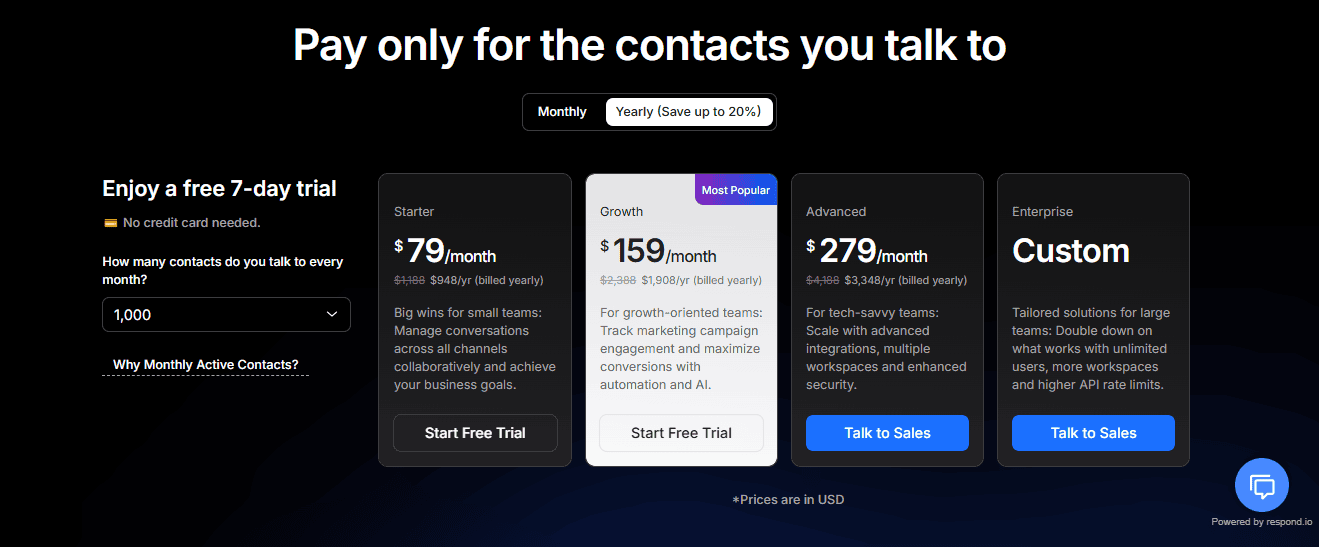
Everything in this respond.io review was read on their own published pages in a browser on 8 September 2026, with no account and no login. The platform is genuinely good and the pricing is not hidden. It is just that the number you remember from the page is almost never the number you will pay, and the plan whose price never changes is the one that cannot send a broadcast.
Here is what this respond.io review found: what each plan actually costs at your contact volume, what the cheapest one cannot do, what happens when you go over, and where DMly is and is not the better answer.
What Respond.io Is, and Who It Is Built For
Respond.io puts every messaging channel your customers use into one inbox, and then lets you automate what happens inside it.
You connect WhatsApp, Instagram, Messenger, Telegram, SMS, email and a website chat widget, and your team answers all of them from a single screen with one contact record behind each conversation. On top of that sits a visual workflow builder that routes chats, assigns them, tags them, calls out to your other systems and now runs AI agents that can answer and even take calls.
The shape of the product tells you who it is for. Five user seats on the entry plan and ten above it, single sign-on and phone number masking on the upper tier, a developer API, webhooks, HTTP requests inside workflows, multiple workspaces, and a 28 day guided onboarding programme. This is a platform sold to a team with an operations person, not to an owner who answers the phone between customers.
The one idea you have to understand before you look at a price
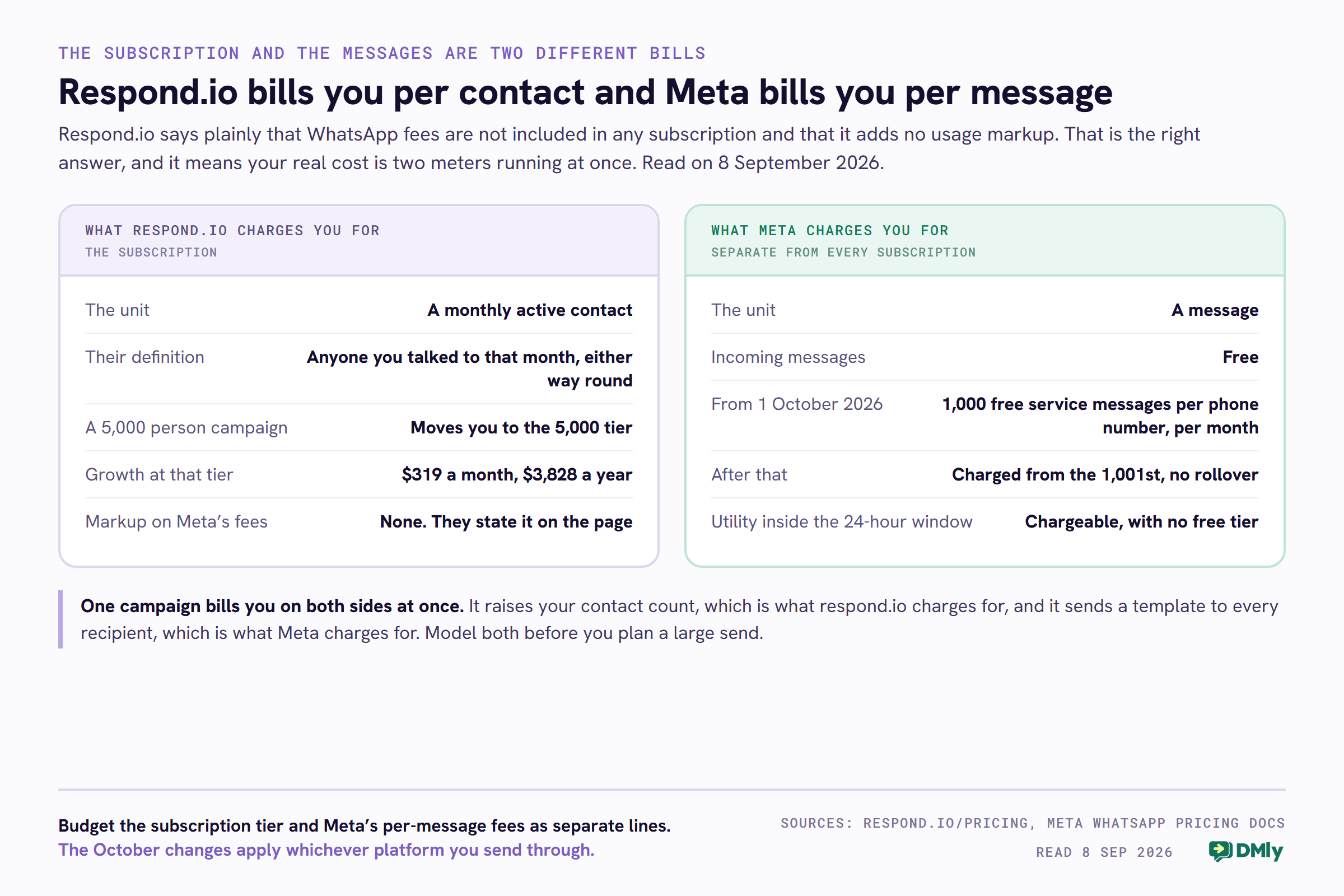
Respond.io does not charge you for messages, or for conversations, or in the first instance for seats. It charges for monthly active contacts, which it abbreviates to MACs. Their own definition is worth quoting because it is broader than people expect: a monthly active contact is “someone you have talked to over calls or chat during the billing month”, and it counts whether the customer messaged you or you messaged them.
So a broadcast to 8,000 people who have opted in does not cost you 8,000 messages in respond.io’s own billing. It costs you up to 8,000 monthly active contacts, and that is the number the dropdown is asking about.
They are candid about why: “Chats with contacts are opportunities to increase revenue and Monthly Active Contact pricing ensures you only pay for the contacts you talk to.” That is a defensible model and for a support desk it is a kind one, because a quiet month genuinely costs less. For a business that broadcasts, it is the opposite: the campaign that reaches the most people is also the one that moves you up a pricing tier.
Respond.io Pricing in 2026: One Question Sets the Whole Bill
Two of the three published prices are not prices at all. They are the first rung of a ladder, and the dropdown decides which rung you are standing on.
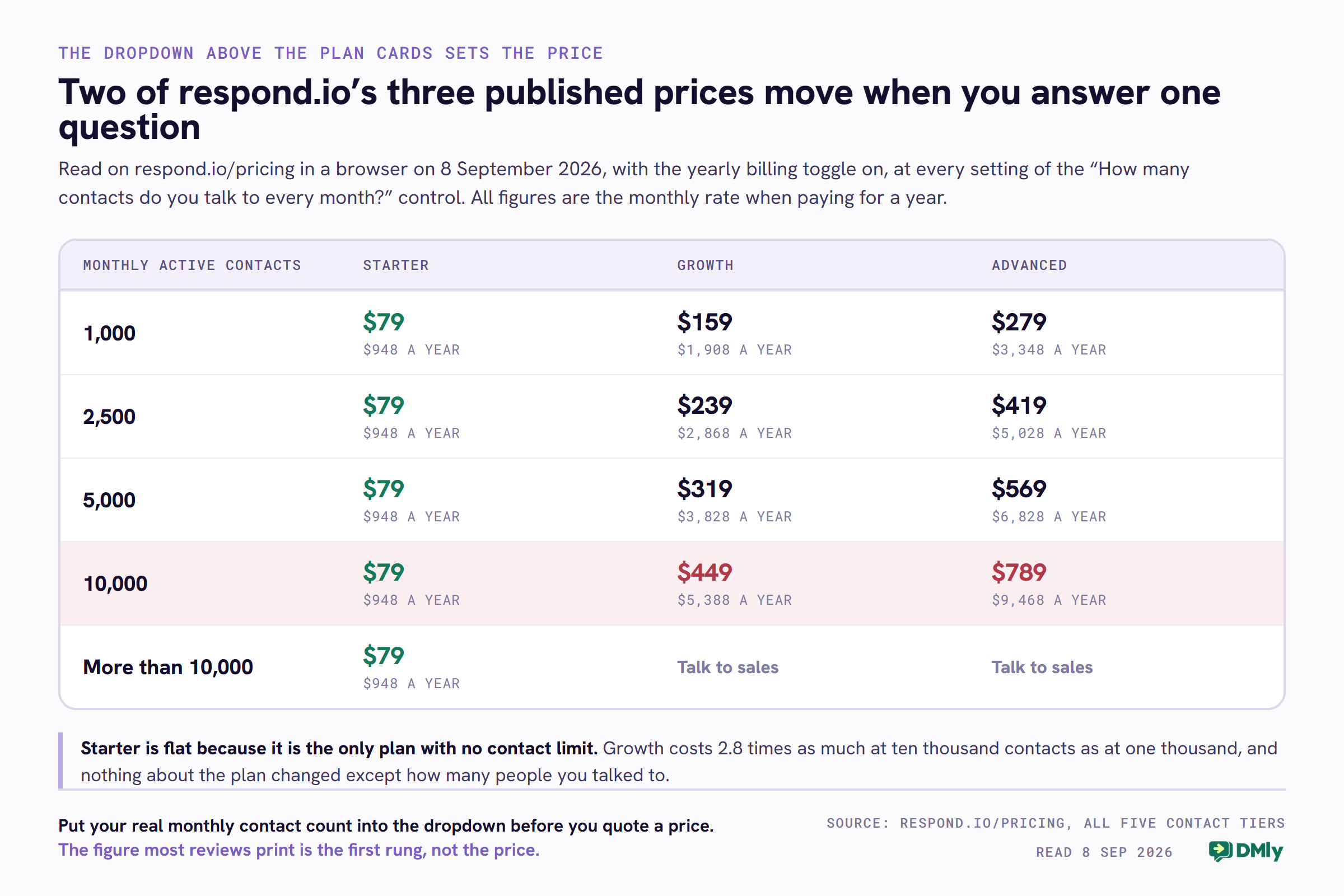
Read for this respond.io review on 8 September 2026 with the yearly billing toggle on, which is the view the page opens with, here is what each plan costs at each contact tier. Every figure below is the monthly rate when you pay for a year, with the annual total beside it.
| Monthly active contacts | Starter | Growth | Advanced |
|---|---|---|---|
| 1,000 | $79 a month, $948 a year | $159 a month, $1,908 a year | $279 a month, $3,348 a year |
| 2,500 | $79 a month, $948 a year | $239 a month, $2,868 a year | $419 a month, $5,028 a year |
| 5,000 | $79 a month, $948 a year | $319 a month, $3,828 a year | $569 a month, $6,828 a year |
| 10,000 | $79 a month, $948 a year | $449 a month, $5,388 a year | $789 a month, $9,468 a year |
| More than 10,000 | $79 a month, $948 a year | Talk to sales | Talk to sales |
Read the Growth column on its own. $1,908 a year at a thousand contacts, $5,388 at ten thousand. That is not a small print surcharge, it is the same plan costing 2.8 times as much, and the only thing that changed is how many people you talked to.
Paying monthly costs about a quarter more
The prices above are the yearly-billed rates. Switch the toggle to monthly and the annual totals at the thousand-contact tier become $1,188 for Starter, $2,388 for Growth and $4,188 for Advanced, which works out at $99, $199 and $349 a month. The page describes the yearly option as saving up to 20 per cent, and on those figures it does.
Every published figure is in US dollars, and the page says so.
Why the Starter column is flat
This is the part of the page most reviews miss, and it runs in respond.io’s favour. The comparison table gives Starter unlimited monthly active contacts. Growth and Advanced both read “Starts with 1,000”. Enterprise is custom.
So $79 a month buys you an omnichannel inbox for five people with no cap on how many customers you talk to. Against a market where nearly everything is metered somewhere, that is a genuinely good deal, and it is why the Starter price is the only one on the page that never moves.
The catch is what that plan can do, which is the next section.
The Cheapest Plan Cannot Send a Broadcast
If you are buying a WhatsApp platform to send campaigns, the $79 plan is not the plan you are buying, and the pricing page says so if you read the middle card rather than the left one.
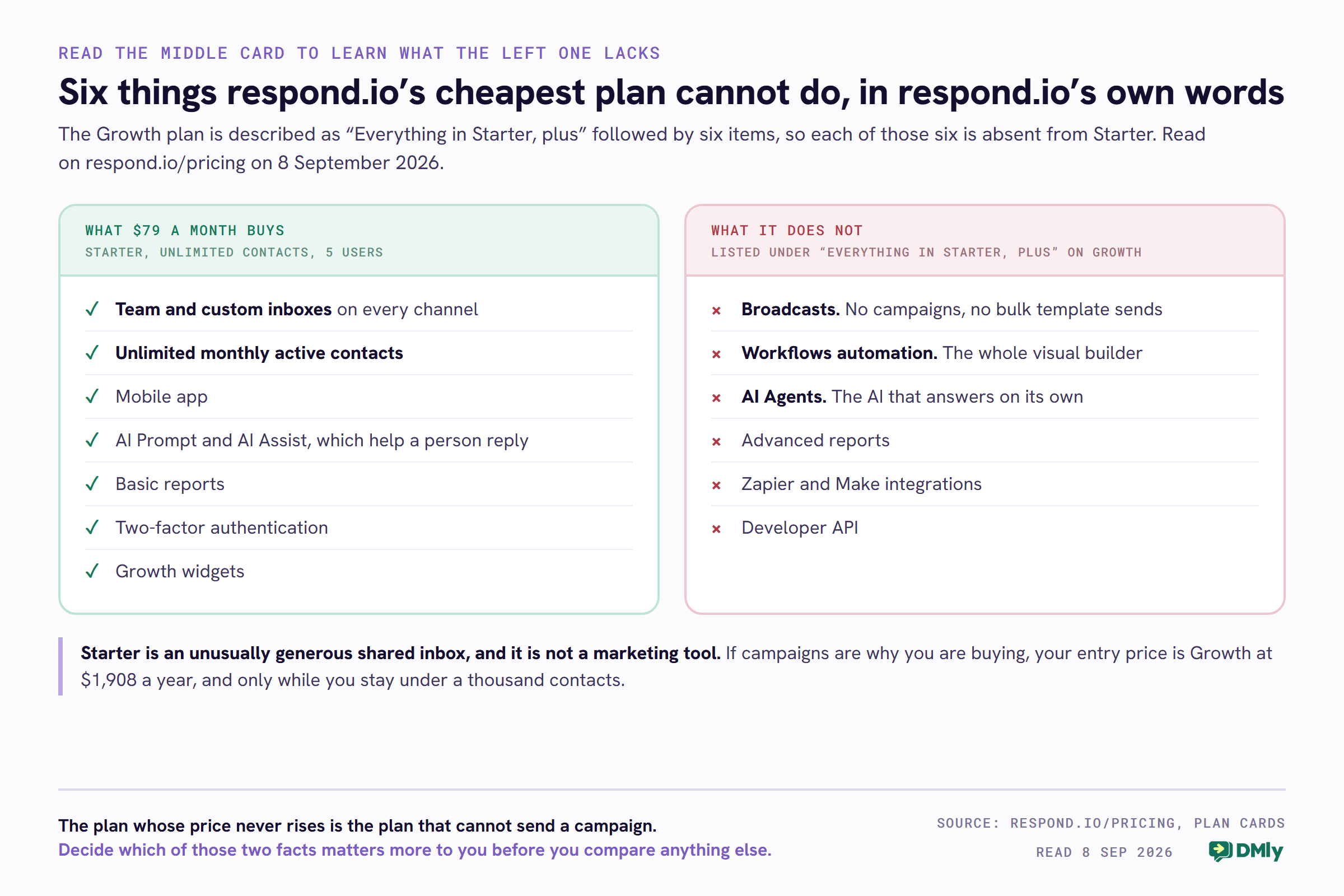
Respond.io lists the Growth plan as “Everything in Starter, plus” and then names six things. Every one of them is therefore absent from Starter:
- Broadcasts. No campaigns, no bulk template sends, no promotional messaging.
- Workflows automation. The visual builder that routes, assigns, tags and calls other systems.
- AI Agents. The AI that answers on its own rather than suggesting a reply to a human.
- Advanced Reports. Starter gets what the page calls Basic Reports.
- Zapier and Make integrations.
- Developer API.
What Starter does include is the part respond.io is best at: team and custom inboxes across every channel, the mobile app, two-factor authentication, growth widgets, basic reports, and two AI helpers that assist a person rather than replace one, which the page calls AI Prompt and AI Assist.
That makes Starter a shared inbox, not a marketing tool. It is a very good shared inbox with no contact limit for $948 a year, and if answering customers faster is the whole job, it is the right purchase. If you came here to send a campaign, your real entry price is $1,908 a year, and only at a thousand contacts.
What the top plan holds back
Advanced is described the same way, as “Everything in Growth, plus”, and its six additions tell you what respond.io considers enterprise:
- Mask phone number and email address, so an agent never sees the customer’s real contact details.
- Multiple workspaces, which is how you keep two brands or two markets apart.
- HTTP requests inside workflows, and incoming and outgoing webhooks.
- Single sign-on.
- Custom channels.
If a data protection policy is the reason you are shopping, masking and single sign-on both sit on Advanced, which is $3,348 a year at a thousand contacts and $9,468 at ten thousand. Price that before you promise it to anyone.
What It Costs When You Go Over
Nothing switches off, which is the right design, and everything keeps billing, which is the part to plan for.
Respond.io publishes both overage rates in its pricing FAQ, and credit where it is due for publishing them at all. Most of the platforms this respond.io review has been compared against do not.
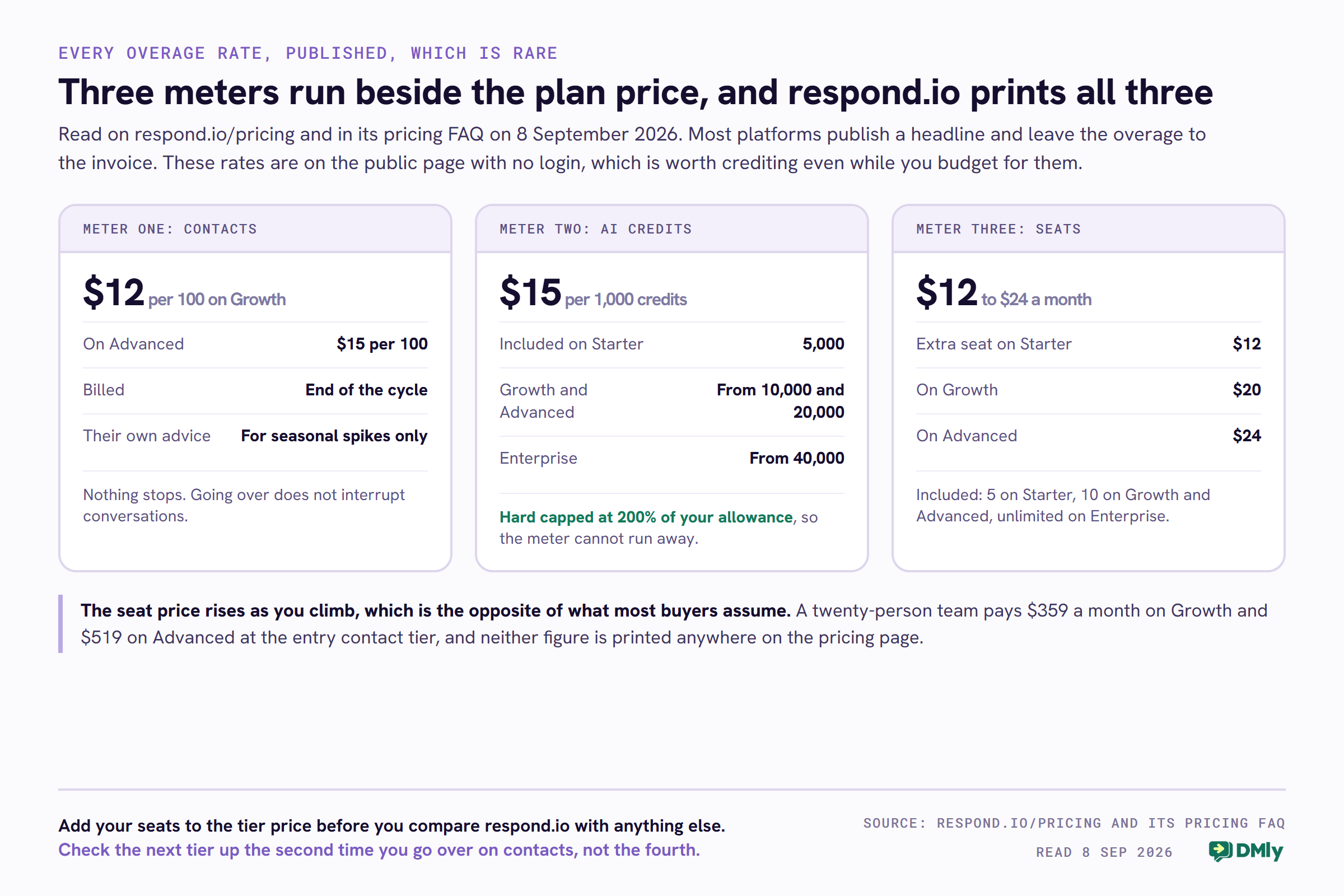
- Contacts. Go past your tier and you are billed in blocks of 100 monthly active contacts at $12 per 100 on Growth and $15 per 100 on Advanced, charged at the end of the billing cycle. Their own advice is that this is for “temporary, seasonal usage spikes” and that a permanent increase is cheaper as an upgrade.
- AI credits. Every plan with AI carries an allowance that grows with your contact tier: 5,000 credits on Starter, from 10,000 on Growth, from 20,000 on Advanced and from 40,000 on Enterprise. Past that, extra credits cost $15 per 1,000, with a hard cap at 200 per cent of your total allowance so the bill cannot run away.
That hard cap is a good piece of design and worth naming, because an uncapped AI meter is exactly how a surprise invoice happens. Respond.io also states that AI usage itself is included at no extra cost on the self-service Growth, Advanced and Enterprise plans under a fair use policy, so the credits are the meter rather than a separate AI subscription.
Do the overage arithmetic before you accept it
Suppose you are on Growth at the 1,000 contact tier, paying $159 a month, and a good month takes you to 1,800 contacts. That is eight blocks of 100, so $96, taking the month to $255.
Do that three months in a row and you have paid $288 in overage. Moving up to the 2,500 tier would have cost $80 a month more, which is $240 for the same three months, and it would have carried you to 2,500 rather than 1,800. The overage rate is deliberately above the tier rate, which is normal and which respond.io tells you in as many words. The action is simply to check the tier price the second time you go over, not the fourth.
The seat price goes up as you climb
This one is genuinely counterintuitive and it is printed in their comparison table. Extra users beyond the included count cost $12 a month on Starter, $20 a month on Growth and $24 a month on Advanced.
Starter includes five users, Growth and Advanced include ten, and Enterprise is unlimited. So a twelve-person team on Growth pays $159 plus two seats at $20, which is $199 a month at the entry contact tier. On Advanced the same two seats are $48. Add the seats to the tier before you compare anything: a twenty-person team pays $359 a month on Growth and $519 on Advanced at the entry contact tier, and neither of those numbers appears anywhere on the pricing page.
The Free Trial, and the One Thing It Will Not Let You Test
Seven days, no credit card, full Growth features for five users and a thousand contacts, with one exclusion that lands exactly where a marketing buyer will feel it.
Their FAQ describes the trial as immediate access to all Growth features “except for broadcasts”. It also notes that some things, such as topping up your WhatsApp Business Account, need a paid subscription, and that support will discuss extending the trial if you ask.
Take that at face value and it is reasonable: broadcasts are the feature most likely to be abused inside a free window, and the abuse lands on Meta rather than on respond.io. But the practical effect is that of the six things Growth adds to Starter, the one most people are upgrading for is the one the trial will not show you. You can evaluate the inbox, the workflows and the AI agents for free. The campaign tool you came for, you buy unseen.
What to do about it: ask support during the trial for a supervised broadcast to a short internal list, or ask for the trial to be extended once your WhatsApp number is connected. They invite the conversation in the FAQ, so it costs nothing to have it.
Meta’s Fees Sit Outside Every Plan
Your subscription buys the software. WhatsApp itself is billed by Meta, and on 1 October the rules for that change for everybody.
Respond.io is direct about this and deserves the credit: “WhatsApp fees are not included in any respond.io subscription. Meta charges these fees based on your usage.” You top up a WhatsApp credit balance inside their platform, and elsewhere on the same page they describe themselves as an official WhatsApp partner “with no usage markups or hidden fees”, quoting outgoing messages as starting from $0.0002 and incoming messages as free.
A “from” price is a floor rather than a rate, so use it as a signal about the model and not as a budget. The number that matters is Meta’s published rate for the countries you actually send to, and we keep that at WhatsApp Business API pricing by country.
What changes on 1 October 2026
Two changes land at once, and only one of them is the one people are talking about. Neither is specific to this respond.io review’s subject, but both belong in the budget.
- Every business phone number gets 1,000 free service messages a month, and Meta charges from the 1,001st. No rollover, and it resets monthly. If you mainly reply to customers who messaged you first, this is good news and it is per number, not per account.
- Utility messages sent inside an open 24-hour window stop being free, with no free allowance attached at all. Order updates, delivery notices, appointment reminders and payment confirmations are utility messages. For a busy business this is the change that shows up on the bill.
Neither of those is respond.io’s doing and neither is avoidable by switching platforms, because Meta bills them the same way whoever you send through. The full breakdown, including what it does and does not cost a local business, is at the WhatsApp pricing change on 1 October.
The one platform-specific thing worth noticing is how the two meters interact. Respond.io charges you per contact and Meta charges you per message, so a campaign to 5,000 people costs you on both sides at once: a jump up respond.io’s contact ladder, and Meta’s per-message fee for every template that lands. Model both before you plan a big send.
What This Respond.io Review Found in Respond.io’s Favour
The last few sections have been about where the bill comes from, so it is worth being just as specific about what the money buys.
- It publishes what most vendors hide. Overage rates per 100 contacts, extra seat prices per plan, AI credit allowances and the cost of extra credits, all on the public pricing page with no login. Several competitors publish a headline and nothing underneath it.
- Nothing switches off when you go over. Contacts keep talking, AI keeps running, and the AI meter has a hard ceiling at 200 per cent of your allowance. That is a deliberate choice to make a bad month expensive rather than broken, and it is the humane version.
- The entry plan has no contact limit. Unlimited monthly active contacts for five people at $948 a year is a real number, and it is better than most of the market at that price.
- No markup on Meta’s fees. They state it plainly on the pricing page and back it by being an official WhatsApp partner. Incoming messages are free and the outgoing rate is Meta’s.
- The channel list is wide and it includes calls. Chat, email, and voice, with AI call recording, summary and transcript on the plans that carry it. Very few conversational platforms take the phone call seriously.
- The trial needs no card. Seven days, five users, a thousand contacts, and nobody takes your payment details to start it.
If you run a support operation with real headcount, and conversations rather than campaigns are the work, respond.io is a serious tool and the price is defensible.
Where Respond.io Runs Out of Road
Four limits, in the order a growing business tends to meet them. None of them is a defect, and a respond.io review that pretended otherwise would not be much use to you. They are the edges of a product built for conversation management rather than for running a local business.
The price scales with the thing marketing is trying to increase
Contact-based pricing rewards a quiet month and charges for a busy one. For a support desk, that is fair. For anyone whose job is to talk to more people this quarter than last, the platform bill grows in step with the campaign that worked, and the growth is not gentle: $1,908 to $5,388 a year between one thousand and ten thousand contacts on the same Growth plan.
The entry plan is an inbox, not a platform
No broadcasts, no workflows, no AI agents, no API and no Zapier on Starter. A business that buys at $79 expecting to automate anything will be on Growth within a month, and the real comparison to run is against Growth’s ladder rather than against the headline.
Customer data lives in someone else’s system
Respond.io has contacts, lifecycle management, tags and notes, and it integrates properly with HubSpot and Salesforce. What it is not is the place your customer record lives. If you do not already run a CRM, you are buying two things rather than one, and the integration list is doing work the product is not.
It ends at the conversation
The chat is where respond.io stops. It does not take a booking into a calendar, raise an invoice, take a payment or ask a happy customer for a Google review. It connects to Cal.com, Calendly and Google Calendar so a booking can happen somewhere else, which is exactly right for a company whose calendar already lives in one of those. For a salon, a clinic, a garage or a tutor, the appointment and the invoice are the business, and they will be in other tools with another subscription.
DMly as a Respond.io Alternative, Honestly
We make DMly, so read this section as an interested party talking and check every figure in it on our own pricing page.
The two products are aimed at different buyers, and that explains almost everything that follows, including the places respond.io wins. Respond.io is built for a conversation operation with staff. DMly is built for the local business: the salon, the clinic, the garage, the tutor, the shop that sells over chat.
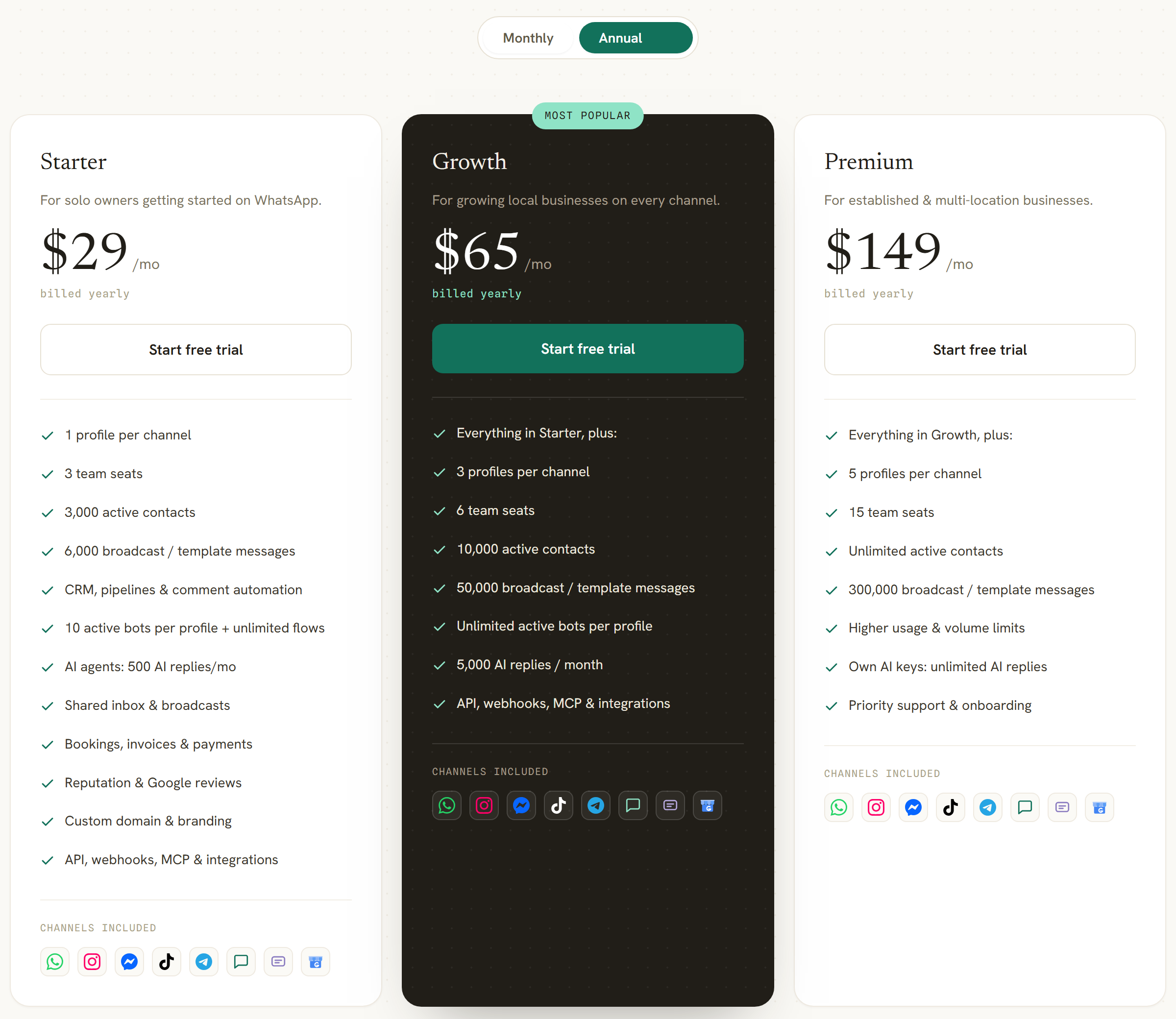
Read on the DMly pricing page on 8 September 2026: Starter is $29 a month billed yearly, or $39 billed monthly. Growth is $65 billed yearly, or $79 monthly. Premium is $149 billed yearly, or $199 monthly. Extra team seats are $10 a month each, an extra profile set is $15, and extra contacts are $15 per thousand. The free trial is seven days on any plan with no card.
Four differences that actually change a decision
- Broadcasts and AI are on the entry plan. DMly’s $29 plan includes broadcasts, the shared inbox, ten active bots per profile with unlimited flows, and 500 AI replies a month. There is no plan sold without the AI agent, and no tier where a campaign is unavailable.
- The booking and the money are in the product. A native calendar with services, staff and classes, three payment modes on a booking including pay-before with a short hold on the slot, branded invoices that can sit part paid, and automatic Google review requests afterwards.
- Two more channels. WhatsApp, Instagram, Messenger, Telegram, TikTok, SMS, Google Business Profile and a live chat widget, all in one inbox against the same contact record.
- You pay Meta directly. Our page states it plainly: Meta’s per-message rates with zero markup from DMly. That is the same promise respond.io makes, and both of us should be held to it.
Two places respond.io is the better buy, said plainly
Contacts are metered on DMly too, and less generously at the bottom. Respond.io’s Starter carries unlimited monthly active contacts. DMly’s Starter carries 3,000 active contacts, Growth carries 10,000, and only Premium is unlimited. Extra contacts are $15 per thousand. If you have a large list and a small team and all you need is an inbox, respond.io’s entry plan is the better shape, and no amount of price difference changes that.
Our AI replies are metered and theirs are broadly not. DMly includes 500 AI replies a month on Starter, 5,000 on Growth and 20,000 on Premium, with unlimited replies on Premium only if you connect your own model provider key. Respond.io states that AI usage is included at no extra cost on Growth and above under a fair use policy. At high volume that is a cleaner answer than ours, and if AI is doing most of your answering you should price both against your real message count rather than taking either headline.
There is a third, shorter one: if a compliance team is asking for single sign-on or for agents not to see customer phone numbers, respond.io has both on Advanced and we do not list either.
DMly and Respond.io Side by Side
Every respond.io figure below is the one this respond.io review verified above, and every DMly figure was read on our own published pages on the same day, 8 September 2026.
| What you are comparing | Respond.io | DMly |
|---|---|---|
| Entry plan | Starter, $79 a month billed yearly, $99 billed monthly | Starter, $29 a month billed yearly, $39 billed monthly |
| What the entry plan cannot do | No broadcasts, workflows, AI agents, API or Zapier | All four are included, plus bookings and invoices |
| Middle plan | Growth, from $159 a month billed yearly at 1,000 contacts | Growth, $65 billed yearly, $79 monthly |
| Top self-serve plan | Advanced, from $279 a month billed yearly at 1,000 contacts | Premium, $149 billed yearly, $199 monthly |
| What the price is metered on | Monthly active contacts, anyone you talk to that month | Active contacts, plus seats and profile sets as add-ons |
| Contacts on the entry plan | Unlimited | 3,000, then $15 per extra thousand |
| Price at 10,000 contacts | Growth $449 a month, Advanced $789 a month | Growth $65 a month covers 10,000 |
| Going over the contact limit | $12 per 100 on Growth, $15 per 100 on Advanced | $15 per 1,000 |
| Seats included | 5 on Starter, 10 on Growth and Advanced, unlimited on Enterprise | 3 on Starter, 6 on Growth, 15 on Premium |
| Price of an extra seat | $12 on Starter, $20 on Growth, $24 on Advanced | $10 on any plan |
| AI agents | Growth and above. Usage included under a fair use policy | Every plan. 500, 5,000 and 20,000 replies a month |
| AI overage | $15 per 1,000 credits, hard capped at 200% of allowance | Own provider key on Premium for unlimited replies |
| Channels | WhatsApp, Instagram, Messenger, Telegram, SMS, email, live chat, calls | WhatsApp, Instagram, Messenger, Telegram, TikTok, SMS, Google Business Profile, live chat |
| Meta message fees | Passed through, no markup, incoming free | Passed through at Meta’s rates, no markup |
| Bookings and appointments | Not native. Connects to Cal.com, Calendly, Google Calendar | Native calendar with services, staff, classes and payment modes |
| Invoices and payments | Not in its plans | Branded invoices, part-paid status, revenue view |
| Google reviews | Not in its plans | Automatic review requests and a reputation inbox |
| SSO and number masking | Both on Advanced | Not listed |
| Free trial | 7 days, no card, Growth features except broadcasts | 7 days, no card, any plan |
| Cancelling | Any time from the Billing section, runs to the cycle end | Upgrade, downgrade or cancel from settings |
Working Out What You Would Actually Pay
Count your contacts first, your seats second, and only then look at a plan name. Every respond.io figure in the three examples below comes from the ladder this respond.io review measured at each tier.
Meta’s per-message fees are the same whichever platform you send through, so they cancel out of a like-for-like comparison as long as neither vendor adds a margin, and neither of these two does. What does not cancel out is how many people you talk to in a month and how many of your staff need a login.
A support desk with a big list and no campaigns
Five people, 12,000 customers who might message in a month, no broadcasts. Respond.io Starter is $948 a year, contacts unlimited, five seats included, and the fact that the list is large costs nothing at all.
DMly would be Premium for unlimited contacts at $149 a month, or $1,788 a year, with fifteen seats and a great deal you are not using. Respond.io wins this one, and it wins it on the exact feature the rest of this page has been careful about, which is the uncapped contact count on its cheapest plan.
A shop that broadcasts to 5,000 people a month
Broadcasts mean Growth, and 5,000 contacts means the third rung. That is $319 a month, or $3,828 a year, before seats and before Meta.
DMly Growth covers 10,000 contacts and 50,000 broadcast or template messages at $65 a month, so $780 a year, with six seats and the AI agent included. The gap is roughly five to one, and it is entirely a consequence of the two pricing models rather than of the feature lists.
A twelve-person team that needs single sign-on
Single sign-on means Advanced. At 5,000 contacts that is $569 a month, plus two seats beyond the included ten at $24 each, so $617 a month or $7,404 a year.
DMly has no answer here at any price, because we do not list single sign-on. If that requirement is real, stop comparing on cost. The right decision is the one that satisfies the policy, and this page should not pretend otherwise.
Then add the part no subscription covers
Whichever you choose, budget separately for Meta. From 1 October 2026 each business phone number gets 1,000 free service messages a month and pays from the 1,001st, and utility templates sent inside an open 24-hour window become chargeable with no free allowance. If you send order updates or appointment reminders, that second change is the one that will appear on your bill.
Respond.io Review 2026: The Verdict
If this respond.io review had to give one recommendation, it is this: buy respond.io Starter if you have a large customer list, a small team and no campaigns. Unlimited monthly active contacts for five people at $948 a year is the best-shaped thing on their pricing page and one of the better shared inboxes at that price anywhere. Just know what you are buying: an inbox, with no broadcasts, no workflows and no AI agent.
Buy Growth or Advanced if the compliance list or the workflow engine is the requirement, and if you have priced the contact ladder rather than the headline. Single sign-on, phone number masking, multiple workspaces and HTTP requests inside workflows are real capabilities that many cheaper tools do not have at all.
Look elsewhere if your bill would grow every time a campaign works, if the appointment or the invoice is the thing you are actually trying to automate, or if you need broadcasts on the cheapest plan. Contact-based pricing and marketing volume pull in opposite directions, and no negotiation fixes that.
Before you sign anything, do two things. Put your real monthly contact count into the dropdown and read the price that appears, not the one in the review you found this page from. Then add your seats at $12, $20 or $24 depending on the tier. Those two steps take a minute and they are the difference between the number you budget and the number you pay.
If you want to see how the rest of the market prices the same job, our roundup of WhatsApp automation tools re-checks twenty of them, and the sibling reviews of DoubleTick, Gallabox and Wati follow the same method on three more.
Respond.io Review: Frequently Asked Questions
How much does respond.io cost in 2026?
At the entry contact tier of 1,000 monthly active contacts, billed yearly: Starter $79 a month, Growth $159 and Advanced $279, with Enterprise quoted by sales. Paying monthly instead costs $99, $199 and $349. Growth and Advanced then rise with your contact count, reaching $449 and $789 a month at 10,000 contacts. Starter never changes, because it has no contact limit.
Can I send WhatsApp broadcasts on the respond.io Starter plan?
No. Broadcasts are listed under “Everything in Starter, plus” on the Growth card, along with workflow automation, AI agents, advanced reports, Zapier and Make, and the developer API. If campaigns are why you are buying, Growth is your entry plan and $159 a month is your entry price at a thousand contacts.
What is a monthly active contact on respond.io?
Their definition is anyone you have talked to over chat or calls during the billing month, whether they contacted you or you contacted them. It is the meter the whole price runs on, so a broadcast that reaches new people raises it. Go over your tier and you are billed in blocks of 100 at $12 per 100 on Growth and $15 per 100 on Advanced.
Does respond.io add a markup to WhatsApp message fees?
They say they do not. Their pricing page describes respond.io as an official WhatsApp partner “with no usage markups or hidden fees”, says WhatsApp fees are not included in any subscription because Meta charges them on usage, and lists incoming messages as free with outgoing messages starting from $0.0002. Treat a “from” figure as a floor and check Meta’s own rate for the countries you send to.
Does respond.io have a free trial?
Yes: seven days, no credit card, with all Growth features for five users and 1,000 monthly active contacts, except broadcasts. Their FAQ also says support will discuss extending it if you ask, which is worth doing given the one feature the trial withholds is the one most people are upgrading for.
What is the best respond.io alternative?
It depends which limit you have hit, and the honest answer from this respond.io review is that there is no single winner. If it is the contact ladder, look for message or seat based pricing instead. If it is broadcasts on the entry plan, DMly includes them from $29 a month billed yearly. If it is the missing bookings and invoicing, that is what DMly was built around. If your constraint is single sign-on or number masking, respond.io is likely still your answer.
What did this respond.io review check, and when?
Everything here was read on 8 September 2026 from respond.io’s own published pages: the pricing page in a real browser at all five contact tiers and on both billing toggles, the full plan comparison table, and the pricing FAQs. No account was created and no figure came from a software directory.
Writing about WhatsApp automation, bookings and growth for local business.
Turn WhatsApp into your busiest channel.
Start free and run message, bookings, payments and reviews in one place.
