
How to Delete a WhatsApp Business Account, and When Not To
Most people who set out to delete a WhatsApp Business account do not actually want the account gone.
They want the messages to stop arriving at eleven at night. Or they want to hand the number to the person who is taking over. Or they are changing numbers. Or they have decided WhatsApp is not for them and want out cleanly. Only the last of those is what deletion does, and deletion is the option everybody finds first because it is the only one with a clearly labelled button.
So this guide starts by separating the four, then gives you the deletion steps properly if that is genuinely what you need, including the part nobody mentions: the account disappears immediately and the data takes up to three months.
Before You Delete: What You Probably Actually Want
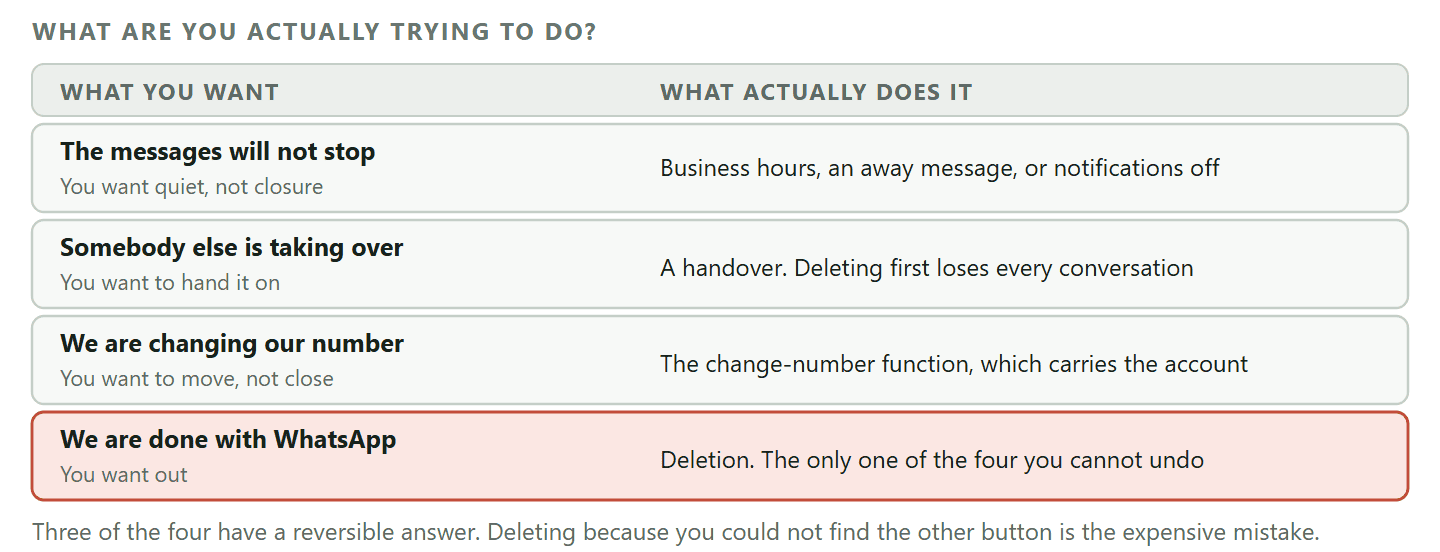
Four reasons people arrive here, and only one of them is solved by deleting.
- “The messages will not stop.” You want quiet, not closure. Muting, setting business hours, an away message, or simply turning off notifications gets you that without losing anything. Deleting to stop notifications is like moving house to avoid a neighbour.
- “Somebody else is taking this over.” You want to hand the number on. Deleting the account and letting them re-register loses every conversation on it, and there is a better sequence further down.
- “We are changing our number.” The app has a change-number function that carries your account across. Deleting and starting again on the new number throws away your chat history for nothing.
- “We are done with WhatsApp.” This one is deletion, and the rest of this guide is for you.
The reason this matters is that deletion is the only irreversible option in the list. Everything else can be undone in an afternoon.
What Deleting Actually Does
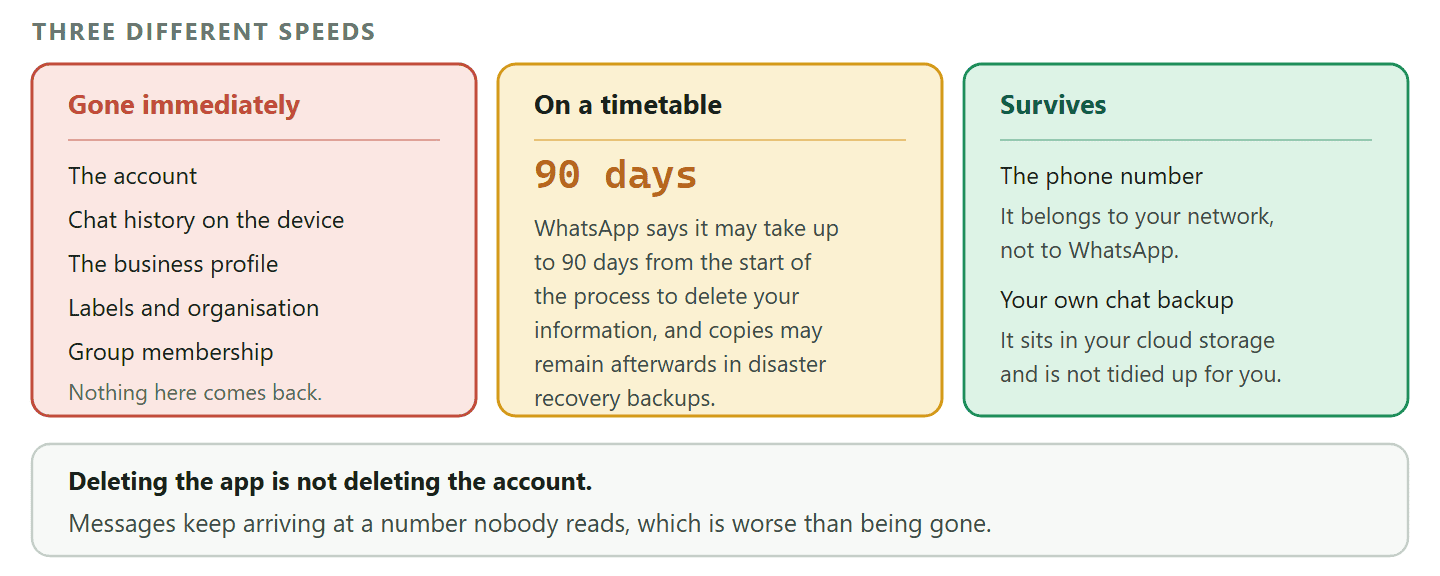
The account goes immediately. The data takes up to three months, and some of it lasts longer than that.
When you delete a WhatsApp Business account, the visible part is instant: the account stops working, you are removed from your groups, and your chat history on that device goes with it.
The invisible part has a timetable. WhatsApp states that it may take up to 90 days from the beginning of the deletion process to delete your information, and that copies may remain after that in the backup storage it uses to recover from a disaster, a software error or a data loss event.
Why the 90 days matters in practice: Not because your data is at risk, but because “I deleted it, so it is gone” is the wrong mental model in two directions. If you are deleting for a privacy reason, the process is a request with a timetable rather than an instant erasure. And if you are deleting in a temper on a Friday and hoping to change your mind on Monday, the account itself is gone immediately and nothing on that timetable brings it back.
Two more things that catch people out.
- Your own backup is a separate thing. A chat backup you made to your phone’s cloud storage is yours, sits outside WhatsApp, and is not tidied up by deleting the account. If you want it gone, delete it where it lives. If you want it kept, check it exists before you delete rather than after.
- Deleting the app is not deleting the account. Removing the app from the phone leaves the account registered and, from a customer’s point of view, still there: messages still go to it and simply never get read, which is worse than being gone.
What You Lose That You Cannot Get Back
Five things, and the second one is the one businesses regret.
- The chat history on that account. Every conversation, unless you exported or backed it up first.
- Your customers’ ability to reach you at that number. They will not be told. They will message the number, get nothing, and conclude you have closed down. For a business, that is the real cost of deleting rather than handing over.
- The business profile. Your description, hours, address, links and the catalogue attached to that account.
- Your labels and organisation. Whatever system you built for keeping track of who is who.
- Group membership. You are removed from groups, and rejoining means somebody has to add you.
What is not lost is the phone number itself. The number belongs to your mobile network, not to WhatsApp, so it survives and can be registered again later. That is the one door deletion leaves open.
How to Delete It, Step by Step
Five minutes on the free WhatsApp Business app, and the first two steps are the ones worth not rushing.
- Export or back up anything you want to keep, first. Individual chats can be exported from inside the conversation, and the app can back up your history to your phone’s cloud storage. Once the account is gone, neither option exists.
- Tell your customers, if you have any. A short broadcast or a status post saying where to reach you now costs nothing and prevents the silence being read as a closure. This is the step everybody skips and the only one with a business cost.
- Open Settings in the WhatsApp Business app and find the account section.
- Choose to delete the account and enter your full phone number in international format, with the country code and no leading zero. The number has to match exactly or the button stays inert.
- Pick a reason if you are asked for one. It changes nothing about the outcome.
- Confirm. The account is gone at this point, immediately, and the data begins its 90-day process.
If the number is on the Business Platform, stop here: The steps above are for the free WhatsApp Business app. If your number runs through a provider or your own software, deleting works completely differently and doing it in the wrong order can leave the number stranded. The next section covers that case.
On the Business Platform, “Delete” Means Three Different Things
Three separate actions, in a specific order, and only one of them is permanent.
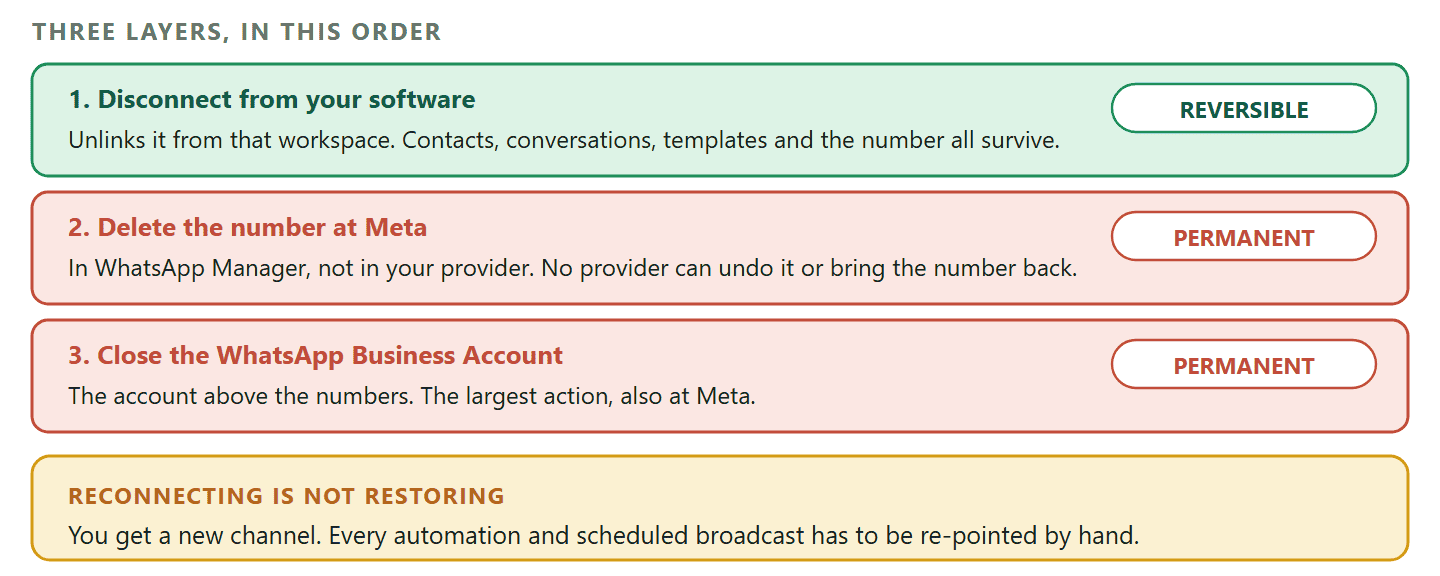
If your number is connected to the WhatsApp Business Platform through software, there is no single delete button. There are three layers and you can act on any of them.
- Disconnect the number from the software. This unlinks it from that workspace and nothing else. Your contacts, your past conversations and your message templates all survive, the number stays on your WhatsApp Business Account at Meta, and you can reconnect later. In DMly this lives on the WhatsApp configuration screen and asks you to confirm.
- Delete the number at Meta. This removes it from your WhatsApp Business Account, it happens in WhatsApp Manager rather than in any provider’s software, and it is permanent. No provider can undo it or bring the number back by reconnecting.
- Close the WhatsApp Business Account itself. The account above the numbers, which is a Meta-side action and the largest of the three.
The order matters: disconnect in your software first, then act at Meta. Doing it the other way round leaves your software holding a channel that no longer exists.
The trap nobody writes about is reconnecting: If you disconnect a number and later reconnect it, you get a new channel rather than the old one back. Every automation, bot and scheduled broadcast that pointed at the disconnected channel is still pointing at the old one and will not resume by itself. After reconnecting, open each of them and re-select the channel. Nothing warns you, and the symptom is a business that reconnects on Monday and quietly sends nothing all week.
One more thing worth knowing before you disconnect for the wrong reason. If your actual problem is that messages have stopped arriving, disconnecting is usually the wrong fix and makes the diagnosis harder. And if Meta has restricted the account, disconnecting does not clear the restriction: that is a policy matter with its own route, which we covered in our guide to billing and account errors.
The Four Alternatives, and When Each Is Right
Written in the order most people need them rather than the order they think of them.
1. Change the number instead
If the business is carrying on and only the number is changing, the WhatsApp Business app has a change-number function that moves your account rather than replacing it. Do that instead of deleting and re-registering, which starts you from nothing on the new number. Give the old number a period of overlap if you can, so the customers who message it are not met with silence.
2. Hand it over properly
When somebody else is taking over the business or the role, the number and the account can go with them, which keeps every conversation intact. That means handing over access rather than deleting: the new person needs the SIM or the number, and if two-step verification is on, the PIN. Write both down before the person leaving goes, because this is the single most common way a business loses its own WhatsApp account. The full sequence is in the handover section below.
3. Make it quiet rather than gone
If the problem is the volume or the hours, the fix is not deletion. Publish the hours you actually answer, set an away message for outside them, and turn off notifications on your own phone in the evening. Our guide to the business profile covers why the hours field is really about reply times rather than opening times.
4. Move it off the phone
Plenty of people want to delete because one handset has become a bottleneck: it never stops, it cannot be shared, and it holds the whole customer history. That is a reason to move the number onto the WhatsApp Business Platform, where several people can answer and replies can be automated outside your hours, rather than a reason to close it. Our comparison of the three account types covers what actually changes, including what it costs.
The honest version of that last one: Moving to the Platform is a real change with real costs, and it is not the answer if you are a one-person business with forty messages a week. If you are deleting because you are overwhelmed rather than because you are leaving, work out which of the four rows in the first figure you are in before you spend anything.
The Handover, Done Properly
The commonest way a business loses its own WhatsApp account is not deletion. It is somebody leaving and taking two things with them.
If the reason you are here is that a person is going and the account is theirs, deleting is the worst available option: it throws away every conversation the business has had and leaves customers messaging a dead number. A handover keeps all of it. It is fiddly for about twenty minutes and then it is done.
Work out first what is actually moving. Sometimes it is the number, on a company SIM that goes back in the drawer. Sometimes the number is personal and leaves with its owner, in which case what you are really doing is starting a business number properly and pointing customers at it, not handing anything over.
- Sort out the number with your mobile network first. If the number is on a company account, the SIM or the number itself has to end up with the person taking over. Nothing in WhatsApp can move a number between networks or people, because the number is not WhatsApp’s to move.
- Get the two-step verification PIN written down. If two-step verification is switched on, registering the number on a new device asks for a six-digit PIN that only the person who set it knows. This is the single thing that strands more business accounts than anything else, and it is discovered at exactly the wrong moment.
- Back up the chat history before the device changes hands. Conversations live on the device, not in the cloud, so a backup made now is what the new device restores from. Made afterwards, it is too late.
- Register the number on the new device. WhatsApp verifies a number by sending a code to it, so whoever can receive that code is who can register it. A number can only be active on one WhatsApp account at a time, which means the old device is signed out as part of the same step and there is nothing extra to do there.
- Restore the backup on the new device if you want the history to come across, which for a business you almost always do.
- Update the business profile. A new person answering means the description, the hours and sometimes the email need changing, and this is the moment when somebody is actually looking at them.
- Set two-step verification again and record the new PIN somewhere the business owns. Not somewhere one person owns. That is the whole lesson of step two.
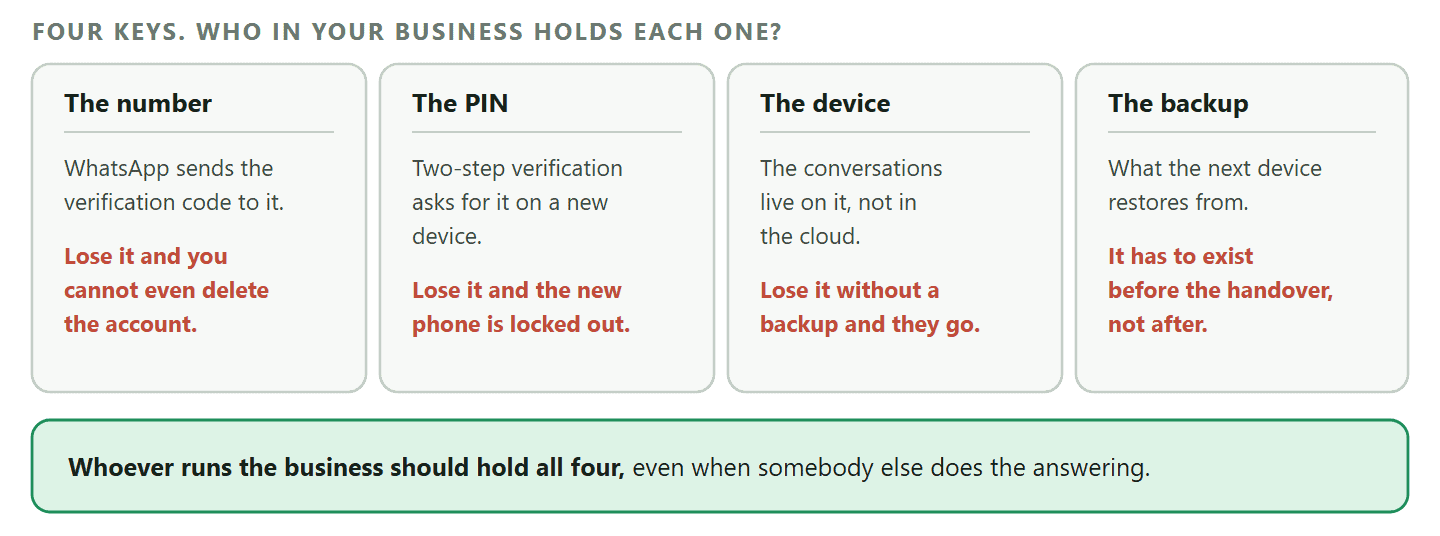
The four things that strand an account: An account nobody can get into is not deleted, it is worse than deleted: it is live, it receives messages, and nobody reads them. The four keys are the number, the PIN, the device and the backup, and losing any two of them at once is usually terminal. Whoever runs the business should hold all four, even if somebody else does the answering.
Delete It Before You Give Up the Number
The order of these two jobs matters more than either of them, and almost nobody gets told about it.
If you are closing a business, changing networks, or handing back a company phone, there is a moment when you stop controlling the phone number. Mobile networks recycle disconnected numbers and give them to somebody else eventually.
WhatsApp verifies a number by sending a code to it. That is the whole of its proof of ownership, which is sensible for a messaging app and has one awkward consequence: when your old number is reassigned, the person holding it can receive that code. If your account is still registered to the number and you have not deleted it, the account is now reachable by somebody you have never met.
So do it in this order.
- Delete the WhatsApp account while you still have the number and the phone. This is the only moment it is easy.
- Then cancel the SIM, change the network, or hand the phone back.
Doing it the other way round leaves you with an account you cannot get into and cannot delete, because every route back in requires a code sent to a number you no longer have. Two-step verification helps, since the PIN is asked for as well, but it is a lock on a door you have already walked away from rather than a fix.
The same applies to a phone that goes back to a leasing company, a handset sold on, and a number that was only ever meant to be temporary. If the number is leaving, close the account first.
When the Delete Button Will Not Work
Four reasons, and the last one is not fixable, which is why the section above exists.
- The number is typed wrong. It has to be the full international format: country code, then the number without its leading zero. The screen will not tell you which part it disliked, it simply will not proceed.
- There is no connection. Deletion is a request that has to reach WhatsApp, so it fails quietly on a bad signal in the way most things in the app do not.
- You are not signed in on that device. There is no way to delete an account from somewhere else, from a website, or by email. You have to be holding the phone that is signed in.
- You no longer have the number. This is the one with no answer. If you cannot receive a code on that number, you cannot sign in, and if you cannot sign in you cannot delete. Nothing on any support page changes that.
And one that is not a fault at all: if your number runs through the Business Platform rather than the app, the app’s delete flow is not the route. That is the three-layer job described earlier, and it happens in your software and in WhatsApp Manager rather than in Settings.
What to Do in the Ten Minutes Before You Press It
A short checklist, because everything on it is impossible afterwards.
- Export the conversations you may need. Anything with a quote, an address, an agreement or a complaint in it. Do it per chat, before the account goes.
- Save the contacts. A phone number in a WhatsApp chat is not necessarily in your phone book. Check the ones that matter are.
- Screenshot your business profile. Description, hours, address, links. If you ever set it up again anywhere, you will want the words back.
- Tell people where you are going. One message to your customers, one line on your website, one line on your Google listing. Silence at a number people have saved is the most expensive part of this whole process.
- Deal with your own backup. Delete it if the point is privacy, keep it if the point is closure.
- Write down the number and the PIN. If there is any chance you register that number again, two-step verification will ask for it.
Plenty of accounts get deleted because one phone could not keep up. DMly puts the same number in a shared inbox, answers outside your hours and keeps the history when staff change. See the plans if that is closer to your problem than deletion is.
Frequently Asked Questions
Can I delete a WhatsApp Business account permanently?
Yes. The account itself goes as soon as you confirm, and WhatsApp states it may take up to 90 days from the start of the process to delete your information, with copies possibly remaining afterwards in the backup storage used for disaster recovery.
Can I recover a deleted WhatsApp Business account?
No. You can register the same phone number again, because the number belongs to your mobile network rather than to WhatsApp, but it will be a new account with nothing in it. The chat history, the profile and the labels do not come back.
Will my customers be told that I deleted my account?
No, and this is the part worth planning for. They will message the number, see nothing happen, and draw their own conclusion, which for a business is usually that you have closed down. Tell them yourself before you delete.
Can I keep my chats after deleting?
Only the copies you made first. Export the conversations that matter, or back up your history to your phone’s cloud storage, before you delete. Afterwards neither option is available to you.
Can I deactivate a WhatsApp Business account temporarily?
There is no documented way to pause a Business account and keep it waiting for you. What people usually want when they ask this is quiet rather than closure, which is what business hours, an away message and switching off notifications give you, all of which are reversible in a second.
Is deleting the app the same as deleting the account?
No, and the difference matters. Removing the app leaves the account registered, so messages keep arriving at a number nobody is reading. From a customer’s point of view that is worse than deletion, because it looks like being ignored rather than being closed.
What happens if I cancel the SIM without deleting the account?
The account stays registered to a number you no longer control. Mobile networks recycle disconnected numbers, and WhatsApp proves ownership by sending a code to the number, so whoever ends up with it can register it. Delete the account first, then give up the number.
Can I delete an account if I have lost the phone number?
No. Every route into the account needs a code sent to that number, and you cannot delete an account you cannot sign in to. There is no email route and no website that will do it for you, which is exactly why closing the account before you give up a number is worth the five minutes.
How do I delete a number that runs through a provider?
In stages. Disconnect it from the software first, which is reversible and keeps your contacts, conversations and templates. Then, if you want the number gone from your WhatsApp Business Account, delete it at Meta in WhatsApp Manager, which is permanent and which no provider can undo.
Delete the Account, Not the Relationship
If you are genuinely finished with WhatsApp, the process is five minutes and the article above covers it. Export first, tell people second, delete third.
If you are here because something is not working, the button you were looking for is probably one of the other three. Deleting is the only one you cannot take back, and there is nothing to gain from choosing it by accident.
Writing about WhatsApp automation, bookings and growth for local business.
Turn WhatsApp into your busiest channel.
Start free and run message, bookings, payments and reviews in one place.
