
Trengo Review 2026: Broadcasting Is Not in Any Plan
The cheapest way to send one WhatsApp campaign through Trengo is $405 a month, and then more. That is the sentence this Trengo review should have opened with in April, and did not.
Not because the entry plan is expensive, although it is. Because of a single word in their own feature table. Against the row marked Broadcasting, all three plans say “Add-on”. Not the cheap plan, not the middle one. All three.
That is the fact this Trengo review most needed and did not have, and it reframes the platform completely. Everything else here was read from Trengo’s own pricing page on 6 September 2026, in a browser, with all three currency options and both billing periods checked.
We have not run Trengo on a paid plan this month, so there is no verdict here on how it feels to use. What there is instead is their own feature grid, read carefully, which turns out to be harder on the entry plan and kinder to it than anything we had written.
Trengo Pricing in 2026
Trengo prices per plan rather than per seat, with a fixed number of users in each. The page switches between euros, dollars and pounds, and the figures are set per currency rather than converted, so the dollar price is not the euro price at that day’s rate.
| Plan | Billed monthly | Billed annually | Users | Conversations |
|---|---|---|---|---|
| Boost | $405, or 349 euros | $347, or 299 euros | 10 | 500 a month, or 6,000 a year |
| Pro | $695, or 599 euros | $579, or 499 euros | 20 | 1,500 a month, or 18,000 a year |
| Enterprise | Not published | Not published | Custom | Custom |
The figures this page carried, $408 for Boost and “from $701” for Pro, were close and incomplete in the way that matters. They were the monthly rates, and the page never said so, which hid an annual rate roughly 14 per cent lower. The current monthly figures are $405 and $695.
Then there are the add-ons, all of which Trengo publishes, and which most reviews of this product leave out entirely.
| Add-on | Billed monthly | Billed annually |
|---|---|---|
| Extra conversations | $21 per 100 | $17 per 100 |
| Any conversation handled with AI | $0.35 each | $0.29 each |
| Extra user on Boost | $35 | $29 |
| Extra user on Pro | $58 | $46 |
| Broadcasting | An add-on on all three plans. Price not published | |
| Voice calling | An add-on on Boost and Pro, included on Enterprise. Price not published | |
Broadcasting Is an Add-On on Every Plan
This is the row worth stopping on. In Trengo’s own key features table, the Broadcasting line reads “Add-on” against Boost, “Add-on” against Pro and “Add-on” against Enterprise. There is no plan you can buy that includes it, and no price for it on the page.
Our review said campaigns were part of the Pro plan. They are not part of any plan. That correction runs against Trengo and it is the single most decision-relevant thing on this page, because a business shopping for a WhatsApp platform is usually shopping to send something.
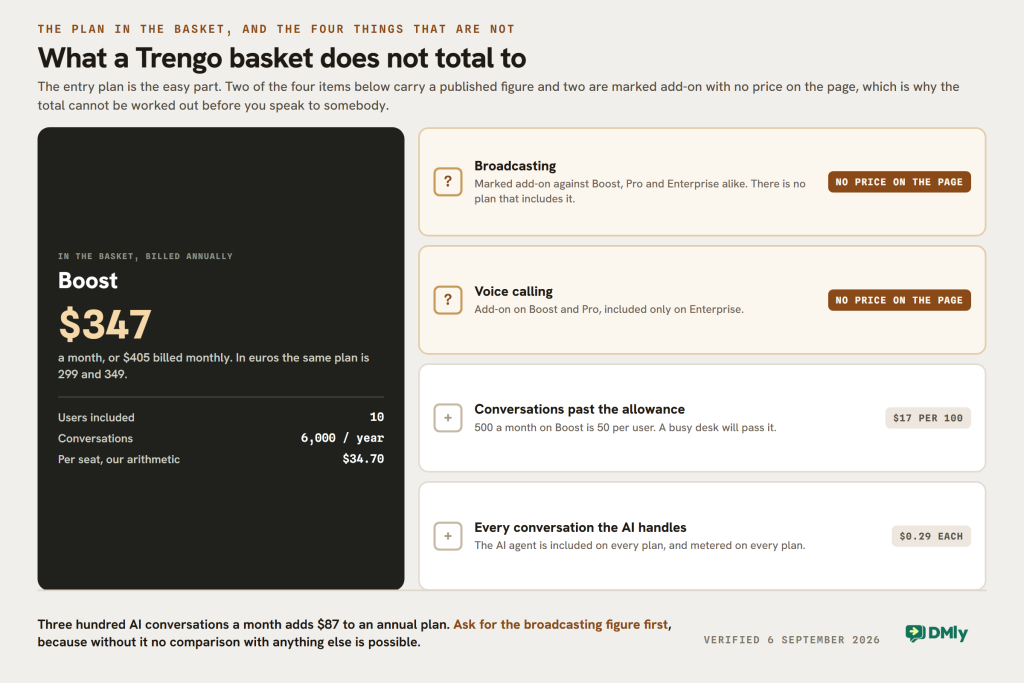
The practical effect is a floor you cannot see from the plan card. The smallest configuration that can send a campaign is Boost at $347 a month on an annual contract, or $405 monthly, plus a broadcasting add-on at a price you have to ask for. Against a WhatsApp-first platform whose entry plan includes broadcasts, that is not a close comparison, and it is not one Trengo is trying to win.
Voice calling works the same way, as an add-on on Boost and Pro and included only on Enterprise, and its price is not published either. Two of the things a buyer is most likely to want are the two things the page will not price. Ask for both figures in writing before comparing Trengo with anything.
What Their Own Table Puts on the Entry Plan
Having been unfair about the campaigns in one direction, this page was unfair about the entry plan in the other. Boost carries far more than we credited it with.
| Feature | Boost | Pro | Enterprise |
|---|---|---|---|
| Unified inbox | Included | Included | Included |
| WhatsApp Business API | Included | Included | Included |
| AI Agent (HelpMate) | Included | Included | Included |
| AI Journeys | Included | Included | Included |
| Website widget, auto replies, quick replies | Included | Included | Included |
| Custom user permissions, custom Help Centre domain | Included | Included | Included |
| Agent performance and AI reporting | Included | Included | Included |
| Custom integrations | Not supported | Via APIs | Custom-built |
| Custom channel integrations | Not supported | Developer access | Full access and support |
| Third-party AI actions | Not supported | API actions available | API actions available |
| Support | Email and messaging | Plus phone | Plus a success manager |
| Broadcasting | Add-on | Add-on | Add-on |
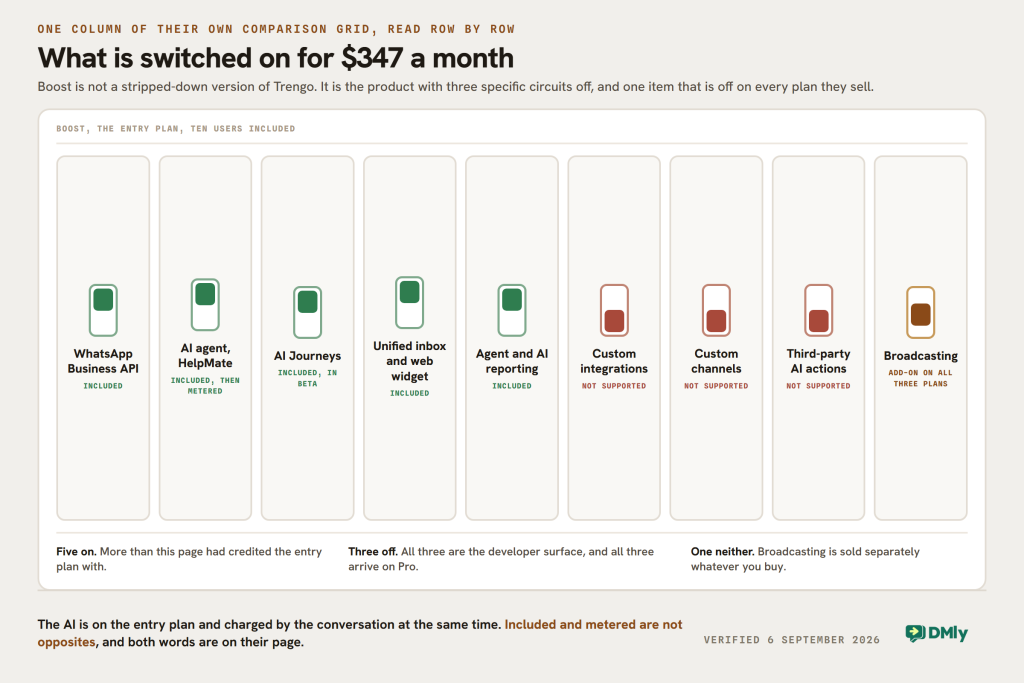
Three of those rows correct this page directly. WhatsApp is on Boost, where we described the entry inbox as “email, live chat, limited channels”. The AI agent is on Boost, where we listed it as an Enterprise feature. And AI Journeys, their multi-step automation, is on Boost too.
What Boost genuinely lacks is the developer surface. Custom integrations, custom channel integrations and third-party AI actions all read “Not supported” on the entry plan and appear on Pro. That is a sharper version of the vague “integration limitations” this page used to complain about, and unlike the vague version it is printed on their own grid.
One caveat their page prints and we should repeat. Under the plan cards: “AI Journeys is currently in a Beta phase. Final pricing and packaging may look different once the feature is publicly available.” A ticked feature whose packaging may change is not the same as a ticked feature, and if AI Journeys is why you are buying Boost, that sentence is the one to raise on the call.
The Unit Is a Seven-Day Conversation
Trengo does not meter messages. It meters conversations, and it defines one precisely: “A Conversation is any reply to an inbound or outbound message with a customer that occurs within a 7-day window. Any messages outside that window start a new conversation.”
That is a generous unit compared with most of this market. A week of back and forth with one customer is one conversation, where a per-message platform would have charged for every reply and Meta’s own 24-hour window would have closed six times over. For a support desk handling long threads, this is the most buyer-friendly meter on any page in this comparison.
Two things stop it being free money. The allowance is 500 conversations a month on Boost and 1,500 on Pro, which is 50 and 75 per user, and a busy desk will pass that. Extras are $21 per hundred monthly or $17 annually, so a hundred conversations over is about a fifth of a user’s worth of budget.
And anything the AI touches carries a surcharge of 35 cents a conversation, or 29 cents on the annual plan, on top of the allowance. If HelpMate handles 300 conversations in a month, that is $105 monthly or $87 annually, which is a quarter of the Boost subscription again. The AI is included and the AI is metered, and both of those are true at once.
One row on their rate card has a date on it. Trengo lists all WhatsApp service conversations as free, which is correct today and stops being correct on 1 October 2026, when Meta begins charging for service messages and for utility messages sent inside an open window. That is Meta’s change rather than Trengo’s, but it is Trengo’s page, and what changes on 1 October is worth reading before signing an annual contract.
What This Trengo Review Got Wrong
| What this page said | What their page says on 6 September 2026 |
|---|---|
| Boost is “email, live chat, limited channels” | WhatsApp Business API is ticked on Boost, along with the unified inbox and the website widget |
| Campaigns are part of the Pro plan | Broadcasting is an add-on on all three plans and its price is not published |
| AI features (HelpMate) are an Enterprise thing | HelpMate and AI Journeys are ticked on all three plans, with a surcharge per AI conversation |
| Boost $408, Pro from $701 | Those are close to the monthly figures, now $405 and $695, with annual rates of $347 and $579 the page never mentioned |
| “Zapier integration doesn’t allow updating contacts easily” | Removed. We could not verify it, and it is not the sort of claim to publish about a competitor unverified |
| “Automation setups rely heavily on workarounds” | Removed, and replaced with the row that is actually printed: custom integrations, custom channels and third-party AI actions are all Not supported on Boost |
The pattern is worth naming, because it recurs across this batch of reviews. Adjectives went stale faster than prices did. The figures on this page were within a few dollars after five months. The judgements about what was gated, what was flexible and what required workarounds were wrong in both directions, and every one of them could have been settled by reading the vendor’s own comparison grid.
Five Trengo Alternatives, Every Price Re-Read
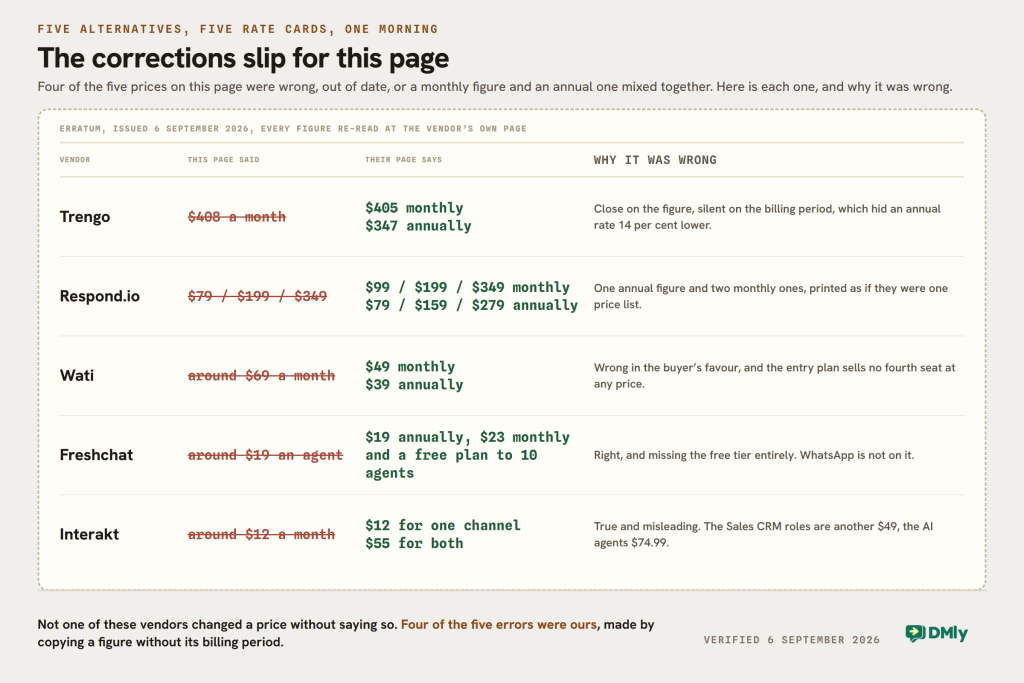
All five were re-read at source on the same morning. Four of the five prices on this page were wrong, out of date, or mixing a monthly figure with an annual one.
1. DMly
We make DMly, so weigh this accordingly. It is an omnichannel messaging platform for local and service businesses, and the difference from Trengo is what the subscription covers: the inbox, but also the CRM and pipelines, bookings, invoices and payments, comment automation on Instagram and Facebook, and Google review requests.
From our own pricing page: Starter $29 a month billed yearly or $39 monthly, with 3 team seats, 1 profile per channel, 3,000 active contacts, 10,000 broadcast or template messages, 10 active bots per profile and 500 AI replies a month. Growth $65 or $79, with 6 seats, 3 profiles per channel, 10,000 contacts, 50,000 messages, unlimited active bots and 5,000 AI replies. Premium $149 or $199, with 15 seats, 5 profiles per channel, unlimited contacts, 300,000 messages, 20,000 AI replies and your own AI keys for unlimited. Extra seats are $10, an extra profile set $15, extra contacts $15 per thousand. Seven days free, no card.
The honest comparison is broadcasts, not features. Trengo Boost is $347 a month on an annual contract for ten seats, with broadcasting as a priced add-on on top. DMly Starter is $29 for three seats with 10,000 broadcast or template messages included. If your team is ten people answering a support queue, Trengo is the better shape. If your team is three people who also need to send things, we are.
Where Trengo wins outright is the contact-centre machinery. A proper ticketing system, a seven-day conversation unit, phone support on Pro, voice calling as a first-class channel and a dedicated success manager on Enterprise are all things DMly does not sell.
2. Respond.io
The closest thing to Trengo on this list, and the strongest workflow engine: multi-channel inbox, lead routing and assignment, a branching automation builder, contact management and open API access.
The figures this page carried mixed the two billing periods together. Both sets, read from their cards: Starter is $99 a month, or $948 a year at $79 a month. Growth is $199 monthly, or $1,908 a year at $159. Advanced is $349 monthly, or $3,348 a year at $279. Enterprise is quoted. Seats are 5, 10 and 10 included, with extras at $15, $25 and $30 monthly, or $12, $20 and $24 on the annual plan.
Against Trengo it is the cheaper way into the same category, at $99 monthly for five users against $405 for ten, and the automation is the deeper of the two. Against Trengo it also loses the seven-day conversation unit and the ticketing structure.
3. Wati
The simplest option here and the one most people actually mean when they say WhatsApp platform: a shared team inbox, broadcasts, a chatbot builder, click-to-WhatsApp ads, catalogue and Shopify templates.
“Around $69 a month” was wrong. Read from their rendered pricing page: Growth is $39 a month billed annually and $49 billed monthly. Pro is $79 and $99. Business is $199 and $249. A Shopify add-on is $4.99 a month.
The limit that decides it is the seat rule, and it is worth quoting exactly: “3 Users Included. No additional users.” You cannot buy a fourth seat on Growth at any price; the fourth person means Pro, where seats are 5 included and $24 each after that. Growth also connects one channel only, allows 15,000 broadcasts a month, 1,000 free automation triggers and 250 AI co-pilot credits. Our head-to-head with Wati works through that rule.
4. Freshchat
The most similar product to Trengo in this list and the one that scales furthest: an omnichannel inbox, Freddy AI, SLA management, intelligent routing and the rest of the Freshworks suite behind it.
“Around $19 per agent a month” was right and incomplete, and the missing part is large. From their pricing page: there is a Free plan for up to 10 agents. Then Growth at $19 per agent a month billed annually and $23 monthly, Pro at $49 and $59, and Enterprise at $79 and $95. The trial is 14 days on the Enterprise plan.
What the free plan does not include is the reason most readers are here. Text messaging and digital channels, meaning SMS, WhatsApp, Line and Google Business Messages, start on Growth, alongside social messengers. So a free Freshchat is a website and email tool, and the WhatsApp version is $19 a seat.
The AI is priced separately and the figures are published, which is more than Trengo does. Freddy AI Agent is $49 per 100 sessions and Freddy AI Copilot is $29 per agent a month on the annual plan, or $35 monthly. Day passes for occasional agents are $2, $7 and $12 by plan.
5. Interakt
A WhatsApp-first sales tool with a CRM attached: pipelines, deal stages, broadcast segmentation on CRM data and a workflow builder, aimed at teams that already think in stages.
“Starts at around $12 a month” was true and misleading, which is the worst kind of price. From their US pricing page: Starter is $12 a month, $69 a quarter or $239 a year, and it carries one channel, not both. Growth, the cheapest plan with WhatsApp and Instagram together, is $55 a month, $149 a quarter or $499 a year. Advanced is $69, $189 or $649. All are quoted before tax.
Two add-ons sit outside the plans and both are large. The Sales CRM roles are sold separately at $49 a month, plus $10 a month per Sales CRM agent, and every plan card says those roles are not included. WhatsApp AI Agents are an add-on at $74.99, which is more than either plan it attaches to. If you are buying Interakt for the CRM and the AI, the honest entry price is neither $12 nor $55.
Trengo and the Alternatives, Side by Side
| Tool | Entry price, billed monthly | Entry price, billed annually | Seats included | The limit that decides it |
|---|---|---|---|---|
| Trengo | $405 | $347 | 10 | Broadcasting is an add-on on every plan, and unpriced |
| DMly | $39 | $29 | 3 | No ticketing, no voice channel, no published SLA |
| Respond.io | $99 | $79 | 5 | Deepest automation here, and the learning curve that comes with it |
| Wati | $49 | $39 | 3 | “No additional users” on the entry plan, at any price |
| Freshchat | $23 per agent | $19 per agent | Priced per agent | WhatsApp is not on the free plan; AI is priced per session |
| Interakt | $12 for one channel, $55 for two | $239 or $499 a year | Unlimited agents | Sales CRM roles cost $49 more, AI agents $74.99 |
The table makes the shape of Trengo obvious. It is the most expensive entry on the list and it includes the most seats, so it is not expensive per person: $347 for ten is $34.70 a seat, against Freshchat’s $19 and Respond.io’s $15.80. What makes it costly is that a small team cannot buy a small amount of it.
Which One to Buy, by Situation
You run a support desk of eight to twenty people
This is Trengo’s fight and it wins a fair share of it. Ten seats included, a real ticketing system, a seven-day conversation unit that suits long threads, phone support on Pro, and voice calling available as a channel rather than a bolt-on to somebody else’s product. Freshchat is the serious rival, cheaper per agent and with a bigger suite behind it. Compare them on the conversation unit, because Trengo’s is the more generous one.
You send campaigns
Ask Trengo for the broadcasting price before anything else, because it is an add-on on all three plans. Until you have that number you cannot compare Trengo with Wati at $39 a month, or with DMly at $29 with 10,000 template messages in the plan, or with Interakt. If the answer is a large number, this is not the category you are shopping in.
You are three or four people
Not Trengo, and that is a structural answer rather than a criticism. The entry plan bundles ten seats, so a team of three pays for seven people it does not have. Wati at $39, DMly at $29 or Freshchat’s free plan for up to ten agents are all built for that size. Freshchat’s free tier is the one to look at first if your customers arrive through your website rather than through WhatsApp.
You want the AI to do the answering
Price the surcharge, not the plan. Trengo includes HelpMate on every plan and then charges 29 to 35 cents for each conversation it handles, so three hundred AI conversations a month is $87 to $105 on top. Freshchat charges $49 per 100 Freddy AI Agent sessions, which is roughly 49 cents each, and $29 to $35 per agent for the Copilot. DMly includes 500 to 20,000 AI replies a month in the plan. Those are three genuinely different models and the cheapest depends entirely on your volume.
You need custom integrations
Then Boost is not a starting point, it is a dead end. Custom integrations, custom channel integrations and third-party AI actions all read “Not supported” on Boost and appear on Pro at $579 a month annually. Budget for Pro from the beginning rather than expecting to grow into it.
You also take bookings or get paid in the conversation
None of the five support tools here do that, and Trengo does not claim to. If the job is running a service business rather than answering one, the subscription you want carries appointments, invoices and payments against the same contact record, which is the half DMly covers and the reason it appears on this list at all.
The Verdict
Trengo is a better product than this page used to say, sold in a shape that suits fewer businesses than its marketing suggests. The entry plan carries WhatsApp, the AI agent and their multi-step automation, all of which we had wrongly placed higher up the ladder. The conversation unit is the most generous meter in this comparison. The feature grid is detailed and published, which is to their credit and is how most of these corrections were found.
Against that: broadcasting is an add-on on all three plans with no published price, voice calling is the same, the entry plan bundles ten seats whether you have them or not, and the AI that comes free is metered by the conversation. None of those is hidden. All of them are on their page, and until today none of them was in this Trengo review.
Buy Trengo if you have a support team of eight or more, if long multi-day threads are your normal shape of conversation, and if voice matters. Ask for two prices before you sign: the broadcasting add-on and the voice add-on, because those are the two things the page will not tell you and the two things a growing team asks for next.
If the job is sending as much as answering, and bookings and payments belong in the same subscription, DMly’s plans start at $29 a month billed yearly with broadcasts included, and the trial does not ask for a card.
Trengo Review FAQs
How much does Trengo cost in 2026?
Boost is $405 a month billed monthly or $347 billed annually, with 10 users and 500 conversations a month. Pro is $695 monthly or $579 annually, with 20 users and 1,500 conversations a month. Enterprise is quoted. In euros the same plans are 349 and 299, and 599 and 499, because the prices are set per currency rather than converted. All read from their pricing page on 6 September 2026.
Does Trengo include WhatsApp broadcasting?
No. Their own key features table marks Broadcasting as “Add-on” against all three plans, including Enterprise, and does not publish a price for it. So the cheapest configuration that can send a campaign is Boost plus a broadcasting add-on you have to ask about. Voice calling is handled the same way, as an add-on on Boost and Pro and included only on Enterprise.
Is WhatsApp available on Trengo’s cheapest plan?
Yes. The WhatsApp Business API row is ticked on Boost, along with the unified inbox, the website widget, the AI agent HelpMate and AI Journeys. Earlier versions of this page said the entry plan was limited to email and live chat, and that was wrong. What Boost does not have is the developer surface: custom integrations, custom channel integrations and third-party AI actions all read “Not supported” until Pro.
What counts as a conversation on Trengo?
In their words, any reply to an inbound or outbound message with a customer inside a 7-day window, with anything outside that window starting a new one. That makes a week of back and forth with one customer a single conversation, which is the most generous unit of any platform in this comparison. Boost includes 500 a month and Pro 1,500, with extras at $21 per hundred monthly or $17 annually, and a surcharge of 35 cents or 29 cents for any conversation the AI handles.
What are the best Trengo alternatives?
It depends which part of Trengo you were buying. Freshchat is the closest like-for-like and cheaper per agent, with a free plan for up to ten agents that does not include WhatsApp. Respond.io is the deeper automation engine at $99 a month for five users. Wati is the simple WhatsApp option at $39 billed annually. Interakt suits sales pipelines. DMly suits a business that also takes bookings and payments.
Is Trengo better than Respond.io?
They are aimed at different team sizes, which usually settles it. Trengo bundles ten users at $347 a month on an annual plan and gives you a ticketing system and a seven-day conversation unit. Respond.io includes five users at $79 a month annually, with extra seats at $12, and the more capable automation builder. Below about eight people Respond.io is cheaper; above that the gap narrows, and the choice becomes ticketing against workflow depth.
Is this Trengo review based on hands-on testing?
No, and we would rather say so. Every price, limit and quotation here was read from the vendors’ own pricing pages on 6 September 2026, in a browser where the page renders its figures after loading, with both billing periods and all three of Trengo’s currencies checked. We have not run Trengo on a paid plan this month, which is why the earlier version’s judgements about flexibility, workarounds and learning curves have been removed rather than rewritten. If something here has changed, tell us.
Writing about WhatsApp automation, bookings and growth for local business.
Turn WhatsApp into your busiest channel.
Start free and run message, bookings, payments and reviews in one place.
