
Edna AI Review 2026: The Price Is in the Contract
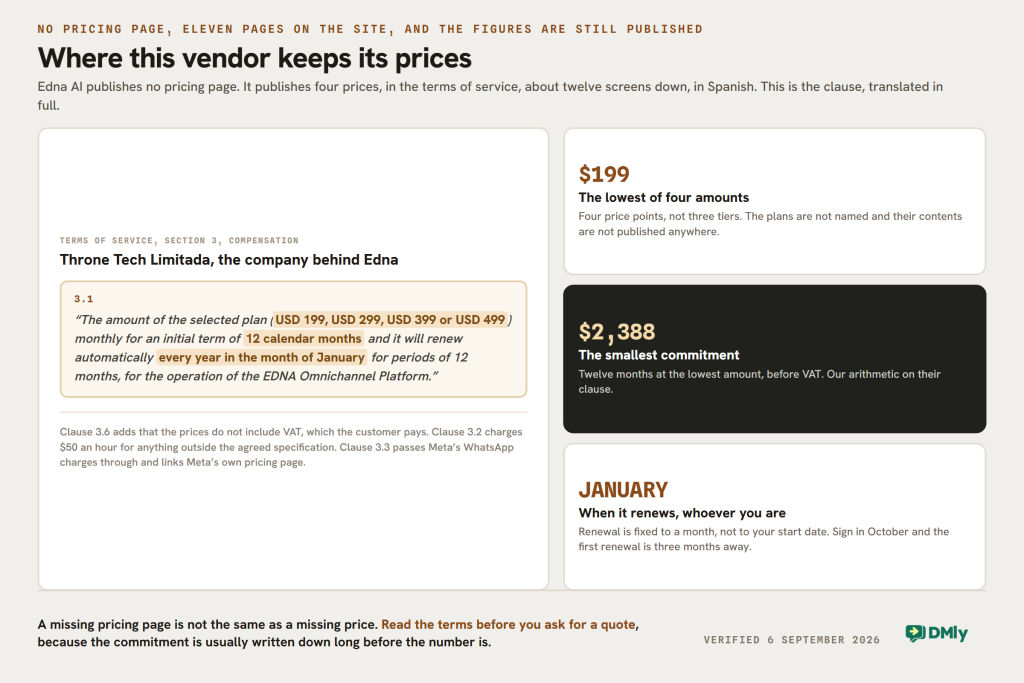
There is a numbered paragraph that begins “3.1”, and it is the single most useful thing in any Edna AI review, including this one. It names four figures in brackets, one of which you will pay every month. It fixes an initial term of twelve calendar months. And it says the whole thing renews itself automatically, every January, for another twelve.
That paragraph is not on a pricing page, because there is no pricing page. It is clause 3.1 of Edna AI’s terms of service, about twelve screens down, in Spanish, and it is the most useful thing published about this product anywhere.
Earlier versions of this page said the company does not publish a price. It does. Four of them. They are simply somewhere nobody looks, alongside a set of commercial terms that matter more than the figures do.
Everything below was read on 6 September 2026 from Edna’s own website: the terms of service, the machine-readable summary they publish for AI models, and the eleven pages their sitemap lists. The site is entirely in Spanish and the translations are ours, with the original wording quoted where it carries the argument. We have not run the platform.
Edna AI Pricing, in Full
Clause 3.1, translated: “The amount of the selected plan (USD 199, USD 299, USD 399 or USD 499) monthly for an initial term of 12 calendar months, renewing automatically every year in the month of January for periods of 12 months, for the operation of the EDNA Omnichannel Platform.”
| What the contract sets out | What it means for a buyer |
|---|---|
| Four plan amounts: $199, $299, $399 or $499 a month | Four price points, not three tiers. The plans are not named and their contents are not published |
| Initial term of 12 calendar months | The smallest commitment is $2,388 at the lowest amount |
| Automatic renewal every January | Renewal is date-based, not anniversary-based, so a July start means a six-month first year |
| Prices exclude VAT, which the customer pays | The invoice is larger than the plan amount |
| WhatsApp message costs are Meta’s, and they link Meta’s own pricing page | No markup is described anywhere in the contract |
| Usage above the contracted amount is charged extra | The plan amount is a floor, not a ceiling |
| $50 an hour for anything outside the agreed specification | Changes, extra training of the bot and consulting are all billable by the hour |
The January clause is the one to read twice. Because renewal is fixed to a month rather than to your start date, when you sign changes what you are buying. Sign in February and the first term runs almost a full year. Sign in October and you are three months from a renewal you have to actively get out of.
The second thing worth noticing is what the plan amounts are attached to. The contract calls the deliverable “the Bot”, and clause 1.2 says the developer completes installation and customisation “according to the milestones agreed with the Client”, with thirty working days of free defect resolution after final delivery. This is an implementation contract with a subscription attached, not a subscription with support attached, and the $50 hourly rate is what happens when the specification moves.
Getting Out Is the Expensive Part
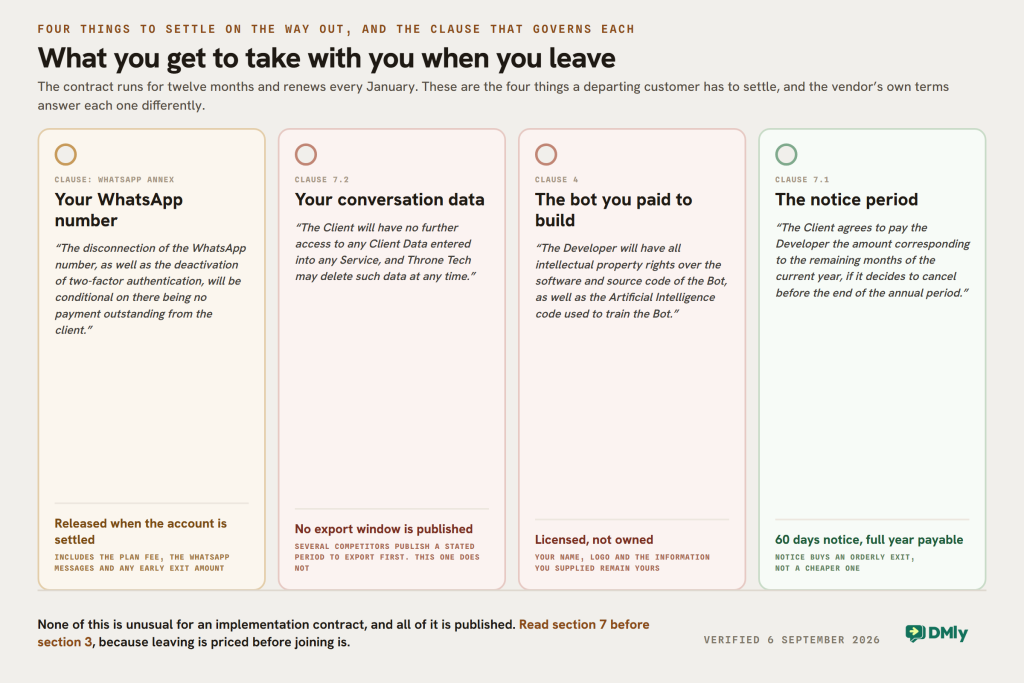
Clause 7.1 sets out early termination, and it does two things at once. Either party may end the contract early with sixty calendar days of written notice. And then: “The Client agrees to pay the Developer the amount corresponding to the remaining months of the current year, if it decides to cancel the contract before the end of the annual period.”
Read together with the January renewal, that means notice does not reduce what you owe. Cancelling in March at the $199 amount means paying March to December anyway, so the notice period buys an orderly exit rather than a cheaper one. The contract says so plainly: all outstanding monthly payments of the current year fall due at termination.
Two further clauses decide what you walk away with, and neither is unusual for an implementation contract, but both are worth knowing before signing rather than after.
- The bot is not yours. Clause 4 gives the customer the intellectual property in their own name, logo and the information they supply. It gives the developer “all intellectual property rights over the software and source code of the Bot, as well as the Artificial Intelligence code used to train the Bot”. What you buy is a licence to use it while you are paying.
- Your data does not follow you out, and no export window is published. Clause 7.2: on termination the customer “will have no further access to any Client Data entered into any Service, and Throne Tech may delete such data at any time”. Several competitors publish a stated period to export first. This contract does not.
And one term that is unusual enough to quote in full, from the WhatsApp annex: “In the event of contract termination, the disconnection of the WhatsApp number, as well as the deactivation of two-factor authentication, will be conditional on there being no payment outstanding from the client. This includes the monthly plan fee, the WhatsApp messages, or the early termination indemnity.”
Your WhatsApp number is released when the account is settled, and not before. That is a reasonable commercial protection and it is also a real operational risk, because a business phone number that cannot be moved to another provider is a business that cannot leave. Anyone signing this should know that the number, the two-factor setting and the final invoice are one knot rather than three.
The payment mechanics are equally specific. An electronic invoice goes out on the first Monday of every month, paid by deposit to a named Banco Nacional de Costa Rica account in the name of Throne Tech Limitada, the company behind Edna. If an invoice is unpaid thirty calendar days after it is received, the service is interrupted until payment resumes, and the developer commits to reactivating within a maximum of 48 hours once paid.
A Published Service Level Agreement, Which Almost Nobody Else Has
The same document that makes leaving expensive also contains something we have not found on any other vendor page in this category: a full incident SLA with response times, priority definitions and a resolution process, published where anyone can read it before buying.
| Priority | How the contract defines it | Time to start resolving |
|---|---|---|
| Urgent | Interrupts the business and affects delivery of the service | 4 hours |
| High | Affects more than 90 per cent of users, without interrupting the business | 12 hours |
| Medium | Affects more than 40 per cent of users and interrupts work to some degree | 24 hours |
| Low | Does not interrupt users or the business | 48 hours |
Two details in that annex are worth carrying into a negotiation. The commitment is to start, not to finish, which is normal and is rarely stated so clearly. And an incident marked Resolved closes automatically after 48 hours if the customer does not confirm, and once closed it cannot be reopened. If you run a support desk on this, someone has to own the confirmation step.
The priority ladder also has an oddity that is easier to see in a table than in prose: High is defined as affecting more than 90 per cent of users, and Medium as more than 40 per cent, but Urgent is defined by business interruption rather than by a percentage. So an outage hitting every user with a workaround available is a twelve-hour ticket, and a smaller failure that stops trading is a four-hour one. That is a defensible way to rank incidents, and it is not what most people assume when they read the word “high”.
Who Edna AI Actually Is
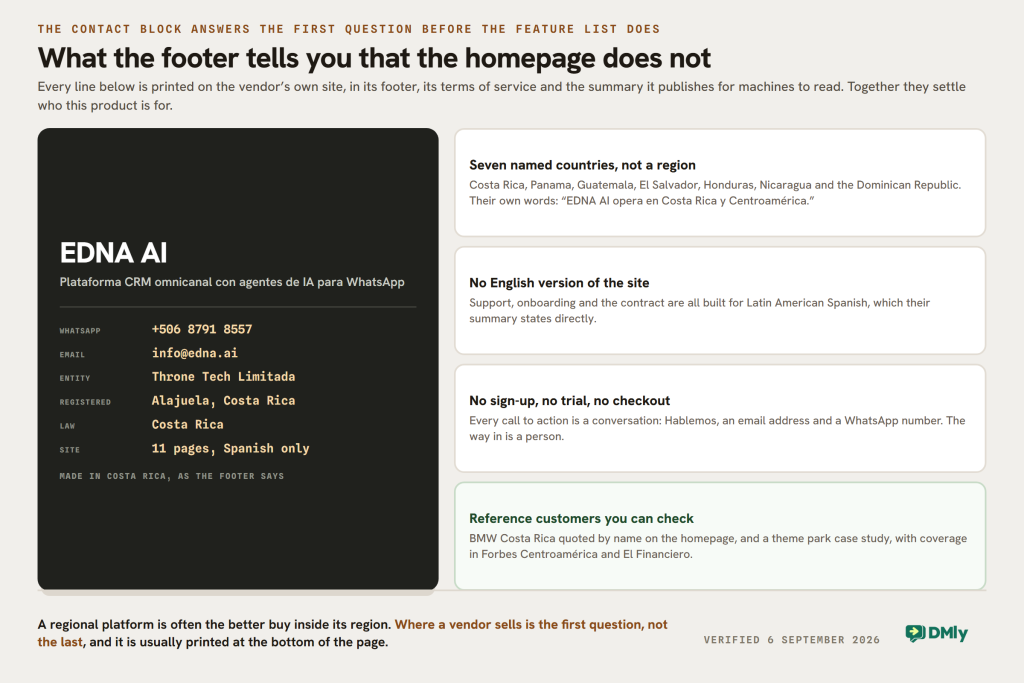
At the foot of every page on their site is a contact block: an email address, a WhatsApp number beginning +506, a button reading Hablemos, and a line saying the product was made in Costa Rica. This page had never mentioned any of it, and it is the first thing a buyer needs.
Edna AI is Costa Rican, and it says so on the page it publishes for machines to read: “EDNA AI opera en Costa Rica y Centroamérica.” The same page names the countries, and there are seven.
Costa Rica, Panama, Guatemala, El Salvador, Honduras, Nicaragua and the Dominican Republic. Not “Latin America” as a marketing region but a named list, and one that stops short of Mexico, Colombia and Brazil. The same page says the platform is built for Latin American businesses that use WhatsApp as their main sales and support channel, and that it supports operations “en español latinoamericano”. The legal entity in the contract, Throne Tech Limitada, is registered in Alajuela and the agreement is governed by Costa Rican law.
The rest of the evidence points the same way. The customer quotation on their homepage is from the Head of Customer Experience at BMW Costa Rica. Their case studies are BMW and Parque Diversiones, a Costa Rican theme park. Their press coverage is Forbes Centroamérica and El Financiero, both describing them as a Costa Rican startup. There is no English version of the site.
None of that is a criticism. A platform built for one region, in one language, with a local team, local reference customers and a bank account you can pay into locally is often a better buy inside that region than a global tool with a support queue in another timezone. It is simply the first question, and this page had been answering the second question first.
There Are Two Companies Called Edna
Worth settling early, because a search for “Edna” returns both and they are not related.
Edna AI, at edna.ai, is the Costa Rican platform this page reviews. Spanish only, eleven pages, no pricing page, and the way in is a WhatsApp conversation.
edna, at edna.io, is a different company and a different product. It sells a business messaging suite called edna Pulse, with a chat centre, a virtual agent, a chat SDK and channel APIs across WhatsApp, Viber, Apple Messages for Business, push and SMS. It has English, Portuguese and Spanish versions, a sign-up button, more than 800 named integrations, and it publishes a per-market WhatsApp rate card charged by the country code of the person being messaged.
They do not sell the same thing to the same people. If you arrived here from a comparison list, check which domain it linked to, because everything else on this page is about the one at edna.ai.
What Edna Says the Platform Does
Because there is no features page in the usual sense, the clearest inventory is the machine-readable summary Edna publishes at /llm, written for AI models to quote. It is unusually specific, and it is the vendor’s own account of the product.
| Area | What Edna publishes |
|---|---|
| Channels | WhatsApp, Instagram, Facebook Messenger, Telegram, email and web chat, in one shared inbox |
| Official WhatsApp Business API integration | |
| AI | AI agents that answer, qualify leads, run workflows and work around the clock; AI-generated replies; an AI copilot for human agents; automatic tone and grammar correction |
| CRM | Customer profiles, conversation history, tags, internal notes, activities and commercial pipelines |
| Operations | Departments and routing, automatic chat assignment, SLA and support workflows, dashboards and analytics |
| Unusual for this category | Video calls and livestreaming, and sentiment analysis |
| Integrations | Salesforce, HubSpot, Zoho, or your own system through their API, plus a no-code workflow builder |
| Marketing | WhatsApp broadcasting, campaign automation and personalised campaigns |
Two of those rows deserve to be pulled out, because they are genuinely uncommon at this end of the market. Sentiment analysis and native video calling and livestreaming are not standard in a WhatsApp inbox, and the BMW Costa Rica quotation names sentiment analysis specifically as something they use. If either is on your list, this is a short shortlist.
The WhatsApp Limits Their Own Contract Publishes
Appended to the terms is an annex of WhatsApp Business API considerations, and it is the plainest list of constraints any vendor in this queue publishes. Most of these are Meta’s limits rather than Edna’s, which is exactly why it is useful to see them written down before signing.
- Your existing chat history does not come with you. On integrating with a provider, previous chats cannot be seen.
- The number cannot be used in the WhatsApp app at the same time. Their annex states it twice: once a number is on the API through Edna, it cannot be used in the WhatsApp mobile app or in WhatsApp Business. This is the pre-coexistence position, and it is worth asking whether it still holds, because Meta now supports running a number on the API and in the app together, and several competitors sell that as a headline feature.
- WhatsApp groups are not supported, and neither is message forwarding, nor replying inside a message thread.
- WhatsApp voice and video calls are not supported. Voice notes are. Note that this sits alongside the video calling and livestreaming in their capability list, so those are platform features rather than WhatsApp ones.
- The 24-hour session applies as normal: after a customer writes, you have 24 hours of free-form replies, and after that only approved templates, which their team will help you submit.
One thing that annex does not cover, and which any quote from any vendor now needs to: from 1 October 2026 Meta begins charging for service messages, meaning the free-form replies your team types inside that 24-hour window, and for utility messages sent in reply inside an open window. The first 1,000 service messages a month on each business phone number are free and service messages have no volume tiers, and what changes on 1 October is worth reading before signing anything with a twelve-month term. Since Edna’s contract passes Meta’s charges through without a markup, that increase lands on you directly.
The Numbers on Their Homepage, and How to Read Them
Edna publishes five headline results: 24/7 support across all channels, a 3X improvement in sales, 150X ROI on WhatsApp campaigns, a 90 per cent deflection rate, and an approximately 60 per cent resolution rate. Their marketing page adds a 98 per cent open rate for WhatsApp.
None of the five is defined, dated or attributed to a named customer. That is not an accusation, it is a description: these are vendor claims of the kind every platform in this category prints, and the honest way to treat them is as questions rather than as findings.
If you take a call, they are the easiest four questions to ask, and the answers are worth more than the numbers. Deflection measured against what baseline. Resolution measured by whom, the bot or the customer. ROI over what period and net of Meta’s message charges or gross of them. And the 3X, against that customer’s own previous year or against an industry figure. A vendor with real numbers enjoys those questions.
Three Corrections to This Edna AI Review
The Starter, Pro and Premium plans are retracted. Earlier versions of this review described three named tiers with feature lists. Those names appear nowhere on Edna’s site: not on the homepage, not on the three solution pages, not in the machine-readable summary, not in the terms, and not in the sitemap. All eleven pages were fetched and searched, and “Starter” and “Premium” return nothing on any of them. What the contract does name is four amounts, not three tiers, and it does not say what separates them.
One detail from those old lists turned out to be real, which suggests they came from an earlier version of the site rather than from nowhere: our Starter list included video calls and livestreaming, and Edna’s own capability list does carry “Videollamadas y livestreaming”. That does not make an unverifiable tier list worth keeping, because a reader cannot check it and a salesperson may not recognise it.
Zendesk was listed as an integration and it is not one. Edna’s integrations, in their own words, are Salesforce, HubSpot, Zoho “or your own system via API”. The only place Zendesk appears on their entire site is in a sentence naming it as a competitor: “EDNA competes in the category of platforms like Intercom, Zendesk, Manychat and HubSpot, with a focus on WhatsApp and Latin America.” The row has been corrected.
The section grading Edna’s setup as complex has been deleted rather than rewritten. It said the platform has a learning curve, a heavy onboarding and features that may overwhelm smaller teams. We have not run Edna on a paid plan, so none of that was ours to write. What replaces it is the contract, which is harder evidence about how the product is delivered than any adjective: it is an implementation with agreed milestones, a thirty-working-day defect window and a $50 hourly rate for changes, and that tells you more about setup than the word “complex” does.
Edna and DMly, Side by Side
We make DMly, so weigh this accordingly. The two products overlap on the inbox and diverge almost everywhere else, and the honest summary is that they are sold to different buyers in different ways rather than being better and worse versions of the same thing.
| Question | Edna AI | DMly |
|---|---|---|
| Entry price | $199 a month, the lowest of four amounts in the contract | $39 a month, or $29 billed yearly |
| Minimum commitment | 12 months, so $2,388, plus VAT | One month. 7-day trial, no card |
| Renewal | Automatic every January, whenever you started | Monthly or yearly from your own start date |
| Leaving early | 60 days notice, and you pay the rest of the current year | Cancel any time |
| How you buy | A conversation, then a contract and a bank transfer | Self-serve online |
| Where it is sold | Costa Rica, Panama, Guatemala, El Salvador, Honduras, Nicaragua, Dominican Republic | Sold online, no territory restriction |
| Language | Spanish. No English site | English |
| Channels | WhatsApp, Instagram, Messenger, Telegram, email, web chat | 7 plus SMS, adding TikTok and Google Business Profile |
| Sentiment analysis | Yes | Not in the documentation |
| Video calls and livestreaming | Yes | No. Zoom is connected for bookings, which creates a meeting link automatically |
| Published support SLA | Yes: 4, 12, 24 and 48 hours by priority | No published SLA |
| Bookings, invoices, payments, reviews | Not described | In every plan |
| Who owns the bot | The developer keeps the software, source code and AI training code | You build the flows yourself in the flow builder, so there is no commissioned software to own |
| WhatsApp charges | Meta’s rates, passed through, no markup described | Meta’s rates, billed directly, no markup |
Three of those rows run in Edna’s favour and should be said clearly. They publish a support SLA with hours in it and we do not. They have sentiment analysis and native video, and our documentation describes neither. Where we do compete is the shared inbox itself, on seats and on price. And a local team, in your language, on your timezone, with a Costa Rican bank account and a contract under Costa Rican law, is worth real money to a business in San José that a self-serve tool cannot match.
Where the two genuinely part company is the shape of the commitment. Edna’s smallest purchase is $2,388 across a year that renews itself in January. DMly’s is $39, cancellable next month. That difference matters far more than any feature row above it, and it is the reason the two rarely appear on the same shortlist.
Which One to Buy, by Situation
You are in Costa Rica or Central America
Edna is on your shortlist and should be. Spanish-language onboarding, a local implementation team, reference customers you can recognise, an invoice you can pay by local transfer and a contract in your own jurisdiction are all real advantages, and the published SLA is better than most. Go in knowing the commitment is a year and the renewal is January.
You are outside those seven countries
Ask before you invest any time. The company describes its market as Costa Rica and Central America and names seven countries. That does not necessarily mean they will refuse a customer elsewhere, but a support relationship in a language and timezone the vendor has not built for is a poor foundation for a twelve-month contract with an early-termination clause.
You want to try something this month
Not Edna, and that is a structural answer rather than a criticism. There is no trial, no sign-up and no monthly term. The smallest thing you can buy is a year at $2,388 plus VAT, after a conversation and a specification. If you want to be sending messages this week, a self-serve platform is the category you are shopping in.
You need sentiment analysis or video inside the platform
Edna, and the list of alternatives is short. Sentiment analysis and native video calling and livestreaming are uncommon in a WhatsApp inbox at any price, and BMW Costa Rica’s quotation on their homepage names sentiment analysis as something they actually use. Our documentation describes neither, so this is a row we lose.
You take bookings or get paid through the conversation
Edna does not describe bookings, invoices, payments or review collection anywhere. If the job is to run a service business rather than to answer one, that is half the work missing, and it is the half DMly carries in every plan alongside the inbox.
You need to keep using your number in the WhatsApp app
Ask, because their contract says you cannot. The annex states twice that a number on the API through Edna cannot also be used in the WhatsApp mobile app or WhatsApp Business. Meta now supports running both together, and several platforms sell that as a feature, so this may be a contract that has not caught up rather than a product limit. Get the answer in writing before you migrate the number that your customers already have.
The Verdict
Edna publishes more hard commercial detail than almost any vendor in this category, and it publishes it in the one place buyers never look. Four price points, a twelve-month term, a January renewal, an hourly rate for scope changes, an invoice date, a bank account, a suspension trigger, an SLA with four response times and a full list of what WhatsApp will not do. Most of its competitors publish a plan card and a demo button.
What this page got wrong was the shape of the thing. It reviewed a regional implementation business as though it were a self-serve global platform, invented a tier structure that does not exist, graded its setup on adjectives we had no basis for, and never once mentioned that the product is sold in Spanish to seven named countries. The single most decision-relevant fact about Edna is where it sells, and this review did not contain it.
Buy Edna if you are in its region, want a local team and a real contract, and can commit to a year. The published SLA and the sentiment analysis are genuine reasons to prefer it. Go in knowing three things: the renewal is January regardless of when you sign, leaving early does not reduce what you owe for the current year, and your WhatsApp number is released when the account is settled and not before.
If you want a price before a conversation, a month before a year, and bookings and payments in the same subscription as the messages, DMly’s plans start at $29 a month billed yearly and the trial does not ask for a card.
Edna AI Review FAQs
How much does Edna AI cost?
Their terms of service name four monthly amounts: US$199, US$299, US$399 or US$499, for an initial term of twelve calendar months, renewing automatically every January. So the smallest commitment is $2,388 before VAT, which the customer pays on top. Anything outside the agreed specification is charged at $50 an hour, usage above the contracted amount is billed extra, and WhatsApp message costs are Meta’s and are passed through. There is no pricing page on their website; clause 3.1 of the terms is where the figures live.
Does Edna AI have Starter, Pro and Premium plans?
Not that anyone can verify. Those plan names appear nowhere on their website, in their terms, or in the machine-readable summary they publish, and all eleven pages in their sitemap were fetched and searched. Earlier versions of this review described three such tiers and they have been retracted. The contract names four amounts and does not say what separates them, so the plan contents are a question for the first call.
Can I cancel an Edna contract early?
Yes, with sixty calendar days of written notice, but the contract says you still pay for the remaining months of the current year. Because renewal is fixed to January rather than to your start date, cancelling in the spring means paying through to December. Their WhatsApp annex also makes disconnecting your number and disabling two-factor authentication conditional on nothing being outstanding, including the plan fee, the WhatsApp messages and the early-termination amount.
Where is Edna AI available?
They describe their market as Costa Rica and Central America, and name seven countries: Costa Rica, Panama, Guatemala, El Salvador, Honduras, Nicaragua and the Dominican Republic. The company behind the platform is Throne Tech Limitada, registered in Alajuela, and the agreement is governed by Costa Rican law. The website is Spanish only. None of that stops a business elsewhere from asking, but it does mean support, onboarding and contracts are built for that region.
Does Edna support WhatsApp, and can I keep using the app?
Edna integrates with the official WhatsApp Business API, alongside Instagram, Facebook Messenger, Telegram, email and web chat. Their contract annex states twice that a number connected through them cannot also be used in the WhatsApp mobile app or WhatsApp Business, which is the position before Meta introduced co-existence. Since several platforms now sell running both together, it is worth asking whether the annex reflects the current product or an older one.
What is the best Edna AI alternative?
It depends which part of Edna you were buying. For the local implementation and the Spanish-language team, the honest answer is another regional provider rather than a self-serve platform. For the omnichannel inbox with a published price and no annual commitment, DMly starts at $29 a month billed yearly with a 7-day trial and no card. For sentiment analysis or native video and livestreaming, there are few alternatives at any price, which is a genuine reason to stay with Edna.
Is this Edna AI review based on hands-on testing?
No, and we would rather say so. Everything here was read on 6 September 2026 from Edna’s own website: the terms of service, the machine-readable summary they publish for AI models, the homepage and the eleven pages in their sitemap, with the Spanish translated by us and the original quoted where it carries the argument. We have not run the platform, which is why the earlier version’s judgements about setup complexity have been removed rather than rewritten. If any of this has changed, tell us.
Writing about WhatsApp automation, bookings and growth for local business.
Turn WhatsApp into your busiest channel.
Start free and run message, bookings, payments and reviews in one place.
