
How to Get WhatsApp API without Facebook Business Verification in 2026
Two hundred and fifty customers a day. Two phone numbers. Two hundred and fifty message templates. No badge, and your business name missing from WhatsApp search. That is the complete cost of running the WhatsApp API without Facebook Business Verification, and it is worth reading before the good news rather than after it.
The good news is real: you can connect a number and start messaging customers today, without submitting a single document. Meta genuinely opened that door and it is genuinely open.
But almost every guide on this query stops there, at the door, and never mentions what is on the other side of it. So this page is a price list first and a how-to second. If the numbers above are fine for your business, and for a lot of businesses they are, you can stop worrying about verification entirely. If they are not, you now know which one will stop you and roughly when.
What You Get Without Facebook Business Verification
An unverified business gets the whole WhatsApp Cloud API, throttled in four specific places. Not a trial, not a sandbox, not a crippled tier. The same automation, the same templates, the same inbox, the same integrations. Four ceilings, and everything below them works.
Here is the comparison that the rest of this page unpacks.
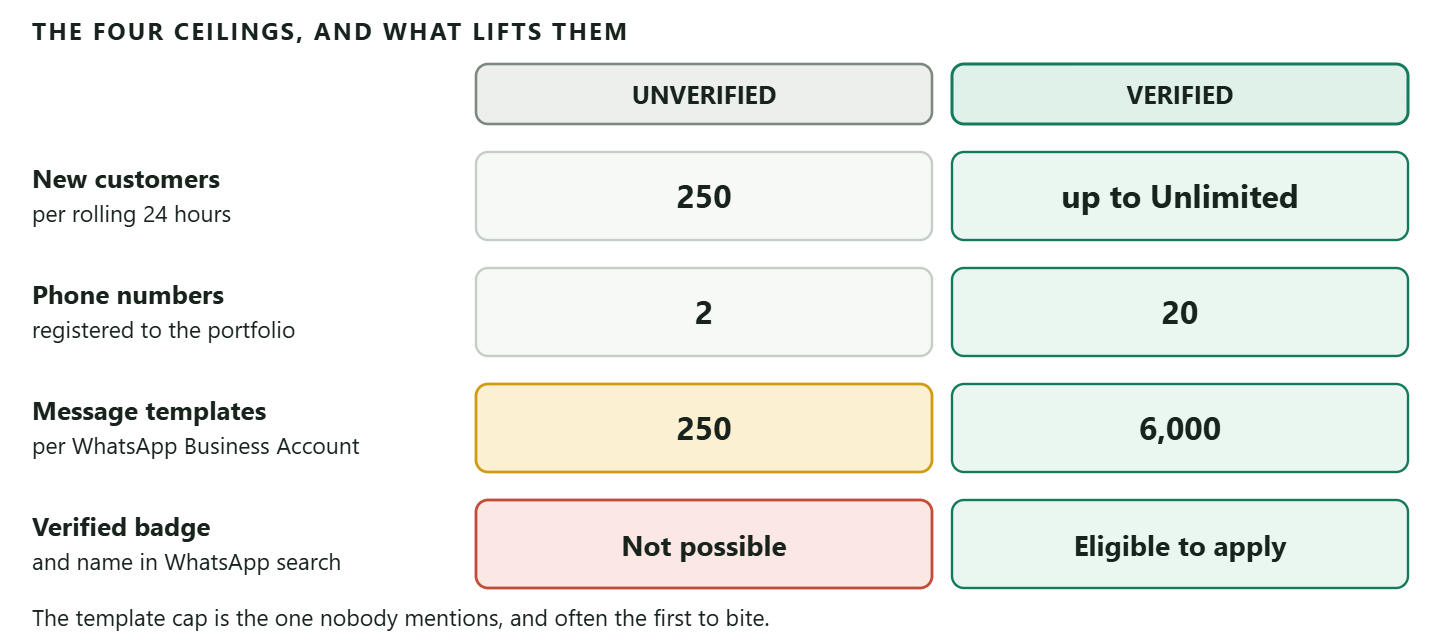
Two of those numbers deserve a sentence each, because they are the ones people get wrong.
The 250 is not 250 messages. It is the number of different customers you may start a conversation with in any rolling 24 hours, outside an open service window. Replying to people who messaged you first does not count against it at all. A busy salon answering fifty enquiries a day is nowhere near this ceiling. A shop sending a promotion to its whole list hits it on the first campaign.
The 250 templates is a cap on how many you can have, not how many you can send. That sounds generous until you run a few channels for a few years. Every reminder, confirmation, receipt, review request and campaign variant is a template, each language counts separately, and old ones accumulate. Businesses do reach it.
Five Different Things Are Called Verification, and You Are Only Skipping One
Most of the confusion on this subject is a naming problem rather than a technical one. Meta uses the word verification for five separate things inside the same setup flow. Four of them you will do, most of them in the first ten minutes. One is the one this page is about, and it is the only one that asks anything about your company.
Worth reading slowly, because people skip the wrong one and then cannot work out why nothing sends.
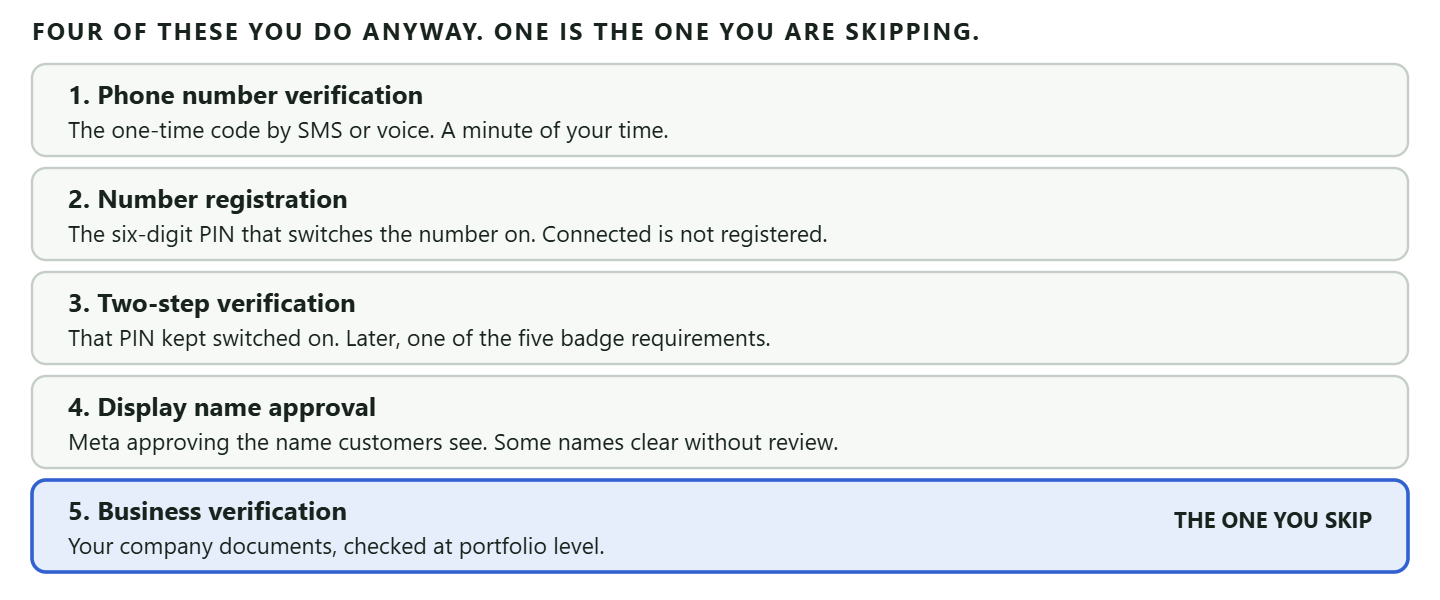
Number registration is the one that actually catches people. DMly’s own documentation puts it in four words: connected is not registered. A number can sit in your dashboard looking perfectly healthy, attached to the right account, and send and receive absolutely nothing, because the six-digit PIN step was never completed. If your setup looks finished and no message moves, check this before anything else.
Display name approval is the one that surprises people. It is a separate decision from anything to do with your company documents, and it has its own set of outcomes: approved, declined, expired, under review, or available without review, which is Meta’s way of saying the name was ordinary enough to wave through. It matters more than it sounds, because a number whose name has never been certified cannot be registered for API use at all.
So when a business owner says they want the WhatsApp API without Facebook Business Verification, what they almost always mean is the fifth item alone. That is the one that asks for a bank statement. The other four are unavoidable and, for the most part, trivial.
How to Get WhatsApp API without Facebook Business Verification, Step by Step
The route is Meta’s Embedded Signup, run through a provider, and it takes about ten minutes of your attention. There is no separate “unverified” application. You simply do the normal connection and skip the verification step, and Meta puts you on the entry tier.
- Have a phone number that qualifies. It must be owned by you, carry a country code, be able to receive a one-time code by voice or SMS, and not already have an active WhatsApp account on it. If it does, you either delete that account first or use coexistence to keep both running.
- Get access to your Business Manager. You need to be able to see and configure the business portfolio. You do not need it verified. You just need to be in it.
- Run Embedded Signup from your provider. In DMly this is Integrations, then Channels, then Add account, then WhatsApp. You are handed to Meta to sign in, pick or create the WhatsApp Business Account and add the number. Complete every screen: stopping halfway returns you with nothing granted.
- Register the number with a six-digit PIN. This is the step people skip and then spend an afternoon on. Being connected is not the same as being registered, and an unregistered number can neither send nor receive while looking perfectly fine in your dashboard.
- Submit your first templates and wait. DMly submits a starter set for you during signup and re-checks the status roughly every ten minutes. Most templates come back within minutes; Meta allows itself up to 24 hours. Nothing you or your provider does speeds that up, so write the templates you know you will need before the week you need them.
The eligibility caveat nobody quotes: Meta’s own wording during signup, which DMly reproduces verbatim in its docs, is that not all WhatsApp Business Accounts qualify for Embedded Signup: only accounts with significant message history and growth potential can onboard. So “no verification needed” is not the same as “everyone gets in”. If signup refuses you, that is usually why, and it is not something a provider can override.
One more, if you are moving a number from another provider: turn off two-factor authentication in WhatsApp Business Manager first. Migrations fail with it still on.
Which Ceiling Hits You First
Which of the four limits stops you depends entirely on what you use WhatsApp for, and the order is not the one most people expect. Work out which of these you are before deciding whether verification is urgent.
- If you answer enquiries and confirm bookings, you may never hit any of them. Replies to inbound messages are free of the 250, one number is usually enough, and a booking business needs perhaps a dozen templates. Verification can wait indefinitely, and that is a legitimate answer.
- If you send campaigns, the 250 stops you on day one. A list of a thousand takes four days to reach, and Meta will simply reject the rest each day. This is the most common wall.
- If you run several locations or brands, the two-number cap bites early, and it bites structurally: there is no workaround short of a second portfolio, which fragments your data.
- If you have run WhatsApp seriously for a year or more, the 250 templates creep up on you. Nobody plans for this one.
- If your customers need to find you, the missing badge matters most. Without Official Business Account status your number does not appear when someone searches for your business inside WhatsApp.
One structural detail catches multi-number businesses badly, so it is worth stating on its own. Meta sets the messaging limit on the business portfolio, not on the phone number, and every number in that portfolio shares the same allowance. Two numbers do not give you 500 customers a day. They give you two ways to spend the same 250, and Meta notes that a single number can consume the whole portfolio’s capability within a given period while the others sit idle. If you were planning to buy headroom by adding numbers, that plan does not work.
It is also worth knowing what a ceiling feels like from the inside, because it is not loud. Meta documents the limit but not what your software shows you when you cross it. In practice you read the result of the send rather than expect a warning before it: DMly’s broadcast report gives you delivered and failed counts, and a block of failures arriving at the same point in a list is the shape this takes. Nothing in DMly, or in any provider, negotiates the number upwards on your behalf.
The Other Meter: What Your Messages Cost, and What Changes on 1 October 2026
The 250 limits how many people you can reach. It has never had anything to do with what you pay, and on 1 October 2026 what you pay changes. Two meters run side by side here and they get confused with each other constantly. Staying unverified caps your reach. It does not make your messaging cheaper, and it never did.
This matters on this page more than on most, because the pattern we are about to recommend is the exact one the change lands on.
The cheapest and safest way to run an unverified number has always been to let customers message you first and answer them inside the 24-hour window their message opens (Meta calls this the customer service window). Those replies do not count against your 250, and until now they have also been free. From 1 October 2026, on Meta’s own published schedule, they are metered, though less harshly than the headlines suggest. Meta charges per message for service messages, the name for the free-form replies you type inside that window, but only after an allowance: every business phone number gets 1,000 free service messages a month, billing starts at the 1,001st, and the allowance resets each month rather than rolling over. A business answering enquiries at the pace an unverified number permits will usually stay under it and pay nothing at all for its replies. The half of the change with no allowance is utility messages sent in response to a customer inside an open window, free since July 2025 and chargeable from the first one.
The detail almost every write-up of this leaves out: Meta states plainly that it does not offer volume tiers for service messages, while continuing to offer them for utility and authentication messages. Those categories now scale differently from each other. Past the free thousand, the cost of conversation therefore rises in a straight line with how much you talk, with no discount for doing a lot of it, which is the opposite of how almost everything else you buy behaves.
We are deliberately not quoting you a rate on this page. Meta committed to publishing the figures that take effect on 1 October by 1 September 2026, and they are set per market. Read the rate for your own country from Meta rather than from any blog post, this one included. If you want the change itself worked through in full, including which categories become billable and what it does to a busy booking business, that is our guide to what service messages now cost from 1 October.
What has not changed is worth as much as what has. Meta’s current pricing documentation still describes free entry point conversations the same way: when somebody reaches you through a click-to-WhatsApp ad or a call-to-action button on your Facebook Page and you answer within 24 hours, that reply is free and it opens a 72-hour window in which you can send anything at all at no charge. For a small business running ads into WhatsApp, that is still the cheapest doorway on the platform, and it is open to an unverified number exactly as it is to a verified one.
One boundary to keep straight: everything in this section is the price list for the WhatsApp Business Platform, which is what people mean when they say the API. The free WhatsApp Business app is a different product on different terms, and in a growing list of countries it is no longer the free option people assume it is either.
Three Ways Off the 250 Tier, and Only One Skips the Paperwork
Meta publishes three routes to the next tier, and the third one is the whole reason this article exists. You can verify your business, you can have the partner who onboarded you verify it, or you can earn the tier by sending.
The middle route is the one nobody mentions, and it is worth a sentence because a fair number of readers are already standing on it without knowing. If you connected your number through a provider rather than going direct, Meta accepts that provider verifying your business on your behalf as a scaling path in its own right. It still involves documents; it may just not involve you filling in Meta’s forms yourself. Ask whoever onboarded you whether they offer it before assuming the only two options are paperwork or patience.
The earn-it route, in Meta’s exact terms: send 2,000 delivered messages, outside customer service windows, to unique WhatsApp user phone numbers, within a 30-day moving period, using templates with a high quality rating. Meet that and Meta moves you up without ever asking for a document.
Every clause in that sentence is load-bearing, which is why the widely repeated shorthand versions are wrong. Delivered, not sent. Unique numbers, not messages. Outside service windows, so your inbound replies do not count. And high quality rating, so a campaign that gets you blocked does not qualify you for anything.
The number you have probably read is wrong: A great deal of published advice, including the earlier version of this page, gives the threshold as 1,000 conversations and the next tier as 1,000 customers a day. Both are the old ladder. Meta’s current tiers are 250, 2,000, 10,000, 100,000 and Unlimited, and the threshold to leave 250 is 2,000 delivered messages. If you are planning around 1,000, you are planning around a number Meta no longer uses.
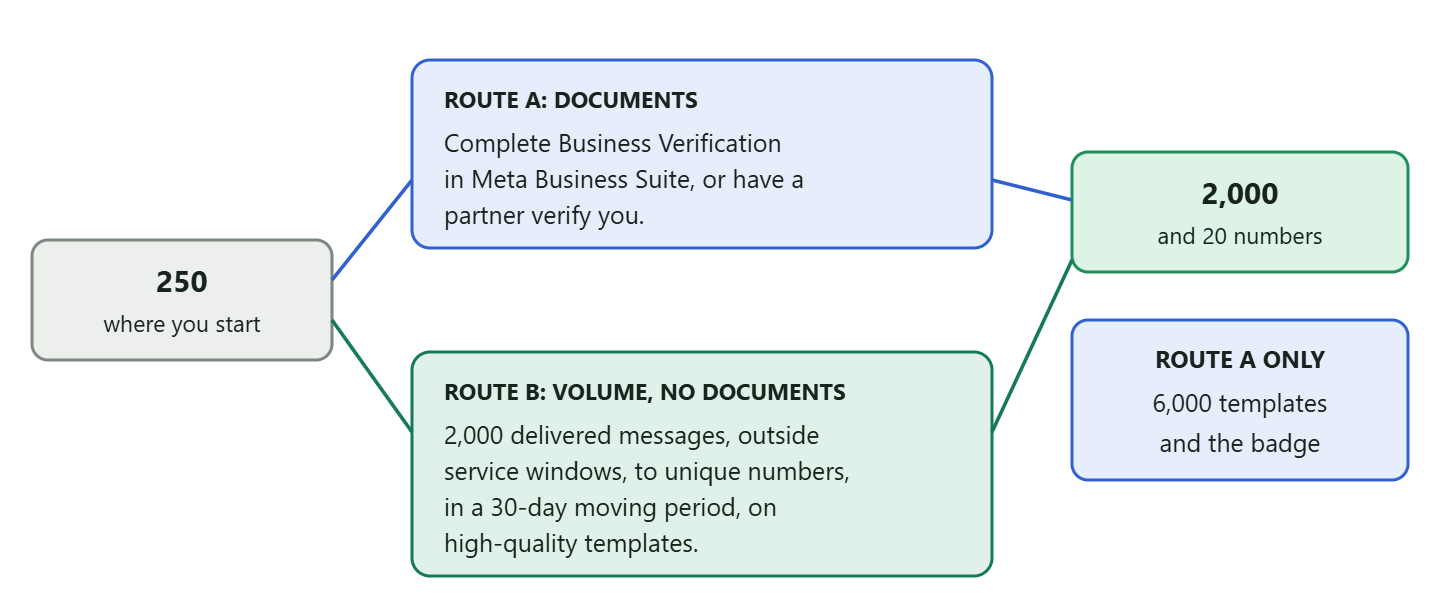
Both routes lift the phone-number cap the same way. Meta states it plainly: if your business becomes verified, or if you have reached a messaging limit of 2,000, the cap on registered numbers rises from two to 20. So the volume route genuinely solves two of the four ceilings.
After 2,000 the ladder gets easier and slightly strange. Meta raises you one level within about six hours when two things are true together: your quality is high, and you have used at least half your current limit in the last seven days. That second condition means an under-sending business stays stuck no matter how good its quality is, which surprises people who assume caution is rewarded. We cover that mechanism, and what drops a tier, in our guide to how WhatsApp account health, quality rating and bans work.
What Verification Buys That Volume Cannot
Two things survive the volume route, and one of them is more useful than the badge everybody asks about.
The first is the template headroom: 250 against 6,000. Meta ties the higher figure to the portfolio being verified and at least one number having an approved display name, so this one genuinely needs documents.
The second is Official Business Account status, the checkmark. Meta lists five requirements and business verification is one of them, so there is no route to the badge that avoids paperwork. The five, in plain terms:
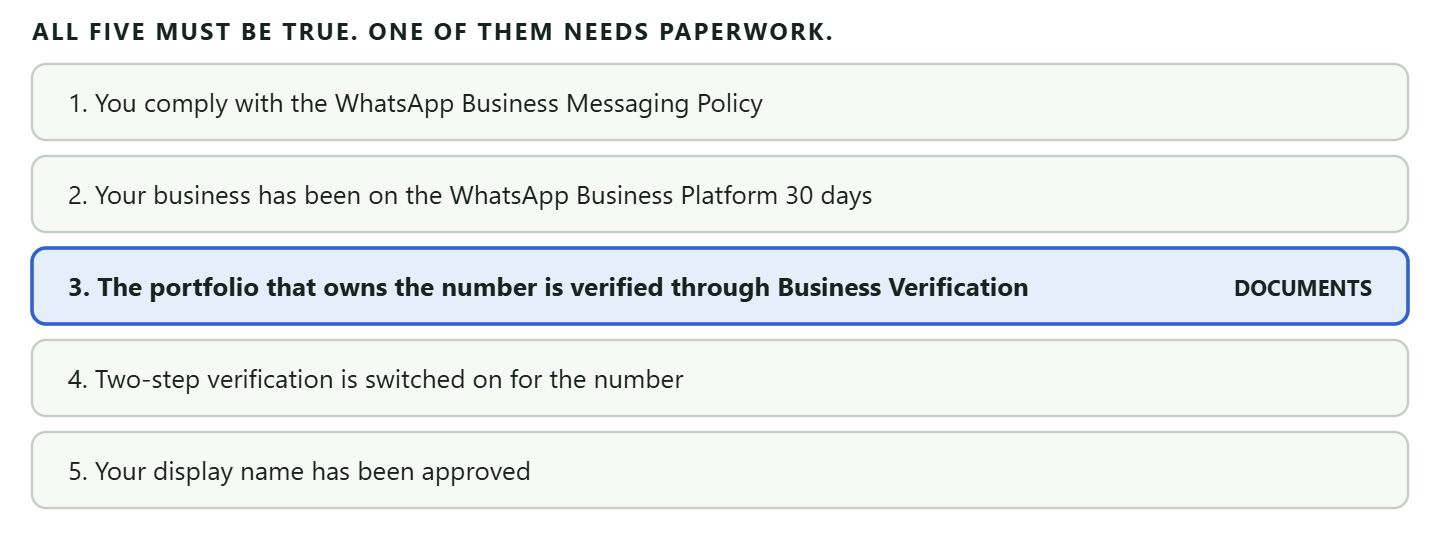
A claim to unlearn, including from the older version of this page: You will read that once you reach a higher messaging tier, WhatsApp starts showing your business name to customers even without an Official Business Account. Volume does not unlock your display name. The name has to be approved by Meta as its own step, and without OBA status your number does not appear when somebody searches for your business inside WhatsApp at all. Getting to the 2,000 tier changes what you can send. It does not change what customers see.
Two things about that badge, since it is the part everyone asks about first. It is worth less than people assume: it does not raise a limit, lower a price or unlock a feature. What it does is make your business findable in WhatsApp search and tell a stranger you are who you say you are, which matters enormously for a business people have not dealt with before and very little for one whose customers already have the number saved. And it is worth more than people assume in one narrow situation, which is a business whose customers routinely receive scam messages using its name.
Completing Verification, When You Decide To
The process is short, and it fails almost exclusively on one thing: details that do not match your documents exactly. Not on the quality of your business, not on its size.
What Meta is checking is narrow. It wants to see that a real, registered company exists at the name and address you claim, and that you are entitled to act for it. So you need one document proving the legal name and address (a business bank statement, a utility bill, a business licence) and often one proving your authority (a certificate of incorporation, a tax registration, an official company letter).
The order of operations matters. Fill in Business Info in Business Settings first, completely and exactly as your documents read, then start verification from the Security Center. If the verification button is greyed out, your setup is incomplete rather than broken, and in most cases you need a WhatsApp Business Account with a phone number connected before it becomes available.
Our step-by-step walkthrough of completing Facebook Business Verification screen by screen covers the document upload and the Security Center path in full, so this page does not repeat it.
On how long it takes: You will see “up to 14 business days” quoted everywhere, including in the older version of this article. Meta does not commit to a turnaround in its published documentation, so we are not going to give you a number to plan around. What you can do is watch the status in the Security Center, and start the process before you need it rather than the week of a campaign.
If your verification is rejected
Rejections are common and almost always fixable. Meta usually names the reason, and it is usually one of four: the business name does not match the official record, the address differs from the document, the document is expired, or the upload is cropped or unreadable.
The mistake is resubmitting hopefully. Read the stated reason, fix that exact thing, and only then submit again. Guessing burns attempts and time.
Running the WhatsApp API without Facebook Business Verification on DMly
Nothing in DMly is gated behind Meta’s verification. Connect an unverified number and you get the shared inbox, the flow builder, broadcasts, appointment reminders, invoices and the CRM on day one. Meta’s ceilings still apply, because they are Meta’s, but nothing on our side adds to them.
Two things worth being straight about, both of which we would rather you knew before signing up than after:
- Your tier and quality rating are read-only in DMly. We read them from Meta and display them. Nothing in DMly raises a tier, and nothing throttles a send based on one. If you exceed your 250, Meta rejects the surplus on its side and you find out from the failures, not from a warning first.
- The 250-template cap is Meta’s and we cannot extend it. What we can do is stop you wasting slots: an approved template is reusable everywhere DMly offers you one, which is broadcasts, the Inbox composer, sequences, and the automated messages behind appointment reminders, invoices and receipts. One well-written reminder template serves every reminder you send rather than needing a variant for each place it is sent from.
The practical shape of starting unverified is this. Connect the number, get five or six templates approved, run your enquiries and confirmations through the inbox, and watch whether the 250 ever actually bothers you. Many businesses find it does not. The ones it does are usually the ones that want to send campaigns, and the honest sequence there is to read what actually governs sending at volume before assuming verification is the fix, because on the campaign side the tier is only half the story.
Frequently Asked Questions
Can I really get the WhatsApp API without Facebook Business Verification?
Yes. Connect a number through a provider’s Embedded Signup and Meta places you on the entry tier without asking for documents. You get the full Cloud API feature set, capped at 250 new customer conversations per rolling 24 hours, two phone numbers and 250 message templates, with no eligibility for the verified badge.
How do I raise my messaging limit without verifying?
Deliver 2,000 messages, outside customer service windows, to unique WhatsApp numbers, within a 30-day moving period, on templates with a high quality rating. That moves you to the 2,000 tier and raises your phone-number cap from two to 20, all without documents.
Does an unverified business have a time limit?
Meta’s documentation sets no expiry on staying unverified. The entry tier is a starting point rather than a trial. That said, Meta changes this area often, so it is worth checking the limits in your own account rather than assuming a state of affairs stays put.
Will customers see my business name if I am not verified?
Not in WhatsApp search. Official Business Account status requires business verification, and without it your number does not appear when someone searches for your business inside the app. If a customer saves your number themselves, your display name shows for them, which is the workaround worth asking for at the end of a conversation.
How many templates can an unverified business have?
250 per WhatsApp Business Account. A verified portfolio with an approved display name on at least one number gets up to 6,000. This is the limit least often mentioned and the one that catches established businesses out.
Is business verification the same as verifying my phone number?
No, and confusing them wastes a lot of time. Verifying your phone number is the one-time code you enter during setup. Registering it is the six-digit PIN that makes it able to send. Business Verification is Meta checking your company documents. A number can be fully verified and registered while your business is not verified at all.
Is the WhatsApp API free if I stay unverified?
No, and the two things are unrelated. Verification governs how many people you may reach; Meta’s price list governs what each message costs, and it is the same price list either way. That price list is also about to change: from 1 October 2026 Meta charges for service messages beyond a free allowance of 1,000 a month for every business phone number, and for utility messages answered inside an open 24-hour window, which get no allowance at all. Free entry point conversations from click-to-WhatsApp ads keep their 72 hours at no charge.
Do I need verification to send marketing campaigns?
Not technically, but the 250 ceiling makes campaigns impractical until you clear it by one route or the other. Reaching a list of a thousand takes four days of partial sends, which is not a campaign so much as a queue.
Start Unverified, Verify Deliberately
Getting the WhatsApp API without Facebook Business Verification is not a loophole and it is not a lesser product. It is Meta’s intended on-ramp, and for a business that answers enquiries, confirms bookings and sends the occasional reminder, it may be the only tier you ever need.
The useful discipline is to stop treating verification as a box to tick and start treating it as a purchase. You are buying four things: headroom above 250 customers a day, eighteen more phone numbers, 5,750 more templates, and the badge. Three of those four you can also earn by sending well. The badge you cannot.
So connect the number, get your templates approved, and run the thing. When one of the four ceilings actually gets in your way, you will know exactly which one it is and exactly what it costs to lift, which is a much better position than submitting documents on the vague sense that you probably should.
Embedded Signup takes about ten minutes and asks for no documents to begin: see how DMly connects a WhatsApp number, and what an unverified number can already do on day one.
Writing about WhatsApp automation, bookings and growth for local business.
Turn WhatsApp into your busiest channel.
Start free and run message, bookings, payments and reviews in one place.
