
OwnChat Review (2026): Pricing, the 15% Markup and Who It Suits
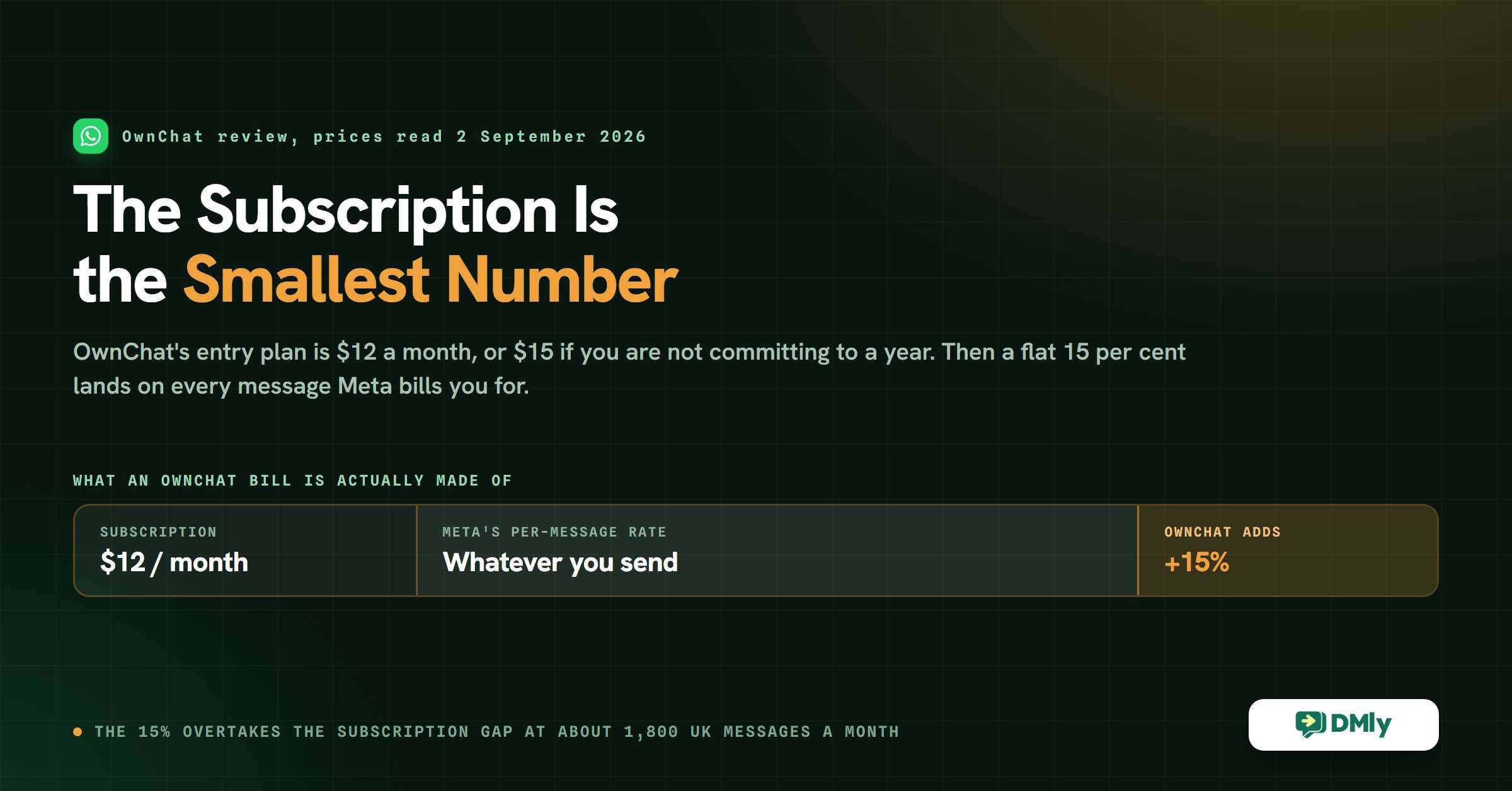
OwnChat’s entry plan costs $12 a month. It also costs $15 a month. Both figures come from the same price card on the same day, and the only thing that separates them is a toggle above the plans marked Quarterly and Annual. Almost every OwnChat review quotes the first number and never mentions the second.
That is a small thing on its own. It matters because it is the shape of everything else on this bill. The subscription is the number you shop on, and it is the smallest number you will pay. Sitting underneath it is a flat 15 per cent that OwnChat adds to every template message Meta charges you for, and depending on which country your customers are in, that percentage can cost more than the whole subscription before you reach ten thousand messages.
This OwnChat review works through the real rate card, all five plans and both billing terms, then does the arithmetic that decides whether the cheaper subscription is actually the cheaper platform. It also covers what changes for every WhatsApp business on 1 October 2026, which is three weeks away and affects OwnChat customers, DMly customers and everyone else equally. Every figure here was read from OwnChat’s own pages on 2 September 2026.
What OwnChat Is, and Who It Was Built For
OwnChat is a WhatsApp and Instagram automation platform built in India, for Indian businesses, and it does not hide that. Its pricing page opens with “the lowest conversation rates in India” and “trusted by 300+ businesses across Tamil Nadu”. Its contact allowances are written in Indian numbering (1,00,000 rather than 100,000). Its integration list runs Shopify, Razorpay, Zoho Bookings and Petpooja, a restaurant point-of-sale system almost nobody outside India has heard of.
None of that is a criticism. It is the single most useful fact about the platform, and it explains most of what follows. A vendor that sells into the cheapest WhatsApp market in the world can charge a percentage on messages without anybody feeling it, because the underlying rate is a fraction of a US cent. The same percentage lands very differently on a salon in Manchester, and that is the fact this OwnChat review keeps coming back to.
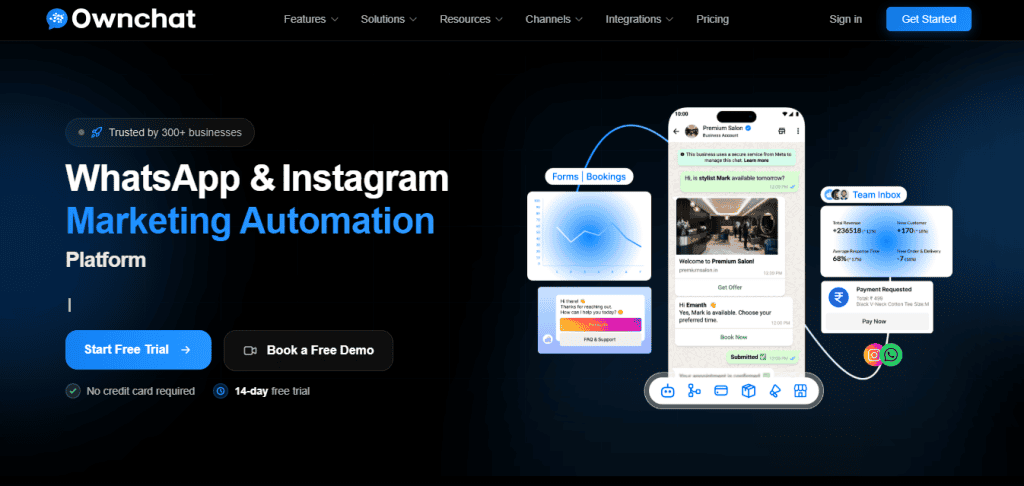
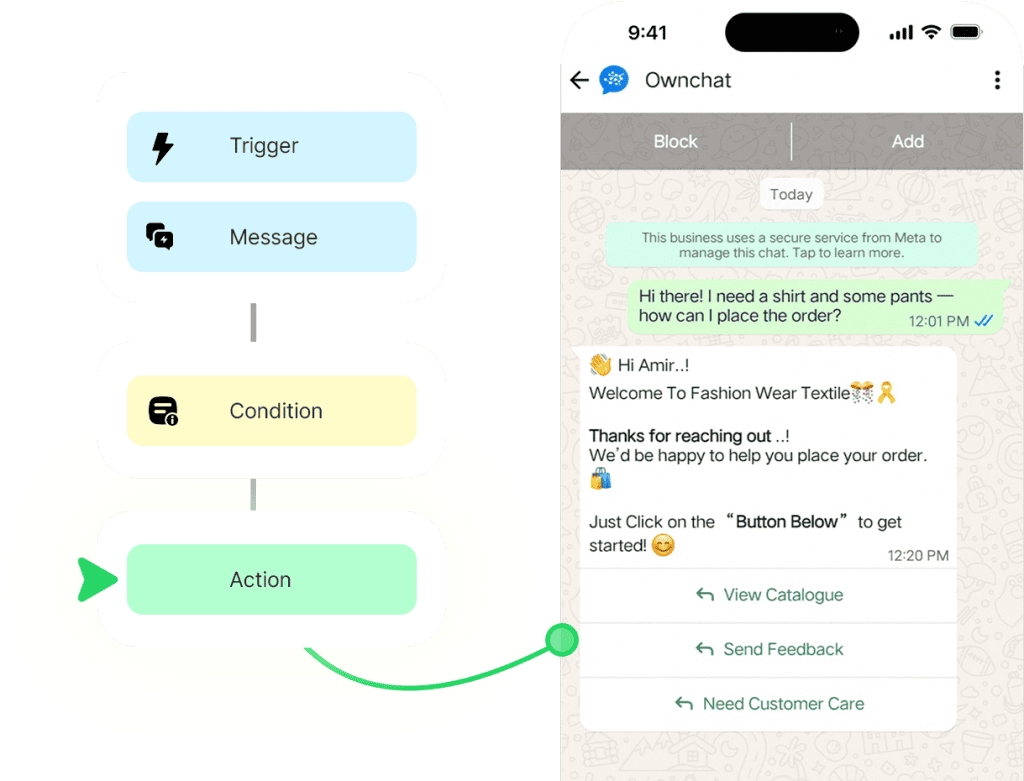
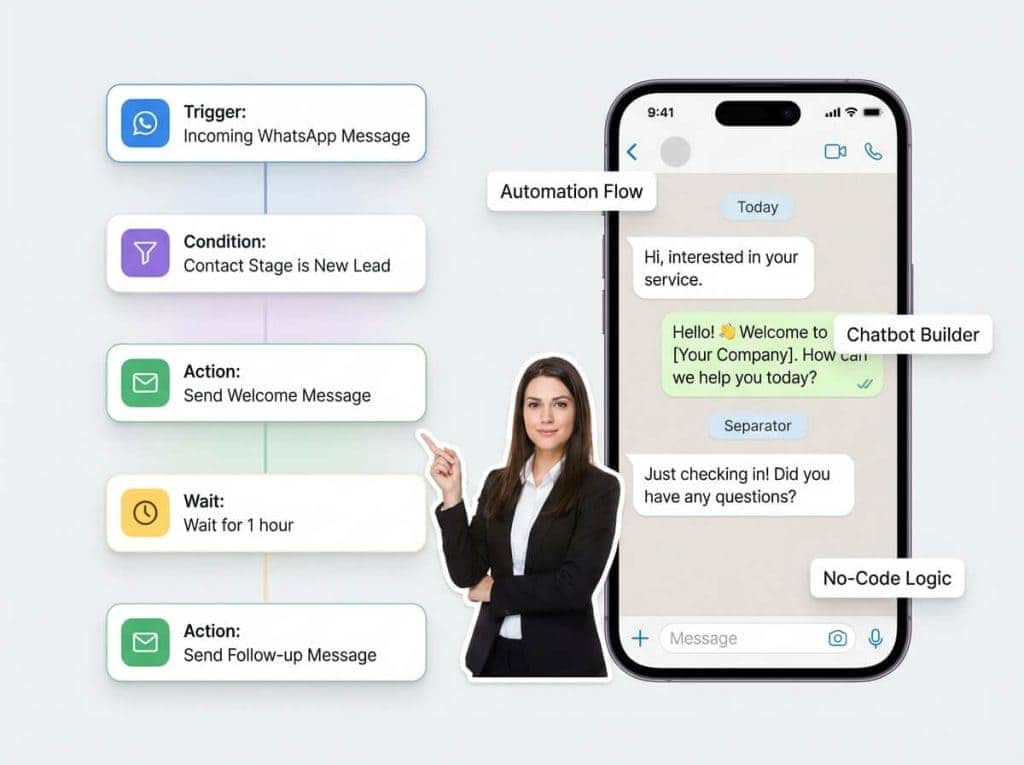
What you get is a genuinely broad WhatsApp toolkit for the money: a shared team inbox, a no-code chatbot builder, a workflow builder for drip sequences, broadcast campaigns, WhatsApp Flows (the in-chat forms Meta supports), a contact CRM with tags and segments, in-chat payments, a product catalogue and cart, click-to-WhatsApp ads, and on the top plan, staff task management with service-level targets and attendance tracking.
On the Instagram side you get a team inbox for DMs, comment-to-DM automation, story-mention auto-replies and an Instagram chatbot. If your business runs on turning Instagram comments into direct messages, OwnChat covers that properly rather than as an afterthought.
The channel list stops there. OwnChat’s own Channels page is headed “Omnichannel Messaging Platform” and then says plainly: WhatsApp and Instagram, with “more channels coming soon: Facebook Messenger, Telegram, SMS, Email”. Treat the roadmap as a roadmap.
OwnChat Review: Pricing, All Five Plans and Both Billing Terms
There is no monthly plan. The toggle above the price cards offers Quarterly or Annual, and nothing else. The headline prices every review quotes are the annual ones. If you are not ready to commit to a year, the real number is the quarterly one, and the smallest amount of money you can hand OwnChat after the trial is $45 for three months.
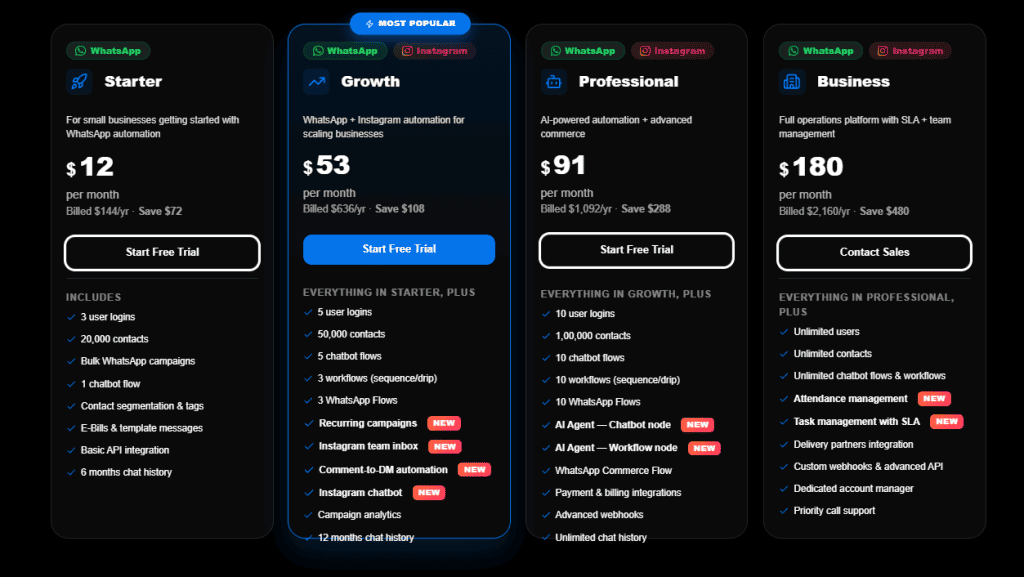
| Plan | Billed annually | Billed quarterly | Users | Contacts | Chatbot flows |
|---|---|---|---|---|---|
| Starter | $12/mo ($144/yr) | $15/mo ($45/quarter) | 3 | 20,000 | 1 |
| Growth | $53/mo ($636/yr) | $59/mo ($177/quarter) | 5 | 50,000 | 5 |
| Professional | $91/mo ($1,092/yr) | $103/mo ($309/quarter) | 10 | 100,000 | 10 |
| Business | $180/mo ($2,160/yr) | $200/mo ($600/quarter) | Unlimited | Unlimited | Unlimited |
| Instagram Pro | $12/mo ($144/yr) | $15/mo ($45/quarter) | 3 | 10,000 | 5 |
What Each Plan Adds
The plans stack, so each one includes everything below it. What actually changes as you climb:
- Starter gives you bulk WhatsApp campaigns, one chatbot flow, contact segmentation and tags, E-Bills and template messages, basic API access and six months of chat history.
- Growth is where Instagram switches on: Instagram team inbox, comment-to-DM automation and an Instagram chatbot. It also adds three workflows (drip sequences), three WhatsApp Flows, recurring campaigns, campaign analytics and twelve months of history.
- Professional is where AI arrives. The AI Agent chatbot node and workflow node are here and nowhere cheaper. It also adds WhatsApp Commerce Flow, payment and billing integrations, advanced webhooks and unlimited chat history.
- Business removes every cap and adds the operations layer: attendance management, task management with service-level targets, delivery partner integrations, a dedicated account manager and priority call support. Its button reads Contact Sales rather than Start Free Trial, so expect a conversation rather than a checkout.
Instagram Pro, the Fifth Plan Most Reviews Miss
If you sell on Instagram and do not use WhatsApp at all, there is a plan for you that no round-up seems to mention. Switch the tab above the price cards from “WhatsApp + Instagram” to “Instagram Only” and a single plan appears: Instagram Pro, at the same $12 a month billed yearly or $15 billed quarterly.
It carries the Instagram team inbox, comment-to-DM automation, an Instagram chatbot builder, three user logins, 10,000 contacts, five chatbot flows, DM analytics, auto-replies to story mentions and keyword-triggered DMs. It also carries the line that matters most here: Instagram conversations are free. Meta does not meter Instagram messaging the way it meters WhatsApp, and OwnChat says so plainly, so there is no message bill underneath this subscription and no percentage on top of it. For a creator or an Instagram-first brand, that is the cleanest deal on this whole page.
What the “Save” Figures Are Measured Against
Each annual card carries a saving: Save $72 on Starter, $108 on Growth, $288 on Professional, $480 on Business. Those are not the savings against the quarterly rate.
Do it yourself with Starter. Quarterly is $45 for three months, so a year of quarterly billing is $180. Annual is $144. The real saving is $36, not $72. The same gap appears on all four plans: the printed figure is exactly double the saving you can actually make, because it is measured against a monthly rate that the page does not sell. Annual is still the cheaper way to buy. It is just cheaper by half as much as the badge suggests.
The Seat Price, and a Currency Question Worth Asking Before You Sign
OwnChat’s own pricing FAQ prices an extra user seat at “$699/mo per user”. That is on plans costing $12 to $180 a month, so one extra seat would cost more than a year of the Business plan. It cannot mean what it says.
The likely explanation sits two questions further down the same page, where OwnChat explains its markup with a worked example: “if Meta charges $0.85 for a marketing message in India, you pay $0.98 total”. Meta’s published marketing rate for India is $0.0118 per message. A $0.85 India marketing message would be seventy-two times Meta’s own rate. Read both figures as rupees and they land exactly where you would expect: ₹699 is roughly $8 for a seat, and ₹0.85 is roughly Meta’s India marketing rate.
So the practical advice is not that OwnChat is expensive. It is that two numbers on the pricing page appear to be rupee figures printed with a dollar sign, and you cannot tell from the page which currency you are being quoted in. Ask, and get the answer in writing, before you add a seat or budget for a message volume. That single question is worth more than the rest of this section.
OwnChat Review: The 15 Per Cent That Decides the Comparison
Every WhatsApp platform sits on top of the same wholesale bill. Meta charges you per message, at a rate that depends on the country you are messaging and the category of message. Your platform either passes that straight through or takes a cut of it. That decision, not the subscription, is what determines your bill at any real volume.
Meta (WhatsApp) charges a base rate for every template message. ownchat adds a flat 15% on top, that’s it.
OwnChat’s pricing page, read 2 September 2026
Fifteen per cent is not a hidden fee. OwnChat publishes it clearly, and being told the number is better than most of this market manages. DMly takes the other route and adds nothing: you connect your own Meta billing and pay Meta’s rate directly, so the subscription is the whole of what DMly charges you.
Which of those is cheaper is arithmetic, and you can do it in one line.
Where the Two Approaches Cross Over
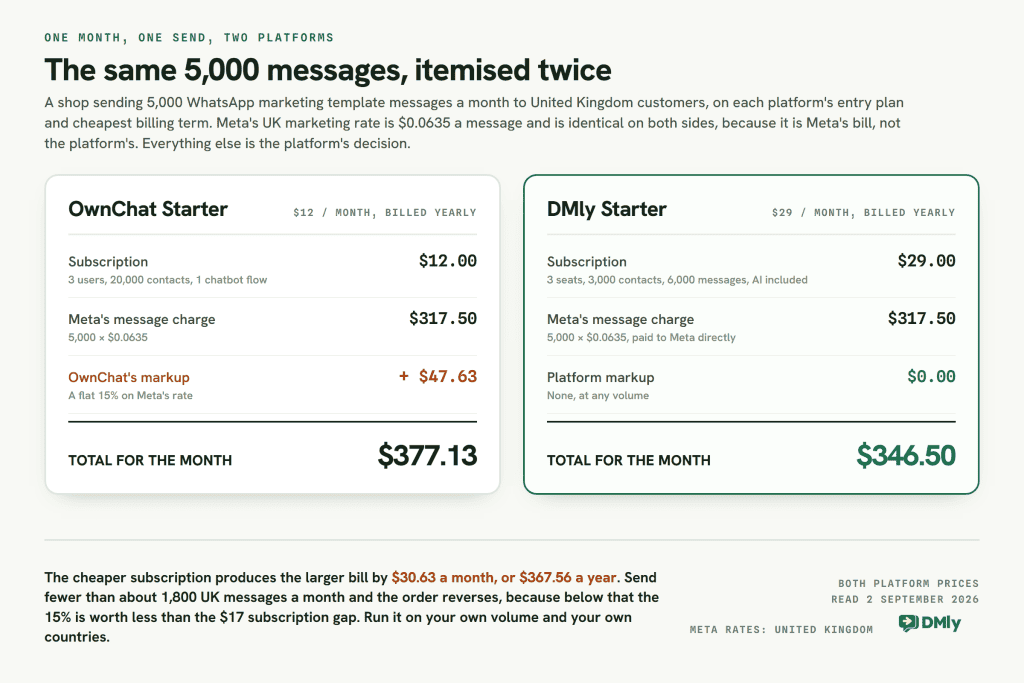
On annual billing, DMly’s entry plan is $29 a month and OwnChat’s is $12, so DMly starts $17 a month behind. OwnChat’s 15 per cent costs you $17 when your Meta message bill reaches $113 a month. Below that, the cheaper subscription wins. Above it, the percentage does.
What $113 of Meta spend buys depends entirely on where your customers are, and the spread is enormous:
| Market | Meta’s marketing rate per message | Marketing messages a month before the 15% costs more than the subscription gap |
|---|---|---|
| India | $0.0118 | about 9,600 |
| North America | $0.0250 | about 4,500 |
| United Kingdom | $0.0635 | about 1,800 |
| Germany | $0.1365 | about 830 |
That is the whole story of this comparison in one table. In OwnChat’s home market the markup is close to invisible, because India has the cheapest marketing rate in the table and you would need to send nearly ten thousand messages a month before the percentage caught up with a $17 subscription gap. Send the same campaign to German customers and the markup overtakes it before you reach a thousand.
One Complication That Works in OwnChat’s Favour
The table above compares entry plan with entry plan, and there is a wrinkle worth being honest about. OwnChat does not cap your message volume on any plan. Users, contacts, flows and history are all capped; messages are not. DMly caps them: 10,000 broadcast and template messages a month on Starter, 50,000 on Growth, 300,000 on Premium.
So a business sending 10,000 messages a month is still on OwnChat Starter at $12, while on DMly it has moved up to Growth at $65. That reopens the gap to $53 a month, and pushes the crossover back out to roughly 30,000 messages a month on Indian rates. On UK rates it lands around 5,600. The direction of the answer never changes, but the volume at which it flips does, and you should run the numbers on your own send volume rather than trusting either vendor’s framing, this page included.
What Changes on 1 October 2026, Whichever Platform You Pick
This is the most important thing on this page, and it has nothing to do with choosing between two vendors. Meta is changing what it bills for, and if you are on the WhatsApp Business Platform through any provider, two things happen at the start of October.
- Service messages start costing money above a free allowance. These are the free-form replies you type inside the 24-hour window after a customer messages you. They have been free since November 2024. From 1 October every business phone number gets 1,000 free service messages a month, with no rollover, and Meta charges only from the 1,001st, at the same rate as that market’s utility messages. Unlike utility and authentication messages, they get no volume discounts at all. A long conversation costs strictly proportionally more than a short one, so a shop answering a few dozen replies a day pays nothing here, and a busy inbox pays from the moment it passes a thousand.
- Utility messages inside an open window start costing money too. Order updates, appointment reminders and delivery notifications that land while the customer’s window is still open have been free since 1 July 2025. From 1 October they are billed at the utility rate, with no free allowance of their own. For most businesses this is now the bigger of the two, and for a booking business it is not close.
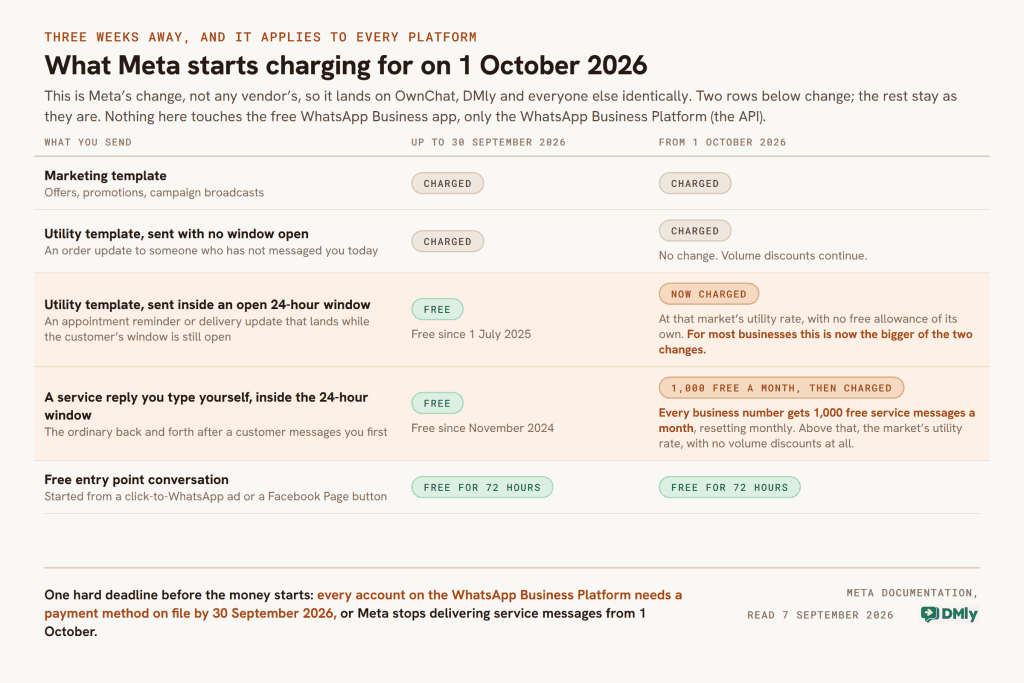
There is also a hard deadline before that. Every account on the WhatsApp Business Platform needs a payment method on file by 30 September 2026. From 1 October, Meta stops delivering service messages for accounts that do not have one. That catches exactly the businesses whose replies have always been free and who therefore never added billing details. If that is you, add the payment method in WhatsApp Manager this week. None of this touches the free WhatsApp Business app, only the API.
Now read that back against OwnChat’s pricing page. Two of the statements on it describe a world that is ending. Its FAQ says service conversations “are always free”, which stops being true on 1 October. And its explainer underneath the plans still opens “WhatsApp charges per conversation, not per individual message”, describing the 24-hour conversation model that Meta replaced with per-message pricing on 1 July 2025.
Neither of those is dishonest. Vendor pricing pages across this market are behind on the same two changes, and we found the same retired conversation model on three of our own pages while working through this batch of reviews, and fixed it. But it does hand you a specific question to ask, and it is the one question about OwnChat that this review cannot answer for you:
Does the flat 15 per cent apply to service messages and to in-window utility messages once those become chargeable on 1 October?
The question to put to OwnChat in writing before you commit
The markup is described as applying to template messages. Service messages are not templates. If the 15 per cent extends to the new charges, it lands on a bill you did not have before: on in-window utility messages from the first one, and on service replies once you pass the free thousand, where there are no volume discounts to soften it. If it does not, OwnChat’s markup is narrower than it looks. Their sales team can answer that in a sentence, and you want the sentence. We cover the full change in our guide to the October WhatsApp pricing change.
What OwnChat Genuinely Does Well
The value for money at the bottom of the range is real, and the specifications are not padded. Twenty thousand contacts on a $12 plan is a serious allowance. Most platforms in this bracket give you a few thousand and charge for the rest.
- No message cap on any plan. You can send as much as your Meta account allows without the subscription changing. Very few competitors do this, and for a high-volume, low-margin sender in a cheap messaging market it is the single best thing about the platform.
- A 14-day free trial with no credit card. Twice as long as DMly’s seven days, and long enough to build a flow, send to a real audience and watch what comes back.
- Instagram conversations cost nothing. Meta does not meter Instagram messaging the way it meters WhatsApp, so an Instagram-heavy business genuinely pays only the subscription. That is equally true of DMly’s Instagram channel.
- Payments and E-Bills from the entry plan. Payment links, multiple currencies, cards, UPI, wallets and bank transfers, refunds handled in chat, payment tracking, recurring billing, and gateway connections to Stripe and Razorpay. E-Bills are listed on Starter.
- Human support included at every tier. The pricing page promises call support, onboarding and “green tick assistance” on every plan, including the $12 one. Getting a person on the phone to walk you through Meta’s verified badge application is worth real money if you have never done it.
- An operations layer nobody else in this bracket offers. Staff task management with service-level targets, attendance tracking and delivery partner integrations on the Business plan. DMly has none of that.
It is also worth saying that OwnChat publishes its prices at all. A large part of this market makes you book a demo to learn what anything costs, which is the subject of our Anantya.ai review. OwnChat tells you the number on a public page. That deserves credit even when the number needs a footnote.
OwnChat Review: Where the Platform Stops
Two channels, and the gap between what the marketing calls them and what they are. A page headed “Omnichannel Messaging Platform” that supports WhatsApp and Instagram is stretching the word. If your customers also reach you on Messenger, Telegram, SMS or a chat widget on your website, those are on the roadmap rather than in the product, and you will be running a second tool until they arrive.
Appointments Are a Chatbot Conversation, Not a Calendar
This is the most consequential limitation for service businesses, and it takes a moment to see because OwnChat markets booking heavily. Its Salons and Spas page promises “24/7 appointment booking on WhatsApp” with customers viewing “available slots” and choosing stylists.
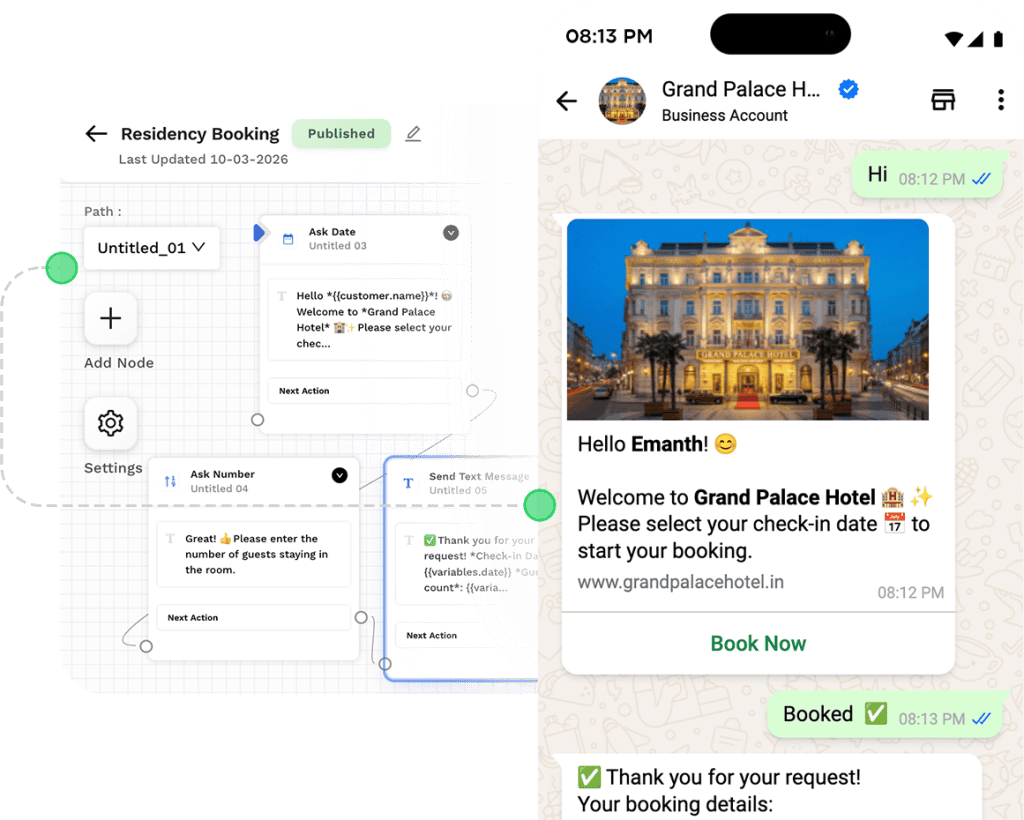
Look at what is actually building the booking. It is a chatbot flow with an Ask Date node and an Ask Number node. Nothing in OwnChat holds a calendar, so nothing checks staff availability, buffers between appointments, or whether two customers just took the same 3pm slot. Their own Salons page gives the game away when it suggests sharing “a booking link button so customers can book through your existing booking system”. You are expected to bring one.
The supported route is their Zoho Bookings integration, which is a good integration: confirmations, reminders, reschedule and cancel, all pushed to WhatsApp automatically. But Zoho Bookings is a separate product with a separate bill and a separate login. If bookings are your business, price that in. Our guide to WhatsApp appointment booking walks through what a real booking system has to do.
AI Costs You Two Tiers
The AI Agent nodes appear on Professional and nowhere below it, which means the cheapest way to get AI into an OwnChat conversation is $91 a month billed yearly, or $103 billed quarterly. If AI replies are the reason you are shopping, OwnChat’s attractive entry price is not the price you will pay.
Your Chat History Has an Expiry Date
Starter keeps six months of conversation history and Growth keeps twelve. Only Professional and above keep it indefinitely. For most businesses that is fine. For anyone who needs conversation records for disputes, warranty claims or regulatory reasons, it is a gate you want to notice before month seven rather than after it.
How DMly Compares, Including Where It Loses
DMly is a wider platform at a higher entry price, and this OwnChat review is published on DMly’s own blog, so treat every claim in this section as one you should check. Everything below is on our public pricing page or in our documentation, both of which you can read without talking to anyone.
DMly Pricing in Full
| Plan | Billed annually | Billed monthly | Team seats | Active contacts | Broadcast and template messages | AI replies |
|---|---|---|---|---|---|---|
| Starter | $29/mo | $39/mo | 3 | 3,000 | 10,000/mo | 500/mo |
| Growth | $65/mo | $79/mo | 6 | 10,000 | 50,000/mo | 5,000/mo |
| Premium | $149/mo | $199/mo | 15 | Unlimited | 300,000/mo | 20,000/mo, or unlimited on your own AI key |
Every plan, including Starter, includes the shared inbox, broadcasts, the CRM and pipelines, comment automation, bookings, invoices and payments, Google reviews, custom domain and branding, and the API. Nothing in the list above is gated behind an upgrade except message volume, seats, contacts and unlimited AI.
Where DMly Is Genuinely Ahead
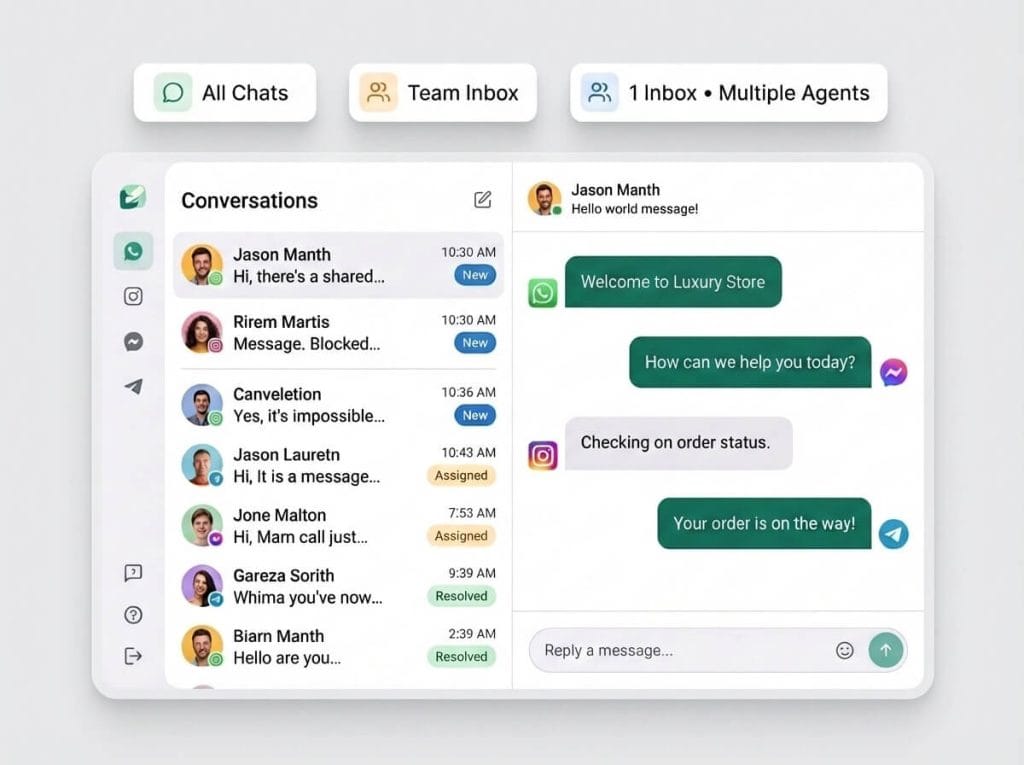
- Eight channels rather than two. WhatsApp, Instagram, Facebook Messenger, Telegram, SMS, TikTok, a Live Chat widget for your website, and Google Business Profile. They land in one shared inbox rather than eight tabs.
- No markup on Meta’s rates, at any volume. You pay Meta directly. This is the whole argument of the section above and it is the clearest difference between the two platforms.
- A real booking calendar. Services with durations and buffers, bookable staff with their own availability and time off, group classes with seats and a waitlist, a public booking page, and calendar sync. Not a chatbot that asks for a date.
- AI included from the entry plan. 500 AI replies a month on Starter, 5,000 on Growth. The agent can look a contact up, tag them, move them along your pipeline, search your documents, hand the chat to a person or book an appointment, rather than only writing a sentence back.
- Invoices, orders, payments, expenses and subscriptions as a finance area rather than a payment link. Invoices support partial payment, so a deposit against an invoice is real. Here is our walkthrough of sending an invoice through WhatsApp.
- Google reviews and reputation. Tracked review-request links sent on WhatsApp, SMS or email, up to 200 contacts at a time, plus your reviews and Google posts in one place. See the Google Business Profile guide.
- Loyalty, plans and gift cards. Points, packages, memberships and gift cards live in the catalogue, and loyalty points can be awarded when someone actually turns up to a class rather than when they book. Our loyalty programme guide covers the design.
- White-label and reselling. A reseller dashboard, your own domain, your app name, logo and colour in place of ours. See white-label.
Where DMly Costs You Something
An honest OwnChat review has to include the places where OwnChat is simply better, and there are several.
- DMly caps your messages and OwnChat does not. 10,000 broadcast and template messages a month on Starter is not a lot for a busy retailer, and there is no message top-up add-on. You move to Growth.
- The entry price is more than double. $29 against $12 on annual billing, and the shortest commitment is a month at $39 against a quarter at $45.
- Broadcast reporting has three holes, and we would rather you heard them from us. Replies is always 0 on every channel and always will be, Engagement over time is placeholder data that shows the same shape for every broadcast, and Delivered and Opened only work on WhatsApp, with Delivered alone on SMS and both stuck at zero on Messenger, Instagram and Telegram. Use the per-template performance view and the inbox instead. Our broadcast guide explains the workaround.
- Two of the eight channels cannot broadcast at all. The Live Chat widget and TikTok are inbox-only. Messenger and Instagram have no message templates, so anything automated has to reach the contact inside a 24-hour window.
- Appointments have three payment modes and none of them is a deposit. No payment, pay after the appointment, or pay before booking with a 15-minute slot hold. If you need a part-payment to hold a slot, the workaround is an invoice, which does support partial payment.
- No staff task management and no attendance tracking. OwnChat’s Business plan has both. DMly marks attendance on a class roster, which is about your customers turning up, not your staff.
- No native Salesforce or Zoho CRM connector. Ours are Shopify, WooCommerce, Zapier, n8n, OpenAI, Claude, Gemini, DeepSeek, Google Drive, Zoom and Mercado Pago. If you run on Salesforce or Zoho you are going through Zapier, n8n or the API.
- Unlimited AI needs your own provider key, and that is Premium only. Below that you are on a monthly allowance of AI replies. Two of the four supported providers, Claude and DeepSeek, cannot search your uploaded documents at all.
OwnChat vs DMly, Row by Row
Every row in this OwnChat review was checked against the vendor’s own published pages on 2 September 2026 rather than copied from a previous comparison.
| OwnChat | DMly | |
|---|---|---|
| Channels | WhatsApp and Instagram. Messenger, Telegram, SMS and email listed as coming soon | Eight: WhatsApp, Instagram, Messenger, Telegram, SMS, TikTok, Live Chat widget, Google Business Profile |
| Cheapest way in | $12/mo billed yearly ($144) | $29/mo billed yearly ($348) |
| Shortest commitment | $45 for one quarter | $39 for one month |
| Free trial | 14 days, no card | 7 days, no card |
| Markup on Meta’s message rates | Flat 15% on every template message | None. You pay Meta directly |
| Message allowance | None stated on any plan | 10,000, 50,000 or 300,000 a month by plan |
| Contacts on the entry plan | 20,000 | 3,000 active contacts |
| Seats on the entry plan | 3 user logins | 3 team seats |
| Extra seats | Printed as “$699/mo per user”; not available on Starter | $10 a month per seat |
| AI agents | Professional and above ($91/mo billed yearly) | Included from Starter, 500 AI replies a month |
| Chat history | 6 months on Starter, 12 on Growth, unlimited from Professional | Not tiered |
| Appointments | No calendar of its own. Chatbot flows that ask for a date, plus a Zoho Bookings integration | Native calendar: services, bookable staff, availability, classes, public booking page |
| Invoices and payments | Payment links, refunds, tracking, recurring billing, Stripe and Razorpay. E-Bills from Starter | Invoices, orders, payments, expenses, coupons and subscriptions. Partial payment supported |
| Reviews and reputation | No reviews or reputation feature listed | Google review requests on WhatsApp, SMS or email, plus a reviews inbox |
| Loyalty and memberships | Marketed on the Salons page as loyalty campaigns and package management. No module of its own in the feature list | Plans, credits, loyalty points and gift cards in the catalogue |
| Staff task management and attendance | Business plan | Not offered |
| White-label and reselling | No partner, reseller or white-label page anywhere on their site | Reseller dashboard, custom domain and branding. Powered by cannot be removed |
| Where it sells | India. “The lowest conversation rates in India”, 300+ businesses in Tamil Nadu | Global, priced in US dollars |
Which One Should You Actually Choose?
Neither platform is the right answer for everybody, and an OwnChat review that ended in a single winner would be lying to you. Here is the honest split, based on everything above.
Choose OwnChat If
- WhatsApp and Instagram are the only channels your customers use, and you are content to wait for the rest.
- You message customers in India, or another market where Meta’s rates are low enough that 15 per cent of them is small money.
- You send high volumes and want no message cap. This is the strongest single argument for OwnChat and it gets stronger the more you send.
- You run a restaurant, salon, jewellery shop or retail store in India and want vertical templates, Petpooja and Razorpay, and a person on the phone to help you get the green tick.
- You need staff task management with service-level targets or attendance tracking, and you are on the Business plan anyway.
- You sell only on Instagram. Instagram Pro at $12 a month with no message costs underneath it is hard to beat.
Choose DMly If
- Your customers reach you on more than two channels, or they will within the year.
- You message customers in Europe, North America or anywhere Meta’s rates are higher, where a percentage on messages compounds quickly.
- Bookings are your business. A calendar that knows staff availability is a different product from a chatbot that asks for a date.
- You want reviews, loyalty, invoicing and payments in the same place as the conversations, rather than stitched together from three tools.
- You want AI in your conversations without paying for two tier upgrades to get it.
- You are an agency or consultant who needs to resell the platform under your own brand and domain.
The Verdict of This OwnChat Review
OwnChat is a well-built, honestly priced WhatsApp and Instagram platform that is very good value in the market it was built for, and the 15 per cent markup is the thing to check before you assume it is cheap. The subscription genuinely is low. Whether the platform is low-cost depends on how many messages you send and to which countries, and the answer flips at somewhere between eight hundred and ten thousand messages a month depending on where your customers live.
If you are in India, sending a lot, on two channels, and you do not need a booking calendar, OwnChat is a strong choice and this OwnChat review would not talk you out of it. If you are outside India, or you need more than two channels, or your business runs on appointments, reviews and repeat customers, the higher subscription buys you a wider platform and a bill that stops growing with your send volume.
Whichever you choose, do the two things this page has been building towards: get the currency of every quoted figure confirmed in writing, and add a payment method to your WhatsApp Business account before 30 September.
Frequently Asked Questions
How much does OwnChat cost?
OwnChat has five plans and two billing terms. Billed annually: Starter $12 a month ($144 a year), Growth $53 ($636), Professional $91 ($1,092), Business $180 ($2,160), and Instagram Pro $12 ($144). Billed quarterly those become $15, $59, $103, $200 and $15 a month respectively. There is no monthly billing option, so the smallest commitment after the 14-day trial is $45 for a quarter. On top of the subscription, OwnChat adds a flat 15 per cent to Meta’s per-message rate, which is the figure this OwnChat review spends most of its time on.
Does OwnChat charge extra for WhatsApp messages?
Yes. Meta bills per template message at a rate set by the destination country, and OwnChat adds a flat 15 per cent on top of that rate. Their own worked example is a marketing message to India. Service conversations and all Instagram conversations are currently free on their pricing page, though from 1 October 2026 Meta charges for service messages beyond the first 1,000 a business number sends each month, and it is worth asking OwnChat in writing whether the 15 per cent applies to those once they do.
What is the best OwnChat alternative?
It depends on why you are looking, and this OwnChat review is only one input. If you want more channels, a native booking calendar, reviews and loyalty, and no markup on Meta’s rates, DMly covers all of those from $29 a month billed yearly. If you want a similar Indian WhatsApp platform with published prices, AiSensy and Interakt are the obvious comparisons. If your only real problem with OwnChat is the AI gate at Professional, compare the real cost of a WhatsApp chatbot across platforms before you upgrade.
Does OwnChat support Telegram or Facebook Messenger?
Not yet. OwnChat supports WhatsApp and Instagram. Its own Channels page lists Facebook Messenger, Telegram, SMS and email as “coming soon” without a date. If you need any of those today you will be running a second tool alongside it.
Can OwnChat handle appointment bookings?
Partly. OwnChat has no calendar of its own, so bookings are built as chatbot flows that ask the customer for a date and other details, or handed to its Zoho Bookings integration, which sends WhatsApp confirmations, reminders and reschedule options automatically. What is missing is anything checking staff availability or preventing double bookings. If appointments are central to your business, either budget for Zoho Bookings alongside it or use a platform with a booking calendar built in.
Is this OwnChat review independent?
No, and it should be read with that in mind. It is published by DMly, which competes with OwnChat, and the comparison section argues for DMly in several places. What we have tried to do instead of pretending otherwise is show our working: every OwnChat figure here comes from OwnChat’s own pages, dated, with the page named, and the sections on where DMly loses are as detailed as the sections on where it wins. Check the numbers against ownchat.app/pricing yourself before you decide.
Writing about WhatsApp automation, bookings and growth for local business.
Turn WhatsApp into your busiest channel.
Start free and run message, bookings, payments and reviews in one place.
