
WhatsApp Broadcasts: Opt-In, Templates, and Timing (2026)
The name is misleading. A WhatsApp broadcast isn’t broadcast at all.
Radio broadcasts: one signal, thrown at everyone, take it or leave it. A WhatsApp broadcast is delivered one-to-one. Each of your five hundred recipients gets a private message from your business, in their own chat with you, sitting between their family group and their best friend. Nobody else on the list is visible. To the person reading it, it isn’t a campaign. It’s a message.
Everything about this channel follows from that one fact. It’s why the read counts embarrass email: your offer sits where the attention already lives, in an app people open dozens of times a day. And it’s why the channel is unforgiving: a message that would be mildly annoying in an inbox feels like an intrusion in a chat, and the block button is one tap away. Meta knows this, which is why broadcasting on WhatsApp comes with more rules than almost anything else a business does online.
So this guide is built the way a campaign is: what a WhatsApp broadcast actually is (and the three things it isn’t), the four gates every send has to pass, what it costs and what it has to earn, who to send to, what to write, how to press send properly, and how to read the morning-after numbers so the next one is better. The worked example runs on DMly, where segments, templates, the send and the replies live in one place.
A Broadcast Is Not a Blast (and Not a Group, a List or a Channel)
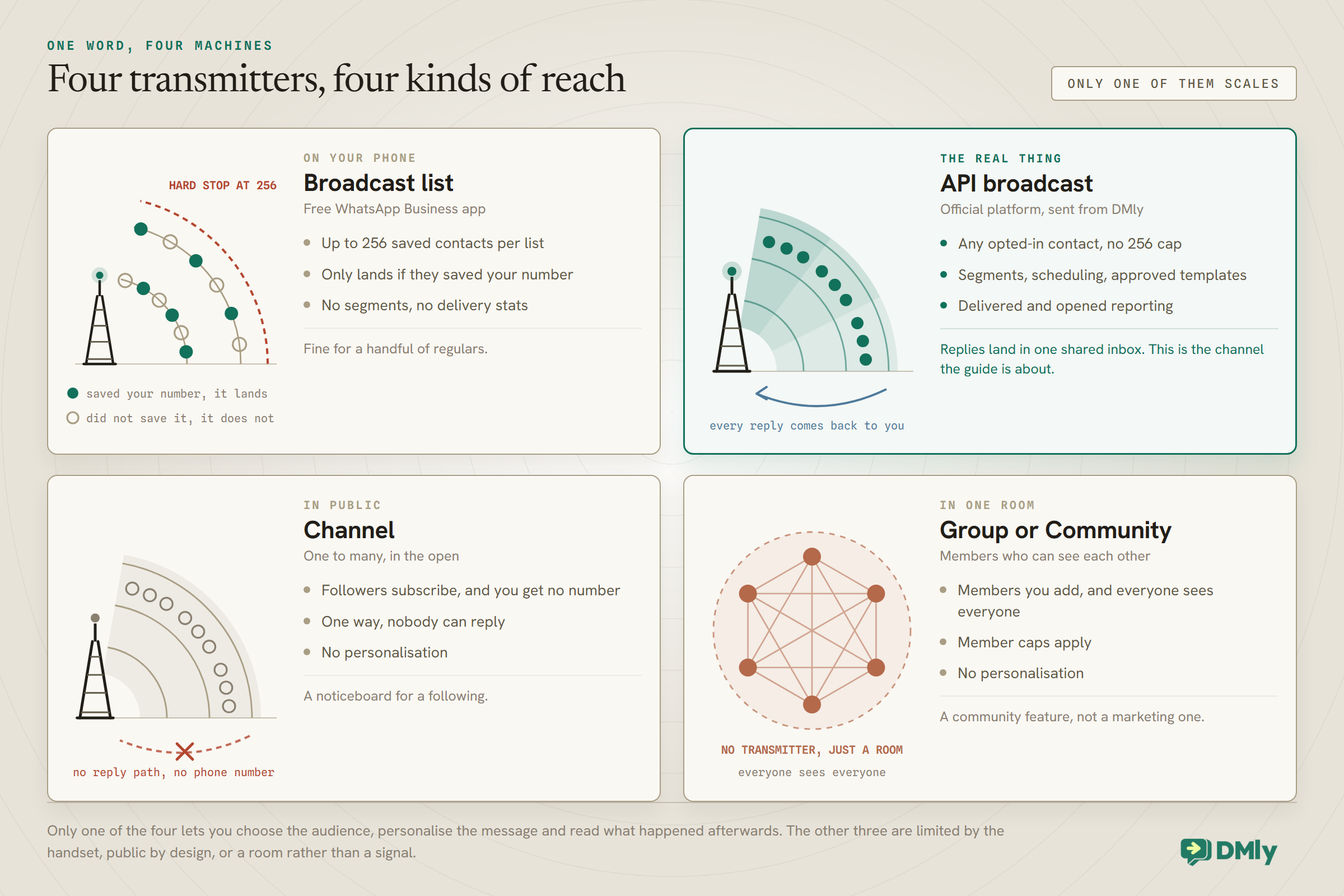
WhatsApp gives you four ways to reach a lot of people at once, and confusing them costs businesses real money, so let us separate them properly.
The broadcast lists in the free WhatsApp Business app are the ones most owners meet first: pick up to 256 saved contacts, type a message, send. The catch is the fine print. Each list caps at 256 people, and a recipient only gets the message if they have saved your number in their phone, which for most businesses quietly filters out half the list with no error message. Fine for a village-sized clientele; a ceiling for everyone else. We unpack the workarounds in our piece on the 256-contact broadcast list limit.
Groups put everyone in one room where they can see each other. That’s a community feature, not a marketing one; your customers didn’t agree to meet each other. Channels are Meta’s one-way megaphone: followers subscribe, can’t reply, and don’t hand you a phone number. Useful as a noticeboard, useless for conversation, and conversation is where WhatsApp earns its keep. If a noticeboard is genuinely what you want, our guide to WhatsApp newsletters, and choosing between a Channel and a broadcast list, weighs the two properly.
Then there’s the real thing. An API broadcast, sent through the official WhatsApp Business Platform via a tool like DMly, goes to a list you choose with no 256 cap and no saved-number requirement, arrives as an individual message to each person, and every reply comes back into a shared inbox where a person or an AI agent can answer. It runs on approved message templates, it’s priced per delivered message, and it’s governed by rules we’ll spend the next section on, because they’re the difference between a channel that compounds and a number that gets restricted.
Before you send, the free WhatsApp broadcast cost calculator estimates the total from your list size and country.
One scale note so the stakes are clear: WhatsApp passed 3 billion monthly users, and across Meta’s messaging apps more than a billion conversation threads between people and businesses are active every day. In a Kantar study Meta commissioned across 22 markets, 73.3% of consumers said they prefer messaging when dealing with a business, and 72.4% said they’re more likely to buy from one that offers it. Your customers are not on some new channel you have to drag them to. They’re already here.
The Four Gates Every WhatsApp Broadcast Passes Before It Sends
Meta protects WhatsApp’s inbox the way a bouncer protects a small club, and your broadcast has to get past four gates. Businesses that internalise these send confidently for years. Businesses that treat them as bureaucracy get their templates paused in week two.
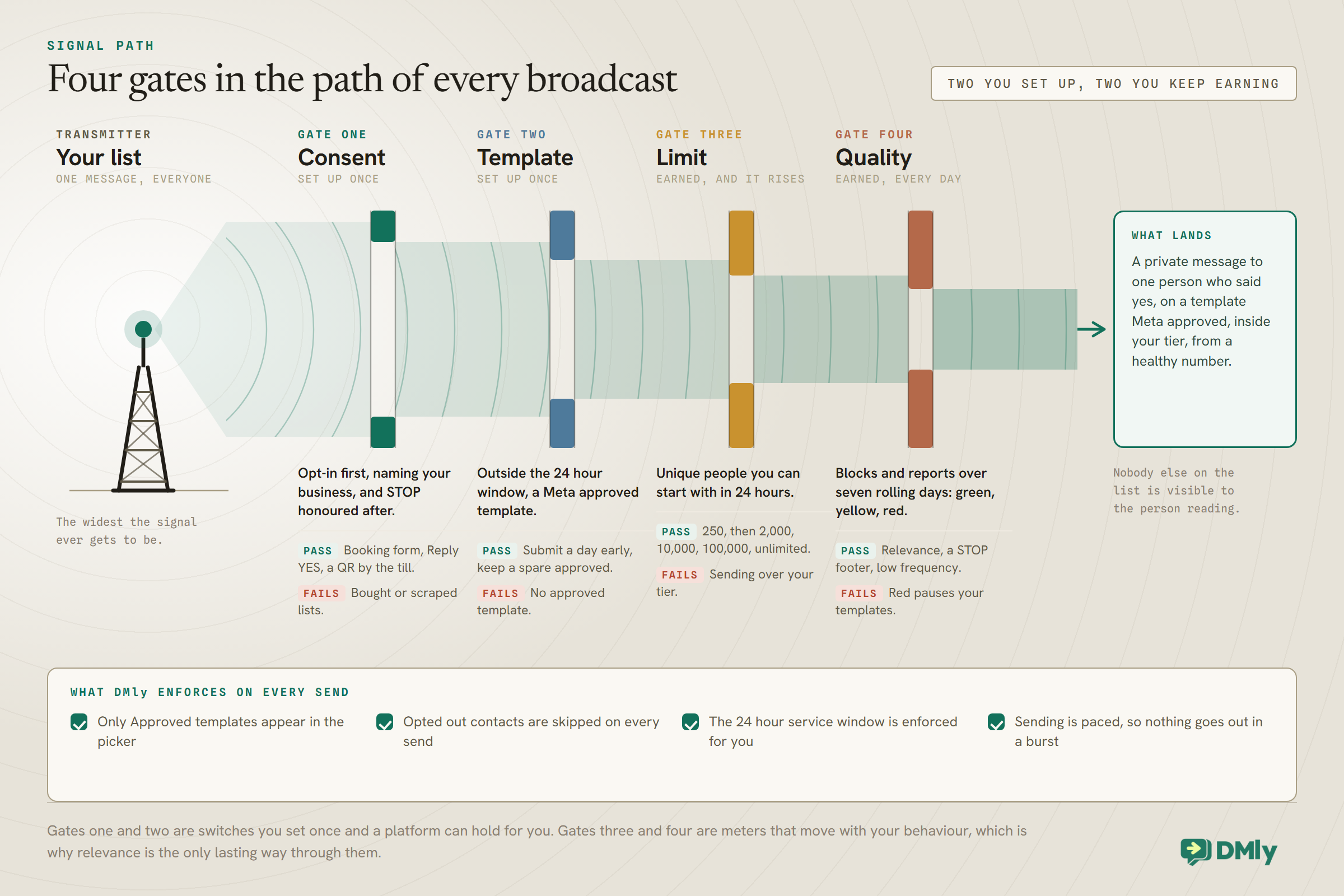
Gate one: consent. Meta’s policy is blunt: you need a person’s opt-in before you message them, and the opt-in has to make clear they’re agreeing to hear from your business, by name, on WhatsApp. How you collect it is flexible: a checkbox on the booking form, a “Reply YES for offers” keyword, a QR code by the till, the receptionist asking. What never counts: a bought list, a scraped list, or “they gave us their number for a delivery once”.
Keep your own record. DMly logs when someone opts out, but deliberately does not claim to know how you got consent, so store it yourself: a custom field like marketing_opt_in = 2026-08-14, booking form on the contact takes seconds and makes the “people who said yes” segment a two-click job later.
Gate two: the template. Outside a 24-hour service window, every business-initiated message is a pre-approved template, and a promotional one is a Marketing template. Meta reviews it before you can send it, usually in minutes, occasionally in a day. We’ll design one properly below.
Gate three: your messaging limit. Meta caps how many unique people you can open conversations with in a rolling 24 hours, in tiers: 250 for a new unverified account, then 2,000, 10,000, 100,000, unlimited. You reach 2,000 by verifying your business, or by delivering 2,000 quality template messages to unique people inside 30 days. Above that, the tier rises automatically, usually within hours, when your quality stays high and you’ve been using at least half your current limit in the past week. The practical reading: a new number cannot blast 5,000 people on day one, and shouldn’t want to. Start small, stay relevant, and the ceiling lifts itself.
If your list is bigger than your daily limit, the free WhatsApp messaging limit calculator shows how to split the send across days.
Gate four: quality. Meta scores your number green, yellow or red based on how recipients react: blocks, reports and ignored messages drag it down, replies hold it up. Quality decides how fast your tier grows, and, as we’ll see later, whether your templates stay live at all. Every other gate you pass once; this one you pass continuously.
None of this is optional, and none of it is a platform being difficult. The rules are why WhatsApp is still a place where messages get read. They are, literally, what you’re paying for.
What a WhatsApp Broadcast Costs, and What It Has to Earn
You pay per delivered marketing message, and the sums are small enough that the real question is whether the message deserved its slot. Since 1 July 2025, Meta bills marketing messages per delivered message. The rate depends on the recipient’s country and your volume; the order of magnitude for most markets is cents, not dollars, per message. Marketing is the category that always costs, even inside an open service window, which is Meta’s way of making you ask whether the message is worth sending. Utility messages (confirmations, reminders, receipts) are free inside an open 24-hour service window, and replies you send inside that window are free-form and carry no charge, but only until 1 October 2026. From that date Meta charges for in-window service messages and for utility templates delivered inside an open window, both at your market’s utility rate, which our guide to the October WhatsApp pricing change works through.
Do the arithmetic before every campaign, because it’s clarifying. Five hundred delivered marketing messages might cost you a few dollars total. If the campaign is a “quiet Tuesday” offer and two people book a colour service, it paid for itself thirty times over. If it’s a vague “we’re great, come by sometime” note, it earned nothing, and, worse, it spent goodwill and quality score you’ll want later. The money is trivial; the attention isn’t.
On the platform side, DMly charges no markup on Meta’s rates: you connect your own card in Meta Billing and pay Meta directly, and the subscription covers the software. Plans include a monthly broadcast and template message allowance: 10,000 on Starter, 50,000 on Growth, 300,000 on Premium, far above what a local business sends in practice. That combination matters when you compare tools, because a per-message markup is a tax that grows with your success.
Fewer People, a Better Message
Here’s the counterintuitive rule that separates businesses that thrive on broadcasts from businesses that burn their list: the best broadcast usually goes to the smallest audience that fits the message.
“Send to all” feels efficient and reads as noise, because no single message is relevant to your whole list. The colour-care offer belongs to colour clients. The “we miss you” nudge belongs to people who haven’t visited in 60 days, and our win-back campaign guide turns that one segment into a whole playbook. The reopening announcement? Fine, that one’s for everyone. The question to ask before every send is not “who can I reach?” but “who is this actually for?”
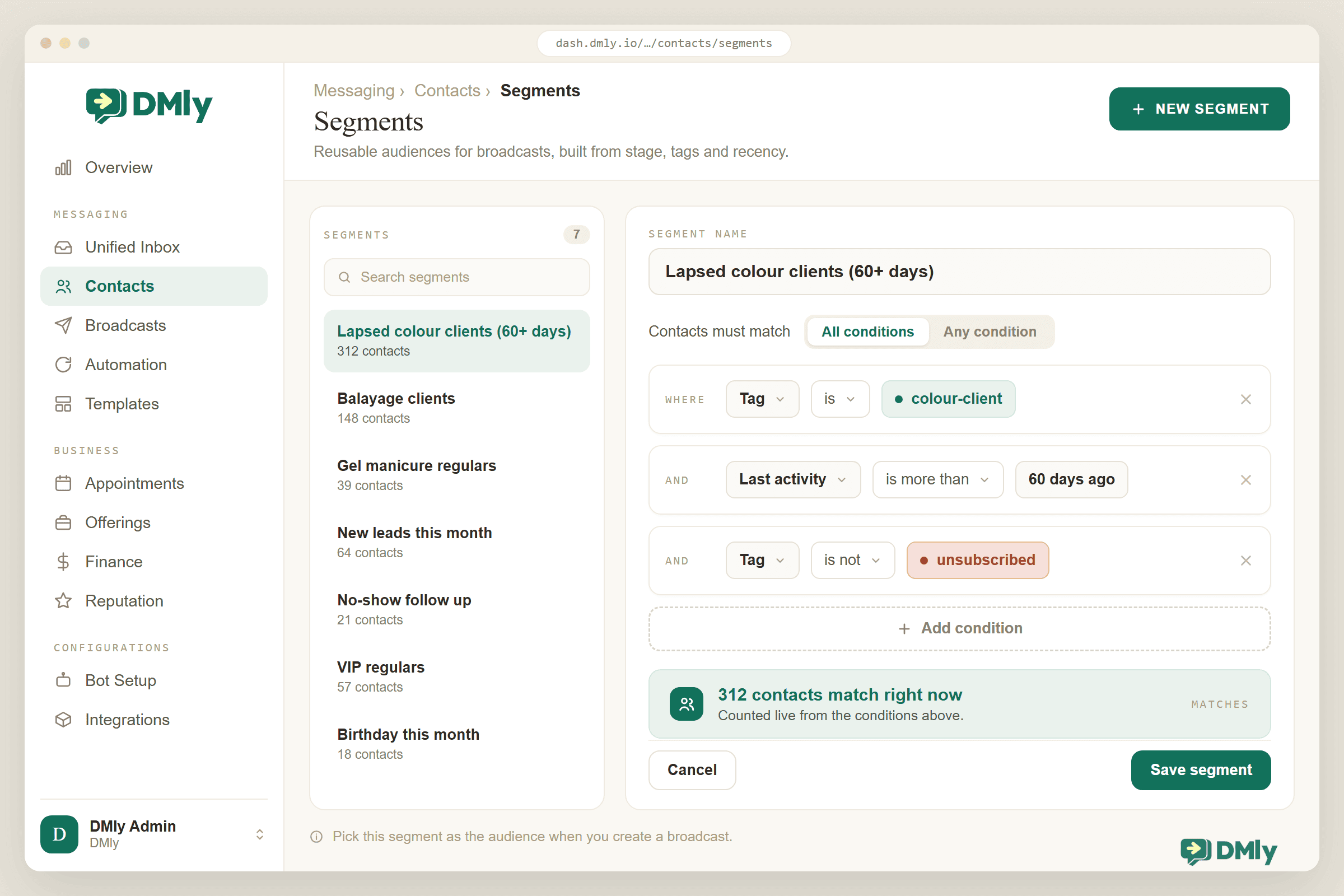
In DMly the audience tooling is tags plus segments. Tags are labels you put on contacts as they arrive: Colour client, Gym member, VIP, applied by hand, by an automation, or on import. Segments are saved, dynamic filters over those tags and fields: contact stage, tags to include, tags to exclude, days since last activity, whether they’re reachable on WhatsApp, marketing opt-in. A segment like “Colour client, last activity 60+ days ago, exclude Unsubscribe” recalculates itself every time you use it, so the win-back campaign you run monthly always targets exactly the right people without a spreadsheet in sight. Segmentation gets its own guide; the point to take from this one is simply that the segment is the strategy.
If your contact list has numbers in mixed formats, clean them up with the free bulk phone number formatter before you import.
Two hygiene habits complete the audience work. Send to reachable contacts only (DMly shows the toggle and the resulting count before you commit). Opted-out contacts are blocked at the moment of sending on every channel, but they aren’t removed from an audience automatically: without the toggle they sit in the recipient count and land in your report as Failed. DMly’s own docs say to tick it on every broadcast, and they’re right. And let the opt-out machinery do its job: in DMly, a contact whose whole message is stop, stop all, stopall, unsubscribe, cancel, quit, end, opt out or optout is opted out on the spot: flows cancelled, an Unsubscribe tag applied, and every future broadcast and sequence blocked for them. The match is exact, so “cancel my appointment tomorrow” opts nobody out, and start, unstop, subscribe or opt in reverses it. (One subtlety: the Unsubscribe tag is applied by the system; adding it to a contact by hand only labels them, it doesn’t opt them out. And opting out stops manual replies too: DMly refuses a reply typed in the inbox until the contact sends start or is resubscribed.) Your only job is to keep the exit visible: a “Reply STOP to unsubscribe” line on every marketing template. An easy exit is cheap; a block or a report is what actually hurts your number.
The Anatomy of a Template Worth Approving
A marketing template has a fixed skeleton, and the craft is fitting something human into it. You get an optional header (text or image), a body, an optional footer, and up to a few buttons.
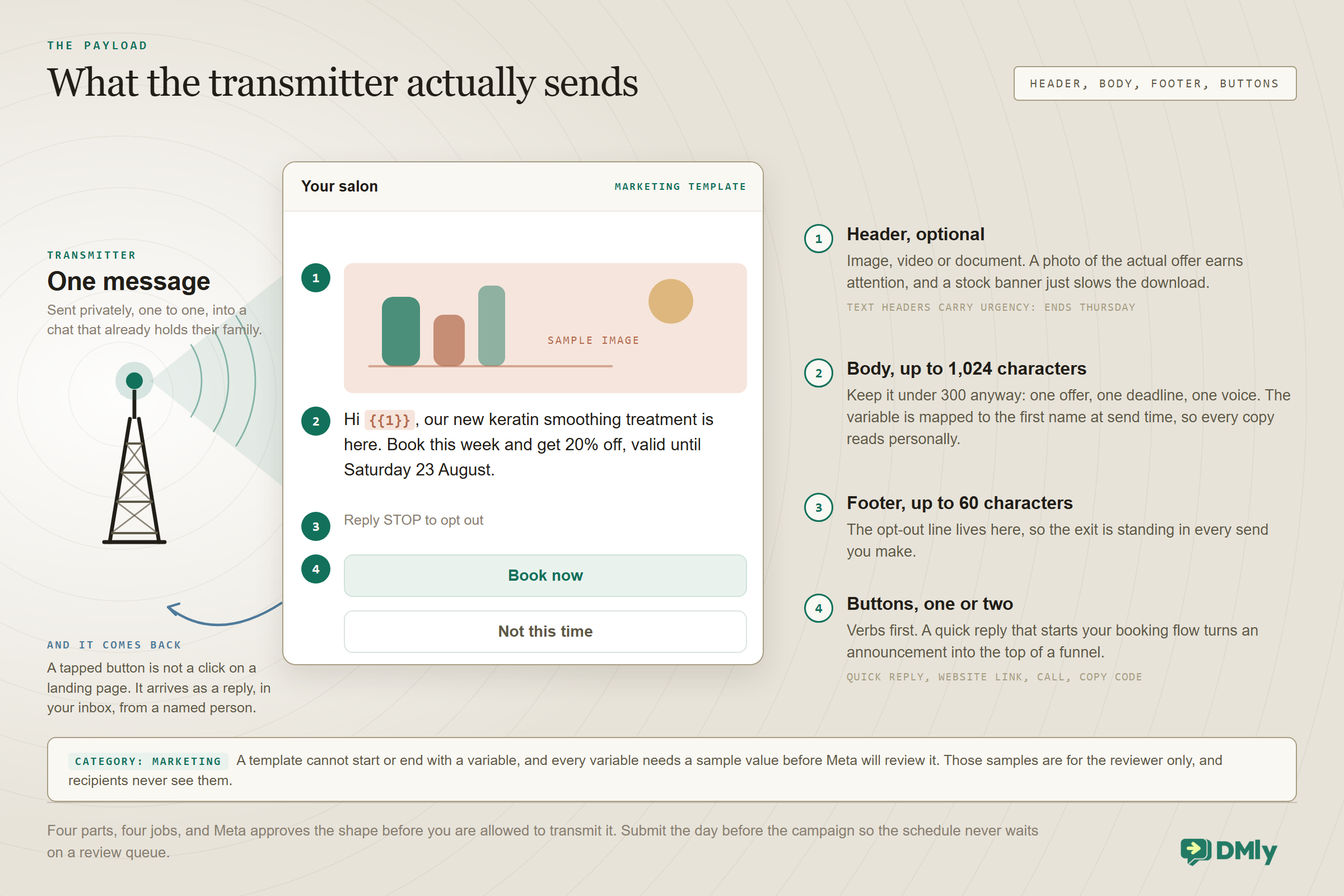
The body carries the campaign. Meta allows up to 1,024 characters; keep yours under about 300 anyway: one offer, one deadline, one voice. A template can’t start or end with a variable, and every variable needs a sample value for Meta’s review. Write it like a person: “Hi {{1}}, quiet week ahead, so colour services are 20% off Tuesday to Thursday. Fancy it?” beats a paragraph of adjectives every time. The {{1}} is a variable; in DMly you map it to the contact’s first name (or any field) when you send, so every copy reads personally without you typing anything.
The buttons do the converting. One or two, verbs first: Book a slot, See prices, Reply STOP. A quick-reply button that starts your booking automation turns the broadcast from an announcement into the top of a funnel; our live guide on boosting CTR for WhatsApp campaigns goes deep on exactly this. The footer takes the unsubscribe line, so the exit is standing in every send.
The header earns its place or gets cut. An image of the actual offer (the dish, the style, the class) lifts attention; a generic stock banner just slows the download. Text headers work for urgency: “Ends Thursday”.
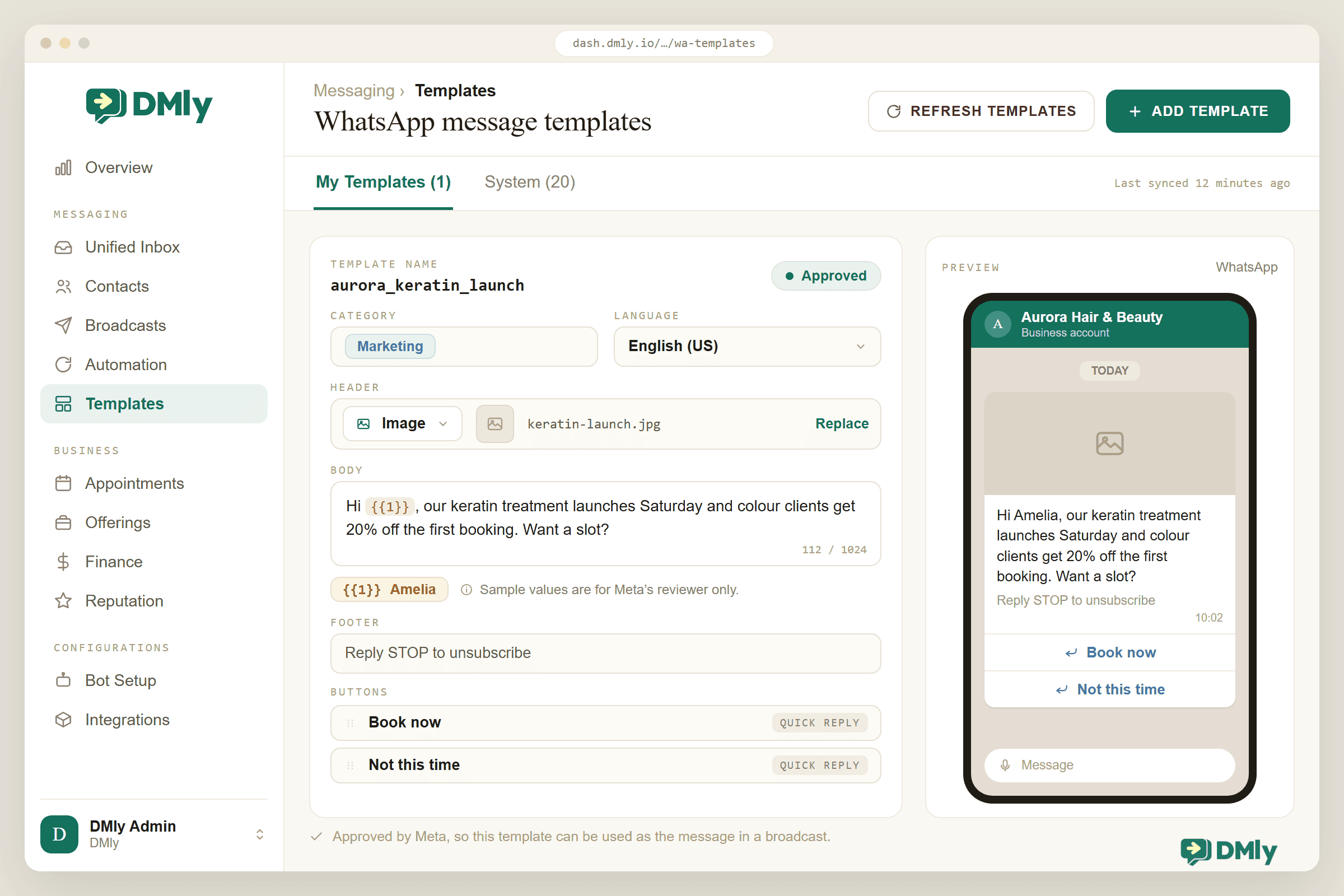
Submit the template the day before the campaign. Approval usually takes minutes, occasionally up to a day, and building in the buffer means the schedule never depends on Meta’s queue. In DMly, templates live under Messaging → Templates with their approval status beside them, next to the system templates DMly keeps approved for bookings and payments.
Press Send Like You Mean It
Sending a WhatsApp broadcast takes five minutes in DMly’s wizard, and the judgement is in three small decisions along the way.
- Name the campaign. A broadcast won’t save without an internal name. Use one you’ll recognise in a report in March:
winback-colour-aug, notbroadcast 7. - Pick the audience. Choose the segment, tick Reachable contacts only, and read the estimated count against your messaging tier. DMly won’t stop an oversized send; Meta simply rejects the overflow, so the excess comes back as failures. If the segment is bigger than the tier, split it across days instead.
- Attach the message. Pick the approved template and map its variables: {{first_name}} into {{1}}, a fixed date into {{2}}. Then read the preview once as a customer, not as the owner. This is the moment typos get caught or shipped. (DMly re-checks that the template still reads Approved at the moment of sending, so a template Meta paused overnight can’t slip out.)
- Choose the moment. Send now, or schedule. The safe defaults for a local business: mid-morning or early evening on weekdays, late morning at weekends, and never at 7am. If your contacts span time zones, DMly can deliver at a chosen hour in each contact’s own timezone, with a declared fallback for contacts whose timezone it can’t detect; on a spread-out list the final wave can leave more than a day after the first, which is the point. One more quiet virtue: the audience is re-queried at send time, so a segment that grew between scheduling and sending includes its newest members. Better than any benchmark: split one segment in half, send the same template at two different times, and let your own read rates settle the argument.
- Review, approve, create. A Review step shows the whole campaign; a team-approval toggle lets a second pair of eyes sign off before anything sends. For a first campaign, use it. And a scheduled broadcast isn’t a fired missile: it can be paused, resumed or cancelled up until it finishes; cancelling is permanent, and anything already sent stays sent.
- Staff the aftermath. A WhatsApp broadcast is a doorbell, and the replies start inside minutes. Someone, or your AI agent, needs to be on the inbox for the hour after it lands, because the fastest way to waste a good campaign is to leave its replies hanging. Our guide to FAQ and auto-response systems covers wiring that safety net so 2am replies get answered too.
The Morning After: Reading the Results
Opens tell you the send worked; replies tell you the campaign did. Every finished broadcast in DMly reports Sent, Delivered, Read, Replied, Clicked and Failed. (Delivered fills in on WhatsApp, SMS, Messenger and Instagram; Read on WhatsApp, Messenger and Instagram, since SMS has no read signal.) Vendor benchmarks put WhatsApp open rates near 98%, and Sinch, an official WhatsApp solution provider, publishes exactly that figure; discount the vendor enthusiasm and your first Opened count will still embarrass your email dashboard. Which is why the temptation is to stare at it. Resist. Opens tell you the send worked; they don’t tell you the campaign did.
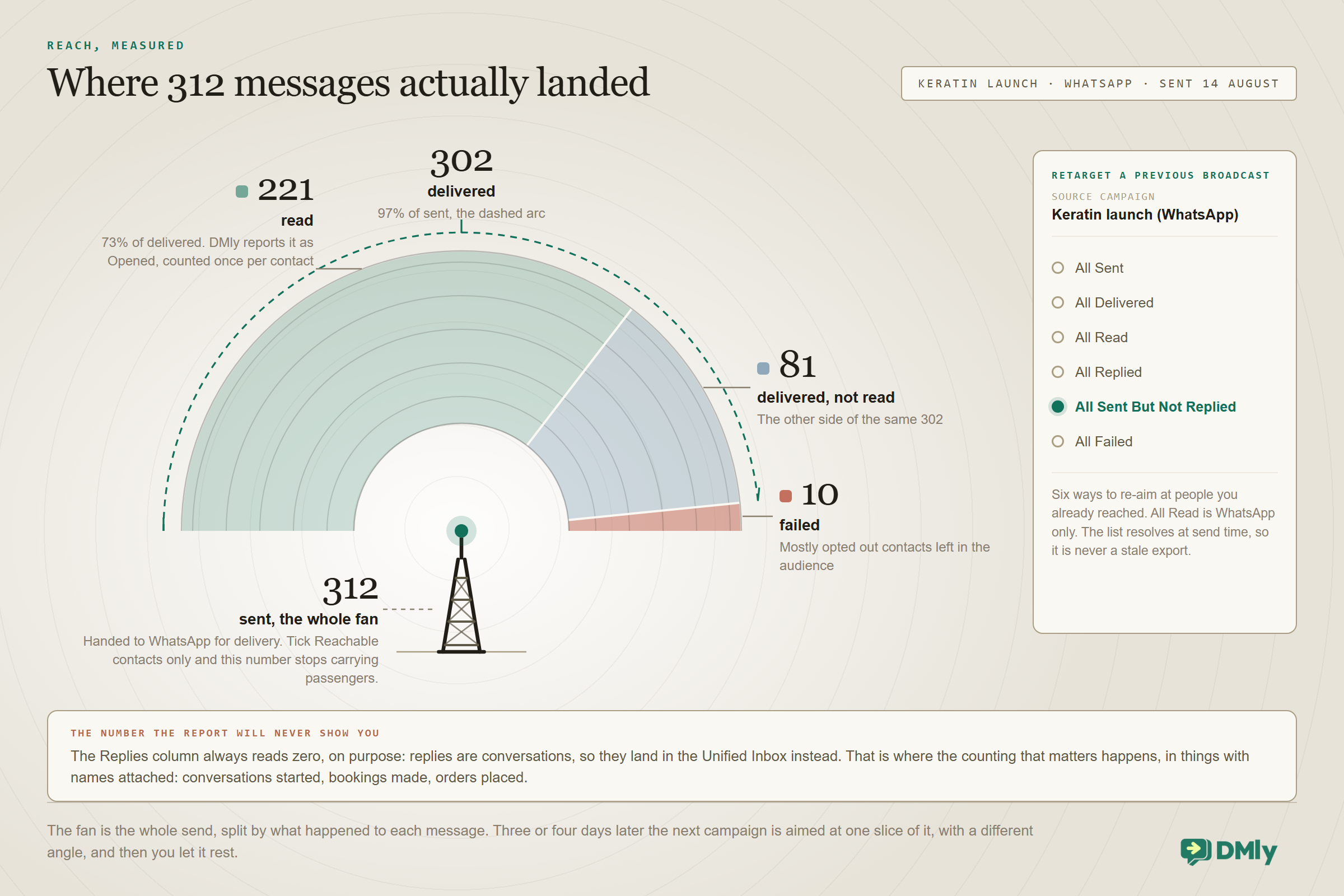
Replies are the real KPI, and DMly is honest about where they live. The Replies figure on a broadcast report counts who answered, and the replies themselves land in the Unified Inbox like any other message, where the conversations that matter happen. A broadcast to 400 people that produces 30 conversations and 12 bookings beat one to 4,000 that produced silence, whatever the open rates say. Count things with names attached: conversations started, bookings made, orders placed. On WhatsApp the conversion is the conversation.
Watch the two warning gauges. A delivery rate sagging below the high nineties usually means list rot: unreachable numbers you should stop paying to miss. A rising opt-out count after a send is the polite version of a message your audience didn’t want; DMly’s Overview dashboard tracks opt-out rate over time, and a spike after a campaign is the list telling you about the campaign. Listen to it before Meta’s quality score says the same thing less politely.
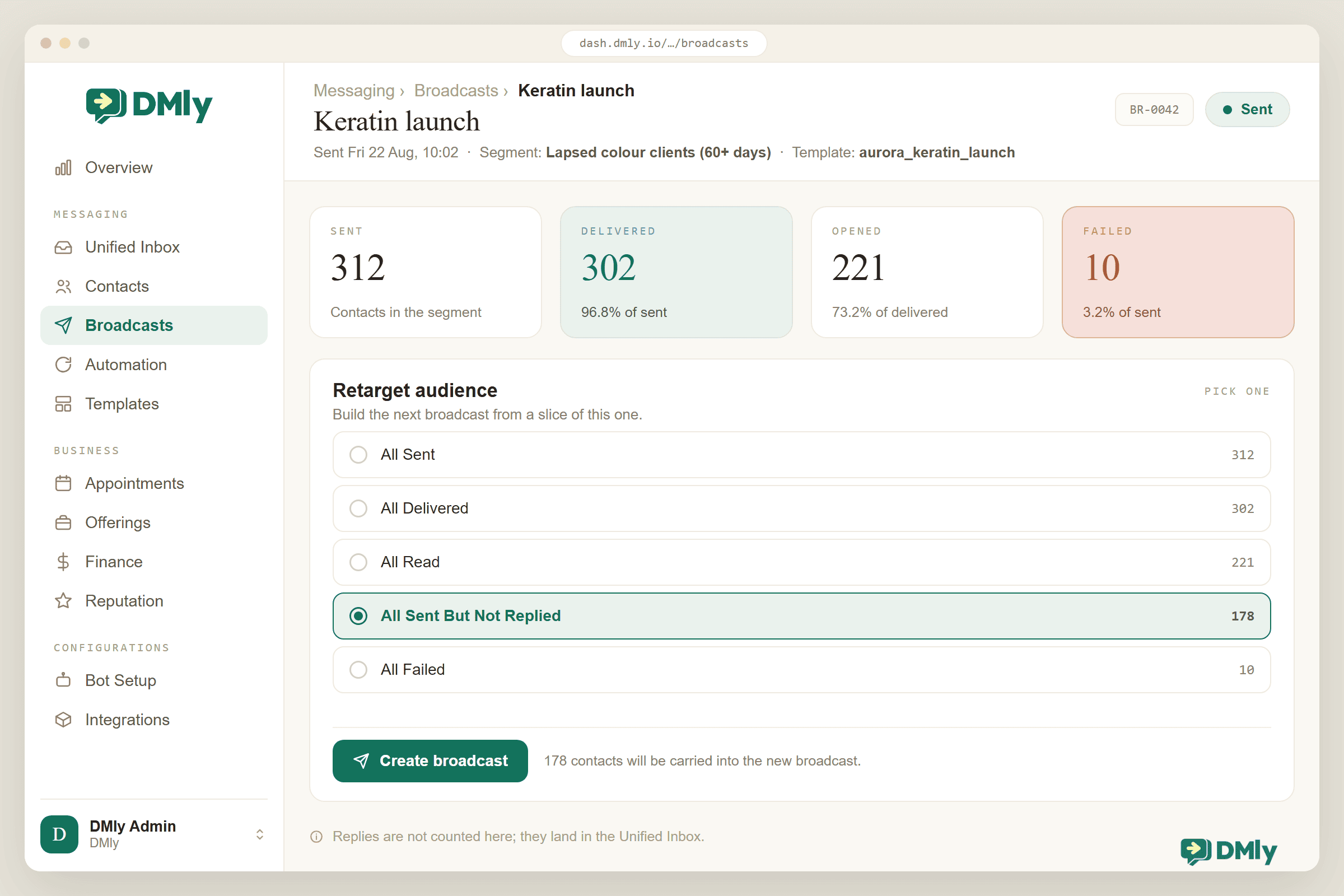
Then retarget, gently. The people who opened but didn’t reply are your warmest cold audience. In the broadcast wizard, switch the audience Type to Retarget, pick the earlier campaign, and choose a filter like All Sent But Not Replied (All Delivered works on WhatsApp and SMS; All Read on WhatsApp only). Three or four days later, the non-responders get one different angle (a reminder of the deadline, a different photo, a question instead of an offer), and then you let it rest. One follow-up is retargeting; three is nagging. We have a separate guide on retargeting non-responders when you are ready to systematise it.
Keeping the Number Alive
Broadcasting is the highest-leverage thing you will do on WhatsApp, and the most scrutinised, so here are the failure modes in plain language.
Templates get paused for performance. If a marketing template racks up blocks and reports, Meta pauses that template automatically: three hours the first time, six the second, disabled the third. The fix is never “send it again louder”; it’s a smaller audience and better relevance.
People have marketing caps. Meta limits how many marketing messages any one WhatsApp user can receive from all businesses combined in a period. When your message would tip someone over, it simply isn’t delivered and the API returns error 131049. You can’t control other businesses’ sending; you can control being the message that wasn’t worth a slot. The caps apply everywhere except the EEA, UK, Japan and South Korea, the exact numbers adapt to each person’s engagement and aren’t published, and after a 131049 failure Meta’s advice is to wait at least 24 hours before trying that person again. Frequency discipline, two to four marketing touches a person per month at most, keeps you out of that lottery and off your customers’ nerves at the same time.
The United States is its own weather system. Meta paused marketing templates to US numbers; utility and authentication still flow. If part of your list is American, plan campaigns for them around utility moments and service conversations instead, and check the current state before a US-heavy send, because platform policy moves.
Enforcement escalates. Policy violations move from warnings to messaging restrictions to being kicked off the platform, and appeals exist but take time you’d rather not spend. The whole game reduces to one sentence: send relevant messages to people who said yes, at a pace they’d choose themselves. Do that and the machinery above stays invisible. Our live walkthrough on sending bulk WhatsApp messages without getting banned is the tactical companion to this section.
Earning the Next Send
A broadcast is not a campaign; a rhythm of broadcasts is. The businesses that get compounding value out of this channel all converge on the same loop.
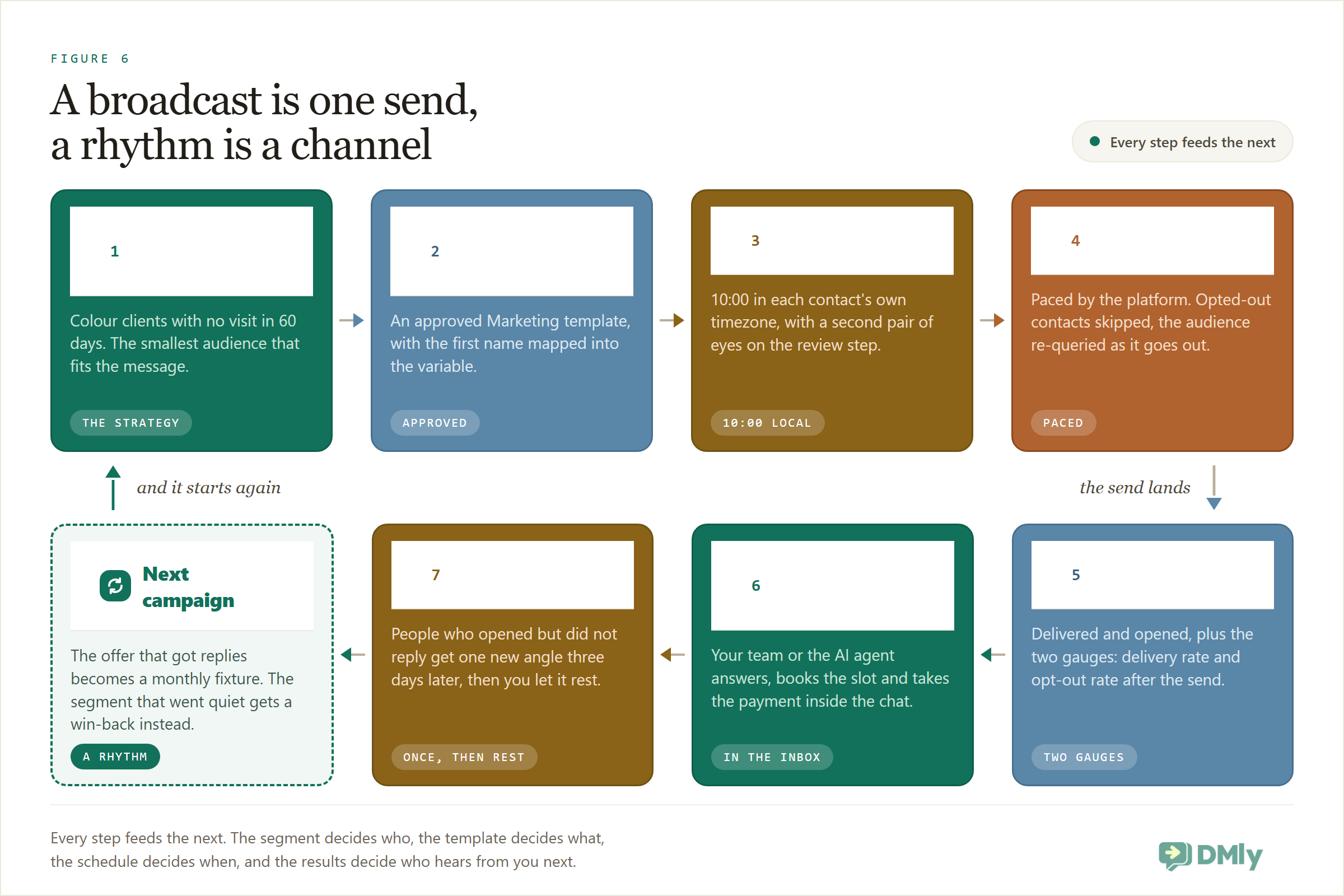
Segment, send, measure, retarget once, rest. Then feed what you learned into the next cycle: the offer that got replies becomes a monthly fixture, the segment that went quiet gets a win-back sequence instead of more promotions, and the sending calendar starts to look less like shouting and more like a relationship. Layer in an automated drip for new contacts (our drip campaign examples post has ten ready to steal) and the broadcast calendar sits on top of an always-on baseline.
And if you’re still weighing this channel against the one you already use: we ran the comparison honestly in WhatsApp vs email marketing. The short version is that they’re colleagues, not rivals: email for the long newsletter, WhatsApp for the message that should be read today.
Why DMly Is Built for WhatsApp Broadcasts
You can send API broadcasts from plenty of tools; the case for DMly is that the entire loop in this guide lives in one product.
The audience machinery is native: tags, custom fields and dynamic segments with an opt-in filter and automatic suppression of everyone who ever typed stop. The templates live next door, with DMly’s system templates pre-approved and your marketing templates a submission away. The wizard enforces the good habits this guide preaches: named campaigns, reachable-only sends, tier-aware counts, a review step, optional team approval, timezone-aware scheduling. And when the replies arrive, they land in the same Unified Inbox as everything else, where your team or your AI agent answers them, books the slot and takes the payment without the customer ever leaving the chat. Broadcast delivery and opt-out rate sit on the Overview dashboard, so the two gauges that matter are the first thing you see.
The commercial terms are simple: plans at $29, $65 and $149 a month billed yearly with 10,000, 50,000 and 300,000 broadcast or template messages included, no markup on Meta’s per-message rates, and a 7-day trial with no card. For a local business, the honest summary is that the software costs less per month than one decent campaign earns back in an evening.
Questions Businesses Ask About WhatsApp Broadcasts
How many people can I send a WhatsApp broadcast to?
On the free app’s broadcast lists, 256 per list, and only people who saved your number. On the official API, there’s no list cap; the constraint is your messaging tier: 250 conversations per day for a brand-new unverified account, rising through 2,000, 10,000 and 100,000 to unlimited as your business verifies and your quality holds. Most local businesses reach 2,000 within their first weeks.
Do people need to opt in before I broadcast to them?
Yes. Meta’s policy requires opt-in that names your business and the channel, and the block button enforces it culturally even where nobody checks the paperwork. Bought and scraped lists are both against policy and commercially self-defeating: they produce the blocks that throttle your account.
What does a WhatsApp broadcast cost?
Two parts. Meta charges per delivered marketing message, with rates by country, typically cents per message. Utility messages inside an open service window are free until 1 October 2026, and billable from that date, alongside the free-form replies you send inside the window. Your platform is the second cost: DMly plans from $29 a month billed yearly include a 10,000-message monthly allowance and add no markup on Meta’s rates.
Why was my template paused?
Meta pauses marketing templates whose recipients block or report them: three hours on the first offence, six on the second, disabled on the third. It’s a relevance signal, not a glitch. Shrink the audience, sharpen the offer, and check your quality rating before resubmitting.
When is the best time to send a WhatsApp broadcast?
For local businesses: mid-morning or early evening on weekdays, late morning at weekends, in the recipient’s own timezone if your list crosses zones. But your list beats any benchmark: send one template to two halves of a segment at different times and keep the winner.
Can my customers see who else got the broadcast?
No. Each message is delivered as a private one-to-one chat. Nobody sees a list, and every reply is a private conversation with your business, which is exactly why the channel converts.
The Channel You Can Wear Out
Every marketing channel decays the same way: it works, everyone piles in, audiences learn to ignore it. WhatsApp is unusual because Meta has built the decay-resistance into the plumbing: consent gates, quality scores, per-person caps. You can’t wear this channel out for everyone. You can only wear it out for yourself, one irrelevant blast at a time, or keep it sharp for years by treating every send as a small withdrawal from an account you’d like to stay in credit.
Start smaller than feels ambitious. One segment, one honest offer, one button, someone ready to answer. The read rate will surprise you; make sure the reply experience deserves it.
Send your first broadcast this week. Import your opted-in list, build one segment, submit one template, and let DMly handle the send, the replies and the bookings. Start the 7-day trial, no card, no markup on messages.
Writing about WhatsApp automation, bookings and growth for local business.
Turn WhatsApp into your busiest channel.
Start free and run message, bookings, payments and reviews in one place.
