
Christmas WhatsApp Marketing: Holiday Season Ideas for Local Businesses (2026)
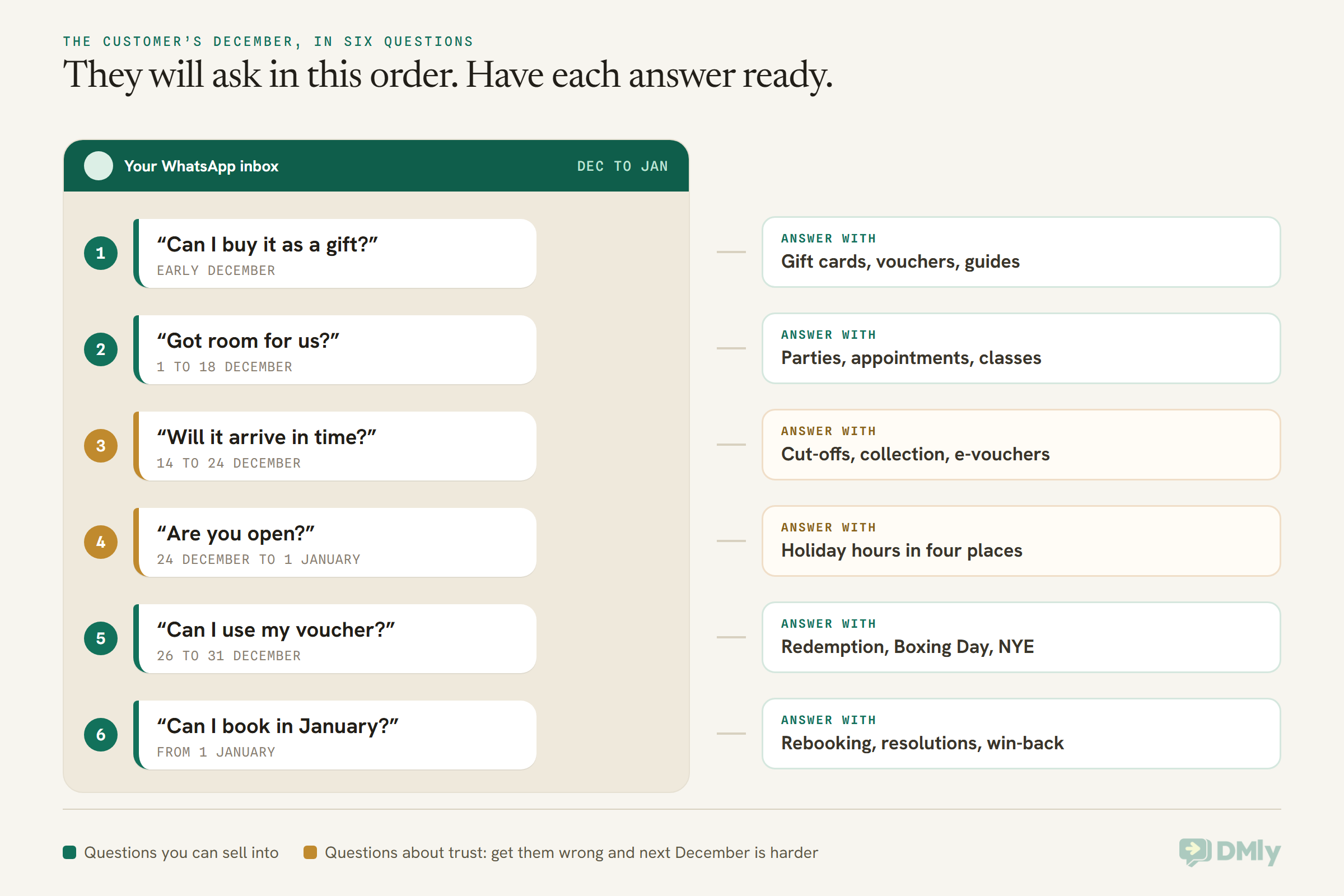
Here’s a forecast for your Christmas WhatsApp marketing season, and you can check it against your own inbox on 1 February. Between now and the middle of January, your customers will message you in a predictable order, and very few of those messages will be replies to a promotion.
In early December they’ll ask whether they can buy something as a gift. A week later, whether you have room for them: a table for twelve, a cut and colour before the 24th, a place on the festive class. Then whether their order will arrive in time. Then, on the days you’re shut, whether you’re open. Between Christmas and New Year, whether their voucher works. And in the first week of January, whether they can book.
The businesses that do well in December aren’t usually the ones that send the most. They’re the ones whose answers are ready before the questions arrive. In this guide, we’ll walk through the season one question at a time, with numbered ideas for each, the 2026 dates that matter in the US, the UK, India, Nigeria, the Gulf and Southeast Asia, six message templates, and the setup that makes it all run while you’re busy serving people. If you’re also running a Black Friday weekend, our Black Friday WhatsApp marketing guide covers it in depth; this one picks up on 1 December.
What Christmas WhatsApp Marketing Looks Like for a Local Business
Christmas WhatsApp marketing is the set of messages you send and answer on WhatsApp between early December and mid-January: gift offers, festive bookings, holiday hours, and the January follow-up, sent to customers who opted in and answered in the same chat they started. It’s less a campaign than a season of conversations.
That’s the main difference from Black Friday. Black Friday is one weekend with one offer, so it rewards a tight plan. The holiday season runs for six weeks, and most of what happens is customers coming to you with a question. A good December is mostly about being ready to answer, with a handful of well-timed broadcasts on top.
Four rules shape what you can send:
- Anything you send first, outside a 24-hour conversation, has to be an approved template. If a customer messaged you in the last 24 hours, you can reply freely. Otherwise WhatsApp only delivers messages Meta approved in advance. Our guide to WhatsApp message templates explained covers the three kinds.
- A Christmas greeting counts as marketing. Meta files thank-you notes and greetings under Marketing, because they build a customer relationship. So a “Merry Christmas from all of us” template needs the same opt-in as a sale.
- Marketing templates don’t reach US numbers. Meta currently doesn’t deliver marketing template messages to people with United States phone numbers. A US business’s December runs on conversations customers start, which we’ll come back to.
- Meta may hold back marketing messages to people who rarely engage. The limit adapts to each person’s recent behaviour across every business, and December is a busy month for everyone’s inbox. A held message fails with error 131049, and Meta asks you to wait at least 24 hours before trying that person again. The limit isn’t active for messages sent from or to the EEA, the UK, Japan or South Korea.
If most of your customers are in the US
Because marketing templates don’t reach US numbers, a US business can’t broadcast a Christmas offer on WhatsApp to US customers. What does work is everything a customer starts. When someone messages you, you can reply with your offer, your gift card details or your holiday hours as an ordinary message inside the 24-hour window. So the US version of every idea below begins with an invitation: a WhatsApp QR code by the till that says “message GIFT for this year’s gift cards”, a click-to-chat link in your emails, and the WhatsApp button on your Google listing. For anything you need to push out, email and SMS do that job in the US.
Holiday Season 2026 Dates for a Global Customer List
Christmas Day 2026 is Friday 25 December, so Christmas Eve is a Thursday, Boxing Day falls on Saturday 26 December, and New Year’s Day 2027 is a Friday. That Friday Christmas shapes the whole fortnight: a long weekend straight after the 25th, and another one straight after New Year’s Day.
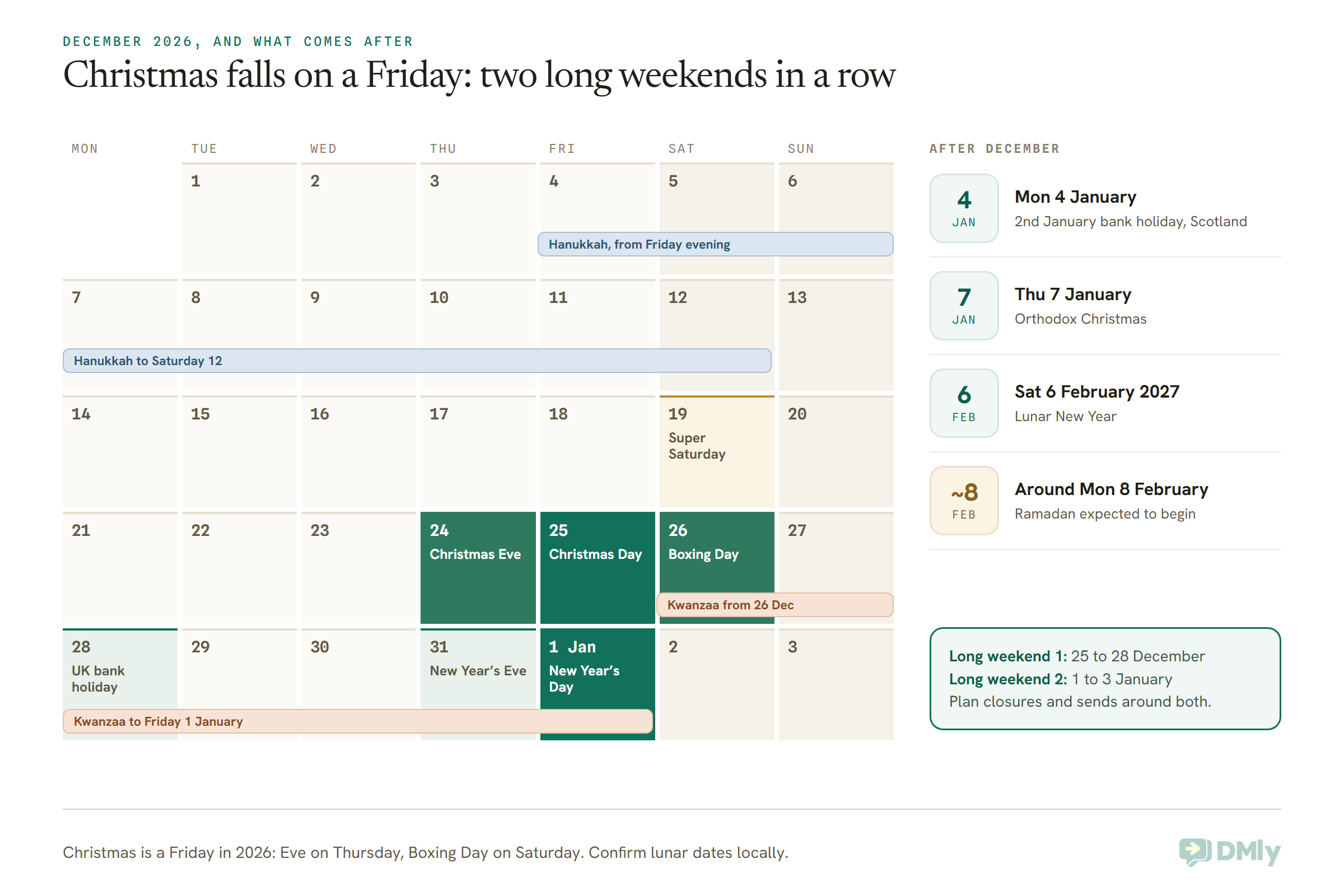
| Date | What it is | Who it matters to |
| Fri 4 to Sat 12 Dec | Hanukkah (first candle on the evening of the 4th) | Jewish customers, everywhere |
| Sat 19 Dec | The last Saturday before Christmas | Every shop with a counter |
| Thu 24 Dec | Christmas Eve | Last-minute gift buyers; many businesses close early |
| Fri 25 Dec | Christmas Day | A public holiday in the US, UK, India, Nigeria and many more |
| Sat 26 Dec | Boxing Day | A public holiday in the UK and Nigeria; widely kept in Canada and Australia |
| Mon 28 Dec | Boxing Day substitute bank holiday | England, Wales, Scotland and Northern Ireland |
| Sat 26 Dec to Fri 1 Jan | Kwanzaa | African American communities, mainly in the US |
| Thu 31 Dec | New Year’s Eve (Hogmanay in Scotland) | Restaurants, bars, venues, salons |
| Fri 1 Jan | New Year’s Day | Almost everyone |
| Mon 4 Jan | 2nd January bank holiday | Scotland |
| Thu 7 Jan | Orthodox Christmas | Orthodox Christian customers in many countries |
| Sat 6 Feb 2027 | Lunar New Year | Chinese communities across Southeast Asia and the diaspora |
| Around Mon 8 Feb 2027 | Ramadan expected to begin (confirm locally) | Muslim customers in the Gulf, Nigeria, India, Indonesia, Malaysia and beyond |
The last two belong on this list because their preparation happens in January, when the rest of your calendar is quiet. Our WhatsApp marketing calendar for 2026 has the prep-by dates for every holiday in the year.
Greeting a mixed customer list without guessing anyone’s faith
If your customers celebrate different things, it’s tempting to tag them by religion and send each group its own greeting. Don’t. Under the UK and EU GDPR, religious beliefs are a special category of personal data with extra protection, and guessing someone’s faith from their name is both risky and often wrong. There are two better options. Send one warm “season’s greetings” message to everyone who opted in to hear from you. Or let customers choose for themselves: a button in an earlier message asking which celebrations they’d like offers for, recorded as their own preference. In Southeast Asia, the Gulf, Nigeria and India, where December sits alongside other festivals, the second approach also tells you who wants a Lunar New Year or Ramadan message later on.
Before 1 December: Three Jobs That Make Every Idea Work
Get your holiday templates approved by mid-November, decide your holiday hours now, and give customers a reason to message you first. Each idea below leans on at least one of these.
- Submit your templates early. Meta’s review is usually quick, but a rejection needs rewriting, and December is when everyone submits at once. In DMly, Templates → Browse library on your WhatsApp channel has ready-made marketing templates filtered by occasion, including seasonal and event, which you can customise or submit as they are.
- Decide your holiday hours and write them down once. Every day you’ll be closed or open short, for every location and every staff member. You’ll need that list in four places, which we cover under question 4.
- Give people a reason to message you. A conversation the customer starts can be answered without a template for 24 hours (the first 1,000 replies a month on each number are free), reaches US numbers, and doesn’t count against Meta’s per-user marketing limit. A sign that says “message GIFT for gift cards” or “message PARTY for group bookings” does more in December than an extra broadcast. If you run ads, a conversation that starts from a click-to-WhatsApp ad opens a 72-hour window where Meta doesn’t charge for your replies.
You’ll also need permission. Every marketing template, including the greeting, needs the customer’s agreement to receive marketing from you. Our guide to WhatsApp opt-in and how to prove consent covers what that looks like, and in DMly anyone who replies STOP is blocked from every broadcast automatically.
Question 1, “Can I Buy It as a Gift?”: WhatsApp Marketing Ideas for Christmas Gift Buyers
The first holiday question is about gifts, and the best answer for a local business is usually a gift card or a voucher for a service, sold in the chat and delivered to the recipient’s phone. It suits salons, spas, restaurants, gyms, studios and shops alike, and it’s the one product that can still be bought on the afternoon of 24 December.
Idea 1: Sell gift cards in the chat
When a customer messages “can I get a voucher for my sister?”, you shouldn’t have to send them to a website. In DMly, a teammate opens Finance → Gift cards → New gift card, picks the customer as the Purchaser, adds the sister as the Recipient, sets the value, and selects Sell. DMly sends the customer a purchase invoice on WhatsApp. The moment it’s paid, the card turns Active and the code goes to the recipient by WhatsApp and email, with the value and your business name.
Two things to check before December. The code message is built from the dmly_gift_card template, which Meta holds as Marketing whatever it’s declared as, so it needs to be approved. And because it’s a marketing template, it won’t arrive on WhatsApp for a recipient with a US number, so take the recipient’s email too. If a code ever goes astray, the purchase invoice shows it on the line item, so you can forward it yourself.
Idea 2: Sell a January voucher, not a December discount
A voucher for “a blow-dry in January” or “a month of classes from 4 January” fills your diary in your quietest weeks and costs you nothing in your busiest. Salons, spas, clinics offering cosmetic treatments, personal trainers and tutors can all sell one. Sell it as a gift card for a set value and say in the message what it covers.
Idea 3: A gift guide by budget
Shops and restaurants can send a short guide in one message: three gifts under a modest price, three in the middle, one showpiece. A carousel template shows 2 to 10 swipeable cards with their own text and buttons, which suits a guide well.
Idea 4: Gift card reminders to last year’s buyers
If you sold gift cards last December, those purchasers are your warmest gift audience this year. Tag them as you sell (DMly’s tags are yours to name, such as “gift buyer 2026”), and next November they’re a ready-made list.
Idea 5: Comp a card instead of discounting
For a loyal regular, a small free gift card often lands better than a percentage off. DMly’s Issue as a comp skips the invoice and makes the card active at once. The code is delivered automatically; if they’ve messaged you recently, follow it with a personal line of your own in the chat.
Template 1: The gift card offer (Marketing)
Hi [Name], it’s [Business]. Our gift cards are back for Christmas, from [lowest value]. Tell us who it’s for and we’ll send you a payment link; the code goes straight to them the moment it’s paid. Last orders [time] on Christmas Eve.
Buttons: Buy a gift card / Ask a question
Footer: Reply STOP to opt out
The “tell us who it’s for” line does real work: it starts a conversation, which opens a 24-hour window for everything that follows.
One caution if you set an expiry date. DMly expires a card in full on its Expires date, whatever balance is left, and gift card expiry rules differ between countries and US states. Check yours before you set one, or leave the field blank and the card never lapses.
Question 2, “Have You Got Room for Us?”: Festive Bookings on WhatsApp
The second question is about space: tables, appointment slots and class places in the three weeks before Christmas. These are the most valuable conversations of the season, and the ones most likely to fall apart when a group changes its mind.
Idea 6: Open the festive diary early, and say so
Salons and barbers know the week before Christmas fills first. A message in late November or the first days of December that says “the diary for 14 to 24 December is open” turns a scramble into an orderly list. Send it to recent clients, not your whole list: people who visited in the last few months are the ones who’ll book.
Idea 7: Take a deposit on party bookings
A table for fourteen that doesn’t turn up on the Friday before Christmas is a night’s takings gone. In DMly, a service set to take payment before booking can take a Deposit instead of the full price: at 25 per cent, a 60 booking costs 15 to secure and 45 on the day. It applies wherever the booking is made, including bookings you add yourself from the calendar. Our guide to accepting appointment deposits or full payment at booking walks through the settings.
Idea 8: Run festive one-off classes and workshops
A wreath-making evening, a festive spin class, a Christmas baking session for children, a New Year’s Eve morning workout. In DMly, a class session has a seat capacity and an optional waitlist, so when someone cancels, the next person moves up without you sending a single message. Our piece on class capacity and waitlists explains how the room refills itself.
Idea 9: Let the bot take the first questions
“How many can you seat?”, “Do you have a set menu?”, “Can we bring a cake?” A keyword automation on PARTY or BOOK can send your festive menu, your group policy and a booking link the moment someone asks, so your team only steps in for the details.
Idea 10: Pre-holiday check-ups for clinics
Dental and medical practices see a rush of “can I be seen before you close?” messages. A plain note to patients due for a check-up, sent in late November, spreads the demand. Keep it to the appointment, never a health claim, and leave out discounts on clinical care.
Template 2: The festive booking invitation (Marketing)
Hi [Name], the [Business] diary for 14 to 24 December is now open, and it fills fast every year. Want us to hold a time for you? Reply with the day that suits and we’ll send the options.
Buttons: Book now [link] / Reply with a day
Footer: Reply STOP to opt out
Question 3, “Will It Arrive in Time?”: The Last-Minute Week, 14 to 24 December
From mid-December, the questions turn to deadlines: will it arrive, can I collect it, is it too late. This is where honesty earns next year’s trust, and where WhatsApp’s speed is a real advantage over email.
Idea 11: State your last-order dates plainly
Read your courier’s published Christmas cut-off dates for each service you use, then add a day of your own. Send one message with your last-order date for delivery and your last time for collection, and stick to it. “Order by [date] and it arrives before Christmas; after that we’ll tell you honestly” is a sentence customers remember.
Idea 12: Answer “where is my order?” automatically
If you sell through Shopify or WooCommerce, DMly’s automation templates include Order Status Self-Service: a customer whose message mentions their order or tracking is asked for the order number, and the status comes back with the tracking link. If the number isn’t found, it hands the chat to a person instead of guessing. In the last week before Christmas, that’s a lot of messages your team doesn’t type.
Idea 13: The 23 and 24 December e-voucher
For anyone who has left it too late, a gift card is still possible on Christmas Eve, because the code arrives as soon as the payment does. A message on the 22nd or 23rd that says “still need a gift? Ours arrive in minutes” is the one Christmas WhatsApp marketing message that genuinely solves a problem at the last minute.
Idea 14: Collection slots for Super Saturday
Saturday 19 December is the last Saturday before Christmas, and it’s crowded. Shops and bakeries can offer collection times so customers aren’t queuing. One way to do it in DMly is to schedule each collection window as a class session with a seat limit, so the booking link stops offering a window once it’s full.
Template 3: The last-order date (Marketing)
Hi [Name], a quick heads-up from [Business]: the last day to order for delivery before Christmas is [date]. After that, you can still collect in store until [time] on [day], or send a gift card that arrives in minutes.
Buttons: Order now [link] / Buy a gift card
Footer: Reply STOP to opt out
Question 4, “Are You Open?”: Holiday Hours on WhatsApp and Everywhere Else
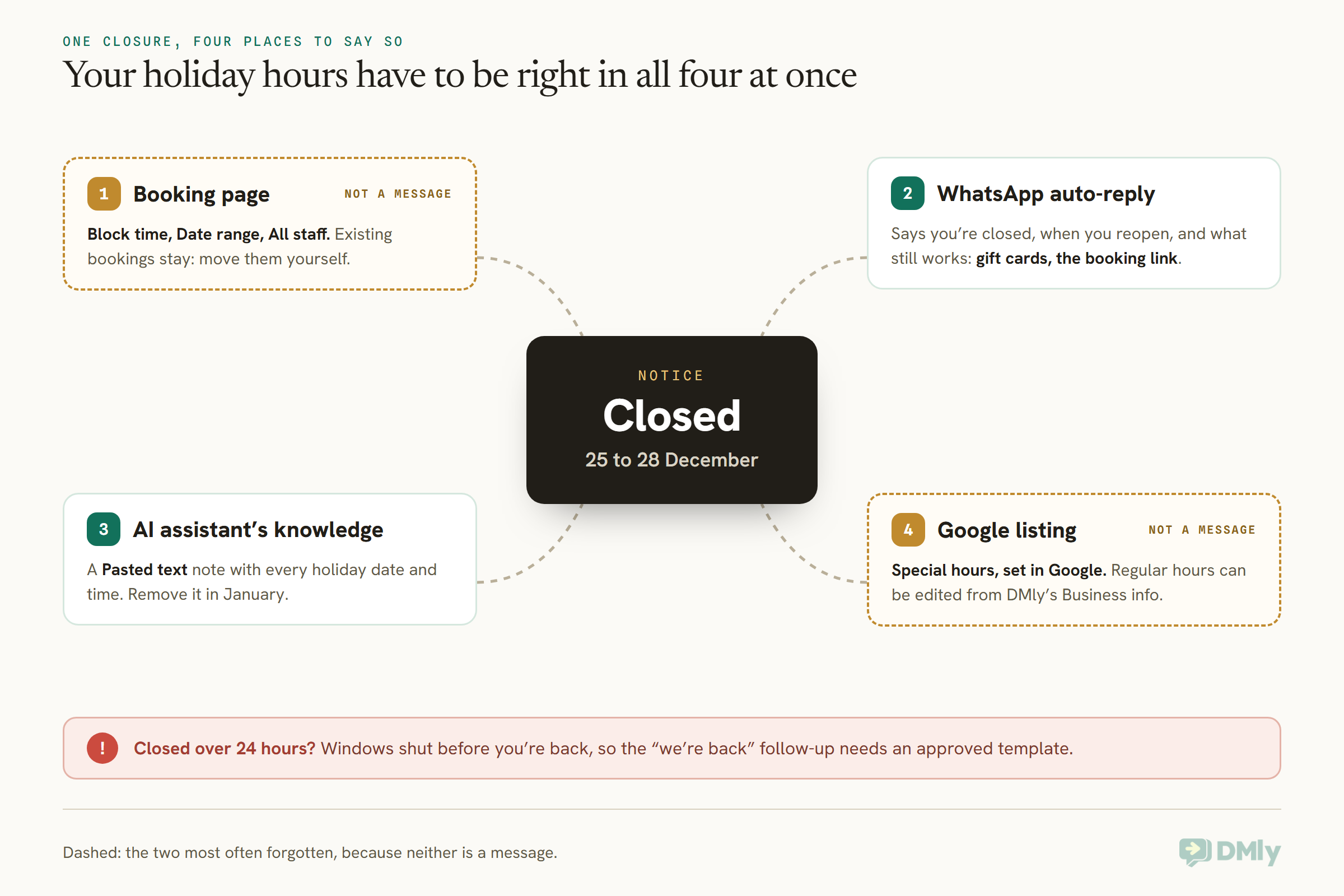
Your holiday hours need to be right in four places at once: your booking page, your WhatsApp auto-reply, your AI assistant’s knowledge and your Google listing. Miss one and a customer gets a confident wrong answer, which is worse than no answer.
Idea 15: Block the closure on your booking page in one go
In DMly, go to Business → Appointments → Calendar, select Block time, choose Date range, leave the staff picker on All staff, tick All day, and add a reason. That’s the workspace-wide kind of block the docs recommend for a public holiday or a closure, and it removes those days from your public booking page at once. For short days, such as closing at 2pm on Christmas Eve, use a single-day block with a start and end time instead.
Two things catch people. A range creates one block per day, so if you change your mind, you remove each day separately. And a block doesn’t cancel bookings already in those days. Find them on the calendar and move or cancel them yourself, and DMly sends its own booking update or cancellation message to the client automatically, as long as those templates are approved.
Idea 16: An auto-reply that still sells
A closed-days reply should say three things: you’re closed, when you’re back, and what the customer can still do now. “We’re closed until Tuesday 29 December. You can still buy a gift card or book for January using the link below, and we’ll answer everything else when we’re back.” Our guide to WhatsApp away messages and business-hours auto-replies shows how to build one, and why the closed message should avoid naming a day if you might forget to switch it off.
Christmas creates a trap that ordinary weekends don’t. Closed from Friday 25 to Monday 28 December, you’ll be away for more than 24 hours, so a customer who wrote on Christmas morning will be outside their window when you reopen. Your “we’re back” follow-up then needs an approved template.
Idea 17: Tell your AI assistant
If an AI assistant answers your chats, it only knows what you’ve given it. In DMly, add a Pasted text note under Settings → AI Knowledge with every holiday date and time; the docs call it the quickest way to get opening hours into the knowledge base. The AI agent is on every plan. Take the note out in January, because there’s no in-place editing: you remove a note and add it again.
Idea 18: Set special hours on Google
Google Business Profile has its own Special hours setting for holidays, and Google suggests confirming your hours for official holidays even when they don’t change. DMly’s Reputation → Business info tab edits your regular opening hours and pushes them to Google, but the holiday exceptions are set in Google itself. While you’re on Business info, turn on WhatsApp on Google, which adds a WhatsApp chat button to your listing in Search and Maps, so people who find you over the holidays can ask rather than guess.
Template 4: We’re back, about your message (keep it free of offers)
Hi [Name], thanks for your message over the holidays. We’re back at [Business] today and we’ve seen it. Reply here and we’ll pick it up straight away.
Buttons: Reply now
This one is tied to something the customer asked, with no promotion in it, so it has the best chance of being treated as Utility. Meta decides the category on review, though, and if a sale creeps in, it becomes Marketing.
Question 5, “Can I Use My Voucher?”: The Quiet Week Between Christmas and New Year
Between 26 and 31 December, customers turn from buying to using: redeeming gift cards, hunting Boxing Day prices and booking New Year’s Eve. For many local businesses it’s also the quietest working week of the year, which makes it a good week to talk to people.
Idea 19: Make redemption easy
Gift card recipients will message you with a code. In DMly, a teammate redeems it against the invoice for whatever they’re buying: open the invoice, Record payment, choose Gift card, enter the code. A card can be spent across several invoices until it’s used up, and a partial redemption leaves the rest for later. One limit to know: the card’s currency must match the invoice’s exactly, so a business invoicing in more than one currency should sell cards in the one it’ll redeem in. A saved reply titled “Using your gift card” answers the how-to question in one click; saved replies don’t fill in names, so write it to read well for everyone.
Idea 20: Boxing Day, done locally
In the UK, Nigeria, Canada, Australia and other places that keep Boxing Day, Saturday 26 December is a shopping day, with the UK’s bank holiday on Monday 28 December. Retailers can send one Boxing Day message to recent buyers who opted in. Restaurants and cafés can promote walk-in tables for families who’ve had enough of cooking. Keep it to one send: your customers had a Christmas greeting from you a day earlier, and Meta’s per-user limit doesn’t care that it’s a holiday.
Idea 21: New Year’s Eve bookings and the morning after
Restaurants and venues fill New Year’s Eve tables from mid-December, so the last-chance message belongs around the 28th, to people who read an earlier invitation and didn’t book. Salons can offer New Year’s Eve hair and make-up slots. Gyms can run a 1 January class for the people who’ll want one. Kwanzaa runs from 26 December to 1 January, and if your community celebrates it, a respectful message to those who chose to hear about it fits this week too.
Question 6, “Can I Book in January?”: New Year WhatsApp Marketing for the Quiet Season
The last question of the season arrives in the first week of January, and the businesses that answer it fastest fill the quietest weeks of their year. New Year WhatsApp marketing is about turning December’s buyers into January’s bookings.
Idea 22: The January rebook
Everyone who visited in December is a candidate for a January appointment, and the January vouchers you sold in December need booking in. Send one message in the first working days of January with your booking link, timed for the morning in each customer’s own timezone if your list spans several. DMly’s At this time in each contact’s timezone option does that; just know that any contact for whom the time has already passed when you save gets it straight away, so schedule it the evening before.
Idea 23: A resolutions run for gyms, studios and tutors
New members and new students enquire in the first fortnight of January. Instead of answering each one from scratch, have a flow subscribe every January enquiry to a short sequence: day 0 answers the question and sends the timetable, day 2 invites them to a first class, day 5 checks in. A sequence runs on each contact’s own clock, its steps can be held to sensible hours in the contact’s timezone, and any step that lands after the 24-hour window goes out as an approved template.
Idea 24: The gentle win-back
Some customers only came in for the Christmas offer. A single, unhurried message in late January, with no pressure and perhaps a reason to come back, is better than three. Our guide to WhatsApp win-back campaigns for inactive customers covers who to send it to and when.
January is also when you prepare what comes next. Orthodox Christmas is on Thursday 7 January for customers who keep it, Lunar New Year is Saturday 6 February 2027, and Ramadan is expected to begin around Monday 8 February 2027. If any of those matter to your customers, their templates belong in January’s quiet weeks.
Template 5: The January rebook (Marketing)
Happy New Year, [Name]! The [Business] diary for January is open, and the first two weeks go quickly. If you’ve got a voucher from Christmas, this is a lovely time to use it.
Buttons: Book now [link] / I have a voucher
Footer: Reply STOP to opt out
Template 6: The season’s greeting (Marketing, and no offer)
Hi [Name], from all of us at [Business], thank you for this year. Wishing you a peaceful holiday season and a happy New Year. We’ll see you in [month].
Footer: Reply STOP to opt out
Keep the greeting and the offer apart. A greeting with a discount attached reads as neither, and both work better as separate messages on separate days.
Which Christmas WhatsApp Messages Are Marketing and Which Are Utility
Almost every Christmas WhatsApp message you send first is Marketing, including greetings, gift card codes and general holiday-hours notices; only messages about one customer’s own booking, order or payment are Utility. Getting the category right is the least glamorous part of Christmas WhatsApp marketing, and it decides approval, cost and who receives each message.
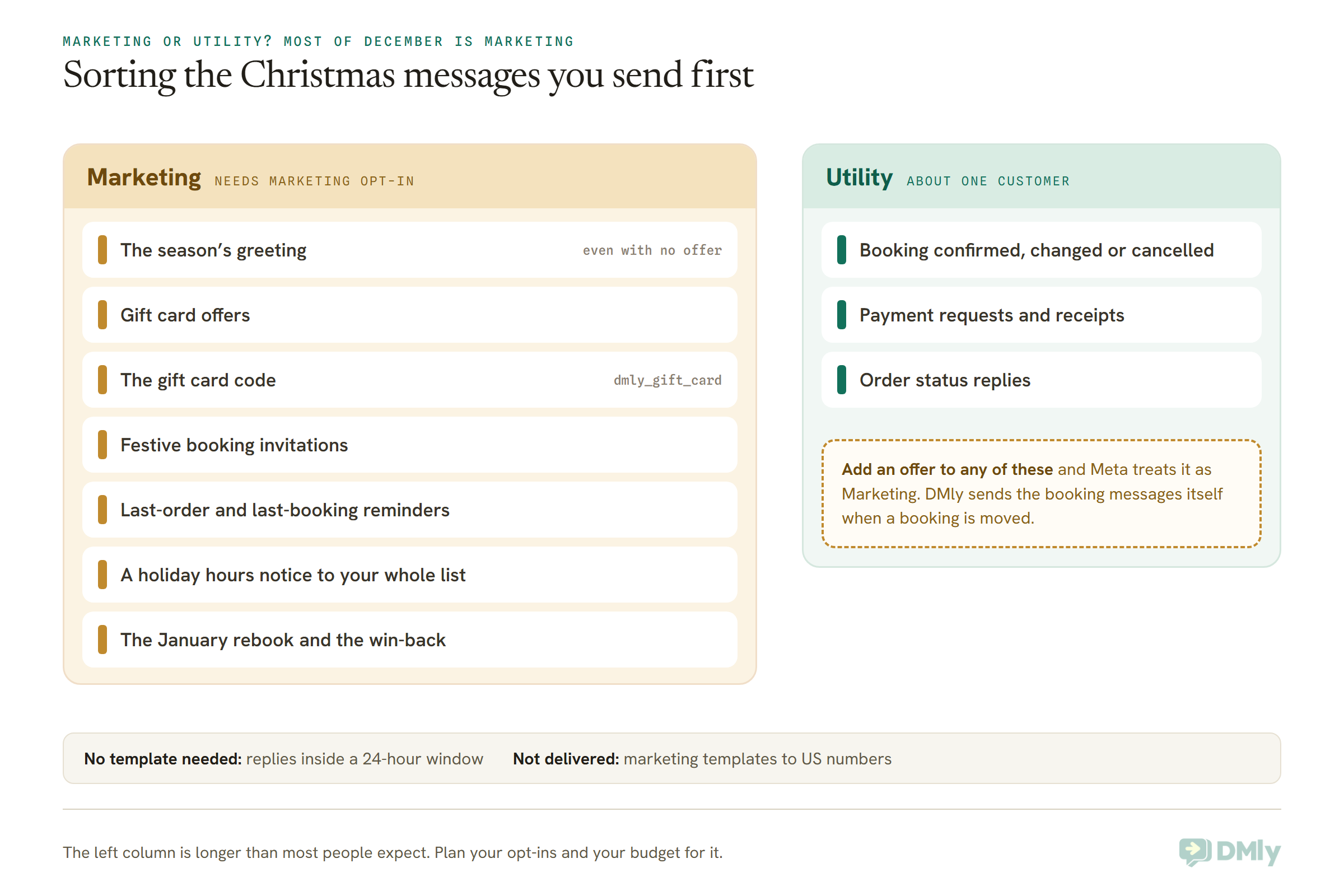
A few of these surprise people. The greeting is Marketing because Meta files thank-you notes and greetings under building a customer relationship. A notice of your holiday hours sent to your whole list isn’t about any one customer’s booking or order, which is what Utility requires, so expect it to be treated as Marketing too; if someone’s own booking is affected, moving it in DMly sends the Utility update for you. And the gift card code itself, the dmly_gift_card message, is held as Marketing by Meta whatever it’s declared as.
On cost, Meta charges each delivered marketing message at the rate for your customer’s country, and messages that fail aren’t charged. Replies inside a conversation the customer started are cheaper: since 1 October 2026 they’re charged after the first 1,000 each month on each number. Our page on the WhatsApp pricing change on 1 October has the detail. That’s another reason the December ideas above lean so hard on getting customers to message you first.
Holiday Season WhatsApp Marketing Ideas by Type of Business
You don’t need all twenty-four ideas; pick the four or five that match how your customers spend December. Here’s where to start for each kind of business, using the idea numbers above.
| Business | Start with | Why these |
| Salons, barbers and spas | 1, 2, 6, 15, 22 | Gift cards and January vouchers, the pre-Christmas diary, and the January gap they fill |
| Restaurants and cafés | 1, 7, 9, 16, 21 | Party deposits, the questions every group asks, and New Year’s Eve |
| Gyms, studios and personal trainers | 2, 8, 17, 21, 23 | Festive classes, 1 January sessions and the resolutions run |
| Clinics and dental practices | 10, 15, 16, 18, 22 | Pre-holiday appointments, accurate closures and January recalls; no promotional health claims |
| Shops and online stores | 3, 11, 12, 13, 20 | Gift guides, honest cut-offs, order status, last-minute e-vouchers and Boxing Day |
| Tutors and training centres | 2, 4, 6, 23, 24 | January term vouchers, enrolment enquiries and parents who went quiet |
Whichever row is yours, keep a sending budget. A sensible Christmas WhatsApp marketing budget is small: across the whole season, most customers will welcome a gift message in early December, one reminder before the deadline, a greeting, and a January note. That’s four marketing messages in six weeks. Everything else should be answers to questions they asked.
The Forecast, Checked: Christmas WhatsApp Marketing Without the Scramble
Come back to the forecast on 1 February and scroll your inbox from the top of December. If the pattern held, you’ll see the gift questions first, the booking questions next, the delivery worries, the “are you open?” messages, the voucher codes, and then the January bookings. The test of your Christmas WhatsApp marketing isn’t how many broadcasts you sent. It’s how many of those questions got a right answer within minutes, including the ones that arrived while you were closed.
If you do only a few things this month, do these: submit your templates by mid-November, block your closure on the booking page, put your holiday hours in your auto-reply, your AI knowledge and your Google listing, and set up gift cards so you can sell one from a chat on Christmas Eve. If you’d like to run all of it from one inbox, you can start a free DMly trial and have your first holiday template submitted today.
Frequently Asked Questions
What is Christmas WhatsApp marketing?
Christmas WhatsApp marketing is the messages a business sends and answers on WhatsApp between early December and mid-January: gift card offers, festive booking invitations, holiday hours, and January rebooking. Proactive messages go to customers who opted in, using approved templates, and most of the season’s value comes from answering the questions customers send you.
When is Christmas 2026, and when is Boxing Day?
Christmas Day 2026 is Friday 25 December and Boxing Day is Saturday 26 December. In England, Wales, Scotland and Northern Ireland, the Boxing Day bank holiday moves to Monday 28 December. New Year’s Day 2027 is Friday 1 January.
Is a Christmas greeting on WhatsApp a marketing message?
Yes. Meta treats greetings and thank-you notes as Marketing, because they build a customer relationship, even when there’s no offer in them. Send a greeting only to customers who opted in to marketing from you, and keep it separate from any sale.
Can I send Christmas offers on WhatsApp to customers in the US?
Not as a marketing template. Meta doesn’t currently deliver marketing templates to US phone numbers. You can reply with your offer when a US customer messages you first, inside the 24-hour window, and reach them by email or SMS for anything you need to push out.
How do I tell WhatsApp customers we’re closed over Christmas?
Set an auto-reply that says you’re closed, when you reopen and what customers can still do, block the dates on your booking page, add the hours to your AI assistant’s knowledge, and set special hours on Google. If you’re closed for more than 24 hours, your “we’re back” follow-up will need an approved template.
Can customers buy a gift card on WhatsApp?
Yes, if your system can send a payment link in the chat. In DMly, a teammate creates the gift card for the purchaser and recipient, DMly sends the purchaser the invoice on WhatsApp, and the code goes to the recipient by WhatsApp and email the moment it’s paid.
How many WhatsApp messages should I send over the holidays?
Around four marketing messages across the six weeks is a sensible ceiling for most local businesses: a gift message, a deadline reminder, a greeting and a January note. Send more only to people who have been replying, and let customers start the rest of the conversations.
Writing about WhatsApp automation, bookings and growth for local business.
Turn WhatsApp into your busiest channel.
Start free and run message, bookings, payments and reviews in one place.
