
WhatsApp Automation for Gyms: Memberships, Class Booking, and Renewals (2026)
A gym is three businesses wearing one hoodie.
There is a subscription business, selling the right to come back every month. There is a ticketing business, selling twelve seats in a spin studio at 6am. And there is a prepaid business, selling ten-class packs to people who resent subscriptions. Most gym software muddles the three, and most gyms run one of them well and improvise the other two. The improvised ones are where your money leaks.
WhatsApp automation for gyms works precisely because those three engines can share one channel and one member record. The class booking, the membership renewal, the pack top-up, the reminder and the win-back all travel through the app your members check between sets. This guide builds each engine in DMly in turn, memberships, class booking with waitlists, and packs, then adds the retention layer on top, flagging every documented trap on the way, because gym builds fail on specifics rather than on concepts.
What WhatsApp Automation for Gyms Actually Does
WhatsApp automation for a gym is the set of member messages and bookings that run without your staff: class bookings and waitlist promotions, membership renewal reminders and payment retries, class pack top-up offers, no-show follow-ups and win-back campaigns, all delivered on WhatsApp through a platform like DMly. Your gym’s number runs on the official WhatsApp Business API, the timetable and memberships live in the same system as the chat, and the messages fire from real events rather than from someone remembering.
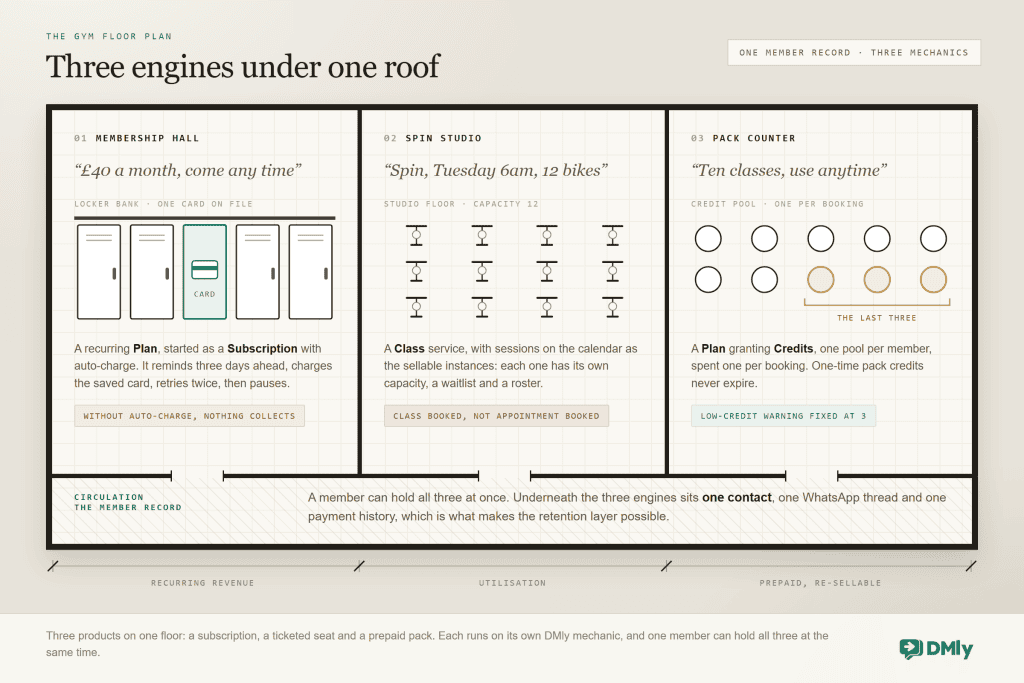
The order below is deliberate: memberships first because they are your revenue floor, classes second because they are the daily machine, packs third because they monetise the people who will never subscribe.
Why WhatsApp rather than a member app? Adoption, mostly. Gym apps get installed in January and forgotten by March, and every push notification a member has disabled is a reminder that never arrived. WhatsApp is already open, already allowed, and already where members message you anyway when the app defeats them. Running your bookings, renewals and nudges in that channel means the automation reaches the member you actually have, not the idealised member who keeps your app on their home screen. Your front desk gains the same thing in reverse: one inbox where every member conversation sits beside that member’s bookings, credits and payment history, so whoever answers knows who they are talking to.
Gym Membership Management: Renewals That Collect Themselves
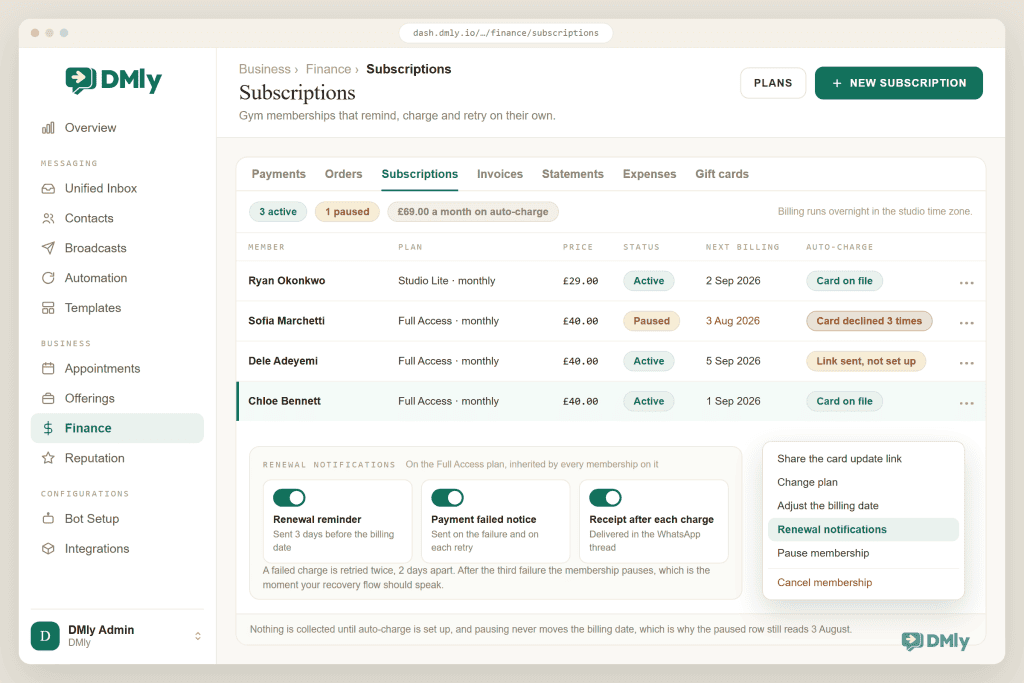
A membership should collect its own money, and one switch is what makes that happen. A gym membership in DMly is a recurring Plan (what you sell) started as a Subscription for a member (the billing arrangement). The step that makes it self-running is auto-charge: your member saves a card once through a link, you never see the card details, and from then on each billing date charges the card, rolls the period, re-grants any credits the plan includes, and sends the receipt on WhatsApp.
Membership renewal reminders are built in. Three days before the billing date, DMly messages your member that the renewal is coming, which quietly eliminates the surprise-payment complaint that fills gym review pages. And when a charge fails, the system runs a ladder rather than giving up: the member is told, the card is retried two days later, then once more after another two days, and after the third failure the subscription pauses.
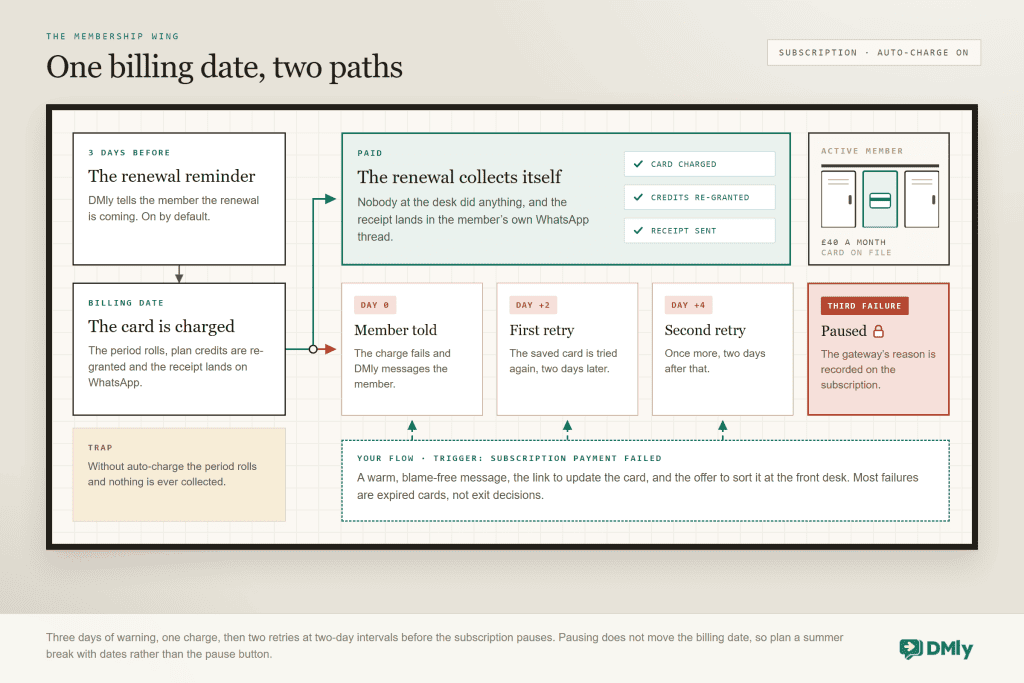
That red branch deserves your best automation, because a failed renewal is almost never a cancellation decision. It is an expired card. Build one flow on the subscription payment failed trigger: a warm, blame-free message, the link to update the card, and an offer to sort it at the front desk. Members who meant to stay will stay, the ones who quietly wanted out will use the moment, and both outcomes beat a silent pause discovered at the door.
Two membership traps, straight from the docs: without auto-charge, nothing is ever collected. A subscription with no saved card rolls its period on the billing date and stops: no invoice, no payment, no error. Either set up auto-charge or make sending the payment link somebody’s named weekly job. And pausing does not move the billing date: pause a membership for the summer, resume after the date has passed, and the nightly run treats it as due and charges immediately. For a planned break, adjust the dates rather than relying on pause alone.
Gym Class Booking on WhatsApp: Capacity, Waitlists and the Roster
Class booking is your daily engine, and DMly models it properly. A Class service defines the thing (price, duration, payment mode, default capacity and waitlist), and the sessions on the calendar are the sellable instances, each with its own capacity. A repeating class generates up to 52 occurrences in one series, so a term of Tuesday 6ams is created in one action. Members book from the booking page or from tappable times in the chat, and every confirmation lands back in the WhatsApp thread.
Before you build a single automation on top, here is the documented trap that catches nearly every gym, and it belongs at the top of the section rather than buried in a troubleshooting table:
Class bookings do not fire “Appointment booked”: booking a class seat fires the Class booked trigger. The documentation itself calls this the most common surprise in the class system: a confirmation flow built on Appointment booked tests perfectly against a personal training session, then silently ignores every class seat you sell. Build your class messaging on the class triggers. Two more from the same family: cancelling a seat fires both Class cancelled and Appointment cancelled, so build on one or your member gets two goodbyes, and DMly sends no built-in cancellation message for a class seat at all, so if you want “no problem, see you next week”, you build it on Class cancelled.
The class waitlist: how a cancelled seat refills itself
The waitlist is the highest-value switch in your entire gym build. A full session offers “join the waitlist” instead of a dead end, joining sends the member an automatic message confirming their place in the queue, and when a seat opens, promotion is first in, first promoted: no favourites, no desk decision, no 5am phone tree.
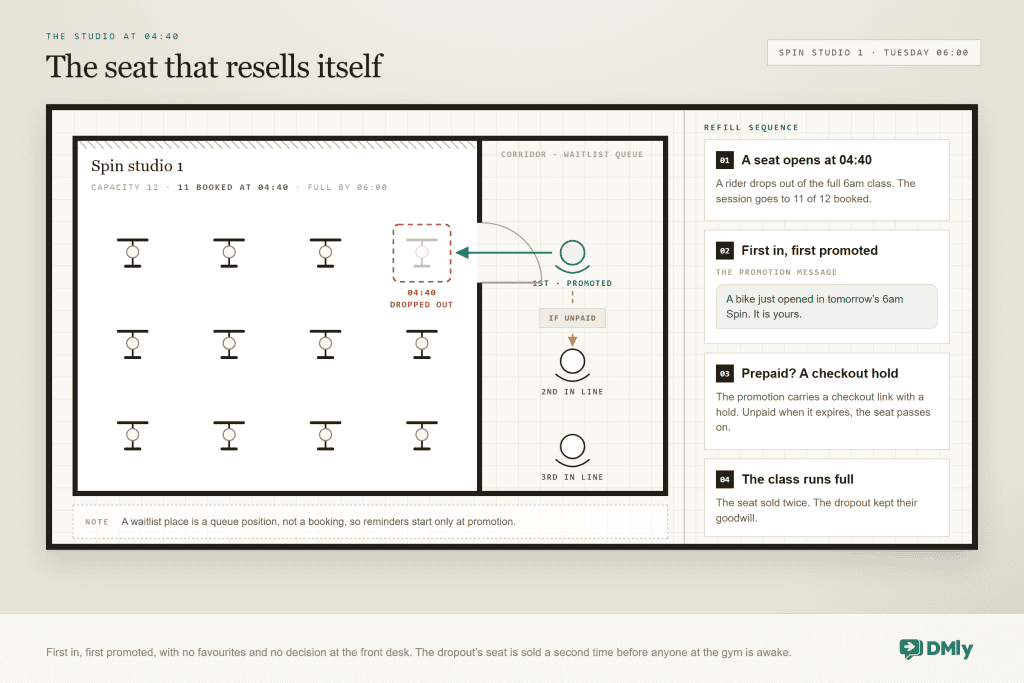
One clarity is worth putting in your waitlist join message, because it heads off the only complaint the feature generates. A waitlisted member holds a queue position, not a booking, so they get no class reminders and no calendar entry until they are promoted. Say so up front and the feature reads as fair; leave it implicit and someone will insist the system forgot them.
The roster, and the button that erases your data
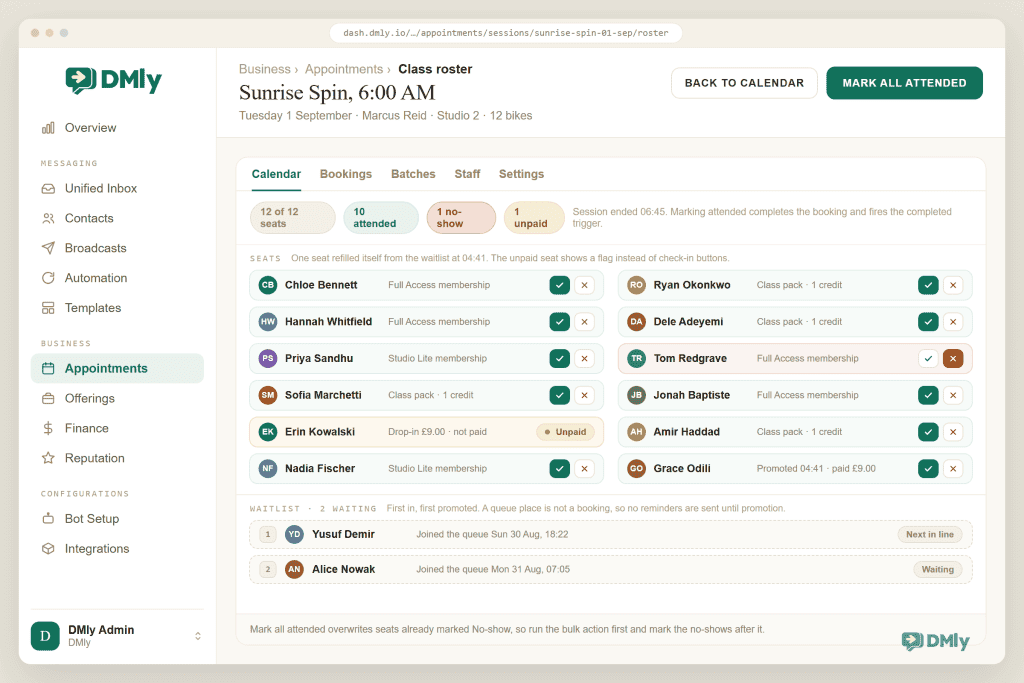
After the class, the roster is where attendance happens: a tick for attended, a cross for no-show, and a Mark all attended button for the common case. Marking attended completes the booking and awards attendance loyalty if you run points, but it fires no automation trigger: neither attended nor no-show on a class seat fires Appointment completed or Appointment no-show. Two documented behaviours to brief your instructors on: Mark all attended leaves seats already marked No-show as they are, and its confirmation says so, so mark the no-shows whenever suits you; and unpaid prepaid seats show an Unpaid flag instead of check-in buttons, locked until the payment hold resolves, which looks like a broken button from the front of a studio and is actually the system refusing to comp a seat.
To find the gaps in how your gym or studio markets itself, run the free studio marketing audit.
Round out class booking with the two policy settings that protect your instructors. Booking window ahead stops self-booking within your chosen number of hours before the start, and the remaining-slots display shows honest scarcity, which fills classes better than any promotion, because “3 of 12 places left” is marketing that happens to be true.
Class Packs and Credits: Selling the Next Ten Automatically
Packs serve the member who trains twice a week and resents subscriptions, and in DMly they run on credits. A Plan grants a number of credits, each class service carries a Credit cost, and booking spends the balance down. Four documented rules decide whether packs delight your members or generate arguments, and three belong in your terms at the point of sale:
- Credits are one pool per member. The balance is a single number, not split by class type, so only put a credit cost on services any credit should legitimately buy.
- Cancelling a booking never refunds the credit. Defensible, standard, and only resented when it is discovered rather than told.
- Expiry follows the source. One-time pack credits never expire; credits granted by a recurring plan lapse when the period they were granted for ends. That difference is the entire commercial distinction between a pack and a membership-with-classes, so sell each deliberately.
- The low-credit warning is fixed at three and fires once, when a deduction takes the balance from above three to three or below.
That last trigger is the best sales moment in the fitness business. A member down to three credits has proved the habit and is about to run out, so a message at that exact moment, a warm line plus the next pack attached for purchase in the chat, sells at the point of genuine need rather than at the point of your promotional calendar. Build it once and it outperforms every broadcast you will ever send.
Group and corporate bookings get one operational note: Batches enrol a named group into a session or a whole series in one action, with a per-run choice about notifying each member, but they refuse pay-before classes, so a corporate block books against an invoice or a plan rather than per-seat prepayment.
Personal Training: The Fourth Thing, Quietly
Most gyms also sell one-to-one sessions, and PT is the exception to this guide’s biggest rule. A personal training session is an appointment, not a class, so it fires the appointment triggers your class flows deliberately avoid. That split is a feature. It means your PT confirmations, reminders and rebooking nudges can run on the appointment side with their own wording, while the class machinery runs beside them without crosstalk.
Two patterns cover most PT businesses. Sessions sold as packs run beautifully on credits: a plan grants ten PT credits, the PT service carries a credit cost of one, and the low-credit trigger at three becomes your trainer’s renewal conversation, opened by the system at exactly the right session. And the rebooking nudge after each session (session completed, wait until evening, tappable times for next week) is borrowed straight from the salon playbook, because a PT client’s rhythm is the closest thing fitness has to a colour cycle. The one habit that powers it: your trainer marks the session completed at the end, since the automatic completion a day later fires nothing.
How to Promote Gym Classes on WhatsApp
Promotion in a gym is mostly distributing the booking link plus a few well-aimed nudges, and the honest list is short.
- The QR at the desk and on the studio door. A member standing in your building is the easiest booking you will ever win; the code opens the chat, and the chat offers the timetable. Put one on the mirror where the queue for the busy class forms, pointing at the quieter alternative.
- The new-class launch broadcast. To a segment of members who attend that discipline, not to the whole list: “New 7:15am strength class starts Monday, twelve places” with tappable times. Specific, scarce, true.
- The empty-slot rescue. Tomorrow’s half-full class goes to the members who have attended it before and are not booked this week. Two minutes to send, and it turns the remaining-slots display into a closing argument.
- Click-to-WhatsApp ads for joiners. Acquisition campaigns that land in the chat, where your welcome flow answers questions and books the trial session, beat campaigns that land on a form nobody finishes. That is its own guide in this series.
All outbound promotion respects the same two rails: opted-in recipients, and approved marketing templates outside the 24-hour window. The discipline is self-rewarding, because the list that remains is a list that reads you.
Winning Back Members Who Stopped Coming
Gym churn is rarely a decision; it is a drift, and drift shows up in your attendance record weeks before it becomes a cancellation email. Every piece above generates the data this section runs on, which is why it comes last and matters most. Segments turn that visibility into lists, and lists into messages. One catch: no segment rule reads class attendance or booking dates, so build these from tags you keep, spend and days since last activity, which counts chat rather than check-ins:
| The segment | The filter idea | The message that works |
| Drifting regulars | Your members tag, 21+ days since last activity (that counts chat, not check-ins) | “We’ve not seen you in a few weeks, and the 6:30 crew has noticed. Anything we can do to make it easier to get back in?” No discount. Belonging beats bribery. |
| Never started | Joined 14+ days ago, zero attendances | A specific invitation to one named beginner-friendly class with tappable times. Generic welcomes do nothing; a seat with a name on it does. |
| Paused by card failure | Subscription paused after failed retries | The recovery message from the membership section, plus a human follow-up within the week. |
| The advocates | Highest attendance last quarter | Not a retention message at all: the bring-a-friend invitation, the testimonial ask, the first offer of the new timetable slot. |
The rules of the road: win-back broadcasts go to opted-in members only, and outside a member’s 24-hour messaging window they travel as approved marketing templates, so plan the template before the campaign day. And measure the machine monthly in the appointment reports, where average class fill by session tells you which timetable slots to defend and which are quietly paying an instructor to coach empty bikes.
The no-show follow-up belongs here too, because it is retention at the single-visit scale. Marking a class seat no-show fires no trigger, so this one is a habit rather than a flow: after the class, whoever marked the roster sends each no-show a kind, guilt-free message with one tap to rebook. Miss that moment and one skipped class becomes two; catch it and the streak restarts before the sofa wins.
Give the whole retention layer numbers, or it stays a feeling. Three figures, read monthly: average class fill from the appointment reports, which should climb as waitlists and rescue broadcasts do their work; the count in your drifting segment, which the win-back messages should shrink; and the share of paused subscriptions recovered within a week, which is your failed-payment flow’s report card. A studio that watches those three knows more about its future revenue than one that watches the door.
Hybrid and Online Classes
If you kept an online timetable, it runs through the Zoom integration. A session can carry an automatic meeting link, available to your confirmations and reminders as a variable, with one shared link per session as the default arrangement. Per-attendee links exist through Zoom Webinar, but that route needs the paid Zoom Webinars add-on and an email address on the member’s contact, and a member without one falls back to the shared link. The failure behaviour is the right way round: if Zoom cannot mint a link, the booking still succeeds, giving you a seat without a link rather than a member turned away, so someone should glance at online sessions before start time.
How to Set Up WhatsApp Automation for Gyms
- Timetable first, waitlists on. Class services with true capacities, sessions as repeating series, and waitlists enabled from day one even for classes that rarely fill. The cost is zero and the first 4am refill pays for the whole project.
- Class messaging on the class triggers. Confirmation and reminder on Class booked, and the cancellation message DMly does not send for you on Class cancelled. Test with a real class seat, not a PT booking.
- Memberships onto auto-charge, recovery flow armed. The saved-card link to every current member, and the failed-payment flow before the first card expires, because one always does.
- The low-credit top-up flow. One trigger, one message, the next pack attached. The highest revenue-per-hour build in this list.
- The roster briefing. Five minutes with your instructors: Mark all attended leaves No-show seats alone, no-shows fire no flow so somebody messages them, and what the Unpaid flag means. Habits, not features, carry the retention data.
- The drift segment and the no-show follow-up. Retention arrives last because it feeds on everything above, and it is the reason members stay years instead of a January.
Common Problems With WhatsApp Automation for Gyms
| Symptom | Cause | Fix |
| Class bookings get no confirmation | The flow listens to Appointment booked; class seats fire Class booked | Rebuild on Class booked and retest with a class seat. |
| An Appointment cancelled flow ignores class seats | Cancelling a seat fires only Class cancelled | Build class cancellation flows on Class cancelled. |
| Cancelling a class says nothing | No built-in cancellation message exists for class seats | Build one on Class cancelled; it is a two-step flow. |
| Waitlisted member says the system forgot them | A queue position is not a booking: no reminders until promotion, by design | Say so in the waitlist join message. |
| The membership never charged anyone | No auto-charge; the period rolls and nothing collects | Set up auto-charge or assign the payment-link job by name. |
| A paused membership charged on resume | Pausing does not move the billing date; the nightly run saw it as due | Adjust dates for planned breaks instead of pausing alone. |
| Class no-show follow-ups never send | Marking a class seat attended or no-show fires no trigger at all | Send the follow-up by hand after the class; no flow can listen for it. |
| Check-in “button broken” on some seats | Unpaid prepaid seats block attendance until the hold resolves | Nothing to fix; that is the Unpaid flag doing its job. |
| Pack credits spent on the wrong classes | Credits are one pool; every service with a credit cost is purchasable with them | Only give a credit cost to services any credit should buy. |
Gym WhatsApp Automation FAQs
Can members book gym classes through WhatsApp?
Yes: from your booking page reached by link or QR code, or from tappable class times offered inside the chat, with the confirmation landing back in the same WhatsApp thread. Capacity is enforced automatically, full sessions offer the waitlist, and there is no app to download or password to reset, which is exactly why members actually use it.
How do class waitlists work?
A full class offers a waitlist place instead of a dead end. When a seat opens, the first person in the queue is promoted automatically and messaged; on a prepaid class the promotion carries a checkout link with a hold, and if it expires unpaid the seat passes to the next in line. A waitlist place is a queue position rather than a booking, so reminders start only at promotion.
What happens when a member’s renewal payment fails?
DMly tells the member, retries the card two days later and once more after another two days, then pauses the subscription after the third failure, with the gateway’s reason recorded on the subscription. Add your own recovery flow on the failed-payment trigger: most failures are expired cards rather than exit decisions, and a warm message with the card-update link saves a large share of them.
Memberships or class packs: which should my studio sell?
Both, deliberately separated. The membership (a recurring plan on auto-charge) suits the three-times-a-week regular; the pack (a one-time plan granting credits that never expire) suits the twice-a-week member who refuses subscriptions. The commercial difference is the credit expiry rule, so sell each on its actual terms and let the low-credit trigger sell the next pack for you.
Can I stop people booking a class minutes before it starts?
Yes. The class policy’s booking window blocks member self-booking within the number of hours you choose before the session starts. Staff bookings and automated enrolments follow their own rules, so your front desk can still squeeze a regular in when it makes sense.
What does WhatsApp automation for gyms cost to run?
DMly plans include classes, subscriptions, credits and the automations, with a 7-day trial and no card. On the WhatsApp side, Meta bills template messages sent outside a member’s 24-hour window at its per-message rates, passed through without markup. Replies inside that window carry no Meta charge until 1 October 2026, and from that date they are billable too, at your market’s utility rate, which our guide to the October WhatsApp pricing change covers. Your reminder and waitlist traffic is small either way; broadcast campaigns are where message volume, and cost, actually lives.
Full classes, renewing members
Class booking with waitlists that refill seats at 4am, memberships that remind, charge and retry themselves, and the top-up message that sells the next pack at the right moment. On the number your members already message.
See classes and memberships in DMly
One Hoodie, Three Engines
Run the three engines on their own mechanics and your gym stops leaking in the places gyms leak: the membership collects itself and fights for its life when a card dies, the class seat resells itself from the waitlist, and the pack sells its successor at three credits remaining. The retention layer then reads the whole machine and catches the member drifting in week three instead of month four.
Build them in that order, one engine a week, and brief the humans on the two habits the system cannot do for them: the class triggers, and the roster order. Everything else runs while you coach.
Writing about WhatsApp automation, bookings and growth for local business.
Turn WhatsApp into your busiest channel.
Start free and run message, bookings, payments and reviews in one place.
