
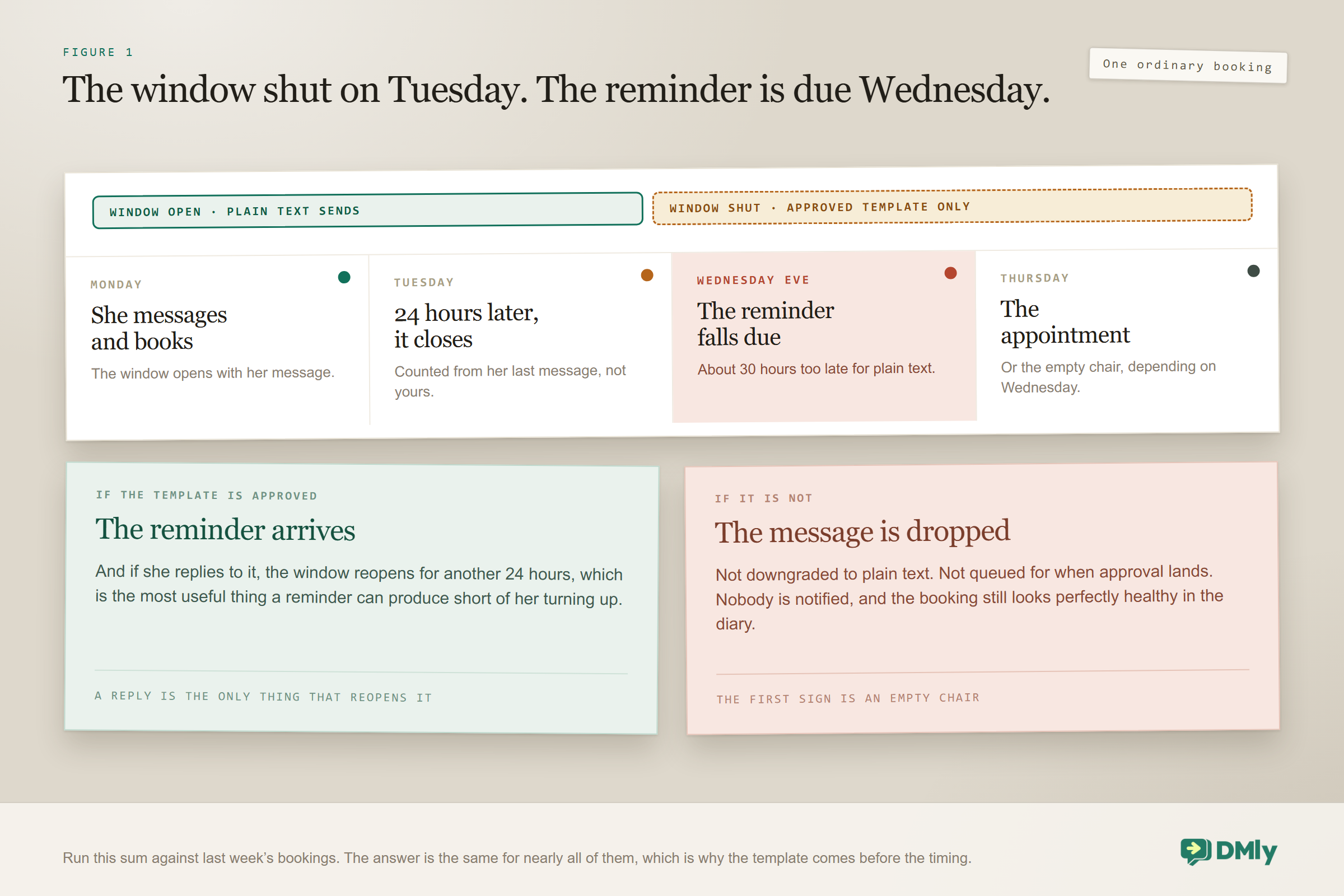
Take one ordinary booking and count the days. A customer messages you on Monday and books for Thursday. Your reminder is due on Wednesday evening. The last thing she sent you was on Monday, which means the 24-hour messaging window closed on Tuesday, about thirty hours before your reminder wants to go out.
That small sum is the whole subject. Appointment reminders almost never land inside the window, which means WhatsApp will only deliver them as an approved message template. And if that template is not approved when the moment arrives, the reminder is not downgraded to a normal message and it is not held for later. It is dropped, and nothing anywhere tells you.
So this is a template problem wearing a timing problem’s clothes. This guide covers where reminders actually come from, why the template matters more than the schedule, the four reasons one is silently skipped, how to choose lead times that earn their place, what the message should say, and how to test the whole thing before it matters to a real customer.
The one sentence to take away, said now: Outside the 24-hour window, if the template is not approved, the message is dropped rather than sent as plain text. No fallback, no retry when the template is approved later, no notification. Get one Utility reminder template approved before your first booking, and check on a schedule that it is still approved.
Where Your WhatsApp Appointment Reminders Come From
Your appointment reminders belong to the service, not to a flow you build, which means you set them once and every booking of that service inherits them. You will find the reminder times under Offerings, then Services, on the service itself: a day before and an hour before, for instance.
This catches out people who expect to construct reminders in the automation builder. You can absolutely build extra messaging as a flow or a sequence, and sometimes you should, but the reminder proper is a property of the service.
Two useful things follow from that. First, different services can have genuinely different schedules, which is right: a three-hour colour correction deserves more warning than a fifteen-minute fringe trim. Second, because the setting lives on the service, a service created by import or by duplication carries whatever reminder times it inherited, which is worth checking rather than assuming. A duplicated service is a new service, and it did not read your mind.
Reminders go out on the client’s own channel, which is to say the channel the booking is attached to. That single fact is what makes the template question unavoidable, and it is where most of the difficulty in this whole subject lives.
Why a Reminder Is a Template Problem
The window your reminder needs is nearly always shut by the time the reminder is due, and there is no way to reason your way around that. On WhatsApp, the 24-hour window opens when a customer messages you and closes 24 hours after her last message. Inside it you can send whatever you like. Outside it, only an approved template goes.
Run the Monday-to-Thursday sum from the top of this page against any booking your business took last week and you will get the same answer nearly every time. The full mechanics of the window are in our guide to the WhatsApp Business API, but for reminders the practical version is short: assume the window is shut.
So your reminder needs a template, and three things about that template decide whether you get any reminders at all:
- It has to be approved before the reminder is due, not merely submitted. Most come back within minutes, but Meta allows itself up to 24 hours, which is longer than some reminder lead times.
- It has to be filed as Utility, not Marketing. A reminder about an appointment the customer booked herself is a utility message. Filing it as Marketing costs more and is more likely to be rejected on category grounds.
- It cannot start or end with a variable, and it has to survive review with sample values in place. Our guide to WhatsApp message templates covers the rules, the categories and the character limits.
Inside the window the behaviour is completely different and much more forgiving: plain text still sends, no template needed. Which is exactly why reminders work beautifully in testing, where you messaged your own business ten minutes ago, and then fail in production, where nobody messages you an hour before their appointment.
The template rule that surprises people later, not sooner: Edits to a template Meta has already approved are not pushed. The approved version is the one that keeps sending, whatever you change in your own copy. If you want different wording, you create a new template under a different name and switch to it. Worth knowing before you spend an afternoon polishing a message nobody will ever receive.
The Four Reasons Appointment Reminders Are Skipped
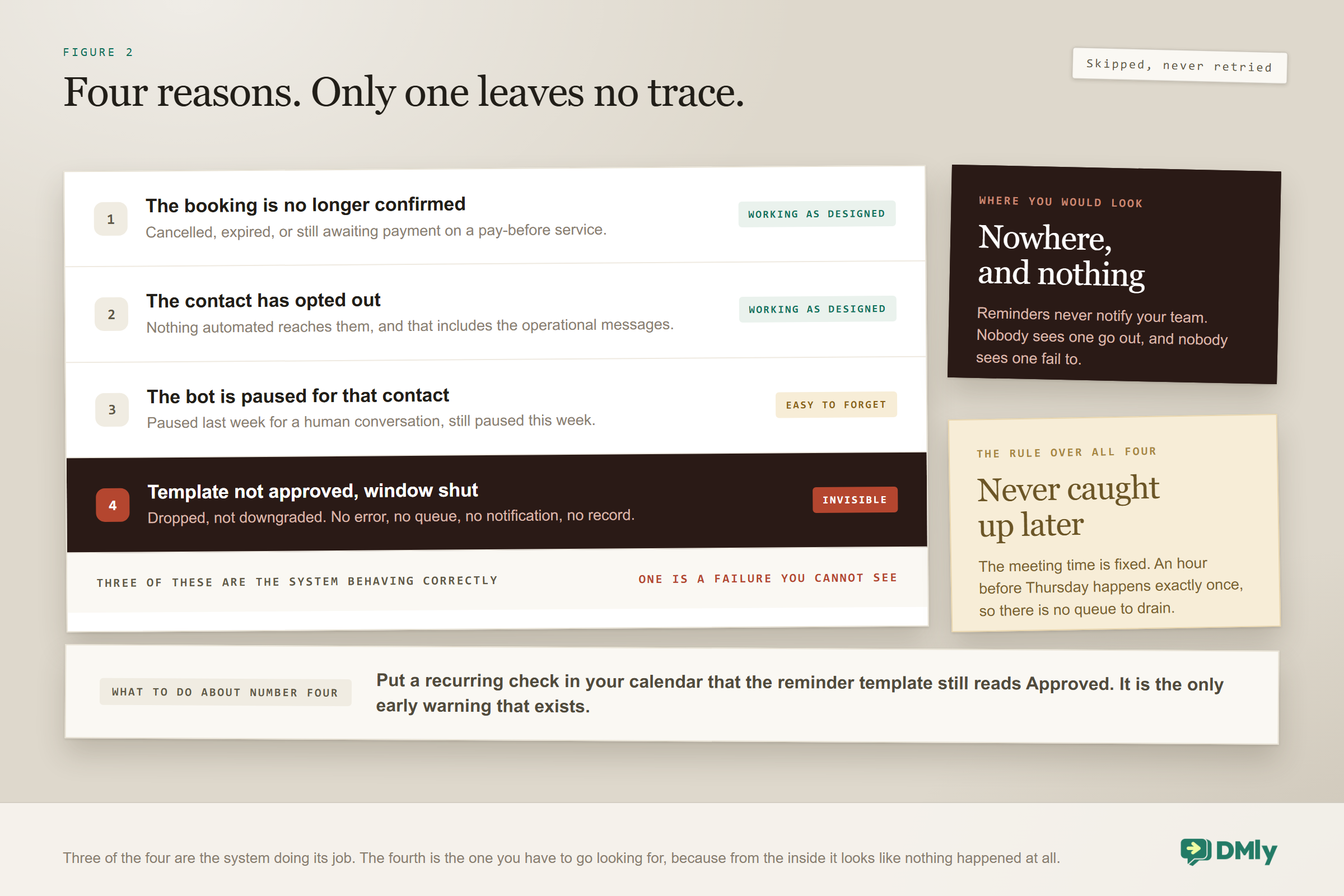
A reminder is skipped rather than retried, and there are exactly four reasons it happens. Knowing them turns an unexplained empty chair into something you can actually diagnose on a Thursday afternoon.
- The booking is no longer confirmed. Cancelled, expired, or still awaiting payment. The reminder correctly does not fire, which is what you want and occasionally not what you expected, particularly on a pay-before service where the payment hold expired.
- The contact has opted out. Nothing automated reaches somebody who has opted out. This is right, and it is also why an over-enthusiastic marketing programme costs you operational messages months later.
- The bot is paused for that contact. The per-contact pause stops automated replies, and a reminder is an automated message. Somebody who paused it to have a human conversation last week is not getting reminders this week.
- The template was not approved and the window was shut. The case above, and the only one of the four that looks like absolutely nothing.
One rule sits over all four: the meeting time is fixed, so a missed window cannot be caught up later. There is no queue that drains when you fix the problem. A reminder that did not go at its moment is simply gone, because an hour before Thursday’s appointment happens exactly once.
And a detail worth knowing before you rely on noticing any of this: reminders never notify your team. Confirmations do, and generously: the assigned staff member gets her own message and the rest of the active team gets a heads-up. Reminders are silent in both directions, so nobody in your business sees one go out, and nobody sees one fail to.
Choosing Lead Times That Earn Their Place
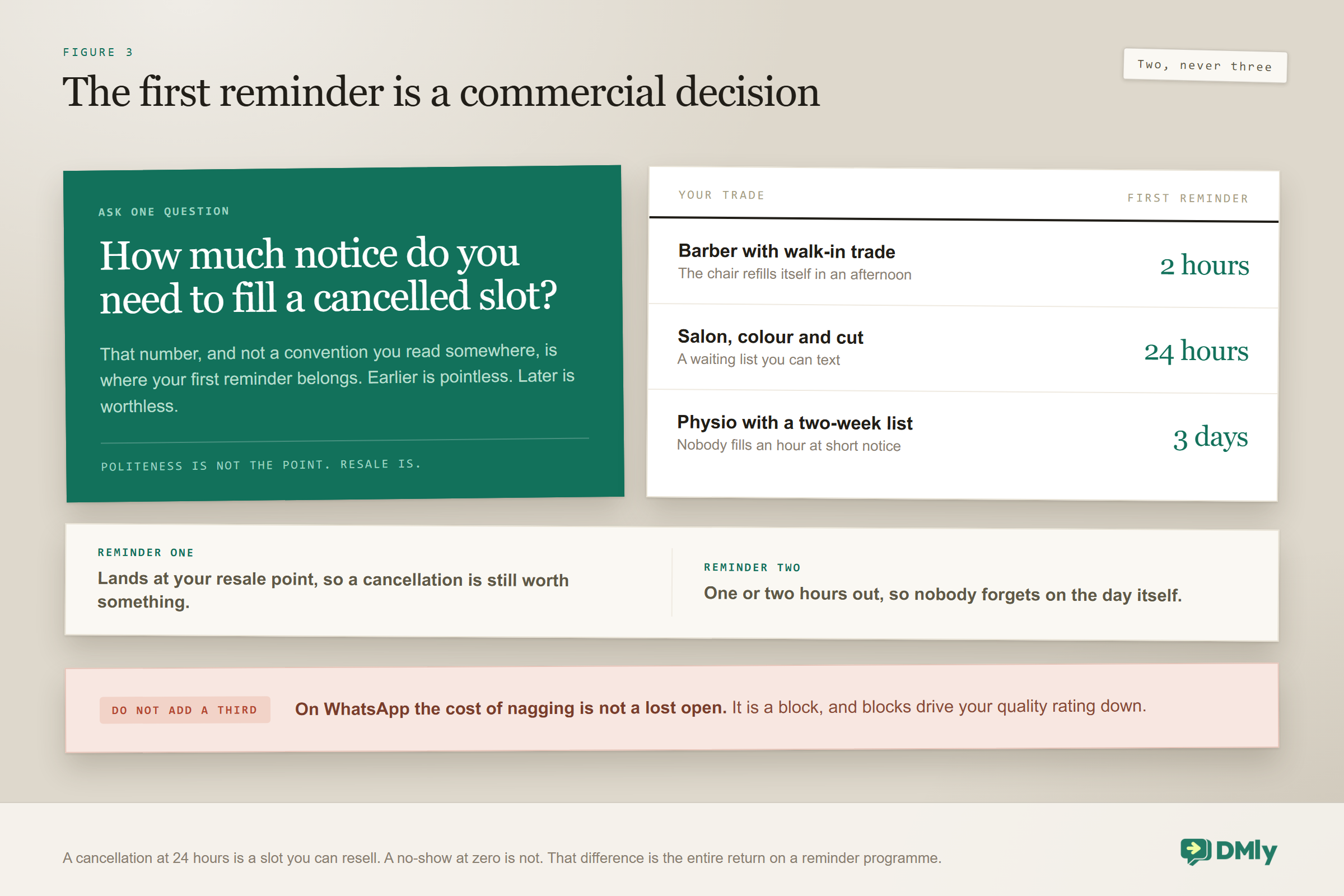
Two appointment reminders is the working default: one far enough out that you could still resell the slot, and one close enough that she will not forget on the day. The first number is not politeness. It is the point at which a cancellation is still worth something to you.
| Business | First reminder | Second | Why that first number |
| Salon or barber | 24 hours | 2 hours | Enough notice to fill the chair from your waiting list |
| Clinic or dental | 48 to 72 hours | 24 hours | Longer slots, harder to refill, higher cost per empty one |
| Restaurant booking | 24 hours | 3 hours | Same-day cancellations can still be resold |
| Home visit or trade | 48 hours | Morning of | Somebody has to be in, so the day itself matters most |
| Class or group session | 24 hours | 1 hour | The waitlist can take a released seat if it goes early |
| High-value consultation | 1 week | 24 hours | Diaries move, and a week gives everybody a chance to rearrange |
Pick your own first number by asking one question: how much notice do you need to fill a cancelled slot? For a barber with a walk-in trade that might be two hours. For a physiotherapist with a two-week waiting list it is more like three days. That number, and not a convention, is the right first reminder.
Resist adding a third. Three reminders for a haircut reads as nagging, and the cost of annoying somebody on WhatsApp is not a lost open. It is a block, and blocks are what drive your quality rating down, as our guide to quality rating and messaging limits explains.
What the Reminder Should Actually Say
A reminder has one job: to produce either an arrival or a cancellation early enough that you can resell the slot. A reminder that produces silence has failed, even though it was delivered perfectly.
Which means the most important thing in it is the way out. Making it easy to cancel feels like inviting cancellations, and it is, but a cancellation at 24 hours is worth far more to you than a no-show at zero. Structure it like this:
- Who and what, in the first line. Your business name and the service, so it reads as a real appointment rather than a marketing message.
- When and where, unambiguously. The day and the date, not just the day, and never just “tomorrow”.
- Anything she needs to bring or do. The thing your team currently repeats on the phone every single time.
- The way out. Confirm, reschedule or cancel, and make it a tap rather than a phone call.
Templates can carry buttons, which is what makes the way out practical: quick replies for Confirm and Cancel, or a URL button pointing at the booking’s own manage page so she can move it herself without messaging anybody. Worth knowing the composition rule before you design it: 10 buttons per template, of which at most 2 can be URL buttons, 1 a call button and 1 a copy-code button.
One thing to avoid completely: do not put an offer in a reminder. A reminder carrying a promotion is a Marketing message wearing a Utility badge, and category mismatch is the single most common reason these templates get rejected.
What Happens When Somebody Replies to a Reminder
A reply reopens the 24-hour window, which makes it the most valuable thing a reminder can produce short of an arrival. The moment she types anything back, you can send free-form messages again for another 24 hours, no template required.
That changes what a reply is worth. Somebody who taps Confirm has told you she is coming. Somebody who writes “any chance of Friday instead?” has handed you an open window, a live intention and a slot you can resell, all in one message. The second is more valuable than the first, and most businesses treat it as an interruption.
Three things to have in place before the replies start arriving:
- Somebody owns the inbox at reminder o’clock. If your first reminder goes out at five the day before, the replies arrive between five and bedtime. A reply that sits until the next morning has wasted most of the notice it just gave you.
- Your assistant knows what to do with a reschedule request. With the booking tools switched on it can check availability and move the appointment in the thread, which was the whole point of asking. Without them it will apologise politely and achieve nothing.
- A cancellation gets acknowledged, not argued with. The value of an early cancellation is the resale, and the resale starts the second the slot is free. Say thank you, free the slot, move on.
There is a quieter point underneath all three. Because reminders never notify your team, a reply is the first moment anybody in your business learns the reminder happened at all. If replies are landing in a queue nobody watches, your reminder programme is producing exactly half of its value and you have no way of knowing.
When the Customer Is Not Reachable on WhatsApp
Some of your bookings have no WhatsApp thread behind them at all, and for those, WhatsApp reminders are not a plan. A booking taken on your website or over the phone may never have produced a message. And a WhatsApp contact whose template was rejected has, for reminder purposes, no working channel either.
SMS is the sensible floor underneath both cases, because it has no messaging window, no template approval and no queue. You can text anybody, at any time, about anything reasonable. It costs more per message in most markets, and for a message that prevents a no-show on a two-hour slot it is comfortably worth it. Our SMS automation guide covers the channel properly.
The rule of thumb for a service business: collect a phone number at booking, use WhatsApp where there is a thread and an approved template, and fall back to SMS where there is not. Adding phone to your booking fields is one field and about ten seconds of work, and it is what makes the whole fallback possible.
Reminders Are Not Confirmations, and Not Follow-Ups
Three different messages get muddled constantly, and building one when you needed another is a common and expensive waste. They fire at different moments, face different rules and do different jobs.
| Message | Fires when | Window | Its job |
| Confirmation | Immediately on booking | Usually open, so plain text works | Reassure, and hand over the manage link |
| Reminder | At the service’s reminder times | Almost always shut, so a template is required | Produce an arrival or an early cancellation |
| Follow-up | After the appointment | Shut, unless she replied | Rebook, review, feedback |
Look at the third column, because it explains why confirmations feel easy and reminders feel hard. A confirmation goes out seconds after the customer acted, which on a booking taken in a chat means the window is wide open. A reminder goes days later, when it is not. Same system, same customer, completely different constraints.
Also worth knowing on a pay-before service: no confirmation goes out during the fifteen-minute payment hold, and no reminders are scheduled until the payment clears. Everything waits.
Going Beyond the Native Reminders
Sometimes you want more than two reminder times, and that means a sequence, which has its own rules worth knowing before you build one. A preparation message two days out, a parking note the night before, a what-to-bring list for one particular service.
- Steps are numbered by Day, starting at zero. Day 0 sends as soon as the contact subscribes; Day 3 sends three days later. The wait between two steps is simply the gap between their numbers.
- The From and To sending window defaults to 09:00 to 20:00, and it is read in UTC. Not your local time. This is the single most common cause of a message arriving at a strange hour, and it catches every business outside UTC exactly once.
- A step due before From waits for it, and a step due after To moves to From the next day.
- A held step retries about once an hour, up to 48 times, which is roughly two days. If the window never reopens, that contact’s run stops there and nothing further sends.
- Contacts leave a sequence when the window has been shut for about two days, when they opt out, when a flow unsubscribes them, when the bot is paused, and when they reply if you turned that toggle on. It is off by default.
- Template steps are silently dropped for non-WhatsApp contacts, and nothing tells you. A mixed audience loses people quietly.
- A sequence belongs to one channel, the one selected when you created it, and the Channel field is read-only afterwards.
Given all of that, the honest advice is to use the service’s own reminder times for reminders, and reserve sequences for genuinely sequential content that is not time-critical. A reminder that has to arrive at a particular hour is a poor fit for a system with a UTC sending window and a two-day retry.
Testing Appointment Reminders Properly
The reason appointment reminders pass testing and fail in production is that you had just messaged your own business, so your window was open and plain text sent. Test the way a real customer experiences it, which means going quiet.
- Confirm the template is Approved, not Pending and not Draft. A Draft template never reached Meta at all.
- Book an appointment, then do not message the business again. Let the window close. This one step is the whole test.
- Wait for the reminder to fall due and confirm it arrives as a template, on the right channel.
- Check the buttons work, particularly any URL button pointing at the manage page.
- Cancel a booking before its reminder is due and confirm the reminder does not fire.
- Test a contact with the bot paused and confirm the reminder is skipped, so you have seen that consequence with your own eyes.
- Test a booking with no WhatsApp thread and confirm your SMS fallback carries it.
- Check the timing against UTC if you built any part of this as a sequence.
Run the second test on a service with a deliberately short reminder lead time, so you are not waiting a day to learn something. Make a hidden test service with a reminder fifteen minutes out, book it, go quiet, and watch. Half an hour, once, and you will trust the whole thing afterwards.
What You Can Honestly Measure
There is no report on appointment reminders anywhere in DMly, so nobody can tell you how many went out last month. That is worth saying plainly, because most articles on this subject imply a dashboard that does not exist. What you have instead is the Bookings list with its filters, your template status, and a habit.
Three things worth doing once a month:
- Check the template status on a schedule. This is the only early warning available. A template Meta pauses for quality shows as Rejected, and your reminders stop that day with no other symptom. Put it in the calendar.
- Count no-shows by service. Filter the Bookings list by status. This is the number that says whether reminders are earning their place, and it is more useful per service than in total.
- Count cancellations that arrived after the first reminder. Counter-intuitively you want this to be healthy. Those are slots you got back with enough notice to resell, and they are the reminder programme paying for itself.
And one thing to watch informally: how quickly replies to reminders get answered. Because nothing notifies the team, that is a habit rather than a metric, and it is the half of the value most businesses drop.
Mistakes Worth Avoiding
Every one of these is common, and most of them are invisible until an empty chair makes them visible.
- Assuming a failed reminder will show up somewhere. It is dropped silently, and reminders never notify your team.
- Filing the reminder template as Marketing. More expensive, more likely rejected, and a promotion inside it guarantees the rejection.
- Testing while your own window is open. Plain text sends and you learn nothing at all.
- Editing an approved template and expecting the change to send. Approved edits are not pushed. Make a new template under a new name.
- Setting three or more reminders. Blocks cost you more than forgetfulness does.
- Building reminders as a flow when the service already has reminder times. Duplicate messages, twice the annoyance.
- Forgetting that a sequence reads From and To in UTC. Messages land at a strange hour and nobody knows why.
- Relying on WhatsApp alone. Bookings with no thread need SMS, and so do contacts whose template was rejected.
- Leaving no way out in the message. A reminder with no exit turns a rearrangeable slot into a no-show.
Frequently Asked Questions
Do WhatsApp appointment reminders need an approved template?
Almost always, yes. A reminder is normally due days after the customer last messaged you, so the 24-hour window has closed and only an approved template can be delivered. Inside the window, plain text still sends, which is why this looks fine in testing.
What happens if my reminder template is not approved?
The message is dropped rather than sent as plain text. There is no fallback, no retry once the template is approved later, and no notification of any kind. The reminder simply never existed, which is why the approval has to be in place before your first booking rather than after your first failure.
Where do I set reminder times?
On the service, under Offerings and then Services. Reminders are seeded from the service’s reminder times, such as a day before and an hour before, so different services can carry different schedules and every booking of that service inherits them. Check them on any service you created by duplicating or importing.
Why did a reminder not send for one particular booking?
Four reasons cover nearly every case: the booking is no longer confirmed, the contact has opted out, the bot is paused for that contact, or the template was not approved while the window was shut. Reminders are skipped rather than retried, and the meeting time is fixed, so a missed one is never caught up.
Should the reminder let people cancel?
Yes. A cancellation with 24 hours of notice is a slot you can resell. A no-show is not. Making the exit easy costs you a handful of bookings and saves you considerably more, and it turns your reminder from a notification into something that does a job.
Can I put an offer in the reminder?
You should not. A reminder carrying a promotion is a Marketing message filed as Utility, which is the commonest category rejection there is. It also makes the message easier to ignore, which defeats the point of sending it.
Do reminders notify my team as well?
No. Reminders never notify the team, though confirmations do: on a confirmation the assigned staff member gets her own message and the rest of the active team gets a heads-up. On a reminder, nobody in the business sees it go out and nobody sees it fail to.
Can I change the wording of a reminder template that is already approved?
Not in place. Edits to a template Meta has already accepted are not pushed, so the originally approved version keeps sending whatever you change. To change the wording you create a new template under a different name and switch your reminders to it.
Approve the Template, Then Worry About the Timing
The instinct with appointment reminders is to spend your time on lead times and wording, and both of those matter. But neither matters at all if the template is not approved, because the message you carefully worded gets discarded without a trace on the one evening it needed to arrive.
So do it in this order. Get one Utility reminder template approved. Put a recurring check in your calendar that it is still approved. Set two reminder times on the services where an empty slot genuinely costs you. Put a way out in the message. Keep SMS underneath for the bookings WhatsApp cannot reach.
Then leave it alone. A reminder programme that quietly works is one of the few pieces of automation that pays for itself in a fortnight, and the businesses that get the most out of it are the ones who set it up carefully once and then stop fiddling. If you run a clinic, where an empty slot is expensive and diaries move constantly, our guide to WhatsApp automation for clinics puts this in the context of a full week, and the WhatsApp appointment booking guide covers the booking that comes before it.
Writing about WhatsApp automation, bookings and growth for local business.
Turn WhatsApp into your busiest channel.
Start free and run message, bookings, payments and reviews in one place.
