
How to Book Appointments Through Instagram DMs Automatically
Instagram will let you take the booking. It will not let you remind anybody about it. That one asymmetry is the thing to understand before you try to book appointments through Instagram DMs, because it decides the whole build rather than just one setting in it.
That is the whole shape of the problem, and it catches almost everybody the first time. A customer messages you, your assistant checks the calendar, offers three times, takes the booking and sends a confirmation. All of it works. Two days later the reminder is due and it does not go, because Instagram stopped accepting automated messages to that customer twenty-four hours after they last wrote to you, and there is no template to fall back on, because Instagram does not have templates. The customer turns up or they do not, and you find out which.
None of that is a reason not to book appointments through Instagram DMs. It converts well, because the person deciding they want your work is looking at your work while they decide. It is a reason to build the days after the booking before you build the conversation.
This guide covers both halves: the three ways to take the booking, the window rules that shape everything after it, deposits and the fifteen minutes that decide them, confirmations and reschedules, and the specific things that go wrong.
Three Ways to Book Appointments Through Instagram DMs
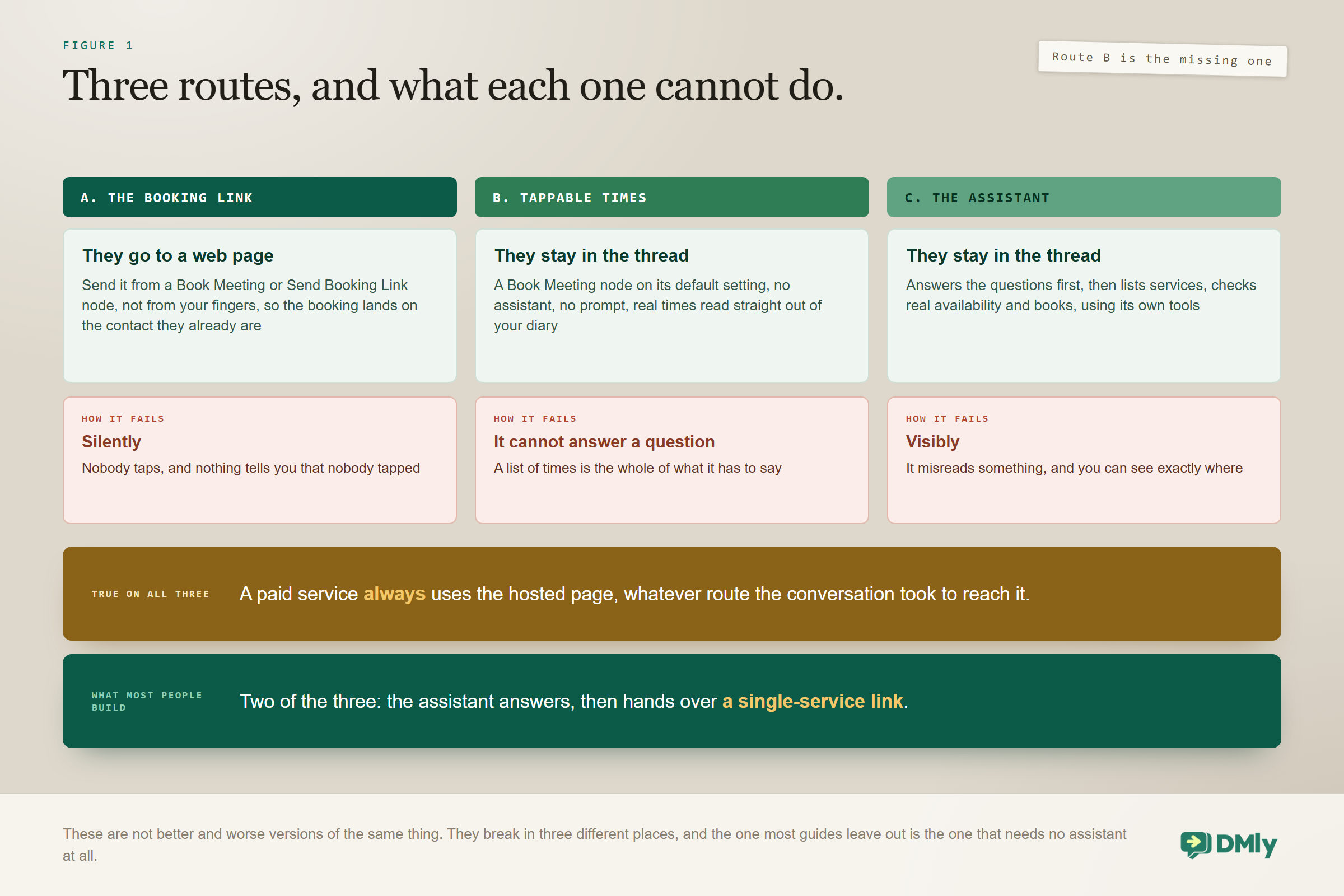
You can send the customer to a booking page, put tappable times in the thread from a flow, or let an assistant run the whole booking with its own tools. All three are legitimate. They fail differently, which is the useful way to choose between them.
| A: The booking link | B: Tappable times from a flow | C: The assistant’s own tools | |
| Setup effort | Minutes | An hour | An afternoon |
| Where the customer ends up | A web page in their browser | Still in the DM | Still in the DM |
| Needs an AI assistant | No | No | Yes |
| Handles an awkward request | No, the form is the form | No, the times are the times | Yes, it can ask and adapt |
| Takes a deposit | Yes | Yes, by sending them to the page | Yes, by sending them to the page |
| Fails how | Silently, when nobody taps | Quietly, when no slots are free | Visibly, when it misreads something |
| Best for | High volume, one obvious service | A short menu of simple services | Questions first, several services, consultative work |
Most businesses end up running two of the three. The assistant answers the questions, and the moment the customer is clearly ready and the service is simple, it hands over a single-service link rather than running through half a dozen tool calls. Route B sits in between and is badly underused, because it books people inside the thread without any assistant at all.
One rule that applies to all three: A paid service always uses the hosted booking page, whatever route the conversation took to get there. You cannot take a deposit inside the thread. If money changes hands at booking, the customer is going to a browser at some point, so design the handover rather than hoping to avoid it.
Where Should the Booking Conversation Start?
The bookings that convert best start from something the customer was already looking at. A cold “how much?” converts far worse than a story reply about the specific piece of work on screen, and your setup should treat those two differently rather than greeting both the same way.
Four entry points are worth building for explicitly.
- A story reply. The best booking signal Instagram produces. They watched the thing and reacted to it, so you know the service, the mood and the timing. Route these to a branch that mentions the work rather than to a generic hello.
- A comment on a post or a Reel. Somebody asks how much or where you are, in public. See the callout below, because this entry point has a property the other three do not.
- An ice breaker tap. You get up to four suggested questions a first-time visitor can tap, and on a booking-led account at least one of them should be the booking question in the customer’s own words. A tap is a stated intent, so the assistant can go straight to availability. Note that Instagram shows ice breakers on mobile only, so they are not a substitute for anything.
- A link in bio that opens a DM. Useful when you would rather start a conversation than send somebody to a form, particularly where the price depends on the answer to two questions.
A comment is the one way in that does not need an open window: In a comment-triggered flow, the first text Send Message step opens the DM as a private reply and bypasses the 24-hour window entirely. That is the standard way to turn a comment into a conversation, and on a channel where everything else depends on the customer having written to you recently, it is worth knowing that a comment on a three-month-old post still gets you a thread. Reply to Comment only posts a public reply underneath; pair the two if you want both. Our guide to Instagram comment to DM automation covers the build.
Build the router for these before you build any booking logic. It takes very little time and it changes the tone of every conversation that follows, because the assistant opens with something relevant instead of asking a question the customer already answered by how they arrived. One thing to avoid while you are in there: a persistent menu item set to Postback is never acted on, so a “Book now” item built that way looks perfect and does nothing. Use Start flow or Open URL.
What You Need in Place Before You Can Book Appointments Through Instagram DMs
None of this works until the appointments side is real, and most first attempts fail here rather than in the conversation. Get these four right and the rest is configuration.
- Services that exist and are bookable. Only services that are active, publicly visible and of the appointment or class type appear on the booking page. Add-ons never appear. A service priced at zero also makes every paid mode inactive, which surprises anybody who sets up a free consultation and then wonders why the deposit setting does nothing.
- Staff with real availability. Open slots are worked out by subtracting booked time, buffers, time off, blocked time, connected calendar busy time, minimum notice and your booking horizon. If any of those are wrong, the assistant will confidently offer a time you cannot honour.
- A connected Instagram channel. A Business account, linked to a Facebook Page you administer, connected through the tile that reads Instagram via Facebook. If the account is not in the picker, it is one of those three things. Our guide to creating an Instagram business account covers the setup, and the Instagram DM automation guide covers the assistant this page assumes.
- A payment gateway, if you charge at booking. Without one, a paid service shows the customer a message saying online payment is not available and asking them to contact you, which is not the experience you were after.
Book on your own page once, from your own phone: Before you share the link anywhere, book a real slot on it yourself, on a phone rather than a desktop. It takes a minute and it is the fastest way to catch a service with no staff attached, a missing price, or opening hours you never actually set. Every one of those looks fine in the settings screen and breaks in front of a customer.
Route A: Send the Link From a Node, Not From Your Fingers
The fastest working version of Instagram booking is a single-service link dropped into the thread at the right moment, and how you send it decides whether the booking lands on the right customer. This is the part almost everybody gets wrong when they first book appointments through Instagram DMs, and the symptom shows up weeks later as a contact list full of near-duplicates.
Every workspace gets a booking page, with a landing page listing your bookable services and a direct link for each service underneath it. You can point your own domain at it instead. Copy the single-service link from the service itself rather than typing an address from memory, and send that one rather than the landing page: every extra choice costs you people, and if the conversation has reached booking, you already know which service they want.
What the customer sees is short. Pick a staff member if you have not hidden that step, pick a time from genuinely open slots, fill in the form, land on a confirmation page. A new visitor must give at least a first name and an email address, and everything else is configurable.
The duplicate contact is a choice, not a fact of life: A link pasted in by hand carries no idea who it went to, so it matches on the email the customer types. An existing contact with that exact address is reused; otherwise a fresh contact is created. A customer with no email on file, or one who types a different address from the one you hold, becomes a second record. Send the same link from a flow’s Book Meeting node in Send hosted booking link mode, or from a Send Booking Link node, and it is attributed: the customer skips the name and email fields entirely and the booking lands on the contact they already are. The Book Meeting node also waits, so anything you put after the booked path fires when they book rather than when the link goes out.
Two settings are worth deciding deliberately rather than accepting.
- Hide staff selection if your customers have no preference. A step removed is conversion gained. Leave it on when the individual is the reason people book.
- Timezone mode, which matters far more on Instagram than on any other channel. See below.
The booking page does not detect the browser’s timezone: There are two modes and neither reads the customer’s device. Detect automatically uses a timezone DMly has already stored for a contact it knows, and falls back to the service’s own timezone for everybody else. Fixed timezone shows your clock to everyone. Which means a stranger sees your clock in both modes, and on Instagram nearly every new booker is a stranger. If you sell to one city, pick fixed and stop thinking about it. If your followers are spread across time zones, say the timezone in the message you send with the link, because the page is not going to do it for you.
Route B: Tappable Times in the Thread, With No Assistant at All
A Book Meeting node in a flow can show real open times as taps inside the Instagram conversation, and it needs no AI, no prompt and no tool configuration. This is the route most guides skip, and for a business with a short menu of simple services it is the best value in the whole product.
The node has two modes. Left on its default it shows tappable times in the chat on WhatsApp, Messenger and Instagram, and automatically sends a booking link instead when the channel is SMS. Switched to Send hosted booking link it sends the attributed link described above. Either way the flow waits on the booked path, so a confirmation, a tag, a note or a handover placed after it fires only once the booking actually exists.
The reason to reach for this rather than an assistant is that there is nothing to misread. The times come from your real availability, the customer taps one, and the booking is made. The reason not to is equally simple: it cannot answer a question. A customer who replies “do you do this on children’s hair?” gets nothing useful from a list of times, which is where Route C earns its afternoon.
Route C: Booking Inside the Thread With the Assistant
An assistant with the booking tools switched on can run the whole thing without the customer ever leaving Instagram, and it is worth the setup when the conversation has to happen before the booking does. This is what people picture when they imagine automated DM booking, and it is the only one of the three routes that can book appointments through Instagram DMs and answer a question in the same breath.
The tools are specific: list bookable services, list staff for a service, check available times, book an appointment, view upcoming appointments, reschedule an appointment, cancel an appointment, and the class equivalents for listing, booking, viewing and cancelling.
Why an assistant talks about booking and never books: There are two causes and most people only know the first. None of the booking tools are on by default: a new AI Reply node arrives with five CRM tools ticked, which are get contact info, add a note, add tags, hand over to a human and move to the unassigned queue. The second cause is the prompt. Ticking a box only makes a tool available; the prompt is what makes the agent reach for it, so an agent whose instructions never mention booking can have every tool switched on and still offer to have somebody call back. If you would rather not assemble this yourself, the template library has an AI Appointment Booking bot that arrives with the whole appointment set already loaded.
A working conversation runs in a particular order, and knowing it is how you read what went wrong.
- The customer says something that implies booking, which is often not the word book.
- The assistant lists bookable services if it does not already know which one, and asks a clarifying question when there are several.
- It lists staff for the service, if staff selection matters to you.
- It checks available times and offers a small number of real slots. Three is plenty. A wall of times converts worse than a short list.
- The customer picks one, the assistant books it, and your post-booking automation takes over.
Each reply gets at most eight tool-calling rounds, which is comfortably enough for that sequence even when somebody changes their mind halfway through. Two other limits are worth knowing before you build something elaborate: a mid-flow AI step reached more than three times in a single run is skipped with a note in the Inbox, and a conversational assistant stops replying after forty turns and the flow moves on.
The Playground tells you half the truth: The Playground runs your configuration against a test message and shows a Tool calls trace, which is the fastest way to see whether the agent actually reached for the booking tools or just talked about them. Two things it will not tell you. Its tool calls run against demo data, so a clean trace says nothing about whether your real services, staff and open slots are right. And knowledge search and web search run inside the model provider, so they never appear in the trace at all; an agent answering correctly from your own documents still shows an empty one.
Why the 24-Hour Window Decides How You Book Appointments Through Instagram DMs
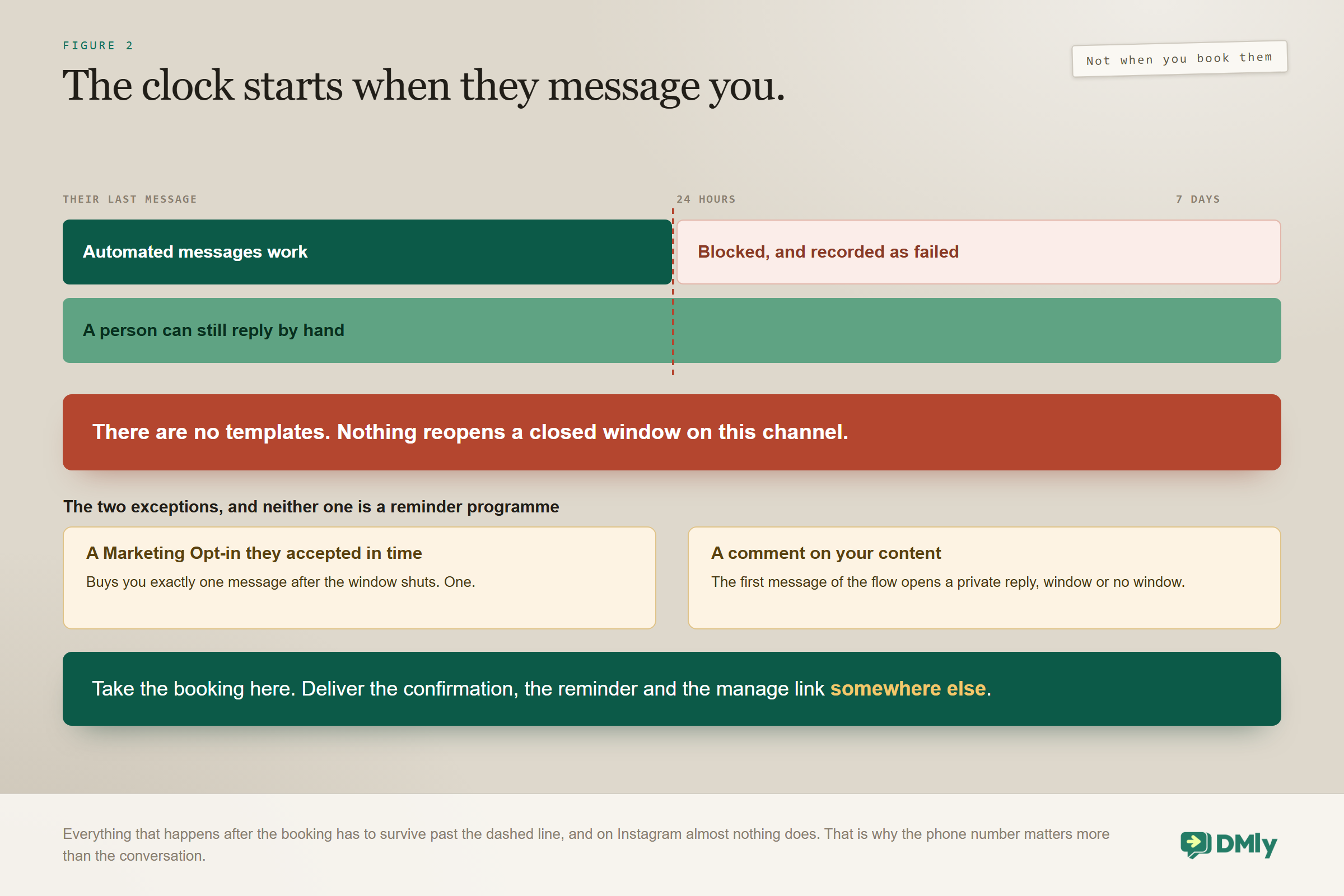
Automated messages reach an Instagram contact for 24 hours after their last message, a person can reply by hand for 7 days, and there are no templates to reopen a closed window. That combination is the single most important thing to understand about this channel, and it decides your whole build.
On WhatsApp an appointment reminder three days out is trivial: you send an approved utility template and it arrives, which is why our WhatsApp appointment booking guide barely mentions this problem. Instagram has no equivalent. If the customer booked on the first of the month and has said nothing since, a reminder on the fourth has nowhere to go. A send outside the window is blocked and recorded as failed rather than silently dropped, which at least means you can see it happening.
There are two narrow exceptions and it is worth being precise about both, because they are often described as more than they are. A contact who accepts a Marketing Opt-in node while the window is still open grants you exactly one more message after it closes. One. That is an escape hatch for a single confirmation, not a reminder programme. And a comment on your content opens a private reply that bypasses the window, which helps you start conversations and does nothing for a customer who has already booked and gone quiet.
The rule the whole build hangs off: Take the booking on Instagram. Deliver everything after it somewhere else. Which means the most important job of your booking conversation is not taking the booking. It is collecting a phone number, so the confirmation, the reminder, the reschedule prompt and the follow-up can go out on a channel that will still accept them next week.
One more thing about this channel that matters for a confirmation you actually care about: Instagram never reports delivery. A message you send sits at sent until the contact reads it, and no delivery receipt is ever coming. Messenger reports both. Nothing is broken, but it does mean that on Instagram you have no signal at all between “we sent it” and “they opened it”, so a confirmation that quietly failed to matter looks exactly like one that worked.
How Do You Get a Phone Number Without Killing the Conversation?
Ask for it as part of the booking rather than as a separate request, and give a reason that benefits the customer. People hand over a number to be reminded about something they care about. They resist handing one to a business that appears to be collecting data.
- Make it part of the booking step. If details are being taken anyway, the number is one more field in a sequence the customer has already committed to. Phrase it as where the reminder should go rather than as a request for their number.
- Use the booking page. A form is a familiar object and people fill in forms. Add phone to your booking fields and it arrives without anybody having to ask.
- Ask after confirming. Lowest friction and lowest completion. Some people simply will not answer, and there is no second chance once the window shuts.
Once you have it, the reminder is ordinary work: an appointment reminder trigger, a message on WhatsApp when they are reachable there, and SMS underneath it when they are not. SMS has no messaging window and no approval queue, which is exactly why it belongs under a channel that has both problems. Our SMS guide covers the setup, and the omnichannel inbox guide covers keeping one customer’s two threads in one place.
Deposits, and the Fifteen Minutes That Decide Them
Payment mode is set on the service rather than on the appointment, and there are three of them. Getting this right matters more here than anywhere else, because people who book appointments through Instagram DMs do it impulsively, and impulsive bookings skew towards no-shows.
- No payment required. The default. The booking confirms immediately.
- Pay after the appointment. The booking confirms first and a payment link follows. Good for established clients, weak as a no-show deterrent.
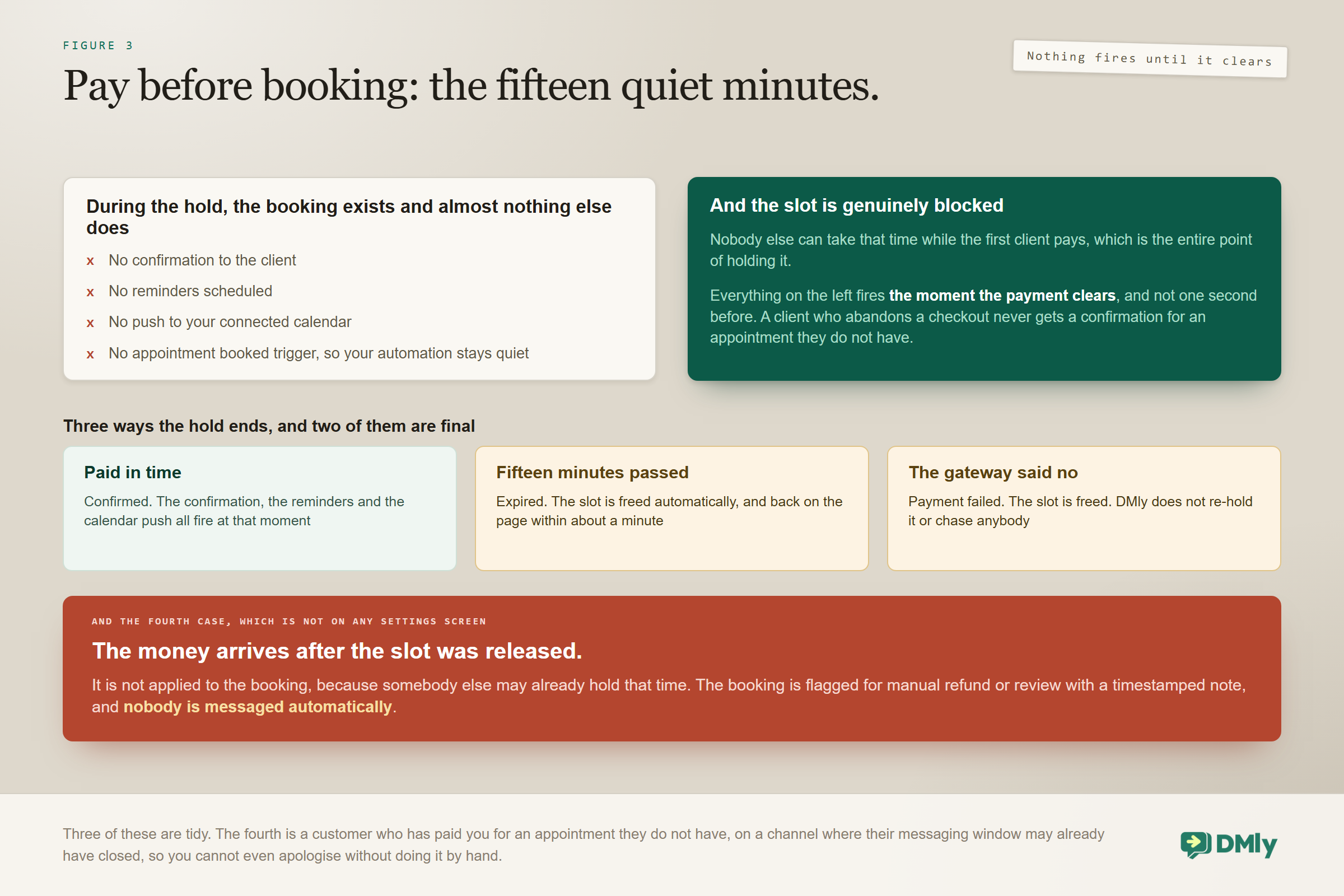
- Pay before booking. The slot is held for 15 minutes and only becomes a real booking once payment clears.
That third mode has behaviour you genuinely need to know before switching it on. During the hold the booking exists and almost nothing else does: no confirmation goes to the client, no reminders are scheduled, no calendar push happens, and the appointment booked trigger does not fire. All of it waits for the payment. That is deliberate, and it is right: somebody who abandons a checkout should not receive a confirmation for an appointment they do not have. The slot is genuinely blocked meanwhile, so nobody else can take it.
A hold ends in one of three ways. Payment succeeds, and the confirmation, reminders and calendar push all fire at that moment. Fifteen minutes pass unpaid, and the booking is marked expired and the slot freed. Or the gateway reports a failure, and the slot is freed. A background sweep runs about every minute, so a freed slot is back on the booking page within roughly that. Expired and payment-failed are both final. DMly does not re-hold the slot, chase the customer or reopen the booking. If they still want it, they book again.
The case that costs you a customer and a refund: A payment that arrives after the slot was released is not applied to the booking. Somebody else may already hold that time, so DMly refuses to resurrect it. Instead it flags the booking for manual refund or review and writes a timestamped note on it, and nobody is messaged automatically. You are holding a customer’s money without giving them an appointment, and you will only know if you look. On Instagram this is worse than elsewhere in two ways: mobile checkouts wander off for fifteen minutes routinely, and by the time you notice, that customer’s messaging window may have closed, so you cannot even apologise automatically. If you take deposits on this channel, put a human check on flagged bookings into somebody’s week.
Three smaller details catch people out. The charge uses a price snapshot taken when the slot was held rather than the live service price, so a mid-checkout price change never affects somebody already paying. Tax comes from the service’s own Tax rate field, and although the field’s hint suggests a blank one falls back to your workspace default, at checkout it does not: blank means no tax is charged. Invoices do fall back to the default, so a service with a blank rate can be charged untaxed while its invoice shows tax. Set the rate on the service if you need bookings taxed. That behaviour is as documented on 2 September 2026 and is worth re-checking before you rely on it.
And one exception that quietly undoes a deposit policy: appointments created by hand from the calendar bypass payment modes entirely. No hold, no pay link, no checkout, whatever the service is set to do. That is convenient when a regular rings up. It is a hole in your policy if staff use it habitually. Our guide to taking payments from a conversation covers the gateway side.
Confirmations, Reschedules and Cancellations
Every booking gets its own private manage page, linked from the confirmation, and it is the thing that saves your team from a week of “can I move it” messages. While the booking is still confirmed and still in the future, the customer can cancel it, reschedule it, or add it to their calendar with links for the usual calendars plus a downloadable file.
Both deadlines are workspace-wide settings measured in hours rather than per-service ones, and both accept zero if you are happy for people to change things right up to the start time. About a day after the appointment the booking moves to Completed, and the manage page keeps only the details with a line saying the meeting has passed. The add-to-calendar links go at the same time, because they are only ever offered on a confirmed, still-upcoming booking.
Classes work differently in one respect that catches studios out. A class seat can be cancelled but never rescheduled, because a class runs when it runs, and it uses its own cancellation deadline on the class settings tab. A cancelled seat passes automatically to the next person on the waitlist. If you run classes as well as one-to-one work, our online class booking guide covers the rest.
Send the manage page link in the confirmation, and send it on the channel that will still be open later. A manage link that exists only in an Instagram DM is a manage link the customer cannot find in three days, because they will look in their texts.
The Awkward Cases
These are the situations that separate a demo from something that runs unattended for a month. Decide each one before it happens rather than during.
- They want a time you do not have. The assistant should offer the nearest alternatives rather than opening a negotiation. Availability is computed from real constraints, so there is nothing to negotiate with.
- Two people pick the same slot seconds apart. The second one is refused with a message telling them the time was just taken, rather than double-booking your staff. No action is needed from you.
- They want several sessions. Staff can book up to twenty slots at once from the calendar, and the contact gets a single confirmation covering the set. Each slot is checked individually, so one that was taken in the meantime is skipped while the rest go through, and the confirmation covers only the ones that succeeded. Check the calendar rather than trusting the message.
- They ask a clinical, legal or financial question mid-booking. That is a handover, not an answer. Name it explicitly in the prompt.
- They go quiet halfway through. You have until the window closes to nudge automatically, and after that only a person can. Build the nudge for a few hours later rather than the next day.
- The contact has no name yet. A new Instagram contact is created as Instagram user plus the last four digits of their ID and only upgraded once Meta returns the profile, so a booking taken in the first moments of a conversation can attach to a nameless record. Somebody who has only ever commented may keep the username permanently, because Meta returns no profile for a person who has never sent you a DM.
- They already exist as a contact on another channel. Instagram identity is a Meta-issued account-scoped ID, and contacts are not linked across channels automatically. Expect duplicates, merge them deliberately, and read our CRM guide on how the merge behaves.
- They text STOP. Opt-out keywords work on Instagram too. The contact is opted out, tagged Unsubscribe and removed from running flows and sequences. Automated messages stop; a person can still reply by hand.
A Testing Checklist Before You Go Live
Every item here has cost somebody a real customer, and the whole list takes under an hour. Do it from a phone, on a real account, not from the desk you built it on.
- Book a real appointment from a real Instagram account. The Playground cannot tell you whether the channel behaves, and its tool calls run against demo data rather than your calendar.
- Check the slot actually disappeared from availability afterwards.
- Book a paid service and abandon the checkout. Confirm the slot comes back after the hold expires and that no confirmation went out during it.
- Confirm the reminder fires on the right channel. This is the test people skip and the one that matters most.
- Cancel from the manage page and confirm the deadline behaves as you configured it.
- Let a booking conversation sit for twenty-five hours, then try to send an automated message and watch it fail. Now you know what your customers would have experienced.
- Ask the assistant for a discount and confirm it declines.
- Open the Tool calls trace in the Playground and check the agent reaches for the booking tools rather than describing them.
The Numbers Worth Watching
Five numbers tell you whether you should book appointments through Instagram DMs at all, and only one of them is about Instagram. Our note on the metrics worth tracking after you automate covers how to instrument them without drowning in dashboards.
- DM to booking rate. Of the conversations where booking came up, how many ended in one.
- Route split. Link against in-thread. If the link wins consistently, simplify the assistant rather than defending it.
- Phone capture rate. The number that predicts your no-show rate better than any other, because it decides whether the reminder can happen at all.
- No-show rate by whether a reminder reached them. Compare bookings where the reminder landed against bookings where it did not. This is the number that pays for the whole build.
- Hold expiry rate on pay-before services. A high rate usually means the price was a surprise rather than that the customer changed their mind.
Mistakes Worth Avoiding
Every one of these has cost a real business a real customer, and all but one of them is invisible until it has already happened. They are listed in the order they tend to bite the businesses that book appointments through Instagram DMs for the first time.
- Building reminders on Instagram. They will not send after twenty-four hours and there is no template to fall back on. This is the big one, and it is the reason this article exists.
- Pasting the booking link by hand. It arrives unattributed, matches on whatever email the customer types, and quietly builds you a second contact record for the same person.
- Forgetting to switch the booking tools on, or forgetting to mention them in the prompt. Either one produces an assistant that talks about booking and never books.
- Sending the landing page instead of a service link. Every extra choice loses people who had already decided.
- Assuming a deposit-taking service confirms immediately. Pay before booking holds the slot silently for fifteen minutes and fires nothing until the payment clears.
- Never checking for late payments on released slots. Nobody is messaged, and you are holding money for an appointment that does not exist.
- Letting staff book paid services from the calendar. It bypasses the payment mode entirely.
- Promising a class reschedule. Class seats cancel; they do not move.
Frequently Asked Questions
Can customers really book appointments through Instagram DMs without leaving the app?
Yes, and in two different ways. You can book appointments through Instagram DMs without the customer ever opening a browser. A Book Meeting node can show tappable times from your real availability inside the thread with no AI involved at all, and an assistant with the booking tools switched on can list services, check availability and book the appointment conversationally. The one exception is money: a paid service always sends the customer to the hosted booking page.
Why did my appointment reminder not send on Instagram?
Because automated messages only reach an Instagram contact within twenty-four hours of their last message, and Instagram has no message templates to reopen a closed window. The send is blocked and recorded as failed rather than dropped silently. Send reminders on WhatsApp or SMS instead, which means collecting a phone number during the booking.
My assistant talks about booking but never actually books. Why?
One of two reasons. The booking tools are off on a new AI Reply node, which arrives with five CRM tools ticked instead. Or the tools are on but the prompt never tells the agent to use them, because ticking a box only makes a tool available. Check the Tool calls trace in the Playground to see which of the two you have, or start from the AI Appointment Booking bot template, which arrives with the whole set loaded.
Can I take a deposit for a booking made through Instagram?
Yes, by setting the service to pay before booking, though the customer completes it on the hosted page rather than in the thread. The slot is held for fifteen minutes while they pay, and during that hold there is no confirmation, no reminders, no calendar push and no appointment booked trigger. All of it waits for the payment to clear.
What happens if the customer pays after the fifteen minutes are up?
The payment is not applied to the booking, because somebody else may already have the slot. DMly flags the booking for manual refund or review and writes a timestamped note on it, and nobody is messaged automatically. You have to refund or rebook by hand, which is why anybody taking deposits on this channel needs a person checking flagged bookings regularly.
Should I send a booking link or book in the thread?
Send a single-service link when the customer has already decided and the service is simple, and send it from a node so it is attributed. Book in the thread when the customer has questions first or is choosing between services. Most businesses use both and let the conversation decide.
Will the booking attach to the customer’s existing contact record?
Only if the link was attributed or they were already identified. An unattributed link matches on the email typed in and creates a new contact when there is no match, and because Instagram contacts are keyed to a Meta-issued ID rather than an email address, that produces duplicates quickly. Send links from a Book Meeting or Send Booking Link node and the problem mostly disappears.
Can a customer reschedule a class booking?
No. Class seats can be cancelled but never rescheduled, and a cancelled seat passes to the next person on the waitlist. Only one-to-one appointments can be moved, against a workspace-wide reschedule deadline.
Build the Second Half First
If you take one thing from this, take the order. Most people who set out to book appointments through Instagram DMs build the conversation, admire it, and discover the reminder problem in week three when somebody does not turn up. The businesses that get real money out of this channel build the second half first: the phone number, the reminder route, the manage link that arrives somewhere findable, and a habit of checking flagged payments.
Then they go back and make the conversation good. Both halves matter, but only one of them fails silently, and it is not the one people worry about. Once the after-part is solid, you can book appointments through Instagram DMs with the confidence that the booking will still be a booking on the day.
Writing about WhatsApp automation, bookings and growth for local business.
Turn WhatsApp into your busiest channel.
Start free and run message, bookings, payments and reviews in one place.
