
WhatsApp Template Rejected? Why It Happened and How to Fix It
You submitted a perfectly ordinary appointment reminder. It came back Rejected. There is nothing obviously wrong with it, the wording is polite, and you have seen a dozen businesses send something almost identical.
So you open the editor and start softening sentences. That is the instinct, and about half the time it is the wrong move entirely, because the copy was never the problem. A WhatsApp template rejected without an obvious reason is failing one of a small number of specific tests, and one word is being used to describe five different situations that need five different fixes.
This guide is the diagnosis rather than the rulebook, and it exists because a WhatsApp template rejected for one reason looks identical to one refused for a completely different one. It assumes you have a rejection in front of you right now and want to know, in about ten seconds, which kind you are looking at.
WhatsApp Template Rejected: First, Work Out Which Kind
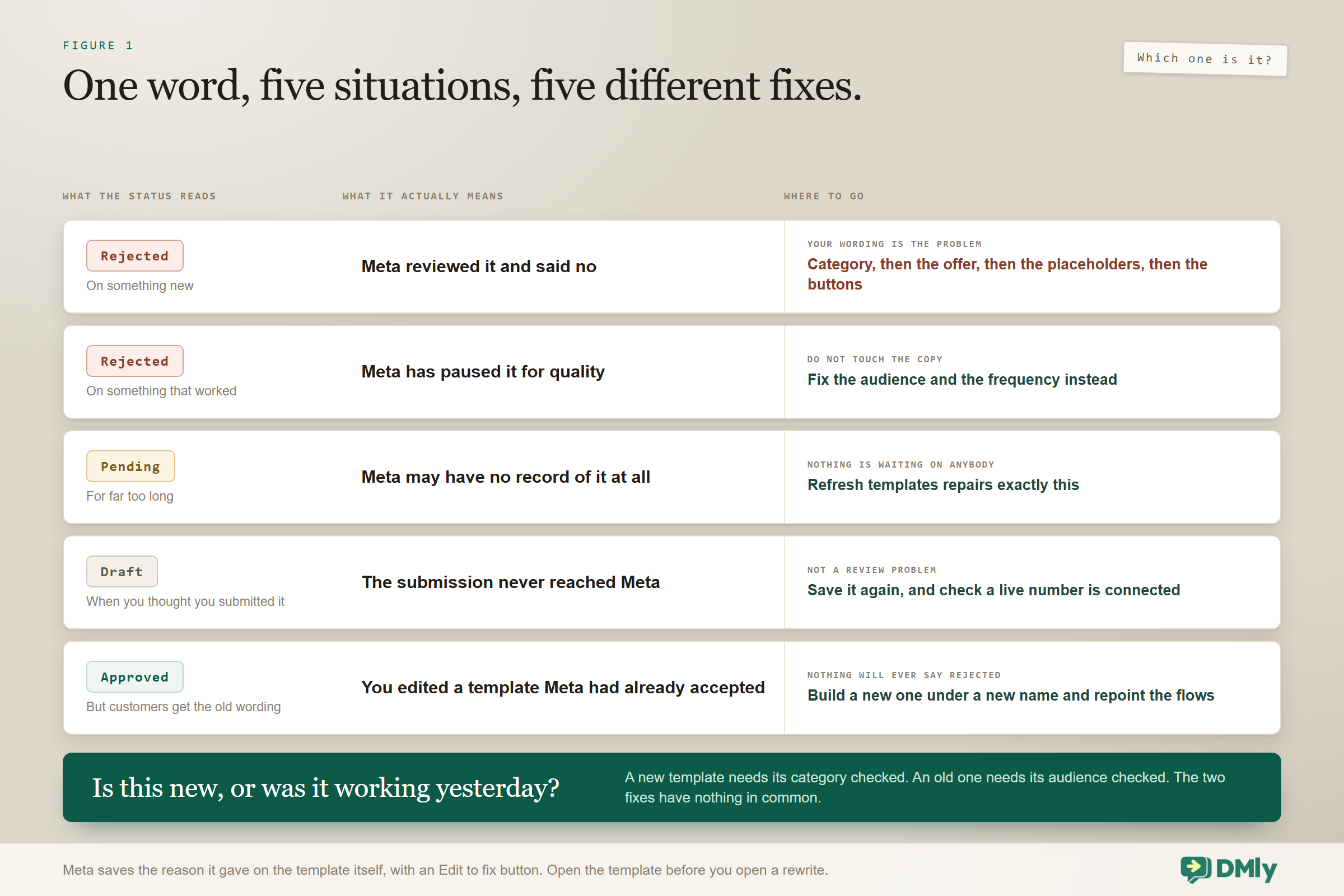
Before you rewrite anything, find out which of five situations you are actually in, because only two of them are about your wording. This table does the job faster than reading any of the sections below.
| What you are looking at | What it actually means | Where to go |
| Rejected, on a template you have just submitted | Meta reviewed it and said no | The five content reasons below |
| Rejected, on a template that has been working for weeks | Meta has paused it for quality | The quality section. Do not touch the copy |
| Pending, for far longer than it should be | Meta may have no record of it at all | Refresh templates, which repairs exactly this |
| Draft, when you thought you submitted it | The submission never reached Meta | Save it again |
| Approved, but customers receive the old wording | You edited an already-approved template | Build a new one under a new name |
The second row is the one almost nobody knows about, and it sends people rewriting copy that was never at fault. A template Meta pauses for quality reasons shows up as Rejected, identical in appearance to a content rejection. If a template has been sending happily for weeks and suddenly reads Rejected without you touching it, skip straight past the content section.
Before anything else: read the reason: Meta does tell you. The rejection reason is saved on the template and shown on it, with an Edit to fix button that reopens the builder. It is easy to miss because a rejection also arrives as a status change in a list, and the list is where most people stop looking. Open the template itself first. Two minutes of reading beats an afternoon of guessing, and it tells you immediately whether you are in the content case at all.
The Five Content Reasons You Get a WhatsApp Template Rejected
If it genuinely is a new template that Meta reviewed and declined, it is almost certainly one of these. They are listed in order of how often they turn out to be the cause.
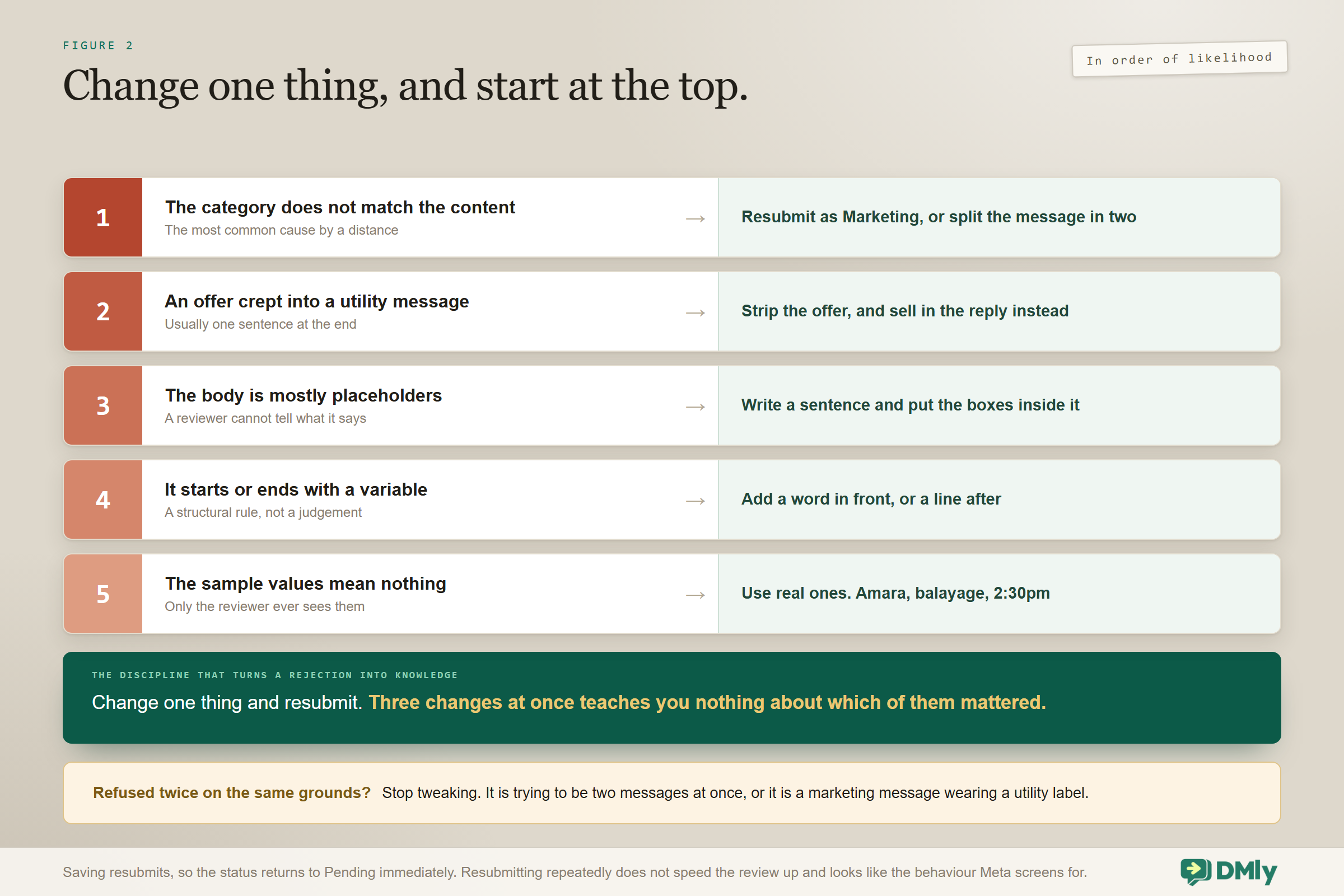
1. The category does not match the content
The most common cause by a distance. Meta reviews against the category you chose, so a promotion filed as Utility is not a marginal call, it is a rejection. If the message exists because you want more business rather than because the customer did something, it is Marketing.
The fix: resubmit under the correct category. If the higher marketing rate is what you were trying to avoid, the better answer is usually to split the message: send the genuine utility part as Utility, and let anything promotional happen in the conversation that follows.
2. Promotional wording crept into a utility template
A close cousin and sneakier, because the template really is a utility message that picked up one sentence of marketing. A single “book now and save 20 per cent” at the end recategorises the whole thing in a reviewer’s eyes.
| Rejected as Utility | Approved as Utility |
Hi {{1}}, your appointment is tomorrow at {{2}}. Book your next visit now and get 15 per cent off your first colour! | Hi {{1}}, your appointment is tomorrow at {{2}}. Reply RESCHEDULE if you need to move it. |
The fix: strip the offer. And notice what you gain by doing so: if the customer replies to the clean version, the messaging window opens and you can mention the offer freely, with no template, no approval and no marketing rate.
3. The body is mostly placeholders
A documented rejection reason and an easy one to hit when you are trying to make one template cover everything. A reviewer looking at {{1}}, {{2}} {{3}} {{4}} cannot tell what the message does, and neither could a customer.
The fix: write a real sentence and put the variables inside it. Aim for most of the body to be fixed text.
4. It starts or ends with a variable
A hard structural rule rather than a judgement: a template cannot begin or end with a variable. “{{1}}, your order has shipped” fails on the first character.
The fix: add a word in front or a line after. “Hi {{1}}, your order has shipped” passes, and reads better anyway.
5. The sample values were unhelpful
Every variable needs a sample value for the review, and those samples are only ever seen by the reviewer, never by a customer. Filling them with “x” or “test” gives the person assessing your template no way to judge what it says in the wild.
The fix: use realistic samples. For a reminder, “Amara”, “balayage” and “2:30pm” tell a reviewer exactly what lands on a phone.
Rejections That Come From the Header, Buttons or Media
Not every rejection is about the body text, and component rejections are worth checking first because they are objective. The editor will happily let you save several things Meta will not accept.
- A media header with no usable sample. Image, video and document headers require a sample file for review, within the accepted sizes: JPG or PNG up to 5MB, MP4 up to 16MB, PDF up to 100MB. A missing or unrepresentative sample gives the reviewer nothing to assess, and an oversized file will not attach at all.
- Too many buttons of one kind. The overall cap is ten, but within that you may have at most two URL buttons, one call button and one copy-code button. Two links plus a phone number is fine. Three links is not, and it fails structurally rather than obviously.
- Text that overflows a component. Header text is capped at 60 characters, footers at 60 and button labels at 25. Long button labels are the usual casualty, because “Reschedule my appointment” looks perfectly reasonable and is over the limit.
- A name that breaks the rules. Template names take lowercase letters, numbers and underscores only, up to 100 characters. Capitals, spaces and hyphens are refused at submission rather than at review, which at least tells you quickly.
If the body reads well and the template still fails, count the buttons and measure the labels before you rewrite a single sentence.
When a Template That Was Working Suddenly Says Rejected
This is the WhatsApp template rejected case that wastes the most time, so it is worth being blunt about it: the copy passed review once, and nothing about it has changed. A template that has been sending happily and then reads Rejected has almost always been paused by Meta for quality.
Quality falls when people block your messages or report them, and a red rating means Meta may pause your templates or drop your messaging tier. So the diagnosis is not about wording at all. It is about who you sent it to and how often. Three questions settle it.
- Was it going to people who asked to hear from you? A marketing template sent to a list that never opted in generates blocks quickly, and blocks are exactly what the rating measures.
- Was it going too often? Frequency is the most common cause of blocks that a business never sees coming, because nobody complains, they just mute you.
- Was it genuinely useful to the person receiving it? Useful messages get replies. Promotional ones get reports.
Fixing this means fixing your sending rather than your sentence: tighten the audience, reduce the frequency, honour opt-outs and let the rating recover. Our guide to WhatsApp quality rating, messaging limits and bans has the full picture, and sending bulk messages properly covers the habits that stop it happening.
The Template That Is Not Waiting on Anybody
A template can sit at Pending in DMly while Meta has no record of it whatsoever. It looks exactly like a review that is taking its time, and it can look like that indefinitely, because there is nothing at the other end to come back.
This is the state most likely to cost you a week, because everything about the screen tells you to be patient. Approval is usually a matter of minutes and Meta allows itself up to 24 hours, so a day of waiting feels reasonable. Two days feels unlucky. Nobody suspects that the submission never arrived.
The button that repairs it: Refresh templates, on the Templates page, re-reads the real state from Meta and re-submits anything that never made it there. That is its actual job, and it is the only thing that repairs this case. It is also worth pressing when you are actively waiting on an approval, because otherwise statuses sync themselves about every ten minutes and you would just be waiting for the next pass. One thing it cannot fix: templates can only be submitted once a live WhatsApp number is connected. If you connected recently, or the number is not fully live, nothing you press will send anything anywhere.
The Failure That Never Says Rejected at All
If you edited a template Meta had already approved, the edit is not pushed and the originally approved version carries on being delivered. Nothing shows as Rejected, which is exactly why this goes unnoticed for months.
You can open the editor, change the price, save it, look at the new wording on your screen, and be entirely wrong about what your customers are receiving. To change approved wording you have to create a new template under a different name and repoint your automations and broadcasts at it.
If you have ever updated a figure in a template and never went back to verify what actually went out, that is worth ten minutes today.
What a Rejected Template Actually Breaks, and What It Does Not
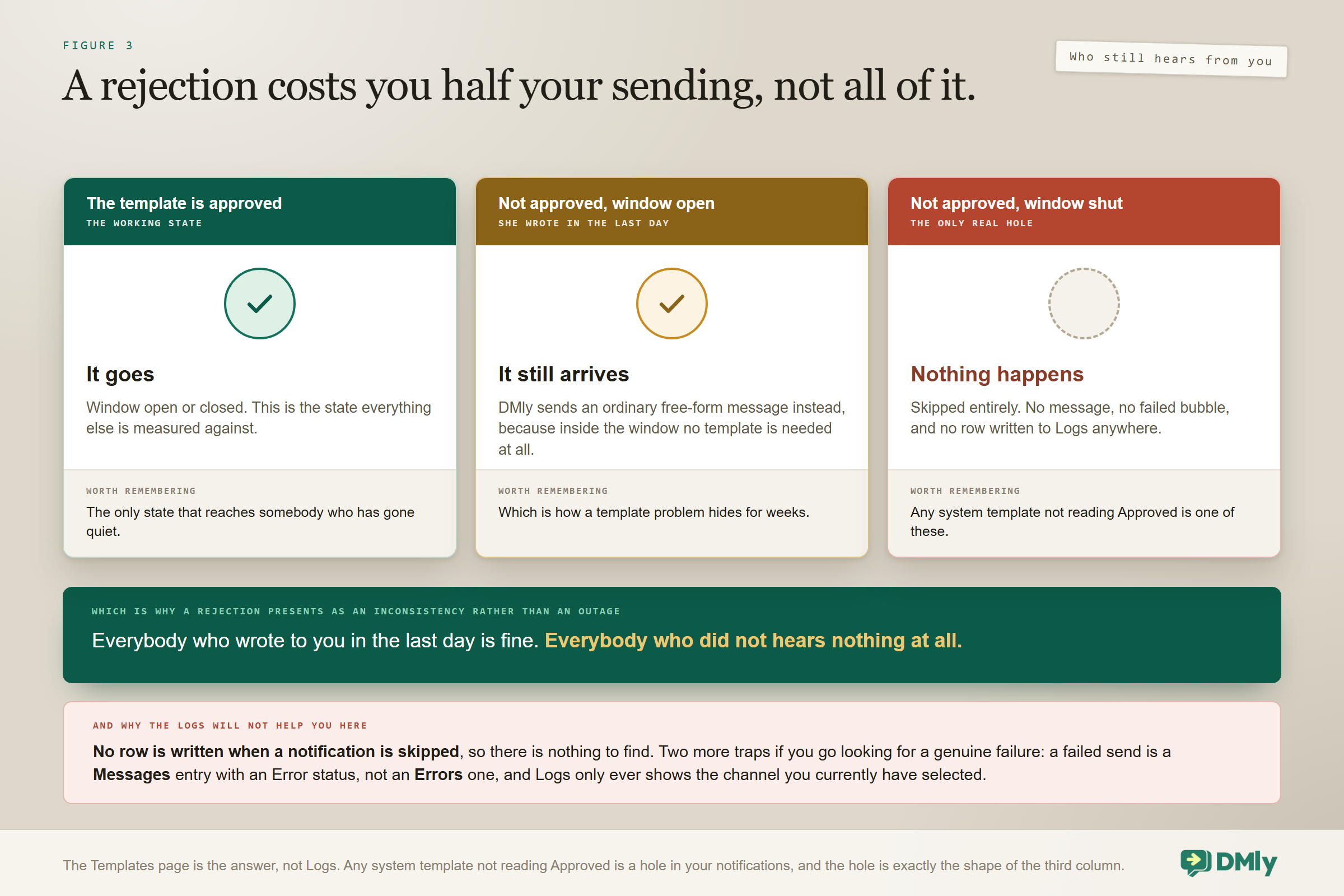
A rejection is less total than it feels, and knowing exactly what still works changes how urgently you need to act. There are three outcomes for any automated WhatsApp notification, and only one of them is a hole.
| The state of the template | What actually happens |
| Approved | The message goes, window open or closed. The working state |
| Not approved, but the contact messaged you in the last 24 hours | DMly sends a free-form message instead, and it arrives |
| Not approved, and the window is closed | The message is skipped entirely. Nothing is sent and no failed bubble appears |
So a rejected template costs you the out-of-window half of your sending and nothing else. Anybody who has written to you in the last day still hears from you normally, which is why a rejection often shows up as “some customers got the confirmation and some did not” rather than as an obvious outage.
You cannot find this in the logs, and it is worth knowing before you look: When DMly skips a WhatsApp notification because the template is unapproved and the window is closed, no row is written to Logs at all. There is nothing to find. If you have worked through the window and the template state and still cannot explain a missing message, that gap is the reason. The Templates page is the answer here, not Logs.
Two more traps if you do go to Logs for a genuine failure. A failed send is logged as a Messages entry with an Error status, not under Errors, which is a different category for faults while processing an inbound message; filtering there hides the row you came for. And Logs only ever shows the channel you currently have selected, so chasing a WhatsApp send with another channel active gives you an empty list and the wrong conclusion.
One more distinction that saves an afternoon. Some failures are a missing setup rather than a bad recipient, and the reason recorded on the message tells you which. no_credentials means the channel is not connected or its credentials are gone. no_gateway on SMS means your SMS provider is not connected, which is not a bad phone number. no_active_channel means DMly had no channel to send on at all. None of the three has anything to do with your template, and none of them resolves on its own.
What the Reviewer Is Actually Looking For
It helps to picture the assessment as a person deciding one thing: would a customer be glad to receive this, or annoyed by it? Almost every documented rejection reason is a proxy for that question, which is why the rules feel arbitrary until you can see what they protect.
Category matters because it declares your intent, and a promotion filed as Utility is an attempt to send marketing at a service message’s price and permission level. A placeholder-heavy body matters because a message that is four-fifths variables could say anything once filled in, so the reviewer cannot judge what customers will receive. Realistic samples matter for the same reason in reverse: they are how you show your working.
Read that way the advice is simple. Submit the message you genuinely intend to send, in the category it genuinely belongs to, written the way you would write it to one customer. Templates that pass that test clear review quickly, and they also tend not to get paused later, because the thing that triggers a quality pause is precisely the thing the reviewer was screening for in the first place.
It is also worth remembering what the system protects. The same review that occasionally frustrates you is why your customers still open WhatsApp messages, and why a reminder from your business lands in an inbox nobody else has flooded. The constraint and the open rate are the same fact.
How to Fix It and Resubmit
Five steps, and the discipline in the middle one is what turns a rejection into knowledge rather than a lottery.
- Identify which of the five situations you are in. The table at the top does this in about ten seconds and saves you rewriting copy that was fine.
- Read the reason Meta saved on the template. It is there, on the template itself, with an Edit to fix button.
- Change one thing at a time. Category first, since it is the most common cause. Resubmitting with three changes teaches you nothing about which of them mattered.
- Save, which resubmits. Saving submits to Meta immediately and the status returns to Pending. There is no separate submit button.
- Wait properly. Approval is usually minutes, Meta allows itself up to 24 hours, and statuses sync on their own. Resubmitting repeatedly does not speed anything up.
If it fails twice on the same grounds, stop tweaking and rewrite. A template refused twice for the same reason usually has a structural problem: it is trying to be two messages at once, or it is a marketing message wearing a utility label.
Build a spare while nothing is urgent: Because approval can take a day and edits to approved templates never push, keep one plain, generic utility template approved and unused. When something urgent is refused the afternoon before you need it, you still have a way to reach people. It costs nothing to hold and it is the cheapest insurance in this whole subject.
What to Do When You Needed It Sent Today
A WhatsApp template rejected the day before a campaign is rarely only a template problem. It is a template problem with a deadline attached. While you fix and resubmit, there are four legitimate ways to get the message out, and none of them involves waiting.
- Use a different approved template you already hold. Connecting a live number auto-submits a set of twenty system templates, and most businesses have accumulated more since. One of them is often close enough to carry today’s message even if it is not the wording you wanted.
- Get the customer to message you first. Anybody who writes to you opens a fresh 24-hour window, inside which you can send whatever you like with no template at all. A click to chat link or a QR code does this at scale, and it is why well-run accounts need fewer marketing templates than they expect.
- Send to the people whose window is already open. Not everybody on your list is out of reach. Contacts who wrote in the last day can receive free-form text right now, so split the send: free-form to the reachable, template to the rest once it is approved.
- Use a channel with no approval queue. SMS has no messaging window, no template approval and no queue, so a short text can carry a time-critical message while the WhatsApp version is still in review. It costs more per recipient in most markets, which is a fair price for a message that had to arrive today.
What not to do is resubmit the same template repeatedly hoping for a different reviewer. A queue full of near-identical submissions is a good way to attract exactly the kind of attention you do not want.
The longer-term lesson from every urgent rejection is the same. Build your templates before you need them. A reminder template approved in a quiet week is worth considerably more than the same template submitted at four o’clock on the afternoon you needed it.
Preventing the Next WhatsApp Template Rejected Notice
Four habits remove most rejections before they happen, and none of them takes any longer than the alternative.
- Choose the category by what the message honestly is, rather than by what it costs.
- Keep utility templates free of offers, and let the conversation carry the selling.
- Write real sentences with the variables inside them rather than around them.
- Use realistic sample values, because the reviewer is a person trying to work out what your customers will see.
Beyond that, the most effective prevention is not writing many templates at all. DMly ships 20 system templates covering confirmations, reminders, invoices, receipts, failed payments and renewals, already submitted for review when you connect a live number, and most businesses need only a handful of their own on top. If you would rather adapt tested wording than face a blank editor, our library of WhatsApp message templates is the shortcut, and the sending side is in our broadcasts guide.
Frequently Asked Questions
How long does approval take after I resubmit?
Usually minutes, and Meta allows itself up to 24 hours. Status updates arrive by push and DMly also re-checks with Meta about every ten minutes, so the list refreshes without you doing anything. Resubmitting the same template repeatedly does not accelerate the review and can look like exactly the behaviour Meta is screening for.
My template was approved before and now says Rejected. Why?
Meta has almost certainly paused it for quality, and a paused template shows as Rejected. The copy is not the problem, since it passed review already. Look at who received it and how often, because quality falls when people block or report messages, and fix the audience and the frequency rather than the wording.
My template has said Pending for days. What now?
Press Refresh templates on the Templates page. It re-reads the real state from Meta and re-submits anything that never reached it, which is a genuine state: a template can show as Pending in DMly while Meta has no record of it at all. Also check that a live WhatsApp number is actually connected, because nothing can be submitted until one is.
Can I appeal a rejection?
In practice, fixing and resubmitting is faster than appealing, because approval usually takes minutes. Work out which of the five content reasons you hit, change that one thing, and save again. Reserve any escalation for a template you are confident is correctly categorised and still refused twice.
Why is my template stuck on Draft?
Draft means the submission never reached Meta, so it is not queued and it is not under review. Save it again to submit it. This state is easy to misread as created and waiting, and it is a common reason a template never appears in the broadcast picker.
Does having a WhatsApp template rejected hurt my account?
A single content rejection is routine and harmless. What does hurt is the pattern behind repeated rejections, especially miscategorised marketing, because that is the same behaviour that drives blocks and reports once messages go out. A template paused for quality is the signal to take seriously, since a red rating can cost you your messaging tier.
Diagnose Before You Rewrite
The instinct on seeing a WhatsApp template rejected is to open the editor and start softening sentences. Half the time that is the wrong move entirely, because the copy was approved once and what changed was who you were sending it to.
So ask the one question first. Is this new, or was it working yesterday? A new template needs its category checked and its placeholders trimmed. An old one needs its audience and its frequency looked at. A template that has been Pending for days may never have reached Meta at all. And if the words on your screen do not match what customers are receiving, you have met the edit rule, and the answer is a new template rather than a fix.
Five situations, five different fixes, and one word covering all of them. The wider platform context is in our WhatsApp Business API guide.
Writing about WhatsApp automation, bookings and growth for local business.
Turn WhatsApp into your busiest channel.
Start free and run message, bookings, payments and reviews in one place.
