
How Salons Can Reduce No-Shows With Deposits and WhatsApp Reminders
A correction first, because it changes where this guide starts. Our own guide to reducing appointment no-shows says nothing in DMly reports on them, and tells you to count them by hand from the bookings list. That is out of date. DMly’s documentation now describes an Appointment reports page with a No-show rate card, broken down by service and by stylist. So before you choose between reminders and deposits to cut salon no-shows, you can find out exactly where they are happening.
That matters, because no-shows are not always spread evenly across a salon’s diary. They cluster: on certain services, certain days, certain kinds of client. A deposit on everything punishes the regulars who never miss. Reminders alone may not move the handful of expensive appointments that go missing. The right answer depends on the numbers, and now you can see them.
This guide works through it in order: reading your real no-show rate (and the one setting that makes it look better than it is), what an empty chair costs you, and a three-layer policy of reminders, payment at booking and a follow-up after a no-show. It builds on our general guides to reducing appointment no-shows and taking deposits or full payment at booking, and applies them to a salon.
Step 1: Find Your Real No-Show Rate
DMly’s Appointment reports show a no-show rate by service and by stylist. Read it before you change anything.
Go to Configurations, then Reports, and open the Appointments tab, headed “Appointment reports”. Five cards run across the top: Total bookings, Completed, No-show rate, Revenue (paid) and Avg class fill. Below them, a By service table and a By staff table break the same bookings down, including no-shows. You can narrow everything by date, stylist, service and status, and download a CSV with one row per booking.
Three views are worth a salon’s time:
- No-shows by service. Often the most useful number in the report. If colour or balayage has a far higher rate than cuts, that is where payment at booking belongs, and nowhere else.
- No-shows by stylist. Not to blame anyone, but because a stylist with a long waiting list and a high no-show rate is losing the most valuable time in the building.
- No-shows over time. Set the date range to the months before and after any change you make, so you can tell whether it worked.
The setting that makes your rate look better than it is
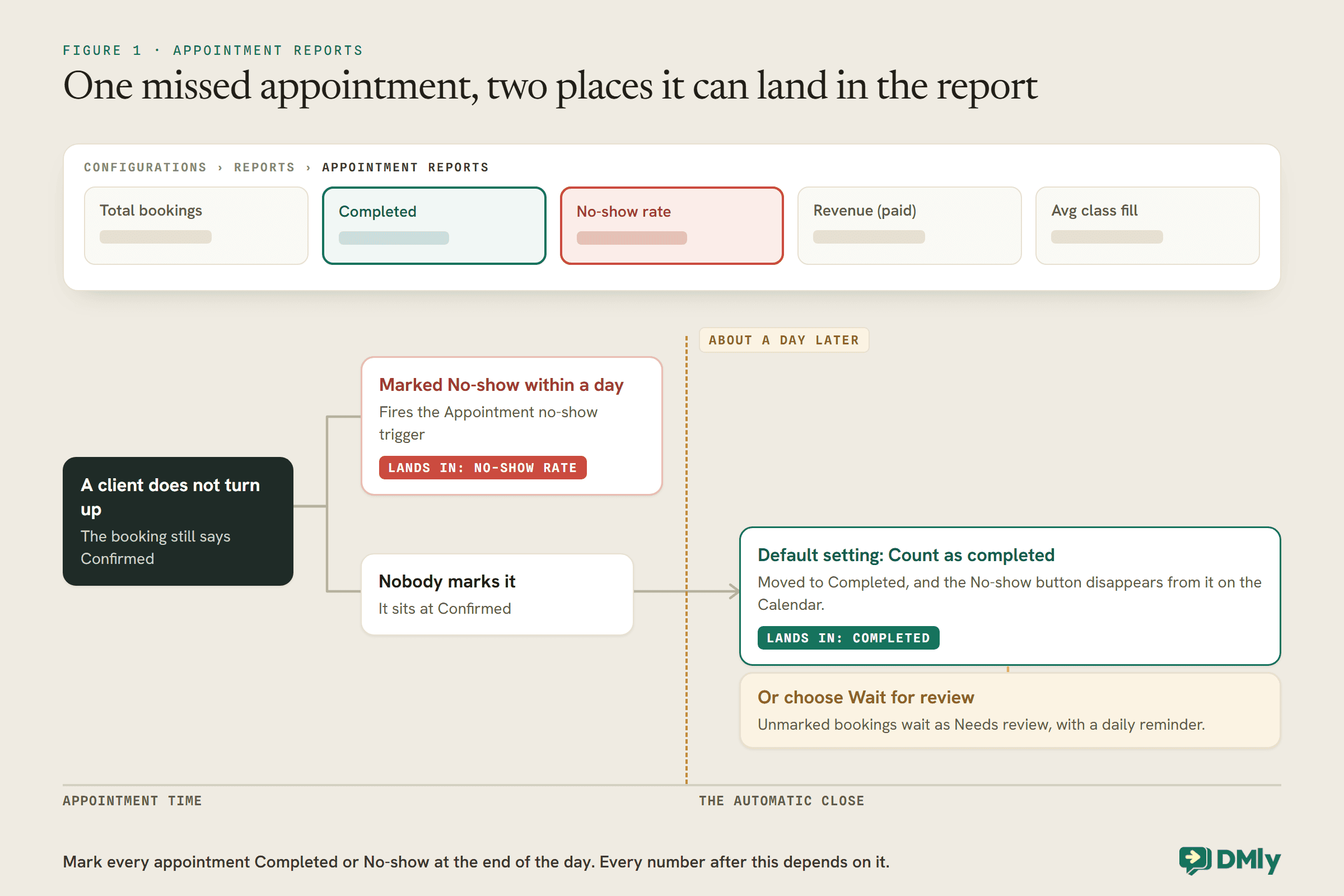
About a day after an appointment’s time has passed, DMly closes it off for you: any booking still sitting at Confirmed or Pending is moved to Completed. The Completed card counts those automatically closed bookings along with the ones you marked yourself. And once a booking has been closed automatically, the No-show button disappears from it on the Calendar.
Put those together and the consequence for a salon is plain. A client who did not turn up, and was never marked as a no-show within about a day, is counted as Completed on the default setting. The report cannot show a no-show nobody recorded. A salon that marks no-shows only when somebody remembers will see a no-show rate lower than the real one, and may decide it does not have a problem.
So the first change is not a deposit or a reminder. It is a habit: at the end of each day, open the Calendar and mark every appointment Completed or No-show. It takes a minute or two, and it is what makes every number that follows trustworthy.
DMly can also make the habit harder to skip. Under Appointments, Settings, Booking policy, the Appointments nobody marked setting decides what the automatic close does. On the default, Count as completed, the unmarked no-show is thanked for coming and counted as Completed. On Wait for review, those bookings wait as Needs review and nothing is sent until someone decides, with a daily reminder to settle them. If you plan to charge no-show fees or ask for reviews after appointments, choose Wait for review.
Make the marking somebody’s job, by name. If each stylist marks their own column, note that DMly’s report respects permissions: a teammate without View team appointments only ever sees a report on their own bookings. That is fine for stylists, but whoever reads the salon-wide number needs that permission, or they will be looking at one person’s diary and calling it the salon’s.
Step 2: Work Out What Salon No-Shows Cost You
A no-show costs the price of the appointment, minus whatever you manage to refill. For a salon, that varies enormously by service.
It is worth doing this sum once, with your own numbers, because it tells you where friction is worth adding. Here is an illustration for a small salon. The prices and rates are assumptions, not benchmarks; swap in your own from the report.
| Service | Price | Bookings a month | No-show rate | No-shows a month | Lost if none refilled |
| Cut and finish | $55 | 200 | 3% | 6 | $330 |
| Root colour | $95 | 60 | 5% | 3 | $285 |
| Full colour or balayage | $220 | 30 | 10% | 3 | $660 |
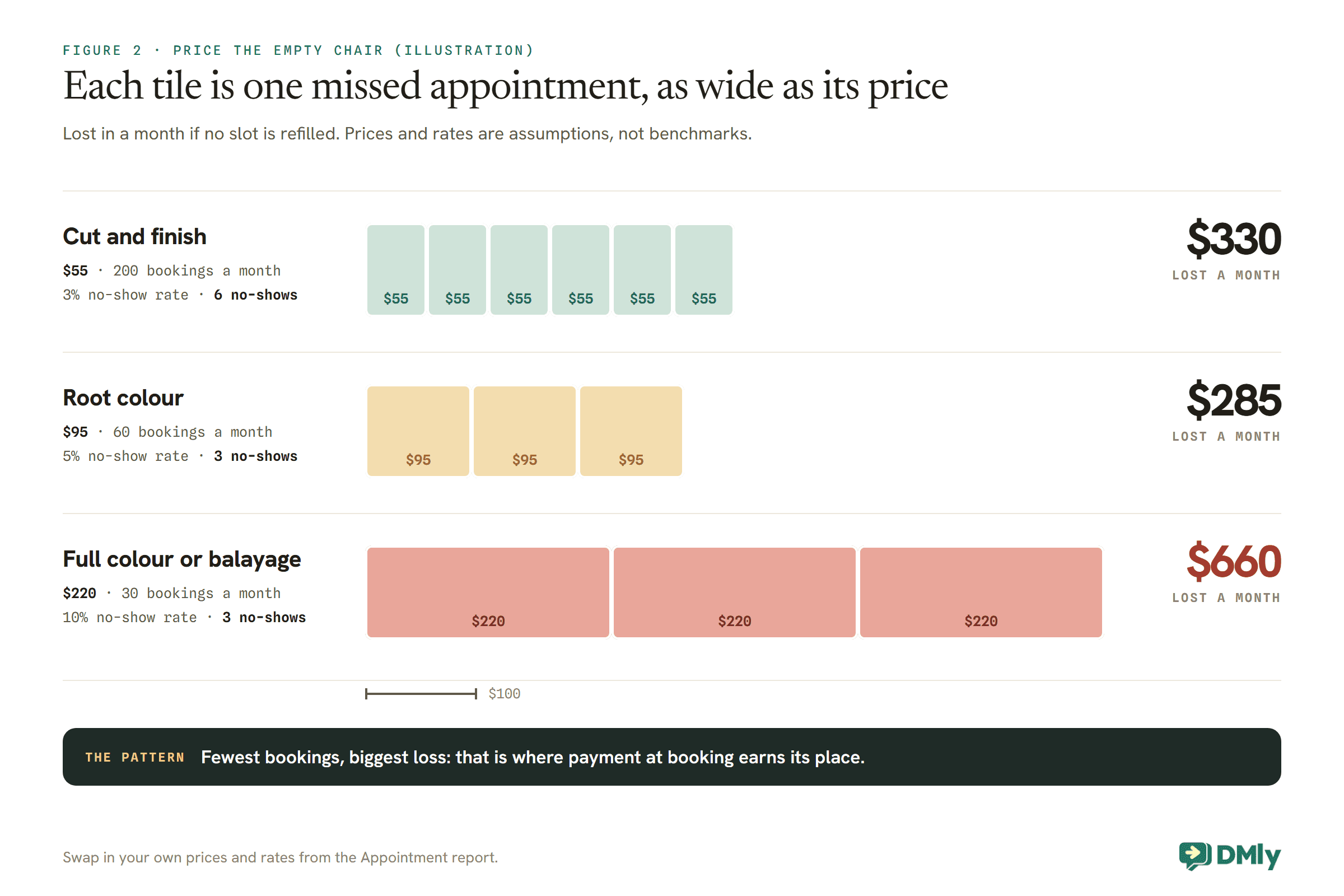
In this example, the longest service has the fewest bookings but loses the most money, because each missed appointment is expensive and hard to refill at short notice. A cut missed at 11 might be filled by a walk-in; a three-hour balayage missed at 1 usually is not. That is the pattern to look for in your own report: the services where the rate is highest and each missed booking is costly. Those are where payment at booking earns its place.
The same sum also tells you where not to bother. Six missed cuts in a month is annoying, but if most of those chairs get refilled, the real loss is small, and a payment step on every cut could cost you more bookings than it saves.
Step 3: A Salon No-Show Policy in Three Layers
Reminders for everyone. Payment at booking where the numbers justify it. A calm follow-up for the no-shows that still happen.
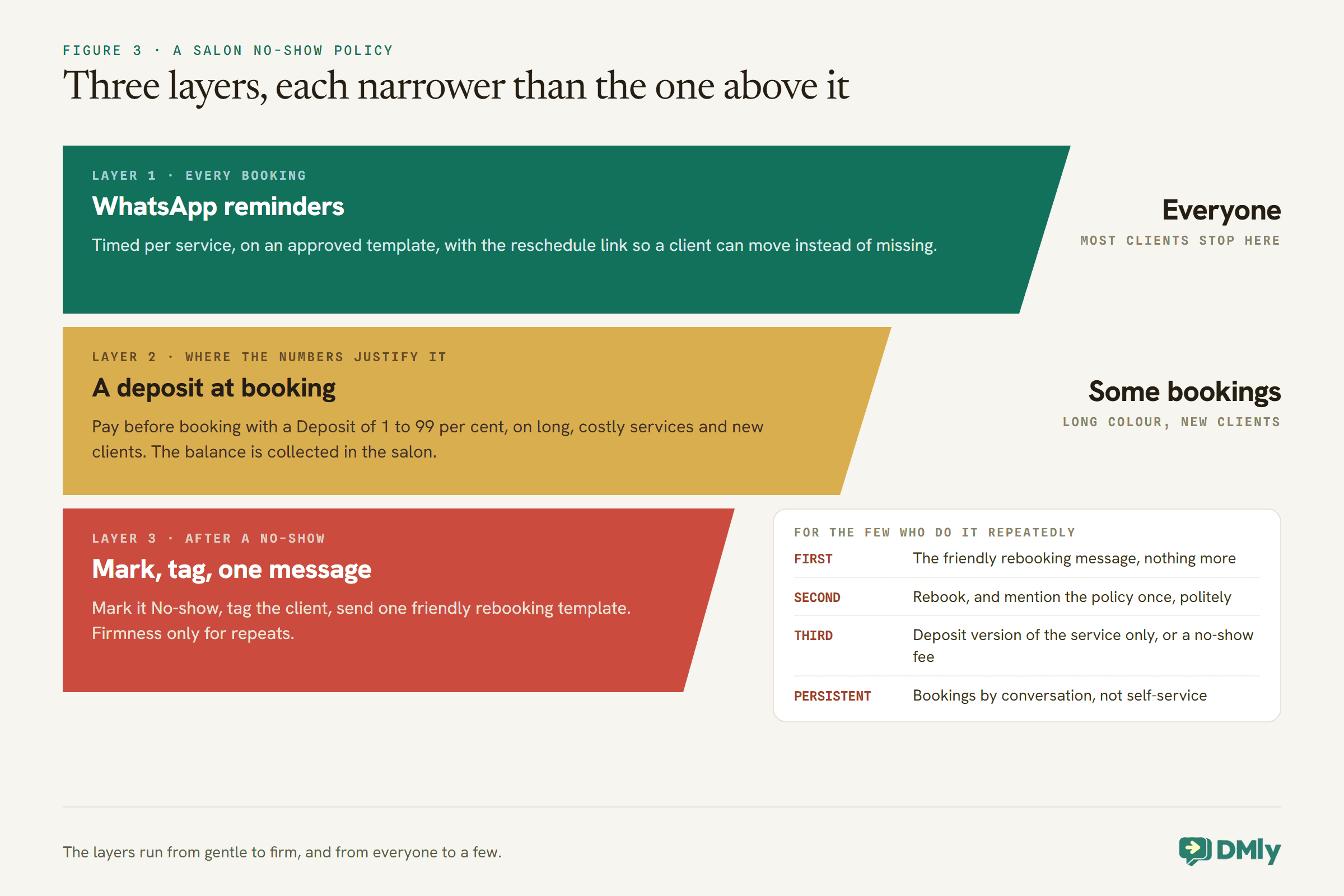
The layers run from gentle to firm, and from everyone to a few. That order matters for a salon, where the relationship with regulars is worth more than any single appointment. Most clients should only ever experience the first layer.
Layer 1: WhatsApp Reminders for Every Booking
A reminder that arrives, at the right time, with an easy way to move the booking, is the cheapest no-show tool a salon has.
In DMly, reminder times are set on each service, under Offerings, then Services, and every booking of that service follows them. For a salon, three settings do most of the work:
- Time the first reminder by service. Set it where a cancellation is still worth something to you: a day ahead for a cut, which can be refilled quickly, and further out for long colour, which cannot.
- Make sure the reminder template is approved. A reminder a day ahead usually lands outside WhatsApp’s 24-hour window, where only an approved template can be sent. If DMly’s reminder template,
dmly_appointment_reminder, is not approved, reminders outside the window are dropped, not sent. - Include the reschedule link. The variable
{{appointment.reschedule_url}}opens the client’s own booking page on rescheduling. A client who can move an appointment in two taps is less likely to simply not come. Set the reschedule and cancellation deadlines under Appointments, then Settings, in Booking policy; both start at 0.
Our guide to automatic WhatsApp appointment reminders covers timing, templates and wording in detail, and our reminder message templates give you wording to borrow.
Layer 2: A Deposit at Booking, Where It Pays
A deposit is a percentage you set on the service. Put it only on the bookings that need it.
A service’s payment mode is one of three: No payment required, Pay after the appointment, or Pay before booking. The last is the one that makes not turning up cost the client something. It holds the slot for 15 minutes while the client pays, and only confirms the booking once the payment clears; if they do not pay, the slot goes back on sale.
On a Pay before booking service, a Deposit field appears. Type a percentage from 1 to 99 and the client pays that share to book, with the rest due in the salon. DMly shows the split under the field and on the booking page, so a 25 per cent deposit on a $220 balayage reads as $55 to book and $165 at the appointment. The balance is the salon’s to collect at the till; DMly sends nothing for it, and the booking shows as not paid until the full price is in, which is how you spot what is still owed. Our guide to taking deposits or full payment at booking covers the setting, the gateway and refunds in detail.
Before you switch it on: the gateway and the 15 minutes
Payment at booking needs a connected payment gateway. Without one, a service set to Pay before booking cannot be booked online at all: the booking page tells the client “Online payment isn’t available right now. Please contact us to book this service”, and you never hear about it. Pay after the appointment is quieter still: with no gateway, it confirms the booking and sends no pay link. Connect the gateway, then book a paid service yourself before you tell anyone.
Then think about the 15 minutes. When a client books a paid service, including through your WhatsApp bot, which always sends paid services to the booking page, the slot is held while they pay. During the hold there is no confirmation and no reminder. If they pay in time, everything catches up. If they do not, the slot is released and goes back on sale. One edge case needs a person: if a payment arrives after the hold has already released the slot, DMly does not attach it to the booking, because someone else may have the time. It flags the booking for refund or review instead. Check for those flags when you first switch payment on for busy slots.
Who should pay at booking in a salon
| Booking | Payment at booking? | Why |
| New client, long colour or balayage | Yes | No history, and the most expensive chair to lose |
| Regular, long colour | Usually not | Their record is the evidence you need |
| Anyone, cut or blow-dry | No | Easy to refill; friction costs more than the risk |
| Client with repeated no-shows | Yes | See Layer 3 |
| Skin test or consultation | Cannot | A free service ignores every payment mode |
To take a deposit from some clients and not others, the same treatment can exist twice: one version with a deposit, one without. DMly’s services have a Show on public booking page switch, and Get booking link gives you a service’s own link to share. Before you build a policy on sending a hidden version to particular clients, test that its link books the way you expect, because the docs describe the switch but not how a hidden service’s link behaves.
Telling a new client from a regular in the bot
The table above depends on knowing who is new, and a WhatsApp booking bot cannot read your memory. The simplest honest approach is to ask. On the colour path of your booking flow, add two reply buttons: “I’ve been before” and “First visit”. A first visit gets the booking link for the deposit version of the service; a returning client gets the standard version. Some people will tap the wrong one, and that is fine: the aim is to put friction where the risk usually is, not to police every booking.
For the cases that matter, a person can check. Each contact in DMly carries a lifecycle stage, such as lead or client, and their history with you, so a stylist who suspects a “returning” client has never been in can look before the day. And when someone books through the wrong version, moving them is a conversation, not a crisis. Our guide to WhatsApp automation for salons shows how the booking flow fits with the rest of a salon’s messaging.
The gaps every salon deposit policy has
A single booking your team adds from the Calendar on a deposit service now asks for the deposit too: DMly holds the slot for two hours and messages the client a payment link. Ticking Payment taken in person confirms it without one, which is right for a regular paying at the till and wrong as a habit. The gap that remains is block bookings: several slots at once, or a repeating series, confirm without taking payment. If you book a new client a course of colour appointments, collect the deposit yourself.
Say the policy where the client will read it
Nothing happens to a deposit automatically when a client cancels: no refund, no forfeit. Your policy is a sentence you write and then honour by hand. Put it in two places. The booking page has a Terms URL field; set it, and the confirm step shows “By booking you agree to our terms”, linked to your page. And put the short version in the service’s Confirmation message, which for a booking made in the chat goes out in your own words while the client’s window is open:
Thanks {{first_name}}, your balayage is booked for {{appointment.date}} at {{appointment.time}}. Your deposit comes off the final bill. Cancel or move more than 48 hours before and we’ll refund it; inside 48 hours we keep it, because we can’t refill a three-hour slot at short notice. Need to move it? {{appointment.reschedule_url}}
A reason in the message does real work. “Because we can’t refill a three-hour slot” is a fact the client can accept, which a bare rule is not.
Then make the booking rules match the words. Clients cancel and reschedule themselves from their booking link within the Cancellation deadline (hours) and Reschedule deadline (hours) you set under Appointments, then Settings, in Booking policy. Both start at 0, which lets a client cancel right up to the start time. If your policy says 48 hours, set both deadlines to 48, so a client inside that window has to message you rather than cancel with a tap. These deadlines are workspace-wide, not per service, so choose a number that is fair for your shortest services too, or keep the stricter rule in the wording and handle exceptions in the chat. Your team is never limited by them: staff can always cancel or move a booking from the Calendar.
Layer 3: What to Do After a No-Show
Record it, count it, send one friendly message, and save firmness for the few who make a habit of it.
Marking a booking as a no-show records what happened and, if the service carries a no-show fee, charges it. It also gives you a fact to count and a trigger to build on. DMly’s Appointment no-show trigger fires when a booking is marked no-show, and a flow that starts from it can:
- Tag the client, for example with
no-show. Not to punish, but to count. A tag stays on the contact and can drive a segment, so you can see who has missed more than once without anybody remembering. - Send one message. “Sorry we missed you today. If you’d like to rebook, here’s the link.” Some clients who miss an appointment still want it and are embarrassed to ask. By the time a no-show is marked, the client’s 24-hour window is usually closed, so this has to be an approved template. DMly also offers its own no-show follow-up automation, whose out-of-window message rides on the utility template
dmly_appointment_no_show; that template only sends if you install the automation. - Free the slot properly, if it is not already, so the rest of the day’s diary is accurate.
For the few who do it repeatedly
Many clients who miss one appointment never miss another, and a policy aimed at everybody punishes the wrong people. For the small number who miss again and again, a steady escalation keeps it fair:
| No-shows | What the salon does |
| First | The friendly rebooking message, nothing more |
| Second | Rebook, and mention the policy once, politely |
| Third | Future bookings through the deposit version of the service only, or a no-show fee on their bookings |
| Persistent | Bookings by conversation with the salon, not self-service |
Our general guide to reducing appointment no-shows covers building the segment for this, and the wording that keeps it calm.
Refill the Chair When a Client Cancels Early
Every cancellation that arrives with notice is a no-show that did not happen. The job then is to fill the slot.
This is why the first reminder’s timing matters so much: a slot released two days before a balayage can be sold; a slot released an hour before cannot. When a cancellation arrives, a quick refill is often a short message to a small group who want exactly that: clients who asked for that time and could not have it, or regulars who are due. A broadcast of a free slot to your whole list is a marketing message, needs marketing opt-in, and asks hundreds of people to fill one hour.
For one-to-one appointments, DMly does not run a waitlist automatically; class seats pass to a waitlist, appointments do not. So the refill is a person’s job, and it helps to decide whose job it is before the next cancellation arrives.
Step 4: Measure Salon No-Shows Again After a Month
Change one thing, wait a month, and compare the same services in the report.
With every appointment marked at the end of each day, the Appointment report gives you a fair comparison. Filter by service and set the dates to the month before and the month after your change. If you added payment at booking to new-client balayage, look at balayage alone; a change in cuts tells you nothing about it. The CSV includes each booking’s status, source and paid state, so you can also check which staff-made bookings on deposit services still show as not paid.
Two things to separate before you judge: expired and payment-failed bookings are clients who did not finish paying at booking, not clients who did not turn up. They are a checkout problem, and lumping them in with no-shows makes a payment policy look worse than it is.
Mistakes to Avoid
- Not marking no-shows within a day. They become Completed, and your no-show rate looks better than it is.
- Putting a deposit on everything. Regulars who never miss pay for a problem they do not cause.
- Forgetting the balance. DMly takes the deposit and nothing more. Collect the rest at the till.
- Block-booking new clients from the Calendar. A series or several slots at once confirm without a deposit.
- An unapproved reminder template. Reminders outside the window are dropped.
- No reschedule link in reminders. Clients who cannot move a booking easily may just not come.
- Counting expired and payment-failed bookings as no-shows. They are a different problem.
Frequently Asked Questions
Do deposits reduce salon no-shows?
A deposit at booking puts money in hand before the appointment, so it is the strongest tool you have; a no-show fee is the gentler one, charged only after a missed appointment. It also adds friction, which can lose bookings, so use it on the services and clients where your report shows the losses are.
Can DMly take a partial deposit for a salon booking?
Yes. On a service set to Pay before booking, the Deposit field takes a percentage from 1 to 99. The client pays that share to book and the rest in the salon, which you collect yourself.
How do I see my salon’s no-show rate in DMly?
Go to Configurations, then Reports, and open the Appointments tab. The No-show rate card and the By service and By staff tables show it. Mark every appointment within about a day, or on the default setting unmarked no-shows are counted as completed.
What should I send a client who did not turn up?
One friendly message with a link to rebook, without accusation. It will usually need an approved template, because the client’s 24-hour window has closed. Save firmer steps for clients who miss repeatedly.
Does marking a no-show charge the client?
Only if you have set a No-show fee, on the service or as a workspace default. Marking also fires the Appointment no-show trigger. A booking nobody marks is never charged.
Can I charge a no-show fee after the appointment?
Yes. Set a No-show fee and it is charged when the booking is marked as a no-show: to a saved card if the client has one from a subscription, otherwise by a payment link on their channel. For most salon clients that means a link they may choose not to pay, which is why a deposit is still the firmer protection for your most expensive chairs. It needs a connected payment gateway, is charged once per booking, and is separate from any deposit. Say so in your terms and confirmation first.
Do WhatsApp reminders on their own reduce no-shows?
They are the gentlest layer and apply to every booking, which is why they come first. Your own report will show whether they are enough for each service; where they are not, add payment at booking for that service.
The Number, Corrected
This guide opened by correcting one of our own claims: DMly does report no-shows now. The second correction is the one that matters more, and it is yours to make. A no-show nobody marked is a completed appointment in the report, so the real rate is only visible if the day is closed properly.
Once it is, reducing salon no-shows becomes a matter of reading the number and responding to it: reminders with a reschedule link for everyone, payment at booking for the long appointments and new clients where the losses really are, and a calm follow-up for the rest. Start tonight, with the Calendar and a minute of marking.
Writing about WhatsApp automation, bookings and growth for local business.
Turn WhatsApp into your busiest channel.
Start free and run message, bookings, payments and reviews in one place.
