
Our own guide to WhatsApp appointment reminders recommends two reminders as a working default, and for a salon it suggests 24 hours and 2 hours before. For a cut, that advice stands. For salon appointment reminders as a whole, I would take part of it back. A salon does not sell one kind of appointment. It sells a thirty-minute blow-dry and a three-hour balayage from the same diary, and one reminder schedule cannot be right for both.
The good news is that salon appointment reminders on WhatsApp can be set per service, so the blow-dry and the balayage each get the schedule they deserve. The less obvious news is that what your client reads depends on timing as much as on what you wrote, because WhatsApp treats a message the day before very differently from one sent a minute after the client last wrote to you.
This guide sets reminders up the salon way in DMly: a schedule for each kind of service, wording that reaches the client, a sequence for skin tests before colour, what reminders cost from October 2026, and the end-of-day habit that keeps the whole thing honest. For the underlying mechanics, our general guide to automatic WhatsApp appointment reminders goes deeper.
Why Salon Reminders Are Different
The same diary holds appointments that differ tenfold in length and value. The reminders should reflect that.
- The cost of an empty chair varies by service. A missed blow-dry leaves a short gap. A missed colour or balayage can leave a stylist with most of an afternoon and nothing to fill it with.
- Some services need preparation. A consultation, a skin test before colour or a treatment with aftercare all come with something the client needs to know before or after.
- Some bookings depend on other bookings. Colour after a skin test is the obvious one: the second appointment only makes sense if the first one happened, and happened in time.
- Regulars and newcomers need different things. A regular knows where you are and how long a cut takes. A first-time client may need the address, the parking and what to expect.
DMly lets reminder timing follow the service, which covers the first point. The rest comes down to putting the right words in the right message, and that is where WhatsApp’s rules come in.
Where Salon Appointment Reminders Are Set Up in DMly
Reminders belong to the service. Set them once on each service and every booking of it, from anywhere, follows.
Go to Offerings, then Services, and open a service. Its reminder times, for example a day before and an hour before, are part of the service, alongside its duration, price and payment mode. Every booking of that service inherits them, whether it came from your WhatsApp bot, your booking page or a booking you added by hand.
A few rules apply to every reminder, and they are worth knowing before you rely on them:
- Reminders go out on the client’s channel, the one the booking is attached to. Give every client a phone number, so the reminder can reach them on WhatsApp.
- A reminder is skipped, not retried, if the booking is no longer confirmed, the client has opted out, or the bot is paused for that client. The appointment time is fixed, so a missed reminder cannot be caught up later.
- Reminders never notify your team. Your stylist hears about a new booking; nobody on the team sees a reminder go out, or fail to.
The bot-pause rule catches salons out more than the others. If someone pauses the bot for a client to have a proper conversation about a wedding trial, that client’s reminders stop too, until the bot is switched back on for them.
A Reminder Schedule for Each Kind of Service
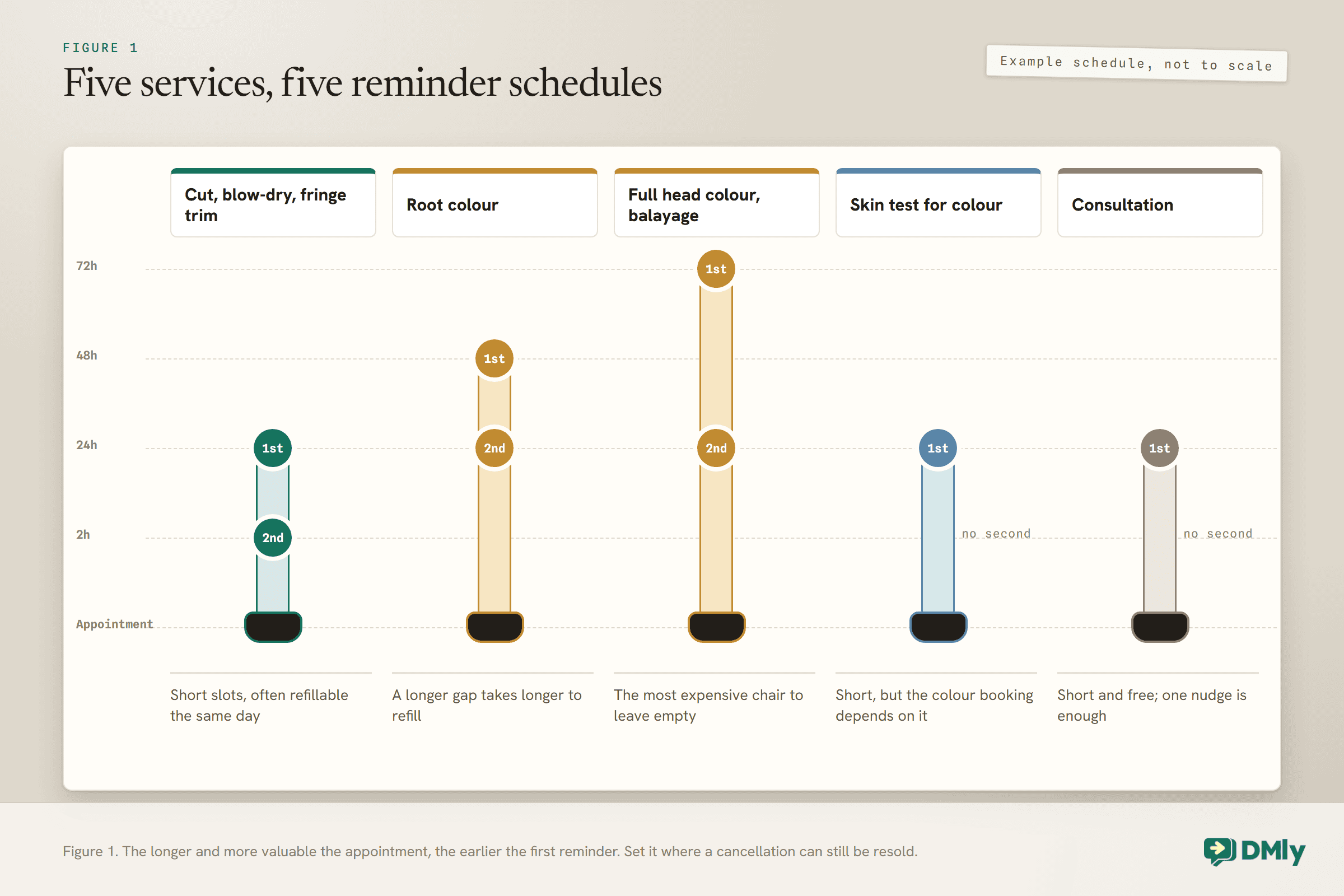
Set the first reminder where a cancellation is still worth something, and the second where it stops the client forgetting.
The first reminder is a commercial decision. Its job is to shake loose the cancellations early enough that you can still fill the chair. The second is a courtesy that makes sure the client does not forget on the day. For a salon, that gives different answers for different services. Here is one way a salon might set them; adjust to how quickly you can fill a gap.
| Service | First reminder | Second reminder | Why |
| Cut, blow-dry, fringe trim | 24 hours | 2 hours | Short slots, often refillable the same day |
| Root colour | 48 hours | 24 hours | A longer gap takes longer to refill |
| Full head colour, balayage | 72 hours | 24 hours | The most expensive chair to leave empty |
| Skin test for colour | 24 hours | None | Short, but the colour booking depends on it |
| Consultation | 24 hours | None | Short and free; one nudge is enough |
Resist a third reminder for the short services. Three messages about a trim reads as nagging, and on WhatsApp an annoyed client can block you, which is worse for your number than a missed appointment is for your diary. For long colour work, a third can be justified if the first sits several days out.
What Your Client Actually Reads
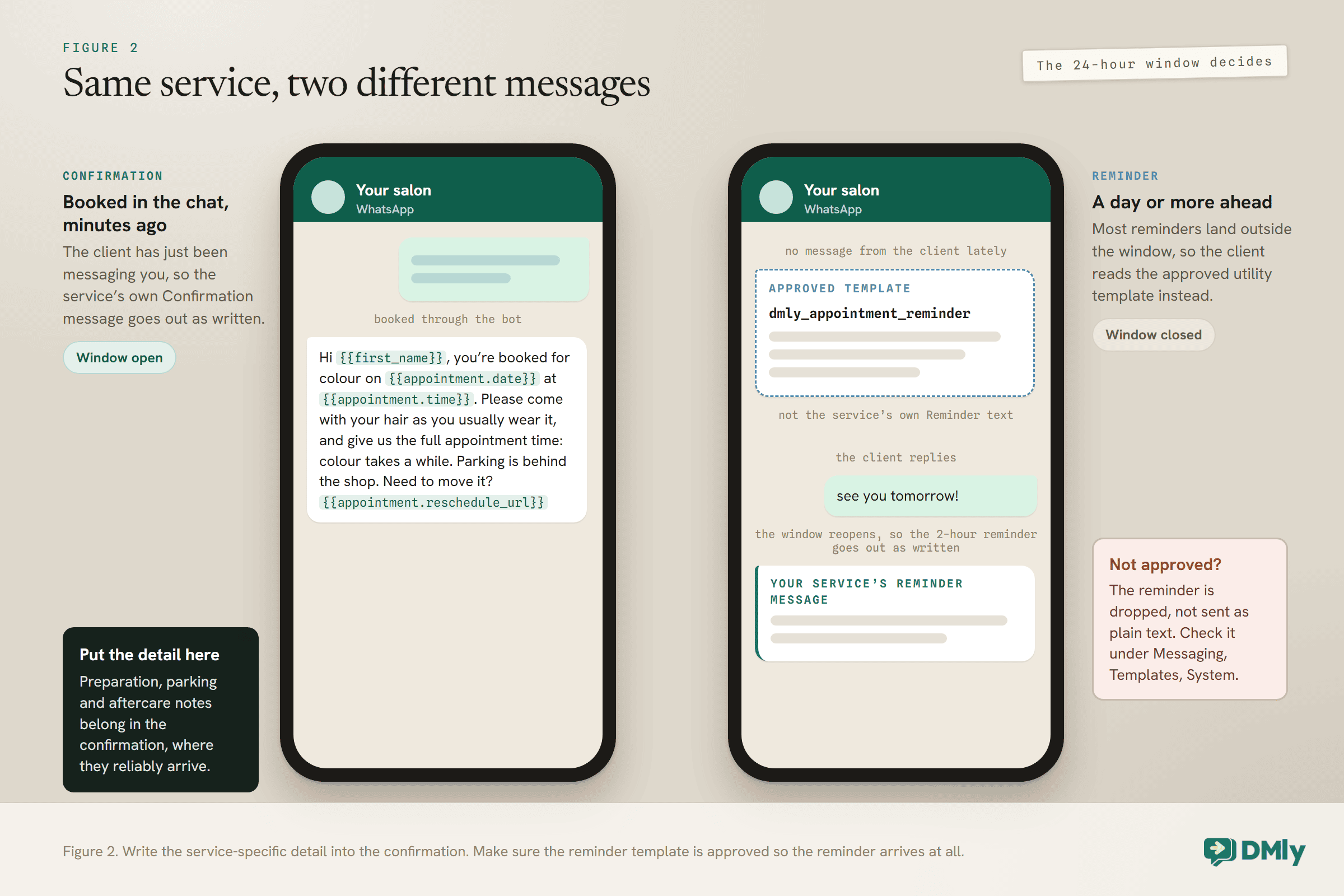
Inside the 24-hour window, a service’s own wording goes out. Outside it, an approved template does. Most reminders land outside.
WhatsApp lets a business send free-form messages only within 24 hours of the client’s last message. Outside that window, only an approved template can be sent. DMly follows that rule for every booking message: inside an open window, the message goes out as plain text; outside it, it goes out on an approved template, and if no template is approved, the message is dropped rather than sent. Our guide to the 24-hour messaging window explains the rule itself.
That has a practical consequence for a salon. Each service has its own Confirmation message, Reminder message and Cancellation message, which you can write to suit the service. But a reminder due a day before the appointment usually lands outside the window, so what reaches the client is the approved reminder template, DMly’s dmly_appointment_reminder, rather than the service’s own text. DMly picks a version with a join link automatically for bookings that have a video meeting link.
Confirmations are different. A client who books through your WhatsApp bot has just been messaging you, so the window is open and the service’s own Confirmation message goes out as written. That makes the confirmation, not the reminder, the reliable place for anything specific to the service.
Check the reminder template before anything else
DMly’s system templates live under Messaging, then Templates, then System, marked as managed by DMly. Look for dmly_appointment_reminder and check it shows Approved. The confirmation, reschedule and cancellation templates sit alongside it, and they matter for bookings made on your booking page by clients who have not messaged you recently. If a template you need is missing, the docs point to Available to install in the same place. Our guide to WhatsApp message templates covers approval and categories.
Writing the Salon Messages
Short, specific, and with one clear action. The client should be able to confirm, move or cancel without typing a paragraph.
DMly fills in booking details with variables, which are tokens it replaces with the real value for each booking. In a service’s confirmation, reminder and cancellation messages you can use the appointment family, such as {{appointment.date}} and {{appointment.time}}, and two that make a reminder far more useful: {{appointment.reschedule_url}}, which opens the client’s own booking page on rescheduling, and {{appointment.cancel_url}}, which opens it on cancelling. Dates and times come out in the client’s own timezone.
Here is a confirmation for a colour appointment, written for the service’s own Confirmation message. Adapt the details to your salon:
Hi {{first_name}}, you’re booked for colour on {{appointment.date}} at {{appointment.time}}. Please come with your hair as you usually wear it, and give us the full appointment time: colour takes a while. Parking is behind the shop. Need to move it? {{appointment.reschedule_url}}
And a reminder message for a cut, which goes out as written whenever the client’s window happens to be open:
Hi {{first_name}}, just a reminder of your cut tomorrow at {{appointment.time}}. Can’t make it? Move it here so we can offer the slot to someone else: {{appointment.reschedule_url}}
Two habits make every salon message better. Always include the reschedule link, because a client who can move an appointment in two taps is less likely to simply not turn up. And say why the notice matters, briefly: “so we can offer the slot to someone else” is a reason, and people respond to reasons. Our collection of appointment reminder message templates has more wording to borrow.
The Skin Test Sequence Before Colour
For colour clients who need a skin test, the reminders should carry them from the test to the colour appointment without anyone chasing.
Hair dye can cause skin reactions. The NHS advises testing a dye at least 48 hours before using it, and notes that symptoms can take up to 72 hours to appear. If your salon asks for a skin test before colour, follow your colour brand’s instructions and your own policy, and let the messages do the reminding:
- The skin test booking. Treat it as its own short service with its own reminder, so the client does not skip it.
- The skin test confirmation. Use the service’s Confirmation message for the aftercare note, since it is sent while the window is open: what to do if the area becomes itchy or sore, and to tell the salon before the colour appointment.
- The colour booking. Set the colour services’ minimum notice to 2,880 minutes, which is 48 hours, so the booking page cannot offer colour sooner than that. The field is in minutes, which is an easy place to make a mistake.
- The colour reminder. The first colour reminder is a natural moment to ask the client to let you know if they had any reaction to the test. Keep it to a line; the detail belongs in the confirmation.
None of this replaces your own judgement or your policy. It makes sure the policy is applied to every client, including the ones booked on a busy Saturday.
When Clients Reply to a Reminder
A reply is worth more than a silent read. It reopens the window, and it often carries a decision.
When a client replies, WhatsApp opens a new 24-hour window. For that day, any message you send, including the next reminder, goes out as plain text in the service’s own words. A client who replies “see you tomorrow!” to the day-before reminder gets the two-hour reminder exactly as you wrote it.
Three things to have in place:
- Someone watches the inbox when reminders land. Reminders never notify your team, so a reply is often the first sign one went out. A reply asking to move to Friday is only valuable if somebody answers it while Friday is still free.
- Clients can move bookings themselves. The reschedule link lets them, within the reschedule deadline you set under Appointments, then Settings, in Booking policy. Both the cancellation and reschedule deadlines start at 0, so set them to match the policy you tell clients.
- A cancellation is thanked, not argued with. The whole point of the first reminder is to free the slot early. Free it, and offer it to someone else.
Standing Appointments: Reminders for a Series
Salons with regulars who come every week or fortnight can book the whole run at once. The reminders need one extra piece of care.
For a client with a standing appointment, such as a weekly wash and blow-dry, DMly can book a recurring series. From the Calendar, open New appointment and turn on Repeat. Choose a frequency (daily, weekly, every two weeks or monthly) and the number of occurrences, from 2 up to 52. Every date shares the same client, stylist and service, and an “every Monday at 9” series stays at 9 even when the clocks change.
A series is quieter than booking each date separately. The client gets one consolidated confirmation listing the dates, the first six and then “and N more”, rather than one message per date. Each date is still its own appointment in the diary, so check the first couple of dates of a new series receive their reminders the way you expect.
The care is in the cancel link. When a client opens their booking page to cancel a date in a series, a checkbox reading Cancel all upcoming in this series is ticked by default. Left ticked, it cancels that date and every later one. A regular who only meant to skip next week can lose the rest of their standing appointments without realising. Two ways to protect them:
- Lead with the reschedule link in reminders for series clients. Rescheduling always moves a single date, never the whole run.
- If you include the cancel link, say so plainly: “To skip just this visit, untick Cancel all upcoming before you confirm.”
Two more things to know about a series: a client cannot start one from the booking page, only staff can book it from the Calendar, and a series is confirmed without taking payment, whatever the service’s payment mode, so collect for those appointments yourself.
Two Locations, Two Numbers
A salon with more than one WhatsApp number needs to know which number its reminders come from, and that the template is approved on each.
DMly sends its WhatsApp notifications from a Default WhatsApp number, set at the top of the Client and staff messages tab in Workspace Settings, then Settings, then Notification settings. A client who already messages you on one of your numbers keeps that number; the default is used when there is no WhatsApp conversation yet. For a salon with two branches on two numbers, that means a new client who books online hears from the default number, which may not be the branch they booked.
Templates are approved per WhatsApp Business Account, and DMly’s notification settings only list templates approved on the selected number’s account. If your second branch’s number sits on a different account, check that the reminder template shows as approved there too, or reminders from that number will not go out when the window is closed. If the two branches share one diary, it is worth telling new clients in the confirmation which branch they are booked into.
What Salon Reminders Cost From 1 October 2026
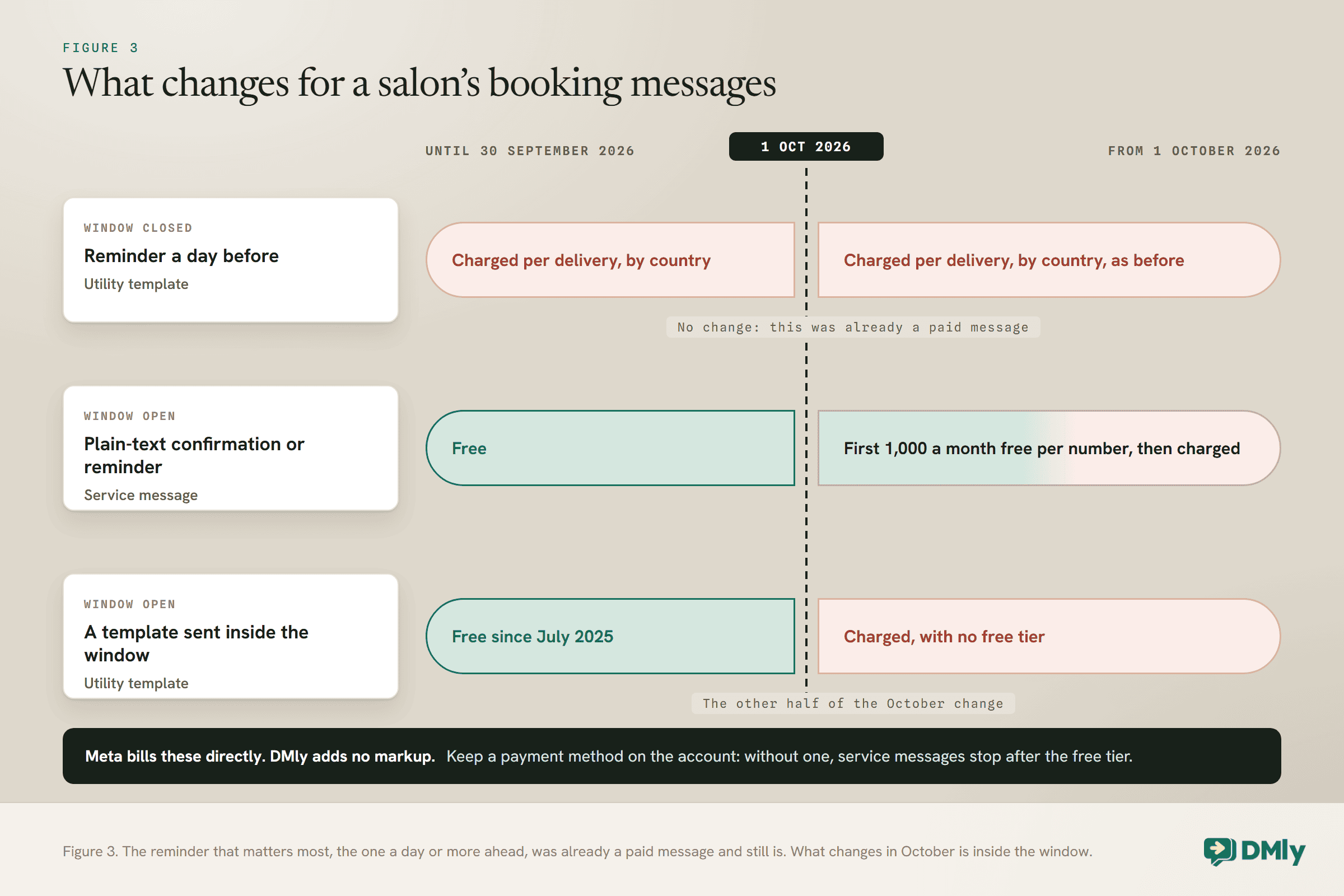
Reminders outside the window are paid template messages. Messages inside the window are free up to a monthly allowance. Most salon reminders are the first kind.
Meta charges per delivered template message, at a rate that depends on the template’s category and the client’s country calling code. Appointment reminders are utility templates. From 1 October 2026, two changes matter for a salon:
- Free-form messages inside the window become chargeable, with a free allowance. Each business phone number gets 1,000 free service messages a month, with no roll-over, and Meta charges from the 1,001st. A confirmation or reminder sent as plain text inside an open window is one of these.
- Utility templates sent inside an open window become chargeable too. They were free inside the window from July 2025.
In practice, the day-before reminders, which land outside the window, cost a utility rate each, as they already did. Plain-text messages inside the window count against the 1,000 free service messages per number. Meta bills these directly, and DMly adds no markup. Make sure your WhatsApp account has a payment method: Meta’s page says that without one, service messages stop being delivered once the free tier is used up. Our guide to the October WhatsApp pricing change and the pricing by country rate card show what each message costs where your clients are.
Close the Day in the Calendar
Reminders do their work before the appointment. Marking what happened after it is what keeps the rest of your automation honest.
About a day after an appointment, DMly closes any booking still sitting at Confirmed and, under the default setting, marks it Completed itself. That is convenient, and it has three consequences a salon should know about:
- You have about a day to record a no-show. Once a booking is closed automatically, the Completed and No-show buttons disappear from it on the Calendar.
- The automatic close counts as a visit. Under the default setting, Count as completed, it fires the Appointment completed trigger, so a review request or rebooking flow built on that trigger runs even for a client who never came. Set Appointments nobody marked (Appointments, Settings, Booking policy) to Wait for review and mark every appointment, so a no-show is never thanked or asked for a review. With Wait for review, an unmarked booking waits at Needs review, sends nothing, and your team gets a daily reminder in the app to settle it.
- The client’s manage link goes read-only. It still shows the booking, but the reschedule and cancel options disappear.
So make it a habit: at the end of each day, mark the day’s appointments completed or no-show. It takes a minute, it keeps your follow-up automations running, and it gives you an honest count of no-shows. DMly also offers a no-show follow-up automation, with its own template, dmly_appointment_no_show, as the out-of-window fallback; that template only sends if you install the automation. Our guide to reducing appointment no-shows covers what to do with the number once you have it.
Test Salon Appointment Reminders the Way Clients Will Receive Them
A reminder that works in testing can fail in real life, because testing usually happens inside an open window.
When you test by messaging your own salon and then booking, your window is open, so the reminder goes out as plain text and looks perfect. A real client who booked last week has no open window, and their reminder depends on the template. Test both:
- Inside the window: message the salon from a test phone, book a short service a few hours ahead, and check the confirmation and reminder read as you wrote them.
- Outside the window: from a second phone that has not messaged the salon, book on the booking page for a day or two ahead, send nothing, and check the reminder arrives on the template.
- The skip rules: cancel a test booking and check no reminder follows; pause the bot for a test contact and check the reminder stops.
- The links: tap the reschedule and cancel links in a real reminder and check the deadlines behave as you set them.
Mistakes to Avoid
- One schedule for every service. A balayage needs earlier warning than a blow-dry.
- Putting preparation notes only in the reminder. Outside the window, the client reads the template, not your service’s text.
- Not checking the reminder template is approved. Without it, reminders outside the window are dropped.
- Testing only inside the window. Everything looks fine until a real client books.
- Leaving the bot paused for a client. Their reminders stop too.
- No reschedule link. A client who cannot move a booking easily may simply not come.
- Sending series clients a cancel link without a warning. The cancel-all box is ticked by default.
- Leaving the day unmarked. Under the default setting the automatic close fires your completed flows for no-shows too, so they get thanked and asked for a review, and no-shows go unrecorded. Switch to Wait for review and mark the day.
Frequently Asked Questions
How far in advance should a salon send appointment reminders?
Set the first reminder where a cancellation can still be filled, and the second close to the appointment. For a cut, 24 hours and 2 hours is a sensible start; for long colour work, an earlier first reminder, such as 48 or 72 hours, gives you time to refill a long slot.
Can different salon services have different reminders?
Yes. In DMly, reminder times are set on each service under Offerings, then Services, and every booking of that service follows them.
Why did my client get a different message from the one I wrote?
Because the reminder landed outside the 24-hour window, where WhatsApp only allows an approved template. Your service’s own reminder text goes out when the client’s window is open; otherwise the approved dmly_appointment_reminder template does.
Do WhatsApp reminders cost money?
A reminder outside the window is a utility template, charged by Meta per delivered message at the rate for the client’s country. From 1 October 2026, plain-text messages inside the window count against 1,000 free service messages per number each month. DMly adds no markup.
Can clients reschedule from the reminder?
Yes, if you include {{appointment.reschedule_url}} in the message. It opens the client’s own booking page on rescheduling, within the reschedule deadline you set for the salon.
Do reminders go to the stylist too?
No. Reminders only go to the client. Stylists get their own message when a booking is made, changed or cancelled, but never a reminder.
The Advice, Amended
Two reminders is still a good default. For a salon, the amendment is that the two should move with the service: close in for a trim, further out for colour, and with a skin test that carries the client to their colour appointment. Put the service-specific detail in the confirmation, where it reliably arrives, and check the reminder template is approved, so the reminder arrives at all.
Set up that way, salon appointment reminders stop being a courtesy and start protecting the diary: the long chairs get the early warning, the short ones get the nudge, and every client can move their own booking in two taps. Then mark the day before you lock up.
Writing about WhatsApp automation, bookings and growth for local business.
Turn WhatsApp into your busiest channel.
Start free and run message, bookings, payments and reviews in one place.
