
When a member of your team leaves, you sit down with them and ask why. It is called an exit interview, and most clinics hold one, because the answer is worth having. When a patient leaves, nobody asks anything. They just stop booking, and the only way most clinics try to win back lapsed patients is to hope they remember on their own.
Some of those patients moved. Some found a clinic closer to work. Some had a bad experience and didn’t want to say so at reception. Plenty simply got busy, meant to call, and never did. From your appointment book, all of them look exactly the same: a name with nothing after it.
A well-timed WhatsApp message is the closest thing you have to that exit interview. It reaches the patient on the phone they already use, it is easy to answer in a few words, and the answers tell you something even when the patient does not come back.
In this guide, we’ll look at what counts as a lapsed patient for your kind of clinic, why a reactivation message is “marketing” in three different senses, where your last-visit dates actually live, the list checks that keep you from messaging the wrong person, a step-by-step build in DMly, messages you can copy, how to answer the replies, US patients and SMS, cost, and how to tell whether it worked.
What It Means to Win Back Lapsed Patients (and How It Differs From a Recall)
To win back lapsed patients is to invite people who used to visit, and have no next appointment, to come back. It is not the same job as a recall, and keeping the two apart saves you from sending the wrong message to the wrong person.
A recall is clinical. A clinician decides that a patient should be seen again by a certain date, and the clinic invites them when that date comes round. If you already run recalls, our guide to automating patient recall messages covers that build in full.
Patient reactivation is what you do for everyone else. The patient who finished a course and never came back for a check. The one who ignored two recall invitations. The one who had a single appointment two years ago and was never given a next date at all. Nobody set a date for them, so no reminder will ever fire.
There is a third neighbour, too: the no-show. Someone who missed yesterday’s appointment hasn’t lapsed; they need a same-week “shall we rebook?” message, which our guide to reducing appointment no-shows covers.
| Recall | Reactivation (win-back) | No-show follow-up | |
| Who | A patient with a due date set by a clinician | A patient with no next appointment, quiet for longer than you’d expect | A patient who missed a booked appointment |
| When | On or before the due date | Once they pass the gap you chose for that service | Within a day or two |
| Tone | “You’re due to be seen” | “We’d love to see you again, when it suits you” | “We missed you, shall we find a new time?” |
| WhatsApp category | Meta decides; check the category it gives your template | Marketing | Usually a reply inside an open chat, or a template |
The rest of this guide is about the middle column.
Who Counts as a Lapsed Patient at Your Clinic?
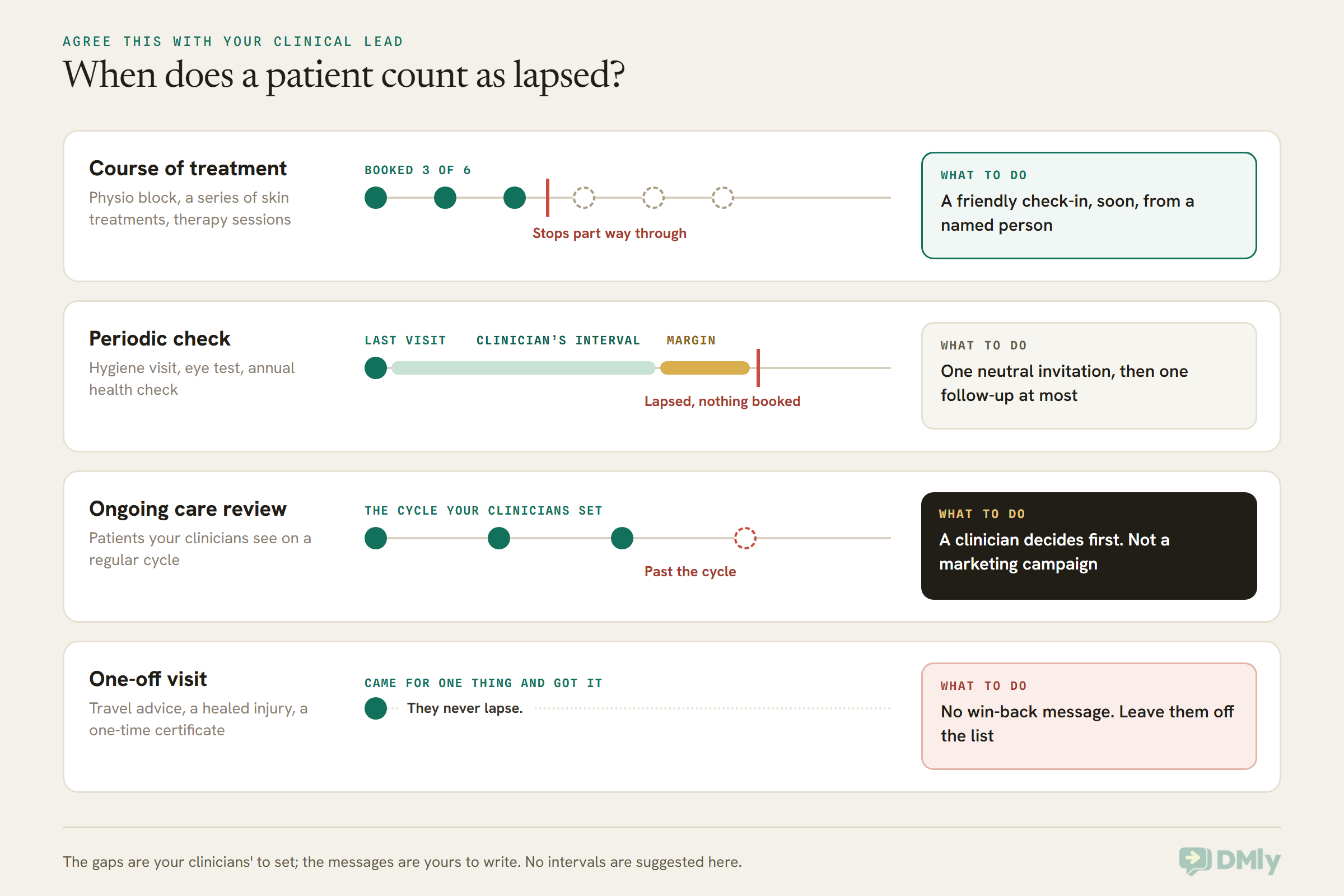
A lapsed patient is someone who has gone longer without a visit than your clinicians would normally expect for that service, and who has nothing booked. That second half matters. A patient who last came in 14 months ago but is booked for next Tuesday is not lapsed, and a win-back message to them looks careless.
The first half depends entirely on what you treat, which is why one number for the whole clinic rarely works. Sit down with your clinical lead and sort your services into a few kinds:
- Courses of treatment. Physiotherapy blocks, a series of skin treatments, a course of sessions with a therapist. A patient who books three of six and then stops has lapsed mid-course, often within weeks. These are the most valuable to notice early.
- Periodic checks. Dental hygiene visits, eye tests, annual health checks, regular reviews. The patient has lapsed once they pass the interval your clinicians set, plus a margin.
- Ongoing care reviews. Patients your clinicians want to see on a regular cycle. Treat these with extra care: a lapse here may be a clinical concern, and it belongs with a clinician, not in a marketing campaign.
- One-off visits. A travel consultation, a single sports injury that healed, a one-time certificate. These patients haven’t lapsed at all. They came for one thing and got it. Leave them out, or invite them only to something new they asked to hear about.
We won’t suggest intervals here, because those are clinical decisions and they vary by patient. What you want from your clinical lead is a short table: each service, the gap after which a patient counts as lapsed, and whether lapses in that service should go to a clinician instead of a message.
Why Patients Stop Coming, and What One Message Can Fix
A single message can bring back patients who forgot or got busy, and it can surface patients who were unhappy; it cannot fix a move, a new clinic or a death. Knowing which is which shapes both the message and what you do with the answers.
Think about the reasons a patient stops, roughly in the order a clinic can do something about them:
- They forgot, or life got in the way. This is the group a reminder genuinely helps. They meant to book. Make it a one-tap job and many of them will.
- Booking felt like effort. Phone lines at lunchtime, a portal password they never set up. A message with a booking link removes the effort.
- Cost or timing. A patient who stopped because of price or opening hours may come back if you can offer an evening slot or explain what a visit costs. Answer this person, don’t argue with them.
- Something went wrong. A long wait, a rushed appointment, a bill they didn’t expect. These patients rarely complain at the desk. Your message may be the first time anyone asks, and their reply is worth more than their booking.
- They moved or switched clinic. No message changes this, but a polite reply lets you update the record and stop contacting them.
- They died. It happens in every clinic list, and it is the reason the list checks later in this guide are not optional.
That is why clinics that win back lapsed patients well treat every answer as useful, not only the bookings. It is the exit interview idea in practice. Even the patients who don’t come back can tell you which of these happened, if your message makes it easy to answer.
The Three Meanings of “Marketing” in Patient Reactivation on WhatsApp
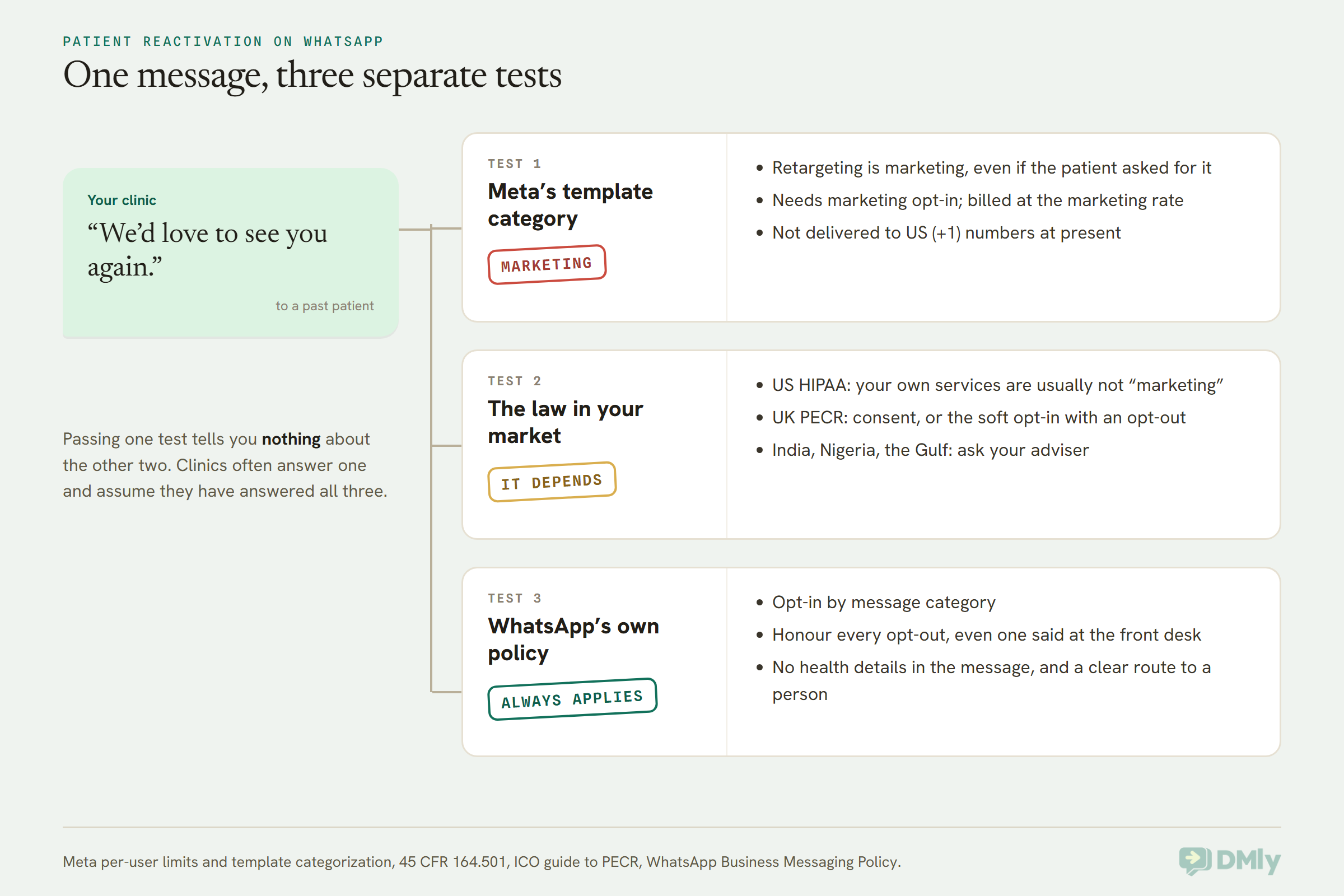
Patient reactivation on WhatsApp is marketing in Meta’s eyes, may or may not be marketing in the eyes of your local law, and must follow WhatsApp’s own opt-in rules either way. These are three separate questions, and clinics often answer one and assume they have answered all three.
1. Meta’s template category: marketing
Outside the 24-hour window after a patient last messaged you, WhatsApp only lets you start a conversation with a pre-approved message template. Every template has a category, and Meta decides it. Meta’s own categorization page lists “retargeting” (calls to action to people who “engaged with you”) and “build customer relationships” as marketing, and says retargeting messages “are marketing even if requested by users”.
A “we’d love to see you again” message to a past patient is exactly that. So plan for it to be a marketing template: it needs the patient’s opt-in to that kind of message, and it bills at the marketing rate. Our guide to marketing, utility and authentication templates explains the categories in plain terms. DMly’s own documentation says the same about its built-in win-back template, dmly_rebook_nudge: it is marketing, needs marketing opt-in, and bills at marketing rates.
One consequence catches US clinics. Meta’s per-user marketing limits page says WhatsApp “does not currently deliver marketing template messages” to people with US phone numbers. We come back to what that means for US patients further down.
2. The law in your market: it depends
Here the word “marketing” means something different, and the answer changes with where you are:
- United States. Under HIPAA’s definition in 45 CFR 164.501, a communication that describes “a health-related product or service” provided by the covered entity making it is excluded from “marketing”, as long as no third party pays you to send it. So a clinic inviting its own patients back to its own services is usually not “marketing” under HIPAA, even though Meta files the same message as marketing. That does not settle every US question: texting rules and your state’s rules are separate, and they belong with your counsel.
- United Kingdom. The ICO’s guide to PECR says you must not send electronic marketing to individuals without specific consent, with a limited exception for existing customers, the “soft opt-in”, which needs a clear chance to opt out when you collected their details and in every message. The ICO says the rule covers direct messages too, not only email and text. A private clinic writing to its own past patients about similar services may be able to rely on the soft opt-in; the ICO notes this guidance is under review after the Data (Use and Access) Act, so check the current version.
- India, Nigeria, the Gulf and elsewhere. India’s Digital Personal Data Protection Act and Nigeria’s Data Protection Act 2023 are the laws to ask your adviser about, along with any health-specific rules in your country. We haven’t summarised them here because how they apply to a clinic’s own patients is a question for someone who knows your setup.
3. WhatsApp’s own policy: opt-in, opt-out and no health details
WhatsApp’s Business Messaging Policy (last updated 23 September 2026) applies on top of the law. Three parts matter here:
- You may only message people who gave you their number and opted in to hear from you, and WhatsApp’s best practices suggest an opt-in “by specific message category”. A patient who agreed to appointment reminders has not automatically agreed to “come back” invitations. Our guide to WhatsApp opt-in and consent shows how to collect both and keep the proof.
- You must honour opt-outs, including ones made off WhatsApp. “Please don’t text me” said at the front desk counts.
- The policy says not to use WhatsApp “to send or request any health related information” where regulations require heightened protection for it. A reactivation message never needs a diagnosis, a treatment name or a clinician’s note to work, so leave them out entirely.
Where Your Last-Visit Dates Actually Live
To find lapsed patients you need each patient’s last visit and whether they have anything booked, and that information usually lives in your appointment records, not in your WhatsApp tool. Before you build anything, work out which system holds it.
There are three common setups:
- Your bookings run through DMly. Then DMly’s appointment records are your source. The Appointment reports page (under Configurations → Reports → Appointments) downloads a CSV with one row per booking: date, service, staff, client, status, source, price and paid. You need the Export reports permission to download it.
- Your clinical system holds the history. Many clinics keep appointments in a practice management or patient records system and use WhatsApp only for messages. That system is the source; most can produce a list of patients by last appointment. DMly then only needs to know who is on the list.
- A mix. Older visits in the old system, newer ones in DMly. Combine both exports in one spreadsheet before you decide who has lapsed.
Why not just use a DMly segment?
DMly’s segments (saved lists that update themselves) are excellent for deciding who gets a message, but they don’t have a “last appointment” rule, and two rules that look close are measuring something else:
- Number of days since last activity is about messages, not visits. DMly’s documentation says a segment built on inactivity “loses a contact the moment they reply to you”. A patient who messaged last week to ask about parking, but hasn’t been seen in two years, would not count as inactive.
- Last purchase is a Commerce rule, built around orders and spend. It is not a record of clinic visits.
So the honest route is to work out the list from your appointment records, then mark those patients in DMly with a tag. DMly’s own documentation says a tag is the only thing in DMly that “holds still”, which is exactly what you want for a list you have checked by hand.
One setting to check first
If your bookings run through DMly, open Appointments → Settings → Booking policy → Appointments nobody marked. On the default, Count as completed, a booking nobody marked is closed as completed about a day later, even if the patient didn’t come. That makes a patient who stopped turning up look like they visited. Switching to Wait for review means your team marks each unmarked booking as completed or no-show, and your future lists will be accurate. Older records won’t change, so treat completed rows from busy weeks with a little suspicion.
Clean the List Before You Message Anyone
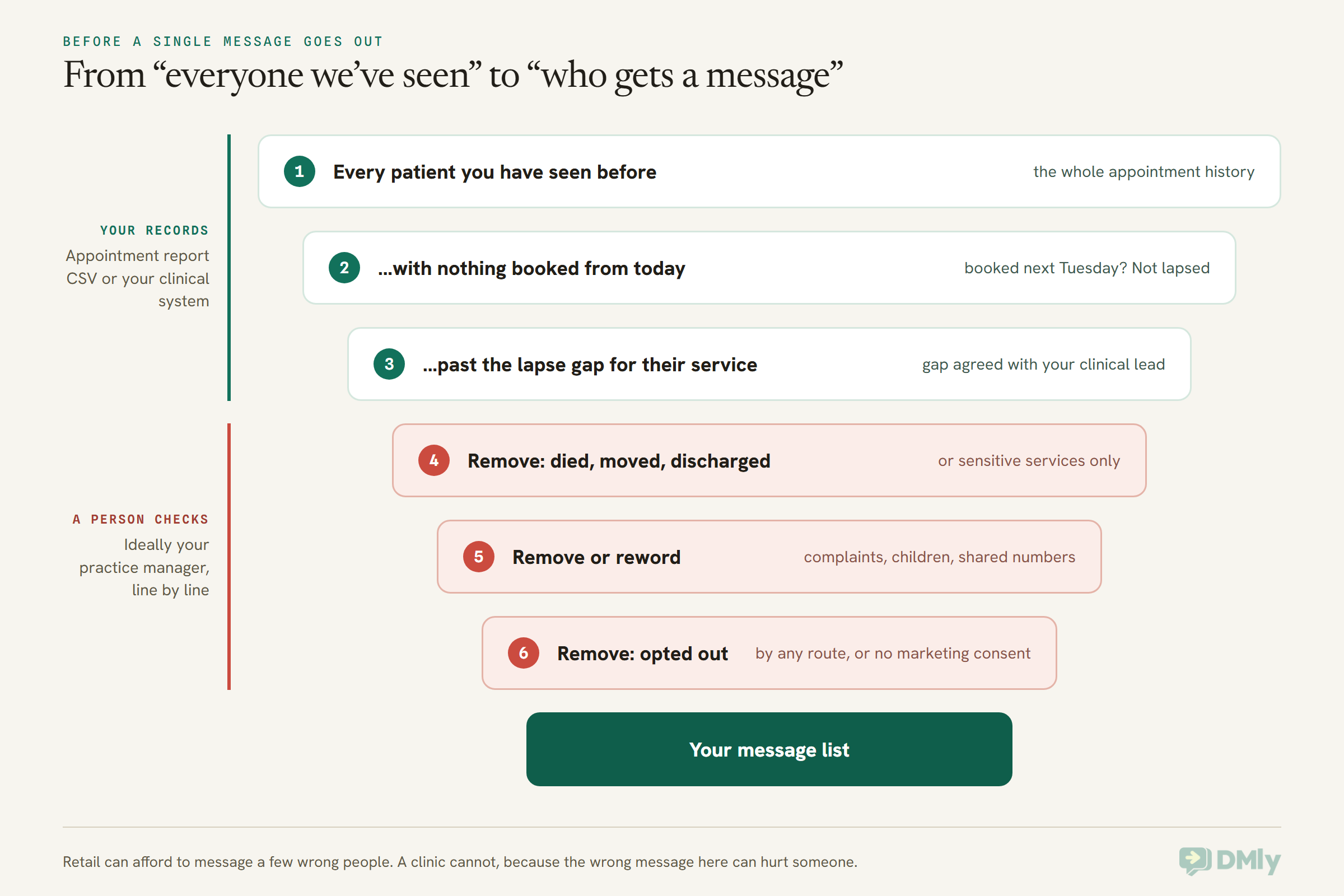
The step that makes a clinic win-back campaign safe is a human check of the list, before a single message goes out. Retail can afford to message a few wrong people. A clinic cannot, because the wrong message here can hurt someone.
Go through these with someone who knows your patients, ideally your practice manager:
- Patients who have died. Check your clinical system’s records and any letters or calls you have had. A cheerful “we miss you” sent to a grieving family is the single worst outcome of this whole exercise, and every clinic list contains people who have died since their last visit.
- Patients who moved, transferred or registered elsewhere. If the records say they left, they left.
- Patients who were discharged or referred on. A patient your clinician discharged, or one now under another service’s care, should not be invited back by a campaign.
- Sensitive services. If a patient’s only visits were for something private (sexual health, mental health, fertility, addiction support, and similar), leave them out of a general win-back campaign. Even a neutral message from that clinic’s name on a lock screen can say too much.
- Children. A child’s record usually carries a parent’s or guardian’s number. If the message would go to an adult about a child, the wording has to suit that, or the patient should come off this list.
- Open complaints, disputes or unpaid balances. Deal with those through the right channel. Mixing them with “we’d love to see you again” reads badly.
- Shared numbers. Family phones and shared work numbers mean someone other than the patient may read the message. Another reason the wording stays neutral.
- Anyone who asked not to be contacted, in any way: a STOP reply, a call, a note at reception, an email. DMly handles STOP replies for you, but it can’t know what was said at the desk.
- Anyone without marketing consent for WhatsApp where your law requires it. More on how DMly records consent in the next section.
How to Win Back Lapsed Patients in DMly, Step by Step
Here is the whole build: a checked list, a tag, a saved list that excludes the right people, a neutral template, a small flow that notices returns, one send, one follow-up, and a person on the replies. If you haven’t set up your clinic in DMly yet, start with our pillar guide to WhatsApp automation for clinics and come back.
Step 1: Agree the lapse gaps
Use the table from your clinical lead: each service, the gap after which a patient counts as lapsed, and which services go to a clinician instead. Write it down. You’ll use it every time you run this.
Step 2: Build the list in a spreadsheet
Download the Appointment report CSV (or your clinical system’s export) for a long enough period to cover your longest lapse gap. In a spreadsheet, for each patient, find:
- their most recent booking with a status of completed,
- the service on it, so you know which gap applies,
- whether they have any booking dated after today.
Keep the patients whose last completed visit is older than the gap for that service and who have nothing booked. Then do the checks from the previous section, line by line. The report’s client column is a name, so where two patients share a name, confirm you have the right person before you go further.
Step 3: Tag the list in DMly
Give the campaign a tag with the month in it, for example Lapsed Nov 2026. A dated tag keeps this round separate from the next one. There are two ways to apply it:
- For a short list, select the patients on the Contacts list and add the tag, or open each contact and use Add tag.
- For a long list, use the round trip DMly’s documentation describes: Export on the Contacts page, add the tag in the spreadsheet, and Import CSV it back. The importer matches existing contacts by phone number or email. One warning, in DMly’s own words: tags are “replaced with whatever the tags column says, not added to”, so keep each patient’s existing tags in that column and add the new one beside them, separated by a pipe or comma.
Create two more tags while you’re there. Do not contact is for anyone who asks, by any route, not to hear from you. Returned will be added automatically when a patient books again (Step 6).
Step 4: Know who agreed to hear from you
This is the part most clinics skip. DMly’s segment rule called Marketing opt-in sounds like it checks consent, but the documentation is clear that it only checks whether the contact has opted out. It cannot tell you who said yes to marketing.
DMly does keep a consent history on each contact’s Privacy tab: STOP and START replies, consent captured by its website WhatsApp popup, and consent your team declares when adding a contact or importing a CSV. On import there is a box, I have consent to send marketing messages to everyone in this file, with a note for how you collected it. Tick it only if it is true for every row.
For a segment, the simplest working approach is a consent tag of your own, such as WA marketing OK, added when a patient agrees (on your intake form, at the desk, or in a chat), and required in the segment. Patients without it come off the WhatsApp list and go to whatever channel they did agree to.
Step 5: Build the saved list
Go to Contacts → Segments → New segment and name it after the question it answers, for example “Lapsed Nov 2026, consented, not returned”. Set:
- Contact tags:
Lapsed Nov 2026andWA marketing OK(both are required, because this filter means “has all of these”). - Exclude contacts with tags:
Do not contact,ReturnedandUnsubscribe.
Watch the Preview count. It should match the number of patients left on your checked spreadsheet, give or take anyone who doesn’t have WhatsApp. If it is far off, a tag didn’t land.
Step 6: Let DMly notice who comes back
Create a small automation (a flow) with the trigger Appointment booked and a single Tag step that adds Returned. Because it only adds a tag and never messages anyone, it runs quietly alongside your other booking automations. From then on, a patient who books, from your message or any other way, drops out of the follow-up audience on their own, because the segment excludes Returned.
Test it: make a booking for a test contact the way your front desk usually does, and check the tag appears. If your team books some patients in another system, those bookings won’t reach DMly, so tag those patients by hand.
Step 7: Write and submit the template
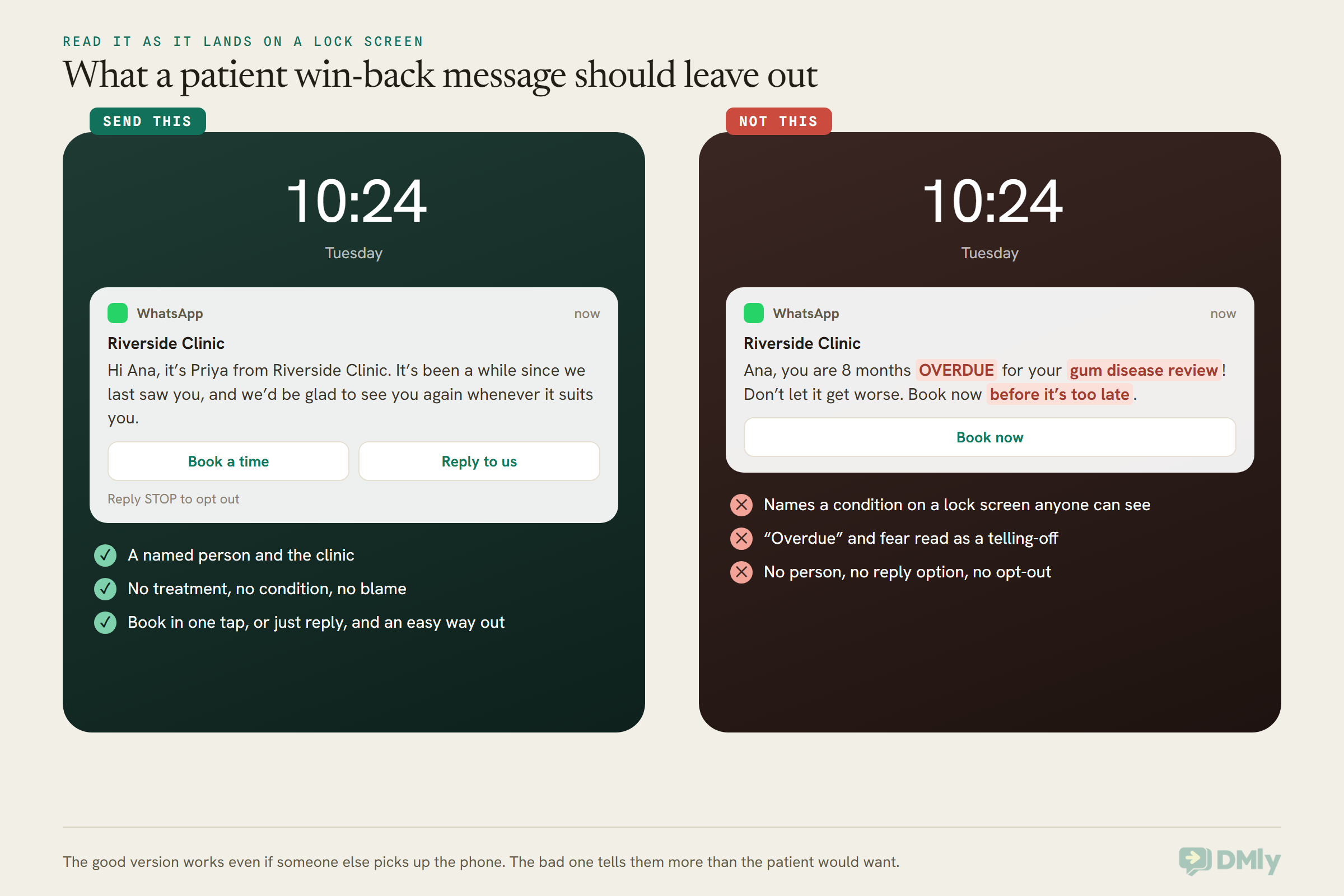
On a WhatsApp channel, go to Templates. You can write your own with Add template, or select Browse library and filter by the clinic industry and the win-back occasion. DMly’s library templates are all marketing category and come with quick-reply buttons and an opt-out footer. Whichever you choose, read it as the patient would read it on a lock screen, and take out anything that names a treatment, a condition or a clinician’s opinion. The next section has wording you can start from.
Set the category to Marketing. Meta reviews against the category you choose, and a win-back filed as utility is a likely rejection or a recategorisation. A template can have up to 10 buttons, with at most 2 that open a link, and button text is capped at 25 characters.
Step 8: Send one broadcast
Create a broadcast, pick your segment as the audience, choose the approved template, and tick Reachable contacts only so patients who can’t receive it aren’t counted as failures. Send it on a weekday, at a time your desk is staffed to answer, because replies come quickly.
Step 9: Follow up once, then stop
About a week to ten days later, send one follow-up to the same segment. It already excludes everyone who booked (they now carry Returned) and anyone your team tagged Do not contact. Before you send, also tag anyone who replied “no thanks” so they don’t hear from you again.
You might be tempted to use DMly’s Retarget audience with All Sent But Not Replied instead. It is a good tool, but for a clinic it has a gap: a patient who booked online without replying still counts as “not replied” and would be invited again after booking. The segment avoids that.
After the follow-up, stop. Two messages is an invitation. Three starts to feel like chasing, and patients who feel chased block numbers, which hurts your WhatsApp quality rating (our guide to quality ratings and messaging limits explains why that matters).
Step 10: Put a person on the replies
Assign the conversations that come in to a named person at the desk, with a clinician they can pass questions to. WhatsApp’s policy requires “prompt, clear, and direct escalation paths” when automation is answering, and a person is the right answer here anyway. The replies to a reactivation message are often personal, as the section on answering them shows.
Patient Win-Back Messages You Can Copy
A good patient win-back message is short, warm, names your clinic and a person, mentions nothing about the patient’s health, and makes booking or replying a single tap. Every template below is a Marketing template, because each one invites a past patient to come back. Replace the bracketed parts with your own details.
1. The general invitation (periodic checks)
Hi [first name], it’s [staff name] from [clinic name]. It’s been a while since we last saw you, and we’d be glad to see you again whenever it suits you. You can pick a time here, or just reply and we’ll find one together.
Buttons: Book a time [link] / Reply to us
Footer: Reply STOP to opt out
Category: Marketing. The everyday version for patients past their usual gap.
2. The mid-course check-in (courses of treatment)
Hi [first name], [staff name] here from [clinic name]. We noticed we haven’t seen you for a little while and wanted to check in. If you’d like to pick up where you left off, we can find a time that works. And if anything about your last visit wasn’t right, we’d really like to hear.
Buttons: Find a time / Tell us something
Category: Marketing. “Where you left off” says nothing about what the course was for.
3. The “something changed” invitation
Hi [first name], it’s [clinic name]. Since your last visit we’ve [added evening appointments / opened on Saturdays / made online booking easier]. If timing was the reason you couldn’t come, it might be easier now.
Buttons: See times [link] / Not for me
Category: Marketing. Use it only when something really did change. It quietly asks the timing question.
4. The short version
Hi [first name], [clinic name] here. We’d love to see you again. Would you like us to find you a time?
Buttons: Yes please / Not right now
Footer: Reply STOP to opt out
Category: Marketing. Works well when your patients prefer to reply rather than tap a link.
5. To a parent or guardian
Hi [first name], it’s [clinic name]. It’s been a while since we saw [child’s first name], and we’d be happy to book a visit at a time that works for your family. Reply here and we’ll sort it.
Buttons: Book a visit [link] / Reply to us
Category: Marketing. Check your records say this number belongs to the parent or guardian.
6. The follow-up
Hi [first name], just a quick follow-up from [clinic name]. If now isn’t a good time, no problem at all, and we won’t keep messaging. If you’d like an appointment, you can book here.
Buttons: Book a time [link] / No thanks
Category: Marketing. The “we won’t keep messaging” line is a promise. Keep it by stopping here.
7. The honest “are you still with us?”
Hi [first name], it’s [clinic name]. We’d like to keep our records up to date. Are you still hoping to visit us, or have you moved on to another clinic? Either answer is completely fine, and it helps us not to message you unnecessarily.
Buttons: Still with you / I’ve moved on
Category: Marketing. Useful once a year on your oldest lapses. The answers clean your list for next time.
Answering the Replies Like the Front Desk Would
Replies to a reactivation message are where the exit interview actually happens, so answer them as a person, inside the chat, and record what you learn. When a patient replies, a 24-hour window opens, and within it you can write freely without a template.
Here is how to handle the common answers. These are plain replies your team types, not templates.
- “Yes please.” Send the booking link or offer two times. Book it, and the
Returnedtag follows on its own. - “I’ve moved” or “I go somewhere else now.” Thank them, wish them well, and tag them
Do not contact. Update your clinical records too.
“Thanks for letting us know, [first name]. We’ve updated our records and won’t message you again. All the best from everyone at [clinic name].” - “It was too expensive” or “I couldn’t get a time.” Answer the actual question: what a visit costs, or which times you have now. Don’t push.
- “I wasn’t happy with my last visit.” This is the most valuable reply you’ll get. Pass it to your practice manager the same day. Apologise, ask if they’d be happy to talk by phone, and keep the details of their care out of the chat.
“I’m really sorry to hear that, [first name], and thank you for telling us. Would you be happy for [manager’s name], our practice manager, to give you a call this week? You can tell us a good time.” - A health question. “Should I still be worried about…?” belongs with a clinician, by phone or in an appointment. Reply with a way to reach one, and don’t discuss symptoms in the chat.
- A family member telling you the patient has died. Reply personally, never automatically. Say you are sorry, say you will make sure they aren’t contacted again, then tag the contact
Do not contact, update your clinical records, and tell whoever manages your patient list.
“I’m so sorry for your loss, and thank you for letting us know. We’ll make sure no further messages are sent. If there’s anything we can help with, please call us on [phone number].” - STOP. DMly opts the contact out and adds the
Unsubscribetag for you. From then on DMly refuses automated messages and even manual replies to them, until they send START or your team resubscribes them at their request.
Keep a small set of reason tags (Moved, Cost, Times, Unhappy) and add one whenever a reply gives a reason. After two or three rounds, those tags tell you more about why patients leave than any survey.
If you want the full picture of what a patient record in DMly can hold, and what it shouldn’t, our guide to the WhatsApp CRM for clinics goes through it.
Can You Win Back Lapsed Patients Automatically?
Partly, and for most clinics the monthly checked list is still the safer choice. Here are the automatic options DMly documents, with the honest limits.
A sequence that starts after each visit
A sequence (a series of messages sent on a schedule) can be started by a flow, including one triggered by Appointment completed. Its steps can be WhatsApp templates, which arrive any time, and each step has a Day number counted from when the patient joined. In principle, a step set far enough out becomes an automatic “we haven’t seen you” message. The documentation doesn’t give a maximum Day, so test a large value before relying on it.
The limits, all from DMly’s documentation:
- A returning patient keeps their old clock. Subscribing a contact who is already in a sequence “does nothing”. So a patient who comes back in month four is still counted from their first visit, and would get the win-back later anyway.
- Take them out when they book. Add the Remove from sequence step to a flow that runs on Appointment booked. It stops their run in that sequence (or every sequence, if you choose) without opting them out or touching their tags. The other exits are finishing it, opting out, a reply if you switch on Stop when the contact replies, or a teammate removing them by hand.
- Don’t use the Unsubscribe Contact step as an exit. It stops every sequence, but it does that by opting the patient out completely, so your reminders stop too. Remove from sequence is the step for this.
- No list check. An automatic step can’t know that a patient has died, moved or asked at the desk not to be contacted, unless someone has already recorded it.
- Mind the completed setting. If Appointments nobody marked is on Count as completed, a no-show starts the sequence as though they visited.
A clinic whose patients mostly follow one predictable rhythm, with a team that marks every appointment and checks the subscriber list, can make this work. Everyone else will find the monthly list more reliable.
The built-in “Rebound” automation
DMly’s automation templates include Rebound: book the next visit, and dmly_rebook_nudge is its out-of-window message. It starts on Appointment completed, waits 28 days, then sends a “few weeks since your last visit” message with a booking link. Outside the 24-hour window the first message goes out as the template, but the booking link is an ordinary message, so on WhatsApp it only arrives while the window is open. It also doesn’t check whether the patient has already booked again. So don’t install it unchanged: set the wait to the lapse gap for that service, and add a Condition on Has an upcoming appointment before the message. Treat it like any other automatic route: the list checks above still apply.
Recalls for patients who have a date
For patients whose clinician has set a due date, a recall is better than a win-back, because it’s tied to their care rather than to a gap. The recall guide linked at the top of this article shows how to hold one date per recall type and invite patients when it comes round. The two work well together: recalls for patients with a date, a monthly reactivation list for everyone the recalls miss.
US Patients, SMS, and Patients Not on WhatsApp
At the moment, a WhatsApp marketing template won’t reach a patient with a US phone number, so US clinics need a different first message. Meta’s page says it “does not currently deliver marketing template messages” to US numbers, and an attempt returns an error.
What still works for US patients:
- Let the patient message first. Once a patient writes to you, the 24-hour window opens and you can reply freely. A click-to-chat link in your emails, on your website or on a card at reception gets that first message started.
- SMS. DMly connects SMS through Twilio, Plivo or a custom gateway, and SMS broadcasts have no messaging window. Texting has its own consent rules in the US, so agree your approach with your counsel before a texting campaign.
- A phone call or a letter. For a short list of high-value lapses, a call from someone the patient knows is hard to beat. DMly can also generate a personalised PDF letter for a contact from a letter template, one contact at a time.
The same options cover patients anywhere who aren’t on WhatsApp, or who agreed to texts or email but not to WhatsApp marketing.
What a Patient Reactivation Campaign Costs
You pay Meta for each delivered marketing template at your country’s marketing rate, plus your DMly plan, which adds no markup to Meta’s rates. That makes the cost easy to estimate in advance.
- Meta’s charge. Marketing templates are billed per delivered message, at a rate that depends on the patient’s country. Our WhatsApp Business API pricing by country guide has the current rate card. Multiply your list size by your country’s marketing rate, then add the same again for the follow-up to whoever hasn’t booked.
- Your DMly plan. DMly’s pricing page (read 26 October 2026) lists plans at $29, $65 and $149 a month billed yearly, with 10,000, 50,000 and 300,000 broadcast and template messages a month. A clinic win-back list sits comfortably inside the smallest of those.
- Replies. When patients answer, your replies inside the 24-hour window are free-form messages. Since October 2026 Meta charges for those beyond a free monthly allowance per number, so a busy reply day isn’t entirely free, but it is a small cost next to a booked appointment.
The real cost is staff time: the list check, and answering replies properly. Budget an hour or two for both on your first run. It gets faster once your reason tags and Do not contact list are in place.
How to Tell Whether Your Patient Win-Back Worked
Count bookings from the tagged list, not opens. A read message is a good sign; a booked appointment is the result. When you set out to win back lapsed patients, the number that matters is how many sat in the chair again.
- Who came back. Make a second segment with
Lapsed Nov 2026andReturnedas required tags. Its Preview count is the number of patients from this round who have booked since. - Did they turn up? Check those patients in the Appointment report. A booking that becomes a no-show isn’t a win.
- Broadcast numbers. Each broadcast shows Sent, Delivered, Opened and Failed. A high Failed count usually means a template or reachability problem, not a bad message.
- Why the rest didn’t. Your reason tags. If
Timeskeeps coming up, that’s a staffing conversation, not a messaging one. - Did anyone mind? Count STOP replies and keep an eye on your number’s quality rating. A clean, consented list should produce very few.
When the round is finished, remove the Returned tag in bulk so it’s ready for next time. Your dated Lapsed tags stay, so you can always see which round brought someone back.
We haven’t quoted a “typical” return rate anywhere in this guide, because we haven’t seen one we trust for clinics. Your own first round is your baseline. Compare the second round against it.
Patient Reactivation on WhatsApp in Five Kinds of Clinic
The steps above don’t change much between clinics, but the list, the channel and the rules do. Five illustrative examples, not real customers:
- A family dental practice in Ohio. Most patients have US numbers, so WhatsApp marketing templates won’t reach them. The practice adds a click-to-chat link to its emails and reception cards, sends its reactivation list by SMS after checking its texting consent with counsel, and uses WhatsApp for the conversations patients start.
- A physiotherapy clinic in Pune. Its biggest lapse is mid-course: patients who book three sessions of six and stop. It runs the mid-course check-in each month from its Appointment report, and its reason tags quickly show which drop-outs were about timing rather than recovery.
- A family clinic in Lagos. Many patients share a family phone, so the practice keeps every message entirely neutral and uses the parent version for children’s records. Its consent tag goes on at registration, when the patient agrees to WhatsApp messages from the clinic.
- A private physiotherapy practice in Leeds. It relies on PECR’s soft opt-in for past patients, so every message carries an opt-out, and new patients are offered a clear opt-out at registration. Patients who said no to marketing get their recalls and nothing else.
- A dermatology clinic in Dubai. It leaves patients whose only visits were for sensitive treatments off its general list entirely, and invites everyone else with the “something changed” message when it opens on Fridays.
For the bigger picture of how DMly fits a clinic, from booking to reminders, see DMly for clinics and healthcare. And if you’d like the generic version of this campaign for a non-clinical business, our guide to a WhatsApp win-back campaign for inactive customers covers it.
Frequently Asked Questions
How do clinics win back lapsed patients on WhatsApp?
Find patients past the usual gap for their service with nothing booked, using your appointment records. Have a person check the list for patients who died, moved, were discharged or asked not to be contacted. Then send one neutral marketing template to those who agreed to hear from you, follow up once, and answer every reply personally.
Is a patient win-back message marketing or utility on WhatsApp?
Marketing. Meta’s categorization treats retargeting and relationship messages as marketing even if the person asked for them, and DMly’s own win-back template is marketing. It needs the patient’s opt-in and bills at the marketing rate.
Can a DMly segment find patients who haven’t visited in a year?
Not directly. Segments have no last-visit rule, and “days since last activity” measures messages, not visits. Work the list out from the Appointment report CSV or your clinical system, tag those patients, and build the segment on the tag.
What should a patient reactivation message say?
Who it’s from, that it’s been a while, and an easy way to book or reply, with an opt-out. Never the treatment, the condition, the word “overdue” or anything a family member shouldn’t read on the patient’s lock screen.
How many win-back messages should a clinic send?
Two at most: the invitation and one follow-up about a week to ten days later, to patients who still haven’t booked. Then stop until the next round, and never message anyone who said no.
Can we message US patients this way?
Not with a WhatsApp marketing template at present, because Meta doesn’t deliver them to US numbers. Use SMS, a call or email for the first contact, or let patients message you first and reply inside the 24-hour window.
What if a family member replies that the patient has died?
Reply personally and kindly, make sure they won’t be contacted again (tag them and update your clinical records), and tell whoever manages your patient list. Never let an automated step answer that message.
The Exit Interview, Held
The patients who drift away from your clinic were never going to tell you why on their own. A short, neutral message from a person they recognise gives them a reason and a way to answer. Some will book. Some will tell you they moved, or that the evenings didn’t work, or that their last visit wasn’t right. Every one of those answers is useful.
To win back lapsed patients well, you don’t need a clever sequence. You need an honest list, a check by someone who knows your patients, consent you can show, one kind invitation, one follow-up, and a person ready to answer. That is the exit interview most clinics never get to hold, and on WhatsApp it takes a few lines to start.
If you’d like to try it, DMly has a 7-day free trial with no card needed, and the whole build in this guide works on every plan.
Writing about WhatsApp automation, bookings and growth for local business.
Turn WhatsApp into your busiest channel.
Start free and run message, bookings, payments and reviews in one place.
