
Best Mindbody Alternatives for Small Gyms and Studios in 2026
Before you compare Mindbody alternatives, write the packing list. Anyone who has moved house knows the van takes the sofa and the boxes. It doesn’t take the wiring, the kitchen you had fitted, or the neighbour who took in your parcels.
Leaving Mindbody is the same kind of move. Your client list goes in the van. So do your class types and prices. But the members’ saved cards, the credit balances on their passes, the bookings already made for next month and the clients who found you through the Mindbody app are all bolted to the wall, in one way or another. Some come with you after a bit of work. Some stay behind for good.
That’s why the right alternative depends less on the feature list and more on why you’re leaving and what you can’t live without. In this guide, we’ll look at what Mindbody costs in 2026 and why that’s hard to pin down, the honest reasons small gyms and studios leave, what Mindbody still does better, ten alternatives (ours included) with prices read on their own pages on 13 October 2026, and how to move without losing members on the way.
One disclosure first: we make DMly, and it’s one of the options below. We’ll say clearly where it fits and, just as clearly, where it’s the wrong choice.
The Best Mindbody Alternatives at a Glance
The best Mindbody alternatives for a small gym or studio are TeamUp for published, usage-based pricing, PushPress or Wodify for CrossFit and functional gyms, Zen Planner for member-based pricing with a cheap branded app, Arketa or Vagaro for solo instructors, Momence, bsport or ABC Glofox for boutique studios happy to get a quote, and DMly when your members already book and ask questions on WhatsApp.
That’s the short answer. The table below adds the one-line reason for each, and the rest of the guide shows the working.
| If you’re leaving Mindbody because… | Look first at | Why |
| You want to see a price before you book a demo | TeamUp, Zen Planner, PushPress, Vagaro | All four print monthly prices on their own pricing pages |
| You run a CrossFit box or functional gym | PushPress, Wodify | Workout tracking, kiosk check-in and door access options built for that kind of gym |
| You’re a solo instructor or a one-room studio | Arketa (Individual), Vagaro | Entry prices of $49 and $30 a month, with the trade-offs noted below |
| You want a branded member app without a big bill | Zen Planner, TeamUp, PushPress | Branded app add-ons published at $39, $99 and $97 a month |
| You’re a boutique studio and want marketing built in | Momence, bsport, ABC Glofox, Arketa (studio plans) | All quote only, so book two demos and compare written quotes |
| Your members message you on WhatsApp all day | DMly | Classes, passes, memberships and payments run inside the same inbox as the chat |
| You get a lot of new clients from the Mindbody app | Stay, or test Vagaro | Nothing on this list replaces Mindbody’s marketplace; Vagaro has its own, smaller listing |
What Does Mindbody Cost in 2026?
Mindbody’s own pricing page now says plans start at $79 a month in North America and Asia, but the three plan cards themselves (Starter, Accelerate and Ultimate) show no price at all, only a “Let’s talk” button. We read the page on 13 October 2026. The $79 figure appears only in the FAQ at the bottom, where Mindbody calls it a “new, lower price”.
So the honest answer to “how much is Mindbody?” is: the entry plan starts at $79 a month in those regions, and anything above Starter is a quote. Outside North America and Asia, the page doesn’t print a number.
Here’s what changes between the plans, in Mindbody’s own words where it matters:
- Starter: booking, integrated payments, branded booking widgets for your website, a website, a listing on the Mindbody app, and basic reporting. Booking confirmations and reminders go out by email.
- Accelerate: adds room and resource management, Client Pick-a-Spot, promo codes, better reporting, and text confirmations and reminders on top of email.
- Ultimate: adds automated email and text marketing campaigns with a monthly text bundle, a lead pipeline, and the AI Concierge, a 24/7 front desk assistant that answers missed calls. On Accelerate the AI Concierge is an add-on.
- Branded app: an add-on on Accelerate and Ultimate. It isn’t offered on Starter.
Three costs sit outside the plan price, and they’re the ones owners tend to discover late.
The marketplace fee. Listing on the Mindbody app is free. When the app sends you a client you wouldn’t otherwise have had, Mindbody takes 20% of that client’s first purchase, capped at $30 (or 30 in local currency). Later bookings from that client are commission free, and existing clients who book through the app don’t trigger the fee.
Payment processing. You don’t have to use Mindbody Payments, but if you do, each transaction carries a processing rate plus a fixed fee of $0.10 to $0.30 in North America and Asia. The rate itself isn’t printed on the page.
The contract. Mindbody’s FAQ says your contract “depends on the specific plan and billing terms you signed up for”, and that cancelling may need advance notice. In plain words: find your own agreement before you plan a switch date, because the notice period is in there, not on the website.
To be fair to Mindbody, the same page says there’s no onboarding fee on any plan, unlimited staff logins per location, and 24/7 support by phone, chat or email. Those are real strengths, and we’ll come back to them.
Why Do Small Gyms and Studios Look for a Mindbody Alternative?
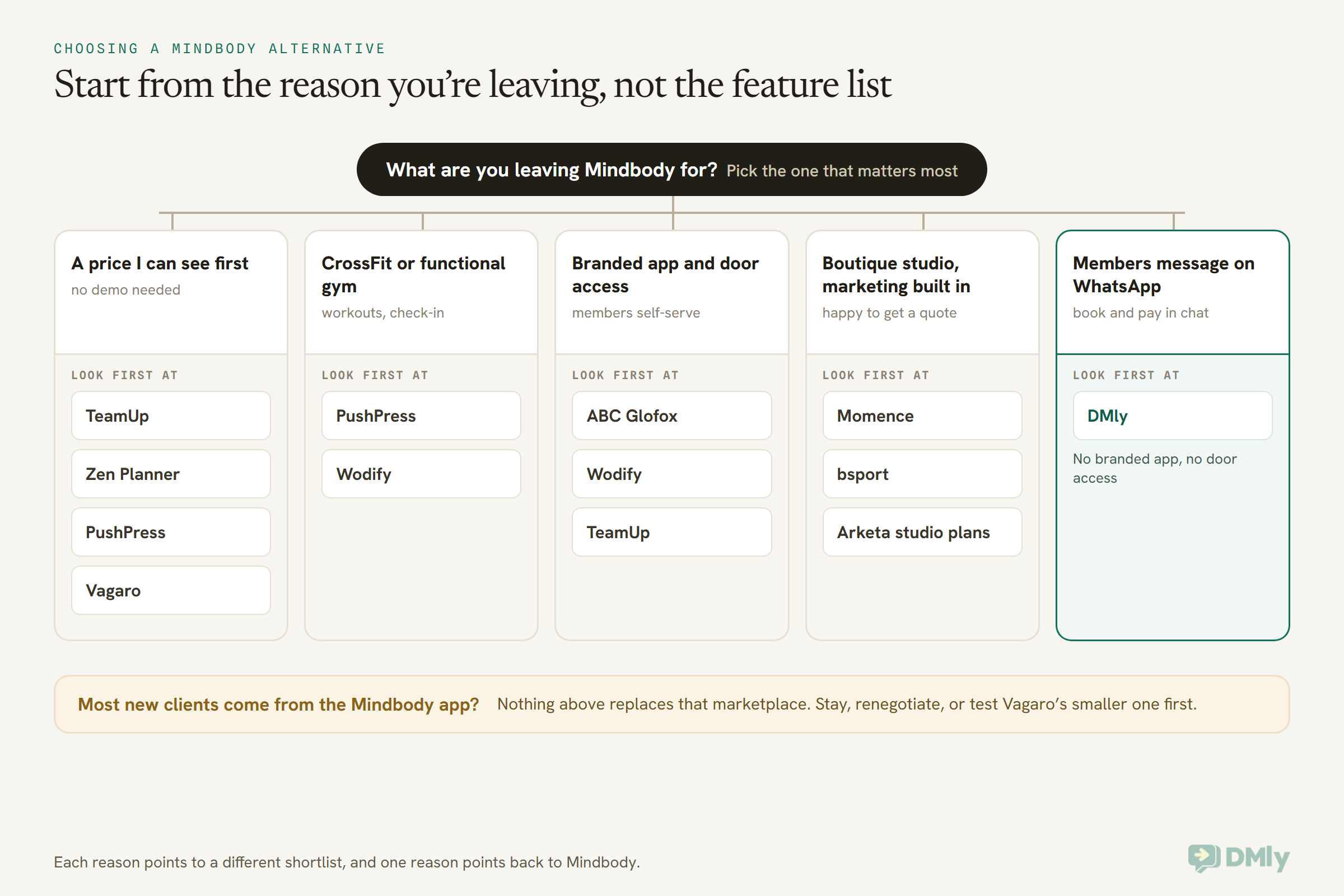
Most small gyms and studios look at Mindbody alternatives for one of four reasons: they can’t see the full price without a sales call, the features they want sit on a higher tier, they’re paying for a marketplace that sends them few new clients, or their members have moved their conversations somewhere Mindbody doesn’t reach.
Each of those points at a different replacement, so it’s worth being honest about which one is yours.
1. The price is a conversation
A one-room yoga studio wants to know what it will pay before it spends an hour on a demo. Mindbody’s $79 starting point helps, but it’s only Starter, and only in two regions. If your real need is text reminders or marketing automation, you’re into Accelerate or Ultimate, and those are quotes.
2. The feature you need is one tier up
On Mindbody, text reminders start at Accelerate, and automated email and text campaigns start at Ultimate. A studio that only wants “remind people by text and nudge the ones who stopped coming” can end up paying for the top plan to get two features.
3. The marketplace isn’t earning its keep
The Mindbody app is genuinely large. But it works best in busy cities where people browse for a class to try. A strength gym in a small town, or a studio whose members all came through word of mouth, may get little from it. If that’s you, the marketplace is a reason to stay that doesn’t apply.
4. Your members talk to you somewhere else
In much of the world, members don’t open a studio app to ask whether there’s room in tonight’s spin class. They send a WhatsApp message. If you answer those by hand and then go and book them into Mindbody, you’re doing the same job twice.
Reasons that are not good reasons
Being annoyed by one bad support call, or by one price rise, isn’t on its own a reason to move 300 members and their payment cards. Switching costs time, and it carries some risk of members dropping off during the change. Make sure the problem is one the new system actually solves.
What Mindbody Still Does Better
Mindbody is still the strongest choice if you rely on its consumer marketplace for new clients, want everything from payments to insurance in one company, or plan to grow to several locations. None of the alternatives below matches all of that at once, and pretending otherwise wouldn’t help you.
- The marketplace. Mindbody says its app reaches more than three million monthly users. You only pay its 20% (capped at $30) first-purchase fee when the app sends a genuinely new client. No alternative here has a consumer app of that size.
- Unlimited staff logins. Every plan includes unlimited users per location, so adding coaches doesn’t raise the bill.
- Retail and payments in one place. Point of sale, online payments, memberships that bill themselves, and late-cancel and no-show fees charged under your policy.
- Room and spot booking. From Accelerate, members can pick their spot in a class, and you can book rooms and equipment.
- A branded app as an add-on, from Accelerate.
- Extras most rivals don’t sell. Business financing (Mindbody Capital, in the US, Canada, UK and Australia) and insurance in most of the US.
- Support and onboarding. One-to-one setup at no onboarding fee, and support around the clock.
If two or more of those are the reason your studio works, the cheapest move might be renegotiating your Mindbody plan rather than leaving it.
Mindbody Alternatives Compared: Prices Read at Source
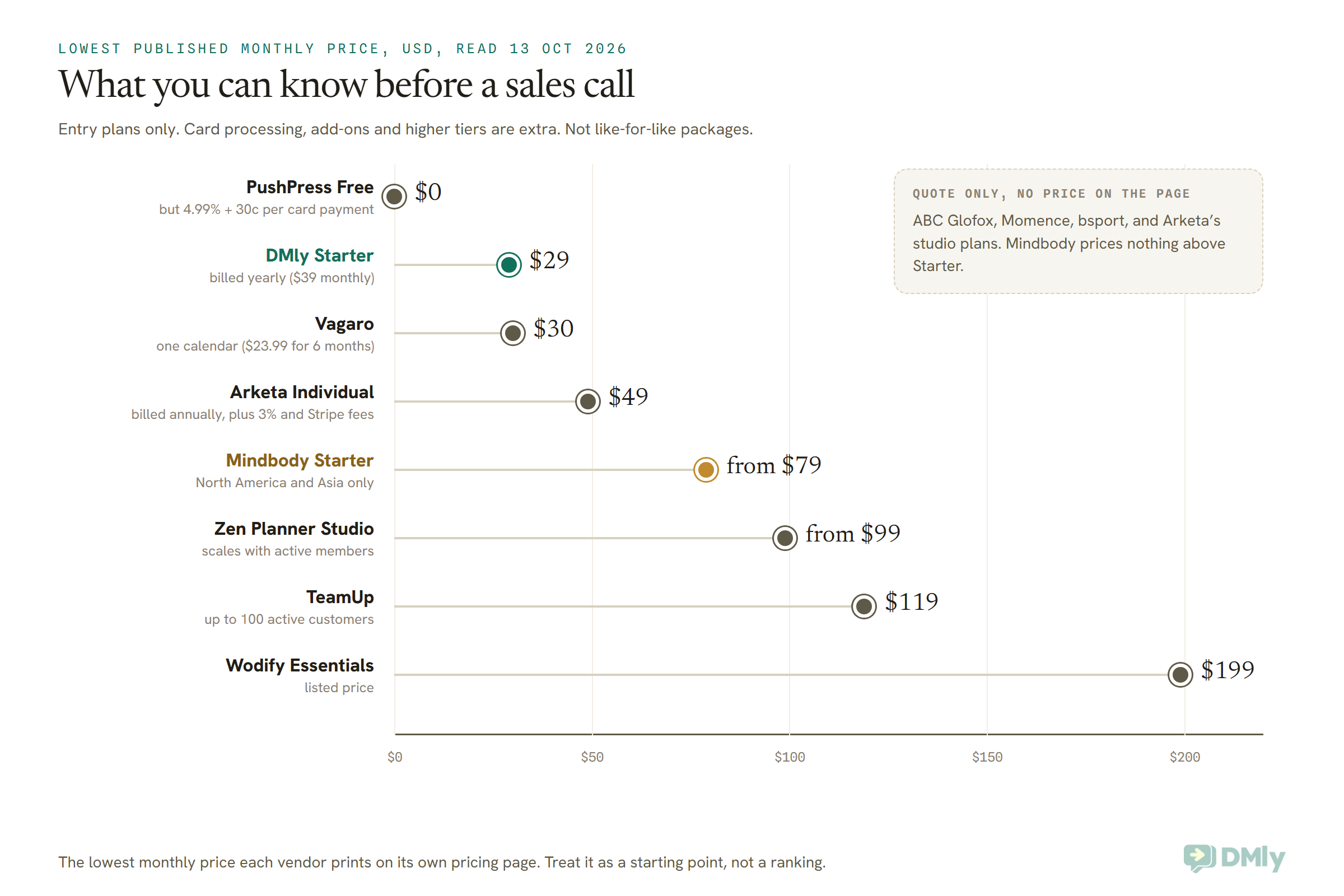
Of the ten Mindbody alternatives below, seven publish a monthly price (TeamUp, PushPress, Wodify, Zen Planner, Vagaro, Arketa’s solo plan and DMly), and three (ABC Glofox, Momence and bsport) are quote only. Every price was read on the vendor’s own pricing page on 13 October 2026. Prices are in US dollars unless we say otherwise, and most of these pages ask international businesses to contact sales.
1. TeamUp: best published price for group fitness studios
TeamUp charges by active customers, meaning anyone who books or buys something from you in a given month. Each person counts once, however often they come. The page lists $119 a month for up to 100 active customers, $189 for 101 to 200, $219 for 201 to 300, $249 for 301 to 400, $289 for 401 to 500 and $379 above 500. It also prices in pounds and euros: £99 or €99 a month for the first band.
There’s no setup fee and no contract; it runs month to month. The included features list memberships and packs, a customer store, point of sale, gift cards, a penalty system, access control, SMS notifications and family accounts. A custom branded app is $99 a month on top.
Pick it if you want to know your bill before you talk to anyone, and your member count moves with the seasons. Think twice if new clients from a marketplace matter to you; TeamUp doesn’t list one.
2. PushPress: best for CrossFit boxes and functional gyms
PushPress has three core plans. Free costs $0 a month but charges 4.99% + 30 cents on card payments. Pro is $159 a month at 2.89% + 30 cents, and Max is $229 a month at 2.75% + 30 cents. All three include unlimited members and staff. Prices are in US dollars, and the page asks international gyms to contact sales.
The FAQ lists the add-ons: Train (workout tracking) at $79 a month, a branded app at $97 a month, and Grow at $329 a month, which adds a CRM, automated email and text, and WhatsApp messaging with approved templates included. There’s also a kiosk mode for check-in, a TV screen app showing who’s booked, waitlists, and a door access integration through HybridAF.
Pick it if you run a box or a strength gym and want workout tracking and check-in that feel built for you. Do the sum if you’re on the Free plan: at 4.99% per card payment, a gym taking a few thousand dollars a month in fees may pay more than Pro would cost.
3. Wodify: best all-in-one for gyms that want the extras
Wodify lists Essentials at $199 a month, Accelerate at $299 and Ultimate at $499. When we read the page, each was shown $100 lower for gyms that book a demo by 31 October, an offer Wodify describes as “for life”. There’s a small onboarding fee, and the plans run month to month with no long-term contract.
Branded app, 24/7 door access, performance tracking, a custom website and heart-rate tracking are add-ons. Wodify says card payments can be as low as 2.7% + 30 cents. One detail to note if you’re outside North America: its SMS feature is only available in the US and Canada.
Pick it if you want one company for scheduling, payments, an app, door access and workout tracking. Think twice if you’re a small studio that only needs class booking; you’d be paying for a lot you won’t use.
4. Zen Planner: best member-based pricing with a cheap branded app
Zen Planner Studio starts at $99 a month, Essentials (adding a custom website) at $198, and Ultimate (adding marketing automation) at $348. There’s also a New Business Bundle from $199 for gyms that haven’t opened yet. Like TeamUp, pricing scales with active members, and prospects and staff never count.
The branded mobile app is $39 a month, and EMV card readers are $39 a month. Studio includes staff payroll, attendance tracking, belt and skill tracking, and member and staff apps. It runs month to month, with an annual contract on request, and onboarding and data migration are included.
Pick it if you want a published starting price and a branded app without paying $100 a month for it. Martial arts schools will like the belt tracking.
5. Arketa: best for solo instructors who teach online too
Arketa’s Individual plan is $49 a month, billed annually, for one login. On top of that you pay a 3% transaction fee plus Stripe’s own fees (2.9% + 30 cents in the US). It covers classes, privates and events, class packages and memberships, an on-demand video library and booking widgets.
The studio plans (Core, Growth and Suite) are priced by quote. They add unlimited team members, point of sale, payroll reporting, marketing campaigns and, on Suite, a custom branded app. Plans renew month to month unless you choose annual billing. Arketa integrates with ClassPass, Mailchimp, Zoom and Zapier.
Pick it if you’re one instructor with a video library. Watch the 3% fee: on $5,000 of monthly sales that’s $150 before Stripe takes its share.
6. Vagaro: best if you also sell appointments and want a marketplace
Vagaro prices by bookable calendar. One calendar is $30 a month, shown at $23.99 for the first six months, and each extra calendar is $10, up to seven. After seven, more staff are free. There’s a 30-day free trial, and Vagaro says you can cancel any time with no cancellation fees (with “exclusions apply” printed next to it).
Every plan includes memberships, packages, a customer waitlist and a free listing on the Vagaro Marketplace. Add-ons start at $10 a month for a check-in app, $20 for text marketing, $34 for payroll and $100 for a branded app. One catch in the small print: the free card reader requires 12 months of Vagaro’s merchant services, or a $150 early cancellation fee.
Pick it if your studio also sells massage, physio or beauty appointments, or if you’d like a marketplace listing at a lower price than Mindbody. It’s the closest thing here to Mindbody’s marketplace, though smaller.
7. ABC Glofox: best for studios planning to grow into a chain
Glofox is now part of ABC Fitness, and its pricing page is a quote form titled “Get a price quote”. There’s no number to compare. The site lists a branded member app, check-in with access control and door entry, point of sale and automated handling of failed payments.
Pick it if you want a branded app and door access from the same company and you’re comfortable comparing written quotes. Ask for the contract length in writing.
8. Momence: best for boutique studios that sell events and courses
Momence, now branded Xplor Momence, says “Let’s talk pricing” and builds a quote per business. It focuses on yoga, pilates, dance, cycling and boutique studios, with classes, courses and workshops on one calendar, built-in marketing and an AI inbox for client questions.
Pick it if workshops and courses are a big part of your income. Book the demo with your own numbers ready, so the quote is specific.
9. bsport: best for boutique studios in Europe
bsport lists five plans (Start, Build, Engage, Elevate and Scale) and every one says “Get a quote”. There’s no free plan and no standard free trial, though new studios get a free initial period “built right into the start of their contract”, which tells you there is a contract. Higher tiers add a branded member app, self check-in, Choose Your Spot and behaviour-based marketing, and bsport lets you control how class-pass aggregators book into your schedule.
Pick it if you’re a boutique studio in Europe (the site runs in English, French, Dutch, German and Spanish). Ask how long the contract runs before you sign.
10. DMly: best when your members already message you on WhatsApp
DMly is a different kind of tool from the nine above. It starts from the conversation: WhatsApp, Instagram, Facebook Messenger, Telegram, SMS and website chat in one shared inbox, with bookings, classes, memberships and payments built in. It’s priced at $29, $65 or $149 a month billed yearly ($39, $79 or $199 billed monthly), with every plan including bookings, invoices and payments. There’s a 7-day free trial with no card. The full breakdown is on our pricing page.
We’ll go through what it does for a gym, and where it falls short, in the next section, because a fair comparison needs more than a paragraph.
| Tool | Lowest published price | How it scales | Branded member app | Contract |
| Mindbody | From $79 a month (North America and Asia) | By plan and location; higher plans by quote | Add-on from Accelerate | Depends on your agreement |
| TeamUp | $119 a month (£99, €99) | Active customers | $99 a month | Month to month |
| PushPress | $0 plus 4.99% + 30c per card payment | Plan and processing rate | $97 a month | Not stated on the page |
| Wodify | $199 a month listed | Plan | Add-on | Month to month, small onboarding fee |
| Zen Planner | From $99 a month | Active members | $39 a month | Month to month, annual on request |
| Arketa | $49 a month billed annually, plus 3% | Plan; studios by quote | Suite plan | Month to month unless annual |
| Vagaro | $30 a month for one calendar | $10 per extra calendar, up to seven | $100 a month | Cancel any time (exclusions apply) |
| ABC Glofox | Quote only | Quote | Listed | Ask |
| Momence | Quote only | Quote | Not checked | Ask |
| bsport | Quote only | Quote | Engage plan and up | Contract |
| DMly | $29 a month billed yearly | Plan, plus add-on seats and contacts | None (booking page and chat instead) | Monthly or yearly, cancel any time |
These prices move: Mindbody’s own page calls its $79 a “new, lower price”, and Wodify’s discount runs only to 31 October. Re-check the vendor’s page on the day you decide.
Is DMly a Good Mindbody Alternative? Where It Fits and Where It Doesn’t
DMly is a good Mindbody alternative for a small gym or studio whose members book, pay and ask questions by message, and a poor one for a business that needs a consumer marketplace, a branded member app, door access, payroll or a card reader at the front desk. Here’s the detail behind both halves of that sentence.
What DMly does for a gym or studio
Classes with capacity and a waitlist. You create a class as a service, then schedule sessions with a seat capacity, repeating up to 52 times. When a class fills, the booking page shows it as full with a waitlist. When someone cancels, the first person in the queue is promoted and messaged automatically. For a paid class, the promoted member gets a checkout link rather than a free seat. If you want the whole picture, our guide to class capacity and waitlists walks through it.
Booking by chat. Members can book on your booking page, which needs no app and comes in 16 languages, or right inside WhatsApp. A flow can put someone in the next session of a class, and the AI assistant can book classes too, respecting your cut-off for late sign-ups. Our walkthrough on how to automate fitness class bookings on WhatsApp shows the build, and the guide to a WhatsApp AI assistant for a gym covers the answering side.
Passes and memberships. A plan in DMly can be a one-time pass (a 10-class pack) or a recurring membership that bills every week, month or year. The plan grants credits, and each class with a credit cost takes them off the member’s balance. Recurring plans can charge a saved card automatically through Stripe, PayPal, Paystack, Razorpay or MyFatoorah. A failed renewal is retried, two days apart, and the membership pauses after three failed attempts. Members get a reminder three days before each renewal.
Deposits and no-show fees. A service set to pay before booking, such as a personal training session, can take a deposit of 1 to 99% instead of the full price. A no-show fee can be set on any service and is charged when you mark someone as a no-show, including from the class roster. With a saved card it’s charged; otherwise the member gets a payment link.
Messages to everyone at once. Broadcasts go out on WhatsApp, Instagram, Facebook, Telegram and SMS. A Monday closure, a new timetable or a summer offer reaches members where they actually read things. Our guide to WhatsApp broadcasts covers the rules.
AI on every plan. Every DMly plan includes the AI assistant, with 500, 5,000 or 20,000 AI replies a month depending on the plan, or your own AI key on Premium.
Check-in and loyalty. Each class has a roster where you tick members as attended or no-show. Checking someone in is what awards loyalty points if your programme rewards attendance. Appointment reports show bookings, no-show rate, paid revenue and average class fill.
Four things about DMly passes you should know before you switch
These are written in DMly’s own documentation, and they matter if you’re used to Mindbody’s pricing options.
- Credits are one pool. A member’s balance is a single number. If you sell a 10-class yoga pass and a reformer class also costs credits, the yoga credits can be spent on reformer. Only put a credit cost on the classes you’re happy for any credit to buy, and charge for the rest as normal paid bookings.
- A short balance doesn’t block a booking. If a member with no credits books a class that costs one, the booking goes through and no credit is taken. If your passes must be enforced, check balances or make that class pay-before.
- Cancelling never gives the credit back. A member who books and cancels loses the credit. To return it, you add it back by hand on their profile.
- Monthly credits don’t roll over, and they only top up with auto-charge. A “4 classes a month” membership gives 4 to use that month. If the member pays each month by invoice instead of a saved card, DMly bills them but doesn’t re-grant the credits, so you’d add them yourself.
One more practical point: DMly’s documentation doesn’t describe a page where a member buys a pass or membership by themselves. You start the membership in Finance, or a flow does it, and the member gets a link to save their card or pay.
When DMly is the wrong choice
- You depend on a marketplace for new clients. DMly has no consumer app or directory. It works with people who already know you, or who find you through your own ads, posts and Google profile.
- You want a branded member app. DMly’s mobile app is for you and your team. Members use the booking page, a client portal that shows their booking history, and WhatsApp.
- You need door access, a check-in kiosk or a card reader. None of these is documented. If members let themselves in with a fob at 5am, look at PushPress, Wodify, TeamUp or ABC Glofox.
- You need payroll or workout tracking. Not documented in DMly. Zen Planner, Vagaro, PushPress and Wodify all list one or both.
- You want members to pick their spot in a class. Mindbody (Accelerate), bsport (Elevate) and others offer it. DMly’s docs don’t.
- You run in the US and want to send promotions by WhatsApp. Meta isn’t currently delivering marketing templates to US numbers. Reminders, booking confirmations and replies still work, but a US studio’s promotional messages would need to go by SMS (connected through your own Twilio or Plivo account) or email.
There’s also no Mindbody connector in DMly’s docs. If you keep Mindbody for bookings and add DMly as an inbox, the two won’t sync, and your team will be copying bookings across by hand. Pick one system for the timetable.
How to Switch From Mindbody Without Losing Members
To switch from Mindbody safely, check your contract’s notice period, export your client and membership data, decide how members’ saved cards will move, rebuild passes and credit balances by hand where there’s no importer, and run both systems side by side for one billing cycle. The order matters, so here it is step by step.
Step 1: Read your Mindbody agreement first
Mindbody’s own FAQ says cancellation may need advance notice depending on your agreement. Find the notice period and the date your current term ends. Your switch date works backwards from there.
Step 2: Export everything you can, and keep the files
Clients, active memberships, pass balances, upcoming bookings and sales history. Even the parts your new system can’t import are worth keeping, because a member will one day ask “how many classes did I have left in March?”
Step 3: Ask the new vendor two questions about cards
“Can you take over my members’ saved cards from Mindbody, and if not, how do members re-enter them?” The answer decides how much chasing you’ll do in the first month. Several of the vendors above, including Mindbody itself, offer to help with data transfer. Get the answer in writing, because it varies by payment processor.
Step 4: Count the members on recurring billing
These are the people who need the most care. A member on a monthly direct charge who has to re-enter a card is a member who might not. Message them personally, explain the change in one line, and send the link. Don’t send it in a mass email they’ll skim.
Step 5: Rebuild passes and balances
A member with 7 classes left on a 10-class pass should still have 7 the day you switch. Plan an hour per hundred members to check balances, and do it before the first class on the new system, not after the first complaint.
Step 6: Run both for one cycle
Keep Mindbody live while the new system takes new bookings, then stop taking Mindbody bookings on a set date. Tell members the date twice. Cancel Mindbody only once the last renewal has gone through the new system.
If you’re moving to DMly: the packing list
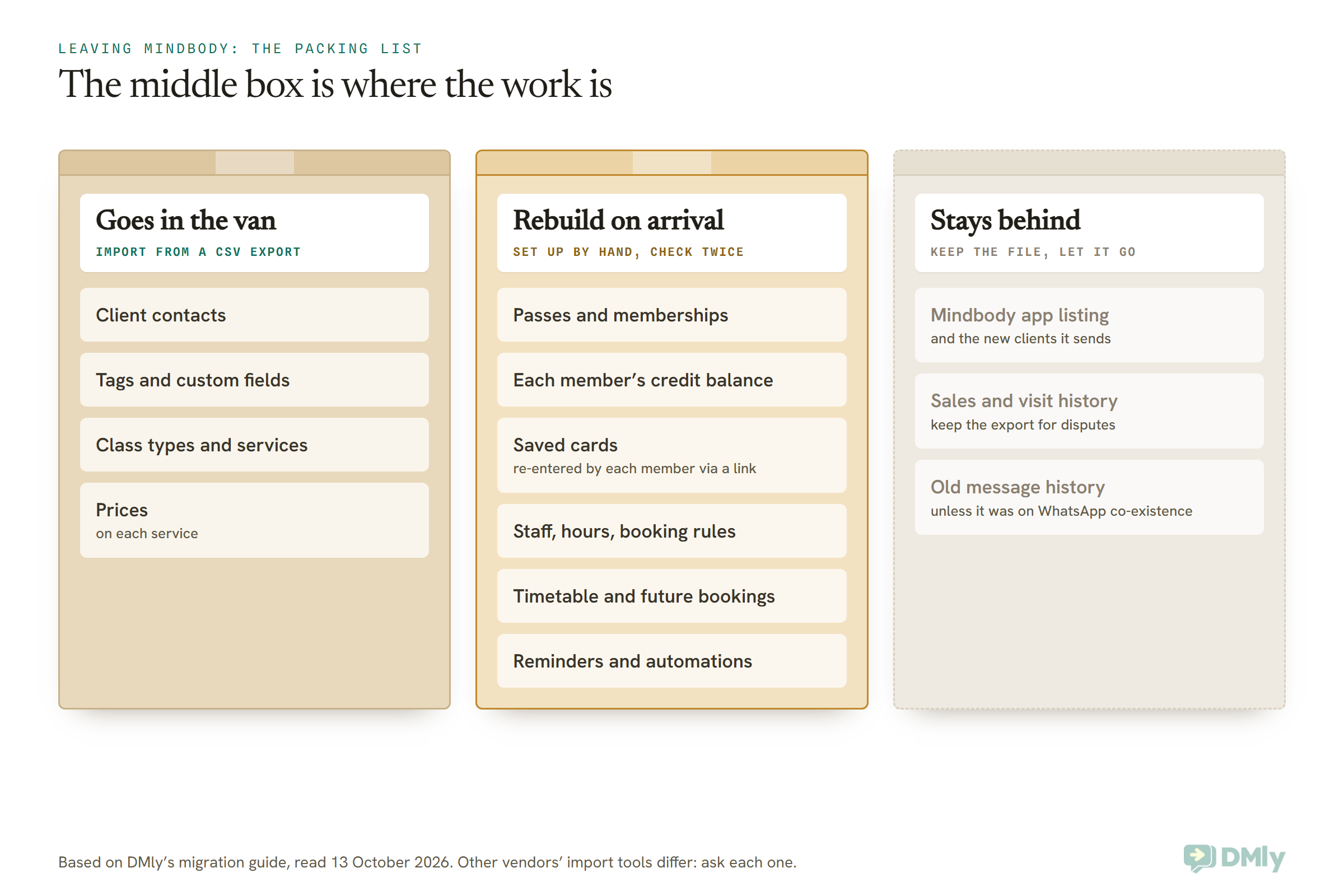
DMly’s migration guide is unusually blunt about what moves and what doesn’t. In its own words: “people and things you sell move; conversations and behaviour do not.” For a studio coming from Mindbody, that means:
- Goes in the van: contacts, tags and custom fields (CSV import), and your services, including class services, imported from a CSV as new services.
- Rebuild on arrival: plans and memberships (Offerings, Plans), each member’s membership (started in Finance, Subscriptions), credit balances (Add credits on each client’s profile, with an optional package name and expiry date), staff, working hours and booking rules, and any automations. Subscriptions, credit balances and future bookings aren’t on DMly’s list of things it imports.
- Cards on file: in DMly, a card is saved only when the member completes the “Set up auto-charge” link themselves. You never see or handle the card details. So budget a week of gentle reminders for members on recurring billing.
- Stays behind: your Mindbody app listing, your Mindbody sales history (keep the export), and any chat history from tools other than a WhatsApp number using co-existence.
One practical warning from DMly’s own docs: creating a plan sells nothing. A plan in the catalogue grants no credits until you start a membership from it or a flow issues the credits, so don’t assume members have balances just because the plans exist.
Choosing a Mindbody Alternative: Six Studios, Six Answers
These are illustrative examples, not customers. They show how the same question gets a different answer depending on the business and the country.
A two-room yoga studio in Austin, Texas. About 180 members, most of whom found the studio through friends, a few through the Mindbody app. Text reminders matter; marketing campaigns don’t. TeamUp’s $189 band for 101 to 200 active customers gives a known monthly bill, and it’s worth comparing against a written Mindbody Accelerate quote before deciding. Since US numbers aren’t currently receiving WhatsApp marketing templates, a messaging-first tool would be for replies and reminders here, not promotions.
A reformer pilates studio in Pune, India. Clients ask about slots on WhatsApp all day, and the owner books them into the system by hand. This is where DMly fits best: classes with a waitlist, a 10-class pass as a plan, and monthly memberships charged through Razorpay, which supports saved cards for automatic renewal in DMly. If a branded app matters more than the chat, Zen Planner’s $39 app is the cheaper path.
A strength and conditioning gym in Lagos. Members pay monthly, and the owner wants to accept bank transfer as well as cards. DMly works with Paystack (whose pay link can open a one-time bank account for a transfer), which supports automatic card renewals, and also Flutterwave and Monnify (pay links rather than automatic renewals in the case of Monnify). If the gym wants workout tracking and leaderboards, PushPress or Wodify are built for that, though both ask international gyms to talk to sales for pricing.
A boxing club in Manchester, UK. Members come early and late and want 24-hour access. That points to a system with door access: Wodify’s 24/7 Access add-on, PushPress through HybridAF, TeamUp, or ABC Glofox. TeamUp’s £99 entry price is printed in pounds, which makes budgeting simple.
A boutique cycling studio in Dubai. Premium brand, members who expect a polished app and to pick their bike. Mindbody’s Pick-a-Spot and branded app, bsport’s Choose Your Spot, or ABC Glofox are the realistic shortlist. This studio may simply be better off staying on Mindbody and negotiating.
A solo yoga teacher in Kuala Lumpur teaching in rented rooms and online. Arketa’s $49 Individual plan with a video library, or Vagaro at $30 for one calendar, are both cheaper than any studio plan. If most of her students message her to book, DMly Starter at $29 a month billed yearly covers bookings, passes and the chat itself, and our roundup of Calendly alternatives is worth a look if she only needs simple 1:1 booking.
What You’ll Really Pay After Switching
The real monthly cost of any Mindbody alternative is the plan price plus card processing, plus the add-ons you actually need, plus any per-message charges for texts or WhatsApp. The plan price is usually the smallest surprise.
- Card processing. PushPress Free (4.99% + 30 cents) and Arketa Individual (3% on top of Stripe’s fees) look cheap until you multiply by your monthly takings. DMly doesn’t process payments itself; you connect your own gateway and pay that gateway’s fees.
- The branded app. From $39 a month (Zen Planner) to $100 a month (Vagaro). Many small studios find members are happy with a booking link, so ask yourself whether yours would really download an app.
- Messaging. Text marketing is an add-on at Vagaro and included in some higher plans elsewhere. On WhatsApp, Meta charges per message. Since 1 October 2026, replies to customers are charged after 1,000 free a month per number; our explainer on the WhatsApp pricing change on 1 October has the detail. With DMly you pay Meta’s rates directly, with no markup added.
- Setup and migration. TeamUp says there’s no setup fee, Zen Planner includes migration, Wodify charges a small onboarding fee, and Mindbody’s data transfer service is available with “fees may apply”.
Before you sign anything, write your last three months of Mindbody bills next to a full quote from your top two alternatives, including processing at your real card volume. That one page usually makes the decision for you.
Questions to Ask Every Mindbody Alternative Before You Sign
- What exactly will I pay each month at my current member count, including card processing?
- Is there a contract, and how much notice do I give to leave?
- Can you move my members’ saved cards, and if not, how do members re-enter them?
- Do you import pass balances, active memberships and future bookings, or do I rebuild them?
- Do members need to download an app to book, or can they book from a link?
- How do you handle a waitlist when someone cancels, and is a paid class seat confirmed only after payment?
- Can I charge a late-cancel or no-show fee, and how is it collected?
- What happens when a monthly payment fails: how many retries, and what’s the member told?
- Which channels can I message members on: email, SMS, WhatsApp, in-app?
- Is your pricing available in my currency, and do you support my local payment gateway?
Ask the same ten to every vendor, Mindbody included. The answers are easier to compare than the demos.
Frequently Asked Questions
What are the best Mindbody alternatives for a small studio?
For a small studio, the best Mindbody alternatives are TeamUp (published prices from $119 a month), Zen Planner (from $99, with a $39 branded app), Arketa or Vagaro for solo instructors, and DMly if your members book and ask questions on WhatsApp. Boutique studios wanting built-in marketing should also get quotes from Momence, bsport and ABC Glofox.
How much does Mindbody cost per month?
Mindbody’s pricing page says plans start at $79 a month in North America and Asia, read on 13 October 2026. Its Starter, Accelerate and Ultimate plan cards show no price, so anything above the entry level is a quote. Payment processing, the branded app and the marketplace fee on new clients are extra.
Is there a cheaper alternative to Mindbody?
Yes, on the published entry price. PushPress Free costs $0 a month but charges 4.99% + 30 cents per card payment, DMly Starter is $29 a month billed yearly, Vagaro is $30 a month for one calendar and Arketa Individual is $49 a month billed annually plus a 3% fee. Whether any is cheaper for you depends on your card volume and the add-ons you need.
Does Mindbody charge a fee for clients from its app?
Only for genuinely new clients. Mindbody charges 20% of a new client’s first purchase, capped at $30, when its app brings you someone you wouldn’t otherwise have had. Existing clients booking through the app, and every later booking from that new client, carry no fee.
Can I leave Mindbody at any time?
It depends on your agreement. Mindbody says the contract depends on the plan and billing terms you signed up for, and that cancelling may need advance notice. Check your own agreement for the notice period before you set a switch date.
Will my members have to re-enter their cards?
Possibly. Ask each vendor whether they can take over saved cards from Mindbody, because it depends on the payment processors involved. In DMly, a card is only ever saved when the member completes the auto-charge setup link themselves.
Do any Mindbody alternatives have a marketplace?
Vagaro includes a free listing on its own Vagaro Marketplace. Arketa and Wodify integrate with ClassPass, and Wodify with Wellhub as well. None of them matches the reach Mindbody claims for its app, so if marketplace clients are a big share of your new business, test before you leave.
Can members book gym classes on WhatsApp?
Yes, with a tool that connects WhatsApp to your timetable. In DMly, a member can book a class in the chat, join the waitlist when it’s full, and get a checkout link if a paid seat opens up. Our guide to WhatsApp automation for gyms covers memberships, class booking and renewals end to end.
Is DMly a full replacement for Mindbody?
For a small gym or studio that books, sells passes and talks to members by message, it can be. It isn’t a replacement if you need a consumer marketplace, a branded member app, door access, a card reader, payroll or workout tracking. DMly’s docs document none of those.
The Van, Unpacked: Choosing Between Mindbody Alternatives
Go back to the packing list. The Mindbody alternatives that suit you are the ones that can take what’s in your van and rebuild what’s bolted to the wall, without asking your members to do too much of the work.
If your clients come from the Mindbody app, the van might not need to leave at all. If you want a price you can read, TeamUp, Zen Planner, PushPress and Vagaro will tell you before you call. If you run a box, look at PushPress and Wodify. If you’re a boutique studio, get two written quotes. And if your members already treat WhatsApp as your front desk, DMly is built for exactly that. The sibling guide on Fresha alternatives takes the same approach for salons and spas, if you run both.
Whichever you pick, move on a date you chose, with your files saved, your balances checked and your members told twice. That’s the difference between a move and a scramble.
Writing about WhatsApp automation, bookings and growth for local business.
Turn WhatsApp into your busiest channel.
Start free and run message, bookings, payments and reviews in one place.
