
Best Square Appointments Alternatives for Local Businesses in 2026

Before you compare Square Appointments alternatives, try a small experiment in your head. Walk to your front desk and unplug everything with a Square logo on it: the reader, the stand, the iPad running the point of sale app. Now list what stops working.
The calendar goes dark, obviously. But so does the way you take a card at the end of a cut, the gift card a client bought in December, the card you saved to charge a late cancellation, the payout that lands in your bank tomorrow morning, and maybe the payroll run on Friday. For a lot of local businesses, Square isn’t a booking app. It’s the counter.
That is why switching feels bigger than it should, and why the right alternative depends less on the booking page than on what you want to keep plugged in. In this guide, we’ll look at what Square Appointments actually costs in 2026, what you lose when you leave Square POS, three different ways out (one of which keeps your Square reader exactly where it is), a month at the counter priced on six tools, and where DMly fits, including the cases where it’s the wrong choice.
Square Appointments Alternatives in Three Groups: Keep the Reader, Replace the Counter, or Move the Money Online
The best Square Appointments alternatives fall into three groups: tools that let you keep your Square reader and only change the booking side (Setmore, Acuity Scheduling, or DMly beside a free Square account), all-in-one systems with their own card reader that replace the whole counter (GlossGenius, Vagaro, Clover, Booksy, Mangomint, Boulevard, Fresha), and tools for businesses that take most of their money before the client arrives or work outside Square’s countries (DMly, Fresha).
Which group you’re in comes down to one question: where does most of your money change hands?
- At the counter, and you like your Square reader. Don’t rip it out. Change the scheduling layer, or drop to Square’s free plan and add what you were missing.
- At the counter, and you’re ready for a different all-in-one. You’re buying a new point of sale as much as a new calendar, so compare card rates and hardware terms first.
- Before the visit, by deposit or payment link, or you’re not in a Square country at all. The reader matters less than the conversation that produces the booking.
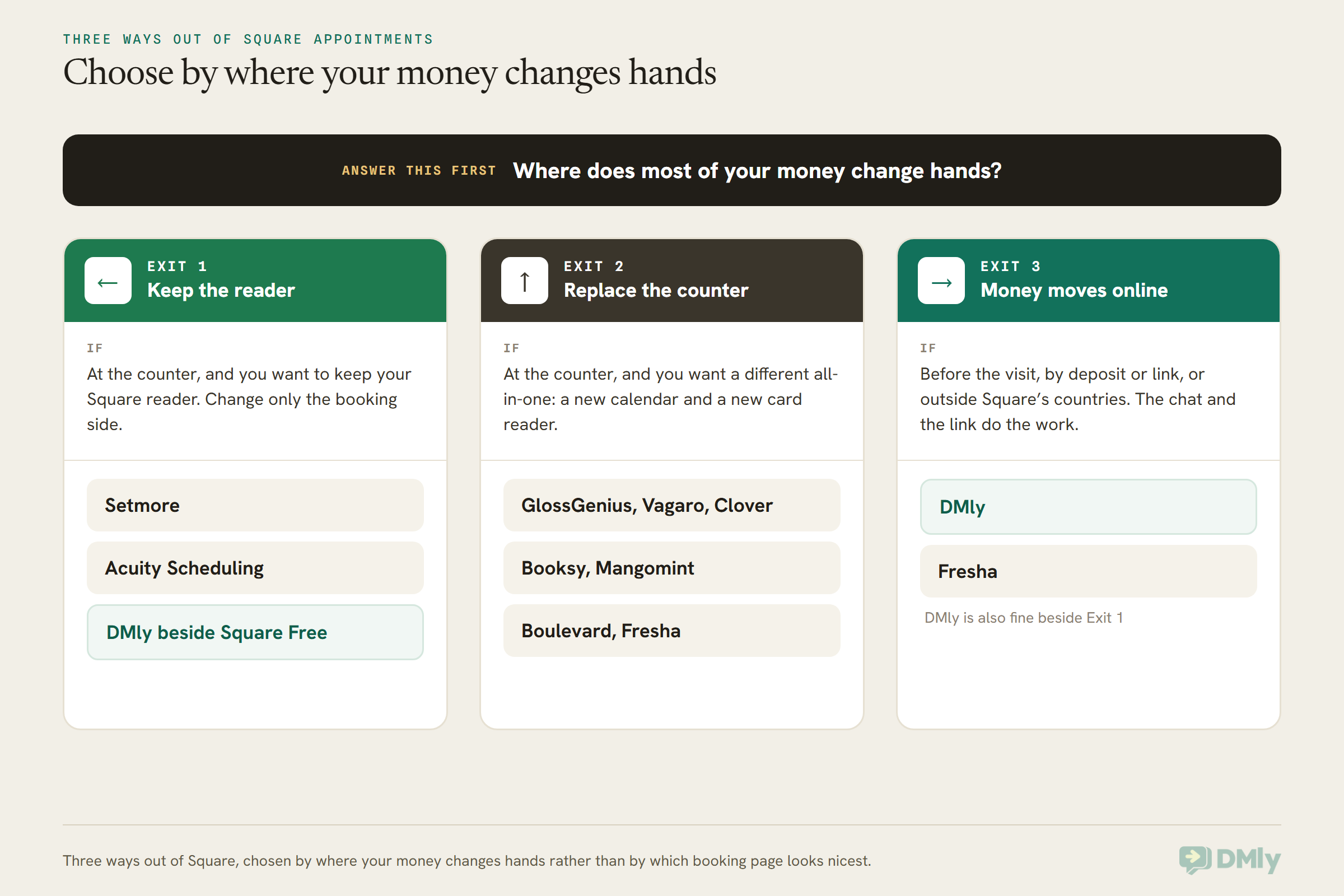
Plenty of businesses that start this search end up in Exit 1, and some of them end up not leaving Square at all. That’s a fine outcome. The aim is to stop paying for things you don’t use and start getting the things you’re missing, not to switch for the sake of it.
How Much Does Square Appointments Cost in 2026?
In the US, Square Appointments now sits inside Square’s three general plans: Square Free at $0 a month per location, Square Plus at $49 a month per location and Square Premium at $149 a month per location, with card processing fees on top that get lower as the plan gets more expensive. Businesses processing over $250,000 a year can ask about custom pricing on Square Pro. We read all of this on Square’s own pricing page on 13 October 2026.
The big change for 2026 is that Square has folded its separately priced products into those three plans. Square’s help centre says the new plans cover “all point-of-sale modes”, from appointments to retail to restaurants, and that once you switch to one, you can’t switch back to your old individual subscriptions. So “Square Appointments Plus” is really “Square Plus”, and what you’re paying for is the whole counter, not just the calendar.
| Square plan (US) | Monthly price | Tap, dip or swipe | Online | Free trial |
| Square Free | $0 per location | 2.6% + 15¢ | 3.3% + 30¢ | Not needed |
| Square Plus | $49 per location | 2.5% + 15¢ | 2.9% + 30¢ | 30 days |
| Square Premium | $149 per location | 2.4% + 15¢ | 2.9% + 30¢ | 30 days |
| Square Pro | Custom, over $250,000 a year processed | Custom | Custom | Talk to sales |
Here’s the part most comparison pages skip: Square Free is a genuinely capable booking tool. On Square’s own feature grid, every plan, including Free, gets the online booking site, unlimited staff calendars, text and email reminders, appointment deposits, prepayment, digital wallets at booking, Google Reviews monitoring and Square Assistant, which lets clients reply to an SMS reminder to confirm, cancel or change.
What you pay for on Plus is the policy side and the marketing side:
- From Plus: cancellation policies and no-show fees charged to a card on file, a waitlist, one booking covering several staff, processing time (booking someone into the gap while colour develops), Google Calendar sync, a loyalty programme, automated email and text campaigns, and 500 marketing texts included (then 3¢ each).
- From Premium: resource management for rooms and chairs, a future bookings report, service cost tracking, 2,500 marketing texts included (then 1.5¢ each), and no 2.5% load fee on gift cards.
Two costs sit outside the plans entirely. Square Payroll starts at $35 a month plus $6 per person paid, and Square hardware starts at $59. Square also says you don’t need hardware at all if you take payments with Tap to Pay on iPhone or Android, invoices or payment links.
If you’re in the UK, Square’s UK appointments page shows its own plans: Free at £0 for a single location, Plus at £29 and Premium at £69 a month per location, with 1.6% for in-person payments. Square’s appointments pricing page links to versions for eight countries: the US, Canada, the UK, Ireland, Australia, Japan, France and Spain. If you run a business in India, Nigeria, the Gulf or most of South East Asia, Square Appointments isn’t on your list to begin with, and we’ll come back to you further down.
Is Square Plus Worth It? Where the Lower Card Rate Pays for Itself
On card-present payments alone, Square Plus only pays for itself once you take about $49,000 a month at the counter, and Premium only beats Plus above $100,000 a month. Below that, you’re buying Plus for its features, not its rate. That’s worth knowing before you decide Square is “too expensive”, because the expensive part is often a plan you picked for a lower rate you never reach.
The sums are simple. Plus takes 0.1 percentage points less than Free on every in-person card payment, and costs $49 a month. One tenth of one per cent of $49,000 is $49. Premium takes another 0.1 points off and costs $100 more than Plus, so it needs $100,000 a month to break even against Plus. The 15¢ per payment is the same on every plan, so it doesn’t change the answer.
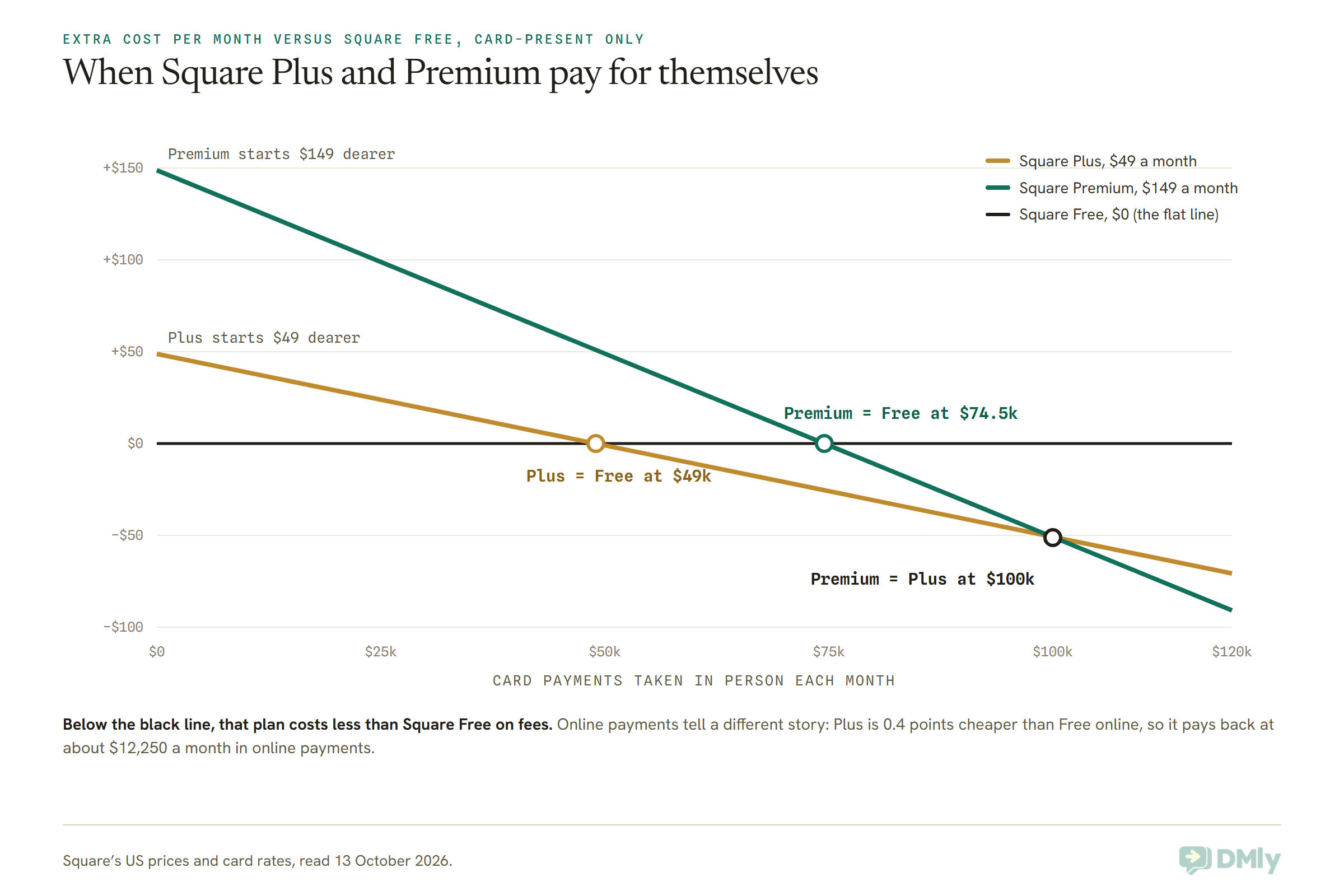
So if your business takes, say, $15,000 a month across the counter, the honest answer is that Square Free is cheaper than Plus on fees, and Plus is worth $49 only if you’ll actually use no-show fees, the waitlist, loyalty or automated campaigns. If you won’t, the cheapest Square Appointments alternative may be Square’s own free plan with one gap filled by something else.
The online picture is different. If most of your clients pay a deposit or prepay when they book, Plus is 0.4 points cheaper than Free on those payments, which covers its $49 at around $12,250 a month in online payments.
What You Lose When You Leave Square POS
When you leave Square entirely, your client list comes with you in a file, saved cards can move only to another major card processor by request, and the reader, the card rate tied to your plan, your Square Go listing, Square gift cards, Square Banking and Square Payroll all stay behind. Knowing which is which is what makes a switch calm instead of chaotic.
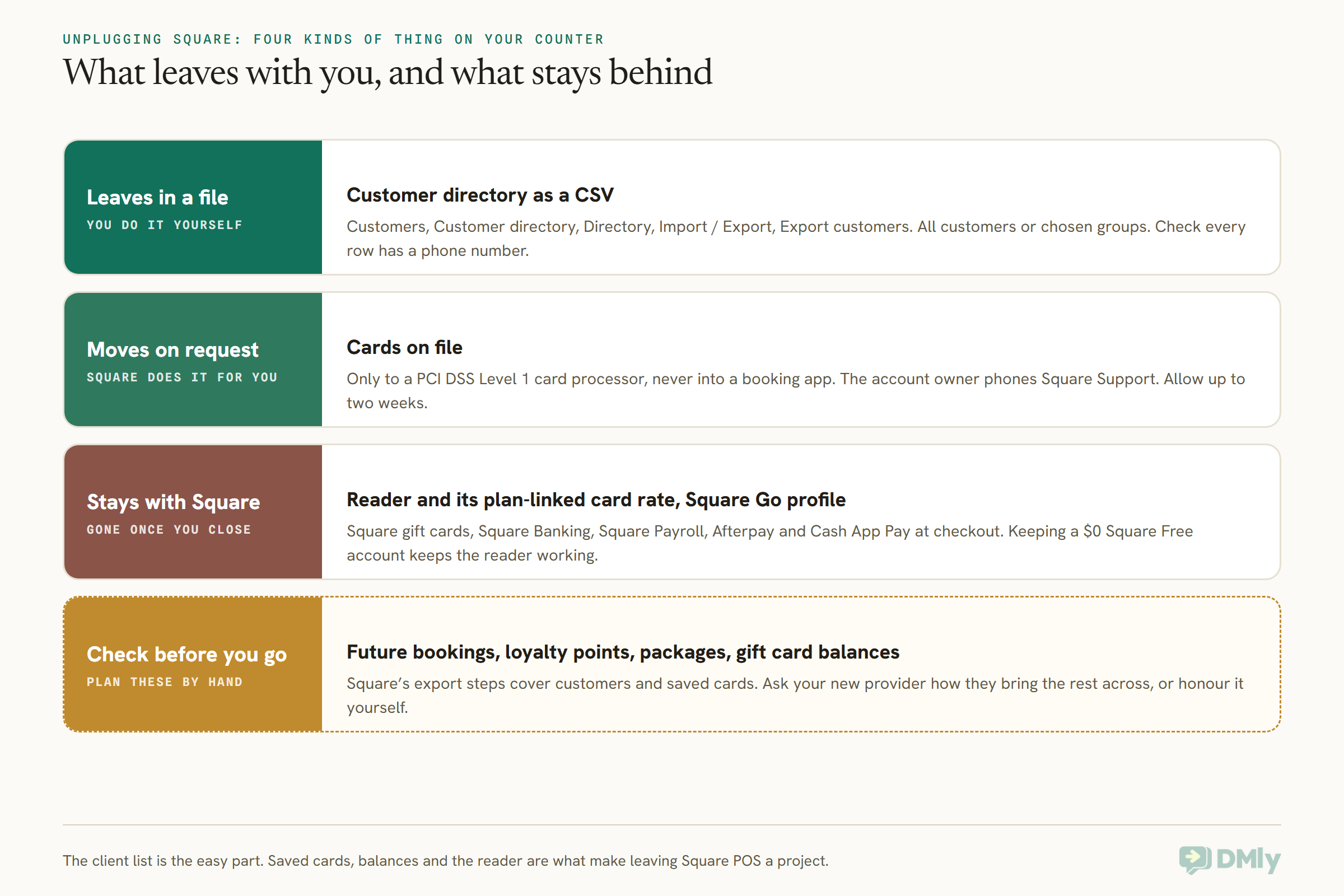
Taking each in turn:
- The reader and its rate. Your Square hardware works with Square. Leave Square and you need another reader, and the card rate you pay comes from whoever processes it. If you love your reader, Exit 1 keeps it.
- Cards on file. Square’s help centre says it can transfer saved cards only to another payment processor that is PCI DSS Level 1 compliant, which is the top tier of card-security certification. The account owner phones Square Support to start it, and it can take up to two weeks. A booking app can’t receive them unless its card processor can. That matters if you charge no-show fees to saved cards today.
- Your client list. You can export it yourself as a CSV file from the Square Dashboard, under Customers, Customer directory, Directory, then Import / Export.
- Square Go. This is easy to forget. Square Go is Square’s free marketplace app in the US, where clients search for beauty and personal care businesses and book them. If your online booking is on and you’re eligible, you have a profile there whether you set one up or not. Leave Square and it goes. Square says Square Go doesn’t take payments yet.
- Gift cards and loyalty. Square gift cards and loyalty points live in Square. Before you go, decide how you’ll honour balances that are still out there. The simplest way is often to keep a Square Free account open, which costs $0 a month, so old gift cards can still be redeemed at the counter.
- Banking and payroll. Square Banking is included with all three plans, and Square Payroll is a separate add-on. If you rely on next-day or instant access to card money in a Square checking account, or run payroll through Square, those are separate moves to plan.
Square Appointments Alternatives That Let You Keep Your Square Reader
If your reader, your payouts and your card rate are fine and it’s the booking side that frustrates you, pick a scheduler that works alongside Square: Setmore and Acuity Scheduling both take payments through Square, and DMly can run your bookings and messages while a free Square account keeps taking cards at the counter. This is the least disruptive way out, and it’s the one most guides don’t mention.
Setmore: the closest thing to “Square, but a different calendar”
Setmore has a Free plan for up to four users at $0, and Pro at $5 per user a month on annual billing, read on Setmore’s pricing page on 13 October 2026. Its Square integration is listed on both plans. Setmore’s integration page says you can take a payment from the booking page or send a payment from the calendar to your Square terminal in the shop, and that Setmore adds no fees of its own on top of Square’s.
Pick it if you want to keep Square for money and Setmore for scheduling, with the two talking to each other. Think twice if you need deposits on the free plan: Setmore’s grid lists deposits on Pro only.
Acuity Scheduling: for appointments sold online, paid through Square
Acuity’s plans are Starter at $16 a month billed yearly ($20 monthly) for one calendar, Standard at $27 ($34) for up to six, and Premium at $49 ($61) for up to 36. Every plan lists payments through Stripe, Square, PayPal or Venmo. That makes Acuity a good fit for coaches, therapists and consultants who sell sessions online and want the money to keep landing in their Square account.
Pick it if your clients book and pay online and you mostly don’t need a counter. Think twice if you’re a busy salon with walk-ins and retail, since Acuity is a scheduler rather than a point of sale.
DMly beside a free Square account: when bookings start in a chat
DMly doesn’t integrate with Square, and we’d rather say that up front. What you can do is let DMly handle everything before the visit (the enquiry on WhatsApp or Instagram, the booking, a deposit taken online, the reminders) and keep a $0 Square Free account for the card at the end of the appointment.
DMly’s documentation plans for exactly this. When you add a booking by hand from Appointments, then Calendar on a pay-before service and you’re taking the money yourself, there’s a Payment taken in person tick for “cash, a card machine, a package they already hold”. The booking confirms straight away and no payment link goes out. For a balance paid after a deposit, you can record the payment on the client’s profile with Credit / debit card as the method.
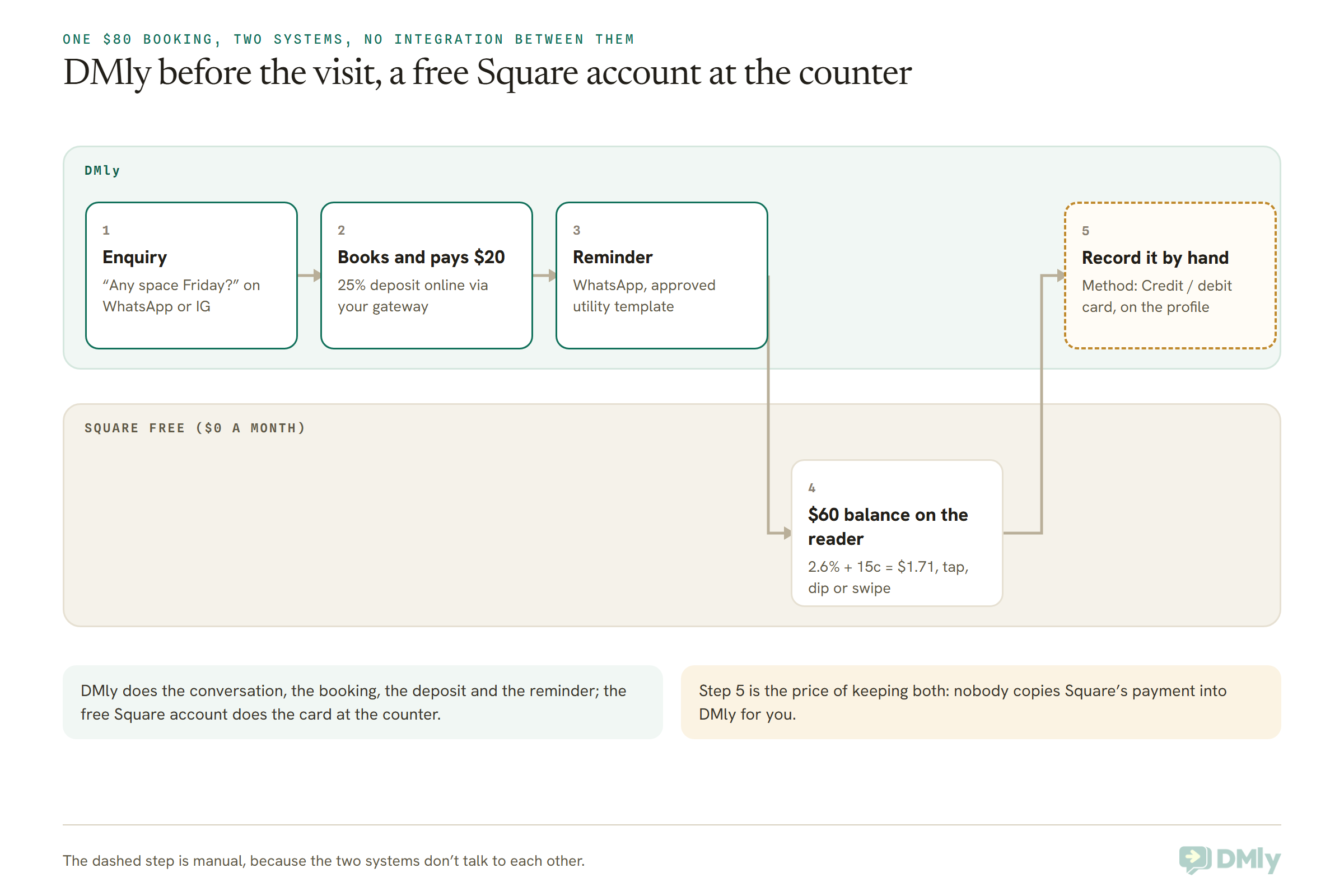
Pick it if your bookings already arrive in WhatsApp, Instagram or Messenger messages, and the counter is the only thing Square is doing well for you. Think twice if you hate double entry. Two systems that don’t talk mean you decide which one is your record of who paid, and someone copies the card payments across or lives with the gap.
Alternatives to Square Appointments With Their Own Card Reader
If you want one system again, the alternatives with their own readers and point of sale are GlossGenius, Vagaro, Clover, Booksy, Mangomint, Boulevard and Fresha. With each of these you’re choosing a new card processor as well as a new calendar, so the card rate and the hardware terms deserve as much attention as the booking features. All prices below were read on each vendor’s own pricing page on 13 October 2026.
GlossGenius: one flat card rate
GlossGenius charges Standard at $28 a month ($24 billed yearly), Gold at $56 ($48) for businesses up to nine staff, and Platinum at $168 ($148) for teams of ten or more. Its pricing page advertises flat 2.6% payment processing, lists card readers and a point of sale, and offers a free data transfer. Each extra location is charged at the plan price less 15%, and instant payouts cost an extra 1.8%.
Pick it if you want a single rate you can predict and a beauty-first app. Think twice if you run several locations, since each extra one is charged at the plan price less 15% rather than included.
Vagaro: per calendar, with a free reader on terms
Vagaro’s US page shows $30 a month for one location ($23.99 for the first six months), with each bookable calendar licence $10 up to seven, after which more employees cost nothing extra. It offers a free card reader when you sign up for Vagaro Merchant Services, a free listing on the Vagaro Marketplace, and a 30-day trial. Its processing rates aren’t printed on the pricing page, so ask for them in writing. Vagaro also says its team will migrate your requested data, usually in one to two business days.
Pick it if you want a marketplace listing to replace Square Go and a done-for-you data move. Think twice if you can’t get the card rate quoted before you sign.
Clover: the other big US point of sale
Clover is the closest like-for-like swap for a Square counter. Its personal services pricing has a Basic system at $16 a month for 36 months (or $349 up front) that doesn’t include appointment management, and a Standard system at $130 a month for 36 months (or $849 plus $84.95 a month) that does: online booking, email and SMS reminders, cancellation and no-show fees, and Reserve with Google. Standard’s card rate is 2.3% + 10¢ in person and 3.5% + 10¢ keyed in.
Pick it if you take a lot of in-person card volume and want a lower in-person rate than Square Free. Think twice if you don’t want hardware on a 36-month payment plan, and read the terms of any hardware promotion closely, since Clover’s own small print ties its current offer to a three-year contract.
Booksy: cheap reader rates, with a marketplace fee
Booksy costs $29.99 a month plus $20 for each extra team member. Its card rates are 2.49% + 10¢ on the Booksy Card Reader, 2.49% + 20¢ with Tap to Pay and 2.69% + 30¢ for mobile or keyed payments. Its Boost marketing feature charges a one-time 30% of a new Boost client’s first visit, up to $100.
Pick it if you’re a barber or stylist who wants low reader rates and a client app. Think twice if you’d rather never pay a commission on a new client.
Mangomint: per location plus per user
Mangomint is $120 a month per location plus $10 per user, with in-person card payments at 2.45% + 15¢ and virtual payments at 2.90% + 30¢. Add-ons include a business phone line at $70 a month, marketing from $30 and payroll at $50 plus $8 per worker. Its page says online booking sits on your own website and you keep all of those appointments.
Pick it if you run a polished salon or spa and want depth. Think twice if you’re small, because the per-location base is high for a one-chair business.
Boulevard: premium salons and spas
Boulevard’s Essentials plan is $143 a month for one location and up to five providers. Premier is $234 a month per location (normally $293) and Prestige $328 (normally $410), both shown as discounted prices. You need Boulevard’s Duo point of sale to process payments, and the processing rate isn’t printed on the page; Boulevard says it offers volume discounts.
Pick it if you’re a growing spa or med spa that wants a premium experience. Think twice if you need a published card rate before talking to sales.
Fresha: priced in your own currency, with a marketplace
Fresha prices its plans per bookable team member in local currency, so the number you see depends on where you are. When we fetched the page it served Nigerian prices: Independent at NGN 6,800 a month and Team at NGN 4,500 per team member. Its point of sale is included, and it charges a one-time fee on brand-new clients who find you through the Fresha marketplace, with nothing on returning clients. We’ve covered it properly in our guide to Fresha alternatives, which is worth reading if Fresha is on your shortlist.
Pick it if you’re outside the US and want a salon-style system with a marketplace. Think twice if you want to see a dollar price without signing up from a US connection.
Square Appointments Pricing vs the Alternatives: One Month at the Counter
For a three-person salon taking $12,000 a month on cards at the counter in 200 payments, Square Free comes out cheapest at $342 a month in fees, and most alternatives land between $368 and $474 once their subscription is added. On these numbers, leaving Square to save money rarely works. Leaving Square to get something you’re missing often does.
Here’s the working. Everything is card-present, billed monthly, one location, three people who each need to log in. Card fees and subscription only; texts, WhatsApp messages, hardware purchases and add-ons are left out.
| Setup | Card fees on $12,000 (200 payments) | Subscription | Total a month |
| Square Free | $312 + $30 = $342 | $0 | $342 |
| GlossGenius Gold | $312 (flat 2.6%) | $56 | $368 |
| Square Plus | $300 + $30 = $330 | $49 | $379 |
| Square Free + DMly Starter | $342 (Square reader) | $39 | $381 |
| Booksy | $298.80 + $20 = $318.80 | $29.99 + 2 x $20 | $388.79 |
| Clover Standard | $276 + $20 = $296 | $130 (36-month plan) | $426 |
| Square Premium | $288 + $30 = $318 | $149 | $467 |
| Mangomint | $294 + $30 = $324 | $120 + 3 x $10 | $474 |
A few things jump out. GlossGenius’ flat rate and low Gold price make it the cheapest switch on this example. Clover’s in-person rate is the lowest here, but its 36-month system price swallows the saving at this volume; if you bought the hardware outright, the monthly total would be $380.95. Vagaro and Boulevard aren’t in the table because neither publishes its card rate on its pricing page.
And Square Free plus DMly Starter costs $39 more than Square Free alone. Whether that’s worth it depends entirely on whether chat bookings, WhatsApp reminders and deposits taken in a conversation bring you more than $39 of appointments a month. For a lot of businesses one saved no-show covers it, but that’s your sum to do, not ours.
Is DMly a Good Square Appointments Alternative?
DMly is a good Square Appointments alternative when your bookings start as messages on WhatsApp, Instagram, Messenger or your website chat, and when most of the money can move before the visit as a deposit or a link. It’s the wrong choice if you need a card reader, a point of sale or payroll, because DMly has none of those.
DMly is one inbox for WhatsApp, Instagram, Messenger, Telegram, SMS and website chat, with bookings, payments and a CRM built in. On the booking side, here’s what the documentation confirms:
- A public online booking page with staff, services and real availability, which you can use as your Instagram bio link or Google Business Profile link, embed on your website, or serve on your own domain. It speaks 16 languages.
- Three payment modes per service: no payment, pay after the appointment (a pay link goes out afterwards), or pay before booking (the slot is held until the money clears). On pay-before services you can accept appointment deposits or full payment, with the deposit set as a percentage from 1 to 99.
- A no-show fee on any service, charged when you mark the booking as a no-show: to a saved card if the client has one from a subscription, otherwise as a payment link. That’s different from Square Plus, which charges a card taken at booking.
- Reminders on the client’s own channel. WhatsApp appointment reminders go out on approved templates, and clients can simply reply in the same chat. If you want them to confirm or change by replying, our guide to two-way WhatsApp appointment reminders covers it.
- An AI agent that books in the chat, checking times, booking, rescheduling and cancelling, and telling a client what’s left to pay after a deposit.
- Payments through your own gateway: Stripe, PayPal, Razorpay, Paystack, Flutterwave, Monnify, MyFatoorah or Mercado Pago. You can also create online payment links for any amount and send them in the chat.
- Gift cards, coupons, loyalty points and Google review requests, plus a mobile app for the inbox, the calendar and recording payments.
DMly’s plans are Starter at $29 a month billed yearly ($39 monthly) with 3 team seats, Growth at $65 ($79) with 6, and Premium at $149 ($199) with 15. Every plan includes bookings and payments, there’s a 7-day trial with no card, and you pay Meta’s WhatsApp message rates directly with no markup. Full details are on the DMly pricing page. Note that DMly is priced by seats and contacts, not per location.
When DMly is the wrong Square Appointments alternative
We’d rather you didn’t sign up and then find these out:
- You need a card reader or a terminal. DMly doesn’t sell or support one. Card payments in DMly happen on your gateway’s own checkout page, online. If a client taps a card at your desk, that’s someone else’s reader.
- You sell retail at a till. DMly has a product catalogue and orders, but no barcode-scanning point of sale. A shop-front with shampoo on the shelves is better served by Square, Clover or GlossGenius.
- You need payroll, timecards or tip pooling. Square lists all three. DMly doesn’t do payroll.
- Your new clients come from Square Go or another marketplace. DMly has no consumer marketplace. Your clients find you through your own links, ads, Google profile and word of mouth.
- You want charge-a-card-on-file cancellation policies for everyone. DMly only saves cards for clients on a subscription, so most no-show fees go out as a link the client has to pay.
- You’re in the US and your clients don’t use WhatsApp. In the US, plenty of clients still expect a plain text message. DMly can send SMS through your own Twilio or Plivo account, but WhatsApp is where it shines. And Meta currently doesn’t deliver WhatsApp marketing templates to US numbers at all, so WhatsApp promotions and review requests sent as templates won’t reach US numbers; use SMS or email for those.
If two or more of those describe you, choose from Exit 1 or Exit 2 and come back to DMly later if chat bookings grow.
Square Appointments Alternatives Outside the US
If you’re outside Square’s eight countries, you need an alternative that works with the payment methods your clients already use, and a booking tool that lives where your clients message you. For many businesses in India, Nigeria, the Gulf, South East Asia and Latin America, that conversation already happens on WhatsApp.
- United Kingdom and Ireland. Square is available, with UK plans at £0, £29 and £69 a month per location and 1.6% in person. Fresha is a natural comparison here too.
- India. Square isn’t an option. A salon in Pune taking ₹500 deposits on a ₹2,000 service can take them through Razorpay on a DMly booking page and send the reminder on WhatsApp.
- Nigeria. A Lagos spa can take naira deposits through Paystack, Flutterwave or Monnify, including bank transfer, and keep the conversation in WhatsApp, where its clients already are.
- The Gulf. A Dubai clinic can take AED deposits through MyFatoorah and book in Arabic, since DMly’s booking page reads right to left in Arabic.
- Latin America. Mercado Pago is built in for businesses whose clients pay that way.
- South East Asia. Check which of DMly’s gateways operates in your country before you plan around online deposits. If none does, bookings and reminders still work and you take payment at the desk.
If you came here because Square isn’t available where you are, it’s also worth reading our guide to Calendly alternatives, which compares simpler schedulers for one-to-one sessions.
How to Switch From Square Appointments Without Losing Clients
Switch in this order: export your clients, decide what happens to saved cards and gift card balances, rebuild your services, run both calendars for a few weeks, then turn off Square online booking last. Turning Square off first is the most common way to lose bookings in the gap.
- Export your client list. In the Square Dashboard, go to Customers, Customer directory, Directory, then Import / Export and Export customers. Choose all customers or specific groups.
- Clean it for your new tool. DMly’s importer needs a name and a phone number on every row and skips the rest, with a count of what it skipped. Phone numbers are what let reminders reach clients on WhatsApp, so fill as many as you can. Quote any value that contains a comma.
- Decide about saved cards. If your new processor is PCI DSS Level 1 and you need the cards, the account owner calls Square Support to request the transfer, and it can take up to two weeks. If you don’t rely on saved cards, skip this step and collect deposits at booking instead.
- Plan for balances. List open gift cards, packages and loyalty points. Either keep Square Free running to redeem them, or honour them by hand in the new system. In DMly you can issue a gift card for the same value.
- Rebuild services and staff hours. Set durations, buffers, prices and the payment mode for each service. If you used Square’s deposits, set the same percentage. Connect your payment gateway and add its webhook in the gateway’s own dashboard, then make one small test payment to yourself.
- Copy future bookings across. Add every upcoming appointment to the new calendar by hand, so nobody’s Saturday disappears.
- Tell clients once, and clearly. Send your new booking link with the next reminder, and put it in your Instagram bio and Google Business Profile.
- Turn off Square online booking last. Once new bookings are arriving through the new link, switch off Square’s booking site and, if you’re listed, opt out of Square Go from the profile management page in your Square Appointments dashboard.
For the first month, watch your no-show rate closely. A new reminder rhythm takes a few weeks to settle, and our guide on how to reduce appointment no-shows has the deposit and reminder settings that work best.
Frequently Asked Questions
What are the best Square Appointments alternatives for salons?
For salons that want one system with a reader, the best Square Appointments alternatives are GlossGenius (flat 2.6% processing, Gold at $56 a month for up to nine staff), Vagaro (from $30 a month plus $10 per calendar) and Mangomint or Boulevard for larger salons and spas. For salons whose clients book by message, DMly beside a free Square account keeps the reader and adds WhatsApp booking, deposits and reminders.
Is Square Appointments free?
Yes, Square Free costs $0 a month per location and includes online booking, unlimited staff calendars, reminders, deposits and prepayment. You pay 2.6% + 15¢ on in-person card payments and 3.3% + 30¢ online. No-show fees, a waitlist and loyalty need Square Plus at $49 a month per location.
Can I keep my Square card reader if I switch booking software?
Yes. Setmore and Acuity Scheduling both take payments through Square, and Setmore can send a payment from its calendar to your Square terminal. With DMly there’s no integration, but you can keep a free Square account for the reader and tick Payment taken in person when you book someone in.
Can I move my clients’ saved cards out of Square?
Only to another payment processor that is PCI DSS Level 1 compliant. The Square account owner has to call Square Support, and the transfer can take up to two weeks. Your customer list itself you can export as a CSV from the Square Dashboard.
Does DMly have a card reader or a point of sale?
No. DMly takes payments online through a gateway you connect, such as Stripe, Razorpay or Paystack, and lets you record cash, card machine and bank transfer payments by hand. If you need a reader, keep Square Free or choose a system like GlossGenius or Clover.
Does Square Appointments work outside the US?
Square’s pricing pages cover the US, Canada, the UK, Ireland, Australia, Japan, France and Spain. In the UK, Square Appointments costs £0, £29 or £69 a month per location. Businesses in India, Nigeria and the Gulf need an alternative such as DMly or Fresha.
Is Square Plus worth the $49 a month?
On card rates alone, only above about $49,000 a month in in-person payments, or about $12,250 a month in online payments. Below that, Plus is worth it if you’ll use its no-show fees, waitlist, loyalty or automated campaigns.
Choosing Between Square Appointments Alternatives: The Counter, Plugged Back In
Go back to the counter you unplugged at the start. Plug things back in one at a time, and the right choice among Square Appointments alternatives usually appears on its own.
If the reader goes back in first because you can’t imagine taking cards any other way, you’re in Exit 1: keep Square, possibly on its free plan, and change only the part that annoys you. If you’d happily replace the reader for a lower rate or a better salon app, you’re in Exit 2, and you should get every card rate in writing before you sign. And if the thing you reach for first isn’t the reader at all but your phone, because that’s where clients ask, book and pay their deposits, you’re in Exit 3.
That last group is who DMly is built for. It won’t sit on your counter, but it will sit in the conversation where most of your bookings now begin. Try it free for seven days beside your Square account, and see which of the two you open first in the morning.
Writing about WhatsApp automation, bookings and growth for local business.
Turn WhatsApp into your busiest channel.
Start free and run message, bookings, payments and reviews in one place.
