
Before service, over staff meal, someone asks: “Whatever happened to the Thursday couple?” If you want to win back customers who stopped visiting, that question is where it starts, and in most restaurants nobody at the table can answer it.
Everyone remembers them. Same table by the window, the lamb, one glass each, always a little late. Your server can describe them perfectly. But nobody knows their names, nobody has their number, and nobody can say when they last came in. Was it August? July? The till knows a card was used. It doesn’t know whose.
So the question gets a shrug, and the couple stay gone. Not because anyone decided to let them go, but because a restaurant is very good at noticing who’s in the room and very bad at noticing who isn’t.
In this guide, we’ll look at how a restaurant can actually tell who has stopped coming, how long “stopped” really is for different kinds of guest, which lapsed customers to message and which to leave alone, what to say, eight messages you can copy, how to handle the replies, and how to set up a restaurant win-back campaign in DMly that you can run in under an hour a month.
How to Win Back Customers Who Stopped Visiting Your Restaurant: the Short Answer
To win back customers who stopped visiting your restaurant, you need a record of who came and when, a sense of each guest’s normal rhythm, permission to message them, and one honest message with a real reason to come back. Then a person reads the replies, and you count who actually returns.
In practice that’s five moves:
- Find out who you can see. Reservations, orders, table QR scans and chats each leave a trace. Walk-ins who pay at the till usually leave none.
- Decide what “lapsed” means for each kind of guest. A weekly lunch regular who misses three weeks has lapsed. A birthday-only guest who hasn’t been since March hasn’t.
- Take out the people you shouldn’t message. Anyone who hasn’t agreed to hear from you, anyone with an open complaint, staff, suppliers, and anyone who said stop.
- Send one message with a reason. A new menu, a dish that’s back, a quiet night with a table held for them. A discount is optional, not the point.
- Answer the replies yourself, then measure returns. A win-back is a conversation starter. Count bookings and orders, not opens.
If you’ve read our general guide to building a WhatsApp win-back campaign for inactive customers, the sending mechanics are the same. What’s different for a restaurant is the first two moves. Most of your guests never tell you who they are, and “inactive” means something very different for a Friday regular and an anniversary couple.
Why Restaurants Can’t See Which Customers Stopped Coming
Restaurants struggle to see lapsed customers because most visits leave no record tied to a person. A salon or a clinic knows every client by name because every visit is booked. A restaurant serves walk-ins, groups where one person booked for six, takeaway orders over the phone and tourists who’ll never come back, and the till records payments, not people.
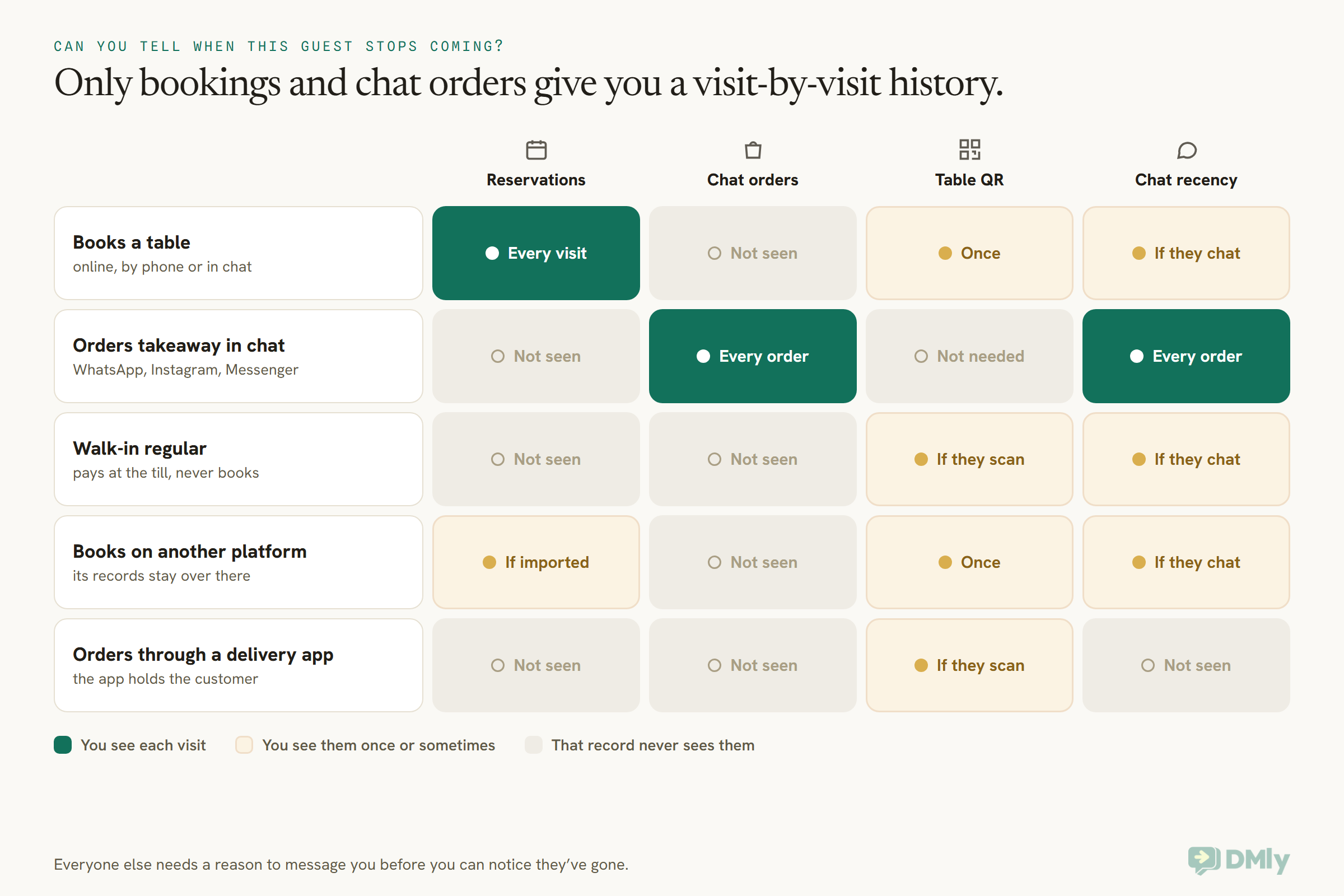
That doesn’t mean you have nothing. It means your “who stopped coming” list can only ever be as good as the records you keep. Here’s what each one tells you.
| Where the record comes from | What it tells you | Who it misses |
| Table reservations (online, phone or chat) | The name, the number, and the date of every booked visit | Walk-ins, and the five guests who came with the person who booked |
| Orders taken in your chat (takeaway, delivery, pre-orders) | Who ordered, what, and when | Anyone who orders through a delivery app or pays at the counter |
| Table or receipt QR codes | That a guest chose to message you, usually once | Every later visit, unless they scan again |
| Chat history | How long since you last talked | Regulars who come every week but never message |
| Your loyalty programme | Visits that earned points | Anyone who never joined, or whose bill wasn’t linked to them |
| Lists from other tools (booking platforms, Wi-Fi sign-ins, a paper guest book) | Whatever that tool collected | Anything it didn’t, and permission, unless guests gave it |
Two things fall out of that table. First, the guests you can win back most easily are the ones who booked or ordered through your chat, because their history is already sitting there. Second, your walk-in regulars are invisible until you give them a reason to message you. We’ll come back to both.
The walk-in problem, and the honest fix
Walk-in regulars are the hardest guests to win back, because you can’t miss someone you never recorded. There’s no clever software answer to that. A restaurant till isn’t connected to DMly (the docs list no point-of-sale integration), so paying by card doesn’t put anyone on a list.
The fix is old-fashioned: give guests a reason to say hello. A small card on the table or a line on the receipt with a WhatsApp QR code works well, as long as scanning gets them something they actually want: the dessert menu, tonight’s specials, a way to book next time, or a stamp towards a reward. Our guide to creating a WhatsApp QR code for your business covers the printing side.
Be realistic about what that gets you. Most guests will scan once. That puts them in your contacts with a name and a number, which is a huge step up from “the Thursday couple”. It doesn’t give you every visit after that. For walk-in regulars, “how long since we last talked” is usually the best signal you’ll have, and that’s fine, as long as you know that’s what you’re measuring.
Lists from other tools
Some restaurants already have guest lists elsewhere: a reservations platform, a guest Wi-Fi sign-in page, a newsletter tool, a paper book at the door. You can bring those into DMly with a CSV import, but read three things first.
- An import doesn’t start any automations. New contacts don’t trigger welcome flows, and tags the file adds don’t trigger tag flows. That’s often what you want here, but don’t expect a welcome message to go out.
- Tags on existing contacts are replaced, not added to. If someone in your file is already in DMly, their tags become whatever your
tagscolumn says, and a blank or missing column strips their tags completely. Import only people who aren’t in DMly yet, or export first and carry their current tags in the file. - Only tick the consent box if everyone in the file agreed. DMly asks you to declare consent for the whole file and records it on each contact. A Wi-Fi sign-in page that didn’t ask permission to send marketing messages hasn’t given you that permission.
What Counts as a Lapsed Restaurant Customer?
A lapsed restaurant customer is a guest who has missed several of their own usual visits, so the right cut-off depends on how often that guest normally comes, not on one number for everyone. Ninety days is a sensible gap for winning back salon clients. For a restaurant, it’s far too long for some guests and far too short for others.
Think about three regulars:
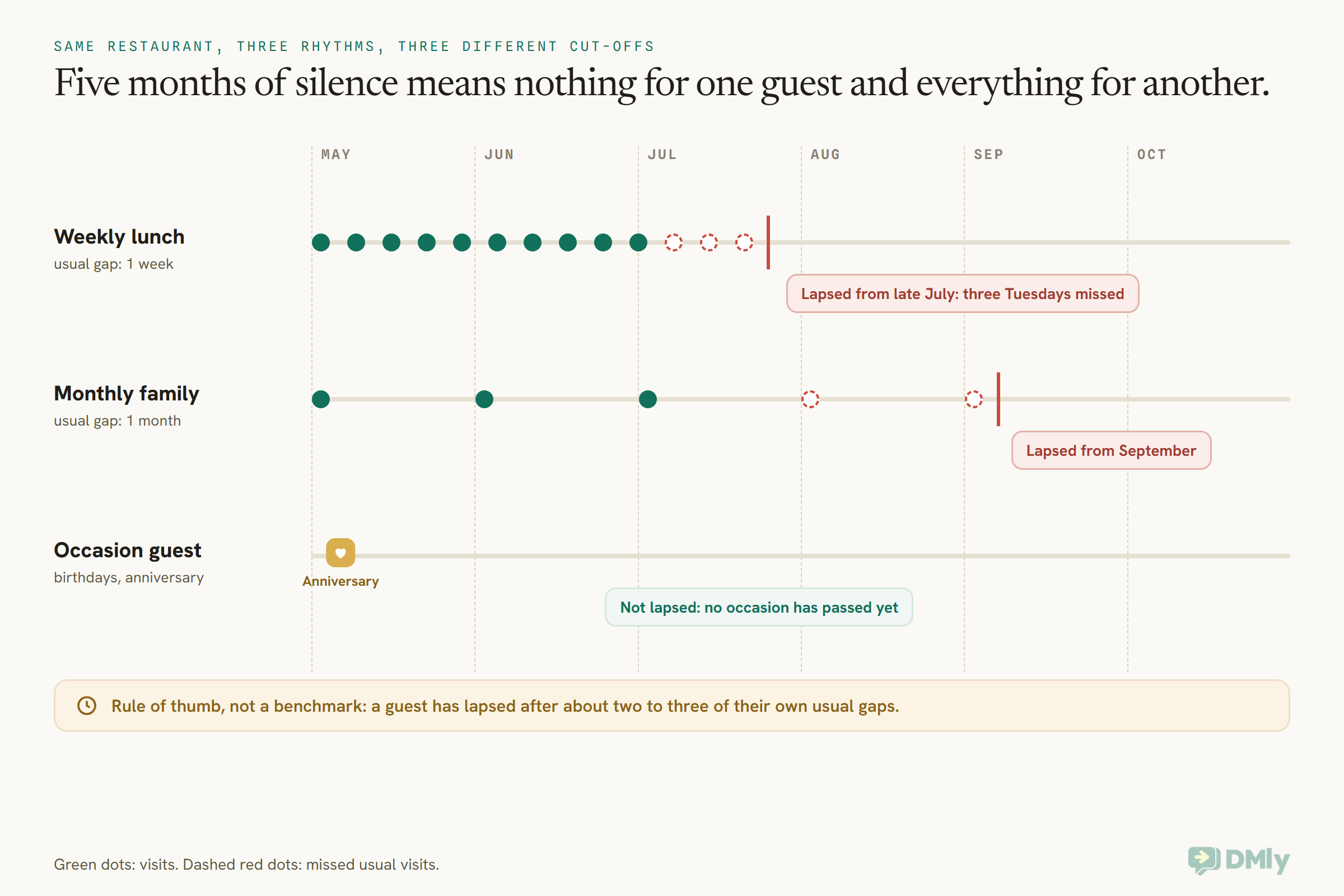
- The weekday lunch regular. An office worker in Chicago who has the same salad every Tuesday. Three missed Tuesdays is a signal. Something changed: a new job, working from home, a new place across the road.
- The monthly family dinner. A family in Pune that comes on the first Sunday of most months. Two missed months is worth a gentle hello. One missed month is just a busy month.
- The occasion guest. A couple in Manchester who book for birthdays and their anniversary. Six months of silence is normal. They haven’t lapsed until an occasion goes by without a booking.
A good working rule, and it’s a rule of thumb rather than a measured benchmark: a guest has lapsed when they’ve been away for roughly two to three of their own usual gaps. That’s long enough to be a pattern and short enough that they still remember your food.
Turning rhythms into something software can use
You can’t set a different cut-off for every guest by hand, and you don’t need to. Most restaurants can group guests into two or three bands and use one window for each:
- Regulars (they came several times in the last few months): message them after about four to six weeks away.
- Occasional guests (one or two visits): message them after about three months, once.
- Occasion bookers: don’t put them in the win-back at all. Use their birthday month instead, if you have it.
Tourists, one-off event guests and people who came once for a work lunch aren’t lapsed customers. They were never regulars. Sending them “we miss you” reads as spam, because from their side it is.
Why Restaurant Customers Stop Coming, and Which Reasons a Message Can Fix
Restaurant customers stop coming for ordinary reasons: their routine changed, they moved, they found somewhere new, the price crept up, the dish they loved disappeared, or they had one bad night. A message can’t fix all of those. It can fix more than you’d think, as long as you match the message to the likely reason.
| Why they stopped | Can a message help? | What to send |
| They simply got out of the habit | Yes, this is the one win-backs are for | A friendly hello with something new to try |
| Their dish came off the menu | Yes, if you know what they ordered | “It’s back”, or the closest thing you now serve |
| They tried a new place nearby | Sometimes | A reason that’s yours alone: a dish, a person, a room, a night |
| Price or portion changed | A little | A set lunch, a quieter-night offer, or simply listen |
| One bad night (cold food, a long wait, a rude moment) | Only from a person | An apology and a question, never a promotion |
| They moved away or their life changed | No | Nothing, or a warm reply if they tell you |
The bad-night guest needs a person, not a promotion
This is the row that goes wrong most often. A guest who complained in July and hasn’t been back since is not a “lapsed customer” in the campaign sense. They’re an unresolved complaint. A cheerful “We miss you! 10% off this week” lands as proof you weren’t listening.
So tag complaints when they happen (a tag like Complaint, added by whoever handled it), keep those guests out of every broadcast, and have the owner or manager message them personally instead. One line works: “Hi Maria, I’m the owner. I know your last visit wasn’t what it should have been and I’m sorry. Would you tell me what happened?” Then listen. Some will come back. All of them will think better of you.
Lapsed Restaurant Customers You Shouldn’t Message
Before you send a restaurant win-back campaign, take out anyone who hasn’t agreed to marketing messages, anyone with an open complaint, anyone who opted out, and anyone who was never really a guest. Getting this list right matters more than getting the wording right.
- People who never agreed to hear from you. A win-back is a marketing message, and WhatsApp expects people to have opted in to that kind of message before you send it. Someone who once asked about parking hasn’t. Our guide to WhatsApp opt-in and how to prove consent explains what counts.
- Anyone who said stop. DMly already blocks opted-out contacts from every broadcast, so this one takes care of itself. Excluding them as well just keeps your numbers tidy.
- Open complaints. As above: a person, not a campaign.
- Staff, ex-staff, suppliers and friends. They’re in your phone because they work with you. Tag them once and exclude them forever.
- The person who booked for someone else. A PA who books the team lunch, or the friend who always books for the group. They didn’t stop coming; their boss or their friends did. Treat corporate bookers as a separate list with a separate message, or leave them out.
- Guests with US (+1) WhatsApp numbers. Meta doesn’t currently deliver marketing template messages to WhatsApp users with US phone numbers, so a WhatsApp win-back simply fails for them. If you’re a US restaurant, plan your win-back around text messages or Instagram instead (more on that below).
That last point catches people out, because DMly’s segment builder has no rule for a phone number’s country code. You can’t filter +1 numbers out in advance. They’ll show up in the broadcast’s failed count with Meta’s reason. If most of your guests are in the US, that’s your cue to send by SMS instead.
Give Lapsed Guests a Reason to Come Back, Not Just a Discount
The messages that win back customers best give a specific, true reason to return, such as a new menu, a returning dish, a seasonal night or a table held for them, rather than a generic “we miss you”. A discount can help, but on its own it tells a guest your food is worth less than they thought.
Restaurants have more real reasons than almost any other business. Something changes every season. Use that:
- Something new. A new menu, a new chef, a new terrace, a new brunch. “We’ve changed” is the strongest reason to try a place again.
- Something back. The winter stew, the Ramadan iftar menu, the mango dessert that only runs for six weeks. If you know a guest loved it, say so.
- A night with room. Your quiet nights are the best nights to bring regulars back. “We’ll keep your usual table on Wednesday” costs you nothing and fills a seat that would otherwise be empty.
- Something they already own. If they have loyalty points or a reward waiting, remind them. That’s their money, not your offer. Our guide to how a WhatsApp loyalty program works covers what you can send about points.
- An occasion. For guests whose birthday you have, a birthday-month message is far warmer than a generic win-back.
Should a restaurant win-back include a discount?
Sometimes. A small, specific offer (“a dessert on us”, “the second main half price on Tuesdays”) works better than a big percentage, because it brings people in on the night you choose without training them to wait for codes. Keep it to guests who’ve been away a long time, not to regulars who missed two weeks.
One practical thing for restaurants. A DMly coupon comes off a DMly invoice or order, with its own validity dates and a per-contact limit. If your guests pay at a separate till, a coupon code in a message is just words your staff honour by hand, and DMly’s usage counter won’t tick. That’s fine, but tell your team what the code looks like, when it expires and whether it’s one per table, or the server will be negotiating at the table on a busy Friday.
Restaurant Win-Back Messages to Copy
These restaurant win-back messages cover regulars, occasional guests, takeaway customers, birthday months, a gentle follow-up and the bad-night apology. Every one of them is a marketing message to Meta, because a message that asks someone to come back, or that builds the relationship, is marketing even when the guest is a long-time regular. If you’d like the full background on the three message categories, see WhatsApp message templates explained.
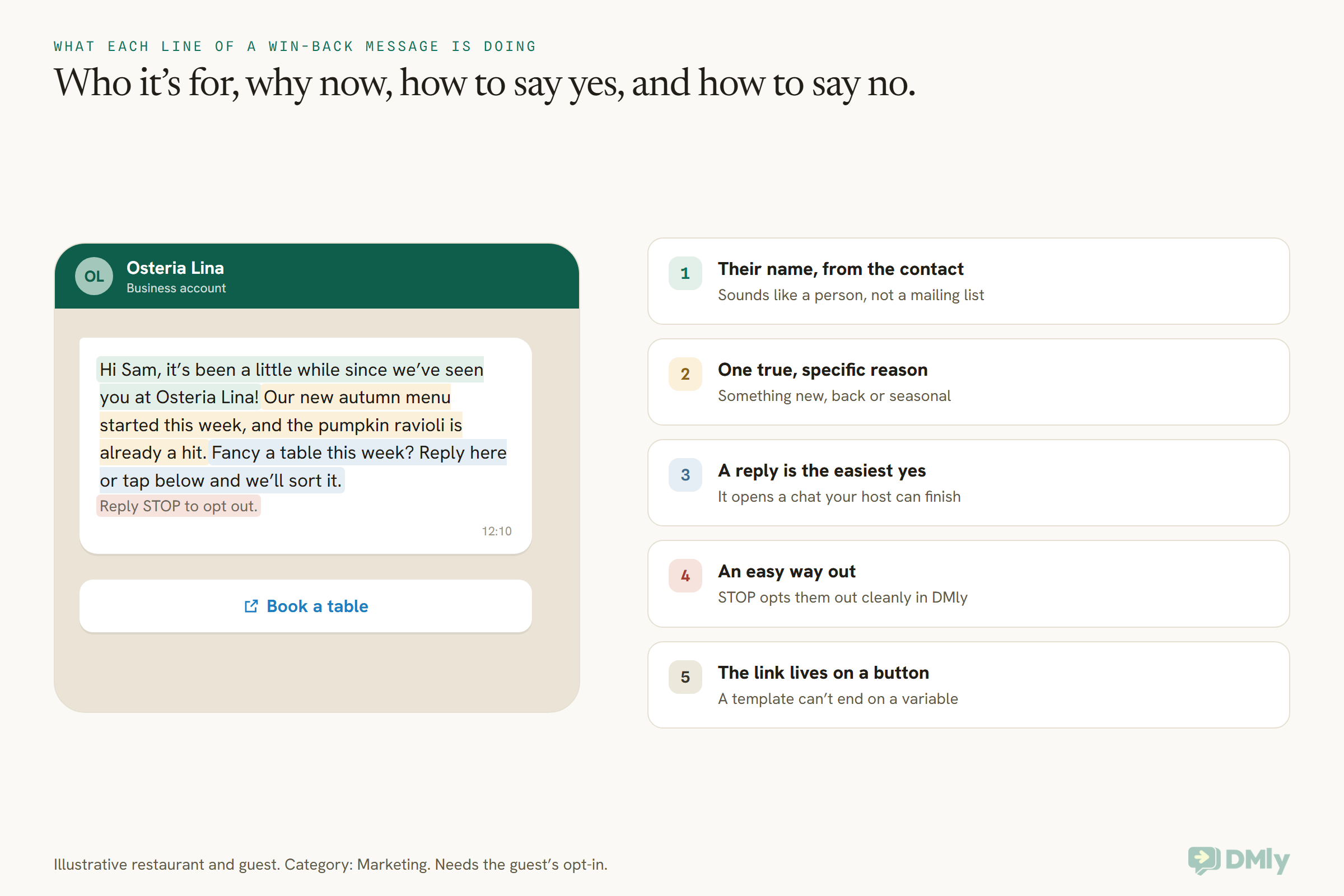
Square brackets mark the parts you’ll turn into variables. When you submit a template, Meta wants real words around each variable, and a template can’t start or end with one. That’s why the links below sit on buttons rather than at the end of the text.
1. The regular who’s been away a few weeks
Hi [Name], it’s been a little while since we’ve seen you at [Restaurant]! Our new autumn menu started this week, and the [dish] is already a favourite. Fancy a table this week? Reply here or tap below and we’ll sort it.
Reply STOP to opt out.
Button: Book a table
Category: Marketing. Keep it short and specific. The new menu is the reason; the booking button is the easy yes.
2. Their dish is back
Hi [Name], good news from the kitchen at [Restaurant]: the [dish] is back on the menu from [day]. We thought you’d want to know first. Shall we save you a table?
Reply STOP to opt out.
Button: Book a table
Category: Marketing. Only send this to guests you actually know ordered it, from their chat orders or a note on their contact. Guessing wrong is worse than not saying it.
3. A quiet night, a held table
Hi [Name], we’d love to see you again at [Restaurant]. Wednesdays are a bit calmer here, so if you’d like your usual corner table one Wednesday this month, just reply with a date and we’ll keep it for you.
Reply STOP to opt out.
Category: Marketing. This one asks for a reply, not a click, which is exactly what you want: a reply opens a conversation your host can finish.
4. The takeaway regular
Hi [Name], it’s [Restaurant]! We haven’t cooked for you in a while. This week’s specials are [special] and [special]. Reply “MENU” and we’ll send the full list, or order in a couple of taps below.
Reply STOP to opt out.
Button: Order now
Category: Marketing. If an AI ordering assistant answers your chat, make sure “MENU” is a keyword it or a flow actually handles before you promise it.
5. The occasional guest, a few months on
Hi [Name], you came to [Restaurant] earlier this year and we hope you enjoyed it. A lot has changed since: [one real change, such as a new terrace or brunch on Sundays]. If you’re ever nearby, we’d love to have you back.
Reply STOP to opt out.
Button: See the menu
Category: Marketing. No pressure, no deadline. One message, and if they don’t answer, leave them be.
6. Their birthday month
Hi [Name], it’s your birthday month, and everyone at [Restaurant] would love to celebrate with you. Book a table any night this month and dessert is on us. Just mention this message when you arrive.
Reply STOP to opt out.
Button: Book a table
Category: Marketing. Birthday wishes are one of Meta’s own examples of a relationship-building marketing message, with or without the dessert.
7. One gentle follow-up
Hi [Name], just a quick one from [Restaurant]: our [seasonal dish or event] runs until [date], and we’d love you to try it before it goes. No worries if not, we’ll be here!
Reply STOP to opt out.
Button: Book a table
Category: Marketing. Send it once, a week or two after the first, only to people who didn’t reply. Then stop. A third message to someone who’s ignored two is how restaurants end up blocked.
8. After a bad night (send it yourself)
Hi [Name], it’s [Owner’s name], the owner of [Restaurant]. I know your last visit wasn’t up to standard and I’m sorry. I’d really like to hear what happened, if you’re willing to tell me. Just reply here and it comes straight to me.
Category: Marketing if it’s sent as a template outside the 24-hour window, because it’s inviting a new conversation rather than updating an order. Send it to one person at a time, never as part of the campaign, and don’t attach an offer. If they reply, then is the time to invite them back, as an ordinary message inside the window.
How to Win Back Customers With DMly: Setting Up a Restaurant Win-Back Campaign
A restaurant win-back campaign in DMly is a saved list that finds guests who’ve gone quiet, a marketing template, and one broadcast, with a person ready to answer the replies. The only fiddly part is the list, because DMly can tell you how long since a guest last talked to you or bought something, but it doesn’t keep a “last visit” date you can filter on. So the setup below gives each visit a label you can count.
The core idea: DMly’s saved lists (it calls them segments) are like a question you ask every time you send: “who matches right now?” A tag, on the other hand, is a label that stays put. Segments are built out of tags, so if each visit leaves a tag, a segment can find the people whose tags stopped arriving.
Step 1: Label every visit you can see
Pick whichever of these fits how your guests reach you. Most restaurants use two.
If guests book tables. Create a flow that starts when a booking is completed (the trigger is called Appointment completed) and adds a tag with the month in it, such as Dined Oct 2026. On the first of each month, open the flow and change the tag to the new month. That’s a one-minute job, and it gives you a clean visit history by month.
Check how past bookings close. About a day after a booking’s time, DMly closes any booking nobody marked. On the default setting, Count as completed, that fires Appointment completed even if the guest never came, so your no-shows would get a “Dined” tag. Either mark no-shows every night, or switch Appointments → Settings → Booking policy → Appointments nobody marked to Wait for review and settle each booking yourself.
Phone bookings count too, as long as your host adds them in DMly with the guest’s number. A booking that lives only in another reservations system or a paper book leaves no trace here.
If guests order in your chat. You may not need tags at all. A segment can use Last purchase (more than so many days ago) and Order count (at least two, so you’re looking at regulars). One catch: orders an AI ordering assistant takes are saved as drafts until your team confirms them from the order’s own page, and draft orders don’t count towards Order count. If your team handles the order in chat but never confirms it in DMly, your best customers look like they’ve never ordered. And if your table bookings take a deposit, check whether those guests show up under Last purchase in the segment’s preview; booking payments sit on the booking rather than on an invoice, and the docs don’t say whether they count.
If guests walk in. Put a WhatsApp QR code on the table or receipt. In DMly, make it a growth tool (Messaging → Growth Tools → New growth tool, type QR code), one per placement so you can tell the table card from the receipt. The tool’s ref, such as TABLE_QR, sits ready in the guest’s message box when they scan. Then build a flow on the WhatsApp message trigger with that exact word as its keyword, which sends the menu or specials, adds the month’s Dined tag, and asks whether they’d like news from you.
Why a keyword flow and not the growth tool’s own flow? On WhatsApp, a growth tool only claims a guest and starts its flow on their first-ever message to your number. A guest who scans again next month reaches you normally, but the tool’s flow doesn’t run. A keyword flow answers every scan.
Asking permission in the same flow. Add two buttons such as “Yes, send me news” and “No thanks” (button titles can be up to 20 characters), and tag a yes with something like Marketing OK. That tag is what your win-back list will look for. DMly’s own Marketing opt-in segment rule only checks that someone hasn’t opted out, so it can’t tell you who actually said yes.
Step 2: Tag the people to keep out
Create a few “never in a campaign” tags and use them every time: Complaint, Staff, Supplier, Corporate booker. Add them from a guest’s profile with Add tag, or tick up to 500 people on the Contacts list and use the bulk Add tag. Bulk tagging doesn’t start any automations, so it won’t set off your flows.
Step 3: Build the win-back list
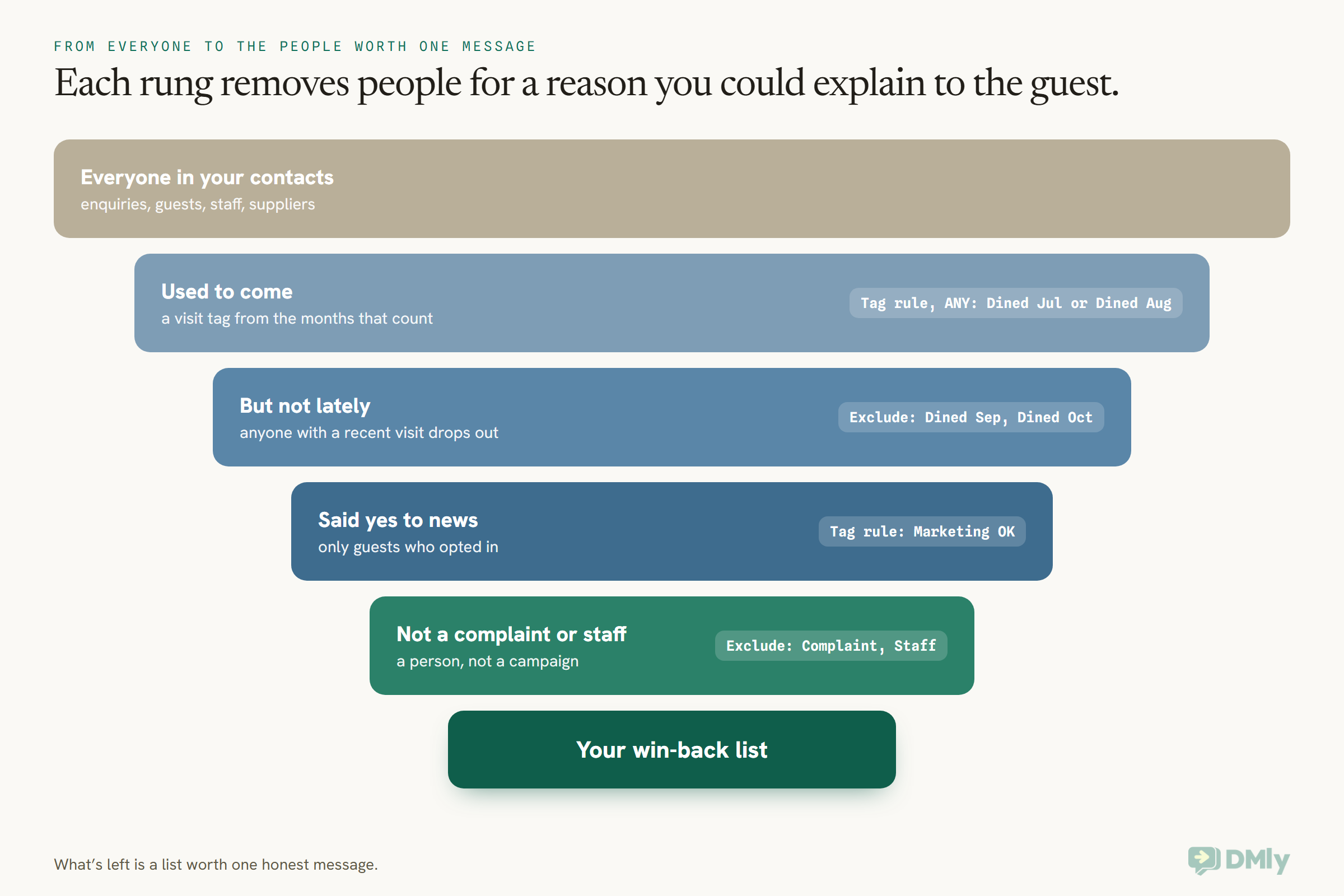
Go to Contacts → Segments → New segment and name it after the question it asks, for example “Dined Jul or Aug, not since”. Then:
- Under Conditions, select Add group, set the group to match ANY, and add a Tag rule for each month that counts as “they used to come”, such as
Dined Jul 2026andDined Aug 2026. (Don’t put these in the Contact tags box at the top: that box needs every tag you pick, so it would only find people who came in both months.) - Add a second group, set to ALL, with a Tag rule for
Marketing OK, so only guests who said yes are included. - Under Exclude contacts with tags, add the recent months (
Dined Sep 2026,Dined Oct 2026) plusComplaint,Staff,SupplierandCorporate booker. One match is enough to drop someone. - Leave the top-level match on ALL, so a guest has to satisfy both groups.
- Watch the Preview count as you go, open a few of the names it finds, and check they really are people you’d expect. Then select Create.
For a chat-ordering list, swap the tag group for Last purchase more than 45 days ago and Order count at least 2. For walk-ins and anyone else, the basic filter Number of days since last activity gives you “people we haven’t talked to for that long”. DMly’s docs describe it as how long since the contact last did anything, and a reply resets it, so read it as conversation recency, not visit recency.
For more on what each rule can and can’t do, see our guide to customer segmentation by spending, activity and interests.
Step 4: Get the template approved
Go to Messaging → Templates and create your win-back message as a Marketing template, with the guest’s name as a variable and your booking or menu link on a button. Pick Marketing honestly; a promotional message filed as Utility is a rejection. Approval is usually quick, but give it a day before your planned send.
Step 5: Tag who you’re sending to, then send
Here’s a small step that makes measuring possible later. A segment changes as people move, so next month you won’t be able to ask it “who did we message in October?”. Before you send, go to Contacts, open Filters, choose your win-back segment, tick Select all N matching and add a tag like Winback Oct 2026. Now the list is frozen.
Then create the broadcast: pick the segment as the audience, choose your approved template, tick Reachable contacts only so opted-out guests don’t clutter your numbers, and schedule it for a time your guests are thinking about food, a little before lunch or late afternoon. Make sure someone is on the inbox for the next few hours.
Step 6: One follow-up, then stop
A week or two later, create one more broadcast with Type set to Retarget, choose the first broadcast, and pick All Sent But Not Replied. Use your gentle follow-up template (message 7 above). That’s the last message these guests get from this campaign.
Can a Restaurant Win-Back Campaign Run on Its Own?
Partly, but a monthly hand-sent win-back is safer for most restaurants than a fully automatic one, because DMly’s automatic options can message guests who’ve already come back. Here’s what exists and where each one trips up.
A drip sequence after every visit
The obvious idea is a sequence (DMly’s word for a series of messages on a timer) that starts after each visit and sends “we miss you” six weeks later. It mostly works, with one real problem: a guest who comes back in week three is still in the sequence. Starting it again does nothing for someone already in it, and a normal reply doesn’t take them out unless you turn on the sequence’s Stop when the contact replies switch. Unless the flow that sees them come back also takes them out, your Tuesday regular, who was in last week, gets “we haven’t seen you in a while”. That’s worse than sending nothing. The fix is DMly’s Remove from sequence step: add it to the flow that runs when a guest visits (on Appointment completed, for example), and it stops their run in that sequence, or in every sequence, without opting them out or touching their tags.
If you try it anyway, keep the sequence short, build its later steps from approved templates (a plain text step only reaches people who messaged you in the last day), switch on Stop when the contact replies, and only feed it guests who have been away a long time.
The “Rebound” template
DMly’s automation library includes a template called Rebound: book the next visit. It starts on Appointment completed, waits 28 days, then sends a “few weeks since your last visit” message followed by a booking link. Four weeks later the chat is usually closed, so the first message goes out as the dmly_rebook_nudge marketing template, but the booking link is an ordinary message, so on WhatsApp it only arrives while the window is open. It also doesn’t check whether the guest has booked again. So don’t install it unchanged: set the wait to your guests’ rhythm, add a Condition on Has an upcoming appointment before the message, and test it on your own number before you rely on it for a restaurant.
A flow on a schedule
The Scheduled date trigger runs a flow on a date you set, once or on repeat, for an audience you choose. That’s handy if you want branching, for example a different message for takeaway regulars and diners. For a single monthly message, a broadcast is simpler, and the docs don’t say whether a scheduled flow’s audience picker takes a saved segment, so check before building around it.
Our honest recommendation: put a monthly reminder in your diary, change the month in your Dined tag flow, refresh the segment’s months, and send. It takes well under an hour, and you look at the list with your own eyes before anyone gets a message.
When a Lapsed Guest Replies
Replies are how you actually win back customers, so treat them as the whole point of a restaurant win-back campaign: a person, ideally someone who knows the regulars, should answer them within a few hours. Once a guest replies, you’re inside WhatsApp’s 24-hour window, and your host can write back normally, without templates or approval.
The replies you’ll get most often, and what to say:
- “Yes! Thursday for two?” Book it straight away, in DMly, with their number, so the visit gets its Dined tag when the booking completes.
- “We moved to Leeds.” “Oh, we’ll miss you! Thanks for letting us know, and if you’re ever back in town, your table’s here.” Then tag them so they’re left out next time.
- “Honestly, last time was disappointing.” Don’t defend, don’t offer a code yet. “I’m really sorry to hear that. What happened?” Then pass it to the owner or manager, and tag
Complaintuntil it’s settled. - “It’s got a bit expensive for us.” A fair point, and useful to hear. Mention a set lunch or a quieter-night menu if you have one. If you don’t, thank them; you’ve learned something.
- “Who is this?” Usually someone who scanned a QR once. “It’s [Restaurant] on [street]! You joined our updates when you visited. Happy to stop if you’d rather not hear from us.”
- “Cancel.” On WhatsApp, a reply that’s just the word cancel (or end, or quit) doesn’t opt anyone out in DMly. It asks first: reply STOP to stop all messages, or STOP OFFERS to stop promotions only. A guest who replies STOP is opted out of everything, and your team can’t reply until they’re resubscribed; STOP OFFERS keeps reminders and receipts going. Either way, respect it.
If an AI assistant answers your chat, remember that DMly’s AI templates, including the food ordering one, answer every incoming message. A happy “yes, table for two” is fine for it to handle. A complaint isn’t. Make sure your assistant’s instructions hand anything unhappy over to a person, and that someone sees those handovers quickly.
Rules for Every Restaurant Win-Back Message
Every restaurant win-back message on WhatsApp is a marketing message, so it needs the guest’s opt-in, is billed by Meta at the marketing rate, and is subject to WhatsApp’s per-person limits on marketing messages. Four practical consequences:
- Opt-in first. No yes, no win-back. That’s why the
Marketing OKtag sits in the middle of the segment. - WhatsApp may hold some messages back. Meta limits how many marketing messages a person receives from all businesses, based on how they’ve been engaging lately. A message held back fails with error 131049. Meta says to wait at least 24 hours before trying that person again, and repeated retries make it worse. If a guest replies, marketing messages inside the 24-hour window that opens don’t count towards that limit.
- No WhatsApp marketing to US numbers. Meta doesn’t currently deliver marketing templates to +1 US numbers. US restaurants can run the same win-back by text message through DMly’s SMS channel (Twilio, Plivo or your own gateway), which has no templates or approval queue. Texting has its own consent rules in the US, so check them, and know that on SMS a text of just “cancel”, “end” or “quit” opts the guest out straight away. Instagram is another route for guests who follow you, but broadcasts there only reach people who messaged you recently or gave Meta’s one-time permission.
- Mind your quality rating. When people block or report your messages, WhatsApp lowers your number’s quality, and a low rating can get templates paused. A small, well-chosen list protects your reservation reminders as well as your marketing.
On cost: DMly doesn’t add a markup to Meta’s message rates, and each plan includes an allowance of broadcast and template messages. Meta’s marketing rate depends on the guest’s country, so check the current rate for your market on our pricing page and Meta’s own rate card before you size a campaign.
How to Tell Whether Your Restaurant Win-Back Worked
A restaurant win-back worked if guests on the list came back within a few weeks, so measure returning visits and orders, not opens or clicks. Read rates feel encouraging and tell you almost nothing about tables.
Because you froze the list with a Winback Oct 2026 tag, this is easy. Three or four weeks later, make a segment with that tag and the new month’s Dined tag (Dined Nov 2026), or with Last purchase within the last 30 days for chat orderers. The count is your returning guests. Compare it with the list size and you have a real answer.
A few other places to look:
- The broadcast’s own numbers. Delivered, read and replied tell you whether the message landed. Replied is the one that predicts bookings.
- Appointment reports. Configurations → Reports → Appointments exports every booking in a date range as a CSV, so you can see whether quiet-night bookings rose after a held-table message.
- Your staff. “Was that the Thursday couple?” is a perfectly good data point. Ask the floor team to mention it when a regular reappears.
Don’t judge it on one campaign. The restaurants that win back customers reliably treat it as a habit, not an event. Run it monthly for a season, change one thing at a time (the reason, the timing, offer or no offer), and keep what brings people back. For broader ideas on keeping guests coming between win-backs, see our guide to using WhatsApp marketing to drive repeat sales, and our WhatsApp automation for restaurants pillar for how win-backs fit with orders, reservations and reviews.
What this looks like in a few real kinds of restaurant
These are illustrative, not case studies, but they show how much the setup changes with the business.
- A taqueria in Chicago. Mostly walk-ins, mostly US numbers. Table QR codes to build the list, a keyword flow that sends the specials, and a monthly win-back by text message rather than WhatsApp.
- A family restaurant in Pune. Weekend tables booked on WhatsApp. Dined tags from completed bookings, a two-month window for families, and a festival-menu message as the reason to return.
- A rice and stew spot in Abuja. Lunch takeaway ordered in chat, paid by transfer. Last purchase over 30 days plus at least three orders, and a “this week’s specials” message priced in naira.
- A gastropub in Manchester. A mix of bookings and walk-ins. Dined tags for bookers, chat recency for the QR crowd, and a Sunday roast that’s “back from October” as the reason.
- A café in Riyadh. Regulars who come almost daily. A three-week window, and the Ramadan evening menu as the seasonal reason, sent well before the month starts.
- A noodle house in Kuala Lumpur. Lots of delivery-app orders the restaurant can’t see. The win-back only covers dine-in guests who scanned the table QR, and that’s fine: it’s the part of the business the restaurant can actually reach.
Frequently Asked Questions
How do restaurants win back customers who stopped coming?
Find guests who’ve missed several of their usual visits, using bookings, chat orders or QR scans, keep only those who agreed to hear from you, and send one specific message, such as a new menu or a table held on a quiet night. Then answer replies personally and send at most one follow-up.
How long before a restaurant customer counts as lapsed?
It depends on the guest. Roughly two to three of their own usual gaps is a good rule of thumb: about a month for a weekly regular, two or three months for a monthly diner. Occasion guests haven’t lapsed until an occasion passes without a booking.
Is a “we miss you” message marketing or utility?
Marketing. Meta treats messages that invite people back or build the relationship as marketing, even for long-time regulars. That means the guest needs to have opted in, it’s billed at the marketing rate, and it isn’t delivered to US +1 numbers on WhatsApp.
Can I win back walk-in customers with no booking record?
Only once they’ve given you a way to reach them. A table or receipt QR code that sends something useful, such as the specials, brings walk-ins into your contacts. After that, “days since we last talked” is the best signal you’ll have for them.
Should a restaurant win-back message include a discount?
It doesn’t have to. A real reason to return, like a new dish or a seasonal menu, often does the job. If you do add an offer, keep it small and specific, such as a free dessert on a quiet night, and save it for guests who’ve been away a long time.
Can DMly find guests who haven’t visited in 60 days automatically?
Not from a last-visit date, because segments can’t compare dates. DMly can find guests by days since last activity, by last purchase for chat orders, or by monthly “Dined” tags added when bookings complete, which is the most reliable way for table bookings.
What if a guest replies “cancel” to a win-back message?
On WhatsApp, a reply that’s only the word “cancel” doesn’t opt them out in DMly. DMly asks whether they want to stop all messages (STOP) or just promotions (STOP OFFERS), and if they meant something else, the conversation carries on. If they choose STOP, respect it; they can opt back in later by sending “start”. By text message, a bare “cancel” opts them out straight away.
The Staff-Meal Question, Answered
Go back to staff meal. “Whatever happened to the Thursday couple?” doesn’t have to end in a shrug. With bookings tagged by month, a QR card on the table and a list you check once a month, the answer becomes a name, a last visit and a choice: message them, or let them be.
You won’t win back customers who moved across the country, and you shouldn’t try to win back the ones you upset with a coupon. But the ones who simply drifted, the regulars who got out of the habit, are often one friendly, specific message away from their usual table. That’s what a good restaurant win-back campaign does: it notices who isn’t in the room, and asks them back like a person would.
If you’d like to run your bookings, chat orders, QR codes and win-back messages from one inbox, you can start a free DMly trial and have your first win-back list built before next week’s staff meal.
Writing about WhatsApp automation, bookings and growth for local business.
Turn WhatsApp into your busiest channel.
Start free and run message, bookings, payments and reviews in one place.
