
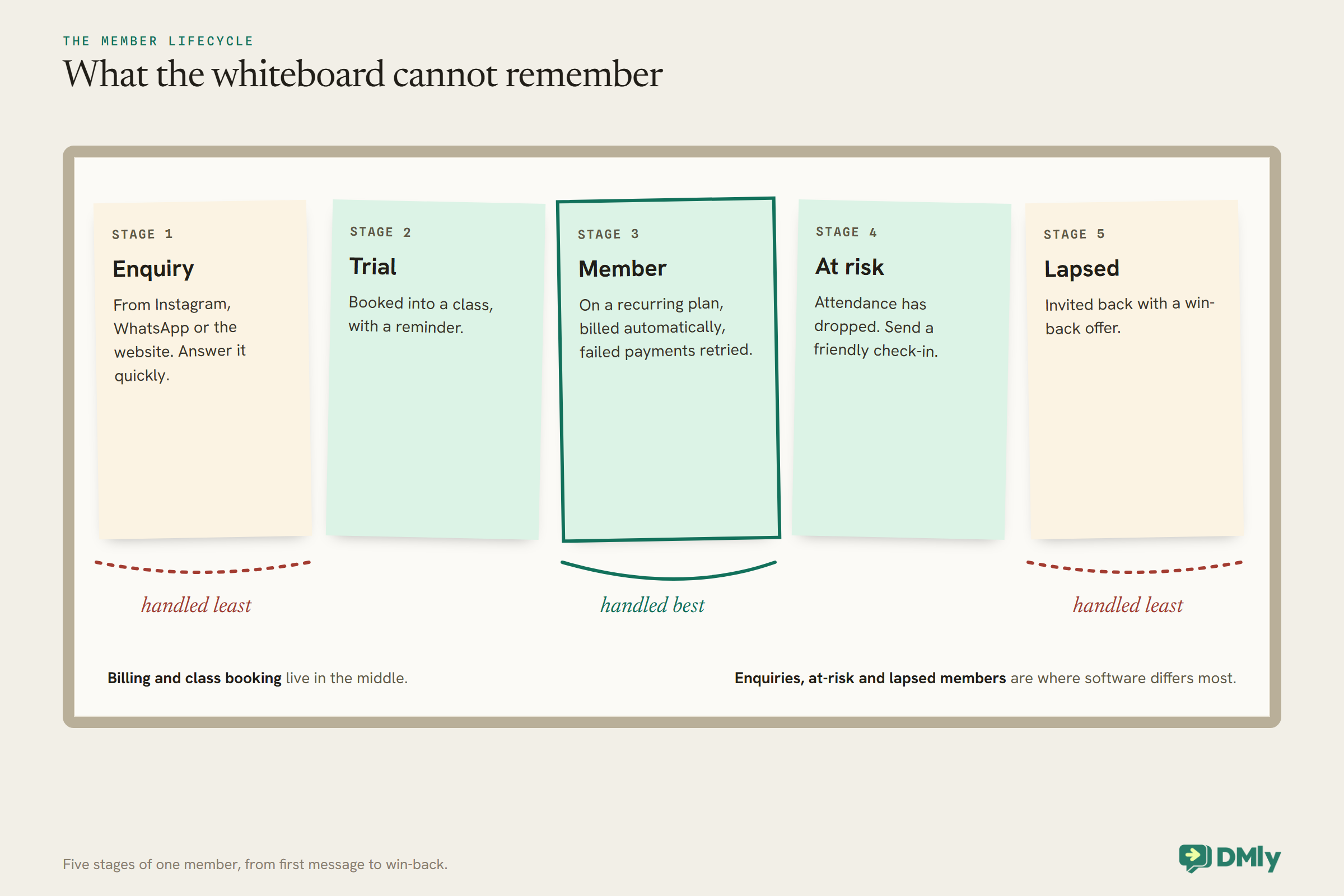
On the wall by the studio door there is a whiteboard with tonight’s 6pm class written on it: twelve names, two crossed out, one squeezed in at the bottom in a different pen, and “waitlist?” with a question mark. At 7 it gets rubbed out for the 7pm class. Nobody knows who missed three sessions in a row, whose card declined on the first of the month, or who asked about a trial on Instagram and never heard back. The whiteboard runs the class. Nothing runs the membership.
Gym membership software is meant to run both: the recurring billing that pays the rent, and the class booking that decides whether members get the session they wanted. The best of it also handles the conversations around them, trial enquiries, reminders, failed-payment messages and the quiet member who has stopped coming. This guide compares five options for independent gyms and studios, with prices read on each vendor’s own page on 27 September 2026.
A disclosure, up front: DMly publishes this blog and is one of the tools compared. We have described every tool from its own pages and documentation and said plainly where another is the better choice. For how a gym can automate its WhatsApp once it has chosen, see our guide to WhatsApp automation for gyms.
What Gym Software Has to Do
A gym system has five jobs, and the one owners notice last, member communication, is often the one that keeps members.
1. Bill members, every month, without chasing. Recurring memberships, class packs, drop-ins and personal training, charged automatically, with a sensible process when a card fails.
2. Book classes without overbooking. Capacity per session, a waitlist that promotes the next person automatically, recurring timetables and easy cancellation.
3. Know who is coming. Check-in and attendance, so you can see who is thriving and who is drifting.
4. Turn enquiries into members. Trial sign-ups, leads from social media and the website, and follow-up before they cool.
5. Keep members. Reminders, milestones, renewal notices and a friendly nudge to anyone who has gone quiet, on a channel they read.
How We Compared Them
We judged each option as gym membership software for an independent gym or studio: vendors’ own pricing pages, read in a browser on one day, measured against the five jobs.
We read PushPress, TeamUp and Mindbody on 27 September 2026. Two others we tried could not be assessed: Gymdesk’s pricing page told us it is not available in our region, and Glofox shows prices only after a quote form, which we did not submit. For DMly we used its documentation, which also describes what it does not do. Card processing, text credits and add-ons are extra unless we say otherwise.
The Quick Answer: Best by Situation
| If you run… | Look first at | Why |
| A gym or studio whose members message on WhatsApp | DMly | Classes, memberships, billing and member messages in the same place as the chat |
| A CrossFit box, martial arts or functional gym | PushPress | A free plan to start, gym-specific features, and WhatsApp in its Grow marketing plan |
| A group fitness studio that wants predictable pricing | TeamUp | Priced by active customers, with unlimited locations and no contract |
| A studio wanting new clients from a marketplace | Mindbody | The Mindbody app marketplace, with marketing and an AI front desk on the top plan |
| A small class business on a tight budget | Setmore or SimplyBook.me | Group classes on Setmore’s free plan and event bookings on every SimplyBook.me plan |
The Best Gym Membership Software, Reviewed
1. DMly: best for gyms whose members message on WhatsApp
Classes. Each class session has a seat capacity and an optional waitlist; when someone cancels, the next person is promoted automatically, and for a paid class the promoted member gets their own payment hold. Classes can repeat as a series of up to 52 sessions, and batches let you enrol a named group of members into a session or a whole series at once. Members book on the booking page, in the chat, or through an AI agent that can book, view and cancel class places. Marking a seat attended awards loyalty points, but neither attended nor no-show fires an automation trigger.
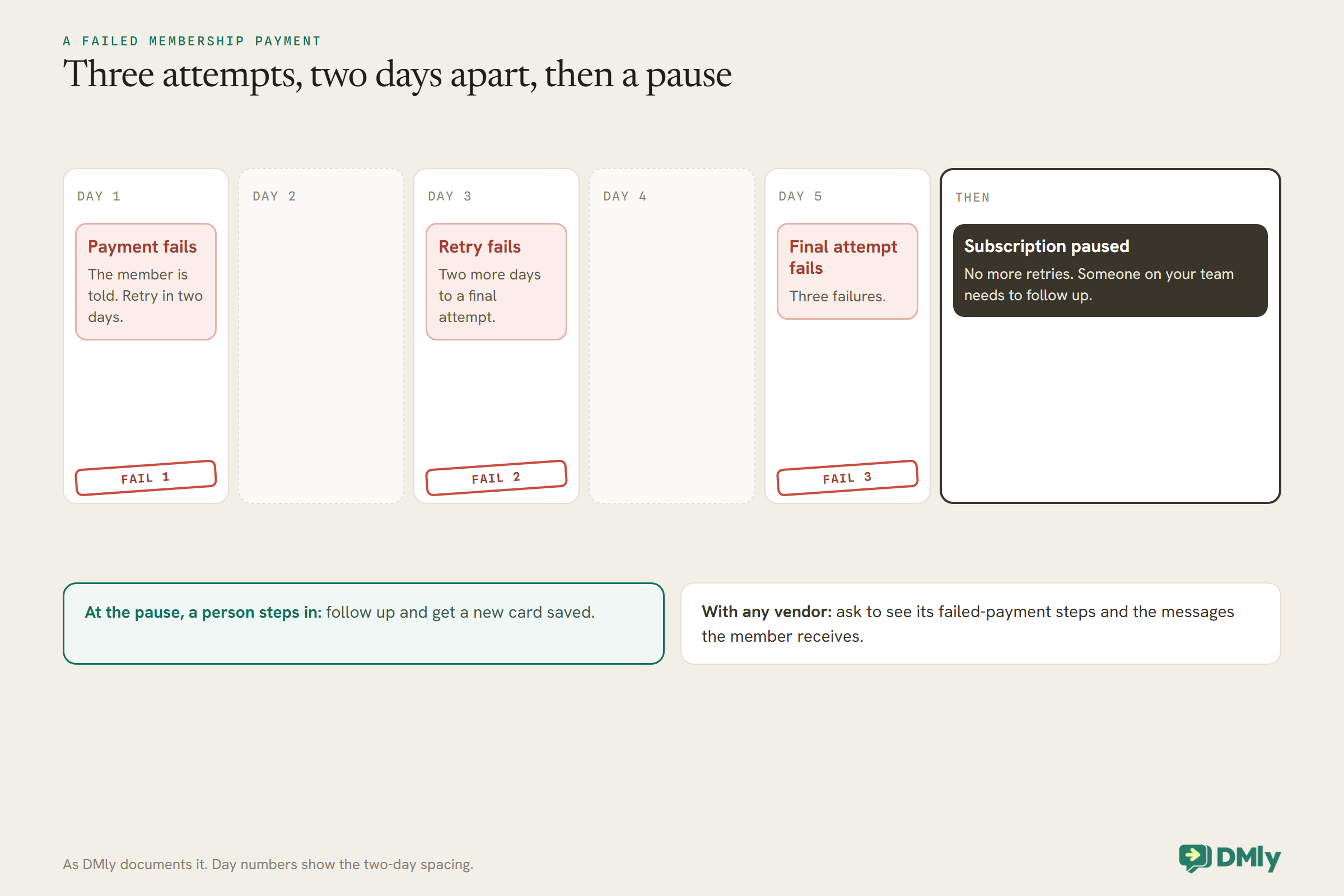
Memberships and billing. Plans can be one-time class packs or recurring memberships, granting credits that each booking spends; a client’s credits are one pool rather than per service. Subscriptions charge a saved card automatically. When a card fails, DMly tells the member and retries two days later, then once more after another two days; after three failures the subscription is paused and retries stop. Renewal reminders go out ahead of each renewal, and memberships can be paused and resumed.
Members. A shared inbox for WhatsApp, Instagram, Messenger and more; segments on tags, lifecycle, spend, loyalty and credit balance; a loyalty programme that awards points for attended classes; and automations for trials, milestones and win-back. Plans are $29, $65 and $149 a month billed yearly.
Watch out for. DMly does not document door access, a check-in kiosk or a members’ app; members use WhatsApp and the booking page. A class set to payment before booking can be batch-enrolled only with a payment gateway connected: each member’s seat is held unpaid and they are sent their own pay link. Workout tracking and programming are outside DMly.
Best for: boutique gyms, studios and personal trainers whose members already message them on WhatsApp or Instagram.
2. PushPress: best for CrossFit boxes and functional gyms
What it offers. PushPress lists unlimited members, staff and leads on every plan, a members app for booking and purchases, a staff app with a kiosk mode for check-ins, a screens app showing who is booked into class, self-managing waitlists, priority class booking, pro-rated billing, digital waivers, rank tracking for martial arts, and a payroll report. Its FAQ lists no-show and late-cancel automation and QR check-ins in the core product.
Pricing. The plan cards show Free at $0 a month with card processing at 4.99% plus 30 cents, Pro at $159 a month with processing at 2.89% plus 30 cents, and Max at $229 a month at 2.75% plus 30 cents, in US dollars. The FAQ also lists separate packages: Grow at $329 a month, described as a full CRM with automated workflows, email and SMS, and WhatsApp messaging with approved templates included; a Branded App add-on at $81 to $97 a month; and Full Stack at about $559 a month. International pricing is through sales.
Watch out for. The free plan’s processing rate is much higher than the paid plans’, so at any real volume the paid plan can cost less overall. WhatsApp messaging sits in the Grow package rather than the core plans.
Best for: CrossFit boxes, functional fitness and martial arts gyms that want gym-specific features and a free way to start.
3. TeamUp: best predictable pricing for group fitness
What it offers. TeamUp is built for group fitness studios, gyms, yoga, Pilates, martial arts and personal trainers. Its site lists online booking, memberships, a members app and custom branded app, appointments, family and child accounts, on-demand and online classes, waivers and forms, a penalty system for no-shows and late cancels, access control, a marketing suite and reports. It offers a free import service and says setup has no fee.
Pricing. TeamUp prices by active customers, meaning people who booked or bought something that month, counted once however often they come: $119 a month for up to 100, $189 for 101 to 200, $219 for 201 to 300, and $289 for 401 to 500, in US dollars. You can manage unlimited locations on one account, and it is month to month with no contract.
Watch out for. Price follows your active customer count, so a busy month costs more; the flip side is that a quiet month costs less.
Best for: group fitness studios that want a complete system at a price that tracks their size.
4. Mindbody: best for studios that want marketplace clients
What it offers. Mindbody’s three plans, Starter, Accelerate and Ultimate, all include business management, integrated payments, branded booking widgets, a website, and a listing on the Mindbody app, which it describes as reaching more than three million monthly shoppers. Accelerate adds advanced reporting, room and resource management and Pick-a-Spot, and Mindbody says email and text confirmations and reminders are included from Accelerate. Ultimate adds automated email and text marketing with a monthly text bundle, a lead management dashboard and an AI Concierge that answers questions and responds to missed calls.
Pricing. All plans are by quote. Listing on the app is free; a fee of 20%, capped at $30, applies only to the first purchase of a client the app brought you who was new to your business.
Watch out for. Quote pricing makes comparison harder, and reminders by text are not on Starter. Get quotes for the plan you need, including the text bundle.
Best for: yoga, Pilates and boutique studios that want new clients from a large marketplace.
5. Setmore and SimplyBook.me: budget class booking
What they offer. For a small class business that mainly needs booking, general schedulers can do the job. Setmore’s free plan, for up to four users, includes group classes, a booking page and email reminders, with SMS reminders and recurring appointments on Pro at $5 a user a month billed annually. SimplyBook.me includes event bookings and the number of clients each provider can accept at once on every plan, with payments and deposits from Basic at $11.9 a month billed annually.
Watch out for. Neither is a membership billing system in the way the gym platforms are; check how recurring memberships, class packs and failed payments would work before relying on them.
Best for: a personal trainer or small studio starting out, with simple class booking needs.
Comparison at a Glance
| Option | Pricing model | Price read | Waitlist | Members app | |
| DMly | Per plan | $29 a month billed yearly | Yes, auto-promotes | No; booking page and chat | Built in: booking, reminders, billing messages |
| PushPress | Plan plus processing rate | Free; Pro $159; Grow $329 | Yes | Yes | In Grow, with approved templates |
| TeamUp | By active customers | $119 for up to 100 | Not assessed | Yes | Not listed |
| Mindbody | Quote | Quote; marketplace fee on new clients | Not assessed | Branded app add-on | Not listed |
| Setmore, SimplyBook.me | Per user, or per plan | Free; $5 or $11.9 | Not listed | Setmore app | SimplyBook.me WhatsApp credits |
What a 150-Member Gym Pays
Gym membership software prices by members, by plan or by payment volume. Price it for your gym.
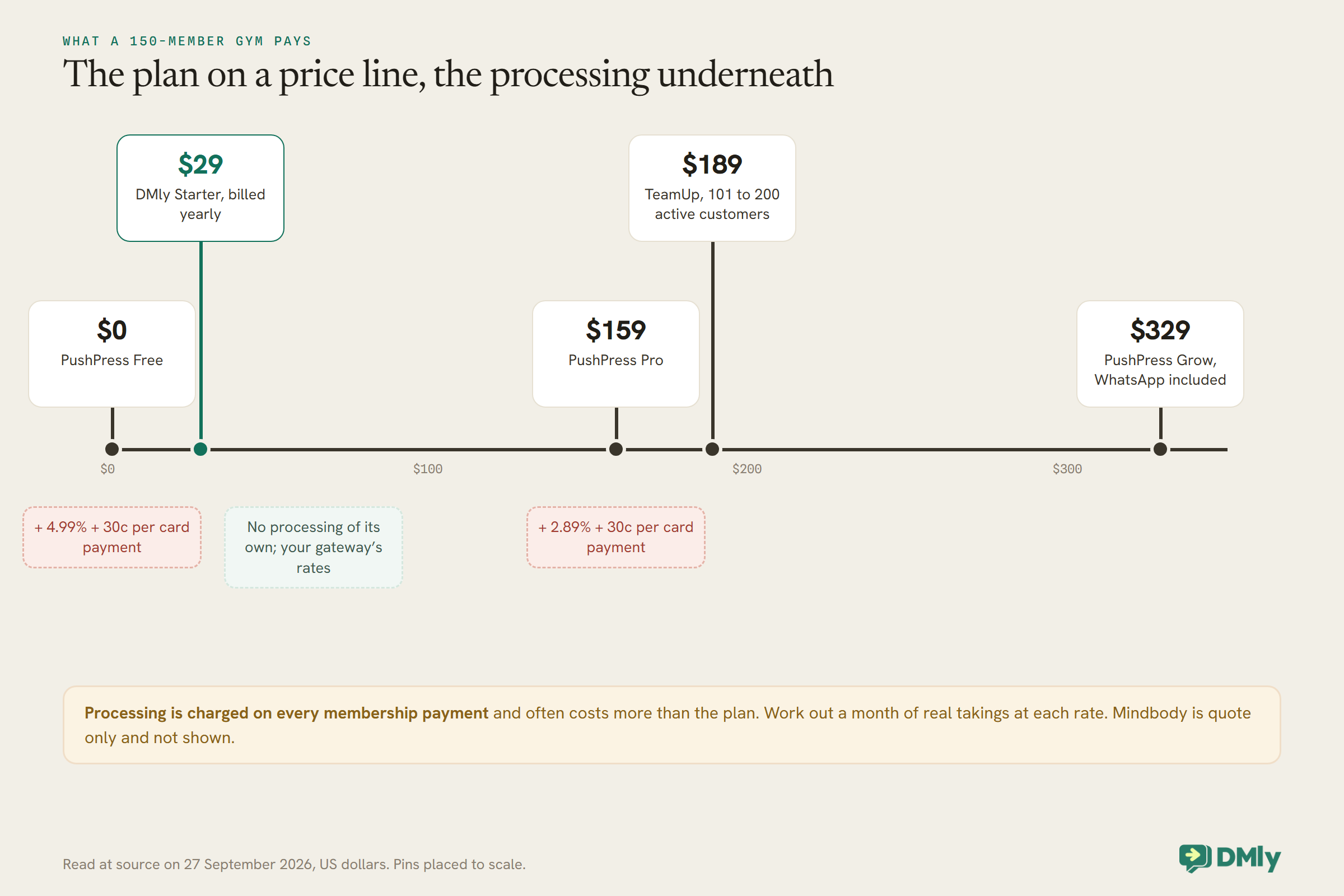
For a gym, card processing matters more than the plan price. A gym billing 150 members every month pays processing on every one of those payments, so a difference of two percentage points in the rate can outweigh the whole subscription. PushPress makes this explicit: its free plan charges no monthly fee but a higher processing rate, while its paid plans charge a fee and lower rates. DMly charges no processing of its own; payments go through the gateway you connect, such as Stripe or Paystack, at that provider’s rates. Work out a month of your real membership takings at each tool’s rate before you decide.
Memberships, Class Packs and Drop-Ins
Before comparing gym membership software, write down what you actually sell. The way each system models it decides how much work your pricing creates.
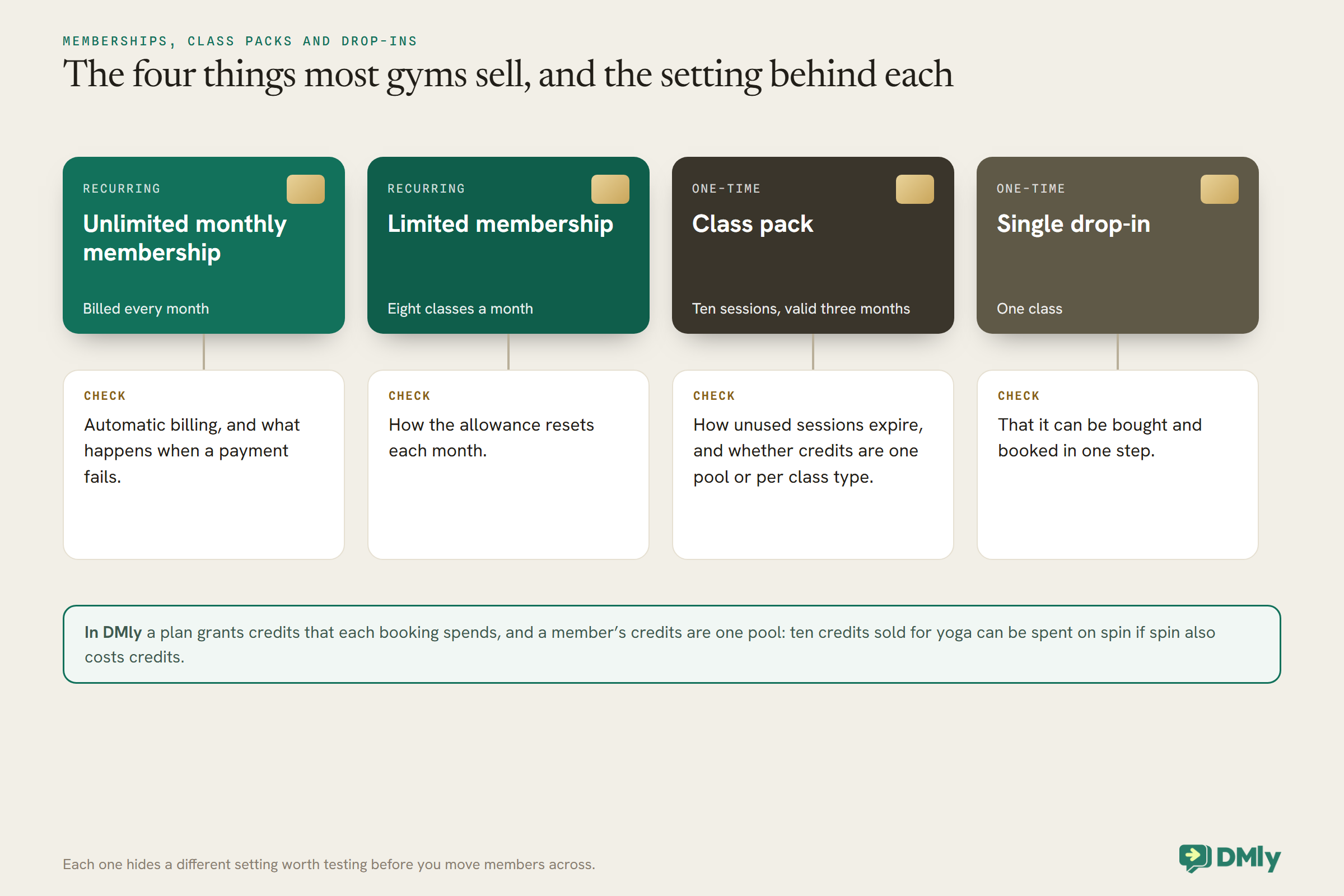
Most gyms sell some mix of four things: an unlimited monthly membership, a limited membership such as eight classes a month, a class pack such as ten sessions valid for three months, and a single drop-in. Some add personal training packages, family memberships or off-peak plans. Check that each of yours can be set up without workarounds, including how unused sessions expire and what happens when a member upgrades part-way through a month. PushPress lists pro-rated billing and plan purchase limits, which stop a member buying the free trial twice; TeamUp lists memberships and family and child accounts.
DMly models this with plans and credits. A plan is what the member buys, one-time for a class pack or recurring for a membership, and it grants credits that each class booking spends. One detail matters when you design your offer: a member’s credits are a single pool, not separate allowances per class type, so ten credits sold for yoga can be spent on spin if spin also costs credits. If you need allowances kept apart, test how you would set it up before you commit.
Personal Training Alongside Classes
Many gyms sell one-to-one sessions as well as classes, and the two work differently in a booking system.
A class has a timetable and a capacity; a personal training session depends on one trainer’s availability. Check that the system handles both from the same member record, with the same payment options. TeamUp lists appointments alongside classes, and PushPress lists PT sessions and class packs among its payment types. In DMly, one-to-one appointments and classes are both services: appointments are booked against each trainer’s own working hours, classes against the session’s seats, and both can draw on the same credits and appear on the same member record.
Membership Billing and Failed Payments
Failed payments are the quiet leak in every gym. Look closely at what each system does when a card declines.
Cards expire, get replaced and hit limits, so some membership payments fail every month. The questions to ask are how many times the system retries, how it tells the member, and what happens to their access. DMly documents its process in full: the member is told the payment failed, a retry follows two days later and a final attempt two days after that, and after three failures the subscription is paused and retries stop, so someone on your team needs to follow up and get a new card saved. PushPress lists automated billing and pro-rated billing; ask each vendor to show you its failed-payment steps and the messages the member receives.
Class Capacity, Waitlists and No-Shows
A full class with an empty spot where a no-show should be is the most frustrating thing in a studio. Look at how each system handles the gap.
Every gym platform here handles capacity. The differences are in the waitlist and the penalties. PushPress lists a self-managing waitlist and no-show and late-cancel automation; TeamUp lists a penalty system; DMly promotes the next person on the waitlist automatically when a place is cancelled, and for paid classes gives the promoted member their own payment hold. Late cancellations and no-shows are where a policy helps: DMly can charge a no-show fee when a class place is marked as a no-show from the roster, charged to a saved card if the member has one from their membership subscription and otherwise sent as a payment link. Set your cancellation deadline, say it in the booking confirmation, and apply it consistently.
Check-In, Apps and Door Access
How members get in the door and book their next class shapes the daily experience more than any report.
Gym platforms tend to include a members app for booking and a staff app or kiosk for check-in: PushPress lists a members app, a staff app with kiosk mode and QR code check-ins, and TeamUp lists a members app, a custom branded app and access control. Mindbody offers a branded app as an add-on. DMly takes a different route: members book on the booking page or in the WhatsApp chat, and attendance is marked on the class roster; it does not document a members app, kiosk or door access. If unstaffed access or a branded app matters to your gym, choose a platform that lists it.
Member Messaging: Where Retention Happens
Members rarely cancel in anger. They drift, and the right message at the right moment brings many of them back.
The messages that matter are simple: a welcome after sign-up, a reminder before class, a check-in after two weeks of no attendance, a renewal notice, a milestone congratulation and a friendly invitation back. Mindbody puts automated email and text campaigns on Ultimate; PushPress puts CRM, email, SMS and WhatsApp in Grow. DMly is built around the conversation: members message on WhatsApp or Instagram, and automations send reminders, renewal notices, milestone messages and win-back invitations from the same place, with segments picking out members by attendance, credit balance or lifecycle. Remember that WhatsApp treats win-back and promotional messages as marketing, which needs the member’s opt-in. Our guide to WhatsApp automation for gyms shows these flows in practice.
Trials and Leads
A trial enquiry that waits a day often never becomes a member. Speed matters more than the software’s name.
Enquiries arrive as Instagram messages, WhatsApp chats, website forms and walk-ins. A gym system should capture each one, reply quickly, book the trial class and follow up afterwards. Mindbody lists a lead management dashboard on Ultimate, and PushPress lists lead capture forms and landing pages in Grow. In DMly, an enquiry on WhatsApp or Instagram can be answered by an AI agent that offers trial class times and books one, with a person taking over for anything it cannot answer, and a follow-up after the trial can run automatically. Whatever you choose, time how long a real enquiry takes to get a reply in your first week.
Switching Without Losing Members’ Cards
The hardest part of changing gym software is not the timetable. It is moving the recurring payments.
In most systems, members’ saved cards are held by the payment processor rather than the software itself, so how they move depends on which processor each system uses and whether the two can transfer them. Before you switch, ask both the old and new vendor, in writing, whether saved cards can be migrated, or whether every member will need to re-enter a card. If they will, plan it like a campaign: a clear message explaining why, a simple link, a deadline before the first billing date, and a person following up with anyone who has not done it. TeamUp offers a free import service for member data, and most systems import members from a spreadsheet; the payments are the part to plan most carefully.
How to Test Gym Membership Software in a Week
Run a real week of classes and a real billing day through it.
Set up your timetable with real capacities, a membership plan and a class pack, and a handful of test members, including yourself. Book a full class and check the waitlist promotes when someone cancels. Mark attendance and a no-show and see what happens. Put a test card that will decline on a membership and watch every message the member receives. Send a trial enquiry by message and time the reply. Finally, work out a month of your real membership takings at the processing rate, and add it to the plan price.
Mistakes Gyms Make When Choosing
- Comparing plan prices and ignoring processing. The rate on every membership payment often costs more than the plan.
- Not testing a failed payment. It is the most common billing problem and the easiest to leave unmanaged.
- No policy for late cancels. Set it, say it, apply it.
- Forgetting the quiet members. A check-in after two weeks away is cheaper than a win-back after two months.
- Choosing an app nobody installs. Check whether your members would rather book in a chat.
Frequently Asked Questions
What is the best gym membership software?
For gyms whose members message on WhatsApp, DMly; for CrossFit and functional gyms, PushPress; for group fitness studios wanting predictable pricing, TeamUp; for studios wanting marketplace clients, Mindbody; for very small class businesses, Setmore or SimplyBook.me.
How much does gym management software cost?
From free, with PushPress’s free plan and its higher processing rate, to around $189 a month on TeamUp for 101 to 200 active customers, or $329 for PushPress Grow, with Mindbody by quote. Card processing on membership payments comes on top.
Does gym software handle failed payments?
Most retry automatically. DMly, for example, tells the member, retries twice at two-day intervals, and pauses the subscription after three failures. Ask each vendor to show its steps.
Can members book classes on WhatsApp?
With DMly, yes: through tappable times in the chat, a booking link, or an AI agent. PushPress lists WhatsApp messaging in its Grow package.
Can gym software charge for no-shows?
Several can. PushPress lists no-show and late-cancel automation, TeamUp a penalty system, and DMly a no-show fee charged when a place is marked as a no-show.
Do I need a members app?
Not necessarily. Many members are happy to book on a web page or in a chat they already use. If you want a branded app, PushPress, TeamUp and Mindbody offer one.
From Whiteboard to System
The whiteboard by the door runs one class at a time and forgets it an hour later. Gym membership software should remember everything the whiteboard cannot: who paid, who came, who is drifting and who asked about a trial. Choose on billing and failed payments, on how classes fill, and on the messages that keep members, then price it with your real processing costs. If your members already message you on WhatsApp, DMly is worth a place on your shortlist.
Writing about WhatsApp automation, bookings and growth for local business.
Turn WhatsApp into your busiest channel.
Start free and run message, bookings, payments and reviews in one place.
