
Go4whatsup Review (2026) + Top 7 Go4whatsup Alternatives for Growing Businesses
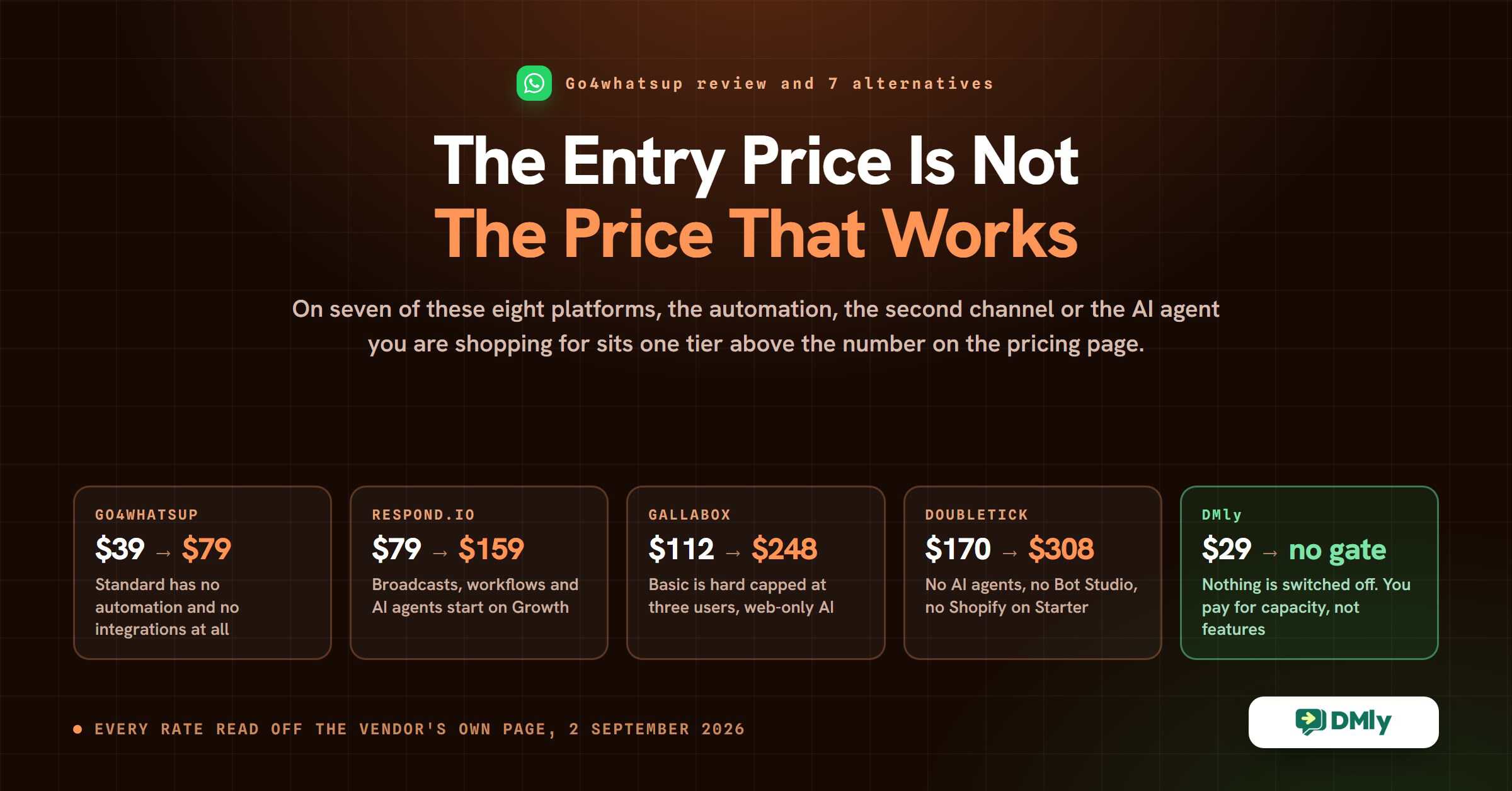
On this page there are eight WhatsApp platforms, and on seven of them the price you end up paying is not the price on the pricing page. That is not a complaint about any one vendor. It is how the whole category is built: the headline tier gets you the inbox, and the thing you actually came for sits one tier up.
Go4whatsup is a clean example, and it is the reason most people start looking at Go4whatsup alternatives. Its Standard plan is $39 a month, it is genuinely on the official WhatsApp Business API, and the plan card lists fourteen things you get. What the card does not say, and what the company’s own comparison table two screens further down does say, is that Standard has no automation, no Shopify or WooCommerce connection, no broadcast scheduling and no click-to-WhatsApp ads. Those all start at $79.
So the useful question when you compare Go4whatsup alternatives is not “what does it cost”. It is “what is the cheapest plan that does the job I am buying this for”. This review answers that for Go4whatsup and for seven alternatives, with every price read off the vendor’s own pricing page on 2 September 2026.
What Go4whatsup is, and who it is for
Go4whatsup is a WhatsApp Business API platform. You connect your business number, and instead of one phone with one person holding it, your team works the conversations from a shared inbox in a browser, sends broadcast campaigns to segments of your contact list, and answers the repetitive questions with a chatbot.
The clearest signal of who it is built for is where the support hours sit. Every paid plan lists support Monday to Friday, 10:30 to 19:00 IST, so the company runs on India time. Its free tier is priced in Nigerian naira. Its integration list leads with Zoho and Pabbly alongside Shopify and HubSpot. If you are a small or mid-sized business in India, Nigeria or the Gulf selling through WhatsApp, that is a good fit rather than an accident.
What Go4whatsup does well
Taking the platform at its own description, and checking each claim against the plan cards and the comparison table on its pricing page, here is what it genuinely offers and on which plan.
AI replies and live translation
This is the feature Go4whatsup leads with, and the translation part is the one worth having. It answers common questions automatically, suggests replies to an agent mid-conversation, drafts campaign copy, and claims auto-replies in more than a hundred languages.
If you sell into several language markets from one number, that removes a real cost. Note that the plan cards describe the chatbot as “Basic” on Standard and “Advanced / Interactive” from Premium, and reserve “AI-driven Chatbots with Advanced Customizations” for Enterprise, so what answers your customer varies a lot by what you pay.
A no-code chatbot builder
You build conversation flows by dragging blocks around rather than writing code. Go4whatsup counts chatbot auto conversations as a plan limit: three on Standard, five on Premium, ten on PRO, each with a depth limit alongside it (levels 7, 10 and 15). Conditional nodes, the branching that lets a flow take a different path depending on an answer, start on Premium.
A shared team inbox
One WhatsApp number, several people answering it, nobody passing a phone around. Standard includes five users, Premium ten and PRO fifteen. Extra users are sold as an add-on whose price is not published, which is worth asking about before you commit.
Roles and permissions are “Limited” on Standard and unlimited from Premium, so a junior agent who can reply but cannot export your contact list is a $79 feature.
Broadcast campaigns with retargeting
Broadcasting and retargeting are on every paid plan, including Standard, which is not true of every platform here. You can send text, images, video, documents and buttons to a segment of your list. Segments are capped: five on Standard, ten on Premium, fifteen on PRO.
Scheduling one for later is a Premium feature. On Standard you can send now, and that is all.
Integrations with the tools you already run
Shopify and WooCommerce with abandoned cart recovery, plus Zoho, HubSpot, Calendly, Google Sheets and Google Calendar. PRO adds Pabbly, which opens the door to a much longer tail of apps.
All of it starts on Premium. The Integration row on Go4whatsup’s own comparison table is empty for Standard. If connecting your store is the reason you are buying a WhatsApp platform, the entry plan is not the plan you want, whatever the plan card implies.
Reporting on messages, not on revenue
Delivery rates, campaign performance and agent activity. It tells you what was sent and what landed, not which campaign paid for itself, which is true of most tools in this category, DMly included.
Where the Standard plan stops, and why people look at Go4whatsup alternatives
Go4whatsup publishes a feature comparison table on its own pricing page, and it contradicts the impression the plan cards give. Read the cards and Standard sounds like a small but complete product. Read the table and you find a row marked Automation with a cross in the Standard column.
Here is what the $39 plan does not include, taken straight from that table:
- Automation. Not limited automation. None. Standard Automation begins on Premium and Advanced Automation on PRO.
- Every integration. No Shopify, no WooCommerce, no Zoho, no HubSpot, no Calendly, no Google Sheets, no Google Calendar.
- Broadcast scheduling. You can send a campaign, but not queue one for Friday.
- Click-to-WhatsApp Ads Manager, so the ad-to-chat path most WhatsApp marketing runs on is not available.
- Sales and ordering, the Social Board, and loyalty points.
- Conditional nodes in the chatbot, which is what separates a flow that reacts from a script that recites.
- Unlimited roles and permissions, which is how you stop five users all having the keys to everything.
What Standard does include is the inbox, five users, five thousand contacts, broadcasting and retargeting, a basic chatbot with three auto conversations, tag management, training videos and email support. For a business that wants to move WhatsApp off one phone and start sending campaigns, that is a real product at a fair price.
It is just not the product most people think they are buying. The realistic entry point for a business that wants automation and a connected store is Premium at $79, which is where you should start the comparison against everything below.
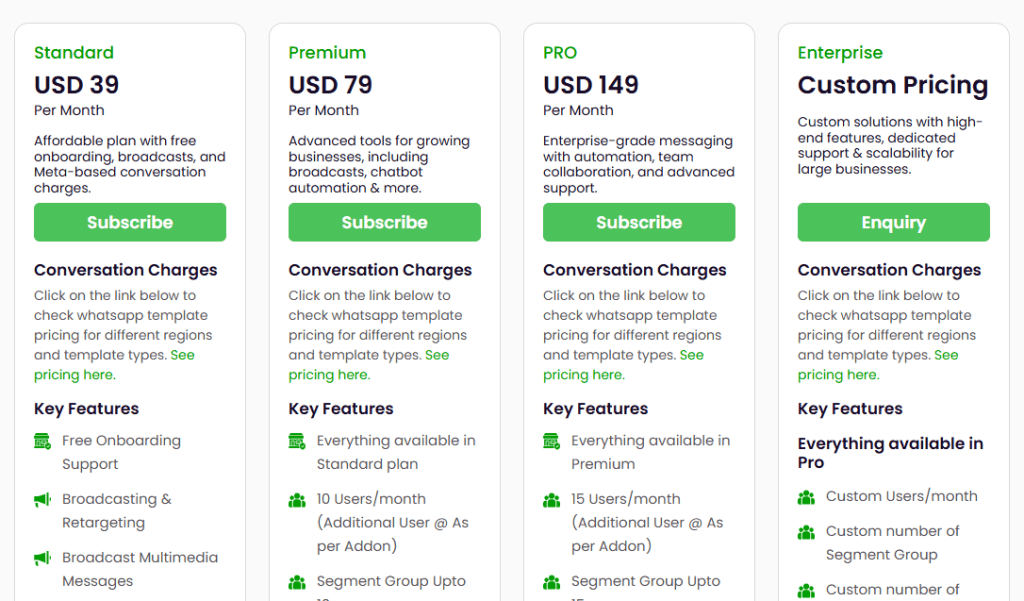
Go4whatsup pricing, checked on 2 September 2026
Go4whatsup publishes five tiers, not three, and a monthly and yearly toggle. Yearly takes 10 per cent off. The figures below are the monthly rates, with the yearly equivalent in brackets, read off the vendor’s own pricing page.
Free Plan Forever, NGN 0
There is a free tier, and almost no review of this platform mentions it. It carries five thousand contacts, one chatbot with three levels, groups up to two, and Google Drive and iCloud integration.
The name does not survive contact with the footnote. Underneath the plan grid, in small text, Go4whatsup’s own page reads: “Free Plan Forever valid for 1 year.” It is also priced in naira rather than dollars, which suggests it is aimed at the Nigerian market specifically. Treat it as a twelve-month trial with a generous contact allowance, which is a genuinely useful thing, rather than as a permanent free plan.
Standard, USD 39 a month (USD 35 billed yearly)
Five users, 5,000 contacts, five segment groups, three chatbot auto conversations at seven levels, limited roles and permissions, a basic chatbot, broadcasting and retargeting with multimedia, free onboarding support, tag management and email support.
No automation, no integrations, no scheduling, no ads manager. See the section above.
Premium, USD 79 a month (USD 71 billed yearly)
Everything in Standard, plus ten users, 20,000 contacts, ten segment groups, five chatbot auto conversations at ten levels, unlimited roles and permissions, and the advanced interactive chatbot. This is also where every integration arrives (Shopify and WooCommerce with abandoned cart, Zoho, HubSpot, Calendly, Google Sheets and Calendar), along with Standard Automation, broadcast scheduling, the Click-to-WhatsApp Ads Manager, sales and ordering, the Social Board, loyalty points, conditional nodes and WhatsApp support.
This is the plan the marketing describes. If you are pricing Go4whatsup against anything else on this page, price Premium.
PRO, USD 149 a month (USD 134 billed yearly)
Everything in Premium, plus fifteen users, 50,000 contacts, fifteen segment groups, ten chatbot auto conversations at fifteen levels, Pabbly, Advanced Automation, catalogue management, voice broadcasting, advanced Excel broadcasting, round-robin task assignment, a shared campaign success manager, a personal training session, and support by phone as well as email and WhatsApp.
Two of those matter more than the list suggests. The developer API is PRO only, so anything you want to wire up yourself needs the $149 plan. And contact masking, which hides a customer’s number from the agent handling the chat, is worth having if you have ever had a salesperson leave with your phone list.
Enterprise, custom
Custom limits throughout, AI-driven chatbots with advanced customisations, product customisation, and a dedicated campaign and support manager. Quote on enquiry.
What none of those prices covers
The subscription buys the software. WhatsApp itself bills separately, and Go4whatsup says so plainly on every plan card. That is the honest arrangement and it is the same one DMly uses. What is worth checking is how the vendor describes those charges, because Go4whatsup’s explanation is out of date in a way that will cost a reader money.
Under the plan grid, the page explains WhatsApp costs as “Conversation-Based Pricing”, split into user-initiated and business-initiated conversations, with a conversation defined as a 24-hour window. Meta retired that model on 1 July 2025 and now bills per message by template category, marketing, utility or authentication. Meta’s own documentation labels the conversation-based page “Deprecated”. Go4whatsup is not alone in this; WhatChimp’s pricing page carries the same framing.
It matters more than a wording quibble because of what happens next. From 1 October 2026 Meta starts charging for two things that are free today, one of them only once you pass a monthly free allowance, and both are things a busy WhatsApp account does constantly:
- Service messages, meaning the free-form replies your team types inside the 24-hour window after a customer messages you. They have been free since November 2024. From 1 October every business phone number still gets 1,000 of them free a month, and Meta only starts charging from the 1,001st. The allowance resets each month and does not roll over.
- Utility templates sent inside an open 24-hour window, which is where most order confirmations and appointment reminders land. Free since July 2025, and unlike service messages they get no free monthly allowance of their own, so the first one you send in October is already chargeable. For a business that confirms bookings and orders, this is usually the bigger half of the change.
Meta’s own upcoming-pricing documentation adds a detail that almost nobody covers: there are no volume tiers for service messages, while utility and authentication keep theirs. So once you are past the free 1,000, every further reply costs the same as the one before it however many you send, and the bill tracks the number of replies your team sends rather than how long the exchange runs. Messages your customer sends you are not charged at all. For most small businesses that means the service replies still cost nothing and the utility templates, which get no monthly allowance of their own, are the part that shows up on the bill. Messages inside the 72-hour free entry point window, from click-to-WhatsApp ads and Facebook call-to-action buttons, stay free, and that window is the one place a template of any category still costs nothing. None of this touches the free WhatsApp Business app, so if you are still on that, it does not apply to you.
We have worked the change through in detail in our guide to what changes on 1 October 2026 and what it does to a normal month’s bill, and the per-country rates sit in our WhatsApp Business API pricing by country table. Whichever platform you pick, ask the vendor in writing whether their published message rates already reflect the October change.
Is Go4whatsup pricing worth it?
At $39 it is inexpensive for what it is, and at $79 it is fairly priced against this list. Premium at $79 gives you ten users, twenty thousand contacts, a connected store, an ads manager and automation, and there is not much on this page that beats that combination at that number.
Three things push businesses towards Go4whatsup alternatives. Contacts and users are hard ceilings that force a whole-tier upgrade rather than a top-up. Everything is WhatsApp, so an Instagram DM or a Messenger enquiry lands somewhere else entirely. And support runs Indian office hours, which is either irrelevant or a daily problem depending on where you are.
Go4whatsup pros and cons
| What works well | What to watch |
|---|---|
| Genuinely on the official WhatsApp Business API, with a Meta Business Partner badge on the vendor’s own site and Meta’s regional template rates billed through rather than marked up | Standard at $39 has no automation and no integrations at all, so the realistic entry point is Premium at $79 |
| Broadcasting and retargeting are on every paid plan, which is not true of Respond.io or DoubleTick at their entry tiers | WhatsApp only. Instagram, Messenger, SMS and web chat are not channels here, so those conversations live in another tool |
| Live translation and auto-replies in more than a hundred languages, which is a real saving if you sell across language markets | Users and contacts are hard tier ceilings rather than top-ups, so one extra colleague can mean a whole plan upgrade |
| A free tier with 5,000 contacts, which no other platform on this page offers at that size | The free tier is priced in naira and, by the vendor’s own footnote, “valid for 1 year”, so it is a long trial rather than a free plan |
| Contact masking and round-robin assignment on PRO, which most platforms reserve for enterprise tiers | The developer API is PRO only, at $149, so anything custom needs the top self-serve plan |
| Free onboarding support on every paid plan, and a personal training session on PRO | Support runs Monday to Friday, 10:30 to 19:00 IST, and is email only on Standard |
| Reporting covers delivery, campaign performance and agent activity | The pricing page still explains WhatsApp costs using Meta’s conversation-based model, which Meta retired on 1 July 2025 |
Seven Go4whatsup alternatives, and where each one puts the gate
Every price in this table of Go4whatsup alternatives was read off the vendor’s own pricing page on 2 September 2026, rendering the page in a browser where the figures are drawn by JavaScript and never appear in the source. The third column is the advertised entry price. The fourth is the one that decides your bill: the first plan that includes the capability most people are shopping for.
| Platform | Best for | Entry price | What the entry price leaves out, and what fixes it |
|---|---|---|---|
| DMly | Eight channels, automation and bookings in one place | $29/mo billed yearly ($39 monthly) | Nothing is switched off. Every plan carries the automation builder, all eight channels, the AI agent, the API and bookings. Starter caps capacity: 10 active bots per profile, 500 AI replies, 3,000 active contacts, 3 seats |
| Go4whatsup | WhatsApp campaigns in India, Nigeria and the Gulf | $39/mo ($35 yearly) | No automation, no integrations, no scheduling, no ads manager. Premium at $79 adds all of them |
| Interakt | WhatsApp plus Instagram with a built-in sales CRM | $69 per quarter, one channel | No chatbot builder, no conversation or agent analytics, one channel only. Growth at $149 a quarter adds them |
| Gallabox | Lead qualification and conversational sales | $112/mo billed annually | Three users, hard capped. No AI agents on WhatsApp or Instagram, no drip campaigns, no ads attribution. Essential at $248 adds them |
| Wati | A mature WhatsApp-first ecosystem | $39/mo billed annually | One channel, three users and no fourth seat purchasable at any price. Pro at $79 adds seats at $24 each and the advanced chatbot |
| Respond.io | Many messaging channels in one inbox | $79/mo | No broadcasts, no workflow automation, no AI agents. Growth at $159 adds all three |
| DoubleTick | Ecommerce catalogue selling on WhatsApp | $170/mo, $2,039 yearly | No AI agents, no Bot Studio, no Shopify, no chat assignment. Pro plus AI at $308 adds them. No free trial on any tier |
| WhatChimp | Broadcast-heavy WhatsApp marketing | $24/mo billed annually ($40 monthly) | WhatsApp only and two seats. The Instagram and Facebook inbox, appointment booking and roles start on Pro at $60 annually |
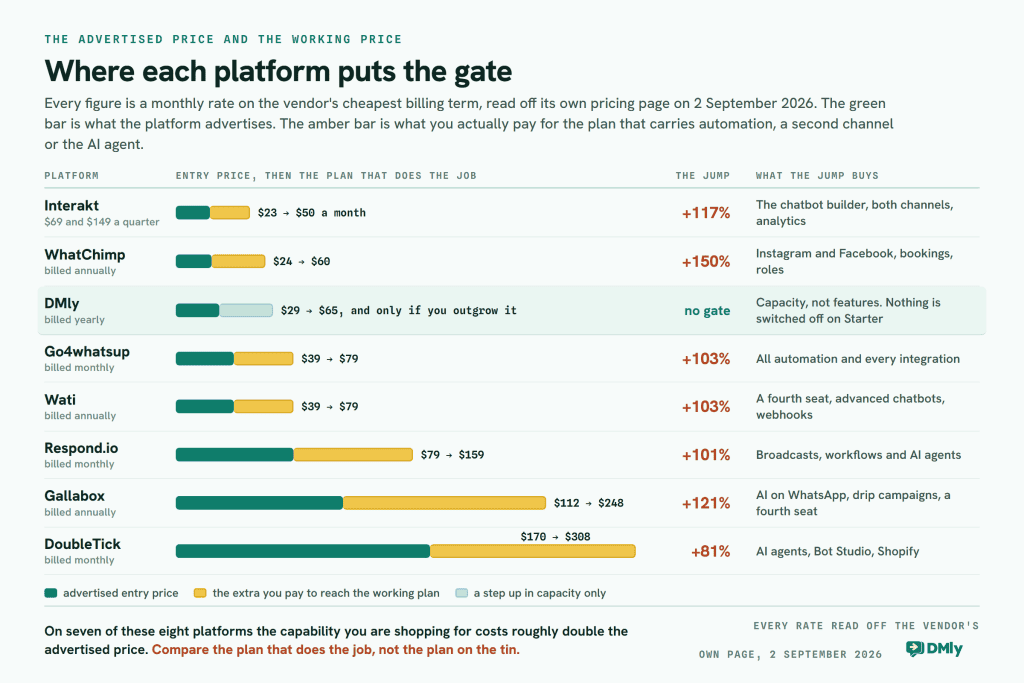
Read down the last column and the pattern is hard to miss: on six of the seven alternatives, the capability people are shopping for costs roughly double the advertised price. That is standard tier design rather than deception. It is just worth doing before you compare $39 against $79 against $170 as though they were the same thing.
1. DMly
DMly is a messaging and automation platform for local and growing businesses. Where Go4whatsup is a WhatsApp product, DMly is built around the idea that your customers reach you in more than one place and you should not need more than one tool to answer them.
The Inbox takes eight channels: WhatsApp, Facebook Messenger, Instagram, Telegram, SMS, TikTok, the live chat widget on your own website, and Google Business Profile for reviews and posts. They land in the same place, against the same contact record, and the same automations can answer on them.
We should say the obvious thing plainly: this is our own product on our own blog, so read the section below with that in mind. What we have tried to do is state the limits as precisely as the features, because a comparison page that only flatters the house tool is not worth reading.
Key features of DMly
One inbox for eight channels
Conversations from every connected channel arrive in one workspace, so a customer who asks on Instagram and follows up on WhatsApp is one person with one history rather than two strangers in two apps.
Two limits belong in the same breath as that claim. Broadcasts do not run on the live chat widget or on TikTok, so a campaign has to reach those contacts on a channel they also use. And Messenger and Instagram have no message templates, because Meta does not offer them there; you get a 24-hour window for anything automated and seven days for a reply a person types by hand.
AI agents that act, not just answer
An AI step inside a flow can read the contact, tag them, move them along your pipeline, write a note, set custom fields, check genuinely open appointment slots, book, reschedule or cancel, search your own uploaded documents, and hand the chat to a person.
What it cannot do is recommend products. There is no product-recommendation tool in the agent’s tool list. It can answer product and price questions from material you have uploaded, and a flow can send a product, but the agent does not browse a catalogue and pick for a customer. Routing is real but narrower than the word suggests: the documented actions are hand over to a human, move to the unassigned queue, and auto-assign round-robin. There is no route-to-a-department control.
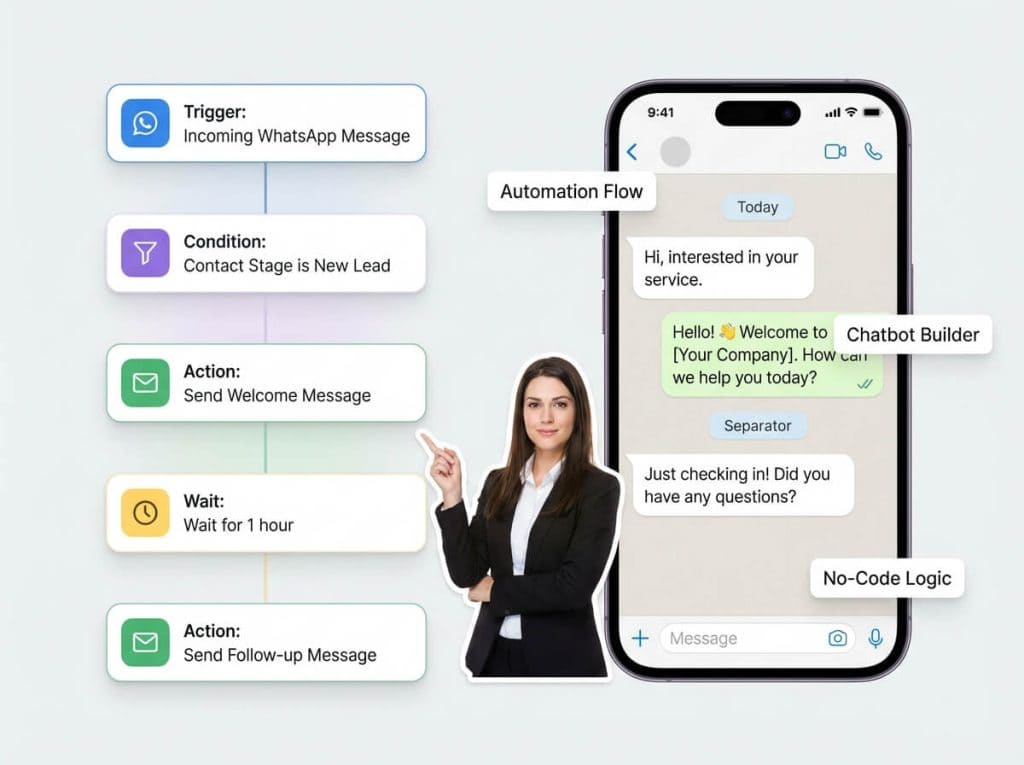
An automation builder on every plan
Multi-step journeys built visually: lead nurture, abandoned cart recovery, appointment reminders, post-purchase follow-ups, onboarding sequences, re-engagement. Flows are unlimited on every plan, including the $29 one, which is the single biggest structural difference between DMly and most of this list.
WhatsApp campaigns through the official API
Targeted broadcasts, scheduling, personalisation, segmentation. Meta’s per-message template rates are billed to you by Meta directly, and DMly adds no fee of its own on top.
Broadcast reporting has a hole in it that we would rather you heard from us. Replies always shows 0 on every channel, there is no click tracking on a broadcast at all, and the “Engagement over time” chart is placeholder data. What genuinely works is Delivered on WhatsApp and SMS, Opened on WhatsApp, per-automation analytics, and the Team report’s average first response and average resolution times.
Segmentation on real fields
The segment builder groups its conditions into Contact, Engagement and Commerce: pipeline stage, tags, excluded tags, days since last activity, lifecycle stage, source, custom field, birthday month, reachable on channel, marketing opt-in, total spend, last purchase, order count, loyalty points and credit balance.
Campaign engagement is not one of them, whatever you may have read on this page before. The commerce fields also read DMly’s own orders rather than your Shopify history, so “everyone who has spent over $500 in my store” is built by using a customer milestone trigger to add a tag, then segmenting on the tag.
Integrations
Shopify, WooCommerce, HubSpot, Mailchimp, Zapier, n8n, and a REST API with webhooks on every plan.
There is no native Salesforce connector. If Salesforce is your system of record, you bridge it through Zapier, n8n or the API, and you should price that work in before switching.
What DMly caps, and what it does not
This is the part of the comparison that matters, so here it is without the marketing. Across the three published plans, no feature is switched off. The automation builder, all eight channels, the AI agent, the CRM and pipelines, bookings, invoices and payments, reputation and Google reviews, custom domain and branding, the API, webhooks and the MCP server are all marked Included on Starter, Growth and Premium alike.
What changes between plans is capacity:
- Profiles per channel: 1, then 3, then 5.
- Team seats: 3, then 6, then 15, with extra seats at $10 a month on any plan.
- Active contacts: 3,000, then 10,000, then unlimited, topped up at $15 per thousand.
- Broadcast and template messages: 10,000, then 50,000, then 300,000 a month.
- Active bots per profile: 10 on Starter, unlimited above it. Bot flows are unlimited on all three.
- AI replies: 500 a month, then 5,000, then 20,000. Premium can also connect your own OpenAI, Claude, Gemini or DeepSeek key, and replies on your key are unlimited and billed by that provider instead.
Two honest caveats on the AI. Claude and DeepSeek cannot search your uploaded documents, so if the agent needs to answer from your price list the provider has to be OpenAI or Gemini. And knowledge is off by default: a new AI step arrives set to “No knowledge” and searches nothing until you point it at a collection.
Pricing
Three plans, verified against the live DMly pricing page on 2 September 2026:
- Starter, $29 a month billed yearly ($39 billed monthly): 1 profile per channel, 3 team seats, 3,000 active contacts, 10,000 broadcast or template messages, 10 active bots per profile with unlimited flows, 500 AI replies a month.
- Growth, $65 a month billed yearly ($79 billed monthly): 3 profiles per channel, 6 team seats, 10,000 active contacts, 50,000 broadcast messages, unlimited active bots, 5,000 AI replies a month.
- Premium, $149 a month billed yearly ($199 billed monthly): 5 profiles per channel, 15 team seats, unlimited active contacts, 300,000 broadcast messages, 20,000 AI replies a month, and your own AI provider keys for unlimited replies on top.
Add-ons rather than upgrades: an extra seat is $10 a month, an extra profile set $15 a month, extra contacts $15 per thousand. There is a 7-day free trial on any plan with no card, no setup fee, and Meta’s WhatsApp charges are billed to you by Meta with no markup from us.
Why DMly is a strong Go4whatsup alternative
The first reason is where the gate sits. Go4whatsup’s $39 plan has no automation and no integrations; DMly’s $29 plan has both, plus the eight-channel inbox, bookings, invoices and the API. When you outgrow Starter you are buying more contacts and more seats, not unlocking a feature you assumed you already had.
The second is channel coverage, and it is the reason most shortlists of Go4whatsup alternatives end up longer than one name. If every enquiry you get arrives on WhatsApp, Go4whatsup is a reasonable tool and this argument does not apply to you. If you also get Instagram DMs, comments on a TikTok, a message through the widget on your site and the occasional Google review that needs answering, then a WhatsApp-only platform means those live somewhere else, and “somewhere else” is usually a phone in somebody’s pocket.
Worth reading next: our guide to running one inbox across every channel covers what changes operationally when the conversations stop being scattered, and our twenty-tool roundup with every price re-verified is the wider version of the table above.
2. Interakt
Interakt is a WhatsApp and Instagram engagement platform with a sales CRM attached. It is popular with ecommerce brands in India, and it puts more weight on tracking a lead through to a deal than on messaging volume.
Key features
- Shared team inbox with unlimited agents. Every tier includes unlimited agents, which is unusual on this list and genuinely generous.
- Built-in sales CRM, sold as a separate module rather than bundled into the messaging plans.
- Deep Shopify integration: order updates, abandoned checkout reminders, contact sync on the entry plan; winback notifications, catalogue sync and cash-on-delivery to prepaid flows higher up.
- WhatsApp commerce: catalogue, checkout bot, order management and native WhatsApp Pay, from Growth.
- Click-to-WhatsApp ads with conversion data passed back to Meta, on every tier.
Pros
- Unlimited agents on every plan, so team growth does not trigger a bill
- The strongest Shopify story on this page after DMly
- Fifteen custom fields and fifteen custom tags free on the entry plan
- Free trial on all tiers
Cons
- The entry plan carries one channel only, WhatsApp or Instagram, not both
- No chatbot builder and no conversation or agent analytics until the second tier
- Billing defaults to quarterly, so the smallest commitment is three months up front
- Prices are quoted against Indian destination numbers by default, so check your region
Pricing
Interakt does not sell a monthly plan. The default is quarterly at 8 per cent off, with a yearly option at 20 per cent off. Starter is $69 a quarter and covers one channel of your choice. Growth is $149 a quarter and includes both WhatsApp and Instagram plus the chatbot builder, click tracking, conversation and agent analytics, WhatsApp commerce and role permissions. Advanced is $189 a quarter. The Sales CRM roles are a separate $135 a quarter, and WhatsApp AI agents are a $74.99 add-on.
You will find “$20 a month” quoted for Interakt in a lot of places, including on this page until today. It is not a rate Interakt publishes.
Why consider Interakt?
If your team is bigger than your budget, the unlimited-agents policy is worth real money: five people on Interakt Growth costs the same as one. And if you sell on Shopify in India, the commerce feature set is built for exactly that. There is a fuller breakdown in our Interakt review with the quarterly pricing worked out per month.
3. Gallabox
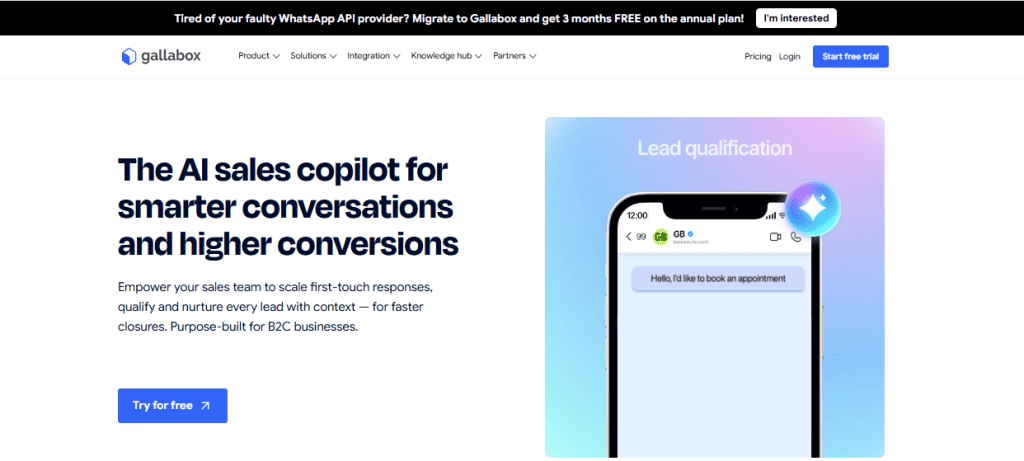
Gallabox is a WhatsApp, Instagram and web-widget platform aimed squarely at businesses with high inbound enquiry volume. Its whole framing is speed to lead: ask the qualifying questions automatically, get the right person on the conversation quickly, close.
Key features
- AI lead qualification, metered in AI credits rather than sold as a flat feature: 500 a month on the entry plan, 2,000 and 8,000 above it.
- Chatbot flows and web AI agents on the entry plan.
- Human calling on WhatsApp, inbound and outbound, from the second tier.
- AI voice on WhatsApp and phone, plus appointment booking and lead pipeline management, on the third.
Pros
- Free to start with 500 AI credits, no card required
- WhatsApp, Instagram and a web widget on the entry plan
- Free onboarding support on every tier
- Twenty-plus integrations and a 48-hour support SLA even at entry level
Cons
- The entry plan is hard capped at three users, and no add-on lifts it
- AI agents on WhatsApp and Instagram start on the second tier; the entry plan’s AI agents are web only
- Drip campaigns, ads attribution and the full API all start on the second tier
- There is no monthly billing option at all, only quarterly or yearly
Pricing
Basic is $112 a month billed annually, with a three-user hard cap and 500 AI credits. Essential is $248 a month billed annually for six users, 2,000 AI credits, AI agents on WhatsApp and Instagram, drip campaigns and ads attribution, with extra users at $18. Advanced is $474 a month annually for ten users and 8,000 credits, extra users at $24. Enterprise is a quote.
The billing toggle offers quarterly or yearly only, and yearly saves 25 per cent. Gallabox is widely quoted at “$25 a month”. It has not been that for a long time, and the gap is roughly four to six times depending on the term you pick.
Why consider Gallabox?
If you get a hundred enquiries a day and lose half of them to slow first replies, this is a tool built for that exact problem. The three-user cap on Basic means most teams start at Essential, so budget $248 rather than $112. Our Gallabox review works through the AI credit meter and what it costs at real volumes.
4. Wati

Wati is the most established name here. If you have researched WhatsApp platforms at all you have seen it, and its ecosystem of agencies, templates and integrations is bigger than anything else on this page.
Key features
- Shared team inbox covering WhatsApp messages and calling, Facebook, Instagram, a QR code, a widget and wa.me links, from the entry plan.
- Broadcast campaigns, 15,000 a month on the entry plan and unlimited from Pro.
- No-code chatbots, with the advanced builder, forms and Instagram automation from Pro.
- Shopify tools: catalogue, abandoned cart and order templates on the entry plan, buyer-data campaigns and Shopflo or Gokwik checkout from Pro.
- Astra AI agents for web, WhatsApp and voice, sold as a separate add-on.
Pros
- Zero setup fees, a 7-day free trial, and help getting the green tick verification
- The deepest partner and integration ecosystem in this comparison
- Broadcast campaigns and CTWA ads on the cheapest plan
Cons
- The entry plan includes three users and sells no fourth seat at any price. A four-person team has to move up a whole tier
- The entry plan connects one channel only
- No webhooks on the entry plan and only 10,000 API calls a month
- Advanced chatbots, forms and Instagram automation start on Pro
- AI agents are a paid add-on rather than a plan feature
Pricing
Growth is $39 a month billed annually: one channel, three users, no additional users purchasable, 15,000 broadcasts a month, 1,000 automation triggers, two integrations, no webhooks. Pro is $79 a month billed annually: five users with extras at $24 each, unlimited broadcasts, 2,000 triggers, five integrations including HubSpot, 200,000 API calls, limited webhooks and 24×7 support. Business is $199 a month billed annually with extra users at $59. Monthly billing costs up to about a quarter more on every tier.
The seat rule is the thing to check before anything else. Three people is a common size for a small business, and four is the next common size.
Why consider Wati?
Maturity is a real feature. If you want a platform your agency has already worked with and where every integration question has already been asked by somebody, Wati is that. We have put the two products side by side in our Wati head-to-head, built around the seat cap.
5. Respond.io
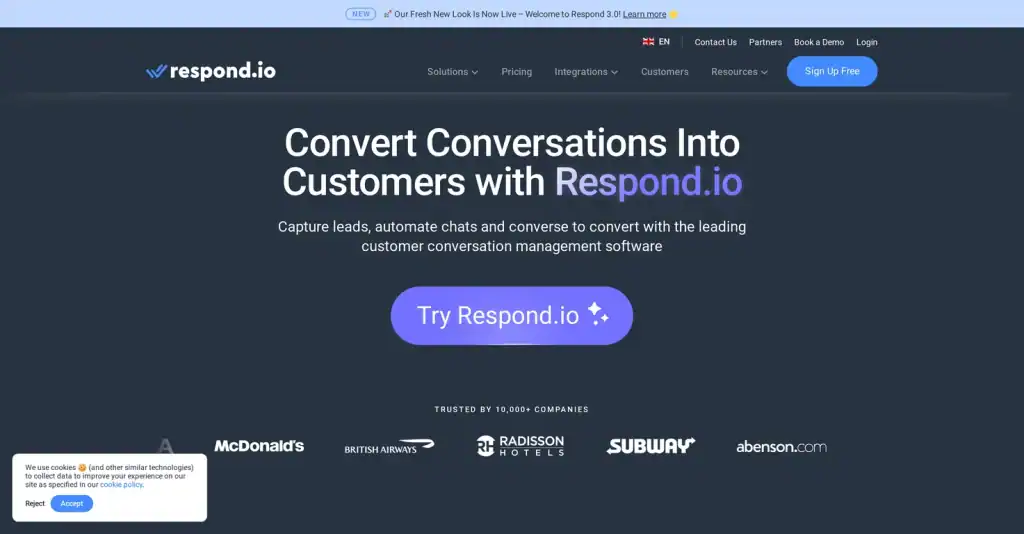
Respond.io is the broadest omnichannel platform here. If your customers genuinely arrive on six different apps, this is the tool designed for that, and it is the only one on the page that bills on monthly active contacts rather than seats or messages.
Key features
- Team and custom inboxes across WhatsApp, Instagram, Messenger, Telegram, LINE and email.
- Workflow automation for routing, assignment and follow-up, from the second tier.
- AI Prompt and AI Assist on the entry plan; full AI agents from the second.
- Masking, multiple workspaces, webhooks and single sign-on on the third tier.
Pros
- The widest channel coverage in this comparison
- Pricing that scales with your active contact list rather than headcount, so a big team on a small list is cheap
- A 7-day free trial with no card, and yearly billing saves up to 20 per cent
Cons
- No broadcasts, no workflow automation and no AI agents on the entry plan. The entry plan is an inbox
- Only basic reports at entry level, and a real learning curve on advanced workflows
- Less ecommerce-specific than Interakt, Gallabox or DoubleTick
Pricing
Starter is $79 a month ($948 a year), and it is an inbox with basic reports. Growth is $159 a month ($1,908 a year) and is where broadcasts, workflow automation, AI agents, advanced reports, Zapier and Make integrations and the developer API begin. Advanced is $279 a month ($3,348 a year). Enterprise is a quote. Every tier is priced against a monthly active contact band, starting at 1,000.
The $79 figure is correct and widely quoted, including here. It is also the wrong number to plan on, because the automation everyone buys Respond.io for is on the $159 plan.
Why consider Respond.io?
If you support customers on LINE, or you need email in the same queue as WhatsApp, nothing else here does it. Budget $159 rather than $79. Our Respond.io review with the contact-band pricing explained works through what happens to the bill as your list grows.
6. DoubleTick

DoubleTick is a WhatsApp sales platform for ecommerce teams. Its distinctive feature is sharing products and catalogues inside a chat, and its pricing sits well above everything else here.
Key features
- Team inbox with five agents included on the entry plan, ten on the next.
- Bulk broadcasts with broadcast and template analytics, on every plan.
- Product and catalogue sharing inside a conversation, on every plan.
- Bot Studio with up to five bots, and AI agents with a 50MB knowledge base and 3,500 AI credits a month, from the second tier.
- Google Sheets and Shopify from the second tier; WooCommerce, HubSpot, Salesforce, Zapier and WhatsApp Pay are paid add-ons on every tier.
Pros
- Five agents included at entry level, which is more than Wati or DMly give you
- 24×7 chat support, APIs, webhooks and developer access on every plan
- AI voice calls on the higher tiers, which almost nothing else here offers
Cons
- No free trial on any tier. DoubleTick’s own FAQ says so: it is a demo or nothing
- No AI agents and no Bot Studio on the entry plan, despite AI being the headline
- No Shopify, no Google Sheets, no chat assignment and no conversation search on the entry plan
- Many integrations are add-ons on every tier rather than plan features
- Easily the highest entry price here, and WhatsApp only
Pricing
Starter is $170 a month, or $2,039 billed yearly, and it explicitly does not include AI agents. Pro plus AI is $308 a month, or $3,694 yearly, and adds up to ten AI agents, a 50MB knowledge base, 3,500 AI credits a month, Bot Studio, roles, number masking, Shopify and the ordering bot. Enterprise is a quote. There is no free trial on any plan.
The figure of $141.58 has circulated widely for DoubleTick, and this page carried it until today. It is a historic rate. The current published Starter price is $170.
Why consider DoubleTick?
If your sales are made by a person sending a catalogue and closing in the chat, DoubleTick is built for that job and does it well. Price the Pro plus AI tier, not Starter, because Starter has neither the bots nor the store connection. Our DoubleTick review goes through the tiers in more detail.
7. WhatChimp
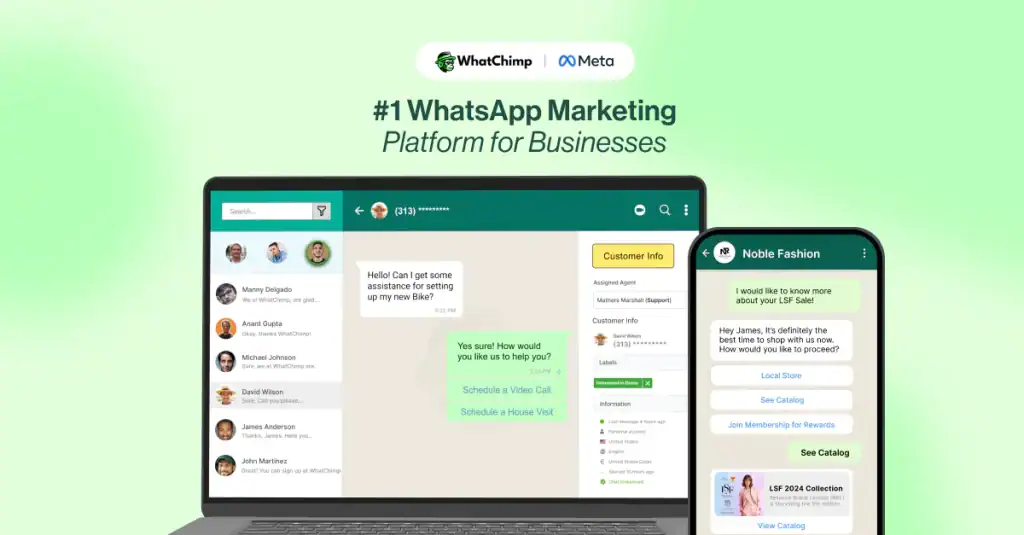
WhatChimp is a broadcasting and automation platform with the lowest entry price here. It keeps the feature set narrow and the setup simple, and it makes the same no-markup promise on Meta’s fees that DMly does.
Key features
- Bulk WhatsApp broadcasting through the official API, with unlimited WhatChimp message credits inside Meta’s 24-hour window. That is WhatChimp’s own metering rather than Meta’s, and Meta still bills its own rates on top.
- Number coexistence, so the same number works in the WhatsApp Business app and in WhatChimp at once. Very few tools here offer that.
- A WhatsApp AI agent trained on your website, PDFs and documents, with 100,000 AI tokens a month on the entry plan.
- Zapier, Pabbly, Make, n8n, WooCommerce and Shopify integrations on the entry plan.
Pros
- The lowest entry price in this comparison
- Integrations and the AI agent on the cheapest plan, which is rare here
- Number coexistence, so you do not have to give up the app
- No markup on Meta’s own WhatsApp message charges, stated plainly
Cons
- Two team members on the entry plan, the tightest seat allowance here
- WhatsApp only at entry level. Instagram and Facebook start on Pro
- Appointment booking, roles, agent routing and the product catalogue are all Pro features
- The subscriber count is a concurrent cap, so you free up old chats to add new ones
Pricing
Basic is $24 a month billed annually, or $40 monthly: two team members, 5,000 subscribers, 100,000 AI tokens a month. Pro is $60 a month billed annually, or $100 monthly: five team members, 15,000 subscribers, unlimited AI tokens, the Instagram and Facebook inbox, appointment booking, roles and permissions, phone number masking, agent routing, the product catalogue and white labelling. Enterprise is a quote. Annual billing saves 40 per cent.
Why consider WhatChimp?
For a solo owner or a two-person business that mainly needs to broadcast and answer, $24 a month with the AI agent and the integrations included is hard to argue with. Number coexistence also means you can try it without abandoning the app you already use. More detail in our WhatChimp review with both billing bases.
Go4whatsup review: final thoughts
Having read all seven Go4whatsup alternatives against it, the fair summary is this: Go4whatsup is a competent WhatsApp platform with a fair price and a clear market. If you are in India, Nigeria or the Gulf, you sell through WhatsApp, and Indian office hours suit you, Premium at $79 is a sensible thing to buy and you will not regret it.
Two things should send you looking at Go4whatsup alternatives. The first is if your customers arrive anywhere other than WhatsApp, because this platform has no answer to that. The second is if you were about to buy Standard at $39 expecting automation and a connected store, because that plan has neither and the vendor’s own comparison table says so.
Whatever you shortlist, do the same exercise we did here before you pay: open the vendor’s own comparison table, find the row for the thing you are actually buying this for, and read across to the column of the plan you were about to choose. It takes two minutes and it is the difference between a $39 decision and a $79 one.
If you would rather start with the automation than upgrade into it, DMly puts the builder, the eight-channel inbox, bookings and the API on the $29 plan and charges for capacity as you grow. There is a 7-day free trial with no card if you would rather test that than take our word for it.
FAQs
What is Go4whatsup used for?
Go4whatsup is a WhatsApp Business API platform used for team inbox management, broadcast campaigns, chatbot automation and customer support on WhatsApp. Businesses use it to move WhatsApp off a single phone, send campaigns to segments of a contact list, and answer routine questions automatically. It covers WhatsApp only, so Instagram, Messenger, SMS and web chat need a different tool.
What does Go4whatsup cost in 2026?
Checked on Go4whatsup’s own pricing page on 2 September 2026: Standard is USD 39 a month, Premium USD 79 and PRO USD 149, with Enterprise on request. Paying yearly takes 10 per cent off each, so USD 35, 71 and 134. There is also a Free Plan Forever priced at NGN 0 with 5,000 contacts, which the vendor’s own footnote says is “valid for 1 year”. WhatsApp’s own per-message charges from Meta are billed separately on every plan.
Does the Go4whatsup Standard plan include automation?
No. Go4whatsup’s own feature comparison table marks the Automation row with a cross in the Standard column. Standard Automation begins on Premium at USD 79 and Advanced Automation on PRO at USD 149. Standard also has no Shopify, WooCommerce, Zoho, HubSpot, Calendly or Google integrations, no broadcast scheduling and no Click-to-WhatsApp Ads Manager. It does include the shared inbox, five users, 5,000 contacts, broadcasting and retargeting, and a basic chatbot with three auto conversations.
Why do businesses look for Go4whatsup alternatives?
Two reasons dominate. The first is channel coverage: Go4whatsup is WhatsApp only, so Instagram DMs, Messenger enquiries, website chat and Google reviews all live somewhere else. The second is where the plan gates sit, since the automation and integrations most people are buying for start at the second tier. Support hours running Monday to Friday on India time is a third reason for businesses in other regions.
Which Go4whatsup alternative is cheapest?
On advertised entry price, WhatChimp at $24 a month billed annually. On the price of a plan that actually includes automation, an integrated store and more than one channel, DMly at $29 a month billed annually is the lowest, because nothing on the DMly feature list is switched off at the entry tier. Compare the plan that does the job rather than the plan on the tin, because on six of the seven alternatives here those are two different plans.
Which Go4whatsup alternative is best for ecommerce?
It depends on how you sell. For catalogue selling inside a conversation, DoubleTick is purpose built, at $308 a month for the tier with the bots. For Shopify-heavy stores in India, Interakt’s commerce feature set is the deepest, at $149 a quarter for the tier that has it. For abandoned cart recovery, order notifications and customer support in one place across every channel your customers use, DMly covers it from $29 a month billed yearly. Read our guide to sending bulk WhatsApp messages without getting your number restricted before you run your first campaign on any of them.
Writing about WhatsApp automation, bookings and growth for local business.
Turn WhatsApp into your busiest channel.
Start free and run message, bookings, payments and reviews in one place.
