
TikTok DM Automation: Setup, Keywords, and Lead Capture
The first TikTok DM automation most businesses try to build is a welcome message. It is the obvious one: someone messages the account, a friendly greeting goes out, the conversation starts. On Instagram it takes four minutes to set up.
On TikTok it cannot be built at all. There is no welcome message, no ice breakers and no persistent menu, because TikTok gives no bot-setup surface for any of them. The second automation people try is comment-to-DM, the mechanic that made Instagram automation famous, and that one does not exist on TikTok either. Neither does a broadcast. Neither does a button.
I am opening with the wall rather than the door because TikTok DM automation is worth doing and almost every guide about it describes a product that does not exist. The channel is real, the demand is real, and the constraints are unusually tight. Once you know the shape of the box, the automation you build inside it is genuinely valuable: 93% of daily TikTok users told Ipsos they would use the platform to research a purchase, and a good number of them are typing that research straight into your inbox.
So this guide runs in that order. First the four walls, stated plainly. Then the setup, the keywords worth automating and the lead capture that actually works inside them. Every capability claim here is checked against DMly’s own documentation rather than the marketing page, because the gap between the two is exactly where wasted afternoons come from.
What Is TikTok DM Automation?
TikTok DM automation is the practice of answering direct messages on a TikTok Business account automatically, using keyword rules, saved replies or an AI agent, instead of a person typing every response. A customer messages your account after watching a video, an automation recognises what they are asking and answers within seconds, captures whatever detail you need, and either resolves the question or hands the conversation to a human.
Two things separate it from the same idea on other channels. TikTok is a discovery platform, so the person messaging you often found you ninety seconds ago and has no idea what you charge, where you are or whether you are open. The questions are unusually basic and unusually repetitive, which is exactly what automation is good at. And TikTok’s messaging surface is deliberately narrow, so the automation has to be simpler and better written than the equivalent on WhatsApp or Instagram, because it cannot lean on buttons or menus to do the work.
What Can TikTok DM Automation Actually Do?
Four constraints define everything you can build. None of them is a DMly limitation; they come from what TikTok’s business messaging allows, and they apply whichever platform you connect.
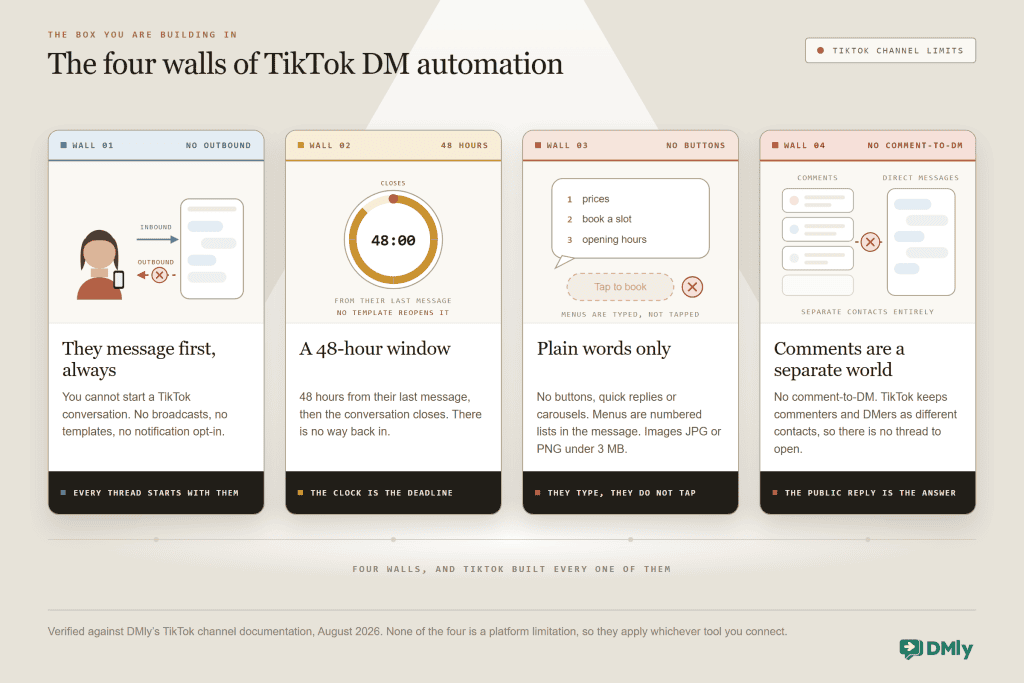
The customer always speaks first. You cannot open a TikTok conversation, there are no message templates and no notification opt-in, and broadcasts are not available on the channel at all. Everything you build is a reply to something a person chose to send you. That single fact rules out most of what people mean by “DM marketing”, and it is also why TikTok DMs stay high quality: everyone in your inbox arrived voluntarily.
You have 48 hours. The window runs from the contact’s last message, and when it expires the conversation closes. That is twice WhatsApp’s 24-hour service window, which sounds generous until you remember there is no template mechanism to reopen it. When the window closes on TikTok, it is closed. Everything your automation needs to accomplish has to happen while the customer is still replying.
The messages are plain. No buttons, no quick replies, no carousels, so the reader has to type their answer rather than tap it. Every menu you write must be a numbered list in the message body, and every question must be answerable in words. Outbound images work if they are JPG or PNG under 3 MB.
Comments and DMs do not connect. This is the one that surprises everyone who has automated Instagram. TikTok has no comment-to-DM mechanism, and it keeps commenters and DMers as separate contacts, so there is no thread to open and nothing to link. A Send a DM step inside a comment flow can only deliver to somebody who already has an open DM conversation with you. The practical consequence is covered in its own section below, because it changes how you write videos.
What you can build, in one line: Instant answers to inbound questions, keyword routing, AI replies in your own tone, lead detail captured to a contact record, human handover, public replies to comments, and a bridge that moves the conversation to a channel you control. That is a genuinely useful list. It is just a different list from Instagram’s.
What You Need Before You Set It Up
Three things, and the second one catches most people out.
- A TikTok Business account. Personal and Creator accounts will not work. If you connect one, DMly detects it and the DMs, comments and automations simply will not run. Switch it in the TikTok app first, under Profile, Settings, Account, Switch to Business Account, then connect.
- A TikTok developer app, created by an administrator. Unlike Instagram or Facebook, where you click through a login, TikTok requires an app registered at developers.tiktok.com with its Client Key, Client secret, Share Type and photo upload settings configured. This is a one-time administrative job, and it is the step to schedule properly rather than attempt five minutes before a campaign.
- Somewhere for the conversation to land. A shared inbox where TikTok sits beside your other channels, so a message that needs a human reaches one. TikTok DMs arriving in a separate app that nobody watches is how automation creates a worse experience than none at all.
How to Set Up TikTok DM Automation
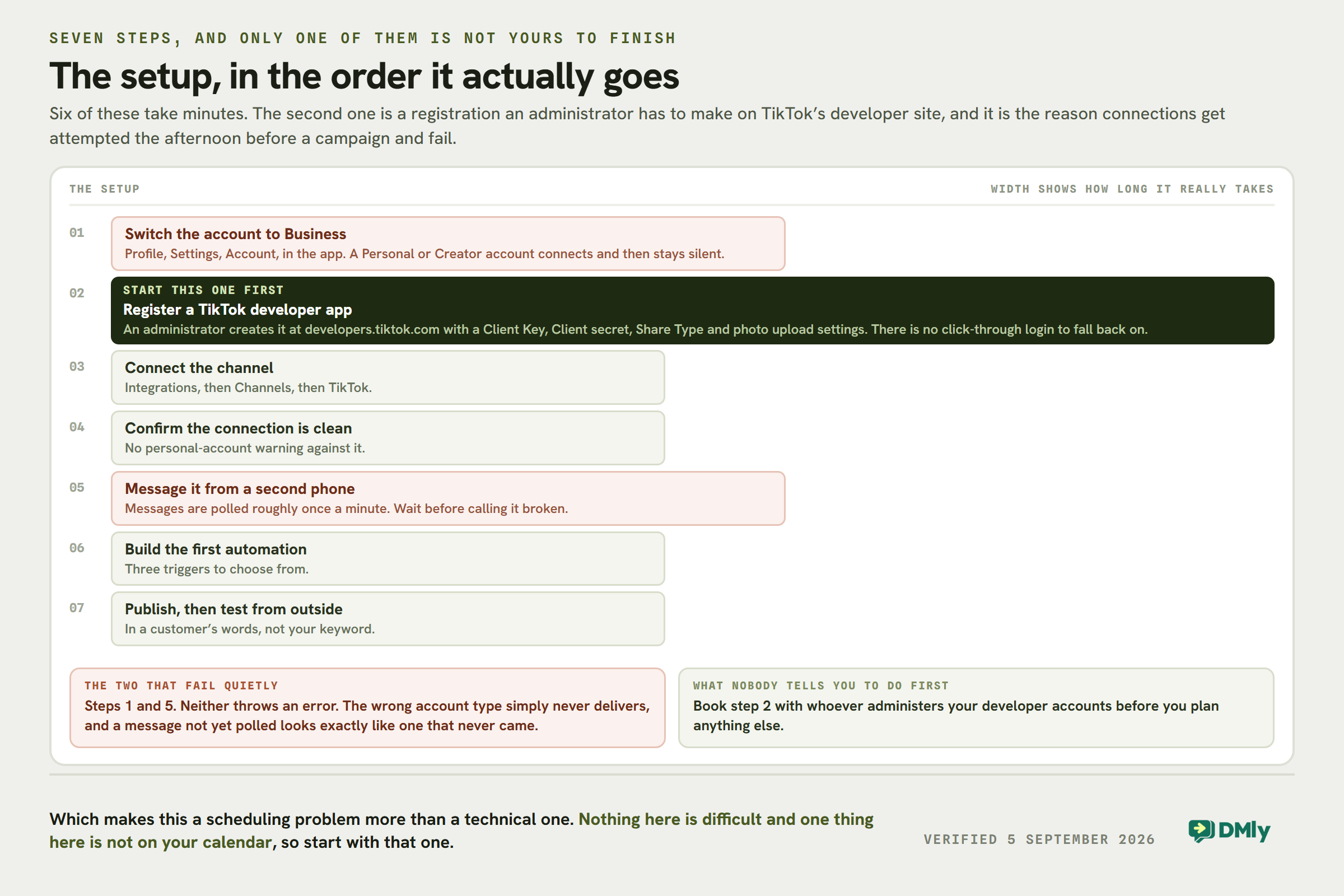
Here is the whole setup in DMly, in the order it actually goes.
- Switch the account to Business. In the TikTok app: Profile, Settings, Account, Switch to Business Account. Do this before anything else, because a personal account fails silently later.
- Create the TikTok app. An administrator registers it at developers.tiktok.com and configures the Client Key, Client secret, Share Type and photo upload settings. Keep those credentials somewhere your team can find them again.
- Connect the channel. In DMly, open Integrations, then Channels, choose TikTok and authorise the permissions TikTok asks for.
- Confirm the connection is clean. The channel should appear in your list with no personal-account warning against it. If that warning is showing, the account type is wrong; fix it in the app and reconnect.
- Send a test message from a second phone. Message the account from a personal TikTok and watch it arrive in the inbox. DMly polls for new messages roughly every minute, so allow a moment rather than assuming a failure.
- Build the first automation. Open Automations, start a new flow and pick the trigger. Three are available: TikTok message when a user sends a message, Video comments when a user comments on your video, and Outgoing TikTok message when you or an agent sends one.
- Publish, then test again from the outside. Message the account as a customer would, with the exact phrasing a customer would use rather than the keyword you designed. This is where most flows reveal that they only work for people who already know the magic word.
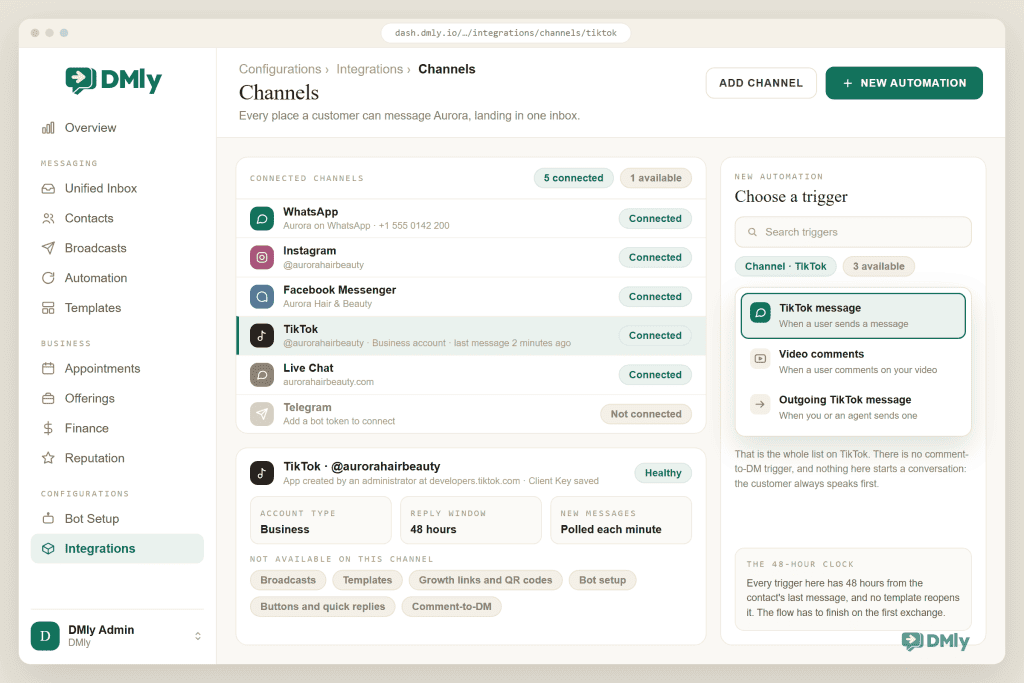
When nothing arrives: Check the account type first, because it is the cause more often than everything else combined. Then check Configurations, then Logs, which records send failures with the reason. Remember the roughly one-minute polling interval before concluding the channel is broken.
Which Keywords Should You Automate on TikTok?
Automate the four or five questions that arrive most often and have one correct answer, and leave everything else to a person or an AI agent. Because TikTok gives you no buttons, keyword design matters more here than on any other channel: the customer has to type the word, so the word has to be one they would type anyway.
That rules out the clever campaign keywords that work on Instagram. Asking viewers to “comment LASH for the price list” is an Instagram mechanic that depends on comment-to-DM, and it does not function on TikTok. What does work is matching the language people already use unprompted.
| What they type | What the automation should send | Why it earns its place |
| price, how much, cost | The actual range, then one question: which service are they asking about | The most common opening message on TikTok by a wide margin, and the one where silence loses the sale |
| book, appointment, available | The booking link, plus the two or three soonest slots written out | Highest intent message you will receive; every minute of delay costs conversions |
| open, hours, today | Today’s hours and the address in one message | Pure information, zero judgement required, endlessly repeated |
| deliver, shipping, location | Whether you deliver, where, and what it costs | Qualifies out the people you cannot serve before a human spends time on them |
| the fallback: anything else | An AI reply in your tone, or a short holding message plus handover | Nothing on TikTok can be answered with a menu, so the catch-all does more work than usual |
Three rules keep TikTok keyword automation from feeling robotic. Answer before you ask, because a reply that opens with a question when the customer asked a question reads as a dodge. Write menus as numbered lists in plain text, since there are no buttons to tap. And keep case-insensitive matching in mind: people type in lower case, in a hurry, with typos, so match on “how much” as well as “price” rather than assuming a single keyword covers the intent.
How to Capture Leads From TikTok DMs
Answering the question is the easy half. The valuable half is finishing the conversation with something that outlives the 48-hour window, because a TikTok conversation that closes without a booking, a contact detail or a move to another channel has produced nothing you can act on tomorrow.
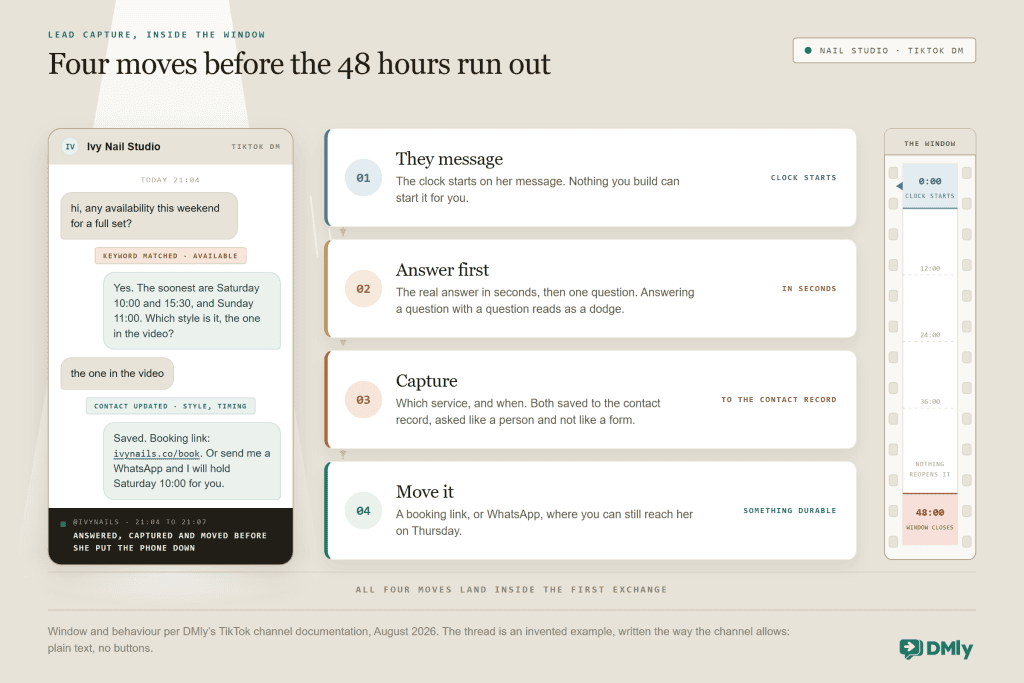
The capture step is ordinary conversation doing quiet work. Ask which service they mean, and save the answer to a field on their contact record. Ask when suits them, and save that too. Nothing here needs a form, and on TikTok nothing here can be a form, so the questions have to read like a person asking them.
The move is the part most businesses skip. A booking link finishes the job outright, and a completed booking is a customer record with a date attached. Where a booking is not the next step, invite them to continue on a channel you can actually follow up on, because a WhatsApp thread with an opted-in contact is worth considerably more to you than a TikTok thread that expires on Thursday. Say why in plain terms: “Send me a message on WhatsApp and I’ll hold the slot for you.” Our guide to running every channel from one inbox covers the mechanics of that handoff, and the wider case for it is in our guide to automating the whole customer journey.
The 48-hour discipline: Design every TikTok flow to reach a booking, a saved detail or a channel move on the first exchange. Do not build a nurture sequence with a two-day delay in it: there is no template to reopen the conversation when the window shuts, so a delayed message that misses the deadline is simply never delivered.
Comments and DMs on TikTok Are Not Connected
This section exists because the single most popular social automation mechanic does not work here, and building as if it does wastes real money.
On Instagram, comment-to-DM is the engine: someone comments a keyword, the automation slides into their DMs, the sale happens in private. TikTok has no comment-to-DM mechanism. A Send a DM step inside a Video comments flow can only deliver to someone who already has an open DM conversation with you, and since TikTok keeps commenters and DMers as separate contacts, there is usually no thread to open at all.
So on TikTok, the public reply is the answer, not a stepping stone to one. Put the payoff directly in the Reply to Comment step: the price, the link, the answer itself. It is public, which feels uncomfortable to businesses used to hiding prices, and it is also the version that thirty other people read on their way past. Alongside the public reply, you can like a comment or delete it. Hide is not available on TikTok; if a flow includes it, the step is skipped and a note is left in the thread.
Two operational details worth knowing. Comments are collected from your 10 most recent videos only, and the 30 most recent comments on each of those, so an older video that suddenly starts performing will not feed comments into your automations indefinitely. And because commenters are separate contacts, the way you convert a commenter into a lead is by telling them to message you, in the video and in the public reply. The full mechanics live in our TikTok comment automation guide, and the channel-by-channel differences are compared in Instagram vs TikTok comment automation.
What This Looks Like in Four Businesses
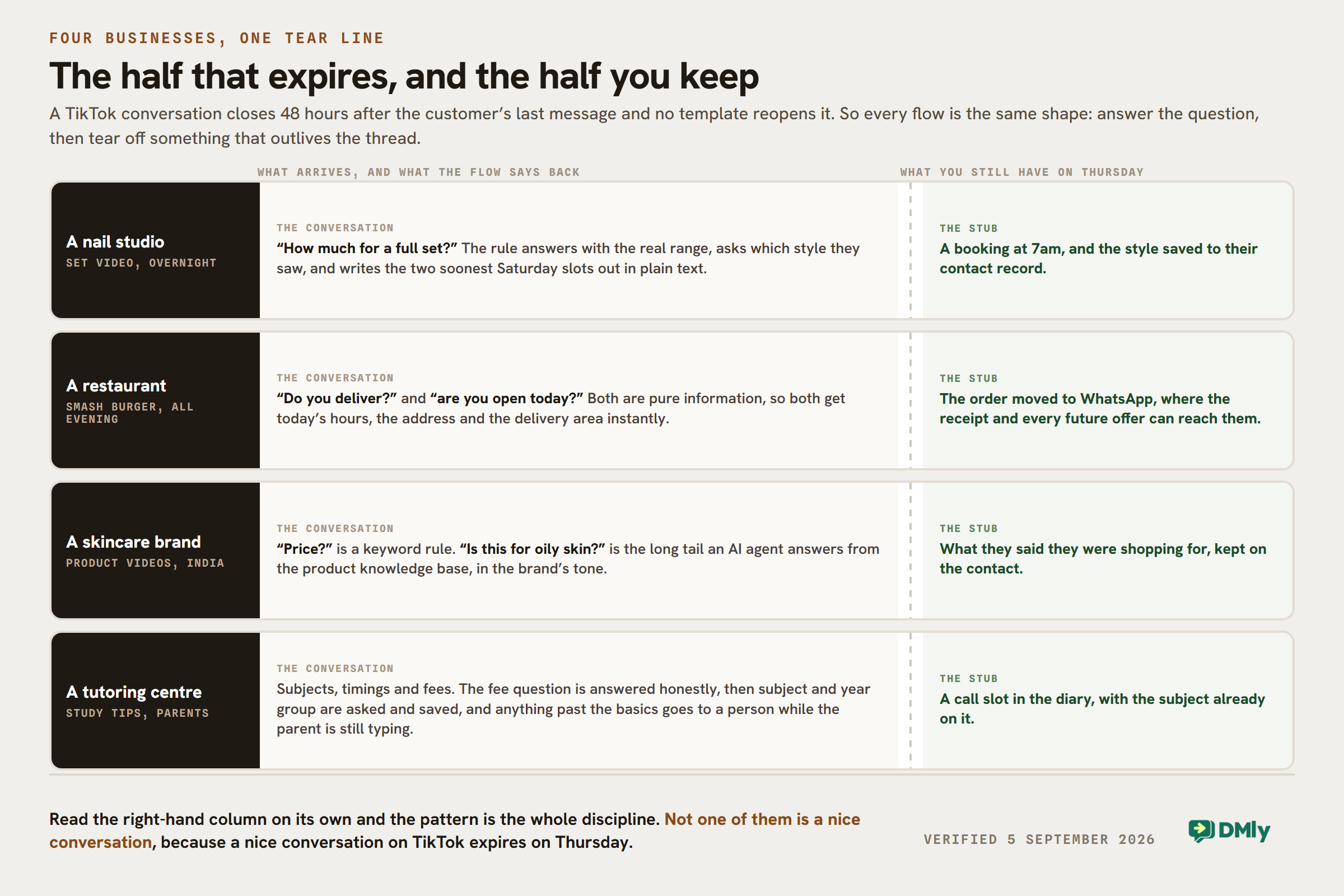
The four walls apply to everyone, but the useful automation differs by what you sell. In each of these, notice that the flow is short and it always ends by moving the conversation somewhere durable.
A nail studio
A set video does well overnight and the inbox fills with “how much for a full set?”. The keyword rule answers with the real range, asks which style they saw, saves that answer to the contact, and sends the booking link with the next two Saturday slots written out in plain text. The customer books at 7am without anyone opening the app. This is the highest-volume TikTok pattern in service businesses, and the salon pillar covers the wider machinery behind it.
A restaurant in Chicago
A short video of the smash burger brings “do you deliver?” and “are you open today?” all evening. Both are pure information, so both get instant automated answers with today’s hours, the address and the delivery area. The move is the menu link and an invitation to order on WhatsApp, where the order confirmation, the receipt and every future offer can actually reach them.
A D2C skincare brand in India
Product videos generate “price?” and “is this for oily skin?” in roughly equal measure. The first is a keyword rule; the second is exactly the long tail an AI agent should own, answering from the product knowledge base in the brand’s tone. Both paths end at the product link, and the contact record keeps what the customer said they were shopping for, which makes the follow-up on another channel specific rather than generic.
A tutoring centre
Parents watch a study-tips video and message asking about subjects, timings and fees. The automation answers the fee question honestly, asks which subject and year group, saves both to the contact, and offers a call slot. Because the enquiry is high-consideration and the sums are meaningful, the handover threshold is deliberately low: any question beyond the basics goes to a person while the parent is still typing.
TikTok’s Built-In Tools vs a Messaging Platform
TikTok offers its own automated messaging features for eligible business accounts, and for a very small operation they may be all you need. If your requirement is a handful of canned answers and nothing more, start there and spend nothing.
The reason businesses move to a platform is rarely the replies themselves. It is everything around them: TikTok conversations landing in the same inbox as WhatsApp, Instagram and Messenger so nobody has to watch five apps; the contact record that remembers this person messaged you in March; multi-step flows with conditions rather than single canned responses; an AI agent trained on your services rather than a fixed reply; assignment and statuses so a team knows which conversations still need a human; and the booking, payment and review machinery that turns the conversation into revenue. Our roundup of the best TikTok DM automation tools compares the platforms that do this, including ours, with the trade-offs stated.
Five Mistakes That Break TikTok DM Automation
- Building a welcome message. There is no bot-setup surface on TikTok: no welcome message, no ice breakers, no persistent menu. Your first message is a reply to theirs, so put the effort into the reply.
- Designing a comment-to-DM campaign. Covered above, and worth repeating because it is the most expensive misunderstanding on this channel. Put the payoff in the public reply.
- Writing menus that assume buttons. “Tap below to book” is nonsense in a channel with no buttons. Write “Reply 1 for prices, 2 to book” and accept that some people will reply in sentences anyway, which is what the AI fallback is for.
- Letting the automation stall on judgement calls. Complaints, custom quotes and anything with feelings in it should reach a person quickly. Automate the facts and hand over the rest, the same rule that applies on every channel we write about.
- Treating TikTok as a broadcast channel. It is not one, and it never will be with these constraints. TikTok is where new customers find you and ask their first question. The relationship continues somewhere you can actually reach them.
How to Tell If It Is Working
Three numbers, read monthly, are enough. Watch your time to first reply on TikTok, which automation should collapse to seconds and which is the entire point of the exercise. Watch how many TikTok conversations end in a booking, a saved contact detail or a move to another channel, because that ratio is the honest measure of whether your flows finish the job or merely answer questions. And watch how many conversations needed a human, which tells you where the next keyword or knowledge-base entry belongs.
If the first number is good and the second is poor, your automation is polite and useless: it answers and stops. That is the most common failure state on this channel, and the fix is always the same, which is to add the move.
TikTok DM Automation FAQs
Can you automate TikTok DMs?
Yes, on a TikTok Business account, using TikTok’s own automated messaging features or a platform connected through TikTok’s official business messaging. The automation replies to messages people send you: it recognises keywords, answers instantly, captures details and hands over to a human when needed. What it cannot do is start conversations, because outbound messaging is not available on the channel.
Does TikTok allow DM automation?
Yes, through official business messaging for eligible Business accounts. The rules to respect are the ones built into the channel: you can only reply to people who messaged you, you have 48 hours from their last message, and there are no templates or broadcasts to work around either limit. Treat any tool promising mass or cold TikTok DMs with real suspicion, because that behaviour is not supported by official access.
Can you automatically DM someone who comments on your TikTok?
No. TikTok has no comment-to-DM mechanism, and it keeps commenters and DMers as separate contacts, so there is no conversation to open. A Send a DM step in a comment flow only reaches someone who already has an open DM thread with you. The reliable answer to a TikTok commenter is the public reply, so put the price, the link or the answer directly in it.
How long can you reply to a TikTok DM?
48 hours from the contact’s last message, after which the conversation closes. There is no template mechanism to reopen it, unlike WhatsApp. Build every flow to reach its goal on the first exchange, and avoid long delays inside TikTok automations, because a message scheduled past the deadline will not be delivered.
Do you need a TikTok Business account for DM automation?
Yes. Personal and Creator accounts will not work, and if you connect one the DMs, comments and automations will not run. Switch the account in the TikTok app under Profile, Settings, Account, Switch to Business Account, then connect it again. An administrator will also need to create a TikTok developer app with its Client Key and Client secret.
Can AI reply to TikTok messages?
Yes, and TikTok is a good channel for it, because the questions are repetitive and the lack of buttons means people type in full sentences that a keyword rule handles badly. An AI agent trained on your services, prices and policies can answer the long tail in your own tone, capture the detail you need and hand over to a person the moment it is out of its depth.
Answer TikTok in seconds, not tomorrow
Bring TikTok DMs and comments into the same inbox as WhatsApp, Instagram and Messenger, with flows, AI replies and bookings behind them.
Build for the Box You Are In
TikTok will not give you welcome messages, broadcasts, buttons or comment-to-DM, and no amount of tooling changes that. What it gives you instead is a stream of people who found your business ninety seconds ago and are asking, in their own words, whether you can help them.
Answer that question in seconds, capture what the answer teaches you about them, and move the conversation somewhere it can continue. Do those three things inside 48 hours and TikTok stops being a place you post and starts being a place you get booked.
Writing about WhatsApp automation, bookings and growth for local business.
Turn WhatsApp into your busiest channel.
Start free and run message, bookings, payments and reviews in one place.
