
TikTok Comment Automation: The Complete Guide to Turning Comments into Customers (2026)
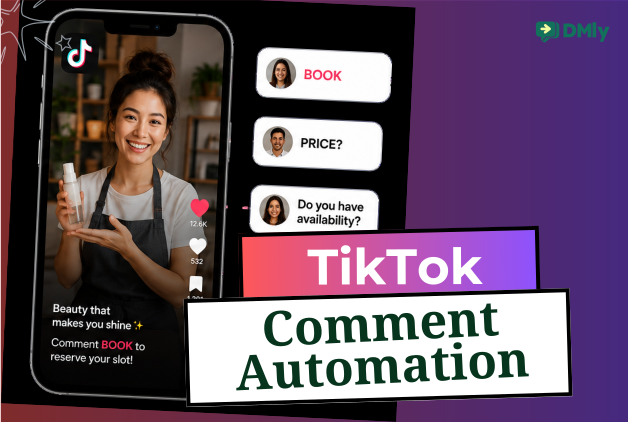
Every comment on your TikTok videos is an opportunity. Someone asking for the price, requesting more information, or simply commenting “interested” has already taken the first step towards becoming a customer.
The challenge is replying quickly enough to keep the conversation going, especially when your videos start attracting dozens or even hundreds of comments.
But with TikTok comment automation, that wouldn’t be much of a problem again. It helps you respond instantly so you can quickly turn engagement into bookings, leads, and sales without spending hours in your comments section.
In this guide, you’ll learn how TikTok comment automation works, why more businesses are using it, and how to set it up with DMly to grow your business more efficiently.
What Exactly Is TikTok Comment Automation?
TikTok comment automation simply helps you automatically respond when someone comments on your TikTok videos. Instead of manually checking every notification and replying one by one, you can create automations that react to specific keywords or actions and guide people towards the next step.
For example, imagine you own a salon and post a video showcasing a new hairstyle. Someone comments, “Price?” or “Interested.” Rather than waiting for a member of your team to reply, an automation answers under the video within seconds, with the price, this week’s free slots or the booking link, where the next forty people watching read it too.
This is where TikTok comment automation becomes more than an auto-reply tool. It answers in the comments section itself, in seconds, where the answer is read by everyone else scrolling past, and it records the commenter as a contact so your team can pick the thread up. Moving somebody into a private chat is the customer’s move to make on this platform, not yours, and the section below on what a flow can actually do explains why.
With DMly, you can create these automations without writing a single line of code. Simply choose the keywords you want to monitor, decide what should happen when someone comments, and let DMly handle the rest.
Depending on your workflow, it can reply publicly, like or delete the comment, add the person to your CRM, assign the thread to a team member, or hand a conversation to an AI agent once the customer messages you.
Why TikTok Comments Matter More Than You Think
It’s easy to focus on views, likes, and shares, but comments often tell you much more. When someone leaves a comment on your video, they’re taking the time to start a conversation with your business. In many cases, that’s a stronger buying signal than simply tapping the like button.
Think about the kinds of comments businesses receive every day:
- “How much is this?”
- “Do you have this in stock?”
- “Where are you located?”
- “Can I book an appointment?”
- “How do I order?”
These aren’t random interactions. They’re questions from people who are interested enough to learn more. The faster you respond, the better your chances of turning that interest into a customer.
Comments also create momentum. Every reply keeps the conversation active and tells TikTok that people are engaging with your content. That can help your videos reach even more potential customers, creating a cycle where higher engagement leads to greater visibility.
For local businesses, the opportunity is even bigger.
A salon can turn someone asking about a hairstyle into a confirmed booking. A dentist can answer questions about teeth whitening and schedule a consultation. A restaurant can help a customer reserve a table, while a fitness studio can recommend the right membership or class based on a simple comment.
The challenge is keeping up as your audience grows. Once a video starts gaining traction, manually replying to every comment becomes difficult. Some comments get missed, replies become slower, and potential customers lose interest.
That’s why more businesses are using TikTok automated replies. Instead of letting valuable conversations slip through the cracks, they answer instantly and in public, put the booking link or the price in the reply itself, and give the people who want more a reason to message the account.
Benefits of TikTok Comment Automation
Every business wants more enquiries, more bookings, and more sales. The problem is that these opportunities often arrive all at once, especially after a video starts performing well. But you don’t have to lose potential customers simply because you couldn’t reply quickly enough.
Here are some of the biggest benefits TikTok automation can deliver.
Reply to Interested Customers Instantly
People expect fast responses. If someone comments asking about your prices or availability, waiting hours to reply could mean they’ve already moved on.
With TikTok comment automation, every eligible comment can receive an immediate response, helping you engage customers while they’re still interested.
Answer in Public, Where Everyone Else Is Reading
The comments section is a great place to start a conversation, but it’s rarely the best place to finish one.
On most channels automation moves that conversation into a private message. On TikTok it cannot, so the public reply has to do the work, and it is worth writing well because everybody watching reads it too. Where a private thread genuinely matters, the route is to get people onto a channel built for it, which is why so many TikTok call to actions end with a link rather than a promise.
Book More Appointments
For service-based businesses, speed matters. Whether you run a salon, dental practice, spa, clinic, or fitness studio, automation can guide customers from a simple comment to a confirmed appointment in just a few steps.
Instead of asking them to call later or wait for a reply, you can keep the booking process moving straight away.
Capture More Leads Automatically
Every conversation is a chance to learn more about your customers.
Automation can collect names, phone numbers, email addresses, preferred services, or any other information you need before passing the conversation to your team. That means fewer missed opportunities and a more organized sales process.
Save Time on Repetitive Replies
Most businesses answer the same questions every day. Instead of typing the same responses repeatedly, automation handles these routine enquiries for you, freeing your team to focus on conversations that need a personal touch.
Deliver Better Customer Service
Quick replies make a strong first impression. Customers feel acknowledged immediately, even if a member of your team joins the conversation later. This creates a smoother experience from the very first interaction.
Scale Without Growing Your Team
One viral TikTok video can generate hundreds of comments in a matter of hours. Responding manually simply isn’t practical.
With automation, you can handle a growing number of conversations without adding extra workload to your team. Whether you receive 20 comments or 2,000, every customer gets a timely response.
How TikTok Comment Automation Really Works
At first glance, automation on TikTok might sound complicated. But in reality, it’s a simple process. Once you’ve created your automation, everything happens automatically in the background whenever someone comments on your videos.
Here’s what a typical workflow looks like.
Step 1: A customer leaves a comment
It starts with someone engaging with your content. They might comment:
- “Price?”
- “Interested”
- “Book”
- “Menu”
- “Tell me more”
You decide which comments or keywords should trigger an automation.
Step 2: DMly detects the trigger
As soon as someone leaves a matching comment, DMly recognizes it and launches the automation you’ve created. This happens almost instantly, so customers don’t have to wait for someone from your team to respond.
Step 3: The customer receives a public reply
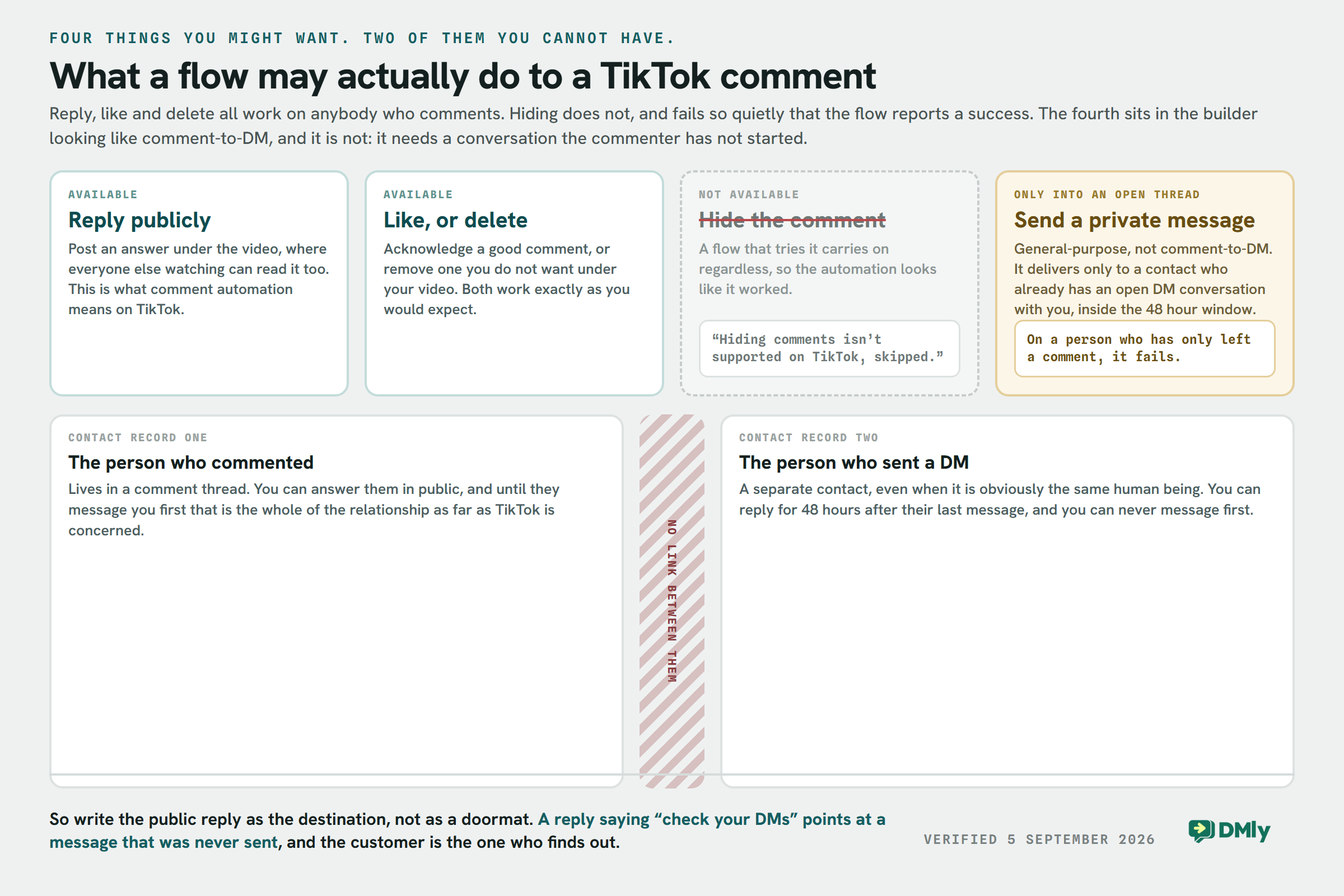
What happens next is where this subject needs more care than it usually gets. A flow on a TikTok comment can reply publicly under the video, like the comment, or delete it. Those three are documented and they work.
What it cannot do is turn that comment into a private message. TikTok has no comment-to-DM mechanism. The flow builder does offer a Send a DM action on the comment trigger, which is where the confusion comes from, but it is a general-purpose action rather than a comment-to-DM one: on a comment flow it can only deliver to somebody who already has an open DM conversation with you, inside TikTok’s 48-hour window. For a person who has only ever left a comment, it fails.
The reason is underneath the action list. TikTok keeps a commenter and a DMer as two separate contacts, even when they are obviously the same person, so there is no thread for the step to open. This is not something a tool can engineer around, and any tool that says otherwise is describing a mechanic the platform does not expose.
So before you build a campaign on it, test it on your own account and watch what the customer actually receives. It costs ten minutes, and the alternative is a public reply telling people to check an inbox that may be empty.
- Reply to the comment publicly. Documented, and the thing comment automation reliably does on TikTok.
- Like it, or delete it. Both work. Hiding does not: a flow that tries it notes that hiding is not supported on TikTok and carries on, so the automation reports a success either way.
- Send a private message, but only to someone already in your inbox. The step exists and it works on a contact who has an open DM thread with you. On a pure commenter it fails, because there is no thread and no way to make one.
Which decides how you write the public reply. “Check your DMs” is the one thing you must not post under a TikTok video, because for most of the people reading it there is no DM and never will be. Put the answer in the reply itself: the price, the link, the times. It is public, which takes some getting used to, and it is also read by everyone else who was wondering the same thing.
The public reply is where pricing, appointment availability, product information or whatever the customer needs next has to go. If the answer genuinely cannot be public, ask them to message you and answer properly when they do, because a person who messages you first is a contact you can reply to for the next 48 hours.
Step 4: The conversation continues automatically
Once a customer has messaged you and a private chat exists, your automation can take that conversation further. For example, it can:
- Answer common questions.
- Recommend products or services.
- Collect names and contact details.
- Book appointments.
- Share payment links.
- Qualify leads before handing them to your team.
With DMly’s AI-powered automation, these conversations will feel natural while following the workflow you’ve designed.
Step 5: A team member joins when needed
Not every conversation should stay automated. If a customer asks something more specific or is ready to make a purchase, DMly can automatically hand the conversation over to the right team member. They’ll see the full conversation history, making it easy to continue where the automation left off.
What You Need Before You Start
Three things, and the first one is the reason most connections fail silently. If you also run the other two comment platforms, the Instagram version of this campaign and the Facebook one work differently enough that the plan does not carry across.
A TikTok Business Account
To access TikTok’s business tools and automation features, you’ll need a TikTok Business Account. If you’re still using a Personal Account, you can switch to a Business Account from your TikTok settings in just a few minutes.
Turn On Direct Messages
This is one of the easiest things to overlook. Your public reply will often ask people to message you, and if your account cannot receive their message, that instruction goes nowhere.
In your TikTok privacy settings, set your direct messages to “Everyone.” Otherwise, only mutual followers will be able to message you, preventing many interested customers from continuing the conversation.
An Approved Automation Platform
While TikTok offers basic automation for eligible accounts, businesses that want advanced comment automation, AI-powered conversations, appointment booking, CRM, and team collaboration will need an approved platform like DMly.
Once your TikTok account is connected, you can build automations without writing any code.
How to Set Up TikTok Comment Automation, Step by Step
Now that you know what comment automation is on TikTok and why you need it, it’s time to build it. DMly’s no-code automation builder makes the process straightforward, so you can have your first comment automation running in just a few minutes.
Step 1: Connect Your TikTok Business Account
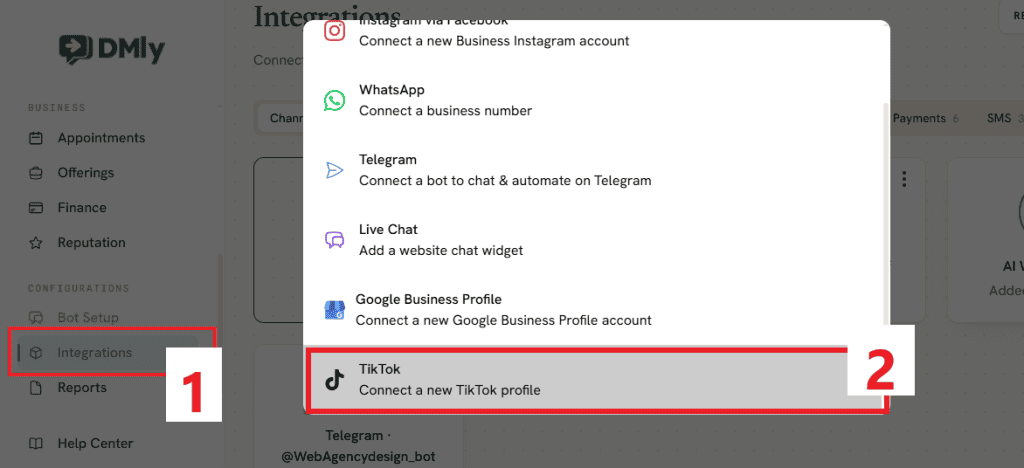
First, connect your TikTok Business Account to DMly.
From your dashboard, click Integrations in the left-hand menu, then select Add account. Choose TikTok and follow the prompts to connect your account through TikTok’s official API.
If your TikTok account is still a Personal Account, switch it to a Business Account before connecting it. Once the connection is complete, your TikTok profile will appear alongside your other messaging channels inside your DMly dashboard.
Step 2: Create a New Automation
Next, open Automations from the left-hand menu and click New automation.
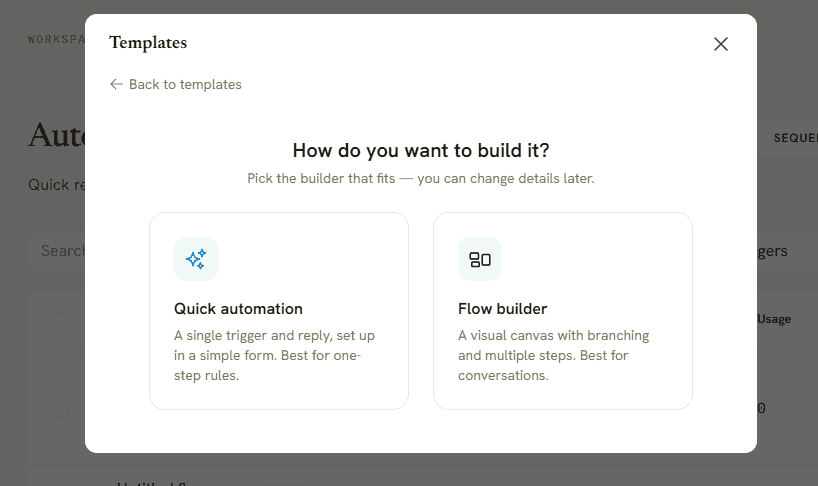
You’ll be asked how you’d like to begin. You’ll have to choose Start with a template if you want to customize a ready-made workflow. But if you’re new to automation, we’ll recommend you select Start from scratch, then choose Quick automation.
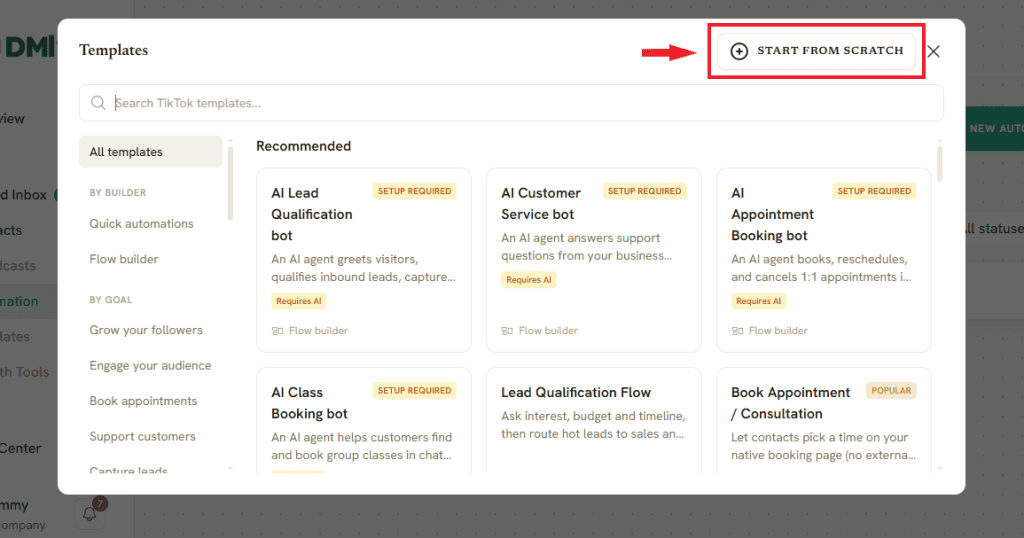
Quick automation is perfect for comment-based workflows because it lets you create a trigger and define the actions that should happen next without building a full conversation flow. If you later need more advanced customer journeys, you can always recreate the automation using DMly’s Flow Builder.
Step 3: Choose Your Comment Trigger
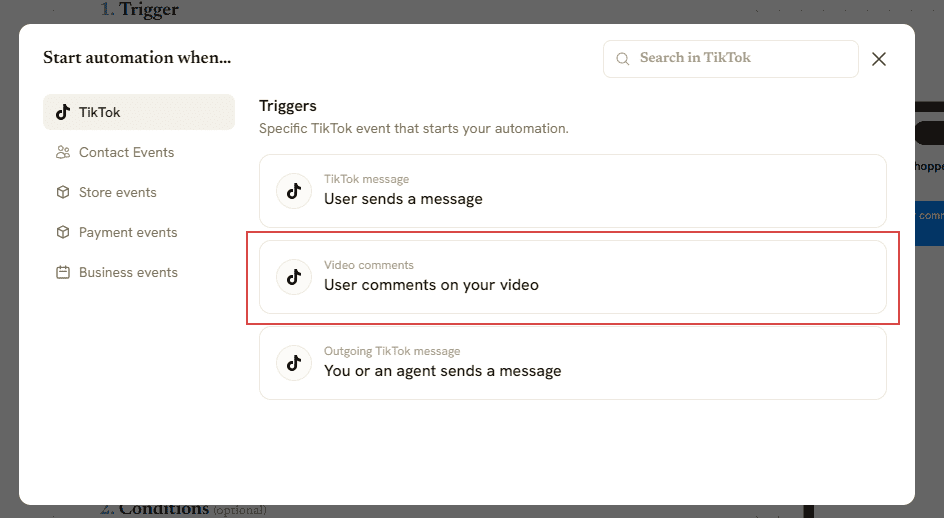
Now it’s time to decide what should start the automation. For the trigger, select User comments on your video.
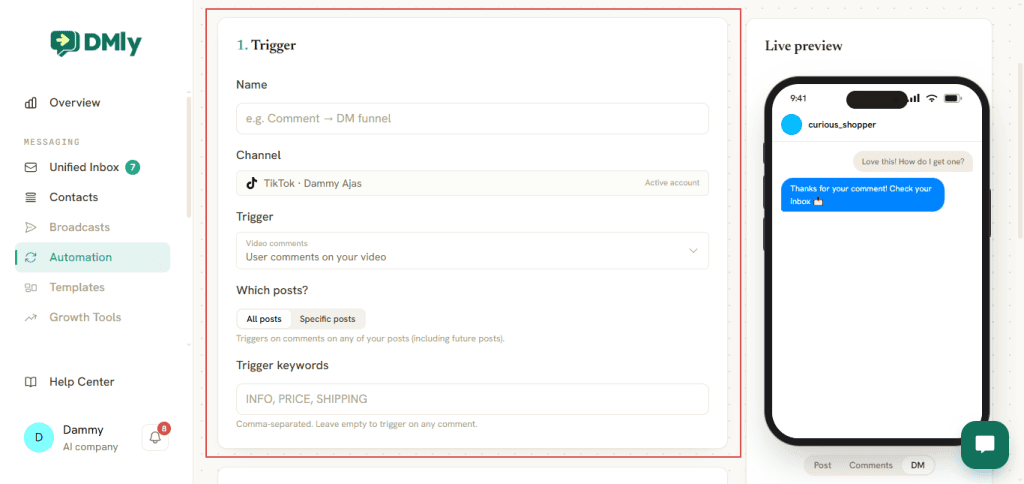
Next, choose where the automation should apply:
- All posts: the automation runs on comments across every TikTok video, including videos you publish in the future.
- Specific posts: the automation runs only on the videos you choose. This is ideal if you’re running a campaign or promoting a particular product or service.
After that, enter your trigger keywords. These are the words or phrases that will activate the automation when someone comments.
Examples include PRICE, BOOK, MENU, DETAILS, INFO, and GUIDE.
If your video tells viewers to comment BOOK to see this week’s available times, add BOOK as your trigger keyword and put the times in the public reply. DMly will only launch the automation when someone uses that keyword, keeping your workflows accurate and relevant.
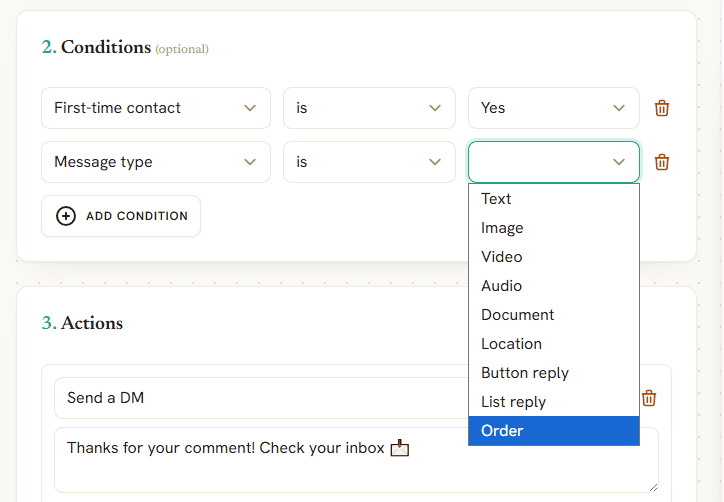
Step 4: Add Conditions (Optional)
Conditions give you more control over when your automation should run. For example, you can choose to trigger the automation only if:
- It’s the person’s first interaction.
- The comment contains certain keywords.
- The comment meets specific criteria you’ve defined.
You can combine multiple conditions to create smarter automations that respond differently depending on the situation.
Step 5: Choose What Happens Next
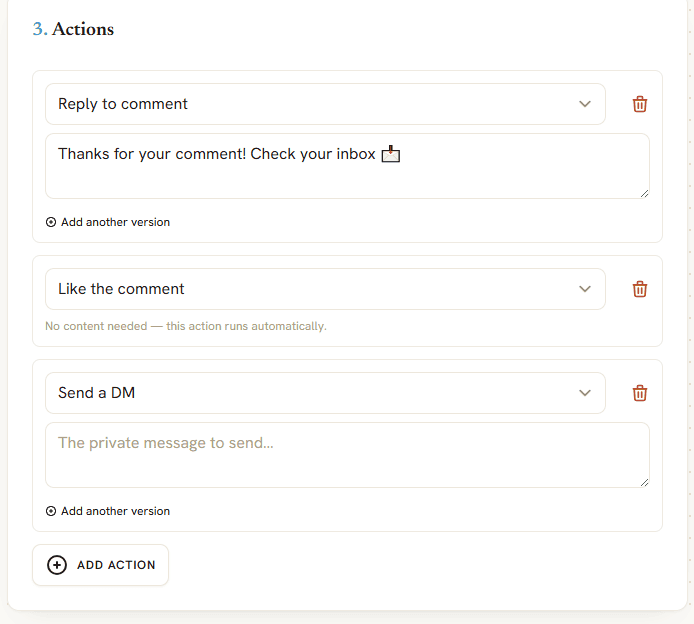
This is where you decide how DMly should respond once the trigger is activated.
You can choose a single action or combine several actions into one workflow. Some of the available actions include:
- Reply to the comment.
- Record the commenter as a contact, so a person can follow up.
- Like the comment.
- Hide the comment.
- Delete the comment.
- Add a tag to the contact.
- Wait before continuing.
- Hand the conversation over to a team member.
For example, your automation could:
- Like the customer’s comment.
- Reply publicly with: “Saturday 10am and 2pm are free. Booking link in our bio.”
- Add the person to your CRM as a TikTok enquiry.
- Tag the contact as TikTok Lead.
- Assign the conversation to your sales team if they reply.
Everything happens automatically, creating a smooth customer experience without extra manual work.
Step 6: Configure Timing and Reply Limits
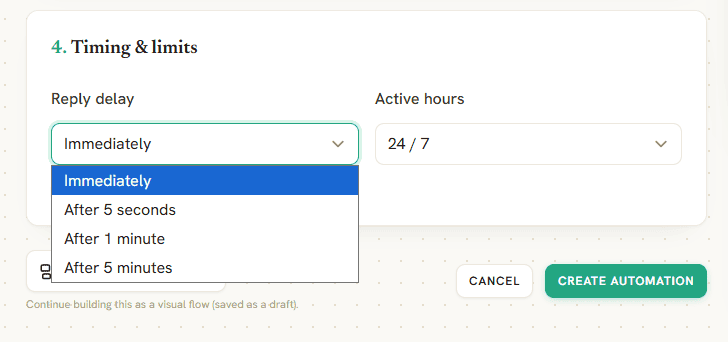
Next, choose when your automation should run.
You can set replies to be sent:
- Immediately
- After a few seconds
- After one minute
- After several minutes
You can also decide if the automation should run 24 hours a day or only during your business hours.
Finally, enable Only respond once per client. This prevents the same person from triggering identical replies multiple times if they leave several comments within a short period.
Step 7: Test Everything Before Going Live
Before using the automation in your videos, test it yourself.
Use another TikTok account to comment with one of your trigger keywords and check that everything works as expected. Make sure the correct actions fire, the reply reads naturally and not like a form letter, and any booking link or price in it is right, because it is going to sit in public under your video.
A quick test only takes a few minutes, but it can save you from missing valuable leads once your videos start gaining traction.
10 Practical Ways Businesses Use TikTok Comment Automation
Every business uses TikTok differently, but they all have one thing in common. They want to turn engagement into results. Comment automation on TikTok helps you do exactly that by moving people from a simple comment to a meaningful conversation.
Here are some of the most effective ways businesses are using it today.
1. Turn Product Enquiries into Sales
People often comment with questions like “How much?”, “Do you deliver?” or “Where can I buy this?”
Instead of leaving them waiting, the automation answers under the video with the price, the delivery area or the link to buy. Everyone else weighing up the same question reads it too, which is the part that makes a public answer worth more here than a private one would be.
2. Book Appointments Automatically
This is one of the biggest opportunities for service businesses.
A salon can ask viewers to comment BOOK to receive available appointment times. A dental clinic can invite people to comment CHECKUP to schedule a consultation. A spa can send treatment options, while a fitness studio can share class schedules. The entire journey begins with a single comment.
3. Capture Leads from Viral Videos
A video does not have to go viral to generate leads, and it is worth knowing that a viral one is the hardest case rather than the easiest. Read the ceiling further down before you plan around a big video: only the thirty most recent comments on it are ever collected.
With automation, every interested person receives an instant response. You can collect their name, phone number, email address, or preferred service automatically before handing the conversation over to your team.
4. Send Menus, Price Lists or Catalogues
Restaurants, cafés, retailers, and beauty businesses often receive the same request over and over.
“Can I see your menu?”
“What’s your price list?”
“What products do you have?”
Instead of posting long replies in the comments, automation can send the information privately, creating a cleaner experience for everyone.
5. Promote Special Offers
Running a weekend promotion or limited-time discount?
Ask people to comment a keyword such as SALE, OFFER, or DEAL. As soon as they do, DMly replies under the video with the discount and how to redeem it. Everyone who was hesitating reads the offer as well, which on a public channel is a feature rather than a leak.
6. Register People for Events and Classes
If you’re hosting a workshop, webinar, church program, fitness class, or community event, comment automation can handle registrations for you.
Interested attendees comment with a keyword and the automation replies with the date, the venue and the registration link, in public, where the next person to watch the video sees it as well.
7. Answer Frequently Asked Questions
Most businesses receive the same questions every day.
- What are your opening hours?
- Where are you located?
- Do you accept walk-ins?
- How long does delivery take?
Instead of typing the same answers repeatedly, let automation handle these common enquiries instantly while your team focuses on more complex conversations.
8. Run Giveaways and Campaigns
Comment automation is perfect for marketing campaigns. Ask viewers to comment a specific word to enter a giveaway, download a guide, receive a coupon, or access exclusive content. Every participant receives the same information automatically, making your campaigns much easier to manage.
9. Filter Spam and Keep Your Comments Clean
Not every comment deserves to stay visible.
DMly can automatically hide or delete spam, offensive language, or unwanted promotional comments based on the rules you set. This keeps your comments section professional and allows genuine customer conversations to stand out.
10. Hand Serious Enquiries to Your Team
Automation doesn’t have to replace people. It simply helps them work smarter.
Once a customer shows genuine buying intent, DMly can assign the conversation to the right member of your team. They’ll see the customer’s comment, previous messages, and any information already collected, making it easy to continue the conversation without asking the same questions again.
Common Mistakes to Avoid
Comment automation can save you hours every week, but only if it’s set up properly. A poorly designed automation can frustrate customers just as quickly as not replying at all.
Here are some of the most common mistakes businesses make, and how to avoid them.
Using Keywords That Are Too Broad
It might seem like a good idea to trigger an automation whenever someone comments “Hi” or “Hello,” but these words appear in all kinds of conversations.
Instead, use clear keywords that match your call to action, such as BOOK, PRICE, MENU, or GUIDE. This makes your automations much more accurate and gives customers a clear instruction to follow.
Trying to Automate Every Conversation
Automation is great for repetitive tasks, but it shouldn’t replace genuine customer service.
Use it to answer common questions, share information, and collect details. When someone needs personalized advice or is ready to make a purchase, let a member of your team take over the conversation.
Sending Long Automated Messages
Customers usually message because they want a quick answer. Avoid overwhelming them with long paragraphs. Keep your first reply short, friendly, and focused on the next step. You can always provide more information as the conversation develops.
Forgetting to Test Your Workflow
A small mistake, such as the wrong keyword, a broken booking link, or an incorrect reply, can stop your automation from working properly.
Before launching a new campaign, test every workflow using a separate TikTok account to make sure everything runs exactly as planned.
Not Giving Customers a Next Step
An automation should always guide people towards something meaningful. After answering their question, encourage them to:
- Book an appointment.
- View your products or services.
- Request a quotation.
- Complete a purchase.
- Speak with your team.
Without a clear next step, conversations often come to a stop.
Ignoring Follow-Up Conversations
A customer who does message you is only the beginning.
If a customer replies with another question or shows they’re ready to buy, make sure someone on your team follows up promptly. Automation opens the door, but great customer service is what turns interest into sales.
Leaving Your Automation Unchanged
Customer behavior changes over time, and so should your automations. Review your workflows regularly to see which keywords perform best, where customers drop off, and which replies generate the most bookings or sales. Small improvements can make a noticeable difference to your results.
Best Practices for TikTok Comment Automation
Most of these are craft. The first one is arithmetic: post steadily, because only your ten most recent videos are being watched for comments at all.
Once your automation is live, a few simple habits can make a noticeable difference to how well it performs. These best practices will help you create a smoother experience for your customers and get better results from every campaign.
Match Your Keyword to Your Call to Action
Your keyword should feel like a natural extension of your video.
If your video ends with “Comment MENU to see today’s specials,” then MENU should be the trigger. If you’re offering a free consultation, ask people to comment BOOK or CONSULT. Keeping your call to action and keyword aligned makes it much easier for viewers to take the next step.
Offer Something Worth Messaging For
People are more likely to comment if they know they’ll receive something valuable in return.
That could be:
- A price list
- A discount code
- A booking link
- A menu
- A product catalogue
- A free guide
- An exclusive offer
Give viewers a clear reason to engage rather than asking them to comment without a purpose.
Keep Your Brand Voice Consistent
Your automated replies should sound like the rest of your business. If your brand is friendly and relaxed, your messages should reflect that. If your business has a more professional tone, keep your replies consistent across every interaction.
Customers shouldn’t be able to tell where the automation ends and your team begins.
Build a Complete Customer Journey
Don’t think of automation as a single reply. Think about what should happen after the first message.
For example, someone comments BOOK, reads the times in your public reply, messages the account to take one, and from there chooses a service, books, gets a confirmation and later a reminder. Connecting those steps creates a far better experience than treating each one separately, and on TikTok the join between the first two is the customer’s own decision to message you.
Review Your Most Popular Videos
Some TikTok videos continue generating comments for weeks or even months.
Check your highest-performing content regularly to see which keywords people use most often. These insights can help you create new automations or improve existing ones based on real customer behavior.
Measure Results, Not Just Replies
The goal isn’t simply to automate comments. It’s to generate business. Track metrics such as:
- Appointments booked
- Leads captured
- Products sold
- Conversations started
- Conversion rates
Looking beyond reply numbers helps you understand which automations are delivering real value and where there’s room to improve.
TikTok Comment Automation Limits You Should Know
TikTok automation has real limits, and one of them is severe enough to decide whether a campaign is worth running at all. Start with that one.
Comments Are Only Collected From Ten Videos, Thirty at a Time
Comments are picked up from your ten most recent videos only, and only the thirty most recent comments on each. A video that scrolls out of the last ten stops being watched, even if it is still being recommended to people. A video that gets busier than thirty comments loses everything after the newest thirty. There is no way to go back and collect what was missed.
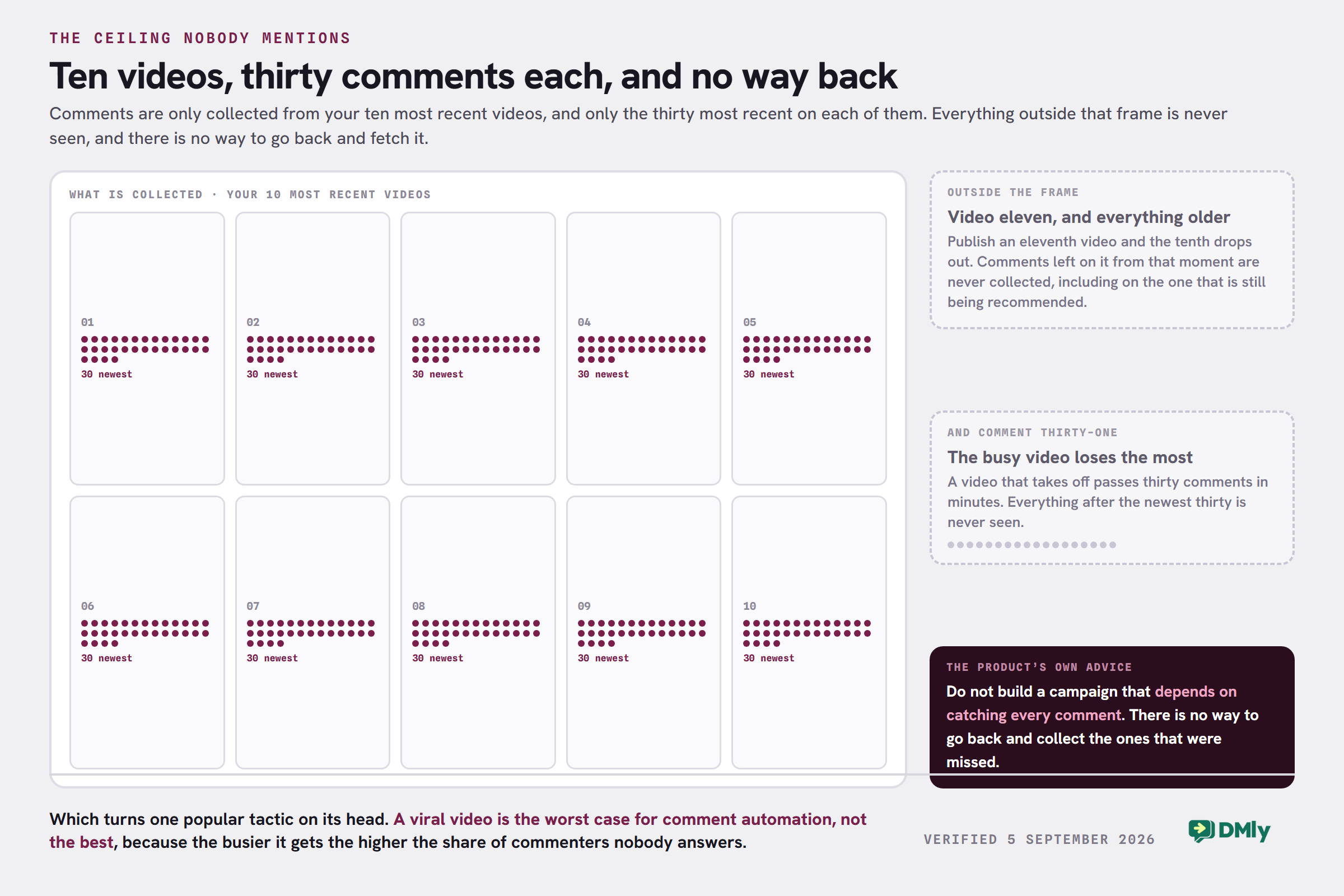
The documentation puts it bluntly: do not build a campaign that depends on catching every comment. That is worth reading twice, because it turns one popular tactic upside down. A viral video is the worst case for comment automation, not the best, since the busier it gets the larger the share of commenters nobody answers. Comment automation on TikTok pays off on steady, recent posting rather than on one video that travels.
TikTok’s API Rules Apply to Everyone
If you’re using an approved platform like DMly, your automations still have to follow TikTok’s official API rules. These restrictions are set by TikTok, so they apply to every approved automation provider.
Direct Messages Have Their Own Limits
When a customer does message you, a different set of rules applies to that thread. TikTok limits automated messaging to:
- A 48-hour messaging window after a user’s last interaction. If the customer replies, the 48-hour window starts again.
- No sending first, ever. A conversation on TikTok is one the customer opened. Outside the window every send is blocked, for bots and for people alike.
This means your automations should focus on helping customers take the next step instead of sending long sequences of messages.
Regional Availability
At the time of writing, TikTok’s official messaging API isn’t available in the European Economic Area (EEA), Switzerland, or the UK. If your business or clients operate in these regions, check TikTok’s latest documentation before building your automation strategy, as these restrictions are controlled by TikTok and may change over time.
Every Automation Depends on the Right Trigger
Your workflow only starts when someone performs the action you’ve configured.
For example, if you’ve created an automation that triggers when someone comments BOOK, it won’t run if they comment Price? or Interested instead. That’s why it’s important to choose keywords that match the call to action in your videos.
Where TikTok Fits, and Where It Does Not
One last piece of context, and it comes from the documentation rather than from us. TikTok’s Business Messaging is still a beta at TikTok’s end, and the advice attached to it is to treat TikTok as a supporting channel and keep WhatsApp as the one you build on. Broadcasts do not exist on TikTok. Growth links and QR codes do not either. Messages carry text and images only, with images JPG or PNG under 3 MB.
None of that makes comment automation on TikTok a waste of time. It makes it a front door rather than a house. The job is to answer well in public and give people somewhere durable to go, which in practice means a channel you can start a conversation on later.
Turn TikTok Comments into Real Business Opportunities
Every comment is a chance to start a conversation. Instead of letting interested customers wait for a reply, you can respond instantly, answer their questions, book appointments, recommend products, and move them closer to becoming paying customers.
DMly gives you everything you need to make that happen. Build powerful TikTok comment automations without writing code, manage every conversation from one shared inbox, and connect TikTok with WhatsApp, Instagram, Messenger, Telegram, SMS, Live Chat, and Google Business Profile.
Start your free DMly trial today and see how much more your TikTok comments can do for your business.
Frequently Asked Questions
What is TikTok comment automation?
TikTok comment automation automatically responds when someone comments on your TikTok videos. Depending on your workflow it can reply publicly, like the comment, delete it, record the commenter as a contact, and hand the thread to your team. It cannot answer them privately: on TikTok, the public reply is the reply.
Can TikTok automatically reply to comments?
Yes. Eligible TikTok Business Accounts can use TikTok’s built-in keyword reply feature. For more than that, such as keyword routing, AI replies, CRM integration and appointment booking, you’ll need a platform like DMly. Note that comment-to-DM is not on that list, on TikTok, for anybody.
Can I send a DM when someone comments on my TikTok video?
Not as a reply to the comment, no. TikTok has no comment-to-DM mechanism. The flow builder does show a Send a DM action on the comment trigger, but it is a general-purpose action: it can only deliver to somebody who already has an open DM conversation with you, inside the 48-hour window, and TikTok keeps commenters and DMers as separate contacts, so for a pure commenter there is no thread to open and the step fails. The reliable answer to a TikTok commenter is the public reply, so put the price, the link or the answer directly in it.
Is TikTok comment automation allowed?
Yes. TikTok allows comment automation when it’s built using its official API and follows the platform’s policies. Using approved tools helps ensure your automations remain compliant.
What types of businesses can benefit from TikTok comment automation?
Almost any business that receives enquiries through TikTok can benefit. It’s especially useful for salons, restaurants, dentists, fitness studios, spas, beauty clinics, retailers, medical practices, and other businesses that rely on conversations to generate bookings or sales.
Do I need coding skills to set up TikTok automation?
No. DMly includes a no-code automation builder, so you can create comment automations, keyword triggers, and customer journeys using a visual interface without writing any code.
What’s the difference between TikTok comment automation and TikTok DM automation?
Comment automation on TikTok starts when someone comments on one of your videos. TikTok DM automation begins when someone sends your business a direct message. Businesses run both, but not joined together the way they are on Instagram: on TikTok the comment automation answers in public and asks people to message you, and the DM automation picks them up when they do.
Writing about WhatsApp automation, bookings and growth for local business.
Turn WhatsApp into your busiest channel.
Start free and run message, bookings, payments and reviews in one place.
