
Moving Beyond UChat: Top UChat Alternatives to Consider for Your Brand
UChat is one of the cheapest serious chatbot platforms you can buy. The Pro plan is $15 a month, it builds bots for a long list of channels, and it does it without asking you to write code. That combination is why it keeps turning up on shortlists next to tools costing five and ten times as much.
So the useful question is not whether UChat works. It is what happens to that $15 as your contact list grows, and whether the parts your business actually leans on are included in the plan you are looking at.
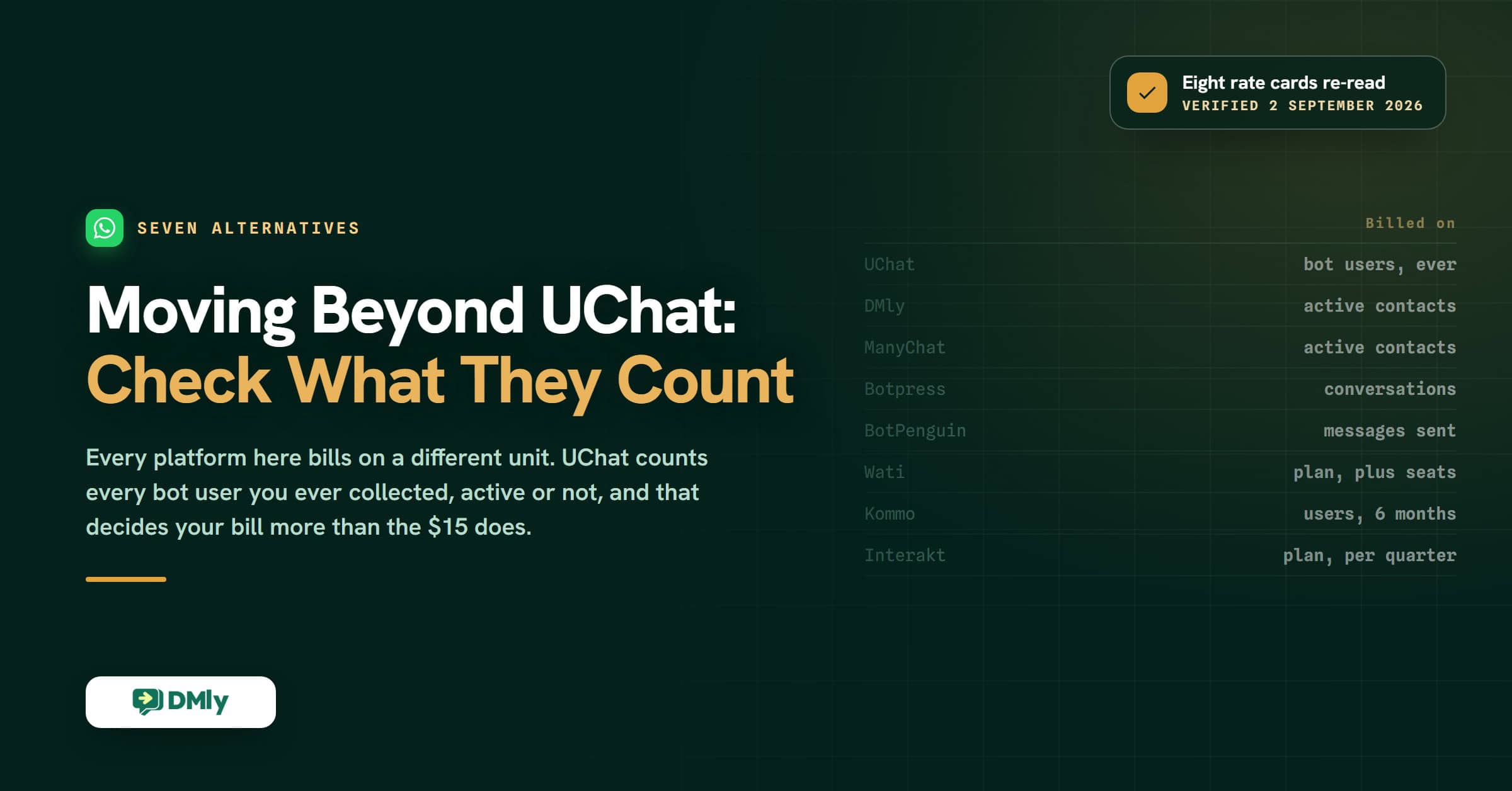
Every price below was read off the vendor’s own pricing page on 2 September 2026, ours included. That turned out to matter: seven of the eight rate cards on this page were wrong or out of date, two of them by more than double, and UChat’s own was the one that had not moved.
What Is UChat?
UChat is a no-code chatbot builder that lets one bot answer on many channels at once. You drag steps around a visual canvas, connect them to conditions and actions, and publish to WhatsApp, Facebook Messenger, Instagram, Telegram, your website and a good many others, without touching code.
It is built for small businesses, agencies and marketers who want to automate conversations themselves rather than brief a developer. The Partner plan takes that further and lets an agency resell the whole platform under its own brand.
The UChat Power vs. Simplicity Test
UChat packs a lot into a low price. The flip side is that more features do not always make a better week for the person who has to run them.
Rather than list what UChat offers, here are the five questions owners actually ask before committing to a chatbot platform, answered one at a time.
How Easy Is It to Build a Chatbot?
Easier than coding one, harder than the marketing suggests. The drag-and-drop builder lets you lay out a conversation, branch it on what the customer says, and fire actions along the way without technical knowledge.
The cost of that flexibility is choice. There are a lot of steps, a lot of settings and a lot of ways to build the same flow, so the first afternoon goes on learning the vocabulary rather than shipping something. If you have built automations before, that is fine. If this is your first bot, expect a slower start than a template-led tool would give you.
How Good Is Its Omnichannel Support?
This is UChat’s strongest area, and the reason most people shortlist it. One bot can be deployed across WhatsApp, Facebook Messenger, Instagram, Telegram, Slack, your website widget and a long tail of others, so you are not rebuilding the same conversation once per platform.
Read the plan card carefully, though. UChat sells you bots, and the Free and Pro plans each include exactly one omni-channel bot, with a second costing $10 a month on Pro. For most single-location businesses one bot is genuinely enough, because that one bot already covers every channel. For an agency running several clients, or a business that wants its retail bot and its wholesale bot kept apart, the count starts to matter.
Can You Train Its AI on Your Own Material?
Yes, and this is the claim most UChat comparisons get wrong, including an earlier version of this one.
UChat’s AI Hub includes a Knowledge Base. You create a vector store, upload files such as PDFs and text documents, and then point either an AI agent or a Flow Builder step at it so the bot answers from your material instead of guessing. UChat published the walkthrough for it on 25 September 2025, and knowledge bases are shared across every bot in the workspace, so you build the collection once.
What is worth knowing is the prerequisite. UChat’s own documentation opens those instructions by telling you to connect your OpenAI API key first, at Workspace, Integrations, Artificial Intelligence, OpenAI. The knowledge base runs on your key, which means the AI half of the bill arrives from OpenAI rather than being covered by the $15, and it means you need an OpenAI account open before the feature does anything at all.
The second thing to check is what you can feed it. The documented route is files you upload into a vector store. If your prices and policies live on your website and change often, keeping the knowledge base current means re-uploading the file rather than pointing the bot at a URL and letting it re-read.
Does It Work Well for Marketing Automation?
For broadcasts and straightforward campaigns, yes. UChat gives you broadcast messaging, workflow automation, segmentation and campaign tools, which covers lead capture and the usual promotional sends.
Where it thins out is lifecycle work: the campaigns that fire off a purchase, a lapse, a booking or a loyalty balance rather than off a keyword. If your marketing plan is mostly “send the right message when something happens in the business”, you will end up wiring that logic together yourself.
Is It Beginner-Friendly?
That depends on which kind of impatient you are. If you enjoy building things and want room to make the bot behave exactly as you pictured it, UChat rewards the time you put in.
If you want something live before the end of the day, the learning curve will feel steep next to tools that hand you a working flow and ask you to edit it. Neither preference is wrong. It is worth being honest with yourself about which one you are before you start, because it predicts whether you will still be using the tool in three months.
Key Features of UChat
- Smart AI agents. Build bots that answer questions, hold a conversation and call an AI model such as OpenAI to phrase replies naturally rather than reading from a script.
- No-code visual flow builder. Lay out conversation paths, conditions, triggers and actions on a canvas, with no code anywhere in the process.
- Omni-channel deployment. One bot answering on WhatsApp, Facebook Messenger, Instagram, Telegram, Slack, your website widget and a long list of others.
- Live chat handoff. Pull a conversation away from the bot and give it to a person when the bot is out of its depth.
- Broadcast messaging. Send announcements, updates and offers to groups of contacts across the channels you have connected.
- AI Hub knowledge base. Upload your own files into a vector store and let the AI agent answer from them. It needs your own OpenAI key, and it is shared across every bot in the workspace.
- Integrations. Direct connections plus Zapier, so customer data can move between UChat and the tools you already run.
- Workflow automation. Trigger actions off customer replies, events or conditions you define.
- Real-time voice AI. Voice-based experiences alongside the text ones.
- Built-in contact management. Contacts, conversation history, tags and custom attributes in one dashboard.
UChat Pricing, Verified 2 September 2026
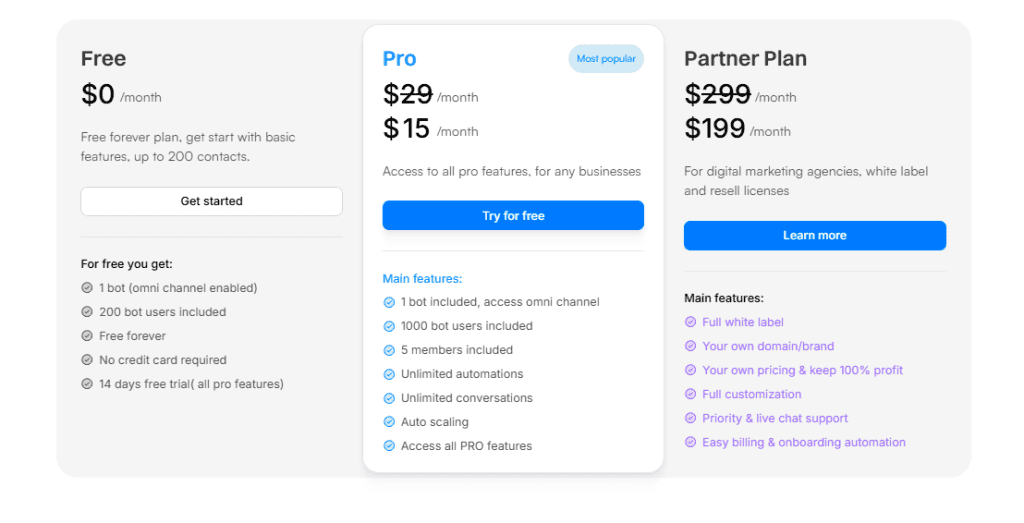
UChat publishes three plans, and both paid tiers currently show a promotional price struck through from a higher list rate. These are the figures on UChat’s own pricing page on 2 September 2026.
Free: $0 a Month
The free tier is unusually generous for this category, and it is free forever rather than a trial that lapses into nothing.
- 1 omni-channel bot
- Up to 200 bot users
- 1 team member
- No credit card required
- 14 days of full access to every Pro feature when you start
Pro: $15 a Month, Down From $29
Pro is the plan most small businesses land on, and it unlocks the whole feature set rather than a subset of it.
- 1 bot, omni-channel enabled
- Up to 1,000 bot users
- 5 team members
- Unlimited automations and unlimited conversations
- Auto scaling
- Access to every Pro feature
Partner: $199 a Month, Down From $299
Partner is not really an end-user plan. It is a reseller licence for agencies who want to sell chatbot services under their own name.
- Full white-label platform with your own domain and branding
- 5 bots and up to 10,000 bot users
- Set your own prices and keep 100% of the revenue
- Priority and live chat support, with a 4-hour response target against 24 hours on Pro
- Automated client billing and onboarding
What the $15 Does Not Include
The headline price is real. The meter underneath it is the part worth reading before you commit. UChat charges by bot users, and its own FAQ is explicit about what that counts: bot users are the people who engage with your bot, “and we count all of them, not just active ones.”
That is a different basis from the active-contact counts most messaging platforms use, and it only ever moves one way. A shop that gathered 3,000 people over two years is billed for 3,000, whether they messaged last week or eighteen months ago.
- Extra 1,000 bot users, below 5,000: $5 a month, on Pro and on Partner.
- Extra 5,000 bot users, above 5,000: $20 a month.
- Extra bot: $10 a month on Pro, $5 on Partner.
- Extra team member: $10 a month on Pro, $5 on Partner.
None of that makes UChat expensive. On Pro, a list of 5,000 contacts works out at $15 plus $20 in top-ups, which is still cheap for what you get. It does mean the number on the pricing page is a starting point rather than a bill, and it means the growth you are hoping for is the thing that moves it.
One cost sits outside every plan on this page, whichever tool you pick. Meta bills you for WhatsApp separately, per message, and from 1 October 2026 Meta starts charging for two categories it does not charge for today: service messages, and utility templates sent inside an open 24-hour window. Service messages come with 1,000 free a month per business phone number, resetting each month with no rollover, so Meta only bills from the 1,001st, and there are no volume discounts on them. Utility and authentication templates keep their volume discounts but get no free allowance, so for most small businesses the utility templates are the part that actually lands on the bill. The free 72-hour window opened by a click-to-WhatsApp ad is unchanged. Our guide to the 1 October 2026 WhatsApp pricing change works through what it means for a normal month, and the WhatsApp pricing calculator puts a number on it for your own volumes.
Top UChat Alternatives to Consider
Seven platforms worth putting next to UChat, with every entry price read off the vendor’s own pricing page on 2 September 2026. Prices in this category move constantly, so the date matters as much as the figure. Note what each price includes as much as the number itself, because the units are not the same.
| Platform | Best for | Entry price | What that price actually is |
|---|---|---|---|
| UChat | Cheap multi-channel bot building | Free, then $15/month | One bot, 1,000 bot users, 5 members. Bot users counted whether active or not, $5 per extra 1,000 |
| DMly | Running the whole customer relationship, not just the bot | $29/month | Billed yearly, $39 monthly. 3 seats, 3,000 active contacts, 10,000 broadcast messages, bookings and invoices included |
| ManyChat | Instagram and Facebook marketing | Free, then $17/month | Repriced 2 March 2026. Free is now 25 contacts; Pro is $39/month for 2,500 contacts, $29 billed yearly |
| Botpress | AI agents with real engineering behind them | Free, then $150/month | Billed annually. 250 conversations a month, then $65 per extra 100. Free tier is 100 conversations |
| BotPenguin | Budget AI chatbots with knowledge-base training built in | Free, then $29/month | 3,000 messages, 5 chatbots, 5 team members. The free tier already trains AI on your website, PDFs and FAQs |
| Wati | WhatsApp-only teams | $39/month | Billed annually. One channel, 3 users, and no fourth seat purchasable on that tier at any price |
| Kommo | Sales pipelines run through chat | $25/user/month | No monthly option: six months minimum, so $150 per user up front. 1 WhatsApp number and 1 Instagram account |
| Interakt | WhatsApp and Instagram for ecommerce | $69/quarter | Quarterly billing, 8% off the monthly rate. Starter is one channel of your choice, not both |
If you want a wider field than seven, our roundup of the 20 best WhatsApp automation tools covers the same ground across the whole category, with every rate card re-checked on the same date.
1. DMly
DMly is a customer engagement platform rather than a chatbot builder, and that difference is the whole reason to compare the two. It handles the conversation, but it also handles what the conversation is for: the booking, the invoice, the follow-up, the review request and the record of who the customer is.
Where UChat gives you room to build a bot exactly as you want it, DMly gives you the surrounding business already built. Which one is better depends entirely on whether the bot is the job or a part of it.
Key Features
Omnichannel Inbox

DMly brings eight channels into one shared inbox: WhatsApp, Instagram, Facebook Messenger, Telegram, SMS, TikTok, the live chat widget on your website, and Google Business Profile messages and reviews. Your team answers all of them from the same screen, with the full history attached to the contact rather than scattered across apps.
Two limits are worth knowing before you plan around it: broadcasts are not available on live chat or TikTok, and Facebook Messenger and Instagram have no message templates, so they work to their own reply windows instead. Our guide to running an omnichannel inbox covers how routing and ownership work once more than two people are answering.
AI Agents
DMly’s AI agents do more than phrase replies. They carry a set of tools you switch on individually, so the agent can act on the conversation rather than just talk through it:
- Qualify a lead and move it along your pipeline
- Read and write contact details, tags, notes and custom fields
- Answer product, price and policy questions from your own uploaded material
- Check real availability, then book, reschedule or cancel an appointment or a class
- Assign the chat round-robin, or hand it to a person and stand down
The handover tool is the one to leave switched on. It is the escape hatch for anything the AI should not be answering, and every AI template ships with it selected.
AI Knowledge, and How It Differs From UChat’s
Both platforms let you train the AI on your own material, so the honest comparison is about the mechanics rather than the presence of the feature.
DMly’s version lives at Settings, AI Knowledge, and takes four kinds of source: files, web pages, FAQs and pasted text. It can bulk-import a whole site rather than asking you to upload pages one at a time, it has a test box so you can ask a question and see what the AI would retrieve, and it shows you which automations are using each collection. It also runs on DMly’s built-in AI, so you do not need your own provider key to use it, though you can connect one if your plan allows.
Two honest caveats. The AI Agent is a plan feature, so a plan without it leaves the tab visible but locked. And if an AI Reply step is set to Claude or DeepSeek, it cannot search documents at all: use OpenAI or Gemini for any step that needs to read your material.
Advanced Workflow Automation

The flow builder works the way UChat’s does, on a canvas with triggers, conditions, actions and waits. The difference is what the conditions can see. Because bookings, orders, invoices and loyalty balances live in the same product, a DMly flow can branch on whether someone actually bought, not only on what they typed.
WhatsApp Campaign Management
Campaigns run through the official WhatsApp Business API, which means approved templates, opt-out handling and delivery reporting rather than a bulk-send workaround. You can schedule a broadcast, personalise it, aim it at a saved segment, follow it with an automated sequence and read the results afterwards.
Customer Segmentation
Segments are saved questions rather than saved lists, so they rebuild themselves every time you send. You can filter on pipeline stage, tags, and how long someone has been quiet, then add rule groups on lifecycle stage, source, custom fields, birthday month, which channel they are reachable on, marketing opt-in, total spend, last purchase, order count, loyalty points or credit balance.
That is a longer list than most chatbot tools carry, because most of those fields come from the commerce side of the product rather than from the conversation.
CRM and Ecommerce Integrations
DMly connects to Shopify and WooCommerce for commerce, HubSpot and Mailchimp for CRM and email, Google Sheets, Google Calendar, Zoom and Slack for the day to day, and Stripe, PayPal, Paystack, Razorpay, MyFatoorah and Mercado Pago for payments. Zapier, n8n, webhooks and a REST API cover everything else.
Stated plainly, because it is the kind of thing worth knowing before you buy rather than after: there is no native Salesforce connector. If Salesforce is your system of record you would bridge it through Zapier, n8n or the API rather than a first-party integration.
Pricing
Three plans, verified against DMly’s own pricing page on 2 September 2026. The figures below are the yearly-billed rates, which is the view the pricing page opens on; paying month to month costs more.
- Starter, $29 a month billed yearly ($39 monthly). 3 team seats, 1 profile per channel, 3,000 active contacts, 10,000 broadcast or template messages, 500 AI replies a month, 10 active bots per profile.
- Growth, $65 a month billed yearly ($79 monthly). 6 seats, 3 profiles per channel, 10,000 active contacts, 50,000 broadcast messages, 5,000 AI replies, unlimited active bots.
- Premium, $149 a month billed yearly ($199 monthly). 15 seats, 5 profiles per channel, unlimited active contacts, 300,000 broadcast messages, 20,000 AI replies, or unlimited on your own AI keys.
Every plan carries the shared inbox, the automation builder, the CRM, bookings, invoices and payments, reputation and Google reviews, custom domain and branding, and API, webhook and MCP access. What changes between tiers is capacity, not which product you get. Extra seats are $10 a month, an extra profile set $15, and extra contacts $15 per thousand, so outgrowing one allowance does not force a whole plan jump.
Meta’s per-message WhatsApp charges are billed to you by Meta at Meta’s own rates, and DMly adds nothing on top of them.
Why DMly Is a Strong UChat Alternative
UChat is an excellent answer to “I want to build bots across a lot of channels, cheaply”. If that is the sentence you would use to describe your problem, it is hard to beat at $15.
DMly answers a different sentence: “I want the conversation to end in a booking, an invoice or a repeat visit, and I want to stop retyping the same information into three systems.” It costs about twice as much at the entry tier, and what you buy for the difference is the bookings calendar, the invoicing, the CRM, the review handling and the reporting that a chatbot builder leaves you to source elsewhere.
If you would end up bolting three subscriptions onto UChat to get there, the comparison is not $15 against $29.
2. ManyChat
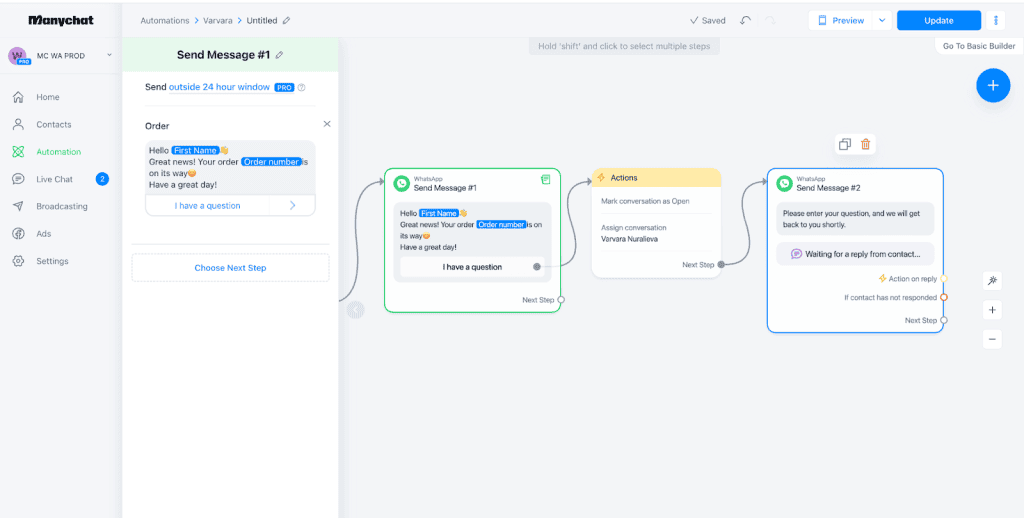
ManyChat is the default choice for businesses whose customers arrive through Instagram and Facebook. It started on Messenger, grew into Instagram, WhatsApp, SMS and email, and it is unusually good at the specific job of turning a comment or a story reply into a conversation.
Next to UChat it is narrower and friendlier. Fewer channels, fewer settings, and a much shorter path from signing up to something that works.
Key Features
- Visual flow builder for chat automation without code
- Messenger, Instagram and WhatsApp automation
- Keyword and trigger-based responses
- Comment-to-DM automation, which is what it is best known for
- Broadcast campaigns and drip sequences
- Shopify and ecommerce integrations
- AI features through OpenAI and external services
Pros
- The easiest tool here to get started with
- Best-in-class Instagram and Facebook automation
- Large template library and a very active community
- Plenty of training material, most of it free
Cons
- Supports far fewer channels than UChat
- Built for marketing rather than customer support, with no real ticketing
- The free plan is now almost a demo: 25 contacts, down from 1,000
- Costs rise with your contact count, and the entry price more than doubled in 2026
Pricing
ManyChat repriced on 2 March 2026 and this is the change most comparison pages have not caught up with. The old $15 Pro plan is gone, replaced by a five-tier ladder: Free at $0 for 25 contacts, Essential at $17 a month, Pro at $39 a month for 2,500 active contacts or $29 billed yearly, Business at $99 and Advanced at $199.
Accounts opened before that date can still be on the old plan, so if you already pay $15 you are not reading the wrong page. One note on sourcing: ManyChat’s pricing pages block automated fetching, so this is the one rate card here not read directly off the vendor’s own site. It is reported consistently by ManyChat’s help centre and by several independent 2026 reviews, and it is dated accordingly. Our full ManyChat review goes through the tiers in detail.
Why It’s a Good UChat Alternative
If your customers find you on Instagram, ManyChat does that one job better than UChat does. If UChat feels like more platform than you need and you have no use for a dozen channels, the trade is a simpler product for a higher price, which is a reasonable trade to make.
3. Botpress
Botpress is the most capable AI platform here and, since it repriced, the most expensive. It sits between no-code automation and developer-grade customisation, which makes it a common choice for larger organisations and technical teams building genuine AI agents rather than decision-tree bots.
Key Features
- Visual conversation builder with advanced workflow logic
- AI agents powered by large language models
- Knowledge base training on websites, PDFs and documents
- Support for multiple messaging channels
- Custom API and backend integrations
- Live chat handoff and a customer-facing help centre
Pros
- The strongest AI capability in this comparison
- Knowledge base training works out of the box, on its own model spend
- Genuinely customisable, with real API depth
- Priced by conversation rather than by seat, which suits small teams handling high volume
Cons
- Steeper learning curve than UChat, and better suited to technical users
- Marketing automation is thin: this is a support and agent tool
- Ten times UChat’s entry price, and the conversation meter is unforgiving
Pricing
Botpress prices by conversation now, and the figures are a long way from the free-tool reputation it carries. Read off its own pricing page on 2 September 2026:
- Free: $0, 100 conversations, 3 seats, 3 AI agents, no top-ups or overages
- Plus: $150 a month billed annually, 250 conversations a month, then packs of 100 at $65. Includes $25 of AI usage
- Team: $750 a month billed annually, 1,500 conversations, then packs of 100 at $50. Unlimited seats
- Enterprise: custom
Read that against UChat and the shape of the decision changes: 250 conversations a month is a quiet week for a busy shop. Our Botpress review works through where the conversation meter starts to hurt.
Why It’s a Good UChat Alternative
If you are building an AI assistant that has to answer accurately from a large body of your own documentation, and you have someone technical to build it, Botpress is the better tool. What it is not is a cheaper or simpler UChat, and it is worth being clear about that before a trial.
4. Wati

Wati is built entirely around the official WhatsApp Business API, and it does that one channel properly. Shared team inbox, no-code chatbot builder, broadcast campaigns, click-to-WhatsApp ads and a mature integration ecosystem, all pointed at the same place.
Key Features
- Shared team inbox with assignment and routing
- No-code chatbot builder
- WhatsApp broadcast campaigns
- Automation workflows and customer segmentation
- Shopify and CRM integrations, with Salesforce on the Business tier
- Click-to-WhatsApp ads integration
Pros
- Purpose-built for WhatsApp, with none of the compromises of a general tool
- Quick to set up and easy for a non-technical team to run
- Strong broadcast and campaign tooling
- Mature integrations, including Salesforce at the top tier
Cons
- One channel. If your customers also use Instagram, this is not the tool
- The entry plan connects one channel and includes three users, and will not sell you a fourth
- Costs climb with message volume
Pricing
Read off Wati’s own pricing page on 2 September 2026, on the annual view it opens with. Growth is $39 a month billed annually with one channel and three users, and no additional seats are purchasable on that tier at any price. Pro is $79 with five users and extra seats at $24 each. Business is $199 with five users and extra seats at $59. Monthly billing costs up to about 25% more on every tier.
The seat rule is the part that catches people out: a four-person team cannot stay on Growth, whatever its message volume. We work through that and the rest of the comparison in our DMly versus Wati head-to-head.
Why It’s a Good UChat Alternative
If essentially all of your customer conversation happens on WhatsApp, Wati removes the complexity that comes with managing several channels and gives you a tighter product for that one. If it does not, you are paying more than UChat asks for less coverage than UChat gives.
5. BotPenguin
BotPenguin is the most direct like-for-like alternative to UChat on this list. Same no-code approach, similar channels, similar audience, and a free tier that already includes AI training on your own website, PDFs and FAQs without asking for an OpenAI key.
Key Features
- No-code drag-and-drop chatbot builder
- AI chatbots trained on documents and website content
- Website, WhatsApp, Facebook, Instagram and Telegram deployment
- WhatsApp marketing and broadcast campaigns
- Unified team inbox and live chat handoff
- CRM and payment gateway integrations
Pros
- The free plan trains AI on your website, PDFs and FAQs, with 1,000 AI-answered messages
- Gentler learning curve than UChat
- Covers the main messaging channels a small business uses
- Good balance of marketing and support features
Cons
- Billed on messages sent, which is a tighter meter than it first looks
- Smaller ecosystem than more established competitors
- Nearly twice UChat’s entry price, and the jump to the next tier is steep
Pricing
Read off BotPenguin’s own pricing page on 2 September 2026, on the omnichannel tab with monthly billing selected. Baby is free forever with 1,000 messages, one chatbot and AI training included. Little is $29 a month with 3,000 messages, five chatbots and five team members. King is $99 with 12,000 messages and unlimited chatbots and AI agents. Emperor starts at $990. Annual billing gives you two months free.
Why It’s a Good UChat Alternative
Pick BotPenguin over UChat if you want the same style of tool but want the AI to read your website without setting up an OpenAI account first. Pick UChat if the price gap matters more than the setup, and you are comfortable adding your own key.
6. Kommo
Kommo is a sales CRM that happens to live inside your messaging apps, rather than a chatbot platform with a CRM bolted on. If your problem is that leads arrive on WhatsApp and then disappear into nobody’s follow-up list, that framing is the right one.
Key Features
- Messaging-based CRM with visual sales pipelines
- Shared omnichannel inbox
- Sales automation workflows and no-code bots
- AI agents, AI reply suggestions and AI summaries
- WhatsApp, Instagram, Messenger, Telegram and email
- Sales analytics and reporting
Pros
- The best pipeline management in this comparison
- Genuinely strong CRM rather than a contact list with tags
- Good automation for lead nurturing and follow-up
- Clean, modern interface that sales people will actually use
Cons
- Priced per user, so a team of five is a very different bill from a team of one
- No monthly billing at all: six months is the shortest commitment
- The entry plan includes one WhatsApp number and one Instagram account
- Less flexible for chatbot building than UChat, and the CRM is wasted on some businesses
Pricing
Read off Kommo’s own pricing page on 2 September 2026. Base is $25 per user per month on the shortest term, with 2,500 leads and 750 AI credits per user. Advanced is $35 per user, and adds pipeline automation, broadcasting and no-code bots. Pro is $45 per user, and adds booking pages, dynamic segments and up to 50 AI agents.
The detail that matters more than the rate: Kommo does not sell a monthly plan. The shortest term is six months paid up front, so Base is $150 per user before you have sent a message. For a three-person sales team that is $450 to start. Our Kommo review covers what that buys and where it stops.
Why It’s a Good UChat Alternative
Choose Kommo when the goal is converting conversations into sales and you need to see where every deal stands. Choose UChat when the goal is automating the conversation itself and a pipeline view would go unused.
7. Interakt

Interakt combines WhatsApp and Instagram messaging with a light CRM, and it is aimed squarely at ecommerce. Order updates, catalogues, abandoned-cart flows and campaigns are all first-class rather than bolted on, which is why it is common among online sellers.
Key Features
- Shared WhatsApp and Instagram team inbox
- Built-in CRM and customer segmentation
- Broadcast campaigns and workflow automation
- Catalogues and native payments from the Growth plan up
- Shopify and ecommerce integrations
- Order notifications and customer support tools
Pros
- Easy to learn, with a short setup
- Unlimited agents on every plan, which is rare in this category
- Unlimited contacts, so your list growing does not move the bill
- Strong ecommerce integrations
Cons
- Two channels only, against UChat’s long list
- The entry plan gives you one of those two channels, not both
- Chatbot flows only get branching, API calls and conditions on the Advanced plan
- Billed by the quarter, so there is no cheap month to try it properly
Pricing
Read off Interakt’s own pricing page on 2 September 2026, which opens on the quarterly view at 8% off. Starter is $69 a quarter and lets you pick one channel, WhatsApp or Instagram. Growth is $149 a quarter and includes both, plus FAQ automations, catalogues, native payments and public APIs. Advanced is $189 a quarter and adds branching chatbot flows, API calls, chat auto-assignment and advanced webhooks. Enterprise is on request, and WhatsApp AI Agents are a $74.99 add-on on Growth and Advanced.
Message costs are charged separately per template type. Our Interakt review looks at what happens to the bill as volume grows.
Why It’s a Good UChat Alternative
If you sell online and your customers are on WhatsApp, Interakt gives you the commerce pieces UChat leaves you to build. If you need more than two channels, it does not compete.
How to Choose the Right UChat Alternative
There is no perfect chatbot platform. The right choice depends on how your business talks to customers today, and on what you expect that to look like in a year.
Start With the Channels You Actually Use
If nearly everything happens on WhatsApp, a WhatsApp-first platform like Wati or Interakt will feel tighter than a general one. If your customers also message you on Instagram, Messenger, Telegram or your website, you want one place those all land.
Changing platform later because you added a channel is expensive in a way that does not show up on any pricing page.
Work Out Which Meter You Are On
This is the single most useful thing on this page, because every platform here bills on a different unit and the units are not comparable:
- UChat bills on bot users, counting everyone who ever engaged
- DMly bills on active contacts, counting people engaged in the last 30 days
- ManyChat bills on active contacts
- Botpress bills on conversations
- BotPenguin bills on messages sent
- Kommo bills per user, for six months at a time
- Wati and Interakt bill per plan, with message charges on top
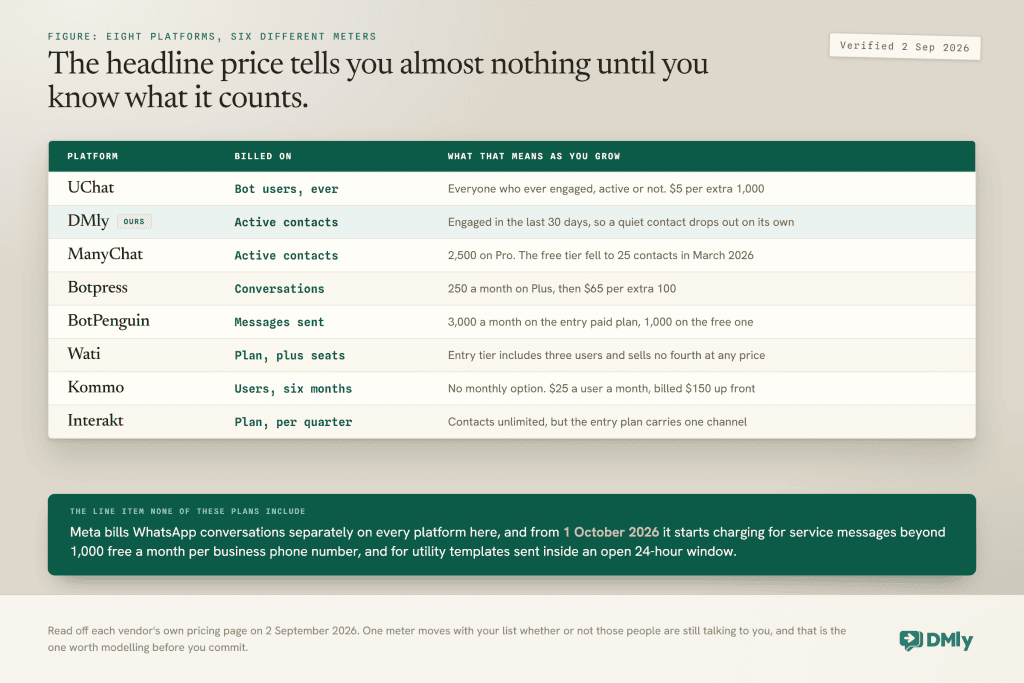
The cheapest headline rate is very often not the cheapest bill, and which one you end up on depends on facts about your own list rather than on the feature comparison.
Decide How Important AI Really Is
Every tool here says it has AI, and they do not mean the same thing. Some only generate replies. Others can be trained on your website, help centre, PDFs or internal documents so the answers are actually yours.
Ask two specific questions of any platform you shortlist. What can I feed it, files only or web pages too? And whose model spend pays for it, yours or theirs? Those two answers separate the platforms far more sharply than the word “AI” on a feature list does.
Match the Platform to the Job
If your priority is marketing and lead generation, look for campaign management and segmentation. If it is customer support, look for live chat, ticketing and AI that can read your policies. If it is sales, look for a pipeline and a follow-up engine. Very few tools are genuinely good at all three, and the ones that claim to be are worth testing hardest.
Think About Ease of Use Honestly
A platform with hundreds of features is not automatically the better buy. If your team needs to be live this week, an interface they can read saves hours of training and prevents a category of mistake. If you have someone technical who enjoys this work, flexibility is worth the extra week.
Do Not Overlook Support
Check the documented response time, not the promise on the home page. UChat publishes 48 hours on Free, 24 on Pro and 4 on Partner, which is a fair and unusually clear way to state it. Responsive support matters most on the day an automation misfires in front of customers, which is exactly the day you cannot wait 48 hours.
Final Verdict
UChat has earned its reputation. It combines wide channel coverage, a real AI hub with knowledge base training, visual automation and flexible integrations at a price most small businesses can absorb without a conversation about it. If your goal is building and deploying bots across many channels, it is genuinely hard to beat on value.
The reasons to look elsewhere are specific rather than general. The learning curve is real. The AI wants your own OpenAI key. The bot-user meter counts people who stopped talking to you a year ago. And nothing in the product handles what happens after the conversation: the booking, the invoice, the follow-up, the review.
Of the seven here, DMly is the strongest all-round alternative, because it is the one that treats the conversation as the start of the job rather than the whole of it. Wati and Interakt are better if you have decided WhatsApp is your only channel. Botpress is better if you are building a serious AI agent and have someone to build it. ManyChat is better on Instagram. BotPenguin is the closest like-for-like swap. Kommo is the right answer if what you actually needed was a CRM.
Whichever way you go, take your own last month of numbers and price the shortlist against them before you commit, and check the vendor’s own page rather than a comparison table. Seven of the eight rate cards checked for this update had moved.
FAQs
Is UChat free?
Yes. UChat has a free forever plan with one omni-channel bot, up to 200 bot users and one team member, and it does not ask for a card. New accounts also get 14 days of full access to every Pro feature, so you can see the whole product before deciding.
How much does UChat cost after the free plan?
Pro is $15 a month, shown as a promotional price down from $29, and it includes one bot, 1,000 bot users and five team members. The Partner plan for agencies is $199 a month, down from $299. Beyond that you are into add-ons: $5 per extra 1,000 bot users below 5,000, $20 per extra 5,000 above it, and $10 a month for an extra bot or an extra team member on Pro. Verified 2 September 2026.
Can UChat train its AI on my own documents?
Yes. UChat’s AI Hub has a Knowledge Base: you create a vector store, upload files such as PDFs and text documents, and point an AI agent or a Flow Builder step at it. The knowledge base is shared across every bot in the workspace. The prerequisite is your own OpenAI API key, connected under Workspace, Integrations, Artificial Intelligence, so the model spend is billed to you by OpenAI rather than covered by your UChat plan.
What is the best UChat alternative?
It depends on what you are trying to finish, not just automate. For a complete customer engagement platform that also handles bookings, invoices, reviews and a CRM, DMly is the strongest option here. For Instagram-led marketing, ManyChat. For WhatsApp only, Wati or Interakt. For advanced AI agents, Botpress. For a sales pipeline, Kommo. For the closest like-for-like swap, BotPenguin.
Is UChat good for WhatsApp automation?
Yes. UChat supports WhatsApp through the official WhatsApp Business API and lets you build chatbots, automate conversations, send broadcasts and run workflows on it, alongside a dozen other channels. Remember that Meta’s per-message charges are separate from your UChat subscription, on any platform, and that from 1 October 2026 Meta also charges for service messages beyond 1,000 free a month per business phone number, and for utility templates sent inside an open 24-hour window.
Is DMly better than UChat?
They are built for different jobs. UChat is an excellent flexible chatbot builder with very wide channel support at a low price. DMly covers the whole customer journey: the same conversations, plus bookings, invoices and payments, a CRM, Google reviews and campaign reporting in one place. If you only need bots, UChat is better value. If you would otherwise buy three tools, DMly usually costs less in total.
Which UChat alternative is cheapest for a growing contact list?
It depends on which meter you are on. UChat counts every bot user you ever collected, so a long-lived list keeps costing more. DMly counts contacts engaged in the last 30 days, so a quiet contact drops out of the count on its own. Interakt does not meter contacts at all but sells you one channel at the entry tier. Price all three against your own numbers rather than against the headline rate.
Writing about WhatsApp automation, bookings and growth for local business.
Turn WhatsApp into your busiest channel.
Start free and run message, bookings, payments and reviews in one place.
