
How to Build a WhatsApp AI Sales Agent That Qualifies Leads
Read a transcript from a chatbot that has just qualified somebody well and it is a genuinely nice thing. It answered the price question, asked what they were after, found out they wanted it before the end of the month, checked they were in the right part of town, and said a colleague would call. Warm, brief, no interrogation. Everybody would be pleased with it.
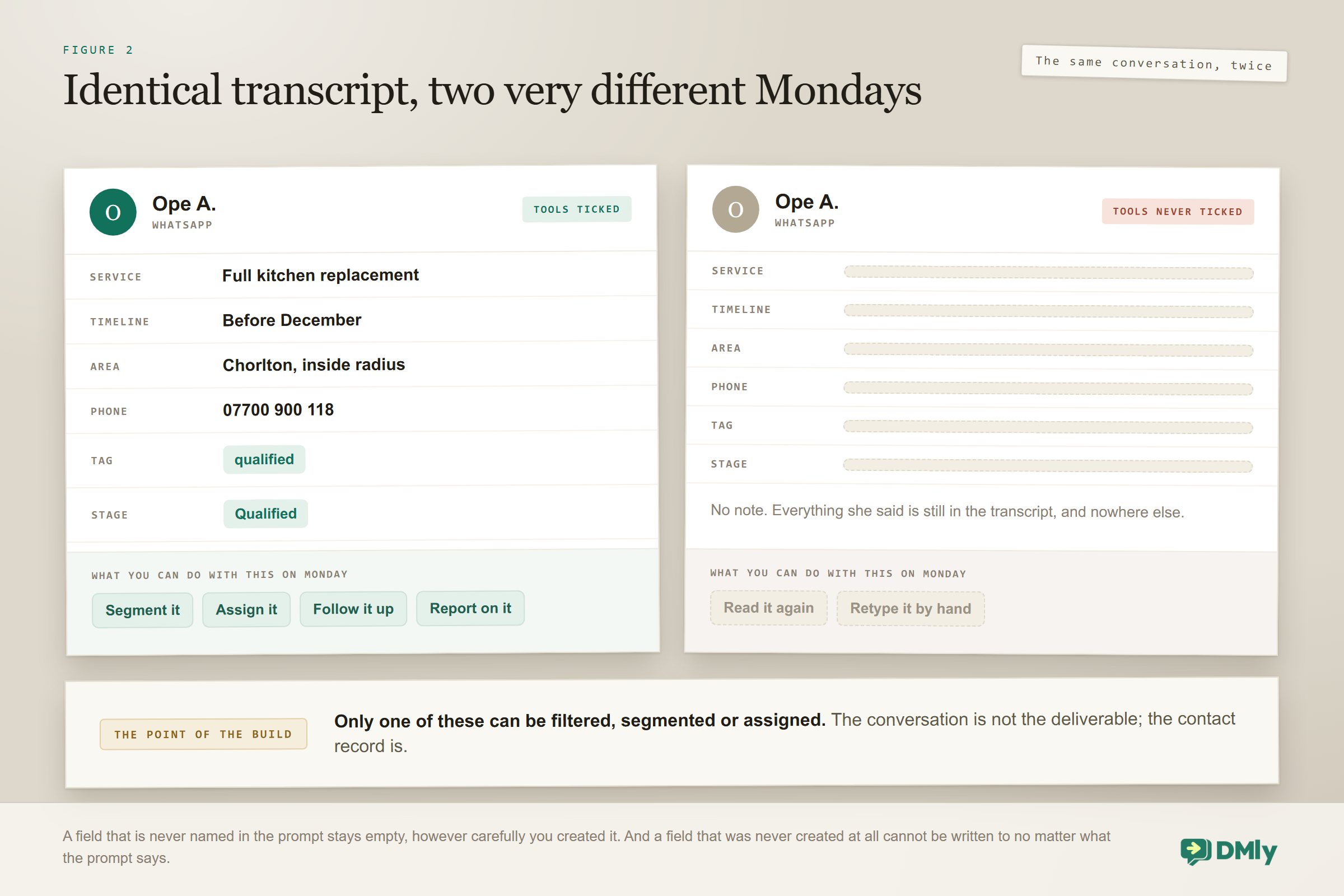
Now open your contacts list and look for that person. No tags. No stage. No fields filled in. Nothing to filter by, nothing to segment on, and nothing on Monday morning to tell your colleague which six of the forty enquiries are worth a phone call. The conversation went perfectly and left nothing behind, because a WhatsApp AI sales agent only writes things down when you have told it where to put them.
That gap is what this build is about. A WhatsApp AI sales agent earns its place not by chatting well but by turning a conversation into structured facts on a contact record, and then routing only the leads that deserve a person. This guide covers the four things worth learning, where the answers have to land, the two routes DMly gives you (one of which has no AI in it at all), and the three ways one of these quietly does nothing while looking fine.
If you are still deciding whether an assistant belongs on your WhatsApp, our guide to WhatsApp AI chatbots for small businesses makes that case. If your problem is getting enquiries rather than sorting them, the WhatsApp lead generation guide is the one you want. This page is about what happens after the message arrives.
What Qualifying Actually Means for a Small Business
Qualifying means learning just enough to know whether this person is worth a human’s time, and how urgently. Forget the enterprise frameworks with acronyms. A salon, a clinic or a builder needs four things, and usually only four.
- What they actually want. Not the category, the specific thing. “A kitchen” and “a splashback replacement” are different businesses.
- When. This week and next spring are different leads, and the difference decides who calls them and how fast.
- Whether you can serve them at all. Location, budget range, or whatever your real constraint is. This is the kindest question to ask early, because the alternative is wasting their evening as well as your morning.
- How to reach them again. The single most valuable field, and the one most businesses forget to capture while the person is still typing.
An agent that learns those four and writes them down has done its job. Anything more starts to feel like a form, and forms are where WhatsApp conversations go to die.
There is an order to it that matters more than the questions themselves. Give before you ask. The pattern people resent is the bot that demands a name, a number and a postcode before it will tell you anything. An assistant that answers what a bathroom refit roughly costs and then asks where you are based reads as helpful, because it is being helpful. Same two facts, opposite reception.
Two Routes, and One of Them Has No AI In It
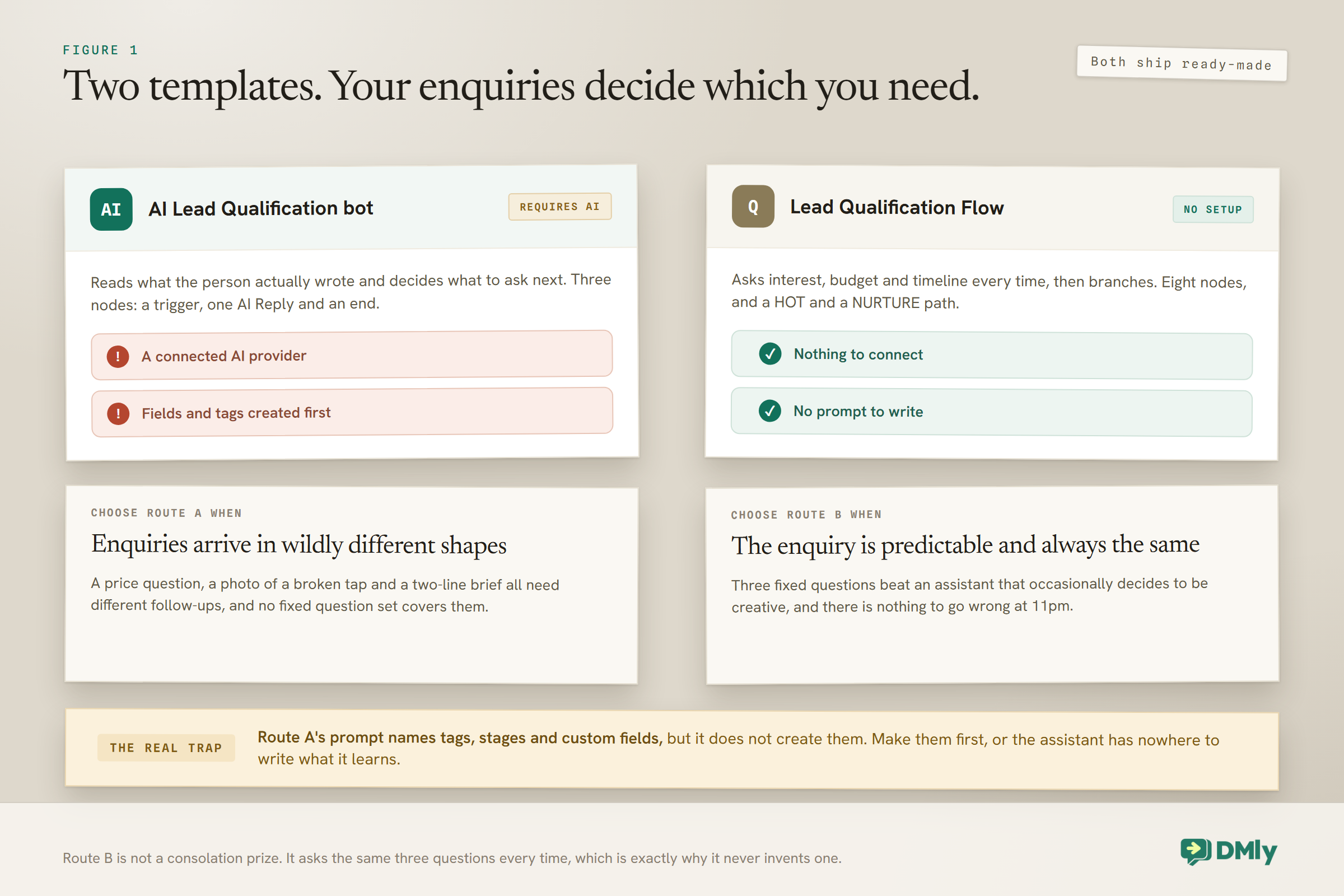
DMly ships two ready-made templates for this, and which one your WhatsApp AI sales agent starts from depends on the shape of your enquiries rather than on your ambition. Almost every guide to this only describes the first, which is unhelpful when the second is the better fit.
| AI Lead Qualification bot | Lead Qualification Flow | |
| How it asks | Reads the message and decides what to ask next | Three fixed questions, every time: interest, budget, timeline |
| Needs | A connected AI provider | Nothing at all |
| Channels | Every channel | Every channel |
| Shape | Three nodes: trigger, one AI Reply, end | Eight nodes, with a HOT and a NURTURE branch |
| Decides urgency by | Reading what the person wrote | Matching the timeline answer against a five-word keyword list |
| Best for | Enquiries that arrive in wildly different shapes | A predictable enquiry that always arrives in the same shape |
Route B is not a consolation prize. If your enquiries genuinely do arrive in the same shape, three fixed questions and a branch will out-perform an assistant that occasionally decides to be creative, and it has no provider to connect and nothing to go wrong at 11pm.
Where the Answers Have to Go
This is the part that separates a WhatsApp AI sales agent from a chatbot that has a nice conversation and forgets it. The answers have to land on the contact record as structured data, because a fact buried in a transcript is not a fact your business can filter, segment or act on next month.
The AI Lead Qualification template arrives with eight CRM tools already ticked, and they are exactly the eight this job needs:
| Tool | What it lets the assistant do |
| Get contact info | See who it is talking to before it asks anything, so a returning client is not treated as a stranger |
| Update phone number | Save a number the contact types into the chat, which is the field most often lost |
| Set custom fields | Store the answers: the service, the timeline, the postcode, the budget band |
| Add tags and Remove tags | Mark a lead hot, and clear a stale tag when they come back months later |
| Move CRM stage | Advance the contact down your pipeline without anyone retyping it |
| Add a note | Leave a human a two-second summary of what was asked |
| Hand over to a human | Stop the bot and pass the thread on. The escape hatch on any customer-facing agent |
Notice what is not in that list: none of the booking tools. This template is built to learn and route, not to put anything in your diary, which is a different agent with a different tool set.
Build the destinations before you write the prompt: Create the tags, the pipeline stages and the custom fields you are about to name in the prompt first. The assistant can only write where there is somewhere to write, and a prompt that confidently instructs it to set a “timeline” field that does not exist produces a conversation that goes perfectly and saves nothing. This is the single most common reason a qualification bot appears to work and leaves no trace.
Building the WhatsApp AI Sales Agent
Seven steps, and the first two are about somewhere to put things rather than about the assistant.
- Create the fields, tags and stages. Whatever your four questions are, make the destinations exist. Ten minutes now, and it is the difference between a bot that qualifies and a bot that chats.
- Connect an AI provider. Four are supported and that is the whole list: OpenAI, Claude, Google Gemini and DeepSeek.
- Install the AI Lead Qualification bot. Create a new automation on the channel you want it on; the picker opens already filtered to that channel. The bot carries a Popular badge in the Recommended section. It installs as a draft and drops you on the canvas. If the canvas is new to you, the no-code automation guide starts from zero.
- Decide whether it should answer every message. The trigger fires on every inbound message from a contact, not just their first. That is usually wrong for qualification, because somebody who already spoke to you last week does not need re-qualifying. The Only respond once per contact toggle on the trigger is the fix.
- Write the prompt. The next section has one. Name your four questions explicitly, and name the fields, tags and stages you created in step one.
- Confirm the tools and the fallback. Eight CRM tools arrive ticked. Leave them. Set the fallback message, which is what the contact receives if the assistant errors or returns nothing; the template ships with a reasonable one that promises a follow-up.
- Test, then publish. If you have a Playground tab, use it: it shows the reply plus a Tool calls trace of which tools the assistant actually reached for, running against demo data so no real contact is touched. It is the fastest way to catch a prompt that never bothers to hand over, or one that tags everybody as hot.
The Prompt That Turns a Chat Into a Record
A qualification prompt has one job the others do not: it has to name the places where answers go. Paste this and change every bracketed part.
Three instructions in there do most of the work. Answer first is what stops the agent reading as an interrogation. One question per message is what stops it reading as a form. And never re-ask something you already have is what makes Get contact info worth having, because the fastest way to annoy a returning customer is to ask them their postcode for the third time.
One thing worth understanding while you are in the prompt: ticking a tool makes it available, and the prompt is what makes the assistant reach for it. A field that is never named in the prompt is a field that stays empty, however carefully you created it.
What Good Qualifying Sounds Like
Notice how little of this reads like qualifying. Four facts are captured and the customer is answered twice before the first question arrives.
Six messages from the agent, four facts captured, one tag, one stage, one note, one handover. And the customer got a price in the first reply, which is the reason they answered anything at all.
The Fixed-Question Route, and Its Two Traps
The Lead Qualification Flow is eight nodes and no AI, and both of the things that go wrong with it are silent. If this is your route, these two paragraphs are the most useful thing on this page.
The flow asks interest, budget and timeline, saves each answer into a custom field of that name, then runs a condition on the timeline answer and splits into a HOT branch with an Assign Conversation step and a NURTURE branch that sends a follow-up.
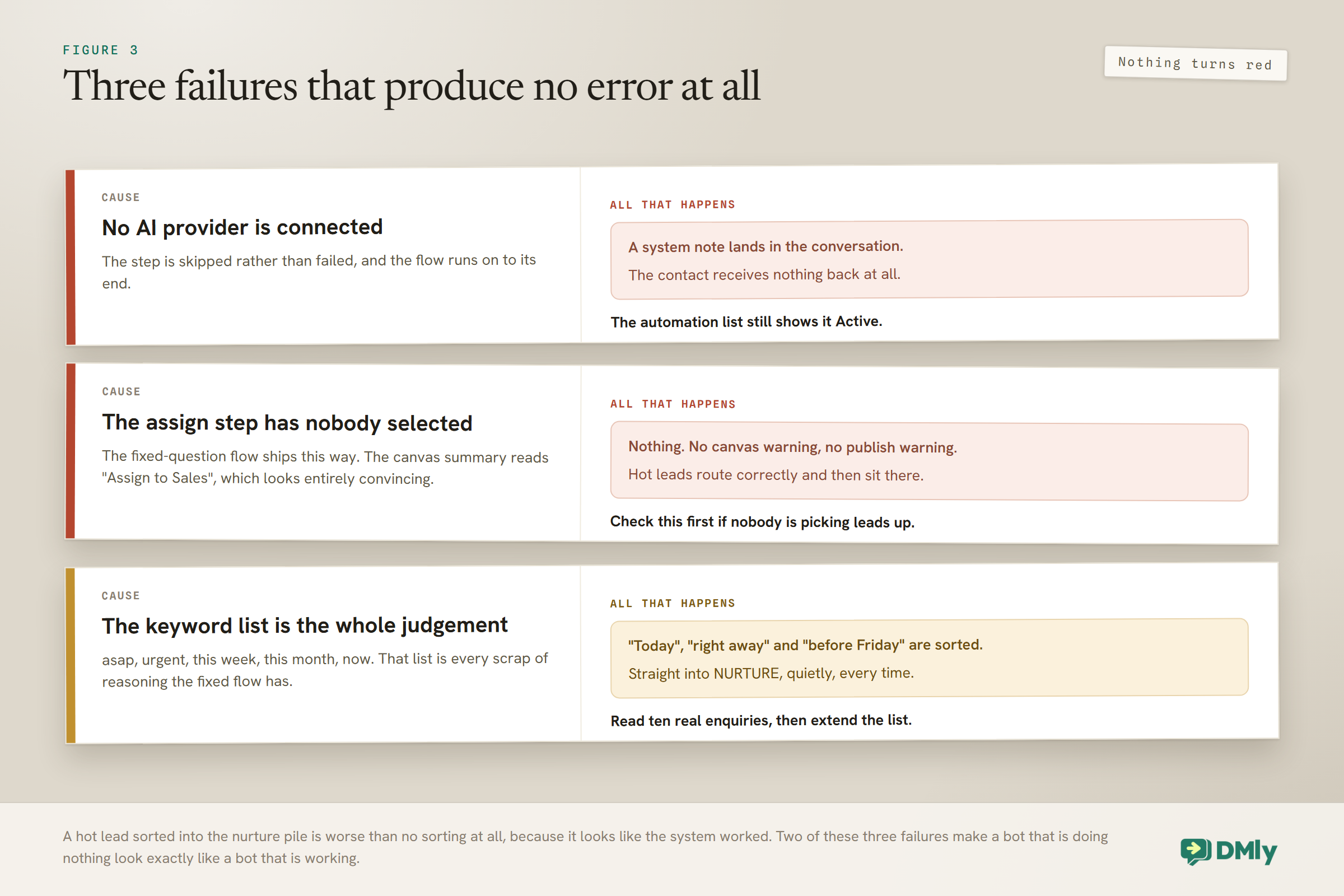
Trap one: the assign step assigns to nobody: As installed, the Assign Conversation step on the HOT branch has no team member selected. The canvas summary reads “Assign to Sales”, which looks entirely convincing, and nothing warns you, on the canvas or at publish. So your hottest leads route correctly to the branch and then sit there unassigned. Open the node and pick somebody under Assign to before you publish. This is the first thing to check if hot leads are arriving and nobody is picking them up.
Trap two is the keyword list. The condition matches the timeline answer against five words: asap, urgent, this week, this month and now. That list is the entire judgement of the bot. “Today”, “right away” and “before Friday” all fall into NURTURE until you add them, and so does every phrase your particular customers actually use. Spend five minutes reading how real enquiries are worded and extend the list to match, because a hot lead sorted into the nurture pile is worse than no sorting at all.
Both branches have to stay connected, incidentally. An unconnected condition branch is only advisory on the canvas but it blocks the publish.
Who Gets the Lead
Routing is where qualification turns into revenue, and it is worth deciding rather than defaulting. The assistant has two ways to pass a lead on, and they suit different teams.
Auto-assign to an agent hands the conversation to the next person round-robin, which suits a team where anybody can handle anything. Move to unassigned queue drops it into a shared pile for whoever is free, which suits a smaller team and quieter periods. Both land in your shared inbox, with the note the assistant left already attached to the contact.
The rule worth enforcing is that only qualified leads reach a person. If everything is handed over the moment it arrives, you have automated nothing and added a layer. The value of a WhatsApp AI sales agent is that the fourteen people who wanted something you do not sell got a polite, immediate and accurate answer, and never appeared in your team’s morning at all.
Handover itself is clean: when the assistant hands over, the bot is paused for that contact and the AI step ends there rather than parking for another turn, so it cannot talk over the colleague who has just picked the thread up.
What Not to Let It Do
Three limits keep a sales agent on the right side of useful, and all three are prompt decisions rather than settings.
Do not let it negotiate. Quoting a published range is fine. Discounting, matching a competitor or agreeing to a date is a human decision, and an agent that does it once has set a precedent you will be held to by somebody with a screenshot.
Do not let it over-qualify. If it is still asking questions at message eight, the lead is cooling. Four facts, then route. A conversational step caps at 40 turns anyway, but if a sales enquiry is anywhere near that, something went wrong at message three.
Be careful with custom functions. If you connect one to your own systems, DMly’s own warning is worth repeating plainly: functions call your systems for real, driven by whatever a contact types, so never point one at an endpoint that charges money or deletes data.
One useful thing you can bolt on: If you want the assistant answering product and pricing questions while it qualifies, put your price list into a collection under Settings, AI Knowledge, then set AI Knowledge on the Built-in Tools tab to all workspace knowledge or tick that collection. It arrives on No knowledge and searches nothing until you change it, and a step replying on Claude or DeepSeek searches nothing either way, since only OpenAI and Gemini can read documents.
What You Can Count on a WhatsApp AI Sales Agent
Two of the three numbers you want are genuinely countable, and the third does not exist anywhere, so it is better to know that now.
The countable pair both come from segments, which are saved filters that rebuild themselves and carry a live contact count in the list. So:
- Qualification rate. Build one segment for everyone who reached the Qualified stage and one for everyone who ever messaged, and read the two counts. This tells you whether the assistant is actually learning the four things or just chatting.
- Field completeness. Build a segment for contacts at Qualified whose timeline field is empty. If that number is not near zero, your prompt is asking politely and not persisting, and every one of those leads is one your colleague still has to interview from scratch.
The count beside a segment is channel-scoped: Switch the channel you are viewing and the number changes, because it is counting contacts on that channel rather than in the whole workspace. Nothing is wrong when a segment appears to shrink; it is counting a smaller pool. Compare like with like, or you will conclude your bot fell off a cliff on a Tuesday.
The third number, time to human contact, is measurable, and it is on a tab most people never open. The Team tab of Reports gives an Avg first response per teammate and for the team as a whole, measured from the moment a conversation was assigned to that person, along with an Avg resolution. Set a date range, or leave it blank for the trailing thirty days, and export it as CSV or PDF.
Two caveats before you lean on it. It measures from assignment rather than from the customer’s message, so a lead that sat unassigned for an hour has an excellent first-response time. And a bot reply is never attributed to a person, so an assistant that answered instantly does not flatter anybody’s number, which is the right way round.
The Four Questions, in Four Businesses
The framework is fixed; the questions are not. Here is what the four become in four different trades, which is usually faster than starting from a blank prompt.
| Business | What | When | Can we serve them |
| Kitchen fitter | Full replacement, or updating what is there | Rough month | Postcode against the travel radius |
| Physiotherapy clinic | The complaint, and whether they have been before | How urgent it feels | Whether it is something the clinic treats |
| Wedding photographer | Full day, half day, or just the ceremony | The date, which either exists or does not | Whether that date is free |
| Accountant | Self assessment, limited company or payroll | The deadline they are worried about | Whether the books are in a state anyone can work with |
Notice that in two of the four, the third question can disqualify politely and immediately. That is not a failure of the bot. Telling somebody kindly, within ten seconds, that their date is taken or that you do not treat that condition is a better experience than four days of silence, and it is the part of this build that most reliably makes customers say something nice about you.
Five Ways a WhatsApp AI Sales Agent Goes Wrong
Each of these turns up in an otherwise well-built WhatsApp AI sales agent, and none of them announces itself.
Naming fields in the prompt that do not exist. The conversation goes perfectly and saves nothing. Create the destinations first, every time.
Publishing a second bot that also answers everything. Only one automation answers a given message, so publishing is refused when another active flow on the same channel already replies to everything. This is documented as the most common thing that stops a qualification bot going live, because qualification bots are exactly the kind that answer every message.
Leaving the trigger on every message. A regular who messages you weekly gets re-qualified weekly. Use Only respond once per contact unless you genuinely want otherwise.
Asking before giving. The most common reason people stop replying halfway through. Answer the question they actually asked, then ask yours.
Treating a non-answer as a stopping point. A prospect who will not say their budget is not disqualified, they are guarded. Instruct the assistant to ask once, accept a non-answer gracefully and hand over anyway with a note saying what is missing.
Frequently Asked Questions
Will customers mind being questioned by a WhatsApp AI sales agent?
Not if it gives before it asks. The pattern people resent is the bot that demands a name, a number and a postcode before it will answer anything. An assistant that says what a bathroom refit costs and then asks where you are based reads as helpful, because it is helping. The order of operations matters far more than the fact that it is automated, and one question per message matters more than the number of questions.
Can it update my CRM by itself?
Yes, and that is the whole point of the CRM tools. Set custom fields writes captured answers onto the contact, Add tags marks them for later segmentation, Move CRM stage advances them through your pipeline, and Add a note leaves context for whoever picks the lead up. The one prerequisite is that the fields, tags and stages have to exist before the prompt names them, since the assistant can only write where there is somewhere to write.
When should I use the fixed-question flow instead?
When your enquiries arrive in a predictable shape. The Lead Qualification Flow is the fixed-question route: three questions saved into custom fields, a condition on the timeline answer, and a HOT branch and a NURTURE branch. No provider to connect and nothing to go wrong at 11pm, and it will beat an assistant that occasionally decides to be creative. Two things to fix before you go live: pick an actual person on the Assign Conversation step, which ships with nobody selected, and extend the five-word keyword list that decides which branch a lead takes.
How many questions should it ask?
Four, and one per message. What they want specifically, roughly when, whether you can serve them, and how to reach them again. If it is still asking at message eight the lead is cooling, and the conversation has become a form. If you are tempted to add a fifth, ask yourself whether anybody will ever filter on it, because if not it belongs in the note rather than in a field.
How is this different from an AI support chatbot?
Direction of travel. A support assistant is built to answer accurately from your own material and close the conversation. A sales agent is built to learn four things and open a conversation with a person, so it uses CRM tools rather than knowledge search and it succeeds by handing over rather than by resolving. Plenty of businesses run both, with the support assistant passing anything that smells like a new enquiry across.
Does this work for outbound prospecting?
No, and it should not be pointed at it. This build is for inbound enquiries, where somebody messaged you first and the 24-hour window is open. Outbound has different consent rules, different message types and completely different economics, and our WhatsApp prospecting guide covers that properly.
Let an assistant answer, learn the four things that matter, write them onto the contact record, and hand your team only the leads worth their morning.
It Hands Over, It Does Not Close
It is tempting to judge a sales agent on whether it closed anything, and chasing that produces pushy bots that customers block. The right test is what your team opens on Monday: a short list of people who want a specific thing at a specific time, with the answers already on file, the postcodes already checked and the polite mismatches already filtered out.
So build your WhatsApp AI sales agent to be useful first and inquisitive second. Give it somewhere to write what it learns before you teach it to ask. And let it hand you the six leads out of forty that were always the point, with the other thirty-four already answered better than they would have been by a voicemail.
Writing about WhatsApp automation, bookings and growth for local business.
Turn WhatsApp into your busiest channel.
Start free and run message, bookings, payments and reviews in one place.
