
Here is the automation almost every business builds in its first fortnight, and it is the reason most WhatsApp follow-up messages never arrive. Somebody enquires, does not book, and three days later a friendly nudge goes out. Sensible, standard, exactly what every marketing guide recommends.
On WhatsApp it does not arrive. Not because the flow was wrong, but because three days is outside the messaging window, and a plain message sent to a closed window is stopped rather than delivered. The flow ran perfectly. The message failed. Nobody was nudged, and nothing told you.
Which is why an honest guide to automating WhatsApp follow-up messages has to start with delivery rules rather than copywriting. Get them right and follow-ups become the highest-return automation a small business can build, because they recover revenue that was already nearly yours. Get them wrong and you build a sequence that quietly sends nothing at all.
This guide covers the rule that governs every one of your WhatsApp follow-up messages, the two different tools DMly gives you for this and when each one is right, the five follow-ups worth building first, what they should say, and the handful of behaviours in the drip tool that surprise everybody exactly once.
Why WhatsApp Follow-Up Messages Are a Different Job
A follow-up is a message sent automatically some time after an event, when the customer has not done the thing you were hoping for. Somebody asked a price and went quiet. An invoice went unpaid. An appointment happened and nobody rebooked.
What separates it from a campaign is that it is triggered by one person’s own behaviour and timed from their event rather than from your calendar. That is why follow-ups feel personal even when they are entirely automatic, and why they convert far better than a general send. It is also the automation most businesses know they should have and never build, because doing it by hand is exactly the kind of task that loses to a busy Tuesday.
The Rule That Decides Every Follow-Up
You can send an ordinary WhatsApp message only within 24 hours of the customer’s last message to you. Outside that, only an approved template is delivered. Everything about follow-up design falls out of that one sentence.
- The clock starts on their message, not on your reply and not on the event you are following up.
- Every message they send restarts the full 24 hours.
- Somebody who has never messaged you has no open window at all. There is nothing to reply into.
- A plain message sent to a closed window is stopped and recorded as failed, rather than pretended into a Sent. The honesty is useful, because at least the failure is visible.
- And if an automated message needs a template while the window is shut and no approved template exists, nothing is sent at all. Not a failure, not a substitute: silence.
So the practical question for every follow-up you design is simply this: will it land inside 24 hours of their last message, or not? The answer decides what you are allowed to write, and it decides which of the two tools below you should be using.
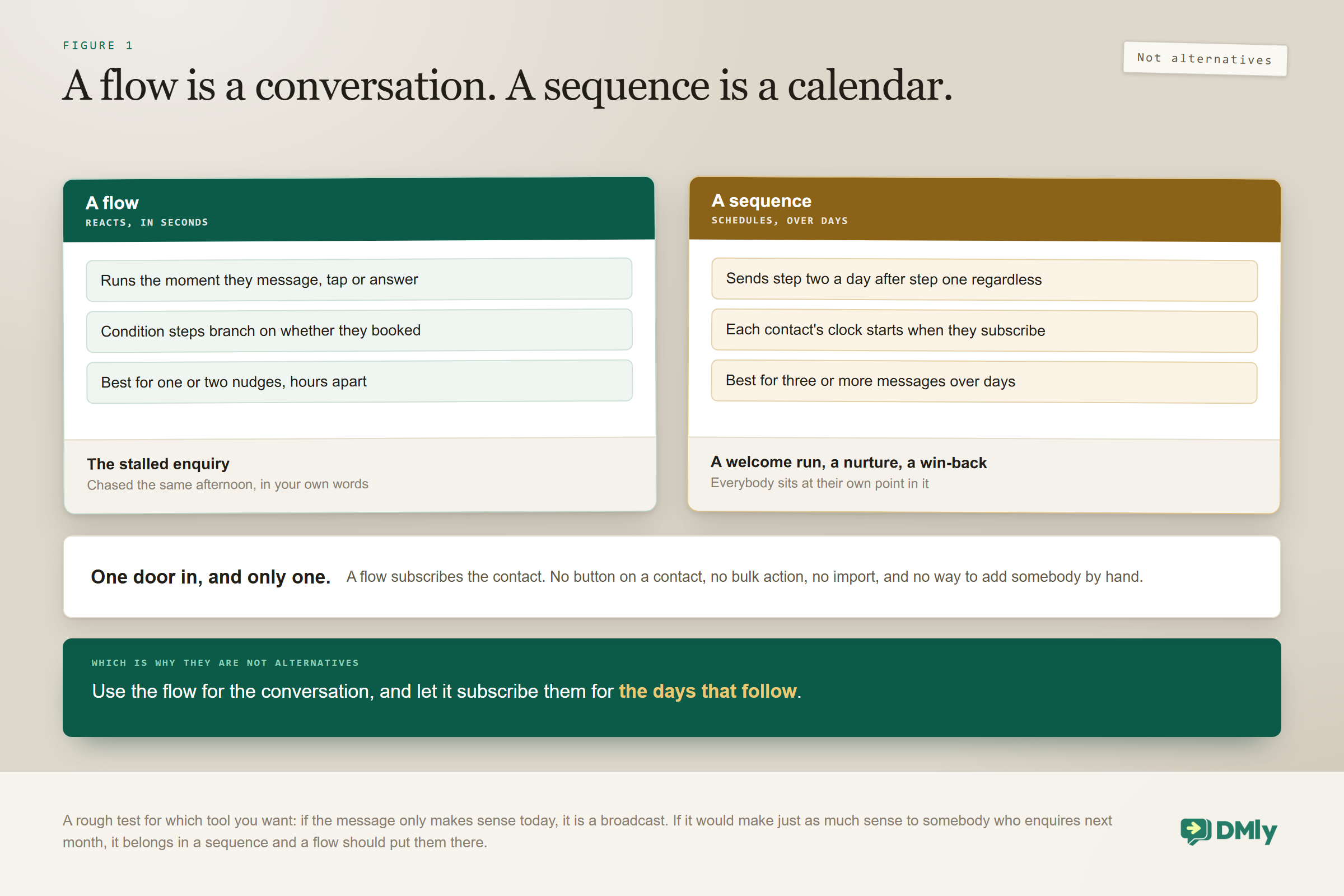
A Flow Is a Conversation. A Sequence Is a Calendar.
DMly gives you two quite different tools for following somebody up, and choosing the wrong one is the second most common way a follow-up fails. The documentation draws the line better than any explanation of it.
A flow reacts to what the customer does right now. They message you, they tap a button, they answer a question, and it runs in seconds. Put a delay in it and it will wait, but it is fundamentally a conversation.
A sequence is a drip campaign: an ordered set of messages delivered on a schedule after somebody subscribes. It does not react to anything. It sends step two a day after step one whether they replied or not. Crucially the clock starts when that contact subscribes, so everybody sits at their own point in the run: the person who enquired this morning is on day 0 while the person who enquired last week is on day 5.
| Use a flow with a delay | Use a sequence | |
| Shape | One or two nudges, hours apart | Three or more messages over days |
| Reacts to the customer | Yes, with condition steps | No, unless you build the exit yourself |
| Good for | The stalled enquiry, the same-day chase | A welcome run, a nurture, a win-back |
| How somebody joins | The trigger fires | A flow subscribes them, and nothing else can |
The two are meant to work together. Use the flow for the conversation, and have that flow subscribe the contact to a sequence for the days that follow. If you have never opened the canvas, our no-code automation guide covers it from zero.
The Two Kinds of Follow-Up Message
Once you can see the window, WhatsApp follow-up messages sort into two families, and the two are built completely differently.
Same-conversation follow-ups, inside 24 hours. These chase something still warm: somebody asked a question an hour ago and went quiet, or you sent a quote this morning. You can write whatever you like, in your own words, with no approval step at all. They are the easiest to build and where a short nudge does most of its work, because a great many stalled enquiries need one “still interested?” and nothing else.
Cross-day follow-ups, outside 24 hours. The appointment reminder, the unpaid invoice chase, the rebooking nudge five weeks later. These are delivered only as an approved template. Less restrictive than it sounds: DMly ships 20 system templates covering exactly that ground, appointment confirmations and updates and reminders, invoices, payment receipts, failed payments and renewal reminders, and they are submitted for Meta’s review automatically when you connect a live number. If you would rather adapt tested wording than write from scratch, our library of message templates has copy for every one of these jobs.
The build that breaks, and it is always the same one: A three-message nurture with day-long delays, written as ordinary text. Message one sends, because the window is open. Messages two and three cross the line and are recorded as failed, and the customer hears nothing at all. If a follow-up has to run past the first day or two, build the later steps from approved templates from the start. That is the whole argument for templates in one sentence.
Building a Follow-Up as a Flow
Five steps, and the third one is the one people skip and regret.
- Pick the trigger, which is the event you are following up on. An incoming message for stalled enquiries, an appointment event for reminders and rebooking, an invoice event for payment chases. The trigger decides everything downstream, so choose the moment precisely.
- Add a Smart Delay. Three modes. Duration waits a fixed amount of time and defaults to one hour, which is what most follow-ups want. Wait until holds the message for a time window, with day toggles defaulting to Monday to Friday, 09:00 to 18:00. Until event waits relative to an appointment, invoice or subscription date, which is exactly how a day-before reminder is built.
- Add a Condition so you do not chase people who already acted. This is the step most often skipped and the one that does the most damage, because nothing irritates a customer more than being chased for something they have already done. A condition needs both its true and false outputs connected before the flow will publish, which is a useful nudge to decide what happens to the people who did act.
- Choose plain text or a template, using the window rule. Inside 24 hours, write it in your own words. Outside, pick an approved template. If you are not sure which side you are on, assume outside.
- Publish, then watch the first day. Check the messages are actually going out rather than being recorded as failed, and that the condition is filtering people the way you expected.
The Wait until mode is the most underused of the three and the one that most improves how a business sounds. A follow-up that fires at three in the morning because that is when the timer happened to expire reads as automated in a way that a nine o’clock message does not, and the fix is one setting rather than a redesign.
Building a Follow-Up as a Sequence
A sequence is where you put the run of messages that unfolds over days, and it takes about ten minutes to build once you know the four things that decide its behaviour.
Create it from Automation, then Sequences, with the right channel selected first. That last part matters more than it looks: a sequence belongs to one channel and the field is read-only for ever. The list only shows sequences for the channel you currently have selected, so if one appears to have vanished, check the channel switcher before you rebuild it.
Then four settings do all the work.
- The Day number on each step. A whole number from zero up. Day 0 sends as soon as they subscribe. What actually sets the wait is the gap between consecutive Day numbers, counted from when the previous step really sent, so 0, 1, 3 means on subscribing, one day later, then two days after that.
- The From and To hours, which default to 09:00 to 20:00 and stop you messaging anybody at 3am. A step due before From waits for it; a step due after To moves to From the next day. These are wall-clock times on the contact’s own timezone, or your workspace’s timezone when the contact has none, so enter them as local times and do not convert them to UTC.
- The Send as picker, on WhatsApp only. Standard send is an ordinary message that delivers inside the window; the other two options are a utility template and a marketing template, and either of those delivers outside it. Choosing a template swaps the message box for a picker of your approved templates in that category.
- Stop when the contact replies, a switch that is off by default. Read the next section before you leave it alone.
Then save it, and understand that nothing happens yet. A sequence sits idle until a published flow on the same channel subscribes somebody to it, using the Sequence step in the flow builder’s Logic group. That is the only door in. There is no button on a contact, no bulk action, no import, and no way to add one person by hand.
Six Things a Sequence Does That Nobody Expects
None of these is a fault. All six are documented, all six surprise people exactly once, and three of them lose messages silently.
- Somebody who replies and books still gets the rest of the run. Stop when the contact replies is off by default, so a person who answers your day 1 message and books an appointment receives day 2 and day 3 asking them to book. Either switch it on, or have the flow that handles the booking unsubscribe them.
- Reordering steps does not renumber them. The wait is the gap between Day numbers, so dragging a day 5 step above a day 1 step leaves no gap at all and the second message goes out as soon as the first lands. After any reorder, read the Timeline top to bottom and check the days still climb.
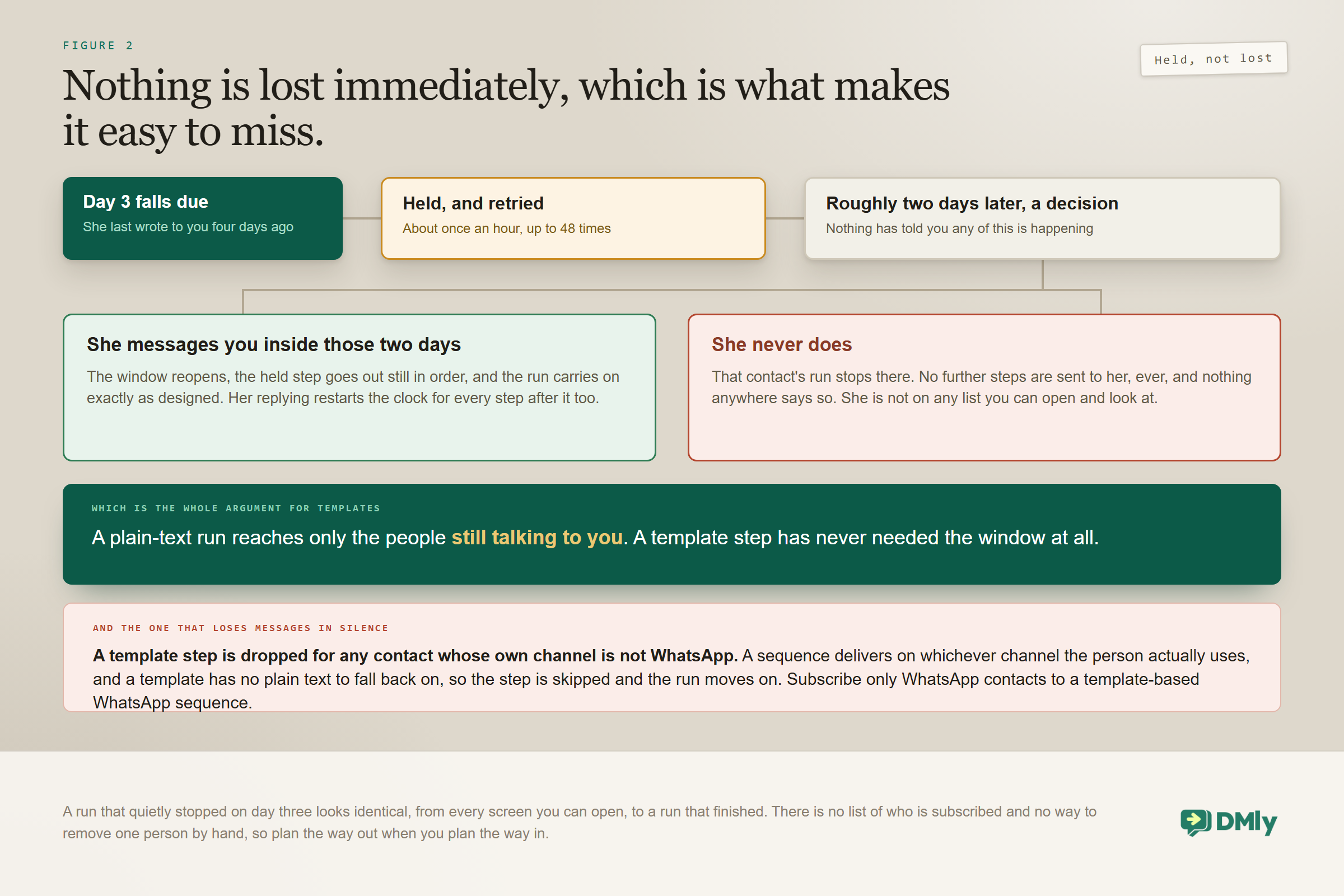
- A template step is silently dropped for anybody whose own channel is not WhatsApp. A sequence delivers on whichever channel the contact actually uses, which is helpful for plain text and fatal for a template: there is no free-form fallback, so the step is skipped and the run moves on. Nothing tells you. Subscribe only WhatsApp contacts to a template-based WhatsApp sequence.
- A held step gives up after about two days. When a step comes due and the channel will not carry it, it is held rather than lost and retried roughly once an hour, up to 48 times. If the contact messages you in that time it goes out, still in order. If they never do, that contact’s run stops there and no further steps are sent.
- Pausing a sequence does not stop people joining it. Pausing genuinely freezes delivery and burns nothing, and everybody picks up where they left off when you resume. But a paused sequence still appears in the Sequence step’s picker, so the flow keeps subscribing people, who queue up behind step one. To stop new joiners you have to change the flow.
- You can see who is in a sequence and take one person out, but only by hand. The Subscribers column counts how many contacts are mid-run right now. To see who they are, open the row’s ⋮ menu and choose View subscribers: the In the sequence, Finished and Stopped tabs show each contact’s step and next send time, and Remove from sequence stops one person’s run without touching anyone else. Plan the way out when you plan the way in.
Two more worth a note before you build: Deleting a sequence a flow is using fails quietly. The flow keeps running and its Sequence step simply does nothing, so open every flow that used it and repoint or remove the step. And resuming a paused bot does not bring a stopped run back: if Handover to Human paused the bot for somebody, their sequence run ends at the next due step, and only the Sequence step can restart them, from the beginning.
One that is genuinely useful rather than a trap: subscribing the same contact twice does nothing, so you cannot accidentally double somebody up. But a contact who has finished a run, or whose run was stopped, starts again from step one, which is exactly what you want for a win-back somebody can go through more than once.
The Five WhatsApp Follow-Up Messages Worth Automating First
Ranked by what they actually recover for a small business, rather than by how clever they are.
| The follow-up | Trigger and timing | Which side of the window |
| The unpaid invoice | The due date, then a second at seven days overdue | Template |
| The appointment reminder | Until event, one day before | Template |
| The stalled enquiry | Two to four hours after they went quiet | Plain text |
| The post-visit check-in | A completed appointment, that evening | Usually a template |
| The rebooking nudge | Until event, at your natural service cycle | Template |
The first two are the ones to build today. Chasing invoices recovers money you have already earned, and the machinery is in our invoicing guide. Appointment reminders reduce no-shows, which is the single most expensive recurring loss in most service businesses, and our appointment booking guide covers the events they hang off. If your follow-up is about an abandoned basket rather than an appointment, that has its own shape and its own guide to recovering abandoned carts.
What the Five Should Actually Say
Wording matters less than delivery, but it is not nothing, and the good ones all look rather similar. Every one of these is short, names the specific thing, and offers a single easy next action. Adapt the brackets and keep the length.
The stalled enquiry, two hours later. “Hi [name], just checking you got the prices for [service]. Happy to hold a slot this week if it helps, or answer anything else.” One sentence of purpose, one of offer, no pressure. The temptation is to re-sell. Resist it, because they already know what you sell.
The unpaid invoice, on the due date. “Hi [name], invoice [number] for [amount] is due today. You can pay here: [link]. If it has already gone out, ignore this and thank you.” That last clause matters far more than it looks: it protects the relationship when your records lag their bank, and it removes the mild accusation every payment chase otherwise carries.
The appointment reminder, the day before. “Hi [name], a reminder of your [service] tomorrow at [time] with [staff]. Reply RESCHEDULE if the week has moved on you.” Offering the reschedule explicitly is what turns a silent no-show into a moved booking, which is the entire point of sending it.
The post-visit check-in, that evening. “Hope [the thing] is settling in well, [name]. Anything not right, just reply here and we will sort it.” No review request in the same message. Ask for the review after they answer positively, never before, or you are asking a favour of somebody who may be about to complain.
The rebooking nudge, at your service cycle. “It has been about [interval] since your last [service], [name], which is usually when people are ready for the next one. [Day] has [time] and [time] free if you are due.” Specific times beat “let us know when suits” by a distance, because they turn a decision into a tap.
The common thread is that every one of these is a service message rather than a sales message. That is not only kinder, it is the safer side of the line: useful messages get replies, promotional ones get blocks, and blocks are what damage your number.
How Long Should You Wait?
Match the delay to the customer’s decision speed, not to a number you read somewhere.
A stalled price enquiry is a same-day decision, so two to four hours is right and tomorrow is already too late. An unpaid invoice follows your terms: one on the due date, one a week after, and a human call after that. An appointment reminder belongs the day before, late enough to be remembered and early enough to be rescheduled rather than cancelled. A rebooking nudge should land slightly before the natural cycle of your service, whether that is five weeks or six months.
Two rules keep the timing humane. Keep messages inside working hours, because a 2am nudge reads as spam whatever it says, and remember that a sequence’s hours run on each contact’s own clock (your workspace timezone if the contact has none), so set them as local times. And cap the run: two follow-ups on any one thing, then stop or hand it to a person. A third automated chase converts almost nobody and costs you goodwill.
One timing behaviour that catches people out: A sequence step that had to be held and retried is rescheduled about an hour later without re-checking its From and To hours. The hours are applied when a step is first scheduled, so a step that waited on a closed window can land outside its usual times. If a customer tells you they got a message at a strange hour and your settings look right, this is almost always why.
Knowing When to Stop Chasing
WhatsApp follow-up messages are the automation most likely to tip from helpful into irritating, and the cost of getting that wrong is not just an unsubscribe. Your quality rating falls when people block or report you, and a falling rating means Meta can pause your templates or drop your messaging tier, which quietly damages every other automation you run.
Three habits keep it safe. Always give an exit, and know that opted-out contacts are suppressed automatically on every send once a stop is registered. Never chase somebody who already acted, which is the condition step doing its job, or the unsubscribe step if they are mid-sequence. And keep the message useful rather than promotional: a reminder about a thing they asked for is welcome, a fourth attempt to sell them something is not. Our guide to quality rating, messaging limits and bans covers what a falling rating actually costs.
Four Ways WhatsApp Follow-Up Messages Fail
- Plain messages on a multi-day delay. The single most common broken build. Anything crossing the 24-hour line needs a template.
- No condition, and no unsubscribe. Chasing people who already paid, already booked or already replied. It undoes all the goodwill the automation was meant to build, and in a sequence it needs deliberate wiring because replying does not stop the run by default.
- Delays that ignore the clock. A reminder at 4am, or a nudge that lands on Sunday morning. The hours setting exists for this, and it reads the contact’s local time.
- Runs that never end. Two attempts, then a person or nothing. Persistence is not a strategy on a channel where the customer can block you with one tap.
Frequently Asked Questions
Why did my automated follow-up not send?
Almost always the 24-hour window. A plain message sent to a contact whose window has closed is stopped and recorded as failed, and if an automated message needs a template while the window is shut and none is approved, nothing is sent at all. Check whether the message was scheduled more than 24 hours after the contact’s last inbound message. If it was, rebuild that step on an approved template.
Should I use a flow or a sequence?
A flow for one or two nudges hours apart, because it can react to what the customer does. A sequence for three or more messages over days, because it runs to a calendar. They are not alternatives: the flow is what subscribes somebody to the sequence, and it is the only thing that can.
Does replying stop a sequence?
Not by default. Each sequence has a Stop when the contact replies switch and it is off unless you turn it on, so somebody who answers your day 1 message and books an appointment still receives day 2 and day 3. Either switch it on, or have the flow that handles the booking unsubscribe them.
How many follow-ups should I send?
Two on any single thing, then stop or bring in a person. The first recovers most of what is recoverable, the second catches the genuinely forgetful, and the third mainly generates blocks. Since blocks and reports are what drive your quality rating down, a third chase can cost more than the sale was worth.
Can I follow up with somebody who never messaged me?
Only with an approved template, and only if they agreed to hear from you. Somebody who has never written to you has no open window at all, so there is nothing to reply into. That is the honest limit separating follow-ups from cold outreach, and it is a feature rather than an obstacle.
Do WhatsApp follow-up messages cost anything?
Cross-day follow-ups use templates and are charged at your market’s rate for that category. Plain replies inside the window have been free, and that changes on 1 October 2026, though less than it first sounds: Meta gives every business number 1,000 free service messages a month and charges only from the 1,001st, which is more replies than most small businesses send. Above that allowance a service message costs the same as a utility message in your market. Our guide to the October pricing change works through what it costs. Set against a recovered booking or a paid invoice, it is rarely the deciding factor either way.
Build the Delivery First, Then the Words
Most advice about WhatsApp follow-up messages is about tone: be friendly, be brief, add value. All true, and all irrelevant if the message is stopped before it leaves the building.
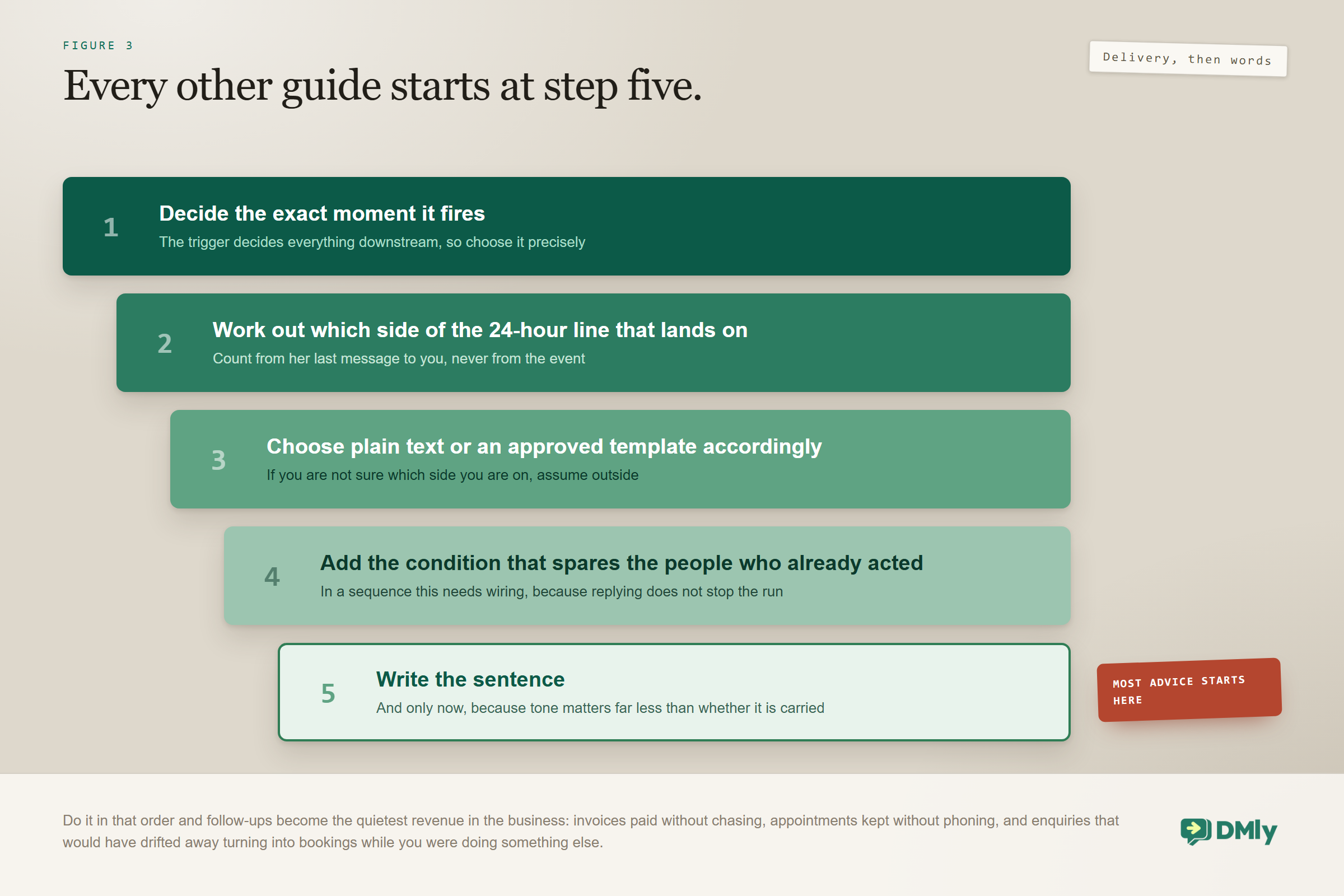
On WhatsApp the order of work runs the other way. Decide when it fires. Work out which side of the 24-hour line that lands on. Choose plain text or a template accordingly. Add the condition that spares the people who already acted. And only then write the sentence.
Do it in that order and follow-ups become the quietest revenue in the business: invoices paid without chasing, appointments kept without phoning, and enquiries that would have drifted away turning into bookings while you were doing something else. The wider set they belong to is in our WhatsApp business automation guide, and if all you want is to send one message later rather than build a run, our scheduling guide is the shorter answer.
Writing about WhatsApp automation, bookings and growth for local business.
Turn WhatsApp into your busiest channel.
Start free and run message, bookings, payments and reviews in one place.
