
Ask three people at a gym about the same member and you get three different people. The front desk knows Priya as the one who messages on a Sunday night to book Tuesday spin and paused her membership last June. Her coach knows her as the one who always takes the back bike and asks for harder settings. Whoever does the accounts knows her as a monthly membership, auto-charged, with one failed card last March that sorted itself out. All three are right, and none of them has the whole picture.
A WhatsApp CRM for gyms is the one place where those three views meet: the conversation, the bookings and the money, on a single record that anyone on the team can open. It is also a place to be careful with, because the coach’s knowledge of a member’s shoulder injury is exactly the kind of detail that does not belong in it.
This guide explains how that works in DMly: what the member record already holds, how leads become members, a pipeline for trial classes, the fields worth adding, what to keep out, tags and segments, families, who on your team sees what, moving in from another system and handling data requests. It is part of our wider guide to WhatsApp automation for gyms.
One Member, One Record, Every Channel
Every conversation, booking and payment attaches to one contact, however the member reaches you.
In DMly, each person is one contact with a profile page. A member who messages you on WhatsApp, comments on Instagram and books through your booking page is still one record: the profile lists every channel identity they have, marks one as primary, and shares the history across them. Replies you send from the profile open in your Inbox rather than an outside WhatsApp link, so they are logged against the member like any other message.
If one person has ended up as two contacts, for example because they booked with an email and later messaged from their phone, the profile shows a Possible duplicates button when the two share a phone number or email. Merging moves the duplicate’s channels, messages, notes and tags into the record you keep and deletes the other. It is permanent, so check which record wins first. A merge never drops a protection: if either record had opted out or was a client, the survivor stays that way.
What a WhatsApp CRM for Gyms Already Holds on Each Member
Before you add anything, the record already tells you a lot. Know where to look.
Every contact’s profile has five tabs: Overview, Activity, Notes, Files & letters and Linked. The header shows how many messages you have exchanged, the tags applied, the last interaction and where the contact came from. The overview lists profile details such as phone, email, birthday and language, the answers they gave in your flows, an activity timeline, their channels and internal notes that only your team can see.
Once someone is a client, a sixth tab, Finance, appears with four money tiles and nine records tabs:
| On the Finance tab | What it means at a gym |
| Available credits | Classes left on a pack or this month’s allowance |
| Amount due | Anything unpaid, shown in red |
| Loyalty points | The live loyalty balance |
| Lifetime value | What the member has been worth so far |
| Subscriptions tab | Their membership, its status and billing |
| Credits and Loyalty tabs | Every movement, for settling “I had more classes than that” |
| Classes and Appointments tabs | Group sessions and 1:1 sessions such as personal training |
| Invoices, Payments, Orders, Statements | The money side, including PT packs and retail |
Each records tab shows at most the 50 most recent rows. For a long-standing member, treat the profile as a summary and go to Finance for the full history.
From the profile you can also book an appointment, add credits, adjust loyalty points with a reason, record a payment taken at the desk, and pause the bot for this one member, which hands their conversation to a person: quick automations, sequences and booking reminders skip them until you resume it.
Leads, Members and a Gym Catch
DMly calls a paying member a client. Someone only becomes one when money or a membership is recorded.
Every contact is either a lead or a client. A lead becomes a client automatically when you raise an invoice, create an order, record a payment or start a subscription for them. You can also select Convert to client on the profile, which needs a phone number or email on the record.
The catch for gyms is the trial. Someone who books a free trial class and comes along is still a lead: nothing was paid and no subscription was started. That is usually right, but it means the Clients list is not “everyone who has trained here”. It is “everyone who has paid or subscribed”. The Finance tab, with its credits and loyalty tiles, only appears once they are a client.
Going the other way is restricted on purpose. Mark as lead is blocked once a contact has a confirmed or completed booking, a successful payment or a paid order, with the message that the client has billing or booking records. Nothing is ever deleted by changing the stage.
A Pipeline for Trials and Enquiries
The lifecycle says who has paid. A pipeline says where each prospect is on the way to joining.
DMly’s pipeline is a separate axis from the lead and client lifecycle, and nothing syncs the two. Every workspace starts with three stages, Lead, Engaged and Customer, which you can rename, recolour, reorder and add to on Contacts → Pipeline View. For a gym, a trial funnel works well:
- Enquiry: asked about membership or classes.
- Trial booked: has a place in a trial class.
- Trial attended: came along.
- Joined: started a membership.
Much of the movement can be automatic. A TRIAL keyword, a growth link or a Click-to-WhatsApp ad can start a flow that moves the contact to Enquiry with the Update Contact Stage step, then books them into your trial class with Add to Class and moves them to Trial booked. A flow on Subscription created moves them to Joined. The one step that needs a person is Trial attended, because DMly’s booking triggers are not narrowed to one class service: the coach who marks the trial class roster can drag the card across, or open the contact and set the stage.
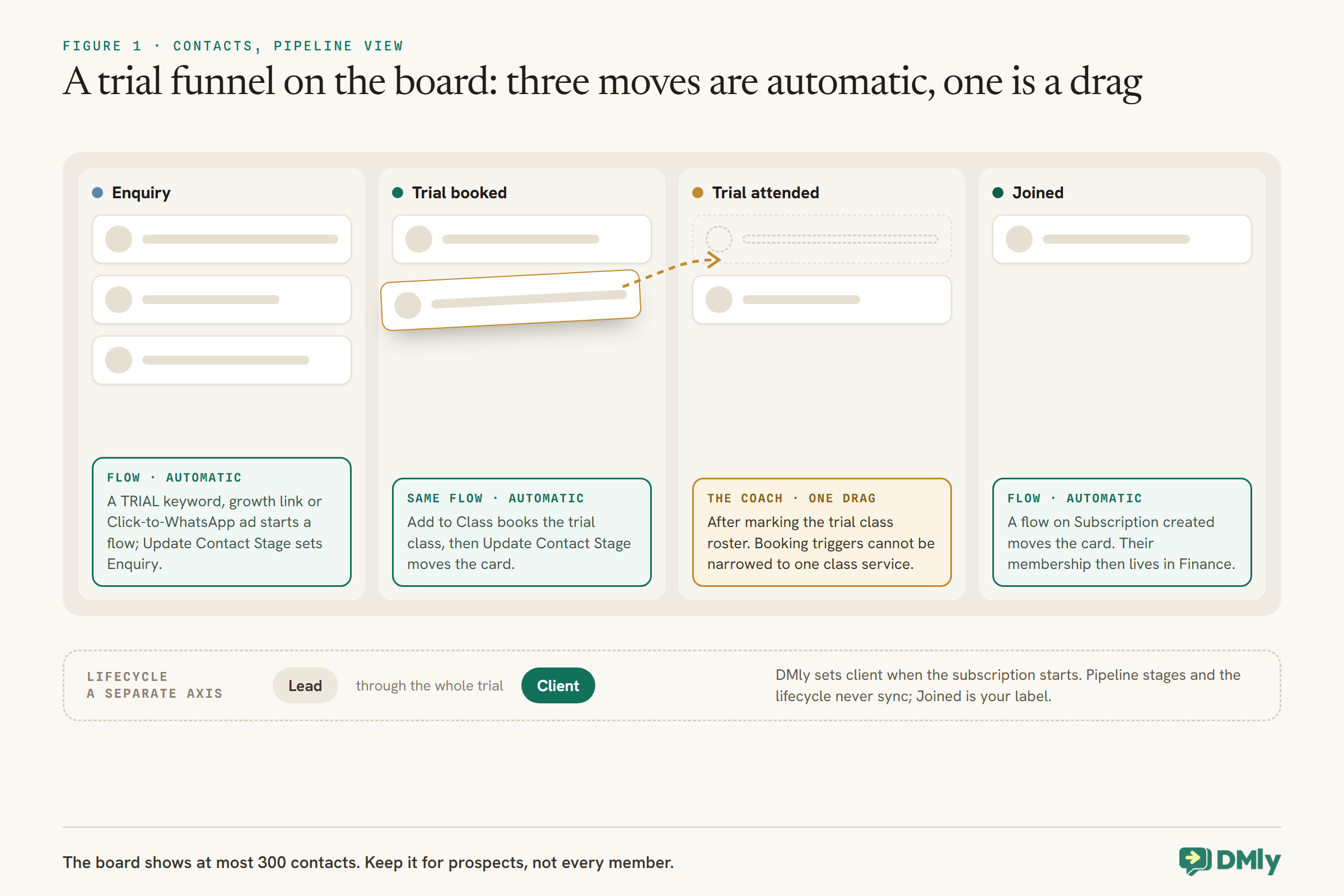
Keep the pipeline for prospects rather than members. The board shows at most 300 contacts and has no pages; with more than that, the slots go to the most recently active contacts. A gym with a few hundred members would crowd its trial leads off the board, so once someone joins, the Joined column is the end of their pipeline journey and their membership lives in Finance.
Custom Fields Worth Adding for a Gym
Custom fields hold the few facts your team needs that DMly does not already track.
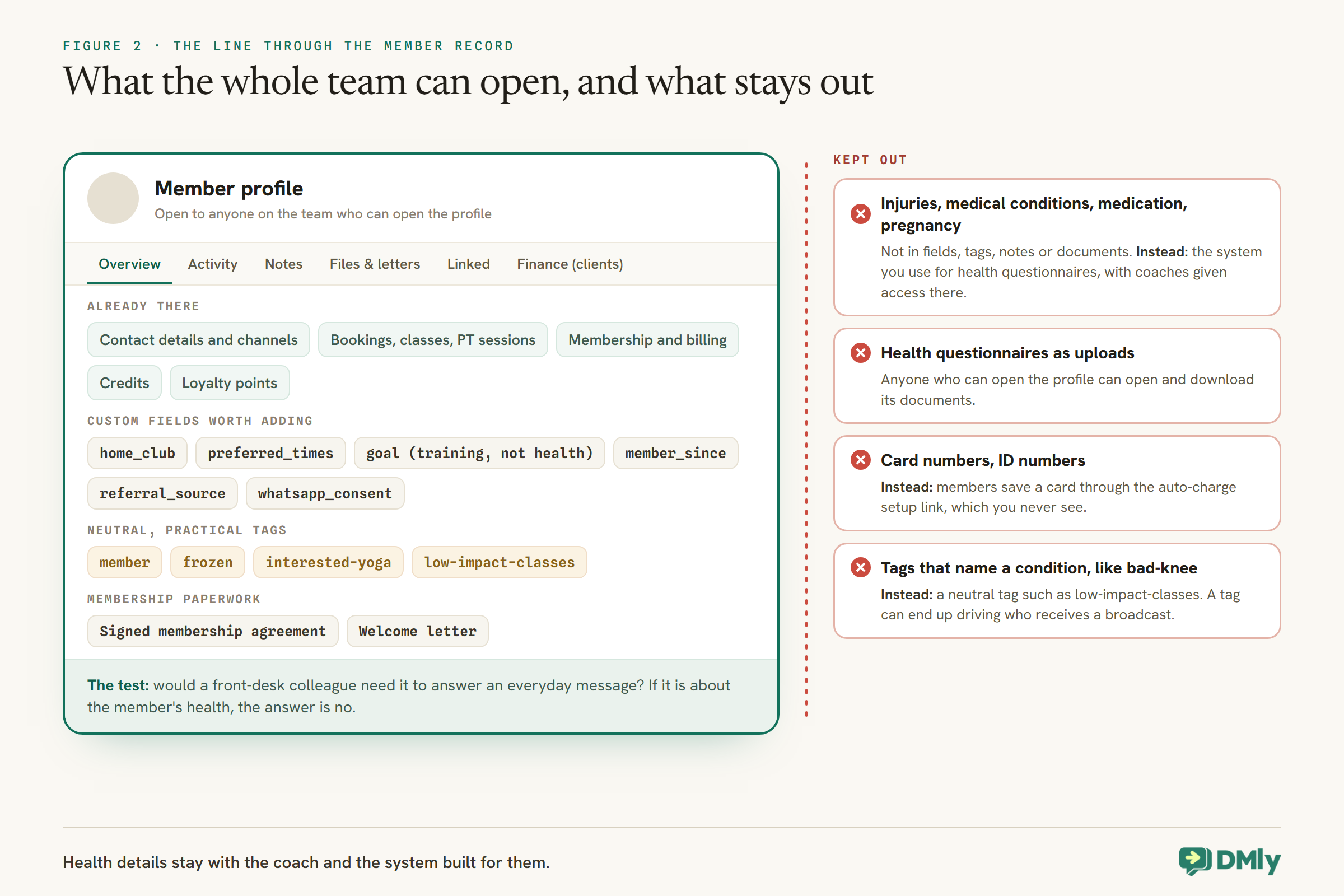
Define custom fields in your workspace settings first, so they appear in segment rules and can be read by automations. Then fill them from the profile, from flows or on import. A short list for a gym:
| Field | Why it helps |
home_club | For multi-site gyms: which location a member mainly uses |
preferred_times | “Evenings”, “weekend mornings”: the best times to suggest in a win-back or a new class launch |
goal | “Get back into running”, “strength”: helps coaches and recommendations, as long as it stays about training goals, not health |
member_since | For anniversaries and long-standing member perks |
referral_source | Filled automatically when your booking form asks it; shows which channels bring members |
whatsapp_consent | What the member agreed to receive, and when |
Three behaviours worth knowing. Your booking form fills a few fields on its own: Preferred Name, Identification Number, Address and Referral Source land in preferred_name, identification_number, address and referral_source, and a booking only fills a field that is empty. The emergency contact answer on the booking form stays on the booking rather than the contact. And the custom fields editor on the profile is free-form: a misspelled field name silently creates a one-off field that no segment can select, so copy names exactly.
If you use a date such as member_since with DMly’s Birthday / key date trigger for anniversaries, test how the trigger treats the year before relying on it. DMly’s docs describe the trigger firing on the day or a set number of days before, but do not say whether the year is part of the match.
What Must Stay Out of the Record
A gym hears a lot about members’ bodies. Almost none of it belongs in a WhatsApp CRM.
Coaches learn about injuries, medical conditions, medication, pregnancy and more, often from health questionnaires members fill in when they join. That information is useful to the person coaching them, and it is also exactly the kind of detail to keep out of a CRM that the whole front desk can open and that feeds your messaging.
- Health and injury details stay out of custom fields, tags, notes and uploaded documents. WhatsApp’s Business Messaging Policy says not to use WhatsApp to “send or request any health related information, if applicable regulations prohibit” it on systems without heightened protections. Keep health questionnaires in whatever system you use for them, and give coaches access there.
- Card numbers and ID numbers never go in the chat or the record. The same policy says not to ask people to share full payment card numbers or ID card numbers. Members save a card through DMly’s auto-charge setup link, which you never see. Turn off the booking form’s Identification Number question unless you genuinely need it.
- Tags that describe a condition. A tag such as
bad-kneeis a health detail with a label on it, and it can end up driving who receives a broadcast. Use neutral, practical tags instead, such aslow-impact-classes, if coaches want to suggest suitable sessions.
Documents attached to a contact can be opened and downloaded by anyone who can open the profile, which is another reason not to upload health forms there. Whether your local rules say more about health data is a question for your own advisers.
Tags and Segments for a Gym
Tags say what a member is. Segments turn tags and numbers into lists you can message.
Tags are workspace-wide labels, and a contact can have any number of them. A small, consistent set does most of the work for a gym:
- Status tags, kept up to date by flows:
memberon Subscription created,former-memberon Subscription cancelled,payment-issueon a failed renewal. - Team tags, added by people:
frozen,do-not-winback,founding-member. - Interest tags, from buttons or flows:
interested-yoga,interested-pt,low-impact-classes.
Segments combine them with DMly’s other rules. Gym-shaped examples: members with a Credit balance of at least 6 late in the month (not using their classes), members with Loyalty points close to a reward, a Birthday month for birthday perks, and Reachable on channel set to not reachable on WhatsApp for members your team should phone instead. Segments are re-checked every time they are used, and their counts are per channel.
One rule shapes how tags drive automations. Tagging one member at a time, from the Inbox, the profile, a flow or the AI agent, fires the Tag applied trigger. A bulk Add tag from the contacts list never does. So a flow can react to a single member being tagged, but never to a list you tagged in one go. Note too that Tag applied cannot yet be narrowed to one tag in the builder: it fires for any tag, so a flow on it runs for every tag change, not just the one you care about.
What the Record Does on Its Own
Much of a gym’s CRM keeps itself current if you let the triggers do the work.
- Membership status. The subscription triggers (created, renewed, payment failed, paused, cancelled, plan changed) can keep status tags and pipeline stages right without anyone typing.
- Class activity. Class booked fires for every place booked, and marking a seat attended on the roster completes the booking and awards loyalty points. On the default setting, a seat nobody marks also closes as completed about a day later and earns points, so mark no-shows or switch Appointments nobody marked to Wait for review. Our guide to an online class booking system covers the class side.
- Credits and loyalty. Every credit movement is written to a ledger that is only ever added to, so the credit history on the profile explains every balance, and loyalty points have a ledger of their own behind the live balance.
- Live balances in messages. DMly’s
{{credit.balance}}and{{loyalty.points}}tokens read a member’s current balance when a message sends, so aCLASSESorPOINTSkeyword can answer members without anyone opening the record. - An AI assistant that knows who it is talking to. An AI step with the Get contact info tool reads the member’s name, stage, tags and custom fields, so it greets a regular like a regular.
Families, Juniors and Parents
A parent booking junior classes and the child who attends are two people. Link them rather than merge them.
DMly’s Linked tab lets you connect two contacts as parent, child, spouse, guardian or sibling, and see the relationship from each person’s profile. Linking is not merging: each keeps their own conversations, tags, invoices and bookings. For junior classes, that keeps the child’s attendance on the child’s record while the conversation and the billing sit with the parent who pays and messages you.
A child who will never message you still needs a way to be reached for their own records: a client needs at least a phone number or an email address. Use the parent’s details where your process allows, and make sure every message about a junior goes to the parent’s WhatsApp, never to a child directly.
Coaches, Front Desk and Who Sees What
Give each person the access their job needs. A coach rarely needs a member’s phone number.
When you add someone to the team without a custom role, DMly offers per-member controls, including Mask contact phone numbers and Mask contact email addresses, and switches to remove whole areas such as the Inbox. For a coach who checks people in and sees who is booked, masking is usually right: a participant’s phone number on a class roster is also masked unless the teammate holds the See full phone numbers permission.
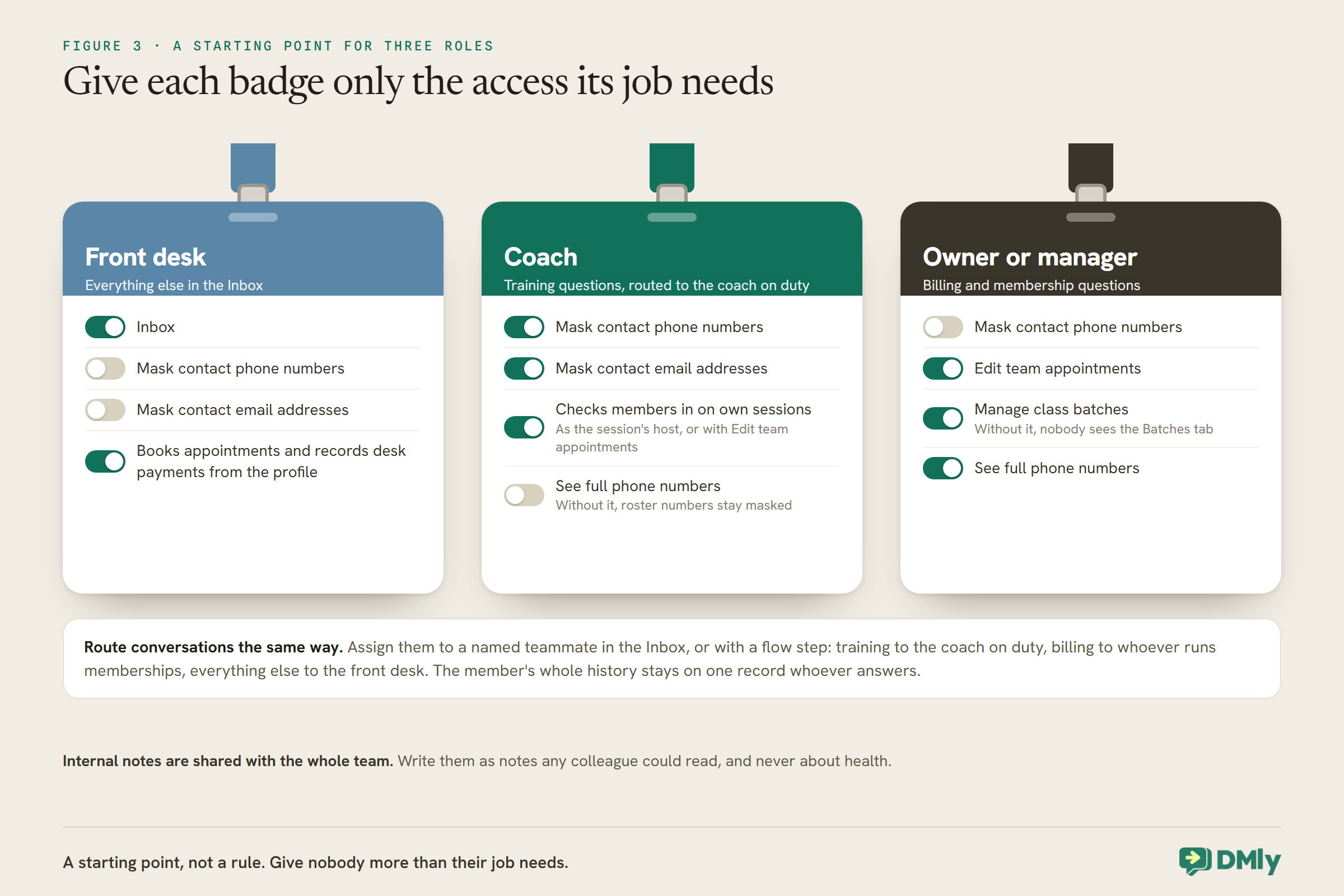
A few more to set deliberately: checking members in on a roster needs the Edit team appointments permission, or being the session’s host; the Batches tab for enrolling a cohort only appears for someone with Manage class batches; and internal notes are shared with the whole team, so write them as notes any colleague could read.
Route conversations the same way. Inbox conversations can be assigned to a named teammate or left in an unassigned queue, and a flow can assign as one of its steps. A training question can go to the coach on duty, a billing question to whoever runs memberships, and everything else to the front desk, with the member’s whole history on one record whoever answers.
Documents and Letters
Membership paperwork can live with the member, as long as it is paperwork and not health information.
Each profile has a Documents card on the Files & letters tab for files that belong to that one person, such as a signed membership agreement. It works for leads as well as clients. Remember that anyone who can open the profile can open the file.
DMly can also generate branded PDF letters from a template with merge tokens for the member’s name, custom fields and a reference number: a welcome letter or a membership confirmation, for example. The letter reaches the member as a secure, signed link that opens in their browser without a login.
Moving In From Another Gym System
Contacts come across in a file. Memberships and cards are set up again in DMly.
DMly’s contacts import takes a CSV with a name and phone number on every row, imported into the channel you have selected, with columns for tags, a pipeline stage and a custom_fields column holding a small piece of JSON per row. Existing contacts are matched by phone or email and their custom fields merged, with the file’s values winning. Four things to plan for:
- Tags are replaced on import, and a blank tags column removes existing tags, so carry every tag you want to keep in the file.
- An import starts automations row by row. DMly fires New contact for each contact created, Tag applied for each tag the tags column attaches and Field changed for each row that updates custom fields, with no batching. Pause any automation built on those triggers before a large import, or it may run hundreds of times.
- Stage names must match exactly; a stage name that does not match is ignored without warning.
- Memberships, credits and cards are not part of the contacts file. Start each member’s subscription in Finance → Subscriptions, add any remaining credits on their profile, and send each member the auto-charge setup link so they save their card. Card details cannot be moved across; members save them themselves, which is also why you never handle them.
Importing a list is not the same as each member agreeing to WhatsApp messages. Only message imported members who gave that permission (our guide to WhatsApp opt-in and consent covers how to record it), and treat any win-back or promotional message as marketing: Meta’s template categorisation guidelines put re-engagement and relationship messages in that category.
Member Data Requests and Deletion
When a member asks for their data or asks to be removed, know what DMly can and cannot give you.
DMly’s docs are clear that the contacts export is not a subject-access or data-portability export. It is a round-trip file for the importer and leaves out much of the record, including the message history. To answer a member’s request for the data you hold, assemble it from the profile (details, custom fields, activity, channels, notes and conversations) or through DMly’s API.
Deleting a contact is a hard delete that reaches further than it looks: their channel identities, messages, notes, tags, documents, client profile, invoices, payments and bookings all go, and it cannot be undone. If you need to keep payment or booking history for your accounts, check before deleting a former member’s record.
Habits That Keep the Record Useful
- Check in every class. Attendance marks drive loyalty, win-back and your reports.
- One tag list, written down. Agree names once; stray variants split your segments.
- Notes a colleague could read. Practical, kind and never about health.
- Merge duplicates when you see them. One member, one record.
- A monthly look at the pipeline. Trial leads stuck in Trial attended deserve a message from a person.
Mistakes to Avoid
- Expecting trial attendees to show as clients. Clients are people who paid or subscribed.
- Using the pipeline for all members. The board shows 300 contacts; keep it for prospects.
- Health details in fields, tags, notes or documents. Keep them in the system built for them.
- Bulk-tagging to trigger a flow. Bulk tags never fire automations.
- Importing without the tags column. A blank column strips existing tags.
- Deleting a former member to tidy up. It removes their invoices and bookings too.
- Unmasked numbers for everyone. Mask them for roles that do not need them.
Frequently Asked Questions
What does a WhatsApp CRM for gyms do?
It keeps each member’s conversations, bookings, membership, credits and loyalty on one record, so anyone on the team can answer a message with the whole picture, and it lets automations and segments act on that record.
Why is a trial member still a lead?
DMly turns a lead into a client when an invoice, order, payment or subscription is recorded. A free trial involves none of those, so the person stays a lead until they join or pay.
Can I track trial classes through to membership?
Yes, with pipeline stages. Flows can move a contact to Enquiry and Trial booked and to Joined when a subscription starts; the coach moves them to Trial attended after marking the roster.
Should we store members’ injuries in the CRM?
No. Keep health and injury details in a system built for them. WhatsApp’s policy warns against handling health information where regulations prohibit it on systems without heightened protections, and a CRM the whole team can open is the wrong place for it.
Can coaches see members’ phone numbers?
Only if you allow it. Per-member controls can mask phone numbers and email addresses, and class rosters mask numbers unless the teammate has the See full phone numbers permission.
Can we move our members from another gym system?
Contact details, tags, stages and custom fields import from a CSV. Memberships, credits and saved cards are set up again in DMly, with members saving their card through the auto-charge link.
One Member, Seen Whole
Go back to Priya. With her record set up this way, the front desk sees her Sunday-night messages and her June freeze, the coach sees her classes and a neutral tag suggesting harder settings, and whoever does the accounts sees her membership, her credits and the card that failed once. Her shoulder stays where it belongs, with her coach and the system built for it.
That is how a WhatsApp CRM for gyms works best: one record for the conversation, the bookings and the money, kept current by triggers, shaped by a short list of fields and tags, and careful about the one kind of detail a gym hears most and should store least.
Writing about WhatsApp automation, bookings and growth for local business.
Turn WhatsApp into your busiest channel.
Start free and run message, bookings, payments and reviews in one place.
