
White-Label WhatsApp Software for Agencies: Pricing, Branding, and Client Workspaces (2026)

Most agencies discover WhatsApp automation the same way. A client asks whether you can “do something about all the WhatsApp messages”, you set them up on a tool, it works, and three more clients ask for the same thing. Now you’re managing four logins on someone else’s platform, invoicing separately for a product that isn’t yours, and hoping the vendor doesn’t email your clients directly.
White-label software is the way out of that. Instead of reselling somebody else’s app, you offer your platform, with your logo on the login page, your domain in the address bar, your name on the invoice and your prices on the plan page. The engineering, hosting and Meta integrations are handled underneath by a company like DMly, but the client relationship, the brand and the margin are yours.
In this guide, we’ll look at what white-label WhatsApp software actually is, how it differs from reseller and referral deals, who it works for, what to check before you sign, how to price it, how to onboard clients without drowning in support, and how to launch your own branded platform with DMly’s white-label plan.
What Is White-Label WhatsApp Software?
White-label WhatsApp software is a finished platform you are allowed to put your own name on and sell. The provider builds it (WhatsApp Business API access, a shared inbox, automation, broadcasts and usually a CRM) and lets you rebrand it as your own product. Your clients log in at app.yourbrand.com, see your logo and colours, receive emails from your domain, and pay you. Behind the scenes, the provider runs the servers, keeps the WhatsApp integration compliant, ships the updates and handles the plumbing with Meta.
The best way to understand it is by contrast with the two models agencies usually start with.
| Model | Whose brand? | Who bills the client? | Who supports the client? | Your margin |
| Referral / affiliate | The vendor’s | The vendor | The vendor | A commission, usually for a limited time |
| Reseller | The vendor’s, sometimes “powered by” you | Usually you, at a discount | Shared, often unclear | The gap between wholesale and retail |
| White-label | Yours: domain, logo, emails, plan names | You, on your own terms | You (with the vendor behind you) | Whatever you set above the platform cost |
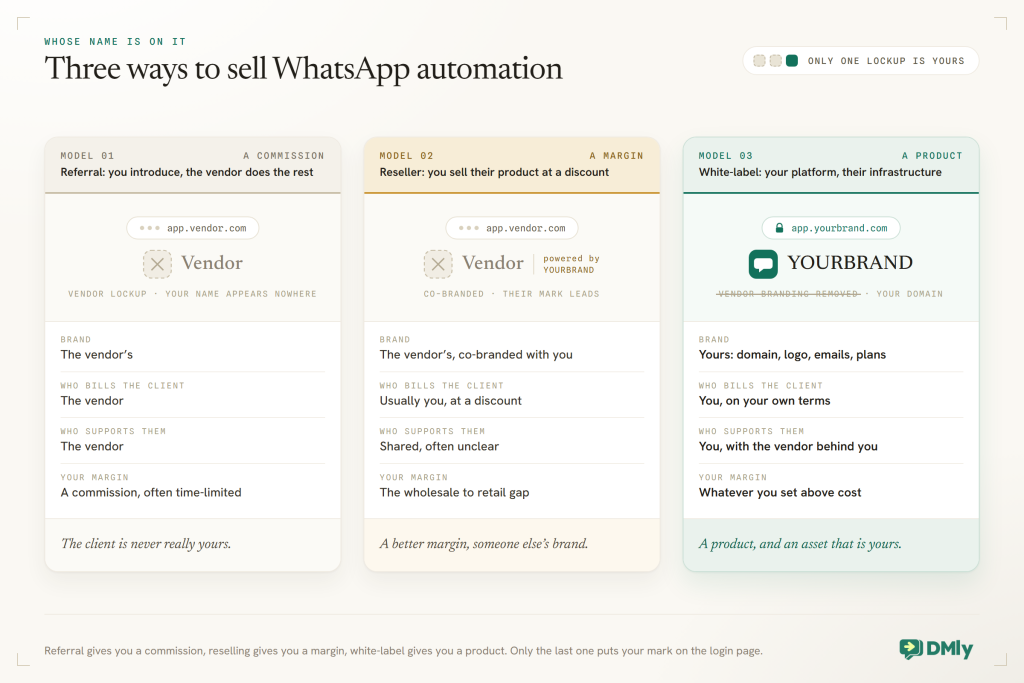
Note that “white-label” doesn’t mean “built for you”. You’re not getting a custom app. You’re getting a proven platform with the vendor’s name removed and yours put in its place, which is exactly what makes it fast and affordable.
Which Agencies Should Launch a Platform
Not every agency should launch a platform, and it is worth being honest with yourself before you sign anything. This model suits businesses that already have client relationships and want a recurring product to attach to them:
- Marketing and social media agencies that run Instagram, TikTok and WhatsApp campaigns and keep getting asked “can you also handle the replies?”
- Web design and development studios whose clients need a live chat widget, a booking page and WhatsApp on the site, and who’d rather bundle it than hand it off.
- Consultants and local-business specialists who serve one vertical (salons, clinics, gyms, restaurants) and can package automation as “the way we run your front desk”.
- Franchises and multi-location groups that want every location on one standard, under the group’s brand, with central control.
- Founders who want a SaaS without a development team: pick a niche, brand the platform, price it, sell it.
The market is there. Meta reported that people hold more than 1 billion active conversation threads with businesses every day across WhatsApp, Messenger and Instagram, and the WhatsApp Business app alone passed 200 million monthly active businesses back in 2023. Most of those businesses are small, local, and answering messages by hand. That is the client base for a white-label agency.
How White-Label WhatsApp Software Works
There are four layers, and you only ever touch the top two. Underneath, every serious WhatsApp platform sits on Meta’s WhatsApp Business Platform (the Cloud API). A white-label arrangement adds the provider’s product on top of that, and then your brand wrapped around the outside. Your clients live in their own separate workspaces inside that branded shell.
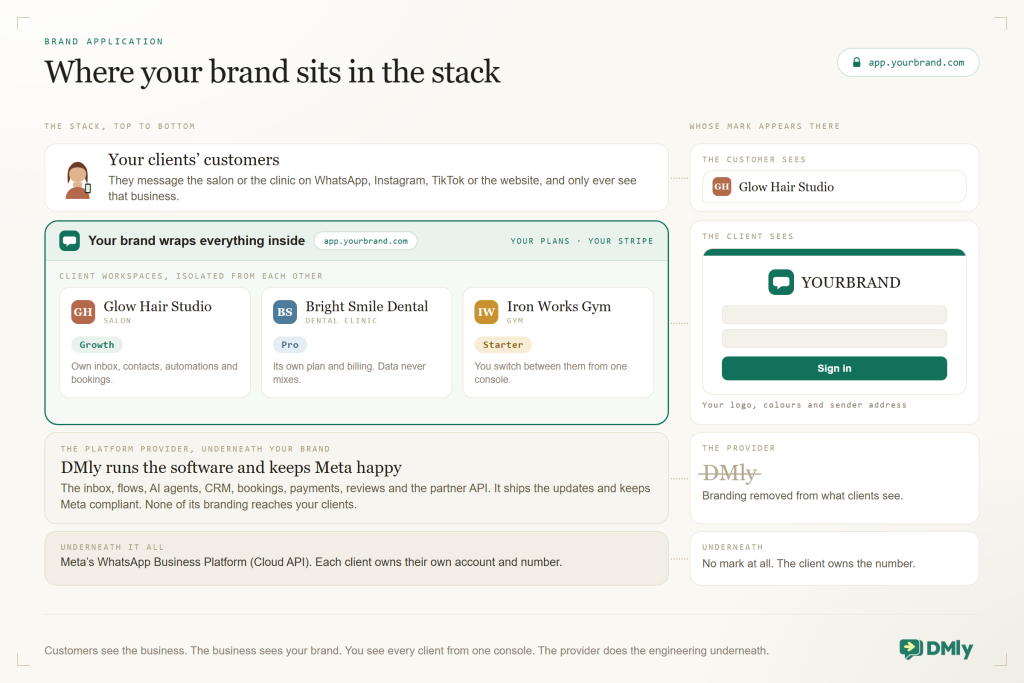
Three details in that diagram matter more than they look.
Clients own their WhatsApp assets. When a business connects WhatsApp through Meta’s Embedded Signup flow, Meta’s own documentation is clear that the business owns its WhatsApp Business Account and phone number. That protects the client, and it protects you: nobody is “holding numbers hostage”, and a client who leaves can take their number with them, which is exactly what a professional agency should be comfortable with.
Workspaces are isolated. A good white-label platform gives each client their own workspace with its own contacts, conversations, automations and billing. Your team can jump between them, but a salon can never see a clinic’s customers.
The money flows to you. In a proper white-label arrangement, the client pays your company on plans you defined, through your payment account. You pay the provider a wholesale fee. The difference is your recurring revenue.
What to Look For in a White-Label WhatsApp Platform
The white-label label gets stuck on some fairly thin products, so this is the list to walk through before you commit. Take it to each vendor and make them show you rather than tell you.
- Real branding, not a logo swap Custom domain with SSL, your logo and favicon, your colours across the whole interface, and transactional emails (invites, password resets, notifications, invoices) sent from your domain. If clients get an email from the vendor’s domain, the illusion is over.
- Isolated client workspaces you can provision quickly One click or one API call to create a workspace, apply branding and assign a plan. Ask how long onboarding a new client takes end to end.
- A partner console One place to see every client, their usage, their plan and their billing status, and to switch into their workspace to help.
- Your own plans and your own billing The ability to define plan names, limits and prices, and to charge clients through your own Stripe (or equivalent) so payouts land in your account, not the vendor’s.
- Transparent WhatsApp costs Meta charges per message. Find out whether the vendor marks those up, and whether you can pass them through or bundle them into your plans.
- More than an inbox Clients don’t stay for a chat tool. They stay because the platform runs their bookings, payments, reminders, reviews and marketing. The broader the product, the stickier the client and the higher your average revenue per account.
- Every channel your clients’ customers use WhatsApp first, then Instagram DMs and comments, Messenger, TikTok, Telegram, SMS and website chat. One inbox for all of them.
- AI that actually does things An AI agent that answers from the client’s knowledge base and can book, reschedule, tag and hand over, not just draft replies.
- API and webhooks For provisioning workspaces, applying branding, setting plans and reacting to events. This is what turns onboarding into a workflow rather than a checklist.
- Roles, permissions and SSO So your team, your client’s staff and the business owner each see only what they should, and nothing more.
- Support behind you Priority support, a partner manager and an SLA at the tiers where you have dozens of clients depending on the platform.
- Compliance built in Opt-out handling, template management, the 24-hour window enforced, quality rating and messaging limits visible. Your clients’ WhatsApp health becomes your reputation.
Read the agency terms before the feature list. Chatrace publishes five of them in a single FAQ answer, including the line “Your clients can’t remove you as admin”, which tells you more about how a platform treats the agency and client relationship than any pricing table will. The Chatrace review works through those terms and the whitelabel tier they belong to.
How to Price White-Label WhatsApp Software
Pricing is where agencies either build a business or build an expensive hobby. Three principles first, then the numbers behind them.
- Price the outcome, not the seat. A salon doesn’t buy “a shared inbox”. It buys fewer missed bookings, fewer no-shows and more reviews. Name your plans around what a business gets, and let the platform be the way you deliver it.
- Separate the platform from the service. The subscription pays for the software and your basic support. Setup, automation builds and monthly management are separate line items, and usually the more profitable ones.
- Pass WhatsApp costs through honestly. Meta bills per message. Either bill it at cost as a separate line, or include a sensible allowance in each plan and be explicit about what happens above it. Surprises on the WhatsApp line are the fastest way to lose a client.
Here’s an example of how the numbers can work. It uses DMly’s published Growth partner tier (about $399 a month for up to 50 client workspaces) purely as an illustration; your platform costs, plan prices and mix will differ.
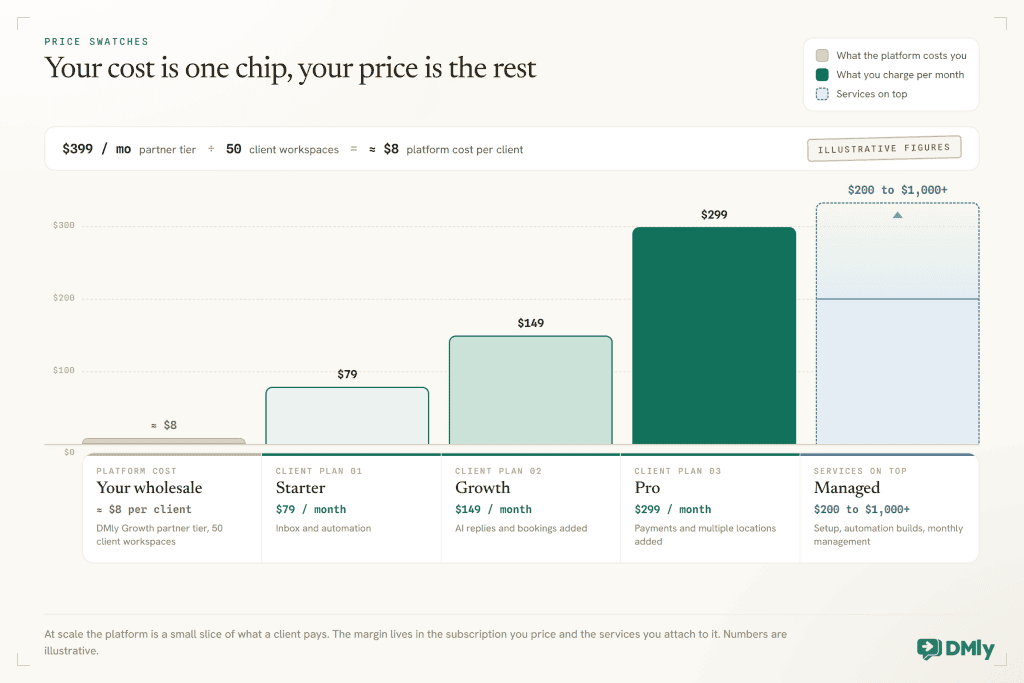
Two habits keep the model healthy. First, put a floor under the number of clients before you commit to a tier: 10 clients on a $97 tier is a very different business from 3. Second, review usage quarterly. A client who has grown into three WhatsApp numbers and 20,000 contacts should be on a bigger plan, and a partner console that shows usage per workspace makes that conversation easy.
What to Sell Alongside the Software
The platform is the product; the services are the profit, and they are the reason clients stay. These are the ones agencies sell most successfully on top of a branded WhatsApp platform:
Setup and migration
Connect the WhatsApp number through the official API, get the business verified with Meta, import contacts, submit the first templates, install the website widget. A fixed one-off fee.
Automation builds
Auto-replies, keyword flows, booking confirmations and reminders, review requests after a visit, abandoned-cart recovery for stores. Priced per flow or as a package.
AI receptionist
Train an AI agent on the client’s services, prices and policies; let it answer, qualify and book; set the handover rules. A premium setup fee plus a monthly “we keep it accurate” retainer.
Campaigns and broadcasts
Monthly promotions to opted-in segments, seasonal campaigns, win-back sequences. Managed monthly, with reporting.
Reputation management
Automated Google review requests, monitoring, and AI-drafted replies with human approval. This one ties directly to your client’s revenue, which makes it the easiest service on the list to sell.
Monthly management
Inbox health checks, template renewals, list hygiene, WhatsApp quality monitoring, quarterly reviews. The retainer that makes churn rare.
Notice how many of those depend on the platform doing more than messaging. Bookings, payments, reviews and CRM aren’t nice-to-haves for an agency; they’re the things you can charge to set up and manage.
How to Onboard a Client Without Losing a Week
The agencies that make this work treat onboarding as a production line, not a project. Here is the sequence, and how long each step should take once you have run it a few times.
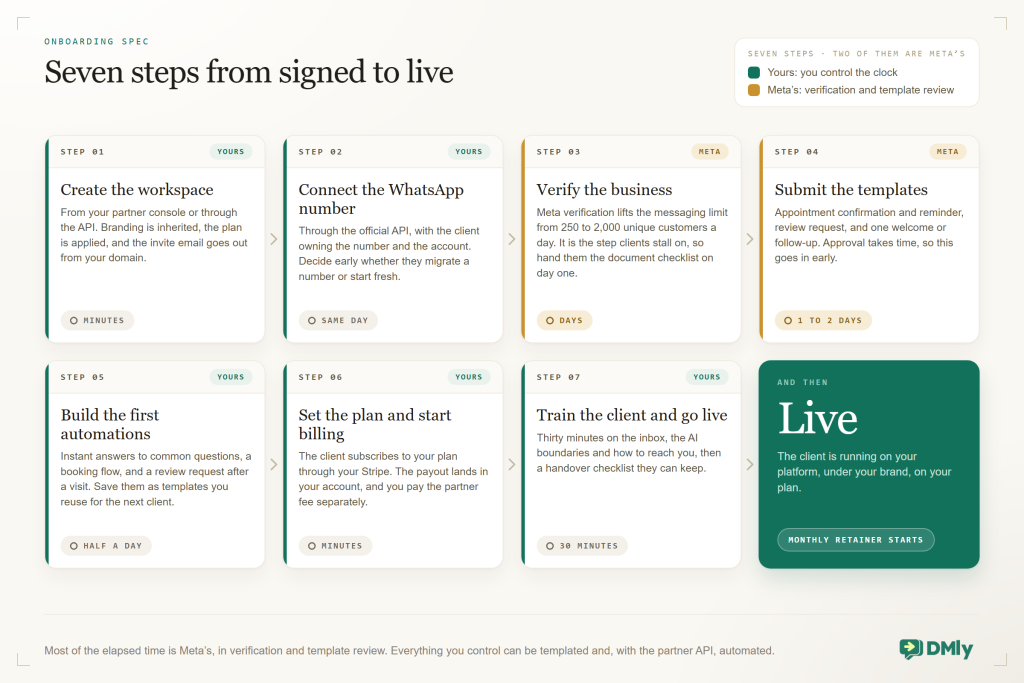
- Create the workspace. From your partner console or through the API. Branding is inherited, the plan is applied, the client gets an invite email from your domain.
- Connect the WhatsApp number. Through the official API, with the client owning the number and account. Decide early whether they’ll migrate an existing number or start fresh.
- Verify the business with Meta. It lifts the messaging limit from 250 to 2,000 unique customers a day, and it’s the step clients most often stall on. Give them a document checklist on day one.
- Submit the templates they’ll need on day one. Appointment confirmation and reminder, review request, and one welcome or follow-up template. Approval takes time, so this goes early.
- Build the first automations. Start with the three things every local business needs: instant answers to common questions, a booking flow, and a review request after a visit. Save these as templates you reuse for the next client.
- Set the plan and start billing. The client subscribes to your plan through your Stripe. Payouts go to you.
- Train and go live. Thirty minutes on the inbox, the AI boundaries and how to reach you. Then the monthly retainer begins.
How to Sell It: The Pitch by Industry
Agencies rarely lose these deals on features; they lose them by describing the software instead of the outcome. The pitch that works is specific to your client’s day, and it usually fits in one sentence.
| Client | The pain they say out loud | The one-sentence pitch | What you actually set up |
| Salon or spa | “We miss bookings when we’re busy, and no-shows kill our Saturdays.” | “Customers book, get reminded and rebook on WhatsApp without your team touching the phone.” | Booking page, AI receptionist, deposits, reminders, review requests, win-back flow |
| Clinic or dental practice | “Reception spends all day confirming and rescheduling.” | “Confirmations, reminders and reschedules run themselves; your desk only sees the exceptions.” | Reminder sequences, reschedule links, recall messages, patient CRM |
| Gym or studio | “Members drift away and we only notice when the payment fails.” | “Class reminders, renewals and win-backs on WhatsApp, and Instagram enquiries turned into trials.” | Class bookings, membership renewals, failed-payment recovery, comment-to-DM |
| Restaurant or café | “We answer the same menu and reservation questions all day.” | “One inbox for WhatsApp, Instagram and TikTok, with orders, reservations and reviews on autopilot.” | Ordering flow, reservation deposits, QR list growth, review requests |
| Ecommerce brand | “Carts get abandoned and ‘where is my order’ floods our DMs.” | “Cart recovery, order updates and support on WhatsApp, with the store connected.” | Shopify or WooCommerce connection, cart recovery, order updates, AI support |
Two closing habits. Show, don’t describe: a two-minute demo where the prospect messages the number and gets booked by the AI beats any slide. And lead with your brand: the platform is “yours”, so talk about it the way you’d talk about any product you’ve built, because as far as the client is concerned, you have.
Risks and How to Manage Them
This is a good business, and it has sharp edges. Better to know where they are before you cut yourself on one.
- Your clients’ WhatsApp health is your reputation. If a client blasts a bought list and gets their number flagged, they’ll blame the platform, which is now you. Put opt-in, opt-out and segment discipline into your onboarding, and monitor quality ratings as part of your retainer.
- Meta’s rules change. Pricing moved to per-message billing in 2025; messaging tiers and template rules have changed more than once. Choose a provider that keeps up and tells you, and build a small buffer into your WhatsApp cost lines.
- Support obligations. Clients will message you at 8pm about a broadcast that “didn’t send”. Decide your support hours, use the platform’s own automation for your own front desk, and pick a tier with a partner manager once you have volume.
- Vendor dependency. You’re building on someone else’s platform. Ask about data export, API access and what happens to your clients’ workspaces if you leave. A vendor that lets clients own their WhatsApp assets and gives you an API is a vendor you can leave, which is precisely why you probably won’t need to.
- Selling software instead of outcomes. An agency that positions itself as “a WhatsApp tool” competes with every tool. An agency that positions itself as “we run your bookings, reminders and reviews on WhatsApp” competes with nobody the client has heard of.
Why DMly Is the Best White-Label WhatsApp Platform for Agencies
Plenty of vendors will let you swap a logo; very few hand you a full local-business operating system to put your name on. Here is what DMly’s white-label plan actually includes, straight from the product.
A platform under your brand in under 15 minutes
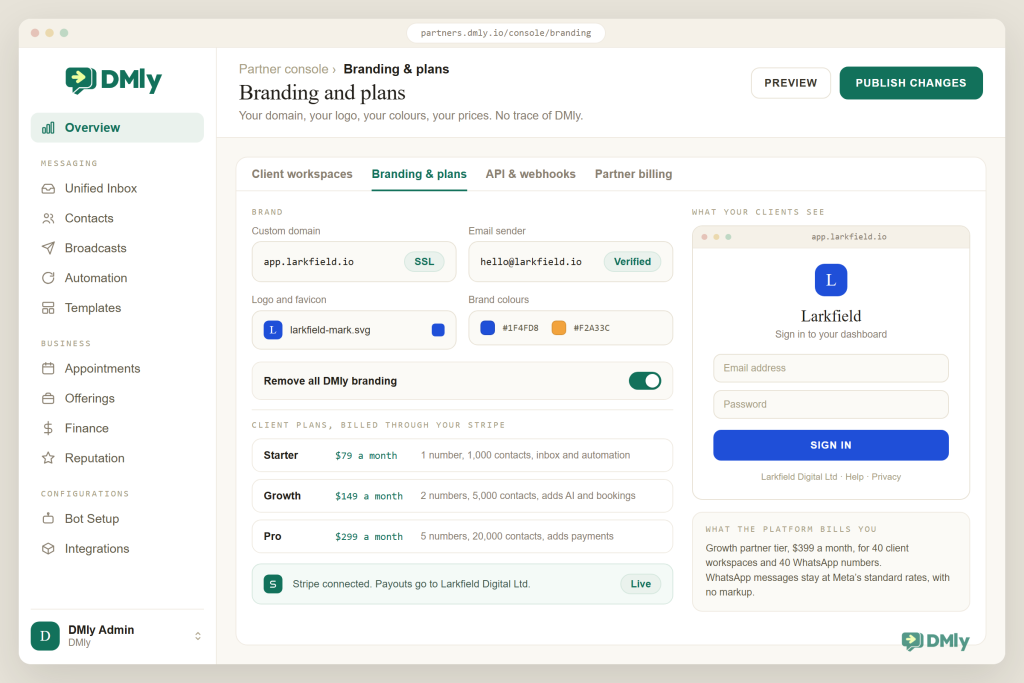
Custom domain with free SSL, so your clients log in at app.yourbrand.com. Your logo and favicon, your brand colours applied across the whole interface, and a live preview before you publish changes. Notifications, invites and invoices go out from your domain, not DMly’s. Every trace of DMly branding is removed. DMly says most partners are live under their own brand in less than 15 minutes, with no engineering required.
Isolated client workspaces, one console
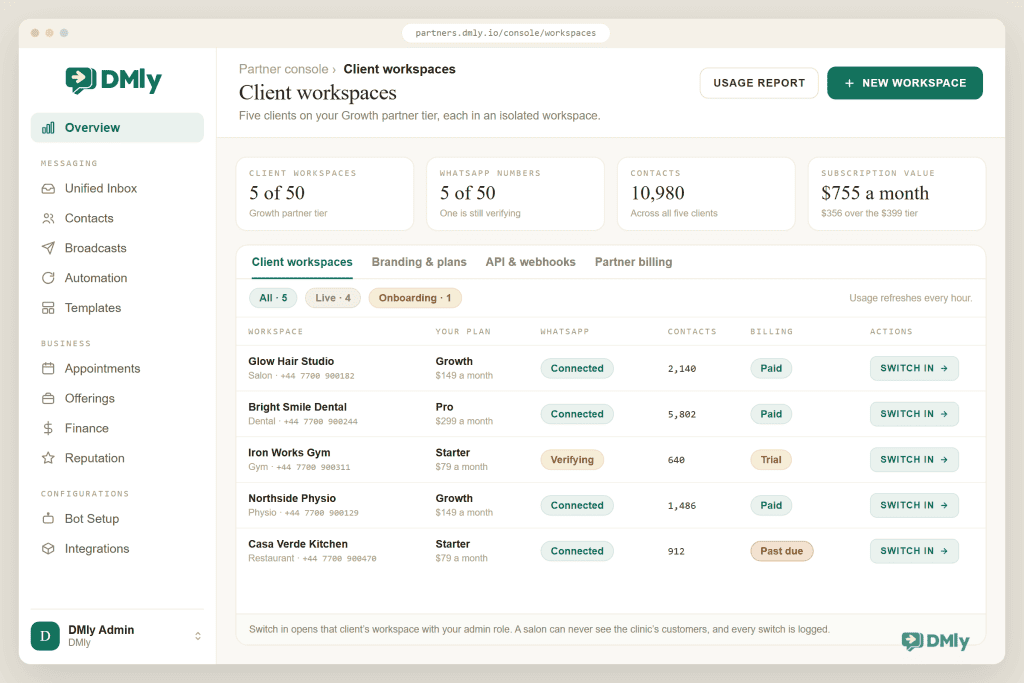
Every client gets an isolated workspace with its own data, provisioned in one click. From the partner console you can switch between them, watch usage and manage billing. Tiers are sized for real agencies: Launch at $97 a month for 10 client workspaces and 10 WhatsApp numbers, Scale at $249 a month for 25 workspaces and 25 numbers, Growth at $399 a month for 50 workspaces and 50 numbers, both with priority support, and a custom Agency tier with unlimited workspaces, a dedicated partner manager and an SLA. Add-ons let you buy more workspaces, numbers and contacts as you grow rather than jumping tiers.
Your plans, your Stripe, your margin
You create your own pricing plans and bill clients directly through your connected Stripe account. Payouts land in your Stripe. DMly charges you the partner subscription and, on the WhatsApp side, there’s no markup: businesses pay Meta’s standard rates. That makes the pricing model in Figure 3 possible, and it makes your cost lines predictable.
A partner API and webhooks for onboarding at scale
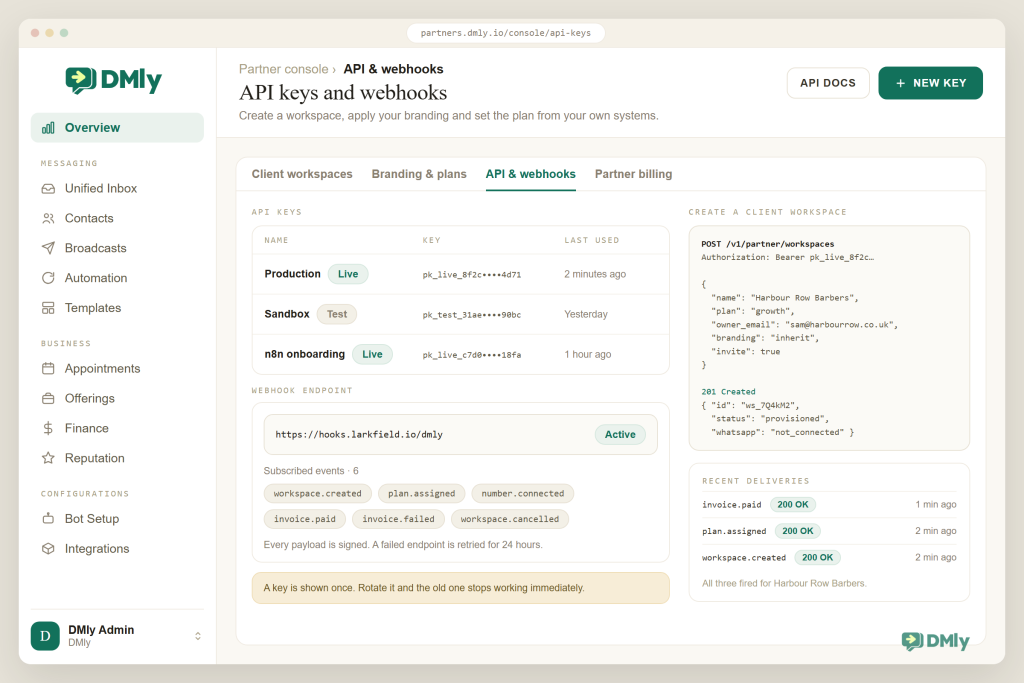
DMly’s partner API lets you create workspaces, apply branding and set plans programmatically, with API keys per environment and webhooks that notify you of every event. In practice that means “new client signed the proposal” can trigger workspace creation, branding, plan assignment and the welcome email without anyone clicking through screens. For an agency onboarding two clients a month it’s a convenience; for one onboarding twenty, it’s the business model.
The whole platform, not just an inbox
What you’re white-labelling is DMly’s full local-business platform: the shared omnichannel inbox across WhatsApp, Instagram, Messenger, TikTok, Telegram, SMS and live chat; the no-code flow builder; AI agents that answer, book, reschedule and hand over; the CRM with tags, segments and pipelines; appointments and classes; services, products, invoices and payments through Stripe, PayPal, Paystack, Razorpay, MyFatoorah and Mercado Pago; subscriptions and loyalty; and Google review requests and Google Business Profile management. That breadth is what lets you sell the six services above, and it’s why clients on a “front desk” platform churn less than clients on a chat tool.
Compliance and account health baked in
Because your clients’ WhatsApp health becomes your reputation, it matters that DMly enforces the 24-hour window everywhere, honours opt-out keywords automatically, only lets approved templates be sent, and shows each number’s quality rating and messaging tier in the dashboard with links to Meta verification. Your onboarding checklist gets shorter and your support tickets get fewer.
| What agencies ask for | Typical white-label chat tool | DMly white-label |
| Branding | Logo swap, vendor domain or subdomain | Custom domain with SSL, logo, favicon, colours, emails from your domain, DMly branding removed |
| Client management | Sub-accounts in one shared login | Isolated workspaces, partner console with usage and billing per client |
| Billing | Vendor bills, you get a discount | Your own plans, billed through your Stripe, payouts to you |
| Automation | Manual setup per client | Partner API and webhooks to create workspaces, apply branding and set plans |
| Product depth | Inbox and broadcasts | Inbox, AI agents, flows, CRM, bookings, payments, subscriptions, loyalty, reviews |
| WhatsApp costs | Often marked up | No markup; Meta’s standard rates |
| Scale | Ask sales | Launch (10), Scale (25), Growth (50), Agency (unlimited) plus add-ons |
Launch your own WhatsApp platform
Your domain, your logo, your plans, your Stripe. Isolated client workspaces, a partner console and an API to onboard at scale, on top of the full DMly platform. Book a 45-minute white-label demo.
How to Launch a White-Label WhatsApp Platform With DMly
Most of this happens in an afternoon; the part that takes longer is your positioning, not the software. Here is the sequence we walk partners through.
- Pick your niche and your promise. “WhatsApp automation for everyone” is a hard sell. “The booking and reminders platform for salons in Lagos” is not. Choose the vertical you already know and write down the three outcomes you deliver.
- Choose your partner tier. Launch for your first ten clients, Scale when you’re past that or want priority support, Growth once you pass 25, Agency when you need unlimited workspaces and a named partner manager.
- Brand the platform. Point app.yourbrand.com at DMly, upload your logo and favicon, set your colours, set the sender address for emails, preview, publish.
- Design your plans. Three is plenty. Name them around outcomes, decide the limits (numbers, contacts, seats, AI replies) and the price, and connect your Stripe account.
- Build your onboarding templates. A standard set of message templates, three starter automations, an AI agent persona and a 30-minute training script. These are the assets you’ll reuse for every client.
- Wire the API if you’ll scale. Proposal signed → workspace created → branding and plan applied → invite sent. Webhooks tell you when the client connects WhatsApp or hits a limit.
- Onboard your first three clients from your existing base. They already trust you, they’ll forgive rough edges, and they’ll give you the case study for the next ten.
- Run your own front desk on the platform. Your own WhatsApp number, your own AI agent for enquiries, your own review requests. Nothing sells a platform like using it in front of the client.
Final Thoughts
This model turns your most common client request, “can you handle our messages?”, into a recurring product with your name on it. The economics work when three things are true: the platform is broad enough that clients build their operations on it, the branding is complete enough that clients think of it as yours, and the onboarding is repeatable enough that the tenth client costs you less than the first.
DMly’s white-label plan is built for exactly that: your domain and brand in minutes, isolated client workspaces from one console, your own plans billed through your Stripe, a partner API for onboarding at scale, and underneath it the full platform local businesses actually run on. Start with the clients who already trust you, price the outcome, and let the platform do the heavy lifting.
Frequently Asked Questions
What is white-label WhatsApp software?
A ready-made WhatsApp messaging and automation platform that a provider lets you rebrand and sell as your own: your domain, logo, emails, plans and pricing, with the provider running the software underneath. Your clients see your brand; you keep the margin above the platform cost.
Do I need to be a Meta Business Partner or BSP to white-label WhatsApp?
No. The white-label provider handles the Meta integration. Your clients connect their own numbers through the official WhatsApp Business Platform inside your branded platform, and, per Meta’s Embedded Signup documentation, they own their WhatsApp assets. You’re selling and supporting the platform, not operating the API yourself.
Who pays for WhatsApp messages?
Meta charges per message. With DMly there’s no markup on those rates. You decide whether to pass them through at cost as a separate line or include an allowance in your plans; either way, be explicit with clients about it.
How much can an agency charge for a white-labelled WhatsApp platform?
It depends on your market and what’s bundled, but subscription plans in the range of $79 to $299 a month per client, plus setup fees and optional monthly management, are common. Price the outcomes (bookings, reminders, reviews, campaigns), not the seats.
Can clients see each other’s data?
Not on a properly built platform. DMly gives every client an isolated workspace with its own contacts, conversations, automations and billing. Your team can switch between workspaces from the partner console; clients cannot.
What happens if a client leaves?
They keep their WhatsApp number and account, because they own them, and you stop billing them. That’s how it should be. Retention comes from running their bookings, payments and reviews well, not from making it hard to leave.
How quickly can I launch?
DMly reports most partners are live under their own brand in less than 15 minutes for the branding and domain setup. Designing plans, building your onboarding templates and signing your first clients takes longer, but none of it requires developers.
Writing about WhatsApp automation, bookings and growth for local business.
Turn WhatsApp into your busiest channel.
Start free and run message, bookings, payments and reviews in one place.
