
WhatChimp Review 2026: The Allowance They Undersell
Most reviews of this kind end up finding a cost the vendor did not mention.
This one found the opposite. The sharpest thing in this WhatChimp review is an allowance WhatChimp forgot to tell you that you have, sitting in their own documentation, understated by a factor of five for the customers paying them the most. It is worth money, it is easy to check, and it goes in their favour.
The rest of the page is less tidy. WhatChimp publishes four different prices for the same Basic plan, on two different pricing pages plus a documentation page, and the ladder above it is twice as long as the pricing page suggests. None of that is hidden. All of it is on their own site, and all of it was read there in a plain browser on 8 September 2026.
Here is what WhatChimp actually costs, what you get for it, what changes when Meta’s rules move on 1 October, and where DMly is and is not the better answer.
What WhatChimp Is, and Who It Suits
WhatChimp is a WhatsApp broadcasting and chatbot platform built on the official WhatsApp Business API, and it is unusually well equipped at the bottom of its range.
You connect your WhatsApp number, import your contacts, and send approved template campaigns to segments of that list. A drag-and-drop builder handles chatbot flows, a shared inbox lets several people answer from the same number, and there is a product catalogue and cart-recovery tooling for online stores.
What is genuinely notable is how much of that sits on the entry plan. Their Basic tier lists a WhatsApp AI Agent with 100,000 AI message tokens, unlimited message credits, unlimited chatbot sessions, SMS broadcasting, number coexistence, API access, outgoing webhooks, and named integrations for Google Sheets, Zapier, Pabbly, Make, n8n, WooCommerce and Shopify. Plenty of competitors put the AI agent three tiers up. WhatChimp does not.
What is not on the entry plan
Three things move to Pro, and one of them will matter to you more than it sounds.
- Instagram and Facebook. The omnichannel inbox is a Pro feature. On Basic, WhatChimp is a WhatsApp-only product.
- The appointment booking system. Also Pro. If bookings are the reason you are shopping, the entry plan is not the one.
- Removing “Powered by WhatChimp”. This is listed as a Pro feature, which means that on the entry plan your customers see the vendor’s name attached to your business. That is a normal way to price a starter tier, and it is worth knowing before your first campaign rather than after it.
WhatChimp suits a business whose customers are on WhatsApp and nowhere else, that wants to broadcast to a list and answer replies as a small team, and that would rather have the AI agent included than pay for it separately. If you are still narrowing a shortlist, how to choose a WhatsApp marketing tool sets out the checks that apply to any vendor here.
The Free Allowance Their Own Documentation Undersells
Start here, because this is the part with money in it, and it is the part their own page gets wrong in your favour.
WhatChimp’s documentation has a page called “Pricing Explained”. Under a heading marked Free Conversations, it says this:
“Each WhatsApp Business Account gets 1,000 free service conversations per month across all business phone numbers. This resets at the beginning of each month and applies only to service conversations.”
That was an accurate description of how WhatsApp worked under the old conversation-based model. It is not how it works now, and it is not how it will work from 1 October. Meta’s own documentation puts it like this:
“Each month, every business phone number will receive 1,000 free service messages; Meta will only charge as of the 1,001st service message delivered.”
Every business phone number, not every account. That single word is the difference between one allowance and several, and WhatChimp sells plans denominated in exactly that unit.
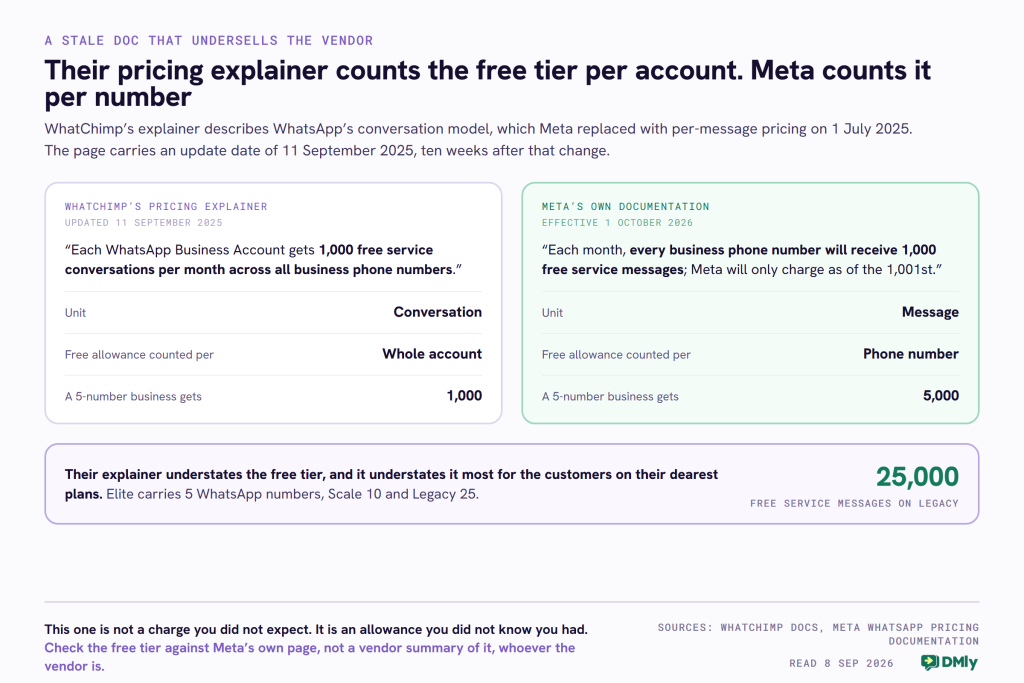
Run it through their own plan ladder and the gap gets wide. Their Elite plan carries five WhatsApp numbers, Scale carries ten and Legacy carries twenty-five. Under Meta’s rule that is 5,000, 10,000 and 25,000 free service messages a month. Their documentation tells all three of those customers they get 1,000.
Why this happened is ordinary, and worth saying plainly so nobody reads an accusation into it. Meta replaced conversation-based pricing with per-message pricing on 1 July 2025. WhatChimp’s explainer still describes the old model throughout, and it carries an update stamp of 11 September 2025, about ten weeks after the change. It is a page that did not get rewritten. Nearly every vendor in this category has one.
The practical instruction for you is short: take the free tier from Meta, not from your vendor’s summary of it, and count it per number. We have set out what changes on 1 October in the WhatsApp pricing change on 1 October, and the per-market rates are in our WhatsApp Business API pricing by country card.
WhatChimp Pricing: Four Answers to One Question
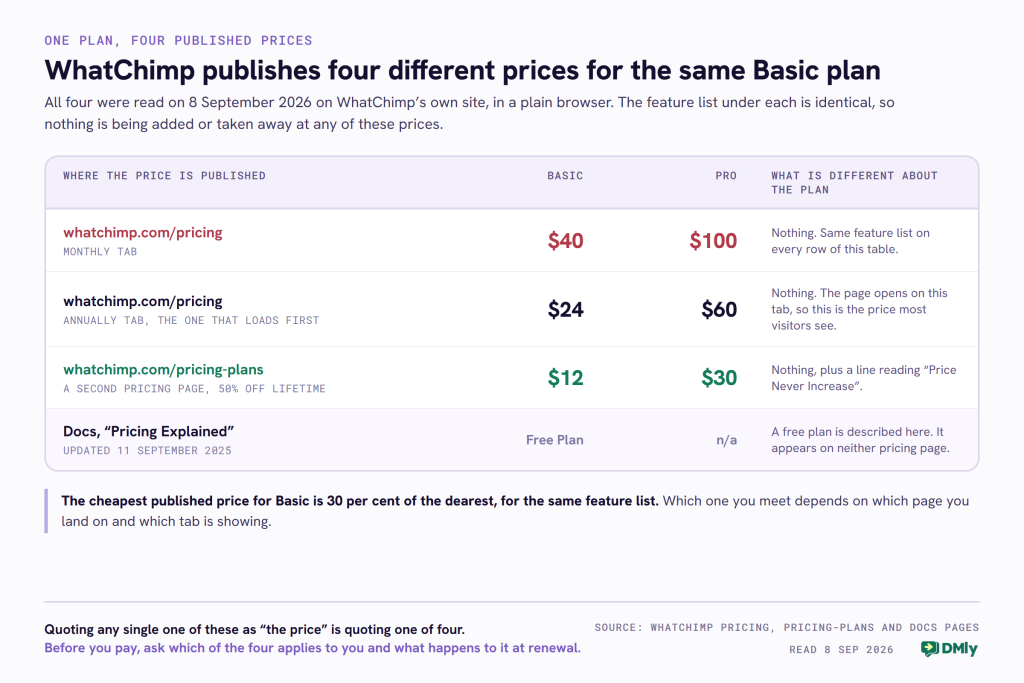
WhatChimp’s Basic plan costs $40, $24 or $12 a month depending on which of their pages you are looking at, and the feature list underneath is the same on all three.
An earlier version of this WhatChimp review quoted Basic at $40 and Pro at $100. Those figures are correct, and they are still on the site today. What that version never said is that they are the monthly-billing prices, that the page opens on a different tab showing lower ones, and that a second pricing page shows lower ones again.
The tab that loads first is not the dearest one
The pricing page has an Annually and a Monthly toggle, and it opens on Annually. So the first number most visitors see is $24 for Basic and $60 for Pro, against a stated “40% off with annual subscription”. Switch the toggle to Monthly and it becomes $40 and $100.
That is a completely normal way to price software, and the 40 per cent claim checks out on their own arithmetic. It is worth knowing only because it decides which figure you should be comparing against anyone else’s.
The second pricing page
WhatChimp runs a second pricing page at whatchimp.com/pricing-plans. Same three cards, same feature lists, different numbers: Basic at $12 a month and Pro at $30, under a banner reading “Special 50% Discount for Lifetime” and a per-plan line reading “50% OFF Lifetime (Price Never Increase)”.
Both pages carried a countdown clock when we read them, and both stated the same deadline: “Offer expires by Sunday, September 13, 2026. This is the last chance to lock 50% OFF for lifetime (no hikes in price for you until you cancel).” We are quoting that rather than characterising it, because a single visit cannot tell you what a countdown does when it reaches zero. If you are buying, the useful move is simply to ask whether the $12 rate is available to you and to get the “price never increase” part in writing on your invoice.
And a free plan on neither page
The documentation adds a fourth answer. Under Subscription Plans it lists a “Free Plan: Start using WhatChimp at no cost and explore basic features”. No free tier appears on either pricing page. If a free plan is what you came for, that is a question for their sales team rather than something you can act on from the site.
The price is shown in your local currency
A detail worth flagging for readers outside the United States: the plan cards print a local conversion under the dollar figure. Read from Nigeria, Basic showed “$ 24 /month, approximately NGN 31,727”, with a banner offering a Nigeria-specific discount. The dollar figure is the price; the local number is a conversion shown alongside it, so check which one your card will actually be charged in.
The Ladder Is Twice as Long as the Pricing Page
An earlier version of this page said WhatChimp’s Enterprise tier was custom-priced. It is not, and correcting that is a point in WhatChimp’s favour.
The pricing page shows three cards: Basic, Pro, and an Enterprise card reading “For Scale” with no figure on it. That third card is what produced the old “custom pricing” line. But the button underneath it, labelled View Enterprise Plans, leads to a page with three more plans, each carrying a published monthly and yearly price.
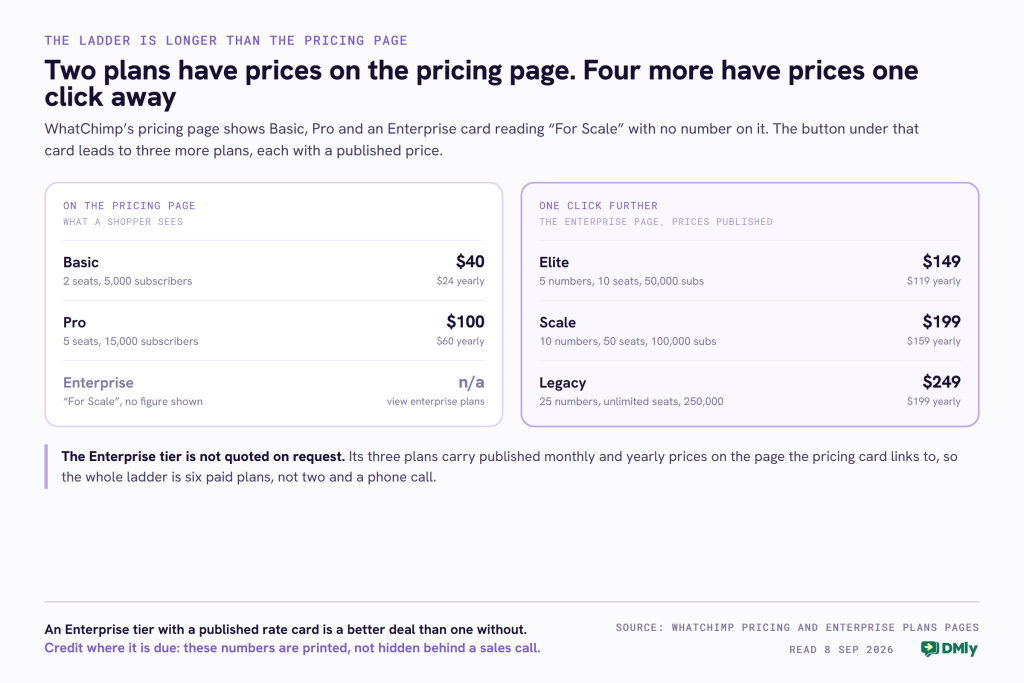
Here is the whole thing in one place, which is not something WhatChimp’s own site does anywhere.
| Plan | Monthly | Yearly | WhatsApp numbers | Seats | Subscribers |
|---|---|---|---|---|---|
| Basic | $40 | $24 | 1 | 2 | 5,000 |
| Pro | $100 | $60 | 1 | 5 | 15,000 |
| Elite | $149 | $119 | 5 | 10 | 50,000 |
| Scale | $199 | $159 | 10 | 50 | 100,000 |
| Legacy | $249 | $199 | 25 | Unlimited | 250,000 |
Two things fall out of that table that the pricing page alone will not tell you.
First, Basic and Pro are both single-number plans. Multiple WhatsApp numbers start at Elite, which is $149 a month. If you run two shops on two numbers, the jump is from $100 to $149 and not from $40 to $100.
Second, and this is the credit: an Enterprise tier with a printed rate card is a better deal than one without. Plenty of vendors put “Contact sales” where Elite, Scale and Legacy have numbers. WhatChimp prints them, with the seat and subscriber counts beside them, and that deserves saying.
The Charges On Top, and What Moves on 1 October
WhatChimp adds nothing to Meta’s message fees, states so twice, and that is the single most valuable line on their pricing page.
Their wording: “Unlike other competitors who charge a 20-25% markup on Meta WhatsApp API pricing, we don’t charge any markup fees.” The first half of that is their characterisation of other vendors and we are not going to endorse a number we have not measured across the market. The second half is a commitment about their own billing, it is published where a buyer can find it, and it is the right policy. DMly does the same thing, so on this row the two of us are level.
The unit on their rate card is the one Meta retired
The same page that carries the free-tier paragraph also carries a per-country rate table, introduced with “WhatsApp’s Conversation-Based Pricing means you pay a fee per conversation, which is a 24-hour window where you can send unlimited messages to a customer.” The pricing page repeats it as a headline: “Pay Per Conversation, Not Per Message”.
Meta moved off that model on 1 July 2025 and now charges per delivered template message. The rate table itself is labelled “effective from 1st July, 2025”, so the numbers in it were right when they were published. What has not been updated is the model wrapped around them, and the free tier described above it.
The question worth putting to them, and to any vendor showing you a rate card: “Is this card current with Meta’s October rates, and does your billing count messages or conversations?” We have run the same test on AiSensy, Interakt and Spoki, and none of the three had caught up either. This is a category-wide lag, not one vendor’s failing.
What actually changes for your bill
Two things, on the same date, pulling in opposite directions.
- Service messages get cheaper for almost everyone. From 1 October every business phone number gets 1,000 free service messages a month. For a salon or a clinic answering a few dozen people a day, replying to customers inside the 24-hour window costs nothing.
- Utility templates start costing money. From the same date Meta charges for utility templates sent inside an open 24-hour window, which have been free since July 2025, and there is no free tier on those. Order confirmations, delivery updates and appointment reminders are exactly the templates a small business sends most.
The honest headline: the replies are free, the reminders are the bill. That is true whichever of these platforms you buy, because Meta sets it and neither vendor marks it up.
Four Criticisms This WhatChimp Review Used to Make
An earlier version of this page carried four complaints. Read again against what WhatChimp actually publishes, two of them do not survive and the other two get sharper.
Withdrawn: “limited automation depth”
This was an adjective, not a measurement, and nothing on their site supports it. Their published feature list carries unlimited chatbot sessions on every plan, a drag-and-drop flow builder, an automated follow-up bot, interactive input collection, HTTP API calls from inside a chatbot, a custom webhook listener and a native WhatsApp form builder. That is a deeper automation surface than the old sentence implied. Withdrawn.
Withdrawn: “advanced marketing segmentation is relatively simple”
We could not verify this either way from anything WhatChimp publishes, and a criticism we cannot support is not one we should print. Withdrawn as unverified rather than restated. If segmentation depth is central to your decision, that is a demo question, not something any review should settle for you from a feature list.
Sharpened: “heavy focus on WhatsApp”
True, and now it has numbers on it. On Basic, WhatChimp is a WhatsApp-only product. Instagram and Facebook arrive with the omnichannel inbox at Pro, which is $60 billed annually or $100 monthly, and there is no Telegram, TikTok or Google Business Profile channel at any tier. Their “WhatsApp Chat Widget” is a click-to-WhatsApp button for your own site rather than a web chat channel of its own. That is a specific ceiling rather than a tone complaint.
Sharpened: “CRM functionality is fairly basic”
The accurate version is narrower and more useful. WhatChimp manages subscribers, which is the right word for what it does: contacts, groups, tags and the segments you broadcast to. What is not there is the layer above it. There are no invoices, no payments, no revenue reporting and no Google review requests anywhere in their published feature lists, and appointments only appear from Pro. So it is not that the CRM is weak; it is that the product stops at the campaign and does not continue into the booking and the bill.
Where WhatChimp Beats Us
Four of these are real, and one of them is a capability DMly does not document at all.
- Number coexistence. WhatChimp lists this on its entry plan. It is the arrangement that lets you keep using the WhatsApp Business app on a number while that same number also runs through the API, which matters enormously to an owner who does not want to give up the phone in their hand. We searched all 375 pages of DMly’s documentation and coexistence is not mentioned once. If that is your requirement, WhatChimp publishes it and we do not.
- SMS broadcasting on the entry plan. WhatChimp lists SMS on Basic. DMly has SMS, but you bring your own gateway: our documentation says plainly that DMly “sends through Twilio, Plivo or a custom HTTP gateway, and you pay that provider for the messages”. That is more setup and a second bill.
- More subscribers at the entry price. Basic carries 5,000 subscribers at $24 to $40. DMly Starter carries 3,000 active contacts at $29 to $39. If you hold a big list and message it occasionally, WhatChimp’s entry plan holds more of it.
- A published enterprise rate card. Elite, Scale and Legacy carry printed prices with numbers, seats and subscriber counts attached.
- An AI agent on the cheapest paid plan, with a stated allowance of 100,000 AI message tokens, and unlimited tokens from Pro.
DMly as a WhatChimp Alternative
The difference in one line: WhatChimp is a WhatsApp campaign tool that grows an inbox, and DMly is the system a local business runs its whole front desk on.
Eight channels on every plan, not three on the second one
DMly connects WhatsApp, Facebook Messenger, Instagram, Telegram, SMS, TikTok, the LiveChat widget on your own site, and your Google Business Profile, and every one of them is on the $29 plan. WhatChimp reaches three of those, and only from Pro at $60 to $100.
Two limits on our side you should know before you count on them: broadcasts are not available on Live Chat or TikTok, and Messenger and Instagram broadcasts only reach people who messaged you in the last 24 hours, not seven days. We would rather you read that here than discover it mid-campaign.
Bookings, invoices and reviews on the entry plan
WhatChimp’s appointment booking system starts at Pro. DMly includes appointments, invoices and payments, Google review requests and a built-in CRM with pipelines on every plan including the $29 one. For a clinic or a salon that is the whole reason to pick one of these over the other: the booking, the reminder, the invoice and the review request sit in the same system as the conversation.
If that is the shape of your business, our guide to WhatsApp CRM for small businesses is a better starting point than any review, and our guide to WhatsApp broadcasts covers the opt-in and template rules that apply whichever tool you buy.
Where the two meters differ
This is the comparison that actually decides the bill, and it is not a straight win either way. WhatChimp meters subscribers and WhatsApp numbers. DMly meters active contacts and broadcast messages. Whichever platform you pick, the tier you end up on is set by whichever of those you hit first.
| Feature | DMly (from $29/month) | WhatChimp (from $24/month) |
|---|---|---|
| Channels | WhatsApp, Instagram, Messenger, Telegram, TikTok, SMS, Live Chat, Google Business, on every plan | WhatsApp; Instagram and Facebook from Pro |
| Chatbot flows | Unlimited on every plan | Unlimited chatbot sessions on every plan |
| AI | 500, 5,000 or 20,000 replies a month by plan; own API key on Premium | 100,000 AI tokens on Basic, unlimited from Pro |
| Seats on the entry plan | 3 | 2 |
| Contacts on the entry plan | 3,000 active contacts | 5,000 subscribers |
| WhatsApp numbers | 1, 3 or 5 profiles per channel by plan | 1 on Basic and Pro; 5 from Elite at $149 |
| Bookings and appointments | Every plan | From Pro |
| Invoices and payments | Every plan | Not offered |
| Google reviews and reputation | Every plan | Not offered |
| Built-in CRM with pipelines | Every plan | Contact and subscriber management |
| Number coexistence | Not documented | Listed on every plan |
| SMS | Bring your own Twilio, Plivo or HTTP gateway | Listed on every plan |
| Vendor branding on your messages | None | Removed from Pro |
| Markup on Meta’s message fees | None | None |
What DMly costs
Starter is $29 a month billed yearly or $39 billed monthly, with 3 seats, 3,000 active contacts and 10,000 broadcast messages. Growth is $65 or $79, with 6 seats, 10,000 contacts and 50,000 messages. Premium is $149 or $199, with 15 seats, unlimited contacts and 300,000 messages. Every plan includes the AI agent, the CRM, bookings, invoices, reputation and the API, and there is no markup on Meta’s fees.
One number to compare carefully: AI is metered differently at the two vendors and the units do not convert. WhatChimp counts AI message tokens, DMly counts AI replies. A hundred thousand tokens and five hundred replies are not the same measurement, and no honest table can turn one into the other. Ask each vendor what happens when you reach the limit, which is the question that actually matters. On DMly the AI step is skipped and the rest of the flow carries on; connecting your own OpenAI, Claude, Gemini or DeepSeek key on Premium removes the cap entirely.
WhatChimp Review Verdict: Which One Fits Your Business
Choose WhatChimp if WhatsApp is the only channel that matters to you, you want an AI agent included on the cheapest paid plan, you need to keep using the WhatsApp Business app on the same number, you want SMS without setting up a separate gateway account, or you hold a large list and message it occasionally.
Choose DMly if your customers message you on Instagram and Messenger as well as WhatsApp, you want bookings, invoices and Google review requests in the same system as the conversation rather than three tiers up, or you want all of that from the entry plan rather than the second one.
Whichever you pick, do these two things before you pay. Ask which of the four published Basic prices applies to you and get it in writing. And take Meta’s free service tier from Meta’s own page: it is counted per phone number, and on a multi-number plan that is worth several thousand free messages a month that nobody is going to remind you about. For the wider field, our roundup of WATI alternatives covers ten platforms on the same tests.
WhatChimp Review FAQs
WhatChimp pricing 2026: how much does WhatChimp cost?
It depends which page you read. On whatchimp.com/pricing, Basic is $40 a month or $24 billed annually, and Pro is $100 or $60. A second page at whatchimp.com/pricing-plans shows Basic at $12 and Pro at $30 under a 50 per cent lifetime offer. Above those sit three enterprise plans with published prices: Elite $149 or $119, Scale $199 or $159, and Legacy $249 or $199. The documentation also describes a free plan that appears on neither pricing page. Meta’s per-message WhatsApp charges are extra and paid directly to Meta, with no WhatChimp markup.
Is WhatChimp an official WhatsApp Business API provider?
WhatChimp builds on the official WhatsApp Cloud API, so your messages go through Meta’s approved infrastructure rather than an unofficial workaround. Their documentation describes connecting through the official API and gives you direct WhatsApp Cloud API access, and their plans list Meta Cloud API credentials. That matters because unofficial WhatsApp automation risks having the number blocked.
Does WhatChimp support Instagram messaging?
Yes, but only from the Pro plan. The omnichannel inbox covering WhatsApp, Instagram and Facebook is listed as a Pro feature, so on Basic you have WhatsApp alone. Pro is $60 a month billed annually or $100 monthly. If Instagram is part of why you are buying, price the comparison from Pro and not from Basic.
How many WhatsApp numbers can I use on WhatChimp?
One, on both Basic and Pro. Multiple numbers begin at the Elite plan, which carries five WhatsApp numbers at $149 a month or $119 billed annually. Scale carries ten and Legacy twenty-five. This is the single most expensive thing to get wrong when comparing plans, because a second location or a second brand pushes you past Pro entirely.
Does WhatChimp charge a markup on WhatsApp fees?
No. WhatChimp states on its pricing page and again in its documentation that it charges 0 per cent markup and that Meta bills you directly for messages. That is the right policy and it is published where a buyer can find it. Be aware that their rate card and their free-tier paragraph both still describe WhatsApp’s conversation-based model, which Meta replaced with per-message pricing on 1 July 2025, so use Meta’s own current rates when you budget.
WhatChimp review 2026: what is the best WhatChimp alternative?
The right WhatChimp alternative depends on which limit you hit first. If you need a second WhatsApp number, or Instagram and Messenger without moving to a higher tier, or bookings and invoices in the same place as the conversation, DMly covers eight channels with unlimited bot flows and appointments on every plan from $29 a month. If you need number coexistence, SMS without a separate gateway account, or simply the largest subscriber list for the smallest monthly figure, WhatChimp’s own entry plan may still be the better buy, and this review would rather say so than pretend otherwise.
Writing about WhatsApp automation, bookings and growth for local business.
Turn WhatsApp into your busiest channel.
Start free and run message, bookings, payments and reviews in one place.
