
Nosnia Review 2026: What the $20 Plan Includes, and What It Does Not
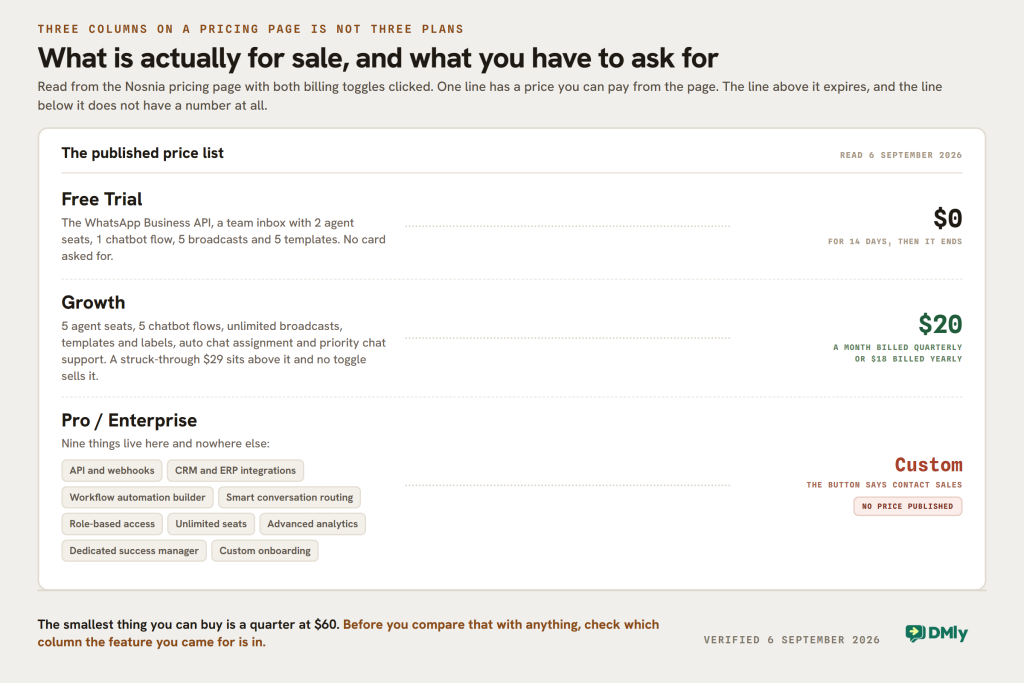
Nosnia’s pricing page has three columns. That is not the same as three plans.
The first column is a 14-day free trial. The third says Custom and its button says Contact Sales. Which leaves one column with a number on it, and that number is the entire published price list.
This Nosnia review is built around what that one column contains, because the answer is narrower than any write-up of this product suggests, including the version of this page we published in April. Five things we said about it were wrong, and the one that matters most is that the integrations we called Nosnia’s stand-out strength are not on the plan you can buy.
Everything below was read on Nosnia’s own pricing page, plan comparison, integrations page and FAQ on 6 September 2026. We have not run Nosnia on a paid plan this month, so there is no verdict here on how the builder feels to use. There is what it costs, what the plan holds, one sentence on their pricing page that will make you under-forecast your WhatsApp bill, and an honest account of where DMly fits and where it does not.
What This Nosnia Review Found on the Price List
There is one purchasable plan, it is called Growth, and it is sold by the quarter or by the year. There is no monthly option on the page at all.
| Column | Price | What it really is |
|---|---|---|
| Free Trial | $0 for 14 days | A trial, not a free tier. No card required, and it expires |
| Growth | $20 a month billed quarterly, or $18 billed yearly | The only plan with a price. A struck-through $29 sits above it, and no toggle sells it |
| Pro / Enterprise | Custom | Contact Sales. Nine capabilities appear here and nowhere else |
Three details the price card does not spell out:
- The smallest commitment is a quarter, not a month. The toggle offers Quarterly and Yearly and nothing else, so $20 a month means $60 up front, and the yearly rate of $18 means $216.
- The $29 above the price is a reference, not an option. Both discounts are quoted against it (save $108 a year at $20, save $132 at $18, and both sums check out), but there is no button that charges you $29.
- The 30-day money-back guarantee is real and worth using. Between a 14-day trial with no card and a 30-day guarantee on a $60 quarter, the cost of finding out whether this suits you is close to nothing. That is a genuinely good offer and most of this market does not match it.
What the $20 Plan Holds, and What Waits Behind Contact Sales
Growth is a five-seat WhatsApp inbox with five chatbot flows and unlimited broadcasts. Stated that plainly it is decent value. Stated the way the marketing states it, as an enterprise-grade compliant messaging platform with deep integrations, it is a different product.
From their own plan comparison, read row by row:
| Row | Free Trial | Growth, $20 | Pro / Enterprise |
|---|---|---|---|
| Shared team inbox | 2 agents | 5 agents | Unlimited |
| Chatbot flows | 1 | 5 | Unlimited |
| Broadcast campaigns | 5 | Unlimited | Unlimited |
| Custom labels and tags | 5 | Unlimited | Unlimited |
| Scheduled messages, auto chat assignment, internal notes | No | Yes | Yes |
| API and webhooks | No | No | Yes |
| Role-based access | No | No | Yes |
| Dedicated success manager, custom onboarding | No | No | Yes |
The API row is the one to stop at. “API / Webhooks” carries a dash on the free trial and a dash on Growth, and a tick only under Enterprise. A platform whose whole pitch is the official WhatsApp Business API does not give you an API of your own until you have talked to a salesperson.
The integrations question, with both of their pages open
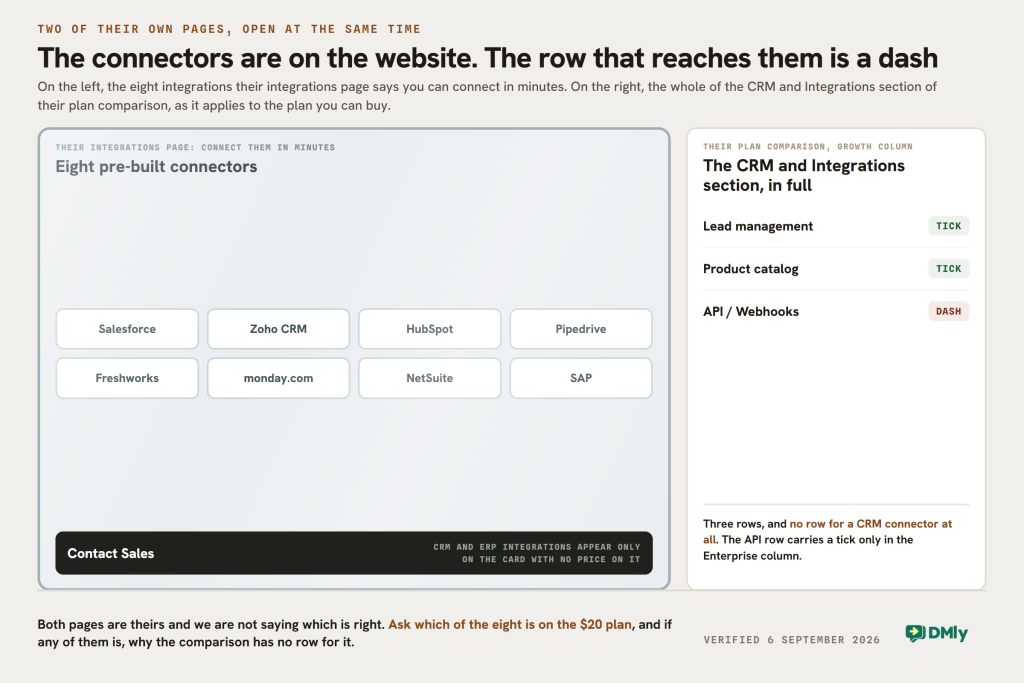
Their integrations page is confident and specific. It names Salesforce, Zoho CRM, HubSpot, Pipedrive, Freshworks, monday.com, NetSuite and SAP as pre-built integrations you can “connect in minutes”, and their FAQ adds Shopify and custom websites.
Their plan comparison, on the pricing page, has a section headed CRM & Integrations. It contains three rows: Lead management, Product catalog and API / Webhooks. There is no CRM connector row at all, and the API row is Enterprise only. “CRM & ERP integrations” appears exactly once on the pricing page, in the bullet list on the unpriced card.
Both pages are theirs and we are not going to tell you which is right. What we will tell you is the question to ask before you pay: which of those eight named connectors is available on the $20 plan, and if the answer is any of them, why does the comparison table not have a row for it. That is a two-line email and it settles the whole decision, because a WhatsApp inbox that writes to your CRM and one that does not are different products at different prices.
Five things this Nosnia review used to say that are not true today
- “Growth Essentials Plan ($20/month)”. The plan is called Growth, and $20 is the rate when you pay for a quarter. Billed yearly it is $18. There is no monthly price.
- We listed “CRM integrations” inside that plan. Their comparison table does not, and their own card puts CRM and ERP integrations on the unpriced tier.
- We called deep integrations the place where “Nosnia really stands out”, and said you can connect custom systems using APIs and webhooks. API and webhooks are Enterprise only. The sentence describes a tier with no price on it.
- We said “multiple agent support” without a number. It is two on the trial, five on Growth, unlimited on Enterprise.
- We named WooCommerce as an integration. It does not appear anywhere on their site today. Shopify does, in the FAQ.
We also spent a section on how technical and unintuitive the platform feels. We have not run it this month, so that was not ours to say, and it has gone. Their FAQ claims the opposite (“completely no-code. If you can use email or standard SaaS products, you can build powerful WhatsApp automations”), and neither of us can settle that for you. Fourteen days and no card can.
The Explanation on Their Pricing Page That Will Make You Under-Budget
This is the most useful section on this page and it has nothing to do with which platform you buy.
Under a heading reading “How WhatsApp Business API Pricing Works”, the Nosnia pricing page explains what Meta will charge you. It says four things:
“WhatsApp pricing is charged by Meta based on conversation categories, not individual messages. You only pay for the 24-hour sessions you initiate.”
“24-Hour Window: Charges are applied once per 24-hour session, regardless of how many messages are sent.”
“Free Service Tier: Service conversations initiated by users are often free within the first 1,000 monthly limit.”
“Service replies within the 24-hour window are free.”
Nosnia pricing page, read 6 September 2026
Every one of those describes conversation-based pricing, which is how WhatsApp worked until 1 July 2025. In Meta’s own words on their pricing documentation, that date was their “update to our pricing model, from conversation-based pricing to per-message pricing”, and conversation-based pricing now sits on Meta’s site under a heading marked Deprecated.
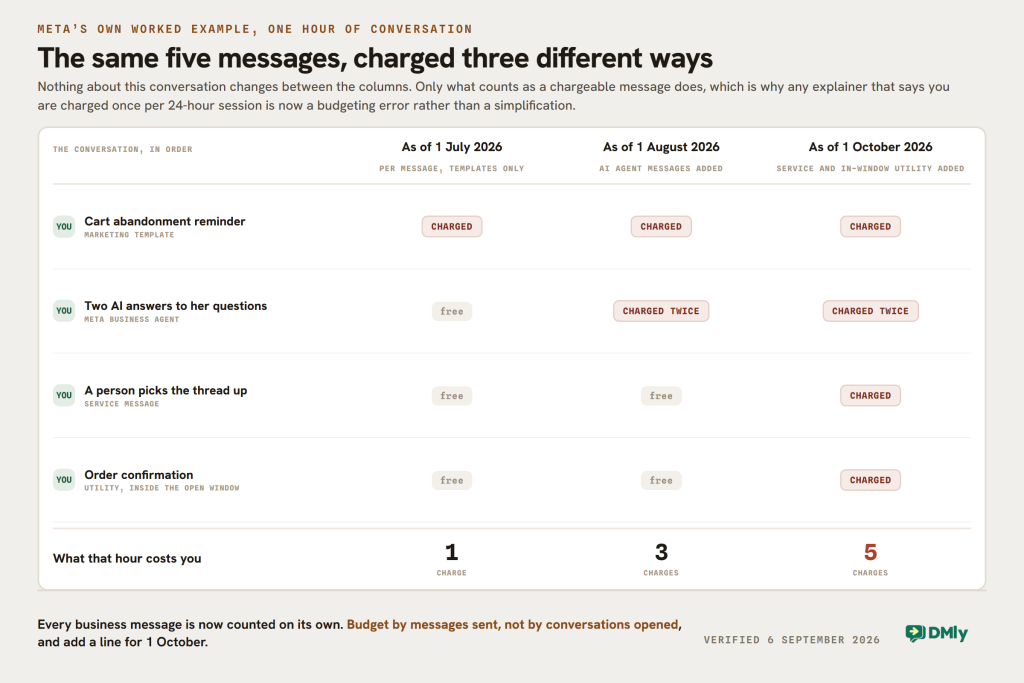
The practical difference is not academic, and it is specific. Under conversation-based pricing, one 24-hour conversation was one charge however many business template messages you sent inside it. Under per-message pricing, every template you send is charged. Send a customer a campaign message, a reminder and a last-chance offer in one day and that is three charges, not one, and a budget built on the sentence above is a third of the real number.
Meta publishes its own worked example of exactly this, following one hour of conversation through three dates. As of 1 July 2026 that hour cost one charge. As of 1 August it cost three. As of 1 October it will cost five. Nothing about the conversation changes; only what counts as a chargeable message.
The likeliest explanation is the boring one, and it is the same one we have found on two other vendor sites this month: the page was written when sessions were how WhatsApp billed, and nobody has been back to it. It is not a claim about Nosnia’s honesty and we are not making one. It is a reason to get your rate and your model from Meta rather than from any platform’s explainer, ours included.
There is a further wrinkle worth knowing, because it lands in three weeks. From 1 October 2026 Meta begins charging for service messages and for utility messages sent inside an open 24-hour window, at each market’s utility and authentication rate, with the first 1,000 service messages of each month free for every business phone number. So the two lines above about service replies being free stop being true on 30 September, whoever your platform is. Our walk-through of the 1 October change covers what becomes billable and how to size it.
And we hold ourselves to the same standard. DMly’s own documentation page on WhatsApp limits still shows a retired “1,000 customers / 24h” step in the messaging tier ladder, when Meta’s ladder is 250, then 2,000, 10,000, 100,000 and unlimited. That row is wrong on our own site as this is published and it is being corrected. Stale WhatsApp documentation is an industry problem, not a Nosnia one.
Where Nosnia Is Genuinely Strong
A review that only finds problems is a sales page in a lab coat. Four of these are real, and two of them are things DMly does not match.
Twenty dollars is a low price for five seats
Five people in a shared WhatsApp inbox, unlimited broadcasts, unlimited templates, unlimited labels and five chatbot flows, for $20 a month billed quarterly. DMly’s entry plan is $29 and carries three seats. If seats are what you need and WhatsApp is the only channel you care about, that is a straightforward win for Nosnia and there is no point pretending otherwise.
The trial and the guarantee are unusually generous
Fourteen days with no card, then a 30-day money-back guarantee on the paid plan. Most of this market gives you seven days or asks for a card up front. It means you can answer the integrations question above by trying it rather than by asking, which is a better answer anyway.
The official API, stated properly
Nosnia describes itself as an Official Meta Partner and says setup is usually done inside 24 hours with no setup fee. Their FAQ is direct about why that matters: on the official API your number is not at risk of a ban for ordinary business use, unlike the browser extensions and bulk senders that still circulate in this market. That is correct and it is the single most important thing a first-time buyer needs to hear. DMly runs on the same official API and says the same thing.
Industry pages that are actually about the industry
Automotive, banking and fintech, education, events, IT and SaaS, healthcare, real estate, retail. Eight of them, each a real page rather than a keyword. If you are in one of those and want to see the flows before you commit, that is a better sales experience than a generic demo.
One thing to check rather than assume: the other channels
Our April version said Nosnia handles “WhatsApp, SMS, Instagram, and Facebook” in one inbox. That claim is on their site and we sourced it correctly, in their FAQ: “Yes, Nosnia.ai supports omnichannel messaging via WhatsApp, SMS, Instagram, and Facebook.”
What is worth knowing is that it appears there and nowhere else. We read every page in their sitemap: the home page, the pricing page, the plan comparison, the five solutions pages and the eight industry pages describe a WhatsApp product, and the pricing page’s own summary of the inbox reads “Give your whole team access to one single WhatsApp Business number”. If Instagram is why you are buying, ask which plan it is on before you pay, because the comparison table does not have a row for it.
DMly as a Nosnia Alternative
We make DMly, so read this knowing that. What we can usefully do is publish our own numbers to the same depth, so you can compare two price lists rather than two adjectives.
From our own pricing page, read the same morning:
- Starter, $29 a month billed yearly: 3 team seats, 3,000 active contacts, 10,000 broadcast and template messages, one profile per channel, 10 active bots per profile with unlimited flows, 500 AI replies a month.
- Growth, $65: 6 seats, 10,000 contacts, 50,000 messages, three profiles per channel, unlimited active bots, 5,000 AI replies.
- Premium, $149: 15 seats, unlimited contacts, 300,000 messages, five profiles per channel, 20,000 AI replies, and the option to connect your own OpenAI, Claude, Gemini or DeepSeek key, which makes replies unlimited and stops them counting at all.
- Add-ons: an extra seat is $10 a month, an extra profile set $15, extra contacts $15 per thousand.
Three differences are structural rather than a matter of degree.
Nothing on the DMly list says Contact Sales. The API, webhooks and integrations are on the entry plan, not held back for a conversation, and there is no unpriced fourth tier holding the interesting half of the product. That is the sharpest difference between the two price lists and it is the reason this comparison is possible at all.
The channels are named and there are eight of them. WhatsApp, Instagram, Messenger, TikTok, Telegram, Google Business and a website Live Chat widget, plus SMS, each with its own row on the pricing page. If you have wondered what running all of that from one place looks like on an ordinary Tuesday, our guide to the omnichannel inbox is the long version.
The subscription covers more than messaging. The CRM and pipelines, comment automation on Instagram and Facebook, bookings and classes, invoices and payments, and Google review requests are in the same product and against the same contact record. A customer can ask a question, be qualified by the AI, book a slot, pay for it and be asked for a review without leaving the system. Nosnia’s answer to most of that is an integration, and on the $20 plan the integrations row is a dash.
Three reasons to buy Nosnia instead
- Five seats for $20 against three for $29. If you have five people in an inbox and only WhatsApp to worry about, we are the more expensive answer to a question you did not ask.
- Unlimited broadcasts. Nosnia does not cap them on the Growth plan. DMly does: 10,000 a month on Starter, 50,000 on Growth, 300,000 on Premium. A high-volume sender should price both properly, because Meta charges for the messages either way and only one of the two subscriptions counts them.
- Fourteen days and a money-back guarantee. Our trial is seven days with no card and there is no guarantee attached. Theirs is a better way to find out.
Nosnia and DMly, Side by Side
| Question | Nosnia | DMly |
|---|---|---|
| Cheapest paid plan | $20 a month billed quarterly, $18 billed yearly | $29 a month billed yearly |
| Smallest commitment | $60 for a quarter | One year, or a 7-day trial with no card |
| Seats on that plan | 5 | 3, then $10 each |
| Chatbot flows | 5 | Unlimited flows, 10 active bots per profile |
| Broadcast messages | Unlimited | 10,000 a month, to 300,000 on Premium |
| API and webhooks | Enterprise only, price on application | On every plan |
| CRM | An integration, on the unpriced tier | Built in, on every plan |
| Named channels | WhatsApp on the plans; SMS, Instagram and Facebook claimed in the FAQ | 7 plus SMS, each on the pricing page |
| AI | Chatbot flows; no AI reply allowance published | 500, 5,000 or 20,000 AI replies a month, or your own key on Premium |
| Bookings and payments | Product catalogue and cart | Appointments, classes, invoices and payments |
| Trial | 14 days, no card, plus a 30-day money-back guarantee | 7 days, no card |
| WhatsApp message cost | Outside the plan, paid to Meta | Outside the plan, paid to Meta directly with no markup |
The row that decides it is the API row. Everything else on this table is a trade you can make in either direction. Whether the platform will talk to the rest of your business without a sales call is the one that does not have a workaround.
Which One to Buy, by Situation
You want five people in a WhatsApp inbox for as little as possible
Nosnia, and take the 14 days first. Sixty dollars for a quarter with five seats and unlimited broadcasts is a good deal, and the money-back guarantee means the downside is your time rather than your money.
Anything in your business needs to talk to anything else
Get the API question answered before you do anything. If the answer is that API and webhooks really are Enterprise only, the $20 plan cannot be part of an automated stack at any price, and you are comparing DMly’s $29 against a quote rather than against $20.
You run a salon, clinic, studio or garage
DMly. Your day is appointments with a price on them, people who do not turn up, and customers who come back every few weeks. Nosnia sells a product catalogue and a cart, which is a shop, not a diary. You also want Instagram comments and TikTok answered in the same place, and those are on our pricing page rather than in an FAQ answer.
You are broadcasting far more than you are answering
Nosnia has the better shape for this and it is not close. Unlimited broadcasts on a $20 plan against 10,000 a month on our $29 one is a real difference, and it stays real until you need something DMly counts and Nosnia does not sell. Meta’s per-message charge lands on you either way, which is the number that will dominate both bills.
You need one system rather than a WhatsApp tool plus four subscriptions
DMly. The inbox, the CRM, comment automation, bookings, invoices, payments and Google reviews are the same subscription and the same contact record. With Nosnia you would be adding a CRM, a scheduler and an invoicing tool around it, then discovering that connecting them is on the tier with no price.
You are budgeting a WhatsApp campaign this quarter
Do not use either platform’s explainer for the message cost. Take the rate from Meta for your market and multiply by messages, not by conversations, and put a line in for 1 October when service and in-window utility messages start being charged. That advice is the same whoever you buy from and it is worth more than any feature row on this page.
The Verdict
Nosnia at $20 is a good, narrow product with a wide description. Five seats, five flows, unlimited broadcasts, the official API underneath and a trial that costs you nothing to take. For a small team whose whole world is WhatsApp, that is a sensible buy and cheaper than we are.
The gap is between the marketing and the comparison table. Enterprise-grade compliance, deep CRM integrations, workflow automation and an API are all real things Nosnia sells, and none of them is on a plan with a price. That is a legitimate way to run a business. It is not what a reader takes away from the word “affordable”, which is why this Nosnia review now leads with what the $20 column actually contains.
The April version of this page got five things wrong, and every one of them made Nosnia sound like it did more than it does for the money. Correcting them is the point of a refresh.
DMly is the better buy if your business is more than a WhatsApp inbox: if you need the API without a sales call, if your customers reach you on Instagram or TikTok as well, or if bookings, invoices and reviews belong in the same place as the conversation. Nosnia is the better buy if you need five seats cheaply and nothing else.
Either way, ask the one question this page keeps returning to before you pay anybody: what does the plan with a price on it include, and what have I read about that is only on the plan without one?
If the answer sends you our way, DMly’s plans put everything on the page, and the trial does not ask for a card.
Nosnia Review FAQs
How much does Nosnia cost in 2026?
One plan carries a price: Growth, at $20 a month billed quarterly or $18 billed yearly, read from their pricing page on 6 September 2026. A $29 figure sits struck through above it and no billing toggle sells it. The other two columns are a 14-day free trial and a Pro / Enterprise tier priced on application. WhatsApp message costs from Meta are separate on every plan.
Does Nosnia have a free plan?
No. It has a 14-day free trial with no credit card, which includes the WhatsApp Business API, a team inbox with two agent seats, one chatbot flow, five broadcast campaigns and five custom templates. After 14 days it ends. The paid plan then carries a 30-day money-back guarantee, which between them make trying it close to risk-free.
Does the $20 Nosnia plan include API access?
Their own plan comparison says no. The row headed “API / Webhooks” carries a dash under both the free trial and Growth, and a tick only under Enterprise. Role-based access, a dedicated success manager and custom onboarding are marked the same way. CRM and ERP integrations appear only in the bullet list on the Enterprise card, and the comparison table has no CRM connector row at all.
How many agents can use Nosnia?
Two on the free trial, five on the Growth plan, and unlimited on Pro / Enterprise. For comparison, DMly’s $29 plan carries three seats with extras at $10 a month each, so on seats alone Nosnia is the cheaper answer for a team of five.
Does Nosnia support Instagram and Facebook as well as WhatsApp?
Their FAQ says yes: “Nosnia.ai supports omnichannel messaging via WhatsApp, SMS, Instagram, and Facebook.” That claim appears there and, as far as we could find reading every page in their sitemap, nowhere else. The plan comparison has no row for any channel other than the WhatsApp Business API. Ask which plan those channels are on before you buy on the strength of them.
Is Nosnia’s explanation of WhatsApp pricing correct?
Not any more. Their pricing page says Meta charges “based on conversation categories, not individual messages” and that charges apply “once per 24-hour session, regardless of how many messages are sent”. Meta moved from conversation-based pricing to per-message pricing on 1 July 2025, in Meta’s own words, and now files the older model under a Deprecated heading. Take the rate and the model from Meta.
What is the best Nosnia alternative?
It depends which half of the product you were buying. If you wanted a cheap multi-seat WhatsApp inbox, Nosnia is already that and the alternatives are dearer. If you wanted the integrations, the API and the workflow builder, you were shopping in the Enterprise column, and DMly puts all three on a $29 plan with bookings, payments and a CRM alongside them. Our round-up of Wati alternatives and our Trengo review cover the rest of the field at both ends.
Is this Nosnia review based on hands-on testing?
No, and we would rather say so than imply otherwise. Every figure, cap and quotation here was read on Nosnia’s own pricing page, plan comparison, integrations page, solutions pages and FAQ on 6 September 2026, and every DMly figure came from our own published pricing and documentation the same day. We have not run Nosnia on a paid plan this month, which is why the earlier version’s judgements about how technical it feels have been removed rather than rewritten. Prices move: check both before you buy, and tell us if something here has changed.
Writing about WhatsApp automation, bookings and growth for local business.
Turn WhatsApp into your busiest channel.
Start free and run message, bookings, payments and reviews in one place.
