
WhatsApp AI Chatbots for Small Businesses: Setup, Training, and Human Handoff (2026)
There’s a one-question test that tells you whether a WhatsApp AI chatbot is worth paying for or is just an expensive toy. Ask it to book something.
Almost any WhatsApp AI chatbot in 2026 can hold a conversation. Large language models made talking cheap, so every demo you get shown is fluent, friendly and happy to read out your opening hours in three languages. Then a customer sends the message that actually earns you money: “Do you have a 3pm slot on Saturday for a gel manicure?” A chatbot will answer that question. Only an agent can do anything about it: open Saturday, see that 3pm is gone, offer 2:30 or 3:45, book whichever one she picks, take the deposit and leave a note on her record.
That gap, between talking about your business and acting inside it, is the whole story of WhatsApp AI in 2026, and it runs through everything below. Talking was never the expensive part of your inbox. The expensive part is the diary nobody can open at 9pm, the price list your Saturday temp misquotes, and the customer who books somewhere else while your reply waits for morning.
So here’s what you’ll get out of this guide: what a WhatsApp AI chatbot actually is and isn’t, the four parts every AI agent is built from, what changes the moment it can reach your bookings, prices and customer records, the jobs worth handing it, what the numbers say, how to choose a platform without being dazzled, and how to build your first agent with DMly in an afternoon.
The One-Question Test for Any WhatsApp AI Chatbot
Before you compare a single price, work out whether the WhatsApp AI chatbot you are being sold only answers or can also act, because that one decision settles what you should buy. The words get thrown around loosely, so let’s pin them down.
A chatbot answers. An AI agent answers and acts. Both use a language model to work out what your customer means, but the agent also has tools: named actions it can take before it replies. It can look up the customer, check what’s genuinely free in your diary, create a booking, tag a lead, take a payment and pass the chat to a person. A chatbot can tell someone you usually have space on Saturday afternoons. An agent can see that this Saturday is different.
| Type | How it decides | What it can do | Where it breaks |
| Rule-based bot (keywords, menus) | Matches words or button taps you defined in advance | Sends scripted replies, collects answers, routes to a flow | Anything off-script: typos, two questions at once, “actually, make it Thursday” |
| AI chatbot | A language model reads the message and writes a reply from your instructions and knowledge | Explains prices, policies, directions and services, however the question is phrased | Can’t check anything live, so it hedges or guesses about availability and orders |
| AI agent | The same model, plus tools it can call before replying | Checks slots, books, reschedules, tags, updates the CRM, takes a payment, hands over | Needs guardrails: a clear scope, a fallback message and a handover rule |
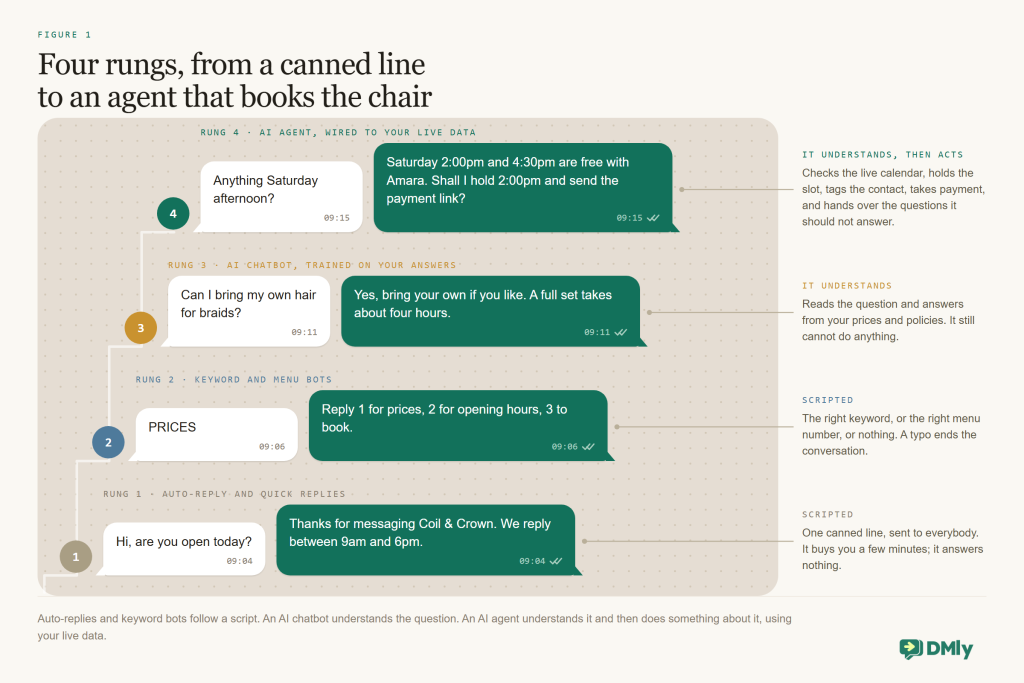
In practice, most small businesses want an agent even when they say WhatsApp AI chatbot, because the questions that eat your evening are the ones that need the diary open in front of you. We unpack the distinction further in AI Agent vs WhatsApp Chatbot: What’s the Difference?, but the short version fits on a sticky note: if it can’t book, it’s a chatbot.
Try this before you read on. Write down the five questions you get asked most often, then mark the ones that need a live look at your calendar, your prices or a customer’s record. If any of them do, you’re shopping for an agent, and the rest of this guide is about getting a good one.
What a WhatsApp AI Chatbot Actually Is (and Isn’t)
A WhatsApp AI chatbot reads the messages customers send your business number and writes back on its own, at any hour, however the customer happened to phrase the question. It does that with a large language model, the technology behind ChatGPT, Claude and Gemini, rather than a fixed script. You give it instructions, your prices, your policies and your FAQs, and it writes a fresh answer each time instead of picking from a list you wrote in advance.
One thing to check before you get excited. It runs on the WhatsApp Business Platform, the official API, not on the free WhatsApp Business app you may already have on your phone. That free app can send a greeting, an away message and quick replies you tap by hand, and that’s the ceiling. It can’t run software that reads and answers for you. If you’re not sure which kind of account you’ve got, our guide to the three types of WhatsApp accounts sorts it out in five minutes.
Just as useful is knowing what a WhatsApp AI chatbot is not, because most of the disappointment comes from buying one of these and expecting the other:
- Not a keyword auto-responder. “Reply PRICES for our price list” is useful automation, and it still earns its place alongside AI (our FAQ and auto-response guide covers it), but it only fires when the customer types the exact word you predicted.
- Not a menu bot. “Press 1 for opening hours” is a phone tree in text form. It falls over the moment someone asks two things in one message.
- Not Meta AI. The assistant built into WhatsApp answers your customers’ own questions about the world. It doesn’t know your prices or your diary, and it doesn’t work for you.
- Not a replacement for your team. A good one takes the repetitive majority off your hands and passes the rest to a person with the context already attached.
Two WhatsApp rules shape everything an AI chatbot can do for you, and they are worth understanding once rather than discovering by accident. The first is the clock. When a customer messages you, a 24-hour window opens (Meta calls it the customer service window). Inside it your chatbot can reply with ordinary free-form messages, the kind you’d type yourself. Outside it, only pre-approved template messages can be sent. The second is permission: WhatsApp’s Business Messaging Policy requires opt-in before you start a conversation with someone, and you have to honour opt-outs. A chatbot that answers questions customers asked first sits comfortably inside both rules, and templates and opt-ins only come into it when you want to follow up later.
One dated change belongs here, because it lands soon and it changes your sums. Free-form replies inside that 24-hour window (Meta calls them service messages) are free until 1 October 2026. From that date Meta charges for them, at the same rate as that market’s utility messages, and it charges for utility templates sent inside the window too. Our guide to the WhatsApp pricing change in October covers what to budget for. Which is worth saying plainly: an agent is most useful exactly where most local-business enquiries already live, inside the window your customer opened, and from October those replies are a line on the bill rather than a free extra.
The Four Parts of Every AI Agent
Every WhatsApp AI agent, on any platform you look at, is built from the same four parts, so learning them once makes every setup screen you ever meet feel familiar. Salespeople will use different words for them. They are always these four.
- A system prompt. Plain-language instructions: who the assistant is, what your business does, how it should sound, what it must never do, and when it has to fetch a human. This is the single biggest lever you have on quality, and it costs nothing but thought.
- A model. The language model that reads and writes: OpenAI, Claude, Google Gemini or another provider. Platforms like DMly let you pick one, or use a built-in shared model so you never open an account anywhere.
- Knowledge. Your prices, policies, FAQs and web pages, filed so the model can search them while it writes. Without knowledge, the model only knows what you put in the prompt.
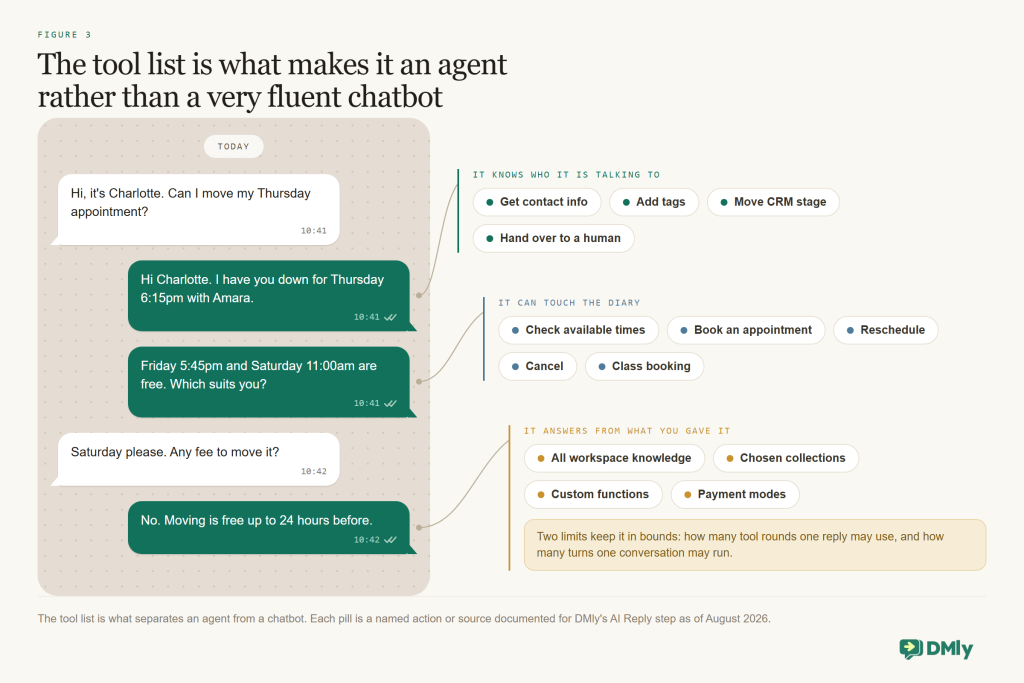
- Tools. Named actions the model is allowed to take: get contact info, check available times, book an appointment, add a tag, hand over to a human. Tools are the whole difference between the two bottom rows of the table above.
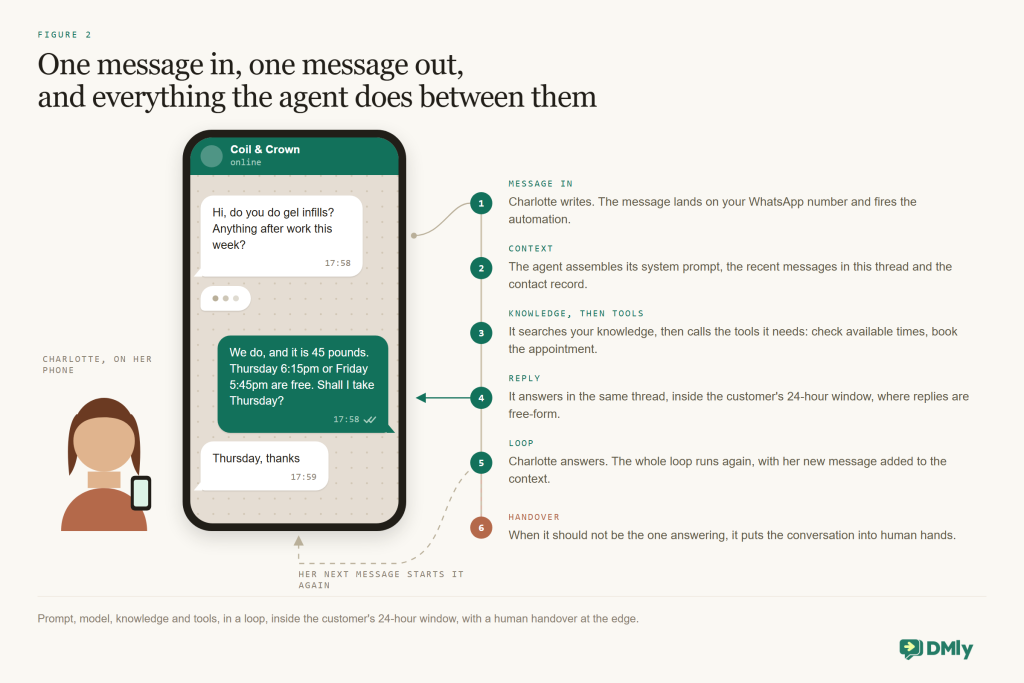
Here’s one real message, from “ping” to booked:
WhatsApp: “Do you have a 3pm slot on Saturday for a gel manicure?” → agent reads the contact record (returning client, last visit June) → searches knowledge (gel manicure: 45 minutes, $35) → checks Saturday’s availability → “3pm is taken, but I have 2:30 or 3:45 with Ada” → customer picks 3:45 → booking created → confirmation sent, reminder scheduled → note added to the contact
Three things in that loop matter once you’re running it for real. The agent keeps a short memory of the conversation, the recent messages rather than your whole history, which is how it copes with “actually, make it Thursday”. It can call several tools before it says anything, which is how checking, booking and note-writing all happen in one reply. And when a person is genuinely needed, it stops: a well-built agent doesn’t carry on talking over the colleague who has just taken the chat.
So when a salesperson shows you their platform, ask to see all four parts: where the prompt lives, which models you can choose, how knowledge gets added and tested, and the actual list of tools. If the “tools” turn out to be “you can send a webhook”, you’re being sold a chatbot with homework attached.
Where the Value Hides: Your Diary, Your Prices, Your Customer Records
The moment the agent can read and write your own business data, it stops being a demo and starts being a colleague. The same conversation changes character entirely. With a platform like DMly, the agent isn’t bolted onto a separate booking tool; it sits inside the system that already holds your contacts, services, calendar and invoices, so there is nothing to sync and nothing to go stale.
Give it your customer records and it reads the name, stage, tags and custom fields before it replies. “Welcome back, Nkechi, same as last time?” instead of “Hello, how can I help you today?” It can write to them too: tag interested-in-highlights, move New to Qualified, save the preferred stylist to a field, and leave a note for your team, such as “wants balayage before 20 September, budget around $200”.
Give it your bookings and it can list your services and who does each one, check what is really free (respecting minimum notice, buffers, staff hours and connected calendars), then book, view, reschedule or cancel, for one-to-one appointments and group classes alike. A booking made this way fires the same confirmations and reminders your appointment settings already define, so nothing is set up twice. One thing to do before launch day: outside the 24-hour window those messages have to ride on approved utility templates, and DMly drops the message rather than sending unapproved text, so get your templates approved first.
Give it your payments and what happens depends on how you set each service up. Set a service to Pay before booking and an agent-made booking holds the slot for 15 minutes while your client pays through your gateway’s checkout. Nothing confirms and no reminder is scheduled until the money clears, and the slot frees itself automatically if it doesn’t. Set it to Pay after the appointment and the booking confirms straight away with a pay link following. That is how a salon takes a deposit for a Saturday colour at 9pm with nobody on shift. DMly’s six built-in gateways are Stripe, PayPal, Paystack, Razorpay, MyFatoorah and Mercado Pago, and the payment lands on the client’s record right next to the conversation.
One piece of housekeeping before you build anything: tidy up the records the agent is going to read. Service names and prices, staff hours, a handful of tags and stages, one or two custom fields. An agent is only ever as good as the information sitting behind it, and an afternoon spent here saves a fortnight of odd answers.
The Jobs Worth Hiring It For
You could hand a WhatsApp AI agent a hundred jobs, but a handful of them pay you back first, and these are the ones. We list fifteen in 15 Ways Small Businesses Can Use AI Agents on WhatsApp; below are the eight where local businesses see the return quickest, with the kind of business each one suits.
- Answering the same questions at any hour. Prices, opening hours, directions, “do you do X”, your cancellation policy, all answered from what you gave it however the customer phrases it. This is the first thing most businesses build and the one that removes the most typing. A restaurant’s version answers “do you have vegan options, and are you open Sunday?” from the menu and hours it was given, then passes group bookings to a person.
- Booking, rescheduling and cancelling. The agent checks what is genuinely free, offers slots, books and confirms, and “can I move Thursday to Friday morning?” finds the booking and moves it. A clinic’s version books the hygienist and explains what to bring, and never goes near symptoms: medical questions hand over, tagged and noted.
- Taking deposits while it books. Pay-before services hold the slot until the deposit clears; pay-after services confirm and send the link. No-shows fall when there’s money on the table, and nobody on your side has to chase.
- Qualifying leads before anyone on your team types a word. “Which treatment, roughly when, have you visited before?” The answers land in custom fields, the contact gets tagged and staged, and the strong leads reach a person already warm. A tutor’s version asks the level and the goal, books the trial lesson, and records the parent as the contact with the student in a field.
- Running the front desk as an AI receptionist. The four jobs above plus a name, a personality and a firm scope. Some vendors call this an AI employee; the label matters far less than the boundaries you set.
- Classes, memberships and waitlists. “Space in 6am spin tomorrow?” answered with the real list, a booked place or a waitlist spot, and freed seats offered on to the next person. Membership cancellations and freezes hand over to a person, tagged.
- Catalogue and order questions. “Does this come in medium?” and “where’s my order?” answered from your catalogue and, through a custom function, from your own store or systems. Refunds and damaged-item claims go to a human.
- Knowing when to stop. The quiet superpower, and the one nobody demos. An upset customer, a complaint, a refund, anything medical: the agent spots the moment, hands over with the transcript and a note, and then stays silent.
Start with one or two of these, not all eight. FAQs plus booking is the classic first build, and deposits and lead qualification are the natural second. A booking agent that never misquotes a price beats a do-everything agent that sometimes does.
The Case in Numbers (and When a WhatsApp AI Chatbot Isn’t Worth It)
Your customers already message businesses the way they message friends, so the behaviour shift you’re worrying about is behind you, not ahead of you. Meta counts more than 1 billion active conversation threads between people and businesses every day across WhatsApp, Messenger and Instagram. Expectations moved with the habit: HubSpot’s research found 90% of consumers rate an immediate response as important or very important when they have a service question, and most of them define immediate as ten minutes or less. The cost of missing that bar keeps climbing, too. In Zendesk’s 2025 CX Trends research, 63% of consumers said they’d switch to a competitor after a single bad experience.
A two-chair salon cannot staff a ten-minute response time from 7am to 11pm, seven days a week. An agent can. Until 1 October 2026 its replies inside the 24-hour window cost nothing on Meta’s side, and from that date each one is charged at your market’s service rate, so it’s worth reading the October pricing change before you forecast. The AI cost on top is a per-reply allowance in your plan or your own model key, usually a small fraction of one missed booking. And your customers don’t resent the automation when it’s done warmly: the same Zendesk research (vendor research, since Zendesk sells AI agents) found 64% of consumers are more likely to trust AI agents that show friendliness and empathy. Independent research is more cautious: in a Gartner survey of 3,566 customers in early 2026, 87% said access to a human agent is essential when companies use generative AI in customer service, and only 27% would try a chatbot again after a bad experience. So set a warm tone, and keep a person one message away.
Now the honest other half. An agent can’t rescue a service people don’t want, and there are businesses where it isn’t worth the setup: a handful of messages a week, or enquiries that are genuinely bespoke every single time. In those cases a good away message and a fast human win, and you should keep your money. We weigh the trade-offs in Chatbot Pros and Cons for Small Businesses. Here’s the quick self-test: count last week’s WhatsApp messages and sort them into “needed a person” and “needed an answer or a booking”. That second pile is the agent’s job, and the size of it is your business case.
Ten Questions to Ask Any WhatsApp AI Chatbot Platform
Plenty of tools will put a language model behind a WhatsApp number and call it a WhatsApp AI chatbot, and on a demo call they all sound the same. Ask these ten questions before you pay, and ask to see each answer working on screen rather than described.
- Is it the official API, with the number in my name? Connected through Meta’s embedded signup, with the WhatsApp Business Account sitting in your business portfolio, not the vendor’s.
- Can I use it without opening a model account? A built-in shared model to start with, and room for your own OpenAI, Claude or Gemini key once volume justifies it.
- Can I test the knowledge before customers see it? Files, web pages and FAQs with a visible status, and somewhere you can type a question and see what the agent would find.
- Are there real tools, or just webhooks? Named actions for contacts, bookings, classes, payments and handover, with a trace showing which tool ran and why.
- Does handover work in both directions? The agent must be able to fetch a person, and the platform must pause the agent automatically when your teammate replies. Both, not one.
- Is there a playground and a fallback message? A safe place to test, and a default reply if the model errors, so a customer never meets silence.
- Are there caps? Limits on tool calls and conversation turns, so one looping chat can’t run up your bill overnight.
- Does one knowledge base serve every channel? The same prices and policies answering WhatsApp, Instagram, Messenger, TikTok, Telegram, SMS and your website chat, with every conversation landing in one inbox.
- Is compliance built in? The 24-hour window enforced for you, only approved templates outside it, opt-out keywords honoured automatically, quality rating visible without you hunting for it.
- Is the pricing legible? A clear AI-reply allowance or your own key, and no markup added to WhatsApp’s per-message rates.
Why DMly Is the Best Place to Build a WhatsApp AI Agent
What makes DMly the strongest choice for a small business isn’t the model, because every platform rents the same models. It’s everything the model is allowed to reach. DMly is WhatsApp-first automation for local businesses, more than 12,000 of them, and the AI agent lives inside the same platform as your inbox, contacts, services, calendar and payments. Here’s the documented version of that claim, so you can check it rather than take it.
One AI Reply step, four providers, no key required
You don’t need an account with an AI company to start. The agent is a single AI Reply step you drop into a flow, and out of the box it runs on DMly’s shared AI, counted against your plan’s allowance (as of August 2026: 500 replies a month on Starter, 5,000 on Growth, 20,000 on Premium). On Premium you can connect your own key under Integrations → AI, and replies on your key are unlimited. The four providers are not interchangeable, and DMly documents the differences rather than hiding them:
| Provider in DMly | Searches your knowledge base | Web search |
| OpenAI | Yes | Yes |
| Google Gemini | Yes | Yes |
| Claude (Anthropic) | No, as of August 2026 | Yes |
| DeepSeek | No, as of August 2026 | No |
| DMly shared AI | Yes | No key needed; metered per plan |
The settings you’ll actually touch are few. On the step’s Configuration tab you pick the provider and model, cap how long a reply can be, and set how many recent messages the agent remembers (12 by default, up to 50). The Prompt tab holds the system prompt, and a customer-service prompt comes pre-filled with the parts you need to edit already marked, plus personalisation tokens like {{business_name}} and {{first_name}}, a fallback message for when the model errors, and a typing delay so replies don’t arrive unnervingly fast. We compare the models in OpenAI vs Claude vs Gemini for WhatsApp Customer Service, though the practical rule is simpler than the comparison: if your knowledge base matters, use OpenAI, Gemini or the shared AI.
A knowledge base you test before customers meet it
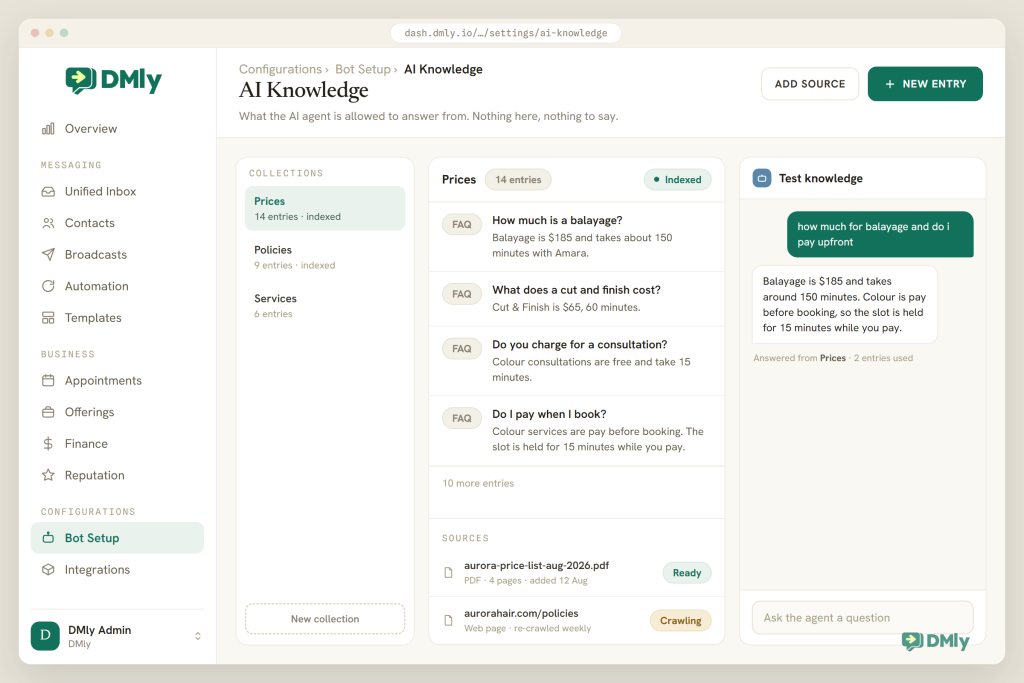
You get to see what the agent knows before a customer does. Under Settings → AI Knowledge you create collections, say Prices, Policies and FAQs, and drop sources into them: PDF, TXT or Markdown files up to 20 MB, web page addresses, question-and-answer pairs, or text you paste in. There’s no training step and no publish button to remember. When a source shows ready, it’s searchable on the very next reply. The Test knowledge panel is the part worth using: type a real customer question and see exactly which snippets the agent would pull, with nothing sent to anyone. The knowledge base belongs to the whole workspace, so the same collections serve your agent on every channel.
Twenty-one built-in tools, plus your own functions
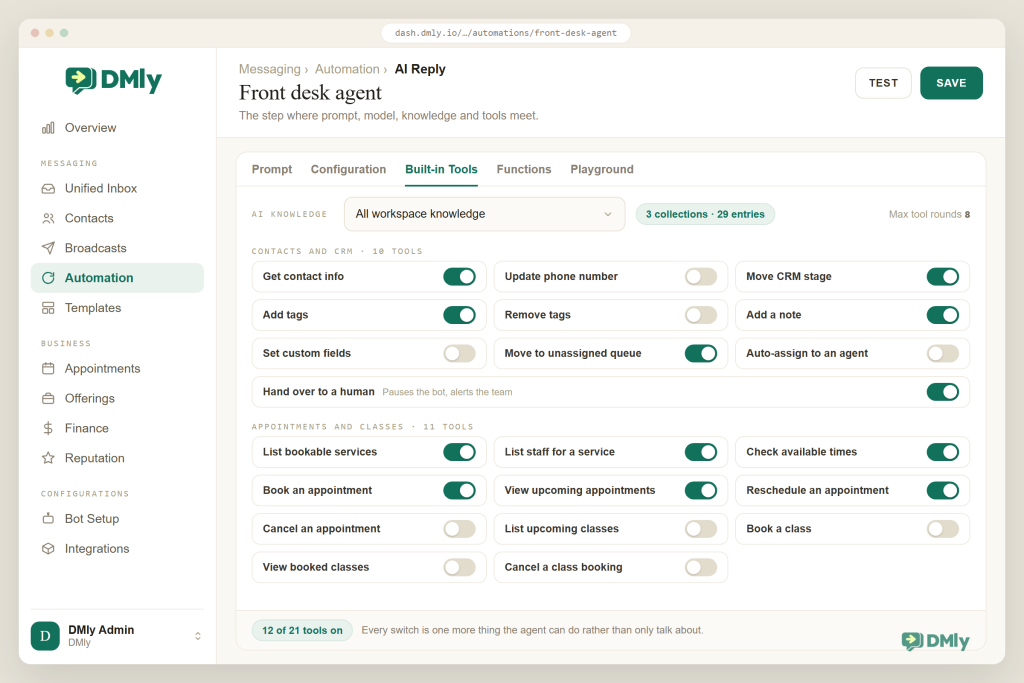
This is the part that turns talking into doing, and it’s a list of switches rather than a coding job. The Built-in Tools tab holds ten contact and CRM tools and eleven booking and class tools, and a new step arrives with get contact info, add a note, add tags, hand over to a human and move to unassigned already switched on. Web search is available on OpenAI, Claude and Gemini. The Functions tab lets the agent call your own web endpoints, which is how “where’s my order?” gets a real answer out of your store, and DMly is blunt about the responsibility that comes with it: functions call your systems for real, so only point one at an endpoint you’re happy for an AI to use. Two hard caps sit behind all of it, 8 tool rounds per reply and 40 conversational turns, so a runaway conversation can’t run away with your bill.
Handover that works in both directions
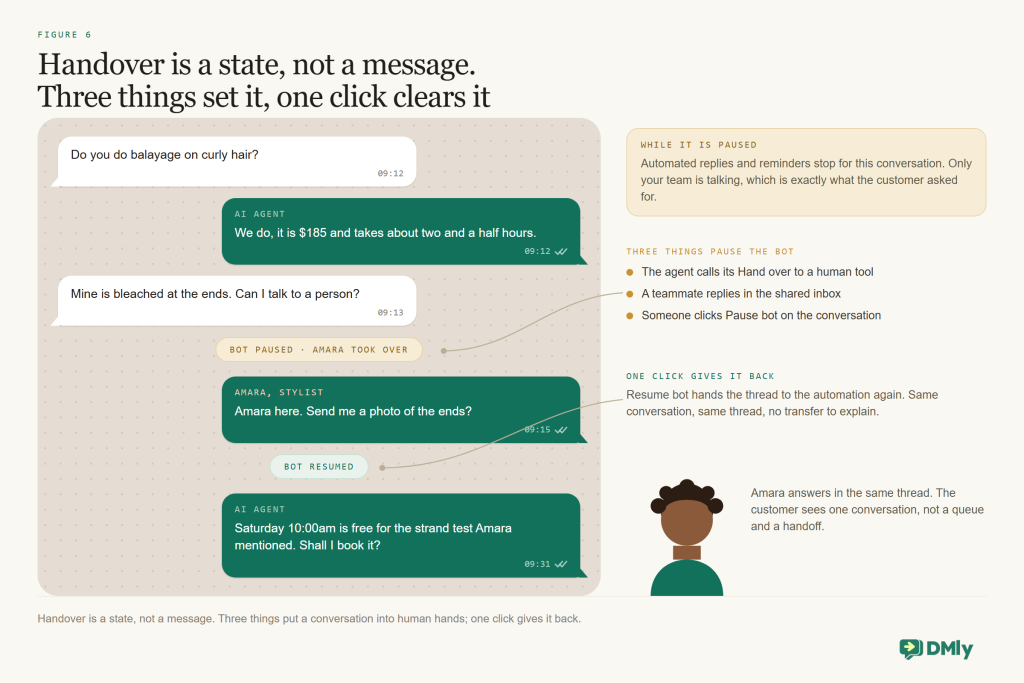
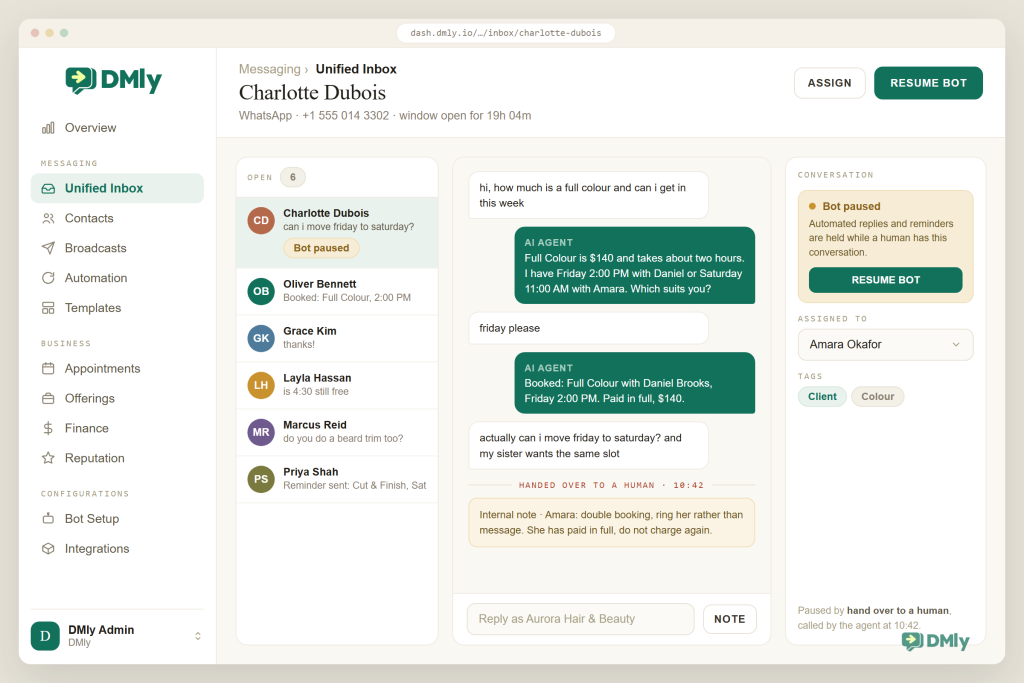
Your customer should never be able to tell where the assistant stopped and your team started, and this is the half most chatbot builders skip. The agent can fetch a person: the Hand over to a human tool pauses the bot and passes the chat to your team. The reverse is automatic, which matters more. When one of your team replies, that reply is the takeover, and every automated reply on that conversation stops. The details panel carries explicit Pause bot (human takeover) and Resume bot controls, and a flow that got interrupted halfway parks itself with options to resume, skip a step or end it. Add round-robin assignment, internal notes with @mentions and the shared inbox, and what your customer experiences is simply “a person picked up where the assistant left off”. Our omnichannel inbox guide covers the team side of that.
Every channel, rules included, and a head start
You build the agent once and it works wherever your customers find you. The AI Reply step runs anywhere DMly automations run: WhatsApp, Instagram, Messenger, TikTok, Telegram, SMS and the website live chat widget. Automations are set up per channel, but the knowledge and the tools are shared, and every conversation lands in one inbox. The compliance side is handled underneath so you don’t have to hold it in your head: DMly enforces the 24-hour window across the inbox, automations, broadcasts and sequences, sends only approved templates beyond it, honours the standard opt-out keywords automatically, shows your number’s quality rating and messaging tier under Bot Setup → WhatsApp → Configuration, and adds no markup to Meta’s rates. And you don’t start from a blank screen: four AI templates ship ready to edit, AI Customer Service, AI Lead Qualification, AI Appointment Booking and AI Class Booking, each installing as a draft with the prompt and tools already wired up.
| What you need | Typical chatbot builder | DMly |
| Model | One provider, bring your own key | Shared AI with no key, or OpenAI, Claude, Gemini or DeepSeek on yours |
| Knowledge | Paste text into a prompt | Collections of files, pages, FAQs and text, with a test panel |
| Actions | Webhooks you build | 21 built-in tools plus custom functions |
| Bookings and payments | Link to an external calendar | Real availability, booking, classes, prepayment with a 15-minute hold |
| Handover | Bot stops; someone checks a dashboard | Agent hands over; teammate reply auto-pauses; parked flows resume |
| Channels | WhatsApp only | Seven channels, one knowledge base, one inbox |
| Compliance | Your problem | Window, templates, opt-outs and quality rating handled in-product |
Give your WhatsApp an agent this week
Install the AI Appointment Booking or AI Customer Service template, add your prices and policies to AI Knowledge, and message your own number to see what comes back. Most businesses have a first version answering within an afternoon. Seven-day free trial, no credit card, and no markup on WhatsApp.
An Afternoon to First Answer: Building It in DMly
Here’s the order we walk new customers through, with the screen you’ll be looking at for each step. None of it needs a developer, and you can stop after any step and come back.
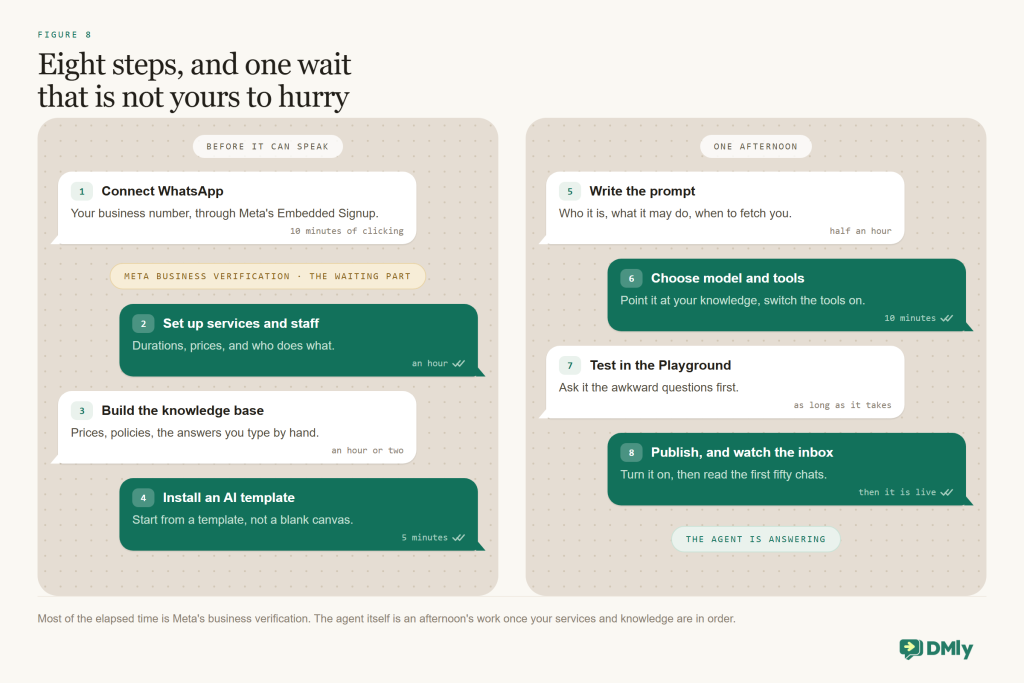
- Connect your number through the official API. Connect the WhatsApp channel through Meta’s embedded signup so the account is yours, and start business verification the same day. It lifts your limit for messages you start from 250 to 2,000 people a day, which your reminders and follow-ups will want sooner than you think.
- Set up the things the agent will act on. Services with durations, buffers, prices, payment modes and reminder times; staff with hours and Accepts bookings ticked; a payment gateway if you’ll be taking deposits; and the tags, stages and custom fields you want written to. The agent can only use destinations that already exist.
- Build the knowledge base. Settings → AI Knowledge: one collection per subject, your sources added, statuses showing ready, then Test knowledge with your ten most common real questions. Keep staff notes, your margins and anyone’s personal details out of it, because whatever you put in can be quoted to a customer.
- Install a template. Automations → new automation on the WhatsApp channel → AI Appointment Booking bot or AI Customer Service bot. It arrives as a draft: a message trigger, an AI Reply node, an end. Leaving the keyword list empty means it answers every message, and only one catch-all can be active per channel, so pause any old reply-to-everything bot first.
- Write the prompt like a job description. Role, scope, tone, hard rules such as “never quote a discount; if someone mentions pain, bleeding or a reaction, hand over immediately”, and exactly when to fetch a person. Set the fallback message and a short typing delay while you’re there.
- Pick the model. Shared AI to start with. If you bring your own key, remember the table above: searching your knowledge needs OpenAI, Gemini or the shared AI.
- Switch on tools and knowledge. All workspace knowledge to begin with (narrow it later), Hand over to a human left on, the booking and CRM tools you actually need, and a custom function only if the agent has to ask your own systems something.
- Test in the Playground, then publish. Type in your collected questions, read the replies and the trace of which tools ran, fix, repeat. Publish, then message the number from your personal phone and try to break it: two questions at once, a typo, “actually make it Thursday”.
The First Month: Keeping It Honest and Useful
The build is an afternoon, but the first month is what decides whether customers like your agent or learn to route around it. It comes down to a few habits, none of which take long.
Introduce it honestly. Give the assistant a name, say plainly that it’s an AI, and tell people how to reach a human, for example “type agent any time”. That isn’t only good manners; it’s the trust mechanism the Zendesk finding points at. Friendly and clearly labelled beats eerily human.
Read the transcripts weekly. Ten minutes with real conversations finds more fixes than an hour of guessing. Look for three things: wrong answers, which are usually a gap in your knowledge base; handovers that weren’t necessary, usually a line of scope to add; and dead ends, usually a missing tool or field.
Track three numbers. How many chats the agent closed on its own, how many it handed over, and what a conversation costs you. Our post on the metrics to track after messaging automation gives you the wider frame.
Keep the knowledge current. Prices change, staff change, holiday hours happen. Update the collection the same day, or your agent becomes the last member of staff to find out. And take the old version out, because contradictions are what make it hedge.
Close the loop. After a completed appointment, let an automation ask for the Google review. The agent booked the visit, and the follow-up banks it. Our Google Business Profile automation guide shows that piece.
And here are the ways it goes wrong, so you can skip them: launching without a handover rule; feeding the knowledge base marketing copy, which has no facts in it, or internal notes, which have secrets in them; expecting document answers from a model that can’t search documents; forgetting the fallback message; letting it promise something it has no tool to deliver; skipping the Playground; and forgetting that follow-ups sent after the window need approved templates and opted-in contacts. Every one of those is a setting you chose rather than a limit of the technology, which is the most encouraging sentence in this guide.
So, back to the one-question test. A WhatsApp AI chatbot answers. An agent answers and acts, and for a local business the acting is the whole point: the messages that cost you bookings are the ones that need the diary, the price list and the customer’s record. Give the model those three things, a clear prompt and a handover rule, and the 9pm enquiries stop being a pile you wake up to. Start with FAQs and booking, watch the first week closely, and let your agent earn its next job.
Questions Owners Ask Before Switching One On
Do I need the WhatsApp Business API to run an AI chatbot?
Yes. Software can only read and reply for you through the WhatsApp Business Platform, which is the official API. You connect your number through Meta’s embedded signup inside a platform like DMly, and you keep ownership of the WhatsApp Business Account. The free WhatsApp Business app on your phone can’t run an AI chatbot, whatever else it does for you.
How much does a WhatsApp AI chatbot cost?
There are two parts to the bill. On Meta’s side, ordinary replies inside the 24-hour customer service window are free until 1 October 2026. From that date Meta charges for them, at the same rate as that market’s utility messages, and it charges for utility templates sent inside the window too, so read our guide to the October WhatsApp pricing change before you budget. On the platform side, DMly includes AI replies on every plan (500 a month on Starter, 5,000 on Growth, 20,000 on Premium), and Premium can connect your own OpenAI, Claude, Gemini or DeepSeek key for unlimited replies. DMly adds no markup to WhatsApp’s rates.
Which AI model is best for a WhatsApp AI chatbot?
The honest answer is: whichever one can read your knowledge base on the platform you’re using. In DMly that means OpenAI, Google Gemini or the built-in shared AI, because Claude and DeepSeek can’t search your documents there as of August 2026. Start on the shared AI and move to your own key when your volume or a specific model gives you a reason to.
Can it really book appointments and take deposits?
An agent with booking tools can. In DMly it lists your services and staff, checks what is genuinely free, books, reschedules and cancels, and handles group classes. For a Pay before booking service, the slot is held for 15 minutes while your client pays through Stripe, PayPal, Paystack, Razorpay, MyFatoorah or Mercado Pago, and nothing confirms until that payment clears.
What happens when it can’t answer?
A well-set-up agent fetches a person. It pauses itself, passes the conversation to your inbox with a note attached, and stays quiet until someone resumes it. In DMly, one of your team replying by hand also pauses the agent automatically, and if the model errors your customer sees the fallback message you wrote rather than silence.
Will customers be annoyed they’re talking to an AI?
Mostly they’re annoyed by slow answers and dead ends, not by automation itself. Zendesk’s 2025 research, which is vendor research, found 64% of consumers are more likely to trust AI agents that show friendliness and empathy, and an independent Gartner survey in 2026 found 87% of customers say access to a human agent is essential. Name it, label it, keep the human path one word away, and most of your customers will notice the speed rather than the software.
Is an AI chatbot allowed under WhatsApp’s rules?
Yes, on the official platform and inside the Business Messaging Policy: answer the conversations your customers start, use approved templates outside the 24-hour window, get opt-in before you message someone first, and honour opt-outs. A platform that enforces the window and the opt-outs for you takes most of the risk off your desk.
Writing about WhatsApp automation, bookings and growth for local business.
Turn WhatsApp into your busiest channel.
Start free and run message, bookings, payments and reviews in one place.
