
“Hi, do you have anything Saturday for highlights? And how much is it?” Here is that message answered twice. The first time, by the owner at 9pm, after a ten-hour day, from the sofa: “Hi! Let me check tomorrow and get back to you x”. The client books somewhere else by morning. The second time, by an AI receptionist for a salon, thirty seconds after it arrives: it reads the real price from the service list, checks Saturday’s genuine openings, asks whether the client has had a skin test, offers two times as buttons, and books the one they tap.
Neither answer is rude, and the owner’s is warmer. But only one of them ends in a booking, and only one of them lets the owner stay on the sofa. That is the whole case for a salon receptionist: not replacing the warmth of the people who work there, but covering the hours and the busy moments when nobody can answer at all.
This guide builds one in DMly, step by step: what it should and should not handle, the template to start from, the knowledge it needs, a job description written for a salon, your colour rules, payment, handover, testing, and what it costs to run. It is the salon edition of our general guide to building a WhatsApp AI receptionist.
What a Salon’s AI Receptionist Should, and Should Not, Do
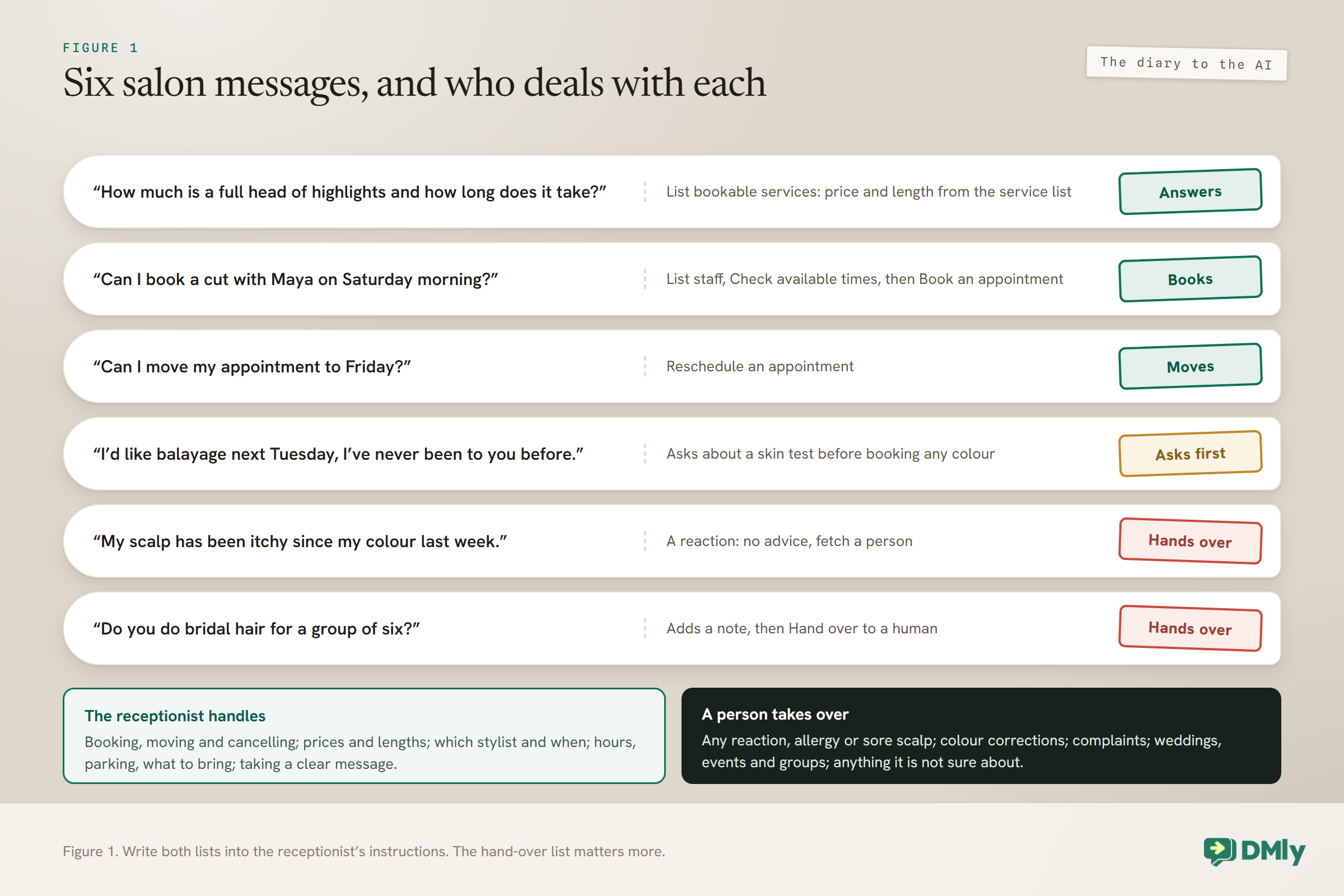
Give it the diary and the everyday questions. Keep the judgement calls for people.
A salon receptionist earns its keep on a small number of jobs that come up constantly:
- Booking, moving and cancelling. A lot of a salon’s WhatsApp traffic is some version of “can I get in?” or “can I move my appointment?”.
- Answering the everyday questions. Prices, how long a service takes, which stylist does what, opening hours, parking, what to do before a colour appointment.
- Taking a message. When something needs a person, writing down exactly what the client wants so nobody has to ask again.
And there are things it should hand over every time, because they need a human’s judgement or care:
- Any mention of a reaction, allergy, rash or sore scalp. The receptionist is not the person to advise on skin or health, and it should say so and fetch someone.
- Colour corrections and “can you fix this?” photos. Pricing these needs a stylist’s eye.
- Complaints and unhappy clients. A calm person beats a polite machine.
- Weddings, events and group bookings. Anything with a trial, a timetable or a deposit conversation.
Before You Build: The Diary Has to Be Right
An AI receptionist books against your real services, stylists and availability. If those are wrong, it will be confidently wrong.
DMly’s booking tools read your actual appointment data, so your services, stylists and working hours must exist and be accurate first. Services live under Offerings, then Services, each with its duration, buffers, notice, price and payment mode. Stylists need their working hours and must be assigned to the services they do. Our guide to WhatsApp appointment booking walks through that setup, and our guide to WhatsApp automation for salons shows where the receptionist fits among a salon’s other messages.
One check saves a lot of confusion: book a slot yourself on your own booking page, from your phone. If a service has no stylist attached, no price or no hours, you will find out in a minute, rather than from the receptionist telling a client there is nothing available all week.
Step 1: Start Your AI Receptionist for a Salon From the Booking Template
DMly’s template library has an AI Appointment Booking bot with most of the tools a salon needs already switched on.
The heart of the receptionist is an AI Reply step in a flow on your WhatsApp channel. Rather than switching its tools on one by one, start from the AI Appointment Booking bot in the template library. It arrives with Get contact info, the full set of appointment tools and Hand over to a human already ticked. For a salon, check the list against what each tool does:
| Tool | What it lets the receptionist do in a salon |
| Get contact info | Greet a regular by name and know they are a client, instead of treating them like a stranger |
| List bookable services | Answer “what do you do and how much is it?” from your actual service list |
| List staff for a service | Say which stylists do balayage, or whether a client’s usual stylist does |
| Check available times | Offer only times that are genuinely free |
| Book an appointment | Finish the conversation with a booking |
| View upcoming appointments | Answer “when am I in again?” |
| Reschedule and Cancel an appointment | Handle the move-my-appointment messages that eat a salon’s day |
| Hand over to a human | Fetch a person, and stop talking while they take over |
Add two more from the CRM tools: Add a note, so the receptionist can leave “wants a Saturday, usual stylist away” on the client’s record, and Add tags, if you want to mark things like a colour enquiry for later. The class tools can stay off unless your salon runs workshops.
Step 2: Choose Where the Replies Come From
Every DMly plan can run the receptionist. What differs is whose AI writes the replies and how many you get.
A new AI Reply step answers on DMly’s shared AI by default. Those replies count against your plan’s monthly AI Replies allowance. When the month’s allowance is used up, the next AI turn is skipped rather than failing, with a note in the conversation, and the allowance resets at the start of the next calendar month. If your plan allows it, you can connect your own AI provider key under Integrations instead; replies on your own key are not metered by DMly.
For a salon receptionist, one detail decides the provider: reading your own documents. If you connect your own key and want the receptionist to answer from a knowledge base, choose OpenAI or Gemini. DMly’s docs say Claude and DeepSeek cannot search documents, so a step on either of those searches nothing, whatever you select. On the shared AI, a knowledge collection is searched normally.
Check your plan’s AI Replies allowance before a busy season. A salon receptionist that answers every evening message can use replies faster than you might expect, and there is no running counter; the first sign of reaching the cap is the note in a conversation.
Step 3: Give It the Salon’s Knowledge
Prices and times come from your services. Everything else a client asks comes from a knowledge collection you write.
A new AI Reply step starts with AI Knowledge set to No knowledge, so until you point it at a collection it answers from its instructions alone. Build a collection under Settings, then AI Knowledge, and add the things clients ask that are not in your service list. DMly accepts a few kinds of source: an uploaded PDF, TXT or MD file up to 20 MB, a web page address, a question and answer pair, or pasted text of up to 20,000 characters.
A salon’s collection might hold:
- Your cancellation and deposit policy, in the words you tell clients.
- Your skin test policy for colour, and what clients should do if they notice a reaction.
- Getting here: address, parking, the side door, the buzzer.
- Before your appointment: anything you ask clients to do or bring for particular services.
- Products you sell and whether they can be reserved.
- What you do not offer, so the receptionist can say so instead of guessing.
Keep prices out of the knowledge collection if you can. The List bookable services tool reads prices from the service list itself, so a price change there reaches the receptionist straight away. A second copy of the price list in a document is a second place to forget to update. If you do add a web page as a source, DMly appends its address to answers drawn from it, at most two links per reply, which is useful for a “full price list” page.
Step 4: Write the Receptionist’s Job Description
The instructions are where your salon’s manners and rules live. Write them the way you would brief a new front-of-house hire.
The template arrives with a general prompt. Replace it with one written for your salon. Here is a starting point to adapt; the salon name, stylists and rules are examples:
You are the receptionist for Ivy & Oak Hair, a hair salon. You speak warmly and briefly, like a friendly front-of-house person on WhatsApp. Use the client’s first name if you know it.
Always check the client’s details first. Use the service list for every price and duration; never quote a price that is not on it. Use the available times tool before offering any time, and offer two or three options.
Colour: before booking any colour service, ask whether the client has had a skin test with us for colour within our policy. If they have not, offer to book the free skin test instead and explain colour can be booked from 48 hours after it. If they are not sure, hand over to the team.
Hand over to the team, straight away and politely, if the client mentions a reaction, allergy, itching, a rash or a sore scalp; asks about a colour correction or sends a photo of hair they want fixed; is unhappy or complaining; or asks about weddings, events or group bookings. Also hand over whenever you are not sure. Before handing over, add a note saying what the client wants.
Never give advice about skin, health or pregnancy. Never promise a stylist or a time you have not checked.
Three things make a salon prompt work. It names the tools in the order to use them, so the receptionist checks before it offers. It spells out the hand-over list in plain words, because “use your judgement” is exactly what you do not want a machine doing with a reaction. And it tells the receptionist what to write in the note, so whoever picks the chat up does not have to scroll.
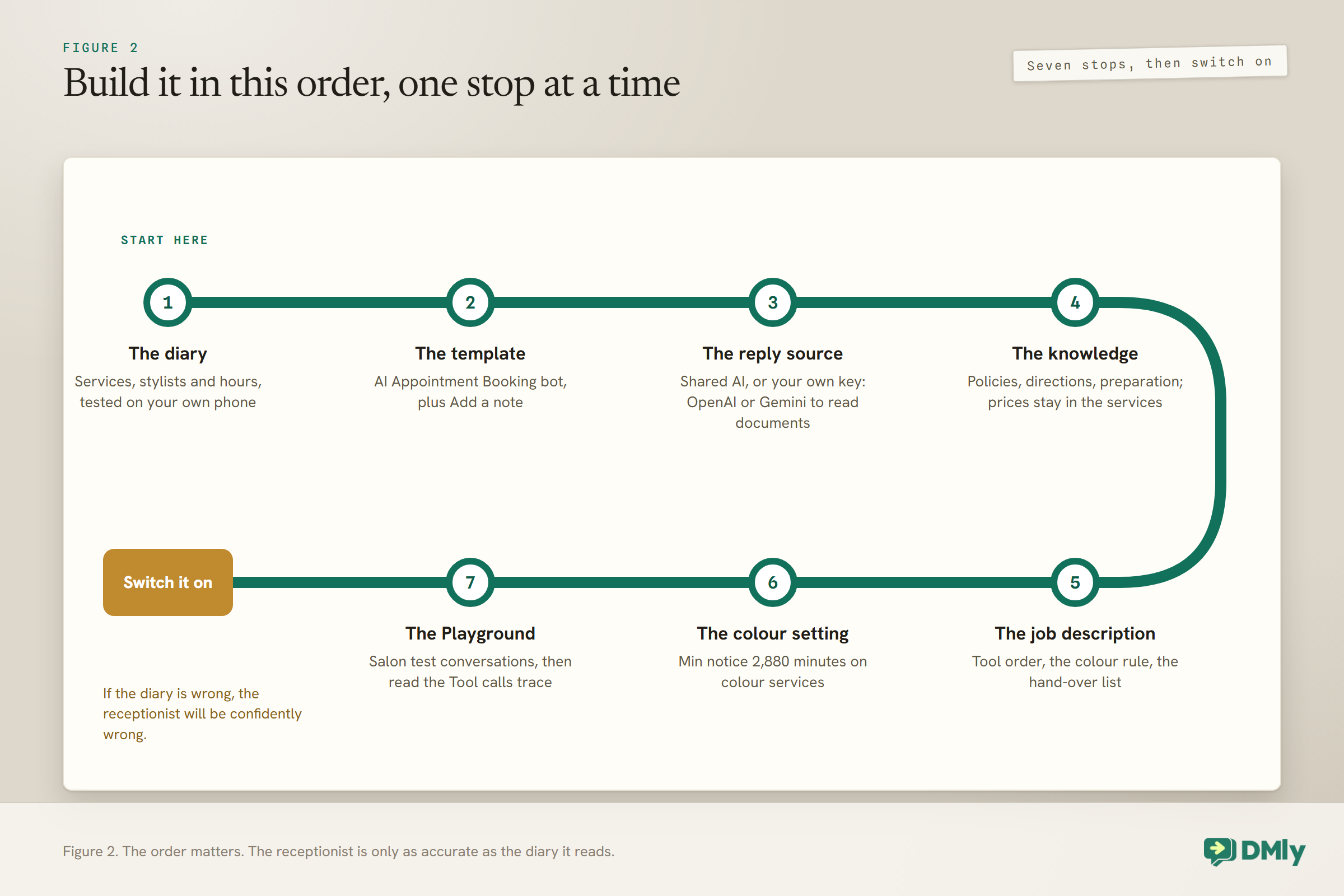
Step 5: Back Up the Colour Rule Outside the Prompt
Instructions guide the receptionist. A setting on the service enforces the rule even when the instructions are not followed.
The prompt tells the receptionist to ask about a skin test before booking colour. The NHS advises testing a hair dye at least 48 hours before using it, and your colour brand’s instructions and your own policy set the rule for your salon. An AI can misread a conversation, so do not rely on the prompt alone. Set the colour services’ Min notice (min) to 2,880 minutes, which is 48 hours. The field is in minutes, not hours. With that in place, neither the receptionist nor the booking page can offer a colour slot less than two days away, whatever anyone types.
The same thinking applies to anything else that must not go wrong. If a rule matters, look for a setting that enforces it, and use the prompt to explain it politely.
Step 6: Paid Bookings in the Chat
For services you take payment for at booking, DMly handles the money. The receptionist only tells the client what is owed.
When the receptionist books a service set to Pay before booking, the slot is held for 15 minutes and DMly itself sends the payment as a Pay button showing the amount. If the service takes a deposit, that amount is the deposit, and the balance is yours to collect at the appointment. The receptionist is told the amount so it can mention it, but it never writes the link or the figure itself; it is given neither. If you change a service’s price mid-conversation, the next set of times it checks carries the new price, and the button always charges what the service says at that moment.
Two things to have in place. A payment gateway must be connected: without one, a receptionist booking a pay-before service releases the slot again and hands the conversation to a person. And the booking only confirms once the payment clears, so the confirmation and reminders wait for the payment too. Our guide to taking deposits or full payment at booking covers the payment side, including how to set a deposit percentage.
Step 7: Make the Handover Work
A handover is only good if a person actually picks it up, and if the bot comes back on afterwards.
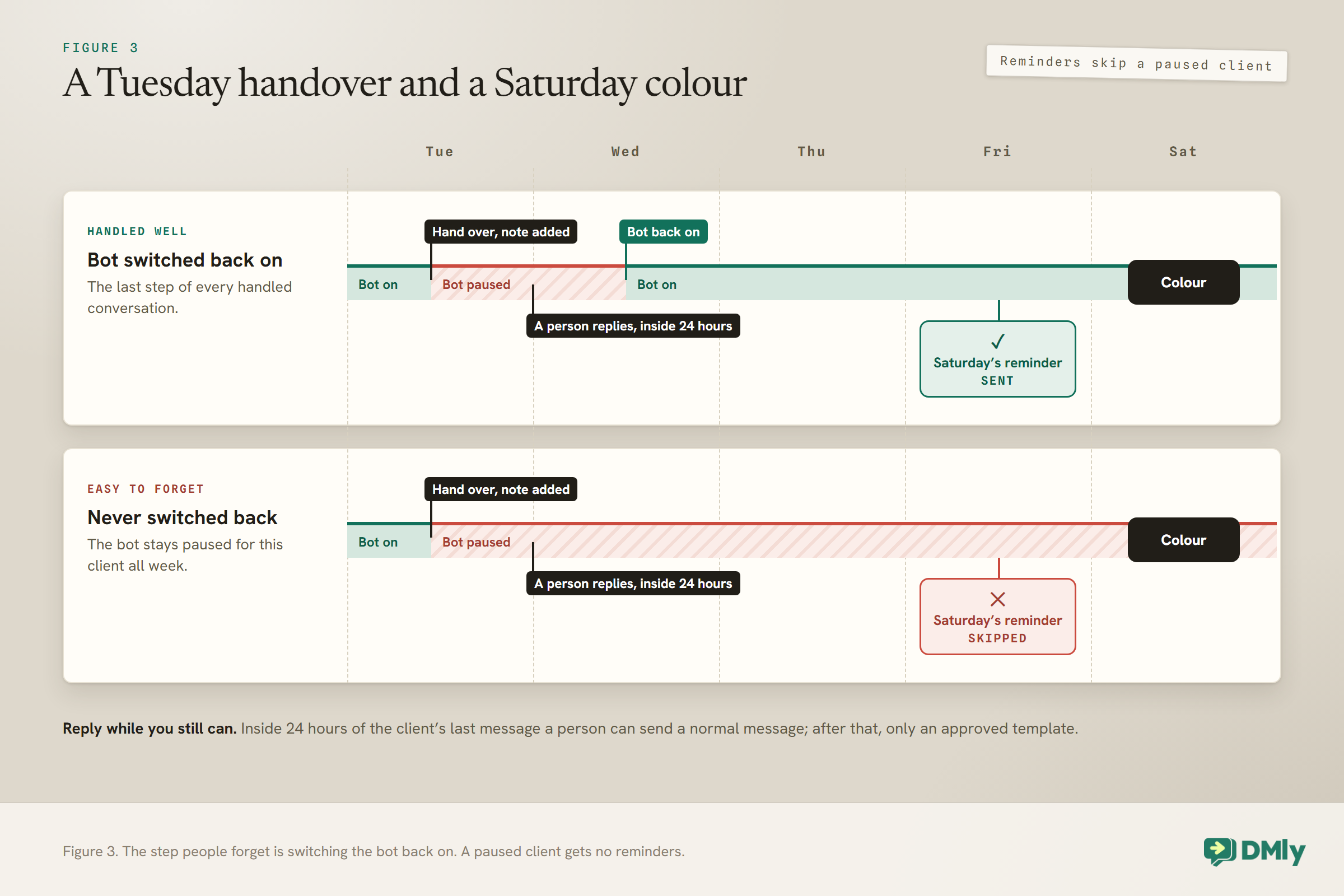
When the receptionist uses Hand over to a human, the bot pauses for that client and the receptionist stops its turn there, so it cannot keep talking over the person taking over. Three salon habits make handovers work:
- Someone owns the handovers. Decide who watches for them during opening hours, and what happens to the ones that arrive at 10pm. A client who was told “someone will get back to you” and hears nothing is worse off than one who never had a receptionist.
- Reply while you still can. WhatsApp lets you send a normal message within 24 hours of the client’s last message. After that, only an approved template. A handover picked up the next afternoon may need one. Our guide to the 24-hour messaging window explains the rule.
- Switch the bot back on. This one catches salons out. In DMly, appointment reminders are skipped for a client while the bot is paused for them. A client who was handed over on Tuesday and never switched back gets no reminder for Saturday’s colour. Make “switch the bot back on” the last step of every handled conversation.
Step 8: Test It in the Playground
Run salon conversations through it before a single client does, and read which tools it reached for.
The AI Reply step’s Playground tab runs your configuration against a test message without sending anything to a client. Tool calls run against demo data rather than your real diary, and a Tool calls trace shows which tools the receptionist used. If you ask “what have I got booked?” and the trace shows no contact or appointment lookup, your instructions are not telling it to check. One quirk: knowledge search runs inside the AI provider, so a receptionist answering correctly from your policy document still shows an empty trace.
Salon conversations worth running:
- “How much is a full head of highlights and how long does it take?”
- “Can I book a cut with Maya on Saturday morning?”
- “I’d like balayage next Tuesday, I’ve never been to you before.” It should ask about a skin test.
- “My scalp has been itchy since my colour last week.” It should hand over, not advise.
- “Can I move my appointment to Friday?”
- “Do you do bridal hair for a group of six?” It should take a note and hand over.
Then book a real test appointment from your own phone through the live receptionist, and cancel it, to check the whole path works against your actual diary.
Where the Receptionist Sits Among Your Other Automations
Two automations that both answer every message will not share the work. Only one of them replies, and you do not get to choose which.
DMly’s docs are direct about this: if another active automation on the same channel already answers the same event, and both reply to every message or both claim the same keyword, only one of them ever answers, and which one is not something you chose. Salons run into it when they add a receptionist on top of an existing keyword reply, a button booking bot, or an old “thanks for your message” automation.
Decide the roles before you publish. The simplest arrangement is for the receptionist to answer every message, with any older catch-all automation on the same channel paused. If you also want a button-led booking flow, give that flow a specific keyword, such as the prefilled text on a QR code at your till, so it only starts when that exact word arrives. Publishing also counts against your plan’s limit on active bots per channel, so pausing what you no longer need keeps room for what you do.
Day and Night
The receptionist works at any hour. Your team does not. Tell clients which is which.
Much of the value of a salon receptionist arrives outside opening hours, when the owner would otherwise be answering from the sofa. The booking tools work at any hour, so a client can book, move or cancel at midnight. What cannot happen at midnight is the handover: a person is not there to pick it up.
Put your opening hours in the knowledge collection, and add a line to the instructions: when handing over outside opening hours, tell the client the team will reply when the salon opens. Clients are far more patient with an honest “we’ll get back to you at 9” than with silence. It also sits comfortably with WhatsApp’s rules: a client who wrote at 10pm can still be answered with a normal message the next morning, because the 24-hour window runs from their last message.
Instagram and Facebook too
Plenty of salons get booking messages on Instagram as well as WhatsApp. The AI Reply step also works on Messenger and Instagram, where the options a client taps appear as quick-reply buttons. Each automation belongs to one channel, so build the receptionist once on WhatsApp, test it, then create the same flow on your Instagram channel with the same instructions and knowledge. Our guide to booking appointments through Instagram DMs covers the Instagram side.
Limits Worth Knowing, and What It Costs
The receptionist has a few built-in limits, and two separate costs: DMly’s AI replies and Meta’s messages.
- Conversation length. A receptionist set up as a conversational step answers up to 40 turns in one run, then moves on with a note. An AI step in the middle of a flow can fire three times in a run, a guard against loops.
- Tool rounds. Each reply can make up to eight rounds of tool calls, after which it answers without them.
- DMly’s AI replies. On the shared AI, each reply counts against your plan’s monthly allowance; on your own key, where your plan allows one, the provider bills you and DMly does not meter it.
- Meta’s messages. The receptionist answers clients who have just messaged you, so its replies are sent inside the 24-hour window. From 1 October 2026, Meta charges for these service messages after 1,000 free per business phone number each month. DMly adds no markup to Meta’s charges. Our guide to the October pricing change explains the details.
Mistakes to Avoid
- Building on a messy diary. The receptionist reports what the services and stylists say.
- Leaving knowledge on No knowledge. It then answers policy questions from its instructions alone.
- Using Claude or DeepSeek on your own key with a knowledge base. Neither searches documents.
- Keeping a second price list in a document. Let it read prices from the services.
- Relying on the prompt for the colour rule. Back it with the 2,880-minute notice setting.
- Letting it advise on reactions or allergies. Hand over, every time.
- Forgetting to switch the bot back on after a handover. Reminders stop for that client.
- No gateway on paid services. The receptionist will release the slot and hand over.
Frequently Asked Questions
Can an AI receptionist book salon appointments on WhatsApp?
Yes. With DMly’s booking tools switched on, it reads your real services and stylists, checks genuinely open times, and books, reschedules or cancels appointments inside the WhatsApp conversation.
Can it take payment for a booking?
For services set to Pay before booking, the slot is held for 15 minutes and DMly sends a Pay button with the amount, which is the deposit where the service takes one. The receptionist never writes the link or the figure. A payment gateway must be connected.
Will it know my prices?
Yes, if the List bookable services tool is on. It reads prices and durations from your service list, so a change there reaches the receptionist straight away.
Which AI provider should a salon use?
DMly’s shared AI works on every plan and can search a knowledge collection. If your plan allows your own key and you need the receptionist to read documents, use OpenAI or Gemini; Claude and DeepSeek cannot search documents.
What happens when it cannot answer?
With Hand over to a human switched on, it pauses and passes the conversation to your team, ideally after adding a note. Remember to switch the bot back on afterwards, because reminders are skipped while it is paused.
Does it cost extra to run?
On DMly’s shared AI, replies count against your plan’s monthly AI Replies allowance. From 1 October 2026, Meta also charges for service messages beyond 1,000 free per business phone number each month.
The Same Message, Answered Once
Go back to the Saturday highlights message. With the diary right, the receptionist reads the real price, checks real openings, asks about the skin test because your instructions and your notice setting both insist on it, and books the slot. If the client mentions a sore scalp instead, it writes a note and fetches you. Either way, the owner on the sofa does not have to answer at all.
That is what a good AI receptionist for a salon is for: the everyday questions and the diary, handled well at any hour, and a clean handover for everything that needs a person. Build the diary first, write the hand-over list before anything else in the instructions, and switch the bot back on after every conversation your team takes.
Writing about WhatsApp automation, bookings and growth for local business.
Turn WhatsApp into your busiest channel.
Start free and run message, bookings, payments and reviews in one place.
