
WhatsApp Automation for Aesthetic Clinics and Med Spas: Consultations, Deposits, Aftercare and Top-Ups (2026)
WhatsApp automation for aesthetic clinics starts with a hand mirror. At the end of a treatment, the practitioner passes it across the chair and the client looks. Everything in your clinic is built towards that moment: the consultation, the deposit, the forty minutes with the needle or the laser.
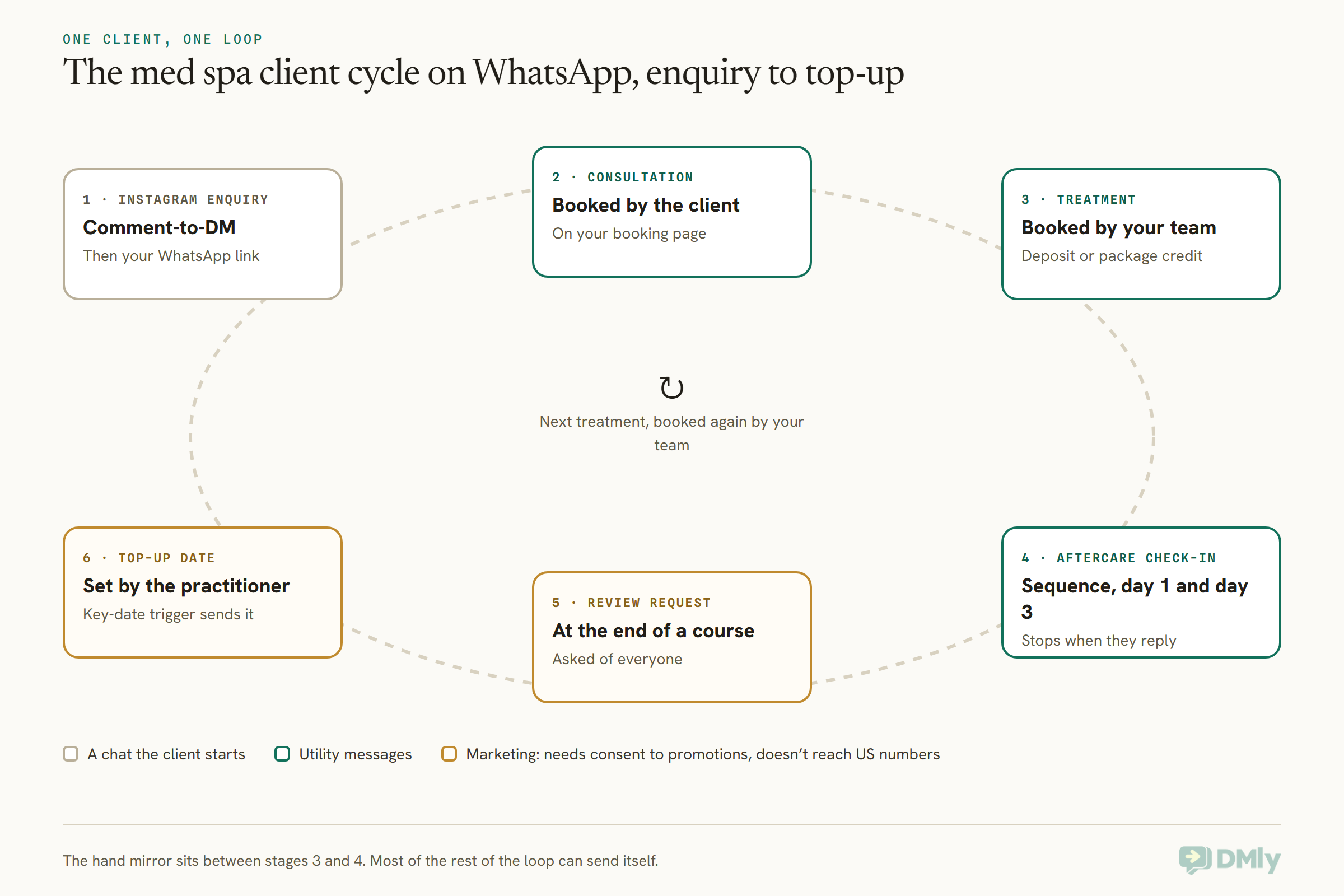
But the mirror takes a few seconds, and the relationship around it lasts months. Before it, there’s an Instagram comment asking “how much?”, a consultation that has to come before any treatment, and a deposit that stops a long slot sitting empty. After it, there’s a worried message the next morning, a course of sessions to keep on track, and, weeks or months later, the right moment to say “you’re due”.
Almost all of that happens in messages. Done by hand, it eats your front desk’s day. Done badly by a machine, it can breach an advertising rule, leak a treatment onto a lock screen, or send a “we miss you” to someone who had a bad reaction.
In this guide, we’ll go through each stage of a med spa client’s journey on WhatsApp: the rules that apply before you write a word, Instagram enquiries, consultations, deposits and no-show fees, treatment packages, before and after photos, aftercare, top-up reminders, reviews and promotions. For each one, you’ll see what DMly does, what it doesn’t, and the wording that works.
One thing first: this is a practical guide, not legal advice. Rules for cosmetic treatments differ by country and change often, so check anything you plan to send with your regulator, your insurer or a lawyer who knows your setup.
What WhatsApp Automation for Aesthetic Clinics Actually Does
WhatsApp automation for aesthetic clinics is the set of client messages that send themselves: consultation and treatment confirmations, reminders, deposit and payment links, aftercare check-ins, package updates, top-up reminders and review requests, all on the WhatsApp number your clients already message. A platform like DMly holds the booking calendar, the client records and the triggers behind those messages.
The basics are the same as for any clinic, and our guide to WhatsApp automation for clinics covers them: reminders, recalls and keeping clinical content out of the chat. A med spa is different in five ways, and those five shape everything below.
- Clients pay, and they pay a lot. A single slot can be worth more than a week of GP appointments, so an empty one hurts. Deposits and no-show fees matter more here than almost anywhere.
- A consultation comes first. Many treatments shouldn’t be booked straight off a price list. Someone has to assess the client, and for prescription-only treatments, a prescriber has to be involved.
- People buy courses and packages. Six laser sessions, three peels, a skin plan. Somebody has to keep track of what’s left.
- Results are visual. Clients send photos, clinics take them, and everyone wants to post them. Each photo needs its own permission.
- Advertising is regulated. Some of your best-selling treatments are prescription-only medicines, and in many countries you can’t advertise them to the public at all.
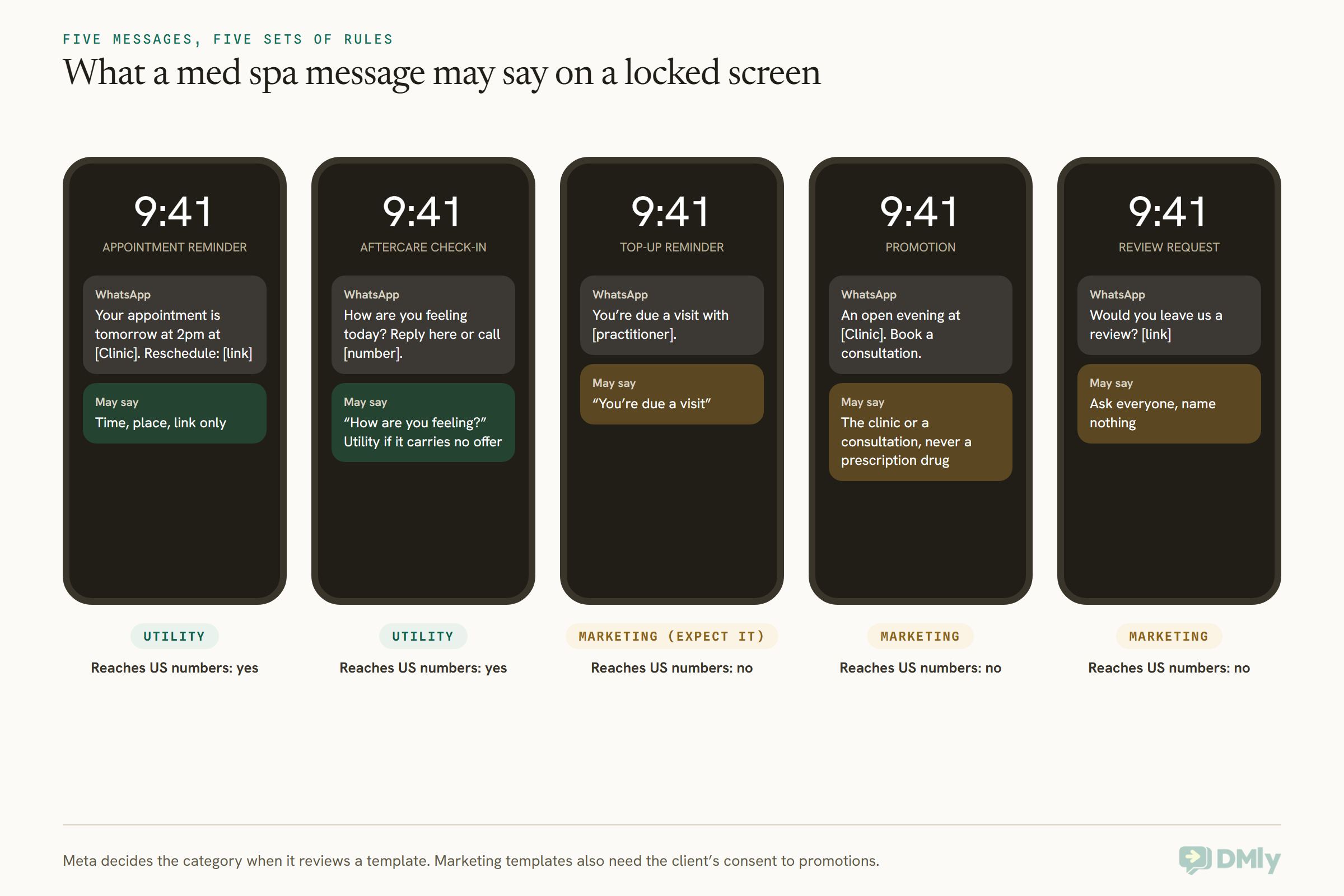
Discretion runs through all five. Plenty of your clients would rather nobody knew they’d had anything done. A message that reads “Reminder: your lip filler appointment tomorrow” on a shared tablet or a partner’s glance at a phone is a small disaster. So the craft of med spa messaging is saying enough to be useful and nothing that tells a stranger what the client had done.
The Rules That Apply Before You Send a Single Message
Three sets of rules apply to WhatsApp automation for aesthetic clinics: WhatsApp’s own policy, the advertising rules for cosmetic treatments where you work, and health privacy law. Get these straight first, because they decide what your automations are allowed to say.
WhatsApp’s own policy
WhatsApp’s Business Messaging Policy (last updated 23 September 2026) has four clauses that bite for an aesthetic clinic:
- Opt-in. You may only message people who gave you their number and agreed to hear from you. Our guide to WhatsApp opt-in and consent covers how to ask and record it.
- A way to reach a person. If you automate, you need prompt, clear and direct escalation paths: a human in the chat, a phone number, an email or similar.
- Health information. The policy says don’t use WhatsApp for telemedicine or to send or request health information where your local rules forbid putting that information on systems that don’t meet stricter standards.
- Restricted products. Section 4 prohibits using WhatsApp for business for “buying, selling, promoting, or otherwise facilitating” certain goods and services, and the list includes “Drugs, whether prescription, recreational, or otherwise” and “Medical and healthcare products”. Meta applies it “in our sole discretion”.
That last clause is the one most med spas miss. Botulinum toxin is a prescription medicine almost everywhere. A WhatsApp promotion that names it, prices it or pushes it puts your number at risk under WhatsApp’s own rules, whatever your local law says. The safe habit is simple: promote your clinic, your practitioners and your consultations, never a prescription-only product.
Advertising rules for cosmetic treatments
These vary a lot by country, so here are the two we checked at source, and a pointer for everyone else.
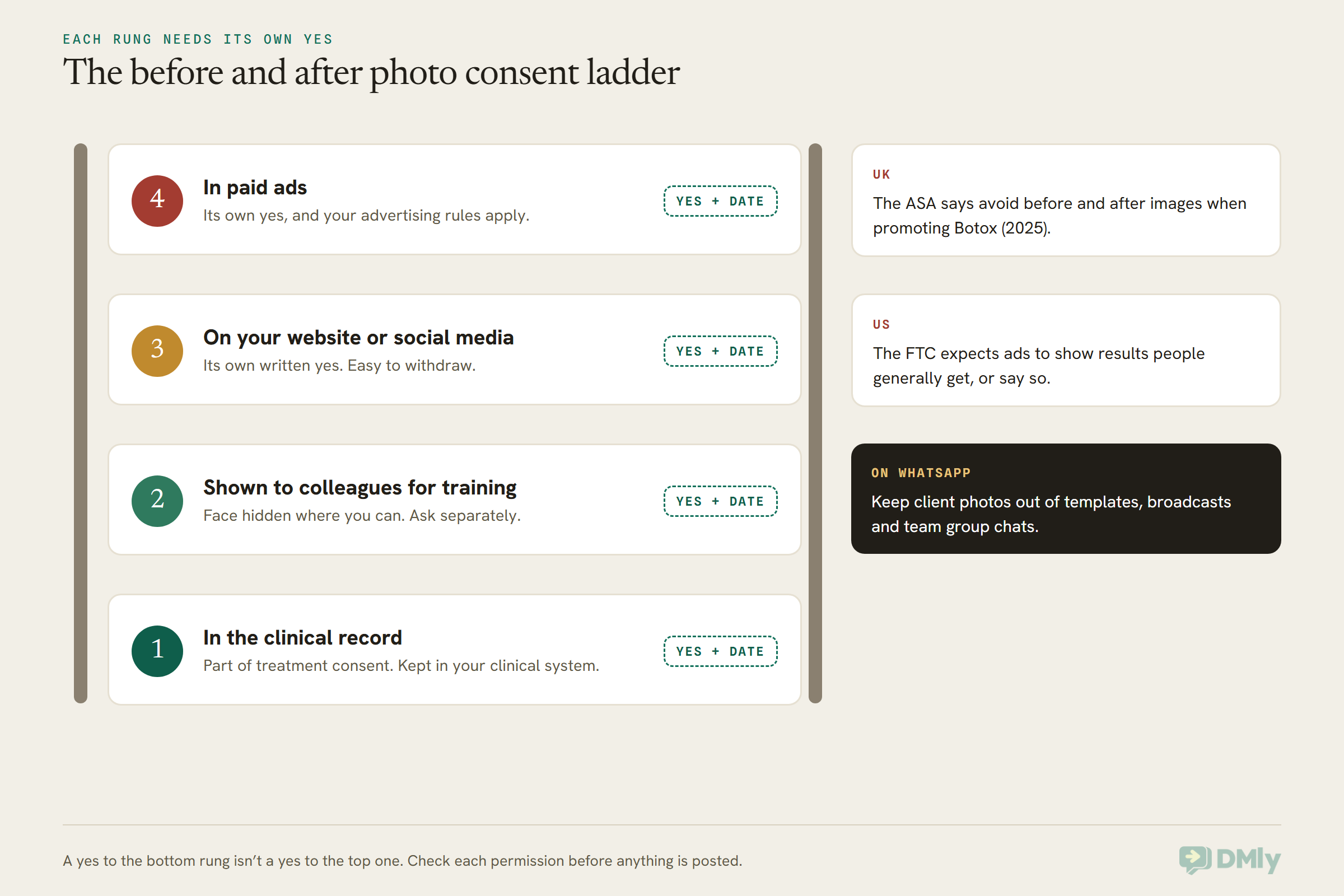
United Kingdom. The ASA’s advice on botulinum toxin (published 29 October 2025) says it is a prescription-only medicine and “cannot be advertised to the public” under CAP Code rule 12.12. It says a reference to Botox on a business’s social media, hashtags included, is likely to be seen as an implied ad. Clinics may promote a consultation instead, as long as the medicine isn’t named in the initial ad, and the ASA says marketers should avoid before and after images. A separate CAP rule (12.25) bans targeting cosmetic intervention ads at under-18s, and that covers non-surgical treatments like fillers too.
United States. The Federal Trade Commission’s Consumer Reviews and Testimonials Rule (16 CFR Part 465) took effect on 21 October 2024. It bans fake reviews and incentives that require a particular sentiment. The FTC’s own Q&A adds that asking only happy customers for reviews isn’t specifically banned by the rule but “could violate the FTC Act”. Its Endorsement Guides say that if a testimonial shows results people won’t generally get, the ad must make the generally expected results clear. That matters for before and after photos. Rules on who may inject and who must supervise are set state by state, so your state medical board is the place to check.
Everywhere else. India, Nigeria, the Gulf states and South-East Asia all have their own rules on medical and cosmetic advertising, and some require approval before a health ad runs. We haven’t summarised them here because we couldn’t verify each one at source. Ask your regulator or professional body before you send your first promotion.
HIPAA, for US med spas
Here’s the plain version. Meta’s terms for the WhatsApp Business Platform (section 4.2, last modified 23 September 2026) say Meta is not a HIPAA business associate and the platform is not HIPAA compliant. DMly doesn’t state a HIPAA position and doesn’t document a business associate agreement.
So if your med spa is a HIPAA covered entity, keep protected health information off WhatsApp entirely. That means no treatment names tied to a client, no medical history, no photos of their skin and no aftercare that describes a condition. Many cash-only med spas aren’t sure whether they’re covered at all, because it turns on things like whether you send insurance claims electronically. That’s a question for your lawyer, not your messaging software. Either way, the habits in this guide (neutral wording, photos kept in your clinical system, a phone call for anything clinical) are the ones to adopt.
There’s also a practical US limit. As of October 2026, Meta doesn’t deliver marketing templates to US phone numbers at all. Your reminders and confirmations will arrive, because they’re utility messages, but a promotion, a top-up nudge or a review request sent as a marketing template won’t. For US clients, those belong on SMS or email.
Instagram Enquiries: From “How Much?” to a Consultation
For most med spas the first message arrives on Instagram, not WhatsApp, so the job is to answer it quickly and move the client towards a consultation and a WhatsApp number. Your results reel gets a comment, or someone sends a DM with a screenshot and “price?”.
DMly connects Instagram in two ways. The plain Instagram (Instagram Login) option works with a Business or Creator account and needs no Facebook Page. Instagram (via Facebook Page) is for a Business account already linked to a Page you manage. Both give you DMs in the Inbox, flows, and comment automation, including comment-to-DM. One catch from the docs: comments on Instagram ads can’t reach an account connected through Instagram Login, so if you boost posts and want to automate replies to ad comments, use the Page route.
Our guide to Instagram automation for salons walks through comment-to-DM step by step, and the same build works for a med spa. Three changes make it fit an aesthetic clinic:
- Answer “how much?” with a range and a consultation. A fixed price in a DM invites people to book the wrong thing. “Prices start from [amount] and depend on what you need. The first step is a consultation with [practitioner]” works better and is honest.
- Keep prescription-only treatments out of public replies. In the UK, a reference to Botox on your own social media is likely to count as an ad. A public reply that says “DM us for Botox prices” is exactly that. “We’ve sent you a message” is enough.
- Hand over to WhatsApp for anything with a date in it. Instagram has no message templates, so an automated message can only go out within 24 hours of the client’s last message. A reminder three days later won’t arrive there. Send your WhatsApp link once they’re interested, so confirmations and reminders reach them.
Be aware that DMly treats someone on Instagram and the same person on WhatsApp as two contacts until you merge them by hand. When a client moves channels, merge the records so their history stays in one place.
Consultations First: How to Set Up Med Spa Bookings
The safest booking setup for a med spa is to let clients book a consultation themselves and keep treatments off the public booking page, so your team books the treatment only after the consultation. That way nobody books a prescription-only treatment straight off a price list.
In DMly, every service lives under Offerings → Services, and each has two switches: Active (available for booking) and Show on public booking page. Here’s how a typical med spa sets them:
| Service | On the public page? | Payment mode | Why |
| Free consultation | Yes | No payment required (price 0) | The easy first step from Instagram or your website |
| Paid consultation | Yes | Pay before booking, deposit or full price | Filters out time-wasters for long consultations |
| Injectable or prescription treatment | No | Pay before booking with a deposit | Booked by your team after the consultation |
| Laser or skin course session | Your call | Credits from a package, or deposit | Repeat visits once a plan is agreed |
| Review or follow-up visit | No | No payment required | Offered by the practitioner, not sold |
Switch Show on public booking page off for a treatment and it stays off your public catalogue while remaining active. Book one test treatment from the Calendar yourself before you rely on it, so you know your team can still reach it.
A few more settings matter for a consultation-first clinic:
- Name services neutrally. The service name shows up in confirmation messages and can be dropped into flows with
{{appointment.service}}. “Consultation with Dr Okafor” or “Skin appointment, 60 min” is safer on a lock screen than “Lip filler 1ml”. - Use buffers. Buffer before and Buffer after on each service give you time for photos, numbing cream or cleaning the room, without anyone booking into it.
- Add your terms. Under the booking page settings, a Terms URL makes the confirm step show “By booking you agree to our terms.” Put your deposit, cancellation and no-show policy there. Without it, DMly doesn’t ask clients to agree to anything.
- Don’t ask medical questions on the booking form. DMly’s booking form questions come from a fixed list, so you can’t add a medical questionnaire anyway. Leave Identification Number switched off too: WhatsApp’s policy says not to ask people for ID numbers or other sensitive identifiers. Medical history belongs in your clinical system, taken at the consultation.
- Set cancellation and reschedule deadlines. They’re workspace-wide, under Appointments → Settings → Booking policy, and both start at 0, which means a client can cancel up to the minute their appointment starts. Most med spas set 24 or 48 hours.
If you use DMly’s AI agent to answer enquiries, tell it in its prompt to book consultations only, to never discuss suitability, dosage or side effects, and to hand over to a person on anything health-shaped. Test it with exactly those questions before a client asks them.
Med Spa Deposits and No-Show Fees for High-Value Slots
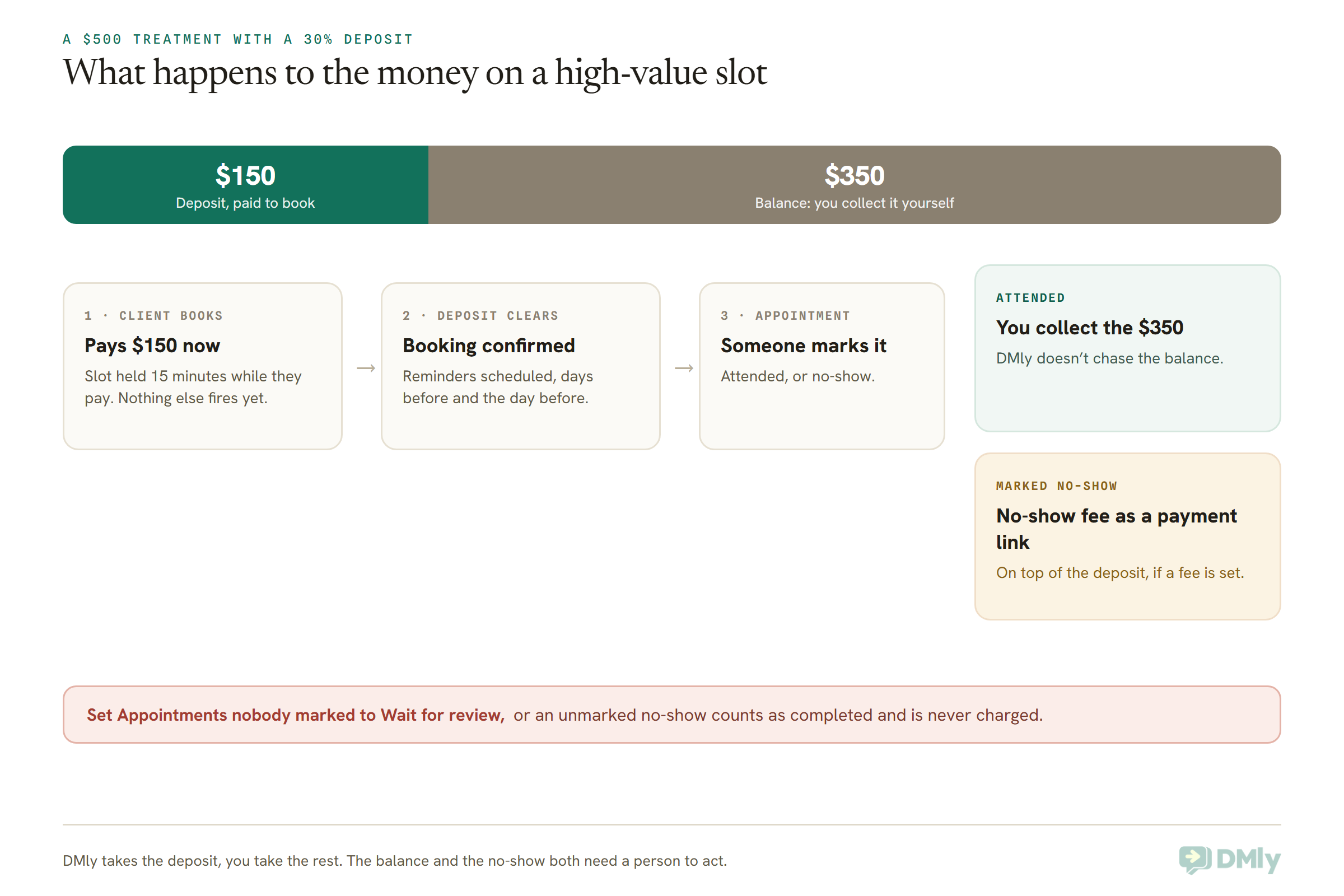
DMly lets a med spa take a deposit of 1 to 99 per cent when a client books, and charge a separate no-show fee when someone is marked as a no-show. Between them, they make a long, expensive slot cost something to abandon.
Setting the deposit
Open the service in Offerings → Services, set a price above 0 and choose Pay before booking. A Deposit field appears. Enter a percentage from 1 to 99; leave it blank and the client pays the full price up front. DMly shows the split under the field: what the client pays to book, and what’s left for the appointment. The percentage is taken of the full price including tax.
On the booking page, the client sees both numbers and the checkout charges exactly the deposit. The slot is held while they pay: 30 minutes for a card payment, or 60 for a bank transfer, by default, and you can change both. During that hold, nothing else happens: no confirmation, no reminders, no booking automations. When the deposit clears, all of it fires. If they don’t pay, the slot goes back on sale within about a minute.
Two things catch people out:
- DMly doesn’t collect the balance. Take it at the appointment, or send an invoice or a payment link yourself. A deposit-only booking shows as not paid until the full price is in, which is handy for spotting who still owes you.
- Refunding a deposit makes the full price owed again. Bear that in mind if you refund someone who then rebooks.
The deposit applies wherever the booking is made: the booking page, the Calendar, the AI agent, the mobile app and the API. When your team books a client over the phone on a pay-before service, DMly holds the slot for two hours and sends the client a payment link for the deposit. If they paid at the desk, tick Payment taken in person and it confirms straight away.
You’ll need a connected payment gateway. DMly works with Stripe, PayPal, Razorpay, MyFatoorah and Mercado Pago, and with Paystack, Flutterwave and Monnify in Nigeria. Without one, a pay-before service can’t be booked online at all. And make sure the dmly_payment_request template is approved in your WhatsApp templates, because that’s the one that carries a payment link to someone outside their 24-hour window. Our guide to accepting appointment deposits or full payment at booking covers gateways and refunds in more depth.
The no-show fee
A No-show fee can sit on any service, whatever its payment mode, or as a workspace default under Appointments → Settings → Booking policy. The service’s own fee wins, and a fee of 0 exempts a service.
It’s charged only when someone marks the booking as a no-show. If the client has a saved card (from a subscription with automatic payment), DMly charges it and tells them. Otherwise, and that’s most clients, it sends a payment link. It charges once per booking and doesn’t subtract the deposit, so if you want the deposit itself to be the penalty, leave the fee blank.
One setting decides whether any of this works. About a day after an appointment, DMly closes any booking nobody marked. By default (Count as completed) it treats it as completed, which means a client who never turned up is thanked, sent your aftercare and review automations, and never charged. Change Appointments nobody marked to Wait for review. Then nothing goes out until your team marks each booking, and DMly nudges you once a day about the ones waiting.
How big should the deposit be? There’s no reliable industry figure, so set it from your own numbers. Look at what an empty slot costs you in practitioner time and product, and at your no-show rate in Configurations → Reports → Appointments. Our guide to how clinics reduce appointment no-shows covers the reminder side of the same problem.
Treatment Courses and Packages: What DMly Tracks, Honestly
DMly sells packages as plans that give a client credits, and each booking of a service with a credit cost takes credits off their balance. It works well for a course of one treatment. It’s weaker if you sell several different packages to the same client, and it’s better to know that before you build your price list.
How it works
Create the package under Offerings → Plans → New plan. Choose One-time for a course bought once (a course of six laser sessions) or Recurring for a monthly membership. Add a plan item of type Credit with the number of sessions. Then, on the treatment service, set Credit cost to 1.
Credits reach the client when you add them on their profile, when you create a subscription from the plan, or when a flow issues them. Saving a plan sells nothing on its own. Credits from a one-time plan never expire; credits from a recurring plan lapse at the end of each billing period.
The limits to plan around
- Credits are one pool per client. If a client buys six laser credits and three peel credits, they hold nine credits, and any service with a credit cost can spend them. You can name each grant (“Laser x6”), and the profile shows it as a package, but spending still draws from the single balance. The docs say plainly that nothing checks which service a credit was meant for.
- Credits are charged on top of payment. A service with both a price and a credit cost charges the card and burns a credit. For a credit-only treatment, set the price to 0 and the payment mode to No payment required.
- A short balance doesn’t stop a booking. A client with no credits can still book a credit service. It confirms, and no credit is taken. Check balances if a package must be enforced.
- Cancelling never gives a credit back. If a client cancels within your policy and you want to return the session, add it back by hand with Add credits.
- The low-credit warning fires once, at 3 remaining. It’s a fixed threshold. For a six-session course that’s halfway through, which is a fine moment to talk about what comes next.
So what’s the practical shape? If most of your clients buy one course at a time, credits work. If clients commonly hold two packages at once (say, laser and peels), only give a credit cost to the treatments where you’re happy for any credit to be spent, and sell the rest as a prepaid invoice instead, tracked on the client’s statement. That keeps the numbers honest.
Booking a whole course at once
Your team can book a course in one go from the Calendar: open New appointment, turn on Repeat, and pick Weekly, Every 2 weeks or Monthly, with 2 to 52 occurrences. The client gets one combined confirmation (DMly’s dmly_appointment_series_confirmation template), and each date still gets its own reminders. Three details matter: a series never takes payment, so collect for the course separately; the booking automation fires once for the whole series, not per date; and a client cancelling from their link cancels every remaining date unless they untick the box.
Before and After Photos: Consent, Storage and What Not to Post
Every use of a client’s photo needs its own permission: one to take it for their record, another to show it internally, another to post it, and another to put it in an ad. WhatsApp makes photos easy to send and very easy to mishandle.
Photos reach a med spa in two ways. Clients send them (“this is the area I’m worried about”), and your team takes them at treatment. Here’s how to handle each.
Photos clients send you
Media that arrives in a DMly conversation is stored by DMly by default. If your privacy policy, a contract or local rules say client files must stay in storage you control, the workspace owner can switch on Custom storage and send new photos, videos and documents to your own S3 or S3-compatible bucket. It applies to new media only.
Two habits keep you safe. First, don’t ask clients to send photos of a skin condition or a concern over WhatsApp if your local rules treat that as health information that can’t go on an ordinary messaging system; ask them to bring it to the consultation instead. Second, if a client sends one anyway, move it into your clinical record and don’t discuss suitability in the chat. “Thanks for sending this. [Practitioner] will look at it with you at your consultation” is the whole reply.
Photos you take, and consent forms
Treatment photos are part of a clinical record. Keep them in your clinical or practice system, not on staff phones and not in WhatsApp threads.
DMly’s contact profile has a Documents card on the Files & letters tab that’s useful for the paperwork around them. Upload a signed consent form as a PDF or image (up to 20 MB). Files there are private: there’s no public link, and only someone logged in to your workspace can open them. Uploading and deleting need a document permission that Owners and Admins have by default, so you can keep it to the people who should handle consent.
Record photo consent in layers, and record each one with a date. A tag per layer (say, photo-consent-social) makes it easy to see at a glance. Then, before anyone posts anything, there’s a simple check: does this client have a tag for this use?
Aesthetic Clinic Aftercare Messages That Stay Discreet
Good aftercare on WhatsApp is a short, non-clinical check-in a day or two after treatment, with a clear route to a person, while the detailed aftercare instructions are handed over in person or as a private document. The check-in catches worries early. The instructions belong to the treatment, not the chat.
Build the check-in as a sequence
A DMly sequence is a short series of messages that go out a set number of days apart. Create one under Automation → Sequences → New sequence, and give each step a Day (0, 1, 3 and so on) and the hours it’s allowed to send, 09:00 to 20:00 by default, in the client’s own timezone. Then build a small flow on the Appointment completed trigger with a Sequence step that subscribes the client. That’s the only way into a sequence.
Three settings make it suit aftercare:
- Stop when the contact replies. Switch it on, so a client who answers “a bit swollen, is that normal?” gets a person, not the next scheduled message.
- Send as a template for later steps. Day 0 or day 1 may fall inside the 24-hour window after the visit, but day 3 won’t. Choose Utility template for those steps and keep the wording free of offers so it stays utility.
- Wait for review. Because the sequence hangs off Appointment completed, the “Appointments nobody marked” setting matters again. With the default, a no-show would get aftercare for a treatment they never had.
One honest limit: DMly’s docs don’t show a way for a flow’s Condition step to check which service was booked, so plan for one general aftercare sequence rather than a different one per treatment. That’s also the more discreet choice. If a treatment needs very specific instructions, give them on paper at the appointment, or use a client letter (below).
Aftercare instructions as a client letter
DMly can generate a branded PDF from a template under Contacts → Client letters, filled in with the client’s details, and share it on WhatsApp. Two things to know before you use it for aftercare. The PDF carries a QR code and a signed link that anyone holding it can open without logging in, so treat it as something that could be forwarded. And it’s generated per client by a team member, not automatically. For general aftercare sheets that name no individual condition, that’s fine. Anything clinical about one person belongs in your clinical system.
What the check-in should and shouldn’t say
Keep the treatment name out of it. Ask how they’re feeling, tell them who to contact, and give the urgent line. Don’t describe expected side effects or what’s “normal” in an automated message: that’s clinical advice, and the right answer depends on the client. If they describe something worrying, the reply is a phone call from the practitioner, not a chatbot.
Med Spa Top-Up Reminders on Your Own Treatment Intervals
A top-up reminder in DMly runs on a date your practitioner sets on the client’s record at checkout, and the key-date trigger sends the invitation when that date arrives. The interval is a clinical decision, so it should come from the practitioner for that client, not from a blanket rule in the software.
The build is the same one our guide to automating patient recall messages explains in full:
- Create a custom field of type date under Settings → Custom fields, called something like
next_review_due. - At checkout, the practitioner or front desk sets it for that client, based on what the practitioner advised.
- Build a flow on the Birthday / key date trigger, pointed at that field, that sends the invitation with a booking link. It only fires for clients who have the date filled in.
- Add a nudge a week later for clients who haven’t booked, then hand the rest to a person.
Two cautions. DMly’s docs don’t say whether the key-date trigger matches the year or repeats annually like a birthday. Test it with a date 13 months ahead before you rely on it, and until you know, only enter dates within the next 12 months. And a date that can’t be read as a date is skipped silently, so type dates in a standard format.
Then the category question. A message inviting a client to book another cosmetic treatment is, in Meta’s terms, a call to action to someone who engaged with you before. Expect Meta to treat it as Marketing, and submit it that way. That has three consequences: the client needs to have agreed to promotional messages, it won’t be delivered to US numbers on WhatsApp, and Meta’s per-user marketing limits apply outside the EEA, UK, Japan and South Korea. For US clients, send the same reminder by SMS or email.
And keep it plain. “You’re due a visit with [practitioner]” works. “Time to top up your Botox!” names a prescription medicine in a promotion, which runs into WhatsApp’s policy everywhere and the UK rules too.
Reviews: Ask Everyone, Name Nothing
A med spa should ask every client for a review the same way, at a sensible point in their treatment, and never only the happy ones. Reviews are how a new client decides whether to trust you with their face, so they’re worth automating carefully.
DMly’s Request Google review flow step sends a tracked link to your Google review page, using the dmly_review_request template. DMly’s docs list that template as Marketing, so the same rules as a top-up apply: consent to promotions, and no delivery to US numbers on WhatsApp. For US clients, the step can send by SMS instead.
Three med spa habits:
- Ask at the end of a course, not after every session. A client halfway through six laser sessions hasn’t seen the result yet.
- Don’t filter who gets asked. If you build from a template such as DMly’s Post-chat CSAT to Google review, check that every score reaches the review step, with low scores also going to a person first. Google’s review policy forbids selectively asking for positive reviews, and the FTC says the practice could violate US law. Ask everyone, and route complaints to a person separately.
- Reply without confirming anything. A public reply that says “glad you love your new lips” confirms a treatment the client may not have mentioned. Thank them, and say nothing about what they had done.
Our guide to clinic Google review requests covers timing, wording and reply libraries in detail.
Promotions on WhatsApp Without Breaking the Rules
A med spa can send WhatsApp promotions to clients who agreed to receive them, as approved marketing templates, as long as they promote the clinic or a consultation rather than a prescription-only product. Seasonal offers, a new practitioner, an open evening and gift cards are all fair game.
In DMly, a WhatsApp broadcast always uses an approved template. The template library under Templates → Browse library has eight ready-made clinic templates among its 64, all Marketing. Start from one, then edit it to fit your rules.
Four things to get right:
- Record promotional consent yourself. DMly’s Marketing opt-in segment condition only checks whether someone has opted out, not whether they ever said yes to promotions. Tag clients who agree (for example
promos-yes) and build your broadcast segment from that tag. - Exclude under-18s. In the UK, cosmetic intervention ads must not target under-18s. If you treat teenagers for anything (acne, for instance), tag them and exclude the tag.
- Don’t ask clients to reply CANCEL. On WhatsApp, a message that is just the word “cancel” doesn’t opt anyone out in DMly, but it does make DMly ask whether the client wants to stop all messages (STOP) or only offers (STOP OFFERS), which is confusing for a client who only meant the appointment. On SMS, a bare “cancel” still opts them out at once. Put a reschedule link in your reminders instead, and use “Reply STOP to opt out” in promotions.
- Send to the right countries. Marketing templates aren’t delivered to US numbers, and outside the EEA, UK, Japan and South Korea, Meta caps how many marketing messages each person receives. A broadcast to a mixed list will partly fail; check the results and use SMS or email for the US.
Cost-wise, Meta charges per delivered template at a rate set by category and country, with no DMly markup. Since 1 October 2026, replies inside the 24-hour window are charged too, with 1,000 free service messages per number each month. Our guide to the October WhatsApp pricing change has the details.
The Client Record for a Med Spa
A med spa runs on knowing who’s due, who’s paid, who’s agreed to what and who prefers not to be messaged. DMly’s client profile holds appointments, credits, invoices, tags, custom fields, notes, documents and letters in one place. Our guide to the WhatsApp CRM for clinics covers it in full. For an aesthetic clinic, keep it to this:
- Custom fields:
next_review_due(date) and anything administrative, like a preferred practitioner. Nothing clinical. - Tags: consent layers (
photo-consent-social,promos-yes), a course in progress, and under-18 status. - Documents: signed consent forms, kept private.
- Appointment notes: internal and never sent to the client. A flow’s Add Appointment Note step can append to them, but keep clinical notes in your clinical system.
If receptionists or freelance practitioners don’t need to see clients’ phone numbers, the role settings can mask phone numbers and emails for them.
How to Set Up WhatsApp Automation for Aesthetic Clinics in DMly
Here’s the order that works when you set up WhatsApp automation for aesthetic clinics, so each piece is in place before the next relies on it.
- Connect WhatsApp and Instagram. Under Integrations → Channels. Use Instagram (Instagram Login) unless your account is already linked to a Facebook Page, and use the Page route if you want to automate replies to ad comments.
- Connect a payment gateway. Before any service goes to Pay before booking.
- Build your services. Under Offerings → Services: consultations on the public page, treatments off it, neutral names, buffers, reminder times, deposits and no-show fees.
- Set your booking policy. Under Appointments → Settings → Booking policy: cancellation and reschedule deadlines, the default no-show fee, and Appointments nobody marked set to Wait for review. Add your Terms URL to the booking page.
- Check your templates. On your WhatsApp channel’s Templates page, make sure the appointment, payment and series templates DMly manages are approved.
- Create your packages. Under Offerings → Plans, with credit costs only where pooled credits make sense.
- Add the custom field and tags.
next_review_due, plus your consent tags. - Build the automations. The Instagram comment-to-DM, the aftercare sequence, the top-up flow on the key-date trigger, the review request at the end of a course, and a no-show follow-up.
- Test on yourself. Book a consultation, pay a deposit, mark yourself a no-show, and set your own top-up date. Read every message on a locked phone and ask: would I mind a colleague seeing this?
Med Spa WhatsApp Messages You Can Copy
Each of these is written to stay discreet on a lock screen. Swap the brackets for your own details or template variables. The note under each says which category to submit it as; Meta has the final say.
1. Reply to an Instagram price enquiry (inside the chat, no template)
Hi [Name], thanks for getting in touch! Prices for this start from [amount] and depend on what’s right for you, so the first step is a consultation with [practitioner]. You can pick a time here: [booking link]. Prefer to chat on WhatsApp? Tap here: [WhatsApp link]
A free-form reply inside the 24-hour window, so no category applies. Note what it doesn’t name: no product, no brand.
2. Consultation booked, deposit explained
Hi [Name], your consultation at [Clinic] is booked for [date] at [time]. If you go ahead with treatment, we take a [percentage] deposit to hold the appointment, and the rest is paid on the day. Our cancellation policy is here: [link]. Need to move it? Use this link: [reschedule link]
Utility, as a follow-up to the confirmation. No offer, no promotion.
3. Day-before reminder for a treatment
Hi [Name], a reminder that we’ll see you tomorrow at [time] at [Clinic], [address]. If anything has changed, you can reschedule here: [reschedule link]
Utility. Notice it says “see you”, not what for.
4. Aftercare check-in, day 1
Hi [Name], it’s [Clinic]. We hope you’re feeling good after yesterday. If you have any questions or anything doesn’t feel right, reply here and [practitioner] will get back to you. If it’s urgent, please call us on [phone].
Utility, if it carries no offer. Turn on Stop when the contact replies so a reply reaches a person.
5. Package progress
Hi [Name], thanks for coming in today. You have [credit balance] sessions left on your plan. Book your next one whenever suits you: [booking link]
Utility in tone, but keep it to the balance. If you add “renew now and save”, it becomes Marketing. Remember the balance is one pool across all of a client’s packages.
6. Top-up due
Hi [Name], [practitioner] suggested we get in touch around now to book your next appointment. Pick a time that suits you here: [booking link]
Footer: Reply STOP to opt out
Submit as Marketing. Only to clients who agreed to promotional messages, and by SMS or email for US numbers.
7. Missed appointment
Hi [Name], we missed you today. These things happen. Your [no-show fee] fee has been sent in a separate message, in line with our booking policy. When you’re ready, you can book again here: [booking link]
Utility. Send it only after someone has marked the no-show, and adjust it if you don’t charge a fee.
8. A promotion that stays within the rules
Hi [Name], [Clinic] is holding an open evening on [date] with [practitioner]: free skin consultations, and a chance to ask anything about our treatments. Book a 15-minute slot here: [booking link]
Footer: Reply STOP to opt out
Marketing. It promotes a consultation, names no prescription-only product and makes no claim about results.
Four Med Spas, Four Markets
WhatsApp automation for aesthetic clinics looks different depending on where you are. Four sketches:
- A med spa in Austin, Texas. Reminders, confirmations, deposit links and aftercare check-ins go on WhatsApp for clients who prefer it. Top-up reminders, promotions and review requests go by SMS and email, because marketing templates don’t reach US numbers. The owner has asked their lawyer whether the practice is a HIPAA covered entity, and in the meantime nothing clinical goes in any message.
- An aesthetic clinic in Manchester. Instagram replies never mention botulinum toxin by name, and promotions are about consultations and the clinic’s practitioners. Before and after images stay off social media for prescription treatments. A 25 per cent deposit sits on treatment services, and the cancellation policy is linked from the booking page.
- A skin clinic in Lagos. Clients pay deposits through Paystack, and courses of chemical peels are sold as one-time plans with credits. Most enquiries start on Instagram and move to WhatsApp within the hour. The clinic checks its advertising with its regulator before its first broadcast.
- A laser clinic in Dubai. Six-session courses are booked as a series from the Calendar every four weeks, with the course paid up front on an invoice, since a series takes no payment. Clients get one combined confirmation and a reminder before each date. Promotions wait until the clinic has checked the local rules on health advertising.
Frequently Asked Questions
Can a med spa promote Botox on WhatsApp?
It’s best not to name it at all. WhatsApp’s Business Messaging Policy prohibits using WhatsApp for business to promote prescription drugs, and in the UK, CAP Code rule 12.12 bans advertising prescription-only medicines to the public. Promote your clinic, your practitioners and consultations instead, and check your local rules.
Is WhatsApp automation for aesthetic clinics allowed under HIPAA?
Meta’s terms say the WhatsApp Business Platform isn’t HIPAA compliant and Meta isn’t a business associate, and DMly documents no business associate agreement. If your practice is a HIPAA covered entity, keep protected health information off WhatsApp completely and use it only for neutral logistics, after checking with your lawyer.
How much deposit should a med spa take?
There’s no standard figure. DMly lets you set any percentage from 1 to 99 on a service set to Pay before booking. Base it on what an empty slot costs you and on your own no-show rate, and add a no-show fee if a deposit alone doesn’t cover it.
Can DMly keep different treatment packages separate?
Not at the moment. Credits are one pool per client, so credits from a laser package can be spent on a peel if both services have a credit cost. You can name each package on the client’s profile, but spending draws from a single balance.
How do I send top-up reminders when a client is due?
Have the practitioner set a date field on the client’s record at checkout, then run a flow on DMly’s key-date trigger. Submit the message as a marketing template, send it only to clients who agreed to promotions, and use SMS or email for US numbers.
Should clients send before photos on WhatsApp?
Only if your local rules allow that kind of information on a messaging app, and even then it’s better seen at the consultation. If a client sends one anyway, move it into your clinical record and don’t assess it in the chat.
Can I ask every client for a review automatically?
Yes, and you should ask every client, not only the happy ones. Ask at the end of a course rather than after each session, keep the treatment out of the message, and remember DMly’s review template is Marketing, so it needs consent and won’t reach US numbers on WhatsApp.
The Mirror, Handed Back
The hand mirror is still the moment that matters. What changes with WhatsApp automation for aesthetic clinics is everything either side of it.
Before the mirror, the Instagram enquiry gets an answer in minutes and turns into a consultation, the deposit protects the slot, and the reminder says where and when without saying what for. After it, the check-in arrives the next day with a real person behind it, the package balance is counted, the review request goes to everyone, and the top-up date your practitioner chose arrives on time, worded so nobody else would know what it means.
Start with three settings this week: consultations on your booking page and treatments off it, a deposit on your longest services, and Appointments nobody marked set to Wait for review. Then add the aftercare sequence and the top-up field. Check the rules where you are before your first promotion, and keep anything clinical in your clinical system. The mirror is yours to hand over. The messages around it can mostly send themselves.
Writing about WhatsApp automation, bookings and growth for local business.
Turn WhatsApp into your busiest channel.
Start free and run message, bookings, payments and reviews in one place.
