
In a paper diary, rebooking is a pencil line six weeks ahead, written while the client is still at the desk with their card out. It works because it happens at the one moment the client is certain they want to come back. The trouble with the paper version is everything that happens when the pencil line is not drawn: the client who “will text you”, the regular who was in a rush, the new client who loved the cut but was not sure about committing. Nobody follows up, because nobody remembers, and the chance to rebook salon clients while they are still happy slips away.
Automation cannot improve on the pencil line. What it can do is follow up on every client who left without one, at the right time, without anyone having to remember, and stop the moment they book. That is what it means to rebook salon clients automatically: not replacing the conversation at the till, but catching everyone the till missed.
This guide builds that in DMly: rebooking at the till, standing appointments for regulars, the one staff habit the automation depends on, a WhatsApp rebooking sequence, and the exit that stops it for anyone who has already booked. It goes deeper than the rebooking section of our guide to WhatsApp automation for salons.
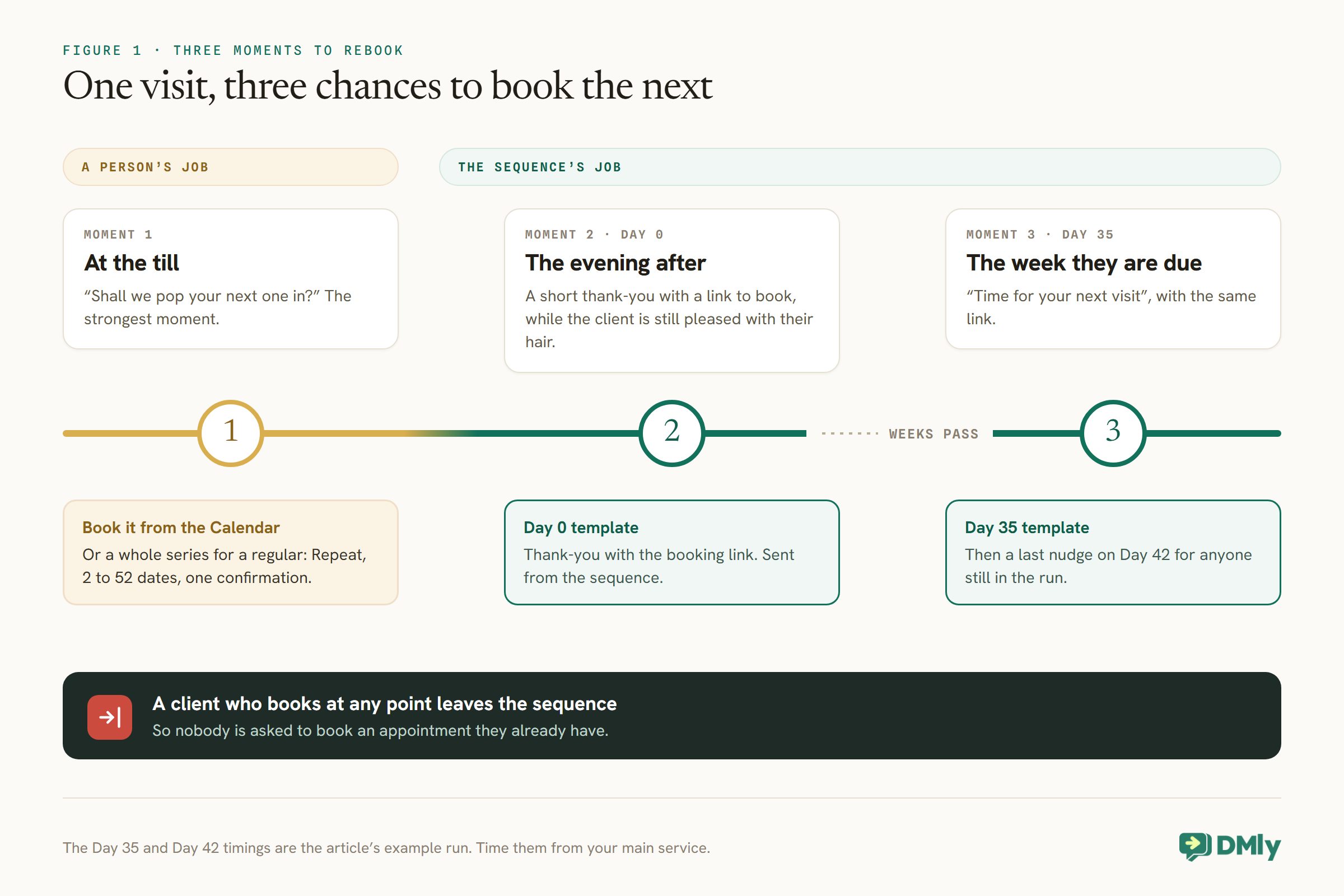
Rebooking Happens at Three Moments
At the till, the evening after, and the week the client is due. Each needs a different tool.
- At the till. The strongest moment. A person books the next appointment, or a run of appointments for a regular, before the client leaves.
- The evening after. A short thank-you with a link to book, while the client is still pleased with their hair and has time to think about the next visit.
- The week they are due. A reminder that it has been about five weeks, with the same link. For some clients, this is the message that finally gets the booking.
Moment One: Book Before They Leave
No message beats a person asking at the till. Make it a routine, and make it easy.
Whoever takes payment asks one question: “Shall we pop your next one in?” If the answer is yes, they add the appointment from the Calendar there and then. A booking added by hand gets the same reminders as any other, and the confirmation too if Notify client is switched on, so the client leaves with it on their phone.
For regulars on a steady rhythm, go further and book the whole run. DMly can book a recurring series from the Calendar: open New appointment, turn on Repeat, choose the frequency (weekly, every two weeks or monthly, among others) and the number of occurrences, from 2 up to 52. Every date shares the same client, stylist and service, and the client gets one confirmation listing the dates rather than a message per date.
Two things to know about a series. Clients cannot start one themselves on the booking page; it is a staff action. And a series never takes payment, whatever the service’s payment mode: DMly confirms every date without collecting, so take the money yourself. If a regular needs to skip a week, point them to the reschedule link rather than the cancel link: when a client cancels a date in a series from their own booking page, the Cancel all upcoming in this series box is ticked by default.
The One Habit the Automation Depends On
The rebooking sequence starts when an appointment is completed. If nobody marks it, DMly may complete it for you, and that is the problem.
DMly’s Appointment completed trigger fires when a booking is marked completed on the Calendar, by a flow or through the API. About a day after an appointment, DMly also closes any booking nobody marked, and what happens then depends on one setting, under Appointments, Settings, Booking policy, Appointments nobody marked. The default, Count as completed, closes it as Completed and fires the trigger, so a client who never turned up still gets a thank-you and a rebooking nudge a day later. Wait for review sets the booking to Needs review, sends nothing, and reminds your team once a day in the app to settle it. For a rebooking sequence, choose Wait for review and mark every appointment completed or no-show, so the nudge only reaches people who actually came.
Make the tap part of taking payment: the client pays, the stylist or front desk marks the appointment completed. If that is not practical, mark the whole day at close. Either way, the same habit also records no-shows properly, which makes your appointment report honest.
Moments Two and Three: Rebook Salon Clients With a WhatsApp Sequence
A sequence is a set of messages sent on a schedule to each client who joins it. It is the right tool for a follow-up that runs over weeks.
A single flow can send one message at one moment. A rebooking follow-up needs two or three messages spread over several weeks, each timed from that client’s own visit. That is what DMly’s sequences are for: a flow subscribes the client, and the sequence sends its steps on the days you set, with each client at their own point in the run.
Create the sequence
- Open Sequences. Select your WhatsApp channel, then go to Automation, then Sequences, then New sequence. Name it after its job, such as “Rebooking after a visit”.
- Set the steps and days. Each step has a Day, counted from when the client joins. The wait between two steps is the gap between their Day numbers. For a salon, an example run is: Day 0, the evening thank-you; Day 35, “time for your next visit”; Day 42, a last gentle nudge.
- Set the sending hours. From and To set when a step may go out, 09:00 to 20:00 by default, and a step that comes due outside them waits. These times are read in UTC, not your local time, so shift them if your salon is not on UTC. A step that joins at 3pm and is due on Day 0 goes out straight away within those hours, which makes the thank-you arrive the same afternoon or evening.
- Make every step a template. For each step, set Send as to a template rather than Standard send, and pick an approved template. The next section explains why this matters so much.
- Decide on replies. The Stop when the contact replies switch, off by default, ends a client’s run the moment they reply to anything. For rebooking, turning it on is sensible: a client who replies is now talking to you, and a person or your booking bot can take it from there.
- Save it. Nothing sends until a flow subscribes someone.
Why every step should be a template
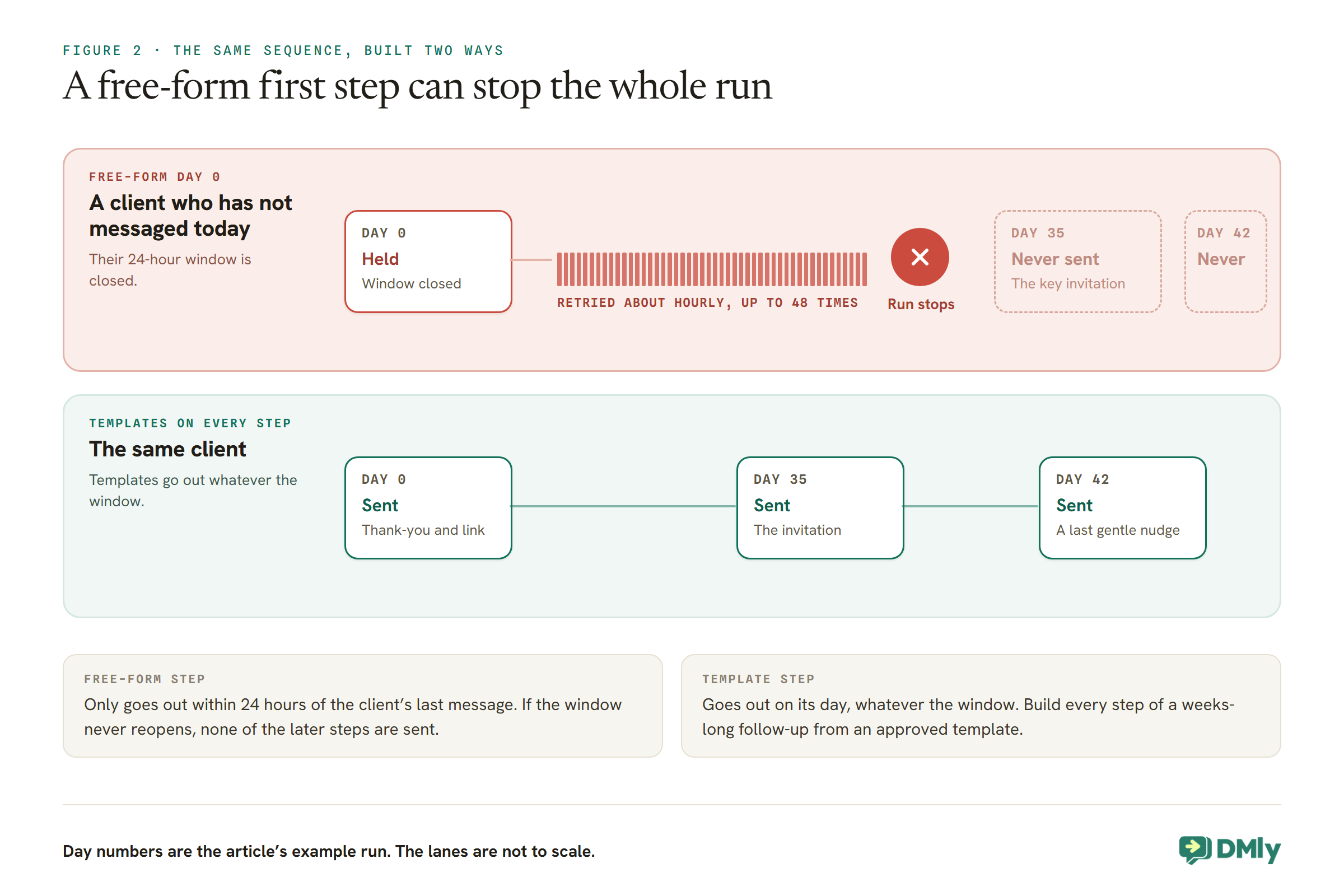
On WhatsApp, a template step can be sent at any time. A free-form step can only be sent within 24 hours of the client’s last message. When a free-form step comes due and the window is closed, DMly holds it and retries about once an hour, up to 48 times, roughly two days. If the client messages in that time, it goes out. If they do not, the client’s run stops there, and none of the later steps are sent.
For rebooking that is decisive. A thank-you written as free-form text reaches only the clients who happened to message you that day. For everyone else, it is held, then the run stops, and the Day 35 invitation, timed for when they are due, never goes. Build every step from an approved template and the whole run reaches everyone.
One more channel rule: a sequence delivers on whichever channel the client actually uses, and a template step is silently skipped for a client who is not on WhatsApp. Subscribe clients to this sequence from a flow on your WhatsApp channel, so it only reaches WhatsApp clients.
Which kind of template
A sequence step on WhatsApp can be sent as a Utility template or a Marketing message. An invitation to book again is promotional in nature, and Meta decides a template’s category in the end. DMly’s own win-back template for lapsed clients, dmly_rebook_nudge, is filed as marketing. Plan for your rebooking templates to be marketing, which means two things: they are billed at Meta’s marketing rate for the client’s country, and they should only go to clients who agreed to hear from you on WhatsApp. Our guide to WhatsApp opt-in covers asking for that permission, and the message templates guide covers approval.
Connect It With Two Flows
One flow puts clients into the sequence after a visit. A second takes them out the moment they book.
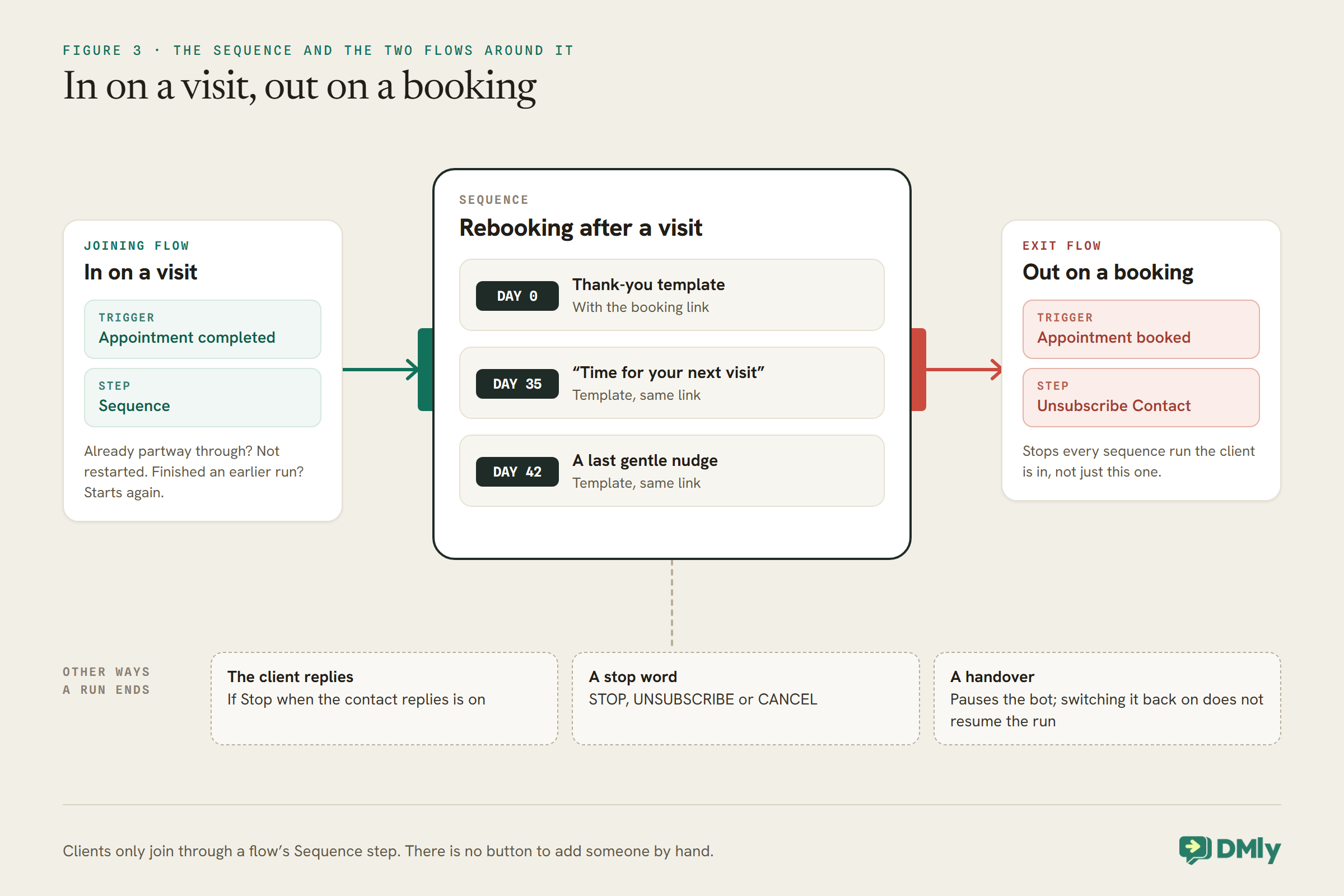
Clients can only join a sequence through the Sequence step in a flow; there is no button to add someone by hand. So the rebooking system is two short flows on your WhatsApp channel:
- The joining flow. Trigger: Appointment completed. One step: Sequence, pointed at “Rebooking after a visit”. Every client whose appointment is marked completed joins the run. A client already partway through it is not restarted or doubled up; one who finished an earlier run starts again from the first step.
- The exit flow. Trigger: Appointment booked. One step: Unsubscribe Contact. The moment a client books anything, by the till, the booking page, your bot or the rebooking link itself, they leave the sequence and get no more rebooking messages.
One caution about the exit flow. DMly’s docs say the Unsubscribe Contact step stops every sequence run the client is in, not just this one. If you run other sequences, such as a welcome series for new enquiries, a booking will end those too. For many salons that is exactly right, since a client who has booked no longer needs nudging, but check before you switch it on.
When a Client Replies
A reply is the best thing a rebooking message can produce. It opens the window and turns a nudge into a conversation.
When a client answers “yes please, any Thursdays?”, WhatsApp opens a new 24-hour window, and for that day you can send them anything, including tappable times. If you switched on Stop when the contact replies, their rebooking run ends there, which is right: they are talking to you now.
What happens next depends on who is answering. A person can reply and book them from the Calendar. A booking flow can offer in-chat times with the Book Meeting step, which shows tappable times on WhatsApp for free services. An AI booking assistant can read the real diary and book the slot in the conversation; our guide to building a WhatsApp AI appointment booking chatbot covers that. Whichever you use, the reply is only valuable if something answers it the same day, while the client still has their diary open.
Winning Back Clients Who Lapsed Long Ago
The sequence only follows clients whose visits are marked completed after you switch it on. Clients who drifted away last year need a different approach.
For clients you have not seen in months, a one-off message to a well-chosen group works better than a sequence. DMly’s segments can find them. A segment is a saved set of rules that is re-checked every time you use it. For a win-back list, combine:
- Lifecycle stage is client, so you reach people who have actually been in, not enquiries that never booked. Check this first: DMly only makes a contact a client automatically when an invoice, order, payment or subscription touches them, so a salon that takes payment outside DMly may have regulars still listed as leads. Convert them on their profile, or leave this rule out and use a tag instead.
- Number of days since last activity set to, say, 90 days or more.
- Marketing opt-in is opted in, which in DMly means the client has not opted out of your messages.
- Reachable on channel WhatsApp.
Two cautions. “Last activity” is the client’s last activity with you, such as a message, not their last appointment, so a client who messaged about a product last month will not appear even if they have not had their hair done since spring. And segments are checked when the message sends, not when you built them, so a client who replies to you in the meantime drops out. Send the win-back as a single broadcast using an approved marketing template, to clients who agreed to hear from you, and make it one friendly message rather than a campaign. Our guide to sending bulk messages on WhatsApp covers broadcasts safely.
What Rebooking Messages Cost
Each template a client receives is a paid message. The exit flow is what keeps the bill down.
Meta charges per delivered template message, at a rate that depends on the template’s category and the client’s country. If your rebooking templates are marketing, each one costs Meta’s marketing rate for that client’s country, and DMly adds no markup. A client who books after the first message receives one; a client who never books receives all three. The exit flow is therefore not only good manners: every client it removes is a message you do not pay for. Our WhatsApp pricing by country rate card shows what a marketing message costs where your clients live, which makes it easy to work out whether a third step earns its place.
One Rhythm for Every Service, and Why
A cut and a colour come back on different cycles. The automation, as documented, treats them the same, so the wording has to work for both.
It would be ideal to rebook a gents’ cut at three weeks and a colour at six. Two documented limits stand in the way. First, DMly’s docs do not describe narrowing the Appointment completed trigger to one service, so one joining flow catches every completed appointment. Second, a sequence fills in contact-level details only, such as {{first_name}}, not appointment details, so a step cannot name the service the client just had.
The practical answer is one rhythm and service-neutral wording, with the booking link doing the rest:
- Pick the gap from your main service. If most of your appointments are colour on a six-week cycle, time the Day 35 step for that. Clients on shorter cycles can book whenever they like from the Day 0 link.
- Let the client choose the date. Every step links to your booking page, where the client picks the service, stylist and time. The message does not have to know what they had.
- Keep the till conversation for the exceptions. The clients with unusual rhythms are the ones worth booking in person before they leave.
What the Messages Should Say
Warm, short, and with one link. A rebooking message is a nudge, not an advert.
Because these are templates, the wording is fixed once Meta approves it; only the variables change. Here are examples to adapt. The booking page is an ordinary public web address, so it can sit in the template as a link or a button.
Day 0: Thanks for coming in today, {{first_name}}! We hope you love it. When you’re ready to book your next visit, it only takes a minute: [booking link]
Day 35: Hi {{first_name}}, it’s been about five weeks since your last visit. Want to get your next appointment in before the diary fills up? [booking link]
Day 42: Hi {{first_name}}, just a last nudge from us: we have some space coming up. Book here: [booking link]. Reply STOP if you’d rather not hear from us.
A few habits keep them welcome. Do not stack discounts into every step; a rebooking message works because the client already likes you. Keep the last step genuinely last. And make leaving easy: the standard opt-out words, such as STOP, add the client to your suppression list and end every sequence for them.
What Ends a Rebooking Run Early
A few things stop a client’s run before the last step. Know them, so a quiet sequence is not mistaken for a broken one.
- They book. Through the exit flow, which is the point.
- They reply, if Stop when the contact replies is on.
- They opt out with a stop word, such as STOP, UNSUBSCRIBE or CANCEL.
- The bot is paused for them. A handover to a person pauses the bot, which ends the client’s run at the next due step. Switching the bot back on does not bring the run back; only the Sequence step can, and it starts them from the beginning.
- A free-form step waits too long. The reason every step should be a template.
There is no screen listing who is subscribed, and no way to remove one client by hand, so the exit flow and the stop words are how you control who hears what.
Test It Without Waiting Five Weeks
There is no screen listing who is in a sequence, so test by being the client yourself, on a short copy.
A rebooking sequence takes weeks to run, and DMly has no list of who is subscribed, so the only way to see it work is to go through it. Do this before you switch the real system on. Make a test copy of the sequence with the same templates on Day 0, Day 1 and Day 2, and point the joining flow at the test copy for now. Then, from a phone that is saved as a test client:
- Book a short appointment for that client, and once its time has passed, mark it completed. The Day 0 template should arrive within the sending hours.
- Wait for Day 1 to arrive, then book another appointment for the same client. The exit flow should unsubscribe them, and Day 2 should never come.
- Repeat with a second test client, but reply to the Day 0 message instead. With Stop when the contact replies on, nothing more should arrive.
When all three behave, point the joining flow at the real sequence and pause the test copy. Remember the From and To hours are in UTC while you wait for messages that seem late.
How to Tell Whether It Is Working
Rebooking is measured in bookings, not in messages. Compare the diary before and after.
DMly’s Appointment report, under Configurations, then Reports, then Appointments, shows total bookings by service and by stylist for any date range, and its CSV export has a row per booking with the client, service, status and source. Two simple checks, a month or two after switching the sequence on:
- Are more future bookings in the diary? Compare total bookings for the same months before and after.
- How many bookings came from the booking page? The source column shows where bookings were made. A rise in booking-page bookings after the sequence starts is a good sign the links are being used.
Neither proves cause on its own, since seasons and staff changes move the diary too, but both are honest numbers you can watch without guessing.
Mistakes to Avoid
- Not marking appointments completed. Under the default setting the automatic close starts the sequence for no-shows too. Choose Wait for review and mark every visit.
- Free-form steps in a weeks-long sequence. Held, then stopped, and the key invitation never sends.
- No exit flow. Clients who already booked keep getting asked.
- Forgetting the From and To hours are UTC. Messages arrive at odd times.
- Naming the service in the wording. A sequence cannot fill in what the client had.
- Sending marketing templates to people who never agreed. Ask for permission first.
- Pointing regulars at the cancel link. In a series, it cancels every later date by default.
Frequently Asked Questions
Can a salon rebook clients automatically on WhatsApp?
Yes. In DMly, a flow on Appointment completed subscribes the client to a rebooking sequence of WhatsApp templates, and a second flow on Appointment booked unsubscribes them the moment they book again.
When should the rebooking message go out?
Two moments work well: a short thank-you with a booking link the day of the visit, and an invitation around the week the client is usually due. Time the second from your most common service.
Why did my rebooking message not send?
The usual causes are an appointment that was never marked completed, a free-form step waiting on a closed window, or a client who opted out or was handed over. With Wait for review switched on, an unmarked appointment starts nothing until someone settles it, so check the Needs review list too.
Will clients who already booked still get the message?
Not if you add the exit flow: a flow on Appointment booked with an Unsubscribe Contact step removes them from the sequence as soon as they book.
Are rebooking messages marketing messages?
Plan for them to be. Meta decides the category, and DMly files its own win-back template as marketing. Marketing templates are billed at the marketing rate and should only go to clients who agreed to hear from you.
Can the message name the service the client had?
Not in a sequence, which fills in contact details only. Keep the wording service-neutral and let the booking link take the client to the right service.
Back to the Pencil Line
The pencil line six weeks ahead is still hard to beat, and nothing here replaces it. Ask at the till, book the regulars’ whole run, and mark each appointment completed as the client pays. The sequence is for everyone the pencil missed.
Built that way, the system to rebook salon clients runs quietly in the background: a thank-you on the day, an invitation when they are due, and silence the moment they book. That is follow-up nobody has to remember, and none of it lands on someone who already has an appointment.
Writing about WhatsApp automation, bookings and growth for local business.
Turn WhatsApp into your busiest channel.
Start free and run message, bookings, payments and reviews in one place.
