
WhatsApp Cloud API vs BSP: Should You Build Directly on Meta or Use a Platform?
Most WhatsApp Cloud API vs BSP debates start with a small win. Your developer registers with Meta, creates an app, clicks Send message on Meta’s API Setup page, and a sample message called hello_world lands on their phone. They hold it up across the desk: “That took an afternoon. Why would we pay a platform to do this?”
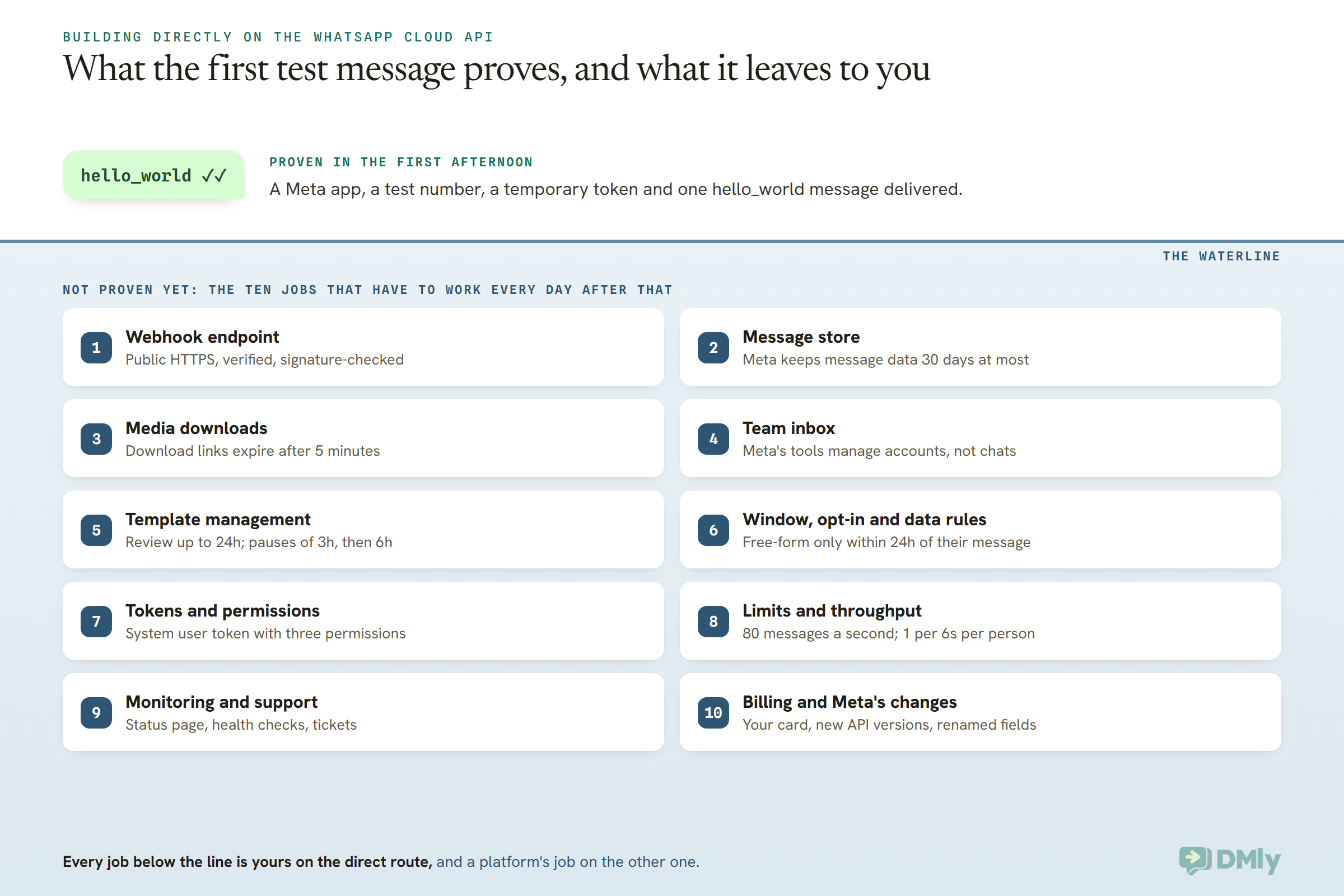
It’s a fair question, and the answer isn’t automatically “you wouldn’t”. But that message proves less than it seems. It came from a test number Meta created for you, using a temporary token that Meta’s own guide says “expires quickly”, to a phone that was expecting it, and nobody on your team had to read the reply, find last month’s conversation or fix anything at 2am.
Everything a business actually runs on WhatsApp happens after that moment. In this guide, we’ll look at what building directly on Meta’s Cloud API involves day to day, using Meta’s own developer documentation as we read it on 13 October 2026: the webhook server, the message store, the tokens, the limits, the template work, the uptime and the bills. Then we’ll look at when building direct is genuinely the better choice, when a platform is, and the middle route where your team works in a platform and your developers still write code against it.
WhatsApp Cloud API vs BSP: The Short Answer
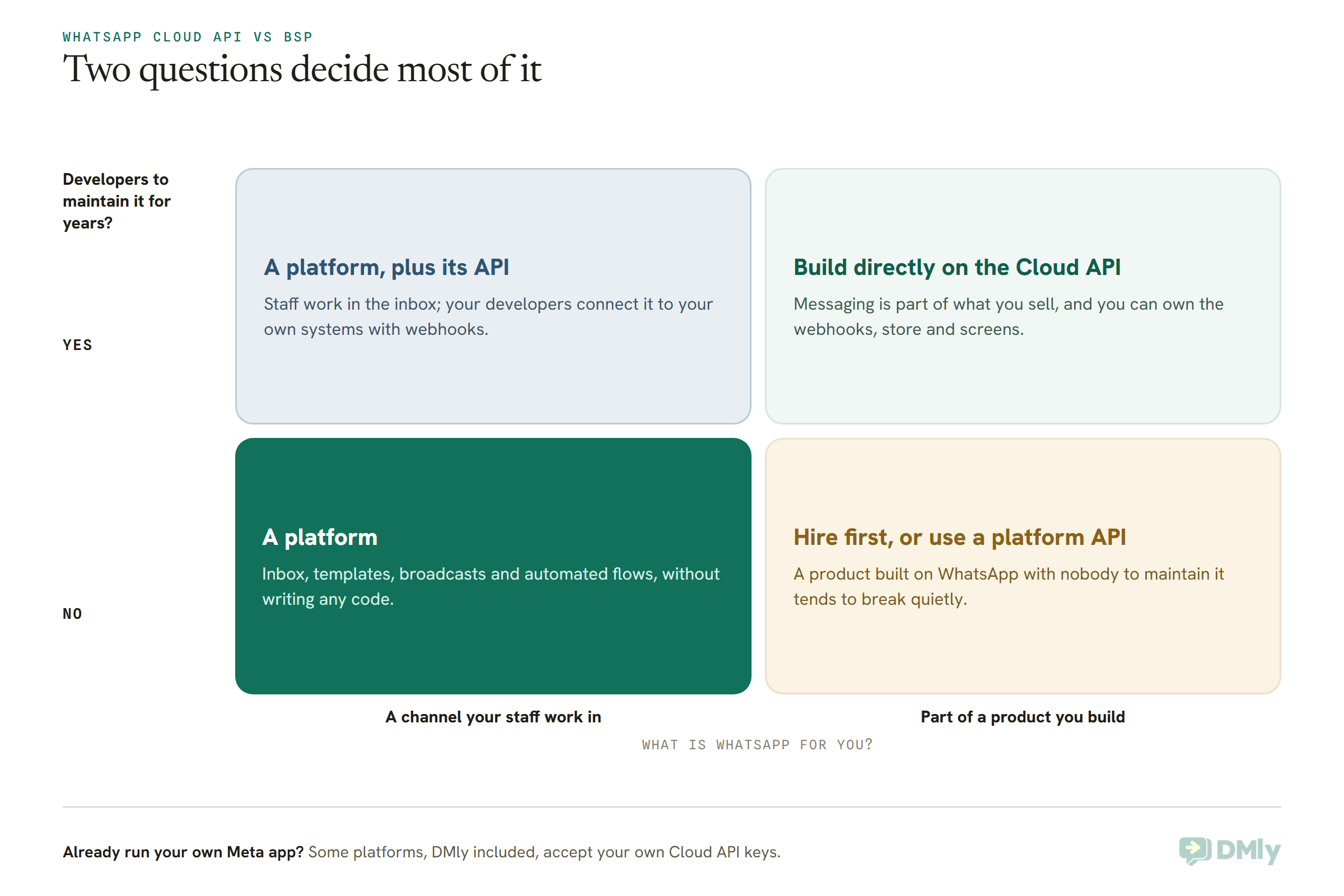
Build directly on Meta’s WhatsApp Cloud API when WhatsApp is part of a product you’re building and you have developers who’ll look after it for years. Use a platform (what most people still call a BSP) when your team needs to work in WhatsApp: answer chats, send templates, run broadcasts and automate replies. If you need both, pick a platform that also gives your developers an API and webhooks.
Notice what doesn’t decide it: Meta’s message charges. Meta bills the same rate for a message whichever route sends it. The difference between routes is any markup a provider adds on top, plus the cost of the software around the messages. With a platform that adds no markup, the whole decision comes down to one comparison: its subscription against the cost of building and running the same things yourself.
| If this sounds like you | Lean towards |
| You’re building an app, a SaaS product or a marketplace, and messaging is one of its features | Building directly on the Cloud API |
| Your staff will answer customers, and nobody on the team writes code | A platform |
| Your staff work in a platform, and you also want WhatsApp data flowing into your own systems | A platform with an API and webhooks |
| You already run your own Meta app but want a proper inbox on top of it | A platform that accepts your own Cloud API keys |
| You send very high volumes from your own systems and need full control of queueing and retries | Building directly on the Cloud API |
A quick word on names. “BSP” is the industry’s older term for the companies Meta lets connect businesses to its platform, and Meta’s own docs now split them into Solution Partners, Tech Providers and Tech Partners. For this decision the label matters much less than what the company actually gives you, so we’ll mostly just say “platform”. If you want the bigger picture of how the API works for a small business first, start with our guide to the WhatsApp Business API for small businesses.
What Does Building Directly on the WhatsApp Cloud API Involve?
Building directly means your business owns a Meta app, connects it to your own WhatsApp Business Account, and writes the software that sends, receives and stores every message. Meta runs delivery and sets the rules. Everything your team sees and touches is yours to build.
Meta’s Get Started guide lays out the first steps, and they really are quick:
- Register as a Meta developer, using a Facebook account or a managed Meta account.
- Create a Meta app with the Connect with customers through WhatsApp use case, attached to a business portfolio.
- On the API Setup page, connect a WhatsApp Business Account (or let Meta create one).
- Generate a temporary token and send a test message from the test number Meta gives you.
- Set up a webhook endpoint so you can receive customers’ messages and delivery updates.
- Create a system user in your business settings and generate a permanent access token with three permissions: business_management, whatsapp_business_messaging and whatsapp_business_management.
Going live adds a few more: registering your real number (Meta says this can only be done through the API, with a six-digit PIN, and it allows 10 registration attempts per number in any 72 hours), choosing a display name, and adding a payment method. Meta notes that its test number and test account don’t need a payment method, which is one reason the first afternoon feels so smooth.
The good news: no App Review for your own business
One worry you can cross off. Meta’s permissions page says plainly: “If you are a direct developer and only access your own business data, you do not need to undergo App Review or obtain Advanced access for any permissions.” App Review only comes in when your app manages other businesses’ WhatsApp accounts, which is what partners do. If you’re building for yourself, that hurdle isn’t there.
What Meta gives you, and what it doesn’t
Meta’s platform overview lists what you get: the Cloud API for sending and receiving messages (plus calling and groups), a management API for phone numbers, templates and analytics, webhooks, and WhatsApp Manager, which Meta describes as a web app for “managing WhatsApp Business Accounts, Messaging Accounts, phone numbers, templates, and reviewing analytics.”
Read that last list again and you’ll notice what’s missing: a screen where your staff read and answer conversations. Meta also mentions that some third-party code libraries exist but are “not maintained or endorsed by Meta”. So the hello_world test proves the pipe works. Building direct means you’re also the plumber, the person who fits the taps, and the one who gets the call when something leaks.
The Real Cost of Building on the WhatsApp Cloud API Yourself
The real cost of a direct build isn’t the first message; it’s the ten jobs that have to keep working every day afterwards. Here they are, each with what Meta’s documentation says (all read on 13 October 2026) and what it means for you if you’re the one paying for it.
1. A webhook endpoint that never sleeps
On the Cloud API, you don’t fetch messages. Meta pushes them to you. In Meta’s words, “the contents of any message sent from a WhatsApp user to your business phone number is communicated via webhook”, and so is every delivery and read update for the messages you send. If you’re new to the idea, our simple guide to webhooks explains it without the jargon.
Meta’s requirements for that endpoint are specific:
- It must sit on a public server with a valid security certificate. Self-signed certificates aren’t accepted.
- It must answer Meta’s verification check, and your code should check the signature on every message (an HMAC-SHA256 hash made with your app secret) so nobody can post fake messages to it.
- Meta asks you to size it for three times your outgoing message traffic plus all your incoming traffic, because every message you send comes back as several status updates.
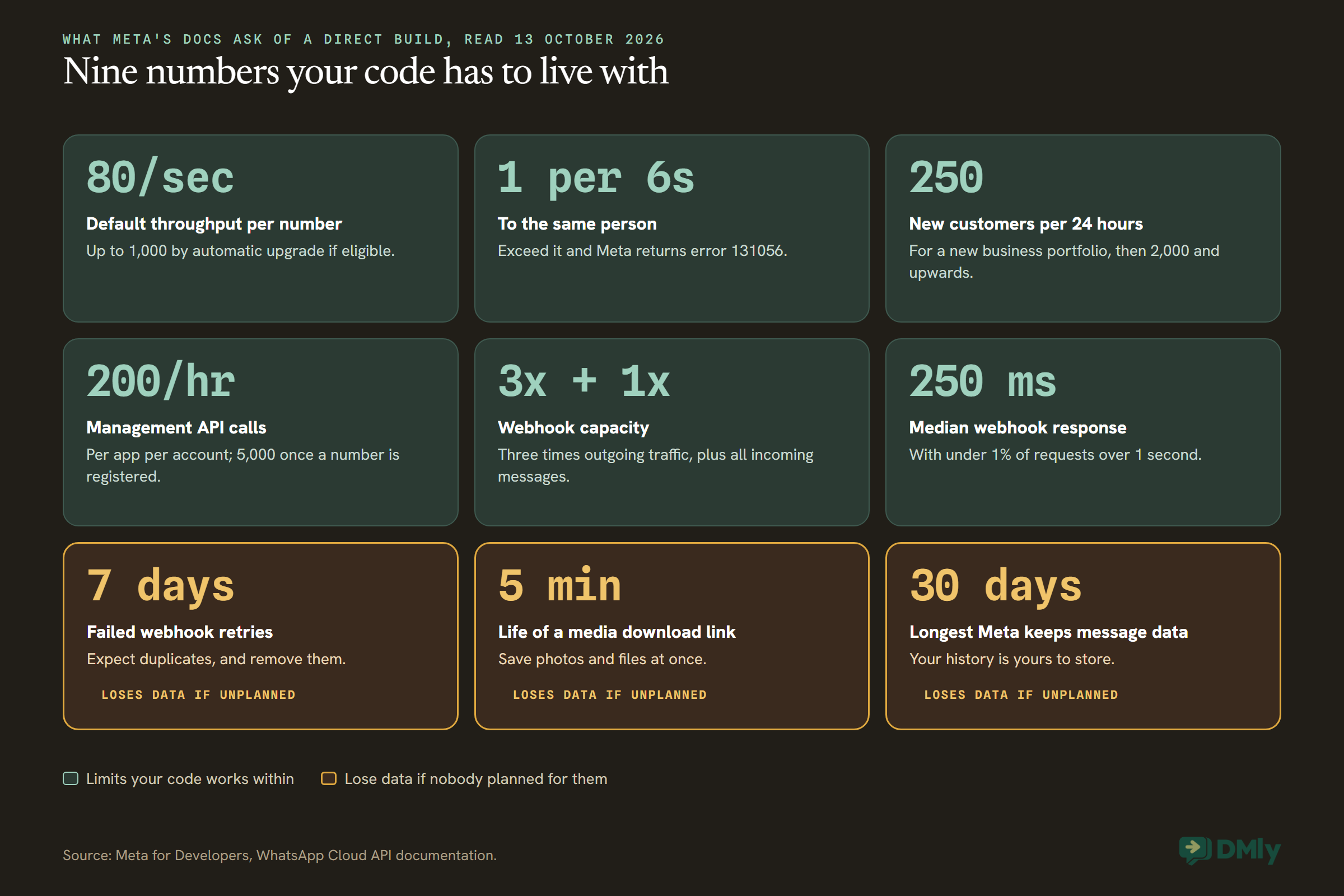
- Meta’s latency standard is a median response of no more than 250 milliseconds, with fewer than 1% of requests taking over a second.
- If your server fails, Meta retries “with decreasing frequency until the request succeeds, for up to 7 days”, which can produce duplicates your code has to spot and ignore.
What it means for you: a small, always-on server, a certificate that never lapses, monitoring that tells someone when it stops answering, and a person whose job it is to care.
2. A message store, because Meta isn’t one
Meta’s privacy page says messages “have a maximum retention period of 30 days” on the Cloud API, kept for things like retransmission. And the webhook page is blunter: “There are no APIs for fetching historical webhook data, so capture and store webhook payloads accordingly.”
Photos, voice notes and documents need extra care. Meta’s media page says a media download link expires after five minutes, and a media ID received by webhook expires after seven days. So a customer’s photo of a damaged parcel has to be downloaded and saved by your system almost immediately.
What it means for you: a database for every conversation, a job that saves media as it arrives, backups, and a plan for how long you keep customer data. If your store is down for a week, those conversations aren’t waiting at Meta for you.
3. An inbox your team can actually use
This is the job that surprises owners most. Meta doesn’t provide a place for staff to work conversations, so a direct build has to include one if humans will ever reply. Think about what your team would expect on day one: a conversation list, who’s handling which chat, internal notes, a visible countdown on the 24-hour window, a template picker when it closes, search, roles and permissions, and something that works on a phone.
What it means for you: that’s not a feature of your build, it’s a product in its own right. If WhatsApp only ever talks to your own app, you may not need it. If a receptionist, sales team or support desk will use WhatsApp, you do.
4. Templates, and their moods
Templates are the only messages WhatsApp delivers outside the 24-hour window, so reminders, receipts, follow-ups and campaigns all depend on them. Meta’s template pages describe the work around them:
- Review takes up to 24 hours. Common rejection reasons include badly formatted variables, asking customers for sensitive identifiers, and duplicating an existing template’s wording.
- If you appeal a rejection, Meta says a decision comes within 24 hours.
- A template that collects too much negative feedback is paused automatically: three hours the first time, six hours the second, then disabled.
- Meta can also change a template’s category, which changes what each message costs. Separate webhooks tell you about status, quality and category changes.
What it means for you: either your developers build screens for creating and tracking templates, or your staff work in WhatsApp Manager and someone keeps template names in step with your code. And your sending code needs a plan for the evening a template is paused before a sale.
5. The 24-hour window, opt-in and data rules
Free-form messages only go out within 24 hours of the customer’s last message. After that, it’s an approved template or nothing. Meta also says you “must obtain user opt-in before sending message templates”, and that the opt-in “must clarify your business name and intent.”
Then there’s data protection. Meta’s privacy page says it acts as a data processor for the Cloud API, and that “Cloud API customers must meet their own obligations under data protection laws, such as the General Data Protection Regulation (GDPR).” Meta also offers optional in-country storage of message data for some countries, which you switch on when you register the number.
What it means for you: your code tracks an open or closed window per customer and picks the right kind of message every time, your sign-up forms record consent properly, and your own database meets the privacy rules where you and your customers are.
6. Tokens and permissions
Your system talks to Meta with an access token. Meta warns that ordinary user tokens expire quickly (“you will have to keep generating a new one every few hours”), so production systems use a system user token. Meta also says to treat tokens as opaque strings that can change length and format, and that a token without access to the right WhatsApp Business Account fails with error code 200 (“not to be confused with HTTP status code 200”).
What it means for you: secure storage for a key that can send messages as your business, a short list of people allowed to create one, and a plan for replacing it if it leaks or the person who made it leaves.
7. Living inside Meta’s limits
Meta’s limits come in several layers, and a direct build has to respect all of them in code:
- Throughput. Each number can send up to 80 messages a second by default, and Meta upgrades eligible numbers to 1,000 a second automatically. Go over and you get error 130429. A number shared with the WhatsApp Business app (coexistence) is fixed at 20 a second; our WhatsApp coexistence guide covers what else changes on those numbers.
- Messages to one person. One message every six seconds to the same customer, with short bursts of up to 45 allowed if you then wait. Exceed it and you get error 131056.
- Management calls. 200 requests an hour per app per WhatsApp Business Account by default, rising to 5,000 an hour once the account has a registered number. Template creation counts here.
- New conversations. A new business portfolio can start conversations with 250 customers in a rolling 24 hours. Verifying your business, or sending 2,000 well-received templates to different people within 30 days, lifts that to 2,000. After that Meta raises it to 10,000, 100,000 and unlimited, within six hours, if your quality stays high and you’ve used at least half your limit in the past seven days.
What it means for you: queueing, pacing and retry code, plus campaign planning that respects how many new people you can reach today.
8. Uptime, monitoring and who you call
Meta publishes a status page for the WhatsApp Business Platform and defines Cloud API as available “unless it has been unable to send or receive messages for at least 10 consecutive minutes.” Its support page adds that “when we update the API, you might experience up to 5 minutes of downtime.” There’s also a health check you can ask Meta for, which reports whether your number, account, business portfolio, app or a template can send right now, as available, limited or blocked.
For help, Meta’s support page lists developer support, a community forum and bug reports for every developer, and describes Direct Support tickets as being for enterprise developers “such as a partner or managed partner”, with an initial response aimed at within 24 hours on business days.
What it means for you: your WhatsApp works only when Meta’s side and yours both do. Someone has to watch both, tell Meta’s problems apart from your own, and own the fix when it’s yours.
9. Paying Meta, on your own card
On the direct route, Meta bills you per delivered message, by category and by your customer’s country, on a payment method attached to your account. Since 1 October 2026, ordinary replies inside the 24-hour window are charged after the first 1,000 a month on each number, and utility templates sent inside an open window are charged too. Our article on the WhatsApp pricing change on 1 October walks through what that means in practice.
A failed card stops templates going out, so it belongs on your monitoring list too. If it happens, our guide to fixing WhatsApp Cloud API billing errors covers the usual causes.
What it means for you: this line is the same on both routes if your platform adds no markup, so it cancels out of the comparison. If a provider does mark messages up, add that difference to the provider’s side.
10. Keeping up when Meta changes things
This is the cost nobody quotes for, and the documentation itself shows why it’s real. On the one day we read it, Meta’s pages recorded that messaging limits moved from each phone number to the whole business portfolio on 7 October 2025, that the field developers used to read a number’s limit has been deprecated in favour of a new one, that a webhook field was renamed between two API versions, and that pricing moved from conversations to individual messages on 1 July 2025. Code samples across the pages refer to Graph API versions from v17.0 to v25.0.
To be fair to Meta, it gives notice. Its pricing calendar commits to a month’s notice for rate card changes and six months for a change of pricing model. But notice still means work for whoever maintains your code.
What it means for you: a standing slice of developer time, every year, spent keeping what already works working.
WhatsApp Cloud API vs BSP Costs: How to Estimate Yours Without Inventing Numbers
The honest way to compare WhatsApp Cloud API vs BSP costs is to price your own build in hours, job by job, then set it against a platform’s fee plus any markup. There’s no reliable published figure for what a build costs, and we’re not going to make one up. Your developer’s estimate for your situation beats any industry average.
Here’s a simple way to do it:
- Cancel out the message charges. Meta’s rate is the same on both routes. Only add a line if a provider charges more than Meta per message.
- Price the one-off build. Take the ten jobs above, cross off any you genuinely don’t need (no human replies means no inbox), and ask your developer for hours per job.
- Price the running cost. Hosting, monitoring, backups, someone on call, and hours each month for template problems, limit planning and Meta’s changes.
- Count the opportunity cost. Every hour spent on plumbing is an hour your developer isn’t spending on the thing your customers pay you for.
- Price the platform honestly too. Its subscription, extra seats, add-ons, and whether its limits fit you, for as long as you’ll use it.
There’s one shortcut worth doing on the back of an envelope. Divide a platform’s monthly fee by what an hour of your developer’s time costs you. The answer is how many hours of upkeep a month your build has to stay under just to break even on running costs, before you count a single hour of building it.
Using DMly’s published prices billed yearly ($29, $65 and $149 a month, read on 13 October 2026), and three hourly costs we’ve picked purely as an illustrative assumption (not a quote, not a survey), the sums look like this:
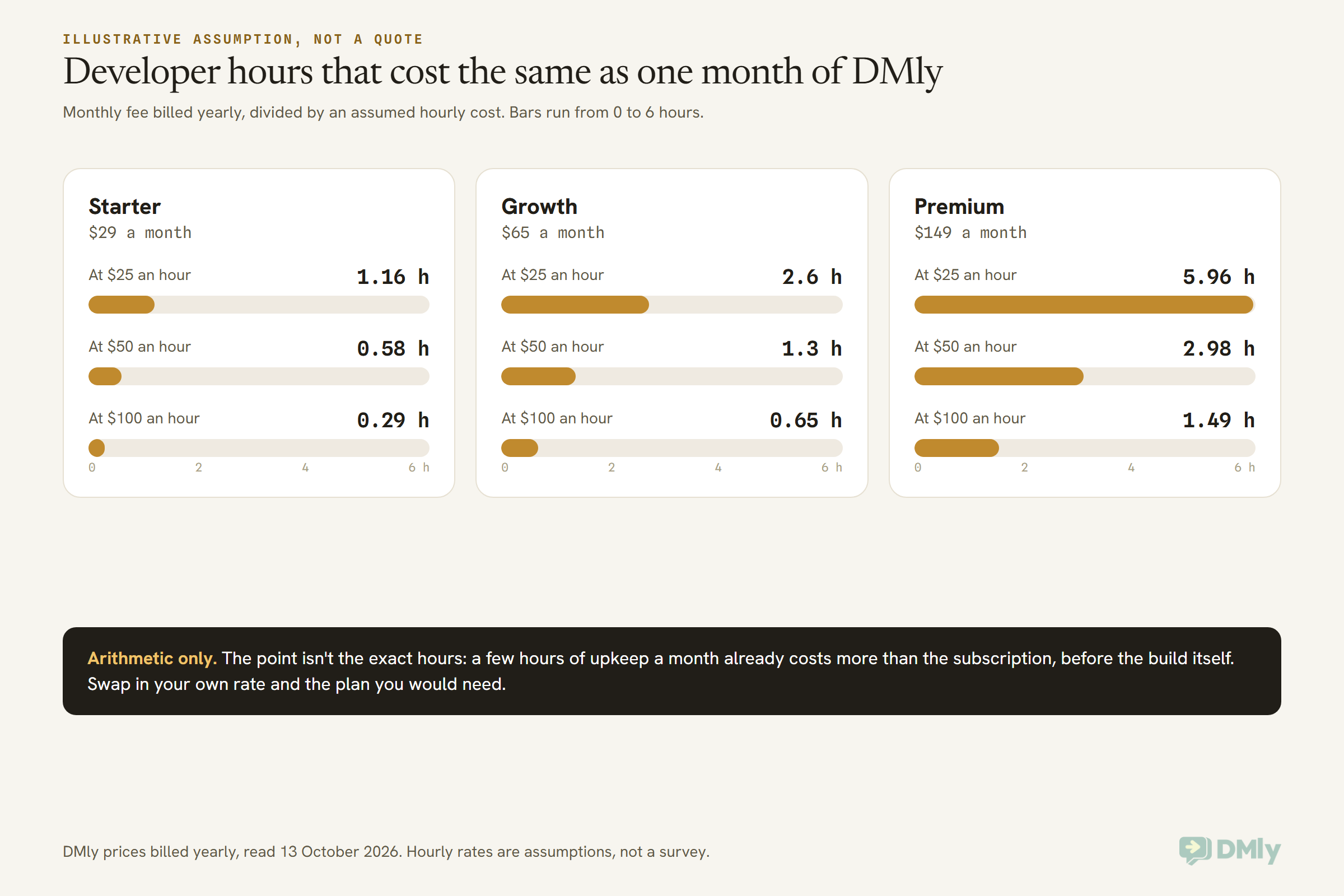
Take Growth at an assumed $50 an hour: $65 divided by $50 is 1.3 hours a month. If keeping your build healthy takes more than about an hour and a quarter of that developer’s time each month, the platform is cheaper to run, and you haven’t yet counted the weeks spent building it. If your developer costs less in your market, as it may in Lagos or Pune, the break-even moves up; if you hire in London or New York, it moves down. Use your own figure.
Two fair caveats. First, a platform’s plan has limits of its own (DMly’s plans include 3, 6 or 15 team seats, with extra seats at $10 a month), so price the plan you’d actually need. Second, a build can do things no platform plan offers, which is the subject of the next section.
When Building Directly on Meta Is the Better Choice
Going direct wins when messaging is part of your product, when your team already has the screens it works in, or when you need control that a platform can’t hand over. These are the cases where we’d tell you to build, even though we sell a platform.
- WhatsApp is a feature of what you sell. A SaaS product that sends WhatsApp notifications for its customers, a marketplace that connects buyers and sellers, an app with WhatsApp sign-in codes. You’ll want to own the experience, and you have developers anyway.
- Your staff already live in a system you built. If your team works every day in your own CRM or helpdesk, a second inbox in a platform could sit unused. Piping WhatsApp straight into the screens they already have can be the better fit.
- You need high volume from your own code. Meta allows 80 messages a second per number, up to 1,000 for eligible numbers. A platform’s API has its own ceiling: DMly’s REST API, for example, allows 60 requests a minute per key. If your system needs to fire thousands of individual sends a minute from code, talk to Meta directly.
- You want Meta’s newest features the day they ship. Meta’s docs cover groups, calling, a separate Marketing Messages API and payments in India and Brazil. A platform offers what it has built, when it has built it. If one specific feature matters to your plan, check that the platform supports it before you buy, whoever the platform is.
- You need to control where data is stored. Meta lets you switch on in-country storage for some countries when you register a number. On the direct route that choice is yours. If a provider’s documentation doesn’t say whether it sets this (DMly’s docs don’t), ask before you sign.
- Your systems can never miss an event. Meta retries a failed webhook for up to seven days. A platform’s own webhooks to your system may retry for far less time: DMly’s docs say failed deliveries are tried three times, at roughly 10 and 60 seconds, then dropped. If every event must land in your own system, design for that, or take events from Meta yourself.
And if your plan is to serve other businesses with your own WhatsApp product, building direct is the start of becoming a partner yourself, with App Review and more of Meta’s process to follow. That’s a different article, and a different business.
When a Platform Beats Building on the WhatsApp Cloud API
A platform wins when the people using WhatsApp are your staff rather than your software, and when your time is better spent on customers than on plumbing. For most local and growing businesses, that’s the honest answer.
- Nobody on the team writes code, or your one developer is already fully booked.
- Several people answer customers and need a shared inbox with assignment and notes.
- You want templates, broadcasts and automated replies this month, not after a build.
- You use more than one channel, and want Instagram, Messenger or website chat in the same place as WhatsApp.
- You’d rather Meta’s changes were someone else’s job. When the rules move, the platform updates once for all its customers.
- Your volume is modest. At a few thousand messages a month, a build rarely earns back what it costs.
It’s worth being clear about what you give up, too. You pay a fee for as long as you use it. You live within its limits on seats, contacts and broadcast volume. Your conversations sit in its system, so check how you’d get them out (in DMly, conversation transcripts have no download button; the docs point you to the API instead). And some providers mark up Meta’s message rates, which changes the sums above. None of that is a reason to build. It’s a reason to choose carefully.
One persistent myth deserves a mention here: that Cloud API access made providers pointless. It didn’t, because Meta gives you access, not a place to work. We pick that one apart in WhatsApp Business API myths.
The Middle Route: A Platform Your Developers Can Still Code Against
You don’t have to choose between screens for your team and code for your developers: a platform with an API and webhooks gives you both. Your staff work in the inbox. Your developers connect it to the rest of your business, without owning the WhatsApp plumbing underneath.
Here’s what that looks like in DMly, from its developer documentation (read on 13 October 2026). It’s included on every plan.
- A REST API covering contacts, conversations, broadcasts, bookings, finance and media. Each integration gets its own key, which can have full access or only the areas you choose, is shown once and stored only as a hash, and allows 60 requests a minute.
- Webhooks on 83 event topics, from a message arriving to an invoice being paid. Every delivery to your endpoint is signed, and the docs ask you to reply within 8 seconds and handle the occasional repeat.
- An HTTP Request step inside the flow builder, which calls your own system mid-conversation (to look up an order, say) and saves fields from the reply.
- No-code connectors: an official n8n community node and a Zapier connection, both built on the same API and webhooks.
- An MCP server with 38 tools, so an AI assistant can search contacts, read conversations or find a free booking slot. It allows 120 requests a minute, and broadcasts it prepares wait for a human to approve them.
The difference from building direct is who owns the hard parts. You message a contact rather than a raw phone number ID, and the 24-hour window, template choice, inbox and message history stay the platform’s job. If you’re weighing which of those doors suits a given job, our comparison of API vs webhooks vs Zapier vs n8n lays them side by side, and how to connect WhatsApp to n8n walks through a real setup. For the code-level version of this whole debate, with request examples, see our WhatsApp automation API guide for developers.
Two limits to know before you plan around it. The REST API’s 60 requests a minute is per key, so give each integration its own key rather than sharing one. And the API needs an active subscription: once a plan or trial has actually ended, DMly’s docs say every request is refused until it’s paid again.
Already have your own Meta app? Bring your own keys
If your developers have already built on the Cloud API and you now want an inbox on top, DMly’s setup page has a second option alongside Meta’s Embedded Signup: Bring your own WhatsApp Cloud API keys, labelled “Complex (30 mins)” and meant for businesses that already run their own Meta developer app.
You supply a permanent system user token, your phone number ID and your WhatsApp Business Account ID. DMly checks the token and the phone number ID with Meta before saving. Then you paste the callback URL and verify token DMly shows you into your Meta app’s webhook settings and subscribe the messages field. The docs add two conditions: the token needs the whatsapp_business_management permission, and the number must already be registered.
One thing follows from that setup: your Meta app’s webhook now points at DMly. If your own code also needs to know when messages arrive, it would take those events from DMly’s webhooks or API rather than straight from Meta.
What DMly Takes Off Your Plate, and When It’s the Wrong Choice
DMly takes the ten jobs from the build list and turns most of them into screens your team can use, while Meta still bills you directly for messages. A disclosure first: DMly publishes this blog and is one of the platforms you could choose. So here’s what its documentation and pricing page say, and nothing more.
- Connecting. Meta’s Embedded Signup, labelled “Simple (10 mins)”. When you finish at Meta, DMly subscribes your number to incoming messages, creates the channel and submits its built-in templates to Meta for review.
- The 24-hour window. DMly checks it before anything leaves. A free-form message to a customer whose window has closed is stopped and recorded as failed, and the inbox shows a countdown and offers a template instead.
- The inbox. One list for WhatsApp and your other channels, with assignment, internal notes and done and open folders. Archived conversations delete themselves after 30 days, so keep finished chats in Done.
- Templates and broadcasts. Build templates and submit them to Meta, sync approved ones, start from a library, and send broadcasts to saved segments. A template Meta pauses shows as Paused by WhatsApp, so you can spot it before a broadcast depends on it.
- Automation. A flow builder for automated replies, bookings and follow-ups, with the HTTP Request step when you need your own systems.
- Number health. Quality rating and messaging limit read live from Meta on the number’s configuration tab.
- Billing. Meta bills you directly, through a payment method you add in Meta’s own billing settings, and DMly’s pricing page says it adds no markup. Plans are $29, $65 or $149 a month billed yearly ($39, $79 or $199 monthly), with a 7-day free trial and no card needed. See DMly pricing for what each plan includes.
What DMly can’t do is just as clear in its docs: the quality rating and messaging limit it shows are read-only, nothing in DMly raises them, and it doesn’t hold back sends based on your tier. Those decisions stay with Meta, whichever route you choose.
When DMly is the wrong choice
- Messaging is your product. Build on the Cloud API, or look at a developer-focused provider.
- You need thousands of API sends a minute from your own code. DMly’s REST API allows 60 requests a minute per key.
- Your systems must receive every event, with days of retries. DMly’s webhooks try three times over about a minute.
- You must choose in-country storage for message data. DMly’s docs don’t say whether it sets Meta’s local storage option, so get that answer in writing first.
- You need a provider to pay Meta for you. On DMly, Meta bills your own payment method. If you can’t add one Meta accepts, look for a provider that offers its own credit line.
Can You Switch Routes Later?
Yes: your number and approved templates can move between routes as long as the WhatsApp Business Account sits in your own business portfolio, but chat history usually doesn’t come with it. That makes one early decision more important than the route itself.
- One provider at a time. DMly’s migration guide notes that a number can be connected to one Cloud API provider at a time, and that two-step verification has to be turned off before you move it.
- Templates follow the account. If the WhatsApp Business Account is yours, your approved templates come across. If an old provider owns it, they stay behind and you resubmit.
- History mostly stays put. DMly’s guide says past chats only import for numbers connected in co-existence mode, from the WhatsApp Business app. From any other source, export what you need before you leave.
- A build keeps its own history. One real advantage of building direct: your message store is yours, so moving to a platform later doesn’t lose it, even if the platform can’t import it.
Whichever route you take today, make sure your WhatsApp Business Account is created in your own business portfolio. It’s the single thing that keeps your options open.
The Ownership Test: Six Questions to Answer Before You Decide
The quickest way to settle WhatsApp Cloud API vs BSP for your business is to name, for each job, the person who’ll own it a year from now. Ask these with your developer in the room:
- When webhooks start failing at 2am on a Sunday, who gets the alert, and who fixes it?
- Where will last March’s conversations live, and who can search them when a customer disputes something?
- When Meta pauses a template the evening before a sale, who notices first, and who swaps it?
- When Meta retires a field or an API version, whose week of work does that come out of?
- Who answers customers, on which screen, and how many people is that?
- If your developer leaves, can someone else run what they built?
If most answers are “our developer, comfortably, and it’s part of their job”, building direct is a credible plan. If most answers are “we’d figure it out”, that’s your answer too: start on a platform, and let your developers build on its API where it actually helps.
Six Businesses, Six Decisions
These are illustrative examples, not customer stories, but they show how the same question lands in different places.
- A heating and cooling company in Phoenix with its own dispatch app and a developer who built it. Visit updates come from that app, so sending them straight through the Cloud API makes sense. One US detail applies on either route: Meta doesn’t currently deliver marketing templates to US numbers, so this is a channel for updates, not promotions.
- A fintech startup in Bengaluru sending one-time sign-in codes at high volume. Messaging is part of the product and throughput matters, so build direct. Billing is worth planning early too: Meta says eligible Indian businesses must move their WhatsApp accounts to rupee billing by 31 December 2026.
- A pharmacy group in Lagos with three branches, no developer and customers asking about stock all day. A platform, with each branch on its own number and staff sharing one inbox. Building would cost far more than it saves.
- A gym group in Manchester whose membership system already holds everything. A platform for the front desk, with webhooks or n8n pushing new WhatsApp leads into the membership system. That’s the middle route.
- A property developer in Riyadh whose agency already built a WhatsApp integration on its own Meta app, but whose sales team wants an inbox. Bring the existing keys to a platform that accepts them, rather than building an inbox from scratch.
- An online marketplace in Jakarta connecting buyers and sellers, where WhatsApp notifications are part of how the product works. Build direct, and budget for the message store and the people on call.
Frequently Asked Questions
WhatsApp Cloud API vs BSP: what’s the difference?
The Cloud API is Meta’s own interface for sending and receiving WhatsApp messages from code; it gives you access, not a place to work. A BSP, or platform, is a company that connects your number to that same API and adds software such as an inbox, templates, broadcasts and automation. Meta’s message rates are the same either way; providers differ in what they add and whether they mark up messages.
Can I use the WhatsApp Cloud API without a BSP?
Yes. Meta lets any business register as a developer, create its own app, connect its own WhatsApp Business Account and pay Meta directly. You then build and run everything around the messages yourself, from the webhook server to the inbox.
Do I need Meta App Review to build on the Cloud API?
Not if you only access your own business’s data. Meta’s permissions page says direct developers in that position don’t need App Review or Advanced access. App Review applies when your app manages other businesses’ WhatsApp accounts, as partners do.
Is building directly on the Cloud API cheaper?
On message charges, it’s the same as a platform that adds no markup, because Meta’s rate doesn’t change. The real comparison is the platform’s subscription against the hours to build and maintain the webhook server, message store, inbox and template tools yourself. Price those hours with your own developer before deciding.
How long does it take to build on the WhatsApp Cloud API?
The first test message can take an afternoon. A production system depends entirely on which of the ten jobs you need, and Meta doesn’t publish an estimate, so ask your developer for hours per job. Remember the ongoing time for Meta’s changes, not just the first build.
What happens to WhatsApp messages if my webhook server goes down?
Meta retries delivery with decreasing frequency for up to seven days, which can produce duplicates when your server comes back. There’s no API for fetching past webhook data, and Meta keeps message data for 30 days at most, so a longer outage can mean lost conversations.
Can I connect my own Meta app to DMly?
Yes. DMly’s setup page has a “Bring your own WhatsApp Cloud API keys” option for businesses that already run their own Meta developer app. You supply a permanent system user token, your phone number ID and your WhatsApp Business Account ID, then point your app’s webhook at DMly.
Beyond Hello World: Making the WhatsApp Cloud API vs BSP Call
Back to that message on your developer’s phone. It was a real achievement, and it does prove something: that your business can talk to Meta. What it doesn’t prove is who’ll look after the other ten jobs, every day, for years.
So make the WhatsApp Cloud API vs BSP decision on that question rather than on the first afternoon. If WhatsApp is part of what you sell and your developers can own the webhooks, the store, the limits and Meta’s changes comfortably, build directly on Meta. If your staff are the ones using WhatsApp, use a platform, and let your developers build on its API and webhooks wherever your own systems need it. Either way, keep the WhatsApp Business Account in your own name, so you can change your mind later.
If the platform route fits, you can start a 7-day DMly trial with no card, connect your number through Meta’s own signup, and see whether the inbox, templates and API cover what your team needs before you commit to building anything.
Writing about WhatsApp automation, bookings and growth for local business.
Turn WhatsApp into your busiest channel.
Start free and run message, bookings, payments and reviews in one place.
