
What Is a WhatsApp Business Solution Provider (BSP)? And Do You Need One?
About ten minutes into the sales call, the rep says it: “Don’t worry, we’re an official WhatsApp Business Solution Provider, so you’re in safe hands.” You nod. Everybody nods. It sounds like the kind of thing you’re supposed to already know, and it sounds reassuring, so the call moves on to the demo.
That nod is worth unpacking, because the word “BSP” quietly answers several questions you probably care about more than the badge: who sends you the bill for your WhatsApp messages, whether you pay Meta’s price or someone’s price on top of it, whose name your WhatsApp account sits in, and who you call when a template gets rejected the night before a sale.
Here’s the short version. A BSP is a company Meta has approved to connect other businesses to the WhatsApp Business Platform (the WhatsApp API) and to provide services on top of it. Meta’s own documentation no longer uses the phrase; it now splits partners into Solution Partners, Tech Providers and Tech Partners, and the difference between them mostly comes down to money. In this guide, we’ll look at what each one is, what a provider actually does for you, who bills you on each route, how markups work with real rates read on 13 October 2026, whether you need one at all, and what to ask before you sign.
What Is a WhatsApp Business Solution Provider?
A WhatsApp Business Solution Provider is a company Meta allows to connect your business number to the WhatsApp Business Platform and to run messaging services for you, such as sending, templates, billing and support. It sits between you and Meta. Meta runs the platform and sets the rules and the prices; the provider gets you onto it and usually gives you something to work with once you’re there.
You only meet providers if you’re on the API. The free WhatsApp Business app on your phone doesn’t involve one at all. If you’re still deciding between the two, our guide to the WhatsApp Business app vs API covers that choice first, and our pillar on the WhatsApp Business API for small businesses explains the API end to end.
The name changed, the job didn’t
“BSP” is the term most of the industry still uses, and it’s what people type into Google. But when we read the partner pages of Meta’s WhatsApp developer documentation on 13 October 2026, none of them used the phrase “Business Solution Provider” at all. Meta now describes partners like this:
“Partners are business entities that deploy value-added solutions as WhatsApp authorized service providers on behalf of their clients. Partners include Solution Partners, Tech Providers, and Tech Partners.” (Meta for Developers, Partners overview, read 13 October 2026)
So when a vendor says “we’re a BSP”, what they usually mean in today’s terms is one of those three. Sometimes they mean a Solution Partner, which is the closest thing to the old BSP. Sometimes they mean they’re a Tech Provider, which is a different arrangement with a different bill. It’s fair to ask which.
DMly’s own documentation uses the same split when it talks about other tools. Its migration guide says Wati, AiSensy, Interakt, 360dialog, Twilio, Respond.io and the rest are all WhatsApp providers, and that “Meta calls them Solution Providers or Tech Providers.”
What it is not
- It isn’t a reseller of WhatsApp itself. Every provider connects you to the same Meta platform, with the same rules on templates, the 24-hour window and messaging limits.
- It isn’t the owner of your account, if things are set up properly. Meta’s Embedded Signup documentation says businesses onboarded that way “own all of their WhatsApp assets.”
- It isn’t a guarantee of quality. Being a partner means Meta approved the company’s access. It says nothing about price, support speed or whether you’ll like the software.
That last point trips people up more than any other, and it’s one of the ideas we pick apart in WhatsApp Business API myths.
Solution Partner vs Tech Provider vs Tech Partner: Meta’s Three Partner Types
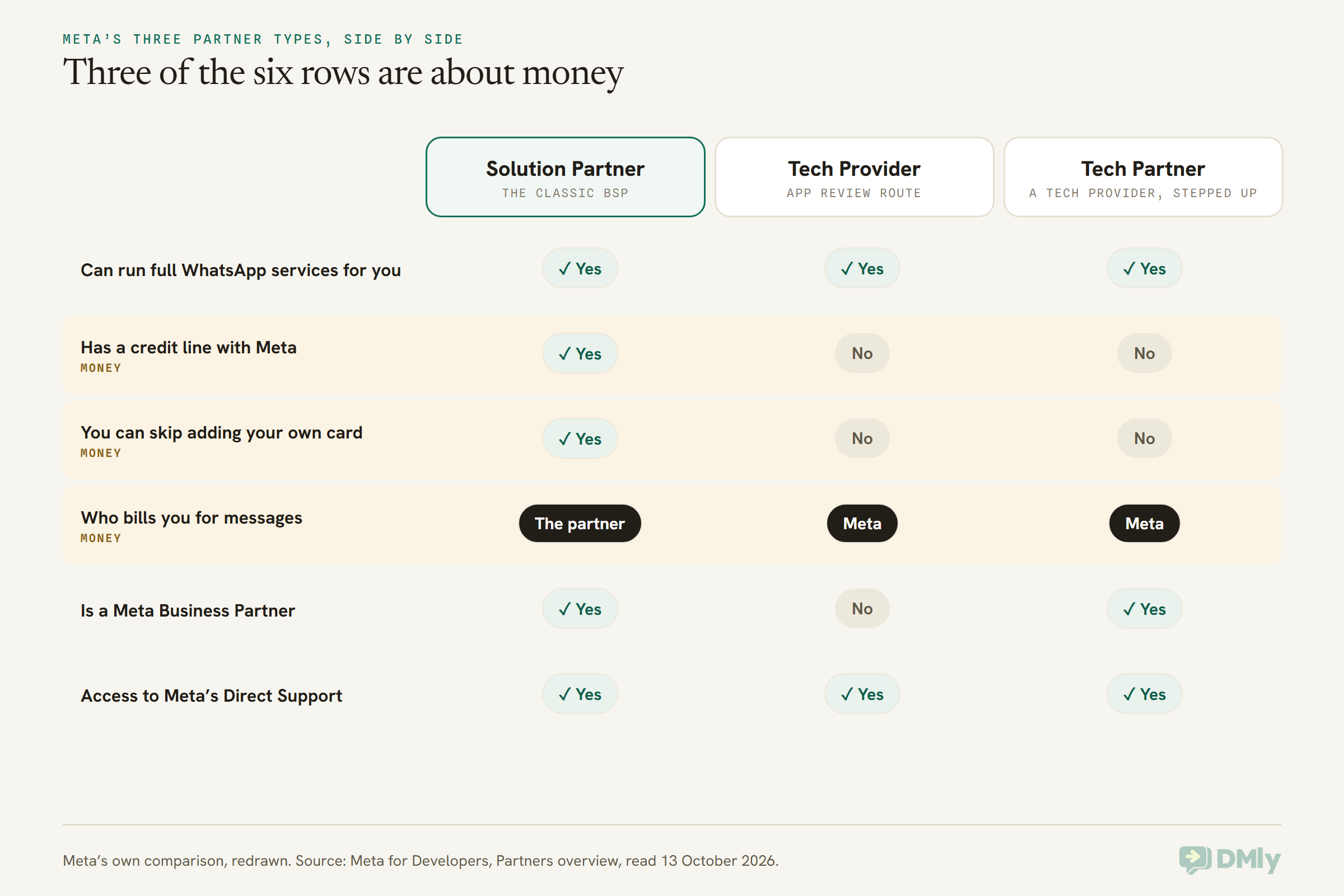
All three partner types can run full WhatsApp services for you; the real difference is who pays Meta for your messages. A Solution Partner can pay Meta on your behalf and bill you itself. A Tech Provider or Tech Partner can’t: you add your own payment method, and Meta bills you directly.
Here’s how Meta defines each, in its own words, read on 13 October 2026.
Solution Partners (the classic BSP)
“Solution Partners are Meta Business Partners that provide a full range of WhatsApp Business Platform services to other businesses (clients), such as messaging services, billing, integration support, and customer support.”
The important extra is a line of credit with Meta. Meta says Solution Partners can extend it to the businesses they onboard, “thus removing the need for those clients to enter their own payment method”, and can “directly invoice their clients.” Meta also notes that becoming one “is a lengthy process.”
Tech Providers
“Tech Providers are similar to Solution Partners in that they also can offer a full range of WhatsApp Business Platform services to other businesses, either by providing these services on their own, or by partnering with a Solution Partner who already offers these services.”
The difference is spelled out straight after: Tech Providers “do not have credit lines. Instead, clients onboarded by Tech Providers must provide their own payment method after onboarding is complete. Meta will then bill these clients for API usage, and the Tech Provider will bill for other services.” To become one, a company verifies its business with Meta and passes App Review, which includes video evidence of sending a message and creating a template from its app.
Tech Partners
“Tech Partners are Tech Providers who are, or are eligible to become, Meta Business Partners.”
Think of it as a Tech Provider that has been around long enough to earn a step up. Meta’s eligibility list for the upgrade includes at least 2,500 average daily messages (or 200 average daily calls) over the last seven days, ten or more active clients, and a quality rating of 90% or better, and Meta says the approvals will “likely take a few weeks.” Billing works the same as for a Tech Provider: Meta bills you.
What the “Meta Business Partner” badge does and doesn’t tell you
You’ll see “Meta Business Partner” on a lot of provider websites. In Meta’s table, Solution Partners and Tech Partners are Meta Business Partners and Tech Providers are not. Meta describes its Business Partners as companies it “has vetted for their technical skills and services.”
Meta also runs a public partner showcase where you can search by name. When we used it on 13 October 2026, the page described itself as “a selection of WhatsApp partners (not exhaustive).” So a name in the showcase is a good sign, but a missing name isn’t proof of anything on its own. If the badge matters to you, ask the provider which partner type it is and where Meta lists it.
What a WhatsApp Business Solution Provider Does for You
A WhatsApp Business Solution Provider does four jobs: it gets you onto the platform, it sorts out how your messages are paid for, it supports you when Meta’s side goes wrong, and it helps you stay inside Meta’s rules. How much of each you get varies a lot between providers, which is exactly why the label alone doesn’t tell you enough.
1. Onboarding: getting your number onto the API
Most providers onboard you through Meta’s Embedded Signup, a Meta window that opens from the provider’s website. Meta lists what you do inside it: sign in with your Facebook or Meta business login, accept the terms, choose or create your business portfolio and WhatsApp Business Account, enter and verify your phone number, and set the display name customers will see. When you finish, the provider’s app gets permission to use those assets for you.
Two details from Meta’s page are worth knowing as an owner. First, you keep ownership: businesses onboarded this way “own all of their WhatsApp assets” and have full access to WhatsApp Manager, which Meta says the partner “cannot restrict… in any way.” Second, if your number is already on the WhatsApp Business app, a provider can connect it in a way that keeps the app working too. That’s called coexistence, and our WhatsApp coexistence guide covers what switches on and off.
2. Billing: who pays Meta
This is where partner types really differ, so it gets its own section below. In short, a Solution Partner can put you on its credit line and invoice you, while everyone else needs you to add a payment method to your WhatsApp account so Meta can bill you.
3. Support: someone to call when Meta says no
Most WhatsApp problems start on Meta’s side: a template rejected or paused, a quality rating dropping after complaints, a number stuck before registration, a card that won’t verify. A good provider can tell you what Meta’s message means and what to change. Partners also have access to Meta’s Direct Support.
You’re not entirely dependent on the provider, though. Meta’s page for businesses onboarded by a partner says that if you’ve registered as a Meta developer, you can open your own Direct Support ticket. If your billing topic doesn’t appear there, Meta says to ask your Tech Provider or Tech Partner to open the ticket for you.
4. Compliance: staying inside Meta’s rules
Providers help you write templates that pass review, put them in the right category, collect opt-ins properly and keep your number healthy. Some Solution Partners can go further. Meta lets approved Select Solution and Premier Solution Partners submit business verification on a client’s behalf, and says decisions on those submissions can come back “in minutes instead of days”, with an average of five minutes. Most providers can’t do this, so if fast verification matters, ask.
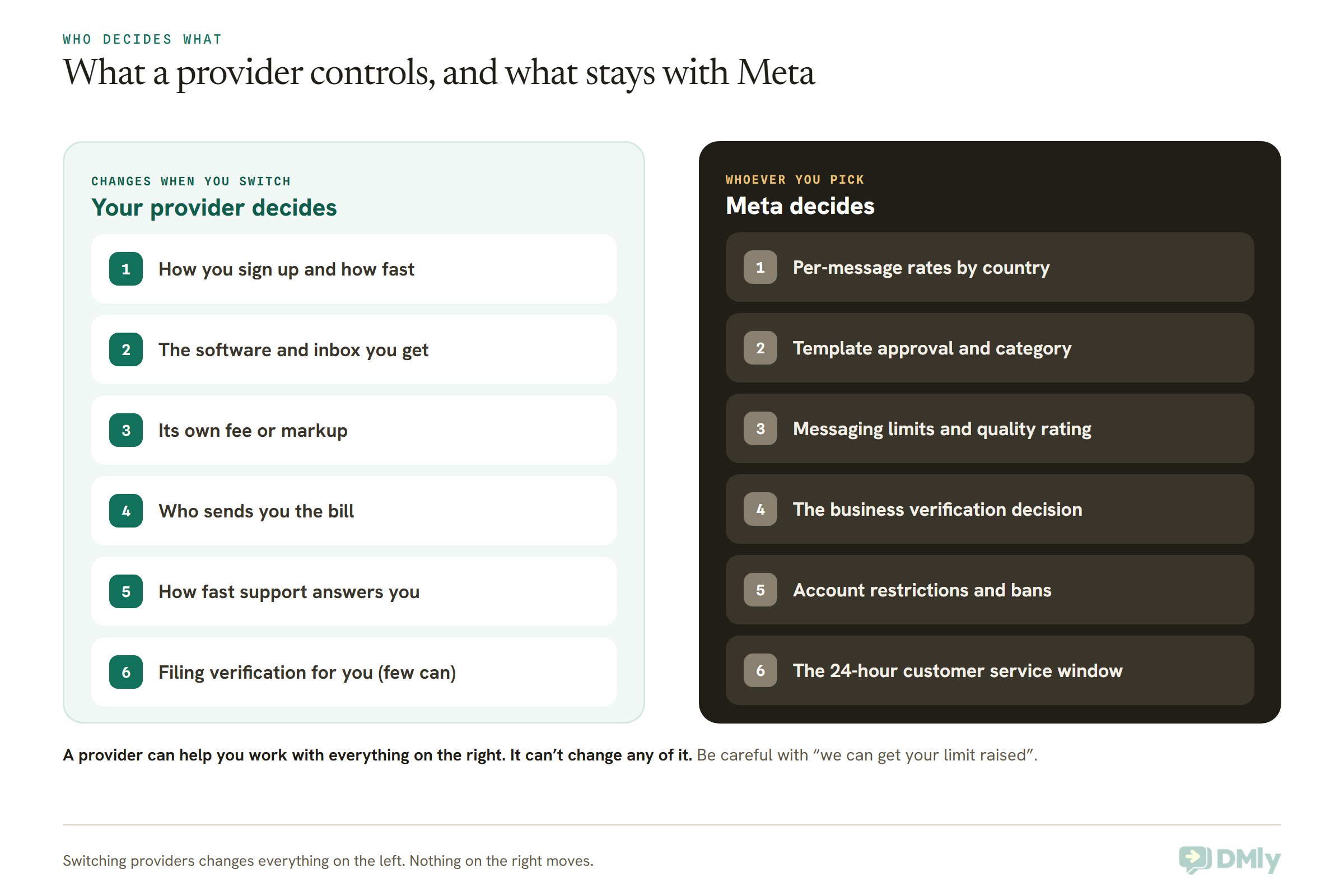
The right-hand column matters when you’re comparing sales pitches. No provider can approve a template Meta has rejected, lift a messaging limit, or restore a banned account by being a partner. If you want the detail on how limits and ratings actually move, read our guide to WhatsApp quality rating, messaging limits and bans.
Who Bills You? The Question That Tells Partner Types Apart
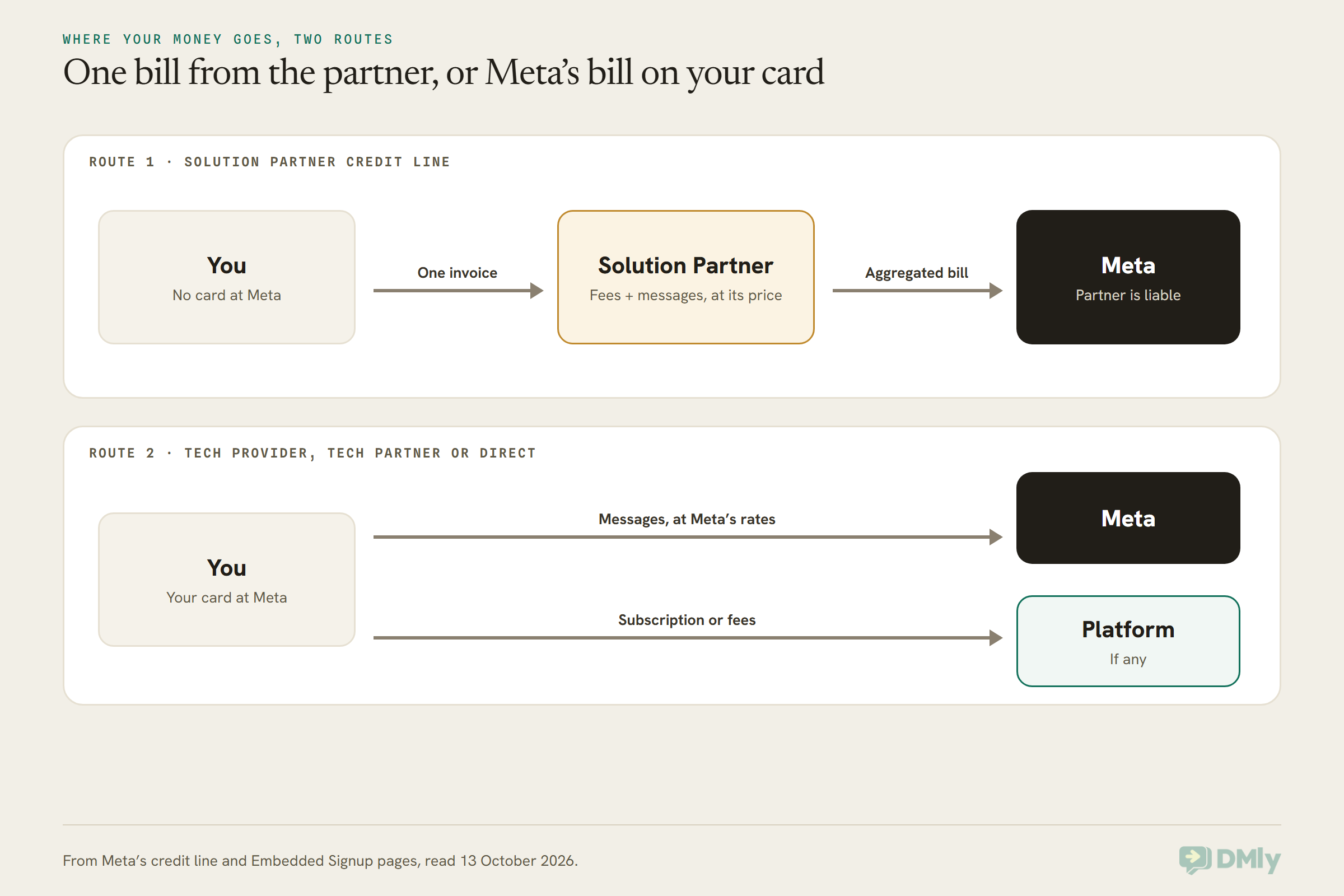
If your provider invoices you for WhatsApp messages, you’re almost certainly on a Solution Partner’s credit line; if Meta charges your own card, you’re with a Tech Provider, a Tech Partner, or building directly. Both are normal. They just put the money, and the responsibility, in different places.
Route one: the Solution Partner’s credit line
Meta’s credit line documentation is blunt about how this works. Under a heading called “Billing Liability Disclosure”, it tells Solution Partners: “businesses pay you, and you receive an aggregated invoice to pay Meta.” The partner becomes what Meta calls the “Bill To Party” and is liable to Meta for everything spent by the businesses on its credit line.
For you, that means one invoice from one company, covering the provider’s own fees and your message charges. You never add a card to Meta. The partner sets the price it charges you for each message, which is where markups come in.
Route two: your card, Meta’s bill
With a Tech Provider or Tech Partner, Meta’s onboarding page says the business “must first attach a payment method to their WABA before they can begin messaging.” Meta then bills you directly for messages, and the provider bills you separately for its software or services. Skip the card step and nothing goes out: Meta’s support page says that without a valid payment method you can’t send template messages. If that’s where you’re stuck, our guide to fixing WhatsApp Cloud API billing errors walks through the common ones.
Building directly on Meta’s Cloud API works the same way: your card, Meta’s bill, and no provider at all.
Three billing details worth asking about
- Currency. Meta bills in a growing list of currencies, and India is moving to rupees: Meta’s pricing page says eligible Indian businesses must move every WhatsApp Business Account to INR by 31 December 2026, after which messages from non-INR accounts stop being delivered. If a provider bills you, ask what currency it bills in and whether its rate follows Meta’s.
- Volume discounts. Meta’s lower utility and authentication rates for high volumes are counted across your whole business portfolio, not per provider. Meta’s own pricing examples include a business using two partners in one month. Your discount follows your business; ask whether a provider passes it on.
- Service messages. Since 1 October 2026, Meta charges for replies inside the 24-hour window above 1,000 free a month per number. Our article on the WhatsApp pricing change on 1 October explains it, and some providers price that category differently from Meta too.
How WhatsApp BSP Markups Work
Meta’s rate for a message is the same whoever connects you; a WhatsApp BSP markup is anything a provider charges on top of that rate, and it comes in four shapes. Knowing which shape you’re looking at is more useful than any single headline price.
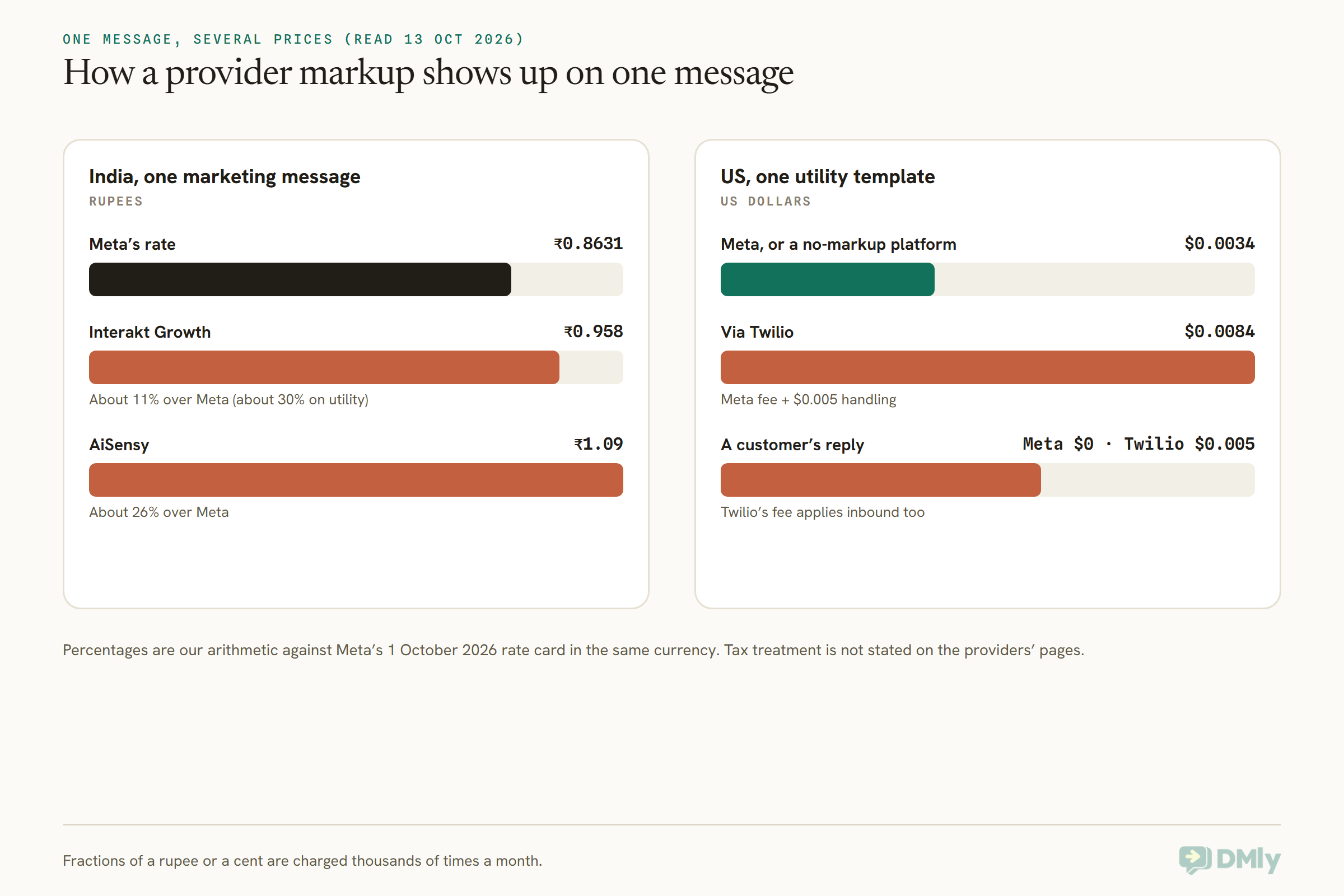
All the figures below were read on each company’s own pricing page on 13 October 2026. The percentages are our arithmetic against Meta’s own rate card for 1 October 2026, in the same currency. Neither AiSensy nor Interakt says on those pages whether tax such as GST is included, so confirm that before comparing.
Shape 1: a higher price per message
The provider publishes its own rate card, a little above Meta’s. Meta’s rate for one marketing message to an Indian number is ₹0.8631. AiSensy lists ₹1.09 for the same message, about 26% more, and ₹0.145 for utility against Meta’s ₹0.115, again about 26% more. Interakt’s Growth plan lists ₹0.958 for marketing, about 11% more than Meta, but ₹0.150 for utility, about 30% more.
That Interakt split is the lesson: a markup isn’t one number. A business sending mostly order updates and reminders would feel the utility rate far more than the marketing one. Our AiSensy review and Interakt review look at those rate tables in more depth.
Shape 2: Meta’s price plus a handling fee on every message
Twilio passes Meta’s fees through at cost and adds its own: “Twilio’s per-message fee for WhatsApp is $0.005, inbound or outbound.” On a US utility template, where Meta charges $0.0034, the total comes to $0.0084, so the provider’s fee is bigger than Meta’s. And because it applies to inbound messages too, every reply your customer sends costs $0.005, even though Meta doesn’t charge for messages customers send you.
Shape 3: a flat fee per number
360dialog charges per phone number per month, plus Meta’s fees: €49 on its Regular plan, €99 on Premium and €500 on Scale. You pay the same however much you send, so it suits steady senders and developers who want a predictable line.
Shape 4: a subscription, with Meta billing you directly
Some platforms charge for their software and leave message billing between you and Meta, with no markup. DMly works this way: its pricing page says you pay Meta’s standard per-message rates directly and DMly never adds a fee on top. The trade is that you have two bills, the platform subscription and Meta’s message charges, and you need a card Meta accepts.
What it adds up to over a month
Say a Mumbai skincare brand sends 2,000 marketing messages to Indian numbers in a month. At Meta’s rate that’s ₹1,726. Through Interakt’s Growth rate it’s ₹1,916, and through AiSensy’s it’s ₹2,180, so the difference between the cheapest and dearest route is about ₹454 a month on messages alone, before any plan fee.
Or say a US dental practice sends 2,000 utility reminders and gets 1,500 replies. Meta’s charge for the reminders is $6.80, and the replies are free at Meta’s end (above Meta’s free monthly allowance, any service messages you send back are charged separately). Through Twilio, add $10 of handling fees on the reminders and $7.50 on the replies, so $17.50 in provider fees against $6.80 from Meta. Neither number is outrageous, but it’s a very different shape of cost from a flat monthly fee.
One US-specific catch while we’re here: Meta doesn’t currently deliver marketing templates to US numbers at all, whichever provider you use. For every market’s base rates, see our WhatsApp Business API pricing by country.
A markup isn’t automatically a bad deal
A provider that charges a little more per message might include an inbox, automation, support you actually reach, and a credit line that saves you from wrestling with card verification. A no-markup platform still charges for its software. Compare the whole monthly cost for your real volume, not the per-message rate in isolation.
Do You Need a WhatsApp Business Solution Provider?
No, not strictly: Meta lets any business build directly on its Cloud API without a provider, but most small businesses still end up using one, because the API on its own is a pipe, not something your team can work in. The real question is less “do I need a BSP?” and more “who is going to give me the screens, and who is going to bill me?”
What going direct actually involves
Meta’s Cloud API Get Started guide shows the direct route. You register as a Meta developer, create a Meta app with the WhatsApp use case, connect a WhatsApp Business Account, send a test message from Meta’s API Setup page, set up a webhook so your system can receive messages, and create a system user with a permanent access token. You add your own card, and Meta bills you.
What you get at the end is the ability to send and receive messages from code. What you don’t get is an inbox for your team, contact records, template management screens, broadcasts, automations or reports. Someone has to build those. That’s why the popular claim that “BSPs are no longer needed” only holds for businesses with developers, as we explain in WhatsApp Business API myths.
The three routes in one table
| Route | Who bills you for messages | What you get | Usually suits |
| Build directly on Meta’s Cloud API | Meta, on your card | An API; you build everything else | Businesses with developers and their own systems |
| A platform from a Tech Provider or Tech Partner | Meta, on your card; the platform bills its own fees | Software for your team, onboarding and support | Teams that want to use WhatsApp, not build on it |
| A Solution Partner (classic BSP) | The partner, on its credit line | Software or API, plus one invoice and no card at Meta | Businesses that want one bill, or can’t add a card Meta accepts |
This guide stops at the definitions on purpose. Whether to build on the Cloud API yourself or buy a provider’s software is a bigger decision with its own costs, and we’ll cover it separately.
Four quick signals
- You’re happy on the WhatsApp Business app. You don’t need a provider yet. Stay on the app until its limits start costing you time.
- You have no developers and want a team inbox and automation. You’ll want a platform. Whether it’s a Tech Provider or a Solution Partner matters mainly for billing.
- You can’t, or don’t want to, put a card on Meta. A Solution Partner’s credit line is the route Meta designed for that.
- You’re building WhatsApp into your own product. Direct Cloud API, a developer-focused provider, or becoming a Tech Provider yourself are the options worth comparing.
Where DMly Fits
A disclosure first: DMly publishes this blog and is one of the platforms you could connect WhatsApp through. So here’s what DMly’s own documentation and pricing page say, and nothing more.
- How you connect. The recommended path is Meta’s Embedded Signup, which DMly’s setup page labels “Configure WhatsApp via Embedded Signup, Simple (10 mins)”. If you already run your own Meta developer app, there’s an advanced option, “Bring your own WhatsApp Cloud API keys, Complex (30 mins)”.
- Who bills you for messages. Meta does. DMly’s docs say WhatsApp Cloud API charges bill to Meta, not DMly, and that you add a payment method through Open Meta Billing; without one, sending stays capped.
- Markup. None. DMly’s pricing page says you pay Meta’s standard per-message rates directly and DMly never adds a fee on top. Your DMly subscription pays for the platform.
- Your number and templates. DMly’s migration guide says a number can be connected to one Cloud API provider at a time, and that whether your approved templates come with you depends on who owns the WhatsApp Business Account. If it’s yours, they come across.
That billing pattern, your card and Meta’s bill, is the one Meta’s docs describe for Tech Providers and Tech Partners rather than for Solution Partners. But DMly’s documentation doesn’t name DMly’s partner type, so we won’t name it here either. If the exact label matters to you, ask us and get the answer in writing, exactly as you would with any other provider.
When DMly is the wrong choice
- You need someone else to pay Meta for you. If you can’t add a card Meta accepts, or your finance team needs a single invoice that includes message charges, look for a Solution Partner with a credit line.
- You’re building WhatsApp into your own app. A developer API or the Cloud API directly will fit better than an inbox platform.
- You need a partner to file business verification for you. Only approved Select Solution and Premier Solution Partners can do that under Meta’s rules.
Questions to Ask a WhatsApp Business Solution Provider Before You Sign
Ask any WhatsApp Business Solution Provider these ten questions before you connect your number, and ask for the money answers in writing. None of them is a trick question; a good provider will answer every one without hesitation.
- Which Meta partner type are you: Solution Partner, Tech Provider or Tech Partner? And where does Meta list you?
- Who bills me for WhatsApp messages, you or Meta? If it’s you, in what currency, and how often?
- What’s your rate per message, by category and by country, next to Meta’s? Marketing and utility separately, because markups can differ, as Interakt’s do.
- Do you charge for messages customers send me? Meta doesn’t. Some providers do.
- Are your prices before or after tax? GST or VAT can make two similar-looking rates quite different.
- Will the WhatsApp Business Account be in my business portfolio, and will I have full WhatsApp Manager access? Meta’s Embedded Signup gives you ownership by default; make sure nothing about the setup changes that.
- How do I leave, and what comes with me? Your number can move, usually after you turn off two-step verification. Templates stay with the WhatsApp Business Account, and chat history in the provider’s inbox usually doesn’t move at all.
- Can I keep using the WhatsApp Business app on the same number? If coexistence matters, check it’s supported before you connect.
- What happens, and how fast, when Meta rejects a template or restricts my number? Ask about response times and how they escalate to Meta.
- Can you submit my business verification for me? Only some Solution Partners can. Most will guide you through doing it yourself, which is fine, but you should know which you’re getting.
And one claim to treat carefully: any promise to raise your messaging limit, guarantee template approval or protect you from bans. Those are Meta’s decisions, whoever you pick.
Five Businesses, Five Different Answers
These are illustrative, not customer stories, but they show how the same question lands differently depending on the business.
- A two-chair barbershop in Atlanta answering bookings on the WhatsApp Business app. No provider needed yet. If it moves to the API later, a platform with coexistence lets the phone keep working.
- A coaching institute in Pune sending fee reminders and class updates, with no developer. A platform makes sense. The useful questions are the utility rate next to Meta’s ₹0.115, and how billing will work once Indian accounts move to rupees.
- An online fashion store in Lagos whose card keeps failing verification at Meta. A Solution Partner’s credit line is the route Meta built for exactly this: the partner pays Meta and invoices the store.
- A property agency in Dubai with an in-house developer who wants WhatsApp inside the agency’s own CRM. Going direct to the Cloud API, or using a developer-focused provider, is worth comparing before buying an inbox it won’t use.
- A small clinic group in London that wants verification done quickly and someone to call. It’s worth asking which providers can file business verification for it, and what support response time each one commits to.
Frequently Asked Questions
What is a WhatsApp Business Solution Provider?
A company Meta allows to connect businesses to the WhatsApp Business Platform and provide messaging services such as onboarding, sending, billing and support. Meta’s developer docs now call these companies partners, split into Solution Partners, Tech Providers and Tech Partners.
Is a BSP the same as a Meta Solution Partner?
It’s the closest match. “BSP” is the older industry term. Solution Partners are the type that can extend a credit line and bill you for messages, which is what most people meant by a BSP. Some companies calling themselves BSPs are actually Tech Providers or Tech Partners, so ask.
Do I need a BSP to use the WhatsApp Business API?
No. Meta lets businesses build directly on the Cloud API with their own Meta app and their own card. Most businesses without developers still use a provider, because the API alone gives you no inbox, templates screen or automation.
Do BSPs charge more than Meta for messages?
Some do and some don’t. On 13 October 2026, AiSensy listed Indian marketing messages about 26% above Meta’s rate and Interakt’s Growth plan about 11% above (about 30% on utility); Twilio added $0.005 to every message in or out; DMly’s pricing page says it adds no markup. Always compare against Meta’s own rate card.
Can I switch WhatsApp providers and keep my number?
Yes. A number can only be connected to one provider at a time, so you move it, usually after turning off two-step verification. If the WhatsApp Business Account is in your name, your approved templates come too.
Can a BSP raise my messaging limit or get my template approved?
No. Messaging limits, quality ratings and template decisions are Meta’s. A good provider helps you work with them, but being a partner doesn’t let anyone override them.
Is DMly a BSP?
DMly’s documentation doesn’t say which Meta partner type it is, so we won’t claim one. What the docs do say: you connect through Meta’s Embedded Signup, Meta bills you for messages on your own payment method, and DMly adds no markup.
Before You Nod Again: The WhatsApp Business Solution Provider Check
Back to that sales call. Next time someone says “we’re an official BSP”, you’ll know the nod isn’t the end of the conversation, it’s the start of a better one. A WhatsApp Business Solution Provider is simply a company Meta lets onto its platform on your behalf. The label tells you they’re allowed in. It doesn’t tell you what you’ll pay.
So ask the two questions that matter most. Which of Meta’s three partner types are you, and who bills me for messages? Then put their per-message rates next to Meta’s, by category and country, and check that the account will sit in your own business portfolio. If the answers are clear and in writing, you can nod properly this time.
And if you’d rather have Meta bill you directly, at Meta’s rates, while your team works from one inbox with bookings, payments and automation built in, that’s the way DMly is set up. Whichever provider you choose, start from the questions above.
Writing about WhatsApp automation, bookings and growth for local business.
Turn WhatsApp into your busiest channel.
Start free and run message, bookings, payments and reviews in one place.
