
WhatsApp’s Free Entry Point Window: The Cheapest Way to Start a Conversation
The free entry point window is a bit like a car park with two signs. The one at the entrance says “Free for 72 hours.” The one on the pay machine says “Free for up to 7 days.” Both are official, both are bolted to the same building, and you’d quite like to know which one the warden reads.
That is where Meta’s WhatsApp pricing sits in October 2026. When a customer taps one of your ads and messages you on WhatsApp, and you answer, Meta stops charging you for that conversation for a while. Three of Meta’s pages say the while is 72 hours. Its main developer pricing page, updated on 30 September, now says up to 7 days.
Either way, it’s the cheapest conversation you will have all month, and since 1 October, when Meta started charging for ordinary replies again, it matters more than it used to. In this guide, we’ll look at what the window is, what opens it and what doesn’t, why the 24-hour rule still applies inside it, what it saves you in real money across seven countries, how to plan the free days, and how to run it all from DMly.
What Is the Free Entry Point Window?
The free entry point window is a period in which Meta doesn’t charge you for any WhatsApp message you send to one customer, because that customer started the conversation by tapping an ad that clicks to WhatsApp. It opens when you reply to them, and while it’s open your replies, your offers, your order updates and your reminders all cost nothing from Meta.
In plain terms, it works like this:
- Somebody sees your ad on Facebook or Instagram, taps the button, and WhatsApp opens with a chat to your business.
- They send you a message, using the WhatsApp app on an Android or iPhone.
- You reply within 24 hours. That reply is free, and it starts the free window.
- While the window is open, Meta doesn’t charge for marketing, utility, authentication or service messages to that person.
Those four words are Meta’s names for the kinds of message you can send. Marketing is anything promotional. Utility is a transactional update, like an order confirmation or a booking reminder. Authentication is a one-time code. Service is an ordinary typed reply inside a conversation. Normally each one has a price per delivered message, set by the country of the person receiving it. Inside the free entry point window, all four are free.
Meta calls a conversation that starts this way a free entry point conversation, and you’ll often see it shortened to FEP. It’s one of only two places Meta says it doesn’t charge for a message a business delivers. The other is the monthly allowance of 1,000 free service messages, which we’ll come to.
There is one exception inside the window. If your replies are written by Meta’s own AI, the Meta Business Agent, those are still charged, because Meta bills that product by the amount of AI processing it does. Replies from a person, or from a third-party AI like the one inside DMly, count as service messages and are free in the window.
Is the Free Entry Point Window 72 Hours or 7 Days?
As of 13 October 2026, Meta’s pages disagree. Its main developer pricing page says the free entry point window “may remain open for up to 7 days.” Three other Meta pages still say 72 hours. Until Meta lines them up, plan your free messages inside 72 hours and treat anything after that as a bonus you check rather than count on.
Here is what each page said when we read it on 13 October 2026:
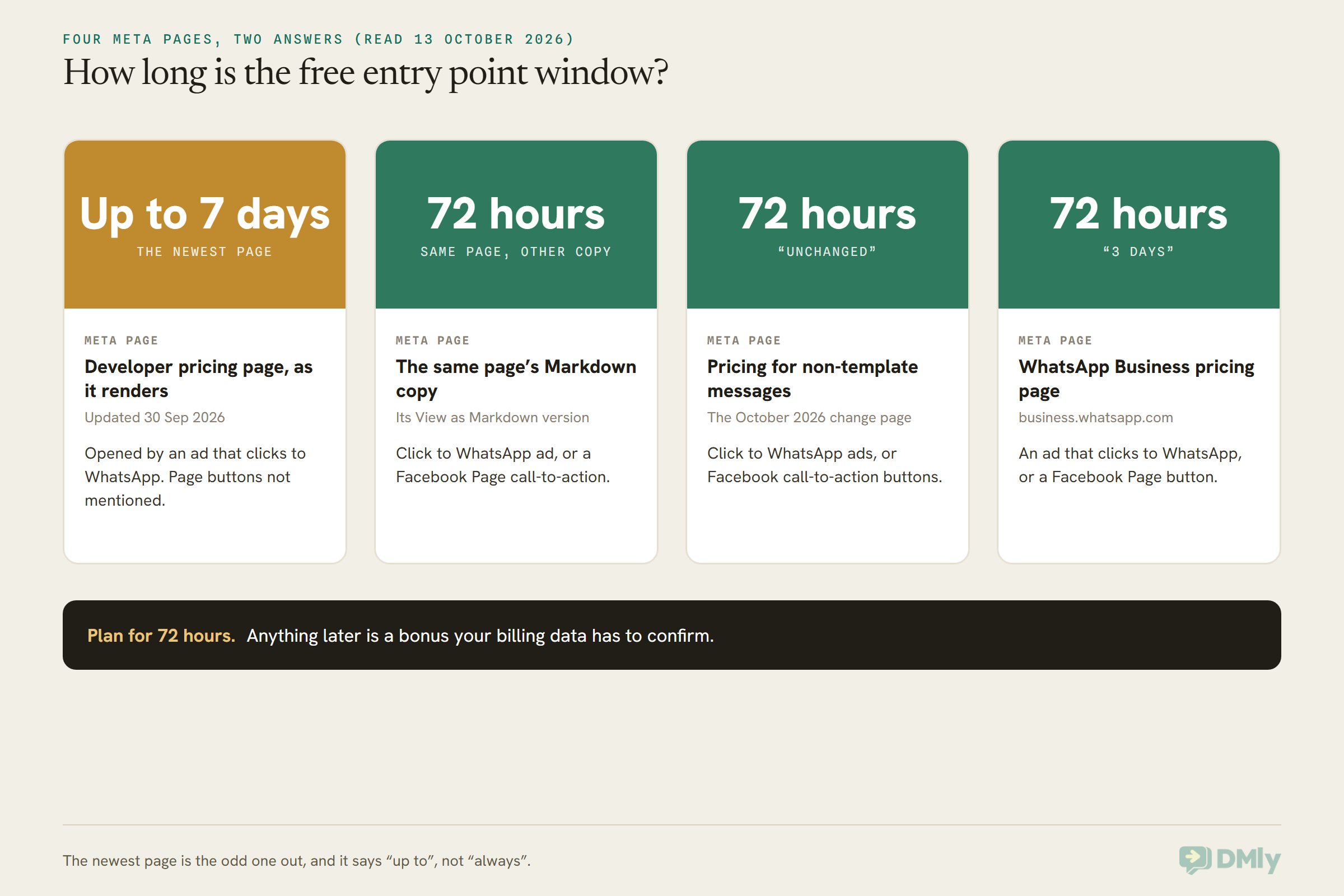
Why go with 72 hours when the newest page says more? Three reasons.
- “Up to” is not a promise. The developer page says the window “may remain open for up to 7 days”. It doesn’t say when it closes earlier, and a window that might last a week is not one you can schedule a sequence against.
- The other three pages haven’t moved. One of them is the very page that announced the October price change, and it describes the free window as unchanged at 72 hours.
- Your billing data will settle it for you. Every message Meta delivers comes back to your platform with a note saying how it was priced. If a message on day five comes back marked free, the longer window applies to you. We’ll show you where that note lives later on.
The safe plan costs you nothing if the longer window turns out to be real. You simply get a few free days you didn’t need. The opposite plan, building a seven-day free sequence on one sentence, could leave you paying marketing rates for messages you budgeted at zero.
You’ll also notice the developer page has dropped any mention of Facebook Page buttons, which the other three still include. We’ll come back to that in the next section, because it changes what you should count on.
What Opens a Free Entry Point Conversation, and What Doesn’t
A free entry point conversation opens when a customer messages you from an ad that clicks to WhatsApp, using the WhatsApp app on Android or iOS, and you reply within 24 hours. Miss any one of those three and you get an ordinary conversation at ordinary rates.
Here’s the detail on each part, because each one catches somebody out.
The ad has to be a click-to-WhatsApp ad
This is the ad format where the button opens a WhatsApp chat with your business instead of a website. You build it in Meta Ads Manager and it runs on Facebook and Instagram. If you’re new to the format, our guide to what WhatsApp ads actually are and what they can target covers the options, and the click-to-WhatsApp marketing guide covers the whole funnel from ad to sale.
Things that look similar but don’t open the window, on any of Meta’s pages:
- A QR code on your counter or menu.
- A wa.me click-to-chat link in your Instagram bio, email or website.
- A WhatsApp button or widget on your website.
- A customer who saved your number and simply messaged you.
All of those are excellent ways to start conversations, and the customer messaging you first still opens the normal 24-hour window. They just don’t make the conversation free.
The Facebook Page button is now uncertain
Three of Meta’s pages say a Facebook Page call-to-action button (the “Send WhatsApp message” button on your Page) opens the window too. The developer page, updated 30 September, mentions only ads. Until Meta clarifies, treat a Page button conversation as a possible bonus and budget it at normal rates.
Status ads and organic posts are not spelled out
Meta also sells ads inside WhatsApp’s Status tab. Meta’s webhook documentation notes that messages from a Status ad arrive without the usual click ID, but none of its pricing pages say whether a Status ad opens a free window. The same goes for an ordinary, unpaid post with a WhatsApp button. Budget both at normal rates until Meta says otherwise.
The customer has to be on the phone app
Meta is explicit here: the customer must message you from a device running the WhatsApp app for Android or iOS. Its desktop and web apps are not supported. If somebody taps your ad on a laptop and the chat opens in WhatsApp Web, that conversation is billed as normal. You can’t control this, so it’s one more reason not to assume every ad conversation is free.
You have to reply within 24 hours
The free window starts from the moment you reply, not from the moment they message. And your reply has to land inside the normal 24-hour window that their first message opened. That first reply can be any kind of message, even a template, and it’s free.
If you take 30 hours to answer, you’ve lost the free window entirely, and you’ll need a paid template just to say hello. For a lead who tapped an ad an hour ago, that’s the most avoidable cost in WhatsApp marketing. An instant automated first reply solves it, and we’ll set one up later.
The 24-Hour Rule Still Applies Inside the Free Window
The free window changes what you pay, not what you’re allowed to send. WhatsApp’s 24-hour rule still decides when you can send a normal typed reply, and once 24 hours pass without the customer writing to you, you can only send approved templates, even though those templates are now free.
Meta puts it plainly: the customer service window is independent of the free window. So you’re running two clocks at once:
- The 24-hour window opens when the customer messages you and restarts every time they write again. While it’s open you can send anything: typed replies, photos, voice notes, buttons. When it shuts, templates only. Our guide to how WhatsApp’s 24-hour messaging window works covers this clock in full.
- The free window opens when you first reply and runs for 72 hours (or up to 7 days, per the newer page). It doesn’t restart. It doesn’t care whether the customer is chatting. It just decides that nothing you send in it is charged.
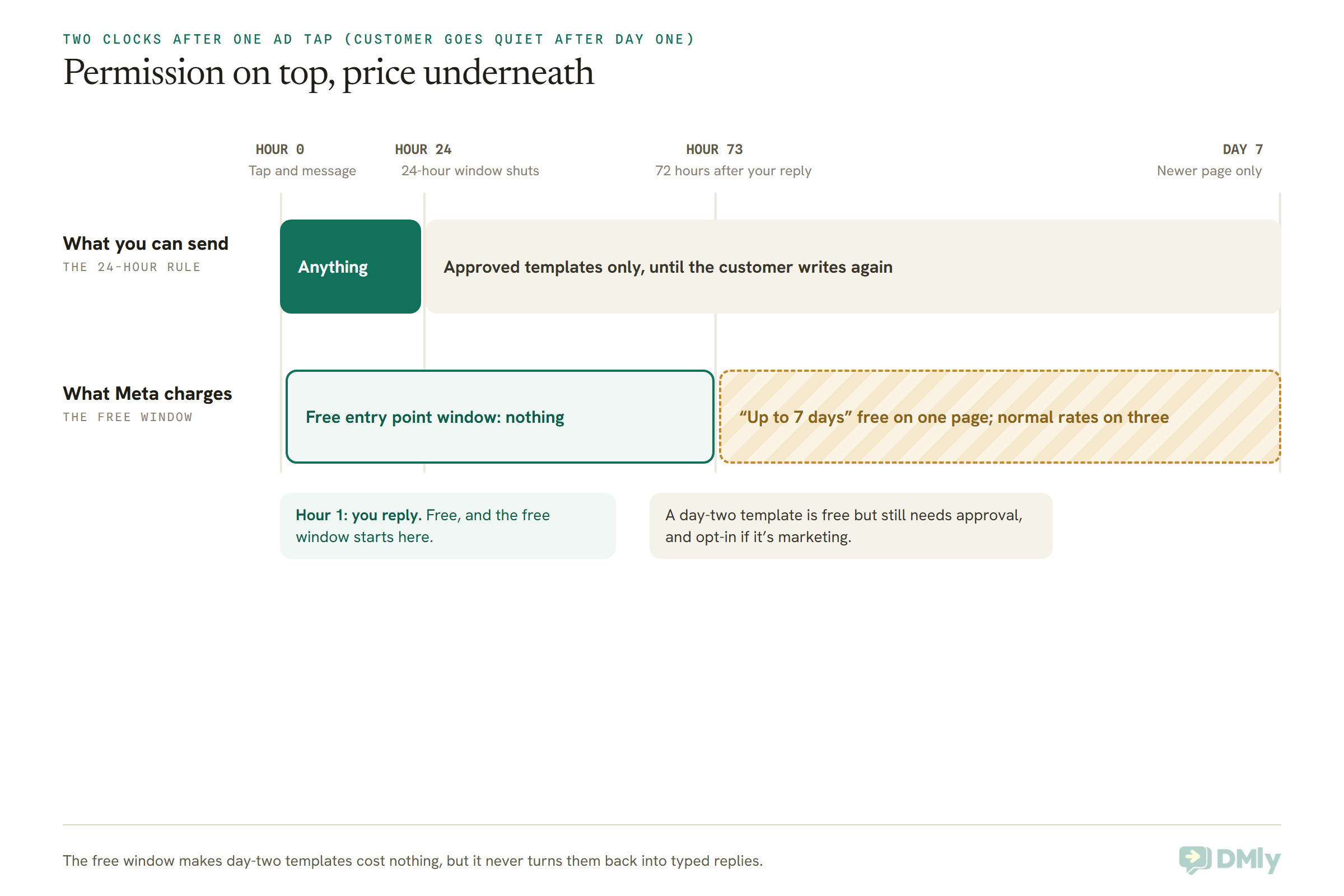
That’s why businesses who plan a three-day “free chat” off the back of an ad get caught out. If the customer goes quiet after the first afternoon, your day-two and day-three messages still have to be approved templates. They’re free, which is lovely, but you have to have built them and had them approved first.
Two more rules travel with you into the window:
- Permission for marketing. Meta’s policy says you need a customer’s opt-in before you send them messages beyond the conversation they started. Someone tapping your ad is asking you a question, not signing up for offers. If you want to send a marketing template on day two, ask in the first chat whether they’d like you to follow up. Our guide to collecting WhatsApp opt-in and proving it has wording you can use.
- Meta’s per-user marketing limit. Meta caps how many marketing templates one person receives from businesses, and the only marketing templates it exempts are those sent inside the 24-hour window. A day-two marketing template inside the free window is free, but it still counts toward that cap and can fail with error 131049 if the person has had too many.
And a note for US businesses: Meta doesn’t currently deliver marketing templates to US phone numbers at all. None of Meta’s pages say the free window changes that, so for a US customer your day-two follow-up has to be a genuine utility message (an appointment reminder, an order update), or wait for them to write back.
How Free Ad Conversations Fit the October 2026 Pricing Change
Since 1 October 2026, Meta charges for ordinary replies and for utility templates sent inside the 24-hour window, which it didn’t before. The free window after an ad is the one place both are still free, so it’s worth more now than it was in September.
Here’s what changed on 1 October, in plain words:
- Typed replies cost money again. Meta calls them service messages. Each business phone number gets 1,000 free a month, and Meta charges from the 1,001st at the same rate as that country’s utility messages. The free 1,000 reset at midnight on the 1st, in your account’s timezone, and don’t roll over.
- Utility templates inside the 24-hour window cost money again. An order confirmation sent while the customer is chatting used to be free. It’s now charged from the first one, with no allowance.
- Service messages get no volume discount. Utility and authentication templates still get cheaper as your monthly volume grows. Typed replies don’t, which our piece on service messages and volume tiers explains.
The full story is in our guide to the WhatsApp pricing change on 1 October. What matters here is how it changes the value of an ad-started conversation:
| Message you send | Normal conversation, since 1 Oct 2026 | Inside the free entry point window |
| Typed reply (service) | Free up to 1,000 a month per number, then the utility rate | Free |
| Utility template inside the 24-hour window | Charged at the utility rate | Free |
| Utility template after the window shuts | Charged at the utility rate | Free |
| Marketing template | Charged at the marketing rate | Free |
| Authentication code | Charged at the authentication rate | Free |
| Meta Business Agent reply | Charged per token | Still charged per token |
Before October, the window mostly saved you money on templates, because typed replies were free anyway. Now it saves you on everything, including the typed replies and order confirmations that make up most of a sales conversation.
If you’d like the difference between those message types in more depth, our explainer on service messages versus templates covers what each one is actually charged for.
Does the free window use up your 1,000 free service messages?
Meta doesn’t say. Its pricing page describes the two free routes side by side and never says whether a typed reply inside the free window counts toward the 1,000. If you’re a small business sending a few hundred replies a month, it makes no difference to you. If you’re near the 1,000, watch your first month’s numbers rather than assuming either way.
Does it count toward volume discounts?
No. Meta’s developer page says utility and authentication messages sent in a free entry point window don’t count toward volume tiers, because only charged messages count. For most small businesses that’s irrelevant. For a high-volume sender chasing the next tier, it’s a small reason the tier may arrive later than expected.
What a Click-to-WhatsApp Free Conversation Saves You: Worked Examples
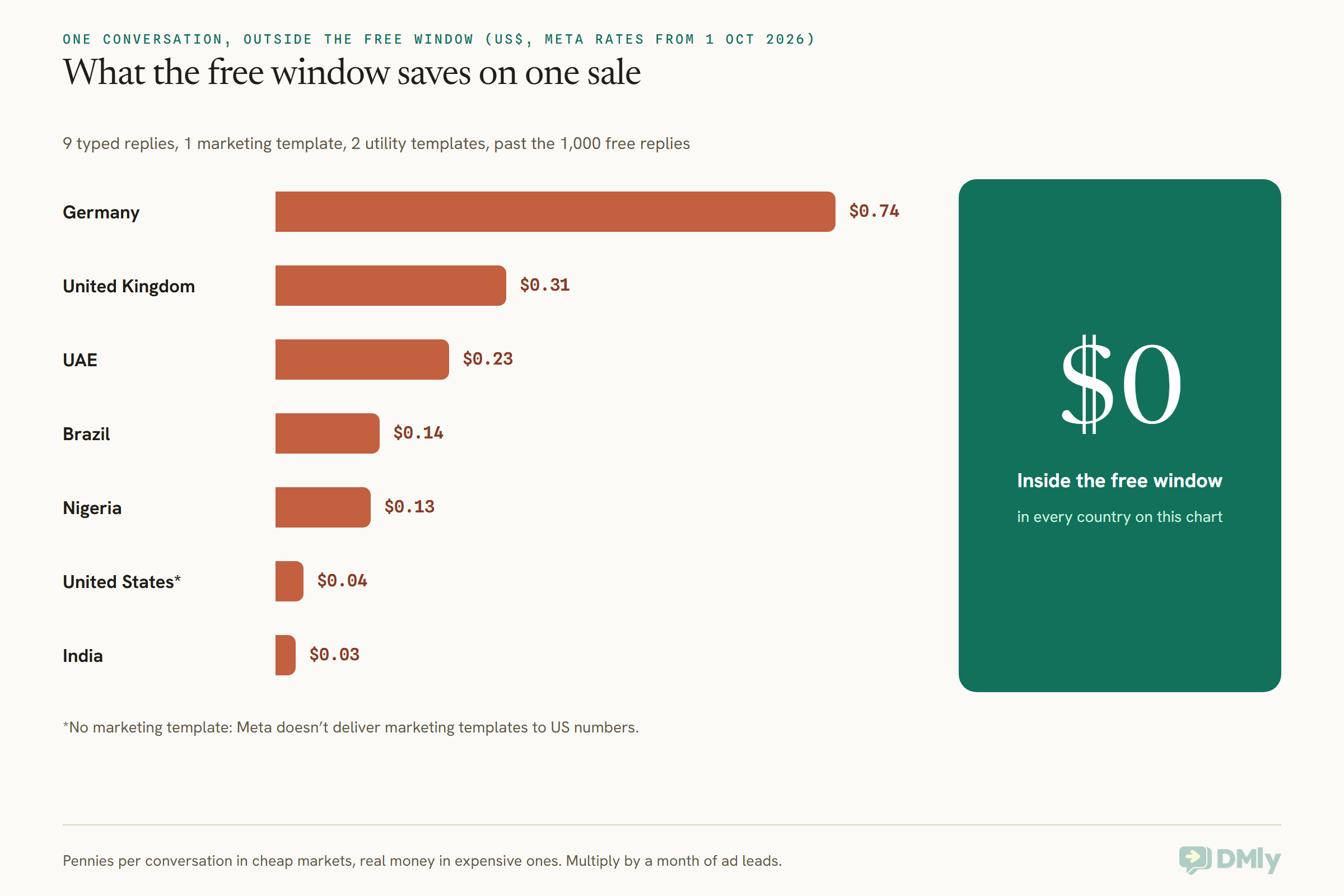
Inside the free window, a typical ad-started sales conversation costs nothing from Meta. Outside it, the same conversation costs from about 3 US cents in India to about 74 cents in Germany, depending on where your customer’s number is registered. Here’s the arithmetic so you can redo it for your own market.
Take one ordinary sales conversation that started from an ad:
- Day 0: the customer asks about a product or a service. You exchange messages and send 6 typed replies. They decide to buy or book, and you send an order or booking confirmation (a utility template).
- Day 1: they’ve gone quiet with something still in the basket or a second service they asked about. You send one marketing template as a follow-up. They reply, and you answer with 3 more typed replies.
- Day 2: you send a delivery update or an appointment reminder (another utility template).
That’s 9 service messages, 1 marketing template and 2 utility templates, all inside 72 hours of your first reply. Here’s what Meta would charge for that conversation if it hadn’t come from an ad, using Meta’s USD rate card effective 1 October 2026, read on 13 October:
| Customer’s country | Marketing rate | Utility and service rate | Cost, past your 1,000 free replies | Cost, within your 1,000 free replies | Cost in the free window |
| United States | Not delivered* | $0.0034 | $0.0374 | $0.0068 | $0 |
| India | $0.0118 | $0.0014 | $0.0272 | $0.0146 | $0 |
| Nigeria | $0.0516 | $0.0067 | $0.1253 | $0.0650 | $0 |
| Brazil | $0.0625 | $0.0068 | $0.1373 | $0.0761 | $0 |
| United Arab Emirates | $0.0576 | $0.0157 | $0.2303 | $0.0890 | $0 |
| United Kingdom | $0.0635 | $0.0220 | $0.3055 | $0.1075 | $0 |
| Germany | $0.1365 | $0.0550 | $0.7415 | $0.2465 | $0 |
*Meta doesn’t deliver marketing templates to US numbers, so the US row has no marketing message: it’s 11 utility and service messages. “Within your 1,000 free replies” means the typed replies are covered by your monthly allowance and you pay only for the three templates.
In rupees, on Meta’s INR card for the same date, the Indian conversation costs ₹2.13 past the allowance (9 replies at ₹0.115, one marketing template at ₹0.8631, two utility templates at ₹0.115) and ₹1.09 within it. Inside the free window, nothing.
Now multiply by a month of ad leads
Say your ads bring in 300 conversations a month, each like the one above. That’s 2,700 typed replies, 300 marketing templates and 600 utility templates. If none of them were in a free window, here’s the monthly Meta bill, after taking the first 1,000 typed replies off as free:
| Market | 1,700 charged replies | 300 marketing templates | 600 utility templates | Month, outside the window |
| United States | $5.78 | Not delivered | $2.04 | $7.82 |
| India | $2.38 | $3.54 | $0.84 | $6.76 (about ₹523) |
| Nigeria | $11.39 | $15.48 | $4.02 | $30.89 |
| United Arab Emirates | $26.69 | $17.28 | $9.42 | $53.39 |
| United Kingdom | $37.40 | $19.05 | $13.20 | $69.65 |
Inside the free window, all of that is zero. For a UK salon or a Dubai property agent, the window is worth a meaningful slice of the monthly bill. For an Indian coaching institute, it’s worth the price of a coffee.
The honest part: the window is a discount on the chat, not on the ad
None of this makes the ad itself cheaper. Meta charges for the ad through its auction, and a single ad click usually costs more than everything in the tables above. So the free window is rarely a reason, on its own, to start advertising.
What it does do is take the messaging cost out of the decision. If your ads already make sense, the conversations they start cost you nothing on Meta’s side for the first three days. And if you’ve been sending people from ads to a website form instead, the window is one more argument for sending them straight to WhatsApp, where the follow-up is free.
How to Use the 72-Hour Free Entry Point Window: A Three-Day Plan
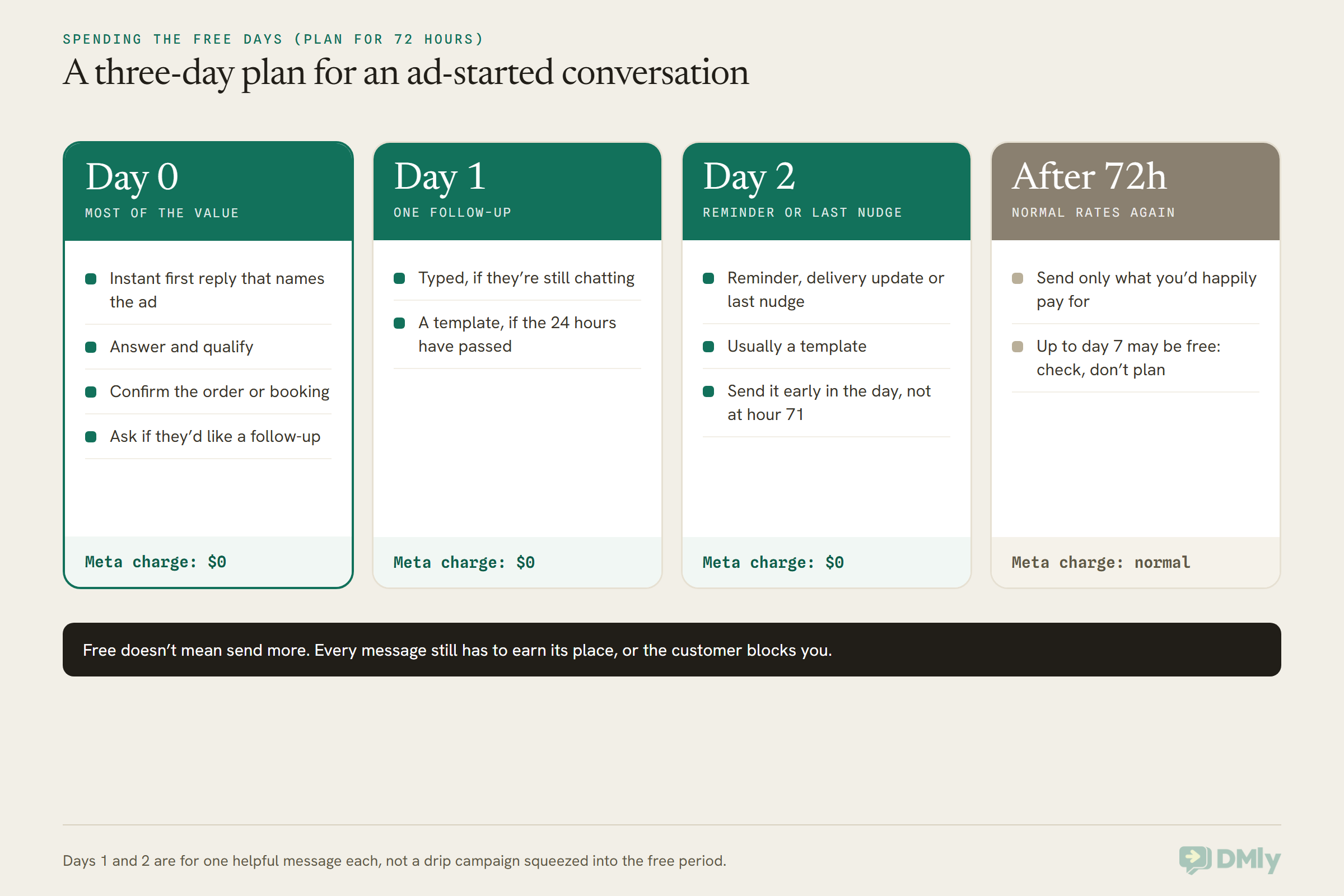
The best way to use the 72-hour free entry point window is to answer instantly, do the selling and the confirming on day 0, and use days 1 and 2 for one useful follow-up each, sent as approved templates in case the customer has gone quiet. Here’s what that looks like.
Day 0: answer in minutes, not hours
The window only opens if you reply within 24 hours, and the customer’s interest fades long before that. Set up an automatic first reply that fires the moment somebody messages from an ad. The best ones name what the person tapped (“Hi! You asked about our two-for-one facial offer…”) and ask one simple question to move things on.
Then do as much as you can while they’re chatting: answer their questions, qualify them, take the booking or the order, and send the confirmation. Every one of those messages is free. This is also the moment to ask, plainly, whether they’d like you to follow up. That gives you permission for day one and day two.
Day 1: one follow-up that helps
If they’re still chatting, carry on as normal. If they’ve gone quiet and 24 hours have passed since their last message, your follow-up has to be an approved template. Keep it useful: the size they asked about is back in stock, the slot they wanted is still free, here’s the price list they asked for.
Day 2: the reminder or the last nudge
A booking reminder, a delivery update or a last “still interested?” sent as a template. Send it in daytime hours, well before the 72 hours are up. A message that leaves your system at hour 71 might be delivered at hour 73, and Meta charges on delivery.
After 72 hours: back to normal
From here, you’re paying normal rates again (unless your billing data shows the longer window applies to you). That doesn’t mean stop. It means the next message should be one you’d send to any customer, at full price, because it’s worth it.
What not to do with free messages
- Don’t send more because it’s free. A customer who gets eight messages in three days blocks you, and blocks hurt your quality rating, which can limit how many people you can message. The cost of a message was never only the price.
- Don’t let a bot chat for its own sake. Inside the window, long chatty automations are free. Outside it, every one of those little messages is charged. Our piece on rewriting automations for per-message billing explains why tighter flows pay off after the window closes too.
- Don’t assume every ad lead is in a window. Desktop users, slow replies and Page buttons may all fall outside it. Budget for some normal-rate conversations.
How to Check a Message Was Free
Every message Meta delivers comes back to your WhatsApp platform with a pricing note. A message sent inside the free window is marked with the pricing type “free_entry_point”, which is the most reliable way to know the window applied.
You don’t need to read code to use this, but it helps to know what to ask for. When Meta confirms a message was delivered, it sends a short notification (a webhook) to whichever platform runs your WhatsApp. Inside it, a small pricing section says:
- Whether it’s billable. True or false.
- The pricing type. “regular” means charged. “free_customer_service” means it was free because it was a typed reply or utility template inside the 24-hour window under the old rules, or a typed reply within your 1,000 free. “free_entry_point” means it was free because of the free entry point window.
- The category. For a message in the free window, Meta labels the category “referral_conversion”.
Messages in a free window also carry a small conversation section with an ID that’s unique to that window, plus an expiry time on the “sent” notification. On the latest version of Meta’s API, that conversation section is left out of every other message, so its presence on its own tells you the free window is in play.
Why this matters now: if you want to know whether the 7-day window on Meta’s newer page applies to you, the day-five message is your test. If it comes back “free_entry_point”, you’ve got the longer window. If it comes back “regular”, you haven’t.
If your platform doesn’t show you this, ask your provider or developer to pull the pricing type for a few ad-started conversations. Meta’s own pricing analytics also break delivered messages down by pricing type. And the most direct check of all is your Meta invoice at the end of the month.
One thing to know if you work with more than one provider: Meta’s developer page says the free window belongs to the business phone number and the customer, not to the account that paid for the ad. If two platforms send from the same number, both send free while the window is open.
Running Free Entry Point Conversations in DMly
DMly doesn’t change what Meta charges, but it gives you the pieces that make the free window easy to use: an automation that fires when someone messages from an ad, the ad’s details inside the chat, the ad recorded on the contact, and a report of what each ad produced. Here’s how they fit together, all from DMly’s documentation.
An instant first reply, tied to the ad
DMly has a trigger called Click-to-WhatsApp ad. It starts an automation when somebody messages you from an ad, or from a post that opens a WhatsApp chat. Its one setting, Which ad starts this?, can be Any ad or A specific ad, where you paste the ad’s ID from Meta Ads Manager. That’s how you give each offer its own first reply, and it’s how you make sure every ad lead gets answered within seconds rather than hours, which is the condition for the free window opening at all.
Two things the docs warn about. If you publish two automations on Any ad for the same number, only the older one ever answers, and nothing warns you, so keep one Any ad flow per number and pin the rest to specific ads. And this trigger never fires for someone who reached you through a QR code, a link or a typed number. Use the WhatsApp URL or WhatsApp message triggers for those.
The ad’s words in your first message
Inside any automation that an ad message starts, DMly fills in tokens from the ad, such as {{ad.headline}} for the headline the person tapped and {{ad.body}} for the ad copy. So your first reply can say “Thanks for asking about {{ad.headline}}” instead of a generic hello. There’s also {{ad.source_type}}, which tells you whether it was a paid ad or a post. That’s handy, because Meta’s pricing pages only name ads as opening the free window.
The ad in front of whoever answers
In the inbox, an ad-started WhatsApp message carries a small card reading From an ad or From a post, with the ad’s headline, the start of its copy and its picture. Whoever picks up the chat sees which offer the person is answering before typing a word.
Follow-ups that fit inside 72 hours
For day one and day two, a DMly sequence is a natural fit. Each step has a Day number, the gap between steps is counted from when the previous one actually sent, and From and To hours stop a step going out in the middle of the night. Each step can be sent as a normal message (inside the 24-hour window) or as an approved utility or marketing template (for when the window has shut). Steps on days 0, 1 and 2 sit comfortably inside 72 hours. A day 3 step can slip past it once the time-of-day rules push it to the next morning, so treat day 3 as paid.
DMly also enforces the 24-hour rule for you. A typed message to a contact whose window has shut is stopped and recorded as failed rather than shown as sent, and the inbox shows a countdown for the 24-hour window. The docs don’t describe a countdown or a label for the free window itself, so use the 72-hour plan above rather than expecting DMly to show it.
Knowing which ads earned their keep
Under Reports, the Ads tab shows, for each click-to-WhatsApp ad, how many people messaged you, how many messages arrived, how many were new contacts, and how much those contacts have since paid you. Those figures work on every workspace with nothing to set up. Once you connect your Meta ad account (a feature that depends on your plan), it adds what each ad cost and the cost per conversation.
Each contact’s Source also records the first ad that brought them in, as something like WhatsApp ad: Summer Sale, and a later ad never overwrites it. You can build segments on that source, which is how you’d later send a well-timed offer to everyone who came in through one campaign.
What it costs on the DMly side
DMly doesn’t add a markup to Meta’s message rates: you pay Meta’s per-message rates directly. So a message Meta doesn’t charge for costs you nothing extra from DMly either. Two things to know, though:
- Templates still count toward your plan allowance. Every DMly plan includes a monthly number of broadcast and template messages, and the docs say every template sent from anywhere, including flows and sequences, counts. A free-at-Meta template inside the window still uses one.
- AI replies still count toward your AI allowance. If DMly’s AI answers your ad leads, Meta treats those replies as service messages, which are free in the window. They still come out of your plan’s AI replies.
One gap worth knowing about: DMly makes the ad’s click ID available as {{ad.ctwa_clid}} but, per its docs, doesn’t send it back to Meta for you yet. If you match sales back to ads in Meta’s own tools, that’s a manual step for now.
Free Ad Conversation Ideas by Type of Business
The window rewards businesses whose sale or booking happens within a few days of the first question. Here’s how that plays out:
- Salons and spas (US, UK, Gulf). An ad for a new-client offer. Day 0: answer, book the slot, send the confirmation. Day 2: the appointment reminder, if the booking is within the window. At UK rates, that confirmation and reminder alone would cost about 4.4 cents outside it.
- Online shops (Nigeria, Brazil, India). An ad for one product. Day 0: answer size and delivery questions, take the order, send the confirmation. Day 1: a back-in-stock or “your cart’s still waiting” template, if they said yes to follow-ups. Day 2: the shipping update.
- Property agents (UAE, Saudi Arabia). An ad for one listing. Day 0: qualify budget and dates and book a viewing. Day 1: two similar listings as a template. Day 2: a viewing reminder. With UAE utility and service messages at 1.57 cents each, the free window saves more here than in India or Nigeria.
- Tutors and coaching centres (India, Nigeria). An ad for a trial class. Day 0: answer, book the trial, confirm it. Day 1: what to bring. Day 2: a reminder an hour before. Every message free, though in India the saving is small.
- Gyms and studios. An ad for a free first class. Day 0: book it and confirm. The day after the class, still inside the window: a membership offer, if they agreed to hear about one.
- Clinics. An ad for a check-up or a new service. Day 0: answer general questions and book. Keep to booking and reminders, and keep anything about a person’s health out of templates. The window changes the price, not WhatsApp’s rules on what’s appropriate to send.
Where the window helps less: anything with a long buying cycle, like a wedding venue or a car, where the decision lands weeks after the ad. You’ll still get the first three days free, but most of the conversation will happen at normal rates.
Frequently Asked Questions
What is the free entry point window on WhatsApp?
It’s a period in which Meta doesn’t charge for messages you send to a customer who started the conversation by tapping an ad that clicks to WhatsApp. It opens when you reply within 24 hours, and while it’s open, marketing, utility, authentication and service messages to that customer are all free. Messages written by Meta’s own AI agent are the one exception.
How long is the free entry point window: 72 hours or 7 days?
On 13 October 2026, Meta’s developer pricing page (updated 30 September) said it “may remain open for up to 7 days”, while three other Meta pages, including the page announcing the October price change, said 72 hours. Plan your free messages inside 72 hours, and check the pricing type on later messages before relying on anything longer.
Does a Facebook Page button open a free entry point conversation?
Three of Meta’s pages say a Facebook Page call-to-action button does. The current developer pricing page mentions only ads that click to WhatsApp. Until Meta clarifies, treat Page button conversations as normally priced and count any free messages as a bonus.
Are marketing templates free inside the window?
Yes. Meta says marketing, utility, authentication and service messages are all free while the window is open. A marketing template still needs approval, the customer’s permission to receive it, and it still counts toward Meta’s per-user marketing limit if the 24-hour window has shut. Meta doesn’t deliver marketing templates to US numbers at all.
Do replies in the free window use up my 1,000 free service messages?
Meta doesn’t say. Its pricing page lists the free entry point window and the 1,000 free service messages as two separate ways it doesn’t charge, without explaining whether one draws on the other. If you’re close to 1,000 a month, check your first full month’s numbers.
What happens if I reply after 24 hours?
You lose the free window. It only opens when you reply inside the 24-hour window that the customer’s first message started. After that, you’ll need an approved template to reach them, charged at the normal rate.
Can I keep sending typed messages for three days?
Only if the customer keeps writing back. The 24-hour rule still decides when you can send typed messages. If they go quiet, you can send approved templates, which are free while the window is open.
The Two Signs, Reconciled
Back to the car park. One sign says 72 hours, the other says up to 7 days, and you don’t have to know which one the warden reads. Park for 72 hours, and if you happen to stay longer and nobody charges you, that’s a nice surprise rather than a plan.
The free entry point window is the cheapest conversation in WhatsApp, and since 1 October it’s the only place where your replies, your confirmations and your offers are all free at once. To make the most of it:
- Send ad traffic straight to WhatsApp with a click-to-WhatsApp ad.
- Answer every ad lead within minutes, automatically, naming the ad they tapped.
- Do the selling and confirming on day 0, while they’re chatting.
- Ask permission to follow up, and have approved templates ready for days 1 and 2.
- Plan for 72 hours, check the pricing type on later messages, and don’t send more just because it’s free.
If you’d like to set up the instant first reply, the follow-up sequence and the ads report in one place, you can start a free DMly trial and have your first ad flow running today. And to see how this fits the bigger picture of what WhatsApp costs by country, our WhatsApp Business API pricing by country guide has the full rate card.
Writing about WhatsApp automation, bookings and growth for local business.
Turn WhatsApp into your busiest channel.
Start free and run message, bookings, payments and reviews in one place.
