
Chatty Bots Are About to Get Expensive: Rewriting Automations for Per-Message Billing
If you have built a WhatsApp bot at any point in the last three years, you have probably been told to break your messages up. Do not dump a wall of text on people. Send the hello, then the menu, then the little acknowledgement when they choose. Let it breathe. It was good advice, it made bots feel less like vending machines, and from 1 October 2026 it is advice you should mostly stop following, because per-message billing turns those friendly little bubbles into charges of their own.
This is not a reason to make your bot worse. It is a reason to notice that a lot of what your bot sends carries no information at all, and that the parts which do can usually travel together.
Below is what to count, what to merge, what to cut, what to leave alone, and the one free setting that can do the job the extra bubbles were doing.
On the free WhatsApp Business app, none of this applies: The green app has no per-message charge, so a chatty auto-reply there costs nothing. Everything here is about the WhatsApp Business Platform, the API version you reach through a provider like DMly. The full picture of what changes is in our guide to the WhatsApp pricing change on 1 October.
What Per-Message Billing Actually Changes About Flow Design
One thing, and it is arithmetic rather than strategy: from 1 October your replies are billed one bubble at a time. Everything in this article follows from that sentence.
Until now, a business could send four short messages inside an open 24-hour window for the same price as one, because the price was nothing. From 1 October, Meta charges per delivered message for free-form replies as well as templates, including utility templates sent inside an open 24-hour window, which have been free since July 2025. Four bubbles is four charges. The length of each one makes no difference at all: a two-word “Got it!” costs exactly what a two-hundred-word answer costs.
Once your replies are charged, one longer message is cheaper than several short ones. The instinct to keep messages short and separate is now pushing in the wrong direction on cost.
Two mitigations sit on top of it, and they matter for deciding how hard to work at this. Every business phone number gets 1,000 free service messages a month, charged only from the 1,001st, resetting monthly with no rollover. And messages inside the 72-hour free entry point window, opened when someone reaches you from a click-to-WhatsApp ad or a Facebook page button on the Android or iOS app and you reply within 24 hours, remain free however many of them your flow can send.
The bit that decides how much this matters to you: Count the free-form messages you send in a month. Under 1,000 per phone number and the consolidation work here is optional, though the template section below still applies to you. Over 1,000, every message above the line is charged at the October rate for the customer’s country or region: 0.34 US cents for North America, 2.20 for the United Kingdom, 0.14 for India, 0.67 for Nigeria. Approved templates have no allowance at all and are charged from the first one, unless they fall inside the free entry point window.
Count What Your Flow Sends Before Per-Message Billing Reaches Your Replies
Under per-message billing the first number to find is how many messages a single run sends. Before rewriting anything, go and read the actual number.
In DMly, every step on a published flow carries a badge on the canvas showing how many times that step ran and how many messages it sent, counted from real runs of the published version rather than estimated. Open your busiest automation and read the badges along the flow. What you are looking for is a run of message steps with near-identical counts, because that is a sequence where every contact receives every bubble, every time.
Three patterns are worth hunting for:
- Four message steps in a row with the same count. Four charges per conversation once you are past the allowance. This is the greeting-menu-acknowledgement-answer shape.
- A step whose count is far higher than the first step’s count. Something is looping, usually a fallback that fires every time an answer is not understood.
- A confirmation something else sends too. The badges here will not show it, so check your automations list and your notification settings as well. That has been free inside an open window and charged outside one, and from 1 October it is chargeable either way, on every booking.
For a precise count across everything rather than one flow, Meta’s own Pricing Analytics endpoint accepts a pricing category and returns your volume and cost per business phone number for a date range. Ask your provider for it if it is not surfaced in your interface.
Four Messages to Cut or Cap in Your Busiest Flow
Go through your busiest automation looking for these four specifically.
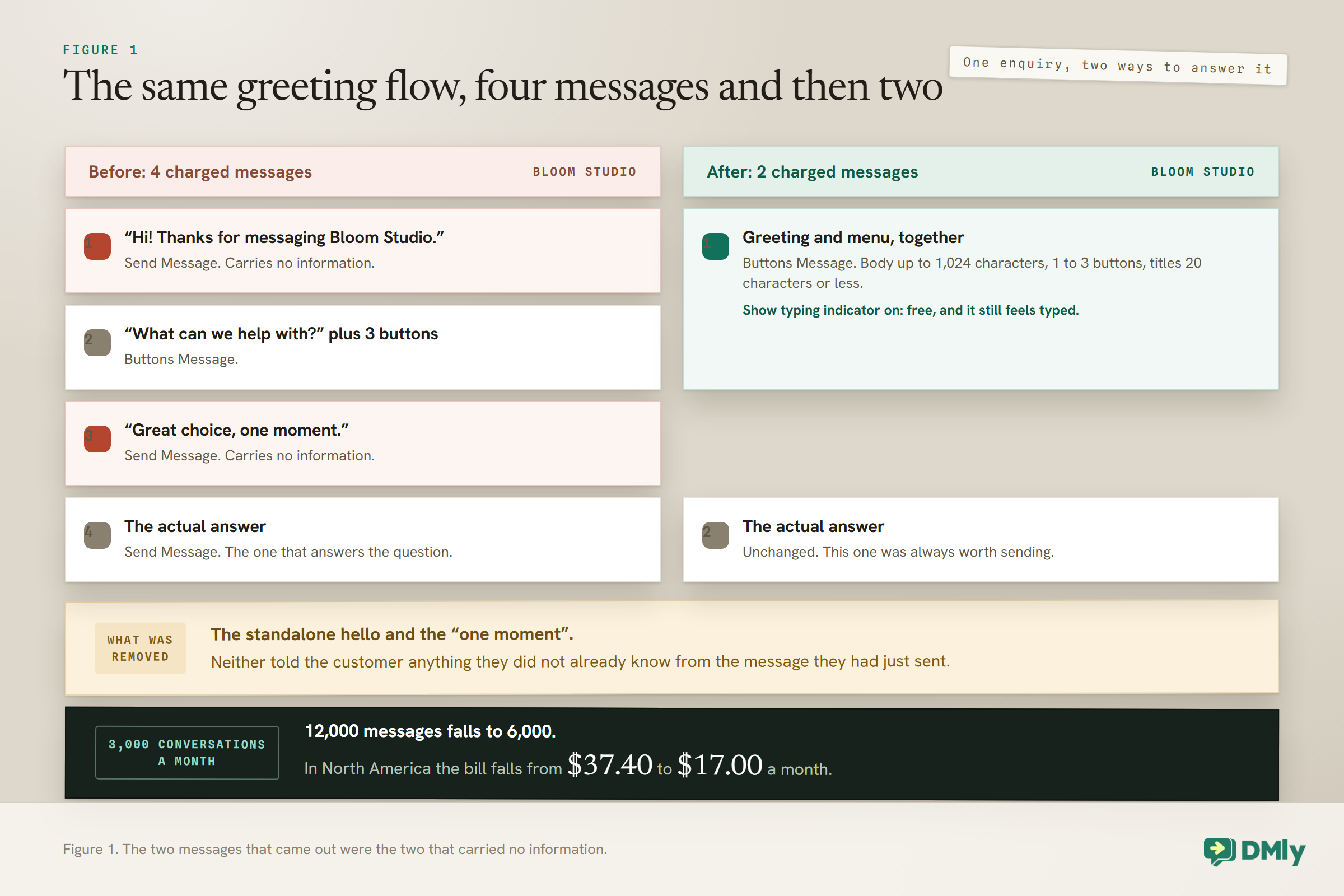
1. The standalone greeting. “Hi, thanks for messaging us!” arriving on its own, before anything useful. The customer knows they messaged you. Merge the greeting into the top of whatever comes next and you have removed one message from every conversation that flow handles.
2. The decorative acknowledgement. “Got it.” “Great choice!” “One moment while I check that.” These exist to fill the silence while the next step runs, and there is now a free way to fill silence, covered below.
3. The second confirmation. Some booking setups confirm twice: once from the flow that took the booking, and once from an automation triggered by the appointment being created. It has been invisible because it was free. Open your automations list and your notification settings, and check whether two things are both replying to the same event.
4. The fallback that fires repeatedly. “Sorry, I did not understand that” sent three times in a row is three charges and a customer who is about to leave. Cap it: after one failed attempt, hand over to a human or offer buttons instead of free text. Our guide to building an AI customer service chatbot covers the handover pattern.
None of the first three cuts remove information. If a message you are about to delete does tell the customer something, it belongs in the section below on what not to cut.
How to Consolidate Without Producing a Wall of Text
The platform has caps on what a single message can carry, and those caps are generous enough that several short messages fit comfortably into one. Knowing the numbers stops you designing something that gets rejected at send time.
On a WhatsApp channel, the two steps to consolidate into are these interactive ones:
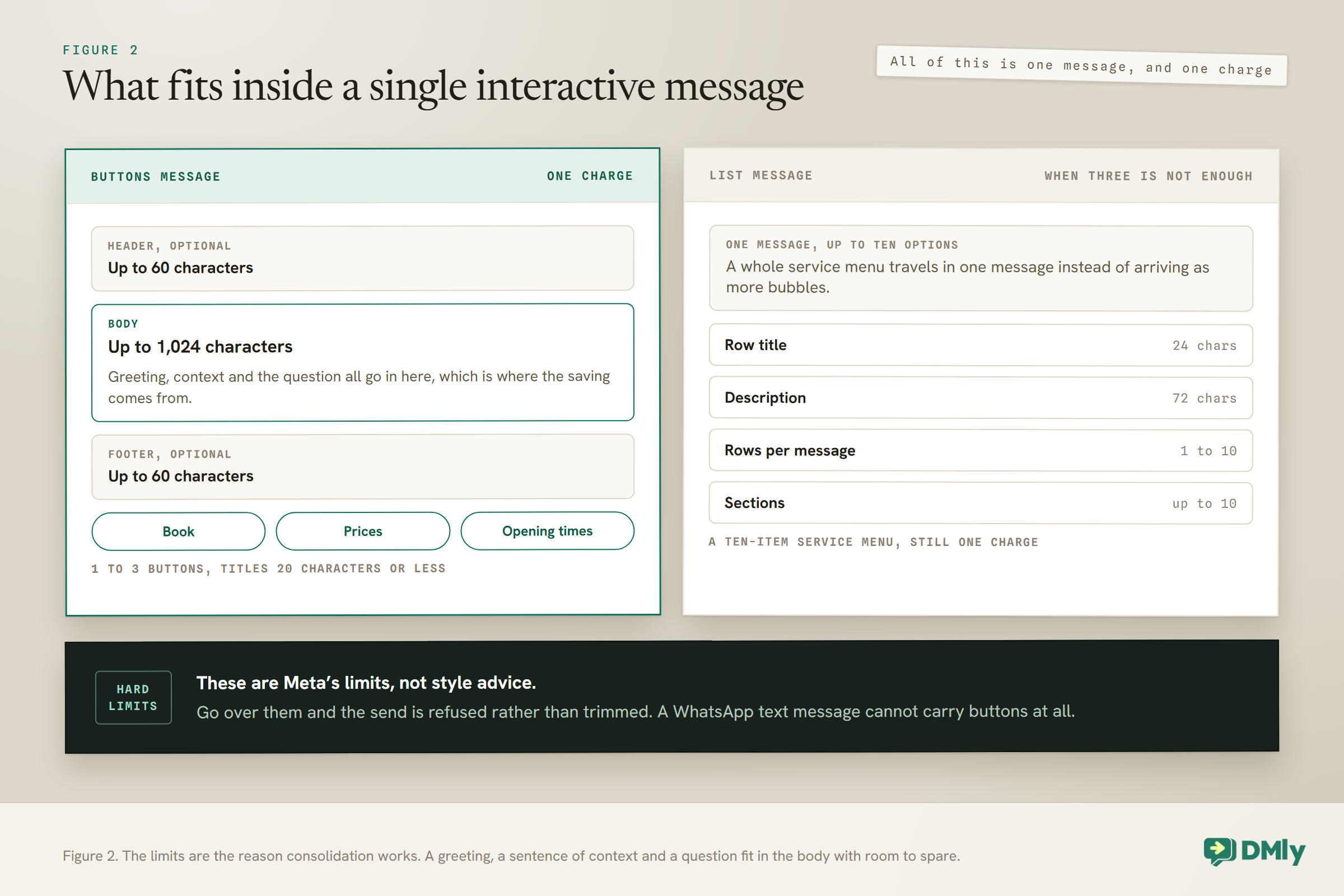
- Buttons Message. A body of up to 1,024 characters, an optional header and footer of up to 60 each, and one to three buttons with titles of 20 characters or less. A greeting, a sentence of context and a three-way choice fit in one of these with room to spare.
- List Message. One to ten rows across at most ten sections, with row titles capped at 24 characters and descriptions at 72. This is the step for a service menu that would otherwise need a numbered list and an explanation of how to reply.
One trap worth naming: a plain text message cannot carry buttons. Buttons on an ordinary Send Message step do not work on a WhatsApp channel, so you must use the Buttons Message step instead, and the builder warns you if a text step carries buttons.
Those caps are hard limits set by Meta rather than style guidance, and exceeding them means the send is rejected rather than truncated. If you are starting from scratch rather than rewriting, our no-code automation guide walks the build in order.
The Typing Indicator Is Free, and It Can Do the Job the Extra Bubbles Were Doing
One reason bots send little acknowledgements is to prove somebody is there. There is a setting that proves it without sending anything, and it costs nothing because it is not a message.
In DMly, most message steps carry a pair of settings at the bottom of the panel. Show typing indicator is a switch, off by default. Turn it on and a Typing delay field appears, which takes anything from 0 to 20 seconds and is capped at 8 whatever you type in it. The platform then raises the channel’s own typing bubble, waits, and sends.
Here is why it matters for cost. Meta charges for messages delivered to the user. On WhatsApp the typing bubble is raised by marking one of the contact’s own messages as read, which is not a message from you. So the pause and the sense of a person on the other end are free, and the “one moment while I check” you were sending to create that feeling will not be.
Three practical notes before you turn it on everywhere. The settings are per step, not per flow, so six message steps means six switches. A step with it on is marked on the canvas with a small keyboard glyph, so you can see at a glance which ones pause. And Send Template, Send Location and Request Phone Number do not have it at all.
One more detail specific to WhatsApp: because the bubble is raised by marking a contact’s message as read, a contact who has never written to you sees no bubble, only the pause. That is fine for a reply flow and pointless at the start of an outbound one.
One Form Instead of Five Questions
A bigger reduction than consolidating a greeting is replacing a question-and-answer sequence with a form that arrives as one message.
An intake that asks for a name, then a phone number, then a service, then a preferred date, then any notes is five outbound messages, and that is before any of the “thanks” bubbles in between. A WhatsApp Flow, which is Meta’s own in-chat form, collects all five in a single message: the contact taps a button, a form opens over the chat, they fill it in and submit, and the answers land on their contact record.
In DMly you can build one without leaving the product. The starting points are Get in touch, Request an appointment, Share your feedback, Register, or Untitled form. Fields can be text, email, phone, number, paragraph, dropdown, choice, date or opt-in, each with a required switch. The form is then sent by the WhatsApp Form (Flow) step in a flow, from the inbox toolbar, or as a button on an approved template.
Three constraints worth knowing. Forms are WhatsApp only, so nothing here applies to Instagram, Messenger, Telegram or SMS. A form sent from the inbox goes with fixed wording you cannot change, so put your own invitation in the Message and button text of the WhatsApp Form step in a flow. And a flow cannot branch on a form answer, so keep a normal question step for anything the next step has to decide from.
For a business running 400 intakes a month, that is 2,000 outbound messages becoming 400. It is the difference between being well over the free allowance and being well under it.
When a Template Is Now Cheaper Than Three Replies
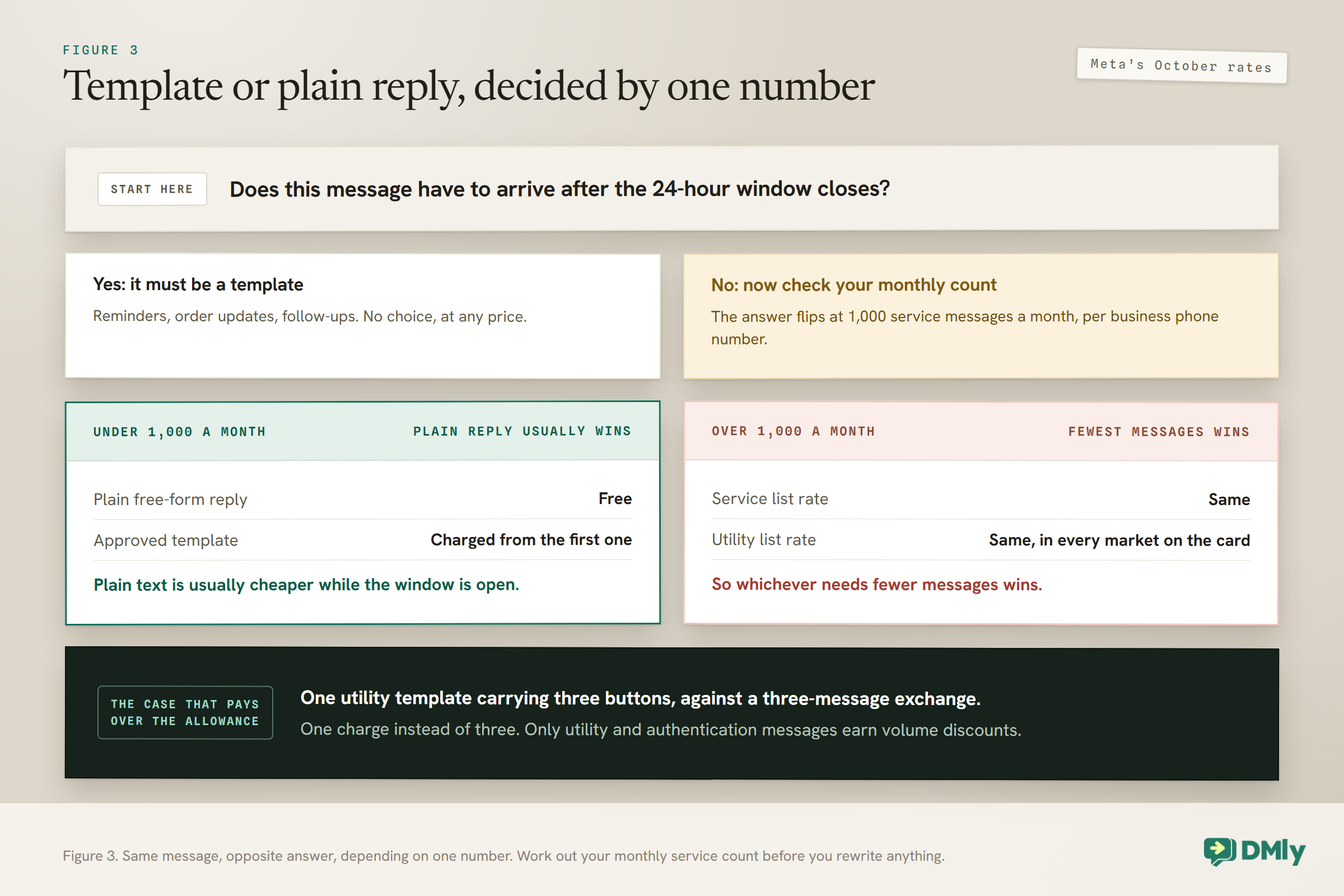
The answer genuinely flips depending on one number: whether you are over your 1,000 free service messages a month.
Under the allowance, plain text is usually the cheaper choice while the window is open. Free-form replies are free until the 1,001st, and approved templates are charged from the first one. A booking confirmation sent as a template while the customer’s window is still open costs you 0.34 cents in North America or 2.20 in the United Kingdom, and the identical words sent as a plain reply cost nothing. There are good non-price reasons to keep the template, covered in a moment, but cost is not one of them at this size.
Over the allowance, fewest messages wins. In every market on Meta’s card, the list rate is the same for service, utility and authentication messages, though only utility and authentication earn volume discounts. A utility template with three buttons beats a three-message free-form exchange, because it is one charge instead of three.
And there are messages where a template is the only thing that works regardless of price. Anything that has to arrive after the customer’s 24-hour window has closed can only be a template: reminders the day before an appointment, an order update two days later, a follow-up. If your flow waits a day or more, assume the window will be shut by the time it finishes and build for a template. Our guide to WhatsApp message templates covers submission and categories, and the 24-hour messaging window explains what closes it.
What Per-Message Billing Costs Three Different Businesses
Honest numbers on what per-message billing actually costs, because the savings at the small end are genuinely small and there is no point pretending otherwise. All of these take a four-message greeting flow down to two, using Meta’s October rates.
A salon with 400 conversations a month. Before: 1,600 messages from the flow, of which 600 are charged. In North America that is $2.04 a month. After consolidation: 800 messages, and if the replies your team types keep the month under 1,000, nothing at all. The money is negligible. The point is that you have moved from paying something to paying nothing.
A clinic group with 3,000 conversations a month. Before: 12,000 messages, 11,000 charged. North America $37.40 a month, United Kingdom $242.00. After: 6,000 messages, 5,000 charged. North America $17.00, United Kingdom $110.00. Saving $20.40 or $132.00 a month, so $245 or $1,584 a year.
A retailer with 50,000 conversations a month. Before: 200,000 messages, 199,000 charged. North America $676.60, United Kingdom $4,378.00. After: 100,000 messages, 99,000 charged. North America $336.60, United Kingdom $2,178.00. Saving $340.00 or $2,200.00 a month.
Read that as three different arguments rather than one. At the small end this is about staying inside the free allowance. In the middle it is about a few hundred to under sixteen hundred a year, which is real but not dramatic. At the top it is a line item somebody will notice. For a fuller bottom-up view of what running a conversational bot costs, our breakdown of WhatsApp chatbot cost puts the Meta charge next to everything else.
Five Things Not to Do
The failure mode of a per-message billing clear-out is a business that saves a few dollars a month and loses a booking a week, so here is the stop list.
Do not cut the confirmation. A customer who books and hears nothing back may assume it did not work, and message you again, which costs you a reply anyway and a slice of your day.
Do not cut the reminder. A no-show can cost a salon the whole appointment. A reminder costs a fraction of a cent in North America. This arithmetic is not close, and our guide on reducing no-shows works it through.
Do not cut the handover message. When a bot gives up and passes a conversation to a person, saying so is the difference between a customer waiting patiently and a customer leaving.
Do not compress two genuinely separate things into one message to save a charge. A booking confirmation and a payment link are different messages doing different jobs, and merging them makes both weaker. If two messages both carry information the customer needs at different moments, they are two messages.
Do not send the same thing twice to be safe. Beyond the doubled charge, a repeated message is the kind of thing contacts block or report, and that feeds your number’s quality rating.
A Ten-Minute Pass Through Your Busiest Flow
Before the 1 October change lands, check with your provider that your WhatsApp Business account has a payment method on file, then do this in order.
- Open your busiest published automation and read the per-node badges. Write down the message count for a single run.
- Delete the standalone greeting and move its wording into the top of the next message’s body.
- Delete every acknowledgement that carries no information, and turn on the typing indicator on the next step that has one, with a delay of two or three seconds.
- Merge any text-then-menu pair into one Buttons Message or List Message. Remember that a plain text step cannot carry buttons on WhatsApp.
- Find any question-and-answer sequence of three or more steps and check whether a form would collect the whole thing in one message.
- Check your automations list and your notification settings for two things answering the same event. Only one flow-builder automation ever answers a given message, but that flow and a business-event automation can both fire.
- Publish, then come back in a week and read the badges again. The number should have moved, and if it has not, check that you pressed Publish and not Save draft.
That last point catches people. Editing a flow only ever changes its draft, and the published version keeps running untouched until you press publish. A rewrite that never went live saves nothing.
Frequently Asked Questions
What is per-message billing on WhatsApp?
Meta charges for each message delivered to a customer rather than for the conversation as a whole. Marketing, utility and authentication templates have been on per-message billing since July 2025, apart from utility messages inside an open window, and free-form service messages join them on 1 October 2026. The length of a message makes no difference to its price.
Does a longer message cost more than a short one?
No. Four short bubbles cost four times what one longer message costs, which is the entire argument for consolidating. The cap to watch is the platform’s own: 1,024 characters in the body of a buttons message.
Does the typing indicator cost anything?
No. Meta charges for messages delivered to the user, and on WhatsApp the typing bubble is raised by marking one of the contact’s own messages as read rather than by sending anything.
Is an automated reply cheaper than one a person types?
No. A reply your own automation sends and a reply a person types are both service messages at the same rate. Replies powered by Meta’s own Business Agent are billed differently, per token, which Meta puts at about 4 to 5 US cents a message.
Should I replace my in-window templates with plain text?
Only if you are under 1,000 service messages a month, where plain text is free and a template is charged. Above the allowance the service and utility list rates are the same, so the deciding factor becomes how many messages each version needs. And anything that must arrive after the window closes has to be a template regardless.
Can I put buttons on an ordinary text message?
Not on WhatsApp. Buttons on a plain message step do not work there. You need the Buttons Message step instead, which takes one to three buttons with titles of 20 characters or less, or the List Message step for up to ten rows.
How many messages does a WhatsApp form count as?
One. The form goes out as one message, and everything the contact fills in comes back as a single inbound submission rather than as a series of replies.
Do messages from a click-to-WhatsApp ad still cost me anything?
Not for 72 hours after you reply. The free entry point window is unchanged by the October update: when someone arrives from a click-to-WhatsApp ad or a Facebook page call-to-action and you reply within 24 hours, every message your flow can send in that conversation is free for three days from your reply. Meta only counts arrivals from the Android or iOS app here, not from WhatsApp on desktop or web.
Will cutting messages hurt my conversion rate?
We have not measured that and will not claim it either way. What we can say is that the three messages this article recommends removing carry no information the customer did not already have.
How do I find out how many messages my flows are actually sending?
Read the per-node badges on the published version of the flow in DMly, which count real runs and real messages sent. For a total across everything, Meta’s Pricing Analytics endpoint returns your volume and cost by pricing category for a date range and a business phone number.
Does any of this apply to SMS, Instagram or Telegram automations?
The billing change does not, because it is a WhatsApp change. The design advice mostly does, since fewer and better messages is not a WhatsApp-specific idea, but the specific steps differ: forms and interactive list messages are WhatsApp only, and an SMS channel loses every media step.
Writing about WhatsApp automation, bookings and growth for local business.
Turn WhatsApp into your busiest channel.
Start free and run message, bookings, payments and reviews in one place.
