
Payment Reminder Message Templates: 20 Polite Examples for WhatsApp and Email
Nobody likes asking to be paid. It feels awkward even when the work is done, the date has passed and the money is plainly owed, and so the reminder gets put off, then written in a rush, then sent either too softly to work or too sharply to keep the customer. The good news is that most late payments are not refusals. People forget, lose the link, wait for payday, or mean to query one line and never get round to it. A clear, friendly message sent at the right moment settles most of them.
This page gives you twenty payment reminder message templates for WhatsApp and email, grouped by stage: before the due date, on the day, just overdue, well overdue, and a few special situations such as a part-payment or a failed card. Each one names the amount, says what it is for and makes paying one tap away. Copy them, change the brackets, and keep the tone.
If you want these reminders sent for you, our guide to reminding customers about unpaid invoices shows the automation, and our walkthrough of sending invoices through WhatsApp covers the invoice itself. For templates of every other kind, see our library of WhatsApp Business message templates.
What a Polite Payment Reminder Contains
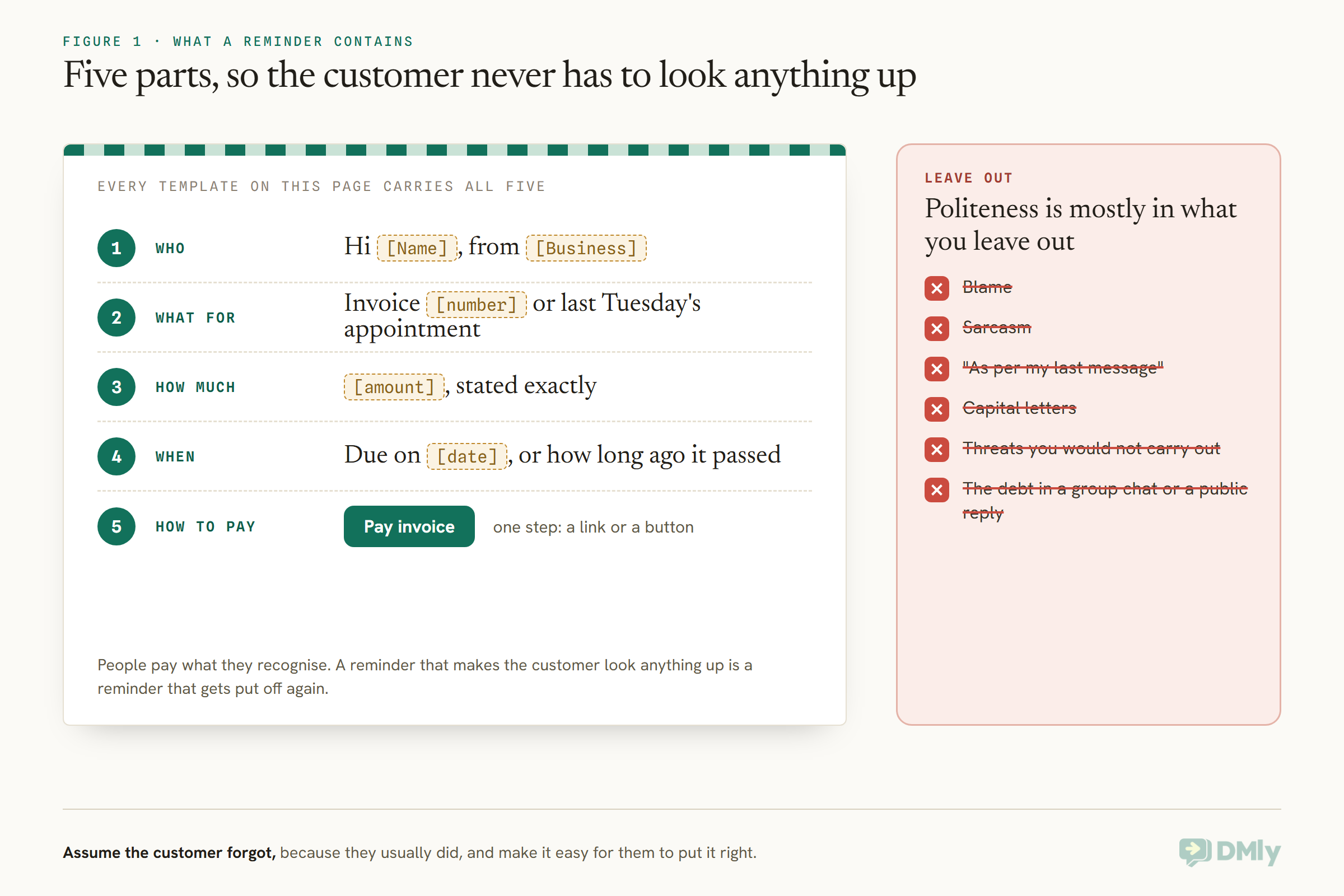
Five things, in a few lines: who you are, what it is for, how much, when, and how to pay.
A reminder that makes the customer look anything up is a reminder that gets put off again. So every template below carries the same five parts. The customer’s name and your business name, so they know who is writing. What the payment is for, such as an invoice number or “last Tuesday’s appointment”, because people pay what they recognise. The amount, stated exactly. The due date, or how long ago it passed. And a way to pay in one step, usually a link or a button, with bank details only if that is how you are paid.
Politeness is mostly in what you leave out. No blame, no sarcasm, no “as per my last message”, no capital letters, and no threats you would not carry out. Assume the customer forgot, because they usually did, and make it easy for them to put it right.
Make the First Reminder Less Necessary
The easiest payment reminder message to send is the one the invoice already made unnecessary.
Many late payments start before the reminder: an invoice with no due date, a total the customer did not expect, or no obvious way to pay. Three habits cut the number of reminders you ever need. First, agree the price and when payment is due before the work starts, in writing, even if that is one WhatsApp message saying “that’ll be [amount], payable on the day” or “invoice due within 14 days”. Second, put a clear due date on every invoice, because “due on receipt” and blank dates both read as “whenever”. Third, make paying the easy part: a link in the same message as the invoice, not a separate email with bank details three days later.
For appointment businesses, taking a deposit or full payment at booking removes much of the chasing altogether; our guide to taking appointment deposits or full payment covers that side. For invoiced work, send the invoice the day the work is done, while the customer still remembers it clearly.
One setting matters here if you invoice from DMly. Default due days, under Finance settings, sets each invoice’s due date as the issue date plus that many days, and it ships at 0. Left at 0, invoices have no due date at all and never become overdue, which means a reminder that waits for the due date, and an escalation that starts when an invoice goes overdue, have nothing to work from. Set it to your usual terms before you rely on either automation.
The Reminder Ladder: Five Stages, Rising Firmness
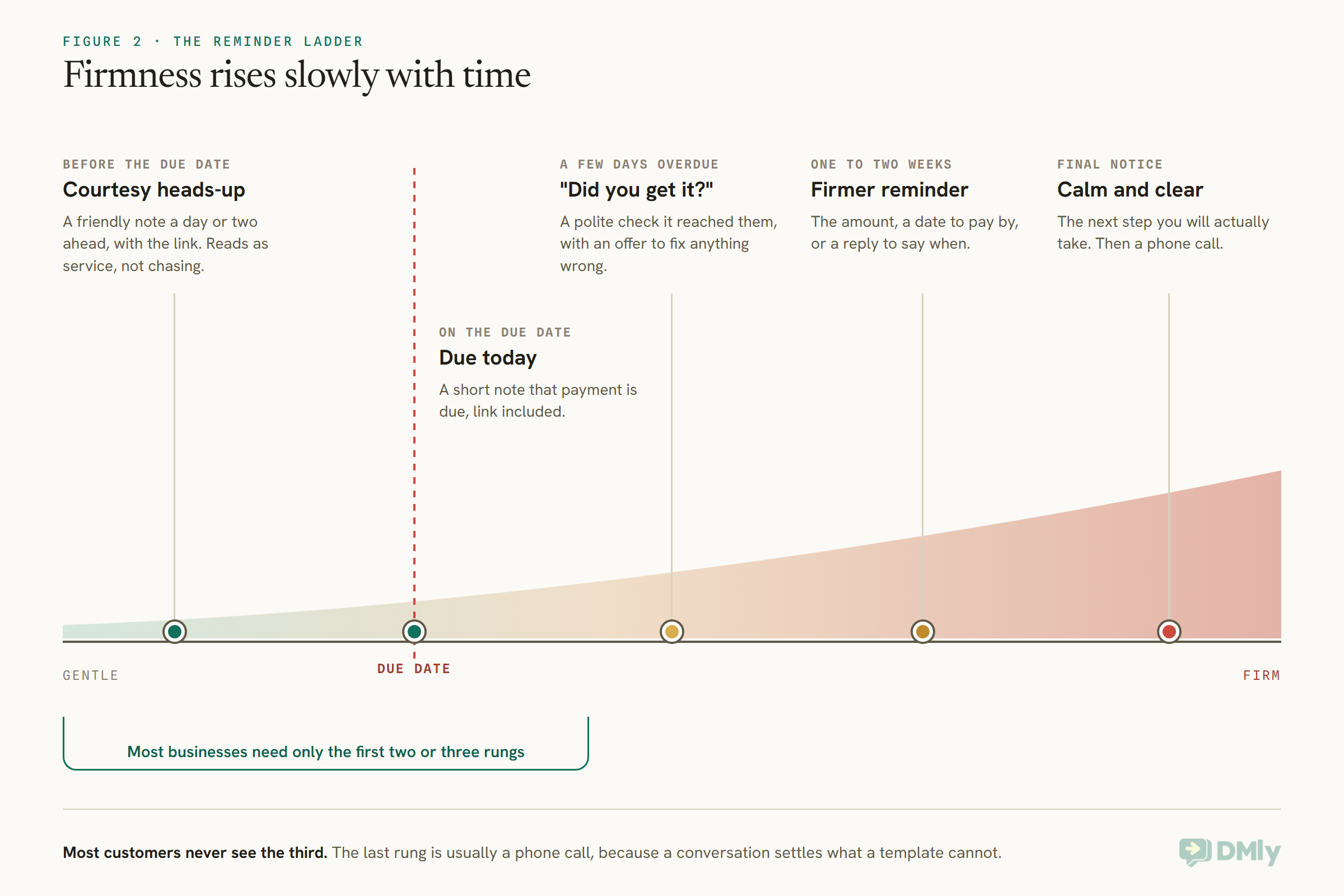
Tone should rise slowly with time. The first message is a courtesy; only the last is firm.
Most businesses need only the first two or three rungs. A courtesy note a day or two before the due date catches the people who were always going to pay and simply needed a nudge. A message on the day, or just after it, catches most of the rest. The firmer messages are for the few that are still open a week or two later, and the last rung is usually a phone call rather than another message, because a conversation settles things a template cannot.
WhatsApp Payment Reminder Message Templates (1 to 10)
Short and friendly, with the pay link on a button. Grouped by stage.
Before the due date
1. The courtesy heads-up
Hi [Name], a friendly reminder from [Business] that invoice [number] for [amount] is due on [date]. You can pay here whenever suits: [Pay link]. Thank you!
Use it when an invoice has a due date a few days away. It reads as service, not chasing, which is exactly what it is.
2. Membership or subscription renewal
Hi [Name], just a heads-up that your [plan] with [Business] renews on [date] for [amount]. Nothing to do if your card is up to date. Any questions, just reply here.
Use it when payment is taken automatically. Keep it plain: the moment it tries to talk the customer into upgrading or staying, Meta counts it as marketing.
3. School, tutoring or class fees
Hello [Parent name], this is [School] with a reminder that [Student]’s fees for [term] of [amount] are due on [date]. Pay securely here: [Pay link]. Thank you for your support.
Use it when fees are due per term or month. Address the parent or guardian who pays, never the student.
On the due date
4. Due today
Hi [Name], just a quick note that invoice [number] for [amount] is due today. Here’s the link if you need it: [Pay link]. Thanks, [Your name]
Use it when the heads-up was not sent, or for larger amounts where a same-day note is worth it.
5. After an appointment, paid on account
Hi [Name], thanks for coming in on [date]. Your balance for [service] is [amount]. You can settle it here: [Pay link]. See you next time!
Use it when a salon, clinic or studio lets regulars settle later, or a deposit covered only part of the price.
A few days overdue
6. The “did you get it?” check
Hi [Name], I’m checking invoice [number] for [amount] reached you; it was due on [date] and still shows as open on our side. Here’s the link again: [Pay link]. If anything on it looks wrong, just reply and I’ll sort it.
Use it when an invoice is three to five days late. Offering to fix a mistake gives a customer with a query a way to raise it, which is often the real reason for the delay.
7. Trades and home services
Hi [Name], thanks again for having us for the [job]. Our invoice for [amount] was due on [date]; if you haven’t had a chance yet, you can pay here: [Pay link]. Cheers, [Your name]
Use it when the job is finished and the customer was happy with it. Mentioning the job reminds them what they are paying for.
One to two weeks overdue
8. The firmer reminder
Hello [Name], invoice [number] for [amount] is now [X] days overdue. Please could you pay by [date] using this link: [Pay link], or reply to let me know when to expect it.
Use it when two friendly messages have gone unanswered. It is still polite, but it asks for a specific date and invites a reply rather than silence.
9. Offering a conversation
Hi [Name], invoice [number] for [amount] is still open. If paying it all at once is difficult right now, reply and we can agree a plan that works. Otherwise, here’s the link: [Pay link].
Use it when you suspect the customer cannot pay rather than will not. An offer to talk often gets a reply where another reminder gets none.
Final notice
10. Calm and clear
Hello [Name], this is a final reminder that invoice [number] for [amount], due on [date], is still unpaid. Please pay by [date] here: [Pay link]. If it’s still open after that, we’ll [pause further bookings / call you to discuss next steps].
Use it when everything else has been tried. State the next step you will actually take, and then take it. Follow this one with a phone call.
Email Payment Reminder Templates (11 to 15)
A subject line that says exactly what it is, the invoice attached or linked, and one clear button.
11. Before the due date
Subject: Invoice [number] due on [date]
Hi [Name],
A friendly reminder that invoice [number] for [amount] is due on [date]. You’ll find it attached, and you can pay online here:
[Button: Pay invoice]
Thank you for your business,
[Your name], [Business]
Use it when the customer received the invoice by email. Putting the number and date in the subject means they can find it again later.
12. On the due date
Subject: Invoice [number] is due today
Hi [Name],
Just a quick note that invoice [number] for [amount] is due today. If you’ve already paid, thank you and please ignore this.
[Button: Pay invoice]
Best,
[Your name]
Use it when payments by bank transfer can take a day or two to show. “If you’ve already paid” saves an awkward reply.
13. A week overdue
Subject: Invoice [number] now overdue
Hi [Name],
Our records show invoice [number] for [amount], due on [date], is still open. Could you let me know when we can expect payment, or pay here:
[Button: Pay invoice]
If there’s a problem with the invoice, reply and I’ll look into it straight away.
Thanks,
[Your name]
Use it when a customer has not responded on WhatsApp, or is a business with an accounts inbox. Copy the person who ordered the work if someone else pays the bills.
14. For a business customer
Subject: Overdue: invoice [number], PO [number]
Hello [Accounts contact],
Invoice [number] for [amount] (purchase order [number]) was due on [date] and remains unpaid. The invoice is attached again for your records. Please confirm the expected payment date, or let me know if anything is needed from us to process it.
Kind regards,
[Your name], [Business]
Use it when you invoice companies. Accounts teams pay what matches their records, so the purchase order number is often what unlocks it.
15. Final notice by email
Subject: Final reminder: invoice [number]
Dear [Name],
Despite earlier reminders, invoice [number] for [amount], due on [date], has not been paid. Please pay by [date] using the link below. If it remains unpaid after that date, we will [next step].
[Button: Pay invoice]
If you’d like to discuss this, please call me on [number].
[Your name], [Business]
Use it when the WhatsApp final notice went unanswered. Keep the tone level; a final notice is firm because it is clear, not because it is angry.
Templates for Special Situations (16 to 20)
Five moments where the wording needs to fit what has actually happened.
16. After a part-payment
Hi [Name], thank you for your payment of [amount paid] towards invoice [number]. The balance of [amount left] is due on [date]; here’s the link for the remainder: [Pay link].
Thank them first. A customer who paid something is trying, and the message should say so.
17. A card payment that failed
Hi [Name], we tried to take your [plan] payment of [amount] today but it didn’t go through. It’s often an expired card. You can update your details or pay here: [Pay link].
Suggest the most likely innocent reason. Most failed payments are expired or replaced cards, not a decision to stop paying.
18. Paying by bank transfer
Hi [Name], to pay invoice [number] for [amount] by bank transfer, please use: [Bank], [Account name], [Account number], reference [reference]. Reply PAID once it’s sent and we’ll confirm when it arrives.
A reference you choose makes the transfer easy to match. Asking for a reply gives you a signal to check your account.
19. Agreeing a payment plan
Hi [Name], thanks for talking it through. As agreed, you’ll pay [amount] on [date] and [amount] on [date]. I’ll send a link before each one. Let me know if anything changes.
Confirm what was agreed in writing, straight after the call, so both sides have the same record.
20. Thank you, paid in full
Hi [Name], we’ve received your payment of [amount] for invoice [number]. You’re all settled. Thank you!
Close the loop, especially after a chase. It tells the customer the reminders will stop and ends on a good note.
WhatsApp: Utility or Marketing?
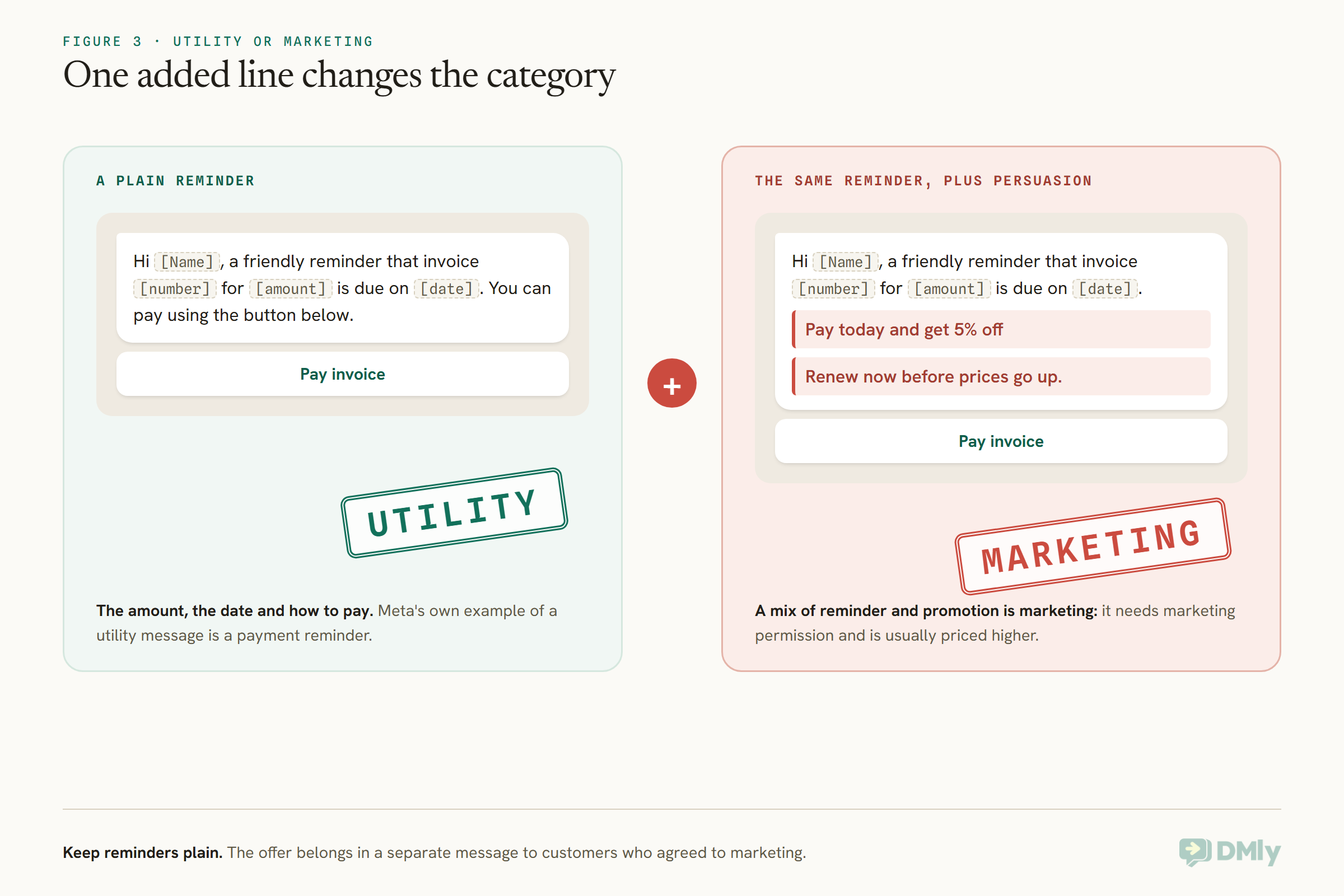
A plain payment reminder is a utility message. Add an offer and it becomes marketing.
On WhatsApp, a message to a customer who has not written to you in the last 24 hours must be an approved template, and Meta sorts templates into categories. Meta’s own example of a utility message is a payment reminder, so a reminder that simply states the amount, the date and how to pay belongs there. The line is crossed by persuasion: “pay today and get 5% off”, “renew now before prices go up”, or an upsell tacked on the end. Meta says order and account messages should not include offers or try to secure renewals, and treats a mix of reminder and promotion as marketing, which needs marketing permission and is usually priced higher.
Utility messages are charged per message outside the window, and from 1 October 2026 Meta also charges for utility messages sent in reply inside an open customer service window. Keep reminders few and useful and the cost stays small.
Building the WhatsApp template
Write the body as real sentences with numbered variables, for example Hi {{1}}, a friendly reminder that invoice {{2}} for {{3}} is due on {{4}}. You can pay using the button below., and put the pay link on a URL button with short text such as “Pay invoice”. A template cannot start or end with a variable, each variable needs a sample value for Meta’s reviewer, and once a template is approved, editing it does not change what sends; create a new one to reword it. If you send from DMly, the invoice and payment templates are already there, so you may not need to write your own at all.
Sending Payment Reminders From DMly
Send the invoice on WhatsApp, and two ready-made automations handle the reminders, stopping by themselves when the customer pays.
When you send an invoice in DMly, it goes out on WhatsApp by default using the approved dmly_invoice_sent template, so it reaches the customer even if they have not messaged you recently. With a payment gateway connected, the message carries a pay link to the provider’s own checkout; without one, the invoice still sends with a link to a public PDF of it. From the invoice’s Payment link & QR panel you can also share the link on WhatsApp, SMS or email, or print the QR code. The link always matches the balance due, so after a part-payment the next link is for the remainder, with no sums for you to do.
For the chasing, DMly’s automation library includes two templates. Invoice payment reminder starts when an invoice is sent, waits until a day before the due date, and then messages the customer with the amount, the due date and a Pay invoice button; if the invoice has been paid or voided by then, it skips the message. Overdue invoice escalation starts when an invoice goes overdue, sends the pay link, waits three days and follows up. An invoice is marked overdue by a nightly check, and the overdue trigger fires once per invoice, so the follow-ups are built inside the flow rather than repeating each night.
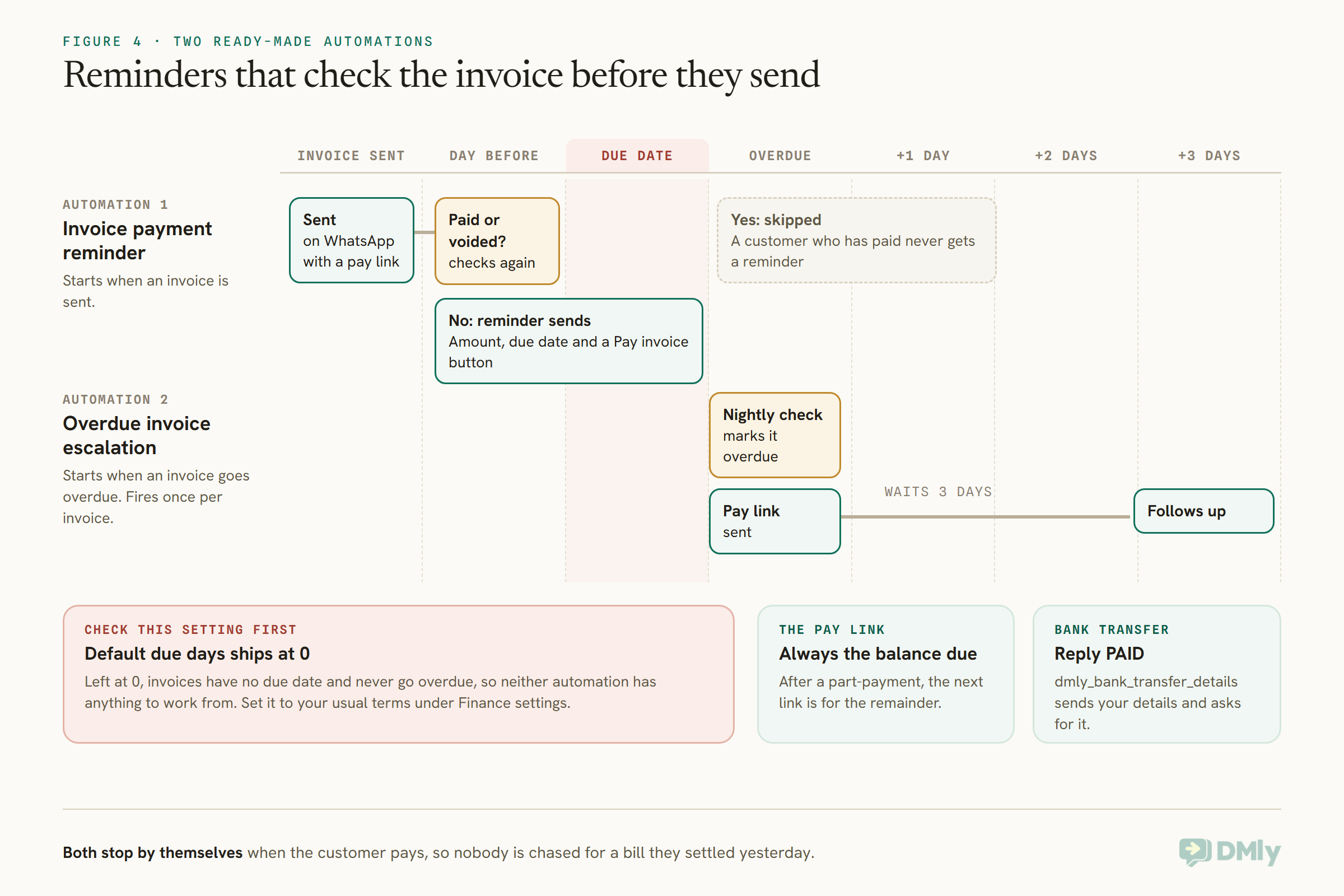
Building your own sequence instead? A flow’s Delay step can wait until a set time before the invoice due date, and if the invoice is settled while it waits, the flow leaves by the delay’s skipped branch rather than sending. That check is what stops the classic mistake of chasing someone who paid yesterday. For customers who pay by bank transfer, DMly has a dmly_bank_transfer_details template that sends your account details and a reference and asks the customer to reply PAID, and a dmly_payment_failed template for card payments that do not go through. DMly’s invoice, payment request, failed-payment and renewal templates are all listed as utility, in line with the rule above.
Adjusting the Tone for Your Customers
The templates are a starting point. Match them to how you already talk to each customer.
A barber who texts regulars by first name would sound strange sending “Dear Mr Okafor, please find attached”. A consultancy invoicing a finance department would sound strange sending “Hey! Quick one”. Keep the five parts and the ladder, and change the greeting, the sign-off and the warmth to fit. For long-standing customers, a personal note from the owner at the second stage usually works better than any automated firmness, and for new customers, a clear heads-up before the first due date sets the expectation for every invoice after it.
Two privacy points apply everywhere. Send reminders only to the person responsible for paying, never in a group chat or to a shared family number unless that is who pays, and do not mention the debt in public replies, comments or reviews. A payment reminder is between you and the customer.
When to Stop Sending Payment Reminder Messages
Messages settle most late payments. When they stop working, change the method, not the volume.
If a customer has not replied after the final notice, another message will not help. Call them. Many situations turn out to be a query, a lost job, a change of address, or embarrassment, and a short conversation finds out which. Agree a plan if one is needed and confirm it in writing with template 19. If the amount is significant and the customer still will not engage, formal recovery has its own rules, which differ by country and by whether your customer is a consumer or a business, so take advice before going further. Whatever you decide, stop the automated reminders once a human conversation has started, so the customer is not chased by a template while talking to you.
Mistakes to Avoid
- No amount or invoice number. The customer has to look it up, and puts it off.
- No way to pay in the message. Every reminder should carry the link or the details.
- Invoices with no due date. Nothing is ever late, so nothing is ever chased.
- Chasing someone who has paid. Check before each send, or use a reminder that checks for you.
- Starting too firm. The first reminder assumes they forgot.
- Threats you will not carry out. They teach customers to ignore the next message.
- Adding offers to a WhatsApp reminder. It turns a utility message into marketing.
- Reminding in public or in a group. Money is a private conversation.
- Too many messages. A reminder every day is harassment, not service.
Frequently Asked Questions
How do you write a polite payment reminder message?
Greet the customer by name, say what the payment is for and how much it is, give the due date, and include a link or details to pay. Assume they forgot and leave out blame.
When should I send the first payment reminder?
A day or two before the due date works well as a courtesy, followed by a short note on the day or shortly after if it is still open.
How many payment reminders should I send?
Usually three or four at most over two weeks, rising gently in firmness, before switching to a phone call.
Is a payment reminder on WhatsApp a marketing message?
Not if it is a plain reminder. Meta treats payment reminders as utility messages; adding an offer or a push to renew or buy more makes the template marketing.
Should I charge a late fee?
Only if your terms said so before the work was done, and only in line with the rules where you trade. Mention it in the reminder as a fact from your terms, not as a threat.
Can I send payment reminders automatically?
Yes. In DMly, the Invoice payment reminder and Overdue invoice escalation automations send reminders before and after the due date, and skip customers who have already paid.
Asking Is Part of the Service
Nobody likes asking to be paid, but a clear reminder is a service to the customer as much as to you: it saves them a late fee, an awkward call, or a bill they genuinely forgot. Pick the templates that fit your business, use the ladder, keep each message short and kind, and let the courtesy note before the due date do most of the work. If you would rather not do the asking yourself, DMly’s invoices send the reminders for you and stop the moment the customer pays.
Writing about WhatsApp automation, bookings and growth for local business.
Turn WhatsApp into your busiest channel.
Start free and run message, bookings, payments and reviews in one place.
