
Lab Reports on WhatsApp: How Diagnostic Labs and Clinics Can Send Reports and Test Result Alerts Safely
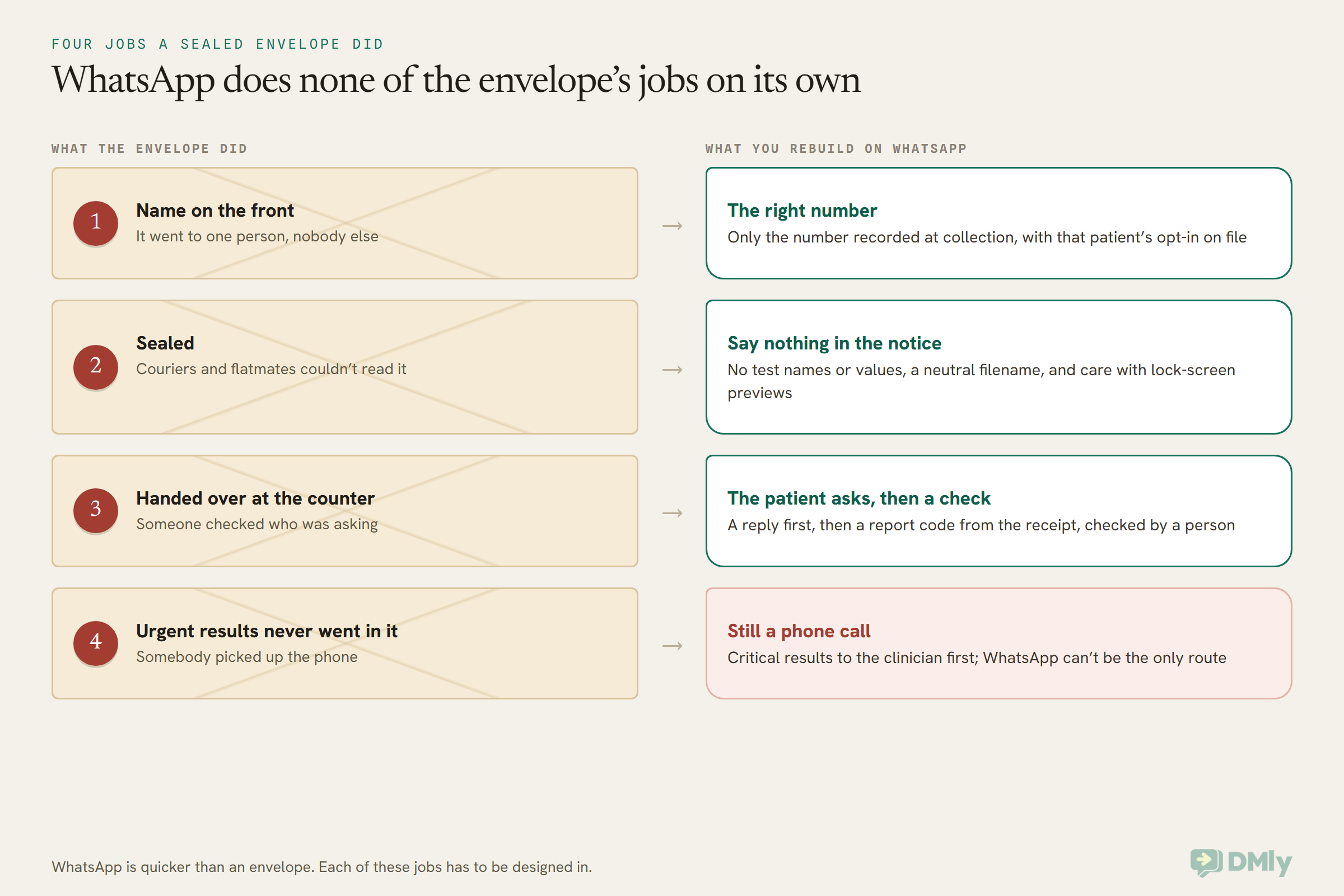
Before anyone sent lab reports on WhatsApp, a lab report came in an envelope, and that envelope did more work than anyone gave it credit for. It had the patient’s name on the front, so it went to the right person. It was sealed, so the receptionist, the courier and the patient’s flatmate couldn’t read it. It was handed over at a counter after someone checked who was asking. And the results that couldn’t wait never went in an envelope at all: somebody picked up the phone.
WhatsApp is faster than the envelope, and your patients would often rather have it. Many labs in India, Nigeria, the Gulf and South-East Asia already send reports this way. But WhatsApp doesn’t do any of the envelope’s four jobs for you. If you want them done, you have to rebuild each one on purpose.
In this guide, we’ll start with the short answer to whether you can send lab reports on WhatsApp at all, which depends on where you are. Then we’ll look at what Meta’s own rules say about health information, how the law differs in the US, India, Nigeria, the UK and the UAE, the four jobs you need to rebuild, the message templates to use, where copies of a report end up, and how to set the whole thing up in DMly.
One thing first: this is a practical guide, not legal or medical advice. Health data law is strict and it changes. Before you change how your lab or clinic releases results, check your plan with your compliance officer, a healthcare lawyer in your country, and the doctors who order your tests.
Can You Send Lab Reports on WhatsApp? The Short Answer
It depends on where you are and what the message contains. In the US, a covered lab or clinic should not send results on WhatsApp at all. In much of the rest of the world, a “your report is ready” notice is a sensible default, and the report itself can go on WhatsApp only where local law allows it, the patient asked for it, and you’ve checked who you’re talking to.
That gives you three ways to deliver a result, from most cautious to least:
- Phone or portal only. WhatsApp carries nothing about the result. This is the default for US covered entities, and for critical or highly sensitive results everywhere.
- A notice on WhatsApp, the report in your portal. The message says the report is ready, with no test names and no values, and points the patient to your secure patient portal or the front desk. This suits most labs as a default.
- The report itself on WhatsApp, on request. The patient asks for the PDF, passes a simple identity check, and a member of your team sends it. This is only for places where your lawyer is satisfied local law allows it, and for patients who chose it.
One rule sits across all three: a critical result, the kind that may mean a patient needs treatment now, goes by phone to the responsible clinician. WhatsApp can’t be the only way that news travels.
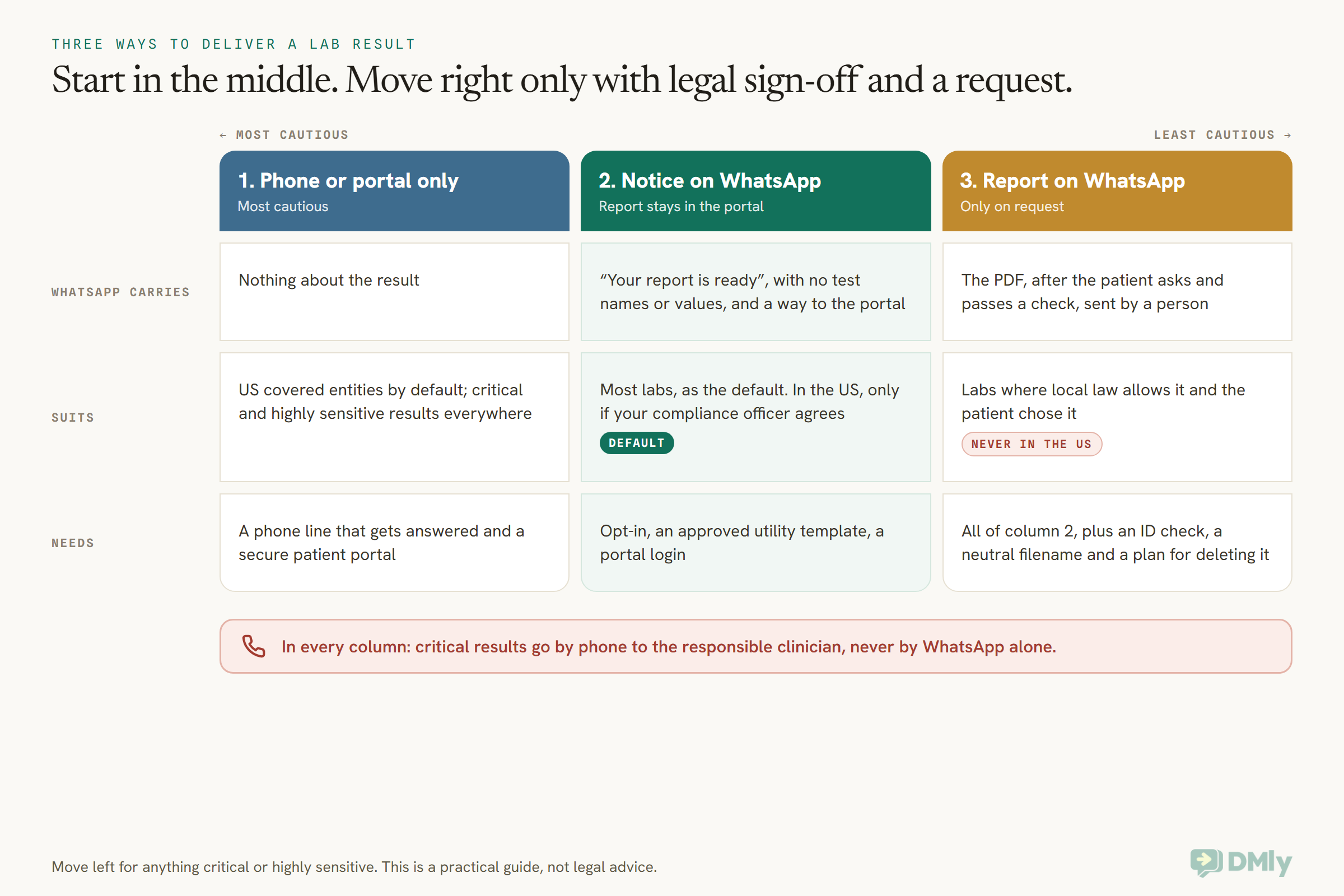
The rest of this guide explains why the line falls where it does for lab reports on WhatsApp, and how to do the middle and right-hand columns properly.
What Meta’s Rules Say About Sending Health Information on WhatsApp
Meta’s terms and policy don’t ban health information outright. They make it your job to keep off WhatsApp any information your local law says needs special safeguards or limits on who it goes to. That makes Meta’s rules the first thing to read, because they apply to every lab using the WhatsApp Business Platform, in every country.
Three pieces matter.
Meta’s terms: “Prohibited Information”
Section 4.2 of the Meta Terms for WhatsApp Business Platform says a business may not give Meta any information or data that is subject to safeguarding or limits on distribution under applicable laws or regulation. It calls that “Prohibited Information”. The same section says Meta is not a business associate under HIPAA, that the platform is not HIPAA compliant, and that Meta makes no promise the platform meets the needs of businesses with heightened confidentiality requirements, naming healthcare as one of them.
Read that carefully, because it reaches beyond the US. Whether a lab report counts as “Prohibited Information” in Pune, Lagos or Dubai depends on what your local law says about health data. Meta is telling you to work that out before you press send, not after.
WhatsApp’s Business Messaging Policy
WhatsApp’s Business Messaging Policy (last updated 23 September 2026) adds the rules you’ll feel day to day:
- Health information. “Don’t use WhatsApp for telemedicine or to send or request any health related information, if applicable regulations prohibit distribution of such information to systems that do not meet heightened requirements to handle health related information.” It’s the same test as the terms: your local law decides.
- Sensitive identifiers. Don’t share or ask people to share full payment card numbers, financial account numbers, personal ID card numbers or other sensitive identifiers. That rules out asking a patient to type their Aadhaar number, their NIN, their Emirates ID or their Social Security number to prove who they are.
- Opt-in. You may only message people who gave you their number and agreed to hear from you, and you must respect opt-out requests made on or off WhatsApp.
- A way to reach a person. If you use automation inside the 24-hour window, you must offer prompt, clear and direct escalation paths, such as a transfer to a human, a phone number or email.
- A published privacy policy. You’re responsible for the notices, permissions and consents needed to collect and share people’s information, including a privacy policy people can read.
What happens to a message on Meta’s side
Meta’s developer documentation says that on the Cloud API, a message travels encrypted between the patient’s phone and Meta’s Cloud API, which then decrypts it and forwards it to your business, or to the platform you use. Meta acts as a data processor for you, keeps message content for up to 30 days (encrypted at rest) so it can do things like retry a failed delivery, and says it won’t automatically use messages to inform the ads people see.
Meta also offers two storage options built for regulated businesses. Local storage keeps message content at rest in a chosen country, and its supported list includes India, the UAE, Bahrain, Singapore, Indonesia, the UK and the EU (Germany), but not Nigeria. No Storage keeps messages and media for at most an hour. Both are set when a number is registered with Meta. DMly’s documentation doesn’t describe a way to switch either one on, so if your law cares where data sits, ask DMly before you assume it can be done.
Sending Test Results on WhatsApp in the US: Why the Answer Is No
If your lab or clinic is a HIPAA covered entity, don’t send lab reports on WhatsApp, and don’t send anything that identifies a patient’s test or result. Meta’s terms say it isn’t a business associate and won’t sign a business associate agreement (BAA), and HIPAA expects one from any vendor that handles patient information for you. No software built on top of WhatsApp, DMly included, can fill that gap, because it sits in Meta’s own terms. DMly doesn’t state that it’s HIPAA compliant and doesn’t document a BAA either.
Most US labs and practices already give results through a patient portal that sits on a system covered by a BAA. Keep it that way. The most a US covered entity might do on WhatsApp is send a notice with no health content at all, along the lines of “There’s an update in your patient portal. Please log in to view it.” Even that identifies someone as your patient, so only send it if your compliance officer has looked at it and agrees.
What about “the patient asked for it”?: HHS guidance says patients have a right to receive copies of their records by unencrypted email if they ask, as long as you warn them about the risk first and they confirm. That’s guidance about email, not a WhatsApp loophole. It doesn’t change Meta’s terms, which still say you may not give Meta information that the law says needs safeguards. If a US patient asks for their result on WhatsApp, offer the portal, secure email or a printed copy instead.
A US clinic that isn’t a covered entity, such as some cash-only practices, still has state privacy laws and its own promises to patients to think about. Don’t decide that alone.
Sending Lab Reports on WhatsApp Outside the US: What the Law Says
Outside the US, most privacy laws treat health data as especially sensitive, and they ask for consent or another clear legal basis, the minimum necessary information, real security, and deletion when you no longer need it. None of the laws below says “never use WhatsApp”, and none says “WhatsApp is fine”. They set conditions, and your lawyer decides whether your setup meets them. Here’s what each says, read at source on 13 October 2026.
India: the DPDP Act 2023
India’s Digital Personal Data Protection Act 2023 applies to digital personal data, and a lab report is about as personal as data gets. The government notified the DPDP Rules on 14 November 2025, with an 18-month phased timeline for organisations to comply, so the full set of duties is arriving now rather than in some distant future.
The duties that matter most for reports are these:
- Consent that’s specific. Section 6 says consent must be free, specific, informed, unconditional and unambiguous, given by a clear affirmative action, and limited to the data needed for the stated purpose. A ticked box at collection that says “Send my report to this WhatsApp number” is specific. A general “we may contact you” line isn’t.
- Security safeguards. Section 8(5) says you must protect personal data with reasonable security safeguards to prevent a breach, including data handled for you by a processor.
- Breach notice. Section 8(6) says that if there’s a breach, you must tell the Data Protection Board and each affected person. A report sent to the wrong number is exactly the kind of thing this covers.
- Erasure. Section 8(7) says you must erase personal data when consent is withdrawn or the purpose is no longer being served, unless another law requires you to keep it, and make your processor erase it too.
Unlike the GDPR, the Act doesn’t create a separate “sensitive” category for health data. That doesn’t make a report less sensitive in practice, and your professional and state rules on patient confidentiality still apply on top.
Nigeria: the NDPA 2023 and the GAID 2025
Nigeria’s Data Protection Act 2023 lists “health status” as sensitive personal data. Section 30 says you may not process it unless one of a short list of conditions applies. Two are relevant to a lab: the patient has given, and not withdrawn, consent for the specific purpose, or the processing is for medical care and is done by or under the responsibility of a professional who owes a duty of confidentiality.
The Act also asks you to keep data to the minimum necessary and for no longer than you need it (section 24), to put appropriate security in place that reflects how sensitive the data is (section 39), and to have a written agreement with any processor that handles data for you (section 29). It has a whole part on transfers of personal data outside Nigeria, which matters because a WhatsApp message passes through Meta’s systems abroad. The Nigeria Data Protection Commission’s General Application and Implementation Directive (GAID 2025, effective 19 September 2025) adds that any direct marketing needs consent, with no exception for existing customers, so a “book your next check-up” promotion needs its own opt-in. The older NDPR has been superseded in practice.
United Kingdom: UK GDPR special category data
Under the UK GDPR, data concerning health is special category data. The Information Commissioner’s Office lists “medical examination data, test results” among its examples, so a lab report is health data without any argument. To use it you need a lawful basis and one of the Article 9 conditions; the one most labs rely on covers medical diagnosis and the provision of health care, by or under the responsibility of a professional with a duty of confidentiality.
That condition lets you process results to care for the patient. It doesn’t settle which channel you send them through: you still need security appropriate to the risk, and a processor contract with your messaging platform. The ICO notes its special category guidance is under review after the Data (Use and Access) Act, so check for updates. For EU clinics, the GDPR works the same way.
United Arab Emirates: health data stays in the country
The UAE is the strictest market in this guide for one reason that has nothing to do with consent. Federal Law No. 2 of 2019 on the use of information and communications technology in health fields says, in Article 13, that health data and information related to health services provided in the UAE may not be stored, processed, generated or transferred outside the country, except where the health authority issues a resolution in coordination with the Ministry. Article 24 sets a fine of AED 500,000 to 700,000 for breaking that rule.
The same law says health information must be kept confidential and used only for health purposes without the patient’s written approval (Article 16), and that health data must be kept for at least 25 years from the patient’s last procedure (Article 20). A WhatsApp message passes through Meta’s systems, and DMly’s documentation says it hosts customer data in Europe and the United States. Meta does offer local storage in the UAE, but DMly doesn’t document a way to use it.
So for a UAE lab, the realistic default is the middle column: a content-free notice on WhatsApp and the report in a portal hosted in the UAE, unless your health authority has said otherwise. The UAE also has a general data protection law, Federal Decree-Law No. 45 of 2021. We couldn’t read its official text on 13 October 2026, so we won’t describe how it treats health data; ask your lawyer how it fits alongside the health law.
Elsewhere in the Gulf and South-East Asia
Saudi Arabia, Singapore, Indonesia, Malaysia and their neighbours all have personal data laws, and several have rules aimed at health information. We won’t summarise them here, because the details matter and they change. Meta’s health clause applies everywhere: if your local rules restrict where health information can go, a report doesn’t go on WhatsApp. Meta’s local storage list includes Singapore and Indonesia, which is worth raising with your platform if data location matters to your regulator.
Four Jobs to Rebuild Before Any Report Leaves the Lab
If your lawyer is comfortable with the middle or right-hand column, the work is rebuilding the four things a sealed envelope did automatically: the right person, sealed contents, handover on request, and a phone call for anything urgent. Each of the next four sections takes one job.
Job One: Make Sure the Report Reaches the Right Person
Only ever send a report notice to the phone number recorded when the sample was collected, for a patient who agreed to WhatsApp at that moment. The biggest real-world risk with lab reports on WhatsApp isn’t a hacker. It’s a report sent to the wrong number, or to the right number held by the wrong person.
Start at the collection desk, because that’s where you know who the patient is. Labs already take identity seriously there: the Joint Commission’s 2026 patient safety goals for laboratories, for example, ask for at least two patient identifiers when collecting samples, such as a name and an assigned ID number or phone number. Carry the same care through to the moment the result leaves the building.
- Record the number at collection, read back. Ask the patient to say their WhatsApp number, type it, and read it back. One wrong digit sends a stranger’s report to someone else.
- Ask for WhatsApp consent there and then, in plain words (there’s a wording example below), and record the answer against the visit.
- Never send to a number typed into a chat. If someone messages “Please send my mum’s report to this number”, don’t. Ask the patient to come in, call, or use the portal, and update the number at the desk with proper checks.
- Agree who else may receive it, once, in writing: a parent or guardian for a child, a named family member for an elderly patient who wants help. Record it at collection, not in a chat.
- Think about shared phones. Many households share one phone. A patient who says “that’s my husband’s phone” should be offered a different route.
- Give every visit a short report code. Print a code on the collection receipt, not the patient’s ID number. Before anyone sends a PDF, they ask the patient to type that code and check it against your lab system. It proves the person replying has the receipt, without asking for a sensitive identifier WhatsApp’s policy forbids.
A DMly contact is one person across every channel, keyed on the number or account they message from. That’s useful, but it means a contact record is only as right as the number you gave it. Our guide to a WhatsApp CRM for clinics covers how to keep patient records tidy without turning your CRM into a medical record.
Job Two: Keep Test Result Alerts on WhatsApp Sealed
A test result alert on WhatsApp should say that something is ready and nothing about what it is. No test name, no value, no “abnormal”, no doctor’s specialty. The message will appear on a lock screen, in a notification on a smartwatch, and in a chat list on a shared tablet, and you can’t control who sees any of those.
Compare these two:
Too much: “Hi Grace, your HbA1c and lipid profile from Sunrise Diagnostics are ready. Some values are outside the normal range.”
Sealed: “Hi Grace, the report from your visit on 13 October is ready. Tap below to receive it here, or log in to your patient portal.”
The first tells anyone holding the phone that Grace is being checked for diabetes and something came back high. The second tells them she visited a lab, which your business name already reveals. If even your name gives too much away (a fertility, sexual health or oncology lab, say), raise that with the patient at collection and offer SMS or a call instead.
Three more ways a report leaks without anyone noticing:
- The filename. A WhatsApp document shows its filename in the chat and in the notification. “Grace_Okafor_HIV_test.pdf” undoes everything else. Rename files to something neutral, such as “report-2026-10-13.pdf”, before you attach them. Meta’s document messages carry the filename you give them.
- The caption. Keep it to “Here is your report.” Don’t summarise the result in the caption.
- Your own team’s phones. In the DMly mobile app, every reply a customer sends in a conversation pushes a notification to whoever the chat is assigned to, or to the whole team on that channel when nobody is. Only the Push switch silences it. On a shared front-desk phone, consider switching push off, so a patient’s reply doesn’t light up the counter.
Some labs send password-protected PDFs and give the password by a different route, such as SMS. That’s a sensible extra layer if your lab system produces them, but it doesn’t change the legal questions above, and it’s only as strong as the password.
Job Three: Send the Report Only When the Patient Asks
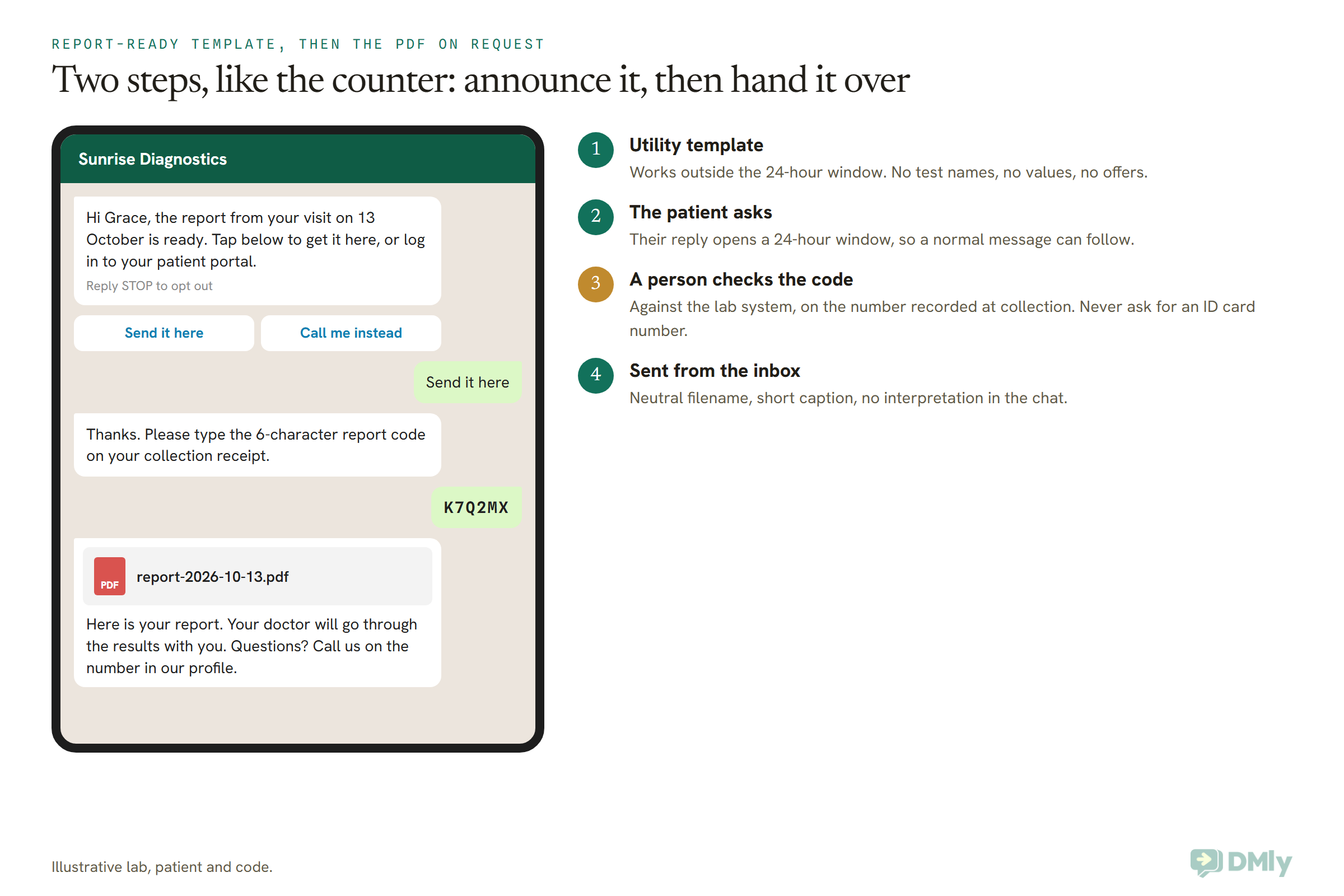
The safest way to send lab reports on WhatsApp is in two steps: an approved utility template that says the report is ready, then the PDF itself only after the patient replies and passes your check. It mirrors the counter: you announce that something’s waiting, and you hand it over to the person who comes to collect it.
Step one: the report-ready template
A patient whose report is ready usually hasn’t messaged you in the last 24 hours, so their window is closed. Outside the window WhatsApp only delivers templates Meta has approved. Our explainer on how WhatsApp’s 24-hour messaging window works covers the rule in full.
A report-ready notice belongs in the Utility category. Meta’s template categorization rules say a utility template must be non-promotional and specific to the user, such as an update about a service they bought. “Your report is ready” fits. Add “Book your next full-body check-up at 20% off” and the whole template becomes marketing, with marketing prices and the stricter opt-in that goes with it. Our guide to WhatsApp message templates explained walks through the three categories.
Give the template two quick-reply buttons, such as “Send it here” and “Call me instead”. Buttons matter more than they look: in DMly a tapped button is simply an answer, while a patient who types just “cancel” or “end” gets a question asking whether they want to stop all messages or only offers (and on SMS is opted out on the spot), so never invite a patient to reply with either word.
Step two: the check, then the PDF
When the patient taps “Send it here”, their reply opens a 24-hour window, and now you can send a normal message. A member of your team asks for the report code from the receipt, checks it against your lab system, and attaches the PDF from the inbox. If the code doesn’t match, or the reply comes from a number that isn’t on the visit, nothing is sent and the patient is pointed to the portal or the desk.
Why a person and not a bot? DMly’s own Privacy Policy says to avoid submitting highly sensitive data into automated flows, and a lab report is about as sensitive as data gets. There’s also a practical reason: DMly’s Condition steps compare fixed text, not a value stored for each patient, so a flow can’t check a patient’s code against your lab system by itself. You could build that check by calling your own lab system from a flow, but that’s a development project and it automates the riskiest step. For most labs a trained person with a checklist is safer.
Job Four: Phone the Results That Can’t Wait
Critical results never travel by WhatsApp alone. A critical result is one far enough outside the normal range that it may mean a life-threatening situation, and the person who needs it first is the clinician responsible for the patient, not a chat thread. The Joint Commission’s laboratory safety goal asks labs to have written procedures for who reports critical results, to whom, and how fast. That’s a phone call with a name at each end.
WhatsApp fails this job in quiet ways. A message can sit unread on a phone that’s switched off. A template can be paused by Meta. A patient can have opted out of your messages months ago, and in DMly an opted-out contact receives nothing, including messages your team types by hand, until they’re resubscribed. None of those failures shouts at you.
Three groups of results deserve a person, not a PDF:
- Critical values. Phone the requesting clinician, following your lab’s procedure. If you also contact the patient, do it by phone.
- Results that change a life. A positive HIV or other infection test, a pregnancy result, a cancer biopsy, a genetic finding. Ask the requesting doctors how they want these given. Many prefer to give them face to face, and a PDF arriving at 11pm with nobody to ask is a hard way to learn news like that.
- Results the patient will want explained. Don’t interpret results in the chat, and don’t let an AI assistant try. If you use DMly’s AI replies for booking questions, switch on its Hand over to a human tool and tell it to hand over the moment anyone asks about a result. DMly’s own Terms say highly sensitive personal data shouldn’t go into AI workflows, so never upload patient reports to the AI Knowledge files your assistant can search.
For the conversations that do happen on WhatsApp, the policy’s escalation rule is a gift: put a phone number in every report message and make “Call me instead” a button. Our guide to building a WhatsApp appointment bot for a clinic shows how to keep automation to bookings and pass everything clinical to a person.
Patient Consent for WhatsApp Report Notices: What to Ask at Collection
Ask at collection, in plain words, whether the patient wants report notices on WhatsApp, say exactly what you’ll send, and record the answer against the visit. WhatsApp’s policy requires opt-in, India’s DPDP Act wants consent that’s specific, and Nigeria’s NDPA names consent as one route to processing health data. One clear question covers a lot of ground.
A consent line for your collection form might read:
“May we send a WhatsApp message to this number when your report is ready? The message won’t name your tests or results. If you ask us to, after a quick check, we can also send the report itself to this number on WhatsApp. You can collect it at the desk or log in to our patient portal instead. Reply STOP at any time to stop our messages.”
That separates the two things a patient might agree to: the notice, and the report. Some patients will say yes to one and not the other, and that’s fine. Record which. If you also want to send health check-up offers, that’s marketing, and it needs its own separate opt-in. In Nigeria the GAID makes that explicit. Our guide to WhatsApp opt-in and how to prove consent covers recording it properly.
For a US covered entity, remember that consent to WhatsApp messages doesn’t create a BAA and doesn’t change Meta’s terms. Consent is necessary on WhatsApp. It isn’t, on its own, permission to send health information through it.
Report-Ready WhatsApp Templates You Can Copy
Every template below is written to stay sealed: no test names, no values, a way to reach a person, and nothing promotional, so each can be submitted as Utility. Replace the square brackets with variables when you build them. Meta wants text around variables, so none of these starts or ends with one.
1. Sample received (Utility)
Hi [Name], we’ve received your sample from [date] at [Lab]. We’ll message you here when your report is ready. Questions? Call us on [phone].
Sets expectations and cuts “is it ready yet?” calls. It’s specific to a service the patient bought, so it’s utility.
2. Report ready, collect from the portal (Utility)
Hi [Name], the report from your visit on [date] is ready. You can view it securely in your patient portal or collect it from our front desk.
Buttons: Open portal [link] / Call us
The middle-column default. Nothing on the phone but a pointer.
3. Report ready, can send here on request (Utility)
Hi [Name], the report from your visit on [date] is ready. Tap below to receive it here after a quick check, or log in to your patient portal.
Buttons: Send it here / Call me instead
Footer: Reply STOP to opt out
Only for patients who said yes to the report itself at collection.
4. The identity check (a normal message inside the window)
Thanks, [Name]. To keep your report private, please type the 6-character report code printed on your collection receipt.
Not a template: the patient’s reply has opened the window, so a team member types or inserts it as a saved reply.
5. Sending the report (a normal message inside the window)
Here is your report. Your doctor will go through the results with you. If you have questions, please call us on [phone].
Attached: report-[date].pdf
6. Report delayed (Utility)
Hi [Name], your report from [date] is taking a little longer than expected. We’ll message you as soon as it’s ready. If you need it urgently, please call us on [phone].
Say nothing about why. “We need to repeat a test” invites worry and questions you shouldn’t answer in a chat.
7. Your doctor would like to speak to you (Utility)
Hi [Name], your doctor at [Clinic] would like to speak with you about your recent visit. Please call us on [phone] or tap below to book a time.
Buttons: Book a call [link] / Call now
For a clinic, not the lab. Content-free on purpose. It’s specific to the patient’s care, so it should pass as utility; never use it to sell anything.
8. What not to send as Utility (this one is Marketing)
Hi [Name], it’s been a year since your last full-body check-up! Book now and get [offer] off our annual health package.
Buttons: Book now [link]
Footer: Reply STOP to opt out
Persuasive, promotional and not tied to a request, so it’s marketing, priced as marketing, and it needs marketing consent. Keep it out of your results flow entirely. If you run recall reminders for follow-up tests, our guide to automating patient recall messages keeps the wording general so a reminder doesn’t double as a diagnosis.
Where Copies of a Lab Report End Up, and for How Long
Every report you send on WhatsApp leaves copies in at least four places, and only one of them is your official record. Plan retention for each before you send the first one.
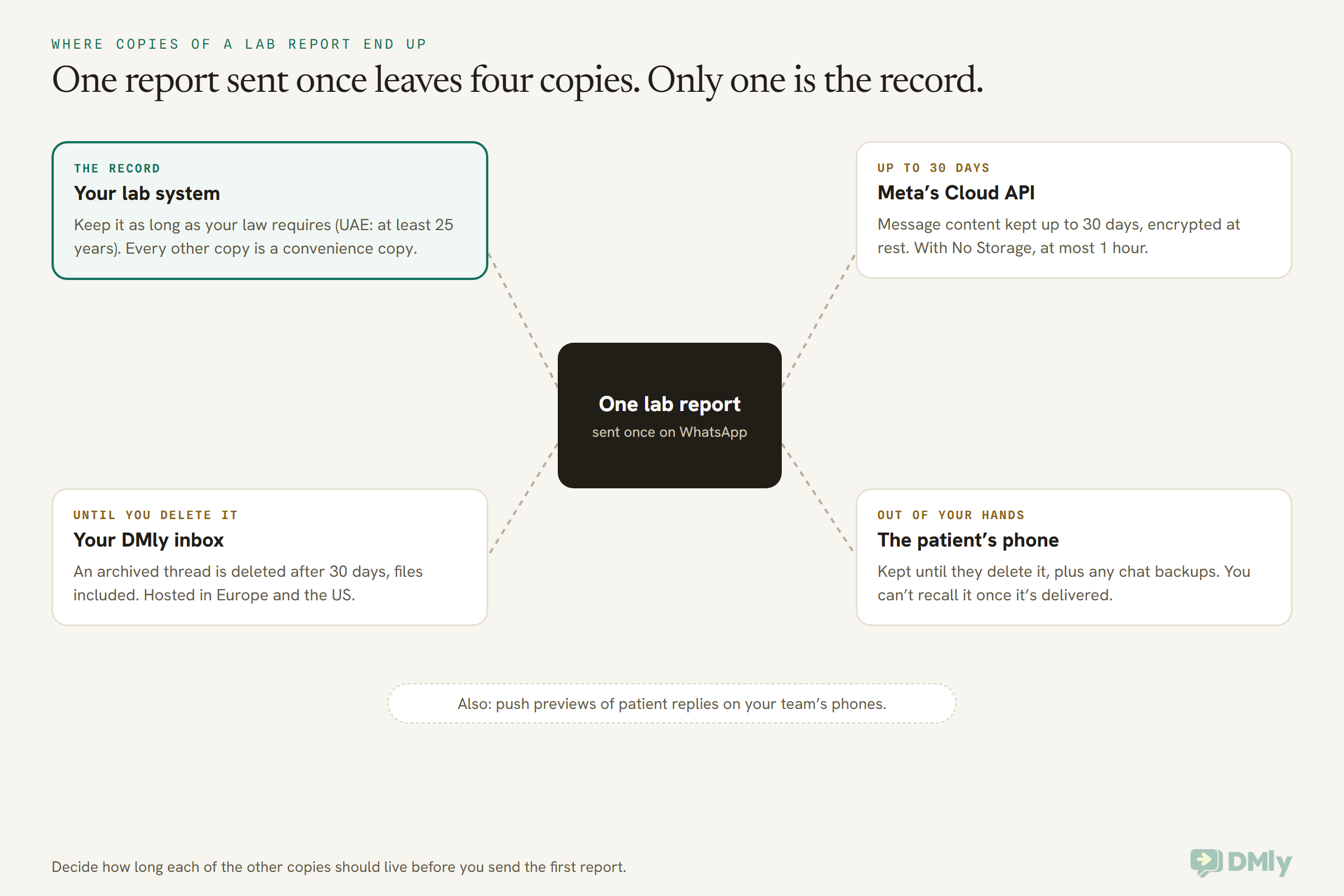
Here’s what each copy means for you:
- Your lab system holds the official report. Retention rules belong to it: the UAE’s health ICT law, for example, says at least 25 years from the patient’s last procedure. Never treat a chat thread as the record.
- Meta’s Cloud API keeps message content for up to 30 days, encrypted at rest, unless the number uses No Storage. You can’t delete Meta’s copy from your inbox.
- DMly keeps your conversations, and the files in them, until you delete them. DMly’s docs say there’s no retention setting that ages data out for you. Two actions do delete: archiving a conversation deletes it for good 30 days later, messages and attachments included, and deleting a contact removes their whole message history and its files straight away, with the rest of the record recoverable from Recently deleted for 30 days unless you use Delete permanently. Archiving can also delete the contact if that was their only conversation, so think before you use it as a clean-up tool.
- The patient’s phone keeps the report for as long as they like, along with any backups. That’s their copy, and once it’s delivered you can’t take it back. It’s one more reason the identity check matters.
If your rules say files must stay in storage you control, DMly has a custom storage option. The workspace owner connects an S3 or S3-compatible bucket under Workspace Settings → Custom storage, and from then on new media goes there: files patients send you, and files your team sends from the DMly mobile app. It applies to new media only, and the docs don’t say whether files your team sends from the web inbox go there too, so ask DMly before you rely on it for outgoing reports.
One more trap: DMly’s contact profiles have a private Documents card that only signed-in team members can download from, which is a reasonable place for a consent form. Generated client letters are different: their PDF carries a signed public link and a QR code that anyone holding it can open without logging in. Don’t produce reports as client letters.
How to Set Up Lab Report Alerts on WhatsApp in DMly
In DMly you can build the report-ready template, send it automatically when your lab system says a report is ready, and have a trained person hand over the PDF from the inbox. DMly isn’t a lab system or a patient portal: its client portal shows booking history only, so the “portal” in your messages should be your lab system’s own. Here’s the setup, using only what DMly’s documentation describes.
- Connect your WhatsApp number and write a privacy notice. WhatsApp’s policy expects a published privacy policy. Say in it that you use WhatsApp for report notices and, if you do, for reports on request.
- Build the report-ready templates. Go to Messaging → Templates → Add template, name it (lowercase letters, numbers and underscores, such as
report_ready_portal), choose Utility and your language, write the body with Add variable for the name and date, and add your buttons. Saving submits it to Meta as Pending. Only Approved templates can be sent, and editing an approved template sends it back to Pending until Meta re-reviews it, so finish the wording before you go live. If one is rejected, our guide to fixing a rejected WhatsApp template covers the usual causes. - Decide how the notice gets triggered. The cleanest route is your lab system calling DMly’s REST API when a report is signed off: the send-message endpoint takes a contact, a template and the values for its variables, and returns an error rather than sending if the template or window rules aren’t met. If you’d rather start without a developer, a team member can send the template from the inbox’s template picker for each finished report. DMly’s Tag applied and Field changed triggers can’t be narrowed to one tag or field yet, so they’re a clumsy fit for this job.
- Write saved replies for the check and the handover. Templates 4 and 5 above work well as saved replies, so every team member uses the same words.
- Hand over the PDF from the inbox. When the patient taps “Send it here”, their reply opens the window. The team member checks the code against your lab system, renames the PDF to something neutral, attaches it with Attach file, and sends it with the short caption.
- Lock down who can see patient chats. Use roles to mask phone numbers and emails for people who don’t need them, limit members to the WhatsApp number they work on, and keep contact export with admins. Ask everyone to switch on two-factor authentication for their own login.
- Keep the bot out of it. If you run an AI assistant or flows on the same number for bookings, make sure they hand over to a person for anything about results, and that patients can reach a human quickly.
- Get the paperwork. If your law expects a written processor contract (the GDPR, UK GDPR and Nigeria’s NDPA all do), contact DMly for its signed data processing agreement, and ask about data location if your regulator cares where data sits.
What DMly’s docs don’t say: DMly’s template builder offers Document as a header type, reviewed by Meta against a sample PDF of up to 100 MB, and Meta’s own platform lets a business attach a different file to each send. DMly’s documentation doesn’t say whether you can attach a different PDF for each patient when you send a document-header template from a broadcast, a flow or the API. Treat that as unconfirmed. The reply-first route above doesn’t need it, and it’s the safer design anyway, because a report pushed inside a template arrives before anyone has checked who’s holding the phone.
What it costs to send a report notice
Meta charges per delivered message, and since 1 October 2026 the rules have changed in two ways that matter here. Utility templates are charged, including ones sent inside an open window. And the normal messages your team types inside the window, such as the code request and the PDF, are service messages: free for the first 1,000 a month on each number, then charged. Our guide to the WhatsApp pricing change on 1 October has the detail. DMly adds no markup on Meta’s rates.
For the bigger picture of what WhatsApp can do around reports, from bookings to recalls, our pillar guide to WhatsApp automation for clinics covers the logistics side end to end.
Five Labs, Five Setups
The right setup for lab reports on WhatsApp depends on where you are and what you test for. These are illustrations, not real businesses.
- A physician practice in Ohio with an in-house lab. A HIPAA covered entity. Results go through its patient portal, backed by a BAA. If it uses WhatsApp at all, it’s for general questions like opening hours, and its compliance officer decides whether even a content-free “check your portal” notice is acceptable.
- A pathology lab in Pune. Under the DPDP Act. It asks two separate consent questions at collection (notice, and report on request), prints a report code on every receipt, sends the report-ready template automatically from its lab system, and hands over PDFs from the inbox after the code check. HIV and biopsy results are released through the referring doctor.
- A diagnostic centre in Lagos. Under the NDPA, where health status is sensitive data. It records consent for the specific purpose, keeps a written processor agreement with its messaging platform, and asks its lawyer about the cross-border transfer rules, since Meta’s local storage list doesn’t include Nigeria. Promotional check-up packages go only to patients who gave separate marketing consent, as the GAID requires.
- A private clinic in Manchester. UK GDPR, where test results are special category data. It relies on the health care condition to process results, sends content-free notices on WhatsApp, and keeps the reports themselves in its clinical system’s portal, because that’s where its security controls already live.
- A day-surgery clinic in Dubai. Under the UAE’s health ICT law, which keeps health data in the country. It sends a content-free notice on WhatsApp and points patients to a portal hosted in the UAE, and it doesn’t send PDFs on WhatsApp unless its health authority has cleared it.
Frequently Asked Questions
Is it legal to send lab reports on WhatsApp?
It depends on your country. Meta’s terms and policy forbid sending health information on WhatsApp where local law restricts where it can go. In the US, a HIPAA covered entity shouldn’t send results on WhatsApp at all. In India, Nigeria and the UK, the law sets conditions (consent or a health care basis, security, minimum necessary, deletion) rather than a ban. In the UAE, health data generally can’t be stored or processed outside the country. Ask a lawyer in your country before you start.
Can a US lab send test results on WhatsApp?
No, not if it’s a HIPAA covered entity. Meta’s terms say Meta isn’t a business associate, won’t sign a BAA, and that the platform isn’t HIPAA compliant. Use your patient portal. The most a US lab might send on WhatsApp is a notice with no health content, and only with its compliance officer’s agreement.
Is a “your report is ready” message a utility or marketing template?
Utility, as long as it’s non-promotional and specific to the patient’s own service. Meta’s categorization rules treat account and service updates as utility. Add an offer, a discount or a push to book something new and the template becomes marketing.
Can I send the PDF report inside a WhatsApp template?
Meta’s platform supports templates with a document header, and DMly’s template builder offers Document as a header type. DMly’s docs don’t confirm that a different PDF can be attached for each patient at send time. The safer pattern is a content-free template first, then the PDF as a normal message after the patient replies and passes an identity check.
Should critical lab results be sent on WhatsApp?
Not on their own. A critical result should go by phone to the responsible clinician, following your lab’s written procedure, and any contact with the patient about it should be by phone too. WhatsApp messages can go unread, and templates can be paused, without anyone noticing.
How do I check a patient’s identity before sending a report on WhatsApp?
Send only to the number recorded and read back at collection, never to a number someone types into the chat. Print a short report code on the collection receipt, and have a team member check the code the patient types against your lab system before sending the PDF. Don’t ask for ID card numbers: WhatsApp’s policy forbids requesting them.
How long does WhatsApp keep a lab report?
Meta’s Cloud API keeps message content for up to 30 days, or at most an hour with its No Storage option. Your messaging platform keeps its copy until you delete it, and the patient’s phone keeps theirs until they delete it. Your lab system remains the official record.
The Envelope, Resealed: Sending Lab Reports on WhatsApp Safely
The sealed envelope never felt like a security system, but it was one. It knew who it was for, kept its contents to itself, waited at the counter until the right person asked, and stepped aside when the news was urgent enough for a phone call.
You can send lab reports on WhatsApp in a way that keeps all four of those promises, but only on purpose. In the US, that means keeping results in your portal and off WhatsApp. Everywhere else, it means starting with a report-ready notice that says nothing, sending the report itself only where your law allows it and the patient asked, checking who’s holding the phone first, and picking up the phone for anything critical.
Start small. Write your consent question for the collection desk, submit one utility template, and print a report code on tomorrow’s receipts. Then take this guide to your lawyer and the doctors who send you samples, and decide together how far to the right you’re comfortable going.
Writing about WhatsApp automation, bookings and growth for local business.
Turn WhatsApp into your busiest channel.
Start free and run message, bookings, payments and reviews in one place.
