
Best Tidio Alternatives for Small Businesses in 2026

If you’re comparing Tidio alternatives, there’s a good chance you’ve just looked at a small counter in your Tidio panel. It sits behind the Usage and plan button, and it reads something like 94/100. It works a lot like a prepaid electricity meter, or the credit on a pay-as-you-go phone: it ticks down quietly while you work, and nobody looks at it until it’s nearly empty.
The awkward part is when it ticks fastest. A slow week barely moves it. A launch, a sale or a good review that sends people to your site moves it a lot, because every chat your team answers is one more unit gone. The meter runs down on your best days, not your worst ones.
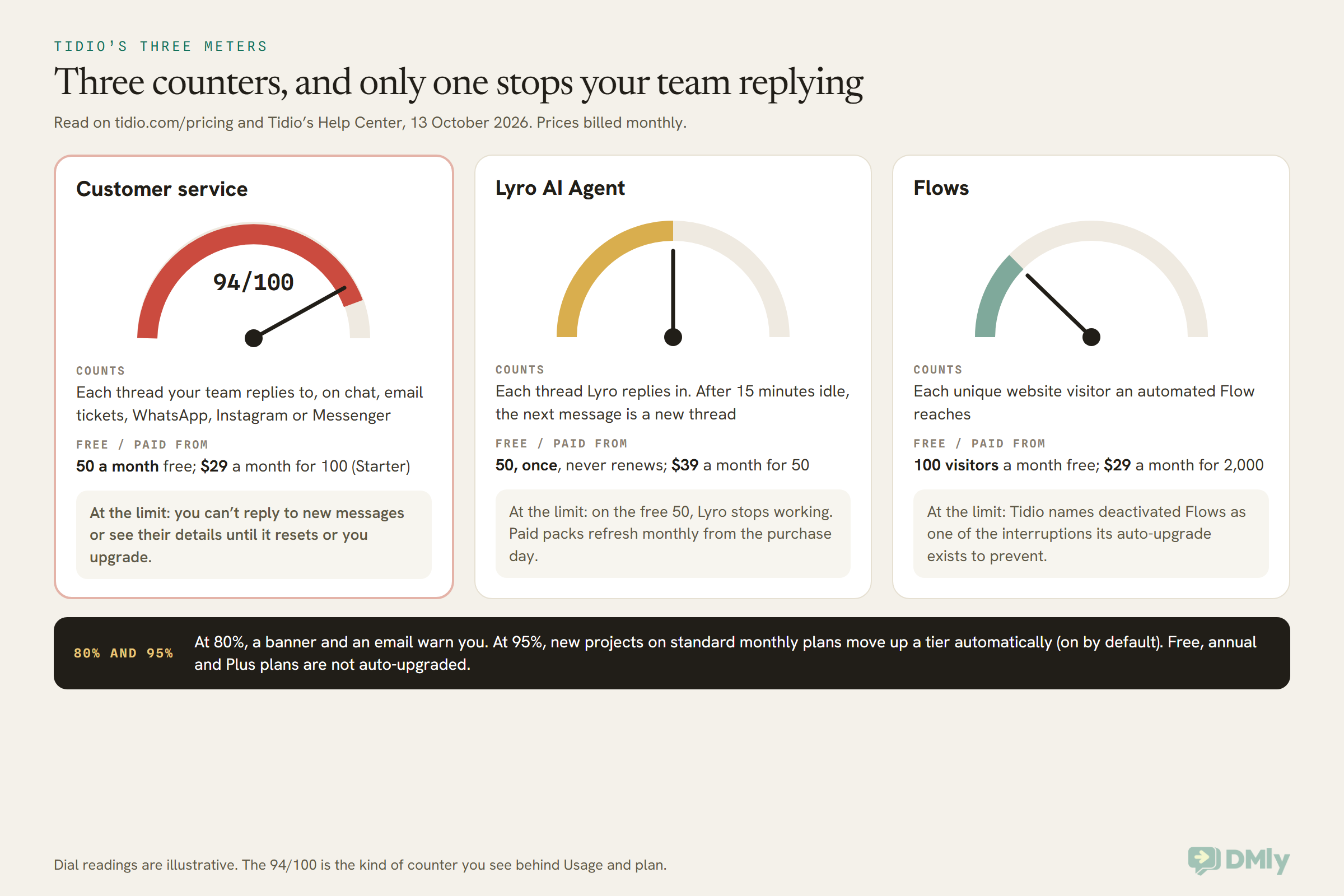
And when it runs out, it isn’t a gentle nudge. Tidio’s own help centre says that once you reach the monthly limit, you can no longer respond to incoming messages or see their details until the quota resets or you upgrade. On newer monthly plans, Tidio upgrades you automatically at 95% instead, which keeps the chat open and raises the bill.
None of that makes Tidio a bad tool. It’s a polished live chat with a capable AI agent, and for some businesses it’s still the right one. But the meter is usually one of three things people are really outgrowing when they start looking. The other two are a website chat that doesn’t reach customers on WhatsApp and Instagram, and the limits on Lyro, Tidio’s AI agent.
In this guide, we’ll read Tidio’s pricing at source, then take each of those three in turn and show which alternatives solve it, what they charge for instead, and what a busy month would cost on four of them. We’ll be honest about when Tidio is still the better choice, where DMly fits and where it doesn’t, and how to switch without dropping a chat. Every price was read on the vendor’s own page on 13 October 2026.
Why Do Small Businesses Look for Tidio Alternatives?
Small businesses look for Tidio alternatives when they outgrow one of three things: a price that rises with every human conversation, a website-first chat that doesn’t follow customers onto WhatsApp, or an AI agent sold by the conversation. Knowing which one is yours matters, because the right alternative for each is different.
- The meter. Tidio counts every conversation your team replies to, on every channel, against a monthly limit. If your chats are growing, so is your bill, and the plan you picked in a quiet month may not fit the busy one.
- The channels. Tidio connects WhatsApp, Instagram and Messenger, but it’s built around the chat bubble on your website. If most of your customers message you on WhatsApp first, you may want a tool built the other way round.
- The AI limits. Lyro is sold in packs of conversations, separately from the human plan. The free 50 conversations are a one-off, and a customer who comes back after 15 minutes of quiet starts a new counted conversation.
There are also reasons that aren’t really reasons. If you simply want a nicer-looking widget, or you read that another tool “resolves more chats”, test that on your own site before you move. Every vendor in this guide quotes its own resolution rates, and none of them is a number you can check.
Tidio Pricing in 2026: Three Meters, Read at Source
Tidio pricing runs on three separate meters: billable conversations for your team, Lyro conversations for the AI agent, and visitors reached for Flows, its automated sales messages. Each is bought and counted on its own, so the price on the plan card is only one of them.
Here’s the human side, read on tidio.com/pricing on 13 October 2026:
- Free: 50 billable conversations a month, plus a one-off 50 Lyro conversations and 100 Flows visitors a month.
- Starter: $29 a month billed monthly, or $24.17 a month billed annually, for 100 billable conversations.
- Growth: from $59 a month billed monthly ($49.17 annually) for 250 billable conversations, rising in steps: $89 for 400, and up to $349 for 2,000. Growth adds automatic chat assignment, permissions, macros and advanced analytics.
- Plus: from $300 a month plus usage, with custom limits, departments, custom branding and discounted usage rates. Premium is by quote.
Self-serve plans include up to 10 seats, so Tidio doesn’t charge per teammate. Removing the Tidio branding is a separate add-on at $20 a month billed monthly. There’s a 7-day trial with no card, after which an unpaid account drops to the Free plan.
Then come the add-ons. Lyro starts at $39 a month (billed monthly) for 50 conversations and goes up to $700 for 1,000. Flows starts at $29 a month for 2,000 visitors reached. Annual billing takes about two months off each.
What each meter counts
Tidio defines a billable conversation as any live chat, ticket, email or social media conversation that includes a message from a human agent. Unanswered messages and spam don’t count, and a long thread counts once. Replies from Lyro and Flows don’t count here either.
The catch is the word “social”. Tidio’s help centre says the limit also applies to conversations through its Messenger, Instagram and WhatsApp integrations and to email tickets. Every channel you add draws on the same meter.
A Lyro conversation is any interaction with at least one reply from the AI agent. Lyro can answer a dozen times and it still counts once. But Tidio’s help centre adds a detail that matters: a thread closes after 15 minutes of inactivity, and a new message after that starts a new thread, counted again. If Lyro hands over to a person straight away, nothing is deducted.
What a busy month costs on Tidio
Take an online boutique with two people on the chat. In a busy month, the team answers 260 conversations and Lyro finishes 180 on its own.
260 is more than Growth’s 250, so the next step up is 400 conversations at $89 a month. 180 Lyro conversations need the 200 pack at $140. That’s $229 a month billed monthly, or about $191 a month billed annually, before the $20 branding add-on. In a quiet month of 90 chats, Starter at $29 would have covered the human side.
That swing is the meter at work. It’s fair, in a sense: you pay more when you’re busier. But it’s hard to budget for, and it’s why the first group of Tidio alternatives below are the ones that don’t count human conversations at all.
Outgrowing the Meter: Tidio Alternatives That Don’t Charge Per Conversation
If the conversation meter is your problem, look at tools that charge a flat price per workspace, or that don’t charge for human chats at all: Crisp, tawk.to, HubSpot’s free live chat and DMly. Just know that every tool meters something. The question is whether it meters something you can predict.
Crisp
Crisp is the closest like-for-like swap. It’s a website chat with a shared inbox, priced per workspace rather than per conversation, and its pricing page says plainly that there are no limits on the number of conversations.
There’s a Free plan with 2 seats. Mini is $45 a month with 4 seats, Essentials $95 with 10 seats, and Plus $295 with 20 or more. Extra agents are $10 a month each. Each plan includes AI credits ($5, $25 or $75) and Crisp’s estimate of “around” 90, 450 or 1,350 automated conversations. So the AI is metered, but the human chat isn’t. There’s a 14-day trial with no card.
Pick it if: you want Tidio’s shape at a fixed monthly price and your team is small. Think twice if: you need WhatsApp or Instagram, because the omnichannel inbox starts on Essentials at $95, and a workspace holds one of each messaging channel unless you pay for more.
tawk.to
tawk.to is free, and has been for over a decade. Its pricing page is an essay on why. You pay $29 a month only if you want to remove the “Powered by tawk.to” line, and its AI Assist chatbot starts from $29 a month, with a free tier for sites with low chat volume. It also sells trained human agents to answer your chats for $1 an hour.
Pick it if: budget is the deciding factor and the chat is mostly for answering questions on your site. Think twice if: you need WhatsApp. The channels its AI Assist page lists are live chat, Messenger, SMS, Telegram and email.
HubSpot free live chat
HubSpot’s live chat and chatbot builder are free inside its free CRM, and every chat is logged against the contact. That makes it a sensible choice if you already use HubSpot for sales. We couldn’t read its paid Service Hub prices on 13 October 2026 (the pricing page didn’t load in our browser), so we’re not quoting them. Check the paid tier you’d need before you build on the free one.
DMly
DMly doesn’t charge for human replies. Your team can answer as many conversations as it likes on any channel, including the live chat widget, and none of them is counted. What the plan does count is people (3, 6 or 15 seats), active contacts, broadcast and template messages, and AI replies on DMly’s shared AI.
Two details make that easier to live with than a hard stop. Going over your active contacts allowance never blocks a message or a new contact, according to DMly’s billing docs; you get an alert instead. And when the monthly AI replies run out, only the AI step pauses until the next month; the rest of the automation carries on. Plans are $29, $65 and $149 a month billed yearly, or $39, $79 and $199 monthly.
Pick it if: you want an unmetered team inbox and your customers also message you on WhatsApp or Instagram. Think twice if: your support runs on email, which DMly doesn’t handle. More on that below.
A different meter: the per-seat tools
LiveChat, Intercom, Zendesk and Freshchat don’t count conversations either. They charge per person instead. That’s predictable when your team size is stable, and it gets expensive quickly as you add part-time helpers. A two-person shop pays for two seats; a shop that wants five people able to jump into the inbox on a Saturday pays for five. We cover their AI prices in the Lyro section below.
Outgrowing Website-Only Chat: Tidio Alternatives for WhatsApp, Instagram and Messenger
If your customers would rather message you on WhatsApp or Instagram than type into a bubble on your site, the best Tidio alternatives are tools built around those apps, with the website chat as one door among several. Tidio’s plan table does list WhatsApp, Instagram and Messenger integrations. The difference is which channel the tool is built around, and what each extra channel costs you.
It’s worth asking where your enquiries really start. A salon in Dubai, a tutor in Pune or a fashion seller in Lagos may get ten WhatsApp messages for every website chat. A software company in Seattle may get the opposite. If you’re the first kind, a website-first tool means your main channel is a bolt-on, and on Tidio every one of those WhatsApp threads your team answers draws on the same billable meter as the website chat.
Whatever you choose, Meta’s own charges apply on top for any tool that connects through the WhatsApp Business Platform. Since 1 October 2026, Meta charges for service messages (your free-form replies inside the 24-hour window), with the first 1,000 a month free for each business number, and for utility messages sent inside the window. We explain the change in the WhatsApp pricing change on 1 October. Check whether a tool passes Meta’s rates through at cost or adds its own.
DMly
DMly puts WhatsApp, Instagram, Facebook Messenger, TikTok, Telegram, SMS and a website live chat widget into one unified inbox. The inbox always shows every connected channel, so your team doesn’t switch screens. Meta’s WhatsApp charges are paid to Meta directly, with no markup from DMly, according to its pricing page.
The widget is designed as a front door to WhatsApp. It can show buttons for your WhatsApp, Messenger, Instagram and Telegram, and you can require a phone number before the chat starts, so you can carry on the conversation on WhatsApp after the visitor leaves. If you’re new to the idea, our guide to an omnichannel inbox explains how routing and assignment work across channels.
respond.io
respond.io is a WhatsApp-first inbox priced by the contacts you talk to each month. Plans were $79, $159 and $279 a month at 1,000 monthly active contacts when we read the page on 13 October 2026. Our respond.io review covers which features sit on which plan, and it’s worth reading before you assume the cheapest plan does everything.
Wati
Wati is a WhatsApp Business API platform with a team inbox, campaigns and chatbots. Its plan prices didn’t render in our browser on 13 October 2026, so we’re not quoting them here. What did show: Pro includes 5 users with extra users at $24 a month, messages are charged on Wati’s own rate card, and its Astra AI agents are an add-on priced separately. Our Wati alternatives roundup has the full price check.
Crisp Essentials, Freshchat and Zendesk Suite
If you’d like to stay with a support-style tool and add messaging apps, three of the website-first tools do it at a higher tier. Crisp’s Essentials plan ($95 a month) connects WhatsApp Business, Instagram, SMS and more. Freshchat lists social messengers and text messaging, including WhatsApp, from its Growth plan at $19 per agent a month billed annually. Zendesk’s Suite plans include social and messaging channels such as WhatsApp, with “additional fees” noted on its pricing page.
For a wider list of WhatsApp tools, including ones without a website chat at all, see our guide to the best WhatsApp business software for small businesses.
Outgrowing Lyro: Tidio Alternatives for an AI Chatbot That Fits Your Budget
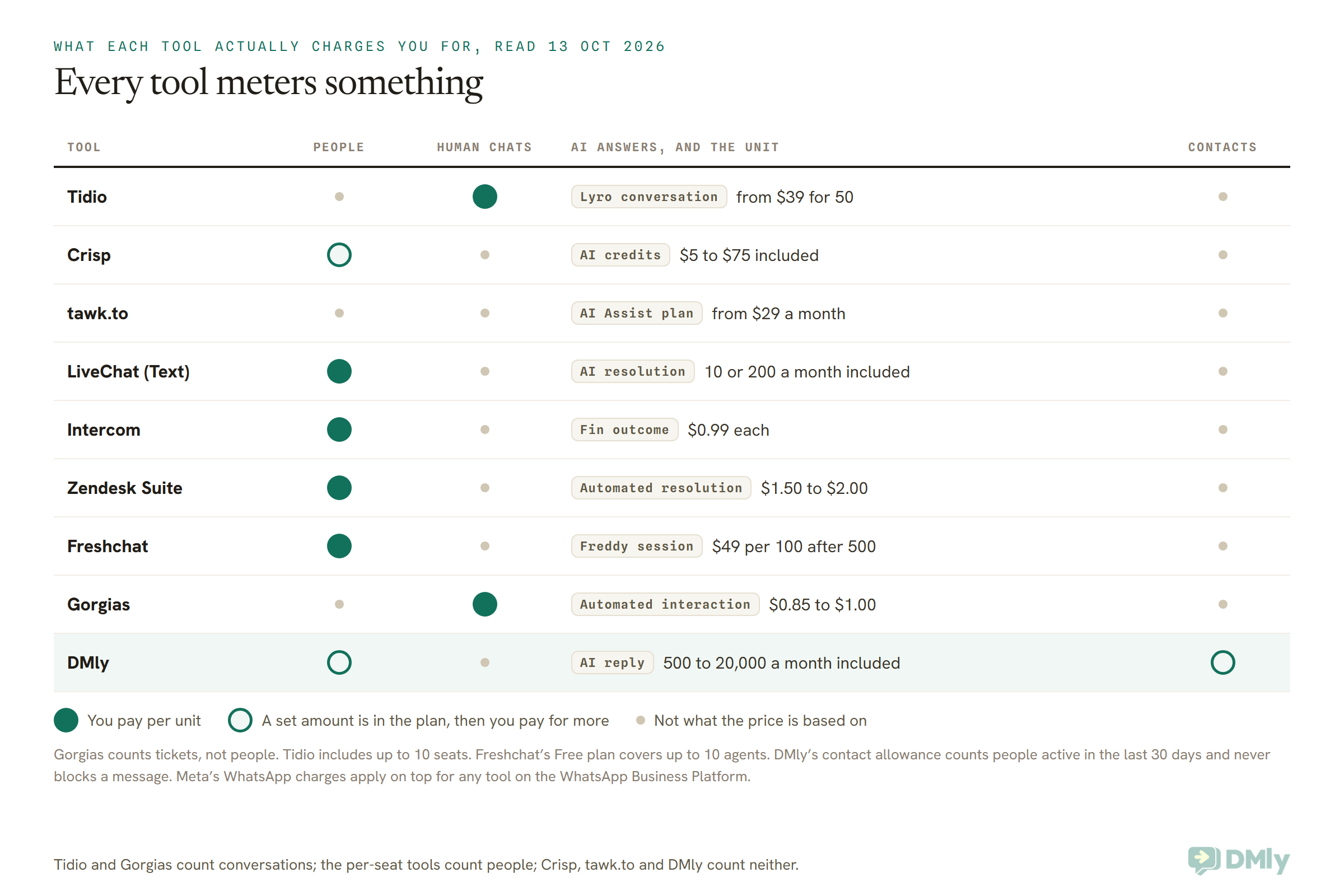
If Lyro’s limits are the problem, the alternatives differ less in how clever their AI is and more in what they count as one AI answer. Tidio counts a conversation thread. Others count an outcome, a resolution, a session, an interaction or a single reply. The same month of chats can cost very different amounts depending on the unit.
Here’s how each one counts, as printed on its own pricing page on 13 October 2026.
- Tidio Lyro: one conversation is a thread with at least one Lyro reply. A new message after 15 minutes of quiet starts a new one. From $39 a month for 50, billed monthly.
- Intercom Fin: $0.99 per outcome. An outcome counts when the customer confirms the issue is resolved, doesn’t ask for more help after Fin answers, or Fin completes a workflow, including a handoff. You’re charged once per conversation. Seats are on top: $29, $85 or $132 per seat a month billed annually. Fin can also be added to another helpdesk with no seat costs, with a minimum monthly commitment.
- Zendesk: AI agents come with Suite plans, which include a small allowance of automated resolutions per agent each month. Beyond that, resolutions cost $1.50 each committed in advance, or $2.00 pay as you go.
- Gorgias: AI Agent is on every plan and billed per automated interaction, at $1.00, $0.90 or $0.85 depending on plan.
- Freshchat: Freddy AI Agent includes the first 500 sessions, then costs $49 per 100 sessions.
- LiveChat (Text): Essential includes 10 AI resolutions a month and Growth 200. Extra packs of 50 cost $49.50.
- Crisp: AI credits are included with each plan ($5, $25 or $75), along with its estimate of how many automated conversations that covers.
- tawk.to: AI Assist from $29 a month, with a free tier for low volume.
- DMly: AI is included on every plan. Starter covers 500 AI replies a month on DMly’s shared AI, Growth 5,000 and Premium 20,000. On Premium you can connect your own OpenAI, Claude, Gemini or DeepSeek key, and replies on your own key aren’t counted by DMly at all; you pay your AI provider instead.
Notice that DMly counts replies, not conversations. That’s a smaller unit, so the allowance numbers look bigger than they are. A conversation where the AI answers four times uses four replies. We applied the same “what happens on the next reply” test in our Zipchat alternative review, and it’s worth doing for any AI tool you shortlist.
The other question is what the AI can do. Lyro answers from your content and can run Actions. Gorgias and Intercom lean towards ecommerce and support workflows. DMly’s AI step can use booking tools to check availability and book, reschedule or cancel an appointment inside the chat, which matters if you run a salon, a clinic or a studio. Our guide to building an AI website chatbot that can book appointments walks through it, and the WhatsApp AI chatbots guide covers training and handing over to a human.
One Busy Month, Four Bills: What Tidio Alternatives Would Cost
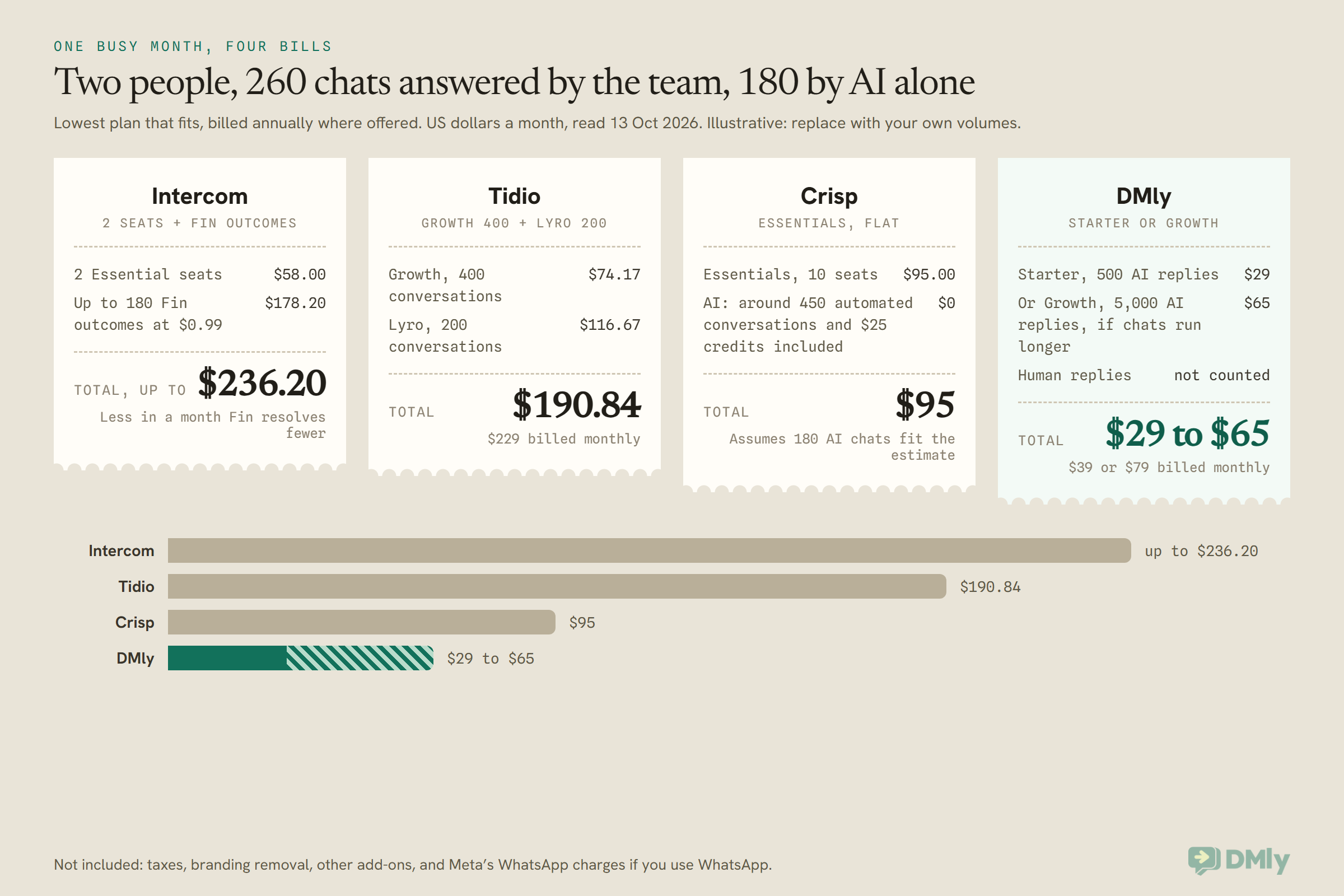
For a small shop with two people on chat, 260 conversations answered by the team and 180 handled by AI alone, the monthly bill ranges from about $29 to $236 depending on the tool and how it counts. Here’s the same boutique from earlier, priced on four tools.
These are illustrative sums, built on assumptions you should replace with your own numbers. Each uses the lowest plan that fits, billed annually where the vendor shows an annual price.
- Tidio: Growth at 400 conversations ($74.17) plus Lyro at 200 ($116.67) = $190.84 a month. Billed monthly, it’s $229.
- Intercom: two Essential seats ($58) plus up to 180 Fin outcomes at $0.99 ($178.20) = up to $236.20. You only pay for the conversations Fin actually resolves, so a month where it resolves fewer costs less.
- Crisp: Essentials at $95 a month flat, which includes 10 seats and Crisp’s estimate of around 450 automated conversations. This assumes your 180 AI conversations fit inside that estimate and the $25 of AI credits.
- DMly: Starter at $29 covers 500 AI replies, about 2.7 per conversation at this volume. If your AI conversations run longer, Growth at $65 covers 5,000. Human replies aren’t counted on either. Billed monthly, that’s $39 or $79.
Two caveats keep this honest. A quieter month changes the sums: at 90 chats and no AI, Tidio’s Starter costs $24.17 a month billed annually, and the free plans from Crisp or tawk.to may cover you outright. And a bigger team changes it again: Crisp’s price doesn’t move until you pass 10 seats, while DMly’s Starter has 3 seats and Growth 6, with extra seats at $10 a month.
Tidio Alternatives Compared: Prices Read at Source
The cheapest paid entry points among these Tidio alternatives range from $10 a month (Gorgias Starter) to $79 (respond.io), but the starting price tells you less than the unit each tool charges in. Every figure below was read on the vendor’s own pricing page on 13 October 2026, in US dollars.
| Tool | Paid plans from | What the price is based on | AI | Beyond website chat | Free plan or trial |
| Tidio | $29 a month billed monthly ($24.17 annually) | Billable conversations: 100 on Starter, 250 to 2,000 on Growth | Lyro from $39 a month for 50 conversations | WhatsApp, Instagram, Messenger, email | Free plan; 7-day trial |
| Crisp | $45 a month per workspace (Mini) | Flat per workspace; 4, 10 or 20+ seats | AI credits $5 to $75 included | WhatsApp, Instagram, SMS and more from Essentials ($95) | Free plan; 14-day trial |
| tawk.to | Free; $29 a month to remove branding | Nothing for the chat itself | AI Assist from $29 a month | Messenger, SMS, Telegram, email | Free |
| LiveChat (Text) | $19 per user a month annually ($25 monthly) | Per user | 10 or 200 AI resolutions a month; 50 more for $49.50 | Messenger, SMS via Twilio, in-app | 14-day trial |
| Intercom | $29 per seat a month annually | Per seat, plus usage | Fin $0.99 per outcome | WhatsApp and SMS, pay as you go | Free trial |
| Zendesk | $19 per agent a month annually (email only); $55 for Suite Team with chat | Per agent | Automated resolutions $1.50 to $2.00 | WhatsApp, Instagram, Facebook and more, extra fees | 14-day trial |
| Freshchat | $19 per agent a month annually | Per agent; Free plan up to 10 agents | Freddy: 500 sessions, then $49 per 100 | WhatsApp, SMS, Facebook, Instagram | Free plan |
| Gorgias | $10 a month (Starter, 50 tickets, monthly only) | Tickets: 50 to 5,000 a month, not per agent | $0.85 to $1.00 per automated interaction | Email, chat, social; voice and SMS add-ons | Free trial |
| respond.io | $79 a month at 1,000 monthly active contacts | Contacts you talk to each month | See our review | WhatsApp-first, plus social channels | See our review |
| DMly | $29 a month billed yearly ($39 monthly) | Seats, active contacts, broadcast messages, AI replies; human replies not counted | On every plan: 500, 5,000 or 20,000 AI replies; own key on Premium | WhatsApp, Instagram, Messenger, TikTok, Telegram, SMS | 7-day trial, no card |
HubSpot (free live chat in its free CRM) and Wati are left out of the table because we couldn’t read their paid prices on 13 October 2026. Prices exclude tax and change often, so check the vendor’s page on the day you buy.
When Tidio Is Still the Better Choice
Tidio is still the better choice if you run a Shopify store and want shop actions inside the chat, if email tickets are a big part of your support, or if its Flows are bringing you sales. Switching has a cost, and for these businesses it may not pay back.
- You’re a Shopify store that lives in the chat. Tidio lists native Shopify actions on its plan table. If your agents look up and act on orders from the chat all day, a tool without that is a step back. If you want even more ecommerce depth, Gorgias is built for exactly this and charges by tickets rather than people.
- Email is half your support. Tidio turns emails into tickets alongside the chat. Many of the WhatsApp-first tools, DMly included, don’t handle email at all. If that’s you, compare Tidio with Zendesk, Freshchat or Crisp, which all handle email.
- Flows are making you money. Tidio’s Flows start when a visitor takes a specific action on your site and nudge them towards buying. If you’ve built Flows that convert, rebuild and test them elsewhere before you cancel.
- Your volume is low and steady. At under 100 human chats a month, Starter is a fair price, and Free covers 50. The meter only hurts when it moves.
- You want Lyro on top of another helpdesk. Lyro is sold on its own and can be added to Zendesk and others, so you don’t have to leave your helpdesk to use it.
Before you leave for price alone, try two things. Check whether automatic upgrades are on, and switch them off if you’d rather decide yourself. And look at how many of your billable conversations were really “thanks!” messages your team didn’t need to answer, because unanswered messages don’t count.
Is DMly a Good Tidio Alternative? Where It Fits and Where It Doesn’t
DMly is a good Tidio alternative for a local or service business whose customers message on WhatsApp and social apps as much as on its website, and that wants bookings and payments in the same chat. It’s the wrong choice for email-heavy support teams and for Shopify stores that need a full order desk inside the inbox.
Where it fits
- One inbox for every channel. WhatsApp, Instagram, Messenger, TikTok, Telegram, SMS and the website widget land in the same list, and nothing closes itself on a timer. The live chat widget runs your flows, bookings and payments like any other channel.
- Human replies aren’t metered. Your team can answer as many conversations as it likes. The allowances are seats, active contacts, broadcast and template messages, and AI replies.
- AI on every plan. There’s no plan without AI. The AI Reply step starts on DMly’s shared AI with no setup, can answer from your own documents through AI Knowledge, and every plan can use AI-suggested replies in the inbox.
- Bookings and payments in the chat. The AI can check availability and book appointments, and you can take a deposit or full payment through Stripe, PayPal, Paystack, Flutterwave, Monnify, Razorpay, MyFatoorah or Mercado Pago. That’s a real difference from a support-only chat if you run a salon, clinic, studio or tutoring business.
- A path from website to WhatsApp. Ask for a phone number before the chat, show your WhatsApp button in the widget, and follow up on WhatsApp later. If a visitor leaves before you reply and you asked for their email, DMly emails them your answer.
Where it doesn’t
- No email inbox. DMly’s channels don’t include email. If customers email you as often as they chat, keep a tool that handles both.
- No store-order desk. DMly connects to Shopify and WooCommerce so automations can send order updates and answer “where is my order?”, but its docs say there’s no screen for browsing store orders inside DMly. A Shopify support team that refunds and edits orders from the chat should look at Tidio or Gorgias.
- A plainer widget. The accent colour is the only colour you control, and the “Powered by DMly” line can’t be removed on a plan bought directly. Visitors can send pictures and videos, not documents.
- No broadcasts to website visitors. Like any web chat, there’s no address to send to later. Capture a phone number and follow up on WhatsApp instead.
- Two records for one person. A visitor who types their number into the widget and later messages you on WhatsApp arrives as two contacts until you merge them. DMly does this on purpose, because a typed number isn’t proof of identity.
- A daily cap on new visitors. The widget accepts up to 500 brand-new visitors a day per workspace. That’s far more than a typical small business sees, but a high-traffic store should know it exists.
What it costs
Starter is $29 a month billed yearly ($39 monthly) with 3 seats, 3,000 active contacts and 500 AI replies. Growth is $65 ($79) with 6 seats, 10,000 active contacts and 5,000 AI replies. Premium is $149 ($199) with 15 seats, unlimited active contacts, 20,000 AI replies and your own AI keys. Extra seats are $10 a month. See the full breakdown on the DMly pricing page; there’s a 7-day trial with no card.
How to Switch From Tidio Without Dropping a Chat
The safest way to move off Tidio is to run both tools side by side for a week or two, swap the website snippet last, and cancel only after the new inbox has handled a busy day. Here’s the order that keeps every customer answered.
- Write down what you use. List your Tidio channels, Flows, Lyro answers, saved replies and integrations. This is your checklist for the new tool, and it stops you finding out what you relied on after it’s gone.
- Check what you can take with you. Before you cancel, look at what Tidio lets you export, such as contacts and conversation history, and save copies. Plan changes on Tidio take effect at the start of your next billing cycle, so you keep paid features until then.
- Move your knowledge first. The documents and FAQs Lyro answers from are the hardest part to rebuild. In DMly, add them as collections under AI Knowledge and point the AI Reply step at them.
- Build the new widget and test it off your site. In DMly, go to Bot setup, select Set up Live Chat, enter a Widget name and select Create widget. Then use Open test page in the Install panel to chat with your own bot without touching your website. Test chats are real contacts, so delete them afterwards.
- Connect your messaging channels. Add WhatsApp, Instagram and Messenger to the new inbox while Tidio still runs your site. Your team answers app messages in the new tool and website chats in Tidio for a few days.
- Swap the snippet. Remove Tidio’s code and paste the new one in your site’s footer or custom code box. Our step-by-step guide to adding a live chat widget to your website covers WordPress, Shopify, Wix and others.
- Cancel after a busy day. Once the new setup has handled a full, busy day without a missed chat, cancel Tidio. Check the automatic upgrade setting first, and any annual term still running.
Choosing a Tidio Alternative: Six Small Businesses, Six Answers
The right Tidio alternative depends on where your customers start the conversation and what you need the chat to do. These six businesses are illustrative, not customers, but each one shows a different answer.
- A Shopify boutique in Austin, Texas. Most chats are “where’s my order?” and returns, and two agents handle them from the store’s data. Answer: stay on Tidio, or move to Gorgias if the team grows and tickets climb. A messaging-first tool would be a step back here.
- A tutoring centre in Pune. Parents message on WhatsApp in the evening asking about batches and fees, and want to book a demo class. Answer: DMly, with the AI booking demo slots on WhatsApp and the website widget passing parents to WhatsApp.
- A fashion seller in Lagos. Orders start in Instagram DMs and finish on WhatsApp with a Paystack or Flutterwave link. Answer: DMly, because both apps share one inbox and payment links go out in the chat.
- A small software firm in Manchester. Customers email bug reports and chat on the website during UK office hours. Answer: Crisp or Freshchat, both of which handle email and chat in one inbox, at a price that doesn’t move with volume.
- A beauty salon in Dubai. Clients ask for prices and slots on WhatsApp and Instagram, and no-shows cost real money. Answer: DMly, with deposits taken at booking and reminders on WhatsApp.
- A one-person travel agency in Cebu. A few website chats a day, a tight budget, and a desire to look professional. Answer: tawk.to for free, or Tidio Free if 50 answered chats a month is enough.
Frequently Asked Questions
What are the best Tidio alternatives for small businesses?
It depends on what you’re outgrowing. For a flat price, look at Crisp, tawk.to or HubSpot’s free live chat. For WhatsApp and Instagram first, look at DMly, respond.io or Wati. For AI on a different unit, compare Intercom Fin, Zendesk, Gorgias and Freshchat. For Shopify support depth, Gorgias.
How much does Tidio cost in 2026?
On 13 October 2026, Tidio’s Starter plan was $29 a month billed monthly ($24.17 billed annually) for 100 billable conversations, and Growth started at $59 ($49.17) for 250. Lyro starts at $39 a month for 50 conversations, and Flows at $29 for 2,000 visitors. There’s a Free plan with 50 conversations a month.
What happens when I hit Tidio’s conversation limit?
Tidio’s help centre says you can no longer respond to incoming messages or see their details until the quota resets or you upgrade. Newer projects on standard monthly plans upgrade to the next tier automatically at 95%, unless you switch that off.
Does Tidio charge for WhatsApp and Instagram conversations?
Yes. Conversations your team handles through Tidio’s WhatsApp, Instagram and Messenger integrations count against the same monthly billable conversations limit as website chats. Meta’s own WhatsApp charges are separate, whichever tool you connect through the WhatsApp Business Platform.
Is there a free Tidio alternative?
tawk.to is free, with paid extras for branding removal and AI. Crisp, Freshchat and HubSpot also have free plans with limits. Tidio itself has a Free plan with 50 answered conversations a month.
Which Tidio alternative has the cheapest AI chatbot?
It depends on your volume, because each tool counts AI differently. DMly includes AI replies on every plan from $29 a month billed yearly. tawk.to’s AI Assist starts from $29 a month with a free tier. Intercom charges $0.99 only for conversations Fin resolves, plus seats.
Can a Tidio alternative book appointments in the chat?
DMly’s AI can check availability and book, reschedule or cancel appointments inside the chat, on the website widget and on WhatsApp, and take a deposit through a payment link. Most support-focused tools hand off to a separate booking tool instead.
Does DMly handle email support?
No. DMly’s channels are WhatsApp, Instagram, Messenger, TikTok, Telegram, SMS and website live chat. If email is a big part of your support, choose a tool that handles it, or keep one alongside.
Choosing Between Tidio Alternatives: The Meter, Reread
We started with a counter reading 94/100 on a busy day. That number isn’t really the problem. A prepaid meter is fine when you know roughly what you’ll use. It becomes a problem when your best weeks are the ones that drain it, and the choice at the bottom is between a bigger bill and a chat that won’t let you reply.
So read your own meter before you compare Tidio alternatives. If the trouble is the count of human conversations, pick a tool that doesn’t count them: Crisp, tawk.to or DMly. If the trouble is that your customers live on WhatsApp and Instagram, pick a tool built around those apps. If it’s Lyro, compare the unit each AI is billed in, not just the headline price. And if you’re a Shopify store with email tickets and Flows that sell, Tidio may still be the right meter to pay.
If your customers message you on WhatsApp first and you’d like the website chat, the AI and the bookings in one inbox with no meter on your team’s replies, that’s what we built DMly for. Try it for 7 days with no card, and keep Tidio running alongside until you’re sure.
Writing about WhatsApp automation, bookings and growth for local business.
Turn WhatsApp into your busiest channel.
Start free and run message, bookings, payments and reviews in one place.
