
Best Acuity Scheduling Alternatives for Service Businesses in 2026

If you’re a solo therapist in the US and you search for Acuity Scheduling alternatives, there’s often one line on Acuity’s price list behind it. The only plan that lets you sign a Business Associate Agreement is Premium, the plan built for up to 36 calendars. You might use one. You still pay $49 a month billed yearly, or $61 month to month, because of a single line on that plan.
That’s not a complaint about Acuity. It’s a good tool, and plenty of practices should stay on it. But it shows how this decision really works. You don’t pick a booking tool by its feature list. You pick it by the one line you can’t live without, and then you find out which plan, and which price, that line sits on.
For a coach, the line is usually packages. For a tutor, it’s lessons that repeat every week and reminders that parents actually read. For a yoga teacher, it’s a class with a cap and a waitlist. For a consultant whose clients are in Lagos, Mumbai or Dubai, it might be whether a reminder reaches them at all.
In this guide, we’ll look at what Acuity costs today and what each plan leaves out, then go practice by practice: the line that decides it, the alternatives that handle it, and what they charge. We’ll cover payments and no-show fees, simple calendar links, what changes outside the US, how to move without losing clients, and where DMly fits and where it honestly doesn’t. Every price was read on the vendor’s own page on 13 October 2026.
Acuity Scheduling Pricing in 2026, and What Each Plan Leaves Out
Acuity Scheduling costs $16, $27 or $49 a month billed yearly, or $20, $34 or $61 billed monthly, for its Starter, Standard and Premium plans. Prices exclude tax. There’s a 7-day free trial with no card, and no free plan. The plans differ mainly by how many calendars you get (1, up to 6, up to 36) and by a handful of features that only switch on higher up.
| What you need | Starter ($16 / $20) | Standard ($27 / $34) | Premium ($49 / $61) |
| Calendars | 1 | Up to 6 | Up to 36 |
| Intake forms | Yes | Yes | Yes |
| Online payments (Stripe, Square, PayPal, Venmo) | Yes | Yes | Yes |
| Packages, memberships, gift certificates | No | Yes | Yes |
| Text reminders | No | Yes | Yes |
| Waitlist | No | Yes | Yes |
| HIPAA and a signed BAA | No | No | Yes |
| Custom API and CSS | No | No | Yes |
Two things on that page deserve a second look.
Text reminders come with a note. Acuity’s pricing page links them to a “check global availability” note. If your clients are outside the US, check your country before you count on SMS.
Premium in HIPAA mode switches some things off. Acuity’s help article on HIPAA (updated 30 September 2026) lists what changes once you sign the agreement. The invoices feature isn’t enabled. Calendar sync with Office 365, Outlook.com, Exchange and iCloud isn’t available. Reserve with Google is off. You’re logged out after four hours of inactivity. And Acuity is clear that taking personal details out of your email and text reminders is your job, not theirs.
None of that is unreasonable. It’s what a careful HIPAA setup looks like. But if you bought Premium only for the agreement, you’re paying for 36 calendars and switching off part of what you paid for.
Here’s what Acuity still does well, so you leave for the right reason or not at all. Intake forms come on every plan, including the cheapest. Payments work on every plan too. It runs one-to-one appointments and group classes from one page. And if you build a website on Squarespace, which owns Acuity, the two sit together naturally.
Which Acuity Scheduling Alternative Fits Your Practice?
The right Acuity Scheduling alternative depends on the one thing your practice can’t do without: a signed BAA, packages, recurring lessons, classes, a plain calendar link, or reminders on WhatsApp. Find your practice in the figure below, then jump to its section. Each section names the line, shows which Acuity plan has it, and lists the tools worth a trial.
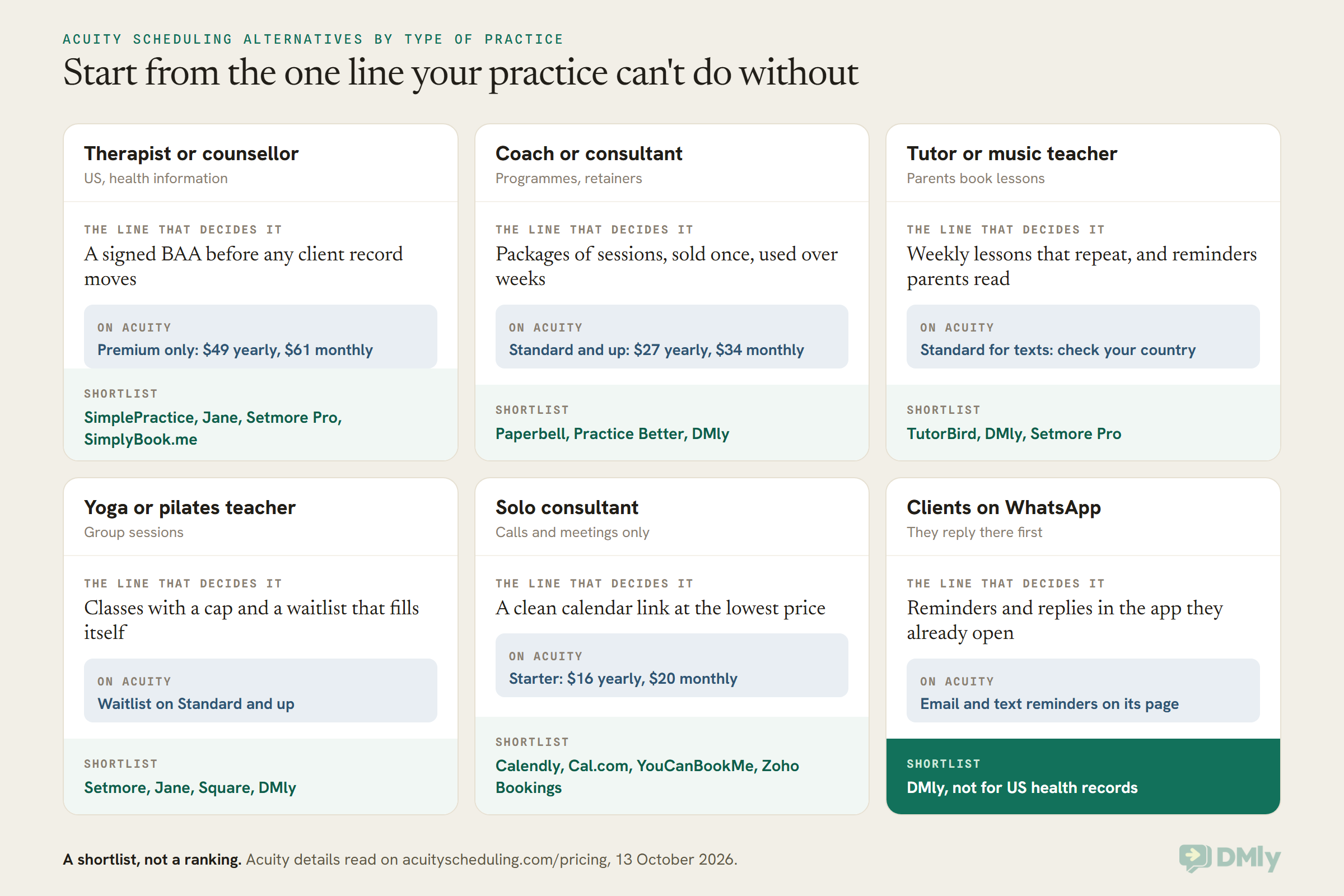
One thing before the sections. Acuity’s own strength is that it does a bit of everything on one page: forms, payments, packages, classes. Most alternatives are better at one of those and thinner on the rest. So a switch usually means trading breadth for depth in the thing you care about most. That’s a good trade when you know which thing it is.
HIPAA Compliant Scheduling Software: Acuity Scheduling Alternatives for Therapists
If you’re a US therapist, counsellor or other covered health practice, the Acuity Scheduling alternatives worth a trial are the ones that will sign a Business Associate Agreement: SimplePractice, Jane, Setmore Pro and, on its Standard plan and up, SimplyBook.me. A BAA is the contract that makes a software company responsible for protecting your clients’ health information. Without one, client records shouldn’t go into the tool at all.
Here’s what each one’s own page says, read on 13 October 2026.
SimplePractice
Built for therapy and counselling practices. Solo plans are $49, $79 and $99 a month (Starter, Essential, Plus). A group practice on Plus pays $99 for the first practitioner and $74 for each one after that. When we checked, a time-limited offer took 50 per cent off the first three months, and the free trial runs up to 30 days. SimplePractice publishes its Business Associate Agreement on its own site. The Plus plan adds group appointments and group telehealth.
Pick it if you want a full practice system, not just a booking page. Think twice if you only need scheduling: you’ll pay for notes and records you may never use.
Jane
Popular with physiotherapists, chiropractors, massage therapists and multi-practitioner clinics. Jane prices in Canadian dollars: CAD 59 for Balance (one practitioner, capped at 20 appointments a month), CAD 79 for Practice and CAD 99 for Thrive. Practice and Thrive include unlimited free SMS reminders where available. Packages and memberships sit on Thrive. Group classes are on every plan. Its pricing page lists HIPAA, PIPEDA and GDPR compliance on all plans. There’s no free trial, only a demo account.
Pick it if you run a clinic with rooms, several practitioners and insurance billing (an add-on). Think twice if you’re one person with a light diary: Balance’s 20-appointment cap fills fast.
Practice Better
Aimed at dietitians, nutritionists and health coaches. Sprout is free for up to 3 clients. Starter is $35 a month billed monthly ($25 a month on annual billing), Professional $69, Plus $99 and Team $155. Plus includes 750 SMS a month. Its pricing page states HIPAA, PIPEDA and GDPR compliance and lists packages and group sessions. Ask for the BAA in writing before you move a single client record.
Setmore Pro and SimplyBook.me
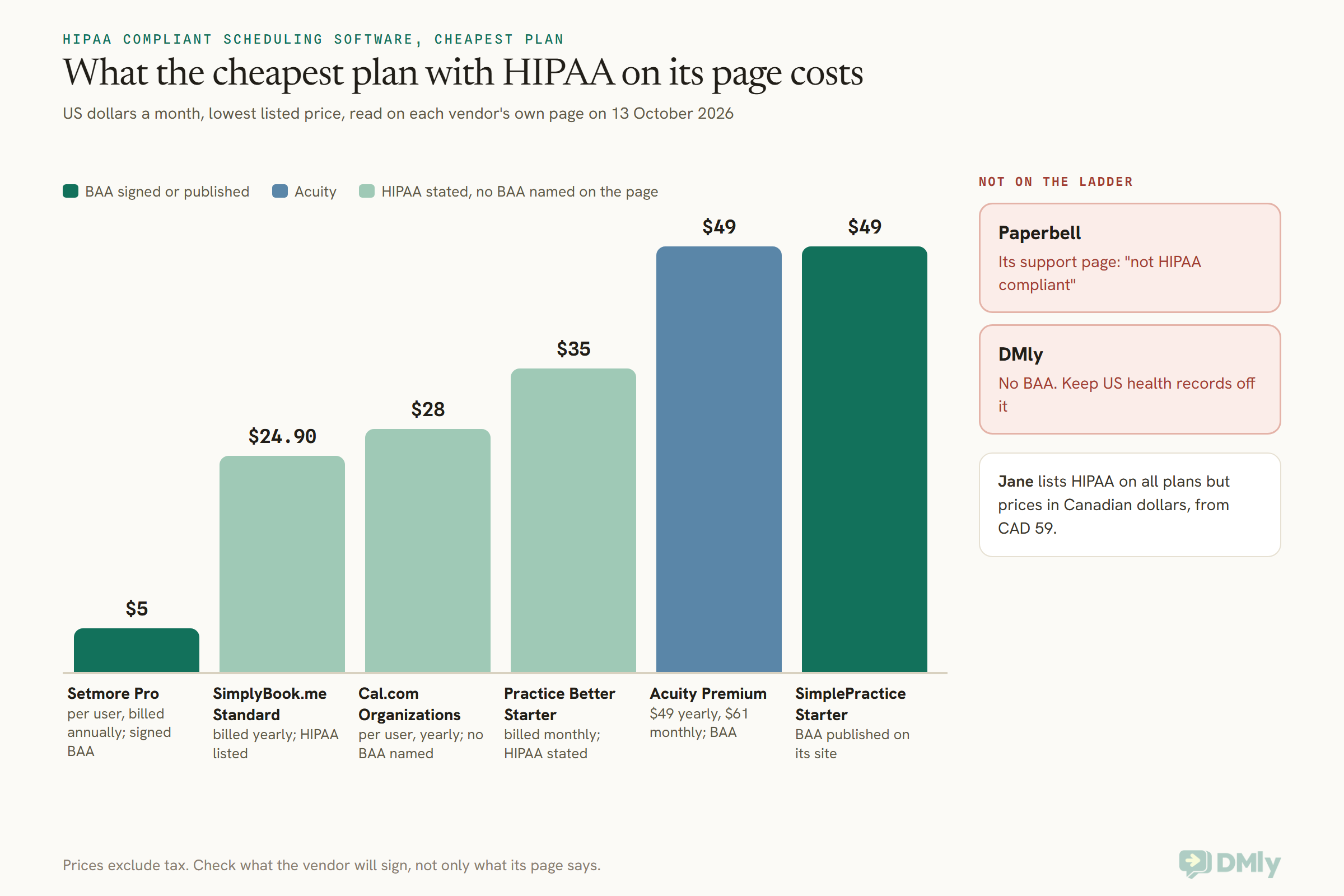
These are the cheap end. Setmore Pro is $5 per user a month on annual billing, and its pricing table shows a signed BAA on Pro (not on Free). SimplyBook.me lists HIPAA from its Standard plan, $24.90 a month billed yearly or $29.90 monthly. Both are general booking tools rather than therapy systems, so you get scheduling, reminders and payments, not session notes.
Cal.com’s Organizations plan ($28 per user a month on yearly billing) is described on its pricing page as “HIPAA compliant”, but the page doesn’t mention a BAA. Paperbell, which coaches love, says plainly on its support site: “No. Paperbell is not HIPAA compliant.”
Where DMly stands on HIPAA
We’ll be straight about this because it matters. DMly doesn’t offer a BAA, and nothing in its documentation states a HIPAA position. Its docs describe DMly as a data processor for your contacts under GDPR, with a data processing agreement on request and hosting in Europe and the United States. That’s useful for a UK physio or a coach in Germany. It isn’t HIPAA.
There’s a second layer too. Meta’s terms for the WhatsApp Business Platform (last modified 23 September 2026) say that Meta is not a HIPAA business associate and that the WhatsApp Business Platform “is not HIPAA compliant”. WhatsApp’s business messaging policy also says not to use WhatsApp for telemedicine or health information where local rules forbid it.
So if you’re a US covered practice, keep protected health information off DMly and off WhatsApp. Use Acuity Premium or one of the tools above for anything clinical. If you run a practice outside the US and want WhatsApp for booking logistics only (times, directions, a reminder that names no treatment), our guide to WhatsApp automation for clinics shows how to keep messages to that, and your own regulator has the final word.
Best Acuity Alternatives for Coaches and Consultants Selling Packages
For coaches and consultants, the best Acuity alternatives are the ones that sell a package once and let the client book against it for weeks: Paperbell, Practice Better and DMly each do this in a different way. On Acuity, packages, memberships and gift certificates start at Standard ($27 a month billed yearly).
Paperbell
Paperbell is built around the coaching package. One plan: $97 a month, or $970 a year. It bundles packages, scheduling, contract signing, payments, a client portal, group coaching tools, online classes and a simple website. Its pricing page says there are no extra transaction fees on top (your payment processor still charges its own). There’s a 30-day money-back guarantee.
Pick it if you sell programmes and want the contract, the payment and the bookings in one flow. Think twice if your coaching touches health (see above), or if $97 a month is a lot for the number of clients you see.
Practice Better
If your coaching is health or nutrition, Practice Better sells programs, packages and group sessions alongside its client records. Prices are in the section above.
DMly
DMly handles packages as plans and credits. You create a plan (say, “6 coaching sessions”) in Offerings, Plans, give it 6 credits, and set each session’s credit cost to 1. Each booking takes one credit off. A recurring plan works for a monthly retainer: each month’s credits lapse at the end of that month.
Three things to know before you rely on it. Credits are one pool per client, not per service, so a client could spend session credits on a different service that also costs credits. Cancelling a booking never gives the credit back automatically; you add it back by hand. And a client can’t buy a package themselves on the booking page: credits arrive when you add them on the client’s profile, when you start a subscription from the plan, or when an automation issues them.
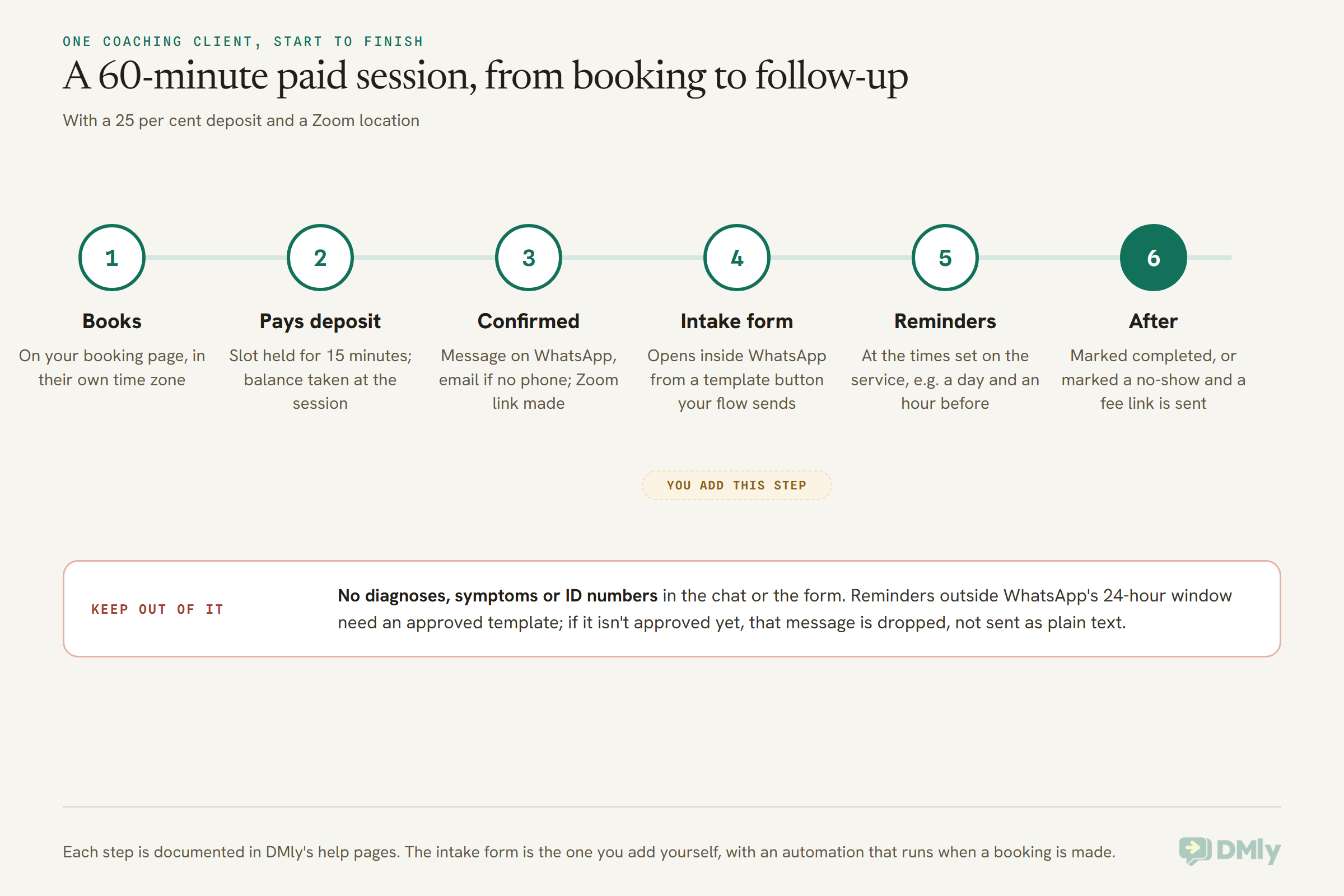
Where DMly earns its place for coaches is everything around the session. The booking page can take a deposit. Zoom links are created automatically. Reminders go out on WhatsApp. And the conversation, the invoice and the next booking all sit on one client record.
Acuity Alternatives for Tutors and Teachers: Weekly Lessons and Parent Reminders
Tutors need two things Acuity treats as extras: the same lesson every week without rebooking, and reminders that reach a parent rather than a student’s inbox. TutorBird, DMly and Setmore Pro cover these best.
TutorBird
Made for tutors and music teachers. One plan: $16.95 a month, plus $4.95 for each extra tutor, with as many students as you like. SMS reminders are included, along with automatic invoicing, online payments, late-fee automation, a student portal and two-way calendar sync. There’s a 30-day free trial and no card needed. Its pricing page doesn’t mention group lessons or packages, so ask if you need them.
DMly
For weekly lessons, you (or your team) book a repeating series from the Calendar: open New appointment, turn on Repeat, and pick how often and how many times. If one date is taken, DMly can skip it and book the rest. Every date gets its own reminders, from the reminder times set on the lesson. Our guide to WhatsApp automation for tutors covers enrolment, term reminders and parent updates in full.
One honest limit: the repeat is a staff action. A parent booking on the public page books one slot at a time.
Setmore Pro
Recurring appointments are on Setmore Pro ($5 per user a month, annual billing), not on the free plan. Pro also includes 500 SMS credits a month per team member, and SMS availability varies by country.
Acuity Alternatives for Wellness Pros Who Run Group Classes
If you teach yoga, breathwork, pilates or meditation in groups, look for a class with a seat cap and a waitlist that moves people up on its own. Setmore, Jane, Square Appointments and DMly all run group classes. On Acuity, the waitlist starts at Standard.
- Setmore includes group classes even on its free plan (up to 4 users).
- Jane includes group classes on every plan, and Thrive (CAD 99) adds an automated waitlist plus packages and memberships.
- Square Appointments adds a waitlist and no-show fees on Plus ($49 a month per location). Card processing fees come on top.
- DMly runs classes with a capacity and an optional waitlist. When a seat opens, the first person waiting is promoted and told automatically; on a paid class they get a payment link and a short hold. Each class session can carry one shared Zoom link, or per-attendee links with Zoom’s paid Webinars add-on.
One DMly detail to plan around: one contact holds one seat per class. A friend coming along books as themselves. For the full picture of running classes online, see how to build an online class booking system.
Taking Payments, Deposits and No-Show Fees Without Acuity
Acuity takes payments on every plan through Stripe, Square, PayPal and Venmo. Most alternatives match that, but deposits and no-show fees vary a lot, and that’s often what decides the switch.
- Setmore: deposits on Pro only.
- SimplyBook.me: payments, deposits and tips from Basic ($11.90 a month billed yearly). Refunds, payment links and saved cards come on Premium.
- Square Appointments: a cancellation policy and no-show fees from Plus ($49 a month per location).
- DMly: a deposit or the full price at booking, and a no-show fee, both set on the service.
Here’s how DMly’s version works, in plain terms. On a service set to Pay before booking, you can enter a Deposit from 1 to 99 per cent. A 25 per cent deposit on a 120 session is 30 to book and 90 at the session. The slot is held for 15 minutes while the client pays, and it confirms when the deposit clears. DMly doesn’t collect the balance for you; you take it at the session or send an invoice.
A No-show fee can sit on any service, even a free one. It’s charged only when someone marks the booking a no-show, usually as a payment link, and it needs a connected payment gateway. Our guide to accepting appointment deposits or full payment walks through the set-up and the wording.
Simple Acuity Alternatives: Calendly, Cal.com, YouCanBookMe and Zoho Bookings
If you only need people to pick a time for a call, apps like Acuity Scheduling that focus on the calendar link cost less, and several are free. These suit consultants, advisers and coaches who don’t need packages, classes or forms beyond a few questions.
- Calendly: free plan; Standard $10 and Teams $16 per seat a month, billed yearly. Stripe and PayPal from Standard. We compare it with all-in-one tools in our guide to Calendly alternatives, so we won’t repeat that here.
- Cal.com: a free plan that already takes Stripe and PayPal payments and sends email and SMS notifications; Teams is $12 per user a month on yearly billing.
- YouCanBookMe: free for one calendar and one booking page; Individual $9, Professional $13 and Team $18 per member a month on monthly billing. Group sessions start at Individual. SMS costs extra.
- Zoho Bookings: free for one user; Basic US$6 and Premium US$9 per user a month billed annually. A good fit if you already live in Zoho.
The trade-off with all four is the same. They’re excellent at the moment of booking and light on what comes after: deposits, packages, reminders on a channel your clients read, and the follow-up.
Acuity Scheduling Alternatives Compared: Prices Read at Source
Here are the Acuity Scheduling alternatives in this guide side by side, with the lowest paid price each vendor shows and how it’s billed. All prices were read on the vendor’s own pricing page on 13 October 2026, exclude tax, and can change. Check before you buy.
| Tool | Best for | Free plan | Lowest paid price |
| Acuity Scheduling | All-round practices | No (7-day trial) | $16/mo yearly, $20 monthly |
| SimplePractice | Therapists | No (trial up to 30 days) | $49/mo |
| Jane | Multi-practitioner clinics | No (demo account) | CAD 59/mo |
| Practice Better | Nutrition and health coaches | Yes, up to 3 clients | $35/mo monthly, $25 annual |
| Paperbell | Coaches selling packages | No (30-day money back) | $97/mo or $970/yr |
| TutorBird | Tutors and music teachers | No (30-day trial) | $16.95/mo + $4.95 per tutor |
| SimplyBook.me | Flexible, add-on heavy | Yes, 50 bookings | $11.90/mo yearly, $13.90 monthly |
| Setmore | Low-cost teams, classes | Yes, up to 4 users | $5 per user/mo, annual |
| Square Appointments | In-person payments | Yes, plus card fees | $49/mo per location |
| Zoho Bookings | Zoho users | Yes, 1 user | US$6 per user/mo, annual |
| YouCanBookMe | Customisable booking pages | Yes | $9/mo monthly |
| Cal.com | Calendar links with payments | Yes | $12 per user/mo, yearly |
| Calendly | Meeting links | Yes | $10 per seat/mo, yearly |
| DMly | Clients on WhatsApp, Instagram and other chat apps | No (7-day trial, no card) | $29/mo yearly, $39 monthly |
A word on reading this table. The lowest price is rarely the price you’ll pay. Acuity’s text reminders start at Standard, SimplyBook.me sells SMS separately at $8 per 100 credits, Square adds card processing fees, and per-user pricing grows with every teammate. Price the plan that has your one line, for the number of people you actually have.
Acuity Alternatives Outside the US: Reminders, Payments and Language
Outside the US, the two things to check first are how your clients will get their reminders and which payment provider the tool can use. A booking tool built for American practices can be quietly weaker in India, Nigeria, the Gulf or South-East Asia.
Reminders. Acuity, Setmore and Jane each say SMS availability depends on your country. Even where texts arrive, ask yourself where your clients actually reply. If they answer you on WhatsApp faster than they answer a text, a reminder there is worth more than a cheaper plan. Our guide to automatic appointment reminders on WhatsApp covers timing and wording.
Payments. Acuity’s pricing page lists Stripe, Square, PayPal and Venmo. That’s fine in the US, UK and much of Europe. A coach in Lagos usually wants Paystack or Flutterwave, a tutor in Pune wants Razorpay, and a wellness studio in Kuwait or Saudi Arabia may want MyFatoorah. DMly connects Stripe, PayPal, Paystack, Flutterwave, Monnify, Razorpay, MyFatoorah and Mercado Pago, and one setting picks which gateway takes the money.
Language and time zones. If your clients book across borders, check that the page shows times in the client’s own time zone. DMly’s booking page can detect the visitor’s time zone or hold one fixed for everyone, and it comes in 16 languages, including Arabic (right to left), French, German, Spanish and Polish.
Privacy law. In the UK and EU, ask for a data processing agreement. Elsewhere, check your own country’s data protection law, because many treat health details as more sensitive than a name and a phone number. The same habit as HIPAA serves you everywhere: keep clinical detail out of reminders and chat.
Is DMly a Good Acuity Scheduling Alternative? Where It Fits and Where It Doesn’t
DMly is a good Acuity Scheduling alternative when your clients talk to you on WhatsApp, Instagram or Messenger and you want bookings, payments and reminders in the same place as those conversations. It’s the wrong choice for US practices handling health information, and for anyone who only needs a calendar link. Here’s the honest version, both ways.
Where it fits
- A booking page that knows your chats. When you send the link from a WhatsApp conversation, the page already knows who the client is and skips the name and email fields. See how to build an online booking page.
- Deposits and no-show fees, as above, through the gateway your country actually uses.
- Each person’s own Google Calendar. Every staff member can connect their own Google Calendar, so a block in your associate’s diary closes only their slots, while the business calendar covers everyone else. Our guide to connecting Google Calendar to your booking system explains the sync.
- Zoom links that look after themselves. Set a service’s location to Zoom and every booking gets a meeting; a reschedule keeps the same link and a cancellation deletes the meeting.
- Classes, packages and repeating lessons, with the limits we’ve been open about above.
- Reminders on WhatsApp at the times you set on each service, with email used when there’s no phone number. You can also make clients sign in with a one-time code sent on WhatsApp or SMS before they book, and returning clients can see their history in a client portal the same way.
- An AI assistant that books in the chat. AI is on every DMly plan (500, 5,000 or 20,000 AI replies a month by plan), and it can check times, book, reschedule and cancel inside the conversation.
Where it doesn’t
- US health records. No BAA, and Meta’s own terms rule out WhatsApp for HIPAA. Stay with Acuity Premium, SimplePractice or Jane.
- Your own intake questions on the booking form. DMly’s booking form uses a set list of questions you can switch on or off and relabel. For anything longer, send a WhatsApp form in the chat (a form that opens inside WhatsApp, WhatsApp only) or ask the questions in an automated conversation after they book. Acuity’s custom intake forms are stronger here.
- Clients buying packages themselves online. There’s no checkout for a pass on the booking page; you issue the credits.
- Email-only client lists. DMly’s contact import needs a phone number on every row, so a client list with emails only won’t come across.
- Just a calendar link. If that’s all you need, Calendly, Cal.com or Zoho’s free plans will serve you better for less.
What it costs
DMly is $29, $65 or $149 a month billed yearly, or $39, $79 or $199 monthly, for Starter, Growth and Premium. Every plan includes bookings, payments, the shared inbox and AI, and a custom booking domain. Plans differ by team seats (3, 6, 15) and how many contacts and messages you can send. WhatsApp messages are billed by Meta at its own rates, and DMly adds no markup. There’s a 7-day trial with no card. Full details are on the DMly pricing page.
How to Move From Acuity Without Losing Clients or Bookings
To switch from Acuity, export your clients and appointments first, set up your services and staff in the new tool, bring your client list across, and run both tools side by side until your existing bookings have passed. Whichever of these Acuity Scheduling alternatives you pick, here’s the order that causes the least trouble.
- Export your clients. In Acuity, go to Clients, then Import/export, then Export client list. Pick All clients. You get a spreadsheet with names, emails, phone numbers, notes and days since the last appointment.
- Export your appointments. Go to Reports, then Import/Export, choose a date range, and export. You can include intake form answers by selecting the form. If you’re a health practice, treat that file as client records: store it securely and delete working copies when you’re done.
- List what doesn’t travel. Package balances, gift certificate balances, memberships and saved cards rarely move between tools. Write down each client’s remaining sessions before you leave.
- Set up the new tool. Services, prices, staff hours, reminder times and payment settings. In DMly, services can come in by CSV; staff hours and booking rules are set by hand.
- Import your clients. In DMly, every row needs a name and a phone number, and importing someone who’s already there fills in their blanks rather than duplicating them. Opt-outs don’t import, so set aside anyone who asked you to stop messaging them.
- Re-issue package balances. In DMly, use Add credits on each client’s profile, with the package name and, if you sold it with one, the original expiry date.
- Run both for a few weeks. Let bookings already made on Acuity happen there. Send every new booking to the new page. When the last Acuity appointment has passed, close the account.
Tell your clients before the link changes. A short message works: “We’ve moved our booking page. Your next session is still on, and from now on you can book here.” Clients who booked through a link you sent in WhatsApp will find the new page faster, because it already knows who they are.
Choosing an Acuity Alternative: Five Practices, Five Answers
These are illustrations, not customer stories. They show how the one-line rule plays out in different places.
A family therapist in Ohio. She needs a BAA, insurance and session notes. The answer is a therapy system: SimplePractice, or Jane if she shares rooms with colleagues. WhatsApp tools, DMly included, are off the table for her clinical work.
A leadership coach in Bengaluru. Clients pay for six-session programmes in rupees and reply on WhatsApp within minutes. Acuity’s pricing page lists Stripe, Square, PayPal and Venmo, and he wants Razorpay. DMly with Razorpay, a package as a plan with six credits, and WhatsApp reminders fits better. If he coached mostly US executives by email, Paperbell would be the stronger pick.
A maths tutor in Lagos. Twenty students, weekly lessons, parents who pay by bank transfer or card and never read email. A repeating series in DMly, Paystack or Monnify for payments, and lesson reminders on WhatsApp to the parent. TutorBird is the alternative if she wants invoicing with late fees and a student portal, and her parents are happy with text messages.
A yoga teacher in Manchester. Three classes a week, 12 mats each, and a waitlist that fills on Saturdays. Setmore’s free plan covers classes; Jane’s Thrive or DMly cover the waitlist plus packs of classes. If she takes cash and cards at the studio door, Square Appointments is worth a look.
A wellness consultant in Dubai. One-to-one calls, clients in four time zones, prices in dirhams. She needs a booking page in the client’s time zone, Arabic and English, and MyFatoorah or Stripe. DMly’s page handles both languages and time zones. If she only books calls and takes payment elsewhere, Calendly or Cal.com is cheaper.
Frequently Asked Questions
What are the best Acuity Scheduling alternatives?
It depends on your practice. For US therapists who need a BAA, SimplePractice, Jane, Setmore Pro and SimplyBook.me (Standard and up). For coaches selling packages, Paperbell, Practice Better and DMly. For tutors, TutorBird and DMly. For group classes, Setmore, Jane, Square and DMly. For a plain calendar link, Calendly, Cal.com, YouCanBookMe and Zoho Bookings.
How much does Acuity Scheduling cost in 2026?
Starter is $16, Standard $27 and Premium $49 a month billed yearly, or $20, $34 and $61 billed monthly, before tax. There’s a 7-day free trial and no free plan (read on Acuity’s pricing page, 13 October 2026).
Is Acuity Scheduling HIPAA compliant?
Acuity can be made HIPAA-enabled on its Premium plan (or the older Powerhouse plan) by signing a Business Associate Addendum with Squarespace inside your account. Some features switch off once you do, and keeping personal details out of reminders is still your responsibility.
Is there a free Acuity alternative?
Yes. Setmore (up to 4 users, with group classes), SimplyBook.me (50 bookings), Zoho Bookings (1 user), Cal.com, Calendly and YouCanBookMe all have free plans. Practice Better’s Sprout plan is free for up to 3 clients. Free plans usually leave out SMS reminders, deposits and branding removal.
Which Acuity alternative is best for coaches?
Paperbell is built around coaching packages, contracts and payments in one flow, for $97 a month. If your clients message you on WhatsApp and you want reminders and payments there, DMly is the better fit. If your coaching is health-related, Practice Better handles the records side.
Can I move my clients from Acuity to another tool?
Yes. Acuity exports your client list and your appointments as spreadsheets from Clients and from Reports. Most tools import a client spreadsheet. Package balances, memberships and saved cards usually don’t move, so note each client’s remaining sessions and re-issue them.
Does DMly sign a BAA?
No. DMly doesn’t offer a Business Associate Agreement, and Meta’s own terms say the WhatsApp Business Platform isn’t HIPAA compliant. US practices handling health information should use a tool that signs a BAA.
Can Acuity Scheduling alternatives send WhatsApp reminders?
Most of the tools in this guide send email and SMS. DMly sends reminders on WhatsApp through approved templates, and SimplyBook.me sells WhatsApp credits as an add-on. If your clients read WhatsApp before texts, check this first.
Choosing Between Acuity Scheduling Alternatives: The One Line, Reread
We started with a therapist paying for 36 calendars because of one line on a price list. That line was the BAA, and for her it’s the right line to buy. The point was never that Acuity is overpriced. It’s that every practice has a line like that, and it’s worth knowing which one is yours before you compare anything else.
So reread the list with your own practice in mind. If your line is a signed BAA, choose between Acuity Premium, SimplePractice, Jane and the cheaper Setmore Pro and SimplyBook.me. If it’s packages, look at Paperbell, Practice Better and DMly. If it’s weekly lessons, TutorBird or DMly. If it’s classes, Setmore, Jane, Square or DMly. If it’s just a link, take a free plan from Calendly, Cal.com, YouCanBookMe or Zoho.
And if your line is that your clients live on WhatsApp, that’s the one we built DMly for. Of all the Acuity Scheduling alternatives here, it’s the one that puts the booking, the deposit and the reminder inside the chat your clients already open. Try it for 7 days with no card, and keep Acuity running alongside until you’re sure.
Writing about WhatsApp automation, bookings and growth for local business.
Turn WhatsApp into your busiest channel.
Start free and run message, bookings, payments and reviews in one place.
