
How to Send Bulk Messages on WhatsApp Officially (Without Getting Banned)
Almost every guide to sending bulk messages on WhatsApp, including the earlier version of this one, contains the same sentence: the WhatsApp Business app lets you broadcast to 256 people at a time, and it is free. We are retracting the second half of that. In a growing list of countries, Meta has renamed the app’s marketing messages feature to business broadcasts and now charges you for each one that gets delivered.
That matters more than it sounds, because “start free on the app, upgrade later” has been the standard advice on this topic for years. For a lot of businesses it is no longer the free option, and nobody sent an email about it.
So this page does two jobs. It tells you the three real ways to send bulk messages on WhatsApp in September 2026 and what each one costs. And it explains the thing that actually gets accounts restricted, which is not how many messages you send.
The short version: Sending bulk messages on WhatsApp is completely allowed. What gets punished is messaging people who did not ask, which shows up as blocks and reports, which drops your quality rating, which costs you your sending limit. Volume is not the trigger. Being unwanted is.
What Changed: The Free Broadcast Stopped Being Free
The WhatsApp Business app now has a paid way to message people who have not saved your number, and it is called business broadcasts. If you have been away from this topic for six months, this is the update that matters most, because it changes the cheapest starting point.
Here is what Meta’s own help centre says, in its words. “Marketing messages is now business broadcasts in some countries.” Sending them is “exclusively on the WhatsApp Business app”. And the billing line: “With business broadcasts, you pay for each message that is delivered to a recipient you chose within five days of being sent.”
A few details worth having before you go looking for it in your app:
- You add a payment method first. Meta charges you for the number of recipients you choose, then credits back anything it could not deliver.
- Pricing follows the recipient, not you. It is “based on the country code of each message recipient”, with published rate cards in sixteen currencies and a USD conversion for everywhere else. Messaging customers in three countries means three different prices in one send.
- The introductory trial is over. Meta states that if you never sent a business broadcast, “your trial ended on April 30, 2026” and any unused credits have expired. If you were saving them, they are gone.
- A Meta Verified subscription includes some free ones. Meta describes this as a trial feature that may not be available to you yet.
- It has not reached everywhere. Meta says only that business broadcasts are “currently available in select countries”. It does not publish the list, so the honest answer to “is it in my country” is to open the app and look.
None of this touches the older, genuinely free feature. Broadcast lists still exist and still cost nothing. They just reach a much smaller group of people than most business owners assume, which is the next section.
The Three Ways to Send Bulk Messages on WhatsApp
There used to be two routes and now there are three, sitting at very different prices and reaching very different people. Almost all the confusion on this subject comes from advice that was written when there were two.
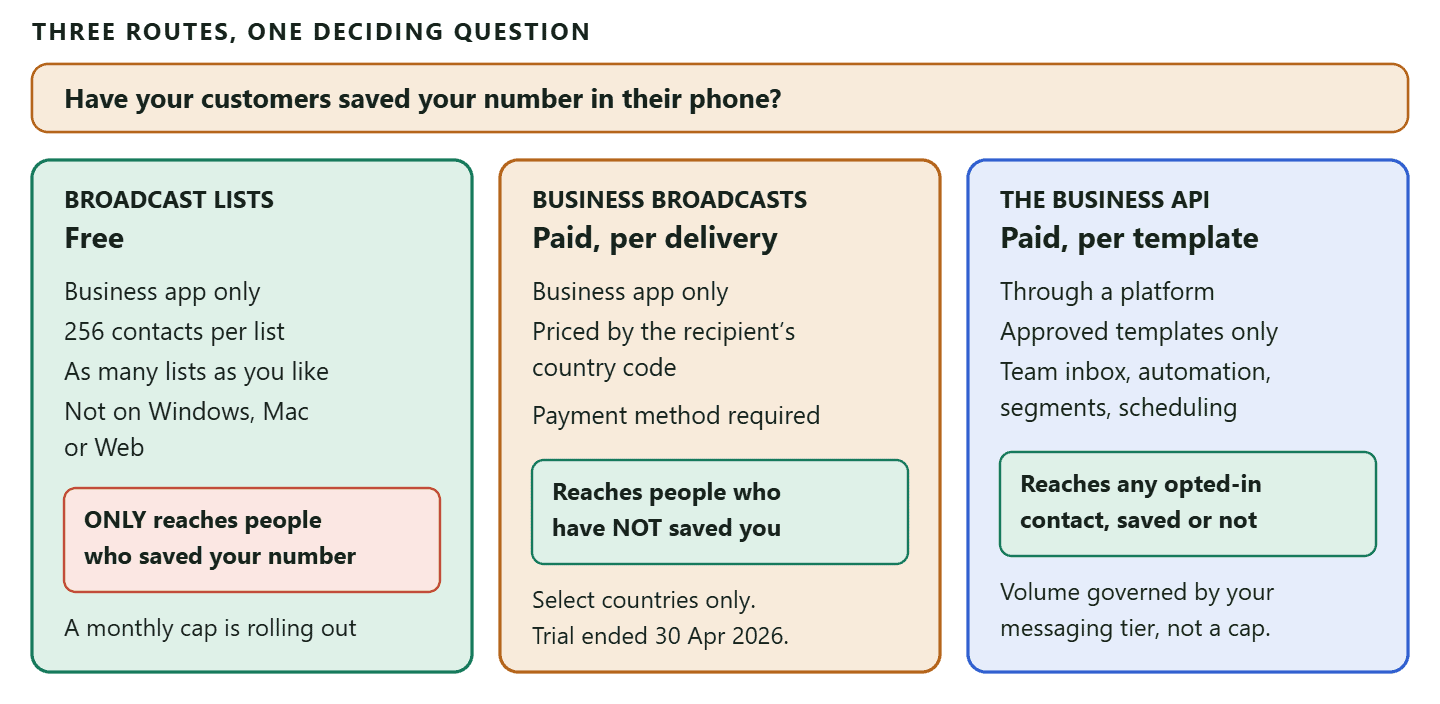
The honest way to choose between them is not by feature list. It is by answering one question: have the people you want to message saved your number in their phone? That single fact rules two of the three routes in or out.
The unofficial route usually arrives as desktop software that drives WhatsApp Web from your own number. Whatso is the one most often searched for, and it is now sold as a Windows bulk sender at $59 to $69 a year rather than the monthly plans most reviews still quote. The risk of running it sits with your number, not with the vendor.
Broadcast Lists: Free, Limited, and Quietly Getting Smaller
Broadcast lists are the free feature, and the reason they disappoint people is a rule most guides mention once and then forget. Meta states it twice on its own page, so it is worth stating plainly here.
A broadcast list message only reaches contacts who have saved your number in their phone’s address book. Not people you have saved. People who have saved you. Meta’s wording: “Only contacts who’ve added your number to their phone’s address book will receive your broadcast message.”
Think about what that means for a real list. You have 400 customers in your phone from the last two years. Perhaps 90 of them saved your number back. You send a broadcast to a list of 256, feel like you have reached 256 people, and in reality you reached the fraction who saved you. Nothing tells you which fraction. There is no failure notice, because from WhatsApp’s point of view nothing failed.
The other things worth knowing about lists:
- 256 is per list, not per business. Meta also says “You can create as many broadcast lists as you like”, so the 256 figure that gets quoted as a hard ceiling is really a chunking rule. Six lists of 256 is allowed. It is just tedious.
- Replies come back privately. If someone answers, it lands as a normal one to one chat. Other recipients never see it. A broadcast list is not a group.
- They are phone only. Broadcast lists are not supported on Windows, Mac or Web, so you are doing this with your thumbs.
New, and almost nobody is reporting it: Meta has an “About broadcast limits” page saying that “people in some countries might see a monthly broadcast limit”, that the feature is rolling out gradually, and that WhatsApp will notify you as you approach it. You check yours under Settings then Broadcasts. Meta does not publish what the number is, and we are not going to guess one for you. If you rely on free broadcasts, go and look at yours this week rather than finding out mid campaign.
Business Broadcasts: The Paid Middle Path
Business broadcasts solve the saved-number problem without moving you to the API, and you pay per delivered message for the privilege. If they have reached your country, this is the shortest distance between a phone full of customers and a message that actually arrives.
Meta positions it exactly that way. Its page says that if you are “trying to reach customers who haven’t added you to their contacts”, you should consider converting your broadcast list into one. That is the whole value proposition in a sentence.
What you get alongside the send is modest but real. Meta says you can see how many customers read and replied to a broadcast. It then adds the caveat that most vendors would have left out: that information “won’t reflect recipients who turned off read receipts, or any messages delivered while your own device’s read receipts is turned off”. So the read count is a floor, not a measurement. Treat it as directional.
Where business broadcasts stop being the right answer is the same place the free app always stops. One phone, one person holding it, no shared inbox, no segments, no automatic follow-up when somebody replies, and no way to schedule around your opening hours. If your problem is “I need to reach people who have not saved me, once a month”, this fixes it. If your problem is “three of us need to handle the replies”, it does not, and that is what the WhatsApp Business API route is for. Our guide to choosing between the three types of WhatsApp account walks through that decision properly.
The WhatsApp Business API Route: What Actually Governs Your Volume
On the WhatsApp Business API there is no 256 limit, no saved-number rule and no monthly broadcast cap. There is something else instead, and understanding it is the difference between scaling and getting restricted.
Three mechanisms decide what you can send. They are not complicated, but they are rarely explained together, which is why so many businesses run into one of them without knowing which one they hit.
1. The 24-hour window
You can send a normal, typed message to a customer only within 24 hours of their last message to you. Meta calls this the customer service window. The clock starts on their message, not on your reply, and answering does not reset it.
Outside that window, WhatsApp delivers one thing: a message template that Meta approved in advance. Since a bulk send goes mostly to people who last messaged you weeks ago, in practice every bulk send is a template send. That is the single most useful sentence in this section.
2. Message templates
A template is a message you wrote earlier and Meta signed off. You pick a category when you submit it, and the category is not cosmetic: Marketing, Utility or Authentication. Meta reviews against the category you chose, so filing a promotion as a utility message is a rejection rather than a shortcut.
Templates carry variables, so one approved template serves a whole list with each person’s name, order number or appointment time filled in. If you want the copy rather than the mechanics, we keep a library of over 100 WhatsApp template examples you can copy.
3. Your messaging tier
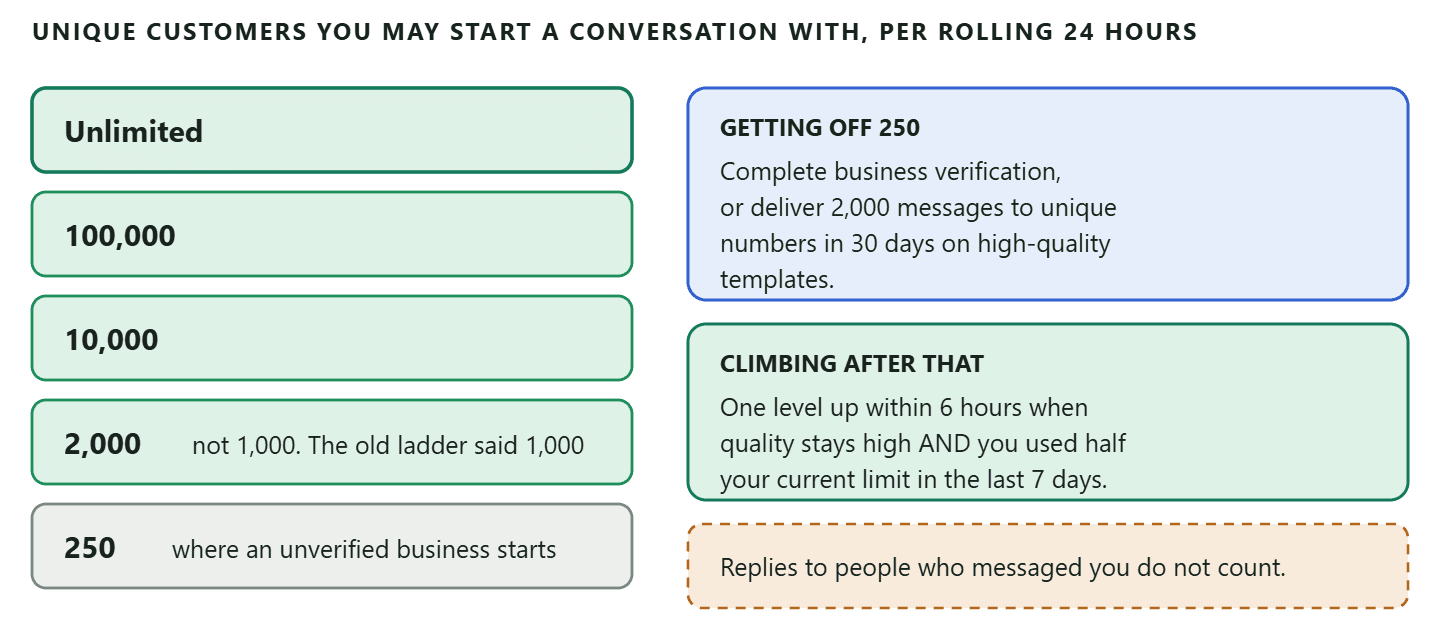
This is the number nobody mentions until it bites. Your messaging tier is Meta’s cap on how many different customers you can start a conversation with, outside a service window, in a rolling 24 hours. It does not limit replies to people who messaged you first.
Meta’s current ladder is 250, 2,000, 10,000, 100,000 and Unlimited. Note the second rung. A great deal of published advice, and a great deal of vendor documentation, still says 1,000, which was the old ladder. If you are planning a campaign around a daily limit of 1,000 unique conversations, you are planning around a rung Meta no longer uses.
What Getting Restricted Actually Looks Like
Accounts are not restricted for sending a lot. They are restricted for being blocked and reported a lot, which is a different thing that happens to look similar. This is the part the original version of this page hand-waved, and it is the part worth understanding properly.
Meta gives every WhatsApp number a quality rating, shown as green, yellow or red. It is driven almost entirely by how recipients react to you: blocking you, or tapping report. Not by volume, not by send speed, not by how promotional your copy feels to you. You can send bulk messages on WhatsApp all week and stay green, or send two hundred to the wrong list and go yellow by Friday.
What happens as it falls:
- Green. Nothing to do. Keep going.
- Yellow. Meta is seeing negative signals. This is your warning, and it is the moment to look at what you sent in the last week and to whom, rather than to send the next campaign.
- Red. Meta may pause your templates or drop your messaging tier. Both are quiet. Neither arrives as an email.
The practical detail that catches people: a template Meta pauses for quality shows up in your platform as “Rejected”, not as “paused for quality”. So the first visible symptom of a quality problem is usually a template you have been using happily for months suddenly refusing to send. If that happens, check your quality rating before you rewrite the template, because the template is probably not the problem.
The second practical detail: your platform cannot save you here. In DMly the tier and quality rating are read-only values pulled from Meta. Nothing in DMly throttles a send based on either one. If Meta decides you have hit your tier, Meta stops the messages on its side, and you find out from the failures rather than from a warning beforehand. That is worth knowing before a large scheduled campaign, and it is covered properly in our guide to how WhatsApp account health, quality rating and bans actually work.
The cheapest protection there is: Only message people who asked to hear from you, keep templates useful rather than promotional, and honour opt-outs immediately. That is the whole defence. It is boring, and it works better than any sending trick, because the rating is a measure of whether people want your messages and there is no way to fake that.
What It Costs to Send Bulk Messages on WhatsApp
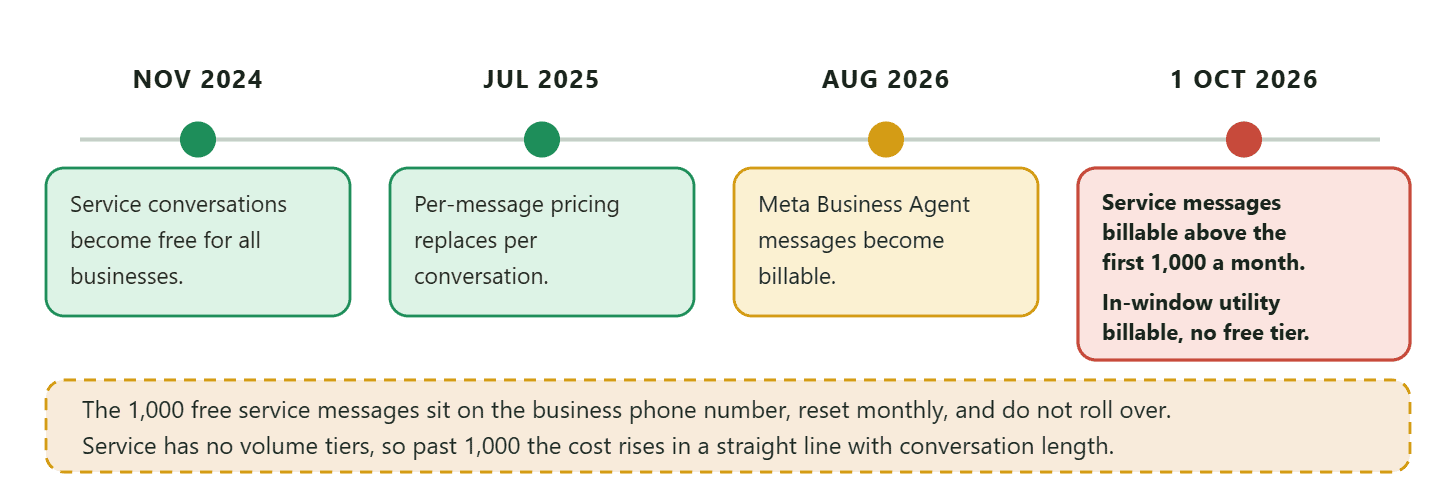
Since July 2025 Meta charges per message rather than per conversation, and two more changes land on 1 October 2026 that will raise the bill for most local businesses. If you are budgeting a campaign, budget against the new rules rather than the ones in most published guides.
How it works until 1 October 2026. You are charged when a template message is delivered. The price depends on the template’s category and the recipient’s country calling code. Non-template messages sent inside an open 24-hour window are free. Service conversations have been free since November 2024.
Now the dated part, and this is the one to diary. Everything in this list is about the WhatsApp Business Platform, the API route. If you are running the WhatsApp Business app on a phone rather than the API, none of these bullets change what you pay, and the business broadcast charge described earlier is the only bill that app gives you.
- From 1 October 2026, Meta charges for service messages above a free monthly allowance. These are the free-form replies you type back inside the 24-hour window, which have been free for nearly two years. Every business phone number gets 1,000 free service messages a month, so charging starts at the 1,001st delivered message, and the allowance resets each month rather than rolling over. Past that, the service rate in each market is the same as that market’s utility and authentication rate.
- From the same date, utility messages sent inside an open window also become billable, and unlike service messages they carry no free allowance at all. You pay from the first one. Most coverage of this change reports only the service half. For a business sending confirmations and reminders, the utility half is usually the bigger number.
- There are no volume tiers for service messages. Meta continues to offer them for utility and authentication. So once you are past the 1,000 free ones, service cost scales in a straight line with how long your conversations run, which is a genuinely new thing to think about.
- The 72-hour free entry point window is unchanged. Conversations that start from a click-to-WhatsApp ad or a Facebook page button stay free for that window.
We wrote the full arithmetic up separately in what the 1 October change means for what service messages cost, and there is a country by country rate card if you want to price a specific market. We are not quoting a per-message figure here on purpose: rates are per market, they move, and a number in a blog post is a number that goes stale.
How to Send Bulk Messages on WhatsApp With DMly
Once your number is on the API, a bulk send is a four-step wizard, and three of the four steps are decisions you make before you ever open it. Here is the whole path, with the traps in the places they actually appear.
- Build the segment first, not in the wizard. The broadcast’s audience step gives you one choice: all contacts, active contacts, or one saved segment. There is no tag picker and no filter builder in the wizard itself. Anything more specific than “everyone” gets built once under Contacts, where you can filter on pipeline stage, tags, days since last activity, custom fields, birthday month, total spend, last purchase, order count and loyalty points. Segments re-evaluate at send time, so “tagged VIP” stays current across every campaign.
- Check you are on the right channel. There is no channel picker in the broadcast wizard. It uses whichever channel is active in your workspace, and that is fixed once the broadcast is created. Switch first if you are on the wrong one. Broadcasts are not available on Live Chat or TikTok at all.
- Pick your template. On WhatsApp there is no message box. You choose from your approved templates, and if the template has variables you fill in a body parameter for each. Each parameter accepts a personalisation token, so you can type
{{first_name}}into a parameter and it resolves per recipient. One quirk worth knowing: the number of parameters comes from the highest number used, not how many you wrote, so a template using{{1}}and{{3}}asks you for three. - Tick “Reachable contacts only”. This drops contacts who have opted out. It is worth ticking even though opted-out contacts are suppressed on every send anyway, because it makes your recipient estimate honest.
- Choose how the schedule reads. Send immediately, or schedule for later. If you schedule, you pick between one moment for everybody, which uses your account timezone from Settings rather than your browser’s, and the same wall-clock time in each contact’s own timezone. That second option is the one most local businesses actually want and most people never notice.
- Review, and send. An immediate broadcast goes out within about a minute. If your workspace requires team approval, the campaign waits for a teammate to sign off no matter what time you scheduled, and editing it after sign-off clears the approval.
The scheduled-campaign trap: Schedule a broadcast a week out on a template that Meta later pauses, and the whole campaign fails at send time. There is no warning beforehand and no automatic retry with a different template. Before any large scheduled send, open your templates page and confirm the one you picked still reads Approved. A template Meta has paused comes back as Rejected.
What You Can Measure, and What You Cannot
This is the section where we contradict the old version of this page, and most of the pages that compete with it. The previous version promised “detailed analytics: see who opened, clicked, and responded”. That is not what a WhatsApp broadcast report gives you, in DMly or anywhere else, and pretending otherwise sets you up to chase a zero that was never going to be anything else.
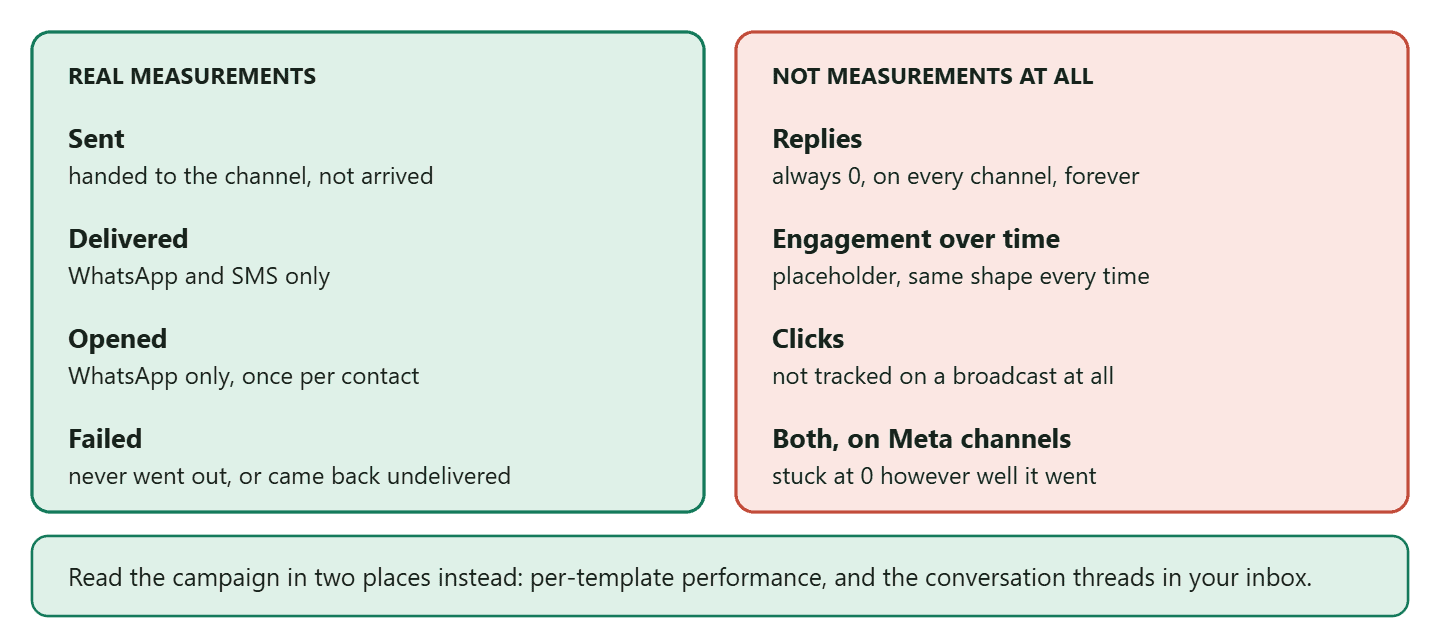
What is real on a DMly broadcast:
- Sent means DMly successfully handed the message to WhatsApp. Not that it arrived.
- Delivered means the channel confirmed it reached the contact. Real on WhatsApp and SMS only.
- Opened means the contact read it. WhatsApp only, counted once per contact.
- Failed covers recipients it never went out for, plus ones the channel later reported undeliverable.
What is not real, stated plainly because you will otherwise spend a morning on it:
- Replies is always 0. Nothing counts replies to a broadcast, on any channel. It appears as a stat card and as the last step of the funnel and it will read zero forever.
- “Engagement over time” is placeholder data. It shows the same fixed shape for every broadcast and is not derived from your send.
- There is no click tracking on a broadcast. If you need to know who clicked, put a trackable link or QR code in the template rather than expecting the broadcast report to tell you.
- On Facebook, Instagram and Telegram, Delivered and Opened stay at zero however well the campaign did, because those numbers are not rolled up onto the broadcast.
So how do you actually tell whether a campaign worked? Two places. Per-template performance, which rolls up every send of that template across broadcasts, flows, sequences and one to one replies, and is the better view of whether the message itself lands. And the inbox, because every broadcast send is recorded in the contact’s conversation thread, so replies arrive there like any other message and you read them as conversations rather than as a number. If you run more than one channel, our guide to why one inbox across channels changes the day covers how that works in practice.
Opt-Outs: The Setting That Protects Your Account
Opt-outs are the mechanism standing between your quality rating and a bad week, and they behave in two ways that surprise almost everybody.
A contact opts out by sending one of these as their whole message: stop, stopall, stop all, unsubscribe, cancel, quit, end, opt out or optout. The match is exact, so “cancel my appointment tomorrow” does not opt anybody out.
Which brings us to the trap. A customer who replies with just the word “cancel”, meaning their booking rather than your marketing, is opted out immediately and silently. For a salon or a clinic, where “cancel” is a perfectly normal one-word reply, this happens more than you would think, and the first sign is a regular customer who stops receiving reminders. If somebody says they are not getting your messages any more, check your suppression list before you check anything else.
The second surprise is more serious, and it is the honest bit that a feature list would leave out:
Opting out is not the same as “never contact this person”: Opting out stops automated messages: broadcasts, sequences, automations and booking reminders. It does not close the inbox composer. Any team member can still type a message to that contact and send it, and nothing prevents it. If your obligation is that you never contact somebody again, you need to block them, which disables the composer as well. Getting these two mixed up is how a business keeps messaging someone who asked it to stop.
Two more details worth carrying. Opt-out lives on the contact, not on one channel, so somebody who sends STOP on WhatsApp is also opted out of your SMS, Telegram and Instagram automations, because it is one person with several channel identities. And Telegram recognises a shorter keyword list than everywhere else: only /stop, stop, unsubscribe and cancel.
To opt back in, a contact sends start, unstop, subscribe, opt in or optin. You can also clear it yourself from the suppressions list, though only do that when you have a record of the person asking.
Best Practices That Actually Move the Numbers
Most advice on how to send bulk messages on WhatsApp is true but weightless: be relevant, do not over-send, time it well. Here are the ones that change an outcome, in rough order of how much they matter.
- Collect the opt-in where the customer is already saying yes. The checkout, the booking confirmation, the QR code on the counter. Not a separate “join our WhatsApp list” campaign, which converts badly and attracts the least interested people. Our guide to click-to-chat links and QR codes covers the mechanics.
- Send to a segment, never to everyone. A message to 200 people who bought this product beats the same message to 2,000 people who did not, on every metric including the one that protects your account. Blocks come from irrelevance, and irrelevance comes from lazy targeting.
- Write the template so the first line survives the notification. Most people read your message on a lock screen and decide there. The offer or the reason goes first, the pleasantries go later or nowhere.
- Use each contact’s own timezone when it exists. The option is one radio button in the schedule step, and it is the difference between a 9am message and a 3am one for anybody outside your city.
- Give people something to reply to. A broadcast that produces replies is worth several that produce silent reads, because a reply opens the 24-hour window and for the next day you can type freely instead of sending an approved template. After 1 October 2026 the first 1,000 of those typed service messages delivered each month are still free. A utility template sent inside the same window is a different thing and is charged from the first one. That window is genuinely the most valuable thing a good broadcast buys you.
- Watch the quality rating weekly, not after a campaign. By the time it goes yellow, the sends that caused it are days old. A weekly glance costs nothing and is the only early warning the system gives you.
- Send often enough to keep your tier. This is counterintuitive and rarely mentioned: Meta raises your limit only if you have used at least half of it in the last seven days. A business that sends one campaign a quarter never climbs the ladder, however good its quality rating is.
Five Mistakes That Get Accounts Restricted
Every one of these is common, and not one of them is about how many bulk messages on WhatsApp you sent.
- Uploading a bought or scraped list. The fastest route to red. These people did not ask for you, so they block and report at a rate no copy can rescue, and it is also a straight breach of the messaging policy.
- Treating a customer relationship as consent. Somebody buying from you once is not the same as agreeing to receive promotions. It feels like a technicality until the blocks arrive.
- Filing marketing as utility to avoid the category. Meta reviews against the category you chose. A promotion submitted as utility is a rejection, and repeated attempts do not help your standing.
- Assuming a broadcast list reached everyone on it. It reached the people who saved your number. If you have been measuring your free broadcasts by list size, you have been measuring the wrong thing for as long as you have been doing it.
- Scheduling a big send and not re-checking the template. Covered above, and it is the single most avoidable campaign failure in this article.
Frequently Asked Questions
Is it legal to send bulk messages on WhatsApp?
Yes, provided the people receiving them agreed to hear from you and you are following WhatsApp’s messaging policy. The platform is built for it and Meta sells you the capability. What is not allowed is messaging people who never opted in, which is both a policy breach and, in many countries, a breach of local marketing law as well.
How many messages can I send before WhatsApp restricts my account?
There is no such number, which is why nobody can give you one. On the API you have a messaging tier capping how many different customers you can start a conversation with in a rolling 24 hours, starting at 250 for an unverified business. Beyond that, restriction is driven by blocks and reports rather than by count. Ten thousand wanted messages are safer than fifty unwanted ones.
Is the WhatsApp Business app broadcast still free?
Broadcast lists are still free, and still only reach people who have saved your number. Business broadcasts, which Meta is rolling out to replace marketing messages in some countries, are paid per delivered message and require a payment method. If your app now shows business broadcasts, the free-to-everyone era has ended for you.
Can I send bulk messages on WhatsApp without customers saving my number?
Not with a free broadcast list, which is the constraint that pushes most businesses off it. You can with business broadcasts in the countries where Meta has launched them, and you can with the WhatsApp Business API, where an opted-in contact receives your approved template whether or not they have you saved.
Why did my broadcast show a high sent count but almost no replies?
Check two things before you blame the message. First, whether you sent it on a broadcast list, in which case only the people who saved your number ever saw it. Second, whether you are reading the Replies figure on a broadcast report, which is always zero and is not a measurement. Real replies land in the conversation thread with the contact.
Do I need the API just to send a monthly promotion?
Honestly, no. If one person handles your messages, everyone who matters has saved your number, and you send something once a month, a broadcast list is fine and free. Move when the reason is real: more than one person needs to answer, you need the conversation history to survive a lost phone, you want reminders sending themselves, or you need to reach people who never saved you.
What happens to my sending if my quality rating goes red?
Meta may pause your templates or lower your messaging tier, and it does neither loudly. The usual first symptom is a template you have used for months coming back as Rejected. Fix the cause rather than the template: look at what you sent in the previous week and to whom, and stop sending until you know.
Start Small, Then Earn the Volume
The way to send bulk messages on WhatsApp without getting restricted is not a trick and it is not a tool. It is a sequence. Collect consent where people are already saying yes. Send to segments rather than to everybody. Keep the templates useful. Honour the opt-outs the moment they arrive, and know that opting somebody out does not stop a colleague typing to them by hand.
Do that, and the ladder climbs itself: your quality stays green, Meta raises your tier every time you use half of it, and the volume you wanted at the start arrives as a consequence rather than as a risk. Do the opposite, and no amount of sending capacity will help, because the thing that gets restricted is not your volume. It is whether people want to hear from you.
Before your next campaign, do the two five-minute checks this page keeps coming back to: open your templates page and confirm the one you plan to use still reads Approved, and open your quality rating and look at the colour. Those two glances prevent most of the failures described above.
Segments that rebuild themselves, approved templates, per-contact timezone scheduling and a shared inbox for the replies: see how DMly handles WhatsApp, on every channel your customers use.
Writing about WhatsApp automation, bookings and growth for local business.
Turn WhatsApp into your busiest channel.
Start free and run message, bookings, payments and reviews in one place.
