
Whatso Review (2026): Three Doors, One Name, and Only One of Them Opens
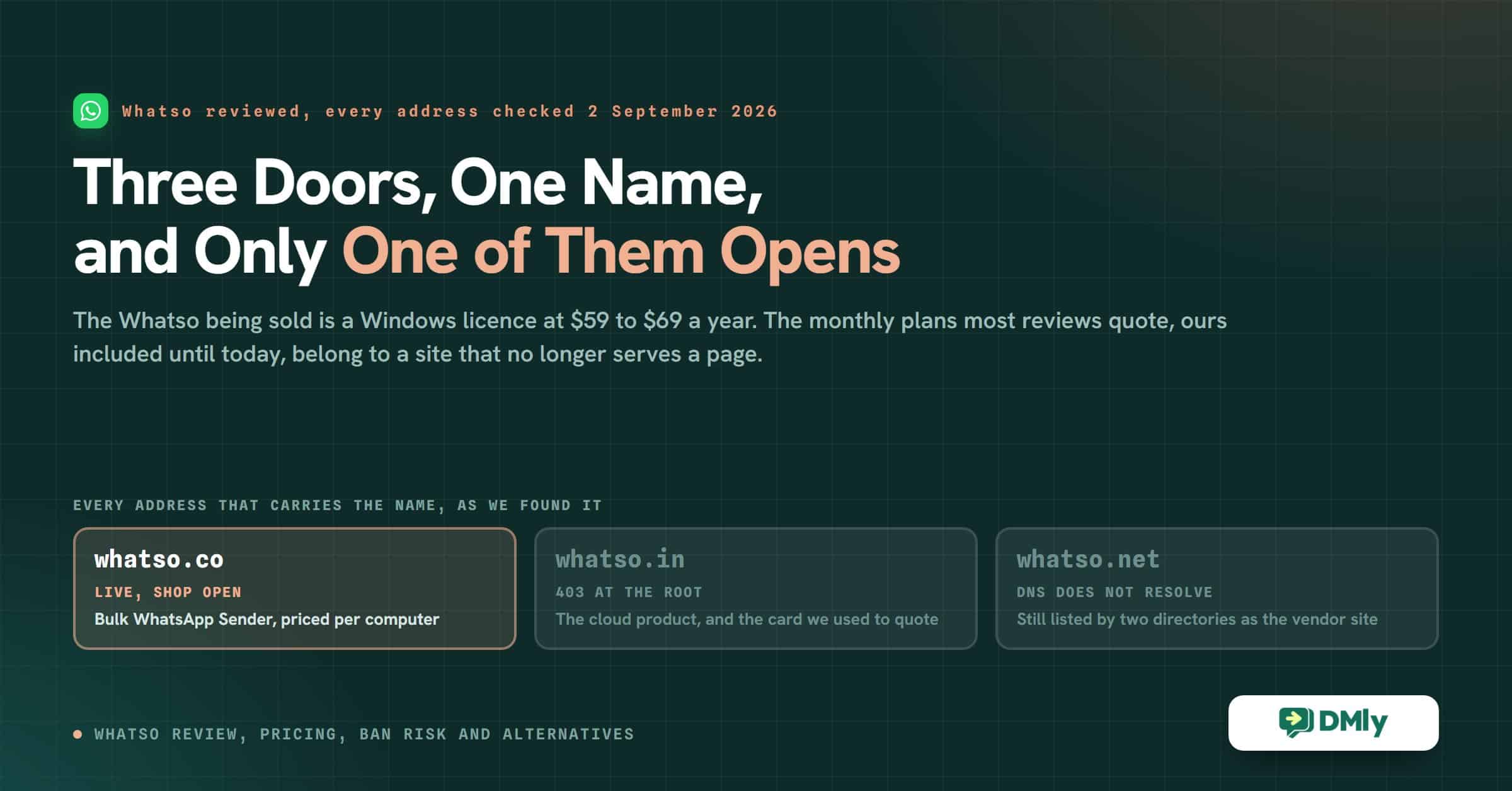
Type “Whatso” into a search box and you are offered three different front doors. On 2 September 2026, the day this Whatso review was rebuilt, only one of them opened.
That is not a piece of trivia. It decides what you are buying, what it costs, and whether any review of this product, including the one you are reading now, describes the thing that would actually arrive in your inbox after you paid. This page had it wrong, and how it got it wrong is more useful to you than another feature list: we reviewed the Whatso at one address while the Whatso on sale sat at another.
So this Whatso review starts with the doors. Then it prices the product that is genuinely for sale, from the vendor’s own page. Then it covers the part that neither our old page nor most of the reviews above us in the results mention at all: what Meta’s own rules say about sending the way this software sends.
Which Whatso are you actually buying?
Three addresses carry the Whatso name, they sell different things, and two of them do not currently serve a page you can read. Before anything else, work out which one your checkout is on.
| Address | What we got on 2 September 2026 | What it sells |
|---|---|---|
| whatso.co | Live. Full site with a shop, a pricing page, a blog, an FAQ, a contact page and published policies. | Whatso Bulk WhatsApp Sender: a Windows program you download after paying. |
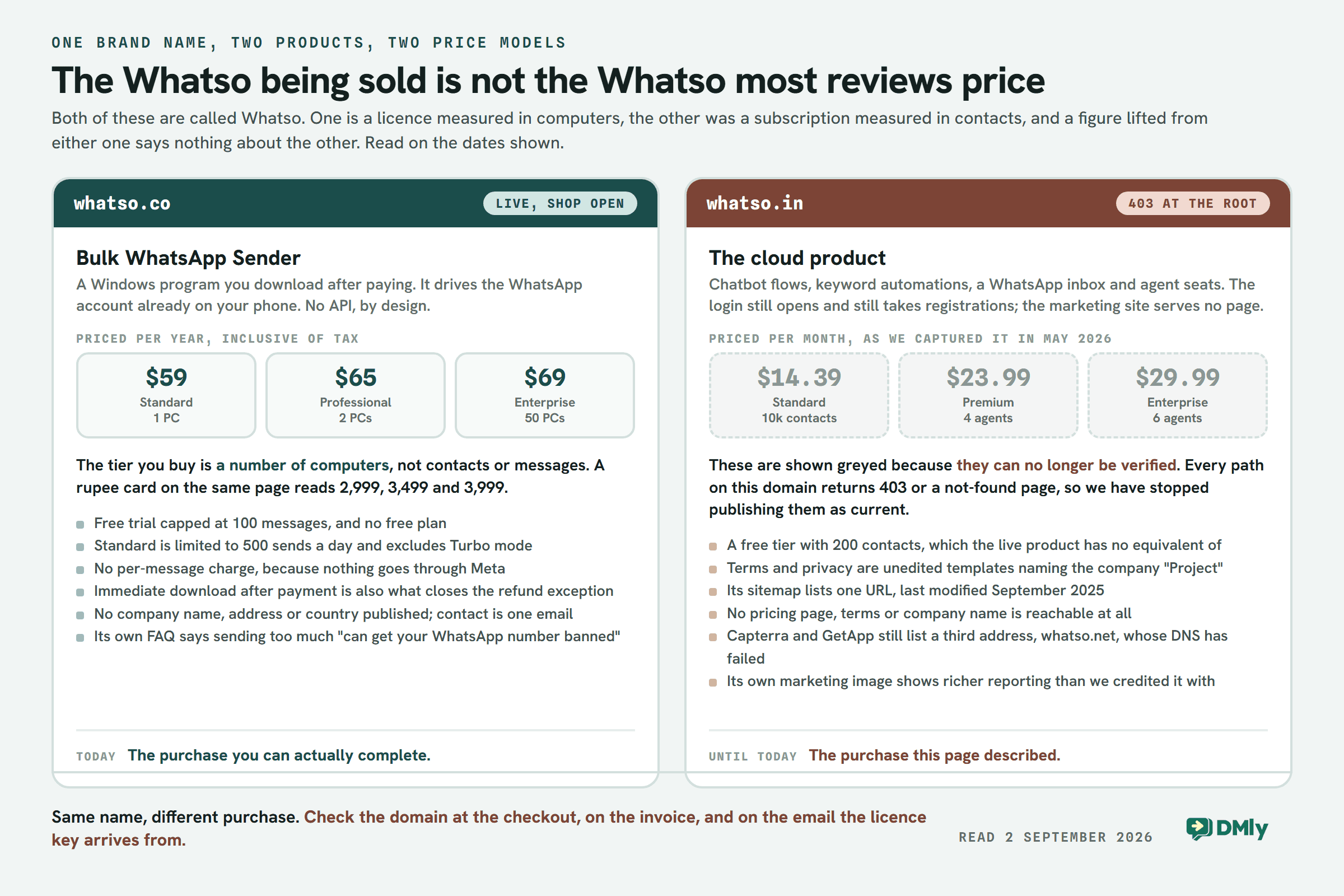
| whatso.in | The home page returns 403 Forbidden. Every other path, including /pricing, returns the application’s own “This Page Does Not Exist” screen. The login at app.whatso.in is up and still accepts new registrations. | A plan-based cloud product with chatbot flows, keyword automations, a WhatsApp inbox and agent seats. This is where our old pricing card came from. |
| whatso.net | Does not resolve at all. Cloudflare’s public resolver answers “No Reachable Authority at delegation whatso.net”. | Nothing reachable. This is the address Capterra and GetApp still list as the vendor’s website. |
It is worth saying how we know whatso.in is genuinely down rather than blocking us. Its robots.txt and sitemap.xml both return 200 from the same server that returns 403 on the home page, so the machine is answering us happily and there is simply nothing at the root. A fetch through an unrelated third-party reader on a different network returned the same 403. And the sitemap it does serve lists exactly one URL, last modified in September 2025.
Both whatso.co and whatso.in resolve to the same address, 195.35.44.171, which belongs to a shared hosting provider. Shared hosting puts unrelated sites on one address every day of the week, so treat that as suggestive rather than proof of common ownership. Neither site links to the other anywhere we could find, and neither names a company.
What to do with that. Every price and status in this Whatso review was read from the .co site on 2 September 2026. If you are about to buy, look at the domain in the address bar at the checkout, and match it against the domain on the invoice and the domain the licence email arrives from. If a review quotes monthly plans and agent seats, it is describing the .in product. If it quotes a yearly licence and a number of PCs, it is describing the .co product. They are not the same purchase.
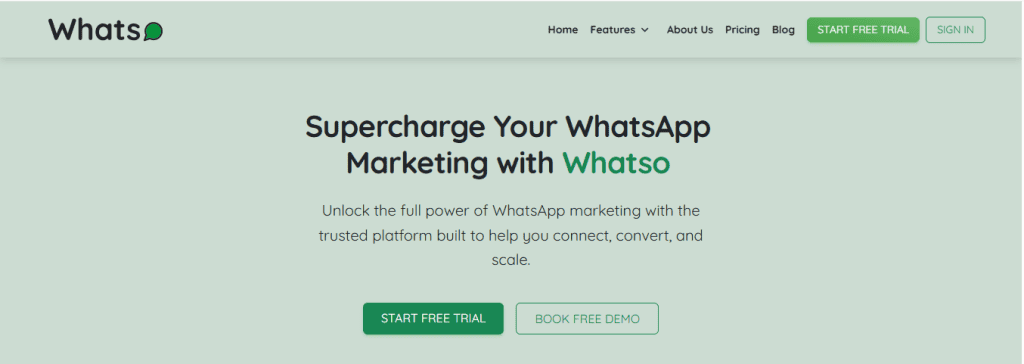
What Whatso is, in plain terms
The Whatso you can buy today is a Windows program that drives the WhatsApp account already on your phone. It is not built on Meta’s WhatsApp Business Platform, and the vendor does not pretend otherwise. Their own features page promises reach “without any technical knowledge or WhatsApp API setup”, and the home page repeats it: “No coding. No API. No complicated setup.”
Their own install instructions tell you the rest of what you need to know about the shape of the thing. You download a zip file, install it, extract it, open an application called Whatso, and log in with the email address and mobile number you bought with. It runs on your machine, against your number.
That architecture is the reason for the one commercial claim on their site that matters most, quoted here in full from their FAQ: “Our software is a complete bulk messaging solution. This means you won’t incur any additional charges to Meta (WhatsApp) for sending messages through our platform.” That is true, and it is true for the same reason the rest of this review exists. Nothing is going through Meta’s paid channel, so Meta is not billing you for it.
What the licence actually includes
Taken from the vendor’s own feature listings rather than from any directory:
- Bulk sending with attachments. Images, videos, PDFs and documents alongside text.
- Three send modes. Text-Paste, Text-Typing (the message appears as though it is being typed) and Turbo Fast. Turbo is excluded from the cheapest tier.
- Contact filtering. It checks a list and separates the numbers that are on WhatsApp from the numbers that are not, plus duplicate cleanup.
- Smart Delay control, described on their site as a way to “avoid number bans” by spacing sends out.
- Multi-number support, so one installation can work several sending numbers.
- Group Contact Grabber. Their words: “Quickly grab contacts from any WhatsApp group, making it super easy to expand your audience with relevant leads.”
- Per-campaign reports on what went out.
Hold on to that last-but-one item. It comes back later, because it is the feature with the sharpest edge on it.
Whatso pricing in 2026, read off the vendor’s own page
Whatso is sold as a yearly or quarterly licence, and the tier you pick is a number of computers, not a number of contacts or messages. That is the row the number sits in, and reading it off the wrong row is how most of the figures circulating about this product went wrong.
| Plan | Yearly | Quarterly | What the card says you get |
|---|---|---|---|
| Standard | $59.00 inc. tax or ₹2,999 | $19.00 inc. tax or ₹999 | Single PC. 500 messages a day. 500 contact imports. Support over mail and chat. Immediate download after payment. Turbo Speed Mode not included. Free updates. |
| Professional | $65.00 inc. tax or ₹3,499 | $23.00 inc. tax or ₹1,199 | Two PCs. Unlimited messages a day. Unlimited contact imports. Support over mail, chat and call. Turbo Speed Mode. Free updates. |
| Enterprise | $69.00 inc. tax or ₹3,999 | $26.00 inc. tax or ₹1,599 | Fifty PCs. Unlimited messages a day. Unlimited contact imports. Support over mail, chat and call. Turbo Speed Mode. Free updates. |
Three things about that table are worth pausing on, and the first is the one most reviews of Whatso get wrong.
There is no free plan. There is a free trial, and the vendor is specific about its size: “We offer a free trial that allows you to send up to 100 messages.” A hundred messages is enough to prove the thing runs. It is not enough to run a campaign.
The cheap tier is capped where it matters. Standard allows 500 messages a day and 500 contact imports, and excludes the fast send mode. If your reason for buying a bulk sender is a list of several thousand people, the $59 line is not the line that does it. The step up to unlimited is another $6 a year, which is a strange gap to leave in a price list and, for once, one that runs in the buyer’s favour.
The same licence carries two prices. The Standard licence is $59 a year on the dollar card and ₹2,999 a year on the rupee card. At early September 2026 exchange rates those are not the same amount of money, and the rupee card is the cheaper one by a wide margin. We are not going to tell you what that means; the vendor publishes both, they are on the same page, and the sensible action is to check which card your checkout is showing you and ask them why if it is the expensive one.
One more term, from their own FAQ, that catches people: “Upgrading your plan is definitely possible! However, downgrades are not currently available.”
The correction this Whatso review owes you
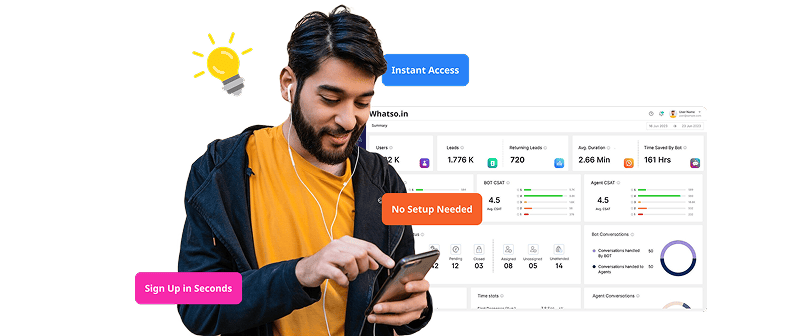
Until today, this page told you Whatso had a free plan and three monthly tiers at $14.39, $23.99 and $29.99. Those numbers were not invented. They were transcribed accurately from a real Whatso pricing page, and the screenshot we took at the time is below, unaltered. What they were not is the price of the product on sale under that name now.
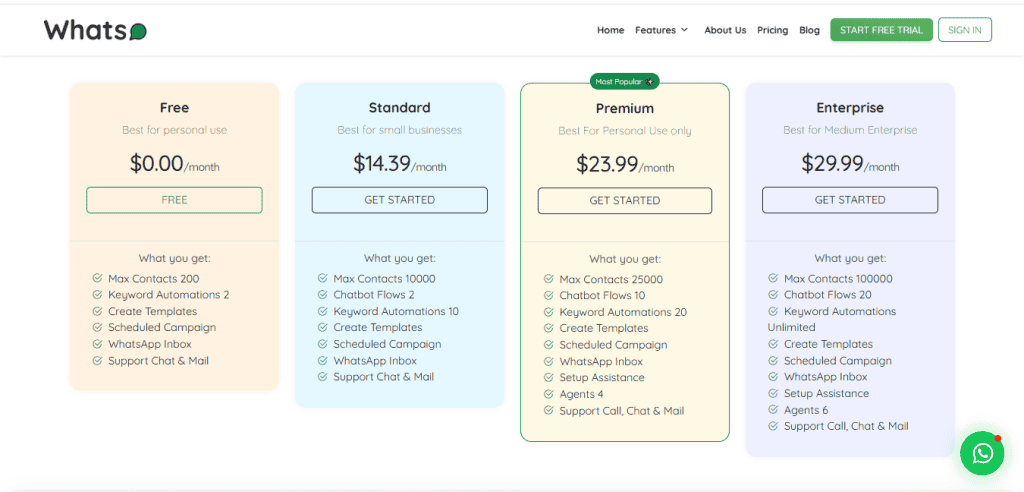
Here is the full account, because the mechanism is the useful part. The card above belongs to whatso.in, the cloud product. Between our capture and today, that site stopped serving pages. Meanwhile the product being marketed, sold and updated under the Whatso name is the Windows sender at whatso.co, which has never been priced monthly and has never had a free tier. Our page kept describing the first thing while readers went and found the second.
Note what we are not claiming. We are not saying the .in prices were ever wrong, or that the product behind them has shut down: the login still works and still takes registrations, so somebody may still be running it. We are saying that we cannot verify those prices today, that a price nobody can verify has no business being published as fact, and that the page you are on now prices the product you can actually put in a basket.
The same discipline is why this review does not quote a figure for one competitor further down. If we cannot read it on the vendor’s own page on the day of writing, it does not go on the page.
The risk Whatso names, and the one it does not
Whatso is more honest about ban risk than this page used to be, and that was a problem with this page. Their FAQ answers the question directly, and here it is in full: “There isn’t a strict limit with our software, but sending too many messages at once can get your WhatsApp number banned. It’s best to send them in smaller batches to be safe.”
Our old review listed “reliability concerns” and “customer support complaints” and never once mentioned that the number you send from can be taken away. When a vendor is straighter with your customers than we are, the vendor is not the one with the problem.
What their answer leaves out is what Meta publishes. We are not going to characterise it, so here are the clauses, quoted from Meta’s own documents rather than from anybody’s blog about them.
| Meta document | The clause, verbatim |
|---|---|
| WhatsApp Terms of Service, under Acceptable Use Of Our Services | You may not “involve sending illegal or impermissible communications such as bulk messaging, auto-messaging, auto-dialing, and the like“. |
| WhatsApp Terms of Service, same section | You may not “collect information of or about our users in any impermissible or unauthorized manner“. |
| WhatsApp Business Messaging Policy, under Create a Quality Experience | “You may only contact people on WhatsApp if: (a) they have given you their mobile phone number; and (b) you have received opt-in permission from the recipient confirming that they wish to receive subsequent messages or calls from you.” |
| WhatsApp Business Messaging Policy, under Enforcement and Updates | “If we terminate your account for violations … we may prohibit you and your organization from all future use of WhatsApp products and services.” |
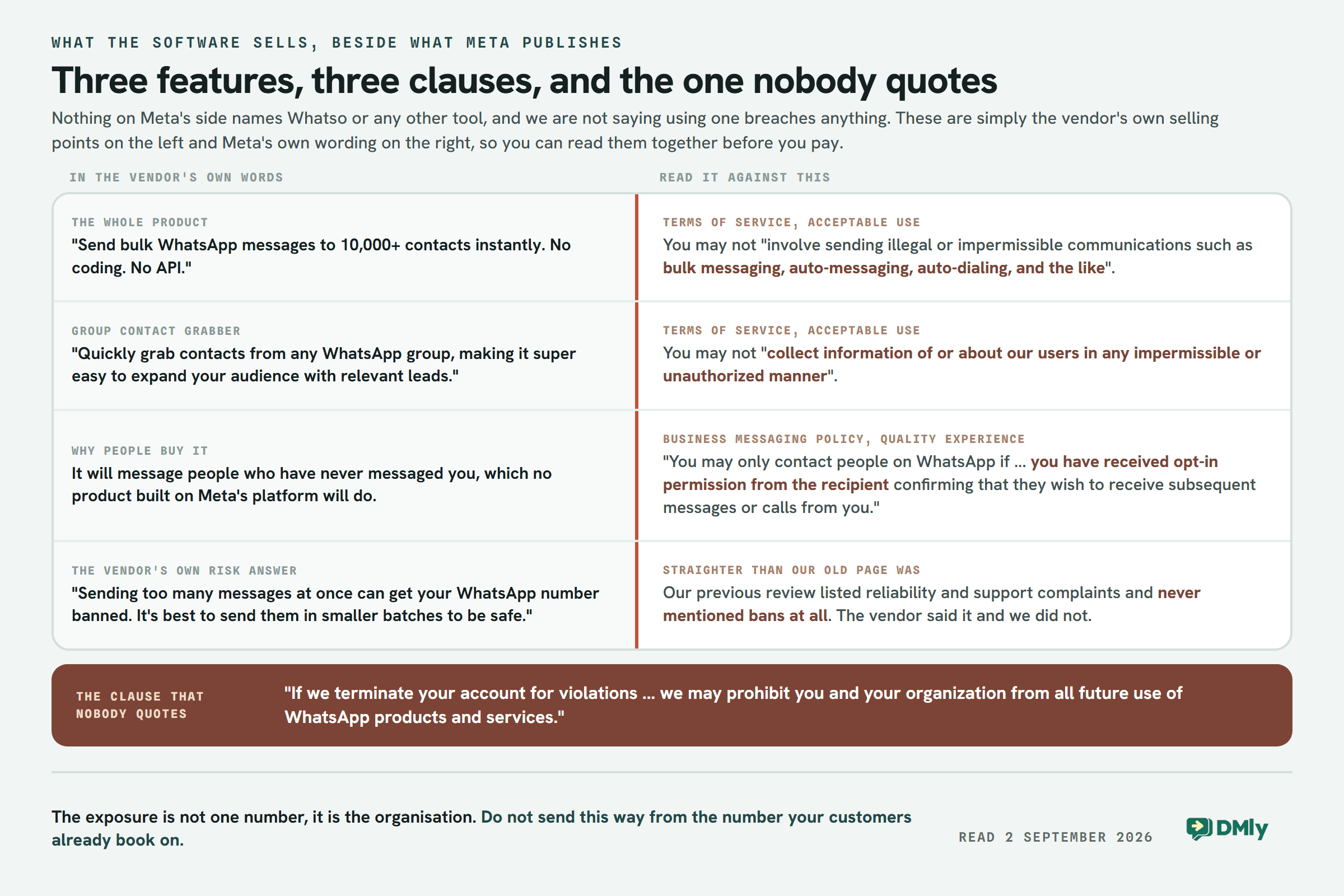
Put those beside the feature list and two things follow that you can check for yourself. Bulk sending from your own number is the thing this category of software is for, and it is the thing named in the first clause. Pulling member numbers out of a WhatsApp group you happen to be in is what the Group Contact Grabber does, and it is worth reading it against the second clause and the opt-in requirement in the third.
We are not telling you that using Whatso breaches Meta’s terms. That is a judgement neither we nor the vendor get to make, and the vendor has never claimed authorisation either way. What we are telling you is that the fourth clause is the one nobody quotes, and it is the one with teeth: the published consequence of a termination for violations is not only losing a number, it is a bar on the organisation. If you run your bookings, your enquiries and your repeat customers through that number, price that risk before you price the licence.
The practical question to put to them in writing, before you pay: is the software authorised by WhatsApp, and if my number is banned while using it, what happens to my licence? Whatso’s refund policy does not mention bans anywhere, which means as things stand a banned number is your loss rather than a defect they will refund. We have written more about how account health actually works in our guide to WhatsApp quality rating, messaging limits and bans, and about the sanctioned way to do the same job in how to send bulk messages on WhatsApp officially.
What you cannot find out before you pay
You cannot find out who you are paying. There is no company name, no registered entity, no address, no country and no telephone number anywhere on whatso.co. The contact page offers a form and one email address, support@whatso.co. That is the whole of it.
Four more things are published, and they are worth reading before rather than after.
- The arbitration clause. Their terms, in full: “Any disputes between you and Whatso shall be resolved by a sole arbitrator, chosen by Whatso, and conducted in English.” No court is named, no jurisdiction is named, and no entity is named to arbitrate against.
- The refund answer depends on which page you read. The FAQ says “If you haven’t used or activated your license, you’re eligible for a full refund.” The refund policy says “One-time fees for end products are non-refundable”, with a seven-day exception for a billing error “provided the end products haven’t been downloaded or used”. Those are not the same promise, and only one of them is on the page headed Refund and Cancellation Policy.
- The download closes the exception. Every pricing card advertises “Immediate download after payment”. The refund exception requires that the product has not been downloaded. Both statements are theirs, they sit two clicks apart, and read together they leave a narrow window.
- Change of mind is excluded, in terms. No refund if “You no longer want the item after making the payment”, if “You change your mind”, if “You bought the item by mistake”, or if “You lack the expertise to use the item”.
The legal pages on the other Whatso are not finished
If you sign up at app.whatso.in, which still works, you tick a required box agreeing to a Terms of Service and a Privacy Policy. Both documents are reachable, and both are unedited template text. They name the company as “Project” throughout, never as Whatso. Both state that “The Service is hosted on the website https:://example.com/”, double colon and placeholder domain included. The two documents are substantially the same text with the title swapped, so the Terms of Service contains the line “Changes to this Privacy Policy: Project has the discretion to update this Terms of Service at any time.” Both end with the template’s own instruction still in place: “You can create more advance Terms of Service here https:://example.com/”.
There is no refund policy, no data retention term, no processor list and no jurisdiction in either. That is what you are agreeing to at that signup box.
The commercial site has the same fingerprint in a lighter form. Its FAQ page still carries the theme’s stock introduction, which begins “General questions: Discover the basics of WordPress themes, including their importance for creating a unique web presence”, on a page about WhatsApp software. The footer’s “Features” column lists Website editor, Theme options, Theme builder and Template library, and every one of those links out to the WordPress theme vendor’s own marketing site. The social icons point at Behance and Dribbble.
None of that proves the software does not work, and we are not suggesting it does. Plenty of good small products run on a lightly edited theme. What it means is narrower and more useful: the documents you would rely on if something went wrong have not been written for this business, so do not plan on relying on them.
Where Whatso genuinely wins
This category exists because it does one thing the official route cannot, and pretending otherwise would make this review useless. Four honest advantages.
- The cost floor is genuinely low, and it is flat. Sixty-five dollars a year buys unlimited daily sends on two machines, and there is no per-message charge on top because nothing is going through Meta’s paid channel. On the official route the platform fee is only half the bill; the other half is Meta’s per-message rate, which varies by country and message type. Our WhatsApp Business API pricing by country rate card is the place to work out what your own volume would cost before you compare the two.
- There is no onboarding to survive. No Business Manager, no business verification, no display name review, no template submitted for approval and rejected on a Friday. You buy, you download, you send.
- It will message people who have never messaged you. This is the entire point of the category, and no product built on Meta’s platform will do it without a template Meta has approved first. It is also, precisely, the thing the clauses above are about. Both halves of that sentence are true at once.
- It is one purchase, not a subscription to manage. One number, one machine, one renewal a year. For a shop with a WhatsApp number and no team, that is a real kind of simplicity.
If you have read the risk section and you want that trade, Whatso is a reasonable member of its category and its price is competitive within it. Our reviews of WhatSender and Whappext cover the two nearest comparisons, both sold the same way and both carrying the same question.
DMly is a different kind of product, and that cuts both ways
DMly runs on Meta’s WhatsApp Business Platform, so it inherits Meta’s protections and Meta’s rules together. That is the honest summary, and the second half is not a footnote.
What it is: one inbox across eight channels, with a CRM, bookings, invoices, reviews and AI agents sitting behind it. The eight are WhatsApp, Facebook Messenger, Instagram, Telegram, SMS, TikTok, a live chat widget on your own site, and Google Business Profile, which brings reviews and posts rather than chat. A contact is one person even when they reach you on two of them.

What DMly cannot do that Whatso can
- It will not message a stranger on demand. Outside the 24 hours after a contact’s last message to you, WhatsApp delivers only templates Meta has approved in advance, and a brand-new lead who has never written to you has no open window at all. If your plan is to acquire a list and message it, DMly is the wrong tool and will stay the wrong tool.
- No group messaging. Meta’s platform does support WhatsApp groups. DMly’s documentation describes no group messaging feature: we checked by label and by concept across all 375 pages and found nothing. If your distribution runs through groups, ask us and every other platform the same question before you commit.
- No free plan and no one-time licence. There is a 7-day trial on any plan with no card required, and after that it is a subscription. If avoiding a recurring bill is the actual requirement, we do not meet it.
- Nothing runs on your desktop. There is no offline mode and no local installation to own.
Where DMly’s reporting stops
A comparison table that only lists what we have is not worth reading, so here is where ours runs out. On a broadcast report, the Replies figure is always 0 on every channel, because nothing counts replies onto a broadcast. Two things soften that and both are real: per-template performance reports a lifetime Replied count on its own screen, and a retarget audience can select All Replied or All Sent But Not Replied, so the audience is selectable even though the number is not reported. The Engagement over time chart on a broadcast is placeholder data and should be ignored. And the Overview dashboard’s headline cards are all-time totals for the selected channel with no date range picker, so month-on-month comparison is not something you do there.
What it does report, and reports well: reply rate, flow completion, broadcast delivery, growth-tool clicks and opt-out rate; a peak conversation hours heatmap over 28 days; growth-tool attribution with a click-to-contact conversion rate; and, under Reports, average first response and average resolution time per team and per agent.
DMly pricing, verified on 2 September 2026
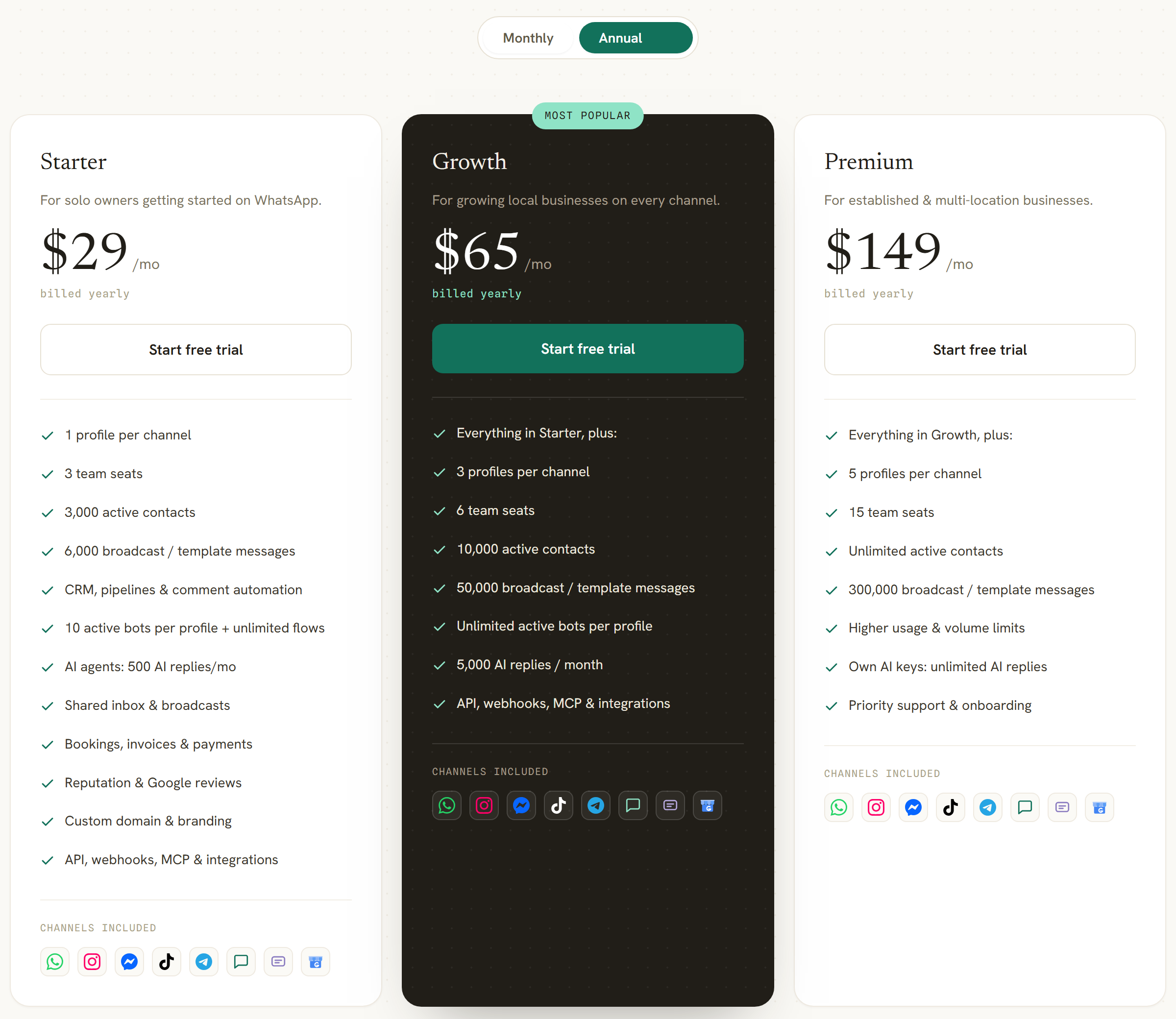
Three plans. The rates below are the billed-yearly figures; billed monthly they are $39, $79 and $199. There is no markup on WhatsApp messages: you pay Meta’s per-message rates directly and DMly adds nothing on top.
- Starter, $29 a month billed yearly. 1 profile per channel, 3 team seats, 3,000 active contacts, 10,000 broadcast or template messages, 10 active bots per profile with unlimited flows, 500 AI replies a month, plus the shared inbox, CRM and pipelines, bookings, invoices and payments, reputation and Google reviews, custom domain and branding, and API, webhook, MCP and integration access.
- Growth, $65 a month billed yearly. 3 profiles per channel, 6 team seats, 10,000 active contacts, 50,000 broadcast or template messages, unlimited active bots per profile, 5,000 AI replies a month.
- Premium, $149 a month billed yearly. 5 profiles per channel, 15 team seats, unlimited active contacts, 300,000 broadcast or template messages, 20,000 AI replies a month, and unlimited AI replies on your own AI keys.
- Add-ons. An extra team seat is $10 a month, an extra profile set is $15 a month, and extra contacts are $15 per thousand.
Whatso and DMly side by side
A note on method, because it changes how you should read the cells. Whatso publishes no product documentation beyond marketing copy and a bullet list per licence. Where a capability is simply absent from everything they publish, the cell below says not published rather than not available. Those are different claims and only one of them is ours to make.
| Capability | Whatso (whatso.co) | DMly |
|---|---|---|
| What it runs on | A Windows program driving your own WhatsApp account. No API, by design. | Meta’s WhatsApp Business Platform, plus seven other channels. |
| How it is priced | $59 to $69 a year, or ₹2,999 to ₹3,999. Tiers are numbers of PCs. | $29, $65 or $149 a month billed yearly. Tiers are contacts, seats and message volume. |
| Per-message cost | None. | Meta’s own rate, paid to Meta, with no DMly markup. |
| Free option | Trial of 100 messages. No free plan. | 7-day trial on any plan, no card. No free plan. |
| Messaging someone who never contacted you | Yes, and that is what it is for. | Only with a template Meta approved in advance. |
| Channels | WhatsApp. SMS and other channels are not claimed anywhere on the site. | Eight: WhatsApp, Messenger, Instagram, Telegram, SMS, TikTok, live chat widget, Google Business Profile. |
| Shared inbox and agent assignment | Not published. | Yes, with assignment, internal notes and round-robin routing. |
| CRM and pipeline stages | Contact lists and filtering. A pipeline is not published. | Yes, with tags, custom fields, lifecycle and pipeline stages. |
| Segmentation | Contact lists and duplicate cleanup. | Four basic filters plus twelve condition fields, including spend, order count, last purchase, loyalty points and channel reachability. Segments re-evaluate every time they run. |
| Bookings and appointments | Not published. | Native calendar with services, staff and classes. |
| Invoices and payments | Not published. | Branded invoices with a partially paid state, expenses and a revenue view. |
| Reviews and reputation | Not published. | Automatic Google review requests and a reputation inbox. |
| White label | Not published. | Yes, through the reseller dashboard, and it applies on your own custom domain. |
| Group messaging | Group Contact Grabber pulls numbers out of groups you are in. | Not documented anywhere in DMly. |
| Who you are contracting with | No company name, entity, address or country published. One support email. | Named company with published terms and privacy policy. |
Which one fits you
The choice is not really about features. It is about whose rules you would rather live under.
- If you have a list of people who never asked to hear from you, and reaching them today matters more than the number surviving the year, no official platform will do that job. A desktop sender will. Read the four clauses above first, then decide, and do not send from the number your customers already use to book.
- If your enquiries already arrive on WhatsApp and the problem is answering them, a bulk sender solves nothing. What you need is one queue, the ability to hand a conversation to a colleague, and a record of who said what. That is what a shared inbox and a contacts and CRM layer are for.
- If you want to broadcast to your own customers, people who have bought from you and given you their number, you do not need to take the ban risk at all. That is exactly the case Meta’s approved templates exist for, and it is covered end to end in our guide to WhatsApp broadcasts, opt-in, templates and timing.
- If bookings, invoices or review requests are the actual job, neither a bulk sender nor a plain inbox will get there, because the messages have to be triggered by something happening in your diary or your ledger.
- If your budget genuinely cannot carry a subscription, be honest about that and buy the licence. We would rather you did that with the risks in front of you than pay us for something you cannot sustain.
Whatso review FAQs
How current is this Whatso review?
Every price, feature, policy quotation and site status on this page was read on 2 September 2026, from the vendor’s own pages and from Meta’s own published terms rather than from a directory or another review. Where we could not verify something on that date, we say so rather than repeating a figure from elsewhere.
How much does Whatso cost in 2026?
On the vendor’s own pricing page on 2 September 2026, Whatso is sold as a licence: Standard at $59 a year or $19 a quarter for a single PC, Professional at $65 a year or $23 a quarter for two PCs, and Enterprise at $69 a year or $26 a quarter for fifty PCs. The same page also shows a rupee card at ₹2,999, ₹3,499 and ₹3,999 a year. All prices are marked inclusive of tax. There is no free plan, and the free trial is capped at 100 messages.
Why did this page previously list monthly Whatso plans?
Because it was reviewing a different Whatso. The monthly card at $14.39, $23.99 and $29.99 belonged to whatso.in, a cloud product we captured in May 2026. That site no longer serves a page, so those figures cannot be re-verified and we have stopped presenting them as current. The screenshot is kept above as the record of what we saw and when.
Does Whatso use the WhatsApp Business API?
No, and it says so as a selling point. Their features page promises reach “without any technical knowledge or WhatsApp API setup”, and their FAQ explains that you “won’t incur any additional charges to Meta (WhatsApp)” because nothing goes through Meta’s paid channel. The software drives the WhatsApp account on your own machine instead.
Is Whatso safe to use?
The vendor’s own answer is the fairest starting point: “sending too many messages at once can get your WhatsApp number banned. It’s best to send them in smaller batches to be safe.” Beyond that, read Meta’s Terms of Service on bulk messaging and its Business Messaging Policy on opt-in and enforcement, both quoted in full above, and note that Whatso’s refund policy does not cover a banned number. Ask the vendor in writing whether the software is authorised by WhatsApp before you buy.
Is there a free Whatso plan?
Not on the product currently sold. There is a free trial of up to 100 messages. The free tier with 200 contacts that older reviews mention, including our own until today, belonged to the cloud product at whatso.in, which cannot be reached.
What are the best Whatso alternatives?
It depends which half of the trade you want to keep. In the same category, sold the same way and carrying the same question about Meta’s terms, the nearest comparisons are WhatSender, Whappext and RapBooster. If you would rather move to the sanctioned route, the established platforms are Wati, Respond.io, Interakt and DMly, and our roundup of WhatsApp messaging automation tools compares them.
Can I get a refund from Whatso if my number is banned?
Nothing in the published refund policy addresses it. The policy makes one-time fees non-refundable, allows a seven-day exception only for a billing error where the product has not been downloaded, and explicitly excludes change of mind. Since every plan advertises immediate download after payment, assume a ban is your loss and price the licence accordingly.
Does DMly support WhatsApp broadcasts?
Yes, on WhatsApp, Messenger, Instagram, SMS and Telegram, with audiences built from saved segments or by retargeting an earlier campaign by what people did with it. Broadcasts are not available on the live chat widget or TikTok. On WhatsApp they go out as templates Meta has approved, which is what makes them deliverable to a contact whose 24-hour window has closed.
Whatso review: the short version
Whatso is a $59 to $69 a year Windows licence that sends bulk WhatsApp messages from your own number. It is cheap, it is simple, it will reach people who never opted in, and the vendor tells you plainly that doing so can get the number banned. It publishes no company name, its refund policy and its FAQ disagree with each other, and the sign-up on its other domain hands you a terms document that calls the company “Project”.
If that trade is the right one for your business, make it with your eyes open and not on the number your customers book on. If it is not, the alternative is not a better sender. It is a different job: answering the people who already message you, and reaching the ones who asked to hear from you in a way that will still work next year.
See what DMly costs, or start the 7-day trial and connect your first channel before you decide anything.
Writing about WhatsApp automation, bookings and growth for local business.
Turn WhatsApp into your busiest channel.
Start free and run message, bookings, payments and reviews in one place.
