
Anantya.ai Review (2026): The Price They Do Not Publish
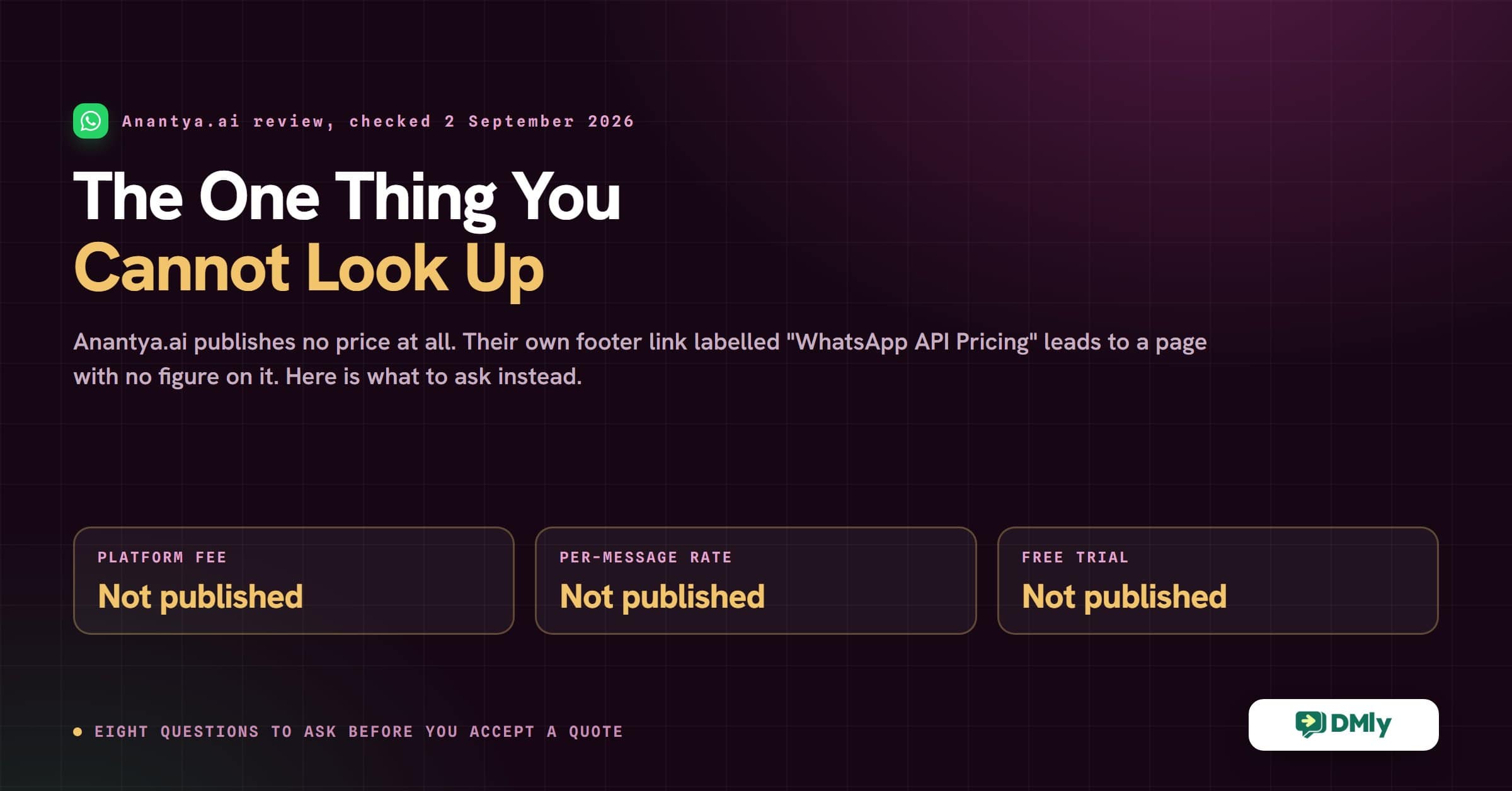
There is one thing about Anantya.ai you cannot look up, and it is the first thing most people want to know.
Anantya.ai publishes no price. Not a starting figure, not a plan name, not a per-message rate. We checked on 2 September 2026: the link in their own site footer labelled “WhatsApp API Pricing” goes to their WhatsApp Business API product page, which carries no figure anywhere on it, and anantya.ai/pricing returns a page whose body reads “404 – Page Not Found”. There is no pricing entry in the main navigation at all.
That is not a scandal. Plenty of good enterprise software is sold that way, and there are real reasons for it. But it does change how you have to evaluate the platform, because you cannot put it on a shortlist next to three others and compare. You have to book a call first.
So this review does two things. It covers what Anantya.ai actually is and where it is strong, verified against their own site rather than a feature list we copied. And because the price is the missing piece, it gives you the questions to ask on the sales call, which is more useful than guessing at a number we do not have.
What Anantya.ai is
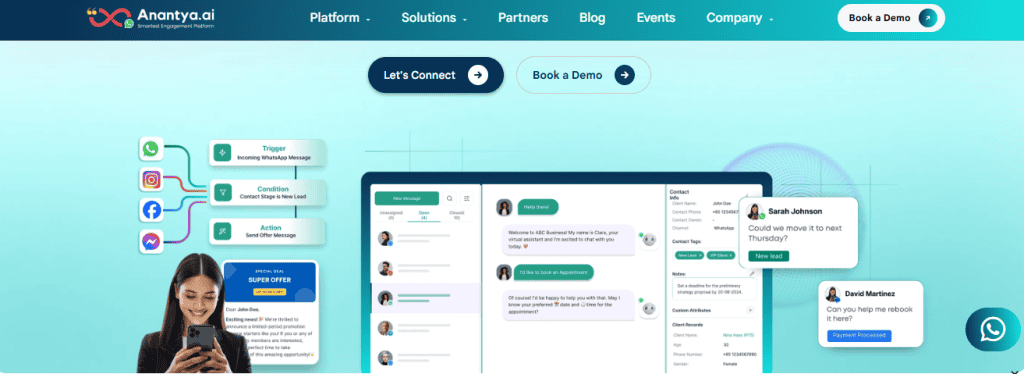
Anantya.ai is a conversational messaging platform built around the WhatsApp Business API, run out of Delhi with a second office in the UAE. Its own line is that it is trusted by more than 500 customers across more than 13 countries.
It is not WhatsApp only, and an earlier version of this review implied it was. Anantya lists five channels: WhatsApp Business API, Instagram, Facebook, SMS and RCS, the richer successor to SMS that Android handsets show as a branded card rather than plain text. RCS is unusual in this bracket and worth flagging, because most WhatsApp-first platforms do not carry it.
The product is organised around four use cases, which is a sensible way to shop it: marketing, commerce, authentication and support. There are also iOS and Android apps, and three free tools that need no account: a WhatsApp QR generator, a chat-link generator and a website widget generator.
What is actually in the platform
Read off their own feature pages rather than a directory listing:
- Bulk broadcasting to opted-in contacts through approved templates, with a template approval dashboard so you can see where each one sits with Meta.
- A drag-and-drop chatbot builder, described as zero-code, for lead capture, onboarding, order updates and post-purchase questions.
- A shared team inbox on one WhatsApp number, with smart agent routing and chats organised by tag, campaign and attribute.
- Click-to-WhatsApp ads, so an ad opens a chat instead of a landing page.
- Catalogues and cart, so a customer can browse and buy without leaving the chat.
- Contact and lead management with tags and attributes, CSV import and export, and message scheduling.
- Campaign analytics in real time, plus reports on delivery and engagement.
- More than 100 integrations, with Salesforce, HubSpot, Zoho CRM, Shopify, Zapier and Pabbly Connect named on their own pages.
That last one deserves a note, because it is a place Anantya genuinely beats us. DMly has no native Salesforce connector and no native Zoho connector. If your business runs on either, Anantya connects to it and DMly needs Zapier, n8n or the API in between, which is work you should price before you switch.
Anantya.ai pricing, and what “contact us” actually costs you
What they publish, precisely
Nothing. Checked on 2 September 2026, three ways:
- The main navigation carries Platform, Solutions, Partners, Blog, Events and Company. No Pricing.
- The footer has a link labelled “WhatsApp API Pricing”. It points at the WhatsApp Business API product page, which describes features and carries no figure of any kind.
anantya.ai/pricingloads, but the page body says “404 – Page Not Found. Sorry, the page you are looking for does not exist.”
Every route to a number ends at sales@anantya.ai or a demo booking. Cost will depend on the usual variables: number of agents, message volume, how much automation you want, chatbot complexity, integrations and business size.
Why platforms do this, and who it suits
Custom pricing is not a trick, and it is sometimes the better deal. A quote is shaped to what you actually use, so an organisation with an unusual pattern (very high volume on one template category, say, or forty agents and almost no marketing) can end up paying less than any published plan would have charged. Enterprise procurement generally expects a quote anyway.
The cost lands somewhere else, and it is a real cost: you cannot shortlist. If you are comparing four WhatsApp platforms on a Tuesday afternoon, three of them tell you their entry price in ten seconds and the fourth needs a call, a demo and a follow-up. Small businesses tend to drop the fourth, not because it is worse, but because the comparison never happened.
The second cost is that you have no anchor. With a published card you can see what the next tier costs before you need it. With a quote, the renewal conversation starts from whatever you agreed, and you find out what growth costs when you are already committed.
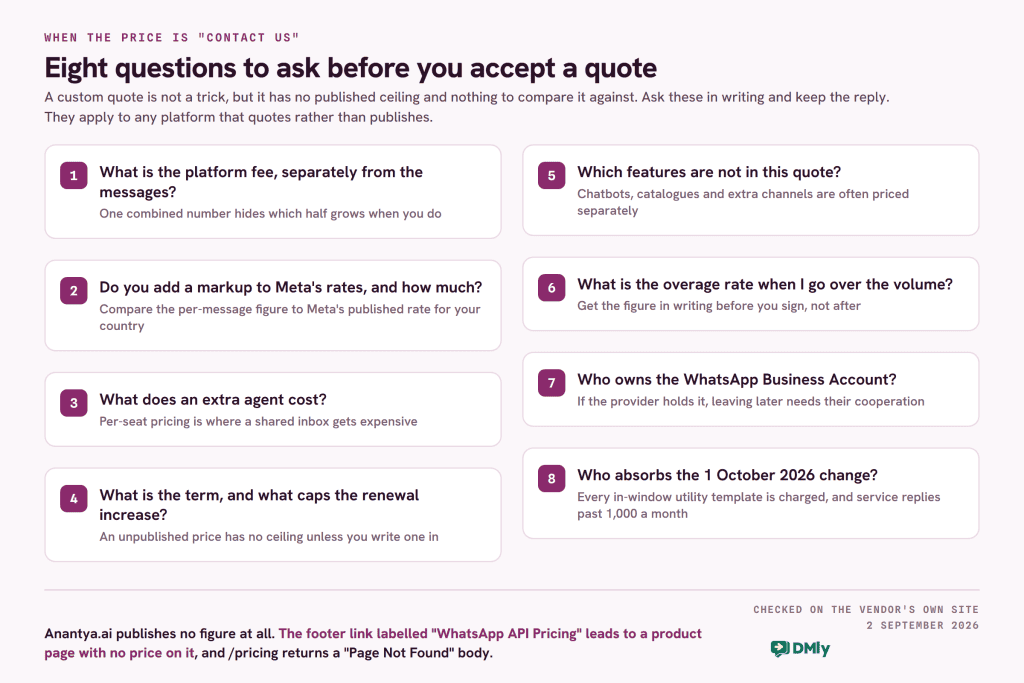
Eight questions to ask before you accept a quote
These apply to any platform that quotes rather than publishes, not just this one. Ask them in writing, and keep the reply.
- What is the platform fee, separately from the messages? One combined number hides which half grows when you do.
- Do you add a markup to Meta’s message rates, and how much? Meta bills per delivered template by category and country. Ask for the per-message figure and compare it to Meta’s own published rate for your country.
- What does an extra agent cost? Per-seat pricing is where a shared inbox quietly gets expensive.
- What is the contract term, and what is the renewal increase capped at? An unpublished price has no ceiling unless you write one in.
- Which features are not in this quote? Chatbots, catalogues and extra channels are separately priced on several platforms in this market, as our breakdown of what a WhatsApp chatbot costs sets out.
- What happens when I go over the volume in the quote? Ask for the overage rate, in writing, before you sign.
- Who owns the WhatsApp Business Account? If the provider holds it, moving away later needs their cooperation and a migration.
- What changes on 1 October 2026? Two categories of message that are free today start being charged, one of them only above a monthly free allowance. A quote written before that date should say who absorbs it. See below.
What DMly charges, since we do publish it
It would be strange to make a point of transparency and then be vague, so here is the whole card, verified against the live pricing page on 2 September 2026.
| Plan | Billed yearly | Billed monthly | Team seats | Active contacts | Broadcast or template messages | AI replies a month |
|---|---|---|---|---|---|---|
| Starter | $29 | $39 | 3 | 3,000 | 10,000 | 500 |
| Growth | $65 | $79 | 6 | 10,000 | 50,000 | 5,000 |
| Premium | $149 | $199 | 15 | Unlimited | 300,000 | 20,000, or unlimited on your own AI keys |
Add-ons are the same on every plan: $10 a month for an extra seat, $15 a month for an extra profile set, $15 per additional thousand contacts. Bookings, invoices, reputation, CRM, the API, webhooks and the MCP server are included on all three rather than gated to the top one. There is a 7-day trial with no card, and DMly adds no markup to Meta’s message fees: you connect your own WhatsApp Business account and Meta bills you directly. The full card is on the DMly pricing page, and our country by country rate card covers what Meta itself charges.
The 1 October 2026 change belongs in any quote you sign this month
Meta’s own upcoming-pricing documentation sets out two changes on that date, and both reach the message half of the bill on every platform, Anantya and DMly alike. Only one of the two comes with a free allowance:
- Service messages become billable above 1,000 a month. These are the free-form replies your team types back inside the 24-hour window after a customer messages you. They have been free since 1 November 2024, and from 1 October every business phone number still gets the first 1,000 each month free, resetting monthly with no rollover. Meta charges from the 1,001st, so a quiet inbox may pay nothing here and a busy support queue will pay in full.
- Utility templates sent in reply to a customer inside that window become billable. Order confirmations, delivery updates, appointment changes. Free since 1 July 2025. There is no free allowance on this one, which for most businesses makes it the bigger of the two.
The detail that changes how a support queue is priced: Meta does not offer volume tiers for service messages, while utility and authentication keep theirs, so once you are past the free 1,000, a long conversation costs in a straight line rather than getting cheaper as it runs. The 72-hour free entry point window from click-to-WhatsApp ads is unchanged.
And there is a deadline before the deadline. Meta’s wording is that any provider or directly integrated business without a payment method on file by 30 September 2026 will have service message delivery stopped when charging starts. If your replies have always been free, that is a job with a date on it. We have written it up in full in what service messages now cost from 1 October.
Where Anantya.ai is strong
- RCS alongside WhatsApp and SMS. Very few platforms in this bracket carry RCS, and if a large share of your customers are on Android in a market where carriers have switched it on, that is a channel nothing WhatsApp-first can reach. DMly has no RCS at all, and the word does not appear anywhere in our documentation.
- Salesforce and Zoho CRM connectors. Named on their own integrations pages. DMly has neither natively.
- Authentication as a first-class use case. One-time passcodes with a dedicated number, plus SMS fallback for OTP, which is a specific and well-solved problem rather than a bullet.
- Ease of use. The most consistent thing in user feedback is that teams get productive quickly without a long onboarding.
- Responsive support, with sales and support numbers published for both India and the UAE.
- A white-label partner programme. An earlier version of this review said Anantya had no white-label offering. That was wrong. They run one, described as building solutions “all under your brand name, powered by Anantya”, with partner margins quoted on the page as 23 to 59 per cent. No price is published for it, as with everything else.
Where Anantya.ai stops
These are limits rather than faults, and each one is only a problem if it is your problem.
- No published pricing, covered above. The comparison cost is real even when the quote turns out to be fair.
- The product stops at the conversation. There is no booking calendar, no invoicing, no review collection and no loyalty scheme on Anantya’s product list. If a WhatsApp conversation in your business ends in an appointment or a payment, that part happens somewhere else.
- Reporting depth. The platform reports delivery, campaign activity and engagement. Businesses that want custom report building or deeper cuts of the data commonly ask for more than is there.
- Lead management is contact management. Tags, attributes, import and export are all present. A pipeline with stages, lifecycle states and spend-based segments is a different thing, and if you are running sales rather than support you will feel the gap.
- No Telegram, TikTok, website chat widget or Google Business Profile as inbox channels. Five channels is more than the review used to give them credit for, and it is still five.
How DMly is different, and where it is not
The two platforms overlap heavily on the messaging layer. Both are on the official WhatsApp Business API, both broadcast through approved templates, both have a shared inbox with assignment, both have a no-code bot builder, and neither marks up Meta. The differences are on either side of that.
Eight channels, and two that cannot broadcast

DMly carries eight channels: WhatsApp, Facebook Messenger, Instagram, Telegram, SMS, TikTok, the LiveChat widget on your own website, and your Google Business Profile. The same customer keeps one contact record across all of them.
Two limits belong in the same breath, because they catch people out. The LiveChat widget and TikTok cannot send broadcasts, so a campaign that needs to reach website visitors has to reach them on a channel they also use. Messenger and Instagram have no message templates; they have a reply window instead, and for anything automated that window is 24 hours, not the seven days a person gets for a reply typed by hand. And DMly’s SMS is not a carrier product: it runs on your own Twilio, Plivo or custom HTTP gateway account, text only, with no read receipts.
Segmentation, with the actual fields
The old version of this review said DMly’s segmentation was “advanced” and Anantya’s was “basic”, which tells you nothing. Here is what DMly’s saved segments can filter on, so you can judge it yourself: lifecycle stage, source, any custom field, birthday month, tag, whether a contact is reachable on a given channel, marketing opt-in, total lifetime spend, last purchase, order count, loyalty points and credit balance, plus pipeline stage, tag inclusion and exclusion, and days since last activity.
The commerce fields are the difference that matters. Segmenting on total spend, order count and last purchase is what lets you send a different message to someone who bought twice last month than to someone who has never bought. Anantya has tags and attributes, which will do it if you keep those fields up to date yourself.
What happens after the conversation

This is the widest gap between the two. DMly carries a booking calendar with services, staff, availability, group classes, a public booking page and calendar sync; invoices and payments with branded invoices, partial payment, coupons, gift cards, refunds, expenses and a revenue report; Google review requests and a reputation inbox; and loyalty points that convert into a discount coupon on their own, alongside prepaid credit packs and memberships sold as recurring plans.
None of that is on Anantya’s product list, and it only matters if your conversations end in an appointment or a bill. A business sending order updates and one-time passcodes will never touch any of it. If it does matter, our appointment booking guide and invoicing walkthrough show the shape of it.
One honest limit inside that. DMly appointments have three payment modes and only three: no payment, pay after the appointment, or pay before booking with the slot held for 15 minutes while the client checks out. There is no deposit or part-payment option on a booking. Invoices do support partial payment, so a deposit is taken by invoicing for it rather than on the booking itself.
Reporting, and what DMly does not measure
The old version of this review said DMly “focuses heavily on actionable insights”. That is the kind of sentence that should not survive a fact-check, so here is what is actually true in both directions.
What works well: the Team report gives assigned, closed, replies, average first response and average resolution, team-wide and per agent, filtered by date and exportable. Most WhatsApp tools in this bracket do not report response times at all.
What does not: DMly’s broadcast reporting has three real holes, and you should know them before you plan a campaign around the numbers.
- Replies is always 0. Nothing counts replies to a broadcast on any channel. The card exists and the funnel shows it, and it will read zero forever. Replies do arrive, in the contact’s conversation thread; they are just never counted.
- Engagement over time is placeholder data, the same fixed shape for every broadcast.
- Delivered and Opened only work on WhatsApp, and Delivered alone on SMS. On Messenger, Instagram and Telegram both stay at zero regardless of how the campaign went.
So use WhatsApp’s Delivered and Opened, use the Team report, and do not build a dashboard on the rest. Our broadcast guide covers what to track instead.
Anantya.ai and DMly, feature by feature
Every row checked against each vendor’s own published material on 2 September 2026. Where something is not in a product, the row says so rather than implying it is weak.
| Capability | Anantya.ai | DMly |
|---|---|---|
| Published pricing | None. Quote only, via sales or a demo | $29, $65 or $149 a month billed yearly, on the site |
| Markup on Meta’s fees | Not stated anywhere publicly | None. You connect your own account and Meta bills you |
| Free trial | Not published. A demo booking is the entry point | 7 days on any plan, no card |
| Official WhatsApp Business API | Yes | Yes, Meta Business Partner |
| Channels | Five: WhatsApp, Instagram, Facebook, SMS, RCS | Eight: WhatsApp, Messenger, Instagram, Telegram, SMS, TikTok, website widget, Google Business Profile |
| RCS | Yes | Not available |
| Broadcasting | Bulk broadcasts to opted-in contacts, template approval dashboard | Yes on six channels. Not on the website widget or TikTok |
| Chatbot builder | Drag and drop, zero code | Flow builder with unlimited flows; 10 active bots per profile on Starter, unlimited above |
| Shared team inbox | Yes, with smart agent routing | Yes: 3, 6 or 15 seats in the plan, extras $10 a month |
| Contacts and tags | Tags, attributes, CSV import and export | Contacts, client profiles, pipeline stages |
| Segmentation | Tags, attributes and auto segregation | 15 saved-segment fields across contact, engagement and commerce data, including total spend, order count, last purchase and loyalty points |
| Click-to-WhatsApp ads | Yes | Yes |
| Product catalogue | Yes, catalogue and cart | Yes, plus Shopify and WooCommerce store automations |
| AI | Positions itself as a conversational AI platform; no published limits | AI agents on every plan: 500, 5,000 or 20,000 replies a month, own AI keys on Premium |
| Campaign reporting | Real-time campaign analytics, delivery and engagement reports | Delivered and Opened on WhatsApp only, Delivered on SMS. Replies always reads 0 |
| Team reporting | Not published | Assigned, closed, replies, average first response and average resolution, per agent, exportable |
| Bookings and appointments | Not on the product list | Services, staff, classes, booking page, calendar sync. Three payment modes and no deposit option |
| Invoices and payments | Not on the product list | Branded invoices, partial payment, coupons, gift cards, refunds, expenses, revenue report |
| Reviews and reputation | Not on the product list | Google Business Profile connection, automatic review requests, reputation inbox |
| Loyalty and memberships | Not on the product list | Loyalty points that convert to a coupon, gift cards, credit packs, recurring plans |
| CRM connectors | Salesforce, HubSpot, Zoho CRM, plus 100+ integrations | HubSpot and Mailchimp. No native Salesforce or Zoho connector |
| Commerce and automation connectors | Shopify, Zapier, Pabbly Connect | Shopify, WooCommerce, Zapier, n8n, Google Sheets, Google Calendar, Zoom, Slack, six payment gateways |
| API and webhooks | Yes | Yes on every plan, plus an MCP server for AI clients |
| White label | Yes, a partner programme under your own brand, margins quoted at 23 to 59 per cent. No price published | Agency tier: own branding, client workspaces, custom domain, Stripe connection. Price on application |
| Mobile apps | iOS and Android | iOS and Android |
Which one should you choose?
Anantya.ai is the better fit if
- You need RCS, or SMS and WhatsApp from one place with OTP fallback between them.
- Your business runs on Salesforce or Zoho and you want a native connector rather than a bridge.
- Authentication is a core use case, not a side one.
- You are large enough that a quote will beat a published plan, and procurement expects one anyway.
- Your conversations end when the message is answered.
DMly is the better fit if
- You want to know the price before you talk to anyone, and to see what the next tier costs before you need it.
- The conversation has to become a booking, an invoice or a review.
- Your customers are on Instagram, Telegram, TikTok or your website as well as WhatsApp.
- You want to segment on what people have actually bought, not only on tags you maintain by hand.
- Three to fifteen people share the inbox and you would rather not price that per head.
If you are weighing several platforms at once, our roundup of twenty WhatsApp automation tools puts published prices side by side, and the omnichannel inbox guide is a fair way to work out how many channels you actually need before you pay for any of them.
Frequently asked questions
How much does Anantya.ai cost?
Anantya.ai publishes no price. There is no pricing page: the footer link labelled “WhatsApp API Pricing” goes to a product page with no figure on it, and anantya.ai/pricing returns a “Page Not Found” body. You get a quote by contacting sales or booking a demo, and it is shaped by agent count, message volume, automation and integration needs. Checked 2 September 2026.
What is Anantya.ai used for?
Running customer messaging at scale on the WhatsApp Business API, and on Instagram, Facebook, SMS and RCS alongside it. The four use cases it organises itself around are marketing campaigns, commerce, authentication with one-time passcodes, and customer support through a shared inbox with chatbots.
Is Anantya.ai WhatsApp only?
No, and this review previously implied it was. Anantya lists five channels: WhatsApp Business API, Instagram, Facebook, SMS and RCS. What it does not carry is Telegram, TikTok, a website chat widget or Google Business Profile as inbox channels.
Does Anantya.ai offer white label?
Yes. An earlier version of this review said it did not, and that was wrong. Anantya runs a partner programme that includes building solutions under your own brand name, with partner margins quoted on their page as 23 to 59 per cent. As with everything else there, no price is published.
Why do businesses look for an Anantya.ai alternative?
Most often because they cannot compare it without a sales call, which pushes it off a shortlist before it has been judged. After that, the common reasons are wanting deeper reporting, wanting to segment on purchase history rather than tags, and needing the platform to handle what happens after the conversation, such as a booking or an invoice.
What is the best Anantya.ai alternative?
It depends on what pushed you away. If it was the price being unpublished, any platform with a public card solves it, DMly among them at $29 a month billed yearly. If it was RCS or a Salesforce connector, DMly is the wrong answer, because it has neither. Other published-price platforms in the same market are worth reading alongside this one, starting with our Interakt review. Match the alternative to the reason.
Can DMly handle customer support as well as marketing?
Yes. The same shared inbox carries marketing, sales and support conversations across all eight channels, with assignment, notes and round-robin. One thing to know: round-robin fires once, on a contact’s first ever inbound message, and never on a returning contact, so a regular is not automatically routed back to the person who knows them unless you set “whoever replied last” or assign by hand.
What should I ask before signing a custom quote?
Get the platform fee separated from the message cost, ask whether any markup is added to Meta’s rates and how much, ask what an extra agent costs, ask for the overage rate in writing, ask what the renewal increase is capped at, ask which features are outside the quote, ask who owns the WhatsApp Business Account, and ask who absorbs the 1 October 2026 change to service and utility messages.
Writing about WhatsApp automation, bookings and growth for local business.
Turn WhatsApp into your busiest channel.
Start free and run message, bookings, payments and reviews in one place.
