
WhatsApp Automation for Salons: Bookings, Reminders, and Rebooking (2026)
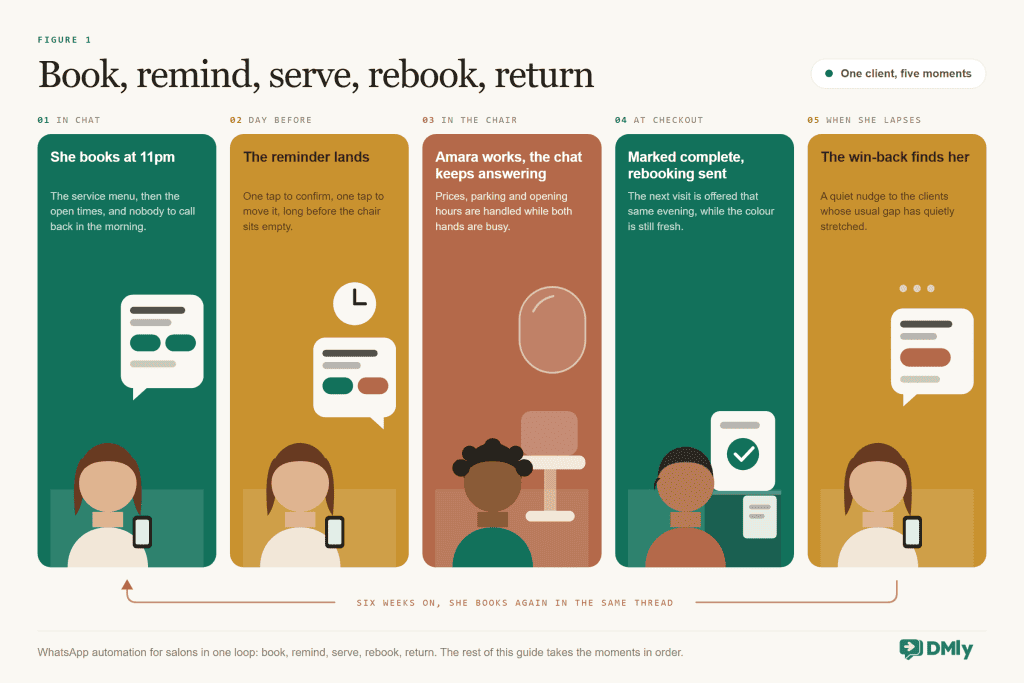
The most valuable minute in your salon is not a treatment. It is the sixty seconds at the till, when a client with fresh colour and a good mood is deciding, whether anyone asks her or not, when she is coming back.
Most salons let that minute pass in silence, and then spend money on ads to win back the same client who was just in the chair. That, in one sentence, is the case for WhatsApp automation for salons: the bookings, the reminders, the rebooking nudge and the win-back all live in the one app your clients check forty times a day, and once they are set up, they run whether your front desk is busy or not.
Salons are the kind of business where WhatsApp automation fits most naturally, because the whole thing is appointments plus relationships, and WhatsApp is already where both of those live. This guide walks your full client cycle: how salon WhatsApp booking works, the appointment reminders that cut no-shows, the rebooking message that matters more than any marketing you will ever run, the quiet-Tuesday broadcasts, and the reviews and loyalty machinery that compounds it all. Everything is built on DMly and checked against how it actually behaves, including the honest limitations.
What WhatsApp Automation for Salons Actually Does
WhatsApp automation for a salon is a set of messages and bookings that handle themselves: clients book from a link or a chat, confirmations and reminders go out on schedule, and follow-ups like rebooking nudges, review requests and birthday offers fire from triggers instead of from somebody’s memory. You connect your salon’s WhatsApp number through the official WhatsApp Business API to a platform like DMly, which adds the booking calendar, the automations and the client records around the chat.
The word “automation” makes some owners picture a robot doing consultations, and that is not what works. What works is automating the admin around the relationship, the booking, the reminding, the following up and the asking, so your team’s actual attention goes to the person in the chair. Here’s the rule worth writing on the wall: automate the diary, never the conversation about someone’s hair.
How Salon WhatsApp Booking Works
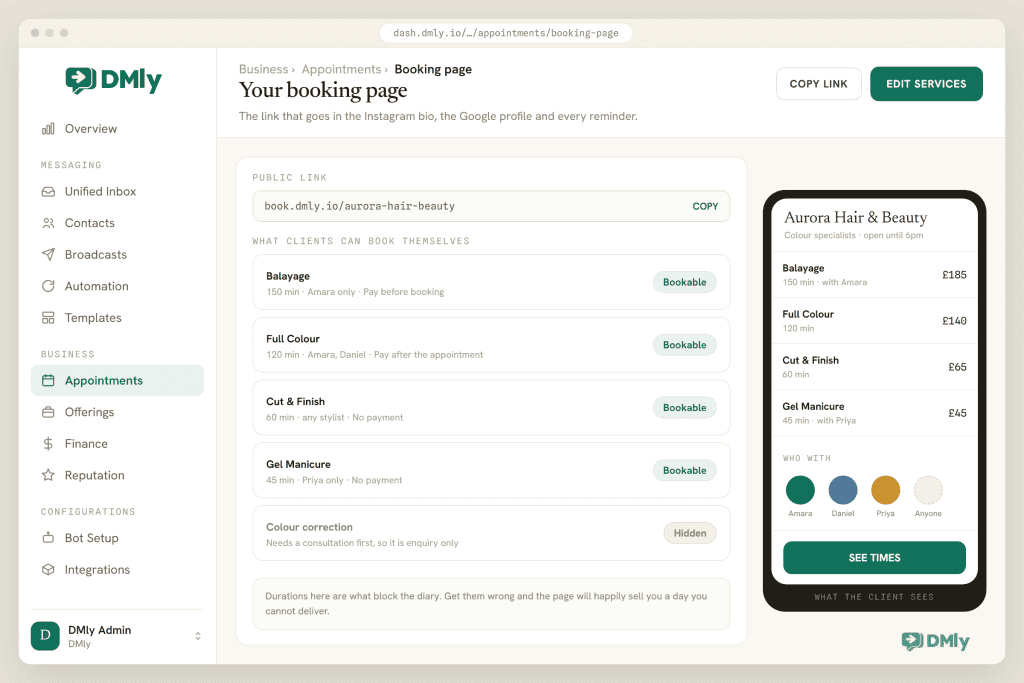
Salon WhatsApp booking works two ways in DMly, and you want both. There’s a booking page your clients reach from any link, and there’s in-chat booking, where an automation offers tappable times inside the conversation itself.
The foundation is your service list. Each service in DMly carries its own duration, price, buffer time before and after, minimum notice, and how far ahead clients can book. That per-service detail is what keeps your calendar honest: a root retouch books its ninety minutes plus cleanup buffer, a blow-dry books its forty-five, and a balayage that needs a consultation first can simply not be self-bookable at all. Staff each have their own working hours, so Keji’s Tuesdays off and Amara’s half-day Saturdays are respected without anyone policing the diary, and a client with no preference can book with whoever is available.
From your client’s side it is deliberately boring: she taps your wa.me link or QR code, or the booking link in your Instagram bio, picks a service, picks a time, done. The confirmation lands in WhatsApp seconds later. No app to download, no account to create, no password to forget, which matters because every step you remove is a client who books instead of drifting off to think about it. For the messaging-first crowd, the Book Meeting step inside a flow offers times as tappable buttons right in the chat, so “can I get in on Thursday?” gets answered with Thursday’s actual slots rather than a round of phone tag.
The deposit question, answered honestly: salons ask about deposits more than any other feature, so here is exactly what DMly does. A service’s payment mode can be No payment, Pay after the appointment (the booking confirms and a pay link follows), or Pay before booking, which holds the slot for 15 minutes while the client pays the full service price. There is no partial-deposit setting on a service. For the bridal trial where you want £50 down on a £300 package, the working pattern is an invoice for the full amount with the deposit taken as a part payment, which our invoicing guide covers step by step. Pay before booking is the right tool for the chronic no-show client and the high-demand Saturday slot; the invoice pattern is the right tool for deposits.
WhatsApp Appointment Reminders That Cut Salon No-Shows
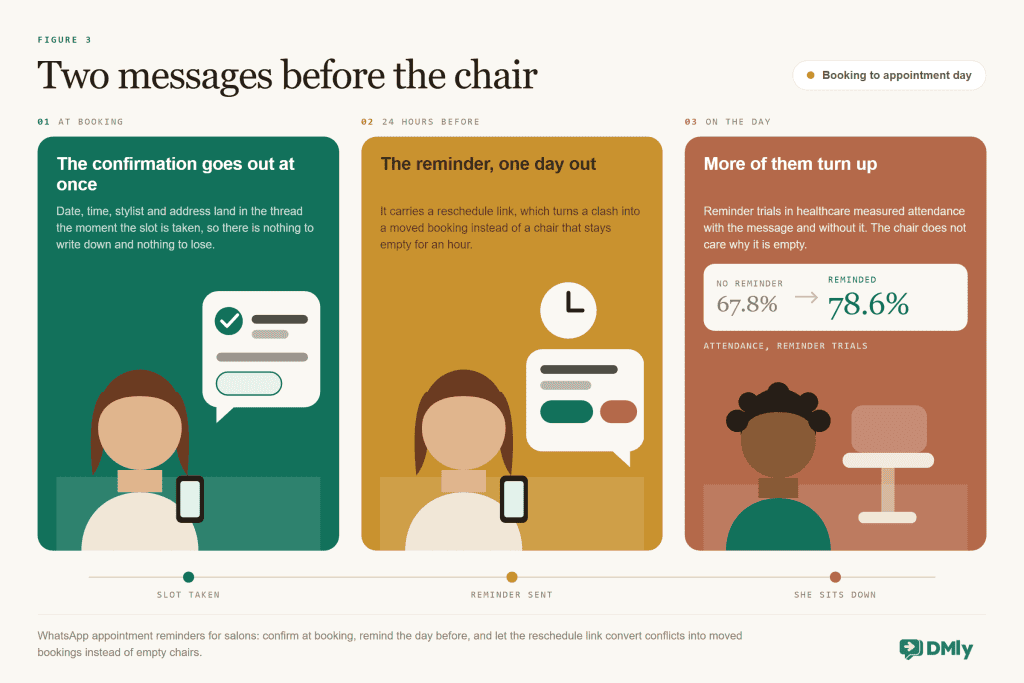
Appointment reminders are the best-evidenced automation in this entire guide, and the cheapest one to switch on. In the Cochrane review of text-message reminders, attendance rose from 67.8% without a reminder to 78.6% with one, across seven studies and 5,841 patients, and a later meta-analysis found people who received reminders roughly 23% more likely to attend. One honesty note, because you will see vendors claim otherwise: that evidence comes from healthcare clinics, not salons. Nobody has run a controlled salon trial. But the thing being tested is “people forget, and a message the day before fixes forgetting”, and forgetting is not a medical phenomenon.
In DMly you set reminder times on each service, and the reminders go out as approved WhatsApp templates, which is what lets them reach clients even when the 24-hour messaging window has closed. Three behaviours are worth knowing so the system never surprises you:
- Reminders skip rather than retry. If a booking is not confirmed, or the client has opted out of messages, the reminder is skipped, not queued. So when a client swears she never got a reminder, check the booking’s status before you blame her phone.
- Templates must be approved before they can send. DMly submits its managed templates to Meta when you connect your number; make sure they show as approved before your first busy Saturday, not during it.
- Always include the way out. A reminder with a reschedule link turns “I forgot I have a thing” into a moved appointment. A reminder without one turns it into a no-show with a guilty conscience.
Pair the reminder with a real cancellation deadline in your booking policy, so late cancellations are blocked from self-service inside the window you choose and become a conversation instead. Firm policy, warm wording: the automation enforces the rule so your receptionist never has to be the villain.
Salon Rebooking: The Message That Refills the Chair
This is the minute from the top of the guide, and it is where salons genuinely make money with WhatsApp automation. The economics of a returning client beat anything acquisition can do: no ad spend, no discount, a head of hair you already know, and a diary that fills six weeks out instead of six days out.
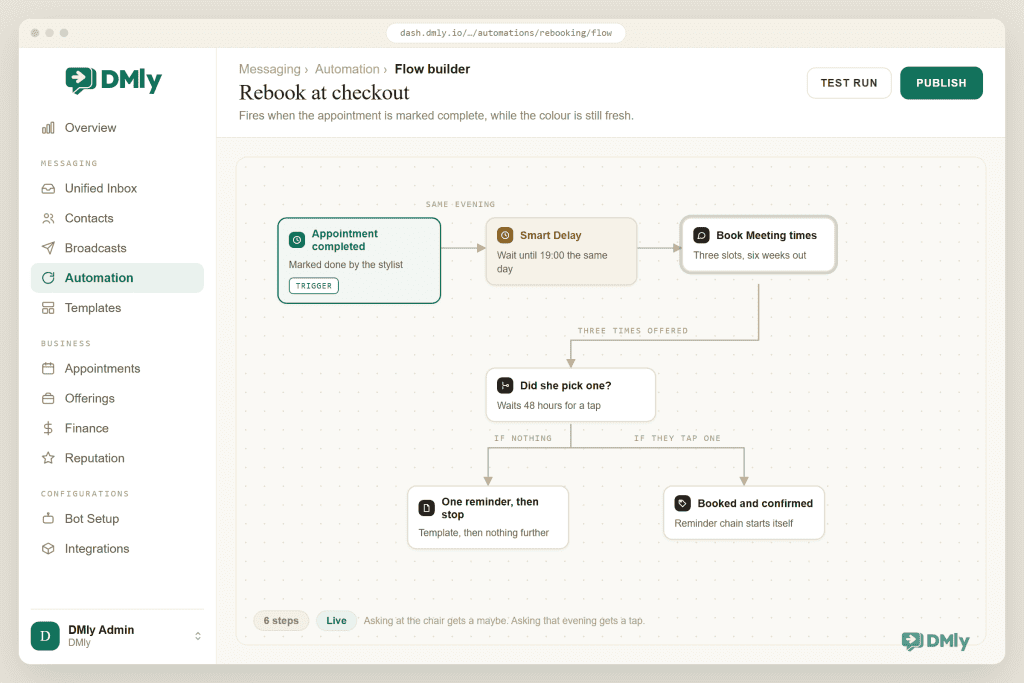
The build is one flow: when an appointment is marked completed, wait until that evening, then send the rebooking message with tappable times around the client’s natural cycle. “Lovely to see you today, Chidinma! Your colour usually likes a refresh around six weeks. Want to lock in your next visit?” with Thursday-ish slots attached. She is on the sofa, hair still perfect, goodwill at its annual peak. Booking takes two taps.
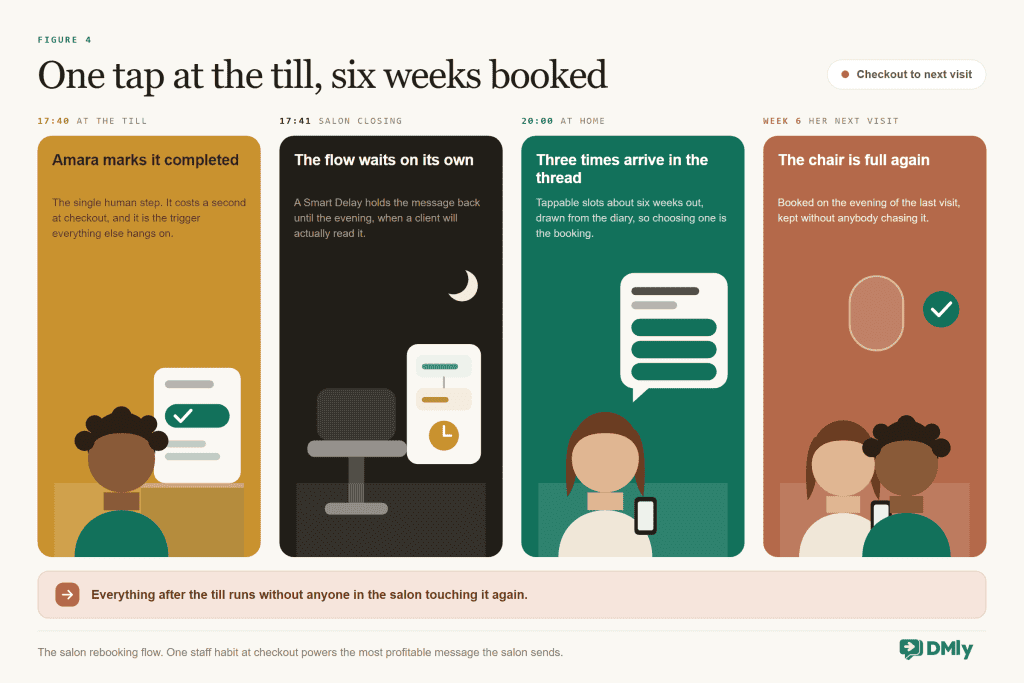
The one thing that breaks this build: DMly auto-completes appointments roughly a day after the slot passes, but automatic completion does not fire the Appointment completed trigger. Only marking the visit completed yourself, from a flow, or through the API does. So your rebooking flow depends on a checkout habit: the stylist or front desk taps Completed while the client pays. Make that tap part of taking payment and the rest runs itself. Skip it, and the flow sits there looking broken while doing exactly what it was told.
Tune the delay to the service rather than to the salon: colour wants the six-week rhythm, a gents’ cut wants three, lashes and nails have their own clocks. Since the flow knows which service just finished, each service’s flow can carry its own gap. That is the difference between a rebooking system and a newsletter with buttons.
WhatsApp Marketing for Salons: Filling the Quiet Days
Booking, reminding and rebooking protect revenue you have already earned; marketing is about the Tuesday-afternoon gaps. The discipline that keeps it working is a short list.
Segments before sends. A broadcast to everyone is how salons burn the channel. DMly’s segments are saved filters over your real client data: colour clients not seen in eight weeks, clients of the stylist with Thursday gaps, top spenders this year, birthdays this month. Each of those deserves a different message, and none of them deserves all four.
The rules are design constraints, not small print. Marketing messages outside a client’s 24-hour window need an approved marketing template, and clients have to have opted in to hear from you. Opt-outs are honoured automatically, so a client who types stop leaves your automated lists without you doing anything. Treat that as a feature. The clients who stay actually read what you send, which is why the channel outperforms the email newsletter your last salon software made you send.
Three broadcasts earn their keep in almost every salon:
- The gap-filler: to a small lapsed segment, with a specific offer and a booking link. “We’ve two colour slots this Thursday” beats “we miss you” every time it has ever been tried.
- The birthday message: automated per client from the birthday trigger, with a modest treat attached as a personal coupon. Costs pennies, gets screenshots.
- The waitlist rescue: a cancellation tomorrow becomes a broadcast to the handful of clients who asked about that day. The slot refills in minutes, from people who wanted it.
Loyalty ties the cycle together and runs itself once you have configured it: clients earn points per completed visit, and when the balance crosses your threshold DMly mints a personal reward coupon and messages the code automatically. Points claw back if a sale is refunded, so the ledger stays honest. The full setup lives in our salon loyalty programme guide, coming as its own piece.
A note on measuring any of this, because “it feels busier” is not a number. Three figures tell you whether the system is working: the no-show rate in DMly’s appointment reports, which should drift down within a month of reminders going live; the share of clients leaving with their next visit booked, which the rebooking flow should move within a fortnight; and the average gap between visits for your colour clients, which shortens as rebooking replaces remembering. Check them monthly, not daily. Messaging automation moves averages, and averages take a few weeks to be honest with you.
Five Salon WhatsApp Automations to Copy
If you want the shopping-list version, these five flows cover most of what a salon needs. The wording is yours to steal and adjust.
| Automation | Trigger → steps | Message wording that works |
| Booking confirmation | Appointment booked → send message | “You’re booked, Ada! Balayage with Keji, Thu 14 Mar, 2pm. Need to move it? Tap here. See you then.” |
| Day-before reminder | Service reminder time, sent as a template | “Quick reminder: your colour appointment is tomorrow at 2pm with Keji. Running into a clash? Reschedule here rather than missing it.” |
| Rebooking nudge | Appointment completed → wait until evening → Book Meeting times | “Lovely seeing you today! Your colour usually likes a refresh around six weeks. Want to lock the next one in while the diary’s open?” |
| Review request | Appointment completed → wait a few hours → Request Google review | “Thanks for coming in, Ada. If you’ve a minute, a Google review helps a small salon more than you’d think. One tap here.” |
| No-show follow-up | Appointment no-show → short wait → send message | “We missed you today! No drama. Life happens. Want to grab another time this week?” |
Notice the register across all five: warm, brief, and never guilt-tripping. The no-show follow-up in particular pays for itself, because a client who missed an appointment is usually embarrassed, and an easy, generous way back in is the difference between a rescheduled visit and a client who quietly switches salons to avoid the awkwardness.
WhatsApp Automation vs Salon Booking Apps
The fair question before you commit: why run your salon on WhatsApp automation instead of a dedicated salon booking app? The short answer is adoption. A booking app is a place your clients have to remember to go; WhatsApp is a place they already are. Every download, account and password between a client and a confirmed slot loses a percentage of them, and a chat thread loses none.
| What matters to a salon | Typical booking app | WhatsApp automation with DMly |
| Where clients book | An app or portal they must install or remember | The chat they already use, or a link that opens in it |
| Reminders | Push notifications, often disabled; email, often unread | WhatsApp messages, in the thread they answer |
| The conversation | Separate from the booking system | The same thread: question, booking, reminder, rebooking, all in one history |
| Client record | Visits | Visits plus every message, note, payment and loyalty point on one profile |
| Rebooking and win-back | Usually a manual report | Triggered flows and segments, running on their own |
The honest limits run the other way: DMly is a messaging-first platform with native bookings, invoices, loyalty and a client CRM, not a till. If your deciding feature is stock control for retail shelves or staff commission splits, you may still pair it with something else, and the two live happily side by side. For the wider comparison of chat-first booking against calendar-first tools, our piece on why local businesses are switching from calendar apps to all-in-one platforms makes the fuller argument.
One underrated advantage sits on your front desk’s side rather than the client’s. When a regular messages “the usual, sometime Thursday?”, whoever answers sees the whole relationship next to the chat: her last visits, her stylist, her colour notes, her lifetime value. That context is what lets a Saturday junior answer like someone who has known her for years, which is what clients actually mean when they say a salon feels personal.
Reviews, the Front Desk, and What Not to Automate
Two more automations round out the system, and one boundary keeps it human.
The review request. The best moment to ask for a Google review is a few hours after a good visit, and the ask should be one tap. DMly has a built-in Request Google review step, so the flow is: visit completed, wait until evening, warm thank-you, review link. Salons live and die on local search, and a steady drip of fresh reviews is the most durable WhatsApp marketing for salons there is. Our guide to getting more Google reviews automatically covers the wording that works.
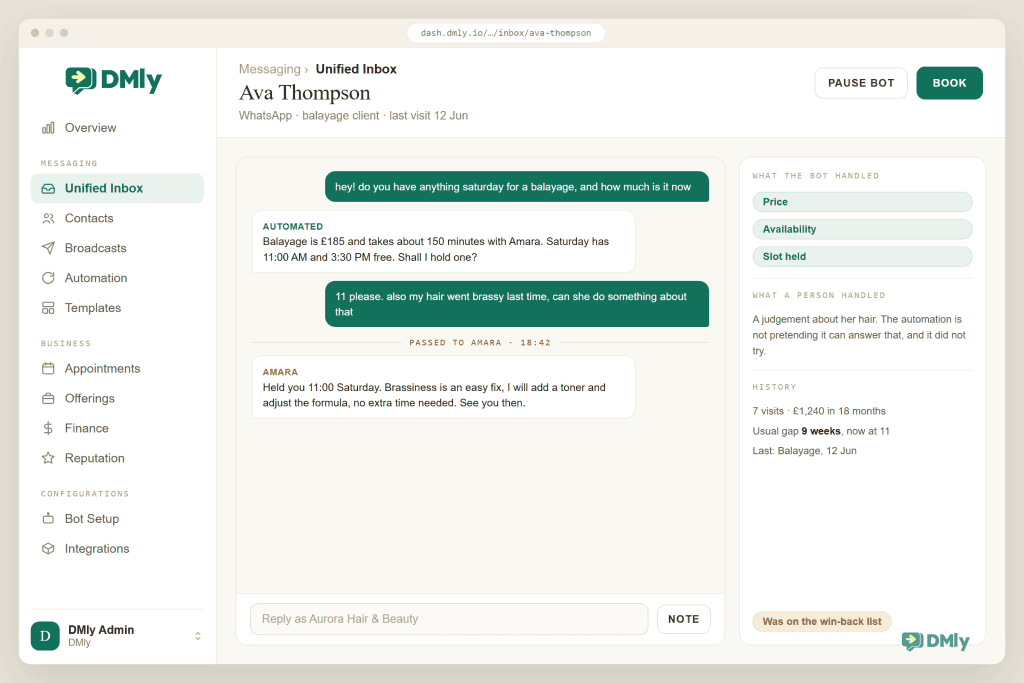
The instant answer. Price list, opening hours, parking, “do you do balayage”: the same twelve questions arrive every day, and a keyword automation or a trained AI reply answers them in seconds, with a handover to a human wired in for everything else. The rule from the top of this guide holds. The diary and the FAQ are fair game for automation; the consultation about someone’s hair never is. A client asking whether her damaged hair can take bleach needs your senior colourist, not a chatbot with confidence.
How to Set Up WhatsApp Automation for Salons: Your First Week
The order below front-loads the money and keeps each day’s work under an hour.
- Connect WhatsApp and build the service list. Your number onto the official API through DMly, then every service with its real duration, buffers and minimum notice. Your calendar is only as truthful as the durations you give it.
- Add staff hours and switch on the booking page. Each stylist’s genuine working pattern, then put the booking link in your Instagram bio, your Google Business Profile and a QR card at the till.
- Confirm the reminder templates are approved, then set reminder times per service. Day-before as the baseline, and add a same-morning nudge for high-value colour work.
- Build the rebooking flow, and brief the team on the checkout tap. This is the day the system starts paying for itself, and it is also the day the completed-marking habit either sticks or doesn’t. Make it part of taking payment.
- Add the review request and the FAQ answers. Both are an hour’s work, and both compound for years.
- Build your first two segments and send nothing yet. Lapsed-eight-weeks and birthdays-this-month. Watch the counts for a week so your first broadcast goes to a list you believe in.
Common Problems With WhatsApp Automation for Salons
| Symptom | Cause | Fix |
| Rebooking messages never send | Nobody marks visits Completed, and auto-completion does not fire the trigger | Make the checkout tap part of taking payment; audit it for a week. |
| A client never got her reminder | Booking unconfirmed or client opted out; reminders skip rather than retry | Check the booking status and the contact’s opt-out state first. |
| Reminders fail for older bookings | The reminder template is not approved yet, and outside the 24-hour window only approved templates deliver | Check template status on the WhatsApp Templates page before launch week. |
| Clients book the wrong slot lengths | Service durations or buffers set optimistically | Fix the durations; the calendar can only be as honest as the service list. |
| You wanted a £50 deposit and got full-price-or-nothing | Pay before booking always takes the full service price | Use the invoice-plus-part-payment pattern for deposits. |
| Two stylists double-booked around an external calendar | DMly reads one workspace-wide Google Calendar, whose busy time blocks all staff | Manage individual availability with staff hours and time off inside DMly. |
| Broadcast reach keeps shrinking | Too broad, too often; opt-outs are doing their job | Smaller segments, better offers, fewer sends. The list you keep is worth more than the list you had. |
Salon WhatsApp Automation FAQs
Can clients book salon appointments directly on WhatsApp?
Yes, two ways: from your booking page, reached through a wa.me link, QR code or the link in your bio, or inside the chat itself when an automation offers tappable times. Confirmations and reminders then arrive in the same WhatsApp thread. No app, no account, no password.
Do WhatsApp reminders really reduce salon no-shows?
The controlled evidence comes from healthcare, where reminders lifted attendance from 67.8% to 78.6% in the Cochrane review, and no equivalent salon trial exists. The mechanism is forgetting, though, which salons suffer from as much as clinics, and the reminder plus a reschedule link also converts genuine conflicts into moved bookings rather than empty chairs.
Can I take deposits for salon bookings through WhatsApp?
Full prepayment, yes: the Pay before booking mode holds the slot for 15 minutes while the client pays the whole service price. A partial deposit has no per-service setting, so the pattern is an invoice for the full amount with the deposit as a part payment, and the balance link re-mints for what is left. Use prepayment for chronic no-shows and peak slots, and the invoice pattern for bridal and big colour work.
Will automation make my salon feel impersonal?
Only if you automate the wrong half. Automate logistics: bookings, reminders, rebooking, review requests, the price list. Keep humans on everything about the client’s actual hair. Done that way round, automation buys your team more time in the chair conversation, not less, which clients experience as more personal rather than less.
What does WhatsApp automation for salons cost to run?
DMly’s plans include bookings, automations, broadcasts and the API, with a 7-day trial and no card. On the WhatsApp side, Meta bills template messages sent outside a client’s 24-hour window at its per-message rates, which DMly passes through without markup. Replies inside that window carry no Meta charge until 1 October 2026, and from that date they are billable too, at your market’s utility rate, as our guide to the October WhatsApp pricing change explains. Your reminder and rebooking traffic is small either way; the broadcast side is where volume, and therefore cost, lives.
Can I message my whole client list about offers?
Only clients who have opted in, and outside the 24-hour window the message has to be an approved marketing template. Practically you shouldn’t want to message everyone anyway: segmented broadcasts to a few dozen well-chosen clients outperform blasts, and they protect the thing that makes WhatsApp work, which is that people actually read it.
Put the diary on autopilot
Bookings in chat, reminders that protect the chair, and the rebooking message that fills your calendar six weeks out. Built for salons, on the number your clients already message.
Back to the Till
Everything in this guide serves that one minute at checkout. The booking automation earned the visit, the reminder protected it, and the rebooking flow spends the goodwill of a fresh colour on the only thing worth buying with it: the next visit.
Start there. One flow, one staff habit, one evening message with tappable times. When your diary starts filling six weeks ahead instead of six days, add the rest of the loop around it.
Writing about WhatsApp automation, bookings and growth for local business.
Turn WhatsApp into your busiest channel.
Start free and run message, bookings, payments and reviews in one place.
