
How to Set Up WhatsApp Away Messages and Business-Hours Auto-Replies
A customer messages you when you are closed. You are not there, so nothing happens. What they decide next is not “they must be shut”. It is usually “this place does not reply”, and they message somebody else.
That is the whole reason a WhatsApp away message matters. It is not politeness. It is the difference between a customer who waits until morning and a customer who books with the salon down the road while they are still holding the phone.
This guide covers the free option first, because for a lot of businesses it is genuinely enough, then what to do once it stops being enough, and how to build an after-hours reply that holds a message until you open rather than waking somebody at midnight.
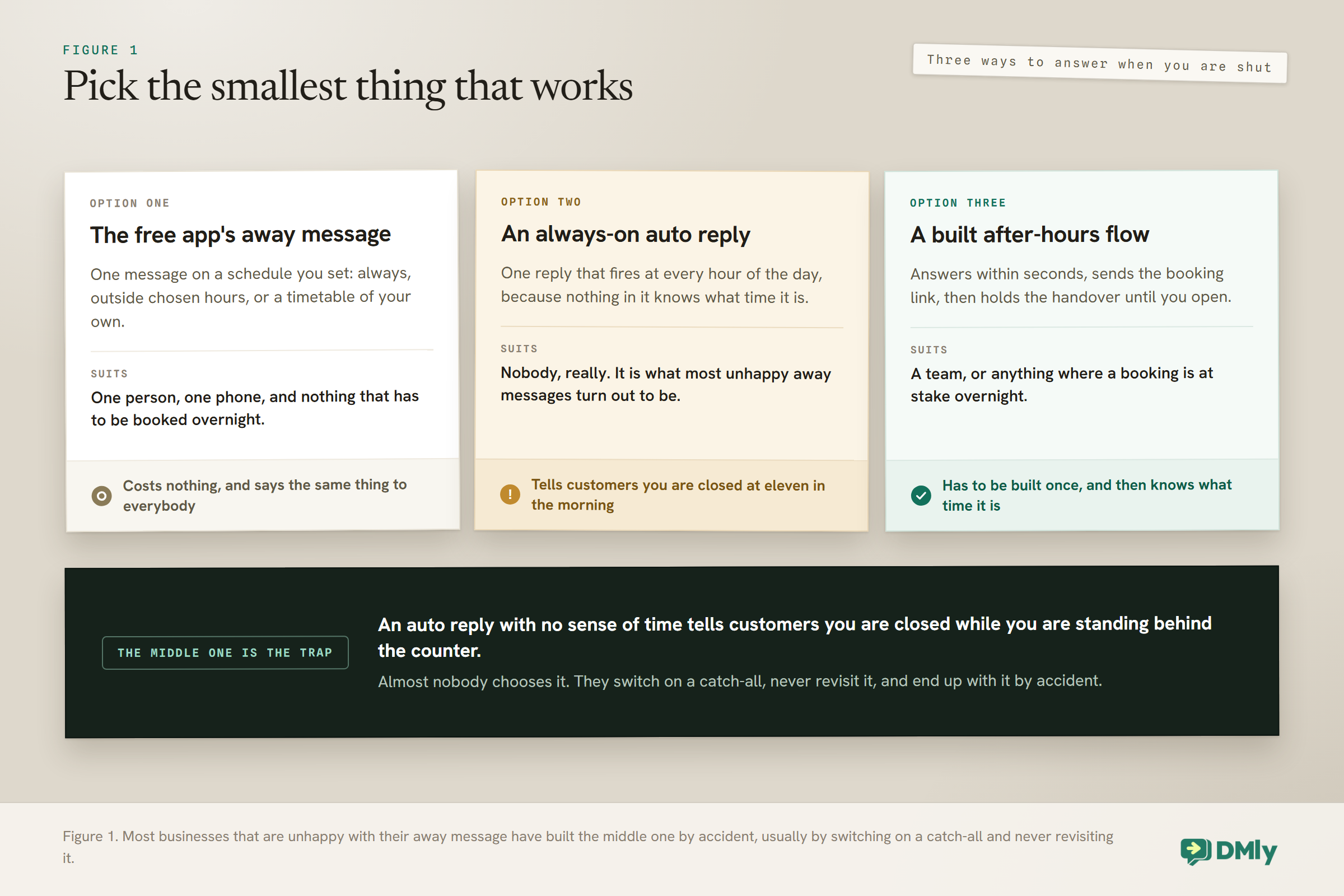
The honest bit, before you read further: On the free WhatsApp Business app there is a built-in away message. On a messaging platform running the official API, including DMly, there is no away-message switch and no business-hours setting. You build the behaviour instead. That sounds like a downgrade and mostly is not, for reasons this guide gets to, but you should know it before you go looking for a toggle that does not exist.
The Free App Already Has a WhatsApp Away Message Built In
If you are a one-person business and all you want is “we are closed, back at nine”, the free app does it and you should use it. There is no sense buying software for a feature you already have.
In the WhatsApp Business app you get two automated messages. A greeting message for people writing to you for the first time, and an away message for when you are unavailable. You can schedule the away message to send always, only outside a set of hours you choose, or on a custom schedule.
That covers a real business. A single stylist, a photographer, a private tutor. One number, one person answering it, one message going out when that person is asleep.
Three things it will not do, and these are the reasons people go looking for something else:
- It is one message for everybody. The customer asking your price and the customer asking whether you are open on Sunday get the same sentence.
- Only one person can hold the number. The app is tied to a phone. Two people cannot answer from it properly, so the away message becomes the whole of your out-of-hours service rather than a stopgap.
- It stops at the message. It cannot book the appointment, take the deposit, or put the person into a list you follow up on Monday.
Those limits are exactly what a platform is for. But if none of them bite yet, close this tab and go and set up the app’s away message, which takes about four minutes.
Why There Is No WhatsApp Away Message Toggle on the API
Once your number runs on the official WhatsApp Business API, the app’s automation settings are not what is answering people any more. Your platform is. And in DMly, after-hours behaviour is something you build rather than something you switch on.
This surprises people, so it is worth being precise. There is no business-hours setting for messaging anywhere in DMly, and no away-message field in Bot Setup on any channel. The only working hours in the product govern which appointment slots a client can book, which is a different job entirely and does not touch what your bot says at ten at night.
The upside is that once you are building it rather than toggling it, you can do things the toggle never could: send a different closed message to someone asking about prices than to someone asking about an urgent problem, hold a message until opening rather than firing it instantly, and put the person in a follow-up queue for the morning.
One thing to check rather than assume: if your number is running in coexistence, where the WhatsApp Business app and the API share a single number, whether the app’s own away message still fires is worth confirming before you rely on either. Our guide to WhatsApp coexistence covers how that arrangement works.
Building an After-Hours Reply That Knows What Time It Is
The building block is a step called Smart Delay, and specifically its “Wait until” mode. It is the piece that makes an out-of-hours flow behave differently from an ordinary auto reply.
Smart Delay can wait in three ways: for a fixed Duration, Until event such as an appointment date, or Wait until a time you specify. That third one is what you want. It gives you a toggle for each of the seven days, with Monday to Friday on by default, and then a From and a To time.
So the shape of a working after-hours flow is simpler than people expect:
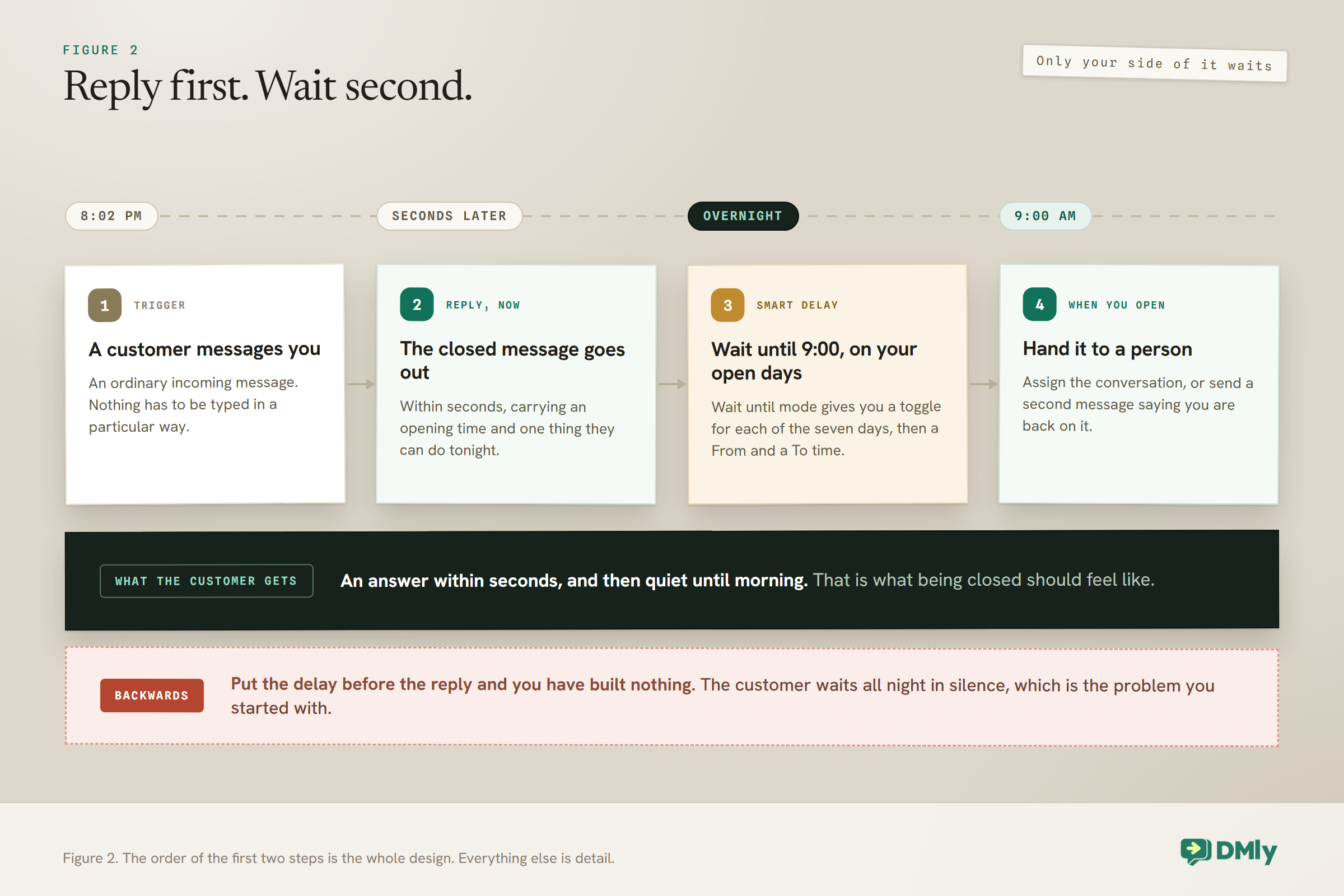
- Someone messages you. The trigger is an ordinary incoming WhatsApp message.
- Reply immediately. This part is not delayed. The customer gets an answer within seconds, which is the entire point.
- Then Smart Delay, set to Wait until your opening time. The flow pauses here overnight.
- When you open, do the follow-up. Notify the team, assign the conversation, or send a second message saying you are back and picking this up.
Read that again and notice what it is not doing. It is not deciding whether you are open. It is replying to everyone, then holding the rest of the conversation until a sensible hour. That distinction is what makes it reliable, because it does not depend on a time-of-day rule at all.
Why the reply goes first and the wait goes second: If you put the delay before the message, a customer who writes at nine in the evening hears nothing until you open, which is exactly the silence you were trying to fix. Reply first, always. The delay is for your side of the conversation, not theirs.
If flows are new to you, our beginner’s guide to no-code WhatsApp automation covers the canvas, the steps and how to publish, none of which this page repeats.
Keeping It to One Reply
An after-hours flow and your normal keyword replies can fight each other, and the software will stop you before they do. Worth knowing so the block does not confuse you.
Only one automation answers any given message. If you already have an auto reply that fires on any message, and you add an after-hours flow that also fires on any message, publishing the second one is blocked and the conflict is named. The older one would have answered every time and the new one would never have run.
The clean way round it is to have one automation on incoming messages and put the different outcomes inside it, rather than several automations competing at the door. Our guide to WhatsApp Business automation covers the wider picture of what should be one flow and what should be several.
What a Good WhatsApp Away Message Actually Says
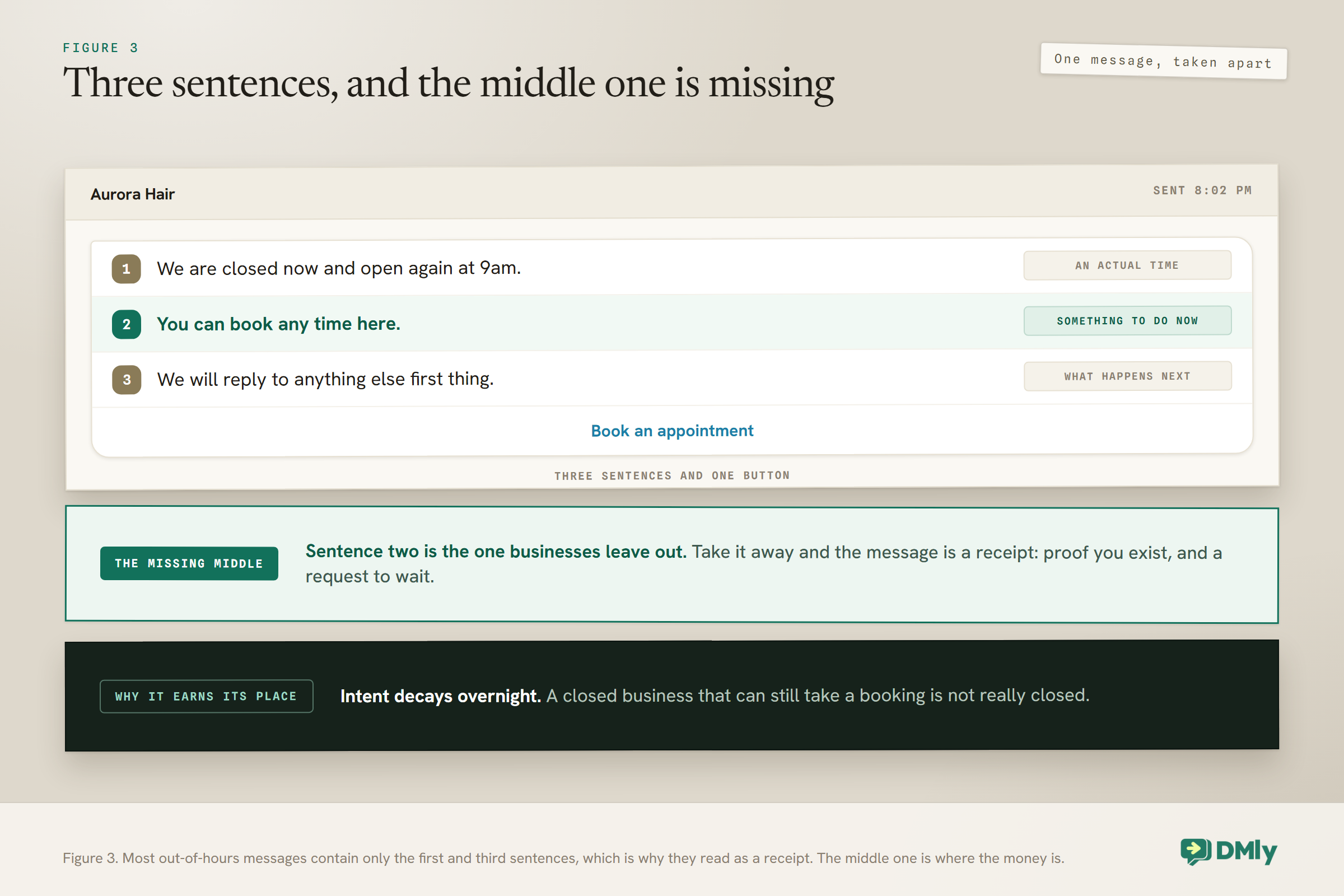
Three sentences, and the middle one is the one most businesses leave out.
Say you are closed and when you are back. Not “we will get back to you as soon as possible”, which means nothing and could mean July. A time. “We open at 9am tomorrow” lets somebody decide whether to wait.
Give them something they can do right now. This is the missing sentence. A closed business that can still take a booking is not really closed. A link to your booking page, a price list, a menu, an order form. The customer came to you with intent, and intent decays overnight.
Say what happens next. “We will reply first thing” is a promise you then have to keep, which is what the Smart Delay is for.
Put together, that is short:
Thanks for messaging Aurora Hair. We are closed now and open again at 9am. You can book any time here, and we will reply to anything else first thing in the morning.
Button: Book an appointment
Two things to avoid. Do not apologise twice, because it reads as anxious rather than warm. And do not promise a response time you cannot hit on a Monday morning, because the away message is the thing that set the expectation you are now failing.
The tone should match the trade, and the gap between them is wider than most people write. A clinic closed for the evening is reassuring somebody who may be worried, so plain and specific wins: what to do if it is urgent, and where to go instead. A salon is talking to somebody deciding between you and the place with the nicer photos, so warmth and a booking link matter more than procedure. A restaurant is often being asked about tonight, which is a question with a deadline, so the useful closed message tells them when the kitchen reopens and whether tomorrow is bookable.
The structure does not change. What changes is which of the three sentences carries the weight. For a clinic it is the third one, because they want to know a person is coming. For a salon it is the second, because they want to book. Write the version for your trade rather than the version that would suit everybody, which suits nobody.
Different Messages for Different Questions
This is where a built flow beats the free app outright. The app sends one away message to everyone. A flow can look at what they asked and answer accordingly, even when you are closed.
The three worth separating:
- Someone asking a question you have already answered somewhere. Prices, opening times, where you are, whether you do a particular treatment. There is no reason these should wait for morning. Answer them at midnight.
- Someone trying to book. Send the booking link. A booking taken at 11pm is a booking, and our guide to WhatsApp appointment booking covers letting people book without you.
- Everything else. The closed message, plus the hold-until-morning handover.
That is the same keyword machinery you would use during the day, just running at a time when you are not there to catch what it misses.
One Thing That Makes This Easier Than You Think
An after-hours reply is a reply, which means it does not need an approved template. This trips people up because so much else on WhatsApp does.
WhatsApp opens a 24-hour messaging window when a customer messages you. Inside that window you can send whatever you like, in plain words, with no approval. Your closed message is going out seconds after they wrote to you, so it is comfortably inside.
The Smart Delay changes that arithmetic, and it is worth being awake to. If someone messages at 8pm and your flow waits until 9am, that is 13 hours, still inside the window. If someone messages on Saturday evening and you open on Tuesday, the window has closed before your follow-up fires, and at that point you need an approved template to say anything at all.
So for ordinary overnight closures you can write freely. For long closures, holidays and anything over a weekend, plan on a template. Our guide to WhatsApp message templates covers getting one approved, which takes minutes but is allowed up to 24 hours.
If You Are Closed on More Than One Channel
You are not just closed on WhatsApp. You are closed on Instagram, Messenger and your website chat too, and each one handles it slightly differently. This catches people who set it up once and assume it applied everywhere.
The differences are worth knowing before you spend an evening confused:
- Facebook, Instagram and Telegram have a Default Reply. It is a setting rather than a flow, and you can choose whether it fires Once per 24 hours per contact or Every time. That is closer to a traditional away message than anything WhatsApp offers, though it still has no sense of time.
- Live Chat has no Default Reply section at all. If your website widget needs an out-of-hours message, it has to come from a flow.
- WhatsApp has neither a Welcome nor a Default Reply. Its front door lives under Conversational Components, and after-hours behaviour is built the way this guide describes.
The practical consequence is that a single flow is usually the tidier answer even where a Default Reply exists. One place to edit when your hours change beats four, and the wording stays consistent across channels, which matters more than it sounds when the same customer messages you on Instagram in the evening and WhatsApp in the morning.
There is one genuine reason to use the Default Reply where you have it: it will still answer when a flow does not, because it is a channel setting rather than an automation that can be paused, superseded or left as a draft. Some businesses run both, with the Default Reply as a plain safety net and the flow doing the real work.
Whichever you pick, decide it per channel deliberately rather than discovering the gap when a customer tells you they messaged on Instagram and heard nothing for two days.
The Other Thing That Happens When You Are Closed
People do not only message you out of hours. They ring, and a missed call out of hours is a customer who has already tried twice.
WhatsApp calls can start an automation the same way a message can. There are separate triggers for an Incoming call, a Missed call, a Call completed and a Call declined, which means the phone ringing into an empty salon does not have to end there.
The useful one is the missed call. Somebody rang, nobody picked up, and right now that is the end of the story. A short automated message straight afterwards turns it into a conversation:
Sorry we missed your call, we are closed until 9am. If it is about a booking you can do it here, and otherwise reply to this message and we will call you back in the morning.
Button: Book an appointment
Two reasons this is worth more than it looks. A person who rings rather than messages is usually further along, because ringing is more effort. And they are now in your inbox as a conversation with a name against it, instead of a number in a call log that nobody scrolls through.
Keep the same discipline as the message version. Reply immediately, hold anything that needs a human until you open, and do not promise a callback time you cannot make on a Monday.
Holidays, Bank Holidays and One-Off Closures
This is the part every business forgets until the day itself. Weekly hours are easy. The Tuesday you are shut for a funeral is not.
There is no holiday calendar to fill in, so a one-off closure is handled the same way as anything else: you change the message. Practically that means keeping your closed message in one place, easy to edit, and treating it as something you update rather than something you set once.
A few habits make this survivable:
- Write the closed message so it does not name a day. “We are closed today” survives being left on. “We are closed on Sunday” is wrong every other day of the week.
- Put closures in the same place as the rota. If your team already writes the week up somewhere, the messaging change belongs on the same list, or it will be missed.
- Turn it off when you get back. The most common complaint about away messages is a business telling customers it is closed during a busy Saturday because nobody switched it off after Christmas.
If several people share the number, the switching-off problem is really a handover problem, and our shared team inbox is where that ownership lives.
Testing It Without Waiting Until Midnight
You do not have to stay up to check this works. Move the hours instead.
Set the Smart Delay to a window that is a few minutes away rather than tomorrow morning, message the business from a different phone, and watch what happens. You should get the closed reply straight away, and the handover a few minutes later. Then put the real hours back.
Four things worth checking while you are there:
- The immediate reply arrives in seconds, not after the delay.
- It arrives once. Two replies usually means a second automation is firing on the same message, or a workspace notification is duplicating it.
- The handover actually happens when the wait finishes, and lands with a person rather than into nothing.
- It is switched on. Quick automations are created as a Draft and turned on with the switch in the list, which is the most common reason a new reply does nothing at all.
If the flow does not fire for you specifically, check whether your own conversation is paused, because pausing a chat freezes every automation for that contact.
Four Ways a WhatsApp Away Message Backfires
All four are common, and all four are avoidable.
It never turns off. The single biggest one. A customer standing in your shop gets a message saying you are closed, and now your automation is actively lying to them.
It says nothing useful. “Thanks for your message, we will be in touch” is a receipt, not a reply. If it does not contain a time or a link, it is not doing work.
It fires at people mid-conversation. If your closed message goes to somebody who has been chatting to a human all evening, it reads as a door being shut in their face. Excluding people with an open conversation is worth the extra step.
It replaces a person permanently. An away message is a bridge to the morning. If the morning never comes, customers learn that this number does not produce humans, and they stop writing. That behaviour also feeds into whether people block or report you, which our guide to WhatsApp quality rating and messaging limits explains matters more than most owners realise.
Frequently Asked Questions
Does WhatsApp have a built-in away message?
The free WhatsApp Business app does. You can write an away message and schedule it to send always, outside a set of hours, or on a custom schedule, alongside a greeting message for first-time contacts. Once a number moves to the official WhatsApp Business API and runs through a platform, those app settings are no longer what answers people, and the after-hours behaviour is built in the platform instead.
Can I set business hours in DMly?
Not as a messaging setting, no. There is no business-hours field for automations and no away-message toggle in Bot Setup on any channel. The working hours that do exist govern which appointment slots a client can book, which is a separate thing. After-hours messaging is built with a flow, using Smart Delay in its “Wait until” mode, which gives you a toggle per day and a From and To time.
Will my after-hours message need an approved template?
Usually not. Your closed message goes out seconds after the customer writes to you, which is well inside WhatsApp’s 24-hour messaging window, so it can be plain text. The follow-up after a long closure is different: if more than 24 hours have passed since their message, the window has shut and only an approved template will send.
How do I stop the away message going out when I am actually open?
Build the flow so it always replies and then waits, rather than trying to decide whether you are open. If your closed message is a plain always-on auto reply, it has no sense of time and will tell customers you are shut at eleven in the morning. Also check nothing is left switched on from a holiday, which is the most common cause.
What should an out-of-office WhatsApp message say?
Three things: that you are closed, when you are open again as an actual time, and one thing they can do right now. The middle sentence is the one businesses leave out and the one that keeps the customer. If you can take a booking while you are closed, put that link in the message and let the business run overnight.
Can I send different away messages to different customers?
Yes, and that is the main reason to build it rather than use the free app’s single message. Since you are writing a flow, you can answer common questions like prices or opening times immediately whatever the hour, send the booking link to anyone trying to book, and keep the closed-and-holding message for everything else.
What happens to messages that arrive while I am closed?
They sit in your inbox as ordinary conversations, and nothing is lost. The automation replies for you, and if your flow includes a handover step after the wait, the conversation is assigned to somebody when you open so it does not need to be found manually. Without that step the messages are still there, but somebody has to remember to look.
Writing about WhatsApp automation, bookings and growth for local business.
Turn WhatsApp into your busiest channel.
Start free and run message, bookings, payments and reviews in one place.
