
Is WhatsApp HIPAA Compliant? What Clinics Need to Know Before Messaging Patients
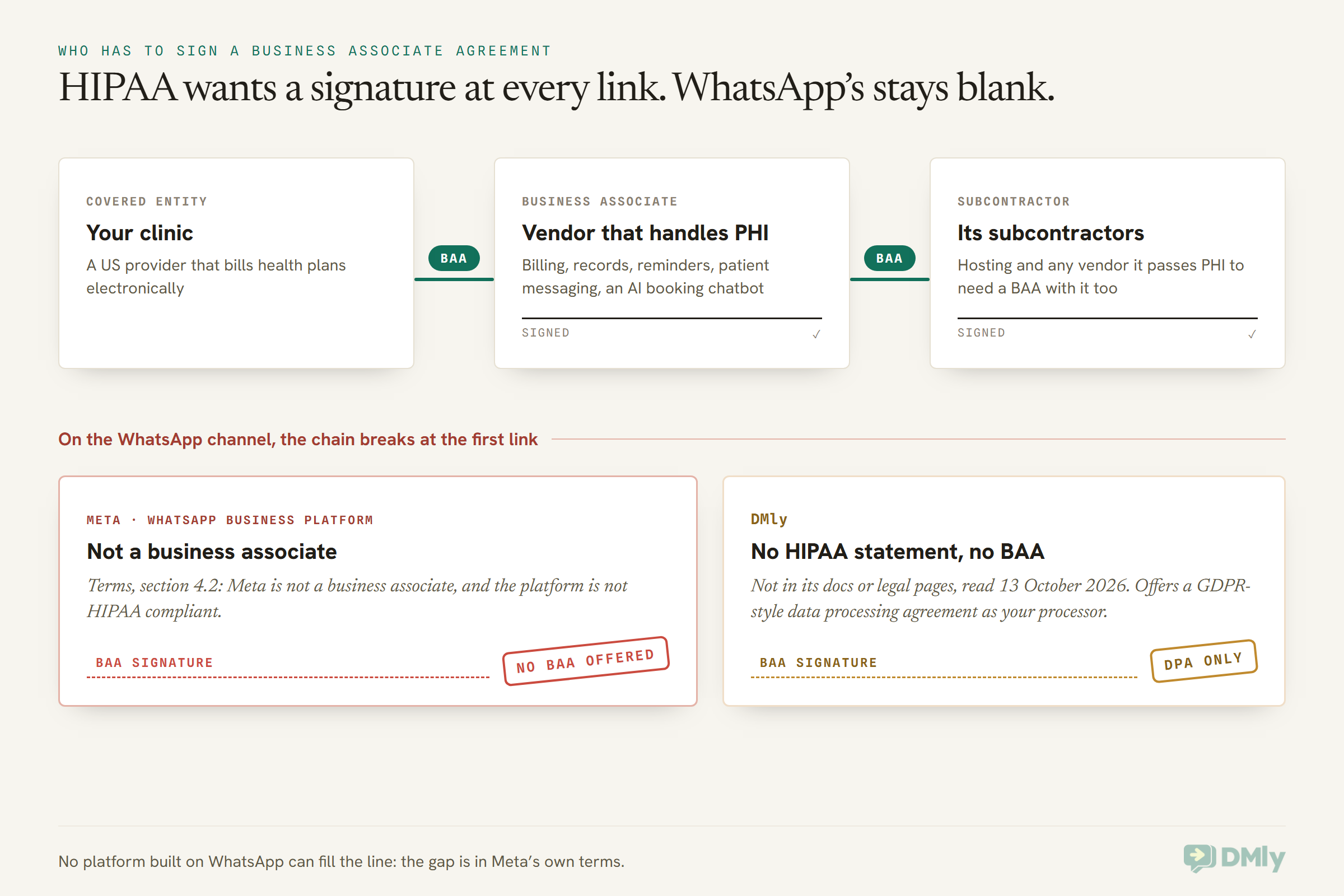
Is WhatsApp HIPAA compliant? The quickest way to find out is to look for a signature. In the US, every company that handles patient information for a clinic is supposed to sign one particular document with that clinic: a business associate agreement, or BAA. Your billing service has probably signed one. So has your records system, and very likely your IT contractor.
For WhatsApp, that signature line stays blank. It isn’t that nobody has asked. Meta has already written its answer into its own terms: it is not a business associate, and the WhatsApp Business Platform is not HIPAA compliant.
That doesn’t make WhatsApp useless to a clinic. Millions of patients outside the US get their appointment reminders on it, and plenty of US practices use it for general questions. But what you can safely send depends on where you are, who you are under the law, and what’s in the message.
In this guide, we’ll look at what HIPAA actually requires, what Meta does and doesn’t offer, what WhatsApp’s encryption covers once a messaging platform is involved, where DMly stands, and a practical line between what’s fine to send and what belongs somewhere else. Then we’ll cover the rules in the UK, EU, India and Nigeria.
One thing first: this is a plain-English guide, not legal advice. Before you change how your clinic messages patients, speak to your compliance officer or a healthcare lawyer who knows your setup.
Is WhatsApp HIPAA Compliant? The Short Answer
No. Meta’s terms for the WhatsApp Business Platform say, in plain words, that Meta is not a HIPAA business associate and that the platform is not HIPAA compliant. That’s section 4.2 of the Meta Terms for WhatsApp Business Platform, last modified on 23 September 2026.
The same section goes further. It says a business may not give Meta any information that is subject to safeguarding or limits on distribution under applicable law, and it calls that “Prohibited Information”. It also says Meta makes no promise that the platform meets the needs of businesses with heightened confidentiality rules, and it names healthcare as one of them.
So for a US clinic, the honest reading is simple. If a message contains protected health information, Meta’s terms say you shouldn’t be sending it through the WhatsApp Business Platform at all, and Meta won’t sign the agreement HIPAA expects from a vendor that handles it.
Two things are worth knowing before you go further:
- “HIPAA compliant” isn’t a sticker a product can wear. Compliance is something your clinic does: policies, training, safeguards, and contracts with the right vendors. What a vendor can do is sign a BAA and meet the safeguards it promises in it. Meta’s terms rule that out for WhatsApp.
- The free WhatsApp Business app isn’t a way round it. We couldn’t find any page where WhatsApp offers to sign a BAA for the app, and it adds problems of its own: staff phones, chat backups and lock screens.
What HIPAA Actually Asks of a Clinic, in Plain Words
HIPAA asks a covered clinic to protect patients’ health information with reasonable safeguards, share only what’s needed, and sign a business associate agreement with every vendor that handles that information for it. Here’s what each piece means for your front desk.
Are you a covered entity?
HIPAA applies to “covered entities” and the vendors that work for them. According to HHS, every health care provider, whatever its size, is a covered entity if it sends health information electronically in connection with certain standard transactions: claims, benefit eligibility checks, referral authorization requests and similar.
HHS adds a useful detail: using email doesn’t make a provider a covered entity on its own. The trigger is those standard transactions. So a dental practice that bills insurers electronically is covered. A cash-only aesthetics clinic may not be, but don’t decide that alone. Several states have health privacy laws that reach further than HIPAA, and the promises you make to patients still count.
What counts as protected health information?
Protected health information (PHI) is health information that identifies a person, held or sent by a covered entity or its business associate. HHS’s summary of the Privacy Rule says it covers information, including demographic data, that relates to a person’s physical or mental health, the provision of health care to them, or payment for that care, and that identifies them.
That middle part catches people out. A patient’s name next to “your appointment with us on Tuesday” relates to the provision of care. In a US covered clinic, even a plain appointment reminder can be PHI.
The Privacy Rule: safeguards and the minimum necessary
The Privacy Rule lets you talk to patients about their care, by phone, post, email and other means. But it asks for two habits:
- Reasonable safeguards. HHS’s guidance on answering-machine messages suggests leaving only your name, number and what’s needed to confirm the appointment, or asking the patient to call back.
- The minimum necessary. HHS calls this a central part of the Privacy Rule: use and share only the least information needed for the purpose.
Patients also have a right to ask you to contact them in a particular way, such as email instead of a postcard, and you must accommodate a reasonable request. Keep that in mind; we’ll come back to it under consent.
The Security Rule: protecting electronic information
The Security Rule covers electronic PHI. HHS’s summary says a covered entity must put in place reasonable and appropriate administrative, physical and technical safeguards. In practice that means:
- a risk analysis of where your patient data lives and what could go wrong;
- access controls, so only authorized people can see it;
- audit controls that record activity in systems holding it;
- transmission security for data sent over a network.
HHS proposed an update to the Security Rule in December 2024 to strengthen cybersecurity protections. A proposal isn’t the law until it’s finalized, so check HHS for its status before you plan around it.
Business associates and the BAA
This is the part that decides the WhatsApp question. HHS describes a business associate as a person or company, outside your own workforce, that creates, receives, maintains or transmits PHI on your behalf. Before you share PHI with one, you need a written business associate agreement promising it will safeguard the information. Its own subcontractors need BAAs with it, too.
HHS’s own list of examples is telling. It includes a health app developer that provides patient messaging on a provider’s behalf, and a third-party AI chatbot that handles appointment scheduling. Both describe exactly what a WhatsApp booking or reminder tool does.
There is one narrow exception: a “conduit”, like the postal service or its electronic equivalents, that only transmits information and stores it temporarily on the way. HHS says the exception is limited to transmission-only services. Anyone that stores PHI to provide a service isn’t a conduit, even if it can’t read the data.
Does Meta Sign a BAA for the WhatsApp Business Platform?
No. Meta’s terms state that Meta is not a business associate or subcontractor under HIPAA, so there’s no BAA to request. Section 4.2 of the Meta Terms for WhatsApp Business Platform says it directly, and adds that Meta has no liability for information you weren’t allowed to send.
What Meta does offer is a data protection framework built for laws like the GDPR. Its terms incorporate the Meta Global Processor Terms where Meta processes personal data on your behalf. Its developer documentation says that for the Cloud API, Meta acts as a data processor or service provider for the business, uses messages only on the business’s instructions, and doesn’t automatically use them to inform ads. It also says Meta holds SOC 2 Type II and ISO 27001 reports.
Those are real protections, and they matter for a clinic in Europe or the UK. But a data processing agreement is not a business associate agreement. HIPAA asks for specific promises in a BAA, and Meta’s terms say in so many words that it won’t be making them.
There’s also a second rule that applies to every clinic, US or not. WhatsApp’s Business Messaging Policy (last updated 23 September 2026) says:
“Don’t use WhatsApp for telemedicine or to send or request any health related information, if applicable regulations prohibit distribution of such information to systems that do not meet heightened requirements to handle health related information.”
Read that alongside section 4.2 and the picture is consistent. Meta is telling healthcare businesses that WhatsApp is not built for regulated health data, and that keeping it off the platform is your job.
Does End-to-End Encryption Make WhatsApp HIPAA Compliant?
No. End-to-end encryption protects a message on its trip, but once a business uses the WhatsApp Business Platform, Meta’s Cloud API decrypts each message and hands it to the business or the platform working for it. Encryption is one safeguard; HIPAA asks for many more, plus that signed agreement.
This is the most common misunderstanding we see, so it’s worth walking through what Meta’s own documentation says happens to a patient’s message:
- On the patient’s phone, the message is encrypted with the Signal protocol before it leaves the device.
- At the Cloud API, operated by Meta, the message is decrypted and forwarded to the business. Meta’s documentation says the Cloud API manages the encryption keys on the business’s behalf, so it is effectively one “end” of the conversation.
- Meta keeps messages for up to 30 days, encrypted at rest, for things like retransmission. Businesses in regulated industries can ask for messages to be stored at rest in a chosen country (Meta calls this local storage and names healthcare as an example), but that changes where the data sits, not whether Meta is a business associate.
- From there, the message travels over HTTPS to whichever platform the business uses to read and answer it, such as DMly, which stores the conversation so your team can work with it.
- On your team’s devices, it shows up in a browser or a mobile app, and possibly in a push notification preview on a lock screen.
HHS has already answered the “but it’s encrypted” argument for cloud services. Its cloud computing guidance says a provider that stores encrypted health information for a covered entity is still a business associate even if it doesn’t hold the decryption key, because encryption alone can’t protect the integrity and availability of the data. A platform that does hold the keys, like the Cloud API, is in an even clearer position.
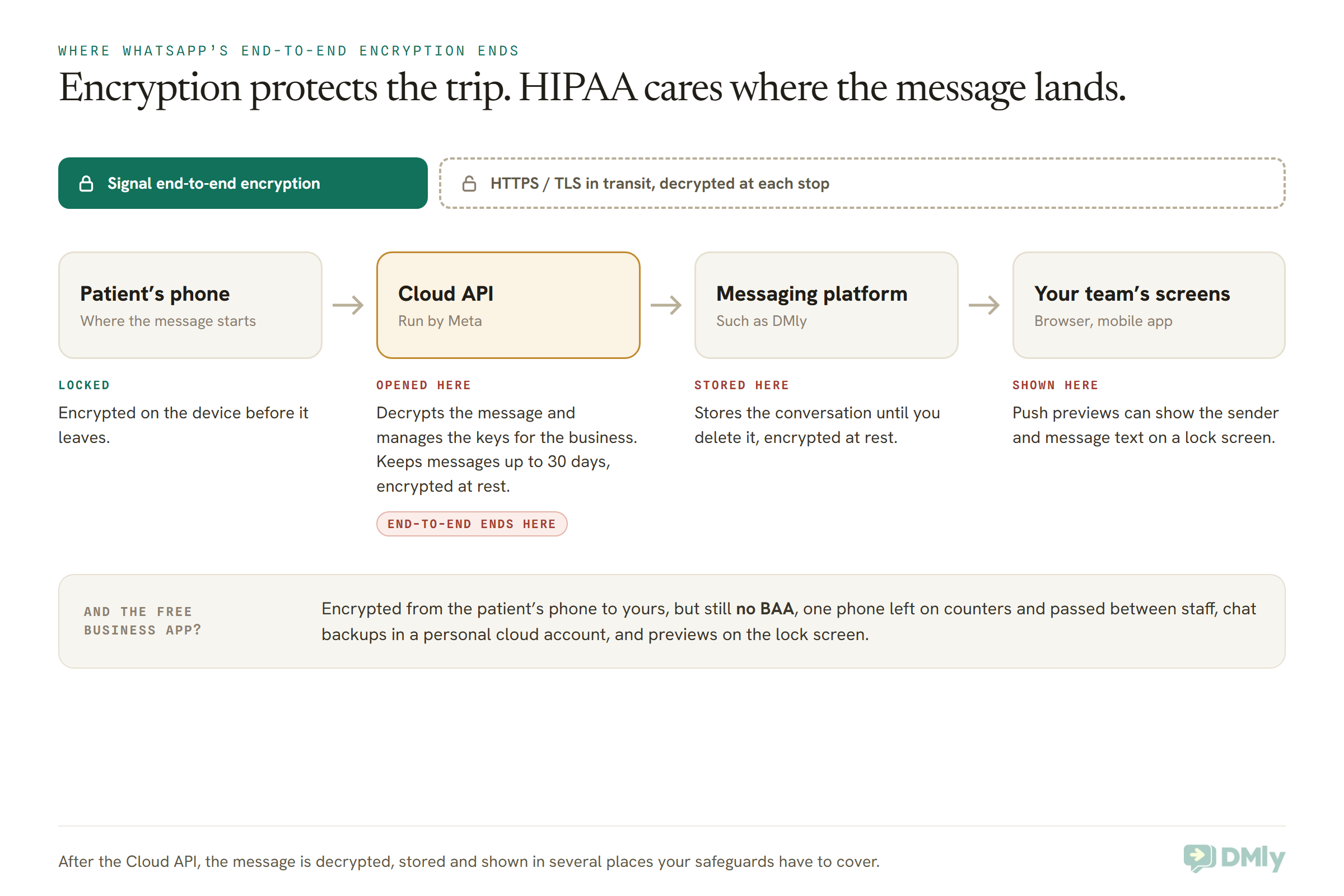
The free WhatsApp Business app works differently: messages are encrypted between the patient’s phone and yours. But that doesn’t solve the HIPAA problem either. There’s still no BAA, the clinic phone is a single device that gets left on counters and handed between staff, chat backups can sit in a personal cloud account, and anyone who glances at the lock screen sees the preview. Switching to the app doesn’t make WhatsApp HIPAA compliant either.
Is DMly HIPAA Compliant? Where DMly Stands
DMly does not state that it is HIPAA compliant, and its documentation and legal pages don’t mention a business associate agreement. We checked the DMly docs index, its compliance pages, the Privacy Policy (last updated 4 August 2026) and the Terms (last updated 11 July 2026) on 13 October 2026. There’s no HIPAA statement anywhere, so we won’t imply one.
Here’s what DMly does document:
- A GDPR-style processor role. DMly’s docs say you’re the data controller for your contacts and DMly is the processor. The Privacy Policy includes a data processing agreement and a list of sub-processors, and the docs say you can contact DMly for a signed DPA or data residency details.
- Security basics. Connections over HTTPS, stored data encrypted at rest, data hosted in Europe and the United States, and each workspace walled off from every other.
- Team controls. Two-factor authentication for each user (each person switches it on for their own login; there’s no workspace-wide setting that forces it), an optional single active session, roles that can mask phone numbers and emails and stop members exporting contacts, and an audit log kept for 180 days.
- Deletion tools. A deleted contact can be restored from Recently deleted for 30 days, and Delete permanently removes that copy straight away. An archived conversation is permanently deleted 30 days after you archive it.
- Its own caution about sensitive data. The Privacy Policy says to avoid submitting highly sensitive data into automated flows, and the Terms say highly sensitive personal data should not be submitted into AI workflows. The sub-processor list includes AI providers for AI replies, and push notification services that carry a message preview to your team’s phones.
It’s also worth saying plainly: no platform built on top of WhatsApp, DMly included, can make WhatsApp HIPAA compliant. The gap is in Meta’s own terms, not in the software you use to read the messages.
Put that together and the honest position is this:
- If you’re a US covered entity, don’t use DMly, or any WhatsApp tool, for protected health information. You’d need a vendor that signs a BAA, and on the WhatsApp channel itself, Meta’s terms rule that out. DMly can still answer general questions that carry no patient detail, such as your hours or how to find you, if your compliance officer agrees.
- If you’re outside the US, DMly can carry appointment logistics with the minimum of detail, under a data processing agreement, with consent recorded and clinical content kept off the channel. That’s the setup the rest of this guide describes, and the one our WhatsApp automation for clinics guide is built around.
What a Clinic Can Safely Send on WhatsApp, and What to Keep Off It
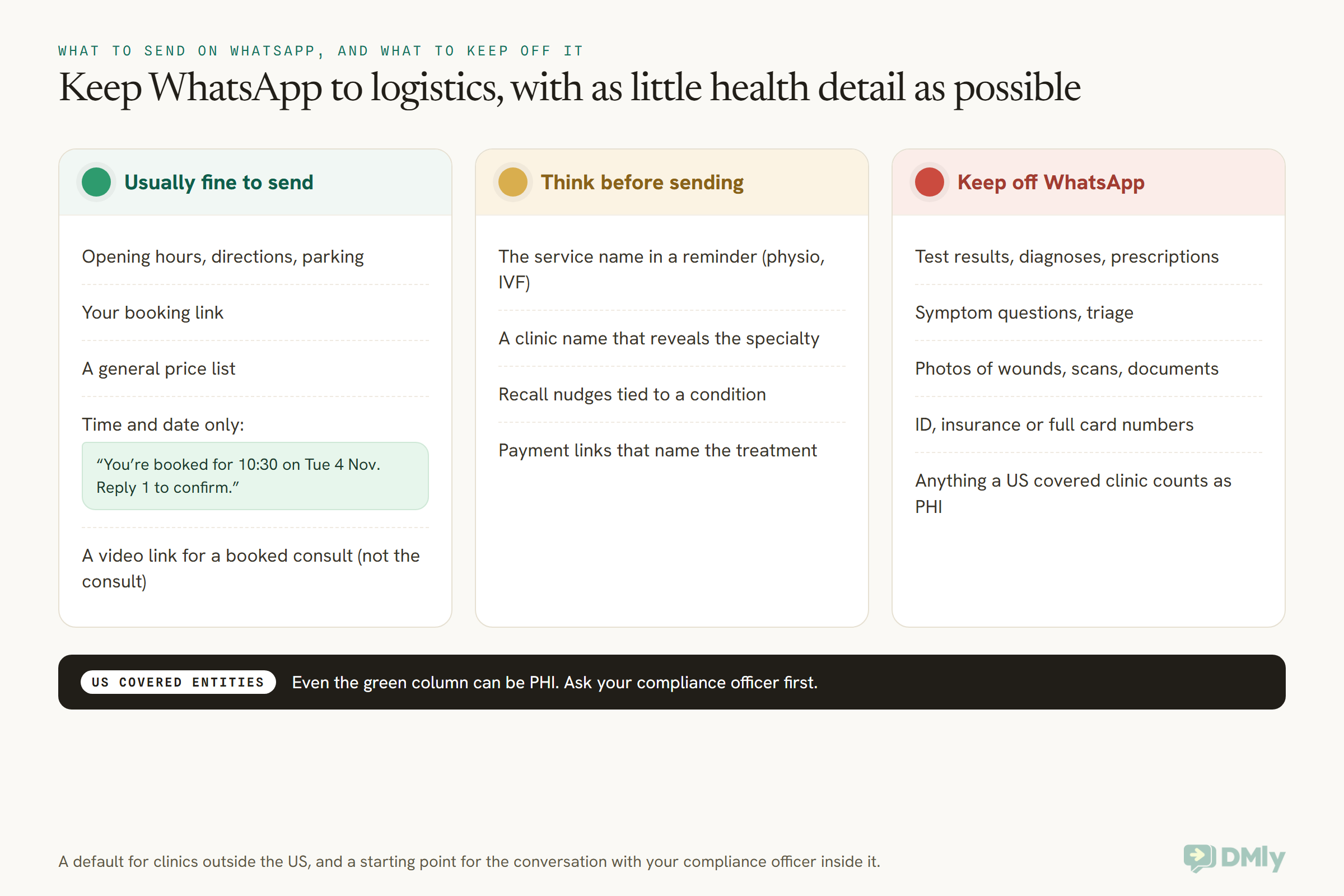
Keep WhatsApp to logistics: the time, date and place of an appointment, directions, a booking link and general information, with as little health detail as possible. Results, diagnoses, symptoms, prescriptions, images and ID numbers belong on another channel.
Since no setup makes WhatsApp HIPAA compliant, this is about reducing what’s at stake in each message. For a US covered entity, add one more step before any of this: as we saw above, even a time-and-date reminder can be PHI, so the green column below still needs your compliance officer’s yes. For everyone else, it’s a sensible default that fits Meta’s policy and the “minimum necessary” idea that most privacy laws share.
The reminder, rewritten three times
Most clinic messages are reminders, so here’s the same one at three levels of detail. Imagine it lighting up on a phone that someone else picks up.
1. Too much. “Hi Grace, reminder: your follow-up for the biopsy results with Dr Mensah is tomorrow at 10:30. Please bring your referral letter and your insurance card.”
That one discloses a procedure, a pending result and an insurer to anyone who sees the lock screen. Don’t send it.
2. Better, still revealing. “Hi Grace, your dermatology appointment is tomorrow at 10:30 at Riverside Skin Clinic. Reply 1 to confirm or 2 to rebook.”
No result, no procedure, but the specialty is still there twice. The UK regulator’s own example is useful here: a single GP appointment says nothing about your health, but a run of appointments at an osteopath clinic or an invoice for a series of physiotherapy sessions does. A specialty name in a reminder can tip a message into health data.
3. Just enough. “Hi Grace, you’re booked with us tomorrow, Tue 4 Nov, at 10:30. Reply 1 to confirm or 2 to rebook. To talk about anything else, please call us.”
That’s the version to aim for. Your business name already shows as the sender, so the message doesn’t need to repeat it. If even your clinic’s name reveals a specialty (a fertility or sexual health clinic, say), that’s worth raising with the patient when you ask for consent, and offering a phone call or SMS instead. For more reminder wording and timing, see how dental clinics can automate appointment reminders and how clinics can reduce appointment no-shows with WhatsApp.
Recall and marketing messages
Recall is where clinics drift into health detail without noticing. “It’s time for your diabetes review” is a recall message and a diagnosis in one sentence. Keep it general: “It’s been a while since your last visit. Would you like to book a check-up?” Our guide to automating patient recall messages has more wording that stays on the right side of that line.
Two extra rules apply to anything promotional. In the US, HIPAA’s Privacy Rule treats communications that encourage someone to buy a product or service as marketing, and HHS says using patient information for marketing needs the patient’s authorization unless the message falls within an exception, such as a communication for their treatment. And on WhatsApp itself, Meta doesn’t currently deliver marketing templates to US phone numbers, so a US clinic can’t send promotional template messages to US patients anyway.
When a patient sends health details anyway
Patients will message symptoms, photos and questions about their medication, however carefully you word your reminders. Plan for it:
- Have a short, kind reply ready that moves them to the right channel: “Thanks for letting us know. So we can look after this properly, please call us on [number] rather than sending details here.”
- If you use an AI assistant, make sure it hands the chat to a person the moment anything clinical comes up, and never tries to answer it.
- Put a line in your welcome message or auto-reply asking patients not to send medical details on WhatsApp.
- Ask your compliance officer how to handle details that have already arrived. Deleting a chat in your messaging tool doesn’t remove it from the patient’s phone or from Meta’s own short-term storage.
For an urgent message, such as pain and swelling after a procedure, your reply should give the emergency route clearly. Our guide to building a WhatsApp appointment bot for a clinic shows how to keep a bot to booking and hand everything else to a person.
Patient Consent for WhatsApp Messages: What to Ask For and How to Record It
Ask every patient, before the first message, whether they want to hear from you on WhatsApp, tell them what you’ll send there, and record their answer. Consent is required by WhatsApp’s own policy, and it’s how you respect a patient’s right to choose how you contact them.
WhatsApp’s Business Messaging Policy says you may only contact people who have given you their number and agreed to hear from you, and that you must respect opt-out requests, whether they come through WhatsApp or another way. HHS’s guidance points in the same direction from the HIPAA side: patients can ask to be contacted by a particular reasonable means, and if a patient isn’t comfortable with a less secure channel, you should offer another way, such as mail or phone.
A good consent line for a clinic’s intake form or booking page sounds like this:
“May we send appointment confirmations and reminders to this number on WhatsApp? We’ll only send the date, time and place. We won’t discuss results or treatment on WhatsApp. Reply STOP at any time to stop.”
That tells the patient exactly what they’re agreeing to, which is what most privacy laws expect. For how to collect and prove consent in more detail, see WhatsApp opt-in explained.
One honest caveat: consent doesn’t create a BAA. A US patient agreeing to WhatsApp reminders doesn’t change Meta’s terms, which still say you may not send information subject to safeguarding rules. Consent is necessary on WhatsApp; it isn’t the whole answer.
How to Decide, Message by Message
Two questions settle most cases: is your clinic covered by HIPAA, and does the message identify a patient or their care? Outside the US, swap the first question for your local law and Meta’s health clause.
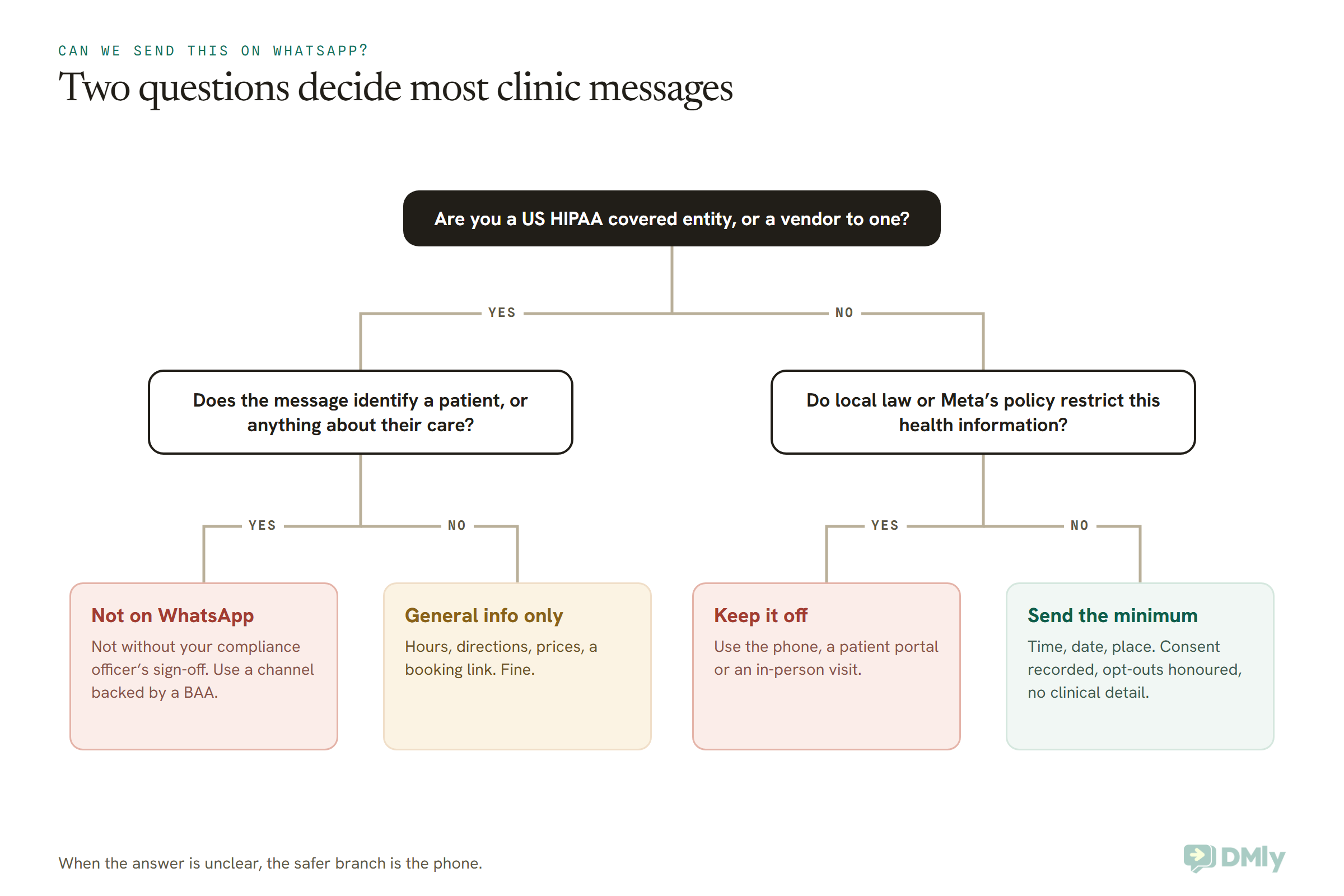
For video consultations, the same logic applies. Meta’s policy rules out telemedicine on WhatsApp wherever regulations require higher standards for health information. A safer pattern is to run the consult on a video platform your clinic has vetted (in the US, one that will sign a BAA) and use WhatsApp only to deliver the join link. During the pandemic, HHS temporarily relaxed enforcement for good-faith telehealth on everyday video apps, but that relief expired on 11 May 2023 and the transition period ended on 9 August 2023. Normal HIPAA rules apply to telehealth again.
Setting Up DMly for a Clinic Without Putting Health Data in the Chat
If you’re outside the US, or you’re a US practice using WhatsApp only for general enquiries, set DMly up so the chat carries logistics and nothing clinical. These settings are all documented in DMly’s help centre; none of them turns DMly into a HIPAA tool.
- Write a minimal reminder template. Appointment confirmations and reminders go out from Workspace Settings → Settings → Notification settings, on the Client & staff messages tab. Each event has a WhatsApp template picker that starts on DMly’s default and also lists your own approved templates. Read the default’s wording before you rely on it, and if it names the service, create and get approval for a version with just the time, date and place. Set both pickers on the reminder card: one for bookings with a video link and one for in-person visits.
- Trim the booking form. DMly’s booking form questions come from a fixed list, and you can switch each one off or change its label. Switch off Identification Number (WhatsApp’s policy also tells businesses not to ask for ID numbers in chat). If you keep the additional notes question, relabel it so patients don’t type symptoms there, for example “Anything we should know about access or timing?”
- Keep the AI assistant to booking. If you use an AI reply, switch on Hand over to a human and tell it to hand over the moment anything clinical comes up. DMly’s own Terms say highly sensitive personal data shouldn’t go into AI workflows.
- Lock down your team’s access. Ask every team member to switch on two-factor authentication on their own profile, since an admin can’t force it. Use roles to mask phone numbers and emails where staff don’t need them, and keep exporting contacts to admins.
- Think about lock screens. In the DMly mobile app, under Settings → Notifications, each team member can turn off push for their own devices or for single events. On a shared front-desk phone, consider switching push off entirely.
- Don’t store clinical notes there. Custom fields, contact notes and documents are handy for a salon’s preferences. For a clinic, keep diagnoses, treatment notes and records in your clinical system, not your messaging tool.
- Know your deletion routes. Deleting a contact keeps a 30-day recovery copy until you use Delete permanently in Recently deleted. Archived conversations are deleted for good after 30 days.
- Ask for the paperwork. If your law expects a written processor contract, contact DMly for a signed data processing agreement.
A shared inbox also makes it easier to see who said what to a patient, and to hand a clinical question to the right person quickly. Our guide to WhatsApp CRM for clinics covers how to organize that without turning the CRM into a medical record. And if you reply to online reviews, the same “say less” rule applies there; see how clinics can automate Google review requests.
WhatsApp and Patient Privacy Outside the US: UK, EU, India and Nigeria
HIPAA is US law. A clinic in London, Madrid, Pune or Abuja answers to its own country’s privacy law instead, and most of those laws treat health information as especially sensitive. If you bill US health plans from abroad, that’s a question for a lawyer. Here’s the short version for the markets we hear from most.
United Kingdom
Under the UK GDPR, “data concerning health” is special category data, which needs extra justification to use. The ICO’s guidance is helpful for clinics because it deals with appointments directly: appointment details, reminders and invoices count as health data when they reveal something about a person’s health. Its example contrasts a single GP appointment, which may reveal nothing, with a list of osteopath appointments or an invoice for a series of physiotherapy sessions, which can. The ICO notes that this guidance is under review after the Data (Use and Access) Act, so check for updates.
European Union
The EU GDPR works the same way: Article 9 lists data concerning health as a special category, and Article 28 requires a written contract with any processor that handles personal data for you. On the WhatsApp side, Meta’s terms incorporate its processor terms for the Cloud API, and DMly’s Privacy Policy includes a data processing agreement. Those contracts help, but deciding whether you have a lawful basis to message patients about their care, and keeping health detail out of the chat, is still your job.
India
India’s Digital Personal Data Protection Act 2023 governs digital personal data, and the government notified the DPDP Rules on 14 November 2025 with an 18-month phased timeline for compliance. Unlike the GDPR, the Act doesn’t set up a separate “sensitive” category for health data, but the core duties still apply: clear notice, consent for a specific purpose, reasonable security safeguards and honouring requests. For a clinic, that points to the same habits: ask before you message, say what you’ll send, and keep clinical detail off WhatsApp. Your professional regulator’s rules on patient confidentiality apply on top.
Nigeria
Nigeria’s Data Protection Act 2023 (NDPA) lists health status among sensitive personal data, and section 30 sets stricter conditions for processing it, with consent as one of them. The Nigeria Data Protection Commission’s General Application and Implementation Directive (GAID 2025, effective 19 September 2025) adds that consent is required for direct marketing, with no soft opt-in for existing customers. The older NDPR has been superseded in practice. For a Nigerian clinic, that means recorded consent before WhatsApp reminders, and separate consent before any promotional message.
The Gulf and South-East Asia
Countries across the Gulf and South-East Asia have their own personal data laws, and several have rules specific to health information. We won’t summarize them here, because the details matter and they change. Meta’s health clause applies everywhere, though: if your local rules restrict where health information can go, it doesn’t go on WhatsApp.
Six Clinics, Six Answers
The right answer depends on where the clinic is and what it bills, so here are six example clinics and what each should do. These are illustrations, not real businesses.
- A family dental practice in Ohio that bills insurers electronically. A HIPAA covered entity. Patient reminders and anything identifying a patient stay on a system backed by a BAA. If it offers WhatsApp at all, it’s a “message us” option that answers general questions and moves anything personal to the phone, signed off by its compliance lead.
- A cash-pay aesthetics clinic in Arizona. It may not be a HIPAA covered entity if it never sends those standard electronic transactions, but state privacy laws and its own promises to patients still apply. It shouldn’t assume it’s free to send treatment details until a lawyer has looked at its setup.
- A physiotherapy clinic in Pune. Not under HIPAA. Reminders with the time, date and place, sent to patients who agreed, fit the DPDP Act’s direction. “Your physio session” is better as “your appointment”, for the reason the ICO gives about physiotherapy invoices.
- A fertility clinic in Abuja. Under the NDPA, and its own name reveals the specialty. It should ask each patient whether WhatsApp is acceptable at all, offer SMS or a phone call instead, and keep messages to logistics. Promotional messages need separate consent under the GAID.
- A private osteopath in Manchester. UK GDPR, and the ICO’s own example. A list of osteopath appointments can be health data, so reminders stay minimal, consent is recorded, and the clinical record lives in the practice’s clinical system.
- A dental group in Madrid. EU GDPR. It needs a processor contract with its messaging platform (DMly’s DPA covers this), a lawful basis for reminders, and the same minimal wording. Treatment plans and X-rays go through its clinical software, not chat.
A Five-Minute WhatsApp Privacy Check for Your Clinic
Before your next patient message goes out, run through these questions with whoever manages your front desk. If any answer is “we’re not sure”, stop and ask.
- Which law are we under? HIPAA if we’re a US covered entity; otherwise our country’s data protection law, plus our professional regulator.
- Does every vendor that handles patient information have the right contract? A BAA in the US; a data processing agreement under the GDPR, UK GDPR and similar laws.
- Did this patient agree to WhatsApp, and can we show it?
- What would a stranger learn from the lock-screen preview? If the answer is anything about their health, rewrite it.
- What happens when a patient replies with symptoms? There should be a ready reply, a person who takes over, and an emergency route.
- Who on our team can see and export patient contacts? Two-factor on, roles tight, exports limited.
- Where do clinical notes live? In the clinical system, never in the chat tool.
Frequently Asked Questions
Is WhatsApp HIPAA compliant?
No. Meta’s Terms for WhatsApp Business Platform (section 4.2, last modified 23 September 2026) say Meta is not a HIPAA business associate and the WhatsApp Business Platform is not HIPAA compliant. They also say businesses may not send Meta information that is subject to safeguarding rules under applicable law.
Will Meta sign a BAA for WhatsApp?
No. Meta’s terms state that it is not a business associate or subcontractor under HIPAA, so there’s no BAA available for the WhatsApp Business Platform. Meta does offer processor terms for data protection laws like the GDPR, but a data processing agreement is not a BAA.
Can any tool make WhatsApp HIPAA compliant?
No. Tools that connect to the WhatsApp Business Platform still pass messages through Meta’s Cloud API, and Meta’s terms say it isn’t a business associate and won’t accept protected health information. A vendor can sign a BAA for its own part, but it can’t sign one on Meta’s behalf.
Is the WhatsApp Business app HIPAA compliant?
We found no BAA offered for the free WhatsApp Business app either. Its chats are encrypted between devices, but HIPAA also asks for a signed agreement with any vendor handling patient information, plus safeguards for the phone, backups and lock-screen previews.
Can a US clinic send appointment reminders on WhatsApp?
Be careful. HIPAA allows reminders in general, but in a covered clinic a reminder that identifies a patient can be protected health information, and Meta’s terms say not to send such information through the platform. Ask your compliance officer before using WhatsApp for any patient reminder, and keep it to the time, date and place if they agree.
Does patient consent make WhatsApp OK under HIPAA?
Consent is required by WhatsApp’s policy and respects the patient’s choice of channel, but it doesn’t create a BAA and doesn’t override Meta’s terms. Treat consent as necessary, not sufficient.
Is DMly HIPAA compliant?
DMly doesn’t state that it is HIPAA compliant, and its documentation doesn’t mention a BAA. A US covered entity should not use it for protected health information. DMly does offer a GDPR-style data processing agreement, which suits clinics outside the US that keep WhatsApp to appointment logistics.
Is WhatsApp GDPR compliant for clinics?
Meta acts as a processor for the Cloud API and offers processor and data transfer terms, which helps. But GDPR compliance depends on what you do: a lawful basis for messaging, extra care because health data is a special category, a processor contract with your messaging platform, and keeping health detail out of the chat.
Can we run video consultations on WhatsApp?
WhatsApp’s policy rules out telemedicine where regulations require higher standards for health information. In the US, HHS’s pandemic relief for everyday video apps ended in 2023. A safer pattern is a vetted video platform for the consult, with WhatsApp carrying only the join link.
The Blank Signature Line, Revisited
So, is WhatsApp HIPAA compliant? Meta has answered that for us, in its own terms: no business associate agreement, no HIPAA compliance, and no health information that the law says must be safeguarded. That signature line stays blank, and no setting in any messaging tool, ours included, fills it in.
What you can do is decide what WhatsApp is for. In a US covered clinic, that may be very little: general questions, with everything personal moved to the phone or a BAA-backed system. Everywhere else, WhatsApp can carry the logistics patients actually want (the time, the date, the place, a link to rebook) as long as you’ve asked first and kept the clinical detail somewhere safer.
Start with your reminder wording. Read it as if you were the stranger holding the phone, cut everything that hints at a diagnosis, and you’ll have solved most of the problem before any lawyer gets involved. Then take the rest to your compliance officer. When you’re ready to set up the logistics side, our guide to WhatsApp automation for clinics walks through it step by step.
Writing about WhatsApp automation, bookings and growth for local business.
Turn WhatsApp into your busiest channel.
Start free and run message, bookings, payments and reviews in one place.
