
Is WhatsApp Marketing GDPR Compliant? Consent Rules for UK and EU Businesses
Before you worry about WhatsApp marketing GDPR rules in the abstract, read the complaint one of your customers could write tonight: “I bought a lamp from this shop in March. Since then I get offers on WhatsApp every week. I never agreed to that, I can’t see how to stop it, and I don’t know how they got my number onto WhatsApp in the first place.”
That’s three sentences, and every one of them is a legal question. Did they agree? Can they stop it easily? Do you know where your list came from? If a customer sends something like it to a data protection regulator, those are the questions you’ll be asked, and the answers have to come from your records, not your memory.
The good news is that WhatsApp marketing can be done lawfully in the UK and the EU, and most of what it takes is ordinary good practice. In this guide, we’ll look at the two laws that apply (not just the GDPR), which lawful basis covers a promotional message, what consent wording works, what the soft opt-in does and doesn’t allow on WhatsApp, how to keep proof, how to handle opt-outs, and what Meta and DMly each say about their part. Nothing here is legal advice: it explains the rules as written, and for your own situation you should speak to a qualified adviser. If you’re outside the UK and EU, your own laws will differ, though the GDPR can still reach you if you sell to people there, which we’ll cover.
Is WhatsApp Marketing GDPR Compliant? The Short Answer
WhatsApp marketing can be GDPR compliant, but the app doesn’t make it so. Compliance depends on how you collect numbers, what people agreed to, what you send, and how you handle opt-outs. The question “is WhatsApp GDPR compliant?” is a bit like asking whether a pen is libel-proof. The tool doesn’t decide it. Your use of it does.
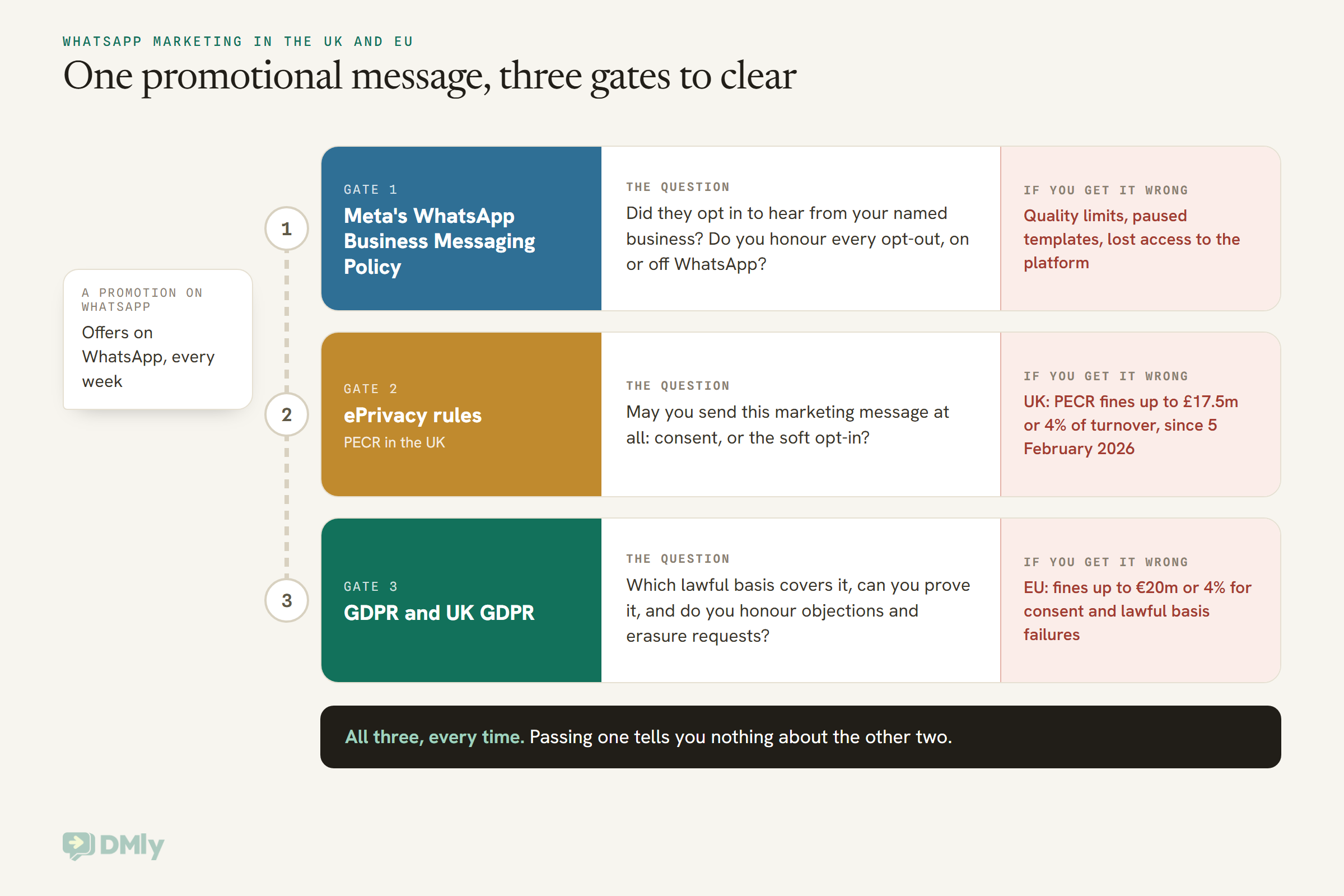
In practice, every promotional WhatsApp message to a customer in the UK or EU has to clear three separate layers:
- The GDPR (or the UK GDPR). You need a lawful basis for using the person’s data for marketing, you have to be able to show it, and you have to respect their rights, including an absolute right to object to direct marketing.
- The ePrivacy rules. In the EU these come from the ePrivacy Directive as each country wrote it into law. In the UK they’re the Privacy and Electronic Communications Regulations, usually called PECR. These decide whether you may send an unsolicited marketing message by electronic means at all.
- Meta’s WhatsApp Business Messaging Policy. Not a law, but a contract you agreed to. It requires opt-in permission and says you must respect every opt-out. Break it and Meta can limit or remove your access.
Most articles stop at the first layer. The second one is where WhatsApp marketing GDPR questions usually get decided, and the third is the one that can switch off your number.
WhatsApp Marketing GDPR Rules Are Really Two Laws: GDPR and PECR
For WhatsApp marketing, the GDPR tells you how you may use someone’s personal data, and the ePrivacy rules (PECR in the UK) tell you whether you may send them a marketing message by electronic means at all. You need to satisfy both, and where the ePrivacy rules set a specific requirement, that’s the one that bites.
The GDPR even says so. Article 95 says the GDPR doesn’t impose extra obligations on matters already covered by specific obligations with the same objective in the ePrivacy Directive. In plain words: for “can I send this unsolicited marketing message?”, look to the ePrivacy rules first.
Does a WhatsApp message count as “electronic mail”?
The name is misleading. “Electronic mail” in these rules isn’t only email. The ePrivacy Directive defines it as any text, voice, sound or image message sent over a public communications network which can be stored until the recipient collects it. PECR uses the same idea and adds text messages explicitly.
The UK regulator, the Information Commissioner’s Office (ICO), is direct about how wide that goes. Its guidance lists email, texts, picture and video messages, voicemail, in-app messages and direct messaging on social media as electronic mail, and says the term has an “intentionally broad meaning”. A promotional WhatsApp message to a customer sits squarely in that list.
In the EU, each country wrote the ePrivacy rules into its own law and has its own regulator, so the detail varies. The working assumption that keeps you safe everywhere is the same: treat a marketing message on WhatsApp exactly as you’d treat a marketing email or text.
What counts as “marketing” and what doesn’t
PECR (since the Data (Use and Access) Act 2025 copied the definition across) defines direct marketing as advertising or marketing material directed to particular individuals. The ICO’s guidance says messages sent purely for administrative or customer service purposes are not direct marketing, as long as they don’t promote anything. Add an offer to a booking confirmation, and it becomes marketing.
That line matters a great deal on WhatsApp, because it mirrors the split Meta already makes between marketing and utility templates. If you want the template side of it, our guide to WhatsApp message templates explained covers Meta’s categories. The two lists aren’t identical, though. Meta decides what a template is for billing and policy. The law decides what a message is for consent. A “your order has shipped” message is service in both. A “your order has shipped, and here’s 10% off your next one” message is marketing in both.
Which GDPR Lawful Basis Covers WhatsApp Marketing?
For WhatsApp marketing, the lawful basis is usually consent or legitimate interests, and which one you use follows from how the ePrivacy rules let you send the message. The ICO puts it plainly: if you rely on consent to send unsolicited electronic marketing, your lawful basis is likely to be consent; if you use a soft opt-in, it’s likely to be legitimate interests.
Here’s what each one means in the GDPR’s own words, translated.
- Consent, Article 6(1)(a). The person agreed to their data being used for one or more specific purposes. The GDPR defines consent (Article 4(11)) as “freely given, specific, informed and unambiguous”, given by a statement or “a clear affirmative action”. More on what that looks like below.
- Legitimate interests, Article 6(1)(f). You have a genuine interest, the processing is necessary for it, and your interest isn’t overridden by the person’s rights. Recital 47 of the GDPR says that processing for direct marketing purposes “may be regarded as carried out for a legitimate interest”. Since 5 February 2026, the UK GDPR says the same thing in the article itself: Article 6(11) now lists direct marketing as an example of processing that may be necessary for a legitimate interest.
Two things that UK change does not do. It doesn’t remove the balancing test: the ICO’s summary of the Data (Use and Access) Act says the new “recognised legitimate interests” basis skips the balancing test, but direct marketing was added as an example under the ordinary legitimate interests basis, which keeps it. And it doesn’t touch PECR. You still need consent or a soft opt-in to send the WhatsApp message itself.
What about contract?
Contract (Article 6(1)(b)) covers what’s necessary to deliver what someone bought: the booking confirmation, the “your table is ready” message, the delivery update. It doesn’t cover promoting something new. That’s why the ICO’s own example of a restaurant has it sending a booking confirmation text, then asking separately before sending a text about a special food event.
The right to object is absolute
Whatever basis you use, Article 21(2) and (3) give people the right to object to direct marketing at any time, and once they do, their data “shall no longer be processed for such purposes”. There’s no balancing and no exception. Article 21(4) adds that you must bring this right to their attention clearly and separately, at the latest at your first communication with them. On WhatsApp, the simplest way to honour all of that is a short “Reply STOP to opt out” line on every promotional message, and a system that actually stops when they do.
If you’re outside the UK and EU
The GDPR can still apply to you. Article 3(2) says it covers a business not established in the EU when it processes the data of people in the EU in connection with offering them goods or services. So an online store in Lagos, Mumbai or Texas that markets to customers in France on WhatsApp should treat this article as written for it, and the UK GDPR has the same reach for customers in the UK. For customers in your own country, your own laws apply, and they can differ a lot.
What Valid Consent for WhatsApp Marketing Looks Like
Valid consent for WhatsApp marketing is a clear, separate, unticked yes to receiving marketing from your named business on WhatsApp, given freely, which you can later prove and which the person can take back as easily as they gave it. Each part of that sentence comes straight from the GDPR, the ICO or Meta.
- A positive action. Recital 32 says ticking a box can be consent, but “silence, pre-ticked boxes or inactivity” can’t.
- Separate from everything else. Article 7(2) says a consent request inside a wider document must be “clearly distinguishable from the other matters”. Burying it in your terms and conditions fails.
- Not a condition of buying. Article 7(4) and recital 43 say consent is unlikely to be free if the sale depends on it. The ICO’s example of bad practice is “By submitting your order, you agree to receive our marketing emails.”
- Specific to the channel. The ICO says a request for “marketing” in general isn’t specific enough; its good-practice example names the channel (“by text message”), and it suggests asking separately for each type. For you, that means saying WhatsApp, or at least listing it.
- Your name. Recital 42 says people should know at least who the controller is. Meta’s opt-in rules say the same: you must clearly state the name of the business they’re opting in to hear from.
- Easy to withdraw. Article 7(3): “It shall be as easy to withdraw as to give consent.” You must also tell people they can withdraw before they agree.
Meta adds its own layer on top. Its policy says you may contact people on WhatsApp only if they’ve given you their mobile number (the current wording adds “or username”) and you’ve received opt-in permission confirming they want subsequent messages or calls from you. Meta’s opt-in page says that permission can be general rather than WhatsApp-specific, “as long as businesses comply with all local laws”. In the UK and EU, the local law is the stricter of the two, so write your wording to the law and you’ll have covered Meta too. The live WhatsApp opt-in guide covers the different capture methods in detail; here’s the wording itself.
Opt-in wording you can adapt
Four versions for the four places most small businesses ask. Swap in your business name, what you’ll send and how often. Keep a dated copy of every version you use.
1. Website checkout or sign-up form (unticked box, separate from the terms)
☐ Yes, I’d like [Business] to send me offers and new-arrival news on WhatsApp, about twice a month. I can reply STOP at any time to stop them.
Note what isn’t there: no “and partners”, no pre-tick, and the box is optional, so the order goes through either way.
2. At the counter or on the phone (said out loud, then recorded)
“Would you like us to send you our offers on WhatsApp? It’s about twice a month, and you can stop any time by replying STOP.” If they say yes, note the date, the time and that they said yes to offers on WhatsApp.
This is the ICO’s restaurant example almost word for word: verbal consent is fine, as long as you record it.
3. A keyword on a poster, menu or receipt
Want our weekly specials on WhatsApp? Message JOIN to [number]. We’ll send about one a week from [Business]. Reply STOP any time to stop.
Their JOIN message is the affirmative action, and the poster is the information they saw, so photograph it and keep the photo with the date.
4. Inside a WhatsApp conversation they started
Thanks for your question, here’s the answer. One more thing: would you like us to send you our offers here on WhatsApp too? About twice a month, and you can reply STOP any time. Just reply YES if so.
Someone messaging you about opening hours hasn’t agreed to promotions. This version asks properly, inside the conversation, so the yes sits in the thread with the date on it. Our guide to the WhatsApp 24-hour messaging window explains why a reply like this costs nothing to send while their window is open.
Wording that fails
- “By booking, you agree to receive updates and offers.” (Bundled with the service and not a separate action.)
- A pre-ticked “Keep me updated” box. (Recital 32: not consent.)
- “We may contact you about products from us and selected partners.” (Not specific, and a partner isn’t you.)
- A list someone else collected, even one sold as “GDPR compliant” or “opted in”. The ICO says plainly that the soft opt-in never covers bought lists, and consent given to another business is consent to them, not to you.
The WhatsApp Soft Opt-In: What It Allows and What It Doesn’t
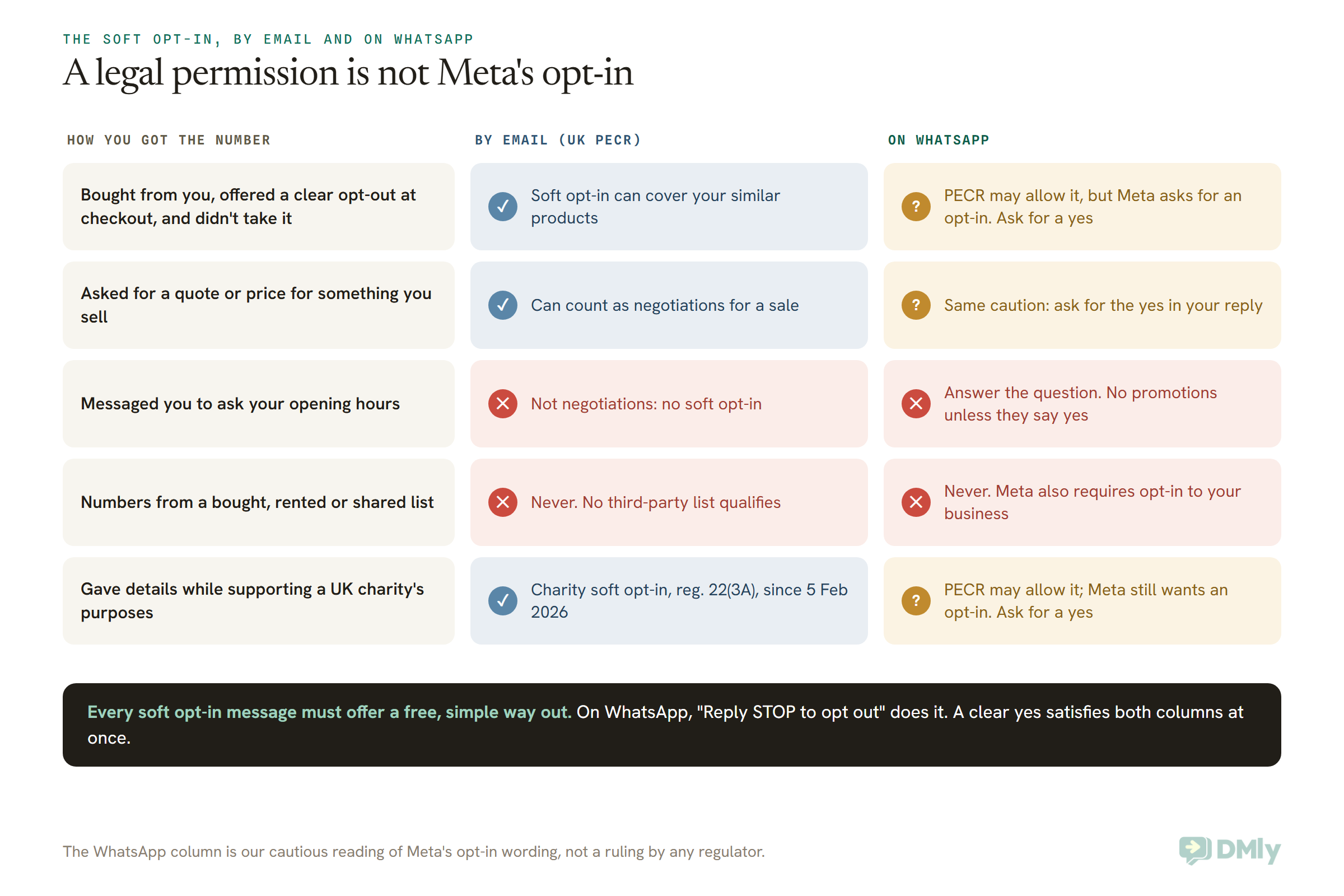
The soft opt-in lets you send electronic marketing about your own similar products to people who bought (or asked to buy) from you and were offered a simple opt-out, without asking for consent first. Under PECR it can cover WhatsApp, but Meta’s opt-in rule means you should still get a clear yes before promoting anything on WhatsApp.
That second sentence is the part most guides skip, so let’s take it slowly.
What the soft opt-in requires
PECR regulation 22(3) sets it out, and the ICO’s guidance breaks it into five conditions. All five must be true:
- You got the contact details yourself, directly from the person. Not from another company, and not from another company in your own group. The ICO says there’s “no such thing as a third-party marketing list that is compliant with the soft opt-in”.
- You got them during a sale or “negotiations for the sale”. They don’t need to have bought. Asking for a quote, starting a free trial or asking about a product you sell counts. Asking whether you’re opening a new branch doesn’t. Browsing your website doesn’t either.
- You only market your own similar products and services. The test is what people would reasonably expect. A supermarket customer can expect grocery offers, not insurance.
- You offered a simple, free way to refuse when you collected the details. A prominent box on the form, or staff asking out loud. The ICO is specific that an opt-out added to the order confirmation afterwards is too late.
- You offer the same way out in every message after that. On WhatsApp, “Reply STOP to opt out” at the end of each promotion does this, as long as STOP really works.
The EU version, Article 13(2) of the ePrivacy Directive, has the same shape: contact details obtained from customers in the context of a sale, your own similar products, and a free and easy chance to object both at collection and in each message. Each EU country’s wording differs in the detail, so check yours.
Since 5 February 2026, UK charities have a second soft opt-in, in a new regulation 22(3A). It lets a charity send electronic marketing to further its charitable purposes to people who expressed interest in, or offered support to, those purposes, with the same opt-out at collection and in every message. The ICO’s guidance on it was updated in April 2026.
Why WhatsApp is different from email here
The soft opt-in is, by design, the absence of a refusal. The person didn’t tick “no”. Meta’s policy asks for something else: that you’ve “received opt-in permission from the recipient confirming that they wish to receive subsequent messages or calls” from you, and that your opt-in clearly states the person is opting in. A customer who simply didn’t refuse hasn’t confirmed anything.
So here’s our reading, and it’s a cautious one. The soft opt-in can make a WhatsApp promotion lawful under PECR. It doesn’t obviously satisfy Meta’s opt-in wording, and Meta is the one that can pause your templates or remove your access. Meta also reviews opt-in flows reactively, including user feedback, and customers who weren’t expecting your message are the ones who block and report you. The practical answer is to use the soft opt-in for email if you like, and to ask for a clear yes before sending promotions on WhatsApp.
What the soft opt-in never covers
- Prospects who never bought or asked to buy anything from you.
- Other companies’ products, including partners and sister brands.
- Fundraising or campaigning by a charity under the products soft opt-in (the charity has its own route now).
- Anyone who said no when you collected their details, or who has opted out since.
- Numbers you got from someone else, however the list was described.
And once someone opts out of a soft opt-in, the ICO says you can only market to them again if they later give consent. Silence doesn’t restart it.
Keeping Proof of Consent for WhatsApp Marketing
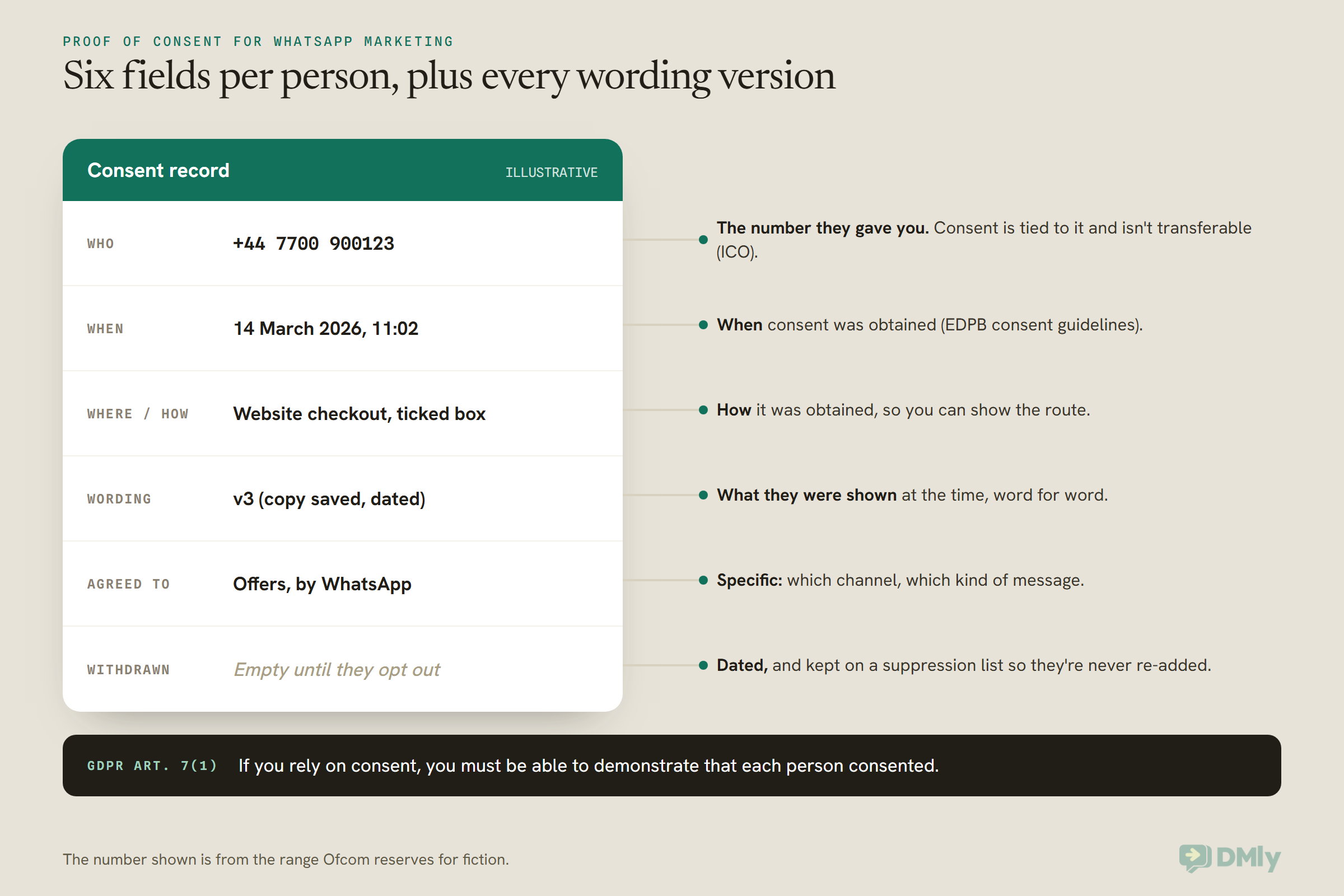
Under Article 7(1) of the GDPR, if you rely on consent you must be able to demonstrate that each person consented. That means a record of who agreed, when, how, to what, and what they were shown at the time. The burden is on you, not the customer.
The European Data Protection Board (EDPB), which brings the EU’s regulators together, gives the clearest picture in its consent guidelines. It says the GDPR doesn’t prescribe a method, but you should be able to show how consent was obtained, when, and what information the person was given at the time. It also warns against overdoing it: keep enough to show the link, but don’t collect more than you need just to prove consent. The ICO’s shorthand is “who, when, how”.
A few practical rules that make a record useful a year later:
- Version your wording. Give each version a label like v3-2026-03 and keep the text. If you change the wording, new sign-ups get the new version, and old ones keep the old label.
- Record scope, not just yes. “Offers by WhatsApp” and “appointment reminders” are different things. Someone who agreed to one hasn’t agreed to the other.
- Keep the record somewhere it survives. A conversation thread is evidence, but threads get archived and deleted. Copy the essentials into the contact record and keep an export.
- Refresh it now and then. The EDPB says there’s no fixed time limit on consent, it depends on context and expectations, and recommends refreshing consent at appropriate intervals as best practice. Someone who joined your list four years ago and has never opened anything may not remember you.
How long should you keep the record itself? The GDPR doesn’t set a number. Most businesses keep it at least as long as they keep messaging the person, and for a while after, in case of a complaint. That’s a question for your adviser, but don’t delete the proof the day someone opts out: the dated opt-out is part of the record too.
Opt-Outs on WhatsApp: STOP, Objections and Meta’s Own Stop Button
On WhatsApp, an opt-out has to work the first time, through the same easy route people use to opt in, and it has to stop every marketing message, not just the next one. Four rules overlap here, and they all point the same way.
- GDPR Article 7(3): withdrawing consent must be as easy as giving it. The EDPB adds that when consent took one tap or one keystroke, withdrawal must be equally easy in practice.
- GDPR Article 21(3): once someone objects to direct marketing, you stop using their data for it. No exceptions.
- PECR and the ePrivacy Directive: every message must give a simple, free way to refuse, and must not hide who it’s from.
- Meta’s policy: you must respect all requests “either on or off WhatsApp” to block, discontinue or opt out of your WhatsApp communications.
That last one is easy to miss. If a customer tells you at the counter or by email that they don’t want your WhatsApp messages, that counts, even though they never typed STOP.
WhatsApp has its own stop control too
Customers don’t have to message you to stop your marketing. Meta’s documentation describes a setting in WhatsApp called Offers and announcements, where a person can mark your marketing as not interesting or stop marketing messages from your business entirely. If you send a marketing template to someone who has stopped them, Meta doesn’t deliver it, and the send fails with error 131050 (“This recipient has chosen to stop receiving marketing messages on WhatsApp from your business”).
Treat a 131050 failure as an opt-out for marketing. Note it on the contact so it isn’t lost when you build your next audience, and don’t try to reach them with marketing on WhatsApp another way.
Opt-outs are usually per channel, objections aren’t
The ICO says opt-outs usually apply to the communication method used, as long as your wording makes that clear: unsubscribing from emails doesn’t automatically stop texts. But it also says the right to object under data protection law is absolute. If someone says “stop marketing to me”, rather than “stop the WhatsApp messages”, stop everything.
One more thing that matters a lot in the UK and EU: Meta’s per-user marketing limit, which quietly holds back some marketing templates to people who get too many, isn’t active for messages sent from or to the EEA or the UK. Nothing on Meta’s side throttles you for those customers. The only brake on how often you message them is you.
Is WhatsApp Itself GDPR Compliant? Meta’s Role and Where Your Data Lives
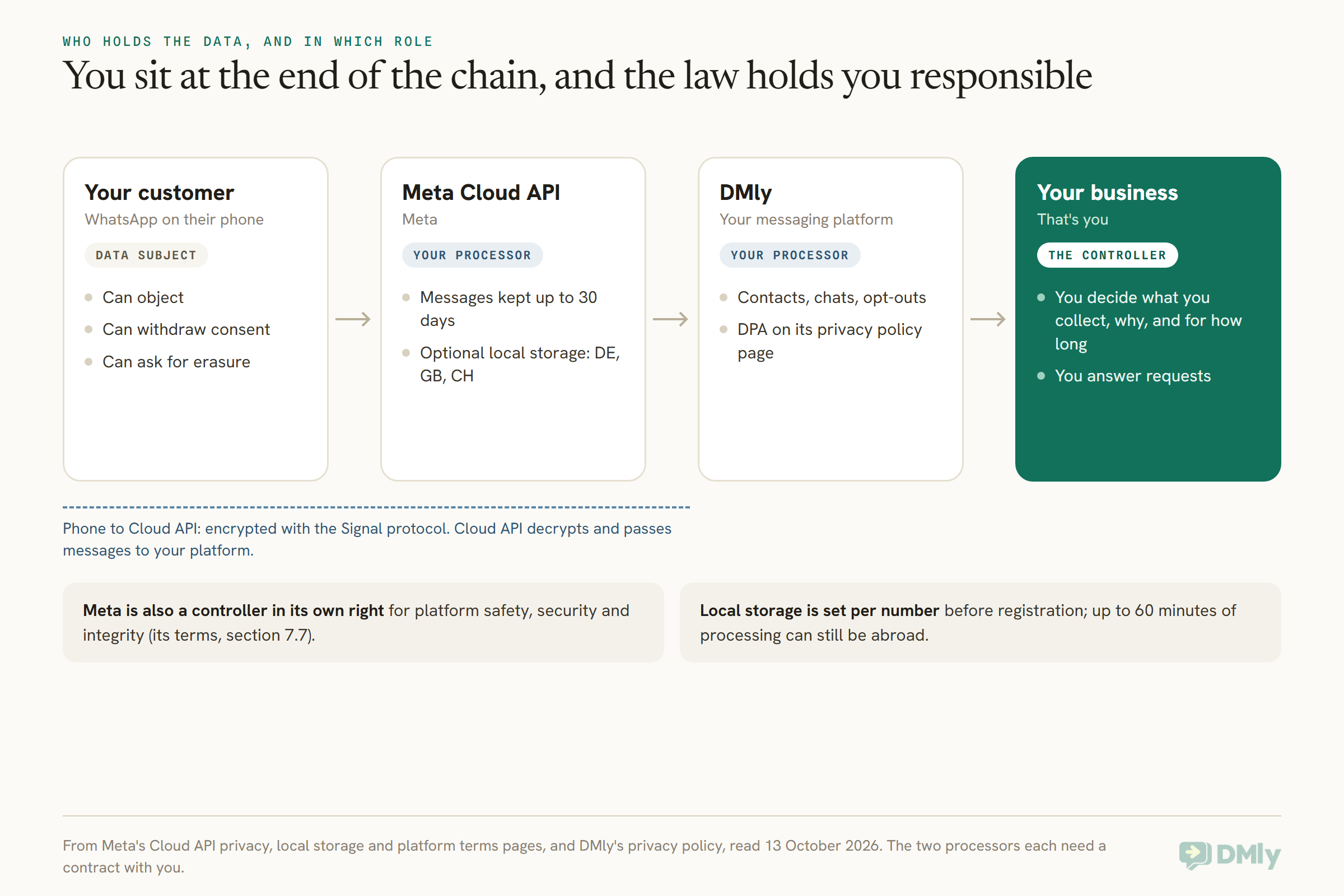
On the WhatsApp Business Platform, Meta says it acts as your data processor for the messages it handles through the Cloud API, while you remain the controller. It also keeps some controller roles of its own. Here’s what Meta’s documents say, read on 13 October 2026. (This covers the Business Platform, the API that tools like DMly connect to. The free WhatsApp Business app on your phone works under different terms.)
Processor, and sometimes controller
- Processor for your messages. Meta’s Cloud API privacy page says that, where the law recognises the concept, Meta “acts as a data processor/service provider on behalf of the business”, and Cloud API only uses the messages it processes on your behalf and at your instruction. It also says Cloud API won’t automatically use WhatsApp messages to inform the ads a person sees.
- The contract that makes that true. Meta’s Terms for the WhatsApp Business Platform (last modified 23 September 2026) incorporate the Meta Global Processor Terms wherever Meta is your processor. The WhatsApp Business Data Processing Terms set out the processor duties, including breach notification without undue delay and help with data subject requests.
- Controller for some things. The same Terms say that where you and Meta are each independent controllers, separate controller terms apply, and section 7.7 says Meta may use personal data as a controller to keep the platform safe, secure and intact, including enforcing its policies. So Meta isn’t purely your processor, and your privacy notice should say that WhatsApp/Meta processes data when you message people there.
Article 28 of the GDPR requires a written contract with any processor, and it’s worth knowing which one covers you. For Meta, it’s those terms, accepted when your WhatsApp Business Account was set up.
Where the messages are, and for how long
- Retention. Meta says Cloud API keeps messages for a maximum of 30 days, to provide things like retransmission, and deletes the user identifiers within 30 days of a message’s last status update unless directed otherwise. Messages at rest are encrypted.
- Location. Cloud API processes messages in Meta’s data centres. For transfers from the EU or UK to the US, Meta points to the WhatsApp Business Data Transfer Addendum for the European Region and a separate UK Data Transfer Addendum.
- Local storage, if you need it. Meta offers an optional local storage setting per phone number, so message content at rest is kept in one country. The supported list includes Germany (for the EU), the United Kingdom and Switzerland, among others. It isn’t total: message content can sit in Meta data centres internationally for up to 60 minutes while being processed, and if you use Meta’s contact book feature, numbers shared that way are stored regardless. The setting can only be switched on when the number is registered, so it’s a decision to make before you connect a number, not after.
- Encryption. Between the customer’s phone and the Cloud API, messages are encrypted with the Signal protocol. Cloud API then decrypts them and passes them to your platform, managing the keys on your behalf. That’s normal for a business messaging service, and it’s why the processor terms matter.
Two Meta rules that are data protection rules in disguise
- Use the data for messaging only. Meta’s policy says not to use any data obtained from Meta about a person you message, other than the content of your message threads, for any purpose beyond what’s reasonably necessary to support messaging with that person.
- Don’t ask for sensitive identifiers. The policy says not to share or ask people to share full card numbers, financial account numbers, ID card numbers or other sensitive identifiers. If you run a clinic, note too that health information is “special category” data under Article 9 of the GDPR, with tighter rules, and Meta’s policy separately restricts health information where regulations require heightened handling.
What DMly’s Documents Say About GDPR, and What They Don’t
DMly’s documentation says that when you message your own customers, you’re the controller and DMly is the processor, and its privacy policy page includes a Data Processing Agreement (DPA). Here’s what that covers, what the product does for consent and opt-outs, and where you’ll need to ask DMly directly. Everything below is from DMly’s docs, privacy policy and terms, read on 13 October 2026.
The paperwork
- Roles. The privacy policy says DMly (operated by Client Path, LLC, registered in the United States) is a controller for account, billing and usage data, and a processor for the messages, contacts and conversations you handle through it, acting on your documented instructions.
- A DPA. The privacy policy page contains a Data Processing Agreement naming you as controller and DMly’s operator as processor. It covers processing only on documented instructions, confidentiality and security, support with data subject requests, breach notification without undue delay, and no selling of your data, and it’s governed by the laws of England and Wales. Separately, DMly’s data security page says to contact DMly if you need a signed DPA or data residency details for your own audit.
- Sub-processors. The DPA lists them by category: the messaging platforms you connect (Meta for WhatsApp, Messenger and Instagram, among others), Shopify if connected, SMS carriers, the payment gateways you enable, AI providers used for AI replies, push notification services, and hosting and storage providers.
- Transfers. The DPA says that where transfers occur outside the UK or EEA, “appropriate safeguards are applied”. It doesn’t name the mechanism, so if your auditor asks which one, ask DMly.
- Hosting region and AI providers: ask in writing. DMly’s documentation and its privacy policy describe where data is stored, and which AI providers are used, in different terms. Until those line up, don’t rely on either statement for a data map. Ask DMly for the current answer for your workspace, in writing.
Opt-outs in DMly
- STOP words. A contact opts out by sending one of these as their whole message: stop, stopall, stop all, unsubscribe, cancel, quit, end, opt out or optout. The match is exact, so “cancel my appointment tomorrow” doesn’t opt anyone out, but a bare “cancel” does.
- What it stops. Broadcasts, sequences, automations and booking reminders. Manual replies from the Inbox, the mobile app and the API are refused too, with the message “This contact opted out of messages, resubscribe them before replying”, and payment links aren’t sent. A running flow is cancelled the moment they opt out.
- Across channels. The opt-out lives on the contact, not the channel, so STOP on WhatsApp also stops messages to that person on Instagram, Telegram and SMS. (That goes further than the per-channel opt-out the ICO allows, which is the safe direction.)
- The Unsubscribe tag. Every workspace has a built-in Unsubscribe tag that DMly attaches when someone opts out and removes when they opt back in, on every channel. It can’t be renamed or deleted.
- Coming back. A contact opts back in by sending start, unstop, subscribe, opt in or optin. You can also use Resubscribe under Contacts → Suppressions, and DMly’s own advice is to do that only when you have a record of them asking.
One honest gap: DMly’s documentation doesn’t say whether WhatsApp’s own Offers and announcements stop (the 131050 failure above) is copied onto the DMly contact as an opt-out. Until it does, record it yourself.
Consent records in DMly
DMly’s documentation calls its consent record “partial”, and it’s worth knowing exactly what that means.
- Recorded in full: an opt-in through a WhatsApp popup growth tool on your website. DMly records the consent wording shown, the page, the time, a hashed IP address and browser details. The dashboard doesn’t show that record, but the Inbox shows a Consent given date in the conversation’s details panel.
- Recorded as a date: a visitor ticking your consent box on the Live Chat pre-chat form (the Require consent before chat setting, with your own Consent text). The time is saved on the contact and shown as Consent given. Our guide to adding a live chat widget to your website covers setting it up.
- Recorded as a withdrawal: every STOP, with the word the contact used.
- Not recorded: any other opt-in route, such as a paper form, a keyword, a phone call or your own website form. For those, the docs say to keep proof in a custom field or a note.
Data rights in DMly
- Access. A contact’s profile shows their fields, channels, notes, custom fields and latest message, with the full history in the Inbox thread, and the API exposes more. The Contacts → Export CSV is not a subject access export: it has seven columns and leaves out the email, the message history and more. DMly’s docs say to build a proper response from the profile or the API.
- Erasure. Delete contact removes the person and their history, invoices, payments and bookings. For 30 days a copy sits in Contacts → Recently deleted, so for an erasure request you finish with Delete permanently there. Files and attachments go straight away. Download anything you’re legally required to keep, such as invoices, first.
- Retention. There’s no retention schedule you can set. Contacts aren’t aged out. Archived conversations are deleted 30 days after archiving, and the audit log keeps 180 days.
- No customer-facing request page. There’s no “request my data” link you can give customers; you handle requests yourself in the dashboard (Shopify customer data and redaction requests are the exception, handled automatically when Shopify is connected).
Setting Up WhatsApp Marketing GDPR Records in DMly
The fastest way to get WhatsApp marketing GDPR-ready in DMly is to define a few consent fields, collect opt-ins where DMly can record them, build your marketing audience from consent rather than from “everyone”, and brief your team on the opt-out rules. Seven steps, all from DMly’s documentation.
- Write and version your wording. Use one of the four versions above. Save each version with a label and a date.
- Define consent fields under Settings → Custom fields, before anything writes to them: for example consent_source (text), consent_date (date), consent_wording (text, the version label) and consent_scope (text, such as offers or reminders). DMly checks a date field holds a readable date on the contact editor, but agree spellings with your team, because a misspelled field name on a contact creates a new field.
- Collect where DMly records it. On your website, a WhatsApp popup growth tool records the wording and time for you; the Live Chat consent box records the date. In WhatsApp itself, DMly’s WhatsApp forms (under Configurations → Bot Setup → WhatsApp → Forms) include an Opt-in field type, and the ready-made Register form carries a consent opt-in. Answers from those land in the contact’s Flow answers, which keeps only the last 50, so copy the result into your consent fields.
- Backfill what you already have. The contacts importer has a
custom_fieldscolumn that takes JSON, so a batch of paper consents can be loaded with their source and date. Anyone you can’t trace to a consent stays out of your marketing audience until they give one. - Build the audience from consent. Under Contacts → Segments, add a Custom field condition (for example consent_scope contains offers), and add Unsubscribe to Exclude contacts with tags. The broadcast wizard has no filters of its own, so this saved segment is what you pick as the audience. Opted-out contacts never receive a broadcast either way; ticking Reachable contacts only keeps them out of the count.
- Put the way out in every promotion. End every marketing template with a line like “Reply STOP to opt out”. It satisfies the every-message rule, and it works because STOP is one of DMly’s opt-out words. Our WhatsApp business message templates include examples you can adapt.
- Brief the team. Three things: a bare “cancel” opts someone out of everything, including manual replies; an opted-out contact’s composer stays open but the send is refused; and only resubscribe someone when they’ve asked and you’ve recorded it.
When you’re ready to send, our guide to WhatsApp broadcasts covers templates and timing, and how to send bulk messages on WhatsApp officially covers the difference between the free app’s broadcast lists and the API. If a lot of people block or report a campaign, that feeds Meta’s quality signals, which our guide to WhatsApp quality rating, messaging limits and bans explains.
Six Businesses, Six WhatsApp Marketing Decisions (Illustrative)
These are made-up businesses, not DMly customers. Each shows one decision the rules above actually change.
- A hair salon in Manchester, UK. Clients book online and give their mobile number for confirmations. The booking form has a separate, unticked box: “Send me offers from [Salon] on WhatsApp, about twice a month. Reply STOP to stop.” Confirmations go to everyone; offers go only to people who ticked. The salon could argue a soft opt-in for email, but on WhatsApp it asks.
- A café in Dublin, Ireland. A small sign on each table: “Message JOIN to get our weekly specials on WhatsApp.” The JOIN message is the consent, the sign is the wording, and a dated photo of the sign is filed with each version. Irish law, not UK law, applies to its ePrivacy rules, so the owner checks the Irish regulator’s guidance once.
- An online homeware shop in Lyon, France. It had a habit of adding every buyer to WhatsApp promotions. It stops, asks recent buyers for a yes inside their order conversations, and only markets to those who answer. The others still get shipping updates, which aren’t marketing.
- A gym in Amsterdam, the Netherlands. Members ask about class times on WhatsApp all day. The gym answers them and, once, asks whether they’d like the monthly timetable and offers on WhatsApp. Members who say yes get a consent date and scope on their record.
- A charity in Leeds, UK. Since February 2026 it can use the charity soft opt-in for people who’ve given their details while volunteering since then, with an opt-out at collection and in every message. For WhatsApp appeals it still asks for a yes, because Meta’s policy asks for opt-in, and it uses email for everyone else.
- An online skincare brand in Lagos, Nigeria, shipping to UK customers. Nigerian law covers its Nigerian customers. For its UK customers, the UK GDPR can apply because it offers goods to them, so it treats UK numbers exactly like a UK business would: clear opt-in, STOP in every message, records kept.
If you’re planning a big seasonal push, the same rules apply on the busiest week of the year. Our Black Friday WhatsApp marketing guide shows how to warm up an opted-in list in the weeks before.
Frequently Asked Questions
Is WhatsApp marketing GDPR compliant?
It can be. The GDPR doesn’t approve or ban apps. WhatsApp marketing is compliant when you have a lawful basis (usually consent), satisfy the ePrivacy rules (PECR in the UK) for sending marketing by electronic means, can prove what people agreed to, and honour opt-outs and objections immediately. Meta’s own policy adds an opt-in requirement on top.
Do I need consent to send WhatsApp marketing in the UK?
Usually, yes. PECR regulation 22 says you need the person’s consent to send unsolicited electronic marketing, and the ICO treats in-app messages and direct messages as electronic mail. The exception is the soft opt-in for your own previous customers (and, since February 2026, a charity version), but Meta’s policy still asks for opt-in permission on WhatsApp.
Can I use the soft opt-in for WhatsApp messages?
Under PECR, it can apply to any electronic mail, which includes WhatsApp, if all five conditions are met: you collected the number yourself during a sale or negotiation, you only market similar products, and you offered an opt-out at collection and in every message. On WhatsApp, though, Meta requires opt-in permission confirming the person wants your messages, so the safer route is to ask for a clear yes.
Is a customer messaging me first the same as consent to marketing?
No. A question about opening hours isn’t consent to promotions, and it isn’t negotiation for a sale either. You can answer it. To send offers later, ask for a yes inside that conversation and record it.
Can I import my email list and send it WhatsApp offers?
Not on the strength of the email consent. Consent is specific to the channel and the purpose, and the ICO says it isn’t transferable to other addresses or numbers. Ask those customers by email whether they’d like offers on WhatsApp, and only add the ones who say yes.
Do booking confirmations and order updates need marketing consent?
Not if they’re purely service messages. The ICO says messages sent only for administrative or customer service purposes aren’t direct marketing, as long as they don’t promote anything. Add an offer and the message becomes marketing.
Is Meta a data processor for WhatsApp Business?
For the Cloud API, Meta says it acts as a data processor on behalf of the business, under its processor terms. Its platform terms also say Meta can be an independent controller in some cases, including to keep the platform safe and enforce its policies.
Where is WhatsApp Business data stored?
Meta says Cloud API processes messages in its data centres and keeps them for up to 30 days. It offers an optional local storage setting per phone number, with countries including Germany, the UK and Switzerland, but up to 60 minutes of processing can still happen elsewhere.
What are the fines for getting this wrong?
Under the EU GDPR, breaches of the basic principles, including the conditions for consent, can reach €20 million or 4% of worldwide annual turnover, whichever is higher. In the UK, since 5 February 2026, the ICO can fine up to £17.5 million or 4% of global turnover under PECR as well. Most problems start with a complaint, which is why the records matter.
The Complaint, Answered: Your WhatsApp Marketing GDPR Checklist
Go back to the customer and the lamp. “I never agreed to that” is answered by a dated record of what they agreed to, in which words, on which channel. “I can’t see how to stop it” is answered by a STOP line on every promotion and a system that actually stops. “I don’t know how they got my number” is answered by knowing where every number on your list came from. If you can answer all three for any customer, that complaint doesn’t have much to stand on.
Here’s the WhatsApp marketing GDPR checklist in one place:
- Know which of your WhatsApp messages are marketing and which are service.
- Get a clear, separate, unticked yes to WhatsApp offers, naming your business.
- Use the soft opt-in for email if it fits; on WhatsApp, ask anyway.
- Record who, when, how, which wording version and what they agreed to.
- Put “Reply STOP to opt out” on every promotion, and honour opt-outs on or off WhatsApp.
- Treat a WhatsApp 131050 failure as an opt-out for marketing.
- Know your processors: Meta’s terms for WhatsApp, and your platform’s DPA. Ask your platform in writing anything its documents don’t settle.
- For an erasure request in DMly, delete the contact and then use Delete permanently.
None of it needs a lawyer to start. But if your business handles health information, markets to children, or works across several EU countries, that’s when an hour with an adviser pays for itself.
Writing about WhatsApp automation, bookings and growth for local business.
Turn WhatsApp into your busiest channel.
Start free and run message, bookings, payments and reviews in one place.
