
How Clinics Can Turn Instagram Enquiries Into Appointments
If you want to turn Instagram enquiries into appointments, try this first. Open the comments under your last three posts, and imagine your receptionist reading every one of them out loud, by name, in your waiting room.
“How much is Invisalign?” Fine. “Do you take walk-ins on Saturday?” Fine. “@priya.k is this the place you went for your skin thing?” Less fine. “My mole has gone darker this month, can you check it, how much?” Now the whole room knows something about a stranger’s body, and so does everyone who scrolls past your post this week.
That’s the clinic version of Instagram. The enquiries are real, often warm, sometimes urgent, and a lot of them arrive in the one place you’d never choose to discuss health: in public. In this guide, we’ll look at where clinic Instagram enquiries come from, how to move each one somewhere private before anyone overshares, which questions a bot can answer and which need a person, how the 24-hour clock shapes everything, and how to set it all up in DMly so the enquiry ends in a booked appointment and a reminder that actually arrives.
How Do Clinics Turn Instagram Enquiries Into Appointments?
Clinics turn Instagram enquiries into appointments in four moves: take the conversation out of public comments and into a private message, answer the one thing the person asked, hand them a booking link or a person while Instagram still lets you reply, and collect a phone number so reminders can reach them later. Everything else in this guide is detail on those four.
It sounds obvious. The reason it goes wrong is that each move has a trap specific to healthcare.
- Moving to private is urgent for a clinic, not just tidy. A salon can answer “how much for balayage?” in public. You shouldn’t answer “how much to treat my gum infection?” in public, even helpfully.
- Answering the question has a ceiling. “What are your opening hours?” is safe for a bot. “Is this rash serious?” is not, and a cheerful automated reply to it can do real harm.
- Booking isn’t always one tap. Some treatments can be booked straight from a DM. Others need a consultation, a referral or a clinician’s call first.
- Reminders are where Instagram runs out. Instagram has no message templates, so it can’t reach a patient days later the way WhatsApp can.
If you’d like the general mechanics of booking from a DM, with tappable times, deposits and an AI assistant, our guide on how to book appointments through Instagram DMs automatically covers them for any business. This page is the clinic layer on top.
Where Clinic Instagram Enquiries Arrive
Clinic Instagram enquiries arrive in six places: comments on posts and Reels, direct messages, replies to your stories, mentions in other people’s stories, comments during a Live, and chats started from an ad or a link in your bio. Each one gives you different options, so it’s worth knowing which door a patient walked through.
| Where it arrives | Who can see it | What you can do |
| Comment on a post or Reel | Everyone | Reply in public, and send one private message to the commenter (Meta calls this a private reply) |
| Direct message | You and them | Reply freely for 24 hours by automation, longer by hand |
| Story reply | You and them (it arrives as a DM) | Same as a DM |
| Story mention | Their followers saw the story | Same as a DM |
| Comment during a Live | Everyone watching | One private reply, but only while you’re still live |
| Ad or bio link chat | You and them | Same as a DM, and you know which ad or link brought them |
Two Meta details catch clinics out here.
First, new conversations from people who don’t follow you land in their Requests folder, not their main inbox. That includes the private message you send in answer to a comment. Patients often never see Requests. So when you reply in public, it helps to say “we’ve sent you a message, check your message requests.”
Second, a comment doesn’t give you an open chat. Meta lets you send one private message per comment, within 7 days of the comment, and nothing else until the person writes back. If they reply, you can carry on. If they don’t, that one message was your whole chance. That’s why the first message matters so much, and we’ll write it together below.
For the full Instagram picture beyond clinics, the Instagram DM automation guide walks through every trigger and flow type.
What a Clinic Should Never Answer in a Public Comment
A clinic should never answer a health question, confirm that someone is a patient, or repeat back anything a person said about their body in a public comment. Reply in public only with things that would be fine on a poster in your window: thanks, opening hours, “we’ve sent you a message”, and a reminder not to post health details.
This isn’t just good manners. In a lot of places it’s the law.
- In the US, the HIPAA rules define individually identifiable health information to include information that relates to “the provision of health care to an individual.” In plain words: the fact that someone is your patient can itself be protected. A friendly “Lovely to see you again, Maria!” under a post is a bigger deal for a clinic than for a café.
- In the UK and EU, health data is “special category data” under GDPR, which the UK regulator (the ICO) says needs extra protection. A public reply that names a condition and a person is processing it in the most public way possible.
- In India and Nigeria, the DPDP Act and the NDPA set their own duties for personal data. We won’t summarise them here. Check with your adviser.
We’re not lawyers, and nothing here replaces your regulator’s guidance or your own legal advice. But the safe pattern works everywhere: answer the asking, not the detail.
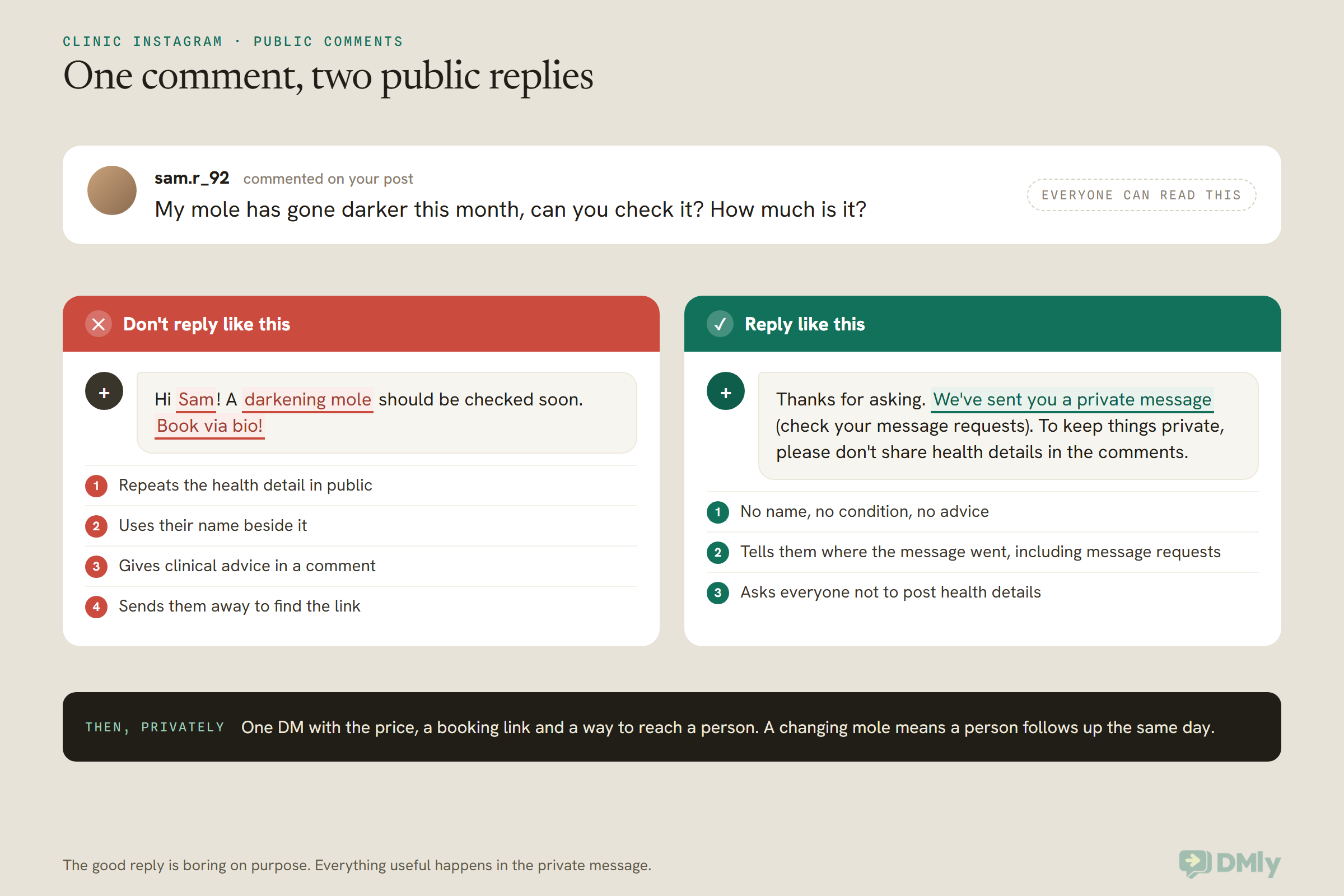
What about the comment itself, still sitting under your post with someone’s health detail in it? You have a choice, and a person should make it, not a keyword rule.
- Leave it and reply as above. Fine for most comments, which are mild.
- Hide it. On Instagram, hiding a comment hides it from everyone except the person who wrote it. They still see it, and they aren’t told. This is often the kindest option when someone has overshared, because it protects them without a public telling-off. Mention it in your private message if it feels right: “We’ve hidden your comment so your details stay private.”
- Delete it. Permanent, and the person can see it’s gone. Keep this for spam and abuse.
DMly can hide or delete comments automatically on keywords. For spam, that’s useful. For health words, be careful: a rule that hides every comment containing “pain” would also hide “Painless whitening? Count me in!” Have the team review health-detail comments by hand from the Inbox, where every Instagram comment lands under Comments.
Sorting Clinic Instagram Enquiries: Five Kinds, Five Destinations
Every clinic Instagram enquiry fits one of five kinds: a practical question, a “could this work for me” question, a symptom or worry, an existing patient’s admin, or a complaint. Each kind has a right destination, and getting that right is most of the work.
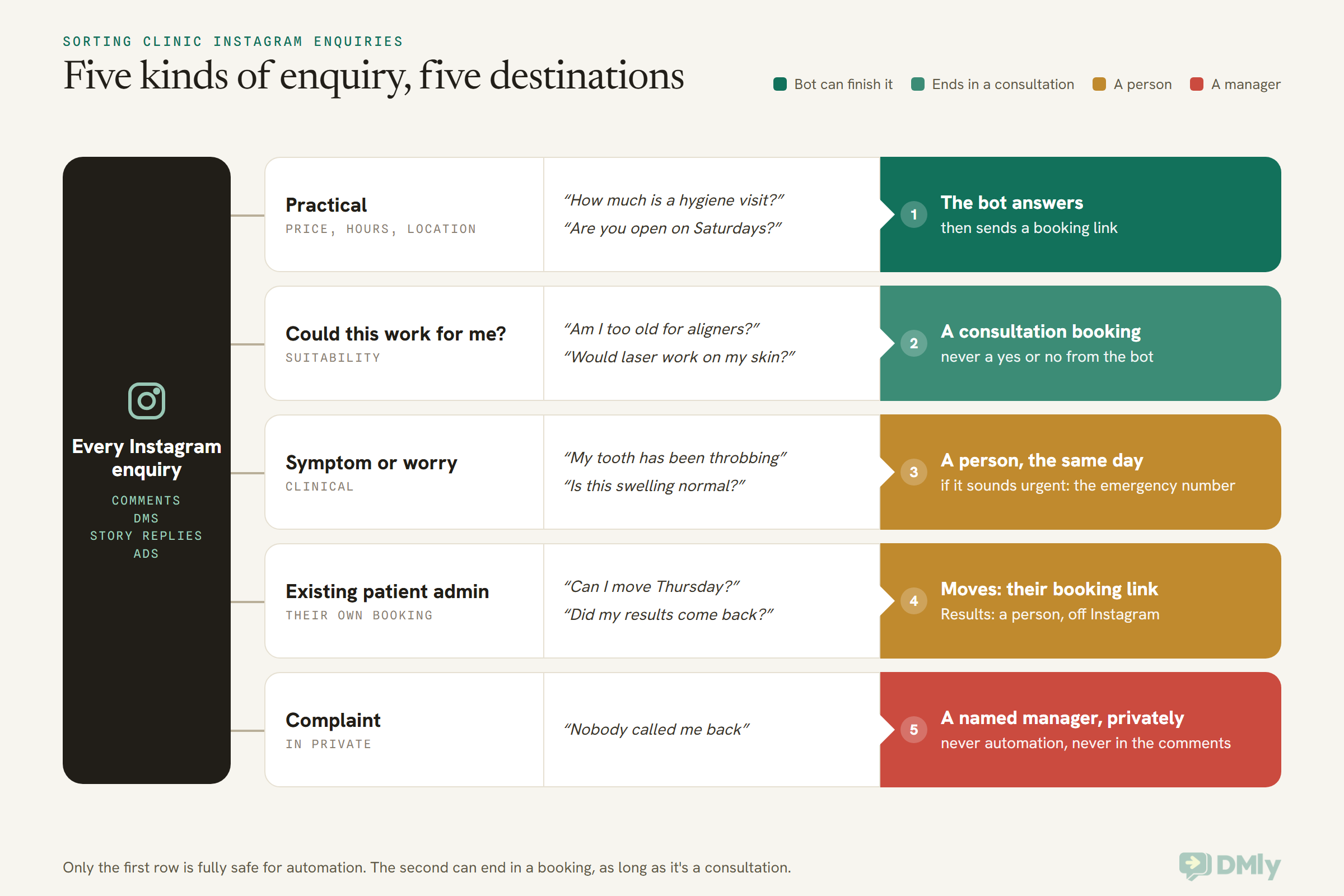
Here’s what each row means in practice.
Practical questions: let the bot do the work
Price, hours, parking, “do you see children”, “do you have a female dentist”, “is there step-free access”. These are the bulk of clinic Instagram enquiries, and they’re the easy win. Your answer is the same every time, and the person is ready to book the moment they hear it. A short automated answer plus a booking link is all it takes.
“Could this work for me?”: book a consultation, not a verdict
This is where clinics lose the most bookings by being too careful or not careful enough. Too careful is “please call us” with no link, and the person never calls. Not careful enough is a bot saying “yes, aligners work for most people!” to someone with a history you can’t see.
The middle path is simple: the bot says it depends on an assessment, explains what the consultation involves, and offers consultation times. You’ve turned a question nobody can answer in a DM into an appointment where somebody can.
Symptoms and worries: always a person
A bot shouldn’t triage pain, swelling, bleeding, a changing mole, a reaction after treatment or anything that sounds like it’s getting worse. It should say, kindly and immediately, that a member of the team will reply, and that if it’s an emergency they should call their local emergency number or go to the nearest emergency department. Then a person picks it up the same day.
WhatsApp’s own Business Messaging Policy makes a similar point for that channel: it bars using WhatsApp for telemedicine or to send or request health information where your local rules require systems with heightened protections. Meta’s Instagram messaging docs we read don’t describe any special handling for health data either. So treat Instagram DMs the way you’d treat any consumer chat app. Good for “let’s get you booked”, not a place to collect a clinical history.
Existing patient admin: the right link, or the right person
Patients who already know you will message on Instagram because it’s the app they had open. Moving an appointment is easy: patients can cancel or reschedule from the link they were sent with their booking, within your booking policy. Results, referrals, prescriptions and anything in the patient’s record belong with a person, and usually off Instagram entirely.
Complaints: a named person, in private
Never argue in comments. Reply once in public (“We’re sorry to hear this, we’ve messaged you so we can sort it out”), then have a named manager pick it up in DMs. Complaints are not a job for automation at all.
Instagram Comment-to-DM for Clinics, Done Safely
Comment-to-DM for clinics means asking people to comment a keyword on a post, then automatically sending each commenter one private message with the information they asked for. It’s the cleanest way to turn a busy post into private conversations, and it naturally steers people away from posting health details: the keyword is all they need to write.
A dental clinic in Houston might post a Reel about clear aligners with the caption “Comment ALIGNERS and we’ll send you prices and consultation times.” An aesthetics clinic in Manchester might do the same with “Comment SKIN for our skin consultation menu.” The commenter types one word, gets a DM, and nobody learns anything about their teeth or their skin.
How the private message works, in plain words:
- You get one message per comment. Make it count. Put the link and the key information in that first message, because if the person doesn’t reply, nothing else you send will reach them.
- Keep the link in the text. If Instagram refuses a message with buttons or a card, DMly resends it as plain text, so the link must be in the words themselves.
- It may land in Requests. For people who don’t follow you, the message goes to their message requests. Say so in your public reply.
- Live is different. During an Instagram Live, Meta only allows private replies while you’re still broadcasting. A Q&A Live with your hygienist works, but the DMs go out during the Live or not at all.
- Ad comments aren’t confirmed. DMly’s docs say comments on Instagram ads aren’t confirmed to reach your automations, and can’t reach an account connected through Instagram Login at all. Watch ad comments in Instagram itself for now.
We’ve written up the general method, with keyword ideas and testing, in our guide to Instagram comment-to-DM campaigns. And if you’d like to see the same move in a neighbouring industry, Instagram automation for salons shows how a salon turns comments into appointments. The clinic difference is mostly in the words, which is where we’re going next.
The First DM: Messages That Turn Instagram Enquiries Into Appointments
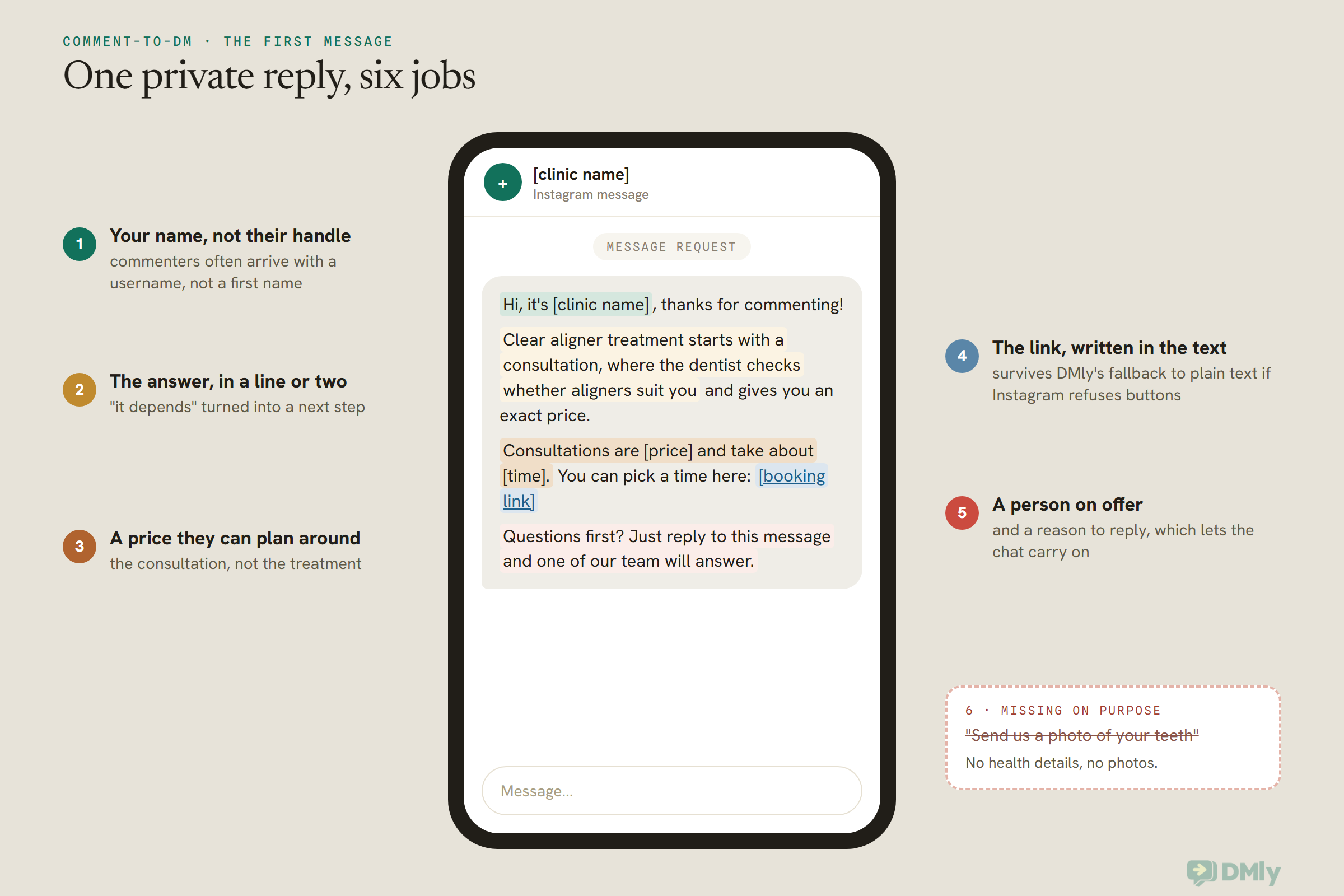
The first DM should say who you are, answer the question in one or two lines, give a booking link, and offer a person, all in one message. Clinics that turn Instagram enquiries into appointments well tend to write short, warm first messages that never ask for health details.
A note on categories before you copy these. On WhatsApp, every message you send outside a 24-hour window has to be an approved template with a category (marketing, utility or authentication). Instagram has no templates and no categories. These are ordinary Instagram DMs, sent inside the window a comment or message opens, so there’s nothing to get approved. You just need to send them in time.
Swap the bracketed parts for your own details. Use your clinic’s name, not the person’s, at the start: Instagram often gives DMly a username rather than a real first name for someone who has only commented, so “Hi {{first_name}}” can come out as “Hi sam.r_92”.
1. Comment-to-DM: price and consultation (practical plus suitability)
Hi, it’s [clinic name], thanks for commenting! Clear aligner treatment starts with a consultation, where the dentist checks whether aligners suit you and gives you an exact price. Consultations are [price] and take about [time]. You can pick a time here: [booking link]
Questions first? Just reply to this message and one of our team will answer.
Instagram DM via comment-to-DM. No Meta template category applies. The link is in the text, so it survives the fallback to plain text.
2. Comment-to-DM: service menu (practical)
Hi from [clinic name]! Here’s our [treatment] menu with prices: [link]. When you’re ready, you can book a time here: [booking link]. If you’d like to talk it through first, reply here and a real person will get back to you.
Instagram DM. Good for physio, eye care and dental hygiene posts where the price list answers most questions.
3. First DM when someone mentions a symptom (symptom or worry)
Thanks for getting in touch with [clinic name]. A member of our clinical team will reply to you here today. If this feels urgent or is getting worse quickly, please call [local emergency number] or go to your nearest emergency department. To keep your information private, it’s best not to send photos or medical details here. We can arrange a proper call.
Instagram DM. Sent by the bot, then the bot pauses and a person takes over. Change the emergency wording to match your country and your clinic’s own protocol.
4. Story reply to a “new appointments this week” story (practical)
Thanks for replying! We have a few [service] appointments left this week. You can see the open times and book here: [booking link]. Anything you’d like to ask first? Just reply.
Instagram DM triggered by a story reply. Pin the trigger to that one story so replies to your other stories don’t get this message.
5. Welcome message for someone who DMs you for the first time (any kind)
Hi, welcome to [clinic name]! I’m our automated assistant. I can help with prices, opening hours and booking. For anything about your health or treatment, I’ll pass you to our team. What can we help with today?
Buttons: Prices / Book a visit / Talk to the team
Instagram DM. It says plainly that it’s automated: Meta’s messaging docs say some places (California and Germany are named) legally require that, and recommend it everywhere. Up to three buttons sit under a DMly welcome message.
6. Asking for a phone number before booking (practical)
Great, let’s get you booked. One quick thing: Instagram can’t send appointment reminders, so could you share the mobile number you’d like us to use? We’ll only use it for your appointment messages.
Instagram DM using an ask-a-question step. Only say “only for your appointment messages” if that’s true, and keep it true.
Book Patient Appointments From Instagram: Direct Booking or Consultation First?
Let patients book straight from Instagram for routine, low-risk services with a fixed price and length, and route everything that needs a clinical judgement to a consultation booking instead. Both end in an appointment. The difference is which appointment.
A rough way to sort your services:
| Usually fine to book directly from a DM | Usually better as a consultation first |
| Hygiene visits and routine check-ups | Orthodontics, implants and cosmetic dentistry |
| Eye tests | Laser eye surgery assessments |
| A first physiotherapy assessment | Injectables, lasers and skin procedures |
| Vaccination appointments your clinic offers routinely | Fertility, weight management and other specialist care |
| A follow-up the clinician already asked for | Anything where the right treatment isn’t clear yet |
That’s a starting point, not a rule. Your clinicians know which of your services need a conversation first, and in some countries the rules on promoting medicines and procedures shape what you can say in the post that started the enquiry. Check with your regulator before you advertise treatments on Instagram.
A consultation can still be booked in two taps from a DM. In DMly you’d set it up as its own service, with its own length, price and reminder times. If no-shows on consultations are a problem, you can set that service to take payment before the booking, or take a deposit instead of the full price. When the AI assistant books a service that’s paid up front, DMly holds the slot for a set time (by default 30 minutes for a card payment and 60 for a bank transfer, and you can change both) and sends the payment request itself, as a Pay button showing the amount. The booking confirms when the payment lands, and the slot goes back on sale if it doesn’t.
Our pillar on WhatsApp automation for clinics covers how booking fits with triage across the whole clinic, not just Instagram.
The 24-Hour Window and the 7-Day Human Reply on Instagram
On Instagram, automated messages can only reach a patient within 24 hours of their last message to you, a person on your team can reply for up to 7 days, and after that you can’t message them at all until they write again. There are no templates to reopen the conversation. This clock shapes your whole setup.
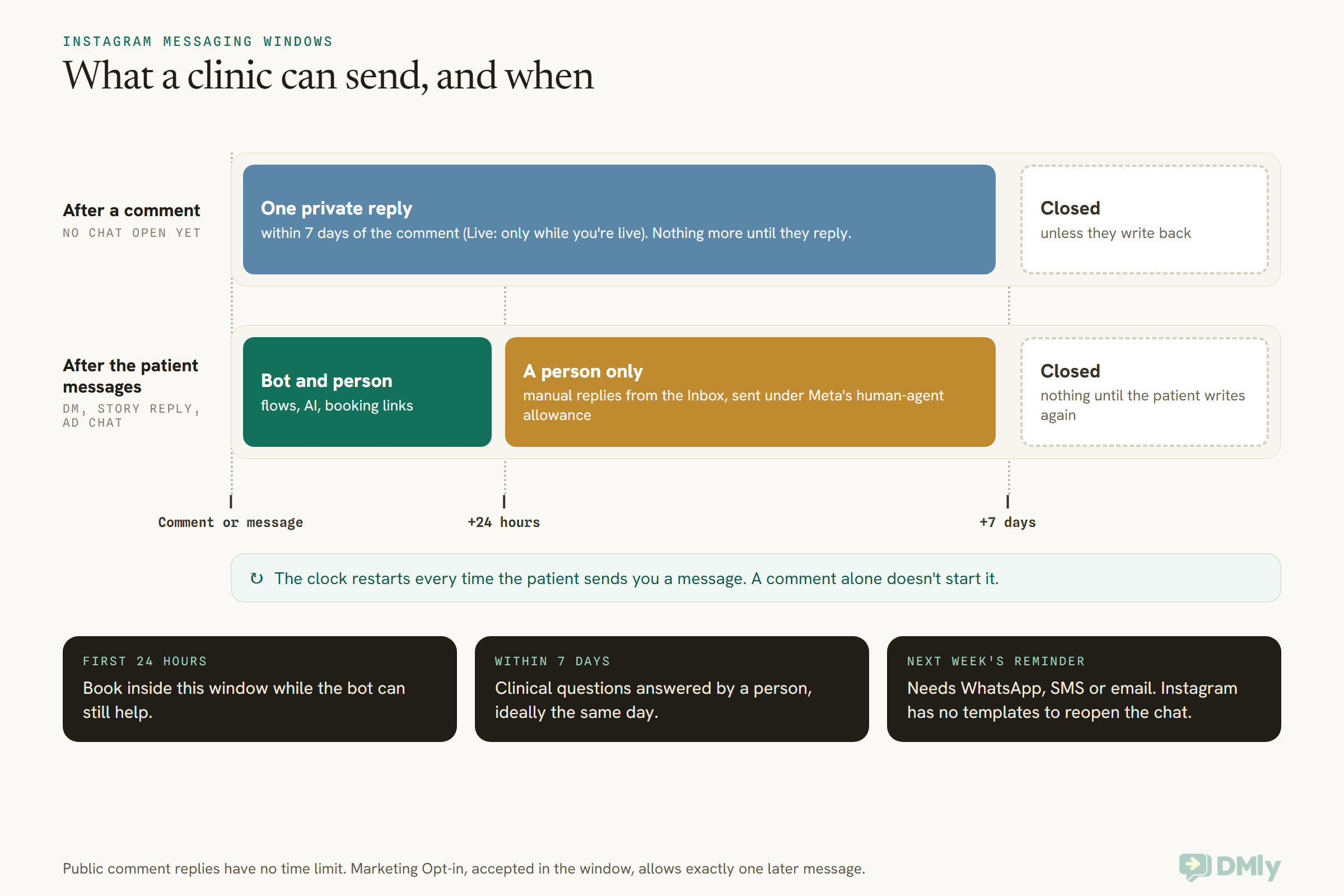
In DMly, that clock works like this:
- Automated messages (flows, the AI assistant, sequences and Instagram broadcasts) only go out inside the 24 hours. Outside it, DMly blocks the send and records it as failed rather than quietly dropping it.
- Manual replies from the Inbox work for 7 days after the patient’s last message. DMly applies Meta’s human-agent allowance for you, so your team doesn’t have to do anything special.
- Public comment replies have no time limit. A late public “we’ve messaged you” is always possible, even when the DM window has closed.
- The one exception is the Marketing Opt-in step. Ask while the patient is still in the window, and if they accept, you get exactly one more message after it closes. That’s one message, not a standing subscription.
Meta also gives a longer window to people who start a chat from a Click-to-Direct ad: up to 7 days from that first message, according to Meta’s messaging docs. That’s useful if you run ads, but it doesn’t change the basic shape. Instagram is brilliant for the first conversation and poor for anything you need to send next week.
Getting Booked Patients Onto WhatsApp So Reminders Arrive
Ask for a mobile number during the Instagram conversation, before or as they book, so the confirmation and reminders can go to WhatsApp, SMS or email instead of an Instagram chat that will have closed by the appointment day. This is the step clinics most often skip, and it’s the one that decides whether a booked patient actually turns up.
A reminder a day before the appointment almost always lands outside Instagram’s 24-hour window. So an Instagram chat on its own usually can’t carry it.
There are three honest ways to get a number:
- Ask in the chat. DMly’s ask-a-question step waits for the patient’s reply and saves it. (The one-tap “request phone number” step is WhatsApp-only, so on Instagram you ask in words, as in copy block 6.)
- Ask on the booking page. Under Settings → Booking Fields you choose what the booking form asks for. A new visitor always gives a first name and an email; add a phone field for your clinic. When an unknown visitor books with a phone number and your WhatsApp number is connected, DMly links that phone to WhatsApp so the confirmation and reminders go there, and falls back to email when it can’t.
- Ask a person to ask. For consult-first and clinical enquiries, a team member is already in the chat. “What’s the best number for your appointment messages?” sounds natural from a receptionist.
One thing to know and test. DMly treats the same person on Instagram and on WhatsApp as two contacts until you merge them, and its docs say reminders go out “on the client’s channel.” If a patient books through a link you sent them inside Instagram, the booking attaches to their Instagram contact. The docs don’t spell out whether DMly then sends that patient’s reminders to WhatsApp using a phone number they gave on the form. So before you rely on it, book a test appointment from a staff member’s Instagram account, give a staff phone number, and check where the reminder arrives. If it stays on Instagram, merge the two contacts, or send the patient the booking link on WhatsApp instead.
The DMly Inbox helps here. A contact you have a phone number for, but no WhatsApp history with, gets a WhatsApp pill above the conversation, marked as template-required, so your team can start a WhatsApp conversation with an approved template.
Why go to this trouble? Because the reminder is where the booking is protected. Our guide on how clinics can reduce appointment no-shows with WhatsApp covers the reminder side in full.
Setting Up DMly to Turn Instagram Enquiries Into Appointments
To turn Instagram enquiries into appointments with DMly, connect your Instagram account, set a welcome and a fallback reply, add comment and story flows for your treatment posts, give an AI assistant booking tools and a hand-over, and let your team take over anything clinical. Here’s the order that works, with the real menu names.
Step 1: Connect Instagram the right way
Go to Integrations → Channels and add an account. You’ll see two Instagram options:
- Instagram (Instagram Login) works with a Business or Creator account and needs no Facebook Page. DMly’s docs recommend it unless your account is already linked to a Page you manage.
- Instagram (via Facebook Page) needs a Business account linked to a Facebook Page that you administer.
Both give you the same thing: DMs in the Inbox, flows, and comment automation including comment-to-DM. Approve every permission Instagram or Facebook asks for, because without the messaging permission, DMs never arrive. If your clinic’s account is still a personal one, switch it first; our guide on how to create an Instagram Business account walks through it.
One clinic-specific tip: if your clinic runs Instagram ads and wants to answer ad comments, note that DMly’s docs say comments on Instagram ads can’t reach an account connected through Instagram Login. Chats started from ads (where someone taps “send message”) are a different thing and do reach DMly through the Instagram ad trigger.
Step 2: Set the welcome message and the fallback reply
Open Bot setup and pick your Instagram channel. Write a Welcome message (copy block 5 above), which DMly sends as the reply to a person’s very first DM when it doesn’t match any flow or keyword. Add up to three buttons under it.
Then set the Default reply under Reply automatically when no keyword or flow matches. Choose Once per 24 hours per contact rather than Every time, so a patient who sends three messages in a row doesn’t get the same answer three times. A good clinic default is “Thanks, a member of our team will reply shortly. For bookings, you can pick a time here: [link].”
Step 3: Add ice breakers and a menu
Still in Bot setup, add up to four Ice breakers: questions a first-time visitor can tap, such as “Prices”, “Book an appointment”, “Opening hours” and “Talk to the team”. Each can send a text answer or start a flow. Instagram only shows them on mobile, and only to people who haven’t messaged you before.
A Persistent menu stays available in every conversation: up to three items per level, up to three levels. Use Start flow or Open URL items. (DMly’s docs say a Postback item does nothing useful on Instagram.)
Step 4: Build a comment flow for each treatment post
Create a flow on your Instagram channel with the Post or Reel comments trigger. Set the keyword matching to Message contains a keyword, add your keyword (ALIGNERS, SKIN, PHYSIO), and under Which posts? choose Specific posts and pick the post. Turn on Only respond once per contact so repeat commenters don’t get repeat DMs.
Then add two steps:
- Reply to Comment with your public reply. DMly fills in a default that thanks them and tells them to check their DMs. Change it to the clinic version: thanks, “check your message requests”, and a gentle line about not sharing health details.
- Send Message with your first DM (copy block 1 or 2). This becomes the private reply.
Two warnings from DMly’s docs worth repeating for clinics. Never pair a no-keyword trigger on all posts with Delete Comment, because it permanently deletes every new comment on your account. And test from a different Instagram account, because your clinic’s own comments never trigger your own flows.
Step 5: Catch story replies and mentions
Stories are where clinics post “two openings left on Friday” or “our new hygienist starts Monday”. Add a flow with the Story reply trigger and, under Which stories?, choose Specific stories for the ones that carry an offer, so a reply to your team’s charity run story doesn’t get a booking pitch. Story mentions has no story picker and fires on every mention; a warm thank-you is usually the right automated response there, with a person following up if it’s a question.
Step 6: Give the AI assistant booking tools and a way out
If you’d like the conversation to end in a booked slot without a person, add an AI Reply step. DMly has an AI Appointment Booking bot template that arrives with the full appointment toolset (list services, list staff, check available times, book, view, reschedule and cancel) plus Hand over to a human. On Instagram, when the assistant offers a few choices like days or times, they appear as tappable quick-reply buttons.
For a clinic, the hand-over matters more than the booking. DMly’s own worked example is a clinic: when a patient asks something clinical, Hand over to a human pauses the bot and an auto-assign puts the conversation in front of the next practitioner. Write your AI instructions so it hands over on any symptom, any “is this normal”, any question about a patient’s own treatment or results, and any complaint. Tell it never to give medical advice and never to ask for photos, ID numbers or medical history.
Keep Check available times switched on. Without it, DMly’s docs warn, an assistant can offer plausible times you can’t actually honour. Our article on building an AI receptionist for a dental practice goes deeper on writing those instructions.
Step 7: Make the human takeover easy
When someone on your team replies in a conversation, that reply takes over from the bot by default, so the patient doesn’t get a bot message in the middle of a human one. You can also press Pause bot (human takeover) in the conversation’s details panel, and Resume bot when you’re done. In a flow, the Handover to Human step does the same if its Pause bot replies toggle is on.
One detail worth knowing: pausing the bot doesn’t stop appointment confirmations or cancellation notices. Don’t assume either way about reminders for a paused patient: test it with a staff booking, and resume the bot once a tricky conversation is done.
Step 8: Put a link in your bio that starts a flow
DMly’s growth tools make a trackable Instagram chat link. Point it at a flow with Starts flow (optional), and on Instagram every tap starts that flow. Make a separate link for your bio, your website and your printed cards, so the counts tell you which one patients actually use.
Who Should Answer Clinic Instagram Enquiries?
Your front desk should answer practical, booking and admin enquiries, and a clinician or clinically trained team member should answer anything about symptoms, suitability or a patient’s own treatment. The bot handles the first reply and the easy bookings; people handle judgement.
In DMly, every Instagram DM and comment lands in the same Inbox as WhatsApp, Facebook and the rest, with an Instagram pill to filter by. That matters for a clinic, because the receptionist answering WhatsApp shouldn’t have to keep a phone with Instagram open as well. If you’re still juggling apps, our guide to managing WhatsApp, Instagram and Facebook messages in one inbox shows how teams split the work.
A few habits that keep it safe:
- Internal notes, not chat messages, for anything the team needs to tell each other about a patient. The patient never sees a note.
- Assign clinical enquiries to a named person rather than leaving them for “whoever’s free”. A worried patient waiting on an unassigned DM is how the 7-day window runs out.
- Move clinical detail off Instagram. When a conversation needs history, photos or results, offer a phone call or an appointment. Don’t build a medical record in a DM thread.
- Never ask for ID numbers in the chat. WhatsApp’s policy bans asking for personal ID card numbers and other sensitive identifiers on that channel, and the same caution makes sense on Instagram. If you need ID, take it at reception.
Once a patient has booked, their record in DMly carries tags, notes and booking history alongside the conversation. Our article on WhatsApp CRM for clinics explains how to keep that useful without turning it into a clinical record.
Clinic Instagram Enquiries Across Six Kinds of Clinic
Every kind of clinic gets Instagram enquiries, but the mix of practical, suitability and clinical questions changes a lot from one to the next. These are illustrative setups, not case studies, to show how the same pieces fit different clinics.
A dental clinic in Houston
Before-and-after Reels pull in aligner and whitening comments. A comment-to-DM flow per Reel sends the consultation price and a booking link. Hygiene visits are booked directly by the AI assistant. Anything about pain goes straight to a person with the emergency line in the first message. The booking form asks for a phone number as well as the email, so confirmations and reminders don’t depend on an Instagram chat that will have closed by the appointment day.
A dermatology clinic in Bengaluru
Skin content gets the most oversharing: people describe rashes and moles in comments. The team hides those comments by hand, sends a private message saying so, and books a dermatologist consultation. Practical questions (which branch, which doctor, consultation fees) go to the bot. Nothing about a skin condition is answered in public or by the AI.
A physiotherapy practice in Abuja
Stories carry “three slots left this week” posts. A story reply flow pinned to those stories sends the booking link. First assessments book directly; anyone describing a new injury with severe pain gets a person and advice to seek urgent care if it’s serious. Phone numbers are collected in the chat so reminders go out on WhatsApp, which most patients already use daily.
An aesthetics clinic in Manchester
Treatment posts use comment keywords that only ask for the consultation menu, never for a treatment by name, and every enquiry is routed to a consultation booking with a deposit. The team checks with its regulator before posting about any treatment. The Instagram pattern is simple: consultation first, deposit to hold it.
A fertility clinic in Dubai
This is the most private enquiry of all. The clinic keeps its public replies to a single line (“We’ve sent you a private message”), never confirms anything in comments, and has every DM picked up by a patient coordinator rather than the AI. The bot’s only jobs are the welcome, opening hours, and offering a call back. Bookings are for an initial consultation, by a person.
An eye clinic in Manila
Most enquiries are practical: “how much is an eye test”, “do you have frames under a budget”. The AI assistant answers from the service list and books eye tests directly. Laser surgery enquiries get a consultation booking. Sudden vision changes go to a person immediately, with advice to seek urgent care.
How to Tell If It’s Working
Measure clinic Instagram enquiries by where they came from, how many reached a booking, and how many of those booked patients turned up. DMly gives you the first two directly; the third comes from your appointment records.
- Source. A chat that starts from an Instagram ad is stamped on the contact as
Instagram ad: <headline>and counted in DMly’s ads report. Growth-tool links count arrivals per link, which is why separate bio, website and card links are worth the extra minute. - Comment flows. Each comment and its DM thread show up in the Inbox, so you can see how many commenters replied to the private message. If very few do, look at that first message again.
- Bookings and attendance. Check how many Instagram-started contacts booked, and how many of those bookings ended as completed rather than no-shows. If bookings are healthy but attendance isn’t, the reminder step (getting a phone number) is usually where to look.
- Time to a person. For clinical enquiries, how long did the patient wait for a human reply? The goal is the same day, well inside the 7 days Instagram allows.
We haven’t put a target number on any of these. Every clinic’s mix of patients, posts and services is different, and a made-up benchmark would only mislead you. Measure your own for a month, then fix whichever step is weakest. That’s how you turn Instagram enquiries into appointments more reliably, one step at a time.
Five Ways Clinics Lose Instagram Bookings
Not a checklist so much as the patterns that come up again and again.
- “Please call us.” A DM that ends without a link or a time leaves the next step to the patient. Most won’t take it.
- The follow-up that never sends. A comment flow with the link in the second message, not the first. If the patient doesn’t reply, the second message never arrives.
- The message in Requests. A private reply nobody tells the patient about. Mention message requests in the public reply.
- The bot that played doctor. An AI assistant without clear instructions to hand over on symptoms. Test it with the worrying questions before you go live.
- The reminder with nowhere to go. A patient booked from Instagram with no phone number and no email that works. The reminder fails quietly on the day before.
Frequently Asked Questions
How can a clinic turn Instagram enquiries into appointments?
Move each enquiry from public comments into a private message, answer the actual question briefly, and send a booking link or offer a person while Instagram still lets you reply. Collect a phone number during the chat so the confirmation and reminders can reach the patient on WhatsApp, SMS or email.
Can a clinic answer health questions in Instagram comments?
It shouldn’t. Reply publicly only with a thank-you and “we’ve sent you a message”, then answer privately. In the US, the fact that someone is your patient can itself be protected health information, and UK and EU GDPR treat health data as special category data. Check your own regulator’s guidance.
How long can a clinic reply to an Instagram DM?
Automated replies can reach a patient for 24 hours after their last message. A team member can reply by hand for 7 days, which DMly sends under Meta’s human-agent allowance for you. After that, you can’t message them until they write again. A comment gives you one private reply, within 7 days of the comment.
Can Instagram send appointment reminders?
Not reliably. Instagram has no message templates, so it can’t open a conversation outside the window, and most reminders fall outside it. Get a mobile number during the Instagram chat so reminders go out on WhatsApp, SMS or email, and test where your reminders arrive before relying on them.
Should a clinic use an AI chatbot on Instagram?
For practical questions and routine bookings, an AI assistant with real availability and a hand-over works well. It should say it’s automated, never give medical advice, and pass any symptom, suitability or results question to a person. In DMly, the Hand over to a human tool pauses the bot when it does.
Do we need a Facebook Page to connect our clinic’s Instagram to DMly?
No. Instagram (Instagram Login) connects a Business or Creator account without a Facebook Page. Instagram (via Facebook Page) is the alternative if your Business account is already linked to a Page you administer. Both give you DMs, flows and comment-to-DM.
What should we do when someone posts private health details in a comment?
Don’t repeat any of it in your reply. Consider hiding the comment, which hides it from everyone except the person who wrote it, and tell them privately that you’ve done so to protect their information. Then answer their question in a private message, with a person following up if it’s clinical.
The Waiting Room, Read Aloud Again
Go back to those comments under your last three posts. Imagine your receptionist reading them out once more, but this time with your setup running.
“How much is Invisalign?” gets a one-word keyword, a quiet “check your messages” in public, and a private DM with a price and a link. “Do you take walk-ins on Saturday?” gets a straight answer and a booking page. “@priya.k is this the place?” gets a thank-you, and nothing that confirms who’s a patient. “My mole has gone darker” is hidden from the room, answered privately by a person the same day, and booked for a proper look.
Nothing about anybody’s body is read out anymore. That’s what it really means for a clinic to turn Instagram enquiries into appointments: every question gets answered, in the right place, by the right person, quickly enough that the patient is still there to book. If you’re ready to build it, start with the comment flow on your busiest post, and when you’d like the whole clinic picture, our WhatsApp automation for clinics pillar is the place to go next.
Writing about WhatsApp automation, bookings and growth for local business.
Turn WhatsApp into your busiest channel.
Start free and run message, bookings, payments and reviews in one place.
