
SuperLemon vs DMly: Which WhatsApp Platform Is Better for Shopify Brands?
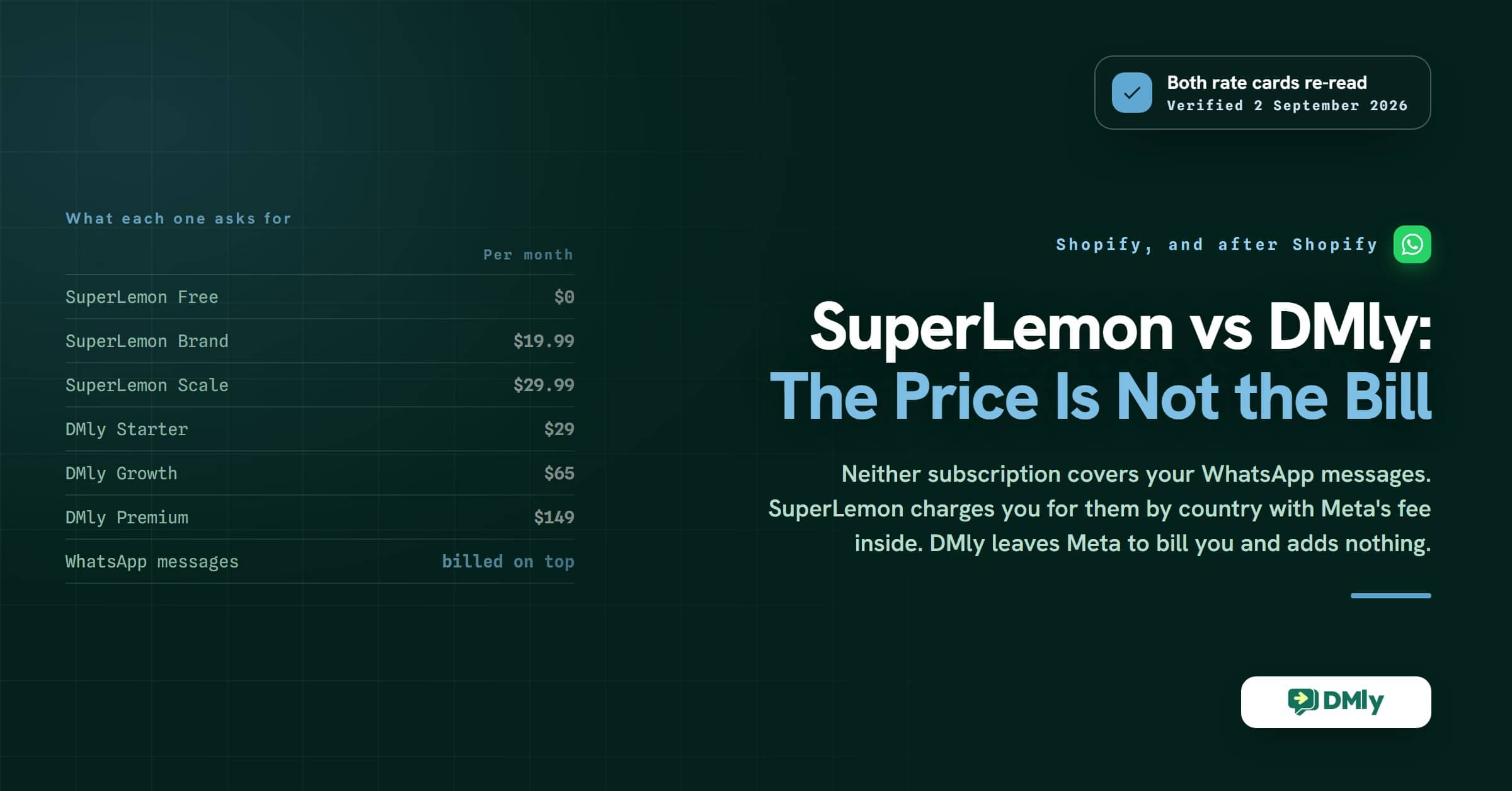
The first real difference between SuperLemon and DMly shows up before you send a single message. SuperLemon installs from the Shopify App Store and asks for nothing. DMly asks you to open your Shopify admin, create a custom app, tick a list of API permissions and paste a token back. Ninety seconds against ten minutes.
That gap runs through everything else. One of these tools is a WhatsApp app for your store. The other is a customer messaging platform that your store happens to plug into. Which one you want depends on whether WhatsApp is a feature of your shop or the place your customers actually live.
This SuperLemon vs DMly comparison covers what each one does, what each one costs, and the part most comparisons skip: the message charges that sit underneath both subscriptions and are billed to you in two completely different ways.
Every price below was read off the vendor’s own pricing page on 2 September 2026, ours included.
SuperLemon at a Glance
| Category | Details |
|---|---|
| Best for | Small and medium Shopify stores |
| Core focus | WhatsApp customer support, order updates and campaigns |
| Main channel | WhatsApp, and only WhatsApp |
| Automation level | Event-based sends, plus Shopify Flow triggers on paid plans |
| CRM | Customer profiles with order history and spend, in a Chrome extension for WhatsApp Web |
| Subscription | Free, Brand $19.99/month, Scale $29.99/month |
| Message charges | Billed on top, per message, by the recipient’s country. SuperLemon says its rate includes Meta’s fee |
| Biggest strength | Installs from the Shopify App Store and works the same afternoon |
| Main limitation | WhatsApp only, and no flow builder |
| Good fit for | D2C brands adding WhatsApp to a Shopify store |
| Verified | superlemon.xyz/pricing, 2 September 2026 |
What SuperLemon Does for a Shopify Store
SuperLemon puts WhatsApp into a Shopify store without asking you to learn anything new. It adds a chat button to your storefront, sends order and delivery updates, chases abandoned carts, and keeps a light record of who you have spoken to. The company says it is used by more than 20,000 merchants across 150 countries.
It is deliberately narrow. There is no Instagram, no Messenger, no Telegram, no SMS. There is no workflow builder in the sense that a marketing automation tool would mean it, and no shared inbox for a support team until you reach a paid plan. What there is, works, and it works quickly.
The pieces you get are these:
- A WhatsApp chat and share button for your storefront, with more than fifty designs, a pre-filled message, custom opening hours and multiple agent numbers.
- Abandoned cart and order notifications, manual on the free plan and automated once you pay.
- A Chrome extension called WhatsApp Web Copilot that turns web.whatsapp.com into a light CRM, showing customer profiles with order history and total spend.
- Shopify Flow integration on paid plans, which is the escape hatch: it lets any other Shopify app trigger a WhatsApp message.
- Cash-on-delivery confirmation, shipment updates and auto-generated discount codes inside templates.
Two details are worth knowing before you compare anything else. SuperLemon supports WhatsApp Coexistence, so the WhatsApp Business app on your phone and the API number can run side by side rather than forcing you to give one up. And on the free plan there is no API number at all: you send manually, from your own phone, up to a hard ceiling.
SuperLemon Pricing, and What the Price Does Not Cover
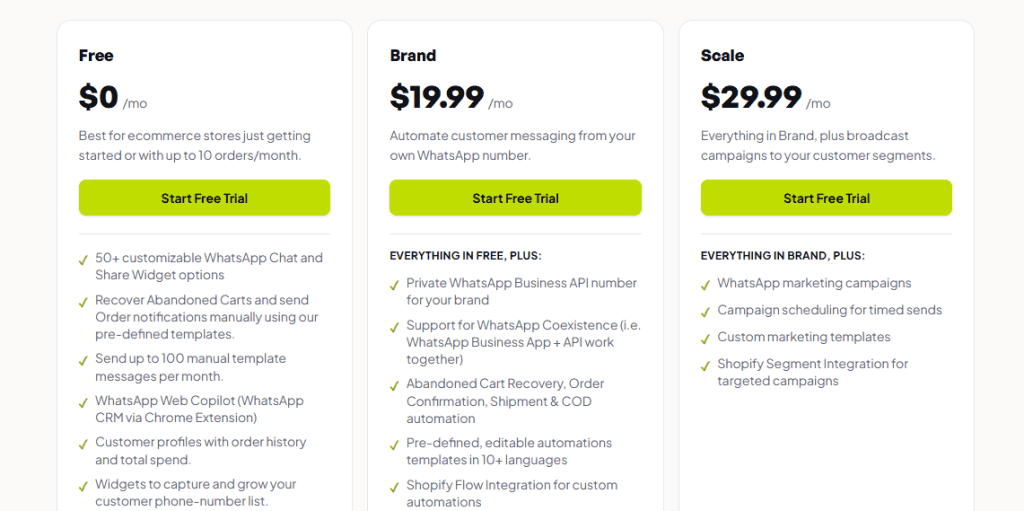
SuperLemon sells three plans, and the two paid ones cost less than most WhatsApp tools charge for a single seat.
Free: $0 a month
Aimed, in SuperLemon’s own words, at stores doing up to ten orders a month. You get the chat and share widgets, the Chrome extension CRM, customer profiles with order history and spend, phone number capture widgets, support for more than ten languages, and manual cart recovery and order notifications using pre-written templates.
The ceiling is 100 manual template messages a month. Everything is sent by hand, from your own number.
Brand: $19.99 a month
This is where automation starts. You get a private WhatsApp Business API number for your brand, Coexistence support, and automated abandoned cart, order confirmation, shipment and cash-on-delivery messages. It also brings unlimited manual template messages, Shopify Flow integration, auto-generated discount codes, Judge.me and Loox integrations, a WhatsApp Inbox, automation analytics, an onboarding call, live support and help applying for the blue tick.
Scale: $29.99 a month
Everything in Brand, plus the marketing half: WhatsApp campaigns, scheduling for timed sends, custom marketing templates, Shopify Segment integration for targeting, and campaign analytics. If you want to broadcast a promotion, this is the plan that does it.
The line under the price
On Brand and Scale, messages are charged on top of the subscription, and they are charged during the free trial too. SuperLemon prices per message by the recipient’s country, and its rate includes Meta’s own fee, which it names as a deliberate difference from providers who bill you and then let Meta bill you separately.
The spread is wide enough to change which plan makes sense. A sample from their published table, in US dollars per message:
| Where your customer is | SuperLemon rate |
|---|---|
| Turkey | $0.015 |
| India, Colombia | $0.02 |
| United States, Canada | $0.04 |
| South Africa | $0.055 |
| Nigeria, United Arab Emirates, Saudi Arabia | $0.075 |
| United Kingdom, Brazil | $0.095 |
| Australia | $0.11 |
| Italy | $0.12 |
| Germany | $0.205 |
| Netherlands | $0.24 |
Run the arithmetic before you commit. A store sending 3,000 cart reminders and order updates a month to Dutch customers is looking at roughly $720 in messages against a $19.99 subscription. The same volume to Indian customers is $60. The subscription is almost never the number that matters.
Where SuperLemon Runs Out
SuperLemon’s limits are not bugs, they are the shape of the product. It set out to be a WhatsApp app for Shopify and it is one. The question is only whether that shape still fits you in a year.
- WhatsApp only. If a customer messages your Instagram account or your Facebook page, SuperLemon is not there. For a D2C brand that advertises on Meta, that is where a good share of enquiries land.
- Shopify only. It is built into the Shopify ecosystem. A WooCommerce store, a marketplace seller or a service business has nothing to install.
- Automation is a list of events, not a builder. Cart, order, shipment and cash-on-delivery are covered. A three-step nurture sequence with a condition in the middle is not. Shopify Flow widens this, but only as far as triggering a send.
- Segmentation arrives at the top plan and comes from Shopify. Targeting on Scale runs through Shopify Segment, so your audiences are defined in Shopify rather than built from messaging behaviour.
- No bookings, no invoices, no reviews, no loyalty. These are not gaps in SuperLemon, they are simply not what it sells. They matter only if your business needs them.
If none of that describes you, stop reading and install SuperLemon. It is cheap, it is quick and it does the job. The rest of this page is for stores where at least two of those lines stung.
DMly: A More Complete SuperLemon Alternative
DMly is a customer messaging platform that connects to your store, rather than a store app that sends messages. The practical effect is that your Shopify data becomes the fuel for automations, and your Shopify customers become contacts you can reach on channels other than WhatsApp.
Eight channels in one inbox, with two honest caveats
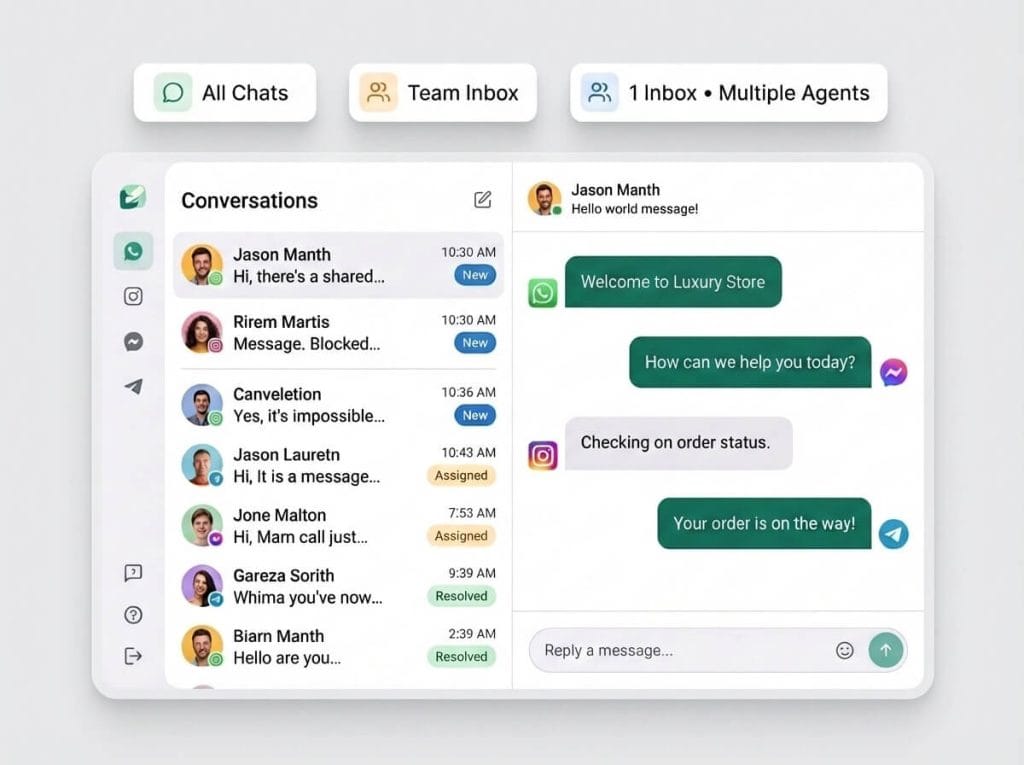
DMly connects WhatsApp, Facebook Messenger, Instagram, Telegram, SMS, TikTok, a website live chat widget and Google Business Profile. One inbox, one contact record, one history, regardless of where the customer started.
Two limits are worth knowing up front rather than discovering later. Broadcasts do not run on the live chat widget or TikTok, so a campaign has to go out on WhatsApp, Facebook, Instagram, SMS or Telegram. And Messenger and Instagram have no message templates, because Meta does not offer them there, so those two channels can only reply inside their own window rather than opening a conversation cold.
What the Shopify connection actually gives you
Connecting your store syncs your products, your customers and the last 90 days of orders, then keeps listening. What that unlocks is a set of triggers you can build flows on: order placed, order paid, order shipped, order cancelled, order refunded, checkout abandoned, product back in stock, inventory low and customer milestone.
Each one can be narrowed before it fires. Minimum and maximum order total, currency, and a payment method filter whose own hint tells you to type cod to catch cash-on-delivery orders only. A customer milestone fires when lifetime spend or order count crosses a threshold you set, and it fires once per customer, not on every order after it.
Three ready-made flows do most of the ecommerce work:
- Order Status Self-Service. A customer types “where is my order”, the flow asks for the order number, looks it up and sends the status with a tracking link. If the number does not match, it hands the chat to a person and pauses the bot rather than looping.
- COD Confirmation. Triggers only on cash-on-delivery orders, sends a WhatsApp form with a confirm button, then writes a note back onto the Shopify order so your fulfilment staff can see it and assigns the chat to a teammate. Dispatch on confirmation instead of on silence.
- Abandoned checkout. Fires about an hour after a checkout goes quiet, once per checkout, and skips anyone who came back and bought.
There is more detail on all of this in our guide to Shopify WhatsApp automation, store sync and order updates.
Two things the Shopify connection does not do
Both are worth knowing before you switch, and neither is in our marketing.
There is no store order browser in DMly. Synced Shopify orders never appear as a list you can open. They exist to power triggers, in-chat lookups and the product pickers inside flow steps. Your Shopify admin stays the place you manage orders, which is the right answer, but it means DMly is not a second place to look at your sales.
The contact segment builder’s commerce filters do not read your Shopify history. Total spend, order count and last purchase are documented against DMly’s own invoicing records, not your store’s. If you want a segment of everyone who has spent over $500 in your Shopify store, the route is the customer milestone trigger: set the threshold, add a tag when it fires, then build the segment on that tag. It works, and it is one more step than you would expect.
Automation that has conditions and waits in it
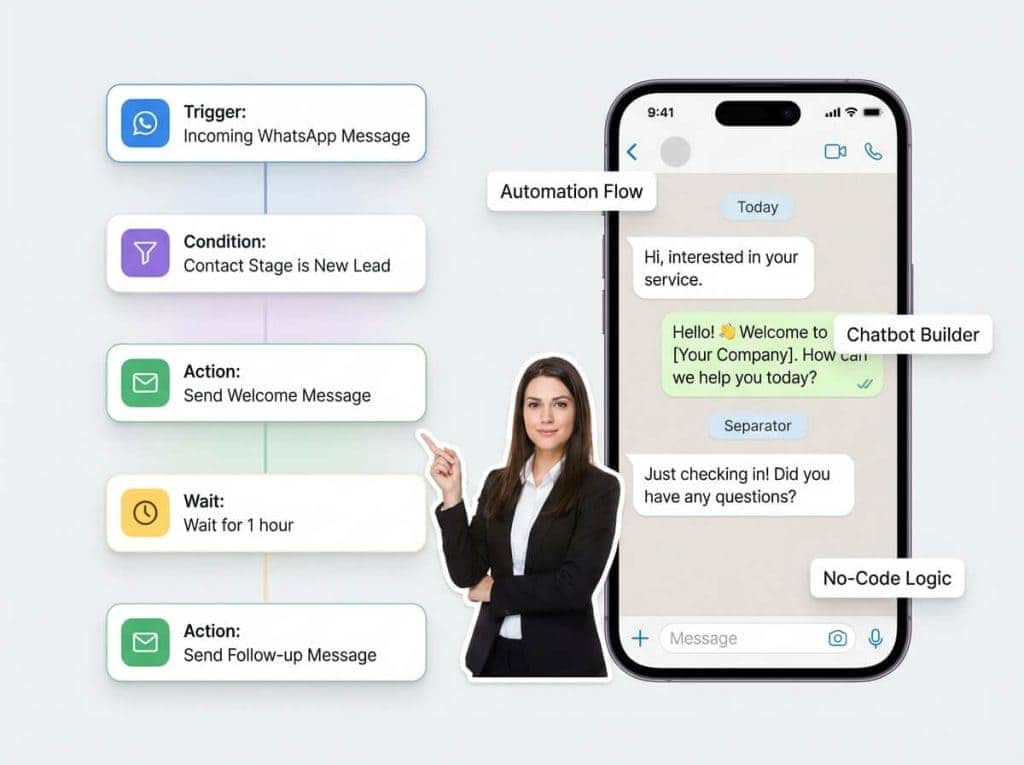
This is the clearest gap between the two tools. SuperLemon sends a message when an event happens. DMly builds a path: a trigger, then conditions, waits, branches, tags, stage changes and steps that read your store. Welcome sequences, post-purchase follow-ups, win-back runs and loyalty campaigns are all the same builder.
One rule catches everyone who comes from a Shopify app. A store event says nothing about when the customer last messaged you, so on WhatsApp they are usually outside the 24-hour window Meta allows free-form replies in. A store-triggered flow has to open with an approved WhatsApp template or the first message will not be delivered.
AI that answers from your own material
DMly’s AI Reply step can do more than write a sentence. Give it tools and it can read the contact’s record, tag them, move them along your pipeline, set custom fields, book an appointment, or hand the chat to a person and pause itself. It can also answer from an AI Knowledge collection you build from files, web pages, FAQs and pasted text.
What it cannot do is pick a product for a shopper. There is no product recommendation tool in the AI agent’s toolset. An earlier version of this page said there was, and that was wrong. What you can do is put your catalogue or a buying guide into a knowledge collection so the agent answers product and price questions from your own words, send a product card as a flow step, or expose your own endpoint as a custom function. All three are real. An AI stylist that browses your catalogue on its own is not.
The parts a Shopify app does not have at all
DMly also carries appointments and classes, invoices and payments, Google review requests and a reputation inbox, and loyalty points, memberships and gift cards. For a pure product store these are dead weight. For a brand that also runs fittings, consultations, classes or a repair service, they are the reason to look at a platform rather than an app.
DMly Pricing
Three plans, each priced at the billed-yearly rate. All three include a seven-day free trial with no card required.
Starter: from $29 a month
One profile per channel, 3 team seats, 3,000 active contacts, 10,000 broadcast and template messages a month, 10 active bots per profile with unlimited flows, and 500 AI replies a month. CRM, pipelines and comment automation, shared inbox and broadcasts, bookings, invoices and payments, reputation and Google reviews, custom domain and branding, and API, webhooks and integrations are all included at this tier rather than held back.
Growth: from $65 a month
Everything in Starter, with 3 profiles per channel, 6 team seats, 10,000 active contacts, 50,000 broadcast and template messages, unlimited active bots per profile and 5,000 AI replies a month.
Premium: from $149 a month
Everything in Growth, with 5 profiles per channel, 15 team seats, unlimited active contacts, 300,000 broadcast and template messages, priority support and onboarding, and the ability to connect your own AI provider key, which makes AI replies unlimited because your provider bills you directly.
Three counters that surprise people
- Active contacts means engaged in the last 30 days, not everyone in your database. Crossing it never blocks a message; you get a gauge that turns amber at 90 per cent.
- The broadcast allowance counts every recipient, plus every template message sent from anywhere else, including the inbox and your flows. Replies inside an open conversation are not counted. It resets on your billing day, not on the first of the month.
- Team seats count pending invitations. An invite nobody accepted still uses a seat.
The bill you do not get from us
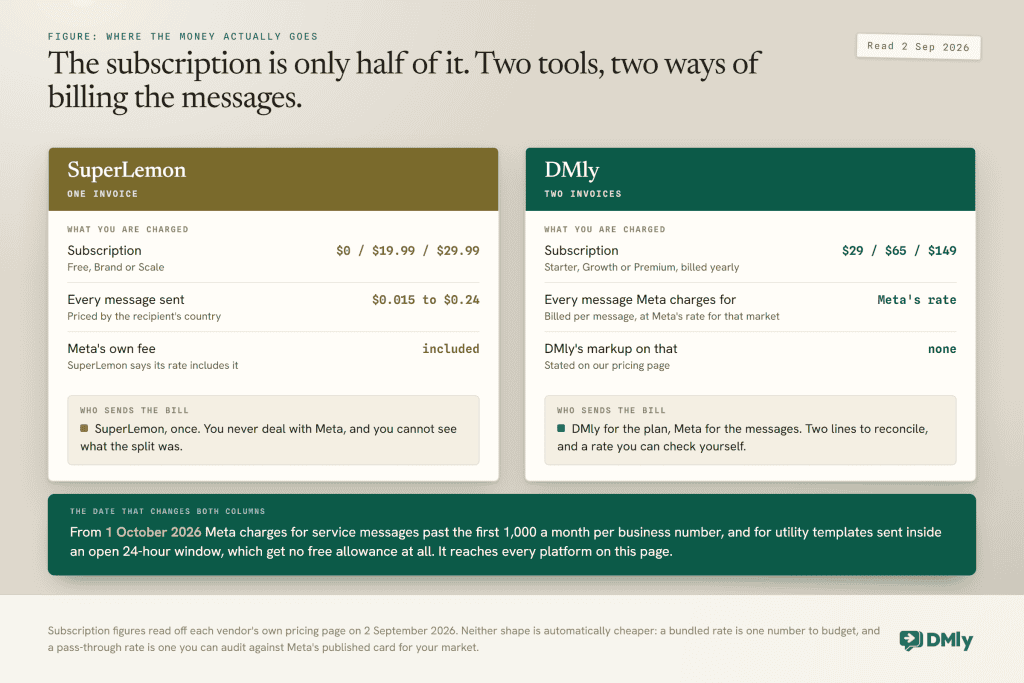
DMly does not resell WhatsApp messages. You pay Meta directly, per message, at its standard published rate for your market, and DMly adds no fee on top. That is the opposite arrangement to SuperLemon, whose per-message rate includes Meta’s fee and arrives on one invoice.
Neither model is automatically cheaper. One bill is simpler and you never deal with Meta; two bills mean you can check Meta’s published rate for your market yourself and know exactly what the platform is adding, which is nothing. If you want the underlying numbers, our WhatsApp Business API rate card by country lists them.
What Changes for Both Tools on 1 October 2026
Meta starts charging for two categories of message that are free today, one of them only above a monthly free allowance, and it affects every WhatsApp platform including both of these. If you are on the free WhatsApp Business app on your phone, none of this touches you. It applies to the API, which is what both SuperLemon’s paid plans and DMly use.
- Service messages become billable above a free allowance. These are the free-form replies you send inside the 24-hour window after a customer messages you. They have been free since November 2024. From 1 October every business phone number gets 1,000 free service messages a month, and Meta charges from the 1,001st onwards at your market’s service rate. The allowance resets each month and does not roll over, and there are no volume discounts on this category, so past the first thousand the cost rises in a straight line with how long a conversation runs.
- Utility messages sent inside an open window become billable too. These have been free since July 2025. For a store sending order confirmations, shipping updates and delivery notices, this is usually the larger of the two.
Meta is also moving nine markets to their own standalone rate cards on the same date: Bangladesh, Iraq, Nepal, Sri Lanka, Kazakhstan, Kuwait, Morocco, Oman and Ukraine.
How you feel this depends on which billing shape you chose. With DMly the change arrives on Meta’s invoice, at Meta’s published rate. With SuperLemon it arrives inside their per-message rate, and how they pass it on is their decision to make. Either way, the store that answers thirty “where is my order” questions a day should model it now. Thirty single replies a day is 900 service messages in a 30-day month, just inside the free thousand; make it a two-message exchange each time and you are at 1,800, well past it, while the utility templates are billable from the first one. We have written up the detail in what the 1 October service message charge actually costs.
SuperLemon vs DMly, Side by Side
| Feature | SuperLemon | DMly |
|---|---|---|
| Primary focus | WhatsApp support and campaigns for Shopify | Customer messaging and automation across eight channels |
| Setup | Install from the Shopify App Store | Create a custom app in your Shopify admin and paste the token in |
| Shopify integration | Native, and Shopify only | Products, customers and 90 days of orders sync; store events start flows |
| Other ecommerce platforms | ❌ Shopify only | ✅ Shopify and WooCommerce |
| WhatsApp chat widget | ✅ 50+ designs, custom hours, multiple agents | ✅ Live chat widget, plus WhatsApp |
| Omnichannel messaging | ❌ WhatsApp only | ✅ WhatsApp, Instagram, Messenger, Telegram, SMS, TikTok, Live Chat, Google Business Profile |
| AI conversations | ❌ Not in the product; offered as paid custom work | ✅ AI Reply step with CRM, booking, knowledge and web-search tools. No product recommendation tool |
| Customer journey automation | Event-based sends, widened by Shopify Flow | ✅ Flow builder with conditions, waits, branches and store steps |
| Abandoned cart recovery | ✅ Manual on Free, automated on Brand and Scale | ✅ Checkout abandoned trigger, filterable by order total and currency |
| Cash-on-delivery confirmation | ✅ Included on paid plans | ✅ Template flow that writes a note back onto the Shopify order |
| CRM | Customer profiles with order history and total spend | ✅ Contacts, pipelines, tags, custom fields and notes |
| Audience segmentation | Shopify Segment integration, on Scale | ✅ Tags, stage, lifecycle, source, custom fields, channel, opt-in and spend. Commerce filters read DMly invoices, not Shopify orders |
| Shared team inbox | WhatsApp Inbox on paid plans | ✅ Assignment, handover, internal notes and round-robin routing |
| Broadcast campaigns | ✅ Campaigns and scheduling, on Scale | ✅ 6,000 to 300,000 broadcast and template messages a month by plan |
| Analytics | Widget, manual and automation analytics; campaign analytics on Scale | ✅ Conversation, team, campaign and finance reports, exportable |
| API and integrations | Shopify Flow, Judge.me and Loox | ✅ REST API, webhooks, MCP server and integrations from Starter |
| Bookings and appointments | ❌ Not offered | ✅ Native calendar: services, staff, classes |
| Invoices and payments | ❌ Not offered | ✅ Branded invoices, deposits, expenses, revenue dashboard |
| Reviews and reputation | Judge.me and Loox integrations for review requests | ✅ Automatic Google review requests and a reputation inbox |
| Loyalty and memberships | ❌ Not offered | ✅ Points, plans, memberships and gift cards |
| White-label | ❌ Not offered | ✅ Full white-label with a custom domain |
| Subscription | Free, $19.99 or $29.99 a month | $29, $65 or $149 a month billed yearly |
| Message charges | Billed by SuperLemon, per message, by country, Meta’s fee included | Billed by Meta directly at Meta’s own rates. DMly adds no markup |
| Best for | Small Shopify stores adding WhatsApp | Brands messaging on several channels, or that also book, invoice or chase reviews |
SuperLemon vs DMly: Which One Fits Your Store
The honest answer is that these two tools are not really competing for the same store.
Choose SuperLemon if you sell on Shopify and only Shopify, your customers reach you on WhatsApp and nowhere else, you want cart reminders and order updates running this afternoon, and you would rather have one invoice than two. At $19.99 to $29.99 a month plus messages, it is the cheapest credible way to put WhatsApp on a storefront, and the free plan is a genuine way to test whether your customers will use it at all before you spend anything.
Choose DMly if any of these are true: enquiries arrive on Instagram or Messenger as well as WhatsApp, you want sequences with conditions and waits rather than single notifications, you have a support team that needs to assign and hand off conversations, you sell somewhere other than Shopify as well, or your business also books appointments, sends invoices or chases Google reviews. Starter is $29 a month billed yearly, and the parts most platforms hold back for higher tiers are in it.
The switching cost is the thing to weigh. Moving from a Shopify app to a platform means a custom app token, a set of API permissions and an hour you did not plan for. It is worth doing when your messaging has outgrown notifications, and not before. If you are still deciding between several tools rather than these two, our roundup of WhatsApp platforms and what each one actually charges covers the wider field, and our guide to WhatsApp marketing for ecommerce and D2C brands covers the campaigns themselves.
FAQs
What is SuperLemon used for?
SuperLemon is a WhatsApp app for Shopify stores. It adds a chat and share button to your storefront, recovers abandoned carts, sends order confirmation, shipment and cash-on-delivery updates, and gives you a light CRM through a Chrome extension for WhatsApp Web.
How much does SuperLemon cost?
There is a permanent free plan, capped at 100 manual template messages a month. Brand is $19.99 a month and adds a private WhatsApp API number with automated notifications. Scale is $29.99 a month and adds marketing campaigns. On both paid plans, messages are charged separately by the recipient’s country, from $0.015 to $0.24 each, and that rate includes Meta’s fee. Verified on SuperLemon’s own pricing page, 2 September 2026.
Is SuperLemon only for Shopify?
Yes. It is built into the Shopify ecosystem and installed from the Shopify App Store. If you sell on WooCommerce, a marketplace or your own build, there is nothing to install.
What are the best SuperLemon alternatives?
It depends on what you outgrew. If it was the WhatsApp-only limit, look at platforms that carry Instagram and Messenger in the same inbox, DMly among them. If it was automation, look at tools with a real flow builder. If it was price, there is very little cheaper than SuperLemon, and the honest answer may be to stay.
Is DMly better than SuperLemon?
Not for every store. DMly does more: eight channels, a flow builder with conditions and waits, an AI step with CRM and booking tools, plus bookings, invoices, reviews and loyalty. SuperLemon is cheaper, installs in seconds and needs no setup. For a store doing twenty orders a month on WhatsApp alone, the extra capability is cost without benefit.
Does DMly integrate with Shopify?
Yes. You create a custom app in your Shopify admin, grant it API access to orders, customers, products, price rules and checkouts, turn on protected customer data access, and paste the token into DMly. Webhooks are registered for you. Your products, customers and the last 90 days of orders sync, and the initial sync deliberately fires no automations, so connecting a store with ten thousand historical orders does not message anyone. One gap to know: the payment failed trigger never fires from Shopify, because Shopify does not report a failed checkout payment as an event. It works on WooCommerce.
In SuperLemon vs DMly, which is better for a growing ecommerce brand?
The test is whether your messaging is still one channel and one kind of message. A store sending order updates on WhatsApp is well served by SuperLemon at $19.99 a month. A brand answering Instagram DMs, running win-back sequences, assigning conversations to three people and reporting on all of it has crossed into platform territory, and DMly starts at $29 a month billed yearly.
Writing about WhatsApp automation, bookings and growth for local business.
Turn WhatsApp into your busiest channel.
Start free and run message, bookings, payments and reviews in one place.
